

Por qué confiar en nuestras recomendaciones de software
6,700+
Reviews
20
Industry experts
16+
Evaluation factors
14
Years
Nuestro equipo lleva probando y evaluando software desde 2012. Como líderes de marketing, sabemos lo difícil —y lo importante— que es elegir el software adecuado.
Para esta guía, evaluamos las herramientas mediante pruebas prácticas e investigación independiente, puntuando las herramientas según nuestros criterios de selección.
Nuestras reseñas reflejan nuestro criterio editorial humano, no un discurso de ventas.
Revisores expertos:
 Gui DrusinaDirector creativo
- Shriya GhateSenior Marketing Lead
 Amanda JacquesLíder de Marketing Ops

Tabla comparativa de herramientas SEO para agencias
| Tool | Best For | Trial Info | Price | ||
|---|---|---|---|---|---|
| 1 | Mejores integraciones para automatización de flujos de trabajo | Prueba gratuita de 14 días + demo gratis | Desde $103.2/mes (facturado anualmente) | Website | |
| 2 | El mejor soporte para gestionar SEO local a gran escala | Prueba gratuita de 14 días + demo gratis | Desde $31/mes (facturación anual) | Website | |
| 3 | Mejor cobertura de datos de SEO y visibilidad en IA | Plan gratuito + demostración gratuita | Desde $29/mes | Website | |
| 4 | La mejor plataforma todo en uno para análisis de competencia y palabras clave | Prueba gratuita de 7 días + demostración gratis | Desde $50/mes (facturado anualmente) | Website | |
| 5 | Mejores insights accionables con herramientas potenciadas por IA | Prueba gratuita de 7 días | Desde $49/mes | Website | |
| 6 | Los mejores widgets de marca blanca para captar nuevos prospectos | Prueba gratuita de 14 días | Desde $99/mes (facturado anualmente) | Website | |
| 7 | Mejor generación automatizada de informes para clientes en equipos grandes | Prueba gratuita de 14 días + demostración gratuita | Desde $20/cliente/mes (facturación anual) | Website | |
| 8 | Los mejores datos competitivos de visibilidad digital | Plan gratuito + prueba gratis de 7 días + demo gratuita | Desde $117.33/mes (facturado anualmente) | Website | |
| 9 | Los mejores informes de marketing SEO personalizables | Prueba gratuita de 7 días | Desde $39/mes (facturación anual) | Website | |
| 10 | Mejor seguimiento unificado de búsqueda y plataformas de IA | Prueba gratuita de 14 días | Desde $96/mes (facturación anual) | Website |



Reseñas de las mejores herramientas SEO para agencias
\u003cspan data-slate-fragment=\u0022JTVCJTdCJTIyY2hpbGRyZW4lMjIlM0ElNUIlN0IlMjJ0ZXh0JTIyJTNBJTIyQmVsb3clMjBhcmUlMjBteSUyMGRldGFpbGVkJTIwc3VtbWFyaWVzJTIwb2YlMjB0aGUlMjBiZXN0JTIwU0VPJTIwdG9vbHMlMjBmb3IlMjBhZ2VuY2llcyUyMHRoYXQlMjBtYWRlJTIwaXQlMjBvbnRvJTIwbXklMjBzaG9ydGxpc3QuJTIwTXklMjByZXZpZXdzJTIwb2ZmZXIlMjBhJTIwZGV0YWlsZWQlMjBsb29rJTIwYXQlMjB0aGUlMjBmZWF0dXJlcyUyQyUyMGludGVncmF0aW9ucyUyQyUyMGFuZCUyMHByaWNpbmclMjBvZiUyMGVhY2glMjBwbGF0Zm9ybSUyMHRvJTIwaGVscCUyMHlvdSUyMGZpbmQlMjB0aGUlMjBiZXN0JTIwb25lJTIwZm9yJTIweW91LiUyMiU3RCU1RCUyQyUyMnR5cGUlMjIlM0ElMjJwJTIyJTJDJTIyaWQlMjIlM0ElMjJWaGc2bG1ZdzN0JTIyJTdEJTVE\u0022\u003eA continuación encontrarás mis resúmenes detallados de las mejores herramientas SEO para agencias que entraron en mi selección. Mis reseñas ofrecen un análisis detallado de las funciones, integraciones y precios de cada plataforma para ayudarte a encontrar la más adecuada para ti.\u003c/span\u003e
 Mejores integraciones para automatización de flujos de trabajo
- Prueba gratuita de 14 días + demo gratis
- Desde $103.2/mes (facturado anualmente)
Visit WebsiteCustomer Rating:4.8/5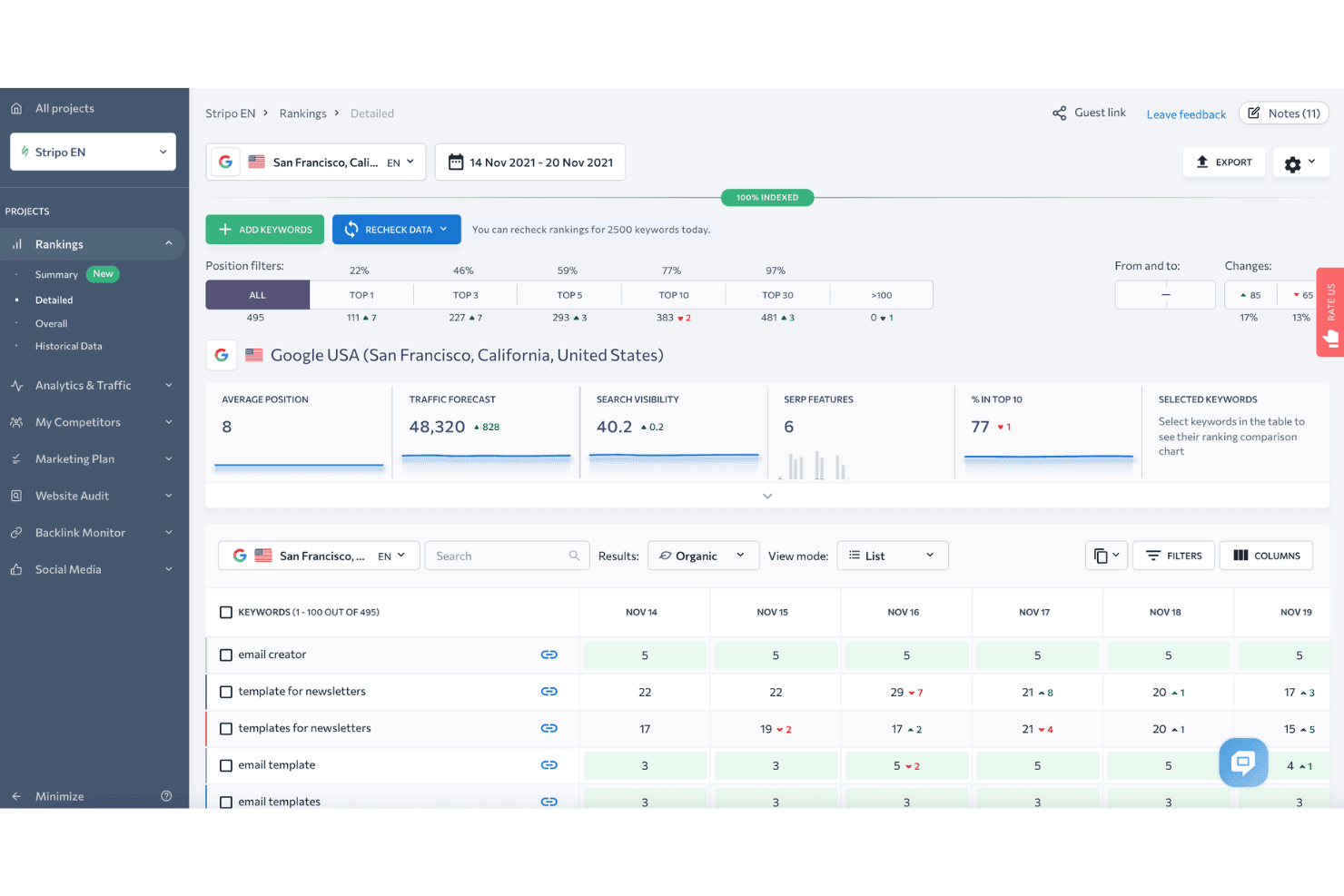
SE Ranking muestra un panel de posiciones de palabras clave detallado con filtros de posición, pronóstico de tráfico y cambios diarios de posiciones para las palabras clave rastreadas. SE Ranking es una plataforma de SEO basada en la nube que abarca el seguimiento de posiciones, auditoría de sitios, investigación de palabras clave, análisis de backlinks, investigación de la competencia, informes de marca blanca y monitoreo de visibilidad de búsqueda con IA en múltiples proyectos de clientes.
¿Para quién es mejor SE Ranking?
SE Ranking es ideal para agencias pequeñas y medianas que necesitan un conjunto completo de herramientas SEO para varias cuentas de clientes sin pagar precios de nivel empresarial.
Por qué elegí SE Ranking
SE Ranking se gana su lugar en mi lista porque su ecosistema de automatización se integra perfectamente con los flujos de trabajo reales de una agencia. Utilizo su nodo verificado de n8n y el conector de Make.com para activar alertas de seguimiento de posiciones y enviar datos directamente a los paneles de los clientes sin exportaciones manuales. El servidor MCP va más allá, enviando datos en tiempo real de SE Ranking a Claude o ChatGPT para que pueda generar análisis sin cambiar de herramienta.
Características clave de SE Ranking
- Informes de marca blanca: Crea informes personalizables y con la marca de la agencia que los clientes pueden consultar a través de un portal dedicado.
- Agrupador de palabras clave: Agrupa automáticamente grandes listas de palabras clave por tema e intención para investigaciones a escala.
- Seguimiento local de posiciones: Supervisa las posiciones dentro de ciudades o regiones específicas y gestiona los datos del Perfil de Empresa de Google.
- Monitoreo de backlinks: Rastrea nuevos y perdidos backlinks en todos los dominios con datos históricos y métricas de autoridad.
Integraciones de SE Ranking
SE Ranking ofrece integraciones nativas con Google Analytics 4, Google Search Console, Google Ads, Matomo Analytics, Looker Studio, Whatagraph, AgencyAnalytics y Reportz. Se conecta con Zapier, Make.com, n8n y proporciona una API para integraciones personalizadas.
Pros and Cons
Pros:
- Seguimiento diario de posiciones fiable en varias regiones
- Portales de cliente de marca blanca y acceso de invitado
- Paquete para agencias con asientos para managers y clientes
Cons:
- Base de datos de backlinks más pequeña que la de los competidores
- Auditoría limitada de sitios renderizados en JavaScript
Learn more about SE Ranking: El mejor soporte para gestionar SEO local a gran escala
- Prueba gratuita de 14 días + demo gratis
- Desde $31/mes (facturación anual)
Visit WebsiteCustomer Rating:4.7/5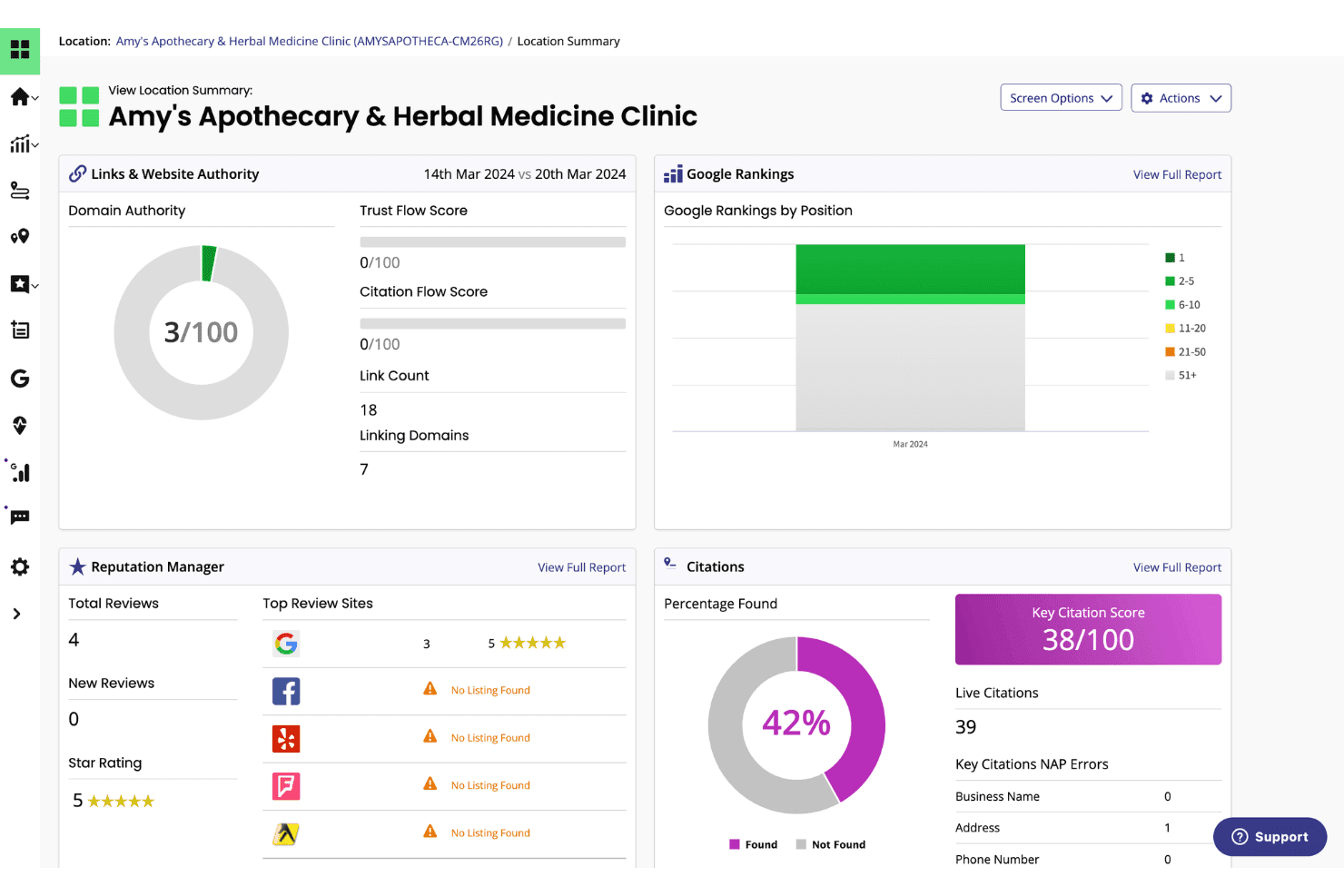
BrightLocal muestra un panel resumen de ubicación con rankings de Google, puntuaciones de citas, autoridad de dominio y métricas de reputación para un negocio local. BrightLocal es una plataforma de SEO local creada para agencias y negocios con múltiples ubicaciones, que combina el seguimiento de posiciones locales, gestión de citas, auditoría de Google Business Profile y monitoreo de reseñas en un solo panel.
¿Para Quién Es Mejor BrightLocal?
Las agencias y proveedores de SEO con marca blanca que gestionan campañas de búsqueda local para clientes con negocios físicos o de área de servicio sacarán el mayor provecho de BrightLocal.
Por Qué Elegí BrightLocal
BrightLocal se gana su lugar en mi lista corta por su excelente manejo del seguimiento de posiciones locales en toda una cartera de clientes. Me encanta la Local Search Grid, que mapea los rankings de Google en una zona geográfica sobre una cuadrícula visual, de modo que puedo ver instantáneamente dónde domina un cliente y dónde hay áreas de oportunidad. Cada cliente también recibe su propio acceso externo a un panel con marca blanca, lo que significa que puedo configurar reportes automáticos una vez y dejar que los clientes consulten su rendimiento por sí mismos.
Características Clave de BrightLocal
- Citation Tracker: Audita y monitoriza los listados empresariales para verificar su precisión e identifica nuevas oportunidades de citas en los principales directorios.
- GBP Audit: Compara el perfil de Google Business Profile de un cliente con los competidores locales y entrega recomendaciones accionables para mejorar.
- Active Sync: Mantiene automáticamente la información empresarial consistente en las principales fuentes de datos y listados locales.
- Widget para mostrar reseñas: Permite publicar reseñas de clientes directamente en tu sitio web para reforzar la prueba social y la confianza.
Integraciones de BrightLocal
BrightLocal ofrece integraciones nativas con Google Business Profile, Google Analytics 4, Facebook y Zapier. Hay una API disponible para integraciones personalizadas.
Pros and Cons
Pros:
- Seguimiento de posiciones locales con visualización geográfica en cuadrícula
- Paneles con marca blanca para clientes ilimitados
- Gestión y monitoreo automatizado de citas
Cons:
- Sin análisis de enlaces ni auditoría de enlaces tóxicos
- Funciones limitadas de auditoría técnica de sitios
Learn more about BrightLocal: Mejor cobertura de datos de SEO y visibilidad en IA
- Plan gratuito + demostración gratuita
- Desde $29/mes
Visit WebsiteCustomer Rating:4.6/5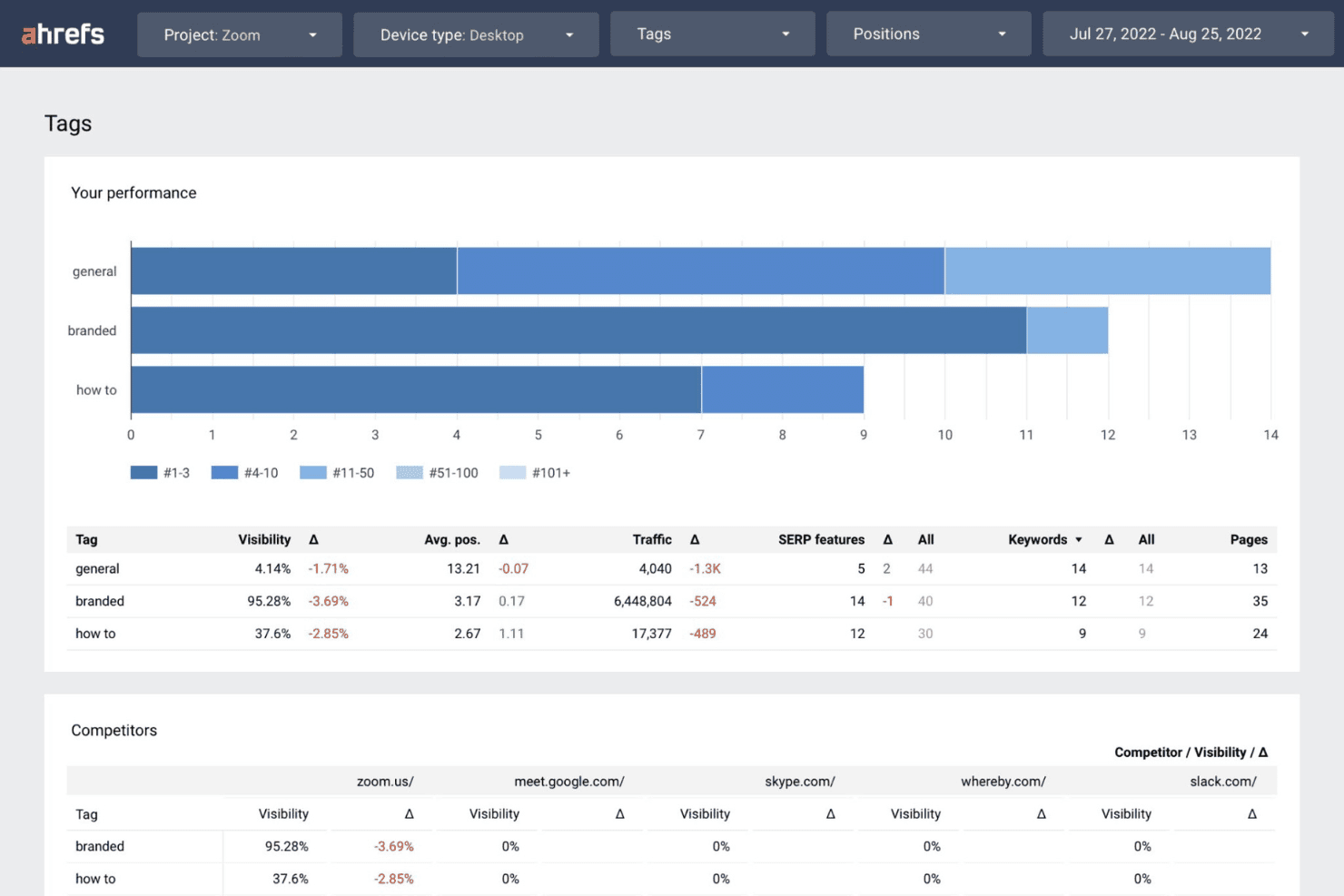
Ahrefs muestra un panel de rendimiento de Etiquetas con datos de visibilidad, tráfico y palabras clave segmentados por categorías de marca, generales y de cómo-hacer junto a comparaciones con competidores. Ahrefs es una plataforma SEO integral construida en torno a uno de los mayores índices de backlinks de la industria, que ofrece investigación de palabras clave, seguimiento de posiciones, auditoría de sitios e inteligencia competitiva a través de múltiples cuentas de clientes.
¿Para quién es mejor Ahrefs?
Ahrefs es una excelente opción para directores de SEO y gestores de cuentas en agencias que priorizan la profundidad de los datos para la investigación competitiva, la creación de enlaces y el seguimiento de palabras clave para múltiples clientes.
Por qué elegí Ahrefs
Elegí Ahrefs como uno de los mejores porque su cobertura abarca tanto la visibilidad en búsquedas tradicionales como en búsquedas con inteligencia artificial, algo que ningún competidor iguala actualmente. Brand Radar rastrea menciones de marca y citas de clientes en LLMs como ChatGPT, Claude y Gemini, y Custom Prompts me permite monitorizar en qué respuestas de IA aparece un cliente. También utilizo los datos de clics de Keywords Explorer para filtrar palabras clave de alto volumen que no generan tráfico real, lo que mantiene las estrategias de contenido de los clientes ancladas en el comportamiento real de búsqueda.
Características clave de Ahrefs
- Site Explorer: Analiza en detalle los perfiles de backlinks de competidores, el tráfico orgánico y las palabras clave de pago.
- Site Audit: Realiza rastreos SEO técnicos escalables para detectar errores on-page y problemas de salud del sitio.
- Rank Tracker: Supervisa los rankings de palabras clave en diferentes dispositivos, ubicaciones y motores de búsqueda.
- Report Builder: Crea paneles personalizados e informes de rendimiento SEO automatizados y listos para el cliente.
Integraciones de Ahrefs
Ahrefs ofrece integraciones nativas con Google Search Console y Looker Studio, es compatible con MCP Server para asistentes de IA como ChatGPT y Claude, y proporciona una API para integraciones personalizadas.
Pros and Cons
Pros:
- El índice de backlinks más grande y actualizado disponible
- Seguimiento de visibilidad en IA para motores de búsqueda
- Herramientas avanzadas de análisis de competidores y SERP
Cons:
- No tiene acceso nativo para clientes ni portal
- Las opciones de informes con marca blanca son limitadas
 La mejor plataforma todo en uno para análisis de competencia y palabras clave
- Prueba gratuita de 7 días + demostración gratis
- Desde $50/mes (facturado anualmente)
Visit WebsiteCustomer Rating:4.6/5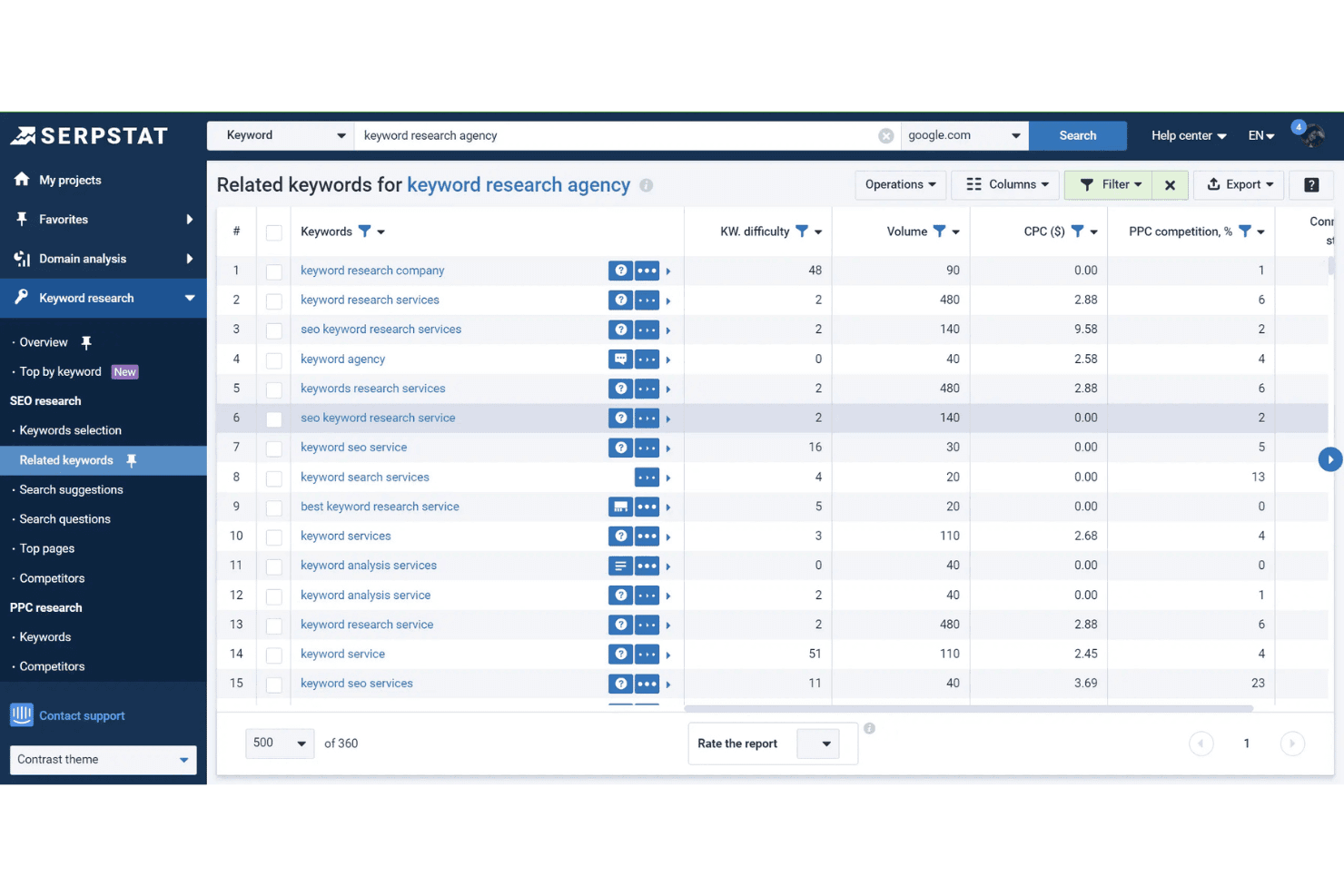
La herramienta de Palabras Clave Relacionadas de Serpstat muestra dificultad de palabra clave, volumen de búsqueda, CPC y datos de competencia PPC para 'agencia de investigación de palabras clave'. Serpstat es una plataforma de marketing de búsqueda que reúne investigación de palabras clave, análisis de la competencia, seguimiento de posiciones, auditoría de sitios y análisis de enlaces entrantes en 230 países y múltiples proyectos de clientes.
¿Para quién es mejor Serpstat?
Serpstat es ideal para agencias de marketing digital pequeñas y medianas que necesitan una plataforma SEO todo en uno asequible para gestionar varias cuentas de clientes.
Por qué elegí Serpstat
Serpstat merece su lugar en mi lista corta por la profundidad con la que el módulo de análisis de la competencia funciona para casos de uso de agencias. Puedo obtener las páginas de mejor rendimiento de un competidor, todo su conjunto de palabras clave y la cuota de tráfico desde una sola vista, lo que agiliza el análisis de brechas antes de una llamada de estrategia. La herramienta de agrupamiento de palabras clave también resulta realmente útil: puedo agrupar automáticamente miles de palabras clave en bruto, lo que acelera la planificación de contenidos para clientes con estructuras de sitios complejas o de gran escala.
Características clave de Serpstat
- Seguimiento de posiciones: Monitoriza la posición de palabras clave en 230 países tanto para escritorio como para móvil.
- Auditoría de sitios: Escanea sitios en busca de problemas técnicos de SEO con programación de auditorías personalizable.
- Acceso a la API: Extrae análisis de búsqueda y datos de auditoría directamente a flujos de trabajo personalizados.
- Análisis por lotes: Analiza hasta 100.000 dominios o palabras clave a la vez para una revisión masiva.
Integraciones de Serpstat
Serpstat ofrece integraciones nativas con Google Sheets, Google Search Console, Reportz, Stackby, Oviond, Datorama, SEOtools for Excel y Looker Studio. También dispone de extensiones para los navegadores Chrome, Firefox, Edge y Opera, con acceso API disponible para integraciones personalizadas.
Pros and Cons
Pros:
- Análisis de la competencia en mercados globales y locales
- Agrupa listas grandes de palabras clave
- Agrupamiento automático de palabras clave para grandes volúmenes de datos
Cons:
- Los datos de backlinks son menos extensos que los de Ahrefs
- Los informes con marca blanca requieren el plan de nivel superior
 Mejores insights accionables con herramientas potenciadas por IA
- Prueba gratuita de 7 días
- Desde $49/mes
Visit WebsiteCustomer Rating:4.5/5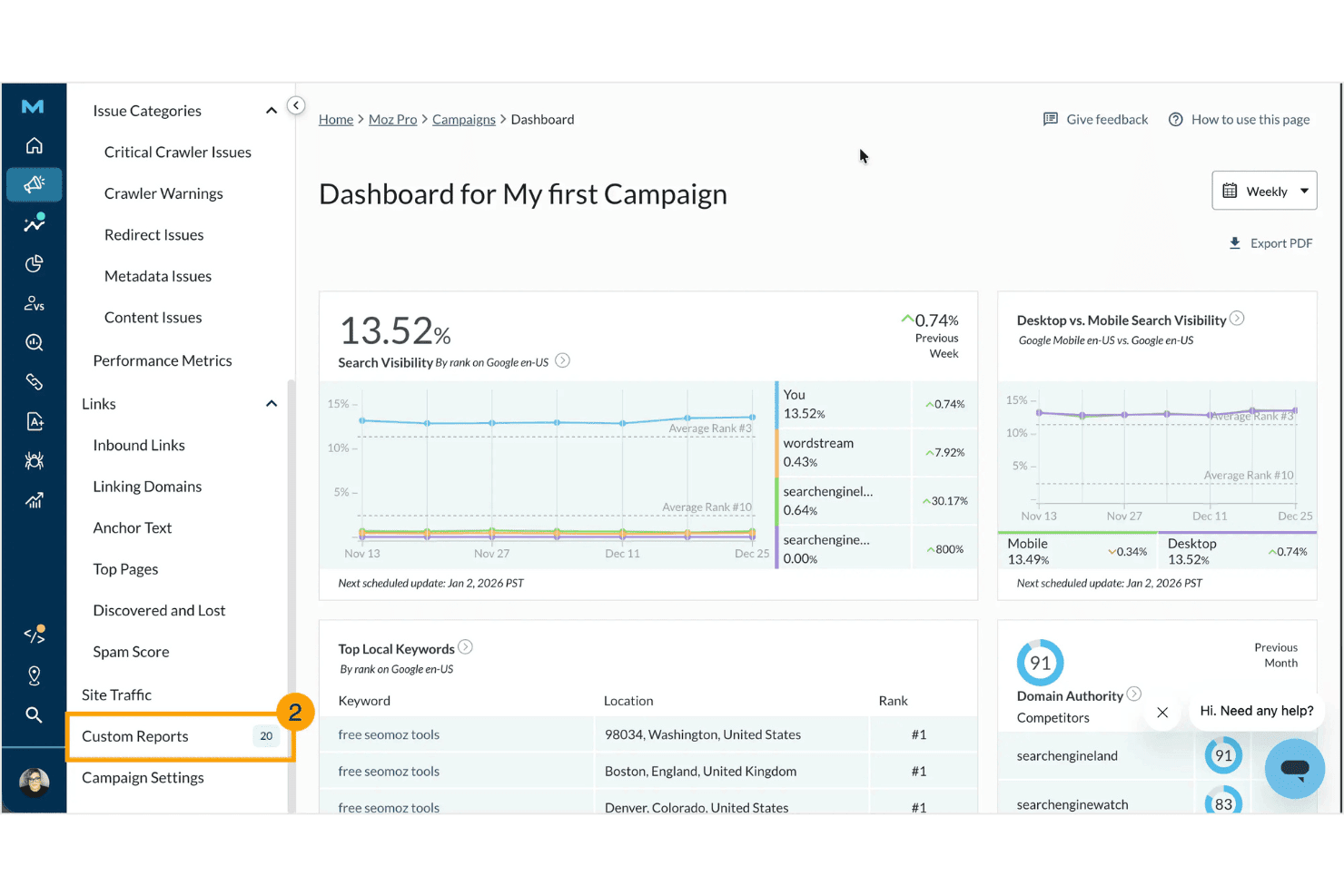
Moz Pro muestra un panel de campañas con métricas de visibilidad en búsquedas, palabras clave locales principales, puntuaciones de autoridad de dominio y comparativas con competidores. Moz Pro es una plataforma de SEO que gira en torno a la investigación de palabras clave, el seguimiento de posiciones, auditorías de sitios, análisis de backlinks e informes personalizables con tu marca, incluyendo herramientas potenciadas por IA para rastrear la visibilidad de la marca en motores de búsqueda generativa.
¿Para quién es mejor Moz Pro?
Moz Pro es ideal para agencias de marketing digital pequeñas y medianas que necesitan informes confiables para sus clientes, métricas de autoridad reconocidas y una interfaz accesible para sus equipos de SEO.
Por qué elegí Moz Pro
Moz Pro merece su lugar en mi lista por cómo combina sus métricas de autoridad consolidadas con herramientas de IA realmente útiles. Me gusta especialmente la función de Seguimiento de Prompts de IA, que muestra con qué frecuencia aparece la marca de un cliente en respuestas de ChatGPT, Gemini y Google AI Mode. Los Informes de Contenido con IA suman una capa extra al convertir datos de palabras clave en guías estructuradas que son inmediatamente accionables para quien redacta el contenido.
Funciones clave de Moz Pro
- Informes personalizados con tu marca: Genera informes SEO listos para agencias y con marca blanca mediante una personalización drag-and-drop.
- Gestión de clientes basada en campañas: Organiza múltiples sitios y proyectos de clientes en campañas separadas dentro de un solo panel.
- Análisis exhaustivo del sitio: Audita sitios web completos para identificar problemas técnicos de SEO y oportunidades de optimización.
- Análisis de perfiles de backlinks: Accede a datos detallados de enlaces para clientes y competidores, incluyendo backlinks nuevos y perdidos.
Integraciones de Moz Pro
Moz Pro ofrece integraciones nativas con Google Analytics, Google Search Console, HubSpot y Looker Studio. Hay una API disponible para integraciones personalizadas.
Pros and Cons
Pros:
- Seguimiento de prompts de IA para búsqueda generativa
- Métricas fiables de autoridad de dominio y puntuación de spam
- Informes SEO y de auditoría personalizables para agencias
Cons:
- Los datos de backlinks tardan más que en los principales competidores
- Sin acceso directo al portal de clientes
Learn more about Moz Pro: Los mejores widgets de marca blanca para captar nuevos prospectos
- Prueba gratuita de 14 días
- Desde $99/mes (facturado anualmente)
Visit WebsiteCustomer Rating:4.8/5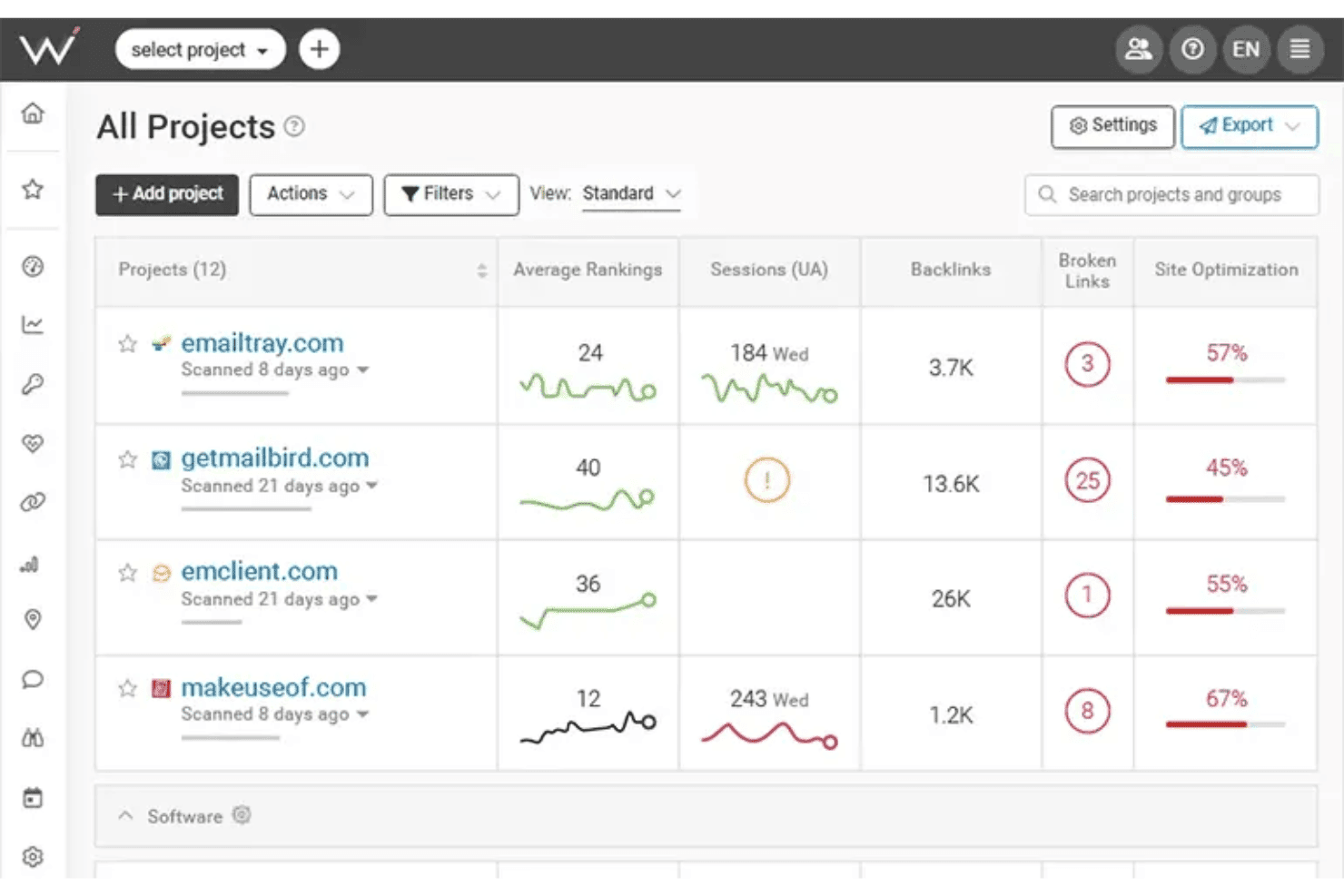
WebCEO muestra un panel de Todos los Proyectos donde los usuarios pueden monitorear posiciones promedio, sesiones, backlinks, enlaces rotos y puntajes de optimización de sitios en múltiples sitios web. WebCEO es una plataforma SEO basada en la nube diseñada para agencias, que cubre el seguimiento de posiciones, auditoría de sitios, análisis de backlinks, investigación de palabras clave, inteligencia competitiva e informes de marca blanca en proyectos de clientes ilimitados desde un solo panel de control.
¿Para quién es mejor WebCEO?
WebCEO es ideal para agencias de marketing digital que gestionan múltiples cuentas de clientes y desean ofrecer servicios SEO personalizados con su propio dominio.
Por qué elegí WebCEO
WebCEO se gana su lugar en mi lista porque el widget de generación de prospectos de marca blanca es realmente raro en el mercado de herramientas SEO. Inserto un botón de auditoría personalizable en una página orientada al cliente, y cuando un prospecto realiza un escaneo, recibo un informe SEO con mi propia marca entregado bajo el dominio de mi agencia. Además, el centro completo de marca blanca me permite ejecutar las herramientas de WebCEO en mi propio dominio personalizado, con inicios de sesión para clientes basados en roles y la entrega automatizada y programada de informes.
Características clave de WebCEO
- Seguimiento integral de posiciones: Supervisa el ranking de palabras clave a diario en múltiples motores de búsqueda, ubicaciones y dispositivos.
- Herramientas de colaboración en equipo: Asigna tareas, gestiona roles de usuarios y sigue el progreso del equipo dentro de un panel unificado.
- Análisis SEO de la competencia: Analiza los backlinks, estrategias de contenido y palabras clave de los competidores para obtener información accionable.
- Auditorías técnicas automatizadas del sitio: Rastrea sitios web completos para detectar errores en páginas, problemas móviles y datos de Core Web Vitals.
Integraciones de WebCEO
WebCEO ofrece integraciones nativas con Google Analytics, Google Ads, Google Search Console, Facebook y LinkedIn. Hay una API disponible para integraciones personalizadas.
Pros and Cons
Pros:
- Widget de captura de prospectos SEO de marca blanca disponible
- Identifica problemas de rendimiento en dispositivos móviles
- Entrega programada y automatizada de informes SEO con marca
Cons:
- Cobra tarifas adicionales por escaneo en planes para agencias
- No hay versión de software de escritorio disponible
Learn more about WebCEO: Mejor generación automatizada de informes para clientes en equipos grandes
- Prueba gratuita de 14 días + demostración gratuita
- Desde $20/cliente/mes (facturación anual)
Visit WebsiteCustomer Rating:4.7/5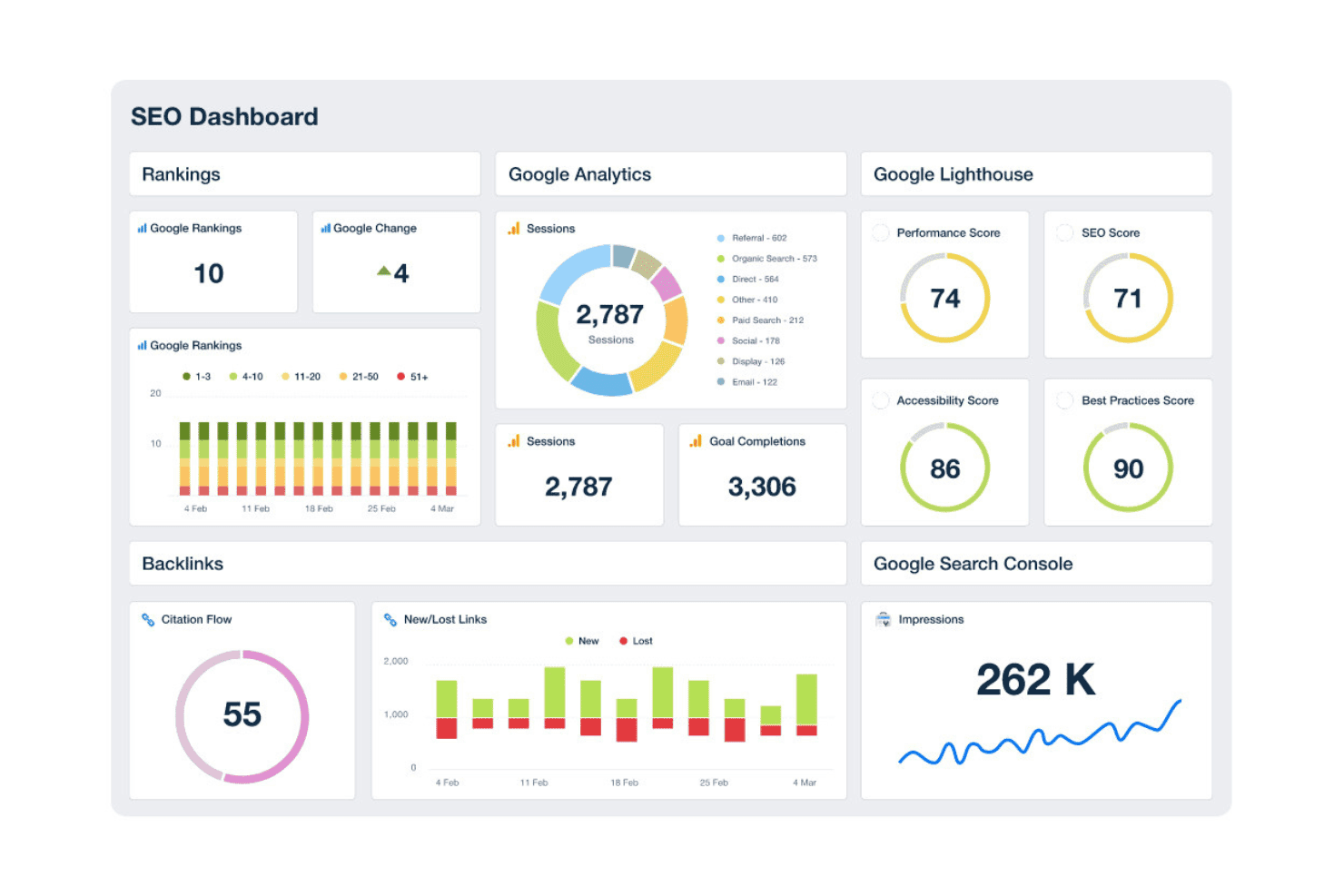
AgencyAnalytics ofrece un panel SEO integral que muestra posiciones, sesiones de Google Analytics, puntuaciones de Lighthouse, backlinks e impresiones de Search Console en una única vista unificada. AgencyAnalytics es una plataforma de informes de marca blanca y monitoreo SEO diseñada para agencias de marketing digital, que combina paneles de control automatizados para clientes, seguimiento de posiciones, auditoría de sitios y monitoreo de backlinks en múltiples cuentas de clientes.
¿Para Quién es Mejor AgencyAnalytics?
AgencyAnalytics es ideal para agencias de marketing digital pequeñas y medianas que gestionan varias cuentas de clientes y necesitan informes de marca blanca sin crear paneles personalizados desde cero.
Por Qué Elegí AgencyAnalytics
He incluido AgencyAnalytics entre mis principales selecciones porque ninguna otra herramienta en este espacio iguala su programación automatizada de informes a escala. Puedo crear una plantilla de informe con la marca de la agencia una sola vez, aplicarla en más de 20 cuentas de clientes y programar su envío mensual sin volver a intervenir. El portal de clientes de marca blanca, la configuración de dominio personalizado y el editor de informes con función de arrastrar y soltar permiten que los clientes reciban paneles profesionales con la marca de la agencia en una URL propia, no en un subdominio genérico de terceros.
Características Clave de AgencyAnalytics
- Información por IA y detección de anomalías: Utiliza aprendizaje automático para destacar tendencias, anomalías y nuevas oportunidades en los datos de rendimiento.
- Monitoreo de backlinks: Rastrea backlinks nuevos y perdidos en fuentes integradas para cada cuenta de cliente.
- Biblioteca de integraciones: Se conecta con más de 80 plataformas de marketing, SEO y medios pagados para la elaboración centralizada de informes.
- Herramienta de auditoría de sitios: Rastrea automáticamente los sitios de clientes para detectar problemas técnicos de SEO y ofrecer recomendaciones en página.
Integraciones de AgencyAnalytics
AgencyAnalytics ofrece más de 85 integraciones nativas, incluyendo Google Analytics, Google Search Console, Ahrefs, Semrush, Moz, Facebook Ads, Google Ads, Shopify, HubSpot, Mailchimp y CallRail. Hay una API disponible para integraciones personalizadas.
Pros and Cons
Pros:
- Informes automatizados y de marca blanca en múltiples clientes
- Ofrece diseños de panel personalizados
- Permisos para el acceso individual al portal de clientes
Cons:
- Las funciones de investigación de palabras clave requieren herramientas de terceros
- Las auditorías de sitios tienen profundidad técnica limitada
Learn more about AgencyAnalytics: Los mejores datos competitivos de visibilidad digital
- Plan gratuito + prueba gratis de 7 días + demo gratuita
- Desde $117.33/mes (facturado anualmente)
Visit WebsiteCustomer Rating:4.5/5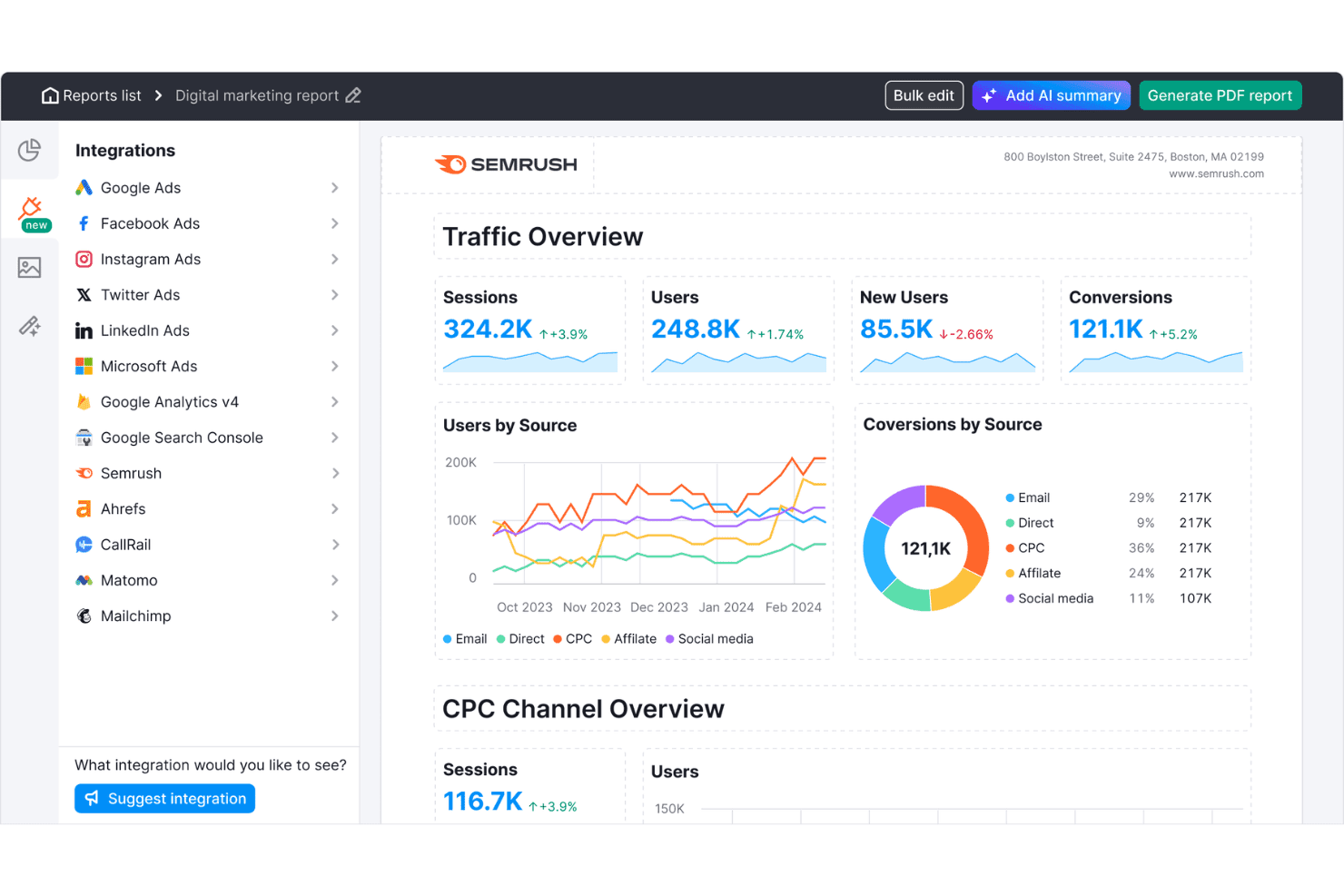
Semrush ofrece un panel de informes de marketing digital con resumen de tráfico, usuarios por fuente, conversiones por fuente y métricas de canal CPC. Semrush es una plataforma de visibilidad online que proporciona a las agencias investigación de palabras clave, seguimiento de posiciones, auditoría de sitios, análisis de backlinks, inteligencia competitiva e informes de marca blanca en docenas de cuentas de clientes desde un solo panel de control.
¿Para Quién es Mejor Semrush?
Semrush es ideal para agencias digitales medianas y grandes que gestionan campañas de SEO para un alto volumen de cuentas de clientes simultáneamente.
Por Qué Elegí Semrush
Elegí Semrush como uno de los mejores porque sus datos de inteligencia competitiva no tienen rival a escala de agencia. La herramienta 'Keyword Gap' me permite comparar hasta cinco dominios de competidores lado a lado para descubrir palabras clave para las que ellos posicionan y mis clientes no, y la herramienta 'Backlink Gap' hace lo mismo para las oportunidades de generación de enlaces. Con una base de datos de 28 mil millones de palabras clave que abarca 142 bases de datos geográficas, puedo realizar este análisis en cualquier sector de cliente sin encontrar vacíos de cobertura.
Principales Características de Semrush
- Herramienta de auditoría de sitios: Escanea los sitios web de los clientes en busca de problemas técnicos de SEO, contenido duplicado, enlaces rotos y problemas de rastreabilidad.
- Seguimiento de posiciones: Supervisa diariamente el posicionamiento de palabras clave en varios motores de búsqueda, ubicaciones y dispositivos para cada proyecto de cliente.
- Panel de gestión de clientes: Organiza todas las cuentas de clientes, proyectos y entregables de campañas en un único espacio de trabajo unificado con permisos según el rol.
- Informes de marca blanca: Genera informes de SEO y marketing con la marca del cliente en una programación determinada para facilitar la entrega y presentación al cliente.
Integraciones de Semrush
Semrush ofrece integraciones nativas con Google Analytics, Google Search Console, Google Sheets, Looker Studio, Facebook, Pinterest, LinkedIn, Instagram, YouTube, All in One SEO, monday.com y Zoho Analytics. Hay una API disponible para integraciones personalizadas.
Pros and Cons
Pros:
- Análisis competitivo de brecha de palabras clave y backlinks
- Gran base de datos de palabras clave y enlaces geoespecíficos
- Auditoría de sitios con chequeo de core web vitals
Cons:
- El informe de marca blanca requiere un complemento de pago
- Límites en palabras clave y dominios rastreados
 Los mejores informes de marketing SEO personalizables
- Prueba gratuita de 7 días
- Desde $39/mes (facturación anual)
Visit WebsiteCustomer Rating:4.4/5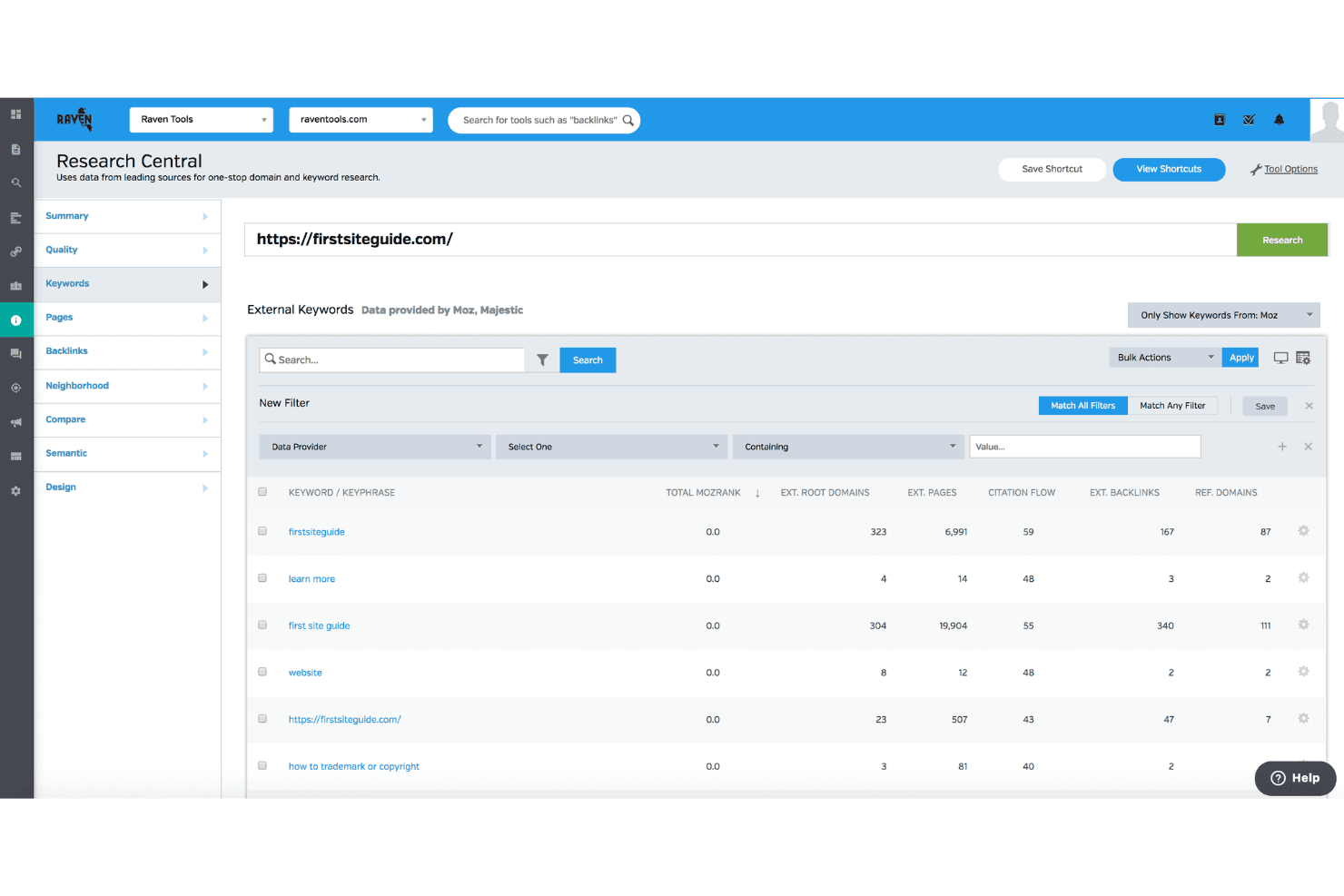
Raven Tools ofrece una función Research Central que muestra datos externos de palabras clave, incluyendo MozRank, flujo de citaciones y métricas de enlaces entrantes para cualquier dominio. Raven Tools es una plataforma de SEO enfocada en agencias, diseñada para la creación de informes de clientes con etiqueta blanca. Incluye seguimiento de posiciones en múltiples motores de búsqueda, auditoría de sitios, análisis de enlaces entrantes gracias a la tecnología de Majestic y Moz, y análisis de palabras clave.
¿Para Quién es Mejor Raven Tools?
Raven Tools es ideal para agencias de marketing digital pequeñas y medianas que gestionan múltiples cuentas de clientes y priorizan la elaboración de informes automatizados y personalizados con marca.
Por Qué Elegí Raven Tools
Raven Tools se ganó su lugar en mi lista porque su constructor de informes realmente va más allá. Puedo combinar más de 20 fuentes de datos y más de 30 módulos prediseñados para crear un solo informe personalizado con la marca de mi agencia, que incluye seguimiento de posiciones, crecimiento de enlaces entrantes y datos de Google Analytics, todo en un solo lugar. El alojamiento de dominio personalizado y la programación de correos electrónicos con dirección propia permite que los clientes reciban los informes desde la dirección de mi agencia, no de Raven, lo cual es clave cuando gestionas la relación de una docena de cuentas.
Funciones Clave de Raven Tools
- Auditor de Sitios: Escanea los sitios web en busca de problemas técnicos de SEO y genera una puntuación de salud del sitio con soluciones priorizadas.
- Seguimiento de posiciones en múltiples motores: Hace el seguimiento de las posiciones de palabras clave en Google, Bing, Yahoo, Yandex y Baidu, con soporte para segmentación por ubicación.
- Explorador de Enlaces Entrantes: Proporciona acceso a datos de enlaces entrantes mediante integraciones de Majestic y Moz sin necesitar suscripciones separadas.
- Gestor de Tareas: Permite al equipo asignar, gestionar y hacer seguimiento de tareas relacionadas con SEO directamente en cada campaña de cliente.
Integraciones de Raven Tools
Raven Tools ofrece integraciones nativas con Google Analytics, Google Search Console, Google Ads, Bing Webmaster Tools, Facebook Ads, Majestic, Moz, YouTube, LinkedIn, Twitter, MailChimp, Constant Contact y CallRail. También dispone de una API para integraciones personalizadas.
Pros and Cons
Pros:
- Informes personalizados con marca blanca y programación de correos electrónicos
- Informes automatizados ilimitados para varios clientes
- Datos de enlaces entrantes integrados de Majestic y Moz
Cons:
- No permite el seguimiento histórico de la dificultad de palabras clave
- No dispone de puntuación de dificultad de palabras clave en las herramientas de investigación
Learn more about Raven Tools: Mejor seguimiento unificado de búsqueda y plataformas de IA
- Prueba gratuita de 14 días
- Desde $96/mes (facturación anual)
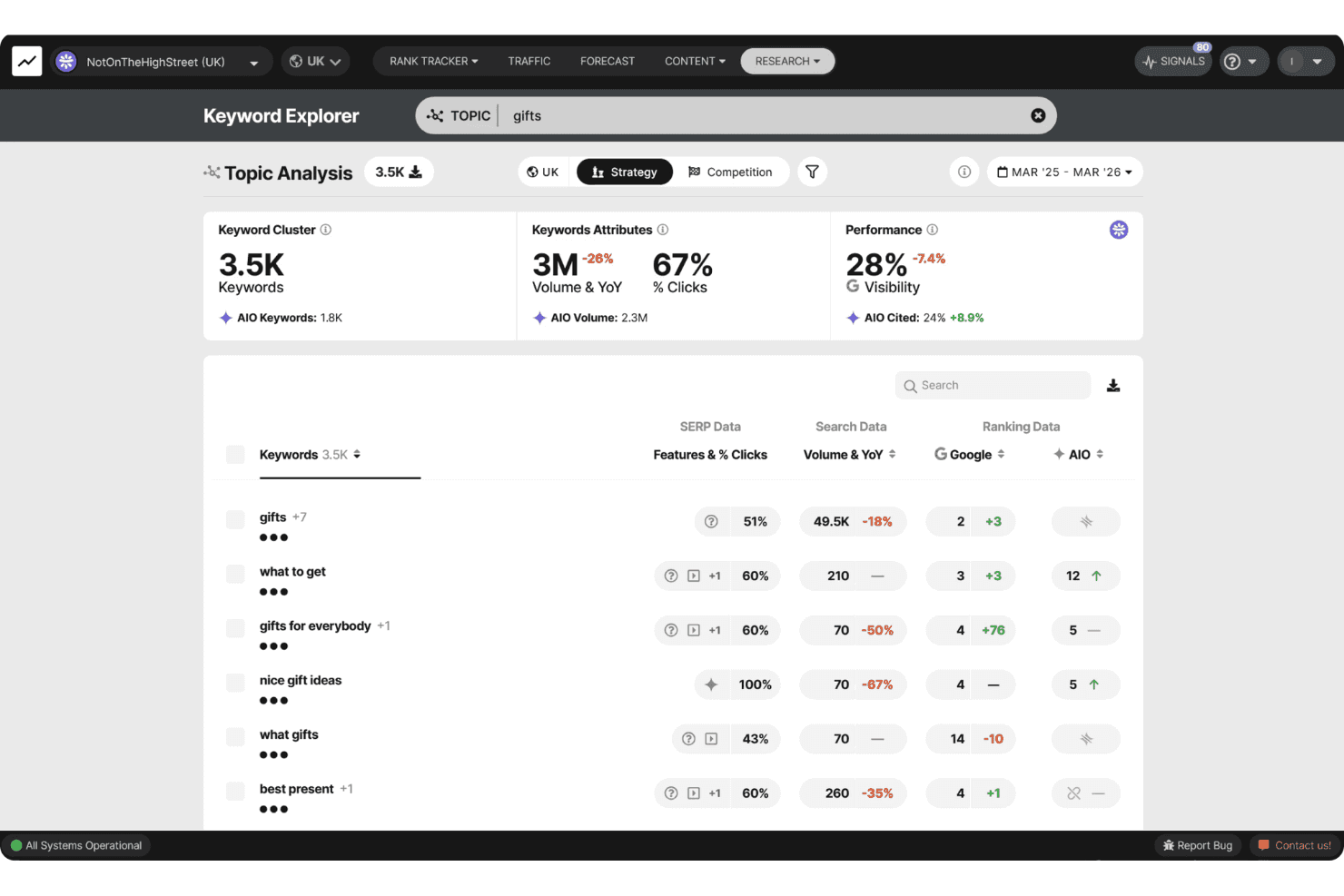
SEOmonitor ofrece un Explorador de Palabras Clave con Análisis de Temas, mostrando grupos de palabras clave, volumen de búsqueda, métricas de visibilidad y datos de AIO para el tema 'regalos'. SEOmonitor es una plataforma de SEO enfocada en agencias que combina el seguimiento del ranking de palabras clave en Google y motores de búsqueda de IA (ChatGPT, Gemini, Perplexity), investigación de palabras clave, previsión SEO y redacción de contenido con IA en un solo espacio de trabajo.
¿Para quién es SEOmonitor?
SEOmonitor es ideal para agencias de SEO que gestionan campañas de múltiples clientes y necesitan una visibilidad unificada tanto en los rankings tradicionales de Google como en plataformas de búsqueda impulsadas por IA.
Por qué elegí SEOmonitor
SEOmonitor se ganó su lugar en mi lista porque es la única plataforma que he utilizado que sigue el ranking en Google y la visibilidad en búsquedas de IA (ChatGPT, Gemini, Perplexity) dentro de una misma estrategia de palabras clave. Dependo de la función de Campañas en Borrador para construir previsiones SEO listas para presentar a clientes potenciales antes de pagar por una sola palabra clave rastreada. El modelo combinado de CTR de Google y Overviews de IA también muestra cómo la búsqueda con IA está cambiando las tasas de clics en palabras clave específicas que más interesan a mis clientes.
Funciones clave de SEOmonitor
- Panel para agencias: Supervisa el rendimiento de tu portafolio y el seguimiento de la salud de los clientes desde una sola vista unificada.
- Redactor de contenido con IA: Automatiza la investigación de contenido, la planificación, los briefs y la creación de artículos para las campañas de los clientes.
- Repositorio de palabras clave: Almacena palabras clave ilimitadas con actualizaciones continuas del volumen mensual de búsqueda para aprovechar oportunidades continuas.
- Conector nativo con Looker Studio: Crea informes SEO visuales y listos para el cliente con flujos de datos en tiempo real.
Integraciones de SEOmonitor
SEOmonitor ofrece integraciones nativas con Google Analytics, Google Search Console, Google Sheets y Looker Studio. Hay una API disponible para integraciones personalizadas.
Pros and Cons
Pros:
- Rastrea tanto rankings en Google como en búsquedas de IA
- Actualizaciones diarias de ranking para todas las palabras clave monitoreadas
- Previsiones detalladas para campañas de múltiples clientes
Cons:
- Enfocado principalmente en análisis de búsqueda orgánica
- Requiere herramientas externas para el seguimiento de enlaces
Learn more about SEOmonitor :
Otras herramientas SEO para agencias
\u003cspan data-slate-fragment=\u0022JTVCJTdCJTIyY2hpbGRyZW4lMjIlM0ElNUIlN0IlMjJ0ZXh0JTIyJTNBJTIySGVyZSUyMGFyZSUyMHNvbWUlMjBhZGRpdGlvbmFsJTIwU0VPJTIwdG9vbHMlMjBmb3IlMjBhZ2VuY2llcyUyMHRoYXQlMjBkaWRuJTI1RTIlODAlOTklMjBtYWtlJTIwaXQlMjBvbnRvJTIwbXklMjBzaG9ydGxpc3QlMkMlMjBidXQlMjBhcmUlMjBzdGlsbCUyMHdvcnRoJTIwY2hlY2tpbmclMjBvdXQlM0ElMjIlN0QlNUQlMkMlMjJ0eXBlJTIyJTNBJTIycCUyMiUyQyUyMmlkJTIyJTNBJTIybzREY0hObkxCeSUyMiU3RCU1RA==\u0022\u003eEstas son algunas opciones adicionales de herramientas SEO para agencias que no entraron en mi selección, pero que aun así merece la pena consultar:\u003c/span\u003e
- 11Screaming FrogMejor rastreo profundo de sitios para auditorías técnicas
- 12SitebulbLos mejores diseños visuales de datos para auditorías técnicas
- 13AccuRankerEl mejor seguimiento en tiempo real del rendimiento de LLM
- 14WhatagraphLa mejor base de datos multiplataforma y escalable
- 15DashThisLos mejores paneles para informes multicanal
- 16SeobilityIdeal para orientación intuitiva de optimización
- 17MorningscoreLas mejores listas de tareas gamificadas para el seguimiento del crecimiento
- 18NightwatchLos mejores informes de atribución de IA y búsqueda
- 19SEOptimerLa mejor auditoría web integrable para captación de clientes potenciales
- 20SEO PowerSuiteEl mejor seguimiento ilimitado de palabras clave y enlaces
Cómo Evalúo Herramientas de SEO para Agencias
Divido mi evaluación en las funcionalidades principales que toda plataforma para agencias debe cubrir—como los informes con marca blanca y los espacios de trabajo multi-cliente—y los diferenciadores que distinguen lo bueno de lo excelente.
Funcionalidades Principales (Requisitos Básicos para Esta Lista)
Cuando selecciono herramientas para mi lista, califico cada una en una escala de 0 (no ofrece la funcionalidad) a 5 (destaca en esta área) para cada funcionalidad principal que se menciona a continuación. Luego, calculo la puntuación total de la herramienta como un porcentaje. Cada herramienta debe alcanzar una puntuación total mínima del 65% para ser considerada para su inclusión.
- Gestión Multi-Cliente: Verifico si la plataforma permite ejecutar espacios de trabajo separados para cada cliente con permisos basados en roles, para que los gestores de cuentas sólo vean lo que necesitan.
- Seguimiento de Posiciones: El seguimiento diario en motores de búsqueda, ubicaciones y dispositivos es fundamental, especialmente para agencias que gestionan campañas locales en decenas de mercados a la vez.
- Auditoría de Sitios: Evalúo la profundidad del rastreo y la detección de incidencias, buscando re-rastreados programados que destaquen nuevos problemas técnicos antes de la próxima reunión con el cliente.
- Análisis de Backlinks: El índice de backlinks debe mostrar enlaces nuevos y perdidos, dominios de referencia y métricas de autoridad tanto para los sitios de clientes como para sus competidores.
- Investigación de Palabras Clave: Busco volumen de búsquedas, puntuaciones de dificultad y datos SERP lo suficientemente amplios como para apoyar el descubrimiento de palabras clave en distintos sectores de clientes.
- Informes con Marca Blanca: Las agencias necesitan informes automatizados y personalizados con su propio logotipo, colores, y preferiblemente un portal de dominio personalizado al que los clientes puedan acceder directamente.
Una vez que tengo una lista de herramientas que cumplen los criterios, considero qué distingue a cada plataforma.
Factores Diferenciadores (Qué Distingue a los Proveedores)
Así es como comparo y analizo distintos proveedores:
Características Destacadas
El seguimiento local de SEO destaca para agencias con clientes de múltiples ubicaciones—busco monitoreo de posiciones geográficas junto con la gestión del Perfil de Negocio en Google. La optimización de contenido mediante IA es relevante cuando produces contenido para varios sectores de clientes. Los briefs de contenido integrados y los analizadores SERP ahorran a tu equipo el tener que cambiar entre herramientas distintas. El análisis masivo completa el panorama, permitiéndote ejecutar investigaciones de palabras clave o rastreos en lote para toda tu cartera de clientes.
Más Allá de las Funcionalidades
El modelo de precios es lo primero que evalúo—un precio por proyecto que crece de forma previsible a medida que agregas clientes es mejor que pagar por varios usuarios individuales. La cobertura de integraciones también es clave. Las conexiones nativas con Google Search Console, GA4 y Looker Studio son requisitos básicos, pero también reviso enlaces con CRM como HubSpot o Asana. La precisión de los datos completa el cuadro; un gran índice de backlinks y actualizaciones diarias fiables de posiciones diferencian las herramientas confiables para entregables de cliente de aquellas que no lo son.
Cómo elegir herramientas SEO para agencias
Es fácil perderse entre largas listas de funciones y estructuras de precios complejas. Para ayudarte a mantener la concentración mientras avanzas en tu proceso específico de selección de software, aquí tienes una lista de factores que debes tener en cuenta:
| Factor | Qué debes tener en cuenta |
|---|---|
| FactorEscalabilidad | Qué debes tener en cuenta¿La herramienta se adaptará al crecimiento de tus clientes o a los cambios en la estructura de tu agencia sin trabajo manual adicional ni sorpresas en la facturación? |
| FactorIntegraciones | Qué debes tener en cuenta¿Se conecta con las plataformas de análisis, generación de informes y flujos de trabajo que tu equipo y tus clientes ya utilizan? |
| FactorPersonalización | Qué debes tener en cuenta¿Los paneles, informes y roles de usuario se pueden adaptar completamente a las necesidades de cada cliente, o tienes que trabajar con plantillas impuestas por el proveedor? |
| FactorFacilidad de uso | Qué debes tener en cuenta¿Tanto tu equipo como tus clientes podrán ponerse al día rápidamente, o las curvas de aprendizaje pronunciadas generarán dificultades y trabajo adicional de incorporación? |
| FactorImplementación e incorporación | Qué debes tener en cuenta¿Cuánto tardará la configuración? ¿El proveedor ofrece documentación, asistencia en directo o ayuda para migrar datos que te permita realizar un lanzamiento sin problemas? |
| FactorCoste | Qué debes tener en cuentaMás allá del precio anunciado, ¿hay tarifas adicionales por puestos de cliente, exportaciones de datos, informes personalizados o límites de datos superiores? |
| FactorMedidas de seguridad | Qué debes tener en cuenta¿Puedes confiar a la plataforma los datos de rendimiento de tus clientes y sus activos sensibles? ¿Ofrece controles de acceso, copias de seguridad de los datos y estándares de seguridad claros? |
| FactorDisponibilidad de asistencia | Qué debes tener en cuenta¿Se ofrece asistencia en directo o prioritaria cuando trabajas en entregables para clientes con plazos ajustados, o corres el riesgo de tener que arreglártelas por tu cuenta si surge algún problema? |
¿Qué son las herramientas SEO para agencias?
Las herramientas de SEO para agencias son plataformas especializadas que permiten gestionar múltiples campañas de clientes, automatizar el seguimiento de posiciones y entregar informes de marca blanca a gran escala. Estas herramientas están diseñadas para los flujos de trabajo de las agencias y ofrecen paneles para múltiples clientes, controles de permisos de usuario y funciones avanzadas de auditoría para ayudarte a satisfacer las exigencias de gestionar programas complejos de SEO en diversos sectores y carteras de clientes.
Características
Al seleccionar herramientas de SEO para agencias, presta atención a las siguientes características clave:
- Gestión de múltiples clientes: Gestiona proyectos de clientes independientes, controla los permisos de usuario y evita que los datos se mezclen entre cuentas para lograr operaciones eficientes en la agencia.
- Informes de marca blanca: Genera informes y paneles personalizables con la imagen de marca de tu agencia para reforzar su identidad al presentar los resultados a los clientes.
- Auditoría integral de sitios web: Analiza automáticamente los sitios web de los clientes en busca de errores técnicos de SEO, problemas en la página y oportunidades de optimización, con recomendaciones detalladas y prácticas.
- Investigación y seguimiento de palabras clave: Descubre oportunidades de palabras clave de alto valor, realiza un seguimiento de las posiciones en varios motores de búsqueda, ubicaciones y dispositivos, y analiza los cambios en las SERP.
- Análisis de vínculos de retroceso: Supervisa los perfiles de vínculos de retroceso, identifica enlaces nuevos y perdidos, evalúa los dominios de referencia y analiza las estrategias de enlaces de la competencia para obtener una visión integral del SEO fuera de la página.
- Herramientas de SEO local: Realiza un seguimiento de las posiciones específicas por ubicación geográfica, supervisa las fichas locales y gestiona los perfiles de empresa de Google en varias ubicaciones de clientes para negocios centrados en la visibilidad en búsquedas locales.
- Herramientas de análisis masivo: Ejecuta comprobaciones masivas de palabras clave, auditorías de vínculos de retroceso y rastreos de sitios para gestionar de forma eficiente grandes volúmenes de datos de varios clientes en un único flujo de trabajo.
- Controles de acceso basados en roles: Define roles y permisos para los miembros del equipo y los clientes, asegurándote de que cada persona vea únicamente los datos y las herramientas pertinentes para sus responsabilidades.
- Programación y automatización de informes: Configura el envío automatizado de informes y paneles de rendimiento periódicos a los clientes para ahorrar tiempo y reducir las tareas manuales de elaboración de informes.
- Integraciones con plataformas de marketing: Conecta herramientas de analítica, publicidad y CRM para unificar los informes de SEO dentro de las operaciones de marketing más amplias de tu agencia.
Ventajas
La implementación de herramientas de SEO para agencias ofrece varias ventajas para tu equipo y tu negocio. Estas son algunas de las que puedes esperar:
- Gestión simplificada de clientes: Los espacios de trabajo específicos y los permisos de usuario te permiten organizar, supervisar y atender fácilmente a múltiples clientes sin solapamientos ni confusión de datos.
- Mayor retención de clientes: Los informes automatizados de marca blanca y los paneles con la imagen de marca ayudan a demostrar el valor continuo y a reforzar la imagen profesional de tu agencia.
- Operaciones de SEO escalables: El análisis masivo y la automatización de flujos de trabajo permiten a tu equipo gestionar grandes volúmenes de auditorías, seguimiento de posiciones e investigación en carteras de clientes diversas.
- Mejor rendimiento de las campañas: Las auditorías integrales de sitios web, el seguimiento de palabras clave y el análisis de vínculos de retroceso proporcionan información práctica para optimizar las estrategias de cada cliente y ofrecer resultados medibles.
- Ciclos de elaboración de informes más rápidos: La programación automatizada de informes elimina la recopilación manual de datos y proporciona a los clientes actualizaciones frecuentes y precisas con un esfuerzo mínimo.
- Mayor colaboración y transparencia: Los controles de acceso basados en roles y los paneles compartibles fomentan la confianza, permiten una comunicación clara y mantienen a todos alineados con el progreso de las campañas.
- Mejor alineación del conjunto tecnológico: Las integraciones con plataformas de analítica, CRM y marketing unifican el trabajo de SEO de tu agencia dentro de los informes y flujos de trabajo más amplios de los clientes.
Costes & precios
La selección de herramientas de SEO para agencias requiere comprender los distintos modelos de precios y planes disponibles. Los costes varían en función de las características, el tamaño del equipo, los complementos y otros factores. La tabla siguiente resume los planes habituales, sus precios medios y las funciones que suelen incluir las soluciones de herramientas de SEO para agencias:
Tabla comparativa de planes para herramientas de SEO para agencias
| Tipo de plan | Precio medio | Características habituales |
|---|---|---|
| Tipo de planPlan gratuito | Precio medio$0 | Características habitualesSeguimiento limitado de palabras clave, auditorías básicas, informes mínimos y acceso para un solo usuario. |
| Tipo de planPlan personal | Precio medio$25-$75/usuario/mes | Características habitualesSeguimiento ampliado de posiciones, investigación de palabras clave, auditorías estándar del sitio, exportación de informes y asistencia por correo electrónico. |
| Tipo de planPlan empresarial | Precio medio$100-$300/mes | Características habitualesEspacios de trabajo para varios clientes, informes con marca blanca, análisis masivo, acceso a la API, integraciones y controles para equipos. |
| Tipo de planPlan para empresas | Precio medio$500+/mes | Características habitualesGestión ilimitada de clientes, automatización avanzada, acuerdos de nivel de servicio personalizados, incorporación personalizada y asistencia premium. |
Preguntas frecuentes sobre herramientas SEO para agencias
\u003cspan data-slate-fragment=\u0022JTVCJTdCJTIyY2hpbGRyZW4lMjIlM0ElNUIlN0IlMjJ0ZXh0JTIyJTNBJTIySGVyZSUyMGFyZSUyMHNvbWUlMjBhbnN3ZXJzJTIwdG8lMjBjb21tb24lMjBxdWVzdGlvbnMlMjBhYm91dCUyMFNFTyUyMHRvb2xzJTIwZm9yJTIwYWdlbmNpZXMlM0ElMjIlN0QlNUQlMkMlMjJ0eXBlJTIyJTNBJTIycCUyMiUyQyUyMmlkJTIyJTNBJTIyUW9CT3dMMVFZOSUyMiU3RCU1RA==\u0022\u003eAquí tienes algunas respuestas a preguntas frecuentes sobre las herramientas SEO para agencias:\u003c/span\u003e
¿Cómo ayudan las herramientas SEO para agencias a gestionar varios clientes?
\u003cspan data-slate-fragment=\u0022JTVCJTdCJTIyY2hpbGRyZW4lMjIlM0ElNUIlN0IlMjJ0ZXh0JTIyJTNBJTIyVGhleSUyMGxldCUyMHlvdSUyMGNyZWF0ZSUyMHNlcGFyYXRlJTIwd29ya3NwYWNlcyUyQyUyMHNldCUyMHJvbGUtYmFzZWQlMjBwZXJtaXNzaW9ucyUyQyUyMGFuZCUyMG9yZ2FuaXplJTIwY2FtcGFpZ25zJTIwc28lMjB5b3UlMjBjYW4lMjBtYW5hZ2UlMjBkb3plbnMlMjBvZiUyMGNsaWVudCUyMGFjY291bnRzJTIwc2VjdXJlbHklMjBhbmQlMjBlZmZpY2llbnRseSUyMGZyb20lMjBhJTIwc2luZ2xlJTIwcGxhdGZvcm0uJTIwQnVpbHQtaW4lMjBTRU8lMjBmZWF0dXJlcyUyMG1ha2UlMjBpdCUyMGVhc2llciUyMGZvciUyMFNFTyUyMHByb2Zlc3Npb25hbHMlMjB0byUyMGJhbGFuY2UlMjBkYWlseSUyMFNFTyUyMHRhc2tzJUUyJTgwJTk0ZnJvbSUyMHRyYWNraW5nJTIwYSUyMHNpdGVtYXAlMjB0byUyMGV4ZWN1dGluZyUyMG9uLXBhZ2UlMjBTRU8lRTIlODAlOTR3aXRob3V0JTIwbG9zaW5nJTIwdHJhY2slMjBvZiUyMGluZGl2aWR1YWwlMjBhY2NvdW50JTIwZ29hbHMlMjBvciUyMGxvbmctdGVybSUyMFNFTyUyMHN0cmF0ZWd5JTIwYmVuY2htYXJrcy4lMjIlN0QlNUQlMkMlMjJ0eXBlJTIyJTNBJTIycCUyMiUyQyUyMmlkJTIyJTNBJTIyM1VJTm9FemJ0SSUyMiU3RCU1RA==\u0022\u003eTe permiten crear espacios de trabajo separados, establecer permisos basados en roles y organizar campañas para que puedas gestionar de forma segura y eficiente decenas de cuentas de clientes desde una única plataforma. Las funciones SEO integradas facilitan que los profesionales del SEO equilibren las tareas diarias de SEO, desde el seguimiento de un mapa del sitio hasta la ejecución del SEO en la página, sin perder de vista los objetivos de cada cuenta ni los indicadores de referencia de la estrategia SEO a largo plazo.\u003c/span\u003e
¿Pueden las herramientas SEO para agencias automatizar los informes de clientes?
\u003cspan data-slate-fragment=\u0022JTVCJTdCJTIyY2hpbGRyZW4lMjIlM0ElNUIlN0IlMjJ0ZXh0JTIyJTNBJTIyWWVzJTJDJTIwbW9zdCUyMG9mZmVyJTIwYXV0b21hdGVkJTJDJTIwd2hpdGUtbGFiZWwlMjByZXBvcnRpbmclMjB0aGF0JTIwc2NoZWR1bGVzJTIwdXBkYXRlcyUyMHRvJTIwY2xpZW50cyUyQyUyMGluY2x1ZGVzJTIweW91ciUyMGFnZW5jeSUyMGJyYW5kaW5nJTJDJTIwYW5kJTIwcmVkdWNlcyUyMG1hbnVhbCUyMGRhdGElMjBwdWxscyUyMGVhY2glMjBtb250aC4lMjBUaGlzJTIwaGVscHMlMjBwcm92ZSUyMHRoZSUyMHZhbHVlJTIwb2YlMjB5b3VyJTIwU0VPJTIwZWZmb3J0cyUyQyUyMHNob3dpbmclMjBjbGllbnRzJTIwZXhhY3RseSUyMGhvdyUyMEFJLWRyaXZlbiUyMGluc2lnaHRzJTIwYW5kJTIwc3RyYXRlZ2ljJTIwY29udGVudCUyMGNyZWF0aW9uJTIwY29udHJpYnV0ZSUyMHRvJTIwZWFybmluZyUyMHRvcC1yYW5raW5nJTIwcG9zaXRpb25zJTIwb24lMjBzZWFyY2glMjBlbmdpbmVzLiUyMFlvdSUyMGNhbiUyMGV2ZW4lMjBidWlsZCUyMGFuJTIwaW50ZXJhY3RpdmUlMjBkYXNoYm9hcmQlMjBmb3IlMjBjbGVhciUyMFNFTyUyMHJlcG9ydGluZy4lMjIlN0QlNUQlMkMlMjJ0eXBlJTIyJTNBJTIycCUyMiUyQyUyMmlkJTIyJTNBJTIycXV6alNvSFgwaSUyMiU3RCU1RA==\u0022\u003eSí, la mayoría ofrece informes automatizados y con marca blanca que programan actualizaciones para los clientes, incluyen la imagen de marca de tu agencia y reducen la recopilación manual de datos cada mes. Esto ayuda a demostrar el valor de tus esfuerzos de SEO y muestra a los clientes exactamente cómo los análisis basados en IA y la creación estratégica de contenido contribuyen a conseguir las primeras posiciones en los motores de búsqueda. Incluso puedes crear un panel interactivo para elaborar informes SEO claros.\u003c/span\u003e
¿Qué integraciones debería buscar en las herramientas SEO para agencias?
\u003cspan data-slate-fragment=\u0022JTVCJTdCJTIyY2hpbGRyZW4lMjIlM0ElNUIlN0IlMjJ0ZXh0JTIyJTNBJTIyTG9vayUyMGZvciUyMGRpcmVjdCUyMGNvbm5lY3Rpb25zJTIwdG8lMjBhbmFseXRpY3MlMjBwbGF0Zm9ybXMlMjBsaWtlJTIwR29vZ2xlJTIwQW5hbHl0aWNzJTIwNCUyMGFuZCUyMEdvb2dsZSUyMFNlYXJjaCUyMENvbnNvbGUlMjAoR1NDKSUyQyUyMGFzJTIwd2VsbCUyMGFzJTIwaW50ZWdyYXRpb25zJTIwd2l0aCUyMHByb2plY3QlMjBtYW5hZ2VtZW50JTIwYW5kJTIwQ1JNJTIwdG9vbHMlMjB1c2VkJTIwaW4lMjB5b3VyJTIwYWdlbmN5JUUyJTgwJTk5cyUyMHdvcmtmbG93LiUyMElmJTIweW91JTIwaGFuZGxlJTIwY29tcHJlaGVuc2l2ZSUyMGNvbnRlbnQlMjBtYXJrZXRpbmclMjBvciUyMHJ1biUyMHBhaWQlMjBjYW1wYWlnbnMlMkMlMjBsb29rJTIwZm9yJTIwdG9vbHMlMjB0aGF0JTIwY29ubmVjdCUyMHdpdGglMjB5b3VyJTIwcHBjJTIwZGFzaGJvYXJkcyUyQyUyMHNvY2lhbCUyMG1lZGlhJTIwdHJhY2tlcnMlMkMlMjBhbmQlMjBvdXRyZWFjaCUyMHNvZnR3YXJlJTIwdG8lMjBrZWVwJTIwYWxsJTIweW91ciUyMGRhdGElMjBpbiUyMG9uZSUyMHBsYWNlLiUyMiU3RCU1RCUyQyUyMnR5cGUlMjIlM0ElMjJwJTIyJTJDJTIyaWQlMjIlM0ElMjIzN19GNUlGZVVfJTIyJTdEJTVE\u0022\u003eBusca conexiones directas con plataformas de análisis como Google Analytics 4 y Google Search Console (GSC), así como integraciones con herramientas de gestión de proyectos y CRM utilizadas en el flujo de trabajo de tu agencia. Si gestionas marketing de contenidos integral o realizas campañas de pago, busca herramientas que se conecten con tus paneles de PPC, rastreadores de redes sociales y software de prospección para mantener todos tus datos en un solo lugar.\u003c/span\u003e
¿Existen riesgos de seguridad al compartir datos confidenciales de clientes en estas plataformas?
\u003cspan data-slate-fragment=\u0022JTVCJTdCJTIyY2hpbGRyZW4lMjIlM0ElNUIlN0IlMjJ0ZXh0JTIyJTNBJTIyTm8lMkMlMjByZXB1dGFibGUlMjB2ZW5kb3JzJTIwb2ZmZXIlMjBhY2Nlc3MlMjBjb250cm9scyUyQyUyMGRhdGElMjBzZWdyZWdhdGlvbiUyQyUyMGFuZCUyMGVuY3J5cHRpb24lMjB0byUyMGtlZXAlMjBzZW5zaXRpdmUlMjBpbmZvcm1hdGlvbiUyMHNhZmUuJTIwV2hldGhlciUyMHlvdXIlMjBjbGllbnRzJTIwYXJlJTIwc21hbGwlMjBidXNpbmVzc2VzJTIwb3IlMjBlbnRlcnByaXNlJTIwYnJhbmRzJTJDJTIwdGhlc2UlMjBwcm90ZWNjdGlvbnMlMjBhbGxvdyUyMGJvdGglMjBiZWdpbm5lcnMlMjBhbmQlMjBhZHZhbmNlZCUyMHRlY2huaWNhbCUyMHRlYW1zJTIwdG8lMjBzYWZlbHklMjBjb2xsYWJvcmF0ZSUyMG9uJTIwYmFja2VuZCUyMGNvbmZpZ3VyYXRpb25zJTIwbGlrZSUyMHNjaGVtYSUyMG1hcmt1cCUyMHdpdGhvdXQlMjBleHBvc2luZyUyMHNlbnNpdGl2ZSUyMGNvcnBvcmF0ZSUyMGRhdGElMjBvciUyMHJpc2tpbmclMjB0aGUlMjBpbnRlZ3JpdHklMjBvZiUyMG theirJTIwbGl2ZSUyMFNFTyUyMHNvZnR3YXJlJTIwc2V0dXBzLiUyMiU3RCU1RCUyQyUyMnR5cGUlMjIlM0ElMjJwJTIyJTJDJTIyaWQlMjIlM0ElMjJfZ1V5Yk5JY01rTSUyMiU3RCU1RA==\u0022\u003eNo, los proveedores de confianza ofrecen controles de acceso, segregación de datos y cifrado para mantener segura la información confidencial. Tanto si tus clientes son pequeñas empresas como si son marcas empresariales, estas protecciones permiten que los equipos técnicos, tanto principiantes como avanzados, colaboren de forma segura en configuraciones del backend, como el marcado de esquema, sin exponer datos corporativos confidenciales ni poner en riesgo la integridad de sus configuraciones del software SEO activo.\u003c/span\u003e
¿Cómo deberían comparar las agencias los precios de las plataformas SEO?
\u003cspan data-slate-fragment=\u0022JTVCJTdCJTIyY2hpbGRyZW4lMjIlM0ElNUIlN0IlMjJ0ZXh0JTIyJTNBJTIyQ29tcGFyZSUyMHRvdGFsJTIwY29zdHMlMjBiYXNlZCUyMG9uJTIwdGhlJTIwbnVtYmVyJTIwb2YlMjBjbGllbnRzJTJDJTIwdHJhY2tlZCUyMGtleXdvcmRzJTJDJTIwY3Jhd2wlMjBjcmVkaXRzJTJDJTIwYW5kJTIwdXNlciUyMHNlYXRzJUUyJTgwJTk0ZG9uJUUyJTgwJTk5dCUyMGp1c3QlMjBsb29rJTIwYXQlMjBiYXNlJTIwcGxhbiUyMHByaWNpbmclMkMlMjBhcyUyMG92ZXJhZ2UlMjBjaGFyZ2VzJTIwYW5kJTIwYWRkLW9ucyUyMGNhbiUyMGFkZCUyMHVwJTIwcXVpY2tseS4lMjBNYWtlJTIwc3VyZSUyMHRoZSUyMHN1YnNjcmlwdGlvbiUyMGluY2x1ZGVzJTIwdGhlJTIwc3BlY2lmaWMlMjB0b29scyUyMHlvdSUyMG5lZWQlMjBmb3IlMjBoaWdoLXF1YWxpdHklMjBTRU8lMjBjb250ZW50JTIwcHJvZHVjdGlvbiUyMHNvJTIweW91JTIwYXJlbid0JTIwZm9yY2VkJTIwdG8lMjBidXklMjBzZXBhcmF0ZSUyMHNvZnR3YXJlJTIwbGF0ZXIuJTIyJTdEJTVEJTJDJTIydHlwZSUyMiUzQSUyMnAlMjIlMkMlMjJpZCUyMiUzQSUyMkgxYTdtTURRN2IlMjIlN0QlNUQ=\u0022\u003eCompara los costes totales según el número de clientes, las palabras clave supervisadas, los créditos de rastreo y las cuentas de usuario; no te fijes únicamente en el precio del plan básico, ya que los cargos por exceso y los complementos pueden acumularse rápidamente. Asegúrate de que la suscripción incluya las herramientas específicas que necesitas para producir contenido SEO de alta calidad, para no verte obligado a comprar software independiente más adelante.\u003c/span\u003e