

El software de investigación de mercados es un recurso valioso para cualquier empresa. Con el software adecuado, los equipos pueden obtener información detallada sobre el comportamiento de los clientes y tomar decisiones basadas en datos. Sin embargo, encontrar el software de investigación de mercados adecuado puede ser complicado, especialmente debido a la gran cantidad de opciones disponibles.
Gracias a mi amplia experiencia con el software de marketing, probé y comparé varias de las principales opciones de software de investigación de mercados disponibles. A partir de ahí, recopilé mis resultados en reseñas detalladas para ayudarte a encontrar el mejor software para tus necesidades específicas. Estoy seguro de que descubrirás tu próximo software de investigación de mercados en la lista que aparece a continuación.
Por qué confiar en nuestras recomendaciones de software
6,700+
Reviews
20
Industry experts
16+
Evaluation factors
14
Years
Nuestro equipo lleva probando y evaluando software desde 2012. Como líderes de marketing, sabemos lo difícil —y lo importante— que es elegir el software adecuado.
Para esta guía, evaluamos las herramientas mediante pruebas prácticas e investigación independiente, puntuando las herramientas según nuestros criterios de selección.
Nuestras reseñas reflejan nuestro criterio editorial humano, no un discurso de ventas.
Revisores expertos:
 Gui DrusinaDirector creativo
- Shriya GhateSenior Marketing Lead
 Amanda JacquesLíder de Marketing Ops

Tabla comparativa de software de investigación de mercados
\u003cspan style=\u0022font-weight: 400\u0022\u003eHemos investigado los precios y la disponibilidad de pruebas gratuitas y versiones de demostración.\u003c/span\u003e
| Tool | Best For | Trial Info | Price | ||
|---|---|---|---|---|---|
| 1 | El mejor para cobertura de escucha social multilingüe | Prueba gratuita de 14 días | Desde $199/mes (facturado anualmente) | Website | |
| 2 | Ideal para análisis competitivo de audiencias digitales | Plan gratuito + prueba gratuita de 7 días + demo gratis | Desde $117.33/mes (facturado anualmente) | Website | |
| 3 | Ideal para la colaboración sin esfuerzo en equipo en encuestas | Plan gratuito disponible | Plan gratuito disponible; desde $7/usuario/mes (facturado anualmente) para Google Workspace | Website | |
| 4 | Ideal para plantillas extensas | Hay un plan gratuito disponible | Desde $7.42/mes (facturado anualmente) | Website | |
| 5 | Ideal para el análisis de datos cualitativos | Prueba gratuita disponible | Desde $30/mes | Website | |
| 6 | Mejor para insights continuos | Demostración gratuita disponible | Precio bajo consulta | Website | |
| 7 | Ideal para la monitorización de marca en tiempo real | Prueba gratuita de 7 días disponible | Desde $99/mes | Website | |
| 8 | Ideal para la recopilación conversacional de retroalimentación | Prueba gratuita de 14 días | Desde $19/mes (facturado anualmente) | Website | |
| 9 | Mejor para obtener perspectivas automatizadas sobre ofertas competitivas | Demostración gratuita disponible | Precio bajo solicitud | Website | |
| 10 | La mejor prueba de UX basada en datos | Prueba gratuita de 14 días | Desde $49/usuario/mes (facturado anualmente) | Website |


Reseñas del mejor software de investigación de mercados
\u003cspan style=\u0022font-weight: 400\u0022\u003eHemos investigado los precios y la disponibilidad de pruebas gratuitas y versiones de demostración para que puedas realizar una comparación directa mucho más sencilla.\u003c/span\u003e
 El mejor para cobertura de escucha social multilingüe
- Prueba gratuita de 14 días
- Desde $199/mes (facturado anualmente)
Visit WebsiteCustomer Rating:4.7/5This rating combines scores from multiple user review sites to reflect overall customer sentiment about the product.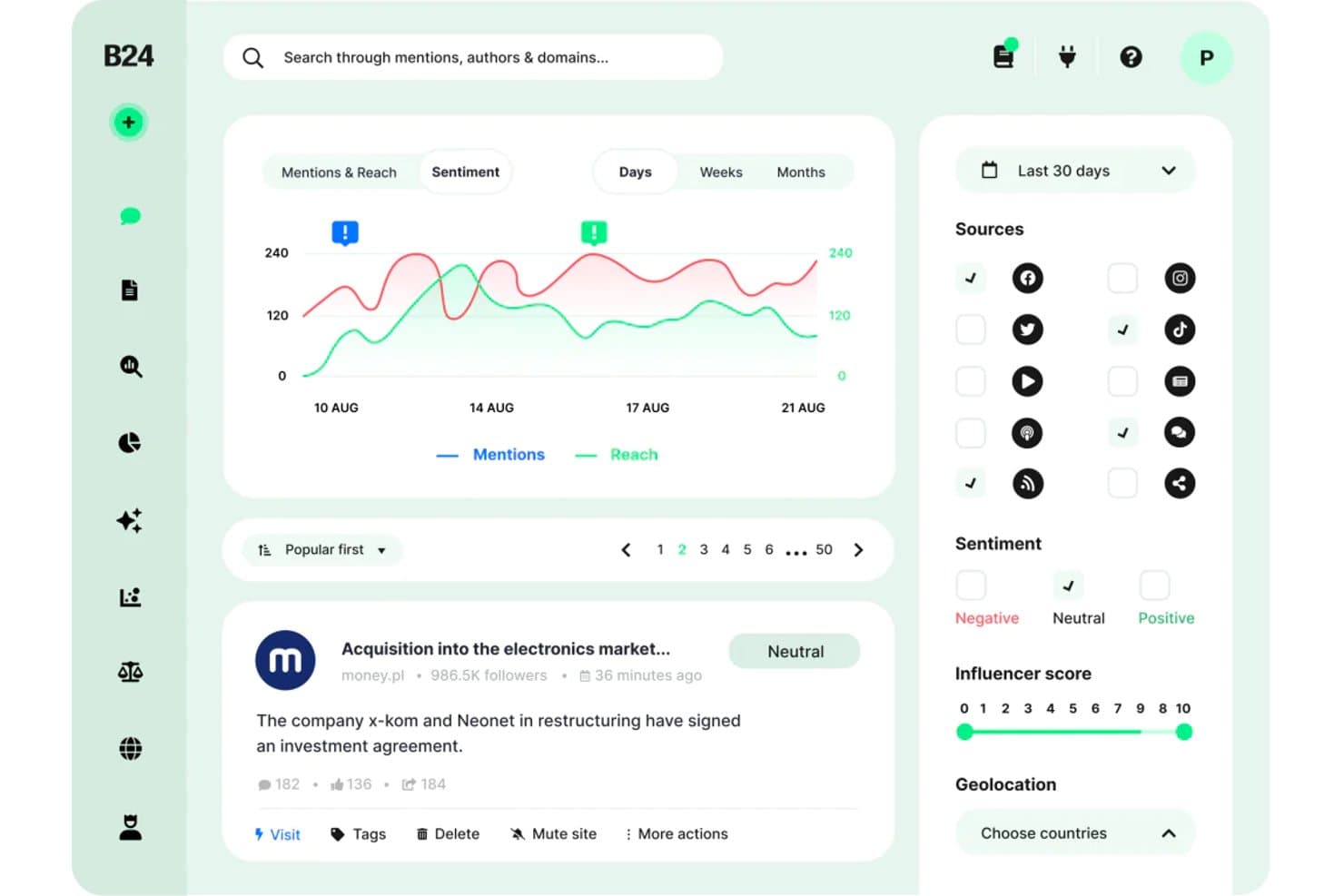
Brand24 ofrece un panel de análisis de sentimiento con seguimiento de menciones, gráficos de alcance, filtrado por fuente y puntuación de influencers para investigación de mercado. Brand24 es una plataforma de escucha social y monitoreo de medios impulsada por IA que rastrea menciones de marcas, sentimientos de los consumidores y conversaciones en línea a través de redes sociales, sitios de noticias, blogs, foros, pódcasts y plataformas de reseñas en tiempo real.
¿Para quién es mejor Brand24?
Los responsables de marca y de insights en empresas que operan en mercados internacionales o multilingües sacarán el mayor provecho de las capacidades de monitoreo multilingüe de Brand24.
Por qué escogí Brand24
Brand24 se gana un lugar en mi lista porque su cobertura multilingüe de escucha social es realmente insuperable. Me gusta especialmente que el análisis de sentimientos opera en 108 idiomas con una tasa de exactitud del 95%, por lo que el seguimiento de la percepción del consumidor en árabe, español o polaco produce datos fiables y no ruido. El AI Brand Assistant 2.0 me permite hacer preguntas en lenguaje natural directamente sobre ese conjunto de datos multilingüe, sacando a la luz temas que de otro modo tendría que buscar manualmente.
Características clave de Brand24
- Puntuación de presencia: Agrega la visibilidad de la marca en una sola métrica actualizada en tiempo real para un monitoreo fácil.
- Identificación de influencers: Destaca a los autores y canales principales que impulsan conversaciones clave sobre tu marca o la competencia.
- Alertas de tormenta: Te notifica al instante acerca de picos inusuales en el volumen de menciones de la marca para facilitar la detección de crisis.
- Informes con marca blanca: Permite exportar datos en formatos PDF, Excel o PowerPoint personalizados con tu marca para compartir y presentar.
Integraciones de Brand24
Brand24 ofrece integraciones nativas con Slack y Microsoft Teams. Hay una API disponible para integraciones personalizadas.
Pros and Cons
Pros:
- Rastrea menciones en 108 idiomas simultáneamente
- Cubre redes sociales, noticias, pódcasts y reseñas
- El asistente AI Brand responde consultas de investigación
Cons:
- Sin encuestas ni capacidades de investigación primaria
- Las métricas de Stories y Reels no están totalmente soportadas
Learn more about Brand24: Ideal para análisis competitivo de audiencias digitales
- Plan gratuito + prueba gratuita de 7 días + demo gratis
- Desde $117.33/mes (facturado anualmente)
Visit WebsiteCustomer Rating:4.5/5This rating combines scores from multiple user review sites to reflect overall customer sentiment about the product.
Semrush Traffic Analytics muestra informes de competencia y análisis de audiencia. Semrush es una plataforma de inteligencia digital que combina investigación de palabras clave, análisis de tráfico de la competencia, auditoría de backlinks y datos de comportamiento de la audiencia en canales de búsqueda, sociales y de pago.
¿Para quién es mejor Semrush?
Semrush es ideal para profesionales de marketing digital y estrategas SEO en empresas medianas y grandes que necesitan una visibilidad profunda de la presencia online de la competencia.
Por qué elegí Semrush
Seleccioné Semrush como uno de los mejores porque su herramienta de análisis de tráfico me ofrece un desglose detallado de la audiencia de cualquier competidor, incluyendo fuentes de tráfico, métricas de engagement y alcance geográfico, todo sin necesidad de acceso a sus datos internos. La herramienta Gap de palabras clave me permite comparar hasta cinco competidores para detectar exactamente qué términos de búsqueda están capturando ellos y yo no. También recurro a la herramienta Gap de backlinks para encontrar oportunidades de link building que mis competidores ya han validado.
Características clave de Semrush
- Explorador de mercado: Mapea el panorama competitivo de cualquier industria, mostrando cuota de mercado, demografía de la audiencia y los principales actores en una sola vista.
- Investigación de temas: Destaca subtemas en tendencia, titulares y preguntas asociadas a cualquier palabra clave semilla para orientar la planificación de contenidos e investigación.
- Monitorización de marca: Rastrea menciones online de cualquier marca en noticias, blogs y redes sociales en tiempo casi real.
- Investigación publicitaria: Revela los textos de anuncios de búsqueda de pago de los competidores, páginas de destino e historial de inversión en palabras clave.
Integraciones de Semrush
Semrush admite una variedad de integraciones con herramientas y servicios populares. Las integraciones nativas incluyen Google Analytics, Google Search Console, Google Ads, Google Sheets, Google Docs, Looker Studio, Trello, WordPress, Facebook, LinkedIn, Instagram, Pinterest, YouTube, monday.com, Wix y Zoho Analytics. Se conecta con Zapier, y hay una API disponible para integraciones personalizadas.
Pros and Cons
Pros:
- Extensa base de datos de palabras clave en numerosos países
- Hace seguimiento de la visibilidad de marca en resultados de búsqueda con IA
- Análisis de brechas competitivo lado a lado para palabras clave
Cons:
- Datos limitados en competidores de nicho o localizados
- Herramientas clave de inteligencia competitiva requieren complementos de pago
 Ideal para la colaboración sin esfuerzo en equipo en encuestas
- Plan gratuito disponible
- Plan gratuito disponible; desde $7/usuario/mes (facturado anualmente) para Google Workspace

Las opciones de uso compartido de Google Forms muestran la gestión colaborativa del acceso al cuestionario. Google Forms es un creador de encuestas gratuito de Google que permite a los equipos crear, distribuir y analizar cuestionarios con recopilación automática de respuestas y resúmenes de datos en vivo en Google Sheets.
¿Para quién es mejor Google Forms?
Google Forms es ideal para equipos pequeños y profesionales del marketing que ya trabajan en Google Workspace y necesitan una forma sin costo para recopilar respuestas a encuestas rápidamente.
Por qué elegí Google Forms
Google Forms se gana su lugar en mi lista porque el acceso multi-editor está integrado por defecto. Todo mi equipo puede abrir el mismo formulario simultáneamente, editar preguntas y dejar comentarios sin conflictos de versión. También me gusta que la lógica condicional nos permite dirigir a los encuestados por diferentes rutas de preguntas según las respuestas anteriores, lo que hace que un solo formulario cumpla la función de varios. Los datos de respuesta fluyen automáticamente a Google Sheets en tiempo real, por lo que mi equipo puede dividir y filtrar resultados juntos en el momento en que llegan las respuestas.
Características clave de Google Forms
- Varios tipos de preguntas: Elige entre selección múltiple, casillas de verificación, menús desplegables, escalas lineales y campos de texto abierto para adaptar cada pregunta al formato adecuado.
- Validación de respuestas: Establece reglas que exijan a los encuestados ingresar formatos específicos, rangos de números o patrones de texto antes de enviar.
- Plantillas de encuestas predefinidas: Comienza con una biblioteca de formatos de encuestas ya hechos en vez de crear cada formulario desde cero.
- Gráficos de resumen automáticos: Visualiza gráficos de barras, gráficos circulares y conteos de respuestas generados automáticamente dentro de Google Forms sin exportar tus datos.
Integraciones de Google Forms
Google Forms se conecta de forma nativa con otras aplicaciones de Google Workspace, incluidas Google Sheets, Google Drive, Google Docs y Google Calendar. Miles de aplicaciones adicionales están disponibles a través de Google Workspace Marketplace y se integra con Zapier. También está disponible una API RESTful para integraciones personalizadas.
Pros and Cons
Pros:
- Respuestas ilimitadas en cada encuesta
- Diseños de formularios fáciles de usar
- Gemini AI genera borradores de formularios a partir de indicaciones
Cons:
- Las plantillas carecen de profundidad en la personalización de diseño
- Los análisis integrados son básicos sin exportar a Sheets
Learn more about Google Forms: Ideal para plantillas extensas
- Hay un plan gratuito disponible
- Desde $7.42/mes (facturado anualmente)

Zoho Survey ayuda a los usuarios a crear, distribuir y analizar encuestas fácilmente. Zoho Survey es una herramienta en línea de encuestas y cuestionarios para que personas y empresas recojan opiniones y conocimientos de su público objetivo. Está dirigida principalmente a profesionales de marketing, investigadores y equipos de RR. HH., facilitando la creación, distribución y análisis de encuestas.
Por qué elegí Zoho Survey: Ofrece una interfaz intuitiva de arrastrar y soltar que facilita la creación de encuestas para tu equipo. Con la generación de informes en tiempo real, puedes analizar rápidamente las respuestas y obtener información relevante. Las plantillas personalizables te ayudan a crear encuestas adaptadas a tus necesidades específicas. Además, funciones avanzadas como la lógica de salto y el piping garantizan que tus encuestas sean dinámicas y atractivas.
Funciones e integraciones destacadas:
Las funciones incluyen plantillas personalizables, informes en tiempo real y lógica avanzada para encuestas, como lógica de salto y piping. Puedes crear y distribuir encuestas fácilmente gracias a su interfaz de arrastrar y soltar. La plataforma también soporta varios idiomas, lo que la hace versátil para equipos internacionales.
Las integraciones incluyen Asana, Dropbox, Google Drive, Google Sheets, Mailchimp, Microsoft Teams, Salesforce, Slack, Trello y Zoho Projects.
Pros and Cons
Pros:
- Lógica avanzada para encuestas
- Soporte para múltiples idiomas
- Interfaz sencilla de arrastrar y soltar
Cons:
- Atención al cliente limitada
- Requiere conexión a internet
Learn more about Zoho Survey: Ideal para el análisis de datos cualitativos
- Prueba gratuita disponible
- Desde $30/mes

Dovetail centraliza y analiza los conocimientos de los clientes para decisiones basadas en datos. Dovetail es una plataforma de conocimientos sobre clientes que ayuda a los gestores de productos, diseñadores, investigadores, equipos de ventas y profesionales de atención al cliente a centralizar y analizar el conocimiento de los clientes. Transforma rápidamente los comentarios, llamadas y documentos de los usuarios en conocimientos prácticos, permitiendo la toma de decisiones basada en datos.
Por qué elegí Dovetail: La plataforma ofrece funciones que te ayudan a organizar y analizar los conocimientos sobre clientes de manera eficiente. Sus conocimientos impulsados por IA pueden convertir grandes cantidades de comentarios en datos significativos. Dovetail también proporciona protección de privacidad de datos e integración con otras herramientas, asegurando que tus conocimientos estén seguros. Su capacidad para estandarizar los procesos de investigación entre equipos lo convierte en un activo valioso para fomentar una cultura centrada en el cliente en tu organización.
Características e integraciones destacadas:
Características incluyen conocimientos impulsados por IA, análisis rápido de datos de clientes y protección de privacidad de datos. Tu equipo también puede beneficiarse de herramientas para organizar los conocimientos e integrarse con otras plataformas. Estas características ayudan a centralizar el proceso de transformar comentarios en conocimientos accionables.
Las integraciones incluyen Workday, SAP SuccessFactors, ADP, Oracle HCM, BambooHR, Microsoft Dynamics 365, Salesforce, ServiceNow, Google Workspace y Slack.
Pros and Cons
Pros:
- Análisis de datos rápido
- Conocimientos impulsados por IA
- Estandariza los procesos de investigación
Cons:
- Acceso limitado sin conexión
- Complejidad de configuración inicial
Learn more about Dovetail: Mejor para insights continuos
- Demostración gratuita disponible
- Precio bajo consulta

Attest busca simplificar la investigación con insights globales, seguimiento de marca y herramientas de pruebas. Attest es una plataforma de investigación de consumidores que simplifica el proceso de investigación para los profesionales de marketing y de análisis de insights. Proporciona acceso a una audiencia global y ofrece herramientas para el seguimiento de marca, perfilado de consumidores, pruebas creativas, análisis de mercado y desarrollo de nuevos productos.
Por qué elegí Attest: La plataforma cuenta con un constructor de encuestas intuitivo que ofrece resultados rápidos, respaldado por sólidas medidas de calidad de datos. Puedes seguir tendencias fácilmente, comparar respuestas y obtener insights accionables a través de su panel interactivo. Attest también proporciona asesoramiento experto y plantillas para ayudarte a realizar investigaciones efectivas y tomar decisiones informadas.
Características e integraciones destacadas:
Características incluyen permisos de usuario personalizables, precios transparentes y soporte experto dedicado. Puedes realizar investigaciones en varios mercados y oleadas en 70 idiomas, lo que garantiza insights localizados. La plataforma también enfatiza la rapidez en los resultados mediante inteligencia artificial segura y métodos de datos de alta calidad.
Integraciones incluyen Tableau, Google Data Studio y Zapier.
Pros and Cons
Pros:
- Fácil de exportar datos
- Fuerte soporte al cliente
- Encuestas personalizables
Cons:
- Complejidad en la configuración
- Limitado a grandes empresas
Learn more about Attest: Ideal para la monitorización de marca en tiempo real
- Prueba gratuita de 7 días disponible
- Desde $99/mes
Visit WebsiteCustomer Rating:5/5This rating combines scores from multiple user review sites to reflect overall customer sentiment about the product.
BrandMentions rastrea menciones de marca en línea y ofrece información sobre la reputación. BrandMentions supervisa las menciones de marca en diversas plataformas en línea, incluidas redes sociales, noticias, blogs y videos. Está dirigido principalmente a empresas y profesionales del marketing, ayudándoles a seguir la reputación de la marca y obtener información sobre las estrategias de marketing.
Por qué elegí BrandMentions: Ofrece funciones como alertas en tiempo real y análisis de sentimiento, lo que te permite monitorear las menciones de marca de forma eficiente. Puedes interactuar con los clientes, seguir a los competidores y gestionar la presencia en línea de tu marca. Su detección de menciones más rápida que otras herramientas mejora tu capacidad para mantenerte al día. La amplia cobertura de la plataforma te ayuda a medir el éxito de tus campañas de marketing de manera efectiva.
Características e integraciones destacadas:
Características incluyen alertas en tiempo real, análisis de sentimiento y monitoreo de medios. Puedes rastrear menciones de marca en redes sociales, noticias, blogs y videos. La herramienta también te permite exportar fácilmente los resultados para fines de informes.
Integraciones incluyen Facebook, Twitter, Instagram, LinkedIn, YouTube, Reddit, Pinterest, TikTok, Google News y Quora.
Pros and Cons
Pros:
- Alertas en tiempo real
- Análisis de sentimiento
- Fácil de usar
Cons:
- Curva de aprendizaje
- Errores ocasionales
Learn more about BrandMentions: Ideal para la recopilación conversacional de retroalimentación
- Prueba gratuita de 14 días
- Desde $19/mes (facturado anualmente)
Visit WebsiteCustomer Rating:4.4/5This rating combines scores from multiple user review sites to reflect overall customer sentiment about the product.
El panel de SurveySparrow muestra análisis de respuestas de encuestas conversacionales. SurveySparrow es una plataforma de encuestas y retroalimentación que presenta los cuestionarios como conversaciones estilo chat, con herramientas para el seguimiento de NPS, evaluaciones 360 grados e investigación de panel de audiencia.
¿Para quién es mejor SurveySparrow?
SurveySparrow es una excelente opción para equipos de experiencia del cliente y de producto en pequeñas y medianas empresas que necesitan aumentar las tasas de respuesta a encuestas mediante formatos conversacionales.
Por qué elegí SurveySparrow
SurveySparrow se gana un lugar en mi lista porque su formato de encuestas tipo chat realmente cambia la forma en que los encuestados interactúan con las preguntas. En lugar de presentar un muro de campos, muestra una pregunta a la vez en un flujo conversacional, lo que según SurveySparrow genera hasta un 40% más de tasa de respuesta. También aprovecho su lógica de omisión y el encadenamiento de preguntas para mantener las encuestas relevantes, de modo que cada persona solo vea preguntas que aplican a su caso. Para estudios de mercado continuos, la función de encuestas recurrentes me permite programar y automatizar envíos periódicos sin tener que reconstruirlas cada vez.
Características clave de SurveySparrow
- Encuestas NPS: Realiza encuestas de Net Promoter Score con seguimientos automáticos según los rangos de puntuación de los encuestados.
- Distribución multicanal: Envía encuestas por correo electrónico, integraciones web, SMS, código QR o enlaces dentro de la aplicación desde una sola plataforma.
- Informes y paneles personalizados: Filtra, segmenta y visualiza datos de respuestas con paneles en tiempo real que puedes compartir.
- Encuestas de marca blanca: Aplica personalización de marca, incluyendo logotipos, colores y dominios personalizados en las experiencias de encuesta.
Basándome en la documentación de soporte que lista 68 artículos sobre integraciones, puedo identificar las siguientes integraciones nativas verificadas desde el centro de ayuda: Excel Online, Power BI, monday.com, Slack, Salesforce, Zendesk, Microsoft Teams, Intercom, Pipedrive, Facebook, Tableau, HubSpot, Freshsales, Google Sheets, Google Tag Manager, Segment, MS Dynamics 365, Adobe Marketo Engage, Webex, Airtable, Klaviyo, UiPath, Google Workspace, Azure SQL, Amazon (probablemente Redshift) e IBM, además de Zapier y acceso mediante API.
Integraciones de SurveySparrow
SurveySparrow ofrece integraciones nativas con Salesforce, HubSpot, Slack, Microsoft Teams, Google Sheets, Zendesk, Tableau, Power BI, Pipedrive y monday.com, entre muchas otras. Se conecta con Zapier y dispone de una API para integraciones personalizadas.
Pros and Cons
Pros:
- Análisis de sentimiento mediante IA a través de la herramienta CogniVue
- Modelos integrados para investigación de precios y análisis conjunto
- Encuestas móviles sin conexión para investigaciones de campo
Cons:
- Análisis cruzado de respuestas limitado
- Informes avanzados disponibles solo en planes superiores
Learn more about SurveySparrow: 9Mejor para obtener perspectivas automatizadas sobre ofertas competitivas
Klue
- Demostración gratuita disponible
- Precio bajo solicitud
 Learn more about Klue:
 10La mejor prueba de UX basada en datos
Loop11
- Prueba gratuita de 14 días
- Desde $49/usuario/mes (facturado anualmente)
Learn more about Loop11:
Otro software de investigación de mercados
Estas son algunas opciones adicionales de software de investigación de mercados que no llegaron a mi lista de seleccionados, pero que merece la pena consultar.
- 11BrandwatchIdeal para análisis global de datos sociales
- 12Google TrendsMejores perspectivas de datos de búsqueda en tiempo real
- 13Kantar MarketplaceLos mejores conocimientos de audiencia multiplataforma
- 14NIQLas mejores perspectivas de consumidores y compradores
Cómo evalúo el software de investigación de mercado
Divido mi evaluación en dos capas: la base que toda herramienta debe ofrecer—como acceso a paneles, lógica de encuestas y análisis—y los diferenciadores que separan a los mejores del resto.
Funcionalidad básica (Requisitos mínimos para esta lista)
Cuando selecciono las herramientas para mi lista, califico cada una en una escala de 0 (no ofrece la funcionalidad) a 5 (destaca en esta área) para cada funcionalidad básica mencionada a continuación. Luego, calculo el puntaje total de la herramienta en porcentaje. Cada herramienta debe alcanzar un puntaje total mínimo del 75% para ser considerada para su inclusión.
- Diseño de encuestas y cuestionarios: Evalúo la variedad de tipos de preguntas, la lógica de salto y las metodologías avanzadas disponibles—cosas como estudios Conjoint o MaxDiff que los equipos de investigación realmente necesitan para ejecutar proyectos de fijación de precios y preferencias de funciones.
- Acceso a paneles y audiencias: Si la plataforma proporciona paneles de encuestados nativos o sólidas integraciones de terceros es clave, especialmente para equipos que realizan estudios en segmentos B2B de nicho o audiencias de consumidores de baja incidencia.
- Análisis de datos cuantitativos: Busco tabulaciones cruzadas integradas, ponderación y pruebas de significancia para que los analistas puedan pasar de datos en bruto a conocimientos segmentados sin tener que exportar todo a otra herramienta estadística.
- Capacidades de investigación cualitativa: Aquí reviso la codificación de respuestas abiertas, etiquetado de sentimiento y análisis de respuestas en video—características que permiten obtener temas estructurados a partir de entrevistas, grupos focales o respuestas de texto libre a escala.
- Reportes y visualización de datos: Los interesados necesitan resultados pulidos, así que evalúo si una plataforma ofrece tableros interactivos, gráficos exportables y reportes listos para presentación que un gerente de marca pueda compartir directamente con la dirección.
- Inteligencia de mercado y competencia: Funciones de investigación secundaria como el análisis comparativo de competidores, seguimiento de tendencias o acceso a datos sindicados de categorías amplían la utilidad de una plataforma más allá de la investigación primaria de encuestas.
Una vez que tengo una lista de herramientas que cumplen con estos criterios, considero qué distingue a cada plataforma.
Factores diferenciadores (Qué distingue a los proveedores)
Así es como comparo y contrasto los diferentes proveedores:
Características destacadas
Plantillas para test de conceptos y anuncios con referencias normativas pueden ahorrar a los equipos semanas de diseño de estudios—reviso si una plataforma ofrece marcos preconstruidos para evaluación de mensajes, empaques o creatividad. La detección de insights impulsada por IA también es importante, especialmente para equipos que procesan miles de respuestas abiertas donde la codificación manual no es práctica. Para equipos de marca que realizan estudios trimestrales de notoriedad o percepción, el seguimiento longitudinal con gestión automatizada de oleadas mantiene la consistencia de los datos sin tener que reconstruir los proyectos desde cero.
Más allá de las características
La calidad del panel es una de las primeras cosas que evalúo—la detección de fraudes, los controles de atención y la verificación de encuestados afectan directamente si tus datos son confiables. También observo qué tan bien se integra una plataforma en tu ecosistema existente, especialmente integraciones con CRM y herramientas de BI, que permiten a los equipos de insights enviar hallazgos a Salesforce o Tableau sin exportaciones manuales. La estructura de precios también es relevante, ya que los modelos por respuesta se adaptan bien a proyectos puntuales, mientras que los planes de suscripción tienen más sentido para equipos que realizan programas de investigación continua.
Cómo elegir un software de investigación de mercados
Es fácil perderse entre largas listas de funciones y estructuras de precios complejas. Para ayudarte a mantener la concentración mientras avanzas en tu proceso específico de selección de software, aquí tienes una lista de factores que debes tener en cuenta.
| Factor | Qué debes considerar |
| Escalabilidad | ¿Puede el software crecer junto con tu empresa? |
| Integraciones | ¿Se integra con las herramientas que utiliza tu equipo? |
| Personalización | ¿Puedes adaptar el software a tus necesidades? |
| Facilidad de uso | ¿Es fácil de utilizar para tu equipo? |
| Presupuesto | ¿Se ajusta a tus limitaciones económicas? |
| Medidas de seguridad | ¿Ofrece funciones de seguridad avanzadas? |
| Asistencia | ¿Está disponible el servicio de atención al cliente cuando lo necesitas? |
| Análisis de datos | ¿Proporciona herramientas completas de análisis de datos? |
Utiliza esta lista de comprobación para mantener organizado y enfocado tu proceso de selección de software.
Tendencias del software de investigación de mercados
Durante mi investigación, recopilé innumerables actualizaciones de productos, comunicados de prensa y registros de versiones de diferentes proveedores de software de investigación de mercados. Estas son algunas de las tendencias emergentes que estoy siguiendo.
- Inteligencia artificial: La IA se está convirtiendo en un elemento integral de las herramientas de investigación de mercados, ya que ofrece análisis de datos avanzados, análisis predictivo y automatización de tareas rutinarias. Las empresas incorporan la IA para proporcionar conocimientos más profundos y previsiones más precisas.
- Escucha social: Las plataformas integran cada vez más la escucha social para captar en tiempo real las opiniones de los consumidores en las redes sociales. Esto ayuda a las empresas a anticiparse a las tendencias y responder rápidamente a los cambios del mercado.
- Comentarios en vídeo: La recopilación de respuestas en vídeo está ganando popularidad, ya que proporciona datos más completos y matizados que las encuestas tradicionales. Los proveedores utilizan este método para ofrecer conocimientos más profundos sobre los consumidores.
- Personalización: Las experiencias de usuario adaptadas se están convirtiendo en la norma, y el software ofrece encuestas e informes más personalizables. Esta tendencia responde a la necesidad de obtener conocimientos más relevantes y útiles.
- Mejora de la calidad de los datos: Cada vez se presta más atención a mejorar la validez y fiabilidad de los datos mediante técnicas de validación sofisticadas y mejores procesos de evaluación de los encuestados.
¿Qué es el software de investigación de mercados?
El software de investigación de mercados es una herramienta que se utiliza para recopilar, analizar e interpretar datos sobre mercados, competidores y consumidores. Los profesionales del marketing, los analistas empresariales y los responsables de producto utilizan estas herramientas para obtener información y tomar decisiones fundamentadas.
Funciones como la recopilación de datos, la creación de encuestas y la elaboración de informes analíticos ayudan a reunir información valiosa sobre el mercado, comprender el comportamiento de los consumidores e identificar las tendencias del mercado. Estas herramientas ayudan a los usuarios a tomar decisiones basadas en datos que pueden mejorar las estrategias empresariales.
Funciones del software de investigación de mercados
Al seleccionar un software de investigación de mercados, presta atención a las siguientes funciones clave.
- Recopilación de datos y agregación: Recopila y consolida datos de diversas fuentes, lo que permite realizar un análisis exhaustivo.
- Creación y distribución de encuestas: Facilita el diseño y la distribución de encuestas para captar de forma eficaz información y comentarios de los clientes.
- Herramientas de análisis de datos: Proporciona herramientas analíticas para interpretar y visualizar datos, así como para identificar tendencias y patrones.
- Informes y paneles de control: Genera informes detallados y paneles de control interactivos para presentar los resultados en un formato fácil de comprender.
- Capacidades de integración: Se conecta con otras herramientas de software para mejorar la funcionalidad y agilizar los flujos de trabajo.
- Accesibilidad móvil: Garantiza que los usuarios puedan acceder al software y a sus funciones desde dispositivos móviles, proporcionando flexibilidad y comodidad.
- Segmentación de clientes: Permite categorizar a los clientes en grupos diferenciados según diversos criterios, lo que facilita las acciones de marketing dirigidas.
- Actualizaciones de datos en tiempo real: Ofrece actualizaciones en tiempo real para garantizar que los datos analizados sean actuales y relevantes.
- Funciones de colaboración: Permite que los miembros del equipo trabajen juntos dentro de la plataforma, mejorando la productividad y la comunicación.
- Plantillas personalizables: Proporciona plantillas prediseñadas que pueden adaptarse a necesidades de investigación específicas, ahorrando tiempo y esfuerzo en la configuración.
Ventajas del software de investigación de mercados
La implementación de software de investigación de mercados, incluidas las herramientas de análisis de la competencia, ofrece varias ventajas para tu equipo y tu empresa. Estas son algunas de las ventajas que puedes esperar.
- Mayor precisión de los datos: La recopilación automatizada de datos garantiza datos más precisos y fiables, reduciendo los errores humanos y los sesgos.
- Información más rápida: Las herramientas de análisis avanzadas permiten procesar los datos con mayor rapidez, proporcionándote información oportuna para tomar decisiones fundamentadas.
- Mayor comprensión de los clientes: Obtén información más profunda sobre las preferencias y los comportamientos de los clientes, lo que ayuda a adaptar tus productos y estrategias de marketing.
- Eficiencia de costes: Agiliza los procesos de investigación y reduce la necesidad de recurrir a agencias de investigación externas, disminuyendo los costes generales.
- Mejor planificación estratégica: El acceso a datos exhaustivos permite realizar una planificación estratégica y unas previsiones más eficaces.
- Reducción de riesgos: Identifica con antelación los posibles riesgos y oportunidades del mercado, lo que permite adoptar medidas proactivas.
- Ventaja competitiva: Mantente por delante de la competencia con tendencias del mercado e información sobre los consumidores actualizadas.
Costes y precios del software de investigación de mercados
Al seleccionar un software de investigación de mercados, es necesario comprender los diversos modelos de precios y planes disponibles. Los costes varían en función de las funcionalidades, el tamaño del equipo, los complementos y otros factores. La tabla siguiente resume los planes habituales, sus precios medios y las funcionalidades que suelen incluir las soluciones de software de investigación de mercados.
Tabla comparativa de planes de software de investigación de mercados
| Tipo de plan | Precio medio | Funciones habituales |
| Plan gratuito | $0 | Encuestas básicas, respuestas limitadas, exportación de datos básica y asistencia de la comunidad. |
| Plan personal | $10-$30/usuario/mes | Encuestas avanzadas, más respuestas, herramientas de análisis de datos, asistencia por correo electrónico y plantillas. |
| Plan empresarial | $50-$150/usuario/mes | Encuestas personalizables, análisis de datos mejorado, integraciones, asistencia prioritaria y herramientas de colaboración en equipo. |
| Plan para empresas | $200-$500+/usuario/mes | Personalización completa, informes avanzados, gestor de cuenta dedicado, acceso a la API y funciones de seguridad avanzadas. |
Desglose de los tipos de planes de software de investigación de mercados y sus costes y funciones.
Preguntas frecuentes sobre el software de investigación de mercados
Estas son algunas respuestas a preguntas frecuentes sobre el software de investigación de mercados:
¿Cómo se lleva a cabo una investigación de SaaS con un software de investigación de mercados?
Para realizar una investigación de mercados para SaaS, empieza por establecer tus objetivos de investigación. Identifica un problema que necesite una solución mejor y determina quiénes son tus clientes potenciales. Analiza tu nicho, el tamaño del mercado y la competencia. Por último, habla directamente con clientes potenciales para obtener información.
¿Cuáles son tres errores habituales al utilizar un software de investigación de mercados?
Entre los errores habituales en la investigación de mercados se incluyen no saber qué se busca, utilizar materiales de referencia deficientes e investigar al grupo equivocado. También es un error basarse en un único conjunto de datos y elegir un grupo focal subjetivo. Evítalos definiendo claramente tus objetivos y utilizando fuentes de datos diversas y fiables.
¿Cómo se garantiza la precisión de los datos del software de investigación de mercados?
Para garantizar la precisión, utiliza varias fuentes de datos y verifica la información mediante referencias cruzadas. Emplea métodos de investigación tanto cualitativos como cuantitativos. Actualiza tus datos periódicamente y utiliza herramientas fiables para recopilar y analizar datos. Esto reduce el riesgo de sesgos y errores.
¿Puede el software de investigación de mercados integrarse con otras herramientas empresariales?
Sí, muchas soluciones de software de investigación de mercados ofrecen integraciones con otras herramientas empresariales. Estas pueden incluir sistemas CRM, herramientas de visualización de datos, software de gestión de proyectos e incluso software de inteligencia de marca para obtener una visión más completa de la percepción del mercado. La integración ayuda a optimizar el flujo de datos y mejora la eficiencia de los procesos de investigación. Comprueba siempre la compatibilidad con tus herramientas actuales antes de elegir un software.