

Warum Sie unseren Software-Empfehlungen vertrauen können
6,700+
Reviews
20
Industry experts
16+
Evaluation factors
14
Years
Unser Team testet und bewertet Software seit 2012. Als Marketingführungskräfte wissen wir selbst, wie schwierig – und wichtig – es ist, die richtige Software auszuwählen.
Für diesen Leitfaden haben wir Tools mithilfe von praktischen Tests und unabhängiger Recherche bewertet und dabei unsere Bewertungskriterien angewendet.
Unsere Bewertungen spiegeln unser menschliches redaktionelles Urteilsvermögen wider, keine Verkaufsstrategie.
Expertenprüfer:
 Gui DrusinaKreativdirektor
- Shriya GhateSenior Marketing Lead
 Amanda JacquesMarketing Ops Leiterin

Vergleichstabelle für SEO-Tools für Agenturen
| Tool | Best For | Trial Info | Price | ||
|---|---|---|---|---|---|
| 1 | Beste Integrationen für Workflow-Automatisierung | 14-tägige kostenlose Testversion + kostenlose Demo | Ab $103,2/Monat (jährliche Abrechnung) | Website | |
| 2 | Beste Unterstützung für die Verwaltung von lokalem SEO im großen Maßstab | 14-tägige kostenlose Testphase + kostenlose Demo | Ab $31/Monat (jährliche Abrechnung) | Website | |
| 3 | Beste Abdeckung von SEO- und KI-Sichtbarkeitsdaten | Kostenloser Tarif + kostenlose Demo | Ab $29/Monat | Website | |
| 4 | Beste All-in-One-Lösung für Wettbewerbs- und Keyword-Analyse | 7-tägige kostenlose Testphase + kostenlose Demo | Ab $50/Monat (jährliche Abrechnung) | Website | |
| 5 | Beste umsetzbare Erkenntnisse mit KI-gestützten Tools | 7-tägige kostenlose Testversion | Ab $49/Monat | Website | |
| 6 | Beste White-Label-Widgets zur Leadgenerierung | 14-tägige kostenlose Testversion | Ab $99/Monat (jährlich abgerechnet) | Website | |
| 7 | Automatisiertes Kundenreporting für große Teams | 14-tägige kostenlose Testversion + kostenlose Demo | Ab $20/Kunde/Monat (jährliche Abrechnung) | Website | |
| 8 | Beste Wettbewerbsdaten für digitale Sichtbarkeit | Kostenloser Plan + 7-tägige kostenlose Testphase + kostenlose Demo | Ab $117.33/Monat (jährliche Abrechnung) | Website | |
| 9 | Beste anpassbare SEO-Marketingberichte | 7-tägige kostenlose Testversion | Ab $39/Monat (jährlich abgerechnet) | Website | |
| 10 | Beste plattformübergreifende Suche und KI-Tracking | 14-tägige kostenlose Testphase | Ab $96/Monat (jährliche Abrechnung) | Website |



Bewertungen der besten SEO-Tools für Agenturen
Im Folgenden finden Sie meine ausführlichen Zusammenfassungen der besten SEO-Tools für Agenturen, die es auf meine Shortlist geschafft haben. Meine Bewertungen bieten einen detaillierten Überblick über die Funktionen, Integrationen und Preise jeder Plattform, damit Sie die für Sie beste Lösung finden können.
 Beste Integrationen für Workflow-Automatisierung
- 14-tägige kostenlose Testversion + kostenlose Demo
- Ab $103,2/Monat (jährliche Abrechnung)
Visit WebsiteCustomer Rating:4.8/5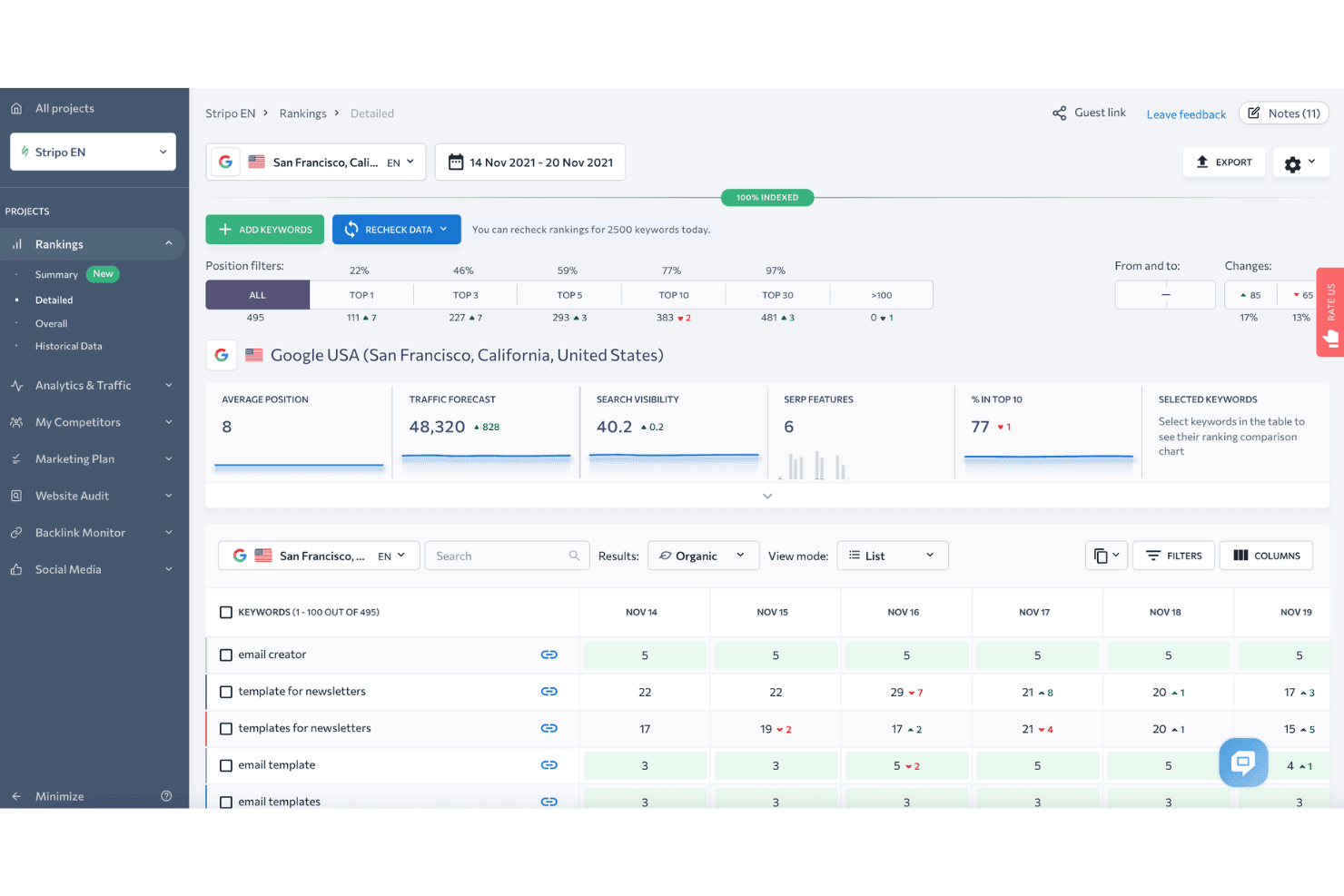
SE Ranking zeigt ein detailliertes Dashboard für Keyword-Rankings mit Positionsfiltern, Traffic-Prognose und täglichen Rankingänderungen für überwachte Keywords an. SE Ranking ist eine cloudbasierte SEO-Plattform, die Funktionen wie Rank Tracking, Website-Audit, Keyword-Recherche, Backlink-Analyse, Wettbewerbsanalyse, White-Label-Reporting und KI-gestütztes Monitoring der Suchsichtbarkeit über mehrere Kundenprojekte hinweg abdeckt.
Für wen ist SE Ranking am besten geeignet?
SE Ranking eignet sich hervorragend für kleine bis mittelgroße Agenturen, die ein vollständiges SEO-Toolset für mehrere Kundenkonten benötigen, ohne Preise auf Enterprise-Niveau zahlen zu müssen.
Warum ich SE Ranking ausgewählt habe
SE Ranking hat es auf meine Auswahlliste geschafft, weil das Automatisierungs-Ökosystem sehr gut mit den tatsächlichen Arbeitsabläufen von Agenturen vernetzt ist. Ich verwende den verifizierten n8n-Node und den Make.com-Connector, um Benachrichtigungen zum Rank Tracking auszulösen und Daten direkt in Kundendashboards zu übertragen, ohne manuelle Exporte. Der MCP-Server geht noch weiter, indem er Live-Daten aus SE Ranking an Claude oder ChatGPT überträgt, sodass ich Analysen erstellen kann, ohne das Tool wechseln zu müssen.
SE Ranking Hauptfunktionen
- White-Label-Reporting: Erstellung von individuell anpassbaren, gebrandeten Berichten, auf die Kunden über ein eigenes Portal zugreifen können.
- Keyword-Grouper: Automatisches Clustern großer Keyword-Listen nach Thema und Suchintention für skalierte Recherchen.
- Lokaler Rank Tracker: Überwachung von Rankings in bestimmten Städten oder Regionen und Verwaltung von Google Unternehmensprofil-Daten.
- Backlink-Monitoring: Nachverfolgung neuer und verlorener Backlinks über Domains hinweg mit historischen Daten und Authority-Metriken.
SE Ranking-Integrationen
SE Ranking bietet native Integrationen mit Google Analytics 4, Google Search Console, Google Ads, Matomo Analytics, Looker Studio, Whatagraph, AgencyAnalytics und Reportz. Es verbindet sich mit Zapier, Make.com, n8n und stellt eine API für individuelle Integrationen bereit.
Pros and Cons
Pros:
- Zuverlässiges tägliches Rank Tracking über Regionen hinweg
- White-Label-Kundenportale und Gastzugänge
- Agency Pack mit Manager- und Kunden-Zugängen
Cons:
- Backlink-Datenbank kleiner als bei Wettbewerbern
- Eingeschränktes Site Audit für JavaScript-gerenderte Seiten
Learn more about SE Ranking: Beste Unterstützung für die Verwaltung von lokalem SEO im großen Maßstab
- 14-tägige kostenlose Testphase + kostenlose Demo
- Ab $31/Monat (jährliche Abrechnung)
Visit WebsiteCustomer Rating:4.7/5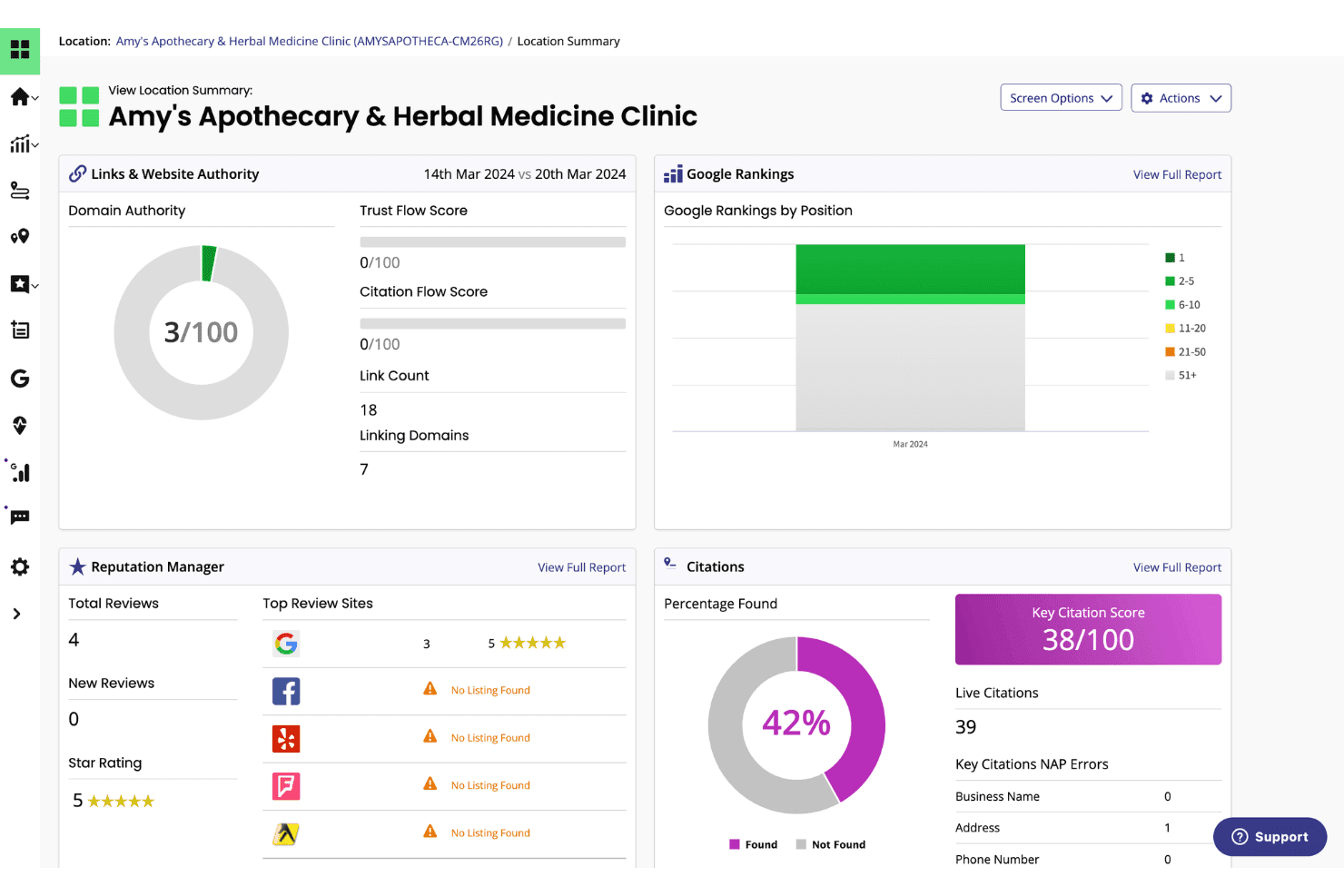
BrightLocal zeigt ein Standort-Übersichts-Dashboard mit Google-Rankings, Eintrags-Bewertungen, Domain Authority und Reputationsmetriken für ein lokales Unternehmen an. BrightLocal ist eine lokale SEO-Plattform, die für Agenturen und Unternehmen mit mehreren Standorten entwickelt wurde. Sie vereint lokales Ranking-Tracking, Verwaltung von Firmeneinträgen, Google Business Profile-Audits und Überwachungen von Bewertungen in einem Dashboard.
Für wen ist BrightLocal am besten geeignet?
Agenturen und White-Label-SEO-Anbieter, die lokale Suchkampagnen für stationäre Unternehmen oder Dienstleistungsunternehmen verwalten, profitieren am meisten von BrightLocal.
Warum ich mich für BrightLocal entschieden habe
BrightLocal verdient seinen Platz auf meiner Auswahlliste aufgrund der hervorragenden Verwaltung des lokalen Ranking-Trackings über das gesamte Kundenportfolio hinweg. Ich finde das Local Search Grid besonders gelungen, da es die Google-Rankings über ein geografisches Gebiet auf einem visuellen Geo-Raster abbildet, sodass ich sofort erkennen kann, wo ein Kunde dominiert und wo die Abdeckung nachlässt. Jeder Kunde erhält zudem einen eigenen externen White-Label-Dashboard-Login, sodass ich die automatisierte Berichterstattung einmal einrichten und die Kunden ihre Leistung selbst verfolgen lassen kann.
Wichtige Funktionen von BrightLocal
- Citation Tracker: Prüft und überwacht Unternehmenseinträge auf Richtigkeit und identifiziert neue Eintragsmöglichkeiten in führenden Verzeichnissen.
- GBP Audit: Vergleicht das Google Business Profile eines Kunden mit lokalen Mitbewerbern und liefert umsetzbare Empfehlungen zur Optimierung.
- Active Sync: Hält Geschäftsinformationen automatisch in allen wichtigen lokalen Datenquellen und Verzeichnissen konsistent.
- Showcase-Bewertungs-Widget: Ermöglicht es, Kundenbewertungen direkt auf der eigenen Webseite zu veröffentlichen, um soziale Glaubwürdigkeit und Vertrauen zu stärken.
BrightLocal-Integrationen
BrightLocal bietet native Integrationen mit Google Business Profile, Google Analytics 4, Facebook und Zapier. Für kundenspezifische Integrationen steht eine API zur Verfügung.
Pros and Cons
Pros:
- Lokales Ranking-Tracking mit Geo-Raster-Visualisierung
- White-Label-Dashboards für unbegrenzt viele Kunden
- Automatisiertes Eintragsmanagement und -überwachung
Cons:
- Keine Backlink-Analyse oder toxische Linkprüfung
- Begrenzte technische Site-Audit-Funktionen
Learn more about BrightLocal: Beste Abdeckung von SEO- und KI-Sichtbarkeitsdaten
- Kostenloser Tarif + kostenlose Demo
- Ab $29/Monat
Visit WebsiteCustomer Rating:4.6/5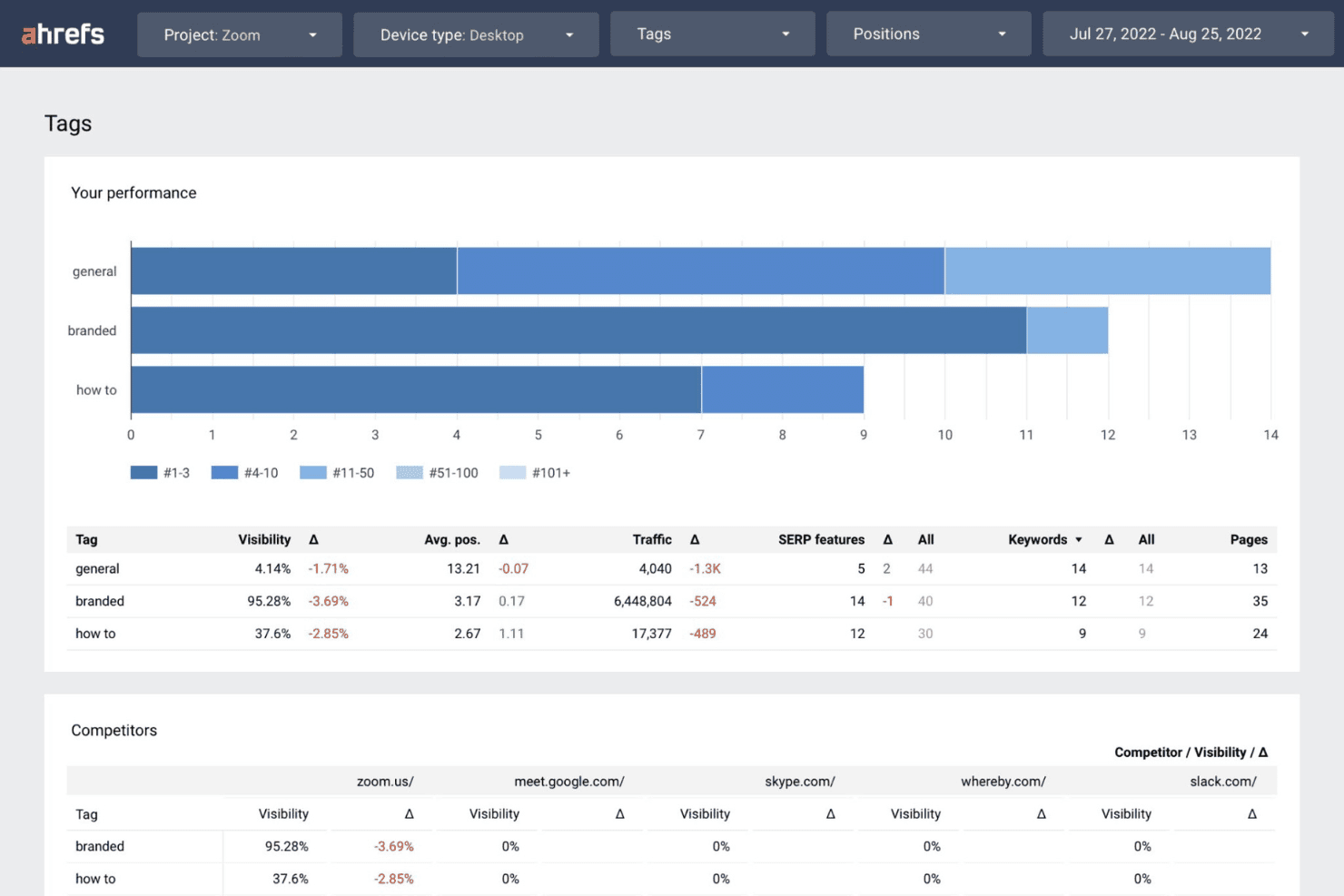
Ahrefs zeigt ein Dashboard zur Performance von Tags an, das Sichtbarkeit, Traffic und Keyword-Daten nach den Kategorien Marke, Allgemein und Anleitungen segmentiert sowie Wettbewerbsvergleiche ermöglicht. Ahrefs ist eine umfassende SEO-Plattform, die auf einem der größten Backlink-Indizes der Branche basiert. Sie bietet Keyword-Recherche, Ranking-Tracking, Website-Audits und Wettbewerbsanalysen für mehrere Kundenkonten.
Für wen ist Ahrefs am besten geeignet?
Ahrefs eignet sich besonders für SEO-Leiter und Account-Manager in Agenturen, die bei Wettbewerbsanalysen, Linkaufbau und Keyword-Tracking für mehrere Kunden Wert auf umfangreiche Daten legen.
Warum ich Ahrefs ausgewählt habe
Ich habe Ahrefs als eines der besten Tools ausgewählt, weil es sowohl traditionelle als auch KI-Sichtbarkeitsdaten abdeckt wie kein anderer Wettbewerber. Der Brand Radar verfolgt Marken-Erwähnungen und Zitate von Kunden über LLMs wie ChatGPT, Claude und Gemini, und mit Custom Prompts kann ich gezielt überwachen, in welchen KI-Antworten ein Kunde auftaucht. Besonders hilfreich ist der Klickdaten-Filter im Keywords Explorer, mit dem ich hochvolumige Keywords aussortieren kann, die tatsächlich keinen Traffic generieren – das hält die Content-Strategien der Kunden an echtem Suchverhalten ausgerichtet.
Ahrefs Hauptfunktionen
- Site Explorer: Detaillierte Analyse von Backlink-Profilen von Wettbewerbern, organischem Traffic und bezahlten Keywords.
- Site Audit: Skalierbare technische SEO-Crawls, um Onpage-Fehler und Probleme mit der Website-Gesundheit aufzudecken.
- Rank Tracker: Überwachung von Keyword-Rankings über verschiedene Geräte, Standorte und Suchmaschinen hinweg.
- Report Builder: Erstellung individueller Dashboards und automatisierter, kundenfertiger SEO-Reports.
Ahrefs Integrationen
Ahrefs bietet native Integrationen mit Google Search Console und Looker Studio, unterstützt MCP Server für KI-Assistenten wie ChatGPT und Claude und stellt eine API für individuelle Integrationen bereit.
Pros and Cons
Pros:
- Größter und aktuellster Backlink-Index verfügbar
- KI-Sichtbarkeitstracking für Suchmaschinen
- Fortschrittliche Tools für Wettbewerbs- und SERP-Analysen
Cons:
- Kein nativer Kundenlogin oder -portal
- White-Label-Reporting-Optionen sind begrenzt
 Beste All-in-One-Lösung für Wettbewerbs- und Keyword-Analyse
- 7-tägige kostenlose Testphase + kostenlose Demo
- Ab $50/Monat (jährliche Abrechnung)
Visit WebsiteCustomer Rating:4.6/5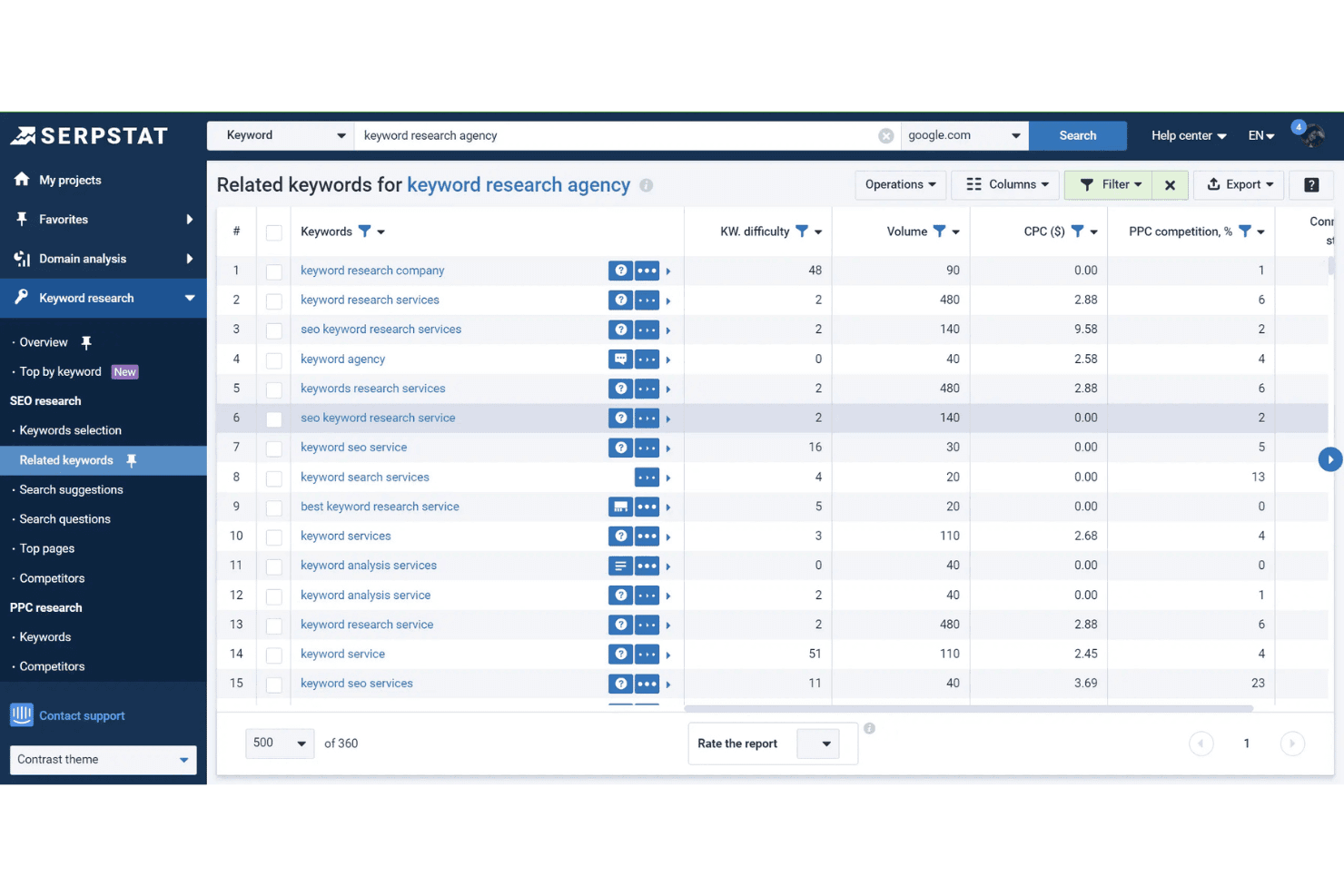
Das Tool ‘Verwandte Keywords’ von Serpstat zeigt Schwierigkeitsgrad, Suchvolumen, CPC und PPC-Wettbewerbsdaten für ‘keyword research agency’ an. Serpstat ist eine Suchmarketing-Plattform, die Keyword-Recherche, Konkurrenzanalyse, Rank-Tracking, Website-Audits und Backlink-Analysen in über 230 Ländern und für mehrere Kundenprojekte vereint.
Für wen ist Serpstat am besten geeignet?
Serpstat ist besonders geeignet für kleine bis mittelgroße Digitalagenturen, die eine erschwingliche All-in-One-SEO-Plattform zur Verwaltung mehrerer Kundenkonten benötigen.
Warum ich Serpstat ausgewählt habe
Serpstat hat es auf meine Auswahlliste geschafft, weil das Konkurrenzanalyse-Modul besonders tiefgehend für Agentur-Anwendungsfälle arbeitet. Ich kann die Top-Seiten eines Mitbewerbers, dessen vollständigen Keyword-Satz und den Traffic-Anteil in einer einzigen Ansicht einsehen, was Lückenanalysen für Kunden vor Strategiegesprächen enorm beschleunigt. Das Keyword-Clustering-Tool ist ebenfalls wirklich hilfreich: Ich kann Tausende von Roh-Keywords automatisch gruppieren, was die Content-Planung für Kunden mit komplexen oder umfangreichen Website-Strukturen deutlich beschleunigt.
Serpstat Hauptfunktionen
- Rank Tracker: Überwachen Sie Keyword-Positionen in 230 Ländern für Desktop und Mobilgeräte.
- Site Audit: Scannen Sie Websites auf technische SEO-Probleme mit anpassbaren Audit-Zeitplänen.
- API-Zugriff: Ziehen Sie Suchanalysen und Audit-Daten direkt in individuelle Arbeitsabläufe.
- Batch-Analyse: Analysieren Sie bis zu 100.000 Domains oder Keywords gleichzeitig für Sammelüberprüfungen.
Serpstat Integrationen
Serpstat bietet native Integrationen mit Google Sheets, Google Search Console, Reportz, Stackby, Oviond, Datorama, SEOtools für Excel und Looker Studio. Browser-Erweiterungen sind für Chrome, Firefox, Edge und Opera verfügbar, außerdem gibt es API-Zugriff für individuelle Integrationen.
Pros and Cons
Pros:
- Konkurrenzanalyse für globale und lokale Märkte
- Gruppiert umfangreiche Keyword-Listen
- Automatisches Keyword-Clustering für große Datensätze
Cons:
- Backlink-Daten weniger umfassend als bei Ahrefs
- White-Label-Reporting nur im Top-Tarif verfügbar
 Beste umsetzbare Erkenntnisse mit KI-gestützten Tools
- 7-tägige kostenlose Testversion
- Ab $49/Monat
Visit WebsiteCustomer Rating:4.5/5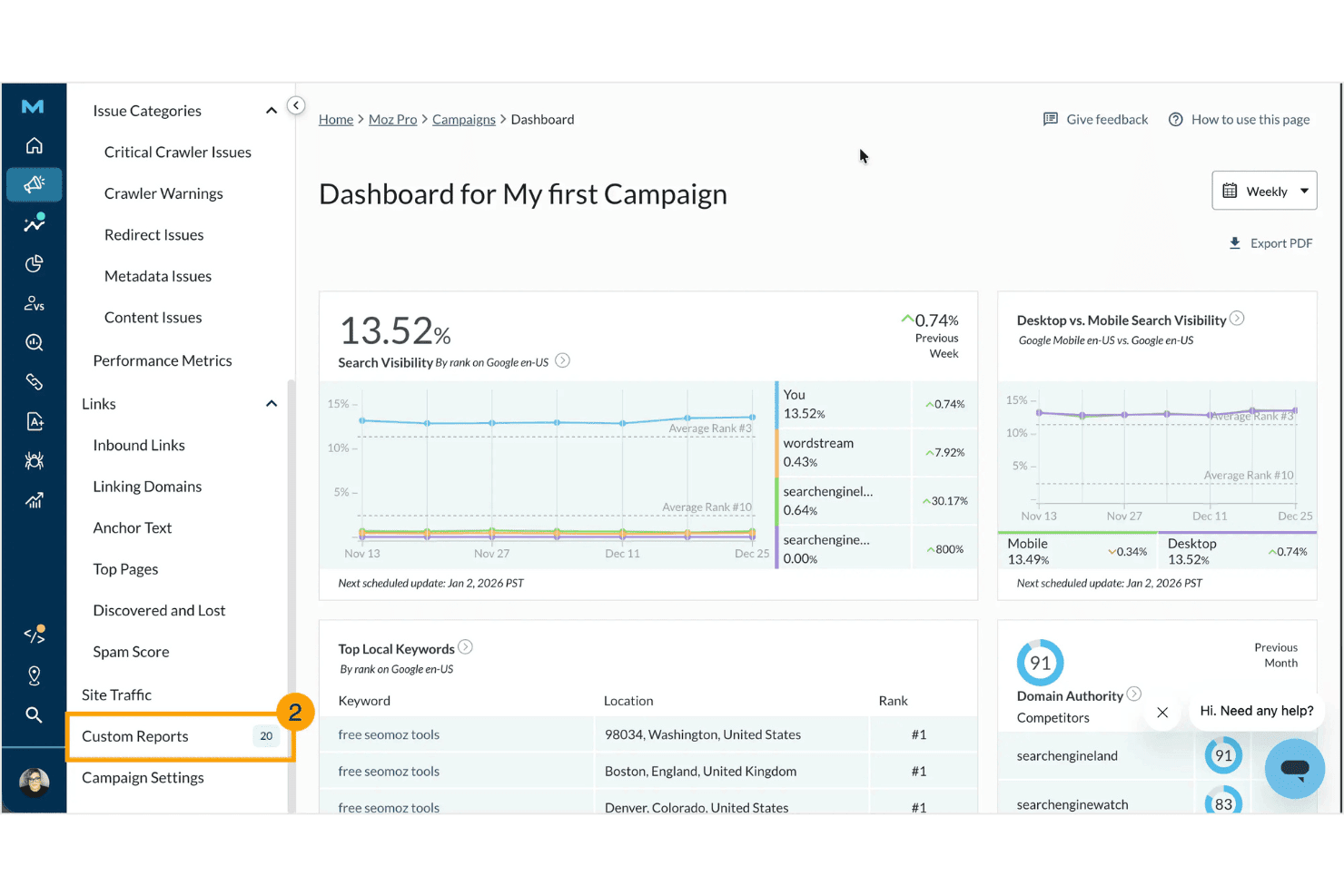
Moz Pro zeigt ein Kampagnen-Dashboard mit Suchsichtbarkeitsmetriken, Top-Keywords auf lokaler Ebene, Domain Authority-Werten und Wettbewerbsvergleichen. Moz Pro ist eine SEO-Plattform, die sich auf Keyword-Recherche, Ranking-Überwachung, Website-Audits, Backlink-Analyse und White-Label-Reporting konzentriert. Zusätzlich gibt es KI-gestützte Tools, mit denen die Markenpräsenz in generativen Suchmaschinen überwacht werden kann.
Für wen eignet sich Moz Pro am besten?
Moz Pro ist besonders geeignet für kleine bis mittlere Digitalmarketing-Agenturen, die zuverlässige Kundenberichte, bewährte Authority-Metriken und eine benutzerfreundliche Oberfläche für ihre SEO-Teams benötigen.
Warum habe ich Moz Pro gewählt?
Moz Pro verdient seinen Platz auf meiner Auswahlliste, weil es seine lang etablierten Authority-Metriken mit wirklich nützlichen KI-Tools verbindet. Besonders gefällt mir das AI Prompt Tracking-Feature, das zeigt, wie oft die Marke eines Kunden in ChatGPT-, Gemini- und Google AI Mode-Antworten erscheint. Die KI-Content-Briefs bieten zusätzlich wertvolle Unterstützung, indem sie Keyword-Daten in strukturierte, umsetzbare Content-Empfehlungen für Copywriter umwandeln.
Wichtigste Funktionen von Moz Pro
- Individuell gebrandete Berichte: Erstellen Sie White-Label-SEO-Berichte für Agenturen mit Drag-and-drop-Anpassung.
- Kampagnenbasiertes Kundenmanagement: Verwalten Sie mehrere Kundenseiten und Projekte innerhalb separater Kampagnen auf einem Dashboard.
- Umfassender Website-Crawl: Prüfen Sie komplette Websites auf technische SEO-Probleme und Optimierungspotenziale.
- Backlink-Profilanalyse: Erhalten Sie detaillierte Linkdaten für Kunden und Wettbewerber, einschließlich neuer und verlorener Backlinks.
Moz Pro Integrationen
Moz Pro bietet native Integrationen mit Google Analytics, Google Search Console, HubSpot und Looker Studio. Eine API ist für individuelle Integrationen verfügbar.
Pros and Cons
Pros:
- KI Prompt Tracking für generative Suche
- Vertrauenswürdige Domain Authority- und Spam Score-Metriken
- White-Label-SEO- und Kunden-Audit-Berichte
Cons:
- Backlink-Daten hinken größeren Wettbewerbern hinterher
- Kein direkter Zugang zum Kundenportal
Learn more about Moz Pro: Beste White-Label-Widgets zur Leadgenerierung
- 14-tägige kostenlose Testversion
- Ab $99/Monat (jährlich abgerechnet)
Visit WebsiteCustomer Rating:4.8/5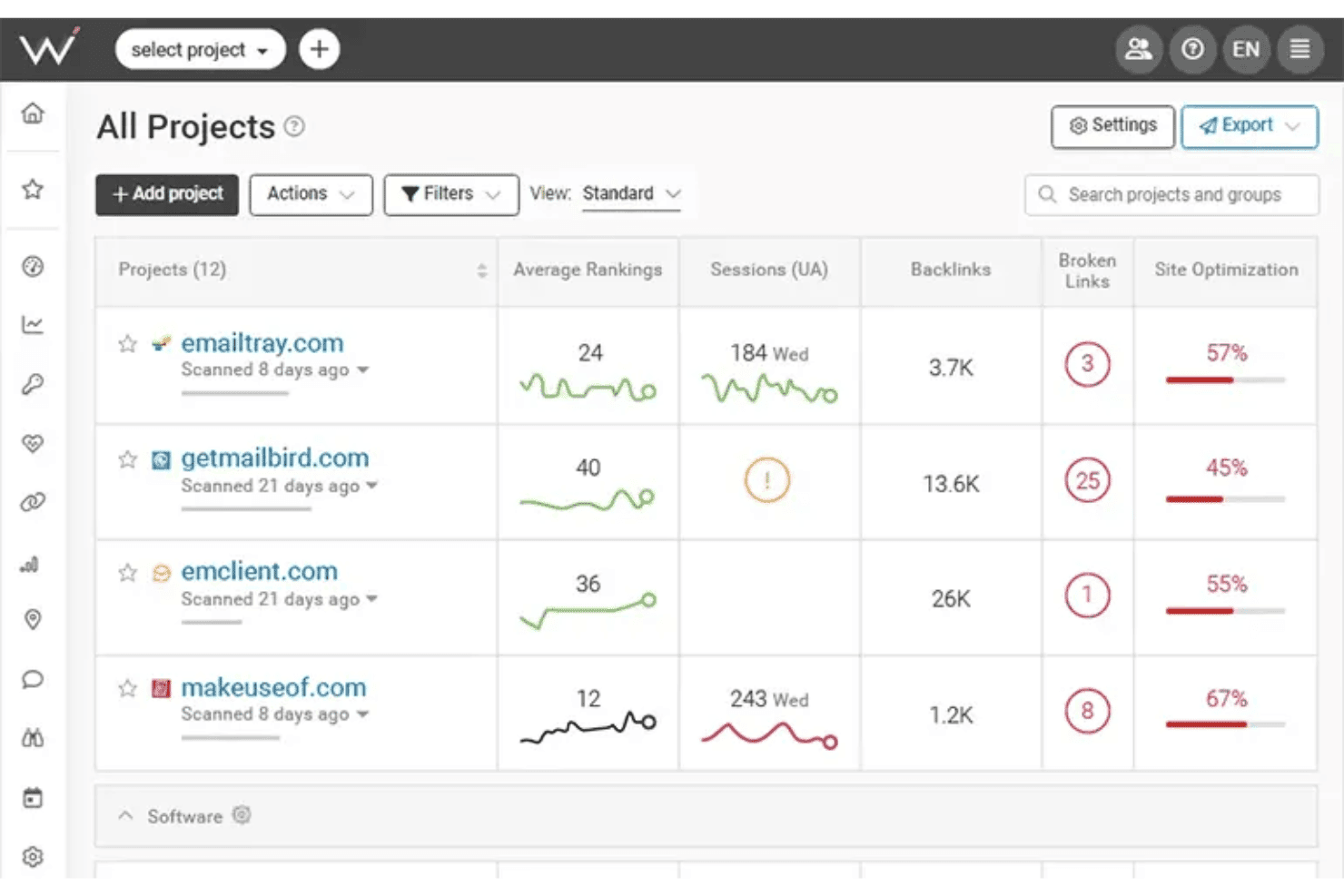
WebCEO zeigt ein Dashboard 'Alle Projekte' an, auf dem Benutzer durchschnittliche Rankings, Sitzungen, Backlinks, defekte Links und Website-Optimierungsscores über mehrere Websites hinweg überwachen können. WebCEO ist eine cloudbasierte SEO-Plattform für Agenturen, die Rank-Tracking, Website-Audits, Backlink-Analyse, Keyword-Recherche, Wettbewerbsanalyse und White-Label-Reporting für unbegrenzte Kundenprojekte in einem einzigen Dashboard abdeckt.
Für wen ist WebCEO am besten geeignet?
WebCEO ist ideal für Digitalagenturen, die mehrere Kundenkonten verwalten und markeneigene SEO-Dienstleistungen unter ihrer eigenen Domain anbieten möchten.
Warum ich WebCEO ausgewählt habe
WebCEO hat es auf meine Auswahlliste geschafft, da das White-Label-Leadgen-Widget im SEO-Toolmarkt tatsächlich selten ist. Ich binde einen anpassbaren Audit-Button auf einer kundenseitigen Seite ein, und wenn ein Interessent einen Scan durchführt, erhalte ich einen gebrandeten SEO-Bericht unter der Domain meiner Agentur. Zusätzlich ermöglicht das vollständige White-Label-Dashboard, dass ich WebCEO-Tools auf meiner eigenen benutzerdefinierten Domain mit rollenbasierten Kunden-Logins und automatischer, geplanter Berichtsübermittlung betreiben kann.
WebCEO Hauptfunktionen
- Umfassendes Rank-Tracking: Tägliche Überwachung der Keyword-Rankings über mehrere Suchmaschinen, Standorte und Geräte hinweg.
- Team-Kollaborations-Tools: Aufgaben zuweisen, Benutzerrollen verwalten und Teamerfolge im einheitlichen Dashboard kontrollieren.
- Wettbewerber-SEO-Analyse: Analyse von Backlinks, Content-Strategien und Keywords der Konkurrenz für verwertbare Erkenntnisse.
- Automatisierte technische Seiten-Audits: Komplette Websites crawlen, um Onpage-Fehler, Mobilprobleme und Core Web Vitals-Daten zu erkennen.
WebCEO Integrationen
WebCEO bietet native Integrationen mit Google Analytics, Google Ads, Google Search Console, Facebook und LinkedIn. Eine API steht für benutzerdefinierte Integrationen zur Verfügung.
Pros and Cons
Pros:
- White-Label-Widget für Lead-Erfassung verfügbar
- Erkennt mobile Performance-Probleme
- Planbare, automatisierte Übermittlung gebrandeter SEO-Berichte
Cons:
- Zusätzliche Kosten pro Scan bei Agentur-Paketen
- Keine Desktop-Softwareversion verfügbar
Learn more about WebCEO: Automatisiertes Kundenreporting für große Teams
- 14-tägige kostenlose Testversion + kostenlose Demo
- Ab $20/Kunde/Monat (jährliche Abrechnung)
Visit WebsiteCustomer Rating:4.7/5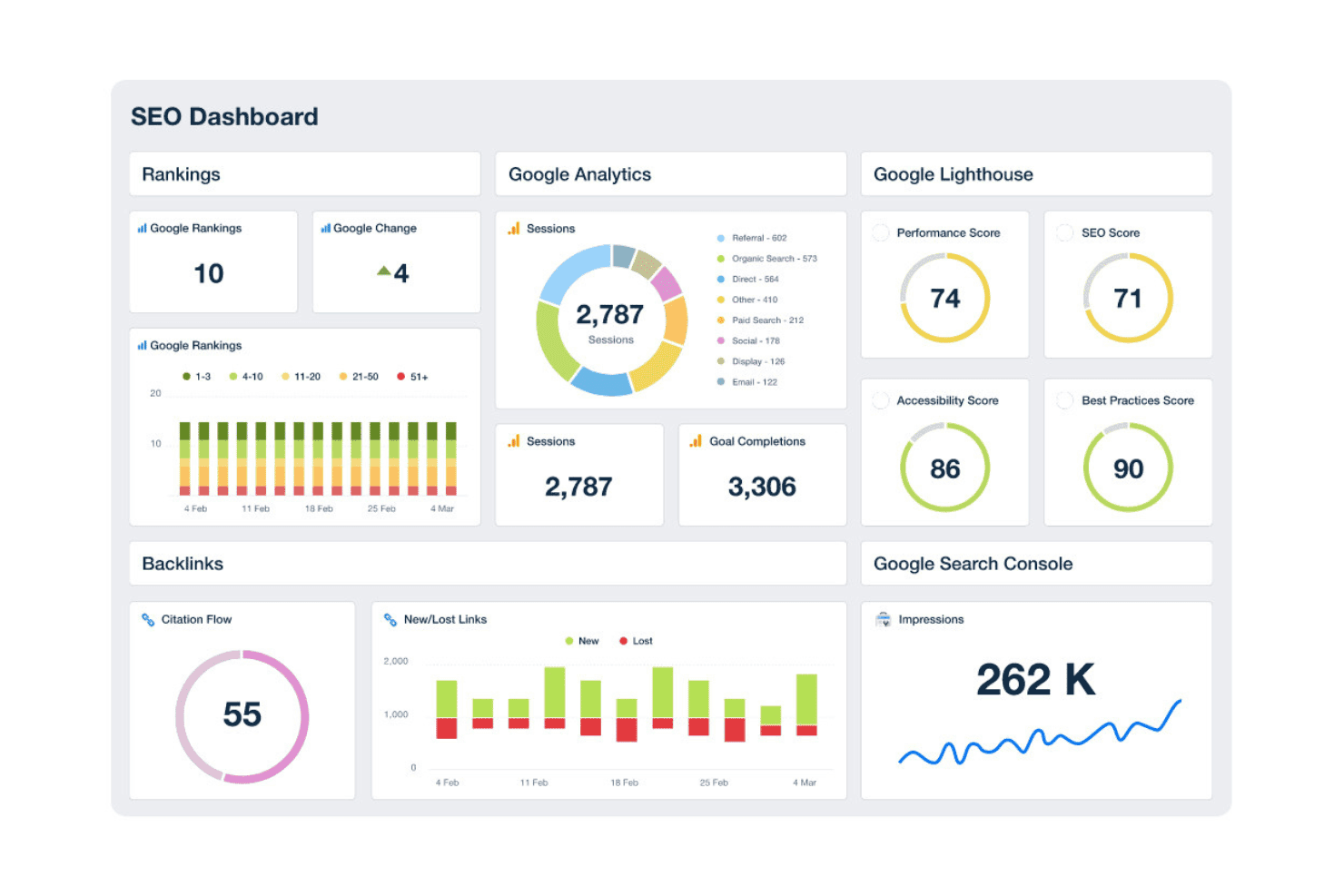
AgencyAnalytics bietet ein umfassendes SEO-Dashboard, das Rankings, Google Analytics-Sitzungen, Lighthouse-Scores, Backlinks und Suchkonsolen-Impressionen in einer einheitlichen Ansicht anzeigt. AgencyAnalytics ist eine White-Label-Reporting- und SEO-Überwachungsplattform, die speziell für Digitalmarketing-Agenturen entwickelt wurde. Sie kombiniert automatisierte Kundendashboards, Ranking-Tracking, Site-Audits und Backlink-Überwachung über mehrere Kundenkonten hinweg.
Für wen ist AgencyAnalytics am besten geeignet?
AgencyAnalytics ist die ideale Lösung für kleine bis mittelgroße Digitalmarketing-Agenturen, die mehrere Kundenkonten verwalten und White-Label-Reporting benötigen, ohne eigene Dashboards programmieren zu müssen.
Warum ich AgencyAnalytics ausgewählt habe
Ich habe AgencyAnalytics in meine Top-Auswahl aufgenommen, weil kein anderes Tool in diesem Bereich die automatisierte Berichtserstellung im großen Stil so gut umsetzt. Ich kann einmal eine gebrandete Berichtsvorlage erstellen, sie auf mehr als 20 Kundenkonten anwenden und die Zustellung automatisiert jeden Monat planen – ganz ohne weiteren Aufwand. Das White-Label-Kundenportal, die Einrichtung einer eigenen Domain sowie der Drag-and-Drop-Berichtseditor sorgen dafür, dass Kunden professionelle, agenturgebrandete Dashboards unter einer eigenen URL erhalten und nicht auf einer generischen Subdomain eines Drittanbieters.
Wichtige Funktionen von AgencyAnalytics
- KI-Einblicke und Anomalie-Erkennung: Setzt maschinelles Lernen ein, um Trends, Auffälligkeiten und neue Chancen in Leistungsdaten hervorzuheben.
- Backlink-Überwachung: Verfolgt neue und verlorene Backlinks aus integrierten Quellen für jedes Kundenkonto.
- Integrationsbibliothek: Verbindet sich mit über 80 Marketing-, SEO- und Paid-Media-Plattformen für zentrales Reporting.
- Site-Audit-Tool: Durchsucht automatisch Kundenseiten, um technische SEO-Probleme und Onpage-Empfehlungen aufzuzeigen.
AgencyAnalytics-Integrationen
AgencyAnalytics bietet mehr als 85 native Integrationen, darunter Google Analytics, Google Search Console, Ahrefs, Semrush, Moz, Facebook Ads, Google Ads, Shopify, HubSpot, Mailchimp und CallRail. Für individuelle Integrationen steht eine API zur Verfügung.
Pros and Cons
Pros:
- Automatisiertes White-Label-Reporting für alle Kunden
- Anpassbare Dashboard-Layouts verfügbar
- Individuelle Portalfreigaben für jeden Kunden
Cons:
- Keyword-Recherche-Funktionen erfordern Drittanbieter-Tools
- Site-Audits haben begrenzte technische Tiefe
Learn more about AgencyAnalytics: Beste Wettbewerbsdaten für digitale Sichtbarkeit
- Kostenloser Plan + 7-tägige kostenlose Testphase + kostenlose Demo
- Ab $117.33/Monat (jährliche Abrechnung)
Visit WebsiteCustomer Rating:4.5/5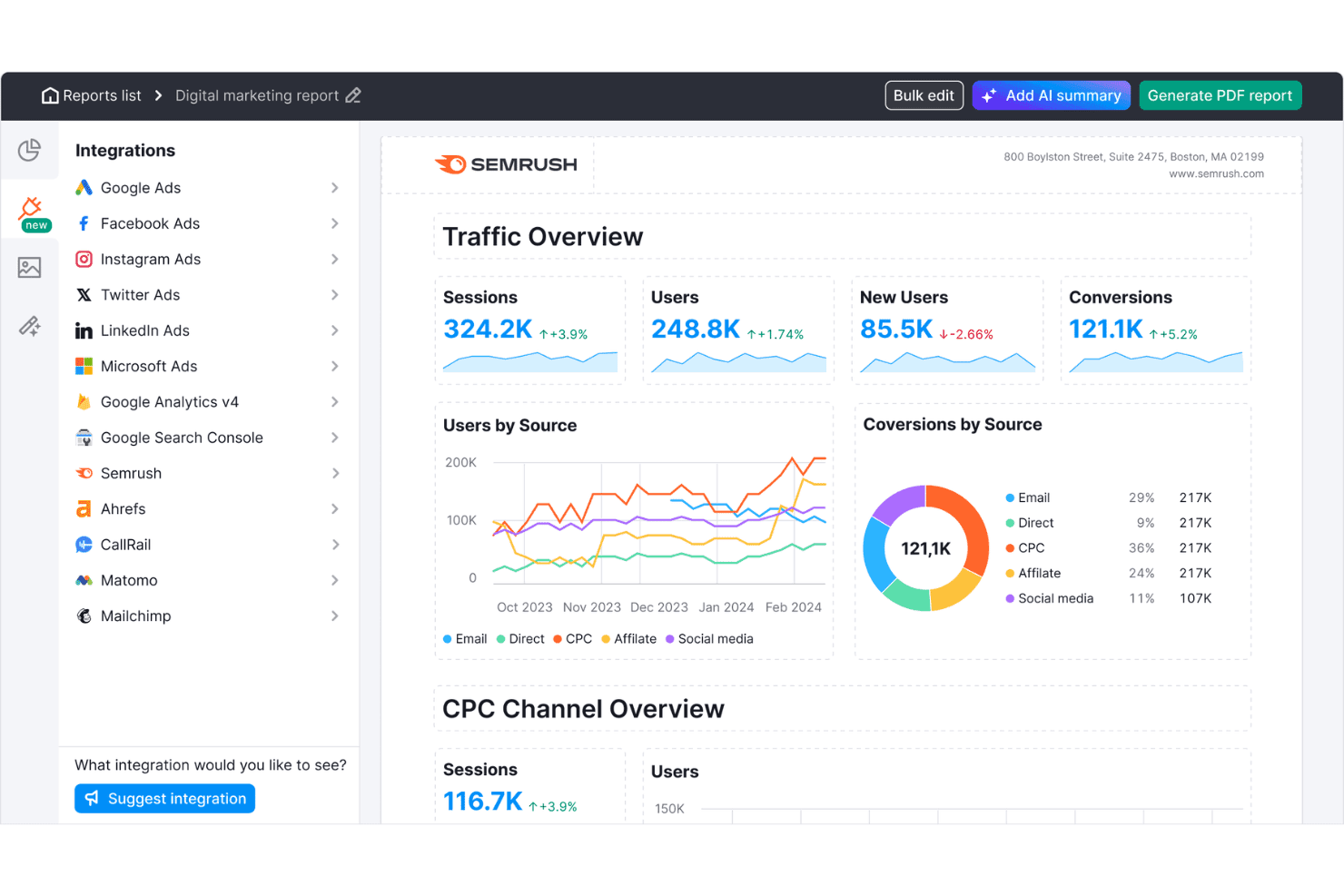
Semrush bietet ein Dashboard für digitale Marketingberichte mit Traffic-Übersicht, Nutzern nach Quelle, Conversions nach Quelle und CPC-Kanalmetriken. Semrush ist eine Online-Sichtbarkeitsplattform, die Agenturen Keyword-Recherche, Ranking-Überwachung, Website-Audits, Backlink-Analyse, Wettbewerber-Intelligenz und White-Label-Berichterstattungen für dutzende Kundenkonten von einem einzigen Dashboard aus bietet.
Für wen ist Semrush am besten geeignet?
Semrush eignet sich besonders für mittelgroße bis große Digitalagenturen, die SEO-Kampagnen für eine hohe Anzahl an Kunden gleichzeitig managen.
Warum ich Semrush ausgewählt habe
Ich habe Semrush als eines der besten Tools ausgewählt, weil seine Wettbewerbsdaten auf Agentur-Niveau unübertroffen sind. Mit dem Keyword Gap Tool kann ich bis zu fünf Wettbewerber-Domains nebeneinanderstellen, um Keywords zu finden, für die diese ranken, meine Kunden aber nicht. Das Backlink Gap Tool funktioniert genauso für Linkbuilding-Möglichkeiten. Mit einer Datenbank von 28 Milliarden Keywords in 142 geografischen Datenbanken kann ich diese Analysen für jede Kundenbranche durchführen, ohne Abdeckungsprobleme zu haben.
Semrush Hauptfunktionen
- Site Audit Tool: Scannt Kundenwebsites auf technische SEO-Probleme, doppelte Inhalte, defekte Links und Probleme bei der Crawlbarkeit.
- Positionsüberwachung: Überwacht tägliche Keyword-Rankings über mehrere Suchmaschinen, Standorte und Geräte für jedes Kundenprojekt.
- Client Manager Dashboard: Organisiert alle Kundenkonten, Projekte und Kampagnenlieferungen in einem einheitlichen Arbeitsbereich mit rollenbasierten Berechtigungen.
- White-Label-Berichterstattung: Erstellt gebrandete SEO- und Marketingberichte nach festem Zeitplan zur einfachen Auslieferung und Präsentation an Kunden.
Semrush Integrationen
Semrush bietet native Integrationen mit Google Analytics, Google Search Console, Google Sheets, Looker Studio, Facebook, Pinterest, LinkedIn, Instagram, YouTube, All in One SEO, monday.com und Zoho Analytics. Eine API ist für individuelle Integrationen verfügbar.
Pros and Cons
Pros:
- Wettbewerbsanalyse für Keyword- und Backlink-Lücken
- Große geospezifische Keyword- und Linkdatenbanken
- Site Audit mit Core Web Vitals-Check
Cons:
- White-Label-Berichte erfordern kostenpflichtiges Add-on
- Begrenzungen bei getrackten Keywords und Domains
 Beste anpassbare SEO-Marketingberichte
- 7-tägige kostenlose Testversion
- Ab $39/Monat (jährlich abgerechnet)
Visit WebsiteCustomer Rating:4.4/5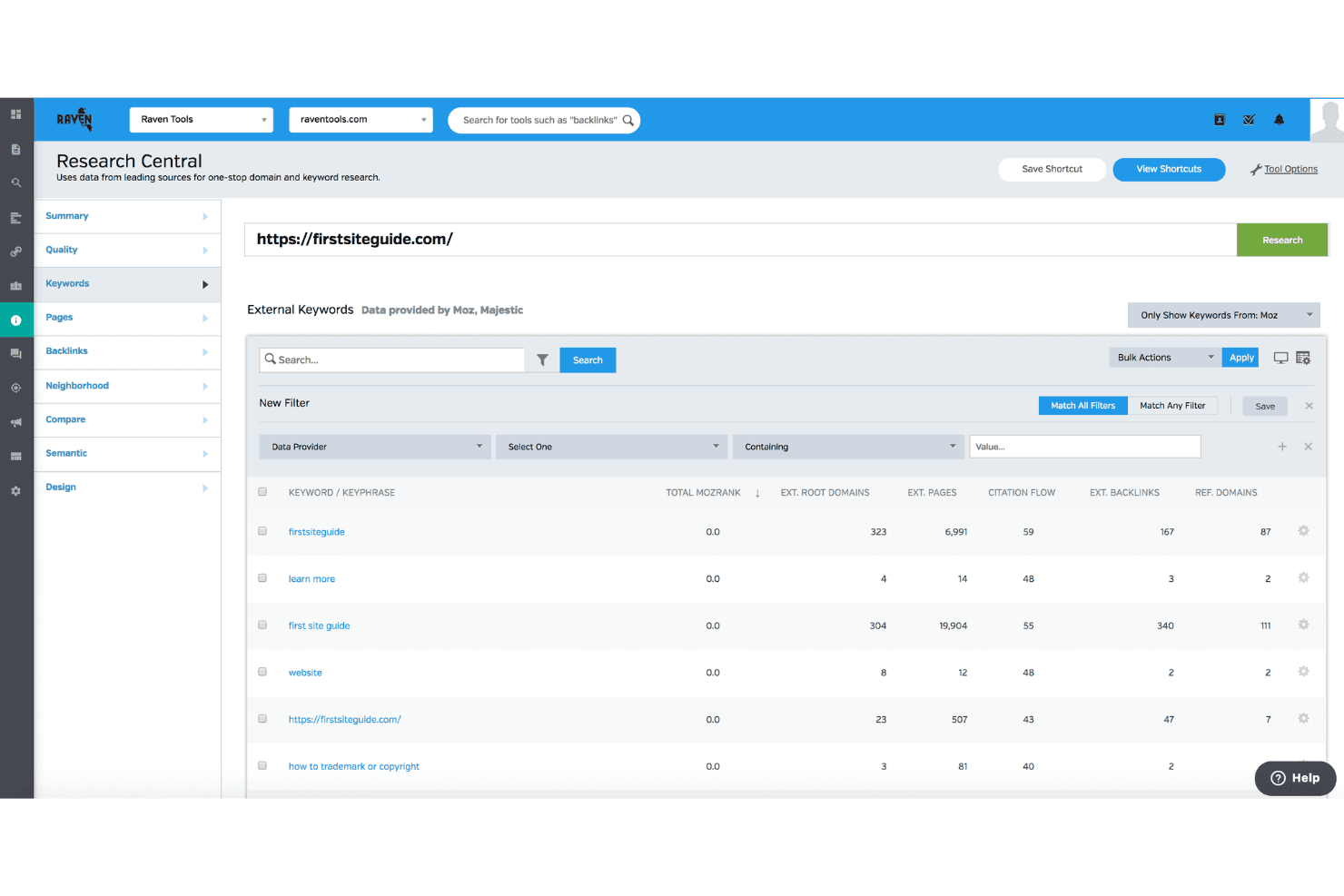
Raven Tools bietet eine Funktion namens Research Central, die externe Keyword-Daten wie MozRank, Citation Flow und Backlink-Metriken für jede Domain anzeigt. Raven Tools ist eine auf Agenturen ausgerichtete SEO-Plattform, die sich auf White-Label-Berichte für Kunden konzentriert. Sie bietet Rank-Tracking über mehrere Suchmaschinen hinweg, Website-Audits, Backlink-Analysen mit Daten von Majestic und Moz sowie Keyword-Recherche.
Für wen ist Raven Tools am besten geeignet?
Raven Tools eignet sich besonders für kleine bis mittelgroße Digitalagenturen, die mehrere Kundenkonten betreuen und Wert auf gebrandete, automatisierte Berichte legen.
Warum ich Raven Tools ausgewählt habe
Raven Tools hat es auf meine Auswahlliste geschafft, weil der Report Builder außergewöhnlich leistungsfähig ist. Ich kann Daten aus über 20 Quellen und 30+ vorgefertigten Modulen kombinieren, um einen einheitlichen gebrandeten Bericht zu erstellen, der Rank-Tracking, Backlink-Wachstum und Google Analytics Daten nebeneinander präsentiert. Das Hosting auf einer eigenen Domain und die individuelle Absenderadresse beim Versand der E-Mail-Berichte sorgen dafür, dass die Kunden die Reports von meiner Agentur erhalten und nicht von Raven – ein wichtiger Aspekt, wenn man Beziehungen über viele Kundenkonten pflegt.
Hauptfunktionen von Raven Tools
- Site Auditor: Durchsucht Webseiten nach technischen SEO-Problemen und erstellt einen Website-Gesundheitswert mit priorisierten Lösungen.
- Rank-Tracking für mehrere Suchmaschinen: Überwacht Keyword-Positionen bei Google, Bing, Yahoo, Yandex und Baidu mit Unterstützung für lokale Zielgruppen.
- Backlink Explorer: Bietet Zugriff auf Backlink-Daten durch die Integration von Majestic und Moz, ohne dass separate Abonnements nötig sind.
- Task Manager: Ermöglicht dem Team, SEO-bezogene Aufgaben direkt innerhalb jeder Kundenkampagne zuzuweisen, zu verwalten und zu verfolgen.
Integrationen von Raven Tools
Raven Tools bietet native Integrationen für Google Analytics, Google Search Console, Google Ads, Bing Webmaster Tools, Facebook Ads, Majestic, Moz, YouTube, LinkedIn, Twitter, MailChimp, Constant Contact und CallRail. Für individuelle Integrationen steht eine API zur Verfügung.
Pros and Cons
Pros:
- Individuell gestaltbares White-Label-Reporting mit E-Mail-Versandplanung
- Unbegrenzte automatische Berichte für mehrere Kunden
- Integrierte Backlink-Daten von Majestic und Moz
Cons:
- Fehlendes historisches Tracking der Keyword-Schwierigkeit
- Keine Keyword-Schwierigkeitsbewertung in den Recherche-Tools
Learn more about Raven Tools: Beste plattformübergreifende Suche und KI-Tracking
- 14-tägige kostenlose Testphase
- Ab $96/Monat (jährliche Abrechnung)
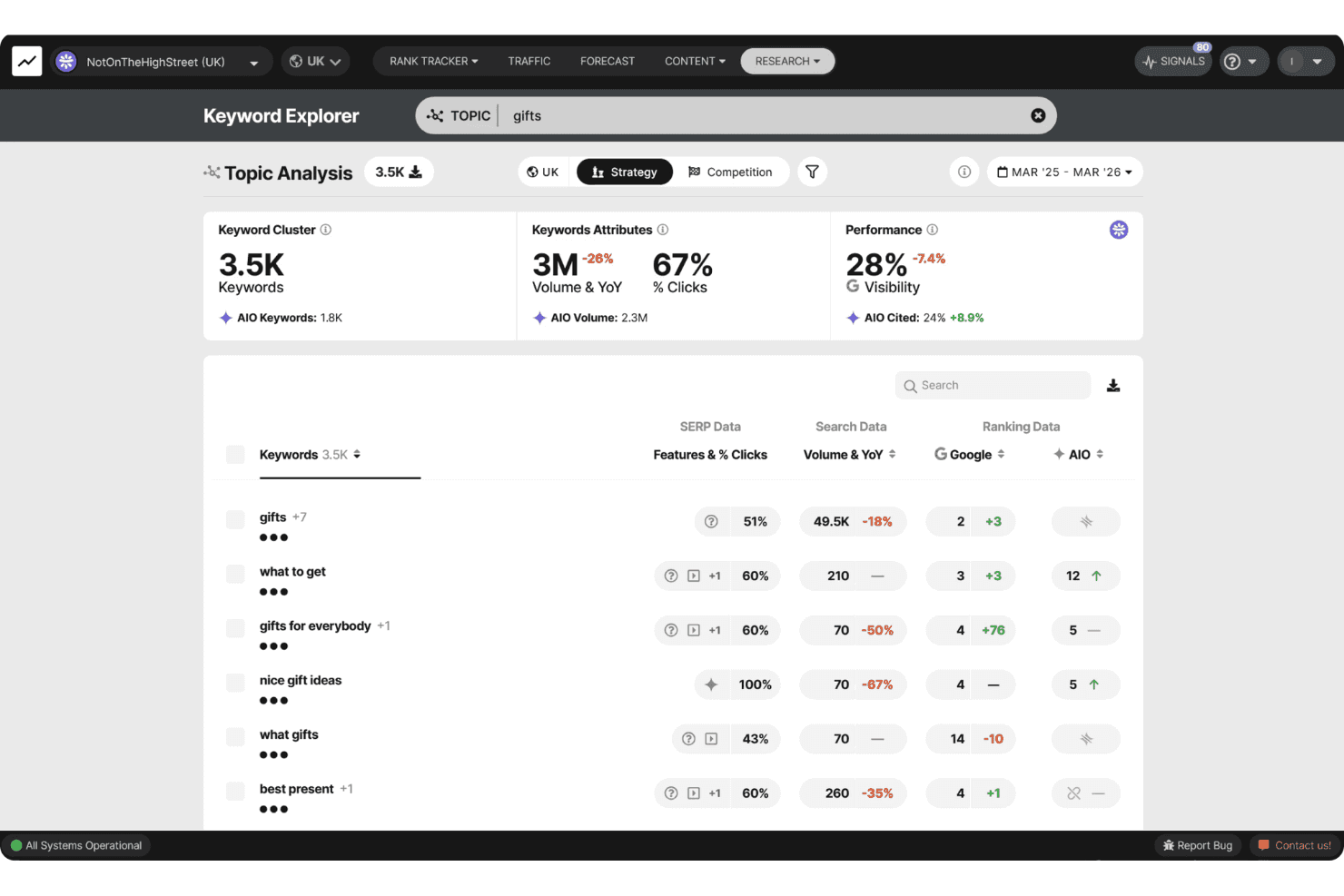
SEOmonitor bietet einen Keyword Explorer mit Themenanalyse, zeigt Keyword-Cluster, Suchvolumen, Sichtbarkeitsmetriken und AIO-Daten zum Thema 'gifts'. SEOmonitor ist eine auf Agenturen ausgerichtete SEO-Plattform, die Keyword-Ranking-Tracking auf Google und KI-Suchmaschinen (ChatGPT, Gemini, Perplexity), Keyword-Recherche, SEO-Prognosen und KI-Content-Erstellung in einem einzigen Arbeitsbereich vereint.
Für wen ist SEOmonitor am besten geeignet?
SEOmonitor eignet sich besonders für SEO-Agenturen, die mehrere Kundenkampagnen verwalten und eine einheitliche Übersicht über sowohl traditionelle Google-Rankings als auch KI-Suchplattformen benötigen.
Warum ich mich für SEOmonitor entschieden habe
SEOmonitor steht auf meiner Auswahlliste, weil es die einzige Plattform ist, die ich kenne, die Google-Rankings und KI-Sichtbarkeit (ChatGPT, Gemini, Perplexity) innerhalb derselben Keyword-Strategie verfolgt. Ich nutze die Funktion 'Draft Campaigns', um Pitch-fertige SEO-Prognosen für potenzielle Kunden zu erstellen, bevor ich auch nur ein einziges Keyword kostenpflichtig tracke. Das kombinierte Google- und KI-Overviews-CTR-Modell zeigt außerdem, wie sich KI-Suchen auf die Klickraten bei den Keywords auswirken, die meinen Kunden am wichtigsten sind.
SEOmonitor Hauptfunktionen
- Agentur-Dashboard: Überwachen Sie die Performance Ihres Portfolios und das Kunden-Monitoring aus einer einzigen Ansicht.
- KI-Content-Writer: Automatisieren Sie Content-Recherche, Planung, Briefings und Artikelerstellung für Kundenkampagnen.
- Keyword Vault: Speichern Sie unbegrenzt viele Keywords mit kontinuierlichen monatlichen Suchvolumen-Updates für laufende Chancen.
- Native Looker Studio-Anbindung: Erstellen Sie visuelle, präsentationsfähige SEO-Reports mit Live-Datenfeeds.
SEOmonitor Integrationen
SEOmonitor bietet native Integrationen mit Google Analytics, Google Search Console, Google Sheets und Looker Studio. Eine API steht für individuelle Integrationen zur Verfügung.
Pros and Cons
Pros:
- Erfasst sowohl Google- als auch KI-Suchergebnisse
- Tägliche Ranking-Updates für alle getrackten Keywords
- Detaillierte Prognosen für Multi-Kunden-Kampagnen
Cons:
- Fokussiert hauptsächlich auf organische Such-Analysen
- Für Link-Tracking sind externe Tools erforderlich
Learn more about SEOmonitor :
Weitere SEO-Tools für Agenturen
Hier finden Sie einige weitere SEO-Tools für Agenturen, die es nicht auf meine Shortlist geschafft haben, aber dennoch einen Blick wert sind:
- 11Screaming FrogBeste umfassende Website-Analyse für technische Audits
- 12SitebulbBeste visuelle Datenlayouts für technische Audits
- 13AccuRankerBeste Echtzeit-Verfolgung der LLM-Leistung
- 14WhatagraphBeste skalierbare kanalübergreifende Datenbasis
- 15DashThisBeste Dashboards für kanalübergreifendes Reporting
- 16SeobilityIdeal für intuitive Optimierungsanleitungen
- 17MorningscoreBeste gamifizierte Aufgaben-Checklisten für die Fortschrittsverfolgung
- 18NightwatchBeste KI- und Such-Attributionsberichte
- 19SEOptimerBester einbettbarer Website-Audit zur Lead-Erfassung
- 20SEO PowerSuiteBestes unbegrenztes Keyword- und Backlink-Tracking
Wie ich SEO-Tools für Agenturen bewerte
Ich teile meine Bewertung in die Kernfunktionen auf, die jede Agentur-Plattform abdecken muss – wie White-Label-Reporting und Multi-Client-Workspaces – sowie in die Alleinstellungsmerkmale, die gute von großartigen Tools unterscheiden.
Kernfunktionen (Grundvoraussetzungen für diese Liste)
Wenn ich Tools für meine Liste auswähle, bewerte ich jedes auf einer Skala von 0 (bietet die Funktion nicht) bis 5 (hervorragend in diesem Bereich) bezüglich jeder unten aufgeführten Kernfunktion. Anschließend berechne ich die Gesamtpunktzahl des Tools als Prozentsatz. Jedes Tool muss eine Mindestgesamtpunktzahl von 65% erreichen, um für die Aufnahme infrage zu kommen.
- Multi-Client-Management: Ich prüfe, ob die Plattform es ermöglicht, separate Kunden-Workspaces mit rollenbasierten Berechtigungen zu betreiben, sodass Account-Manager nur das sehen, was sie benötigen.
- Rank Tracking: Die tägliche Überwachung über Suchmaschinen, Standorte und Geräte hinweg ist wichtig – insbesondere für Agenturen, die lokale Kampagnen in zahlreichen Märkten gleichzeitig betreuen.
- Site Auditing: Ich bewerte die Crawltiefe und Fehlererkennung und achte darauf, ob geplante erneute Crawls neue technische Probleme vor dem nächsten Kunden-Check-in aufdecken.
- Backlink-Analyse: Der Backlink-Index muss neue und verlorene Links, verweisende Domains und Autoritätsmetriken sowohl für Kundenseiten als auch deren Wettbewerber anzeigen.
- Keyword-Recherche: Ich achte auf Suchvolumen, Schwierigkeitswerte und SERP-Daten, die breit genug sind, um die Keyword-Entdeckung über verschiedene Kundenbranchen hinweg zu unterstützen.
- White-Label-Reporting: Agenturen benötigen markengerechte, automatisierte Berichte mit eigenem Logo, Farben und idealerweise einem Kundenportal auf eigener Domain, in das sich Kunden direkt einloggen können.
Nachdem ich eine Liste von Tools habe, die die Kriterien erfüllen, betrachte ich, wodurch sich jede Plattform abhebt.
Unterscheidungsmerkmale (Was Anbieter unterscheidet)
So vergleiche und kontrastiere ich verschiedene Anbieter:
Herausragende Funktionen
Lokales SEO-Tracking ist besonders für Agenturen mit Kunden mit mehreren Standorten relevant – ich achte auf standortspezifisches Ranking-Monitoring und die Verwaltung von Google Business Profilen. KI-Inhaltsoptimierung ist wichtig, wenn in mehreren Kundenbranchen Content erstellt wird. Integrierte Content-Briefs und SERP-Analysetools ersparen dem Team das Hin- und Herschalten zwischen verschiedenen Lösungen. Bulk-Analysen vervollständigen das Bild, indem sie Massen-Keyword-Recherche oder umfangreiche Site-Crawls über das gesamte Kundenportfolio hinweg ermöglichen.
Über Features hinaus
Als erstes prüfe ich das Preismodell – eine projektbezogene Preisstruktur, die mit zunehmender Kundenanzahl planbar wächst, ist individueller Abrechnung nach Benutzer vorzuziehen. Die Integrationsmöglichkeiten sind ebenso wichtig. Native Anbindungen an Google Search Console, GA4 und Looker Studio sind Mindeststandard, zugleich achte ich aber auch auf CRM-Verbindungen zu Tools wie HubSpot oder Asana. Datenqualität rundet das Gesamtbild ab: Ein großer Backlink-Index und zuverlässige tägliche Ranking-Updates machen den Unterschied zwischen Tools, denen Sie für Kundenergebnisse vertrauen können, und solchen, bei denen das nicht der Fall ist.
So wählen Sie SEO-Tools für Agenturen aus
Bei langen Funktionslisten und komplexen Preisstrukturen verliert man leicht den Überblick. Damit Sie sich bei der Auswahl der für Sie passenden Software auf das Wesentliche konzentrieren können, finden Sie hier eine Checkliste mit den wichtigsten Faktoren:
| Faktor | Was Sie beachten sollten |
|---|---|
| FaktorSkalierbarkeit | Was Sie beachten solltenKann das Tool das Wachstum Ihrer Kunden oder Veränderungen in Ihrer Agenturstruktur ohne zusätzlichen manuellen Aufwand oder unerwartete Abrechnungskosten bewältigen? |
| FaktorIntegrationen | Was Sie beachten solltenVerbindet es sich mit den Analyse-, Reporting- und Workflow-Plattformen, die Ihr Team und Ihre Kunden bereits nutzen? |
| FaktorAnpassbarkeit | Was Sie beachten solltenKönnen Dashboards, Berichte und Benutzerrollen vollständig an die Anforderungen jedes Kunden angepasst werden, oder müssen Sie mit vom Anbieter vorgegebenen Vorlagen arbeiten? |
| FaktorBenutzerfreundlichkeit | Was Sie beachten solltenWerden sich sowohl Ihr Team als auch Ihre Kunden schnell einarbeiten können, oder führen steile Lernkurven zu Problemen und zusätzlichem Einarbeitungsaufwand? |
| FaktorImplementierung und Einführung | Was Sie beachten solltenWie lange dauert die Einrichtung? Bietet der Anbieter Dokumentation, Live-Support oder Unterstützung bei der Datenmigration, damit Sie reibungslos starten können? |
| FaktorKosten | Was Sie beachten solltenGibt es über die beworbenen Preise hinaus Zusatzgebühren für Kundensitze, Datenexporte, Markenberichte oder höhere Datenlimits? |
| FaktorSicherheitsvorkehrungen | Was Sie beachten solltenKönnen Sie der Plattform Kundendaten zur Leistung und vertrauliche Dateien anvertrauen? Bietet sie Zugriffskontrollen, Datensicherungen und klare Sicherheitsstandards? |
| FaktorVerfügbarkeit des Supports | Was Sie beachten solltenWird Live- oder bevorzugter Support angeboten, wenn Sie unter engem Zeitdruck Ergebnisse für Kunden liefern müssen, oder riskieren Sie, bei auftretenden Problemen allein dazustehen? |
Was sind SEO-Tools für Agenturen?
SEO-Tools für Agenturen sind spezialisierte Plattformen, mit denen Sie mehrere Kundenkampagnen verwalten, die Ranking-Überwachung automatisieren und White-Label-Berichte in großem Umfang bereitstellen können. Diese Tools sind auf die Arbeitsabläufe von Agenturen zugeschnitten und bieten Dashboards für mehrere Kunden, Benutzerberechtigungen und erweiterte Prüfungsfunktionen, damit Sie die Anforderungen komplexer SEO-Programme für verschiedene Branchen und Kundenportfolios erfüllen können.
Funktionen
Achten Sie bei der Auswahl von SEO-Tools für Agenturen auf die folgenden wichtigen Funktionen:
- Verwaltung mehrerer Kunden: Verwalten Sie separate Kundenprojekte, steuern Sie Benutzerberechtigungen und verhindern Sie, dass sich Daten zwischen Konten vermischen, um effiziente Agenturabläufe zu gewährleisten.
- White-Label-Berichte: Erstellen Sie markenbezogene, anpassbare Berichte und Dashboards, die die Identität Ihrer Agentur bei der Präsentation von Ergebnissen für Kunden stärken.
- Umfassende Website-Prüfung: Scannen Sie Kundenwebsites automatisch auf technische SEO-Fehler, Probleme auf einzelnen Seiten und Optimierungsmöglichkeiten und erhalten Sie detaillierte, umsetzbare Empfehlungen.
- Keyword-Recherche und -Überwachung: Ermitteln Sie wertvolle Keyword-Möglichkeiten, verfolgen Sie Rankings über mehrere Suchmaschinen, Standorte und Geräte hinweg und analysieren Sie Änderungen in den Suchergebnisseiten.
- Backlink-Analyse: Überwachen Sie Backlink-Profile, identifizieren Sie neue und verlorene Links, bewerten Sie verweisende Domains und analysieren Sie die Verlinkungsstrategien von Wettbewerbern, um umfassende Erkenntnisse zur Offpage-SEO zu gewinnen.
- Lokale SEO-Tools: Verfolgen Sie standortbezogene Rankings, überwachen Sie lokale Brancheneinträge und verwalten Sie Google-Unternehmensprofile für mehrere Kundenstandorte, um Unternehmen bei der Verbesserung ihrer Sichtbarkeit in der lokalen Suche zu unterstützen.
- Tools für Massenanalysen: Führen Sie Keyword-Prüfungen, Backlink-Audits und Website-Crawls im Stapel durch, um große Datenmengen für mehrere Kunden effizient in einem einzigen Arbeitsablauf zu verarbeiten.
- Rollenbasierte Zugriffskontrollen: Definieren Sie Rollen und Berechtigungen für Teammitglieder und Kunden und stellen Sie sicher, dass jeder nur die für seine Aufgaben relevanten Daten und Tools sieht.
- Planung und Automatisierung von Berichten: Richten Sie die automatische Zustellung regelmäßig erscheinender Leistungsberichte und Dashboards an Kunden ein, sparen Sie Zeit und reduzieren Sie manuelle Berichtsaufgaben.
- Integrationen mit Marketingplattformen: Verbinden Sie Analyse-, Werbe- und CRM-Tools, um die SEO-Berichterstattung in die umfassenderen Marketingabläufe Ihrer Agentur zu integrieren.
Vorteile
Die Implementierung von SEO-Tools für Agenturen bietet Ihrem Team und Ihrem Unternehmen mehrere Vorteile. Auf Folgendes können Sie sich freuen:
- Vereinfachte Kundenverwaltung: Separate Arbeitsbereiche und Benutzerberechtigungen ermöglichen es Ihnen, mehrere Kunden einfach zu organisieren, zu überwachen und zu betreuen, ohne dass sich Daten überschneiden oder Verwirrung entsteht.
- Stärkere Kundenbindung: Automatisierte White-Label-Berichte und markenbezogene Dashboards helfen Ihnen, den fortlaufenden Mehrwert zu demonstrieren und das professionelle Image Ihrer Agentur zu stärken.
- Skalierbare SEO-Abläufe: Massenanalysen und die Automatisierung von Arbeitsabläufen ermöglichen es Ihrem Team, große Mengen an Audits, Ranking-Überwachung und Recherchen für vielfältige Kundenportfolios zu bearbeiten.
- Verbesserte Kampagnenleistung: Umfassende Website-Prüfungen, Keyword-Überwachung und Backlink-Analysen liefern umsetzbare Erkenntnisse, mit denen Sie die Strategien jedes Kunden optimieren und messbare Ergebnisse erzielen können.
- Schnellere Berichtszyklen: Die automatische Berichtsplanung macht manuelle Datenabrufe überflüssig und liefert Kunden mit minimalem Aufwand regelmäßig genaue Aktualisierungen.
- Bessere Zusammenarbeit und Transparenz: Rollenbasierte Zugriffskontrollen und teilbare Dashboards fördern Vertrauen, ermöglichen eine klare Kommunikation und sorgen dafür, dass alle über den Kampagnenfortschritt informiert sind.
- Bessere Abstimmung des Technologie-Stacks: Integrationen mit Analyse-, CRM- und Marketingplattformen vereinheitlichen die SEO-Arbeit Ihrer Agentur innerhalb der umfassenderen Kundenberichterstattung und Arbeitsabläufe.
Kosten & Preise
Die Auswahl von SEO-Tools für Agenturen erfordert ein Verständnis der verschiedenen verfügbaren Preismodelle und Tarife. Die Kosten variieren je nach Funktionen, Teamgröße, Zusatzoptionen und weiteren Faktoren. Die folgende Tabelle fasst gängige Tarife, deren Durchschnittspreise und typische Funktionen zusammen, die in Lösungen für SEO-Tools für Agenturen enthalten sind:
Vergleichstabelle der Tarife für SEO-Tools für Agenturen
| Tarifart | Durchschnittlicher Preis | Übliche Funktionen |
|---|---|---|
| TarifartKostenloser Tarif | Durchschnittlicher Preis$0 | Übliche FunktionenEingeschränkte Verfolgung von Schlüsselwörtern, grundlegende Prüfungen, minimale Berichterstattung und Zugriff für einen einzelnen Benutzer. |
| TarifartPersönlicher Tarif | Durchschnittlicher Preis$25-$75/Benutzer/Monat | Übliche FunktionenErweiterte Ranking-Verfolgung, Recherche zu Schlüsselwörtern, standardmäßige Website-Prüfungen, Export von Berichten und E-Mail-Support. |
| TarifartGeschäftstarif | Durchschnittlicher Preis$100-$300/Monat | Übliche FunktionenArbeitsbereiche für mehrere Kunden, Berichte im eigenen Branding, Massenanalysen, API-Zugriff, Integrationen und Teamsteuerungen. |
| TarifartUnternehmenstarif | Durchschnittlicher Preis$500+/Monat | Übliche FunktionenUnbegrenzte Kundenverwaltung, erweiterte Automatisierung, individuelle SLAs, persönliche Einführung und Premium-Support. |