

Ücretsiz e-posta pazarlama yazılımı; bütçenizi zorlamadan kampanyalar başlatmak, listenizi büyütmek ve müşterilerinizle bağlantınızı sürdürmek için akıllıca bir yol olabilir. Programınızı sıfırdan oluşturuyor veya karar vermeden önce yeni araçları test etmek istiyorsanız, temel ihtiyaçları hâlâ karşılayan güçlü ücretsiz planlar bulunuyor.
Kullanım kolaylığı, özellikler ve uzun vadeli değer arasında denge kuran platformları bulmanıza yardımcı olmak için çeşitli seçenekleri test edip inceledim. Bu rehberde, en iyi seçimlerimi ve her birinin hangi konuda öne çıktığını bulabilir; böylece ekibiniz için en uygun seçeneği belirleyebilirsiniz.
Why Trust Our Software Recommendations
6,700+
Reviews
20
Industry experts
16+
Evaluation factors
14
Years
Our team has been testing and reviewing software since 2012. As marketing leaders ourselves, we know how difficult—and important—it is to choose the right software.
For this guide, we evaluated tools using hands-on testing and independent research, scoring tools using our selection criteria.
Our reviews reflect our human editorial judgment, not a sales pitch.
Expert reviewers:
 Gui DrusinaCreative Director
- Shriya GhateSenior Marketing Lead
 Amanda JacquesMarketing Ops Leader

Ücretsiz E-posta Pazarlama Yazılımları Karşılaştırma Tablosu
Bu karşılaştırma tablosu, en iyi ücretsiz e-posta pazarlama yazılımı seçimlerim için fiyatlandırma ayrıntılarını özetler:
Sorted by: Default
| Tool | Starting Price | Website | |
|---|---|---|---|
Best for beginners | 4.5 out of 5 | $10.70/month Free plan available | Book Demo |
Best for B2B cold outreach prospecting | 4.5 out of 5 | $49/user/month Free plan + 14-day trial + demo available | Book Demo |
Best for robust integrations options | 4.6 out of 5 | $9/month Free plan + 14-day trial + demo available | Website |
Best for time-based urgency emails | 4.7 out of 5 | $38month Free plan + free trial available | Website |
Best for testing emails | 4.8 out of 5 | $14.99/ month for 1 user and up to 5 inboxes A free version specifically for a single inbox and up to 500 email tests per month. | Website |
Best for user-friendly interface | 4.7 out of 5 | $12/month Free plan + 14-day free trial available | Website |
Best for ecommerce users | 4.6 out of 5 | $25/month Free plan + free demo available | Website |
Best for small teams | 4.5 out of 5 | $33/month 14-day free trial available | Website |
Best for simple email templates | 4.3 out of 5 | $12/month Free plan + free demo available | Website |
Best for Canadian businesses | 4.5 out of 5 | $22.04/month Free plan available | Website |


En İyi Ücretsiz E-posta Pazarlama Yazılımları İncelemesi
Aşağıda, kısa listeme giren en iyi ücretsiz e-posta pazarlama yazılımları hakkındaki ayrıntılı özetlerimi bulabilirsiniz. İncelemelerim; her aracın temel özelliklerine, avantajlarına & dezavantajlarına, entegrasyonlarına ve ideal kullanım alanlarına ayrıntılı bir bakış sunarak sizin için en iyi seçeneği bulmanıza yardımcı olur. Bu araçlardan bazıları tamamen ücretsiz bir sürüm sunarken diğerleri ücretsiz deneme süresi sunar. İncelemelerimin her birine hangi özelliklerin ücretsiz olduğuna dair bir not ekledim.
 Best for beginners
- Free plan available
- From $10.70/month (billed annually)
Visit WebsiteCustomer Rating:4.5/5
Mailchimp helps small teams send and analyze email campaigns. Mailchimp is a versatile email marketing platform aimed at small businesses and startups. It provides tools for creating, sending, and analyzing email campaigns, helping teams engage with their audience effectively.
Why I picked Mailchimp: Mailchimp's free plan includes access to basic email marketing tools, making it an excellent choice for beginners. You can create and send emails with an easy-to-use drag-and-drop editor. The platform offers audience segmentation and basic reporting features, which are ideal for those new to email marketing. Its intuitive interface helps teams get started without needing extensive training.
Standout features & integrations:
Features include a drag-and-drop email editor that simplifies the creation process. Audience segmentation tools help you target specific groups effectively. Mailchimp also provides basic reporting to track the success of your campaigns and make informed decisions.
Integrations include Shopify, WooCommerce, WordPress, Zapier, Salesforce, Eventbrite, Slack, Stripe, QuickBooks, and Facebook.
What's free? Mailchimp offers a free-forever plan with limitations on the number of contacts and emails you can send monthly.
Pros and Cons
Pros:
- No credit card required
- Basic reporting included
- Suitable for small businesses
Cons:
- Limited customer support in free plan
- Basic features only in free version
Learn more about Mailchimp : Best for B2B cold outreach prospecting
- Free plan + 14-day trial + demo available
- From $49/user/month (billed annually)
Visit WebsiteCustomer Rating:4.5/5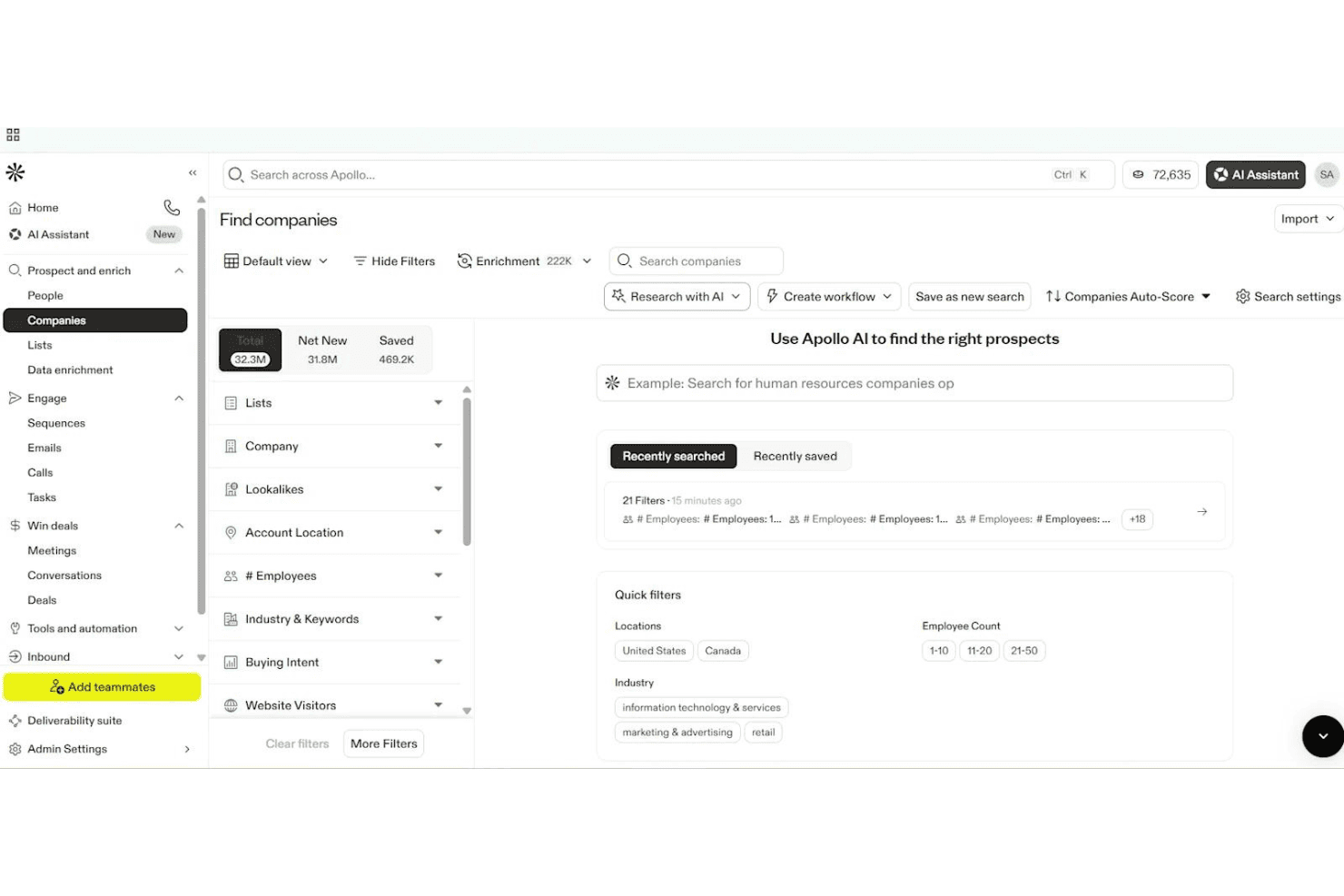
Apollo.io lets users filter and find companies using AI-powered search. Apollo.io is an AI-powered sales engagement platform offering multi-step email sequences, contact management, form capture, and analytics, built primarily for outbound B2B prospecting rather than traditional email marketing.
Who Is Apollo.io Best For?
Apollo.io is a smart pick for B2B sales teams and outbound prospecting specialists looking to automate multi-step cold outreach campaigns.
Why I Picked Apollo.io
I picked Apollo.io as one of the best because it's built for automating high-volume cold outreach to massive B2B contact databases. I like how my team can launch multi-step sequences targeting new leads and personalize emails with AI-driven variables. Its form builder lets us route inbound leads straight into outreach workflows.
Apollo.io Key Features
- Form builder: Create embeddable web forms to capture inbound leads and route them directly into outreach workflows.
- AI email writer: Auto-generate personalized outreach emails using AI based on contact data and engagement signals.
- Sequence A/B testing: Test multiple email variations within outbound sequences to optimize response rates and messaging.
- Deliverability tools: Access mailbox warm-up, deliverability scoring, and built-in guidance for SPF, DKIM, and DMARC setup.
Apollo.io Integrations
Apollo.io offers over 50 integrations, including native connections with Salesforce, HubSpot, Zoho CRM, Gmail, Microsoft 365, LinkedIn via Chrome Extension, Outreach, SalesLoft, Marketo, Pipedrive, Asana, ClickUp, and Zapier. API access is available on enterprise plans.
What's Free?
Apollo.io offers a free-forever plan that gives you basic access to its B2B contact database and core outreach features. The free plan has significant limits—you get 60 email credits per month, basic search filters, and restricted access to some integrations and automation tools.
Pros and Cons
Pros:
- Multi-step sales sequences with A/B testing
- AI writes and personalizes outreach emails
- Massive built-in B2B contact database
Cons:
- Free plan limited to cold outreach use
- No drag-and-drop newsletter builder
Learn more about Apollo.io: Best for robust integrations options
- Free plan + 14-day trial + demo available
- From $9/month
Visit WebsiteCustomer Rating:4.6/5
Sender’s automation dashboard lets users build and launch email workflows using ready-made templates and a visual editor. Designed for businesses seeking cost-effective email marketing solutions, Sender offers a robust platform to create, automate, and manage email campaigns without the complexity or expense often associated with such tools. It is particularly appealing to small businesses and startups looking to enhance their marketing efforts through a user-friendly interface and a generous free plan. By addressing the need for efficient communication with up to 2,500 subscribers and providing up to 15,000 emails per month at no cost, Sender effectively alleviates the challenge of managing customer engagement on a budget.
Why I Picked Sender
I picked Sender for its unique approach to offering a "Free Forever" plan that caters to small businesses and startups needing to manage up to 2,500 subscribers. This plan allows for sending 15,000 emails monthly, providing an excellent opportunity to engage with your audience without financial constraints. Additionally, Sender’s focus on high deliverability through monitored IP reputation ensures that your emails reach the intended recipients, which is crucial for maintaining customer engagement. The inclusion of dynamic content and A/B testing further allows you to personalize and optimize your campaigns, enhancing the effectiveness of your marketing efforts.
Sender Key Features
In addition to its standout free plan, I also found several features that enhance its appeal:
- Email Automation: Create and manage automated email sequences to streamline your marketing efforts.
- Template Library: Access over 1,600 customizable templates to design professional emails tailored to your brand.
- Analytics Dashboard: Monitor campaign performance with detailed insights and reports to make informed decisions.
- Integration Options: Seamlessly integrate with platforms like WordPress and WooCommerce to expand your marketing reach.
Sender Integrations
Integrations include WordPress, WooCommerce, Magento, PrestaShop, OpenCart, Joomla, Zapier, API for custom integrations, and Shopify.
Pros and Cons
Pros:
- User-friendly drag-and-drop builder
- Built-in SMS marketing support
- Unlimited automation workflows included
Cons:
- No built-in landing page builder
- Subscriber limits on lower tiers
Learn more about Sender: Best for time-based urgency emails
- Free plan + free trial available
- From $38month (billed annually)
Visit WebsiteCustomer Rating:4.7/5
Flodesk helps create urgency with clean, time-based countdown email designs. Flodesk is a free email marketing platform designed for users who want simple, visually appealing email creation without the technical hassle. Known for its clean design tools, it’s especially useful for small businesses and creatives looking to send polished campaigns effortlessly. With time-based urgency email features, Flodesk makes it easy to create engaging messages and automate workflows, helping you maintain consistent communication with your audience.
Why I Picked Flodesk
I picked Flodesk for its strength in creating time-based urgency emails that drive action through countdown timers and deadline-focused campaigns. This makes it easy to prompt subscribers to act quickly without overcomplicating setup. Combined with customizable templates and simple automations, Flodesk supports engaging campaigns while keeping email creation straightforward.
Flodesk Key Features
In addition to time-based urgency emails, Flodesk offers:
- Customizable Templates: Allows you to craft emails that reflect your brand's unique style with ease.
- Subscriber Management: Provides tools to manage your email list effectively, including segmentation and personalization.
- Performance Analytics: Offers insights into email performance, helping you make data-driven decisions.
Flodesk Integrations
Integrations include Shopify, Instagram, Canva, Zapier, and WordPress.
What's Free?
Flodesk offers a free plan that lets you use forms, landing pages, and list-building tools — but it doesn’t allow email sending under the “free” tier. However, it offers a 14-day free trial that gives full access to its email marketing features.
Pros and Cons
Pros:
- Segmentation tools enhance targeted email marketing campaigns
- Automation features for subscriber journeys (welcome series, triggers, etc.)
- Unified interface simplifies campaign creation and management
Cons:
- Limited integrations compared to larger email-marketing platforms
- Not ideal for very large or complex mailing needs
Learn more about Flodesk: Best for testing emails
- A free version specifically for a single inbox and up to 500 email tests per month.
- From $14.99/ month for 1 user and up to 5 inboxes
Visit WebsiteCustomer Rating:4.8/5
Mailtrap lets devs safely test and debug email deliverability. Mailtrap is a tool designed for developers and QA teams to test email sending and deliverability. It allows users to capture, inspect, and debug emails in a safe environment, preventing real recipients from receiving test emails.
Why I picked Mailtrap: Mailtrap's free plan provides a safe sandbox environment for testing emails, which is perfect for developers needing to ensure their emails are correctly formatted and delivered. You can inspect and debug emails without them reaching real inboxes. The platform supports email testing with HTML support and spam score checks. These features make it an ideal choice for teams focused on email testing.
Standout features & integrations:
Features include email inspection tools that let you debug and analyze emails in detail. The spam score checker helps you improve deliverability by identifying potential issues. Mailtrap also provides a user-friendly interface for managing your email testing environment.
Integrations include GitHub, GitLab, Bitbucket, Heroku, Jenkins, Travis CI, CircleCI, Zapier, Slack, and PagerDuty.
What's free? Mailtrap offers a free-forever plan with limitations on the number of emails you can test monthly and the number of inboxes available.
Pros and Cons
Pros:
- Ideal for developers and QA teams
- HTML support for emails
- Spam score checker included
Cons:
- Advanced features require upgrade
- Limited inboxes in free plan
Learn more about Mailtrap: Best for user-friendly interface
- Free plan + 14-day free trial available
- From $12/month
Visit WebsiteCustomer Rating:4.7/5
MailerLite makes email marketing simple for small teams and freelancers. MailerLite is an email marketing platform catering to small businesses and freelancers. It offers tools for creating, managing, and analyzing email campaigns, focusing on simplicity and ease of use to enhance user experience.
Why I picked MailerLite: MailerLite's free plan provides a straightforward interface, making it perfect for users who prioritize ease of navigation. You can send up to 12,000 emails per month to a maximum of 1,000 subscribers. The platform includes simple drag-and-drop editors and basic automation features. This makes it a great choice for teams looking to manage email marketing without hassle.
Standout features & integrations:
Features include a drag-and-drop editor that allows you to design emails effortlessly. MailerLite offers automation tools to streamline sending emails based on user actions. You can also access landing page creation tools to support your marketing campaigns.
Integrations include Shopify, WooCommerce, WordPress, Zapier, Stripe, Facebook, Squarespace, Mailchimp, Google Sheets, and PayPal.
What's free? MailerLite offers a free-forever plan with limitations on the number of subscribers and emails you can send each month.
Pros and Cons
Pros:
- No credit card required
- Supports up to 1,000 subscribers
- Landing page creation tools
Cons:
- No phone support in free plan
- Basic reporting tools only
 Best for ecommerce users
- Free plan + free demo available
- From $25/month
Visit WebsiteCustomer Rating:4.6/5
Klaviyo powers ecommerce email and SMS campaigns with automation. Klaviyo is a marketing platform designed for ecommerce businesses, offering email and SMS marketing solutions combined with B2C CRM features. It helps businesses automate marketing tasks, segment their audience, and build engaging campaigns to drive customer engagement.
Why I picked Klaviyo: Klaviyo's free plan offers automation and segmentation features, making it ideal for ecommerce users who need to tailor their marketing efforts. You can create and send targeted campaigns without upfront costs. The platform supports robust analytics to help you understand customer behavior. Its integration capabilities align with the needs of ecommerce businesses.
Standout features & integrations:
Features include detailed customer segmentation to target specific audiences. The campaign building tools are intuitive, allowing you to design effective email and SMS campaigns. Klaviyo also provides in-depth analytics to track the success of your marketing efforts.
Integrations include Shopify, Salesforce, WooCommerce, Magento, BigCommerce, Stripe, Facebook, Google Ads, Instagram, and Zendesk.
What's free? Klaviyo offers a free plan that includes automation, segmentation, and campaign building capabilities with some limitations on the number of contacts and emails sent per month.
Pros and Cons
Pros:
- Supports email and SMS marketing
- Detailed customer segmentation
- Strong ecommerce focus
Cons:
- Restricted email sends monthly
- Limited contacts in free plan
 8Best for small teams
Kit
- 14-day free trial available
- From $33/month (billed annually)
Visit WebsiteCustomer Rating:4.5/5
Kit helps creators grow audiences with email, automation, and insights. Kit is a creator-focused email platform that helps users grow and engage their audiences through newsletters, landing pages, and automated messaging. It’s built for individuals and small teams to manage email, automation, monetization, and audience insights—all in one place.
Why I picked Kit: Kit lets you send unlimited emails, create landing pages, and build opt-in forms on its free plan. It includes basic visual automation, tagging, A/B split testing, and in-email polls. These features help small teams launch campaigns, segment audiences, and test content without upgrading.
Standout features & integrations:
Features include customizable email templates, conditional content, and resend‑unopened campaigns so you can refine your messaging. You also get access to visual automation workflows beyond simple sequences. Plus, there’s a creator network recommendation engine to help you grow.
Integrations include Canva, GIPHY, Circle, Broadcast Boost, TeachKit, Sponsy, SavvyCal, and Senja.
What's free? It's a free‑forever plan that supports up to 10,000 subscribers, 1 user, 1 visual automation, and 1 email sequence.
Pros and Cons
Pros:
- Lets you A/B test emails
- Allows subscriber tagging and segmentation
- Up to 10 k subscribers free
Cons:
- Free plan shows Kit branding
- Limits to 1 user on free plan
Learn more about Kit: Best for simple email templates
- Free plan + free demo available
- From $12/month
Visit WebsiteCustomer Rating:4.3/5
Benchmark Email helps SMBs create and automate email campaigns easily. Benchmark Email is an email marketing platform aimed at small to medium-sized businesses. It provides tools for creating and managing email campaigns, with a focus on user-friendly design and automation.
Why I picked Benchmark Email: Benchmark Email's free plan includes an email builder and customizable templates, which are perfect for creating simple and effective email campaigns. You can access automation features and reporting tools without needing a credit card. It's ideal for teams that want straightforward email templates without complexity. The free version also supports list building and campaign optimization, aligning with its simple email template USP.
Standout features & integrations:
Features include an easy-to-use email builder, customizable templates, and automation tools. You can also access landing pages and reporting features to track your campaigns. These elements make it easier for your team to manage and optimize email marketing efforts.
Integrations include Shopify, Zapier, WordPress, Google Analytics, PayPal, Salesforce, HubSpot, Facebook, Twitter, and LinkedIn.
What's free? Benchmark Email offers a free-forever plan with limitations on the number of emails you can send per month and access to certain features.
Pros and Cons
Pros:
- Suitable for small businesses
- Customizable email templates
- No credit card required for free plan
Cons:
- Basic reporting features
- Limited monthly email sends
Learn more about Benchmark Email: Best for Canadian businesses
- Free plan available
- From CAD $22.04/month
Visit WebsiteCustomer Rating:4.5/5
Cyberimpact helps Canadian SMBs automate and analyze email campaigns. Cyberimpact is an email marketing platform tailored for small to medium-sized enterprises and non-profit organizations in Canada. It focuses on marketing automation, landing page creation, and performance analysis to enhance customer engagement.
Why I picked Cyberimpact: Cyberimpact's free plan offers access to customizable email templates and automated email scenarios. This makes it ideal for businesses looking for simple solutions to manage their email marketing. The platform provides high-conversion landing pages and real-time performance tracking, aligning with its USP of being best for Canadian businesses. Its bilingual support and compliance with Canada's Anti-Spam Law are key differentiators.
Standout features & integrations:
Features include marketing automation that helps you schedule and send emails automatically. The email editor is intuitive, allowing you to design emails without hassle. Performance analysis tools let you track and improve your campaign results effortlessly.
Integrations include Shopify, Google Analytics, Facebook, PayPal, WordPress, Salesforce, LinkedIn, Twitter, Zapier, and HubSpot.
What's free? Cyberimpact offers a free-forever plan with limitations on the number of emails you can send monthly and access to certain advanced features.
Pros and Cons
Pros:
- Real-time performance tracking
- Compliance with CASL regulations
- Bilingual support available
Cons:
- Restricted integration options in free plan
- No 24/7 customer support
Learn more about Cyberimpact:
Diğer Ücretsiz E-posta Pazarlama Yazılımları
Ücretsiz planlar veya deneme sürümleri sunan bazı ek e-posta pazarlama yazılımı seçenekleri şunlardır. Bu araçlar kısa listeme girmemiş olsa da göz atmaya değer:
- 11BrevoBest for transactional emails
- 12VidyardBest for video emails
- 13VitaMailBest for paired content and deliverability tools
- 14EmailOctopusBest for high deliverability
- 15OmnisendBest for automation features
- 16SendPulseBest for AI-driven email personalization
- 17MailjetBest for multilingual email campaigns
How I Evaluate Free Email Marketing Software
First, I define what counts as free. For email marketing software, vendors must offer a free-forever plan—not a trial—because sending newsletters, automating welcome flows, and managing growing lists are ongoing functions. From there, I split my evaluation into two layers: the core functionality a tool must clear to qualify, and the differentiators that separate the strongest options.
Core Functionality (Table Stakes For This List)
In addition to my free offer requirements, I also use a scoring system to select tools for my list. Here's how it works:
I rank each one on a scale from 0 (does not offer the functionality) to 5 (excels in this area) for each core functionality listed below. Then, I calculate the tool's total score into a percentage. Each tool needs to achieve a minimum total score of 75% to be considered for inclusion.
- Email Campaign Builder: I look for a visual drag-and-drop editor with a solid template library, so a solo marketer can design a branded product launch email without touching code.
- Contact List Management: Organizing subscribers matters, so I evaluate whether the free plan supports segmentation by tags or attributes—like separating purchasers from newsletter-only subscribers.
- Signup Forms: I check whether the platform includes embeddable forms or hosted landing pages that feed new contacts straight into the list, similar to what Mailchimp and MailerLite offer.
- Marketing Automation: Even basic workflows make a difference. I look for free-tier automations like welcome sequences or post-signup drip series triggered by subscriber actions.
- Campaign Analytics: Open rates, click-throughs, bounces, and unsubscribes should all be visible on the free plan. I evaluate how easy it is to pull insights after sending a weekly newsletter.
- Free Send Volume: The monthly email cap and subscriber limit need to support real use. I consider whether a startup with a few hundred contacts can run regular campaigns without hitting a wall.
Once I have a list of tools that meet the criteria, I consider what sets each platform apart.
Differentiating Factors (What Sets Vendors Apart)
Here's how I compare and contrast different vendors:
Standout Features
A/B testing on the free tier is a big differentiator—it lets you compare subject lines or send times and improve performance based on real data instead of guessing. I also evaluate ecommerce integrations, since store owners on Shopify or WooCommerce need abandoned cart and product recommendation emails built in. Deliverability tools matter just as much. Spam score checkers and domain authentication support (SPF, DKIM) help free users actually land in the inbox rather than the junk folder.
Beyond Features
I check how well a free plan connects to the rest of your stack—Zapier or Make compatibility is a baseline, but native CRM and CMS integrations save time when syncing contacts between tools like HubSpot or WordPress. Compliance also weighs heavily. Built-in GDPR consent capture, double opt-in, and CAN-SPAM-compliant unsubscribe handling protect you from legal exposure. I also look at scalability—when your list outgrows the free tier, the upgrade path should be predictable, not a cliff where costs spike or key features suddenly get locked behind premium plans.
Ücretsiz E-posta Pazarlama Yazılımı Nasıl Seçilir?
Karmaşık özellik listeleri ve fiyatlandırma yapıları, ücretsiz bir e-posta pazarlama yazılımından gerçekten ne elde ettiğinizi anlamanızı zorlaştırabilir. Yazılım seçme sürecinizi yürütürken odağınızı korumanıza yardımcı olmak için göz önünde bulundurmanız gereken bazı faktörleri aşağıda bulabilirsiniz:
| Faktör | Dikkat Edilmesi Gerekenler |
| Ücretsiz Teklifin Kapsamı | Ücretsiz planda nelerin dahil olduğunu kontrol edin. Gönderilen e-postalar, kişiler ve yükseltme yapmadan kullanılabilen özelliklerle ilgili sınırlamalara dikkat edin. |
| Ölçeklenebilirlik | Yazılımın ihtiyaçlarınızla birlikte büyüyüp büyüyemeyeceğini değerlendirin. E-posta listeniz ve kampanya karmaşıklığınız arttıkça yükseltme seçenekleri sunulmasına dikkat edin. |
| Entegrasyonlar | Yazılımın ekibinizin hâlihazırda kullandığı CRM sistemleri, e-ticaret platformları ve analiz araçları gibi araçlara bağlandığından emin olun. |
| Kullanım Kolaylığı | Arayüzü ve kurulum sürecini değerlendirin. Ekibinizin kapsamlı bir eğitim veya zorlu bir öğrenme süreci olmadan kolayca kullanabileceği bir yazılım seçin. |
| Müşteri Desteği | Sorunlar ortaya çıktığında size yardımcı olacak canlı sohbet veya yardım merkezi gibi mevcut destek kanallarını araştırın. |
| Analizler | Raporlama özelliklerindeki ayrıntı düzeyini inceleyin. Başarınızı ölçmek için açılma oranları, tıklama oranları ve diğer metriklerle ilgili içgörülere ihtiyaç duyacaksınız. |
| Otomasyon | Otomasyon özelliklerinin karmaşıklığını belirleyin. Zamandan tasarruf etmek ve etkileşimi artırmak için otomatik e-postalara yönelik iş akışları oluşturabildiğinizden emin olun. |
| Özelleştirme | E-posta şablonlarının ve kampanyalarının ne ölçüde özelleştirilebildiğini kontrol edin. Kapsamlı tasarım becerilerine ihtiyaç duymadan marka tutarlılığını korumak isteyeceksiniz. |
Daha kapsamlı bilgi edinmek istiyorsanız doğru e-posta pazarlama platformunun nasıl seçileceğine ilişkin kapsamlı rehberimize göz atın.
Ücretsiz E-posta Pazarlama Yazılımı Nedir?
E-posta pazarlama yazılımı, işletmelerin pazarlama e-postaları göndermesine, kişi listelerini yönetmesine ve kampanya performansını analiz etmesine yardımcı olan bir araçtır. Bu araçlar genellikle gönderilen e-posta veya yönetilen kişi sayısına sınır getirilmesi gibi sınırlı özelliklere ya da kullanım miktarlarına sahip ücretsiz planlar sunar.
Pazarlama profesyonelleri, küçük işletme sahipleri ve yeni girişimler, yüksek maliyetlere katlanmadan hedef kitleleriyle etkileşim kurmak için genellikle bu araçları kullanır. Otomasyon, analizler ve özelleştirilebilir şablonlar gibi özellikler, kullanıcıların kampanyaları verimli bir şekilde yönetmesine, hedef kitle etkileşimini anlamasına ve marka tutarlılığını korumasına yardımcı olur.
Ücretsiz E-posta Pazarlama Yazılımının Özellikleri
E-posta pazarlama yazılımlarında yaygın olarak bulunan özellikleri ve bunlardan hangilerinin genellikle ücretsiz ya da ücretli planlara dahil edildiğini inceleyelim.
Genellikle Ücretsiz E-posta Pazarlama Yazılımı Özellikleri
- E-posta şablonları: Önceden tasarlanmış düzenler, profesyonel görünümlü e-postaları hızlıca oluşturmanıza olanak tanıyarak zamandan ve emekten tasarruf etmenizi sağlar.
- Temel analizler: Açılma ve tıklama oranları hakkında içgörüler sunarak kampanya başarısını ölçmenize yardımcı olur.
- Kişi yönetimi: Hedefli mesajlar göndermek üzere e-posta listelerinizi düzenlemenizi ve segmentlere ayırmanızı sağlar.
- Otomasyon: Tetikleyicilere göre e-postaların otomatik olarak gönderilmesi için basit iş akışları oluşturmanızı sağlar.
- Sürükle ve bırak düzenleyici: E-posta oluşturma sürecini basitleştirerek kodlama becerileri olmadan e-posta tasarlamayı kolaylaştırır.
- Günlük gönderim sınırları: Günde gönderebileceğiniz e-posta sayısına sınır getirerek ücretsiz planlardaki kaynakların yönetilmesine yardımcı olur.
- Kayıt formları: Abone bilgilerini doğrudan web sitenizden toplamanıza ve e-posta listenizi büyütmenize olanak tanır.
- Temel segmentasyon: Daha kişiselleştirilmiş iletişim için hedef kitlenizi gruplara ayırmanızı sağlar.
Genellikle Ücretli E-posta Pazarlama Yazılımı Özellikleri
- Gelişmiş segmentasyon: Daha kişiselleştirilmiş ve etkili kampanyalar oluşturmak üzere ayrıntılı hedef kitle belirleme olanağı sunar.
- A/B testi: İçeriği optimize etmek ve etkileşim oranlarını artırmak için farklı e-posta sürümlerini test etmenizi sağlar.
- Gelişmiş analizler: Daha iyi kararlar alabilmeniz için müşteri davranışları ve kampanya performansı hakkında daha derin içgörüler sunar.
- Özelleştirilebilir açılış sayfaları: E-posta kampanyalarınızla uyumlu ve dönüşüm sağlayan benzersiz sayfalar oluşturmanıza olanak tanır.
- Çok kanallı pazarlama: Bütünlüklü bir pazarlama stratejisi için e-postayı SMS, sosyal medya ve diğer kanallarla entegre eder.
- Sınırsız gönderim: Gönderebileceğiniz e-posta sayısına ilişkin kısıtlamaları kaldırarak daha büyük kampanyaları destekler.
- Öncelikli destek: Daha hızlı yanıt süreleri ve özel yardım sunarak sorunların verimli bir şekilde giderilmesini sağlar.
- Gelişmiş otomasyon: Yapay zekâ destekli e-posta pazarlama araçları karmaşık iş akışlarını ve tetikleyicileri destekleyerek pazarlama çalışmalarınızın verimliliğini artırır.
Ücretsiz E-posta Pazarlama Yazılımının Faydaları
Ücretsiz e-posta pazarlama yazılımını uygulamak, ekibiniz ve işletmeniz için çeşitli faydalar sağlar. İşte yararlanabileceğiniz birkaç fayda:
- Uygun maliyetli çözüm: Ücretsiz planlar, bütçenizi etkilemeden e-posta pazarlamasını yönetmenize olanak tanır; bu da onları yeni kurulan işletmeler ve küçük işletmeler için ideal hâle getirir.
- Kullanım kolaylığı: Kullanıcı dostu arayüzler ve sürükle-bırak düzenleyiciler, ekibinizdeki herkesin e-posta oluşturup göndermesini kolaylaştırır.
- Temel otomasyon: Basit görevleri otomatikleştirmek zamandan tasarruf sağlar ve kitlenizle tutarlı iletişim kurmanızı güvence altına alır.
- Kitle büyümesi: Kayıt formları ve kişi yönetimi, e-posta listenizi verimli bir şekilde oluşturmanıza ve düzenlemenize yardımcı olur.
- Performans içgörüleri: Temel analizler, e-posta etkileşimi hakkında değerli veriler sunarak nelerin işe yaradığını anlamanıza yardımcı olur.
- Özelleştirme: E-posta şablonları, tasarım becerilerine ihtiyaç duymadan marka tutarlılığını korumanıza olanak tanır.
- Ölçeklenebilirlik: Ücretsiz planlar başlangıç için bir temel sunar ve işletmeniz ile e-posta ihtiyaçlarınız büyüdükçe planınızı yükseltmenize olanak tanır.
Ücretsiz E-posta Pazarlama Yazılımının Maliyetleri ve Fiyatlandırması
Bu makaleye ücretsiz olarak sunulan en iyi e-posta pazarlama yazılımı seçeneklerini aradığınız için geldiğinizi biliyorum. Ancak ücretsiz planlar yalnızca sınırlı özellikler sunduğundan, gelecekte planınızı yükseltmeniz gerekebilir.
Aşağıdaki tablo, e-posta pazarlama yazılımı çözümlerinde yaygın olarak sunulan planları, bunların ortalama fiyatlarını ve tipik özelliklerini özetlemektedir:
E-posta Pazarlama Yazılımı İçin Plan Karşılaştırma Tablosu
| Plan Türü | Ortalama Fiyat | Yaygın Özellikler |
| Ücretsiz Plan | $0 | Temel e-posta şablonları, kişi yönetimi, temel analizler, günlük gönderim sınırları ve basit otomasyon. |
| Kişisel Plan | $5-$25/ kullanıcı/ay | Gelişmiş şablonlar, artırılmış gönderim sınırları, A/B testi ve müşteri desteği. |
| İşletme Planı | $30-$100/ kullanıcı/ay | Gelişmiş otomasyon, ayrıntılı analizler, açılış sayfası oluşturma ve çok kanallı pazarlama. |
| Kurumsal Plan | $100+/ kullanıcı/ay | Özel entegrasyonlar, öncelikli destek, sınırsız gönderim ve gelişmiş segmentasyon. |
Ücretsiz E-posta Pazarlama Yazılımı SSS
Ücretsiz e-posta pazarlama yazılımı hakkında sık sorulan bazı soruların yanıtları burada:
E-posta pazarlaması ücretsiz olarak yapılabilir mi?
Evet, birçok araç e-posta gönderme, kişileri yönetme ve temel analizler gibi temel özellikleri kapsayan ücretsiz planlar sunar. Bu ücretsiz sürümler, herhangi bir maliyete katlanmadan kitleleriyle etkileşim kurmak isteyen küçük işletmeler veya yeni kurulan işletmeler için idealdir.
Ücretsiz e-posta pazarlama yazılımının sınırlamaları nelerdir?
Ücretsiz e-posta pazarlama yazılımı genellikle aylık gönderilebilecek e-posta sayısı ve yönetebileceğiniz kişi sayısı konusunda sınırlamalarla birlikte gelir. A/B testi veya ayrıntılı analizler gibi gelişmiş özellikler de ücretli planlarla sınırlandırılmış olabilir; bu nedenle ihtiyaçlarınızı dikkatlice değerlendirin.
Ücretsiz e-posta pazarlama yazılımında gizli maliyetler var mı?
Yazılımın kendisi ücretsiz olsa da e-posta veya kişi sınırlarını aşmayla ilgili maliyetlere dikkat edin. Bazı sağlayıcılar ek özellikler veya premium destek için ücret talep edebilir. Beklenmedik masraflardan kaçınmak için ücretsiz planın koşullarını her zaman inceleyin. Daha ayrıntılı bilgi istiyorsanız, doğru e-posta pazarlama platformunu nasıl seçeceğinize dair kapsamlı rehberimize göz atın.