

İçerik pazarlama otomasyonu araçları, ekibinizin içerikleri daha az manuel çabayla planlamasına, oluşturmasına, dağıtmasına ve analiz etmesine yardımcı olan yazılım platformlarıdır. Artan içerik taleplerini yönetmenin, kanallar arasındaki kampanyaları koordine etmenin veya değişen hedef kitle beklentilerine ayak uydurmanın yollarını arıyorsanız, bu araçlar ölçülebilir bir fark yaratabilir.
Bu listede tekrarlayan görevleri otomatikleştirmek, iş birliğini geliştirmek ve daha net içgörüler elde etmek için güvenilir seçenekler bulacaksınız; böylece yalnızca uygulamaya değil, stratejiye ve sonuçlara odaklanabilirsiniz. Pazarlama hedefleriniz için doğru seçeneği bulmak ve özellikleri karşılaştırmak üzere bu rehberi 2026'da kullanın.
Why Trust Our Software Recommendations
6,700+
Reviews
20
Industry experts
16+
Evaluation factors
14
Years
Our team has been testing and reviewing software since 2012. As marketing leaders ourselves, we know how difficult—and important—it is to choose the right software.
For this guide, we evaluated tools using hands-on testing and independent research, scoring tools using our selection criteria.
Our reviews reflect our human editorial judgment, not a sales pitch.
Expert reviewers:
 Gui DrusinaCreative Director
- Shriya GhateSenior Marketing Lead
 Amanda JacquesMarketing Ops Leader

İçerik Pazarlama Otomasyonu Araçları Karşılaştırma Tablosu
Bu karşılaştırma tablosu, en iyi içerik pazarlama otomasyonu aracı seçimlerimin fiyatlandırma ayrıntılarını özetlemektedir.
Sorted by: Default
| Tool | Starting Price | Website | |
|---|---|---|---|
Best for rapid copywriting assistance | 4.8 out of 5 | $79/month Free trial + free demo available | Website |
Best for AI-powered content creation | 4.7 out of 5 | $59/month 7-day free trial available | Website |
Best for integrated SEO-driven campaigns | 4.5 out of 5 | $139/month 14-day free trial | Website |
Best for scheduling social media posts | 4.4 out of 5 | $6/month Free plan + 14-day trial available | Website |
Best for multichannel audience engagement | 4.5 out of 5 | $85/month 30-day free trial | Website |
Best for collaborative editorial planning | 4.4 out of 5 | $29/month Free plan + 14-day free trial + free demo available | Website |
Best for automating cross-platform workflows | Not rated | $19.99/month Free plan available | Website |
Best for LinkedIn employee advocacy at scale | 5.0 out of 5 | £5/user/month Free demo available | Website |
Best for automated blog post generation | Not rated | $9/month Not available | Website |
Best for open-source marketing automation | Not rated | €247.50/month 14-day free trial + free demo available | Website |


İçerik Pazarlama Otomasyonu Araçları İncelemeleri
Aşağıda kısa listemde yer alan içerik pazarlama otomasyonu araçlarının ayrıntılı özetlerini bulabilirsiniz. İncelemelerim, sizin için en iyi seçeneği bulmanıza yardımcı olmak amacıyla her platformun özelliklerine, en uygun kullanım alanlarına ve entegrasyonlarına ayrıntılı bir bakış sunmaktadır.
 Best for rapid copywriting assistance
- Free trial + free demo available
- From $79/month (billed annually)
Visit WebsiteCustomer Rating:4.8/5
Writesonic produces marketing copy for ads, blogs, and landing pages quickly. Writesonic offers AI-powered copywriting tools designed for marketers and content teams who need to generate high volumes of copy quickly. It’s especially useful for agencies, ecommerce brands, and social media managers looking to automate blog posts, ad copy, and product descriptions. With Writesonic, you can create drafts, headlines, and even long-form articles in minutes, helping you keep up with demanding content calendars.
Why I Picked Writesonic
When you need to generate marketing copy at scale, Writesonic stands out for its rapid copywriting assistance. I picked Writesonic because its AI-driven templates let you produce blog posts, landing page copy, and ad headlines in just a few clicks. The tool’s content rephrasing and expansion features help you quickly adapt messaging for different channels or audiences. For content marketers who need to keep up with fast-moving campaigns, Writesonic’s automation capabilities make it easy to fill your content pipeline without slowing down.
Writesonic Key Features
In addition to its rapid copywriting capabilities, I also found these features useful for content marketing automation:
- Bulk content generation: Create multiple pieces of content at once by uploading a list of topics or keywords.
- Brand voice customization: Adjust the AI’s writing style to match your brand guidelines and tone.
- Plagiarism checker: Scan generated content to ensure originality before publishing.
- AI image generator: Produce relevant images to accompany your written content directly within the platform.
Writesonic Integrations
Integrations include WordPress, Zapier, Webflow, Google Docs, Google Sheets, Surfer, Shopify, Wix, Notion, and an API is available for custom integrations.
Pros and Cons
Pros:
- Multilingual support for global content campaigns
- AI image generator for visual content needs
- Bulk article generation for multiple topics
Cons:
- No native integration with analytics tools
- No workflow management for team collaboration
Learn more about Writesonic: Best for AI-powered content creation
- 7-day free trial available
- From $59/month (billed annually)
Visit WebsiteCustomer Rating:4.7/5
Jasper creates AI-assisted marketing copy for blogs, ads, and social posts. Jasper uses AI to help marketing teams create content at scale, making it a strong fit for businesses that need high-volume, on-brand copy. The platform appeals to content marketers and agencies looking to automate blog posts, ad copy, and social content with customizable brand voice controls. Jasper stands out for its ability to generate drafts, repurpose assets, and support multi-channel campaigns with AI-driven suggestions.
Why I Picked Jasper
Jasper stands out for content marketing automation because it brings advanced AI content generation directly into your workflow. I picked Jasper for its ability to produce long-form articles, ad copy, and social posts that match your brand’s tone and style. The platform’s brand voice controls and campaign templates help you maintain consistency across channels while speeding up content production. For teams that need to scale high-quality content creation, Jasper’s AI-powered approach is a strong fit.
Jasper Key Features
Some other features make Jasper a flexible option for content marketing automation:
- AI Art Generator: Create original images and graphics to pair with your written content.
- Content Workflow Management: Assign tasks, set deadlines, and track progress within collaborative content projects.
- Plagiarism Checker: Scan generated content to ensure originality and avoid duplicate text issues.
- Multilingual Support: Generate and translate content in over 30 languages for global campaigns.
Jasper Integrations
Integrations include Slack, Google BigQuery, Webflow, Microsoft Word, Google Sheets, Google Docs, Google Chrome, Zapier, Make, and Pabbly Connect.
Pros and Cons
Pros:
- Supports brand voice customization at scale
- Offers built-in plagiarism detection
- Generates content in over 30 languages
Cons:
- Requires manual review for compliance
- Occasional factual errors in generated content
Learn more about Jasper: Best for integrated SEO-driven campaigns
- 14-day free trial
- From $139/month
Visit WebsiteCustomer Rating:4.5/5
Semrush boosts SEO with keyword research, competitor insights, and performance tracking. If you’re looking to unify your content marketing and SEO efforts, Semrush brings both under one roof. The platform is especially useful for marketing teams that want to plan, optimize, and measure content performance with real-time SEO data. Semrush helps you identify high-impact keywords, track rankings, and manage campaigns that tie organic search directly to your content strategy.
Why I Picked Semrush
What sets Semrush apart for content marketing automation is its ability to connect SEO insights directly to campaign planning and execution. I picked Semrush because it lets you research keywords, audit your content, and monitor rankings all in one place, making it easier to align your content with search demand. The platform’s content marketing toolkit helps you generate topic ideas, optimize articles, and track how your content performs in organic search. This integrated approach is especially valuable for teams that want to ensure every piece of content supports broader SEO-driven goals.
Semrush Key Features
Some other features make Semrush a versatile choice for content marketing teams:
- SEO Writing Assistant: Get real-time recommendations for readability, tone, and keyword usage as you draft content.
- Content Audit Tool: Analyze your website’s existing content to identify gaps, outdated pages, or optimization opportunities.
- Brand Monitoring: Track mentions of your brand or competitors across the web and social media.
- Post Tracking: Monitor the performance of individual articles published on external sites, including referral traffic and keyword rankings.
Semrush Integrations
Integrations include WordPress, Google Analytics, Google Search Console, Trello, HubSpot, Google Looker Studio, and more.
Pros and Cons
Pros:
- Audits existing content for SEO improvements
- Suggests content topics based on search trends
- Tracks keyword rankings alongside content analytics
Cons:
- No direct publishing to most CMS platforms
- Limits on tracked keywords per plan
 Best for scheduling social media posts
- Free plan + 14-day trial available
- From $6/month
Visit WebsiteCustomer Rating:4.4/5
Buffer schedules and publishes social posts across multiple platforms. Buffer gives marketing teams and solo creators a way to plan and schedule social media posts across multiple platforms from one dashboard. It’s especially useful for those who want to maintain a consistent posting schedule without manual effort. With Buffer, you can queue content, preview posts, and analyze engagement to keep your social channels active and organized.
Why I Picked Buffer
Buffer is purpose-built for teams and individuals who need to schedule social media posts efficiently across multiple channels. I picked Buffer because its queue-based scheduling lets you plan content in advance and maintain a steady publishing cadence without manual posting. The platform’s post preview feature helps you see exactly how your content will appear on each network before it goes live. For content marketers focused on automation and consistency, Buffer’s scheduling tools keep campaigns organized and on track.
Buffer Key Features
Some other features make Buffer useful for content marketing automation:
- Link shortener integration: Automatically shorten URLs in your posts for cleaner links and easier tracking.
- Team collaboration tools: Invite team members to contribute, review, and approve posts before publishing.
- Hashtag manager: Save and reuse groups of hashtags to speed up post creation.
- Analytics dashboard: Monitor post performance and engagement metrics across all connected social accounts.
Buffer Integrations
Integrations include Dropbox, Google Drive, OneDrive, Instagram, X (Twitter), Facebook, LinkedIn, Pinterest, Shopify, and Google Photos.
Pros and Cons
Pros:
- Team approval workflow for content review
- Analytics dashboard for post engagement tracking
- Built-in hashtag manager for post templates
Cons:
- No built-in content ideation tools
- No automated content recycling feature
 Best for multichannel audience engagement
- 30-day free trial
- From $85/month
Visit WebsiteCustomer Rating:4.5/5
CleverTap dashboard showing purchase KPIs, user reachability, and trends. CleverTap brings advanced audience segmentation and multichannel engagement to marketers who need to orchestrate campaigns across mobile, web, email, and more. It’s a strong fit for consumer brands, app-first businesses, and growth teams aiming to personalize messaging at scale. With CleverTap, you can automate targeted content delivery based on real-time user behavior, helping you drive retention and conversion across every touchpoint.
Why I Picked CleverTap
What sets CleverTap apart for content marketing automation is its ability to unify audience engagement across multiple channels from a single platform. I picked CleverTap because it lets you automate personalized messaging through push notifications, in-app messages, SMS, email, and web—all triggered by real-time user behavior. Its advanced segmentation tools help you target users based on lifecycle stage, actions, or preferences, so your campaigns stay relevant and timely. For marketers focused on orchestrating consistent, multichannel experiences, CleverTap’s automation features make it possible to reach audiences wherever they are.
CleverTap Key Features
Some other features that make CleverTap valuable for content marketing automation include:
- A/B testing engine: Run experiments on messaging and campaigns to identify what resonates best with your audience.
- Journey builder: Design and automate multi-step customer journeys with drag-and-drop workflows.
- Real-time analytics dashboard: Monitor campaign performance and user engagement metrics as they happen.
- Rich media messaging: Send images, videos, and interactive content through supported channels to boost engagement.
CleverTap Integrations
Integrations include Adjust, Branch, Amplitude, mParticle, Tealium, Twilio Segment, Airbridge, RevenueCat, Exotel, and Vonage.
Pros and Cons
Pros:
- Built-in A/B testing for campaign optimization
- Journey builder automates complex campaign flows
- Real-time segmentation for audience targeting
Cons:
- Requires technical setup for event tracking
- Limited support for content personalization
Learn more about CleverTap: Best for collaborative editorial planning
- Free plan + 14-day free trial + free demo available
- From $29/month (billed annually)
Visit WebsiteCustomer Rating:4.4/5
CoSchedule organizes marketing work with a shared content calendar and workflows. If your team needs a single place to plan, organize, and execute content, CoSchedule is built for you. Marketing teams, agencies, and content managers use it to coordinate editorial calendars, assign tasks, and keep everyone aligned on deadlines. Its collaborative approach helps reduce missed deadlines and keeps content production moving smoothly.
Why I Picked CoSchedule
CoSchedule stands out for teams that need to manage content production collaboratively from start to finish. I picked CoSchedule because its shared editorial calendar lets everyone see what’s coming up and who’s responsible for each task. The platform’s task assignment and workflow features help keep writers, editors, and designers on the same page throughout the content process. For content marketing teams juggling multiple projects and contributors, CoSchedule brings structure and visibility to every stage of planning and publishing.
CoSchedule Key Features
I also found several other features that support content marketing teams:
- Headline Studio integration: Analyze and optimize headlines directly within your workflow.
- Social media publishing: Schedule and publish posts to multiple social channels from the same platform.
- Asset organizer: Store, tag, and manage digital assets for easy access during content creation.
- Analytics dashboard: Track content performance and team productivity with built-in reporting tools.
CoSchedule Integrations
Integrations include WordPress, Google Drive, Dropbox, Canva, HubSpot, Mailchimp, Slack, Trello, Asana, and Google Analytics.
Pros and Cons
Pros:
- Social media scheduling alongside editorial planning
- Built-in headline analyzer for content optimization
- Shared calendar for cross-team content visibility
Cons:
- Asset library lacks advanced search
- No built-in email marketing automation
Learn more about CoSchedule: Best for automating cross-platform workflows
- Free plan available
- From $19.99/month (billed annually)

Zapier automates no-code workflows across 8,000+ apps. Zapier connects your content marketing stack by automating workflows between apps that don’t natively integrate. It’s a strong fit for marketing teams juggling multiple platforms and looking to reduce manual data entry or repetitive publishing tasks. If you need to trigger actions across tools like your CMS, email platform, and analytics, Zapier helps you keep everything in sync without custom development.
Why I Picked Zapier
For content marketing teams that need to connect tools across different platforms, Zapier stands out for its workflow automation capabilities. I picked Zapier because it lets you set up automated triggers—like publishing a blog post that instantly shares to social media or updates a spreadsheet—without writing code. Its multi-step workflows help you coordinate content distribution, lead capture, and reporting across your entire stack. This makes it especially useful for marketers who want to eliminate repetitive tasks and keep campaigns running smoothly across channels.
Zapier Key Features
Some other features make Zapier especially useful for content marketing teams:
- Conditional logic (Paths): Set up workflows that branch based on specific triggers or data, so you can automate more complex processes.
- Schedule by Zapier: Automate tasks to run at set times or intervals, such as sending weekly content reports or publishing posts on a schedule.
- Webhooks support: Connect with apps that aren’t natively supported by Zapier using custom webhooks for advanced automation.
- Task history and error tracking: Review detailed logs of every automated task and quickly identify or troubleshoot any issues in your workflows.
Zapier Integrations
Integrations include Google Sheets, Gmail, Slack, Google Calendar, Google Drive, Notion, HubSpot, Mailchimp, and more.
Pros and Cons
Pros:
- No coding required for workflow setup
- Connects hundreds of marketing and content tools
- Automates repetitive content publishing tasks
Cons:
- Occasional delays in trigger execution
- Limited formatting options for content transfers
Learn more about Zapier: Best for LinkedIn employee advocacy at scale
- Free demo available
- From £5/user/month (billed annually)
Visit WebsiteCustomer Rating:5/5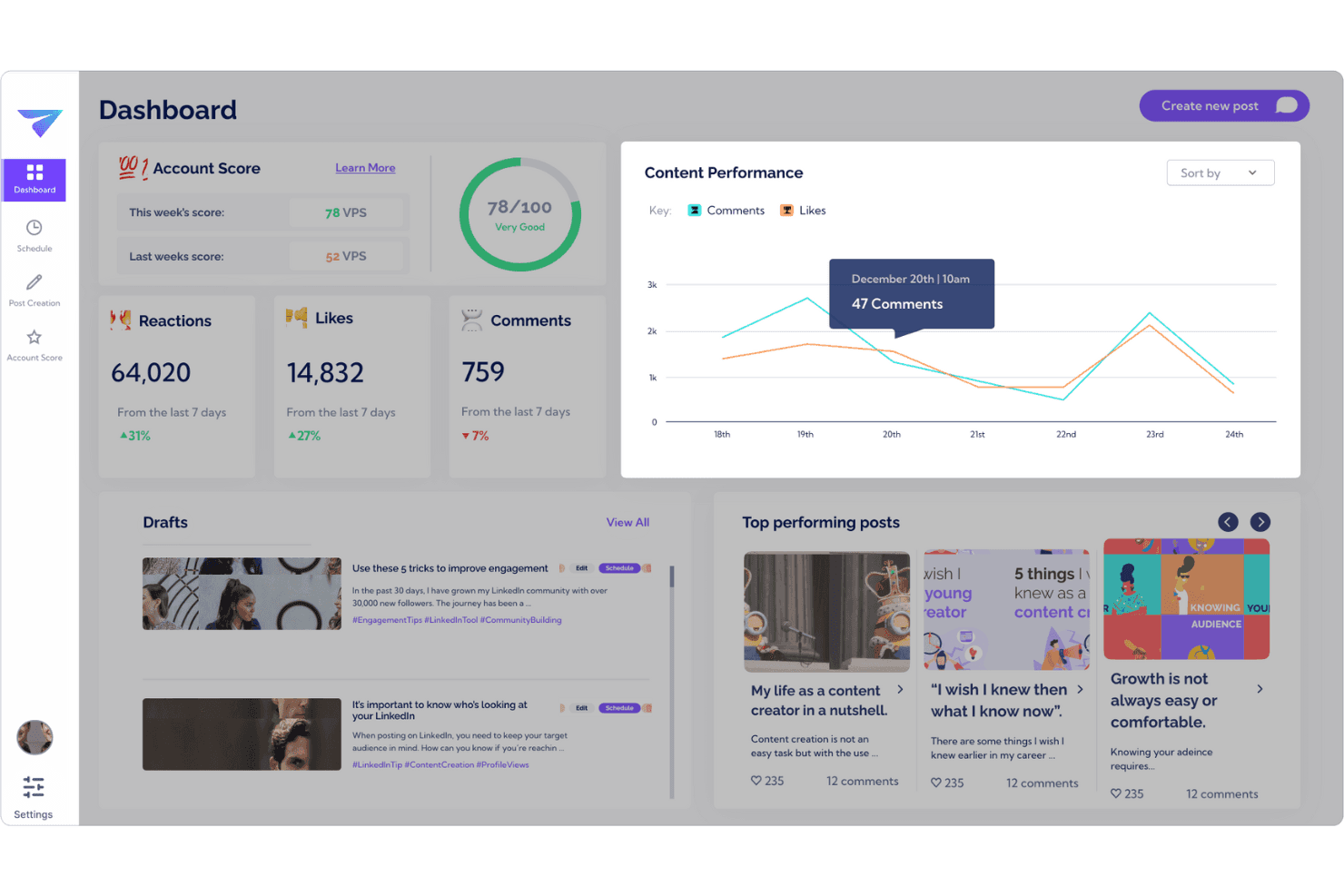
Track LinkedIn engagement and employee advocacy performance in one dashboard. Vulse is a LinkedIn-exclusive employee advocacy platform that combines AI-powered content generation with tone-of-voice matching, post scheduling, team analytics, and community management across personal profiles and company pages.
Who Is Vulse Best For?
Vulse is a strong fit for B2B marketing teams running LinkedIn-led employee advocacy programmes who need to scale authentic content across multiple personal profiles without losing brand consistency.
Why I Picked Vulse
I picked Vulse as one of the best because its tone-of-voice matching is genuinely unlike anything else I've seen for LinkedIn employee advocacy at scale. The AI learns each employee's posting rhythm and vocabulary, so when my team pushes out a single brand message, every draft lands in each person's queue already written in their voice. Pair that with LinkedIn API-native analytics and an Account Score that tracks programme health across the whole team, and you get real visibility into what's actually working.
Vulse Key Features
- Content scheduling calendar: A drag-and-drop calendar lets you batch-create and schedule LinkedIn posts for auto-publication across your entire team.
- Team leaderboards: Ranks team members by posts published, impressions, and engagement so you can spot who's active and who needs a nudge.
- Community management feed: Aggregates LinkedIn mentions, tags, and comments into one feed so your team can engage from any connected profile without sharing credentials.
- Article summarizer: Converts longer-form content into LinkedIn-ready posts directly within the platform.
Vulse Integrations
Native integrations are not clearly documented. However, Vulse connects through LinkedIn’s official Community Management API.
Pros and Cons
Pros:
- Approval workflows and team content calendar
- Native LinkedIn API for real-time analytics
- AI tone-of-voice matching for every user
Cons:
- Lacks full-funnel marketing attribution features
- LinkedIn-only with no multi-channel publishing
Learn more about Vulse:

ContentBot generates AI content ideas, blog drafts, and marketing copy fast. ContentBot focuses on automating long-form blog post creation for marketers and content teams who need to publish frequently. The platform appeals to agencies, startups, and SEO professionals looking to generate topic ideas, outlines, and full drafts with minimal manual input. ContentBot’s unique strength is its ability to produce entire articles from a single prompt, helping teams keep up with demanding editorial calendars.
Why I Picked ContentBot
When I need to automate blog post generation, ContentBot stands out for its ability to turn a single prompt into a full-length article. The tool’s automated blog post workflows let you generate outlines, introductions, and complete drafts without switching between multiple tools. I appreciate how ContentBot supports topic ideation and content scheduling, which helps teams keep their publishing pipeline full. For marketers focused on scaling blog content, these features make ContentBot a strong fit.
ContentBot Key Features
Some other features make ContentBot a versatile choice as a content marketing automation platform:
- AI-Powered Content Rewriter: Rewrite existing content to improve clarity or adapt to different tones.
- Automated Email Generator: Create marketing email campaigns and newsletters from prompts or templates.
- SEO Optimization Tools: Suggest keywords and optimize drafts for search engine visibility.
- Content Automation Workflows: Set up recurring content tasks and automate publishing schedules.
ContentBot Integrations
Integrations include WordPress and a Chrome extension.
Pros and Cons
Pros:
- Supports automated email and newsletter creation
- Offers AI-powered content rewriting tools
- Generates full-length blog posts from prompts
Cons:
- Requires manual fact-checking for accuracy
- Occasional repetitive phrasing in long articles
Learn more about ContentBot: 10Best for open-source marketing automation
Mautic
- 14-day free trial + free demo available
- From €247.50/month (billed annually)

Mautic powers open-source email marketing, lead nurturing, and campaign analytics. If you’re looking for a flexible, open-source approach to marketing automation, Mautic gives you full control over your campaigns and customer data. This platform is a strong fit for marketing teams with technical resources, agencies, or organizations with strict data privacy requirements. Mautic stands out by letting you customize and self-host your automation workflows, making it easier to tailor campaigns to unique business needs.
Why I Picked Mautic
Open-source flexibility is what sets Mautic apart in the content marketing automation space. I picked Mautic because it lets you fully customize automation workflows and campaign logic to fit your organization’s unique requirements. The platform supports advanced segmentation and dynamic content, so you can deliver highly personalized customer experiences across channels. For teams that want to self-host and control their marketing data, Mautic offers a level of transparency and adaptability that’s hard to match.
Mautic Key Features
Some other features make Mautic a versatile option for content marketing automation:
- Visual Campaign Builder: Design multi-step campaigns using a drag-and-drop interface.
- Landing Page Creator: Build and customize landing pages directly within the platform.
- A/B Testing Tools: Run split tests on emails and landing pages to optimize performance.
- Multi-Channel Messaging: Send messages across email, SMS, social, and web channels.
Mautic Integrations
Integrations include Salesforce, HubSpot, SugarCRM, Zoho CRM, Outlook, Gmail, Twilio, Mailjet, Amazon SES, and Slack. An API is available for custom integrations.
Pros and Cons
Pros:
- Active global community for support and plugins
- Flexible segmentation for targeted content delivery
- Fully open-source with self-hosting options
Cons:
- Limited built-in analytics for campaign reporting
- Requires technical setup and server management
Learn more about Mautic:
Diğer İçerik Pazarlama Otomasyonu Araçları
İşte kısa listemde yer almayan, ancak yine de göz atmaya değer bazı ek içerik pazarlama otomasyonu aracı seçenekleri:
- 11Customer.ioBest for personalized messaging automation
- 12BuzzSumoBest for multi-platform content distribution
- 13SocialBeeBest for content performance insights
- 14CelumBest for managing digital asset workflows
How I Evaluate Content Marketing Automation Tools
I evaluate tools in two layers: baseline capabilities—like automated publishing and approval workflows—and the differentiators, like AI content generation or DAM, that make one a better fit.
Core Functionality (Table Stakes For This List)
When I'm selecting tools for my list, I rank each one on a scale from 0 (does not offer the functionality) to 5 (excels in this area) for each core functionality listed below. Then, I calculate the tool's total score into a percentage. Each tool needs to achieve a minimum total score of 75% to be considered for inclusion.
- Content Workflow Automation: I look for tools that automate multi-stage production workflows, like routing a blog draft through editing, legal review, and final approval without manual handoffs.
- Multi-Channel Publishing: Each tool should support automated scheduling and distribution across blogs, email, social, and web with channel-specific formatting baked in.
- Content Calendar & Planning: I evaluate how well the calendar supports campaign-level planning, drag-and-drop scheduling, and asset linking so teams can map a full quarter's output in one view.
- Personalization & Audience Targeting: The tool should let you deliver tailored content experiences using behavioral or rule-based segmentation, like surfacing different CTAs to returning visitors vs. new ones.
- Performance Analytics: I check whether the platform tracks content-specific metrics across the full funnel, from initial engagement through conversion attribution, not just surface-level pageviews.
- Integrations & CMS Connectivity: Native connectors to the CMS, CRM, and marketing automation platforms your team already uses matter here, along with open API access for custom builds.
Once I have a list of tools that meet the criteria, I consider what sets each platform apart.
Differentiating Factors (What Sets Vendors Apart)
Here's how I compare and contrast different vendors:
Standout Features
AI content generation is a major differentiator. I look for tools that help draft briefs, suggest headlines, or spin up copy variants so your team spends less time on first drafts. Built-in SEO tools also matter because platforms with keyword research and content scoring let you optimize before publishing. I evaluate content repurposing automation too, like turning a long-form guide into social snippets and newsletter blurbs without recreating each asset from scratch.
Beyond Features
I check whether a platform scales with your team—a solo content marketer has different needs than a 30-person operation managing multiple brands across regions. Compliance and governance capabilities also weigh in my evaluation. Role-based access controls and approval gates matter when content touches regulated industries like finance or healthcare. Pricing transparency is another factor I consider, including whether a vendor offers free trials or clear tier breakdowns so you can project costs as content volume grows.
İçerik Pazarlama Otomasyonu Araçları Nasıl Seçilir
Uzun özellik listeleri ve karmaşık fiyatlandırma yapıları arasında kaybolmak kolaydır. Özgün yazılım seçim süreciniz üzerinde çalışırken odaklanmanıza yardımcı olmak için aklınızda bulundurmanız gereken faktörleri içeren bir kontrol listesi hazırladım:
| Etken | Dikkat Edilmesi Gerekenler |
|---|---|
| EtkenÖlçeklenebilirlik | Dikkat Edilmesi GerekenlerAraç, içerik hacminizi ve hedef kitle büyümenizi zaman içinde destekleyecek mi? Kullanıcı, kanal veya kampanya sınırlarını kontrol edin. |
| EtkenEntegrasyonlar | Dikkat Edilmesi GerekenlerAraç, CRM'niz, analiz ve yayınlama platformlarınızla yerel olarak bağlantı kuruyor mu? Buradaki eksiklikler manuel iş yükü oluşturabilir. |
| EtkenÖzelleştirilebilirlik | Dikkat Edilmesi Gerekenlerİş akışlarını, şablonları ve raporlamayı ekibinizin ihtiyaçlarına göre uyarlayabilir misiniz? Katı sistemler işinizi yavaşlatabilir. |
| EtkenKullanım kolaylığı | Dikkat Edilmesi GerekenlerEkibiniz aracı ne kadar hızlı öğrenip kullanmaya başlayabilir? Açık bir gezinme yapısı ve minimum eğitim gereksinimi sunan araçları tercih edin. |
| EtkenUygulama ve kullanıma alıştırma | Dikkat Edilmesi GerekenlerAracı çalışır duruma getirmek için hangi kaynaklara ve ne kadar zamana ihtiyaç var? Veri aktarımı desteği, eğitim ve kurulum hizmetlerini sorun. |
| EtkenMaliyet | Dikkat Edilmesi GerekenlerÖlçeğinizi büyüttükçe fiyatlandırma kademeleri şeffaf ve öngörülebilir mi? Gizli ücretlere, eklentilere veya zorunlu yükseltmelere dikkat edin. |
| EtkenGüvenlik önlemleri | Dikkat Edilmesi GerekenlerAraç veri şifreleme, kullanıcı izinleri ve GDPR gibi standartlara uyumluluk sunuyor mu? Verileri korumak çok önemlidir. |
| EtkenDestek erişilebilirliği | Dikkat Edilmesi GerekenlerHangi destek kanalları sunuluyor ve hangi saatlerde kullanılabiliyor? Canlı sohbete, telefona veya özel müşteri temsilcilerine ihtiyaç duyup duymayacağınızı değerlendirin. |
İçerik Pazarlama Otomasyonu Araçları Nelerdir?
İçerik pazarlama otomasyonu araçları, pazarlama ekiplerinin birden fazla kanaldaki içerikleri otomatik olarak planlamasına, oluşturmasına, zamanlamasına, dağıtmasına ve analiz etmesine yardımcı olan yazılım platformlarıdır. Bu araçlar kampanya yönetimini merkezileştirir, tekrarlayan görevleri yönetir ve kitle davranışına dayalı hedefli mesajlaşmayı mümkün kılar. İş akışlarını ve raporlamayı otomatikleştirerek strateji ve yaratıcı çalışmalara zaman kazandırırken tutarlı ve veriye dayalı içerik sunumu sağlar.
İçerik Pazarlama Otomasyonu Araçlarının Özellikleri
Bir içerik pazarlama otomasyonu yazılımı seçerken aşağıdaki temel özelliklere dikkat edin:
- İçerik takvimi: İçerikleri kanallar arasında planlamanıza, düzenlemenize ve izlemenize olanak tanıyan görsel bir zamanlama aracı; ekiplerin kampanyaları ve son teslim tarihlerini koordine etmesine yardımcı olur.
- Çok kanallı yayınlama: İçeriği tek bir panodan e-posta, bloglar ve sosyal medya gibi birden fazla platforma dağıtabilme; manuel paylaşım ihtiyacını azaltır.
- Kitle segmentasyonu: Kişileri demografik özelliklere, davranışlara veya etkileşime göre gruplandırmaya yarayan araçlar; içeriği doğru kişilere doğru zamanda hedeflemenizi sağlar.
- İş akışı otomasyonu: Onaylar, bildirimler ve içerik yönlendirme gibi tekrarlayan görevleri otomatikleştiren, verimliliği ve tutarlılığı artıran özelleştirilebilir kurallar ve tetikleyiciler.
- Performans analitiği: Erişim, etkileşim ve dönüşümler gibi ölçümleri izleyen panolar ve raporlar; hangi içeriğin işe yaradığını anlamanızı sağlar.
- Kişiselleştirme motoru: İçerik ve mesajları farklı kitle segmentlerine göre uyarlamanıza olanak tanıyan özellikler; uygunluğu ve etkileşimi artırır.
- İş birliği araçları: Ekiplerin içerik oluşturma ve inceleme süreçlerinde birlikte çalışmasına yardımcı olan paylaşılan çalışma alanları, yorum yapma ve görev atama özellikleri.
- Varlık yönetimi: Görseller, belgeler ve diğer medya dosyaları için merkezi depolama ve düzenleme; onaylanmış varlıkları bulmayı ve yeniden kullanmayı kolaylaştırır.
- Kampanya takibi: İçerik kampanyalarının ilerlemesini ve sonuçlarını izlemeye yarayan araçlar; yatırım getirisini ölçmenize ve gelecekteki çalışmalarınızı optimize etmenize yardımcı olur.
İçerik Pazarlama Otomasyonu Araçlarının Faydaları
İçerik pazarlama otomasyonu araçlarını uygulamak, ekibiniz ve işletmeniz için çeşitli faydalar sağlar. Yararlanabileceğiniz birkaç fayda şunlardır:
- Tutarlı içerik sunumu: Otomatik zamanlama ve yayınlama, içeriğinizin tüm kanallarda kitlelere zamanında ulaşmasını sağlar. Merkezi bir pazarlama platformu kullanmak, küçük işletmelerin ve büyük kuruluşların tükenmişlik yaşamadan abonelerine daha etkili bir şekilde ulaşmasına olanak tanır.
- Geliştirilmiş hedefleme: Kitle segmentasyonu ve kişiselleştirme özellikleri, ilgili mesajları doğru kişilere iletmenize yardımcı olur.
- Daha yüksek ekip verimliliği: İş akışı otomasyonu ve iş birliği araçları, manuel görevleri azaltır ve içerik üretimini yönetir.
- Daha iyi performans içgörüleri: Yerleşik analitik ve kampanya takibi, neyin işe yaradığı ve nerelerde iyileştirme yapılması gerektiği konusunda net veriler sunar.
- Merkezi varlık yönetimi: İçerik varlıklarını tek bir yerde depolamak ve düzenlemek, bunları bulmayı, yeniden kullanmayı ve marka tutarlılığını korumayı kolaylaştırır.
- Ölçeklenebilir kampanya yönetimi: Çok kanallı yayınlama ve otomasyon özellikleri, iş yükünü artırmadan daha fazla kampanyayı yönetmenize olanak tanır.
- Daha hızlı işe alıştırma ve benimseme: Kullanıcı dostu arayüzler ve işe alıştırma kaynakları, ekiplerin yeni süreçleri hızla uygulamaya başlamasına yardımcı olur.
İçerik Pazarlama Otomasyonu Araçlarının Maliyetleri ve Fiyatlandırması
İçerik pazarlama otomasyonu araçlarını seçmek, mevcut çeşitli fiyatlandırma modellerinin ve planların anlaşılmasını gerektirir. Maliyetler özelliklere, ekip büyüklüğüne, eklentilere ve diğer unsurlara göre değişir. Aşağıdaki tablo, içerik pazarlama otomasyonu aracı çözümlerinde yaygın planları, bunların ortalama fiyatlarını ve genellikle dahil edilen özellikleri özetlemektedir:
İçerik Pazarlama Otomasyonu Araçları İçin Plan Karşılaştırma Tablosu
| Plan Türü | Ortalama Fiyat | Yaygın Özellikler |
|---|---|---|
| Plan TürüÜcretsiz Plan | Ortalama Fiyat$0 | Yaygın ÖzelliklerTemel içerik takvimi, sınırlı yayınlama kanalları, basit analitik ve temel varlık depolama. |
| Plan TürüKişisel Plan | Ortalama Fiyat$10-$30/kullanıcı/ay | Yaygın Özelliklerİçerik zamanlama, çok kanallı yayınlama, kitle segmentasyonu ve standart raporlama araçları. |
| Plan Türüİşletme Planı | Ortalama Fiyat$40-$100/kullanıcı/ay | Yaygın ÖzelliklerGelişmiş iş akışı otomasyonu, iş birliği araçları, geliştirilmiş analitik, varlık yönetimi ve entegrasyonlar. |
| Plan TürüKurumsal Plan | Ortalama Fiyat$150-$500+/kullanıcı/ay | Yaygın ÖzelliklerÖzel iş akışları, özel destek, gelişmiş güvenlik, API erişimi ve uyumluluk ile işe alıştırma hizmetleri. |
İçerik Pazarlama Otomasyonu Araçları SSS
İçerik pazarlama otomasyonu araçları hakkında sık sorulan soruların bazı yanıtları:
İçerik pazarlama otomasyonu araçları çok kanallı kampanyaları nasıl destekler?
İçerik pazarlama otomasyonu araçları, içeriği tek bir panodan birden fazla kanalda planlamanıza, yayınlamanıza ve izlemenize olanak tanıyarak dijital pazarlama çalışmalarınızı destekler. Bu, ekibinizin manuel çalışmayı ve hata riskini azaltırken tutarlı mesajlaşma ve zamanlamayı sürdürmesine yardımcı olur.
Bu araçlar mevcut CRM veya analiz platformlarımla entegre olabilir mi?
Evet, çoğu içerik pazarlama otomasyonu aracı Adobe Experience Cloud gibi popüler CRM ve analiz platformlarıyla entegrasyonlar sunar. Sorunsuz veri akışı sağlamak ve manuel veri aktarımlarından kaçınmak için her zaman yerel entegrasyonları veya kullanılabilir API’leri kontrol edin. Verileriniz ayrı sistemlerde tutulmadığında müşteri ilişkilerini güçlendirmek çok daha kolay hale gelir; böylece davranışlarına dayalı kişiselleştirilmiş temas noktalarıyla potansiyel müşterileri geliştirebilirsiniz.
Yeni bir içerik pazarlama otomasyonu aracına geçiş yaparken nelere dikkat etmeliyim?
Veri geçişini, ekip eğitimini ve iş akışı düzenlemelerini planlayın. Geçişi kolaylaştırmak için işe alım desteği, mevcut varlıklar için içe aktarma seçenekleri ve eğitimler veya canlı yardım gibi kaynaklar sunan araçları tercih edin. Birden fazla müşteriyi yöneten bir pazarlama ajansıysanız, fikir üretmenize veya konu satırlarını optimize etmenize yardımcı olabilecek ve açılma oranlarınızı bir sonraki seviyeye taşıyabilecek AI araçlarını tercih edin.
Bu araçlarla ilgili güvenlik veya uyumluluk endişeleri var mı?
Evet, veri şifreleme ve kullanıcı izinleri gibi her aracın güvenlik önlemlerini incelemelisiniz. Hassas verileri işliyorsanız veya düzenlemelere tabi sektörlerde faaliyet gösteriyorsanız GDPR veya SOC 2 gibi standartlara uyumluluğu doğrulayın. Ayrıca harici bir etkileyici ile çalışıyorsanız aracın güvenli ve sınırlı erişimli iş birliğine izin verdiğinden emin olun.
İçerik pazarlama otomasyonu araçlarından elde edilen ROI'yi nasıl ölçerim?
Aracın analiz özelliklerini kullanarak dönüşüm oranları, etkileşim ve kampanya performansı gibi metrikleri takip edin. Verimlilikteki ve sonuçlardaki iyileşmeleri değerlendirmek için bu sonuçları önceki manuel süreçlerinizle karşılaştırın.