

Instagram araçları; Instagram hesaplarınızda gönderileri planlamanıza, performansı analiz etmenize ve içerikleri yönetmenize yardımcı olan yazılım platformları ve pazarlama araçlarıdır. Sosyal medya pazarlaması için en iyi araçları arıyorsanız muhtemelen zamandan tasarruf etmek, içerik pazarlama stratejinizi geliştirmek ve sonuçları daha doğru ölçmek istiyorsunuz. Kullanılabilecek bu kadar çok sosyal medya platformu ve seçenek varken, planlama araçları, Instagram analiz araçları ve ekip iş birliği gibi özellikleri gerçekten sunan araçların hangileri olduğunu bilmek zor olabilir. Bu liste, 2026'nın en iyi sosyal medya araçlarını hızlıca karşılaştırmanıza yardımcı olacak; böylece Instagram büyüme hedefleriniz ve iş akışınız için doğru seçeneği belirleyebileceksiniz.
Why Trust Our Software Recommendations
6,700+
Reviews
20
Industry experts
16+
Evaluation factors
14
Years
Our team has been testing and reviewing software since 2012. As marketing leaders ourselves, we know how difficult—and important—it is to choose the right software.
For this guide, we evaluated tools using hands-on testing and independent research, scoring tools using our selection criteria.
Our reviews reflect our human editorial judgment, not a sales pitch.
Expert reviewers:
 Gui DrusinaCreative Director
- Shriya GhateSenior Marketing Lead
 Amanda JacquesMarketing Ops Leader

Instagram Araçları Karşılaştırma Tablosu
Aşağıdaki tablo, en iyi Instagram aracı seçimlerim için fiyatlandırma ayrıntılarını karşılaştırır.
Sorted by: Default
| Tool | Starting Price | Website | |
|---|---|---|---|
Best for small business Instagram scheduling | 4.3 out of 5 | $29/month 14-day free trial | Website |
Best for team workflow approvals | 4.6 out of 5 | $65/month Free plan + trial available | Website |
Best for unified inbox management | 4.5 out of 5 | $99/user/month Free plan + 30-day trial + demo available | Website |
Best for collaborative post scheduling | 4.4 out of 5 | $6/month Free plan + 14-day trial available | Website |
Best for in-depth performance insights | 4.4 out of 5 | $33/month 14-day free trial and free plan available | Website |
Best for advanced analytics reporting | 4.3 out of 5 | $79/user/month 30-day free trial | Website |
Best for visual content planning | Not rated | $18.75/month 14-day free trial + free demo available | Website |
Best for drag-and-drop grid design | Not rated | Pricing upon request 14-day free trial available | Website |
Best for direct publishing to stories | Not rated | $49/3 accounts/month 14-day free trial + free demo available | Website |
Best for AI-powered content suggestions | Not rated | $15/4 socials/month 7-day free trial available | Website |


Instagram Araçları İncelemeleri
Aşağıda, kısa listeme giren Instagram araçlarının ayrıntılı özetlerini bulabilirsiniz. İncelemelerim, size en uygun seçeneği bulmanıza yardımcı olmak için her platformun özelliklerine, en iyi kullanım alanlarına ve entegrasyonlarına ayrıntılı bir bakış sunar.
 1Best for small business Instagram scheduling
Enji
- 14-day free trial
- From $29/month
Visit WebsiteCustomer Rating:4.3/5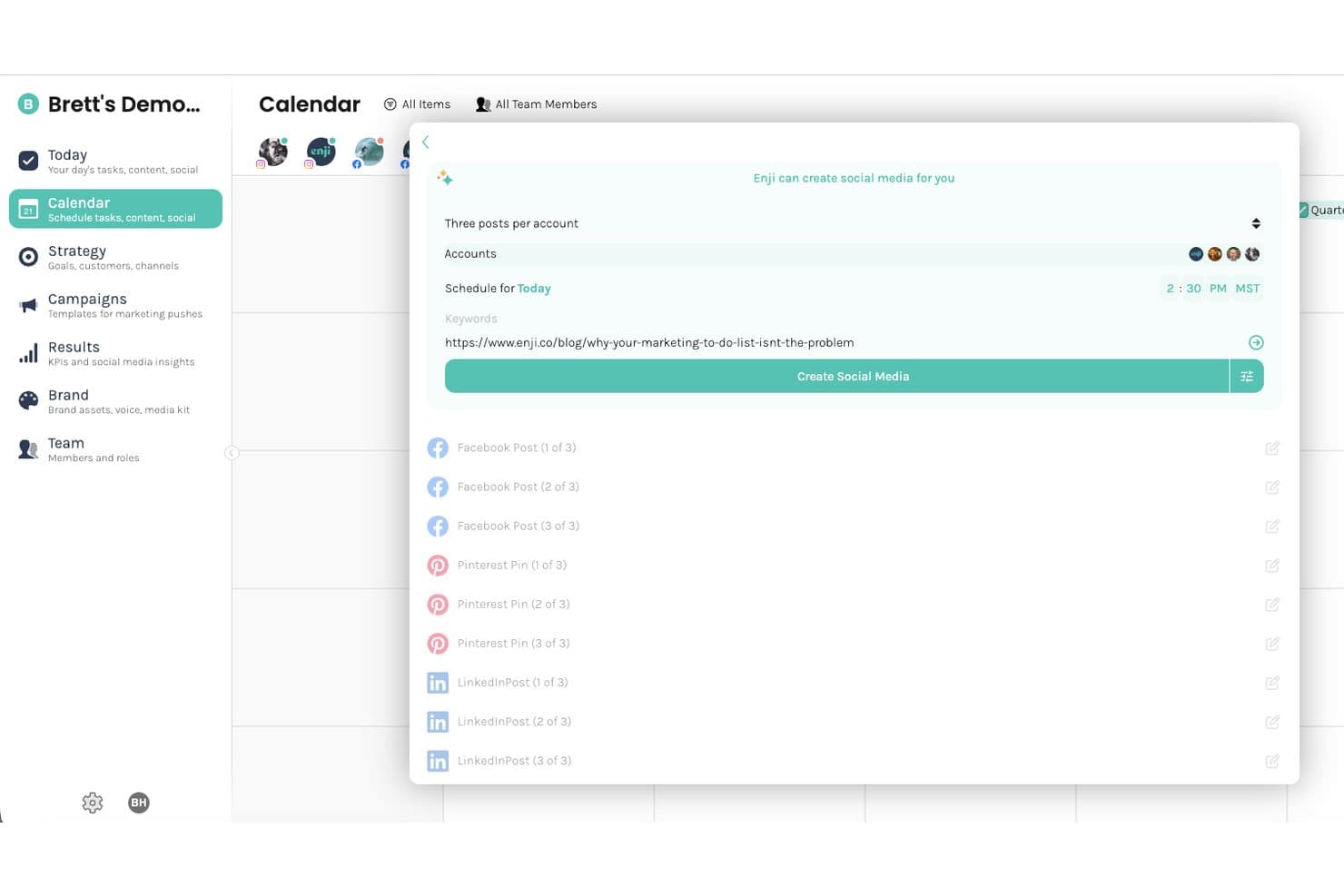
Enji lets users auto-generate social posts across platforms from a URL. Enji is a small-business marketing platform with a social media scheduler that supports Instagram feed posts, Stories, and Reels, alongside AI caption drafting, a visual feed planner, and cross-platform publishing to seven networks.
Who Is Enji Best For?
Enji suits small-business owners who want to schedule Instagram posts, draft captions with AI, and manage cross-platform publishing without juggling multiple tools.
Why I Picked Enji
I've included Enji in my top picks because it's purpose-built for small-business owners who need Instagram scheduling without the complexity of enterprise tools. I particularly like how the Visual Instagram Planner lets you preview your grid before anything goes live, so you can rearrange posts and swap photos until the feed looks right. The AI copywriter drafts captions using your brand voice directly, which cuts the blank-page problem that slows down solo marketers.
Enji Key Features
- Multi-platform cross-posting: Schedule and auto-publish content across Facebook, Instagram, TikTok, Pinterest, LinkedIn, Threads, and YouTube Shorts from a single calendar.
- Instagram Reel audio: Add music or original creator audio from Meta's library to scheduled Reels, preview tracks, and balance audio against the video before publishing.
- Monthly performance metrics: Analytics connections automatically pull account-performance data monthly, covering Instagram and other connected platforms.
- AI content idea generator: Generates personalized social content ideas using your business website information, and refines suggestions based on ideas you use or discard.
Enji Integrations
Enji offers native integrations with Instagram, Facebook, TikTok, Pinterest, LinkedIn, Threads, YouTube Shorts, Google Analytics, and Canva. It provides a smaller set of native integrations focused on social publishing, performance tracking, and content creation.
Pros and Cons
Pros:
- Reviewers praise AI caption starting points
- Plans posts against a visual feed preview
- Drafts captions around your business voice
Cons:
- Monthly metrics offer limited reporting depth
- No inbox for Instagram comments or DMs
Learn more about Enji: Best for team workflow approvals
- Free plan + trial available
- From $65/month
Visit WebsiteCustomer Rating:4.6/5
Loomly shows a visual calendar with scheduled Instagram posts, times, and tags. If your team needs a structured approval process for Instagram content, Loomly is built with collaboration in mind. The platform helps marketing teams and agencies manage post drafts, feedback, and approvals in one place. Loomly is especially useful for organizations that require multiple sign-offs before publishing to Instagram.
Why I Picked Loomly
For teams that need a clear approval workflow before posting to Instagram, Loomly offers built-in tools for managing feedback and sign-offs. The platform lets you assign roles, set up custom approval steps, and track the status of each post as it moves through the review process. I like that you can leave comments directly on post drafts, making it easy for team members and stakeholders to collaborate. These features make Loomly a strong choice for agencies or brands with multi-step content approval needs.
Loomly Key Features
Some other features that help Instagram marketers manage content and campaigns include:
- Post Ideas Generator: Get content inspiration based on trending topics and calendar events.
- Hashtag Suggestions: Receive automated hashtag recommendations for each Instagram post.
- Asset Library: Store, organize, and reuse images, videos, and post templates.
- Instagram Analytics: Monitor post performance, engagement, and audience growth with built-in reporting tools.
Loomly Integrations
Integrations include Instagram, Facebook, LinkedIn, TikTok, YouTube, Pinterest, Google Business Profile, Threads, Canva, and Giphy.
Pros and Cons
Pros:
- Easy mock up generation
- Good for agency workflows
- Visual calendar interface
Cons:
- Pricey for solo managers
- Interface looks slightly old
Learn more about Loomly: Best for unified inbox management
- Free plan + 30-day trial + demo available
- From $99/user/month
Visit WebsiteCustomer Rating:4.5/5
Agorapulse shows an Instagram calendar with post previews and schedules. Managing Instagram conversations across multiple accounts can get overwhelming, especially for agencies and social media teams. Agorapulse brings all your Instagram messages, comments, and mentions into a single unified inbox. This helps you keep track of every interaction and respond quickly without missing important engagement opportunities.
Why I Picked Agorapulse
When you need to manage high volumes of Instagram engagement, Agorapulse’s unified inbox approach is a major advantage. The platform collects all your Instagram comments, direct messages, and mentions in one place, so you never have to switch between tabs or miss a message. I appreciate how Agorapulse lets you assign conversations to team members and track message status, which is especially useful for agencies or teams handling multiple accounts. This focus on centralized communication makes it a strong fit for anyone prioritizing Instagram inbox management.
Agorapulse Key Features
Some other features that make Agorapulse valuable for Instagram management include:
- Content Scheduling: Plan and schedule Instagram posts and stories directly from the platform.
- Social Listening: Monitor Instagram for keywords, hashtags, and brand mentions in real time.
- Reporting and Analytics: Access detailed Instagram performance reports and export them for stakeholders.
- Saved Replies: Create and use pre-written responses for common Instagram questions or comments.
Agorapulse Integrations
Integrations include Facebook, Instagram, X (Twitter), LinkedIn, Pinterest, TikTok, YouTube, Google Analytics, Canva, and HubSpot.
Pros and Cons
Pros:
- Great team workflow routing
- Built in social CRM tools
- Beautiful reporting exports
Cons:
- Grid planner is very basic
- Mobile app lacks features
Learn more about Agorapulse: Best for collaborative post scheduling
- Free plan + 14-day trial available
- From $6/month
Visit WebsiteCustomer Rating:4.4/5
Buffer provides a calendar view to schedule and organize Instagram posts across channels. Buffer is a strong fit for teams that need to coordinate Instagram content and approvals in one place. It’s especially useful for marketing teams, agencies, and small businesses that want to plan, draft, and review posts together before publishing. With Buffer, you can streamline collaboration and keep your Instagram scheduling organized.
Why I Picked Buffer
When you need to coordinate Instagram posts with a team, Buffer stands out for its collaborative scheduling features. The platform lets multiple users draft, review, and approve posts before anything goes live, which is especially helpful for agencies or marketing teams managing brand voice and compliance. I appreciate that Buffer includes post approval workflows and shared content calendars, so everyone stays on the same page. These features make Buffer a strong choice if your Instagram process relies on teamwork and clear communication.
Buffer Key Features
Some other Buffer features help you manage Instagram content more efficiently:
- First Comment Scheduling: Add and schedule the first comment on Instagram posts to include hashtags or extra context.
- Instagram Stories Planning: Plan and organize Instagram Stories with reminders for manual posting.
- Link in Bio Tool: Create a customizable landing page to drive traffic from your Instagram bio link.
- Analytics and Reporting: Track Instagram post performance, engagement, and audience growth with built-in analytics.
Buffer Integrations
Integrations include Instagram, Facebook, X (Twitter), LinkedIn, Pinterest, Shopify, Canva, Google Drive, Dropbox, and OneDrive.
Pros and Cons
Pros:
- Fast IG post scheduling
- Clean link in bio builder
- Easy drag and drop calendar
Cons:
- Reels auto publish is buggy
- No unified IG inbox
 Best for in-depth performance insights
- 14-day free trial and free plan available
- From $33/month (billed annually)
Visit WebsiteCustomer Rating:4.4/5
Iconosquare compares competitors by followers, fans, and posts across brands. When you need deep analytics for Instagram, Iconosquare gives you access to detailed performance data and reporting. This platform is designed for social media managers and agencies who want to track engagement, follower growth, and content effectiveness over time. Iconosquare is especially useful for teams that need to make data-driven decisions and present clear insights to clients or stakeholders.
Why I Picked Iconosquare
For marketers who need more than basic Instagram metrics, Iconosquare delivers advanced analytics and reporting tools. The platform offers visual dashboards that break down engagement rates, follower demographics, and post performance in granular detail. I appreciate how you can schedule automated reports and benchmark your Instagram account against competitors. These features make Iconosquare a strong fit for teams focused on optimizing content strategy with data-driven insights.
Iconosquare Key Features
Some other features that help Instagram marketers manage and analyze their accounts include:
- Content Calendar: Plan and schedule Instagram posts with a visual drag-and-drop calendar.
- Comment Management: Monitor and reply to Instagram comments from a unified inbox.
- Hashtag Tracking: Track the performance of specific hashtags over time.
- Instagram Stories Analytics: Access dedicated analytics for Instagram Stories, including reach and completion rates.
Iconosquare Integrations
Integrations include Instagram, Facebook, TikTok, LinkedIn, X (Twitter), Pinterest, Threads, and YouTube.
Pros and Cons
Pros:
- Strong agency reporting
- Tracks IG Stories lifespan
- Custom metric dashboards
Cons:
- Publishing tools are basic
- UI focuses purely on data
Learn more about Iconosquare: Best for advanced analytics reporting
- 30-day free trial
- From $79/user/month (billed annually)
Visit WebsiteCustomer Rating:4.3/5
Sprout Social shows Instagram post history with engagement metrics and VIP labels. Sprout Social is designed for marketing teams and agencies that need deep insights into Instagram performance. It’s especially useful if you want to track campaign impact, audience trends, and competitor benchmarks all in one place. With Sprout Social, you can turn Instagram data into actionable reports for clients or leadership.
Why I Picked Sprout Social
For teams that need more than basic Instagram metrics, Sprout Social offers advanced analytics reporting that goes far beyond standard dashboards. The platform provides customizable, presentation-ready reports that let you dig into post performance, audience growth, and engagement trends over time. I like that you can benchmark your Instagram results against competitors and industry averages directly within the tool. These analytics features make Sprout Social a strong choice if you need to demonstrate ROI or optimize your Instagram strategy with data-driven insights.
Sprout Social Key Features
Some other Sprout Social features help you manage Instagram accounts more thoroughly:
- Smart Inbox: View and respond to all Instagram comments and messages from a unified inbox.
- Instagram Publishing Calendar: Plan, schedule, and organize Instagram posts with a visual calendar.
- Asset Library: Store, organize, and reuse images and videos for Instagram content.
- Approval Workflows: Set up multi-step post approval processes for teams managing Instagram accounts.
Sprout Social Integrations
Integrations include Instagram, Facebook, X (Twitter), LinkedIn, Pinterest, TikTok, YouTube, Salesforce, HubSpot, and Canva.
Pros and Cons
Pros:
- Highly professional reports
- Deep competitor tracking
- Smart optimal post times
Cons:
- Takes time to learn fully
- Complex initial setup
Learn more about Sprout Social: Best for visual content planning
- 14-day free trial + free demo available
- From $18.75/month (billed annually)

Later shows a visual Instagram calendar with drag-and-drop scheduling and grid preview. Later stands out for marketing teams and content creators who want to visually plan and organize their Instagram feeds. The platform’s drag-and-drop calendar and grid preview help you map out posts for a cohesive brand look. If you need to coordinate visual assets and schedule content in advance, Later offers a focused solution.
Why I Picked Later
When visual content planning is your top priority for Instagram, Later offers a set of features built specifically for that need. The drag-and-drop visual planner lets you arrange posts on a grid to preview how your feed will look before anything goes live. I appreciate that you can schedule images, videos, and carousels while seeing the overall aesthetic in real time. These planning tools make Later a strong fit for brands and creators who care about maintaining a cohesive and visually appealing Instagram presence.
Later Key Features
I also found several other features that help Instagram marketers manage content more efficiently:
- Media Library: Store, organize, and tag all your Instagram images and videos in one place.
- Link in Bio Tool: Create a clickable landing page to drive traffic from your Instagram profile.
- Instagram Analytics Dashboard: Track post performance, follower growth, and engagement metrics.
- User-Generated Content Collection: Collect and curate content from Instagram users for reposting.
Later Integrations
Integrations include Instagram, Facebook, Pinterest, TikTok, X (Twitter), LinkedIn, YouTube, Canva, Dropbox, and Google.
Pros and Cons
Pros:
- Saves hashtag collections
- Easy UGC content sourcing
- Strong link in bio feature
Cons:
- Basic multi channel sync
- Support response is slow
Learn more about Later: Best for drag-and-drop grid design
- 14-day free trial available
- Pricing upon request

Planoly shows a visual content calendar for scheduling Instagram posts across channels. If you want to visually plan your Instagram feed with precision, Planoly gives you a true drag-and-drop grid design experience. This tool is especially useful for brands, creators, and social media managers who care about the look and flow of their Instagram grid. Planoly helps you arrange, preview, and schedule posts so your feed always matches your visual strategy.
Why I Picked Planoly
For anyone who wants to control the visual flow of their Instagram feed, Planoly’s drag-and-drop grid design stands out. You can move posts around on a live grid to see exactly how your feed will look before anything goes live. I like that Planoly lets you preview and rearrange scheduled content, which is especially helpful for brands and creators who care about aesthetics. This focus on visual planning makes it a strong choice for anyone prioritizing Instagram grid design.
Planoly Key Features
Some other features that make Planoly useful for Instagram management include:
- Auto-Post Scheduling: Schedule Instagram posts to publish automatically at set times.
- Hashtag Manager: Save and organize groups of hashtags for quick insertion into posts.
- Analytics Dashboard: Track post performance and engagement metrics within the platform.
- Linkit Tool: Create a shoppable link page to drive traffic from your Instagram bio.
Planoly Integrations
Integrations include Instagram, Facebook, Pinterest, TikTok, LinkedIn, Canva, Unsplash, Pexels, YouTube, and Amazon Posts.
Pros and Cons
Pros:
- Built in IG comment inbox
- Very easy to learn and use
- Great for lifestyle brands
Cons:
- Weaker team collaboration
- Video posting can be buggy
Learn more about Planoly: Best for direct publishing to stories
- 14-day free trial + free demo available
- From $49/3 accounts/month (billed annually)

Sked Social provides a unified inbox for Instagram messages and comments. For teams that need to publish Instagram Stories directly without workarounds, Sked Social offers a rare native solution. This platform is especially useful for agencies, brands, and content creators who rely on Stories as a core part of their Instagram strategy. Sked Social stands out by supporting direct scheduling and publishing of Stories, which helps users maintain a consistent presence and avoid manual posting.
Why I Picked Sked Social
Unlike most Instagram tools, Sked Social allows you to schedule and publish Stories directly, without relying on push notifications or manual uploads. This direct publishing capability is especially valuable for brands and agencies that need to plan and automate time-sensitive Stories campaigns. I appreciate that Sked Social also supports advanced Story editing features, like stickers and links, so you can fully prepare your content before it goes live. For anyone who treats Instagram Stories as a key engagement channel, these features make Sked Social a strong fit.
Sked Social Key Features
Some other features that make Sked Social useful for Instagram management include:
- Bulk Image Upload: Upload and schedule multiple Instagram posts at once from your desktop.
- Hashtag Manager: Save, organize, and insert hashtag groups directly into your Instagram posts.
- Visual Content Calendar: Plan and view all scheduled Instagram content in a drag-and-drop calendar.
- Instagram Analytics: Access detailed metrics for posts, Stories, and audience engagement.
Sked Social Integrations
Integrations include Instagram, Facebook, TikTok, LinkedIn, Threads, Google Business Profile, YouTube, X (Twitter), Pinterest, and Snapchat.
Pros and Cons
Pros:
- Perfect for IG first brands
- Advanced link in bio tool
- Built in photo editor
Cons:
- Takes time to master UI
- Slow customer support
Learn more about Sked Social: 10Best for AI-powered content suggestions
FeedHive
- 7-day free trial available
- From $15/4 socials/month (billed annually)

FeedHive shows a weekly content calendar with an AI assistant for post ideas. If you’re looking for AI-driven content ideas for Instagram, FeedHive offers automated suggestions and post generation. This tool is a good fit for social media managers, creators, and small businesses who want to keep their content pipeline full without spending hours brainstorming. FeedHive stands out for its ability to analyze your account and trends, then recommend relevant post topics and captions tailored to your audience.
Why I Picked FeedHive
What sets FeedHive apart for Instagram is its AI-powered content engine that generates post ideas and captions based on your niche and audience trends. The platform analyzes your past Instagram performance and current social trends to suggest relevant topics, helping you keep your content fresh and engaging. I like that you can also use its AI to automatically generate captions and hashtags tailored to each post. These features make FeedHive a strong choice for anyone who wants to maintain a consistent Instagram presence without spending hours brainstorming.
FeedHive Key Features
Some other features that make FeedHive useful for Instagram management include:
- Visual Post Scheduler: Schedule Instagram posts using a drag-and-drop calendar interface.
- Content Recycling: Automatically reshare top-performing Instagram posts at set intervals.
- Collaboration Tools: Invite team members to review and approve Instagram content before publishing.
- Analytics Dashboard: Track Instagram post performance with visual metrics and engagement breakdowns.
FeedHive Integrations
Integrations include Facebook, Instagram, YouTube, TikTok, LinkedIn, Pinterest, Google Business, Threads, Twitter/X, and Discord.
Pros and Cons
Pros:
- Great visual color coding
- Clean and modern interface
- Easy content recycling
Cons:
- Basic team collaboration
- Smaller integration list
Learn more about FeedHive:
Diğer Instagram Araçları
Kısa listeme girmeyen, ancak yine de göz atmaya değer bazı ek Instagram aracı seçenekleri şunlardır:
- 11HootsuiteBest for managing multiple social profiles
- 12SocialPilotBest with bulk post scheduling
- 13SendibleBest for agency client management
How I Evaluate Instagram Tools
I evaluate every tool on two levels: whether it can reliably auto-publish Reels and pull real Instagram analytics, then what sets it apart for social media managers juggling multiple accounts.
Core Functionality (Table Stakes For This List)
When I'm selecting tools for my list, I rank each one on a scale from 0 (does not offer the functionality) to 5 (excels in this area) for each core functionality listed below. Then, I calculate the tool's total score into a percentage. Each tool needs to achieve a minimum total score of 65% to be considered for inclusion.
- Instagram Post Scheduling: I check whether a tool can auto-publish across all Instagram formats—feed posts, Reels, Stories, and Carousels—not just send push reminders to your phone.
- Performance Analytics & Reporting: Each tool should surface Instagram-specific metrics like reach, engagement rate, and follower growth so you can tie content back to results.
- Content Calendar & Grid Preview: I look for a visual planner that lets you preview your Instagram grid layout and rearrange upcoming posts, the way tools like Later and Planoly approach feed aesthetics.
- Engagement & Inbox Management: Managing comments, DMs, and mentions across multiple accounts from one inbox matters, especially for teams handling high-volume community interaction.
- Hashtag & Discovery Tools: I evaluate whether the tool offers hashtag research with performance data, not just a basic suggestion list, so you can refine your content strategy over time.
- Instagram Graph API Integration: Official Meta API access is what I look for here, since tools relying on workarounds tend to break after platform updates or put your account at risk.
Once I have a list of tools that meet the criteria, I consider what sets each platform apart.
Differentiating Factors (What Sets Vendors Apart)
Here's how I compare and contrast different vendors:
Standout Features
AI-powered caption and hashtag generation can save hours of creative work, especially when you're managing multiple brand accounts with different voices. I also look for link-in-bio builders that turn your Instagram profile into a trackable landing page—tools like Later and Linktree approach this differently, so it's worth comparing customization and analytics depth. For agencies and larger teams, approval workflows with role-based permissions make a real difference when clients need to sign off on content before it goes live.
Beyond Features
Pricing structure matters here because some tools charge per Instagram account while others charge per user—an agency managing 20 client profiles has very different cost math than a solo brand manager. I also evaluate how well each tool connects with design platforms like Canva and e-commerce systems like Shopify, since Instagram content rarely lives in isolation from your broader marketing stack. Compliance is another factor I check, particularly official Meta Business Partner status and data privacy standards like GDPR and SOC 2.
Instagram Araçları Nasıl Seçilir?
Uzun özellik listeleri ve karmaşık fiyatlandırma yapıları arasında kaybolmak kolaydır. Kendinize özgü yazılım seçim sürecinizde ilerlerken odağınızı korumanıza yardımcı olmak için göz önünde bulundurmanız gereken faktörleri içeren bir kontrol listesi hazırladım:
| Faktör | Dikkat Edilmesi Gerekenler |
|---|---|
| FaktörÖlçeklenebilirlik | Dikkat Edilmesi GerekenlerAraç, mevcut ve gelecekteki Instagram hesaplarınızın sayısını, ekip büyüklüğünü ve içerik yükünü destekleyecek mi? Kullanıcı sınırlarını, hesap kısıtlamalarını ve iş akışı darboğazlarını kontrol edin. |
| FaktörEntegrasyonlar | Dikkat Edilmesi GerekenlerAraç, mevcut pazarlama teknoloji yığınınıza (ör. Canva, HubSpot, analiz platformları) yerel olarak bağlanıyor mu? Kısa listeye almadan önce uyumluluğu doğrulayın. |
| FaktörÖzelleştirilebilirlik | Dikkat Edilmesi Gerekenlerİş akışlarını, onay süreçlerini veya panoları ekibinizin ihtiyaçlarına uyacak şekilde özelleştirebilir misiniz? Esnekliğe ihtiyacınız varsa katı süreçleri zorunlu kılan araçlardan kaçının. |
| FaktörKullanım kolaylığı | Dikkat Edilmesi GerekenlerYeni ekip üyeleri aracı ne kadar hızlı öğrenebilir? Anlaşılır gezinme, minimum eğitim gereksinimi ve mantıklı bir arayüz arayın. |
| FaktörUygulama ve işe alıştırma | Dikkat Edilmesi GerekenlerBaşlamak için hangi kaynaklar gerekiyor? Kurulum, geçiş ve kullanıcıların benimsemesi için gereken zamanı, eğitimi ve desteği göz önünde bulundurun. |
| FaktörMaliyet | Dikkat Edilmesi GerekenlerFiyatlandırma kademeleri kullanımınız ve büyüme planlarınızla uyumlu mu? Bütçenizi etkileyebilecek gizli ücretlere, asgari kullanıcı koşullarına veya özellik kısıtlamalarına dikkat edin. |
| FaktörGüvenlik önlemleri | Dikkat Edilmesi GerekenlerAraç güvenli kimlik doğrulama, veri şifreleme ve gizlilik standartlarına uyumluluk sunuyor mu? Bu, müşteri hesaplarını yöneten ajanslar için özellikle önemlidir. |
| FaktörDestek olanakları | Dikkat Edilmesi GerekenlerHangi destek kanalları (sohbet, e-posta, telefon) sunuluyor ve hangi saatlerde hizmet veriliyor? Acil yardım veya sorun giderme konusunda ekibinizin ihtiyaçlarını göz önünde bulundurun. |
Instagram Araçları Nedir?
Instagram araçları, bireylerin ve ekiplerin Instagram işletme hesabı varlıklarını yönetmesine, planlamasına, analiz etmesine ve optimize etmesine yardımcı olmak üzere tasarlanmış yazılım platformlarıdır. Bu araçlar; e-ticaret veya influencer pazarlama kampanyaları için içerik düzenleme, yorum moderasyonu, analiz takibi ve kitle etkileşimi gibi görevleri merkezileştirir. Pazarlama profesyonelleri ve tüm Instagram influencer'ları, kampanyaları koordine etmek, marka bahsetmelerini izlemek ve birden fazla hesap genelinde performansı ölçmek için bu araçları kullanır; böylece tutarlı ve etkili bir Instagram stratejisini sürdürmek kolaylaşır.
Instagram Araçlarının Özellikleri
Instagram araçlarını seçerken aşağıdaki temel özelliklere dikkat edin:
- İçerik planlama: Tutarlı bir paylaşım takvimini sürdürmek ve kitlenize en uygun zamanlarda ulaşmak için gönderileri, hikâyeleri ve Reels videolarını önceden planlayın.
- Birleşik gelen kutusu: Etkileşimi ve yanıtlamayı kolaylaştırmak için tüm Instagram yorumlarını, doğrudan mesajlarını ve bahsetmelerini tek bir merkezi konumdan yönetin.
- Analiz ve raporlama: Kampanya etkinliğini değerlendirmek ve gelecekteki stratejilere yön vermek için takipçi artışı, etkileşim oranları ve gönderi performansı gibi ölçümleri izleyin.
- Hashtag takibi: Eğilimleri belirlemek, erişimi genişletmek ve hashtag stratejinizi geliştirmek için belirli hashtag'lerin performansını izleyin.
- Sosyal dinleme: Markanızla ilgili konuşmalardan haberdar olmak için Instagram'daki marka bahsetmelerini, anahtar kelimeleri ve rakip faaliyetlerini takip edin.
- Ekip iş birliği: Pazarlama işlevleri arasında verimli ekip çalışmasını desteklemek için roller atayın, izinleri yönetin ve içerik onaylarını koordine edin.
- Kayıtlı yanıtlar: İletişimi hızlandırmak için sık sorulan sorulara veya yaygın yorumlara yönelik önceden yazılmış yanıtlar oluşturun ve bunları kullanın.
- Izgara önizlemesi: Tutarlı ve görsel açıdan çekici bir profil sağlamak için yayınlamadan önce Instagram akışınızın düzenini görselleştirin ve planlayın.
- Rakip analizi: Güçlü yönleri, zayıf yönleri ve büyüme fırsatlarını belirlemek için Instagram performansınızı rakiplerle karşılaştırın.
Instagram Araçlarının Yaygın Yapay Zekâ Özellikleri
Yukarıda listelenen standart Instagram aracı özelliklerinin yanı sıra bu çözümlerin birçoğu aşağıdaki gibi özelliklerle yapay zekâyı kullanmaya başlıyor:
- Açıklama oluşturma: Görüntü analizi, popüler konular veya marka üslubu yönergelerine göre gönderiler için ilgi çekici ve alakalı açıklamaları otomatik olarak oluşturun.
- En uygun paylaşım zamanı tahmini: Maksimum erişim için içerik yayınlamak üzere en iyi zamanları önermek amacıyla kitle davranışını ve etkileşim kalıplarını analiz edin.
- Duygu analizi: Yanıtları önceliklendirmeye ve marka sağlığını izlemeye yardımcı olmak için yorumların ve mesajların tonunu ve duygusunu değerlendirin.
- İçerik etiketleme için görüntü tanıma: İlgili hashtag'leri önermek veya içerikleri kategorilere ayırmak için görüntülerdeki nesneleri, sahneleri veya marka logolarını otomatik olarak algılayın.
- Otomatik yorum moderasyonu: Instagram varlığınızı güvenli ve marka kimliğinizle uyumlu tutmak için istenmeyen mesajları, saldırgan dili veya uygunsuz yorumları filtrelemek üzere yapay zekâdan yararlanın.
Instagram Araçlarının Faydaları
Instagram araçlarını uygulamak ekibiniz ve işletmeniz için çeşitli faydalar sağlar. Yararlanabileceğiniz bazı avantajlar şunlardır:
- Merkezi etkileşim yönetimi: Tüm Instagram yorumlarını, mesajlarını ve bahsetmelerini tek bir birleşik gelen kutusundan yönetin; böylece kitle etkileşimlerini takip etmek kolaylaşır.
- Tutarlı içerik planlama: Düzenli ve stratejik bir Instagram varlığını sürdürmek için gönderileri, hikâyeleri ve Reels videolarını önceden planlayın ve zamanlayın.
- Veriye dayalı karar alma: Performansı ölçmek, büyümeyi takip etmek ve Instagram stratejinizi gerçek içgörülere göre geliştirmek için ayrıntılı analizlere ve raporlamaya erişin.
- Geliştirilmiş ekip iş birliği: Ekip çalışmasını kolaylaştırmak ve darboğazları azaltmak için platform içinde roller atayın, onayları yönetin ve içerik oluşturmayı koordine edin.
- Gelişmiş marka izleme: İşletmenizle ilgili marka bahsetmelerini, rakip faaliyetlerini ve popüler konuları izlemek için sosyal dinleme ve hashtag takibinden yararlanın.
- Daha hızlı yanıt süreleri: Yaygın soruları hızlıca yanıtlamak ve istenmeyen yorumları filtrelemek için kayıtlı yanıtlardan ve otomatik moderasyondan yararlanın.
- Optimize edilmiş görsel planlama: Tutarlı ve görsel açıdan çekici bir profil sağlamak için yayınlamadan önce Instagram ızgara düzeninizi önizleyin.
Instagram Araçlarının Maliyetleri ve Fiyatlandırması
Instagram araçlarını seçmek, mevcut çeşitli fiyatlandırma modelleri ve planlarının anlaşılmasını gerektirir. Maliyetler özelliklere, ekip büyüklüğüne, eklentilere ve daha fazlasına göre değişir. Aşağıdaki tablo, Instagram araçları çözümlerindeki yaygın planları, ortalama fiyatlarını ve genellikle sunulan özellikleri özetlemektedir:
Instagram Araçları için Plan Karşılaştırma Tablosu
| Plan Türü | Ortalama Fiyat | Yaygın Özellikler |
|---|---|---|
| Plan TürüÜcretsiz Plan | Ortalama Fiyat$0 | Yaygın ÖzelliklerTemel gönderi planlama, sınırlı analiz, tek hesap desteği ve temel yorum yönetimi. |
| Plan TürüBireysel Plan | Ortalama Fiyat$15-$99/ay | Yaygın ÖzelliklerBirden fazla hesap desteği, içerik takvimi, temel raporlama, hashtag takibi ve sınırlı entegrasyonlar. |
| Plan Türüİşletme Planı | Ortalama Fiyat$85-$399/ay | Yaygın ÖzelliklerEkip iş birliği araçları, gelişmiş analiz, birleşik gelen kutusu, onay iş akışları ve sosyal dinleme. |
| Plan TürüKurumsal Plan | Ortalama Fiyat$300+/kullanıcı/ay | Yaygın ÖzelliklerÖzel entegrasyonlar, özel destek, gelişmiş güvenlik, işe alıştırma yardımı ve API erişimi. |
Instagram Araçları Hakkında SSS
Instagram araçları hakkında sık sorulan bazı soruların yanıtları:
Instagram araçları aynı anda birden fazla hesabı yönetebilir mi?
Evet, çoğu Instagram aracı birden fazla hesabı tek bir kontrol panelinden yönetmenize olanak tanır. Bu özellik, çeşitli profilleri yöneten ajanslar, markalar veya ekipler için kullanışlıdır ve içerik, etkileşim ve analizlerin tek bir yerde düzenli tutulmasına yardımcı olur.
Instagram araçları Instagram giriş bilgilerimi gerektirir mi?
Evet, genellikle Instagram’ın resmi API’si üzerinden Instagram hesabınızı araca bağlamanız gerekir. Bu, aracın şifrenizi doğrudan paylaşmadan güvenli bir şekilde gönderileri planlamasına, analizlere erişmesine ve etkileşimi yönetmesine olanak tanır.
Ekip iş birliğini destekleyen Instagram araçları var mı?
Evet, birçok Instagram aracı rol tabanlı izinler, içerik onay iş akışları ve paylaşılan içerik takvimleri gibi ekip iş birliği özellikleri içerir. Bunlar, pazarlama ekiplerinin kampanyaları koordine etmesine ve marka tutarlılığını korumasına yardımcı olur.
Instagram araçları analiz konusunda nasıl yardımcı olur?
Instagram araçları; takipçi artışı, etkileşim oranları ve gönderi performansı gibi metrikleri izleyen kontrol panelleri ve raporlar sunar. Bu içgörüler, kampanya etkisini ölçmenize ve stratejinizi gerçek verilere göre ayarlamanıza yardımcı olur.
Instagram araçlarında güvenlik açısından nelere dikkat etmeliyim?
Güvenli kimlik doğrulama, veri şifreleme kullanan ve gizlilik standartlarına uyan araçları tercih edin. Bu, özellikle müşteri hesaplarını veya hassas marka bilgilerini yönetiyorsanız önemlidir. Hesaplarınızı bağlamadan önce aracın güvenlik belgelerini mutlaka inceleyin.