

A QR code generator is a software platform that lets you create QR codes to connect offline audiences with digital experiences, campaigns, or content. If you’re comparing QR code generator tools, you’re probably looking for smarter ways to bridge print and digital, measure campaign impact, and support everything from lead capture to dynamic links. This list breaks down what matters most—privacy, analytics, scalability, and bulk operations—so you can choose the right solution for your next marketing initiative.
Why Trust Our Software Recommendations
6,700+
Reviews
20
Industry experts
16+
Evaluation factors
14
Years
Our team has been testing and reviewing software since 2012. As marketing leaders ourselves, we know how difficult—and important—it is to choose the right software.
For this guide, we evaluated tools using hands-on testing and independent research, scoring tools using our selection criteria.
Our reviews reflect our human editorial judgment, not a sales pitch.
Expert reviewers:
 Gui DrusinaCreative Director
- Shriya GhateSenior Marketing Lead
 Amanda JacquesMarketing Ops Leader

Comparison Table: QR Code Generators
Compare pricing and specs side by side for the QR code generators that made it onto my shortlist.
| Tool | Best For | Trial Info | Price | ||
|---|---|---|---|---|---|
| 1 | Best for high-resolution QR code exports | 14-day free trial | From $30/month | Website | |
| 2 | Best for scheduled QR code campaigns | 7-day free trial | Pricing upon request | Website | |
| 3 | Best for QR codes with link analytics | Free plan available | From $10/month (billed annually) | Website | |
| 4 | Best for bulk digital business cards | Free plan available | From $6.99/month (billed annually) | Website | |
| 5 | Best for multilingual QR code content | Free plan available | From $16.99/month | Website | |
| 6 | Best for enterprise QR code management | 14-day free trial | From $9/month (billed annually) | Website | |
| 7 | Best for QR code lead capture forms | 14-day free trial | From $5/month | Website | |
| 8 | Best for no-signup static QR codes | 14-day free trial | From $10/month (billed annually) | Website | |
| 9 | Best for privacy-focused QR analytics | Free plan available | From $12/month | Website | |
| 10 | Best for offline campaign attribution | Free plan available | From $25/month (billed annually) | Website |


QR Code Generator Reviews
Below are my detailed summaries of the best QR code generators that made it onto my shortlist. My reviews offer a detailed look at the features, best use cases, and integrations of each platform to help you find the best one for you.
 Best for high-resolution QR code exports
- 14-day free trial
- From $30/month
Visit WebsiteCustomer Rating:4.9/5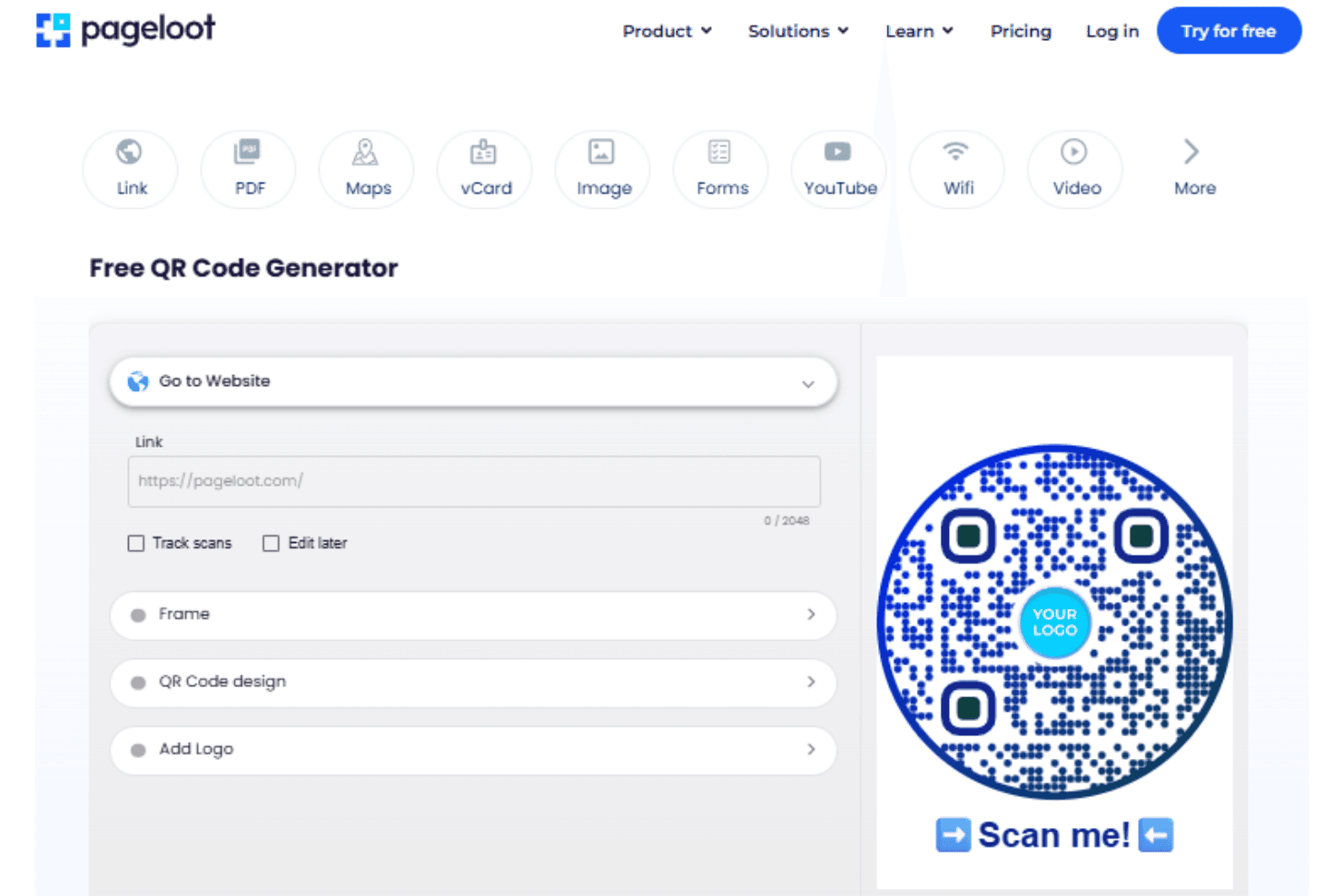
Pageloot offers a free QR code generator with customizable design options including frames, logos, and link tracking. Pageloot is a QR code generator that lets you create, customize, and manage dynamic and static QR codes across 25+ content types, including URLs, vCards, PDFs, app links, and Wi-Fi.
Who Is Pageloot Best For?
Pageloot is a good fit for marketing agencies and brand teams that regularly produce print collateral and need QR codes that meet commercial printing standards.
Why I Picked Pageloot
Pageloot earns its spot on my shortlist because of how seriously it handles print output. It exports QR codes in SVG, EPS, and PDF formats, which are the formats commercial print vendors actually require. I also like the built-in readability score, which flags contrast issues before I send a design to print. That catches errors I'd otherwise only notice after wasting an entire print run.
Pageloot Key Features
- Dynamic QR code editing: Change destination URLs or content at any time without generating a new code.
- Bulk QR code generation: Create large batches of unique QR codes using CSV uploads or the Pageloot API.
- Multi-language support: Dashboard available in 16 languages, with 37 landing page languages for global campaigns.
- Analytics with CSV export: View real-time scans by location, date, and device, and export data for reporting.
Pageloot Integrations
Native integrations are not clearly documented. The tool supports integrations via API and Zapier.
Pros and Cons
Pros:
- Supports 25+ distinct QR code content types
- Built-in readability score catches contrast issues
- Print-ready SVG, EPS, and PDF exports
Cons:
- Folder organization limited for large code libraries
- Dynamic QR codes unavailable on free plan
Learn more about Pageloot: 2Best for scheduled QR code campaigns
QRFY
- 7-day free trial
- Pricing upon request
Visit WebsiteCustomer Rating:4.6/5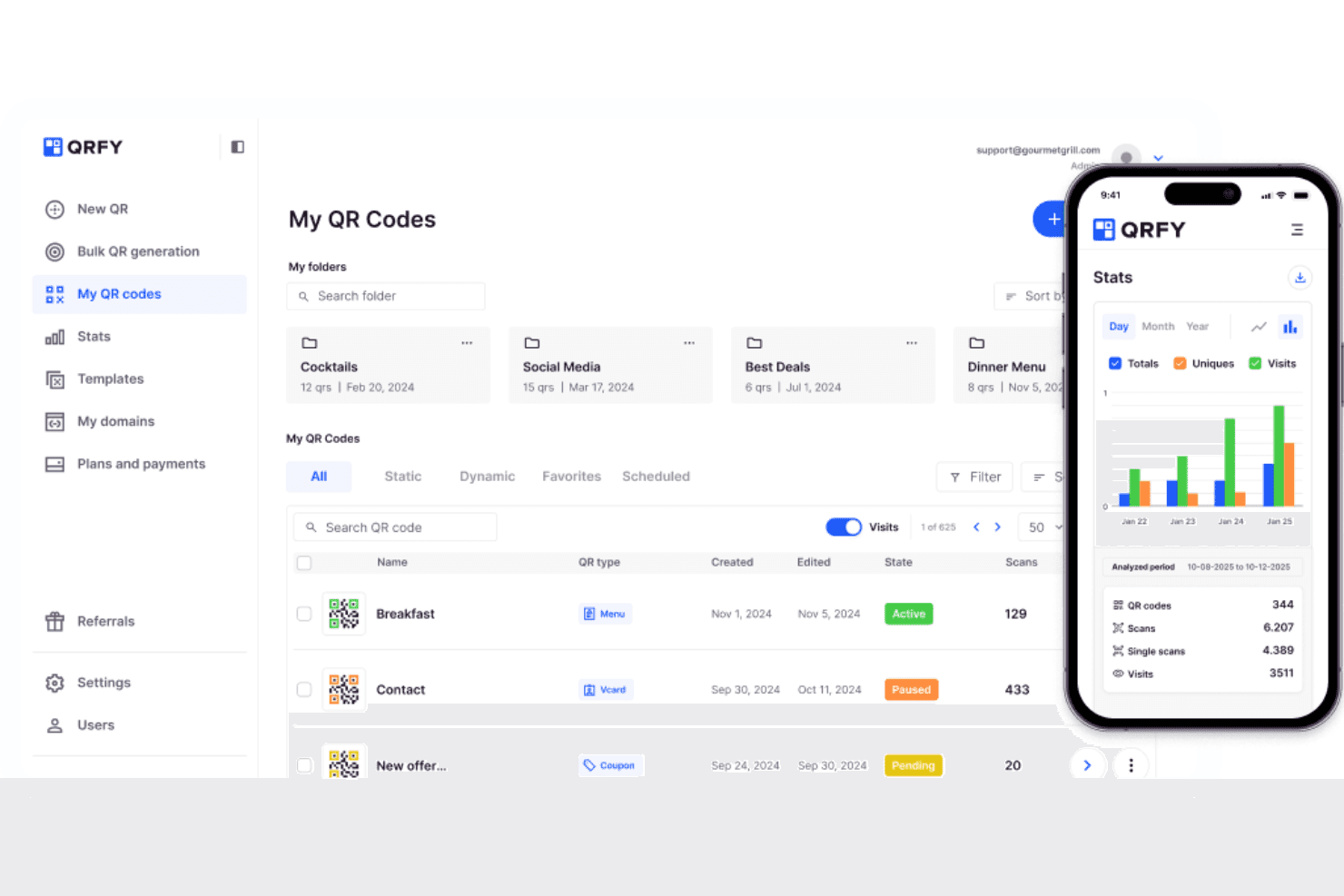
QRFY offers a centralized dashboard to manage, organize, and track QR codes with detailed scan analytics. QRFY is a dynamic QR code generator that lets you create, brand, and manage unlimited editable QR codes across content types including URLs, vCards, PDFs, menus, and landing pages, with built-in scan analytics and bulk CSV creation.
Who Is QRFY Best For?
QRFY is a strong fit for marketing teams running multiple simultaneous print-and-digital campaigns who need unlimited dynamic codes without worrying about per-code limits.
Why I Picked QRFY
I picked QRFY as one of the best because of how it handles dynamic code management across print campaigns. The redirect feature lets me point an already-printed QR code at a new destination URL when a campaign goes live or wraps up, with no reprint needed. I also rely on the scan analytics, which break down results by country, city, and device, to evaluate which campaign placements actually drove engagement.
QRFY Key Features
- Bulk CSV creation: Generate up to 500 dynamic QR codes at once from a spreadsheet upload.
- Custom branding editor: Apply your logo, colors, and frames to every code to match your brand.
- Scan analytics by device and geography: View detailed reports filtered by device type, country, and city, exportable to CSV or XLSX.
- Multi-content support: Generate codes for links, PDFs, vCards, videos, menus, reviews, and more content types.
QRFY Integrations
Native integrations are not clearly documented. QRFY provides an API for custom integrations.
Pros and Cons
Pros:
- Print-ready SVG and EPS export formats included
- Unlimited dynamic codes on paid plans
- Scheduled QR code campaigns with date-based activation
Cons:
- Analytics dashboard lacks real-time refresh capabilities
- No clearly documented native third-party integrations
Learn more about QRFY: Best for QR codes with link analytics
- Free plan available
- From $10/month (billed annually)
Visit WebsiteCustomer Rating:4.5/5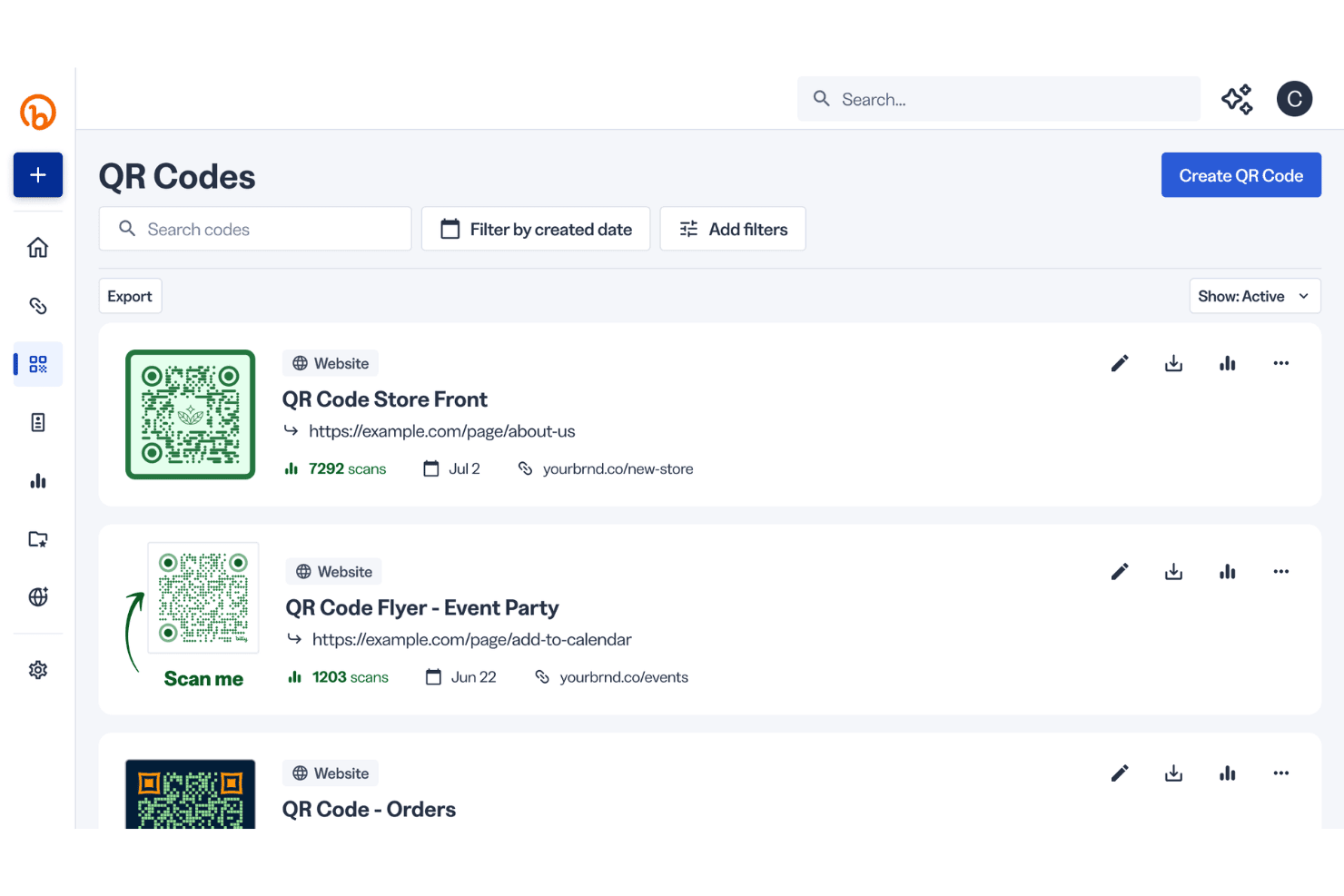
Bitly displays a QR Codes dashboard where users can manage, track scans, and create new QR codes linked to websites. Bitly Codes is a QR code generator built into Bitly's link management platform, offering dynamic QR code creation, branded customization, bulk generation, and scan analytics across a unified dashboard.
Who Is Bitly Codes Best For?
It's a strong fit for mid-market and enterprise marketing teams that need QR codes integrated into a broader link management and campaign analytics workflow.
Why I Picked Bitly Codes
Bitly Codes earns its spot on my shortlist because no other QR code generator ties scan data this deeply into a link management workflow. I love that scan breakdowns go down to city, device, OS, and browser, and Bitly Assist lets me ask performance questions in plain language rather than digging through reports. Dynamic routing by country and device type means one printed code can send iOS users to the App Store while directing desktop users to a campaign landing page.
Bitly Codes Key Features
- Bulk code creation: Generate multiple QR codes at once with CSV upload for campaign and print runs.
- Brand templates: Save and reuse QR code design templates for consistent branding across projects.
- Custom domain support: Use branded links with your own domain to reinforce trust and recognition.
- Centralized dashboard: Manage QR codes, links, and landing pages from a unified, searchable workspace.
Bitly Codes Integrations
Bitly Codes offers native integrations with HubSpot and Google Analytics, and provides an API for custom integrations.
Pros and Cons
Pros:
- Country and device-based URL routing
- Dynamic codes editable after printing
- City-level scan breakdowns available
Cons:
- QR features secondary to link management
- Visual customization limited vs. dedicated QR tools
Learn more about Bitly Codes: Best for bulk digital business cards
- Free plan available
- From $6.99/month (billed annually)
Visit WebsiteCustomer Rating:5/5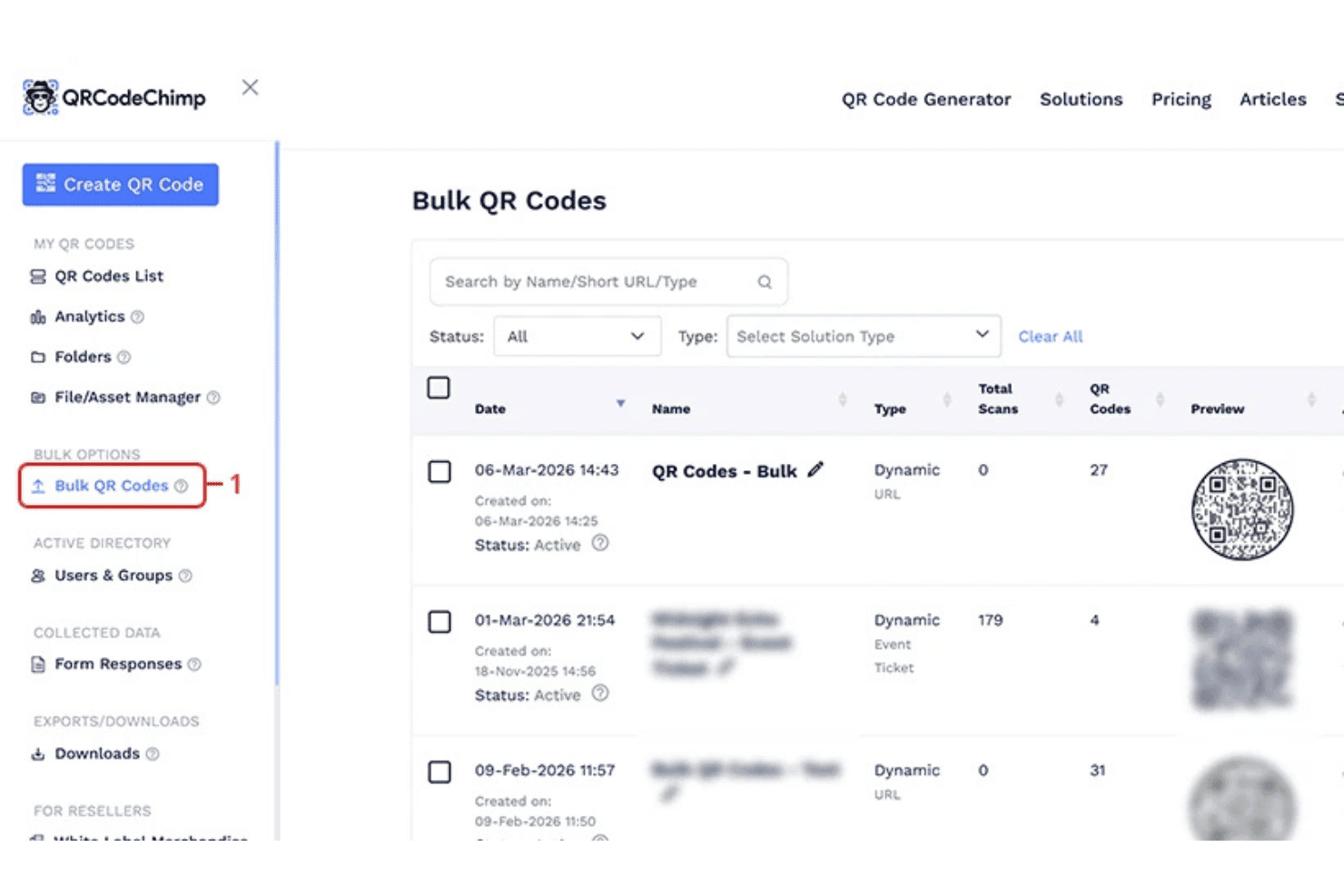
QRCodeChimp offers a Bulk QR Codes management dashboard where users can view, filter, and track multiple QR code campaigns by status, type, and total scans. QRCodeChimp is a QR code generator and management platform for creating static and dynamic QR codes, digital business cards, and branded landing pages, with bulk creation tools, NFC support, and campaign-level scan analytics built in.
Who Is QRCodeChimp Best For?
QRCodeChimp is a strong fit for enterprise marketing and HR teams managing large-scale digital business card rollouts across distributed workforces.
Why I Picked QRCodeChimp
I picked QRCodeChimp as one of the best because its bulk digital business card workflow is genuinely purpose-built for scale. I can upload a spreadsheet with employee data and generate hundreds of branded, NFC-enabled cards at once, each with its own unique QR code and tracking. Field locking lets me enforce brand consistency across every card in the batch, so individual employees can't override approved design or contact fields after distribution.
QRCodeChimp Key Features
- Dynamic QR code editing: Update the content or destination of a QR code at any time without creating a new code.
- Scan analytics dashboard: Track scans by city, device, browser, operating system, and timestamp for individual or bulk codes.
- Advanced branding controls: Customize QR codes with unique shapes, gradients, CTA frames, and brand logos for campaign consistency.
- Multi-content type support: Generate QR codes for URLs, PDFs, event tickets, app store links, menus, social profiles, and Wi-Fi.
QRCodeChimp Integrations
Native integrations are not clearly documented. QRCodeChimp provides an API for custom integrations.
Pros and Cons
Pros:
- Field locking enforces brand consistency at scale
- NFC card support built in natively
- Bulk card generation via CSV upload
Cons:
- Folder organization becomes unwieldy at large volumes
- Analytics depth limited compared to dedicated platforms
Learn more about QRCodeChimp: Best for multilingual QR code content
- Free plan available
- From $16.99/month
Visit WebsiteCustomer Rating:3.5/5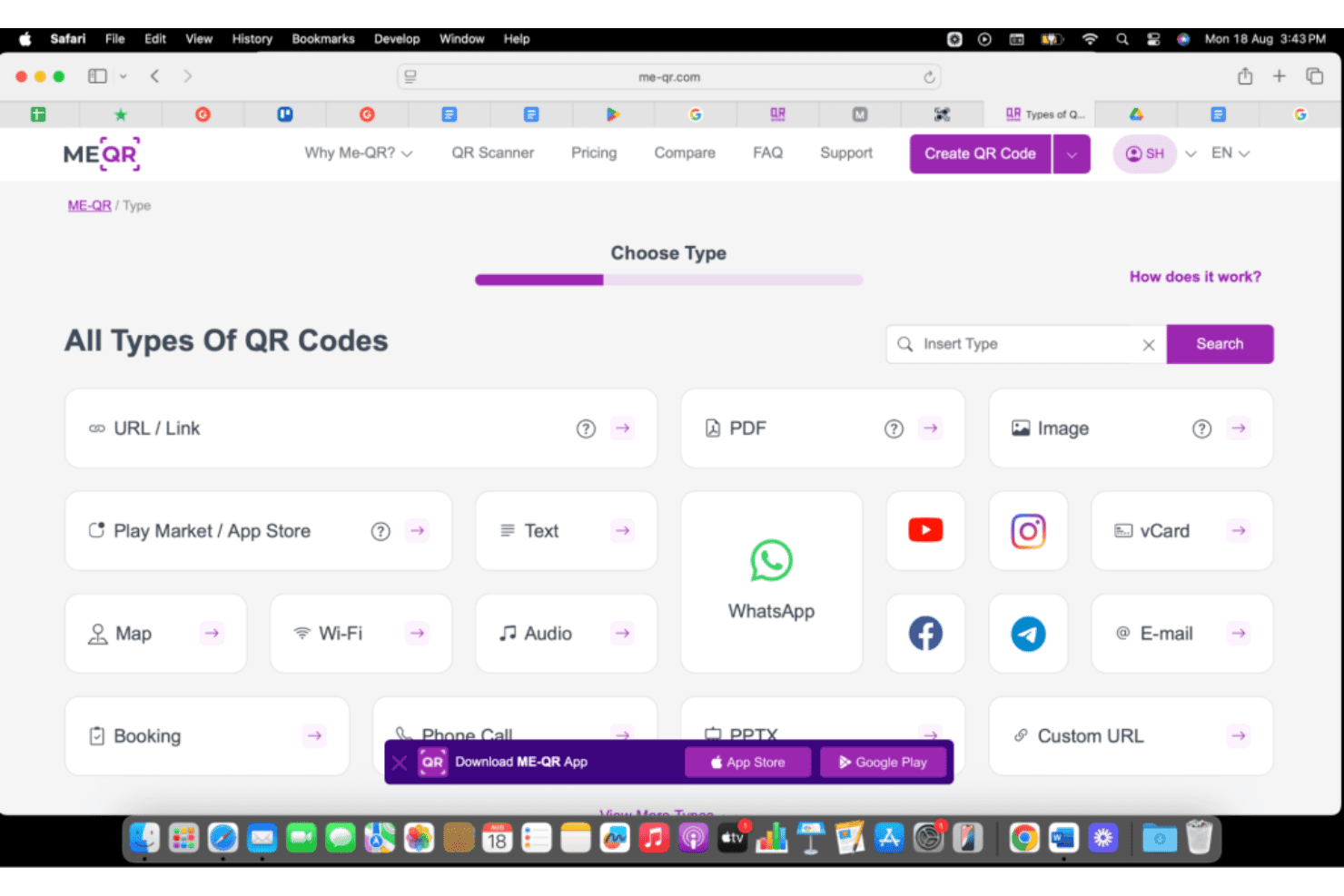
Me-QR offers a wide variety of QR code types including URL, PDF, Image, WhatsApp, vCard, and more from its type selection page. ME-QR is a QR code generator supporting 40+ content types—URLs, vCards, PDFs, Wi-Fi, and more—with dynamic code editing, branded customization, bulk generation, and built-in scan analytics.
Who Is Me-QR Best For?
ME-QR is a strong fit for marketing teams running campaigns across multiple regions or languages, given its 30+ language interface and globally accessible platform.
Why I Picked Me-QR
I've included ME-QR in my top picks because its 30+ language interface is genuinely rare in this space, supporting teams that run QR campaigns across multiple regions. What I particularly like is the Logo QR feature: it embeds brand marks directly into the code's dot pattern, keeping visual identity consistent across every language version you print. I also rely on the PDF and landing page content types to connect region-specific audiences to localized collateral from a single dynamic code.
Me-QR Key Features
- Bulk code creation: Generate multiple QR codes at once using CSV upload for large campaigns or inventory needs.
- Scan analytics dashboard: Access detailed reports on total and unique scans, locations, device type, and browser statistics.
- High-res SVG/PNG downloads: Export codes as high-quality PNG or SVG files suitable for professional print and packaging.
- API integration: Connect via public REST API to automate QR code generation directly from your systems or workflows.
Me-QR Integrations
Native integrations are not clearly documented. The tool supports integrations via a public REST API for custom workflows.
Pros and Cons
Pros:
- Logo embedded directly in code pattern
- Editable dynamic codes post-print deployment
- Multilingual QR content across 30+ languages
Cons:
- No geo-based or device redirect targeting
- Scan analytics lack depth vs. competitors
Learn more about Me-QR: Best for enterprise QR code management
- 14-day free trial
- From $9/month (billed annually)
Visit WebsiteCustomer Rating:4.9/5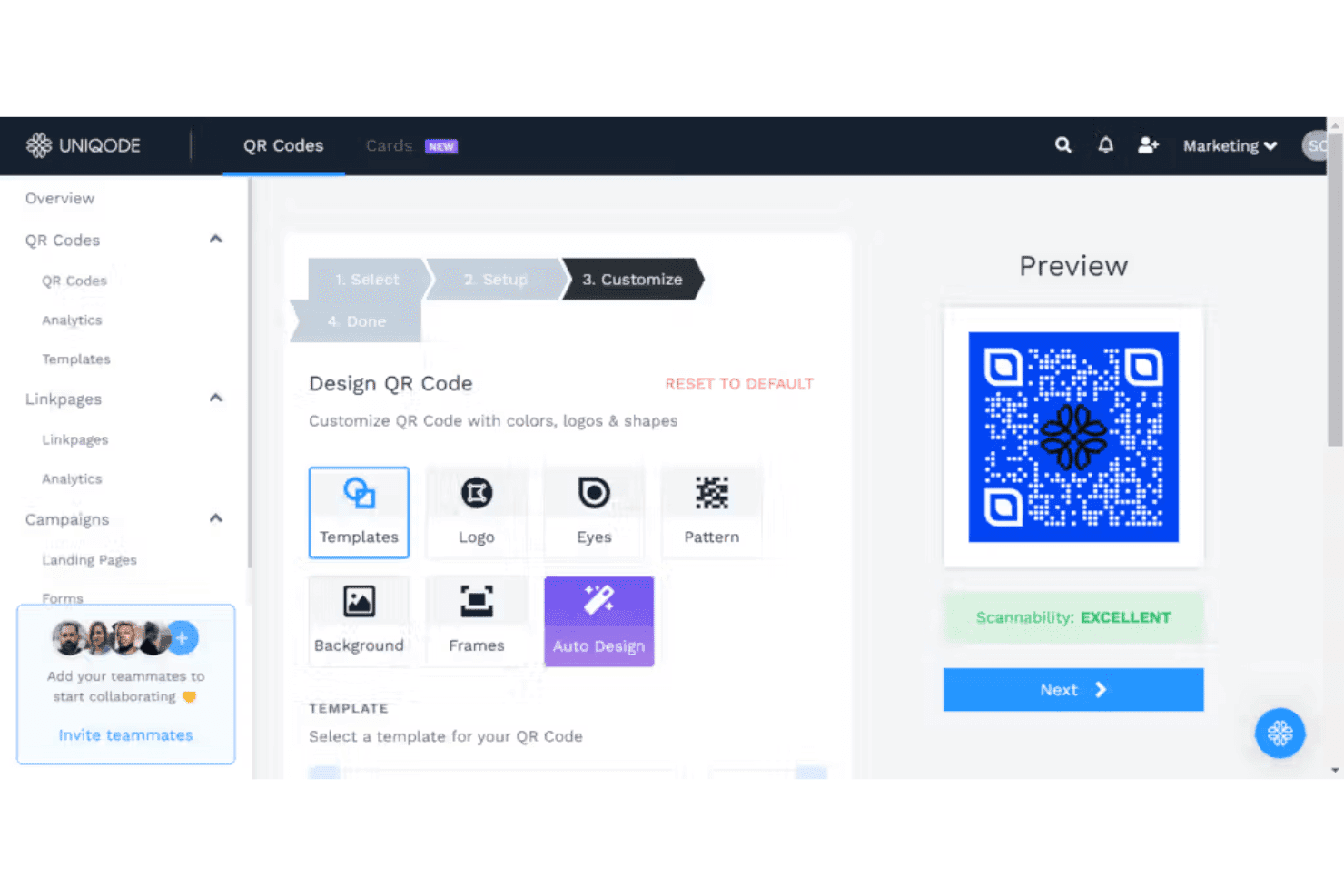
Uniqode QR Codes offers a customizable QR code designer with options for templates, logos, eyes, patterns, backgrounds, frames, and auto design, along with a live preview showing scannability rating. Uniqode is a QR code generator platform that supports 20+ dynamic and static code types, branded customization, bulk creation, real-time scan analytics, and enterprise security features including SOC 2, HIPAA, and GDPR compliance.
Who Is Uniqode QR Codes Best For?
Uniqode is a strong fit for enterprise marketing teams that need to manage QR code campaigns at scale across multiple brands, regions, or departments.
Why I Picked Uniqode QR Codes
I've included Uniqode in my top picks because it handles the organizational complexity that comes with QR campaigns at enterprise scale. Multi-team workspaces with role-based access let different departments or agencies manage their own codes without overlap. I also like the geo and device-based redirect logic, which lets a single printed code serve different landing pages depending on where or how someone scans it.
Uniqode QR Codes Key Features
- Scan analytics dashboard: See real-time stats for total and unique scans by location, device, and time.
- Custom landing page builder: Design mobile-optimized landing pages to link from QR codes.
- Bulk generation and CSV import: Create thousands of unique QR codes at once using batch CSV upload tools.
- High-res export formats: Download codes as print-ready PNG, SVG, PDF, JPG, and EPS files.
Uniqode QR Codes Integrations
Uniqode QR Codes offers native integrations with HubSpot, Salesforce, Google Analytics, Google Ads, and Meta Pixel. An API is available for custom integrations.
Pros and Cons
Pros:
- Post-print URL edits without reprinting codes
- Real-time scan data by city and device type
- Strong enterprise-grade security and compliance controls
Cons:
- Bulk generation features not available on entry plans
- Scan analytics depth requires higher-tier plans
Learn more about Uniqode QR Codes:
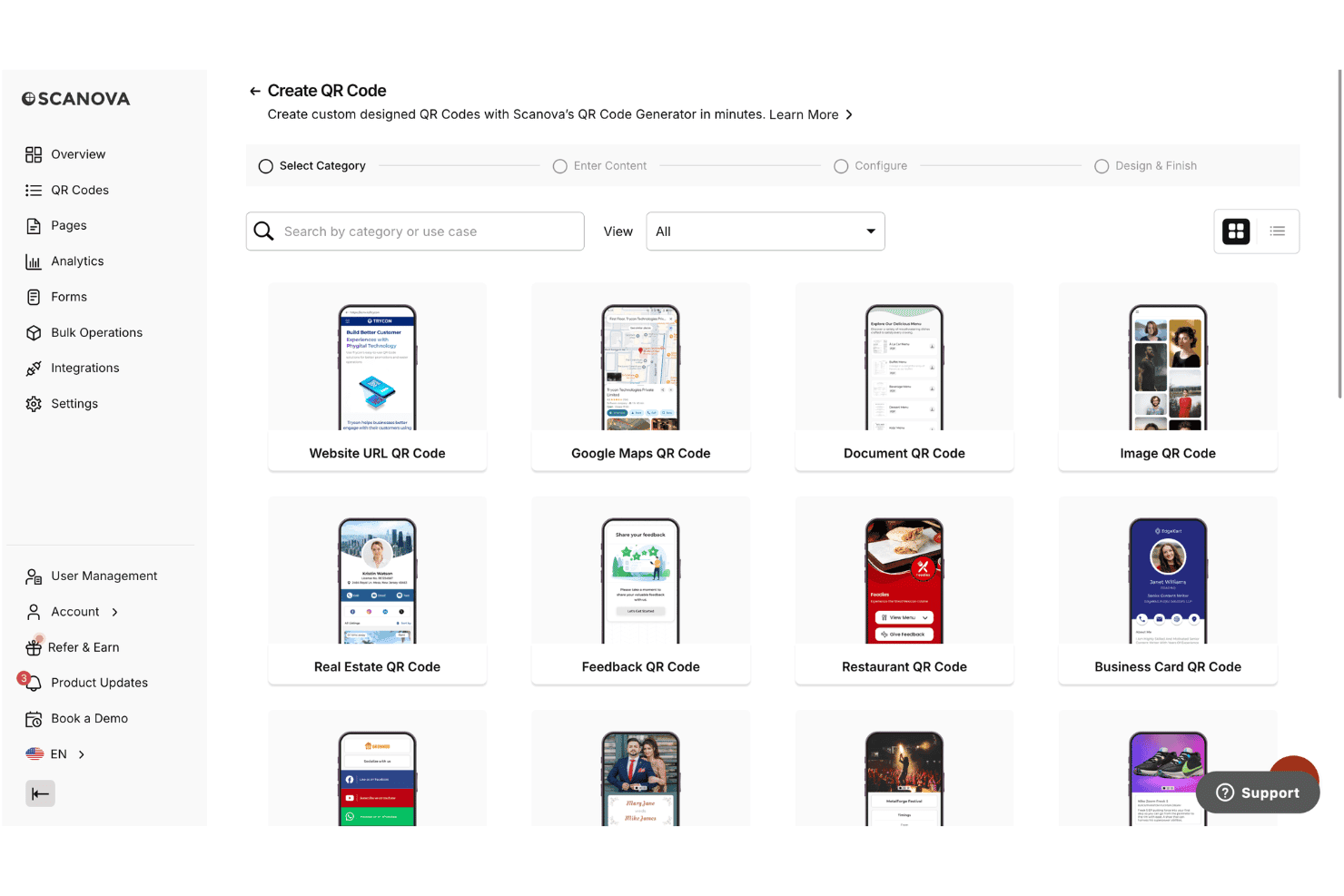
Scanova offers a QR Code creation wizard with multiple category options including Website URL, Google Maps, Document, Image, Real Estate, Feedback, Restaurant, and Business Card QR Codes. Scanova is a QR code management platform that lets you create, design, and track dynamic and static QR codes across 26 content types, including landing pages, lead forms, vCards, and app store links.
Who Is Scanova Best For?
Scanova is a strong fit for mid-market and enterprise marketing teams running print-to-digital campaigns where branded QR codes, lead capture, and scan-level analytics need to work together.
Why I Picked Scanova
I picked Scanova as one of the best because its QR Code Forms feature turns a printed code into a direct lead capture point, with customizable fields and CRM-ready exports built in. I also like Conditional Redirection, which routes scanners by country or device so one printed code can serve multiple audience segments. The event and click tracking on landing page buttons then shows exactly which form elements drive conversions, not just raw scan counts.
Scanova Key Features
- Mobile landing page builder: Create customizable, mobile-optimized landing pages for QR codes without coding.
- Bulk QR code generation: Generate dozens or thousands of unique QR codes at once with batch upload or QR API.
- Advanced branding options: Customize QR codes with logos, colors, gradient patterns, and CTA frames for full brand alignment.
- Audit logs and user management: Assign roles, track user actions, and manage permissions for multi-user workspaces.
Scanova Integrations
Scanova offers native integrations with Google Analytics, Meta Pixel (Facebook), LinkedIn Insight Tag, and Microsoft Advertising. It connects with Zapier and provides an API for custom integrations.
Pros and Cons
Pros:
- 26 QR code content types supported
- Geo and device-based conditional redirects available
- QR code forms capture leads directly
Cons:
- Reporting dashboard less visual than competitors
- Dynamic features locked behind higher-tier plans
Learn more about Scanova: Best for no-signup static QR codes
- 14-day free trial
- From $10/month (billed annually)
Visit WebsiteCustomer Rating:4.7/5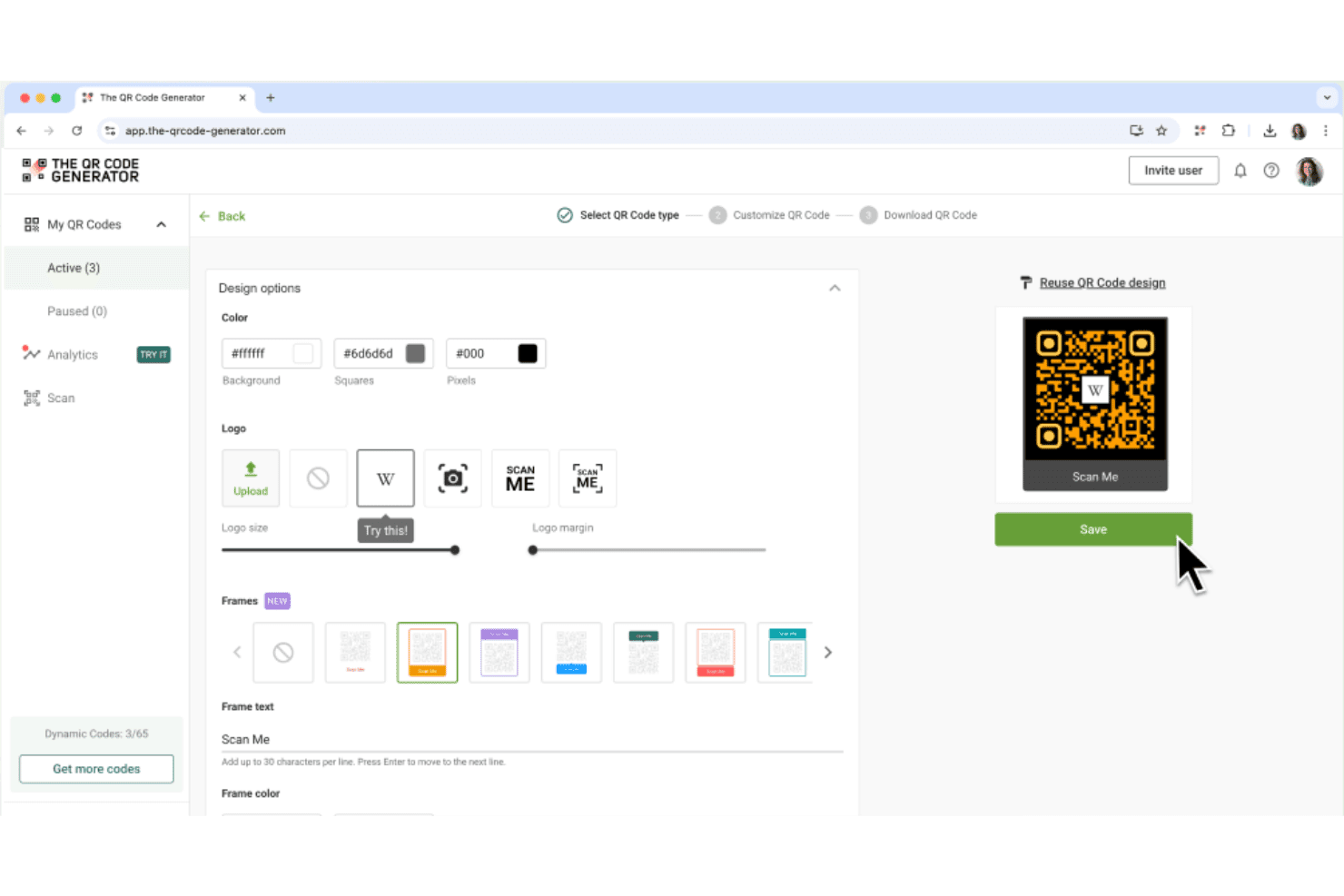
The QR Code Generator (TQRCG) allows users to customize QR codes with color options, logos, frames, and frame text before saving. The QR Code Generator (TQRCG) is a QR code platform that lets you create static and dynamic QR codes across content types like URLs, PDFs, vCards, SMS, and social profiles, with scan analytics and visual customization built in.
Who Is The QR Code Generator (TQRCG) Best For?
It's a strong fit for small businesses and marketing teams in retail, hospitality, and events who need quick, low-friction QR code creation without a steep learning curve.
Why I Picked The QR Code Generator (TQRCG)
I picked The QR Code Generator (TQRCG) as one of the best because it's the only tool on my list where you can generate unlimited static QR codes without signing up. It covers 10 content types (URLs, PDFs, vCards, App links, and SMS, among others) and exports in both PNG and SVG, so I can hand files directly to a print vendor without reformatting. I also like that the two free dynamic codes never expire, which keeps low-volume campaigns running long-term without a subscription.
The QR Code Generator (TQRCG) Key Features
- Scan analytics dashboard: Track scan totals, unique scans, GPS locations, devices, and time distribution in real time.
- Visual QR customization: Change colors and insert logos or images to match branding requirements.
- Bulk QR creation tool: Upload a CSV file to create multiple QR codes for products or campaigns in one step.
- Multiple content types supported: Generate codes for URLs, PDFs, vCards, SMS, app links, and social profiles.
The QR Code Generator (TQRCG) Integrations
Native integrations are not clearly documented. No API or Zapier support is available for custom integrations.
Pros and Cons
Pros:
- Direct URL embedding with no forced short-link redirects
- Two free dynamic codes never expire or deactivate
- Static codes generate instantly without account creation
Cons:
- Scan analytics only available on dynamic codes
- Dynamic code limit capped at two on free plan
Learn more about The QR Code Generator (TQRCG): Best for privacy-focused QR analytics
- Free plan available
- From $12/month
Visit WebsiteCustomer Rating:4.9/5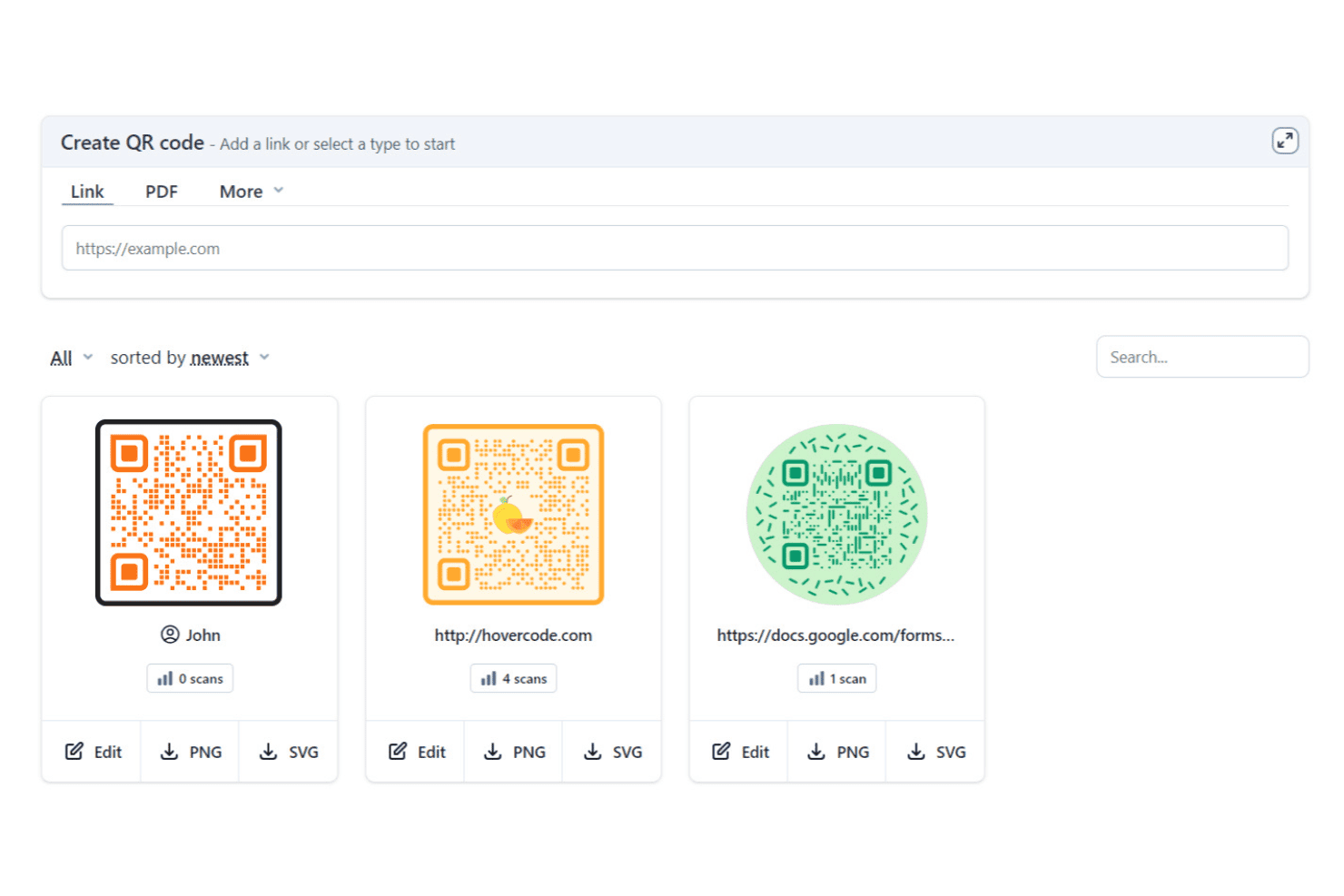
Hovercode allows users to create, manage, and track custom QR codes with scan analytics from a simple dashboard. Hovercode is a QR code generator for creating dynamic, fully branded QR codes across content types including links, vCards, PDFs, Wi-Fi, and GS1 Digital Links, with built-in scan analytics and landing page tools.
Who Is Hovercode Best For?
Hovercode is a good fit for small-to-midsize marketing teams that need branded, trackable QR codes without the complexity of an enterprise platform.
Why I Picked Hovercode
I've included Hovercode in my top picks because of how it handles scan data without compromising the scan experience. There are no ads shown when someone scans a code, and the mobile app is confirmed to collect no user data. I also like that you can route scans through your own custom domain (like qr.yoursite.com) rather than a generic Hovercode URL, which keeps the analytics flow clean and brand-controlled.
Hovercode Key Features
- GS1 Digital Link support: Generate QR codes compliant with GS1 standards for product packaging and retail use.
- Bulk QR code generator: Create multiple dynamic QR codes at once using CSV upload for large campaigns or asset tracking.
- Custom QR templates: Choose from a range of ready-made layouts, including circular, 3D, and patterned designs.
- Multi-link landing pages: Build and link mobile-optimized micro landing pages directly from QR codes.
Hovercode Integrations
Native integrations are not clearly documented. Hovercode provides an API for custom integrations.
Pros and Cons
Pros:
- GS1 Digital Link support for retail packaging
- Custom domain routing for branded scan URLs
- Privacy-respecting analytics with no user data
Cons:
- Smaller code template library than category leaders
- Analytics dashboard lacks real-time scan refresh
Learn more about Hovercode: 10Best for offline campaign attribution
Flowcode
- Free plan available
- From $25/month (billed annually)
Visit WebsiteCustomer Rating:4.6/5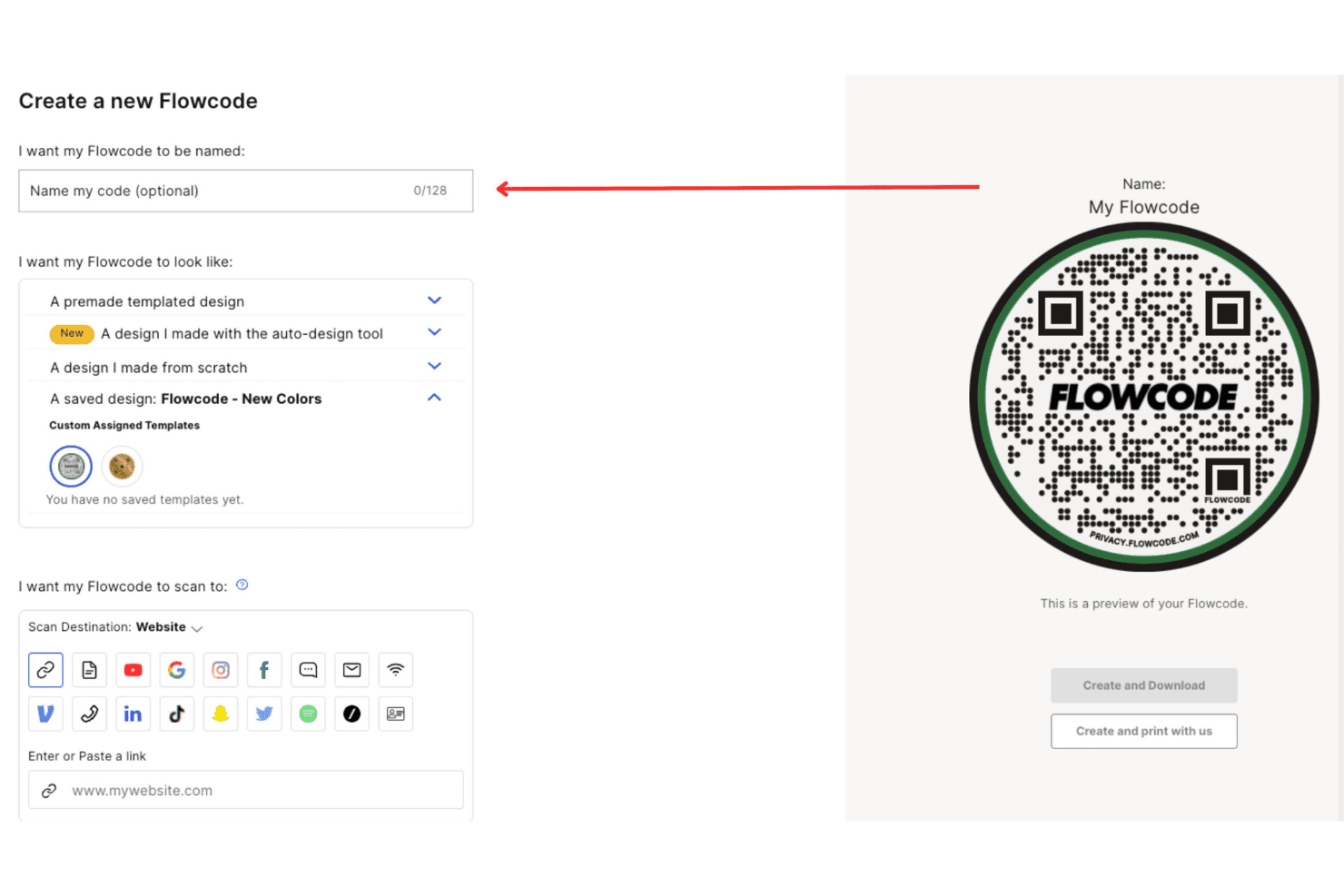
Flowcode offers a QR code creation interface where users can name their code, choose a design style, and set a scan destination URL. Flowcode is a dynamic QR code platform that combines branded code design, mobile landing pages, smart routing, and first-party scan analytics built specifically around physical marketing touchpoints.
Who Is Flowcode Best For?
Flowcode is a strong fit for mid-size to enterprise marketing teams running multi-channel campaigns that include print, events, or retail touchpoints alongside digital channels.
Why I Picked Flowcode
I picked Flowcode as one of the best because it goes further than any other QR tool I've used for measuring what actually happens after someone scans a code in the real world. Advanced geolocation analytics and UTM traffic charts let my team trace a scan at a trade show or billboard back to a specific campaign. Smart routing by device, day, or location also means I can send mobile users in different cities to different landing pages without reprinting a single code.
Flowcode Key Features
- Bulk code creation: Generate up to 1,000 QR codes at a time with batch tools or API access.
- Brand Kits: Lock in logos, colors, and fonts for consistent branding across all codes.
- Custom redirect domains: Assign branded shortened URLs to QR codes for added trust and recognition.
- Enterprise team workspaces: Manage user roles, permissions, and organize codes for large teams or agencies.
Flowcode Integrations
Flowcode offers native integrations with HubSpot, Salesforce, Snowflake, and Braze, with an API available for custom integrations.
Pros and Cons
Pros:
- Real-time scan dashboards with exportable reports
- Dynamic codes updatable without reprinting
- Deep offline scan attribution by location and device
Cons:
- Landing page builder feels basic for advanced needs
- Free plan limited to static codes only
Learn more about Flowcode:
Other QR Code Generators
Here are some additional QR code generator options that didn’t make it onto my shortlist, but are still worth checking out:
- 11QR.ioBest for multi-link QR code pages
- 12QR Code TigerBest for bulk QR code generation
- 13UnitagBest for artistic QR code customization
- 14Canva QR Code GeneratorBest for QR codes in Canva designs
- 15Qr Code MonkeyBest for free custom static QR codes
Related Reviews
How I Evaluate QR Code Generators
I evaluate QR code generators across two layers: baseline functionality every tool must meet and the differentiators—like analytics depth and bulk generation—that set the best apart.
Core Functionality (Table Stakes For This List)
When I'm selecting tools for my list, I rank each one on a scale from 0 (does not offer the functionality) to 5 (excels in this area) for each core functionality listed below. I then calculate the tool's total score into a percentage, using 75% as a benchmark to help assess its overall fit for the list.
- Dynamic QR Codes: I look for editable destinations so you can swap a printed flyer's URL without reprinting, plus scheduling or geo-based redirects for advanced campaigns.
- Scan Analytics: Each tool should track scans by location, device, and time so you can measure which trade show booth or packaging variant drives more traffic.
- Branded Customization: Logo uploads, brand colors, and CTA frames matter—your QR code on event signage should look like part of the design, not an afterthought.
- Multiple Content Types: Beyond URLs, I check for vCards, PDFs, app store links, and Wi-Fi codes so one platform covers everything from menus to event badges.
- Bulk Generation: Large campaigns like product packaging or event ticketing need CSV-based batch creation with unique tracking per code.
- High-Res Export Formats: Print-ready vector formats like SVG and EPS are key—low-res exports won't hold up on billboards or large retail signage.
Once I have a list of tools that meet the criteria, I consider what sets each platform apart.
Differentiating Factors (What Sets Vendors Apart)
Here's how I compare and contrast different vendors:
Standout Features
Built-in landing page builders are a major differentiator. Some tools let you create mobile-optimized pages with menus, vCards, or social links directly from the QR code, removing the need for a separate site. I also evaluate API access for bulk generation, since teams running product packaging or event ticketing campaigns need programmatic code creation at scale. Real-time scan analytics with GA or CRM integrations push a tool further, connecting offline scans to your broader attribution model.
Beyond Features
Integrations matter a lot here. I check whether scan events can flow into your CRM or marketing automation platform via native connectors or Zapier, since that's how you tie a billboard scan to a closed deal. Data privacy is another factor I evaluate—GDPR and CCPA compliance, SSL-secured redirects, and password-protected codes all come into play when handling scan data. For agency or enterprise teams, I also look at multi-user workspaces with role-based permissions and white-label options for client-facing deliverables.
How to Choose a QR Code Generator
With so many QR code generators promising analytics, customization, and scalability, how do you focus on the right platform for your next campaign?
| If your priority is... | Prioritize... |
|---|---|
| If your priority is...Editable destinations after printing | Prioritize...Dynamic QR and URL update functionality |
| If your priority is...Attribution and campaign ROI | Prioritize...Advanced scan analytics and exportable reports |
| If your priority is...Brand consistency on all collateral | Prioritize...Deep logo, color, and style customization |
| If your priority is...Large-scale or franchise deployment | Prioritize...Bulk/CSV creation and user permission controls |
| If your priority is...Connecting physical scans to digital flows | Prioritize...Integrations with CRM, marketing, and automation |
How to Vet Your Shortlist
- Request an analytics sample: Ask for a screenshot of the scan analytics dashboard showing city/device breakdown or export sample.
- Test dynamic updates: Run a 24-hour pilot printing QR codes, then update destinations and verify redirect works.
- Verify integration claims: Connect a demo QR code to your CRM or automation via Zapier or API, then check for a real scan event.
- Ask for compliance proof: Request documentation showing GDPR or CCPA data compliance for scan storage and handling.
- Decide scale versus branding: Weigh focused bulk generation/API access against advanced brand design controls to pick what matters most for your team.
What Are QR Code Generators?
QR code generators are software platforms that let you create QR codes for connecting printed materials to digital content like landing pages, menus, or promos. Marketers, campaign managers, and retail teams use them to bridge offline and online channels for any smartphone QR code scanner, collect scan analytics, and customize codes with brand elements. These tools typically support dynamic editing, scan tracking, support for multiple content types, and export options for high-quality print and digital use cases.
Features
When selecting QR code generators, keep an eye out for the following key features:
- Dynamic codes: Edit the destination URL or content of your code even after it’s printed, allowing you to refresh campaign destinations without physically changing collateral.
- Scan analytics: Track scan counts, unique users, time, device, and location data to measure campaign performance and optimize future marketing strategies.
- Brand customization: Customize colors, shapes, frames, and add brand logos to make your QR codes look seamless across all print and digital channels.
- Multiple content types: Generate codes for URLs, PDFs, vCards, app store links, menus, Wi-Fi, and social profiles, letting you power a mix of offline-to-online experiences.
- High-res export options: Download codes in print-ready vector formats like SVG or PDF and standard raster formats for versatile and high-quality usage in any channel.
- Bulk generation: Create hundreds or thousands of QR codes at once via CSV upload or batch tools, streamlining large deployments like product labeling and event passes.
- API access: Use APIs to automate code creation, update destinations, or pull analytics, supporting integration with internal systems and custom campaign workflows.
- Landing page builder: Some tools offer built-in, mobile-optimized landing pages so you can send scanners to menus, vCards, downloads, or promos without maintaining a separate site.
- Password protection and expiry: Control access to sensitive codes by adding passwords or setting automatic expiration dates, especially useful for ticketing, event check-ins, or limited-time offers.
- User and permission controls: Assign roles and manage user access, making it easier for agency teams or enterprise marketing groups to collaborate and control campaign changes.
QR code generator solutions do not typically include AI as part of their feature offering.
Benefits
Implementing QR code generators provides several benefits for your team and your business. Here are a few you can look forward to:
- Flexible campaign updates: Dynamic codes let you update destinations after printing, saving time and reducing print waste during campaign changes.
- Actionable performance data: Built-in analytics show which campaigns, locations, or devices deliver the most engagement, supporting smarter marketing decisions.
- Brand consistency everywhere: Customization options ensure every code aligns visually with your brand on print, packaging, or digital touchpoints.
- Simplified multi-channel access: QR codes connect offline experiences to landing pages, menus, digital downloads, or app stores—all with a single scan.
- High-volume deployment: Bulk and API features make it easy to generate and manage thousands of unique codes for product packaging or event ticketing.
- Enhanced data security: Password protection, SSL links, and compliance features help keep scan data safe and meet regulatory requirements.
- Streamlined team workflows: User management and roles support collaboration across marketing, retail, and agency teams working on shared campaigns.
Costs & Pricing
Selecting QR code generators requires an understanding of the various pricing models and plans available. Costs vary based on features, team size, add-ons, and more. The table below summarizes common plans, their average prices, and typical features included in QR code generator solutions:
Plan Comparison Table for QR Code Generators
| Plan Type | Average Price | Common Features |
|---|---|---|
| Plan TypeFree Plan | Average Price$0 | Common FeaturesCreates static codes, offers basic customization, limited scan analytics, and exports in PNG format. |
| Plan TypePersonal Plan | Average Price$5-$20/user/month | Common FeaturesIncludes dynamic codes, expanded design options, better analytics, and supports multiple content types. |
| Plan TypeBusiness Plan | Average Price$25-$60/user/month | Common FeaturesAdds bulk generation, team management, advanced analytics, integrations, and priority support. |
| Plan TypeEnterprise Plan | Average Price$75-$200+/user/month | Common FeaturesIncludes API access, single sign-on, advanced compliance, white-labeling, dedicated account management, and custom SLAs. |
QR Code Generator FAQs
Here are some answers to common questions about QR code generators:
What’s the difference between static and dynamic QR codes?
Static QR codes hold fixed data and can’t be changed after printing, while dynamic QR codes let you update the destination or content any time—making them more flexible for marketing and long-term use.
Can I track who scans my QR codes?
No, QR code generators can collect scan location, device, and time data from a user’s QR code reader, but they cannot identify individual users without additional opt-in steps. Analytics show trends and engagement without capturing personal information.
Are QR code generators secure for sensitive content?
Yes, especially if you use password protection, SSL-secured links, and set expiration dates. Look for platforms with data privacy compliance (like GDPR) if you’re handling sensitive information.
Do QR code generators support bulk code creation?
Yes, most business-focused QR code generators let you create hundreds or thousands of codes at once using CSV uploads or API access. This is ideal for product packaging, asset management, or event ticketing.
Can I customize the design of my QR codes?
Yes, most solutions offer custom branding options. You can add your logo, set brand colors, adjust patterns, and use frames or call-to-actions, all while keeping the codes easily scannable.