

A free QR code generator is a tool that lets you create QR codes at no cost, usually through a free plan or trial. If you’re looking for fast, reliable ways to link your audience to content without paying upfront, you need options with quality features and no hidden fees.
This guide walks you through top-rated free QR code generators so you can quickly compare choices, avoid wasted time, and find the best tool for instant code creation, branding, or analytics—whatever matters most to your team this year.
Why Trust Our Software Recommendations
6,700+
Reviews
20
Industry experts
16+
Evaluation factors
14
Years
Our team has been testing and reviewing software since 2012. As marketing leaders ourselves, we know how difficult—and important—it is to choose the right software.
For this guide, we evaluated tools using hands-on testing and independent research, scoring tools using our selection criteria.
Our reviews reflect our human editorial judgment, not a sales pitch.
Expert reviewers:
 Gui DrusinaCreative Director
- Shriya GhateSenior Marketing Lead
 Amanda JacquesMarketing Ops Leader

Comparison Table: Free QR Code Generator
This comparison table summarizes pricing details for my top free qr code generator selections.
| Tool | Best For | Trial Info | Price | ||
|---|---|---|---|---|---|
| 1 | Best for marketing collateral integration | Free trial + free plan available | From $144/user/year (billed annually) | Website | |
| 2 | Best for bulk QR code generation needs | 14-day free trial | From $5/month | Website | |
| 3 | Best for instant static code creation | 14-day free trial | From $10/month (billed annually) | Website | |
| 4 | Best for on-brand QR codes in design projects | Free plan available | From $7.99/user/month (billed annually) | Website | |
| 5 | Best for GDPR-friendly scan analytics | Free plan available | From $12/month | Website | |
| 6 | Best for campaign tracking and analytics | Free plan + free demo available | From $7/month | Website | |
| 7 | Best for integrated link management workflow | Free plan available | From $10/month (billed annually) | Website | |
| 8 | Best for no-signup custom QR designs | Free plan available | Free to use | Website | |
| 9 | Best for branded QR codes with logo options | Free plan available | From $25/month (billed annually) | Website | |
| 10 | Best for editable dynamic QR codes on free plan | Free trial + free demo available | From $9/month (billed annually) | Website |


Free QR Code Generator Reviews
Below are my detailed summaries of the free QR code generators that made it onto my shortlist. My reviews offer a detailed look at the features, best use cases, and pricing of each tool to help you find the best one for you.
 Best for marketing collateral integration
- Free trial + free plan available
- From $144/user/year (billed annually)
Visit WebsiteCustomer Rating:4.7/5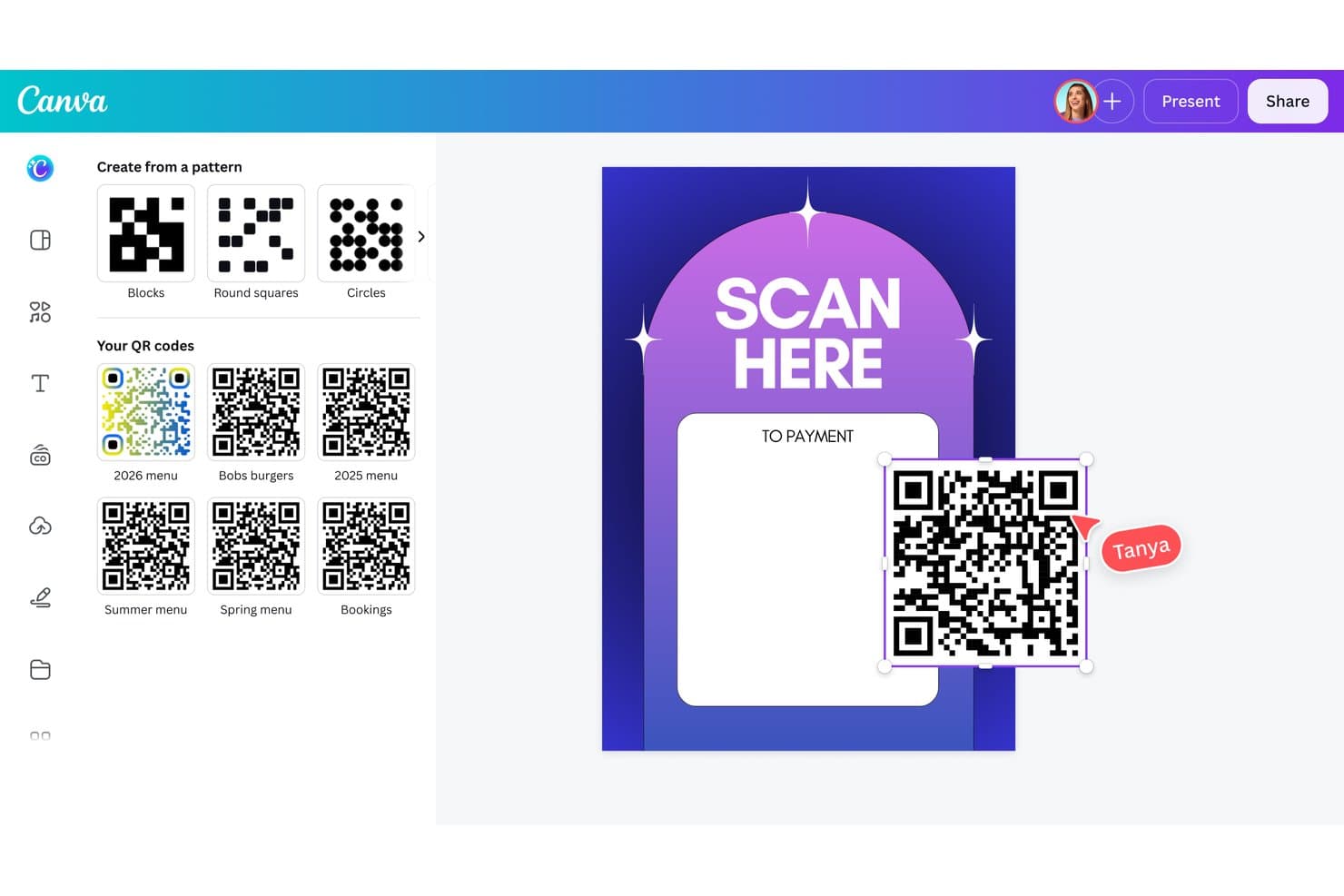
Canva lets users access saved QR codes and pattern styles while placing a QR code directly onto a “Scan Here to Payment” poster design. Canva is a visual design platform with a built-in QR code generator that lets you create, customize, and embed QR codes directly into branded marketing collateral like flyers, business cards, and posters.
Who Is Canva Best For?
Canva suits marketers and small business owners who already create print and digital collateral and want QR codes as part of that design workflow.
Why I Picked Canva
Canva earns its spot on my shortlist because it's the only free QR code generator that lives inside a full design platform. I can drop a QR code directly onto a business card or event flyer template and adjust its color to match a brand kit, all without switching tools. I also like that Canva supports dynamic QR codes, so I can update the destination URL after a flyer goes to print without touching the original design.
Canva Key Features
- SVG and PDF export: Download QR codes in SVG and PDF formats for crisp printing on marketing materials.
- Color and pattern customization: Change QR code colors and patterns to match your brand or design theme.
- Design template integration: Add QR codes directly onto business cards, flyers, and other templates inside Canva.
- Brand Kit support: Incorporate your brand’s colors and logos into QR-enabled designs for consistent branding.
Canva Integrations
Canva integrates with Asana, Slack, Google Workspace, Meta, Microsoft Teams, and Salesforce. It also provides an API for custom integrations.
What's Free?
Canva offers a free-forever plan that includes static QR code generation and basic design template access. Dynamic QR codes and Brand Kit features require a paid Canva Pro subscription.
Pros and Cons
Pros:
- Exports QR codes in SVG for print
- Color customization available on the free plan
- QR codes embed directly into design templates
Cons:
- No scan analytics on free tier
- Dynamic QR codes require a paid plan
Learn more about Canva: Best for bulk QR code generation needs
- 14-day free trial
- From $5/month
Visit WebsiteCustomer Rating:4.6/5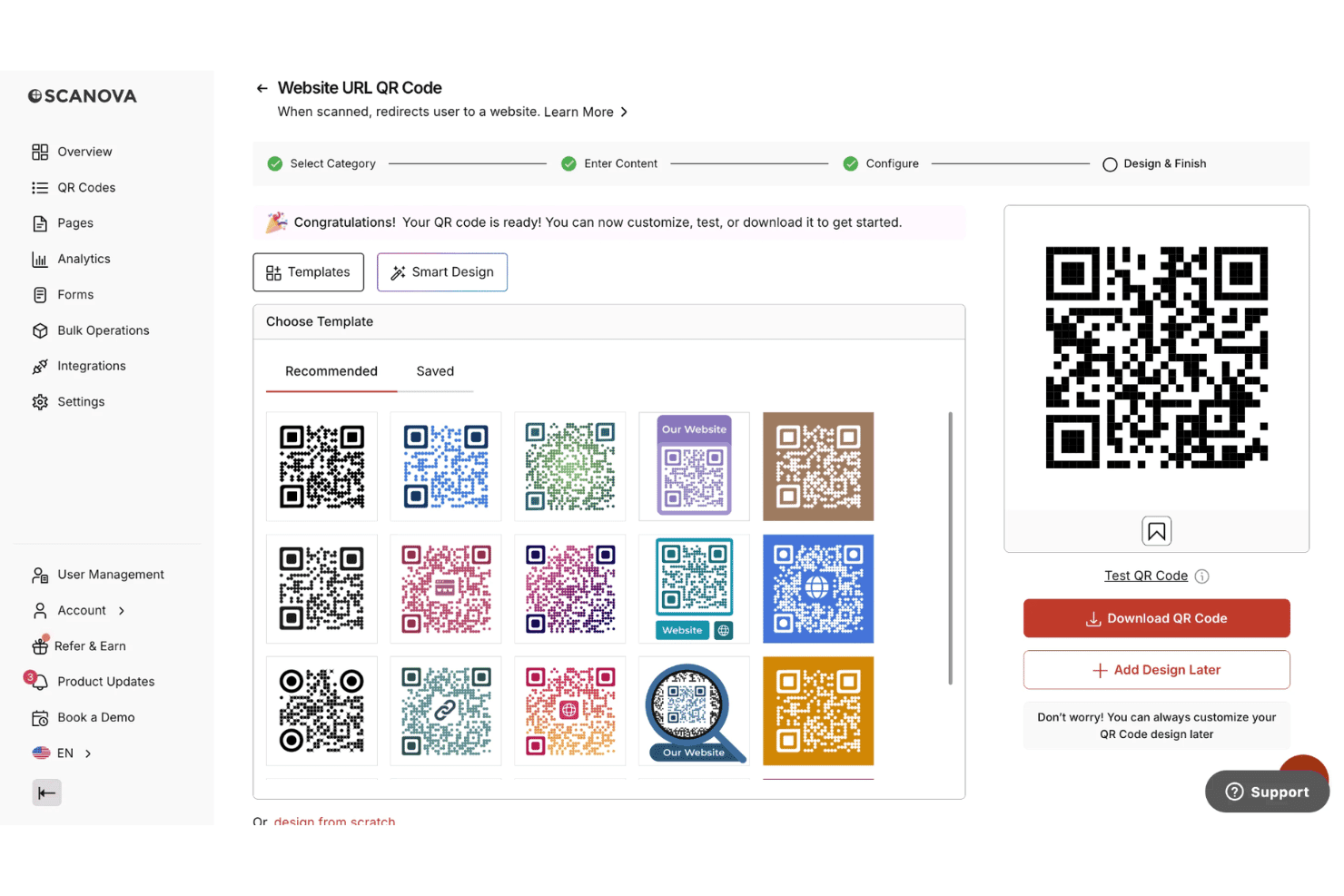
Scanova offers a QR code design step with customizable templates, smart design options, and instant download functionality. Scanova is a QR code generator and management platform that supports 26 QR code types, dynamic and static code creation, visual customization with logo and color branding, bulk generation, and scan analytics.
Who Is Scanova Best For?
Scanova is a strong fit for marketing teams and agencies that run high-volume QR code campaigns across print, packaging, events, or product launches.
Why I Picked Scanova
I've included Scanova in my top picks because its bulk generation capability scales well beyond what most free or entry-level QR tools offer. At the Enterprise level, I can push batches of 500 codes at once, and the dedicated QR Batch tool handles up to 100,000 static codes for true production runs. Each code in a batch retains consistent branding: logo, colors, and frame styling applied across every output.
Scanova Key Features
- Dynamic QR code editing: Change the destination URL of QR codes after distribution without reprinting.
- Custom landing page builder: Design mobile-optimized pages to link to from QR codes without coding.
- Advanced scan analytics: Access data on scan time, location, device type, and filter out bot activity.
- Visual customization suite: Apply custom colors, logos, patterns, and eye styles for branded QR code designs.
Scanova Integrations
Scanova offers native integrations with Slack, HubSpot, Google Analytics, Google Ads, and Zapier. An API is available for custom integrations.
What's Free?
Scanova offers a free-forever static QR code generator that requires no sign-up. You can create unlimited static codes across multiple content types and download them as PNG files, but dynamic codes, scan tracking, visual customization, and bulk generation are locked behind a 14-day free trial, after which a paid plan is required.
Pros and Cons
Pros:
- Static codes available without account signup
- Supports 26+ QR code content types
- Batch generation scales to 100,000 codes
Cons:
- PNG-only downloads on the free plan
- Dynamic codes require a paid subscription
Learn more about Scanova: Best for instant static code creation
- 14-day free trial
- From $10/month (billed annually)
Visit WebsiteCustomer Rating:4.7/5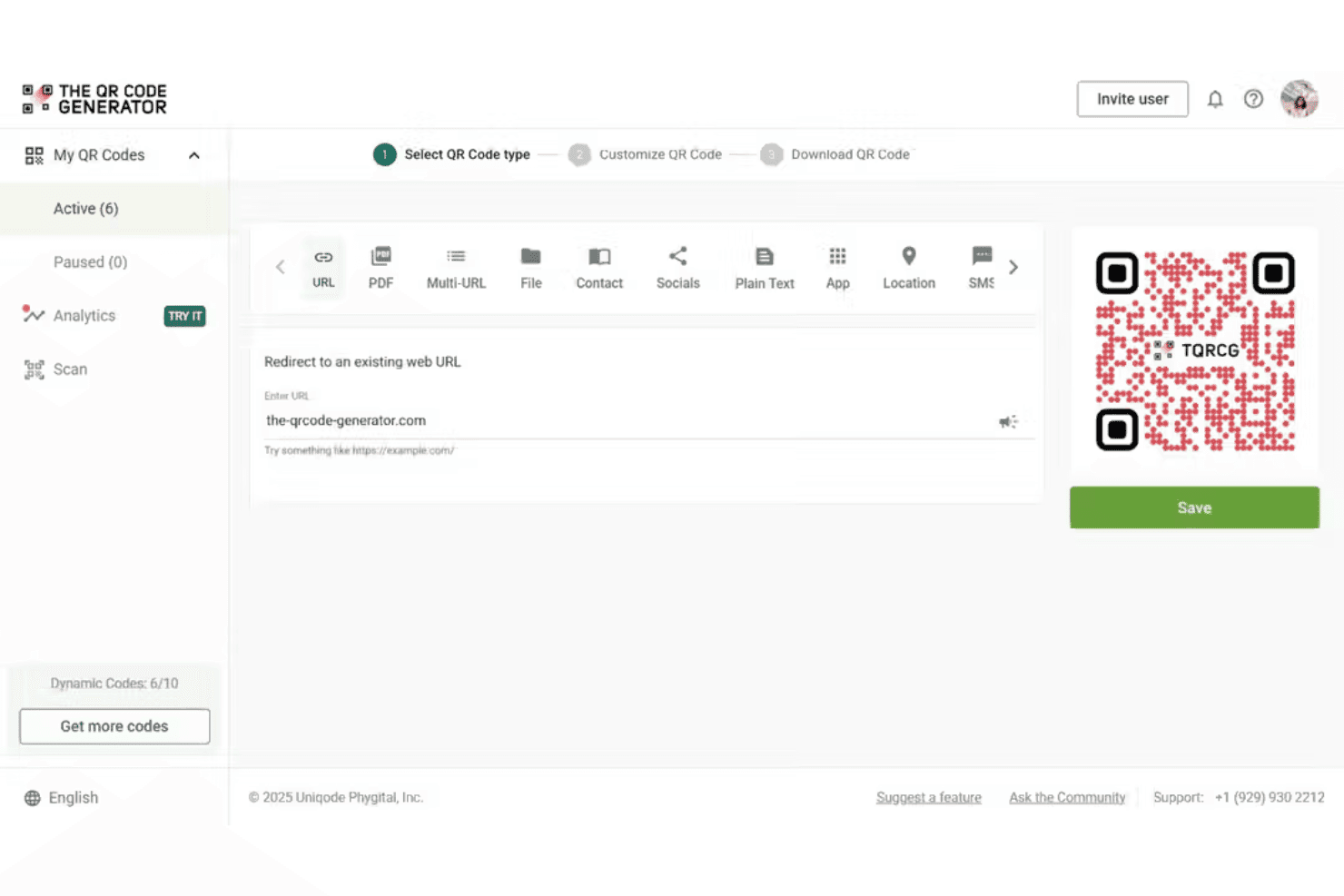
The QR Code Generator (TQRCG) offers a step-by-step interface to create URL-based QR codes with live preview and save functionality. The QR Code Generator (TQRCG) is a free QR code generator that supports static and dynamic code creation across 10 content types, with visual customization, logo embedding, and scan analytics built in.
Who Is The QR Code Generator (TQRCG) Best For?
Small business marketers and print-focused teams who need unlimited, ready-to-use static QR codes without committing to a paid plan.
Why I Picked The QR Code Generator (TQRCG)
I picked The QR Code Generator (TQRCG) as one of the best because it lets me generate unlimited static QR codes instantly, with no credit card and no output caps. I can encode across 10 content types, from vCards to App Store links, and download in both PNG and SVG for print-ready use. What I appreciate most is that static codes are truly permanent, so anything I put on packaging or signage stays functional without a paid subscription.
The QR Code Generator (TQRCG) Key Features
- Team collaboration: Invite up to 5 members to collaborate on QR code projects in a shared workspace.
- Multiple content types: Encode as URL, PDF, vCard, social, SMS, email, plain text, app, phone, or multi-URL for broad flexibility.
- Chrome extension: Instantly generate and download QR codes from your browser with an integrated Chrome extension.
- Compliance certifications: SOC 2 Type II, ISO 27001, and GDPR compliance help meet data privacy standards.
The QR Code Generator (TQRCG) Integrations
Native integrations are not publicly documented.
What's Free?
The QR Code Generator (TQRCG) offers a free-forever plan that gives you unlimited static QR codes with no account required across all 10 content types. Dynamic QR codes, scan analytics, and custom branding features are only available on paid plans starting at $10/month.
Pros and Cons
Pros:
- Free SVG downloads for print use
- Unlimited static codes without watermarks
- No account required to generate codes
Cons:
- Scan tracking requires a paid upgrade
- No dynamic codes on the free plan
Learn more about The QR Code Generator (TQRCG): Best for on-brand QR codes in design projects
- Free plan available
- From $7.99/user/month (billed annually)
Visit WebsiteCustomer Rating:4.5/5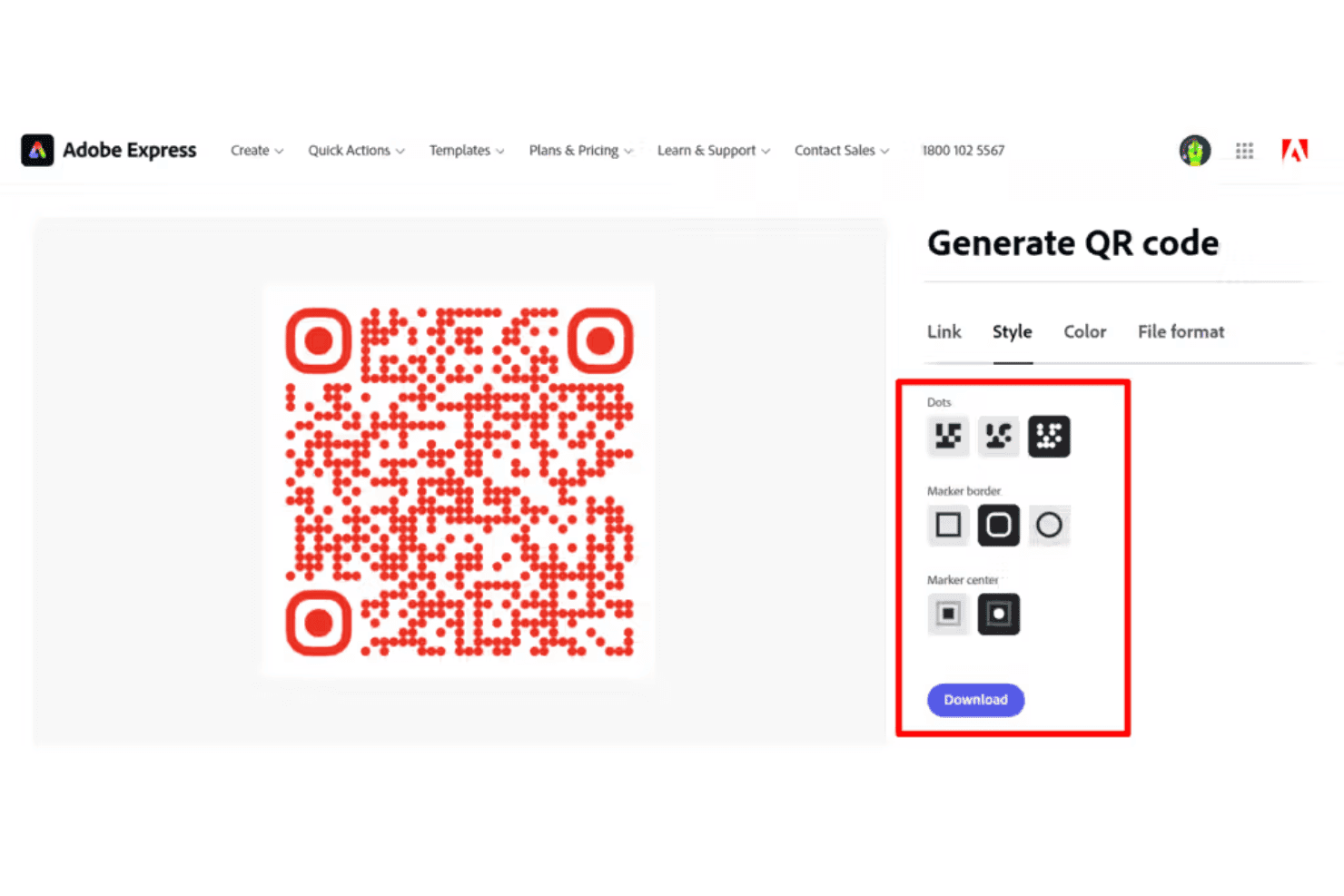
Adobe Express allows users to customize QR codes with dot patterns, marker borders, and marker center styles. Adobe Express is a free graphic design platform with a built-in static QR code generator that lets you create color-customized, logo-embedded QR codes and place them directly into marketing templates like business cards, flyers, and signage.
Who Is Adobe Express Best For?
Adobe Express suits designers and small business marketers who need QR codes as one component of a broader print or brand design project.
Why I Picked Adobe Express
Adobe Express earns its spot on my shortlist because the QR code generator is built directly into a full design environment. I can generate a code, embed my own logo at its center, match the QR color to my brand palette, and place it into a business card or event flyer template without switching tools. That's a workflow you won't get from a standalone QR generator, where you'd build the code in one place and manually drop it into your design in another.
Adobe Express Key Features
- No account required for QR generation: Users can create and download QR codes without registering or signing in.
- Direct PDF export: Download QR codes as print-ready PDFs for use in marketing materials.
- Static QR codes that never expire: Generated codes remain valid as long as the destination URL is active.
- Integration with Adobe design templates: Place QR codes directly into business card, flyer, or packaging layouts within the design platform.
Adobe Express Integrations
Adobe Express integrates with Miro, Box, Slack, Figma, Bynder, and OpenAI. It also provides an API for custom integrations.
What's Free?
Adobe Express offers a free-forever plan that includes full access to the QR code generator, including color customization and logo embedding. The free plan has limits on premium templates and Adobe Stock assets, but core QR code creation and download are available without a subscription.
Pros and Cons
Pros:
- No account required to generate codes
- Logo and color customization on free plan
- QR codes embed directly into design templates
Cons:
- Static codes only, no editable destinations
- No dynamic QR codes or scan tracking
Learn more about Adobe Express: Best for GDPR-friendly scan analytics
- Free plan available
- From $12/month
Visit WebsiteCustomer Rating:4.9/5
Hovercode provides QR code scan tracking with total scans, unique scans, and a 30-day trend line chart. Hovercode is a dynamic QR code generator that combines branded QR code creation, short link management, and multi-link landing pages with built-in scan tracking and analytics.
Who Is Hovercode Best For?
Hovercode is a strong fit for small business marketers who need privacy-compliant scan tracking without the overhead of enterprise-grade QR platforms.
Why I Picked Hovercode
I've included Hovercode in my top picks because its GDPR-friendly analytics architecture is genuinely rare in the QR code space. The platform is hosted in Germany and collects only truncated IP addresses and device types by default, meaning no personally identifiable data is stored without explicit consent. If I want GPS location tracking, Hovercode requires the scanner to opt in before that data is ever captured or recorded.
Hovercode Key Features
- Custom domain support: Use your own branded domain for short links and QR code redirects.
- Multi-link landing pages: Create micro landing pages that bundle multiple links under a single QR code.
- Bulk QR code generation: Generate large sets of unique QR codes using CSV upload or spreadsheet data.
- Canva and Figma integration: Design and embed QR codes directly inside your Canva and Figma projects.
Hovercode Integrations
Native integrations are not publicly listed. Hovercode provides an API for custom integrations.
What's Free?
Hovercode's free plan is free forever and includes 3 dynamic QR codes that never expire, 3 short links, and 1 multi-link page with unlimited scans. Analytics on the free plan are limited to total and unique scan counts with 3 months of history, and "Powered by Hovercode" branding appears on your codes.
Pros and Cons
Pros:
- Servers hosted in Germany for privacy
- Free dynamic QR codes never expire
- GDPR-compliant scan analytics built in
Cons:
- Hovercode branding appears on free plan codes
- Free plan capped at 3 dynamic codes
Learn more about Hovercode: Best for campaign tracking and analytics
- Free plan + free demo available
- From $7/month
Visit WebsiteCustomer Rating:4.8/5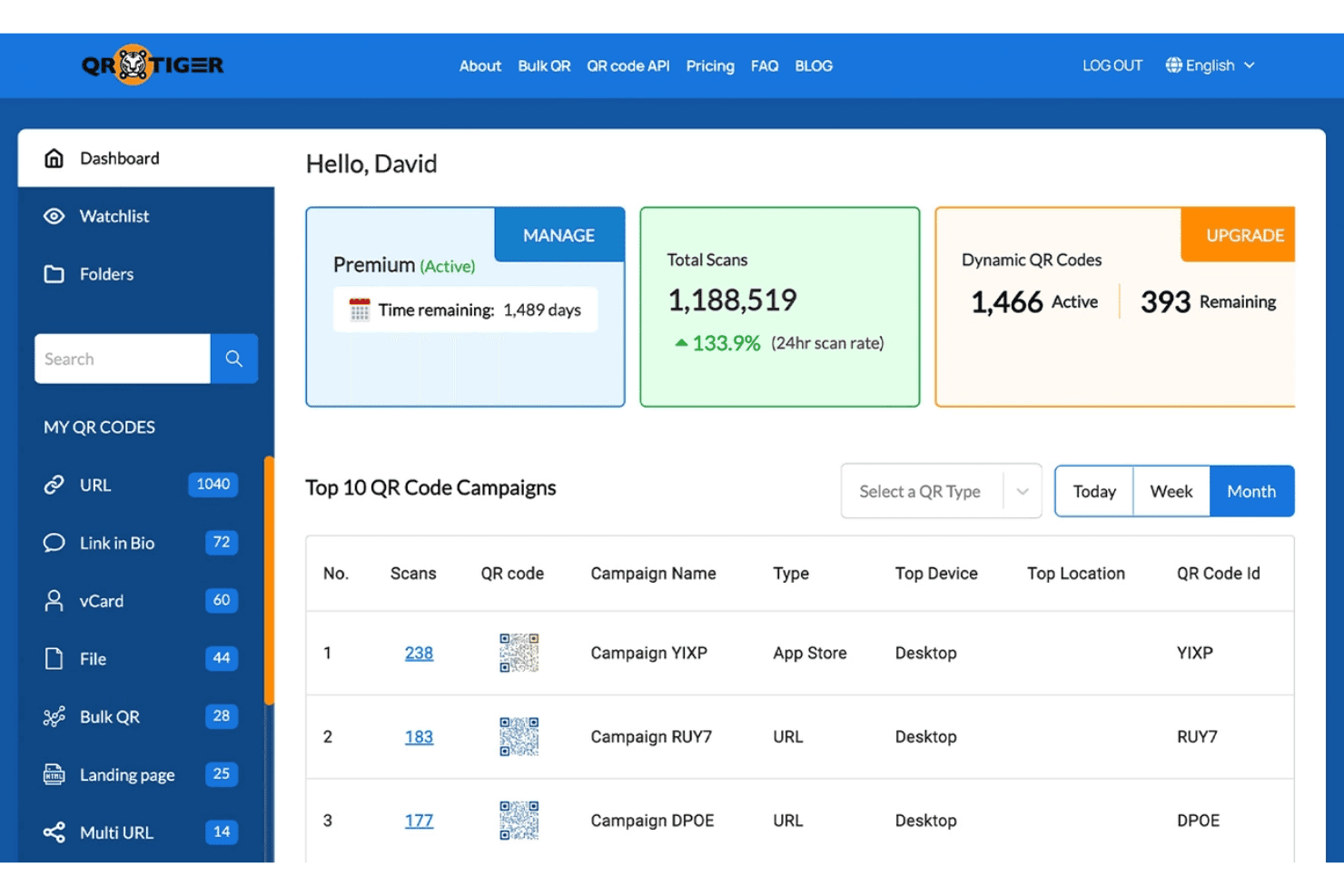
QR Tiger includes total scans, active dynamic QR codes, and top campaign performance metrics. QR Tiger is a free QR code generator that supports static and dynamic code creation across 25+ content types, with visual customization tools and a built-in scan analytics dashboard.
Who Is QR Tiger Best For?
QR Tiger suits small business marketers and field marketers who need branded, trackable QR codes for print campaigns, events, or offline promotions.
Why I Picked QR Tiger
I picked QR Tiger as one of the best because its analytics dashboard breaks down campaign performance by location, device type, and scan time, not just total counts. I also use the Smart Multi URL feature to route a single printed QR code to different landing pages based on the scanner's location or time of day. The built-in UTM parameter support means every scan feeds cleanly into GA4 alongside my other digital campaign data.
QR Tiger Key Features
- Bulk QR code generation: Create up to 3,000 unique QR codes at once using a CSV upload.
- Custom design templates: Save and reuse branded QR code designs for future campaigns.
- Multiple content type support: Generate codes for URLs, vCards, Wi-Fi, PDFs, and social media profiles.
- High-resolution file downloads: Export QR codes in print-quality PNG, SVG, or PDF formats ready for collateral.
QR Tiger Integrations
QR Tiger offers native integrations with HubSpot, Canva, GA4, Google Tag Manager, and Monday.com. It also connects with Zapier and provides an API for custom integrations.
What's Free?
QR Tiger's free plan is free forever and includes unlimited static QR codes and 3 dynamic QR codes. Dynamic codes are capped at 500 scans each, and free-plan codes display a QR Tiger logo popup on scan.
Pros and Cons
Pros:
- Extensive logo and color customization options
- Smart URL routes by location or time
- Analytics tracks location, device, and scan time
Cons:
- Logo popup on all free-plan scans
- Dynamic codes expire at low scan limits
Learn more about QR Tiger: Best for integrated link management workflow
- Free plan available
- From $10/month (billed annually)
Visit WebsiteCustomer Rating:4.5/5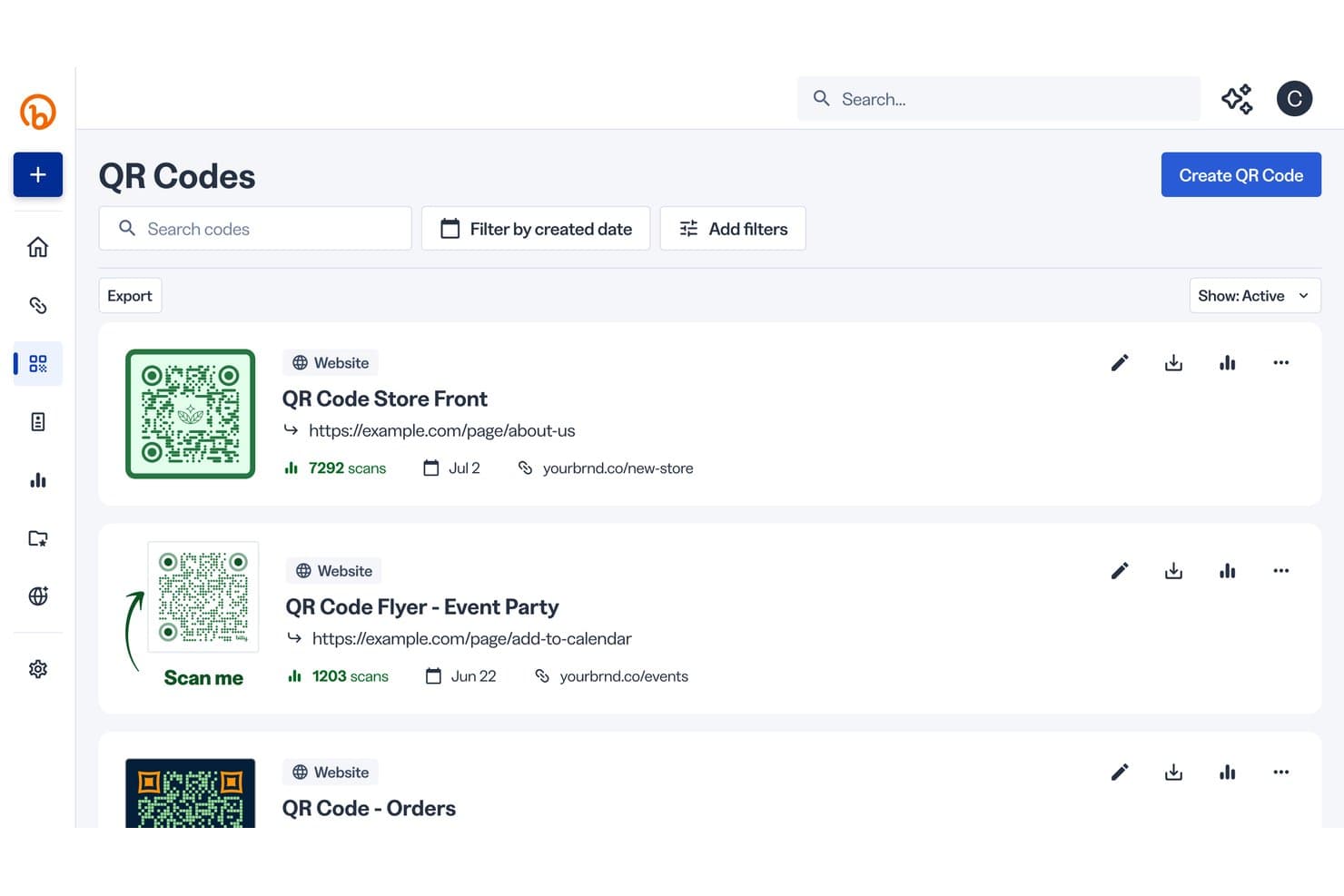
Bitly Codes includes QR code management where users can view, track scans, and manage multiple active QR codes linking to websites. Bitly Codes is a QR code generator built into Bitly's link management platform, combining code design customization, scan analytics, and dynamic URL routing alongside short link creation.
Who Is Bitly Codes Best For?
It's a natural fit for marketing teams that already manage short links and want QR code creation, tracking, and branding tools in the same place.
Why I Picked Bitly Codes
I picked Bitly Codes because it's the only tool on my list where QR code creation sits natively inside a link management platform. I can generate a short link and a QR code for the same campaign URL without switching tools, and see both organized in one place. The unified dashboard means scan analytics and link click data live side by side, which I find genuinely useful when reviewing offline campaign performance against broader channel activity.
Bitly Codes Key Features
- Template saving: Create and reuse branded QR code designs across multiple campaigns and assets.
- Marketplace integrations: Connect Bitly Codes with tools like Canva, HubSpot, and Claude for workflow automation.
- Mobile app support: Generate and manage QR codes directly from Android or iOS devices.
- Bulk QR generation: Upload spreadsheets to create large batches of QR codes in one step.
Bitly Codes Integrations
Bitly Codes offers 65+ native integrations, including Canva, Shopify, Microsoft Copilot, WordPress, Salesforce, Notion, and Slack. It also connects with Zapier and Make, and an API is available for custom integrations.
What's Free?
Bitly Codes has a free-forever plan that lets you create up to 2 QR codes per month with unlimited scans. The free plan includes basic color and frame customization, PNG/JPEG/SVG downloads, and up to 2 custom landing pages, but it doesn't include scan analytics, logo uploads, or dynamic QR code redirects.
Pros and Cons
Pros:
- Free plan includes SVG file downloads
- Short links and QR codes unified
- Unlimited scans on the free plan
Cons:
- Scan analytics locked behind paid plan
- Only two QR codes free monthly
Learn more about Bitly Codes: Best for no-signup custom QR designs
- Free plan available
- Free to use
Visit WebsiteCustomer Rating:4.8/5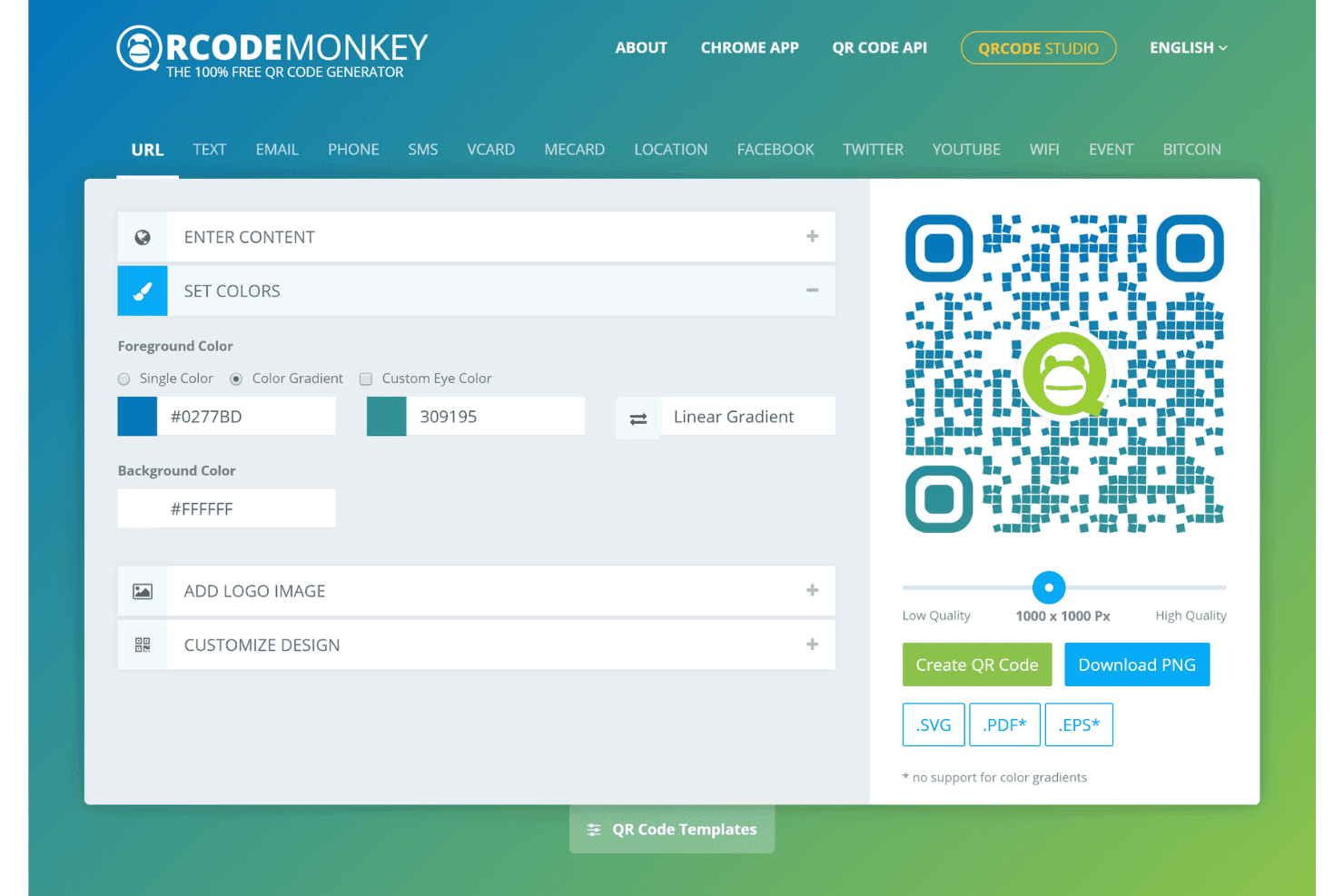
QRCode Monkey offers a free QR code generator with customizable colors, gradients, logo embedding, and multiple download formats including PNG, SVG, and PDF. QRCode Monkey is a free, browser-based QR code generator that creates static QR codes across 14+ content types with deep visual customization, including logo embedding, color gradients, pattern styles, and vector-format downloads.
Who Is QRCode Monkey Best For?
It's a strong fit for print and event marketers who need quick, branded static QR codes for physical collateral without creating an account.
Why I Picked QRCode Monkey
QRCode Monkey earns its spot on my shortlist because the design depth it offers without any signup is genuinely rare. I can upload a brand logo, apply a linear or radial color gradient, and style the eye frames and eye balls independently, all before downloading. Output formats include SVG, PDF, and EPS, so codes go straight to a print vendor at any scale without quality loss.
QRCode Monkey Key Features
- Multi-language interface: The platform supports English, German, Spanish, French, Portuguese, Italian, Indonesian, Russian, Thai, and Arabic.
- Unlimited QR code generation: Generate as many static QR codes as needed with no scan limits or expiration.
- Developer API access: Programmatic custom QR code creation is available via a public API supporting various output formats.
- Advanced content support: Codes can embed URLs, text, vCard, event, Wi-Fi, and multiple cryptocurrency address types.
QRCode Monkey Integrations
Native integrations are not publicly listed. QRCode Monkey offers an API for custom integrations.
What's Free?
QRCode Monkey's free plan is free forever and requires no account to use. It includes unlimited static QR code generation, full visual customization, and high-resolution downloads in PNG, SVG, PDF, and EPS formats, though dynamic QR codes and scan tracking are only available on paid plans.
Pros and Cons
Pros:
- Full logo and gradient customization included
- Vector format exports available for free
- No account required to generate codes
Cons:
- Scan tracking locked behind paid plans
- No dynamic QR codes on free plan
Learn more about QRCode Monkey: Best for branded QR codes with logo options
- Free plan available
- From $25/month (billed annually)
Visit WebsiteCustomer Rating:4.6/5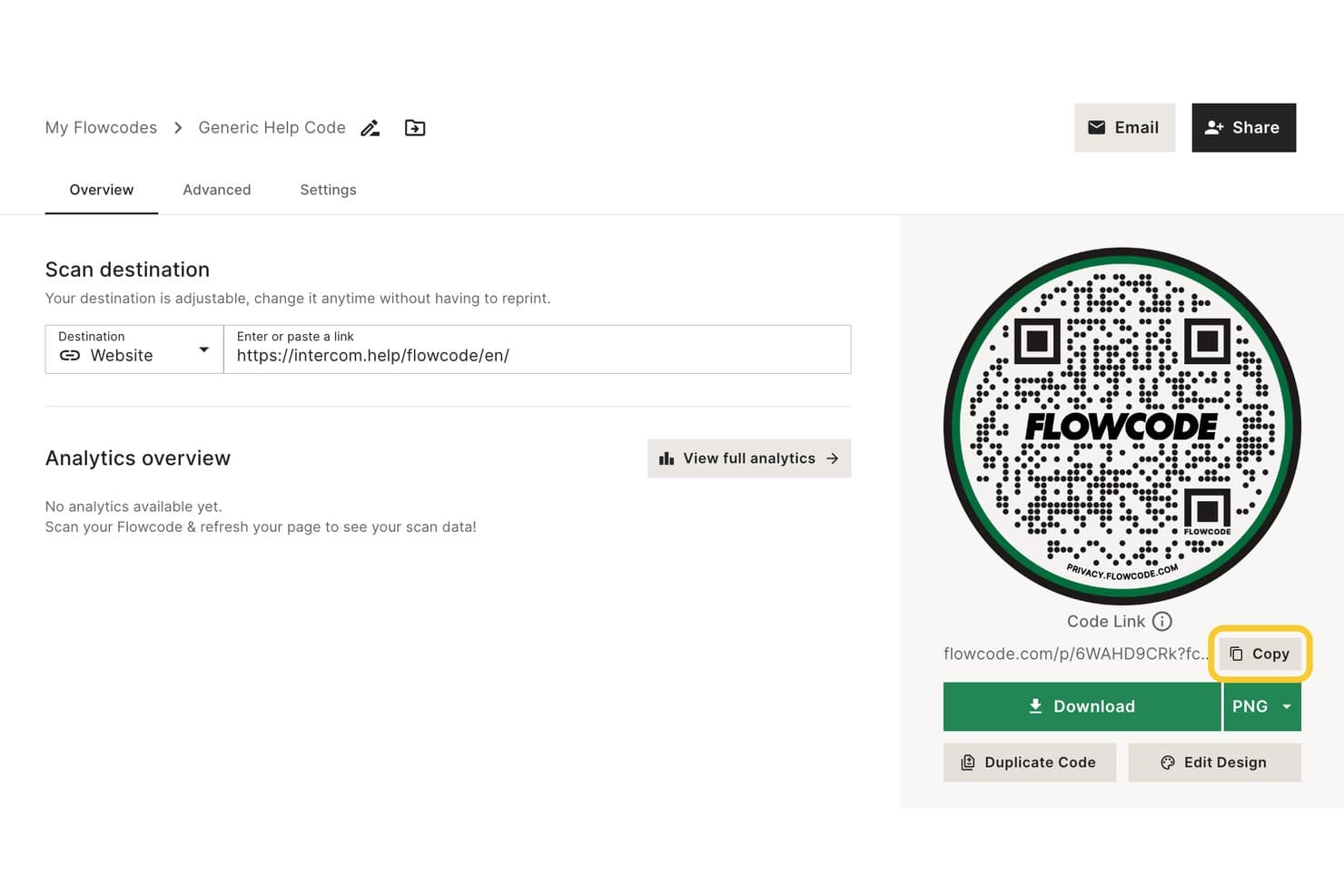
Flowcode includes a QR code overview page where users can set a scan destination URL, view analytics, copy the code link, and download the QR code as a PNG. Flowcode is a QR code generator platform built around dynamic codes, branded design customization, mobile landing pages, and scan analytics.
Who Is Flowcode Best For?
Flowcode is a strong fit for marketing teams running offline campaigns that need branded, trackable QR codes across print, retail, events, and out-of-home placements.
Why I Picked Flowcode
I picked Flowcode as one of the best because its logo embedding and HEX color customization let me match codes exactly to campaign visuals, not just slap a logo on top. The artist-designed templates give codes a finished, intentional look. I also use Brand Kits to lock in specific logos, fonts, and colors so every code my team generates stays on-brand without manual checks across a full print run.
Flowcode Key Features
- Mobile landing pages: Create and link custom, mobile-optimized pages to each QR code.
- Real-time scan analytics: Access dashboards with scan counts updated as activity happens.
- Bulk QR code generation: Generate up to 50 codes at once in lower tiers, or more via API in premium tiers.
- GDPR and CCPA compliance: Ensures data privacy standards are met for generated codes and scan analytics.
Flowcode Integrations
Flowcode offers native integrations with Okta, MailChimp, HubSpot, Salesforce, Snowflake, Microsoft Dynamics 365, and more. It also connects with Zapier, and an API is available for custom integrations.
What's Free?
Flowcode's free-forever plan supports up to 2 dynamic QR codes and 2 mobile landing pages, with scan analytics capped at 500 lifetime scans. The free tier includes 1 artist-designed template and advanced logo and HEX customization, but bulk code creation, geolocation data, and collaboration seats are locked to paid plans.
Pros and Cons
Pros:
- Mobile landing pages included on free plan
- Dynamic codes are editable post-print
- Deep logo and HEX color customization
Cons:
- Only 2 dynamic codes on free plan
- Free scan analytics capped at 500 lifetime
Learn more about Flowcode: Best for editable dynamic QR codes on free plan
- Free trial + free demo available
- From $9/month (billed annually)
Visit WebsiteCustomer Rating:4.3/5
Uniqode QR Code Generator offers multiple dynamic QR code types including Website, PDF, Form, vCard, and more in a step-by-step creation wizard. Uniqode is a QR code generator that supports 20+ code types—including website, vCard, Wi-Fi, PDF, and app download—with visual customization, dynamic code editing, bulk creation, and scan analytics built in.
Who Is Uniqode QR Code Generator Best For?
Uniqode is a strong fit for small business marketers and print campaign managers who need branded, trackable QR codes across physical marketing materials.
Why I Picked Uniqode QR Code Generator
I picked Uniqode as one of the best because the free plan includes access to editable dynamic QR codes, meaning you can update destination URLs after physical materials have already been printed. This is especially useful when running campaign-specific codes on packaging or signage where reprinting isn't an option. I also like that Uniqode's visual customization goes beyond color, letting you style the logo, frame, and eye shapes to match brand guidelines precisely.
Uniqode QR Code Generator Key Features
- Bulk QR code creation: Generate up to 2,000 QR codes at once using spreadsheet import.
- 20+ QR content types: Support for website, PDF, social, Wi-Fi, vCard, app download, and more.
- High-res export options: Download QR codes in PNG, SVG, PDF, or EPS for print or digital use.
- Team and role management: Assign permissions and manage user roles for collaborative projects.
Uniqode QR Code Generator Integrations
Uniqode offers native integrations with HubSpot, Canva, Google Analytics, Meta Ads, Slack, Workato, and more. It also connects with Zapier and Make, and provides an API for custom integrations.
What's Free?
Uniqode's free offering is a 14-day free trial that gives you access to dynamic QR codes and advanced features. Once the trial ends, dynamic codes become inactive unless you upgrade to a paid plan, though static QR codes you created will continue to work permanently.
Pros and Cons
Pros:
- Vector export formats support large-format printing
- Scan analytics include geo, device, and time data
- Dynamic QR codes editable after print distribution
Cons:
- Free plan capped at 14 days, not free-forever
- Dynamic codes deactivate when free trial ends
Learn more about Uniqode QR Code Generator:
Other Free QR Code Generators
Here are some additional free QR code generator options that didn’t make it onto my shortlist, but are still worth checking out:
- 11QRCodeChimpBest for visually creative QR code templates
- 12QRStuffBest for supporting multiple QR content types
- 13PagelootBest for lead capture with QR forms
- 14QRFYBest for mobile-friendly landing pages
- 15Me-QRBest for multilingual QR code campaigns
- 16QR Code AIBest for AI-powered QR code personalization
- 17UnitagBest for enterprise-grade design control
How I Evaluate Free QR Code Generators
First, I define what counts as free. For QR code generators, that means a free-forever plan—codes printed on packaging or signage can't go dark when a trial ends. From there, I split my evaluation into the core functionality a tool must offer to make the list and the differentiating factors that separate one option from another.
Core Functionality (Table Stakes For This List)
In addition to my free offer requirements, I also use a scoring system to select tools for my list. Here's how it works:
I rank each one on a scale from 0 (does not offer the functionality) to 5 (excels in this area) for each core functionality listed below. Then, I calculate the tool's total score into a percentage. Each tool needs to achieve a minimum total score of 65% to be considered for inclusion.
- Static QR Generation: I look for codes that stay live permanently—important when you're printing codes on product packaging or event signage that stays up for months.
- Multiple Content Types: Beyond basic URLs, I check whether a tool supports vCards, Wi-Fi, email, and social links—content types marketers actually use on business cards and menus.
- High-Res Downloads: Print collateral like posters and packaging demands vector formats, so I evaluate whether free plans include SVG or PDF exports alongside standard PNG.
- Visual Customization: I look at color, pattern, and logo options since a plain black-and-white code on branded retail signage or direct mail pieces looks out of place.
- Dynamic QR Codes: The ability to edit a destination URL after printing matters—especially for seasonal campaigns where a flyer's QR code needs to point to updated offers.
- Scan Tracking & Analytics: I check for scan count, location, and device data so marketers can measure whether a tradeshow banner or storefront poster is actually driving traffic.
Once I have a list of tools that meet the criteria, I consider what sets each platform apart.
Differentiating Factors (What Sets Vendors Apart)
Here's how I compare and contrast different vendors:
Standout Features
Custom design goes well beyond picking a color. I evaluate whether a tool lets you add your logo, style corner eyes, and include CTA text in frames. A QR code on a retail display or event badge should match the brand around it. Bulk generation is another separator—uploading a spreadsheet to produce unique codes per product SKU or attendee saves hours. How deep scan analytics go on free plans also matters, since knowing where and when people scan tells you far more than a raw count.
Beyond Features
Free tier limits vary widely. I check whether a tool caps how many codes you can create or adds watermarks—either one can derail a campaign when you're producing codes for a product line or multi-location rollout. Whether you need an account also matters; some tools let you generate and download without signing up, which is useful for quick one-off needs like a last-minute event flyer. I also evaluate privacy policies around scan data collection, since your audience's trust is on the line every time they point their camera at your code.
How to Choose a Free QR Code Generator
It’s easy to get bogged down in long feature lists and complex pricing structures. To help you stay focused as you work through your unique software selection process, here’s a checklist of factors to keep in mind:
| Factor | What to Consider |
|---|---|
| FactorScalability | What to ConsiderWill the tool support the volume of codes your campaigns need now and in the future—such as for multiple products or events? |
| FactorIntegrations | What to ConsiderDoes it connect with your existing marketing, analytics, or CRM systems to fit seamlessly into your tech ecosystem? |
| FactorCustomizability | What to ConsiderCan you tailor QR codes to reflect your brand? Consider your standards for logo placement, color palettes, and campaign-specific visuals. |
| FactorEase of use | What to ConsiderHow quickly can your team generate, customize, and download codes, especially under tight deadlines or with non-technical users? |
| FactorImplementation and onboarding | What to ConsiderWhat training or setup is required? Will new users need step-by-step guidance, or is it intuitive enough for self-service adoption? |
| FactorCost | What to ConsiderAre there hidden limits on the free plan—such as caps, ads, or forced upgrades—that could interfere with long-term use? |
| FactorSecurity safeguards | What to ConsiderHow is QR data stored and who can access it? Make sure privacy settings protect both your business and your campaign participants. |
| FactorSupport availability | What to ConsiderWhat options exist if you run into issues—documentation, live chat, or user forums? Are response times suitable for your workflow needs? |
What are Free QR Code Generators?
A free QR code generator is an online tool that lets you create QR codes at no cost, usually offering a free-forever plan. These tools help marketers and businesses generate, customize, and download QR codes for anything from URLs to contact information—without worrying about recurring fees or code expiration. The concept of QR codes was first invented by Denso Wave.
Features
Let’s go over the features commonly found in QR code generator tools, and which ones are usually included in free vs. paid plans.
Typically Free QR Code Generator Features
- Static code creation: Generate permanent QR codes that always point to one destination, great for simple web links or contact info with no ongoing costs.
- Basic visual customization: Choose from a set of colors and shapes to help your QR code blend with your marketing materials and make it stand out.
- Common content types: Create codes for basic content like URLs, email addresses, phone numbers, and plain text without requiring advanced setup.
- Download in PNG or JPG format: Export codes in a standard, high-quality image format suitable for digital use or small print applications.
- Unlimited scans: Most freemium QR code generators let any QR code reader scan your codes as often as needed without scan caps or throttling.
- No account required: Some platforms allow quick code generation and download without forcing you to sign up or share personal information.
- Mobile-friendly creation: Generate and download codes from your smartphone or tablet, ideal for last-minute event or field marketing needs.
- Basic analytics: Access simple metrics like total scan counts to gauge whether your code is getting used.
Typically Paid QR Code Generator Features
- Dynamic code editing: Change the QR code’s destination after printing, so you can update campaign URLs without replacing printed materials.
- Scan tracking analytics: Get detailed reporting on time, location, device type, and user demographics to measure real-world campaign impact.
- Vector file downloads: Export QR codes in scalable formats like SVG or PDF for use on large banners, posters, or packaging without losing clarity.
- Logo and full brand customization: Add your logo, select advanced color patterns, and customize every aspect for a brand-consistent look.
- Bulk code generation: Upload spreadsheets to create hundreds of unique QR codes for inventory tagging or personalized direct mail campaigns.
- Password protection: Restrict access to QR code destinations by requiring a password, useful for gated content or private event check-ins.
- Campaign management dashboard: Organize, label, and manage multiple campaigns, making it easier to coordinate teamwork and measure results across many codes.
- Expiration and scheduling: Set start and end dates for when a QR code is active, useful for time-limited promotions or event check-ins.
- Advanced content types: Support for codes linking to PDFs, app stores, Wi-Fi credentials, payment requests, or multi-link landing pages.
- API access: Integrate QR code creation directly into your business systems or apps for automated campaigns and workflows.
Benefits
Implementing a free QR code generator provides several benefits for your team and your business. Here are a few you can look forward to:
- Zero upfront cost: Launch campaigns and test QR codes without investing in software or licensing fees.
- Faster time to market: Instantly generate and customize codes for any touchpoint such as print, signage, or packaging with minimal setup.
- Flexible code usage: Use codes in a wide range of applications, from event check-ins to product promotions, thanks to support for multiple content types.
- Brand consistency: Customize colors and basic design to match your existing visual identity without needing advanced design resources.
- Simplicity for non-technical users: Most platforms require no technical skill or setup, making QR code campaigns accessible to anyone on your team.
- Reliable access: Free-forever plans ensure codes remain active and accessible on long-lived marketing materials, packaging, or print assets.
- Quick feedback: Basic scan analytics from a QR code scanner let you measure initial campaign performance and optimize future usage based on real engagement data.
Costs and Pricing
I realize you came to this article looking for the best QR code generator options that are available for free. However, since free plans only offer limited features, there's a good chance you'll need to scale your plan up in the future.
The table below summarizes common plans, their average prices, and typical features included in QR code generators:
Plan Comparison Table for QR Code Generator
| Plan Type | Average Price | Common Features |
|---|---|---|
| Plan TypeFree Plan | Average Price$0 | Common FeaturesGenerate static codes, basic customization, PNG downloads, support for URLs and text, and unlimited scans. |
| Plan TypePersonal Plan | Average Price$5-$15/month | Common FeaturesCreate limited dynamic codes, scan analytics, vector downloads, logo upload, and simple campaign management. |
| Plan TypeBusiness Plan | Average Price$20-$60/month | Common FeaturesMultiple user accounts, advanced analytics, bulk code generation, PDF export, enhanced branding, and priority support. |
| Plan TypeEnterprise Plan | Average Price$100-$300/month | Common FeaturesUnlimited codes, enterprise integrations, API access, SLA-backed support, account manager, and custom onboarding. |
Free QR Code Generator FAQs
Here are some answers to common questions about free QR code generators:
Do free QR code generators expire or deactivate codes?
No, most free QR code generators provide static codes that never expire or deactivate, so your URLs remain scannable for as long as you need. Be sure to check if the tool adds any expiry dates or scan limits in the fine print before printing at scale.
Can I use free QR code generators for commercial purposes?
Yes, most tools allow commercial use, but you should always review each platform’s terms of service to ensure your campaign, packaging, or signage can be used without violating usage rules.
Are scans or codes limited on free plans?
Yes, some free QR code generators place caps on the number of codes you can create or scans your codes receive before you’re prompted to upgrade. Always check these limits before launching a large campaign.
Can I edit the destination URL on a free QR code?
No, editing a QR code’s destination after printing (dynamic codes) usually requires a paid plan. Free plans almost always offer static codes only, which can’t be changed once created.
Are QR codes generated with free tools safe to use?
Yes, as long as you choose a reputable provider, codes are safe for your audience. Still, review privacy and data collection policies, especially if you’re gathering analytics or using codes in regulated industries.
Will free QR code generators include watermarks?
Some tools add a watermark or branding to codes created on free plans, especially for downloadable images. If brand appearance is essential, test your output before printing or using codes widely.