

AI video creation software lets you automatically generate videos using artificial intelligence to handle editing, visuals, voiceovers, and even scripts. If you’re searching for the best AI video creation tools, you’re probably aiming to produce professional-looking videos faster and more easily—whether for marketing, training, or social media. In this list, you’ll discover which platforms are making video creation smarter, how to match their strengths to your workflow, and what you need to know to choose the right tool for your team this 2026.
Why Trust Our Software Recommendations
6,700+
Reviews
20
Industry experts
16+
Evaluation factors
14
Years
Our team has been testing and reviewing software since 2012. As marketing leaders ourselves, we know how difficult—and important—it is to choose the right software.
For this guide, we evaluated tools using hands-on testing and independent research, scoring tools using our selection criteria.
Our reviews reflect our human editorial judgment, not a sales pitch.
Expert reviewers:
 Gui DrusinaCreative Director
- Shriya GhateSenior Marketing Lead
 Amanda JacquesMarketing Ops Leader

AI Video Creation Software Comparison Table
This comparison table summarizes pricing details for my top AI video creation software selections:
| Tool | Best For | Trial Info | Price | ||
|---|---|---|---|---|---|
| 1 | Best for walkthrough videos without voice recording | Free plan + free demo available | From $39/creator/month (billed annually) | Website | |
| 2 | Best for personalized training videos | Free plan available | From $59/month (billed annually) | Website | |
| 3 | Best for animating still photos into video | 14-day free trial | From $4.70/month (billed annually) | Website | |
| 4 | Best for instant video production from PPTs | Free plan available | From $24/month (billed annually) | Website | |
| 5 | Best for customizable video templates | Not available | From $17/month (billed annually) | Website | |
| 6 | Best for team-based visual branding | Free trial + free plan available | From $144/user/year (billed annually) | Website | |
| 7 | Best for turning scripts into video highlights | Free trial available | From $29/month | Website | |
| 8 | Best for fast subtitle generation | Free plan available | From $12/user/month | Website | |
| 9 | Best for creating lifelike AI presenters | Free plan + free demo available | From $14/month (billed annually) | Website | |
| 10 | Best for multilingual talking avatars | Free plan available | From $24/month (billed annually) | Website |


Best AI Video Creation Software Reviews
Below are my detailed summaries of the best AI video creation software that made it onto my shortlist. My reviews offer a detailed look at the features, capabilities, and best use cases of each platform to help you find the best one for you.
 Best for walkthrough videos without voice recording
- Free plan + free demo available
- From $39/creator/month (billed annually)
Visit WebsiteCustomer Rating:5/5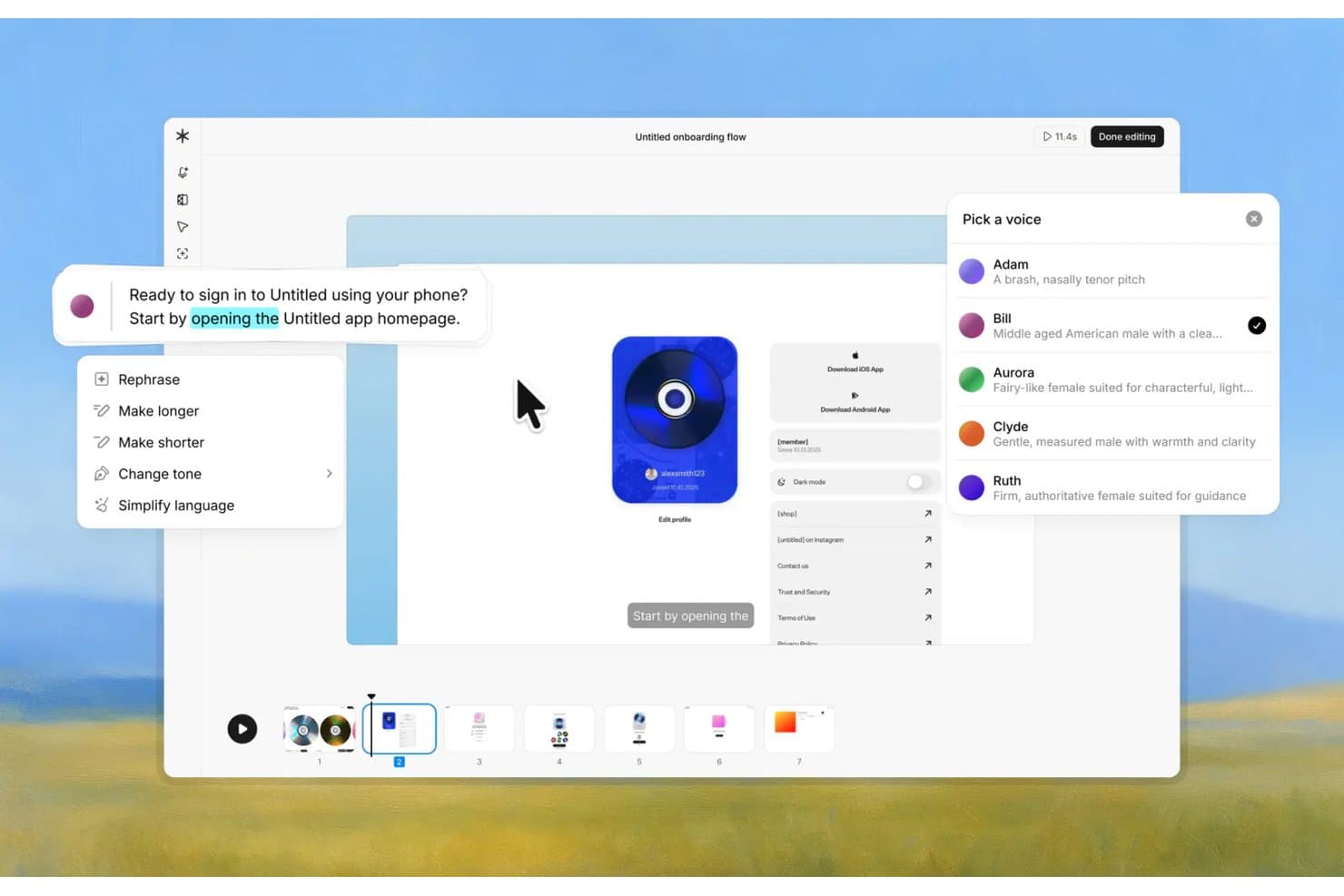
Guideless lets users pick AI voices and edit script text for video guides. Guideless is an AI video tool that turns recorded browser workflows into narrated software walkthrough videos and step-by-step written guides, with automatic captions, voiceovers, and smart zoom highlights.
Who Is Guideless Best For?
Guideless is a strong fit for product and customer success teams that need to turn browser-recorded workflows into polished, narrated training videos without scripting or recording their own voice.
Why I Picked Guideless
I picked Guideless as one of the best because it's the only tool I've found that turns a recorded browser workflow into a fully narrated training video without you ever touching a microphone. You run the Chrome extension, click through your software process, and Guideless writes the narration, generates an AI voiceover in 40+ languages, and applies smart zoom highlights to each step automatically. Its "living guide" model lets you update only the steps that changed and regenerate their voiceover without re-recording the whole thing.
Guideless Key Features
- AI rewrite presets: Apply one-click options like Shorten, Make More Descriptive, or SEO Optimize to individual steps or the full guide transcript.
- Blur and annotation tools: Mark up screenshots or blur sensitive information directly within the editor before publishing.
- Multi-format export: Publish finished guides as MP4 video (up to 4K), PDF, or Markdown for use in Notion, GitHub, or help centers.
- Guide analytics: Track views, play rate, completion, and drop-off points at both the guide and workspace level.
Guideless Integrations
Guideless supports integrations with Slack, Notion, and Confluence for sharing software guides.
Pros and Cons
Pros:
- Exports narrated walkthroughs and written guides
- Living guides update changed steps without rerecording
- Natural-sounding AI voiceovers need little editing
Cons:
- No avatars, timeline editing, or social formats
- Browser workflows only, not general video generation
Learn more about Guideless: Best for personalized training videos
- Free plan available
- From $59/month (billed annually)
Visit WebsiteCustomer Rating:4.6/5
Colossyan offers an AI video creator and course builder dashboard with templates for employee onboarding and internal communications training. Colossyan is an AI video creation platform that focuses on generating professional training and instructional videos with customizable AI presenters, multi-language support, and scenario-based video editing.
Who Is Colossyan Best For?
Corporate learning and development teams who need to create interactive training videos tailored for employee onboarding, skills development, or compliance programs.
Why I Picked Colossyan
I picked Colossyan as one of the best because I can create highly personalized training videos using its AI presenters, auto-translate scripts for multilingual teams, and adapt video scenarios for different learning needs.
Colossyan Key Features
- Script collaboration: Invite teammates to edit and comment on scripts together in real time.
- Video length settings: Set and adjust video duration for any project.
- Multiple slide support: Combine several slides and scenes in a single video.
- Brand kit uploads: Upload your own brand logos, colors, and fonts for consistent branding.
Colossyan Integrations
Integrations include SCORM export, Zapier, and YouTube. A custom API is available for custom integrations.
Pros and Cons
Pros:
- Customizable avatars with expressive gestures
- Auto-translation supports dozens of languages
- Scenario-based branching for interactive training videos
Cons:
- Limited scene-by-scene editing flexibility
- AI-generated voices can sound robotic
Learn more about Colossyan: 3Best for animating still photos into video
D-ID
- 14-day free trial
- From $4.70/month (billed annually)
Visit WebsiteCustomer Rating:4.6/5
D-ID offers an AI video creation interface where users can select a digital presenter, type a script, choose language and voice settings, and generate a talking-head video. D-ID is an AI video creation platform that specializes in animating still photos, generating digital presenters, and turning written text into video content with lifelike movement.
Who Is D-ID Best For?
Creative teams and content marketers at agencies or brands who want to produce engaging video from static images without complex production resources.
Why I Picked D-ID
I picked D-ID because I like how quickly I can animate still photos into video clips, using lifelike AI-driven expressions and synced lip movements from a text or audio script. My team often uses its Creative Reality Studio to turn static portraits into engaging explainer or training content.
D-ID Key Features
- API access: Integrate photo animation and video creation into your existing platforms.
- Batch processing: Upload and animate multiple images in a single workflow.
- Customized AI avatars: Generate branded digital presenters for your videos.
- Multilingual voice support: Create videos using different languages and accents.
D-ID Integrations
Integrations include Canva, PowerPoint, TikTok, Facebook, Instagram, LMS systems, stock media, and API support.
Pros and Cons
Pros:
- Handles multiple languages and voice cloning
- Supports text-to-video with AI avatars
- Animates still photos with realistic movement
Cons:
- No built-in stock media assets
- Limited avatar gesture control options
Learn more about D-ID: Best for instant video production from PPTs
- Free plan available
- From $24/month (billed annually)
Visit WebsiteCustomer Rating:4.3/5
AI Studios is an AI video platform for creating avatar-led videos from scripts and presentations. AI Studios is an AI video creation platform where you can generate videos from scripts, use customizable AI avatars, and convert presentation files directly into narrated video content.
Who Is AI Studios Best For?
Training and internal communications teams who want to quickly turn presentations into AI-narrated videos.
Why I Picked AI Studios
I picked AI Studios because I can upload a PowerPoint file and automatically generate a full-length AI-narrated video, complete with avatars and scene transitions. My team uses its PPT-to-video workflow whenever we need to deliver dynamic training or explainer content fast.
AI Studios Key Features
- Custom AI avatars: Create and personalize digital presenters for your videos.
- Script-based video editing: Modify or generate video content directly from text input.
- Multilingual voice synthesis: Produce narrated videos in a wide range of languages.
- Template library: Access pre-made layouts and styles for faster video creation.
AI Studios Integrations
Integrations include ElevenLabs. A custom API is available for custom integrations.
Pros and Cons
Pros:
- Multilingual voiceover and subtitle support
- Offers diverse AI avatars for narration
- Converts PowerPoint files directly to video
Cons:
- Avatar gestures and expressions feel restricted
- Limited editing options after video generation
Learn more about AI Studios: Best for customizable video templates
- Not available
- From $17/month (billed annually)

InVideo offers a template library with 100+ options including sport, fashion, real estate, and lifestyle templates to jumpstart AI video creation. InVideo is a cloud-based AI video creation platform with a strong focus on customizable templates, drag-and-drop editing, text-to-video generation, stock media, and AI-powered video assistant features.
Who Is InVideo Best For?
Marketing teams and small businesses looking to produce branded social media or promotional videos using a wide range of customizable templates.
Why I Picked InVideo
I picked InVideo as a top contender because I can access thousands of professionally designed video templates, swap media and text in seconds, and use AI-powered recommendations to customize scenes for different brand and content needs.
InVideo Key Features
- AI script generator: Create video scripts from simple prompts or keywords.
- Text-to-video functionality: Quickly convert written text into animated video content.
- Built-in stock media library: Access millions of royalty-free images, video clips, and music tracks.
- Automated voiceovers: Generate realistic AI voiceovers in multiple languages and accents.
InVideo Integrations
InVideo offers native integrations with Pexels, Pixabay, and Unsplash for stock media access. An API is available for custom integrations.
Pros and Cons
Pros:
- Built-in access to extensive stock footage
- AI-powered text-to-video conversion is fast
- Wide selection of dynamic video templates
Cons:
- AI voiceover quality varies by language
- Scene-by-scene editing options are basic
Learn more about InVideo: Best for team-based visual branding
- Free trial + free plan available
- From $144/user/year (billed annually)
Visit WebsiteCustomer Rating:4.7/5
Canva offers an AI-powered video creation interface where users can generate B-roll footage using text prompts and browse video search results directly within the editor. Canva is an online design platform that lets you create, edit, and collaborate on videos, social graphics, presentations, and branded content with AI-powered design tools and templates.
Who Is Canva Best For?
Marketing teams and creative departments in small to midsize companies who need to collaborate on brand assets and video content.
Why I Picked Canva
I picked Canva as one of the best because I can manage brand assets, assign team permissions, and create reusable video and design templates that help our entire team collaborate on branded visual content for all our channels.
Canva Key Features
- AI video generator: Produce videos directly from text and media prompts using built-in AI tools.
- Animation controls: Animate individual elements or complete scenes with timeline editing.
- Stock content library: Access millions of royalty-free stock videos, audio, and images for your projects.
- One-click background removal: Remove backgrounds from video and image assets instantly with AI-powered tools.
Canva Integrations
Canva offers native integrations with Google Drive, Dropbox, Meta, YouTube, Slack, LinkedIn, HubSpot, Mailchimp, OneDrive, Pinterest, and Zapier. An API is available for custom integrations.
Pros and Cons
Pros:
- Quick video resizing for social platforms
- Easy brand kit setup for multiple teams
- Wide variety of AI-powered video templates
Cons:
- No support for AI-generated voiceovers
- Limited advanced video editing tools
Learn more about Canva: Best for turning scripts into video highlights
- Free trial available
- From $29/month
Visit WebsiteCustomer Rating:4.8/5
Pictory is an AI video platform that turns long-form content into short, shareable videos. Pictory is an AI video creation software that lets you transform long-form scripts and video content into short, engaging video highlights using text-to-video technology, automatic scene selection, and subtitle generation.
Who Is Pictory Best For?
Marketing and content teams who need to convert blog posts, webinars, or scripts into short-form video clips for digital channels.
Why I Picked Pictory
I picked Pictory as one of the best because I can upload a script and the platform turns it into video highlights, automatically matching scenes and generating subtitles for social sharing. I like that it pulls visual assets directly from your text.
Pictory Key Features
- Bulk video creation: Produce multiple videos at once from a list of scripts.
- Automatic video summarization: Generate concise highlight reels from long-form videos.
- Caption and subtitle editing: Customize and fine-tune captions and subtitles before export.
- Stock media library access: Search and use royalty-free images, videos, and music directly within the platform.
Pictory Integrations
Pictory offers native integrations with Hootsuite and YouTube. An API is available for custom integrations.
Pros and Cons
Pros:
- Auto-captions with manual editing control
- Bulk video creation from multiple scripts
- Scene detection quickly identifies key moments
Cons:
- AI voices sometimes lack natural tone
- Limited control over advanced video editing
Learn more about Pictory: 8Best for fast subtitle generation
VEED
- Free plan available
- From $12/user/month
Visit WebsiteCustomer Rating:4.5/5
VEED is a browser-based AI video platform for editing, subtitles, transcription, and voice generation. VEED is an online AI video creation platform offering automated video transcription, subtitle generation, audio enhancement, AI video editing, and text-to-speech features in a browser-based workspace.
Who Is VEED Best For?
Video editors, marketers, and social media managers who need fast, automated subtitle and transcription workflows for global video distribution.
Why I Picked VEED
I picked VEED as one of the best for fast subtitle generation because I can instantly auto-generate and edit subtitles, convert speech to text with high accuracy, and export subtitles in multiple formats suitable for YouTube, LinkedIn, and other platforms.
VEED Key Features
- AI video generator: Create new videos from text or prompts using AI automation.
- Green screen editor: Remove and replace video backgrounds directly in your browser.
- Text-to-speech tool: Instantly generate voiceovers from written scripts in multiple languages.
- Video noise reduction: Remove unwanted background noise from audio tracks in your videos.
VEED Integrations
VEED offers native integrations with YouTube, Zoom, Google Drive, and Dropbox. An API is available for custom integrations.
Pros and Cons
Pros:
- Browser-based video creation and editing
- Fast AI-driven transcription processing
- Supports multiple languages for subtitles
Cons:
- No advanced animation or motion graphics
- Limited manual video editing controls
Learn more about VEED: Best for creating lifelike AI presenters
- Free plan + free demo available
- From $14/month (billed annually)

Synthesia offers a dashboard with featured templates and recent AI-generated videos for quick video creation and management. Synthesia is an AI video creation platform where you generate videos from text using customizable avatars, automated voiceovers, and multiple language options.
Who Is Synthesia Best For?
Corporate trainers, marketers, and learning teams who need video content with AI-generated presenters across multiple languages.
Why I Picked Synthesia
I picked Synthesia as one of the best because I can generate videos with digital presenters who look alarmingly real, match voices to 120+ languages, and swap presenters or scripts in minutes for quick updates.
Synthesia Key Features
- Template library: Choose from a large collection of ready-made video templates.
- Screen recording: Capture your screen to add product demos or software walkthroughs.
- Built-in media assets: Access stock images, icons, and background music within the editor.
- Video collaboration tools: Invite teammates to review, comment, and edit projects together.
Synthesia Integrations
Synthesia offers native integrations with 360Learning, HubSpot, Shopify, WordPress, Workato, YouTube, and Zingly. PowerPoint import is available, and an API is available for custom integrations.
Pros and Cons
Pros:
- Script changes update videos instantly
- Supports video generation in over 120 languages
- Digital avatars mimic real presenters convincingly
Cons:
- No built-in interactive video elements
- Limited customization of avatar appearance
Learn more about Synthesia:

HeyGen offers a Video Agent interface that turns ideas into production-ready AI videos using avatars, brand assets, and community style templates. HeyGen is an AI video creation platform that lets you generate talking avatar videos, convert text to speech in multiple languages, and customize video scenes with ease.
Who Is HeyGen Best For?
Marketers and learning teams who need engaging talking avatar videos for audiences in multiple languages.
Why I Picked HeyGen
I picked HeyGen as one of the best because I can create multilingual talking avatar videos by uploading a script and choosing from 300+ avatars, then instantly translate content for global audiences in more than 40 languages.
HeyGen Key Features
- Custom avatar creation: Generate your own avatar using a video upload and voice sample.
- AI video generator: Produce videos directly from scripts with automatic scene composition.
- Expanded stock assets: Access thousands of royalty-free images, videos, and background tracks.
- Collaboration workspace: Invite and manage multiple team members on shared video projects.
HeyGen Integrations
HeyGen offers native integrations with Canva, Zapier, and provides an API for custom integrations.
Pros and Cons
Pros:
- Real-time script editing updates video instantly
- Custom avatar creation from user video uploads
- Multilingual avatar lip-sync is highly accurate
Cons:
- Advanced brand customization features are missing
- Limited control over avatar gestures and movement
Learn more about HeyGen:
Other AI Video Creation Software
Here are some additional AI video creation software options that didn’t make it onto my shortlist, but are still worth checking out:
- 11Hour OneBest for generating talking head updates
- 12CaptionsBest for auto-captioned video reels
- 13Lumen5Best for fast blog-to-video transformation
- 14Steve AIBest for transforming blogs into animated videos
- 15ElaiBest for building localized video content at scale
- 16Vidnoz AIBest for voice cloning for synthetic voices
- 17CreatifyBest for ecommerce product demo videos
- 18AkoolBest for face-swapping in marketing videos
- 19ChatGPTBest for generating video scripts and storyboards
- 20JoggAIBest for script-based avator video creation
How I Evaluate AI Video Creation Software
To make this list, a tool needs to deliver real, measurable AI value—whether that's turning a blog post into a polished social video or generating a localized avatar-led ad without a single camera. I evaluate every tool across two layers: the core functionality it must offer to qualify, and the differentiating factors that separate the best options from the rest.
Core Functionality (Table Stakes For This List)
When I'm selecting tools for my list, I rank each one on a scale from 0 (does not offer the functionality) to 5 (excels in this area) for each core functionality listed below. I then calculate the tool's total score into a percentage, using 75% as a benchmark to help assess its overall fit for the list.
- AI Video Generation: I look for how many input types a platform supports—text prompts, pasted scripts, blog URLs, uploaded docs—and whether it produces coherent scenes with matched visuals and pacing.
- AI Avatars or Voiceovers: The avatar library size, realism of lip-sync and gestures, and availability of custom or cloned avatars all factor into my evaluation here.
- Text-to-Speech & Multilingual Support: I check language count, voice variety per language, and whether the TTS output sounds natural enough to use in customer-facing campaigns without re-recording.
- Template & Scene Library: A strong template library should be categorized by use case—ads, product demos, social posts—and include integrated stock footage, images, and music tracks.
- AI Editing Automation: I evaluate how many editing tasks the platform handles automatically, from auto-captioning and aspect ratio resizing to filler-word removal and smart scene trimming.
- Brand Customization & Export: Saved brand kits with logos, fonts, and color palettes that auto-apply across new projects matter here, along with export options covering multiple resolutions and aspect ratios for channels like TikTok, LinkedIn, and YouTube.
Once I have a list of tools that meet the criteria, I consider what sets each platform apart.
Differentiating Factors (What Sets Vendors Apart)
Here's how I compare and contrast different vendors:
Standout Features
I look for personalization at scale—tools that let you swap in dynamic variables like name, company, or region across thousands of video variants are a must for ABM and outbound campaigns. I also evaluate repurposing capabilities, since an AI clipping agent that turns a 60-minute webinar into short-form clips for Reels or Shorts saves hours of manual editing. Built-in analytics matter too; I check whether a platform tracks watch time and drop-off points so you can iterate on creative with real performance data rather than guesswork.
Beyond Features
I check whether each platform offers native integrations with the tools marketing teams already use—CRMs, marketing automation platforms, and direct social publishing to channels like LinkedIn and TikTok. A tool that can't plug into your existing stack creates bottlenecks between creation and distribution. Content rights also matter more than most buyers realize; I look for clear commercial licensing on AI avatars, voices, and stock media, plus consent controls for voice cloning, since running a paid campaign with unlicensed synthetic media is a legal risk no brand should take.
How to Choose AI Video Creation Software
It’s easy to get bogged down in long feature lists and complex pricing structures. To help you stay focused as you work through your unique software selection process, here’s a checklist of factors to keep in mind:
| Factor | What to Consider |
| Scalability | Can the platform handle large batches of videos or high user numbers as your needs grow? Look for workflow automation, file export capacity, and user seat flexibility. |
| Integrations | Does it connect with your current tools, like content management systems, cloud storage, or learning platforms? Native integrations can reduce manual transfer and rework. |
| Customizability | Can you tailor branding, avatars, and templates to match company standards? Make sure your visual and messaging requirements can be met without workarounds. |
| Ease of use | Will your team need extensive training to get started? Prioritize a solution that matches your team’s comfort with new software and supports quick content revisions. |
| Implementation and onboarding | How quickly can you go live from purchase to launch? Check for onboarding materials, support availability, and typical user timelines for full rollout. |
| Cost | Are pricing models aligned with your volume and usage patterns? Analyze per-video costs, seat licenses, overages, and the predictability of future spend. |
| Security safeguards | Does the vendor provide adequate protection for confidential content and user data? Look for encryption, access controls, and compliance with organizational policies. |
| Support availability | Are help resources available during your team’s working hours? Consider the importance of live chat, phone, or asynchronous support, especially for production deadlines. |
What Is AI Video Creation Software?
AI video creation software is one type of AI tool for content creation that uses artificial intelligence to generate videos from text, images, presentations, scripts, or storyboards with minimal manual editing. These platforms often combine an AI video generator, AI video editor, and AI video maker in one workspace, helping teams create professional video content without relying on traditional production resources.
These tools use AI models and video model technology to create visuals, narration, subtitles, and scene timing automatically. They’re useful for content creation teams, marketers, trainers, and beginners who want to produce high-quality videos faster while reducing the learning curve of manual video editing.
Features of AI Video Creation Software
When selecting AI video creation software, keep an eye out for the following key features:
- AI avatars: Generate lifelike digital presenters to narrate and personalize your video content automatically, without the need for human actors or video shoots.
- Script-to-video conversion: Transform written scripts or text into full video scenes with automatically generated visuals, transitions, and timing.
- Multilingual voiceover: Create natural-sounding voiceovers in multiple languages and accents to quickly localize your video content for different audiences.
- Subtitle generation: Automatically generate and sync subtitles for your videos, boosting accessibility and viewer comprehension.
- Template library: Access a wide range of pre-designed video templates that enable rapid creation and ensure visual consistency across projects.
- Media asset integration: Import images, logos, and brand assets directly into your videos to maintain branding and enrich your visuals.
- Scene editing tools: Modify, rearrange, or customize individual scenes with drag-and-drop functionality and flexible timeline controls.
- Export options: Download or share finished videos in a variety of formats and resolutions suited for web, social media, or broadcast.
- Collaboration features: Allow multiple users to work on the same projects, share drafts, and provide feedback within the platform.
- Analytics and reporting: Track viewer engagement, video play statistics, and performance metrics to measure the impact of your video content.
Benefits of AI Video Creation Software
Implementing AI video creation software provides several benefits for your team and your business. Here are a few you can look forward to:
- Faster content production: AI-driven tools automate script conversion, narration, and editing, letting you create videos in minutes instead of days.
- Lower production costs: Eliminate the need for studios, actors, or expensive video shoots by using AI avatars and synthetic voices.
- Global audience reach: Multilingual voiceover and subtitle features make it easy to customize videos for audiences worldwide.
- Consistent branding: Built-in templates and asset integration help ensure every video matches your organization’s style and guidelines.
- Easier scalability: Batch processing and automated workflows let you handle large volumes of video content as you grow.
- Enhanced collaboration: Real-time editing, sharing, and feedback tools support smooth teamwork across departments.
- Accessibility improvement: Auto-generated subtitles and diverse avatar options help make your content more inclusive for all viewers.
Costs and Pricing of AI Video Creation Software
Selecting AI video creation software requires an understanding of the various pricing models and plans available. Costs vary based on features, team size, add-ons, and more. The table below summarizes common plans, their average prices, and typical features included in AI video creation software solutions:
Plan Comparison Table for AI Video Creation Software
| Plan Type | Average Price | Common Features |
| Free Plan | $0 | Limited video exports, watermark on videos, basic templates, restricted avatar and voice options, and community support. |
| Personal Plan | $5-$25/user/month | Higher export limits, access to premium templates, customizable avatars, expanded media library, and basic support. |
| Business Plan | $30-$80/user/month | Team collaboration tools, advanced editing, priority support, brand asset management, and multilingual video generation. |
| Enterprise Plan | $100+/user/month | Custom integrations, dedicated account manager, advanced security, API access, tailored onboarding, and compliance options. |
AI Video Creation Software FAQs
Here are some answers to common questions about AI video creation software:
Can AI video creation software really replace traditional video production?
Yes, AI video creation software can handle many tasks traditionally managed by video production teams, such as narration, editing, and visual generation. While it doesn’t replace custom filming for high-end projects, it’s a strong option for marketing, training, or explainer videos where speed and scalability matter.
Is it possible to use my own branding in AI-generated videos?
Yes, most platforms let you upload logos, brand colors, and custom images for consistent branding. Some also support custom video templates, so every project aligns with your organization’s visual identity without manual rework.
How accurate are AI-generated voiceovers and subtitles?
AI-generated voiceovers and subtitles are highly accurate for most use cases, especially when using clear, well-structured scripts. However, you may need to review and edit output to ensure names, industry terms, and tricky phrasing are handled correctly.
What file formats can I export videos in?
Most AI video creation software exports to common video formats like MP4, MOV, and sometimes WebM. Some tools also offer direct uploads to platforms like YouTube or LinkedIn for quick publishing and distribution.
How secure is my content when using cloud-based video creation tools?
Most cloud-based platforms use encryption and offer access controls to keep your data protected. If your videos contain sensitive or confidential information, check with the vendor about compliance and security certifications before uploading content.