

AI localization platforms use artificial intelligence to translate and adapt content for different languages and cultures. If you’re searching for the best AI localization platforms, you’re probably under pressure to launch products in new markets, keep messaging consistent everywhere, and meet fast-changing customer demands.
Choosing the right tool can help your team boost translation accuracy, automate repetitive tasks, and manage large volumes of content across channels. In this list, you’ll find top-rated platforms with the features, integrations, and workflows you need to move faster and stay ahead.
Why Trust Our Software Recommendations
6,700+
Reviews
20
Industry experts
16+
Evaluation factors
14
Years
Our team has been testing and reviewing software since 2012. As marketing leaders ourselves, we know how difficult—and important—it is to choose the right software.
For this guide, we evaluated tools using hands-on testing and independent research, scoring tools using our selection criteria.
Our reviews reflect our human editorial judgment, not a sales pitch.
Expert reviewers:
 Gui DrusinaCreative Director
- Shriya GhateSenior Marketing Lead
 Amanda JacquesMarketing Ops Leader

AI Localization Platforms Comparison Table
This comparison table summarizes pricing details for my top AI localization platform selections:
| Tool | Best For | Trial Info | Price | ||
|---|---|---|---|---|---|
| 1 | Best for access to built-in linguist marketplace | 15-day free trial + free demo available | From $1,200/year | Website | |
| 2 | Best for AI-driven terminology management | 30-day free trial + free demo available | From $16,500/year | Website | |
| 3 | Best for adaptive translation memory technology | Free demo available | Pricing upon request | Website | |
| 4 | Best for enterprise content security controls | Free demo available | Pricing upon request | Website | |
| 5 | Best for global regulatory compliance | Not available | Pricing upon request | Website | |
| 6 | Best for fast app and marketing content updates | 14-day free trial + free demo available | From $144/month (billed annually) | Website | |
| 7 | Best for automated visual website translation | Free demo available | Pricing upon request | Website | |
| 8 | Best for managing continuous content releases | 15-day free trial + free demo available | From $135/month (billed annually) | Website | |
| 9 | Best for developer-friendly localization workflows | 14-day free trial + free demo available | From $27/month (billed annually) | Website | |
| 10 | Best for multilingual website setup | 14-day free trial + free plan + free demo available | From $17/month | Website |


Best AI Localization Platforms Reviews
Below are my detailed summaries of the best AI localization platforms that made it onto my shortlist. My reviews offer a detailed look at the features, integrations, and best use cases of each platform to help you find the best one for you.
 Best for access to built-in linguist marketplace
- 15-day free trial + free demo available
- From $1,200/year
Visit WebsiteCustomer Rating:4.6/5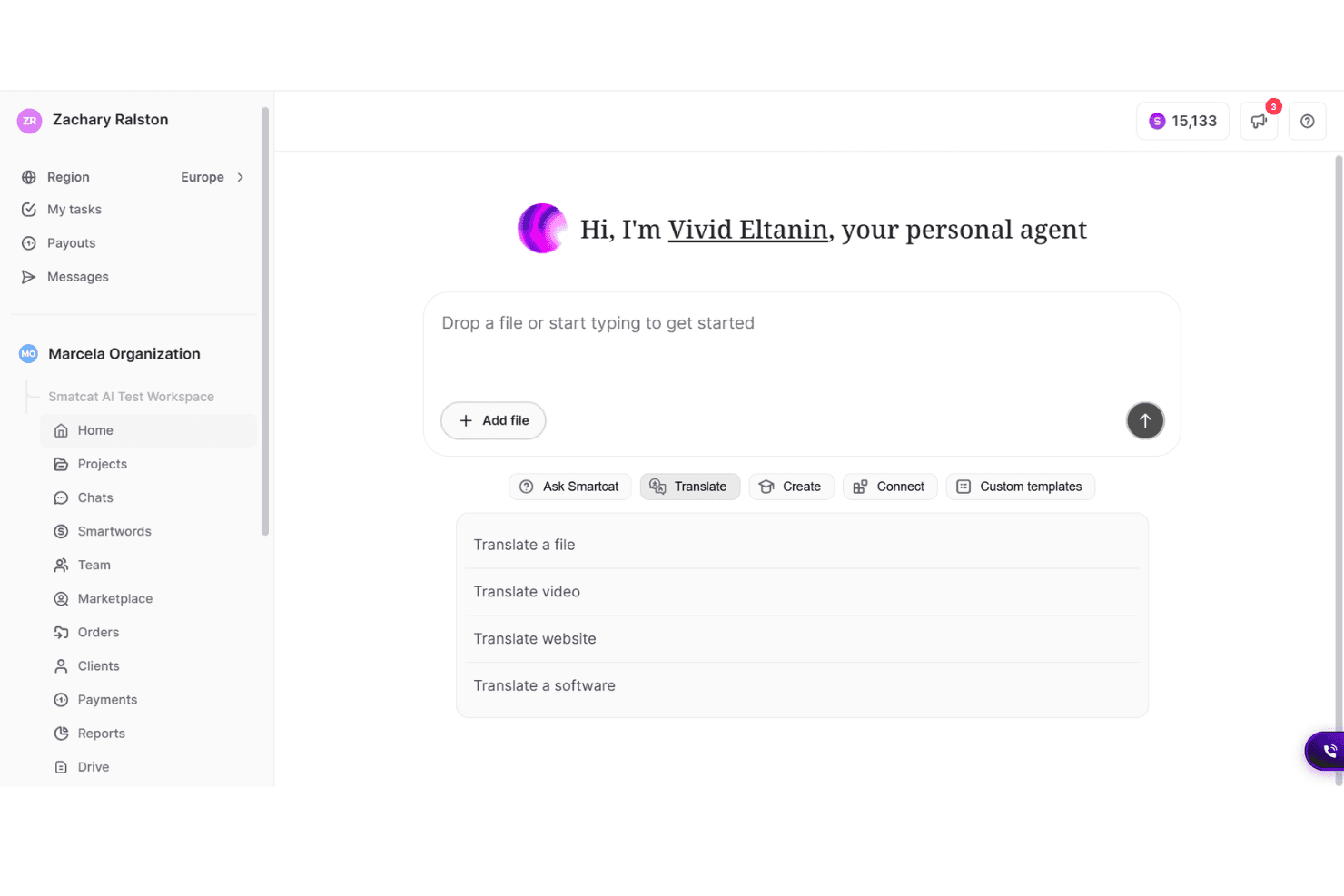
Smartcat offers an AI-powered personal agent called Vivid Eltanin with translation options including file, video, website, and software translation. Smartcat is an AI localization platform that combines neural machine translation across 280+ languages, collaborative CAT editing, workflow automation, and an on-demand marketplace of human linguists into a single content translation environment.
Who Is Smartcat Best For?
Smartcat is a strong fit for localization teams at mid-market and enterprise companies that need to blend AI translation with on-demand access to vetted human linguists.
Why I Picked Smartcat
Smartcat earns its spot on my shortlist because no other platform I've used combines AI translation with a built-in marketplace of 500,000+ vetted linguists you can hire directly inside a project. The Translation Quality Score (TQS) gives each AI-translated segment a 0-100 rating, which helps me decide exactly where human review is worth the investment. The Translation Review Agent then checks terminology and linguistic accuracy automatically, so only genuinely complex content reaches a human reviewer.
Smartcat Key Features
- Multi-format content support: Handle translation of web pages, emails, ads, design files, video subtitles, and software strings in one platform.
- Automated QA checks: Run built-in quality assurance to flag terminology, length, and placeholder issues before human review.
- Continuous localization workflows: Set up pipelines that detect source changes and trigger translation and publishing automatically.
- In-context visual editing: Preview translations live within actual design or content layouts to catch formatting and context errors.
Smartcat Integrations
Smartcat offers native integrations with WordPress, Contentful, Figma, Google Drive, SharePoint, Dropbox, Salesforce, Salsify, Jira, and Canva. An API is available for custom integrations.
Pros and Cons
Pros:
- Supports 280+ languages with neural MT
- TQS scores guide smarter human review decisions
- Built-in marketplace of 500,000+ vetted linguists
Cons:
- Lacks built-in document layout editor
- No direct Git repository syncing
Learn more about Smartcat: Best for AI-driven terminology management
- 30-day free trial + free demo available
- From $16,500/year
Visit WebsiteCustomer Rating:4.8/5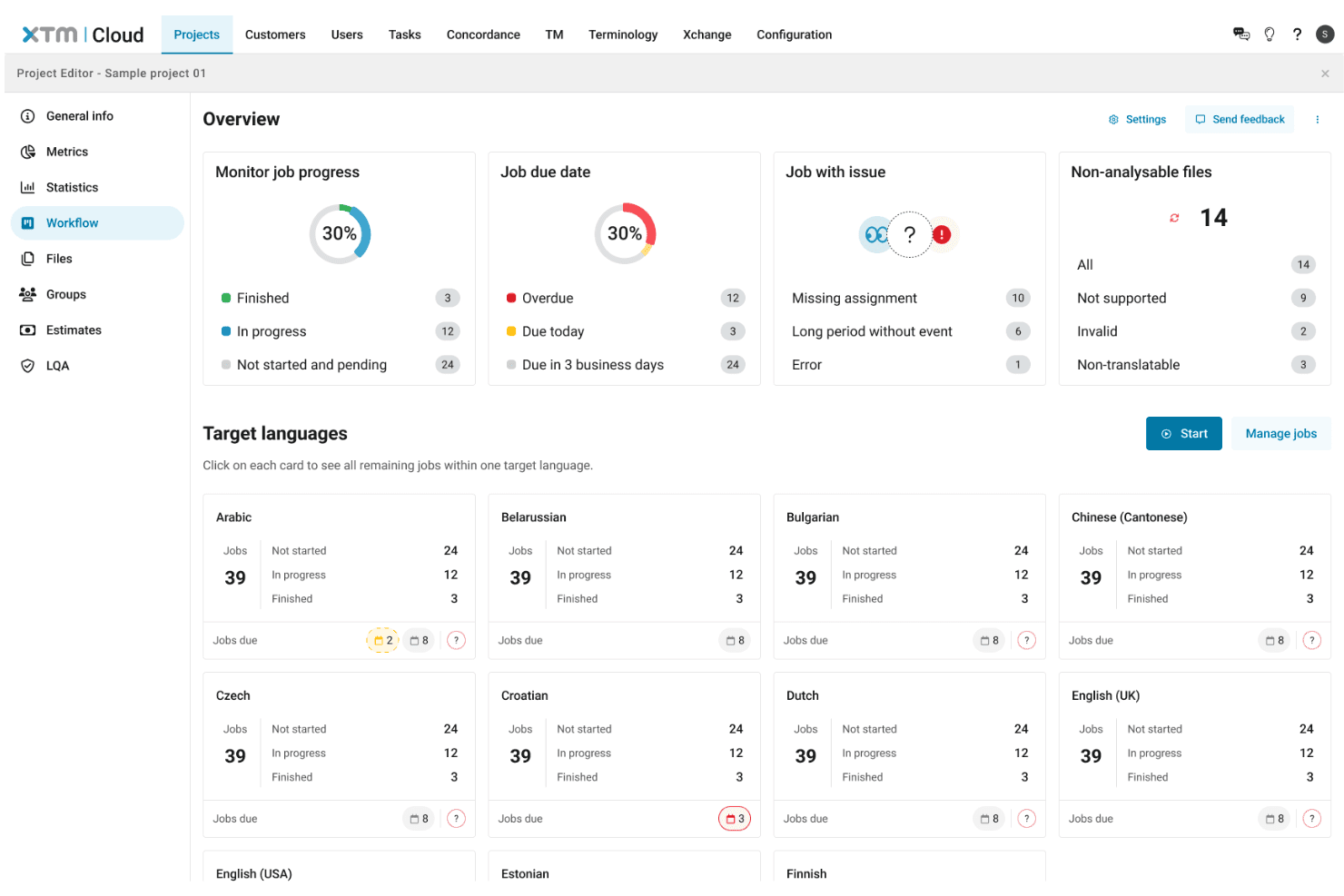
XTM Cloud offers a project workflow overview dashboard displaying job progress, due dates, language targets, and issue tracking across multiple languages. XTM Cloud is an AI-native translation management system that combines multi-engine machine translation, automated workflow routing, translation memory, and AI-driven terminology and quality management across 800+ languages.
Who Is XTM Cloud Best For?
XTM Cloud is a strong fit for enterprise localization teams and language service providers managing high-volume, multi-market translation programs.
Why I Picked XTM Cloud
XTM Cloud earns its spot on my shortlist because of how seriously it handles terminology at scale. Language Guard actively flags translations that deviate from approved brand terms before content ships, which I find invaluable when managing multilingual campaigns where off-brand phrasing can slip through undetected. Paired with SmartContext, which feeds translators contextual cues tied to your approved glossary, the terminology controls here go well beyond a basic term list.
XTM Cloud Key Features
- SmartContext previews: Translators can see live contextual previews of content for accuracy across channels and layouts.
- AI-powered routing: Content is automatically routed for human review or auto-approval based on quality confidence scores.
- Direct CMS and code repository integrations: Connects with platforms like WordPress, Contentful, GitHub, and Figma for smooth localization processes.
- Audit-ready compliance controls: Enterprise-grade security with SOC 2, ISO 27001, GDPR, HIPAA certifications, and detailed activity logs.
XTM Cloud Integrations
XTM Cloud offers over 80 native integrations, including WordPress, Contentful, Figma, Adobe Experience Manager, GitHub, Shopify, Zendesk, Salesforce, Sitecore, and DeepL. An API is available for custom integrations.
Pros and Cons
Pros:
- Webhook-triggered pipelines automate continuous localization
- Supports multiple MT engines including LLMs
- Granular AI-driven terminology enforcement across languages
Cons:
- Requires desktop client for advanced features
- Lacks automatic image text extraction
Learn more about XTM Cloud:
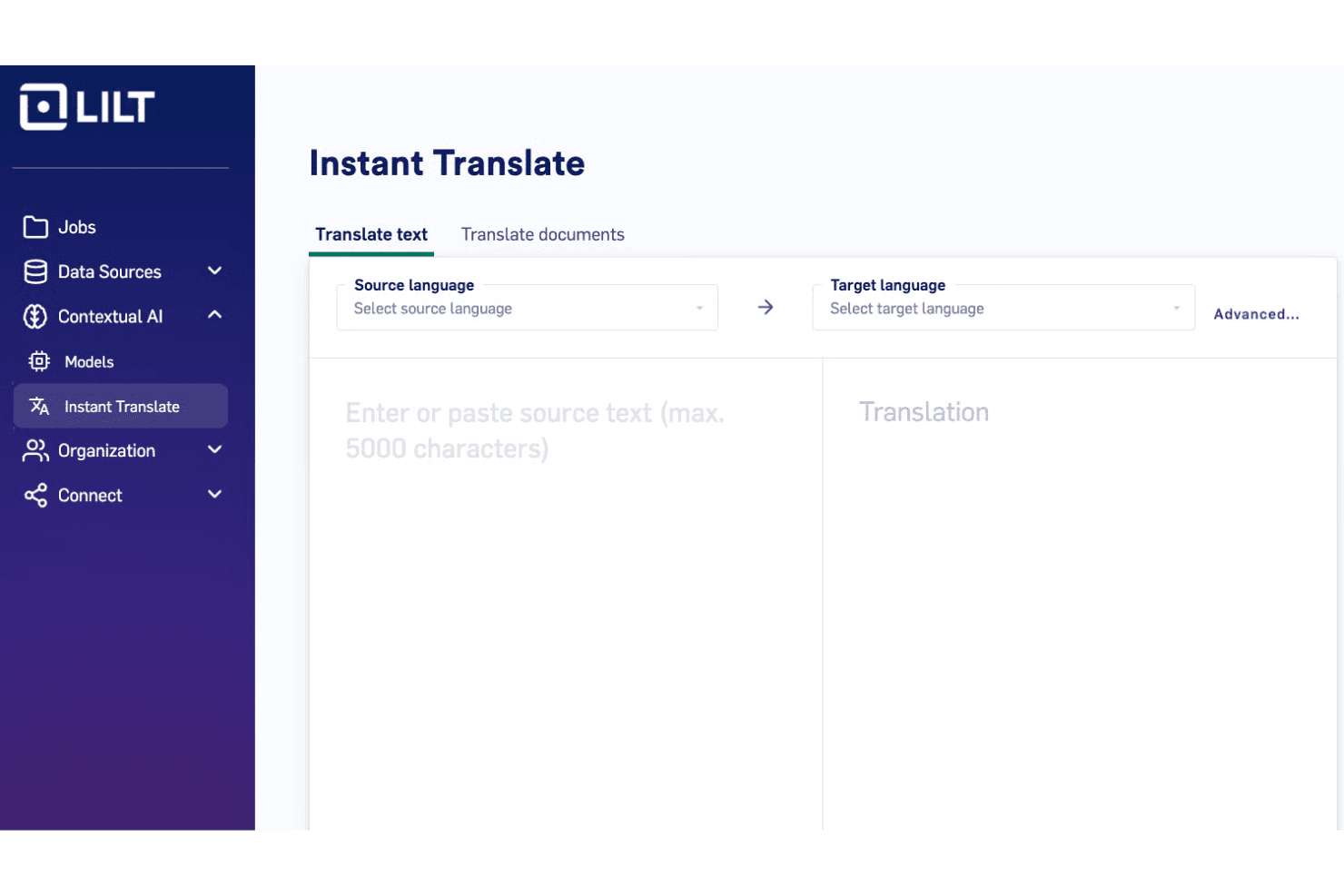
LILT offers an Instant Translate feature that allows users to translate text or documents between selected source and target languages. LILT is an enterprise AI localization platform that pairs a proprietary contextual AI engine with adaptive translation memory, human-in-the-loop review, and 60+ pre-built connectors for automating multilingual content workflows across text, video, audio, and image formats.
Who Is LILT Best For?
LILT is a strong fit for enterprise content and localization teams running high-volume, ongoing multilingual programs across multiple markets and content types.
Why I Picked LILT
LILT earns its spot on my shortlist because its Contextual AI Engine genuinely learns in real time, not just through periodic batch retraining. Every time a linguist accepts, rejects, or edits a translation suggestion, LILT updates its model instantly and carries that knowledge into every future project. I also like that you can feed your style guide directly into the AI Review layer, so it catches brand and terminology errors before a human reviewer ever sees the file.
LILT Key Features
- Pre-built connectors: Connects with 60+ systems including CMS, e-commerce, DAM, and design tools for automated content exchange.
- AI-powered quality review: Automatically analyzes translations for errors, terminology compliance, and style guide adherence before human review.
- Human expert network: Provides access to domain-specific linguists across 40+ industries for in-depth translation review and project support.
- Full multi-format support: Handles translation of text, images, PDFs, audio, and video files within one platform.
LILT Integrations
LILT offers 60+ native integrations, including Adobe Experience Manager, Figma, Salesforce, Shopify, GitHub, and Contentful. An API is available for custom integrations.
Pros and Cons
Pros:
- Domain-specific AI models per language pair
- Handles text, image, audio, and video
- AI translation memory retrains in real time
Cons:
- No direct mobile application SDK
- Lacks offline translation capabilities
Learn more about LILT: Best for enterprise content security controls
- Free demo available
- Pricing upon request
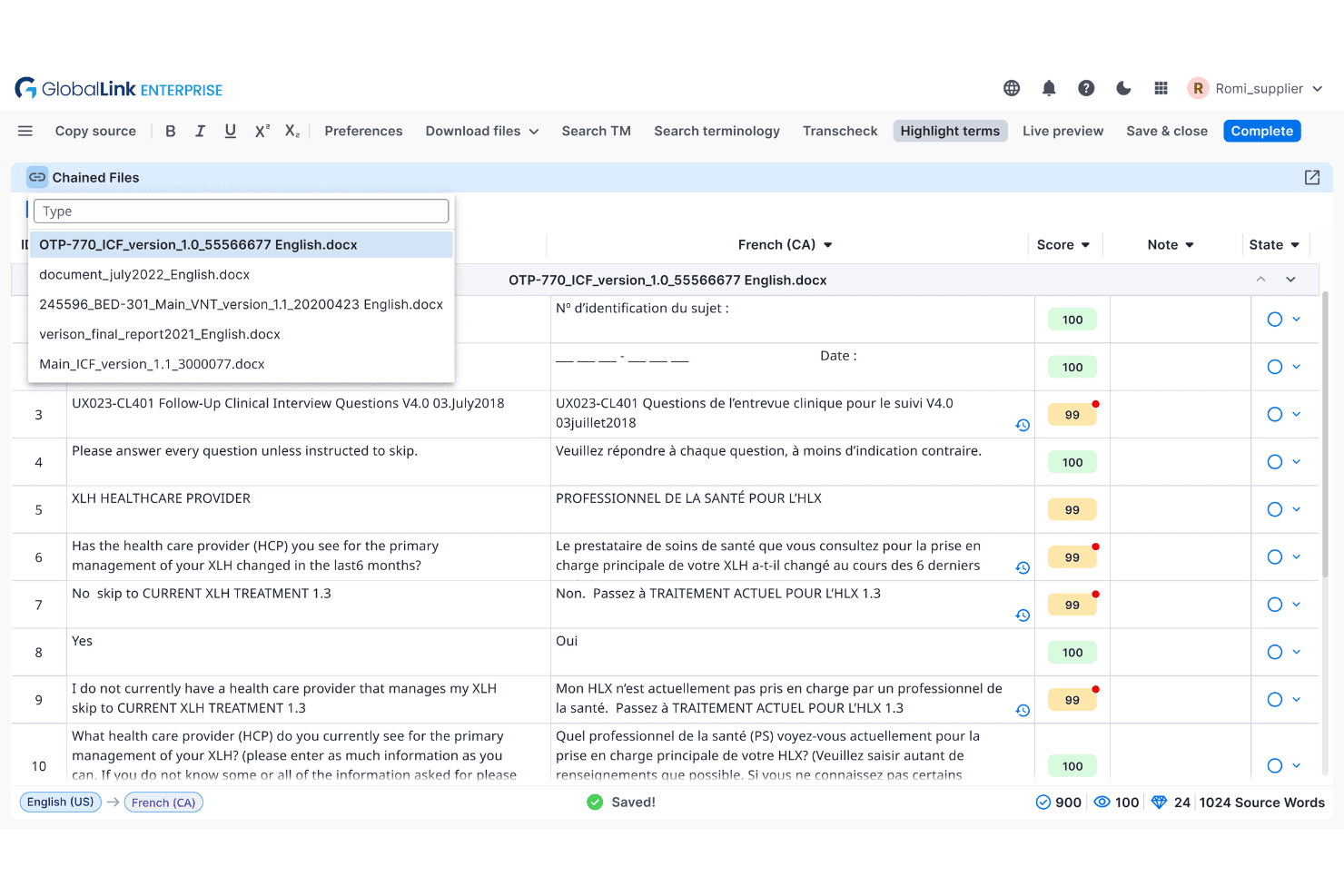
TransPerfect GlobalLink offers a chained files translation editor with TM scoring, French (CA) target language support, and segment-level review tools. TransPerfect GlobalLink is an enterprise AI localization platform that orchestrates translation across multiple LLMs, human review layers, and 100+ integrations, with dedicated modules for web, media, software strings, and video content.
Who Is TransPerfect GlobalLink Best For?
GlobalLink is a strong fit for large enterprises in regulated industries—such as life sciences, finance, and legal—that manage high-volume multilingual content across multiple markets.
Why I Picked TransPerfect GlobalLink
I've included TransPerfect GlobalLink in my top picks because of how seriously it handles data governance at the enterprise level. The optional on-premise deployment means sensitive content never has to leave your infrastructure, which matters when you're localizing regulated or confidential material. TowerLLM's model-agnostic routing also gives security teams control over which AI models process your data, rather than defaulting to a single third-party LLM.
TransPerfect GlobalLink Key Features
- In-context visual editing: Preview translations within live web or app interfaces to verify accuracy and layout before publishing.
- Automated QA checks: Use AI to automatically flag terminology errors, placeholders, and other localization issues during review.
- Continuous localization workflows: Automatically detect new content, route it for translation, and deliver updates back to production environments.
- Extensive marketing tool integrations: Connect natively with CMS, marketing automation, DAM, and ecommerce platforms for content sync.
TransPerfect GlobalLink Integrations
GlobalLink offers 100+ native integrations, including Adobe Experience Manager, WordPress, Drupal, Salesforce, Sitecore, Webflow, Bynder, ServiceNow, Stibo Systems, and AWS, and provides an API for custom integrations.
Pros and Cons
Pros:
- Supports 200+ languages across all content types
- Model-agnostic AI routing across multiple LLMs
- Optional on-premise deployment for sensitive content
Cons:
- Less suited for small-scale localization projects
- Complex setup requires dedicated localization program management
Learn more about TransPerfect GlobalLink: Best for global regulatory compliance
- Not available
- Pricing upon request
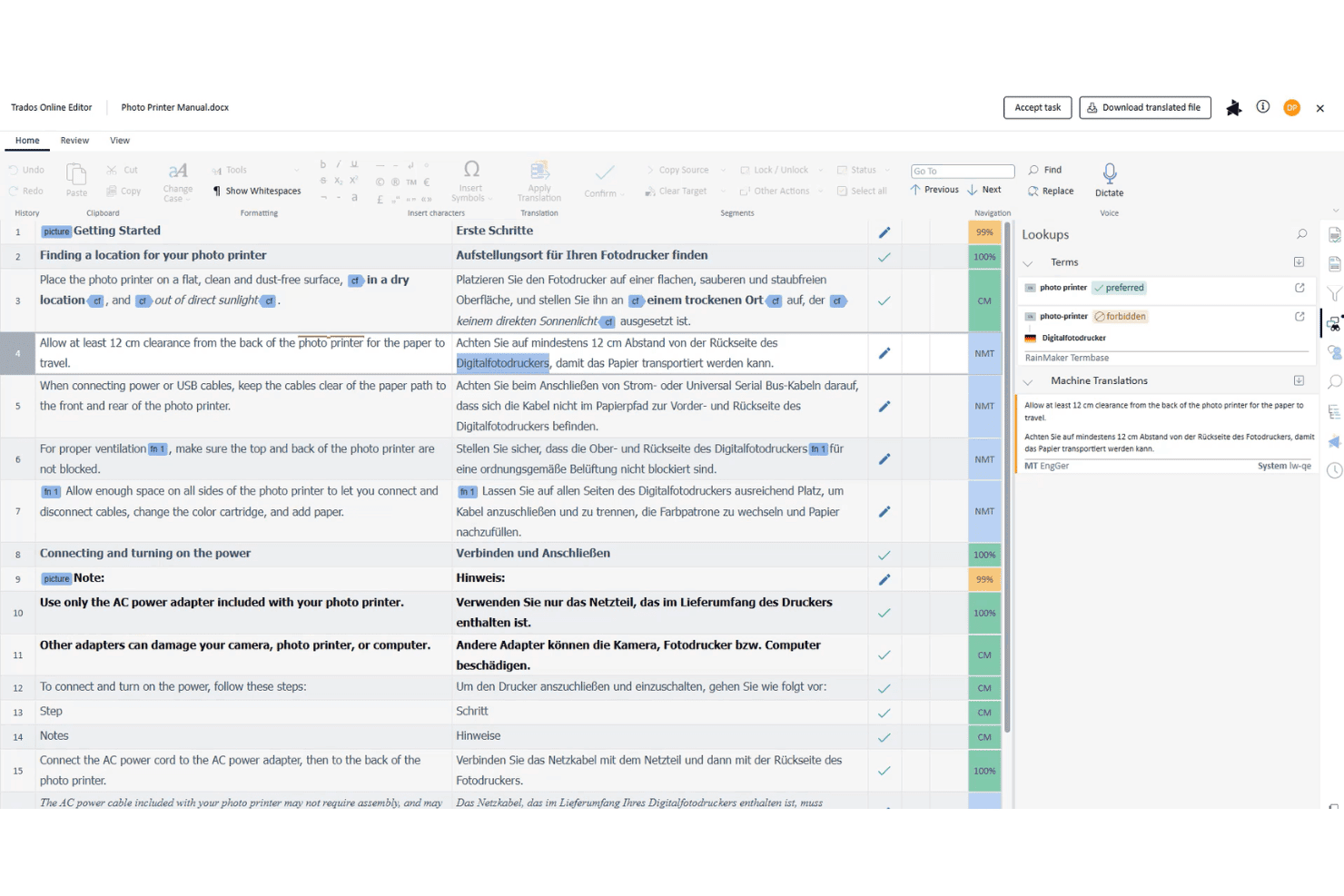
Trados Online Editor displays a photo printer manual being translated from English to German with terminology lookup and machine translation suggestions. RWS Language Platforms is an enterprise AI localization suite that combines neural machine translation, translation memory, terminology management, and configurable localization workflows across Trados and Language Weaver.
Who Is RWS Language Platforms Best For?
It's a strong fit for large enterprises in regulated industries like life sciences, legal, and financial services, where translation accuracy and data compliance are non-negotiable.
Why I Picked RWS Language Platforms
RWS Language Platforms earns its spot on my shortlist because of how seriously it treats compliance at every layer of the translation process. Language Weaver Pro is built for secure, private-cloud or on-premise deployment, which means sensitive content in life sciences or financial services never touches a public MT engine. I also like that Trados Enterprise supports federated SSO and configurable audit trails, keeping localization workflows within your organization's governance structure.
RWS Language Platforms Key Features
- Trados Terminology management: Lets you create structured, reusable glossaries and control brand-specific language across projects.
- Smart Review with AI suggestions: Provides AI-powered linguistic suggestions to improve translation quality during human review.
- In-context visual editing: Allows linguists to preview translations in actual web or app layouts to catch context errors.
- RWS AppStore integrations: Offers 350+ connectors and plugins for content systems, PIMs, and custom workflow automation.
RWS Language Platforms Integrations
RWS Language Platforms offers native integrations with Tridion Sites, Trados Studio, Adobe Workfront, Google Cloud Translation, DeepL, memoQ, and Antidote, plus over 350 connectors via the RWS AppStore. An API is available for custom integrations.
Pros and Cons
Pros:
- Built-in regulatory terminology enforcement
- Keeps AI translation models completely private
- On-premise MT deployment for sensitive content
Cons:
- Limited brand voice tuning for marketers
- Lacks direct social media integrations
Learn more about RWS Language Platforms: Best for fast app and marketing content updates
- 14-day free trial + free demo available
- From $144/month (billed annually)
Visit WebsiteCustomer Rating:4.8/5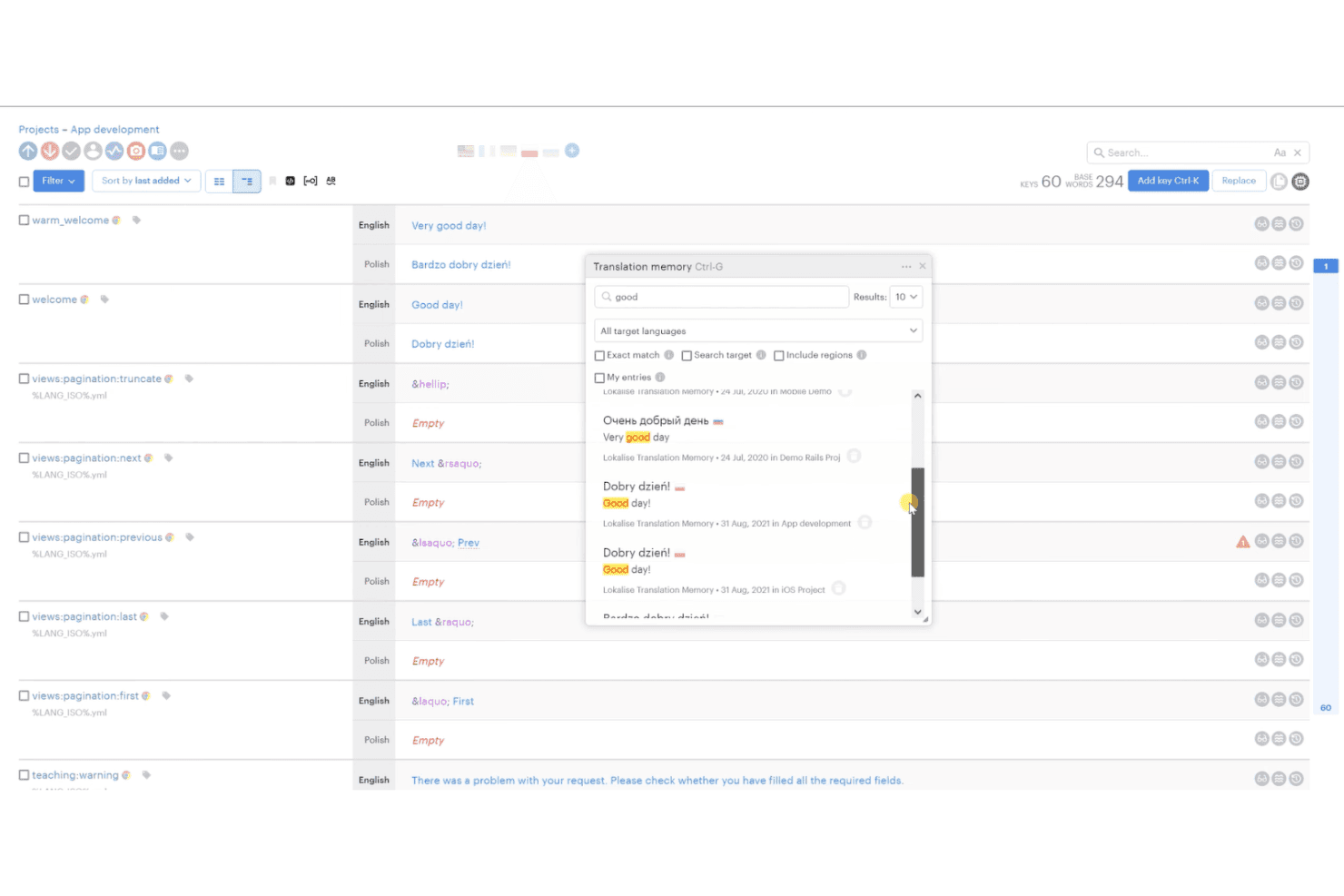
Lokalise offers a Translation Memory panel that lets users search and reuse past translations across projects directly within the editor. Lokalise is an AI-powered translation management system that combines multi-LLM machine translation, translation memory, glossary management, and automated localization workflows with 60+ integrations across dev, design, and marketing tools.
Who Is Lokalise Best For?
Lokalise suits mid-market and enterprise tech companies where engineering and marketing teams manage localization in parallel across multiple products and markets.
Why I Picked Lokalise
I picked Lokalise as one of the best because the OTA SDK lets my team push app string updates live without a new store release. For marketing content, I rely on Custom AI Profiles (RAG) to apply brand glossary and style rules automatically at translation time. Multi-LLM Smart Routing then selects the best AI engine based on content type, so customer-facing copy gets higher-quality output than internal strings.
Lokalise Key Features
- In-context visual editors: Preview translations directly in web and mobile interfaces to ensure accuracy and natural integration.
- Automated QA checks: Run built-in linguistic quality checks for issues like terminology violations, length limits, and placeholder mismatches.
- Translation memory management: Store and reuse previously approved translations to boost consistency and minimize repetitive tasks.
- Role-based access controls: Assign permissions to project members, external translators, and reviewers for secure collaboration.
Lokalise Integrations
Lokalise offers 60+ native integrations, including Figma, GitHub, GitLab, Jira, Contentful, WordPress, HubSpot, Zendesk, Adobe, and Slack, with an API available for custom integrations.
Pros and Cons
Pros:
- In-context editor catches layout errors before deployment
- Multi-LLM routing improves translation quality per content type
- OTA updates push live without app store resubmission
Cons:
- Explorer subscription limits users to ten languages
- No downloadable desktop or native mobile software
Learn more about Lokalise: Best for automated visual website translation
- Free demo available
- Pricing upon request
Visit WebsiteCustomer Rating:4.4/5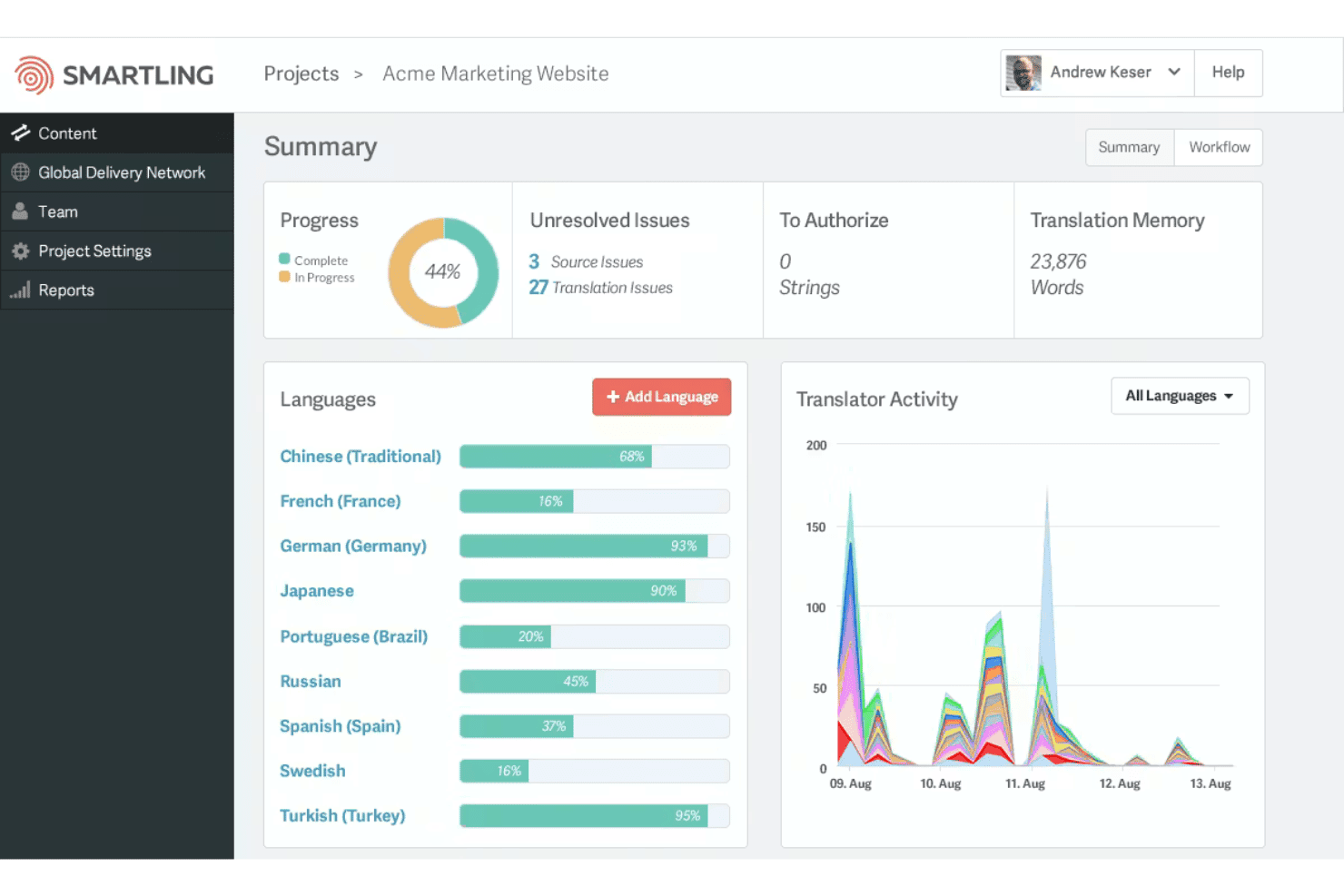
Smartling offers a project summary dashboard displaying translation progress by language, unresolved issues, and translator activity over time. Smartling is an AI translation management platform that combines neural machine translation, visual in-context editing, workflow automation, and a professional linguist network to handle localization across websites, apps, and marketing content.
Who Is Smartling Best For?
Smartling is well-suited to enterprise marketing and localization teams managing high-volume, multilingual content across websites, campaigns, and digital products.
Why I Picked Smartling
I picked Smartling as one of the best because of its Global Delivery Network (GDN), a proxy-based technology that translates your website without touching any underlying code. Pair that with the CAT tool's visual in-context editing, and translators see exactly how translated strings render on the live page before anything publishes. I've found that combination removes two of the biggest friction points in website localization: dev dependency and layout-breaking copy.
Smartling Key Features
- Adaptive machine translation orchestration: Smartling tests and routes content through 70+ AI models and MT engines for optimal results per project.
- Translation memory and glossary management: Store, reuse, and manage your organization’s linguistic assets centrally, supporting terminology consistency at scale.
- Automated linguistic quality assurance: Built-in LQA tools flag terminology, placeholder, and formatting errors using customizable MQM metrics and AI checks.
- 50+ native marketing integrations: Pre-built connectors link Smartling directly with CMS, marketing automation, design, and storage platforms for automated content sync.
Smartling Integrations
Smartling offers 50+ native integrations, including WordPress, Adobe Experience Manager, Contentful, Drupal, Salesforce, Zendesk, Marketo, HubSpot, Figma, and Canva. An API is available for custom integrations.
Pros and Cons
Pros:
- Visual in-context editing catches pre-publish layout errors
- Translation memory cuts costs on repeated content
- Translates websites without touching any code
Cons:
- Requires proxy configuration for websites
- Lacks built-in video translation tools
Learn more about Smartling: Best for managing continuous content releases
- 15-day free trial + free demo available
- From $135/month (billed annually)
Visit WebsiteCustomer Rating:4.3/5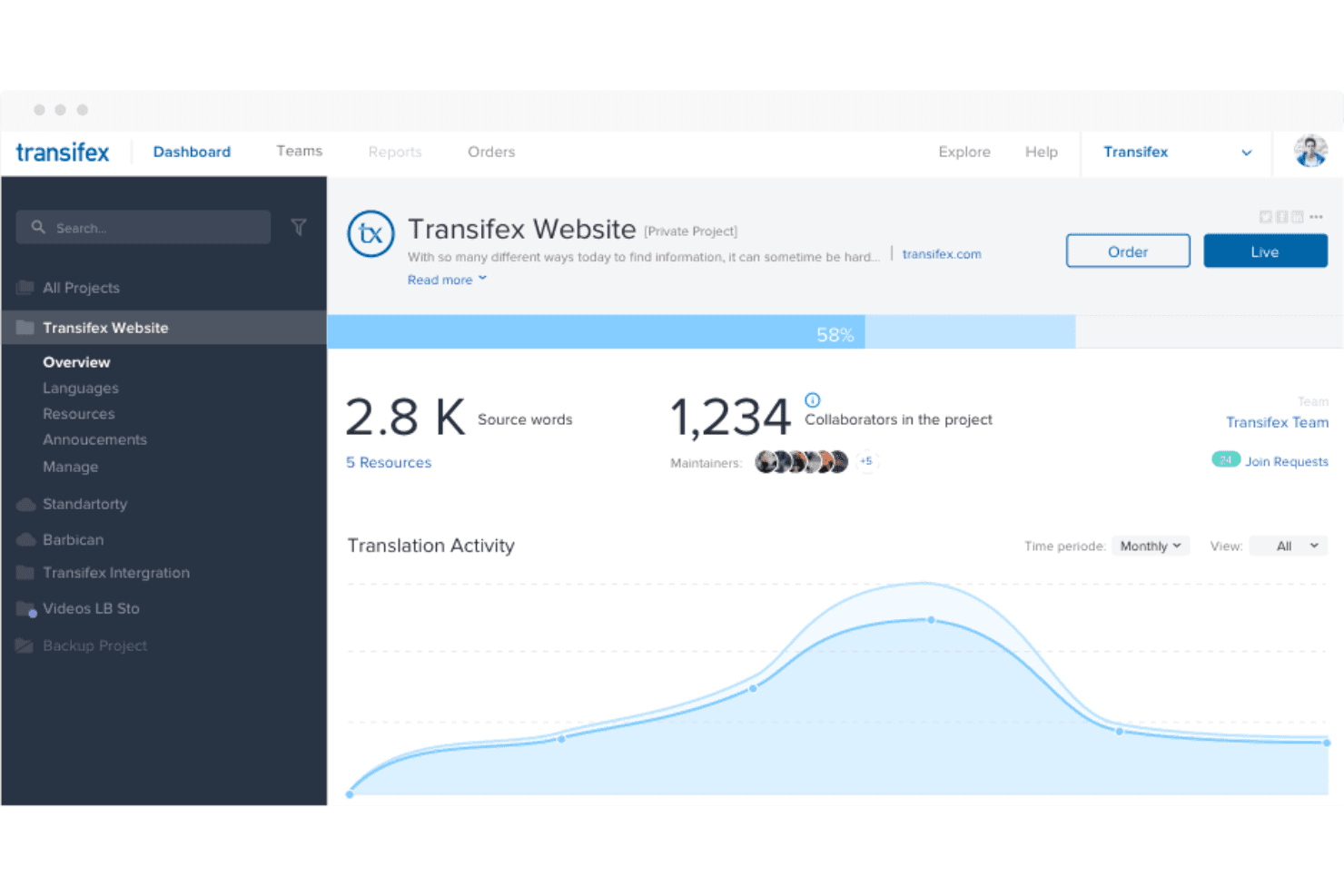
Transifex displays a project dashboard with translation activity, collaborator counts, and completion progress for the Transifex Website project. Transifex is a continuous localization platform that combines AI machine translation, translation memory, glossary management, and workflow automation to handle multilingual content across web, mobile, and digital marketing assets.
Who Is Transifex Best For?
Transifex is a strong fit for mid-market SaaS and digital product teams that ship updates frequently and need localization integrated directly into their development pipeline.
Why I Picked Transifex
Transifex earns its spot on my shortlist because of how it handles continuous releases. I love AI Fillup, which automatically detects and translates new strings the moment they appear, so my team never has a backlog of untranslated content waiting for a manual trigger. I also rely on TQI Tasks to auto-score batches of AI translations across releases, which means we can catch quality issues without reviewing every string one by one.
Transifex Key Features
- Translation memory management: Store, search, and reuse approved translations across all projects to drive linguistic consistency.
- In-context visual editor: Edit translations with a live preview of how text appears on web and app interfaces.
- Glossary support and enforcement: Build and maintain a glossary of brand terms to guide translators and standardize terminology.
- CI/CD pipeline integrations: Connect localization workflows to GitHub, GitLab, Bitbucket, and other dev tools for automated translation sync.
Transifex Integrations
Transifex offers 40+ native integrations, including GitHub, GitLab, Bitbucket, Contentful, WordPress, Shopify, Figma, Zendesk, HubSpot, and Jira. An API and CLI are available for custom integrations.
Pros and Cons
Pros:
- Deep CI/CD pipeline support for developers
- Real-time TQI scoring across translation batches
- AI Fillup auto-translates newly detected strings
Cons:
- Lacks built-in marketplace for linguists
- Requires manual file format conversion
Learn more about Transifex: Best for developer-friendly localization workflows
- 14-day free trial + free demo available
- From $27/month (billed annually)
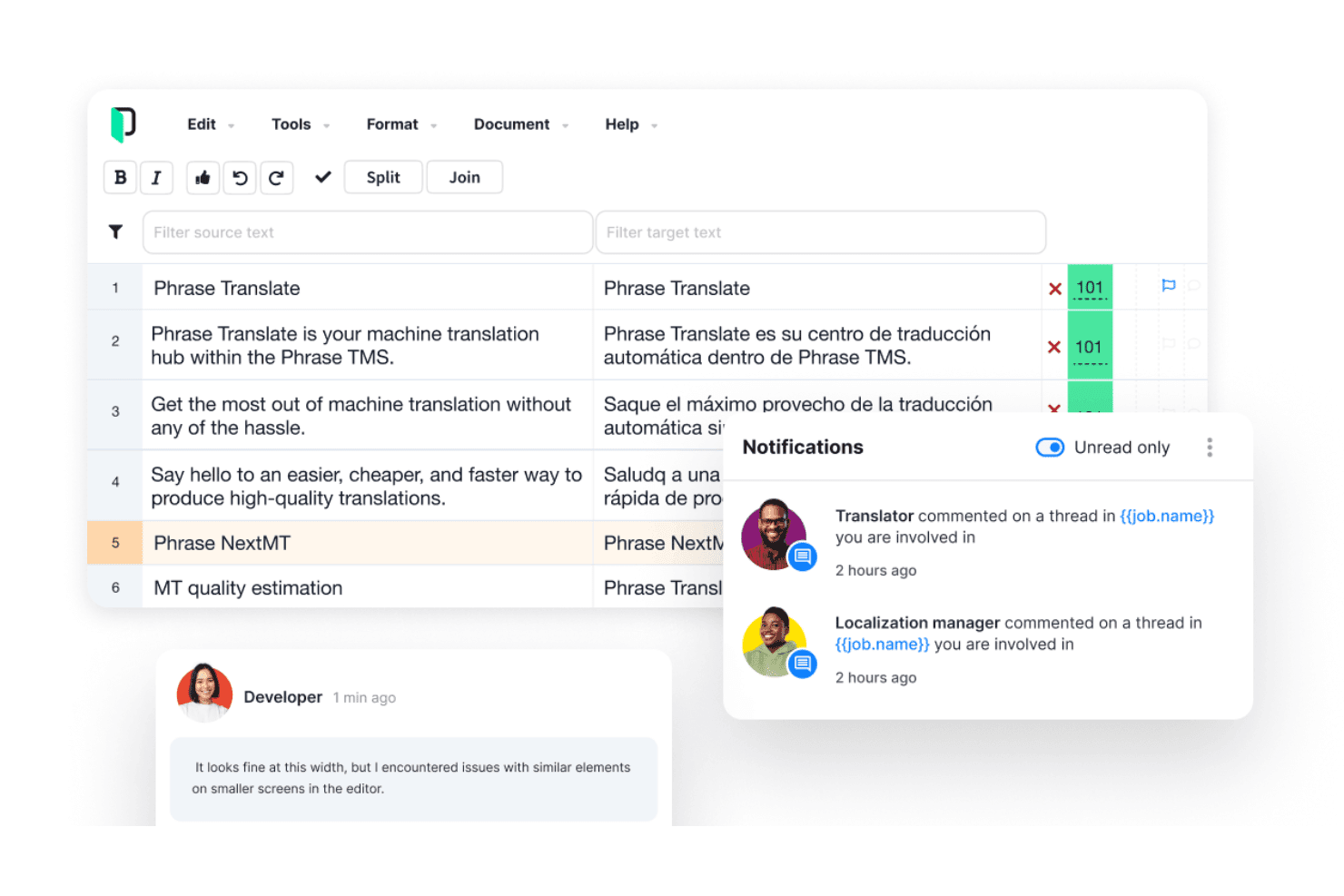
Phrase offers a translation editor with segment-by-segment editing, machine translation scoring, and a notifications panel for team collaboration. Phrase is an AI-powered localization platform that combines translation management, machine translation orchestration, multimedia localization, and configurable workflow automation across marketing, product, and technical content types.
Who Is Phrase Best For?
Phrase is a strong fit for mid-size to enterprise teams where engineering, product, and marketing functions all share ownership of localization.
Why I Picked Phrase
Phrase earns its spot on my shortlist because of how deeply it integrates into developer toolchains. I can connect it directly to GitHub, GitLab, or Bitbucket, so localization strings get pulled and pushed without leaving the repo workflow. The API-first architecture and MCP server support also mean my engineering team can build custom automation pipelines and even bring their own LLMs into the translation orchestration layer.
Phrase Key Features
- AI-powered translation orchestration: Dynamically selects and routes content between multiple machine translation engines, LLMs, and custom AI models.
- Visual in-context editor: Lets you preview translations directly within your product UI or website for real-time context validation.
- Automated linguistic quality assurance: Runs AI-driven terminology, consistency, and placeholder checks before human review.
- Extensive marketing platform integrations: Connects natively with CMS, marketing automation, support, and design platforms for smooth content localization.
Phrase Integrations
Phrase offers native integrations with GitHub, GitLab, Bitbucket, Figma, WordPress, Contentful, Adobe Experience Manager, Zendesk, Salesforce Marketing Cloud, and Drupal, and provides an API for custom integrations.
Pros and Cons
Pros:
- Continuous localization via webhooks and CI/CD pipelines
- Orchestrates multiple MT engines and LLMs simultaneously
- Developer toolchain integration is exceptionally deep
Cons:
- AI customization lacks user-controlled prompt editing
- Term-base management is less advanced
Learn more about Phrase: 10Best for multilingual website setup
Weglot
- 14-day free trial + free plan + free demo available
- From $17/month
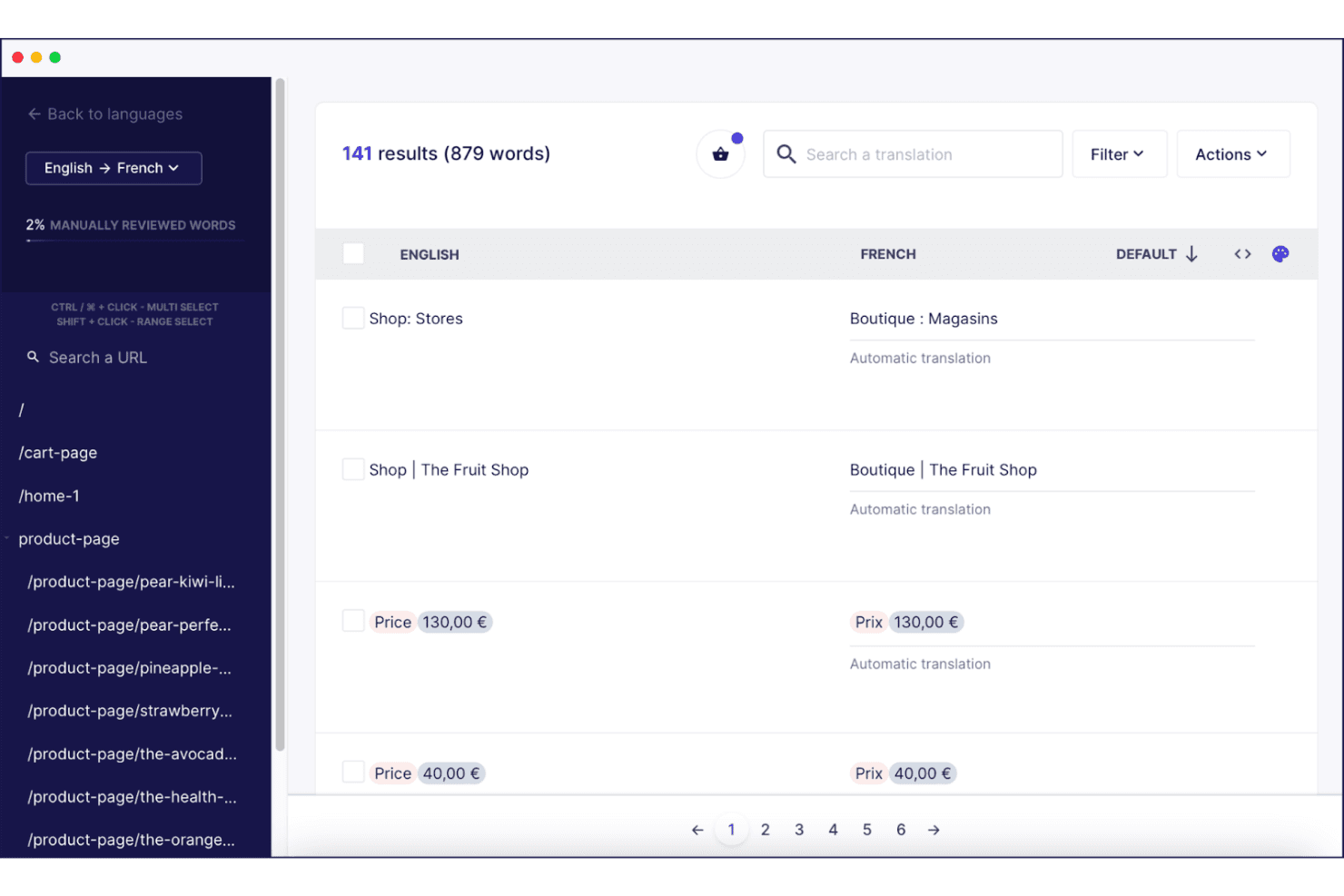
Weglot displays a translation management interface where users can review and edit automatic English-to-French translations across multiple product pages. Weglot is a no-code website localization platform that uses AI machine translation—powered by DeepL, Google, and a custom OpenAI/Gemini model—to translate, manage, and serve multilingual versions of any website with built-in SEO optimization.
Who Is Weglot Best For?
Weglot is a strong fit for marketing and e-commerce teams at small to mid-sized businesses that need to launch a multilingual website quickly without engineering resources.
Why I Picked Weglot
Weglot earns its spot as one of the best on my shortlist because of how fast you can go from a single-language site to a fully indexed multilingual one. The combination of its Custom AI Translation Model (trained on your glossary and brand tone) and automatic hreflang tag injection means translated pages rank in search from day one. I also like that it auto-detects and translates new content the moment it goes live, so there's no manual sync required between your CMS and your localized pages.
Weglot Key Features
- Visual editor: Edit translations directly on your live website for full context.
- Multilingual SEO automation: Automatically generates hreflang tags and translated URLs for search engine indexing.
- Glossary rules: Set custom terms to always or never translate specific words or phrases.
- Professional translator ordering: Order human post-editing directly from the Weglot dashboard.
Weglot Integrations
Weglot offers native integrations with WordPress, Shopify, Wix, Webflow, Squarespace, Drupal, and BigCommerce, and provides an API for custom integrations.
Pros and Cons
Pros:
- Built-in multilingual SEO requires no setup
- Auto-detects and translates new page content
- Fast multilingual website setup without code
Cons:
- Word count limits cap high-volume translation
- Limited to website content only
Learn more about Weglot:
Other AI Localization Platforms
Here are some additional AI localization platform options that didn’t make it onto my shortlist, but are still worth checking out:
- 11DeepLBest for advanced neural translation quality
- 12CrowdinBest for real-time team collaboration
- 13LocalizeBest for website content localization
- 14MotionPointBest for optimizing multilingual site SEO
- 15UnbabelBest for scalable human-AI review workflows
- 16WXRKSBest for all-in-one localization project control
- 17SystranBest for customizable translation engines
- 18LanguageWireBest for multilingual campaign automation
How I Evaluate AI Localization Platforms
Every tool on this list needs to show its AI adds real value—like adapting to your brand voice or learning from past edits to improve over time. I split my evaluation into core functionality a platform must deliver and the differentiating factors that set one vendor apart from the next.
Core Functionality (Table Stakes For This List)
When I'm selecting tools for my list, I rank each one on a scale from 0 (does not offer the functionality) to 5 (excels in this area) for each core functionality listed below. Then, I calculate the tool's total score as a percentage. Each tool needs to achieve a minimum total score of 65% to be considered for inclusion.
- AI Machine Translation: I evaluate how many languages the engine covers and whether it uses neural MT or LLMs for context-aware output on marketing copy.
- Translation Memory & Glossary: Consistent terminology matters when you're localizing across product pages, emails, and ads, so I check how TM and glossaries are managed.
- Multi-Format Content Support: I look for support across web pages, ad creatives, video subtitles, social posts, and other marketing assets your team produces daily.
- Brand Voice Adaptation: Your brand should sound like your brand in every market, so I evaluate whether tone and style controls go beyond basic presets.
- Workflow Automation: I consider how each platform handles translation routing, reviewer assignments, approvals, and publishing without requiring manual handoffs.
- Marketing Tool Integrations: Native connectors to your CMS, marketing automation platform, DAM, or ecommerce system keep localized content in sync without export-import cycles.
Once I have a list of tools that meet the criteria, I consider what sets each platform apart.
Differentiating Factors (What Sets Vendors Apart)
Here's how I compare and contrast different vendors:
Standout Features
In-context visual editing is a big one for me. When translators can preview copy inside the actual webpage or app screen, they catch layout breaks and awkward truncations before anything goes live. I also evaluate adaptive machine translation—engines that learn from your past edits and brand voice to improve output over time, which pays off quickly for teams running high-volume campaigns. Automated QA checks round things out by flagging terminology mismatches and placeholder errors before a human reviewer even opens the file.
Beyond Features
Pricing models vary widely—per-word, per-seat, per-string—so I look at how costs scale as you add languages and content volume. Whether MT usage is bundled or metered matters separately when you're running campaigns across dozens of markets. I also consider the human-in-the-loop ecosystem, like whether you can bring your own translators or tap into a built-in linguist marketplace for post-editing AI output. Developer integration rounds it out: REST APIs and native connectors to platforms like WordPress or Contentful keep content flowing without manual exports.
How to Choose AI Localization Platforms
It’s easy to get bogged down in long feature lists and complex pricing structures. To help you stay focused as you work through your unique software selection process, here’s a checklist of factors to keep in mind:
| Factor | What to Consider |
|---|---|
| FactorScalability | What to ConsiderWill the platform support your growth from a handful of languages to dozens? Consider future market expansions and content volume. |
| FactorIntegrations | What to ConsiderDoes it connect natively with your CMS, ad tools, or DAM? Lack of integrations often means manual upkeep and disconnected workflows. |
| FactorCustomizability | What to ConsiderCan you tailor workflows, terminology policies, and review steps to fit your process, or does the tool force you into rigid templates? |
| FactorEase of use | What to ConsiderWill your marketers, reviewers, and external translators actually use it, or will steep learning curves slow you down during busy launches? |
| FactorImplementation and onboarding | What to ConsiderWhat training, support, and migration help does the vendor provide? Ask about typical rollout timelines and common snags for teams like yours. |
| FactorCost | What to ConsiderHow do pricing tiers map to your language count and content volume? Watch for extra charges tied to premium language pairs or advanced automation. |
| FactorSecurity safeguards | What to ConsiderDoes the platform have SOC 2, ISO 27001, or similar certifications? Ask how data is stored, who has access, and if you control data usage by AI/LLM. |
| FactorSupport availability | What to ConsiderWhen issues arise before a big campaign launch, will you be able to access responsive support via the right channels and time zones? |
What Are AI Localization Platforms?
AI localization platforms are cloud-based tools that use artificial intelligence to translate and adapt marketing content across multiple languages and channels. They support automated and human-in-the-loop workflows, integrate with your tech stack, and help maintain brand voice and consistency at scale. These platforms are built for teams managing global campaigns and need a way to automate repetitive localization tasks while improving translation speed and quality.
Features
When selecting AI localization platforms, keep an eye out for the following key features:
- AI machine translation: Uses neural networks or LLMs to quickly and accurately translate content across multiple languages with contextual understanding.
- Translation memory: Stores previously translated phrases or terms for reuse, reducing redundant work and ensuring consistency across projects and campaigns.
- Terminology glossary: Maintains brand-specific vocabulary, approved terms, and guidelines to keep messaging consistent in every market and language.
- Multi-format support: Allows teams to localize websites, emails, ads, multimedia assets, and more without manual conversion or reformatting.
- Brand voice adaptation: Adjusts style and tone automatically so your brand feels authentic and culturally relevant in each target language.
- In-context editing: Offers side-by-side previews of translated content in real layouts, helping catch layout issues and improve language accuracy.
- Workflow automation: Routes content through translation, review, and approval steps, making it easier to manage projects with complex stakeholder involvement.
- Marketing tool integrations: Connects with CMS, DAM, and e-commerce platforms so localized assets flow directly into your existing marketing operations.
- Automated quality assurance: Runs linguistic, formatting, and accuracy checks to spot inconsistencies, errors, or broken placeholders before publishing.
- Human-in-the-loop collaboration: Enables professional translators and reviewers to refine AI-produced output, providing flexibility and higher quality for sensitive or high-impact content.
Benefits
Implementing AI localization platforms provides several benefits for your team and your business. Here are a few you can look forward to:
- Accelerated time-to-market: Automated workflows and AI translation speed up content launches across new regions without waiting on manual processes.
- Brand consistency: Glossaries, translation memory, and brand voice adaptation features help you maintain unified messaging in every market and language.
- Cost reduction: Reusable linguistic assets and machine translation decrease reliance on manual translation vendors and lower ongoing localization expenses.
- Quality control: Automated QA checks and in-context editing catch errors and inconsistencies before your content goes live.
- Scalability: Multi-format support and flexible integrations make it possible to grow from a few locales to dozens without revamping your entire process.
- Collaboration: Human-in-the-loop features let your team and external experts review and refine AI translations for critical or complex content.
- Better campaign performance: Integrated, timely, and consistent localized content leads to improved audience engagement and conversion rates globally.
Costs & Pricing
Selecting AI localization platforms requires an understanding of the various pricing models and plans available. Costs vary based on features, team size, add-ons, and more. The table below summarizes common plans, their average prices, and typical features included in AI localization platform solutions:
Plan Comparison Table for AI Localization Platforms
| Plan Type | Average Price | Common Features |
|---|---|---|
| Plan TypeFree Plan | Average Price$0 | Common FeaturesLimited languages, basic machine translation, manual export options, and community support. |
| Plan TypePersonal Plan | Average Price$25-$50/user/month | Common FeaturesMore language pairs, translation memory, basic glossary, file uploads, and email support. |
| Plan TypeBusiness Plan | Average Price$60-$200/user/month | Common FeaturesMulti-format support, workflow automation, brand voice settings, QA checks, integrations, and priority support. |
| Plan TypeEnterprise Plan | Average Price$300+/user/month | Common FeaturesCustom SLAs, SSO, advanced security, API, scalability for high volumes, dedicated onboarding, and role-based permissions. |
AI Localization Platforms FAQs
Here are some answers to common questions about AI localization platforms:
Can AI localization platforms fully replace human translators?
No, an AI-powered localization platform or AI translation tool cannot fully replace human translation, especially for creative assets. While machine translation and a translation engine automate routine tasks to lower turnaround times, expert review ensures high-quality multilingual content that preserves your brand voice, translation quality, and user experience.
How do these platforms integrate with existing marketing tools?
Most AI-driven translation software and localization tools offer api access, native connectors, or CLI integrations for your tech stack, CMS, code repositories, and e-commerce tools. This setup reduces manual work across localization workflows, enabling continuous localization and smooth content syncing for global content without complex copy-paste tasks.
Is my data secure when using an AI localization platform?
Yes, Enterprise Saas Translation Management System (TMS) providers prioritize security with SOC 2 or ISO 27001 compliance, strict project management controls, and end-to-end data encryption. They safeguard your translation process, proprietary assets, and file formats while ensuring your data isn’t exposed to unauthorized LLM training or external third parties.
What content types can be localized with these tools?
You can adapt website localization, software localization, emails, ads, subtitles, JSON, HTML, mobile app UI strings (iOS), help docs, and translation projects across various use cases. Advanced translation tools offer real-time in-context preview functionality to optimize your overall localization process and user-friendly publishing.
Are there additional costs beyond the subscription fee?
Yes, pricing varies across translation services. Some platforms charge extra for premium language pairs (like Spanish), higher word volumes, custom style guides, glossaries, or leveraging a translation memory database. Professional quality assurance, cost-effective add-ons, or dedicated customer support may also be billed outside base translation workflows.