

Software-ul pentru gestionarea clienților potențiali vă ajută să îi captați, organizați și urmăriți, astfel încât să nu ratați niciodată o oportunitate de vânzare și să nu pierdeți clienți potențiali valoroși. Dacă sunteți în căutarea celor mai bune instrumente pentru a spori concentrarea echipei, a îmbunătăți urmărirea și a transforma mai mulți clienți potențiali în contracte, nu sunteți singurii — bugetele limitate și piețele aglomerate fac din gestionarea corectă a clienților potențiali o prioritate critică.
În acest ghid, veți găsi o comparație clară a celor mai eficiente sisteme de gestionare a clienților potențiali din 2026, axată pe funcțiile și avantajele practice care contează cel mai mult pentru echipele de marketing și vânzări cu performanțe ridicate.
Why Trust Our Software Recommendations
6,700+
Reviews
20
Industry experts
16+
Evaluation factors
14
Years
Our team has been testing and reviewing software since 2012. As marketing leaders ourselves, we know how difficult—and important—it is to choose the right software.
For this guide, we evaluated tools using hands-on testing and independent research, scoring tools using our selection criteria.
Our reviews reflect our human editorial judgment, not a sales pitch.
Expert reviewers:
 Gui DrusinaCreative Director
- Shriya GhateSenior Marketing Lead
 Amanda JacquesMarketing Ops Leader

Tabel comparativ pentru software-ul de gestionare a clienților potențiali
Acest tabel comparativ rezumă detaliile privind prețurile pentru selecția mea de software pentru gestionarea clienților potențiali:
Sorted by: Default
| Tool | Starting Price | Website | |
|---|---|---|---|
Best for B2B intent data and lead enrichment | 4.5 out of 5 | $49/user/month Free plan + 14-day trial + demo available | Book Demo |
Best for drag-and-drop interface configuration | 4.7 out of 5 | $15/user/month Not available | Website |
Best for shared marketing and sales timelines | 4.4 out of 5 | $20/user/month Free plan available | Website |
Best for journey-based audience segmentation | 4.5 out of 5 | Pricing upon request Free plan available | Website |
Best for automated lead routing and matching | 4.6 out of 5 | Pricing upon request Free demo available | Website |
Best for high-velocity lead capture workflows | 4.4 out of 5 | Pricing upon request Free demo available | Website |
Best for predictive analytics and account insights | 4.3 out of 5 | Pricing upon request Free demo available | Website |
Best for automated customer milestone tracking | 4.4 out of 5 | $15/month 14-day free trial + free demo available | Website |
Best for native sales intelligence dashboards | 4.1 out of 5 | Pricing upon request Free demo available | Website |
Best for enterprise-grade campaign orchestration | Not rated | Pricing upon request Free demo available | Website |


Recenzii pentru cel mai bun software de gestionare a clienților potențiali
Mai jos sunt prezentate rezumatele mele detaliate ale celor mai bune soluții software pentru gestionarea clienților potențiali din lista mea scurtă. Recenziile mele oferă o perspectivă detaliată asupra funcțiilor, celor mai potrivite cazuri de utilizare și integrărilor fiecărei platforme, pentru a vă ajuta să o găsiți pe cea mai potrivită pentru dumneavoastră.
 Best for B2B intent data and lead enrichment
- Free plan + 14-day trial + demo available
- From $49/user/month (billed annually)
Visit WebsiteCustomer Rating:4.5/5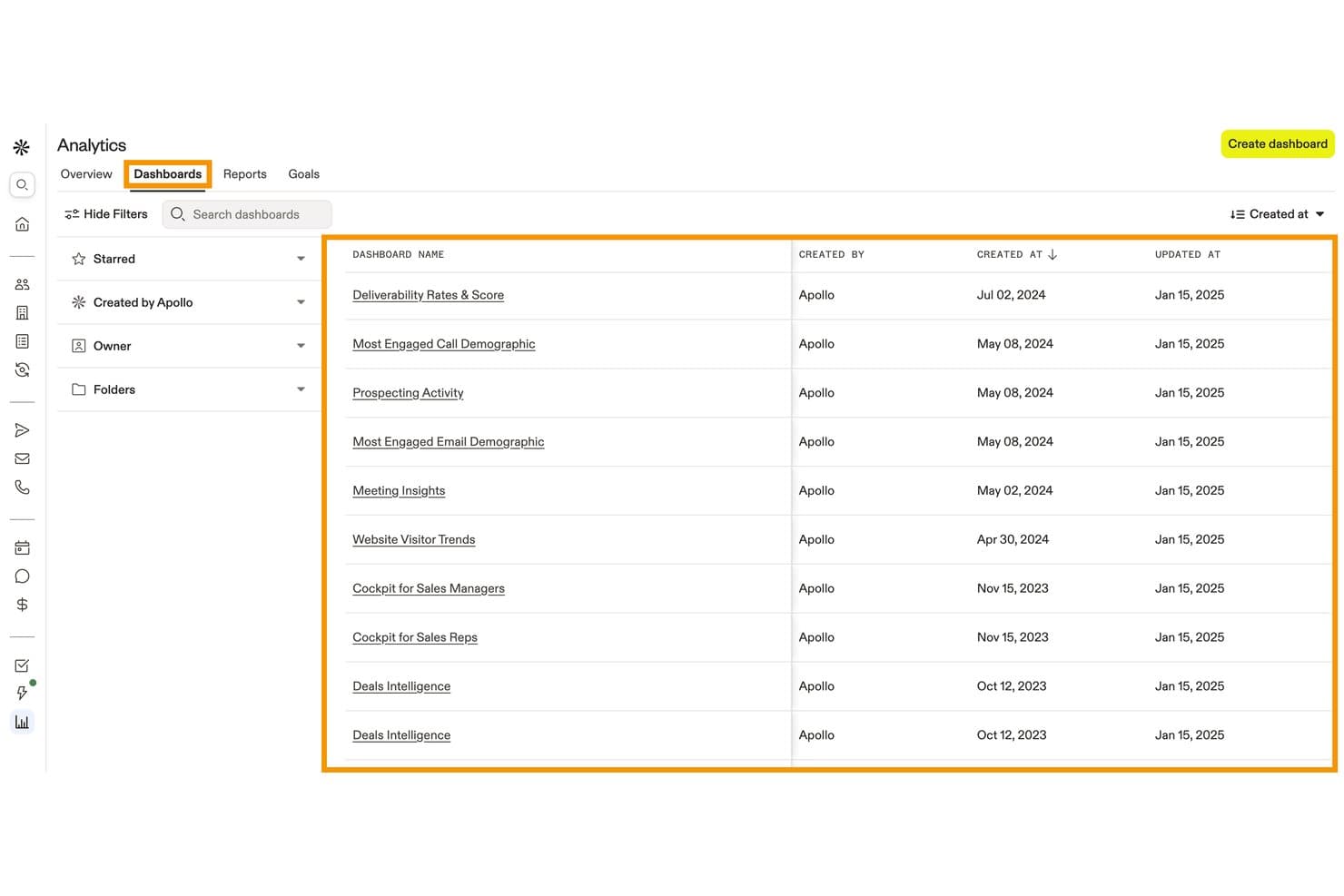
Apollo.io centralizes pre-built analytics dashboards for tracking sales activity. Apollo.io (Apollo) is a B2B sales and lead management platform that combines a 240M+ contact database, form enrichment, website visitor identification, lead scoring, inbound routing, and workflow automation.
Who Is Apollo.io Best For?
Apollo.io is a strong fit for B2B sales and marketing teams that need to enrich, score, and route inbound leads using a large contact database without stitching together multiple data tools.
Why I Picked Apollo.io
Apollo.io earns its spot on my shortlist because its B2B intent data, powered by Bombora, surfaces accounts actively researching your category across 15,000+ topics before they ever hit a form. I love how form enrichment pairs with that signal: a prospect submits just their email, and Apollo auto-fills company size, industry, and phone number from its 240M-contact database, so your routing rules fire on complete data from the start. That combination of intent scoring and enriched inbound capture is where Apollo pulls ahead for B2B lead qualification.
Apollo.io Key Features
- Inbound router: Routes incoming leads to the right rep or meeting type based on intake form answers, ICP fit, or existing account ownership, including round-robin distribution.
- Waterfall enrichment: Pulls missing contact data from multiple providers in sequence, filling gaps in email, phone, and firmographic fields across your saved records.
- Website visitor identification: Surfaces the companies and contacts browsing your site—including the specific pages they viewed—before they ever submit a form.
- Custom scoring models: Lets you build separate scoring models for people and companies using 65+ filters, with tiered outputs and a score breakdown view for each prospect.
Apollo.io Integrations
Apollo.io offers native integrations with Salesforce, HubSpot, Zoho, Microsoft Dynamics, Pipedrive, Marketo, Klaviyo, Mailchimp, Snowflake, and Slack. It also supports a public API for custom integrations and Zapier.
Pros and Cons
Pros:
- Granular inbound routing improves sales handoff
- Form enrichment reduces form friction
- B2B intent signals identify active research
Cons:
- Attribution lacks multi-touch revenue reporting
- Marketing nurture remains incomplete
Learn more about Apollo.io: Best for drag-and-drop interface configuration
- Not available
- From $15/user/month
Visit WebsiteCustomer Rating:4.7/5
Creatio offers a management dashboard with campaign analytics and AI insights. Creatio is a no-code marketing automation and CRM platform that covers lead capture, scoring, nurturing, and pipeline management across the full lead lifecycle.
Who Is Creatio Best For?
Creatio is a strong fit for mid-market and enterprise marketing teams that want to configure their own workflows without relying on developers.
Why I Picked Creatio
I've included Creatio in my top picks because its drag-and-drop interface configuration goes well beyond email templates. The visual Campaign Designer lets you build multi-step, multi-channel lead nurturing flows with branching logic, all without writing a line of code. The drag-and-drop Landing Page Designer is another standout, letting you build and connect lead capture pages directly in the platform so new leads flow straight into your pipeline.
Creatio Key Features
- Lead predictive scoring: An AI model that rates each lead from 1 to 100 based on customer needs, engagement data, and service history.
- Campaign Designer: A visual, no-code tool for building multi-channel campaign flows with branching logic based on customer behaviour.
- Landing Page Designer: A drag-and-drop builder that creates landing pages integrated directly with Creatio, automatically registering new leads when a form is submitted.
- Web analytics tracking: Imports Google Analytics or Matomo data into contact profiles, showing lead source, channel, and full session-level website activity.
Creatio Integrations
Creatio offers native integrations with Microsoft Exchange, Microsoft 365, Google Calendar, Google Ads, and Facebook Ads, along with a marketplace that includes connectors for SharePoint, DocuSign, Salesforce, Jotform, and Microsoft Teams Phone. It also connects with Zapier and supports OData 3/4 protocols plus a REST API for custom integrations.
Pros and Cons
Pros:
- Built-in lead scoring and sales forecasting
- Supports no-code layout configuration
- Captures leads from multiple channel sources
Cons:
- Modular pricing structure is hard to estimate
- Steep learning for advanced builds
Learn more about Creatio: Best for shared marketing and sales timelines
- Free plan available
- From $20/user/month
Visit WebsiteCustomer Rating:4.4/5
HubSpot offers a dashboard with contact activity and prospect tracking. HubSpot is a CRM platform with built-in lead management tools that combine contact tracking, lead capture, pipeline management, and marketing-to-sales handoff workflows in one system.
Who Is HubSpot Best For?
I'd recommend HubSpot for small to mid-size marketing and sales teams that manage leads across both functions and need a single shared system.
Why I Picked HubSpot
I've included HubSpot in my top picks because of how well its contact timeline unifies marketing and sales activity in one view. When a lead opens an email, visits a pricing page, or fills out a form, that activity sits right alongside call notes and meeting logs from sales. That shared context means sales reps know exactly what marketing content a lead engaged with before the first outreach, which cuts down on redundant follow-up.
HubSpot Key Features
- Lead scoring: Assigns point values to leads based on demographic data and engagement activity to help prioritize outreach.
- Pipeline management: Organizes leads into deal stages with drag-and-drop controls so reps can track progress at a glance.
- Meeting scheduling: Let leads book time directly on a rep's calendar through a shareable link.
- Smart lists: Automatically segments leads based on criteria like lifecycle stage, industry, or behaviour.
HubSpot Integrations
HubSpot has 1,500+ apps in its App Marketplace, including Salesforce, Slack, Google Workspace, Mailchimp, Shopify, LinkedIn Sales Navigator, Microsoft Teams, Zoom, Stripe, and WordPress. It's available on Zapier and has an API for custom integrations.
Pros and Cons
Pros:
- Automated lead nurturing email sequences included
- Shared contact timeline across all teams
- Built-in forms capture leads automatically
Cons:
- Custom lead routing rules can be complex
- Advanced reporting is restricted to enterprise
 Best for journey-based audience segmentation
- Free plan available
- Pricing upon request
Visit WebsiteCustomer Rating:4.5/5
Ortto offers a dashboard with customer insights and audience segmentation. Ortto is a marketing automation platform that combines a built-in customer data platform with journey-based campaign tools, lead scoring, multi-channel messaging, and audience segmentation.
Who Is Ortto Best For?
Ortto works well for marketing teams that own both campaign execution and audience data, without depending on a separate data or engineering team.
Why I Picked Ortto
Ortto earns its spot on my shortlist because of how its journey builder connects audience segmentation directly to campaign triggers. I use Ortto's built-in CDP to build segments based on behavioural data, like page visits or product actions, and those segments feed directly into automated journeys. What I like is the ability to split journeys by audience attributes mid-flow, so leads receive different messaging based on where they are in the funnel.
Ortto Key Features
- Custom lead scoring: Build scores from demographic, firmographic, and behavioural data, with automatic score degradation over time for accuracy
- Funnel analysis reports: Monitor multi-step conversion rates across the full lead lifecycle using built-in funnel report templates
- Popup and form builder: Capture leads directly with embeddable forms, popups, and surveys tied to your CDP contact data
- Round-robin lead assignment: Automatically assign leads to sales reps via journey-triggered round-robin rules when score thresholds are met
Ortto Integrations
Ortto offers 25+ native integrations, including Salesforce, HubSpot, Pipedrive, Shopify, Stripe, Chargebee, Recurly, Zendesk, Intercom, and Google Ads. It also connects with Zapier and provides an API for custom integrations.
Pros and Cons
Pros:
- Multi-channel lead nurturing across email and SMS
- Visual journey builder supports team collaboration
- Built-in CDP unifies lead data automatically
Cons:
- Contact-based pricing scales up quickly
- No built-in CRM for pipeline management
Learn more about Ortto: Best for automated lead routing and matching
- Free demo available
- Pricing upon request
Visit WebsiteCustomer Rating:4.6/5
LeanData offers a lead routing builder with matching, assignment, and workflows. LeanData is a Salesforce-native lead management platform built around automated lead-to-account matching, territory-based routing, and buying group orchestration for B2B revenue teams.
Who Is LeanData Best For?
LeanData is a strong fit for enterprise B2B revenue operations teams managing high lead volumes across complex, multi-territory Salesforce environments.
Why I Picked LeanData
I picked LeanData as one of the best because its lead-to-account matching goes well beyond email matching. It uses six fields plus custom tiebreakers, so leads actually land on the right account record in Salesforce. I also like how its visual routing flowchart lets my team build territory-based assignment rules without writing code. On top of that, BookIt scheduling lets reps book meetings directly inside Salesforce the moment a lead qualifies.
LeanData Key Features
- Audit trails: Logs every routing decision so your team can trace exactly why a lead was assigned a certain way and fix errors fast.
- Buying group orchestration: Groups related contacts from the same account into a coordinated opportunity, so sales aren't working the same deal in silos.
- Round-robin lead distribution: Automatically cycles lead assignments across reps to balance workload and prevent leads from piling up with one person.
- SLA tracking: Monitors lead response time against set thresholds so ops teams can flag and escalate leads that go too long without a follow-up.
LeanData Integrations
LeanData is a Salesforce-native platform with 17+ integrations, including Salesforce Sales Engagement, 6sense, Clearbit, Cognism, Cloudingo, Crossbeam, Outreach, Salesloft, Gong, and Slack. It also connects with Microsoft Teams, Kronologic, Sendoso, UserGems, Qualified, G2, and Groove. An API is available for custom integrations.
Pros and Cons
Pros:
- Duplicate detection prevents CRM data decay
- Manages complex global territory assignments
- Visual drag-and-drop routing flow builder
Cons:
- No standalone mobile app
- Contact routing sold separately from leads
Learn more about LeanData: Best for high-velocity lead capture workflows
- Free demo available
- Pricing upon request
Visit WebsiteCustomer Rating:4.4/5
LeadSquared offers a lead management dashboard with scoring and assignments. LeadSquared is a sales execution and lead management platform built for high-volume sales teams, combining lead capture, automated distribution, pipeline tracking, and field sales management in one system.
Who Is LeadSquared Best For?
LeadSquared is a strong fit for inside sales and field sales teams in industries like education, financial services, and healthcare that manage large volumes of inbound leads daily.
Why I Picked LeadSquared
I picked LeadSquared as one of the best because its lead capture engine pulls in leads from more entry points than almost any other platform I've seen. It captures across Google Ads, Facebook, Instagram, IVR phone calls, chat tools, and third-party marketplaces simultaneously, all without manual imports. What I really like is the lead distribution automation: rules fire the moment a lead enters the system and route it to the right rep by territory, product, or load-balanced quota. For teams processing thousands of inbound leads daily, that instant routing prevents the drop-off that kills conversion rates.
LeadSquared Key Features
- AI-powered conversion predictor: Uses machine learning to assign each lead a conversion probability score based on historical data and lead attributes.
- Field force automation: Let field sales reps plan beat routes, log calls, upload documents, and update lead records directly from the mobile app.
- Lead scoring and engagement scoring: Scores leads automatically based on activity, profile data, and behaviour to help reps prioritize follow-up.
- Sales performance management: Tracks rep-level and team-level quota attainment, territory assignments, and pipeline progress in one dashboard.
LeadSquared Integrations
LeadSquared offers native connectors for lead capture and communication tools, including Google Ads, Google Forms, Facebook Lead Ads, WhatsApp, Zoom, Zendesk Chat, and Salesforce. The LeadSquared Zapier integration allows you to connect with 500+ third-party web services, and a REST API is available for custom integrations.
Pros and Cons
Pros:
- Mobile app supports full field sales tracking
- Aggregates multi-source inbound lead data
- Automated lead distribution by territory and quota
Cons:
- Limited native reporting dashboard customization
- Portal slows down under heavy workflow loads
Learn more about LeadSquared: Best for predictive analytics and account insights
- Free demo available
- Pricing upon request
Visit WebsiteCustomer Rating:4.3/5
6sense offers a lead dashboard with analytics, lead scoring, and insights. 6sense is an AI-driven account engagement platform that surfaces anonymous buyer intent data, predicts which accounts are in-market, and helps sales and marketing teams prioritize outreach based on buying signals.
Who Is 6sense Best For?
6sense suits enterprise B2B revenue operations teams that run account-based marketing programs and need data to align sales and marketing around the same target accounts.
Why I Picked 6sense
I picked 6sense as one of the best because of how it handles the dark funnel. Most lead management tools wait for a prospect to fill out a form. 6sense goes further by combining anonymous behavioural signals, technographic data, and firmographic intelligence to deliver a complete view of the buyer journey, even before a lead self-identifies. I particularly like the predictive scoring model: it uses machine learning to weigh dozens of signals, including firmographic fit, technographic profile, behavioural patterns, and intent data, based on what has actually correlated with conversion in historical data. All of that data is then analyzed against historic conversion patterns by 6sense's AI predictive model to predict each account's buying stage, and the platform provides a 360-degree profile view of each account.
6sense Key Features
- Dynamic audience segments: Build and update account segments automatically based on intent signals, firmographics, and technographics without manual list management.
- Sales intelligence alerts: Notify sales reps in real time when a target account spikes in research activity or changes buying stage.
- Conversational email: Send AI-generated, personalized email sequences to prospects based on their account profile and buying stage.
- Contact data enrichment: Surface-verified contact details, including direct dials and emails, for key decision-makers within target accounts.
6sense Integrations
6sense offers native integrations across CRM, marketing automation, sales engagement, advertising, and intent data categories, including Salesforce, Microsoft Dynamics, HubSpot, Marketo, Eloqua, Outreach, Salesloft, Gong, LinkedIn Advertising, and Google Ads. It also integrates with Slack for messaging and supports data warehouse and AWS S3 connections. An API is available for custom integrations, and Zapier support is not clearly documented.
Pros and Cons
Pros:
- Tracks keyword-level intent across the web
- AI predicts the account buying stage timing
- Detects anonymous buyer intent signals
Cons:
- Requires a dedicated admin to maintain properly
- Limited long-term reporting
Learn more about 6sense: Best for automated customer milestone tracking
- 14-day free trial + free demo available
- From $15/month (billed annually)
Visit WebsiteCustomer Rating:4.4/5
ActiveCampaign offers a dashboard with lead details and activity tracking. ActiveCampaign is a marketing automation and CRM platform that combines email marketing, contact scoring, pipeline management, and behaviour-based automation across the full customer lifecycle.
Who Is ActiveCampaign Best For?
ActiveCampaign is a strong fit for small to mid-sized B2C and B2B businesses that run high-volume email and automation campaigns across long or multi-touch customer journeys.
Why I Picked ActiveCampaign
I picked ActiveCampaign as one of the best because its goal-based automation is genuinely built around tracking where a contact is in their lifecycle. I like that you can set milestone goals directly inside automation workflows, and contacts automatically skip ahead or branch when they hit that goal. Pair that with date-based triggers and contact scoring thresholds, and your team can react to real lead behaviour, not just scheduled follow-ups.
ActiveCampaign Key Features
- Deal pipeline management: Track leads through a visual CRM pipeline with drag-and-drop stage updates and automated task creation.
- Site and event tracking: Logs contact activity on your website and fires automation triggers based on pages visited or actions taken.
- Dynamic segmentation: Builds contact lists automatically using tags, custom fields, and behavioural data that update in real time.
- Lead capture forms: Embeddable forms that push submissions directly into contact records and trigger automation workflows instantly.
ActiveCampaign Integrations
ActiveCampaign offers 1,000+ apps and integrations, including native integrations with Salesforce, Shopify, WooCommerce, WordPress, Facebook, Google Ads, Calendly, Slack, Zendesk, and Microsoft Dynamics 365. It also connects with Zapier and provides an API for custom integrations.
Pros and Cons
Pros:
- Dynamic content tailors email delivery
- Built-in lead scoring updates automatically
- Granular automation branching for lead workflows
Cons:
- Lacks advanced pipeline visualization tools
- CRM features locked behind higher tiers
Learn more about ActiveCampaign: Best for native sales intelligence dashboards
- Free demo available
- Pricing upon request
Visit WebsiteCustomer Rating:4.1/5
Adobe Marketo Engage offers a dashboard with event workflows and automation. Adobe Marketo Engage is a B2B marketing automation platform with lead scoring, audience segmentation, multi-channel nurturing, and native sales intelligence tools built for enterprise marketing and sales teams.
Who Is Adobe Marketo Engage Best For?
Adobe Marketo Engage is a strong fit for enterprise B2B marketing teams that run complex, multi-touch campaigns and need deep alignment with sales.
Why I Picked Adobe Marketo Engage
Adobe Marketo Engage earns its spot on my shortlist because of Sales Insight, a native dashboard that surfaces lead score, engagement history, and "interesting moments" directly inside Salesforce or Microsoft Dynamics. My team uses it to see exactly which leads are spiking in activity so reps can prioritize outreach without switching tools. I also like the Revenue Attribution dashboard, which maps which campaigns influenced closed deals at each pipeline stage.
Adobe Marketo Engage Key Features
- Engagement programs: Builds multi-step nurture tracks that automatically advance leads based on their responses and engagement cadence.
- Progressive profiling: Replaces already-known form fields with new questions each time a lead converts, building richer profiles over time.
- Smart campaigns: Triggers automated actions like emails or lead score changes based on specific lead behaviours or data changes.
- Anonymous lead tracking: Tracks web activity from unknown visitors and retroactively links it to a lead record once they fill out a form.
Adobe Marketo Engage Integrations
Integrations include Salesforce, Microsoft Dynamics, Veeva, Clearbit, ZoomInfo, Google, Facebook, LinkedIn, Zoom, and ON24.
Pros and Cons
Pros:
- Deep Salesforce sync for lead lifecycle tracking
- Tracks multi-touch revenue attribution
- Custom behaviour-based lead scoring
Cons:
- Requires dedicated ops resource to manage
- Lacks modern drag-and-drop design tools
Learn more about Adobe Marketo Engage: Best for enterprise-grade campaign orchestration
- Free demo available
- Pricing upon request

Oracle Eloqua offers a workflow builder with drag-and-drop lead nurturing. Oracle Eloqua is an enterprise B2B marketing automation platform built for managing multi-channel lead nurturing, advanced lead scoring, and campaign orchestration across complex buyer journeys.
Who Is Oracle Eloqua Best For?
Oracle Eloqua is a natural fit for large B2B enterprises with dedicated marketing operations teams running complex, multi-touch demand generation programs.
Why I Picked Oracle Eloqua
Oracle Eloqua earns its spot on my shortlist because its Campaign Canvas gives marketing operations teams precise control over multi-step, multi-channel campaigns at a scale that most tools can't match. I particularly like the Program Canvas for automating lead management workflows, where event listeners fire in real time based on lead score changes or new contact creation. Pair that with concurrent lead scoring models across multiple business units, and Eloqua handles the complexity that smaller platforms simply weren't built for.
Oracle Eloqua Key Features
- Dynamic content blocks: Swap email or landing page content automatically based on a contact's profile data or segment membership.
- Website visitor tracking: Identifies known contacts visiting your site and logs page-level activity directly to their contact record.
- Insight reporting: Pre-built and custom reports that surface campaign performance, email engagement, and lead funnel metrics.
- Contact washing machine: Automates data normalization and field standardization as contacts enter or move through your database.
Oracle Eloqua Integrations
Oracle Eloqua offers 500+ prebuilt integrations through its Marketing AppCloud marketplace, including CRM integrations with Salesforce, Oracle CX Sales, and Microsoft Dynamics, along with apps for tools like LinkedIn, 6sense, Webex, and Cvent. Eloqua is also natively integrated with the broader Oracle CX suite, and an API is available for custom integrations.
Pros and Cons
Pros:
- Unifies online and offline data
- Behavioural lead scoring across business units
- Visual canvas simplifies campaign orchestration
Cons:
- No native SMS or WhatsApp channels
- Built-in analytics require manual report building
Learn more about Oracle Eloqua:
Alte soluții software pentru gestionarea clienților potențiali
Iată câteva opțiuni suplimentare de software pentru gestionarea clienților potențiali care nu au ajuns pe lista mea scurtă, dar care merită totuși analizate:
- 11Salesforce Sales CloudBest for forecasting revenue trends
- 12Mailchimp Best for built-in email campaign launches
- 13SalesflareBest for automated meeting logging
- 14Zoho CRMBest for customizable workflow automations
- 15Capsule Best for small business client management
- 16FreshsalesBest for integrated email and calling tools
- 17CognismBest for AI-powered B2B prospecting and lead enrichment
- 18Pipedrive Best for visual sales pipeline tracking
- 19Sugar MarketBest for campaign ROI tracking
- 20monday CRMBest for team collaboration on deals
How I Evaluate Lead Management Software
I evaluate tools in two layers: the baseline—lead capture, scoring, and sales routing—and the differentiators, like ABM support or attribution depth, that actually set platforms apart.
Core Functionality (Table Stakes For This List)
When I'm selecting tools for my list, I rank each one on a scale from 0 (does not offer the functionality) to 5 (excels in this area) for each core functionality listed below. Then, I calculate the tool's total score into a percentage. Each tool needs to achieve a minimum total score of 65% to be considered for inclusion.
- Lead Capture Across Channels: I check whether the platform pulls in leads from forms, landing pages, chat widgets, and ad platforms rather than relying on manual entry or a single source.
- Lead Scoring & Qualification: Each tool should let you build scoring models that weigh both profile fit and behavioral signals, like page visits or email engagement, to surface sales-ready leads.
- Segmentation & Database Management: I look for dynamic list-building, custom fields, and deduplication—things that matter when you're running campaigns across multiple audiences simultaneously.
- Lead Nurturing Automation: The platform should support multi-step, trigger-based workflows that go beyond basic email drips, such as branching paths based on a lead's content engagement or form submissions.
- Lead Routing & Distribution: I evaluate whether the tool offers rules-based assignment by criteria like territory, lead source, or deal size so reps get the right leads without manual intervention.
- Tracking & Attribution Reporting: Dashboards should connect lead sources and touchpoints to pipeline outcomes, giving marketing teams a clear view of which channels and campaigns drive conversions.
Once I have a list of tools that meet this criteria, I consider what sets each platform apart.
Differentiating Factors (What Sets Vendors Apart)
Here's how I compare and contrast different vendors:
Standout Features
AI-powered lead insights are a major differentiator—I look for platforms that surface buying signals and recommend next-best actions rather than just assign a static score. Intent data and enrichment capabilities also matter, especially when your team needs firmographic or technographic context to prioritize outreach. I evaluate how well a platform bridges marketing and sales through shared workflows, lead handoff notifications, and SLA tracking that keep both teams aligned on pipeline goals.
Beyond Features
CRM integration depth is one of the first things I check—a lead management tool that doesn't sync bi-directionally with your CRM creates data gaps that erode trust between marketing and sales. Pricing structure also matters here, particularly how vendors scale costs as your contact database grows. I look for transparent tier breakdowns tied to volume or seats. Compliance is another area I evaluate closely, especially consent management and audit trail features that help teams stay aligned with GDPR and CCPA requirements across regions.
Cum să alegeți software-ul pentru gestionarea clienților potențiali
Este ușor să vă pierdeți în liste lungi de funcții și structuri complexe de prețuri. Pentru a vă ajuta să rămâneți concentrați în timp ce parcurgeți procesul unic de selectare a software-ului, iată o listă de verificare a factorilor de care trebuie să țineți cont:
| Factor | Aspecte de luat în considerare |
|---|---|
| FactorScalabilitate | Aspecte de luat în considerareVa putea sistemul să gestioneze creșterea numărului de clienți potențiali, utilizatori și date pe măsură ce afacerea dumneavoastră se extinde? Căutați planuri și o arhitectură flexibile, care să permită adăugarea de conducte de vânzări sau utilizatori. |
| FactorIntegrări | Aspecte de luat în considerareSe conectează nativ la CRM-ul, instrumentele de e-mail, automatizare de marketing sau analiză pe care le utilizați deja? Verificați cu atenție dacă integrările esențiale sunt verificate și nu sunt disponibile doar prin intermediul unor terți. |
| FactorPosibilități de personalizare | Aspecte de luat în considerarePuteți ajusta conductele de vânzări, câmpurile și fluxurile de lucru pentru a se potrivi procesului dumneavoastră de vânzări sau regulilor specifice ale afacerii? Evitați abordările rigide, universale, care limitează flexibilitatea. |
| FactorUșurința utilizării | Aspecte de luat în considerareSunt interfața și configurarea intuitive pentru personalul fără cunoștințe tehnice? Testați soluția cu câțiva utilizatori care au un nivel de competență similar cu cel al echipei dumneavoastră înainte de a lua o decizie. |
| FactorImplementare și configurare inițială | Aspecte de luat în considerareCe este necesar pentru migrare, configurarea conductelor de vânzări și instruirea echipei? Evaluați cât timp poate investi în mod realist echipa dumneavoastră și dacă furnizorul oferă asistență pentru migrare sau servicii de configurare inițială. |
| FactorCost | Aspecte de luat în considerareCum se încadrează prețul lunar total în bugetul dumneavoastră, inclusiv utilizatorii, contactele și modulele suplimentare necesare? Fiți atenți la costurile ascunse pentru formulare suplimentare, integrări sau rapoarte avansate. |
| FactorMăsuri de securitate | Aspecte de luat în considerareSunt implementate criptarea, controalele de acces și conformitatea cu reglementări precum GDPR? Confirmați dacă aveți nevoie de autentificare unică, jurnale de audit sau opțiuni privind localizarea datelor. |
| FactorDisponibilitatea asistenței | Aspecte de luat în considerareEste disponibilă asistența în timp real în timpul programului dumneavoastră de lucru sau în limba dumneavoastră? Verificați existența unor opțiuni precum chat, telefon sau echipe regionale de asistență, pentru a evita întârzierile dacă apar probleme. |
Ce este software-ul pentru gestionarea clienților potențiali?
Software-ul pentru gestionarea clienților potențiali este un instrument digital care ajută companiile să capteze, urmărească, organizeze și califice clienții potențiali pe parcursul procesului de vânzare. Aceste platforme centralizează datele de contact, automatizează acțiunile de urmărire și sprijină colaborarea în echipă, facilitând gestionarea clienților potențiali de la interesul inițial până la transferul către echipa potrivită sau conversie.
Funcțiile software-ului pentru gestionarea clienților potențiali
Atunci când selectați software pentru gestionarea clienților potențiali, urmăriți următoarele funcții esențiale:
- Formulare de captare a clienților potențiali: Colectați clienți potențiali noi direct de pe site-ul dvs., paginile de destinație sau campaniile de pe rețelele sociale și adăugați-i automat în baza de date.
- Gestionarea fluxului de vânzări: Vizualizați, organizați și deplasați clienții potențiali prin etape personalizabile, astfel încât echipele să cunoască întotdeauna starea actuală și pașii următori pentru fiecare contact.
- Acțiuni de urmărire automatizate: Configurați e-mailuri, mesaje text sau sarcini programate ori bazate pe declanșatori pentru a cultiva clienții potențiali și pentru a vă asigura că nimeni nu este omis.
- Baza de date a contactelor: Stocați și gestionați profiluri detaliate ale contactelor și istoricul interacțiunilor, astfel încât echipa dvs. să aibă o perspectivă de 360 de grade asupra fiecărui client potențial.
- Evaluarea clienților potențiali: Atribuiți valori pe baza datelor demografice, comportamentului sau gradului de implicare pentru a ajuta la prioritizarea clienților potențiali cu cea mai mare probabilitate de cumpărare.
- Atribuirea sarcinilor: Delegați acțiuni de urmărire, apeluri sau pași următori membrilor echipei direct în cadrul platformei, pentru o responsabilitate mai bună.
- Rapoarte și analize: Urmăriți sursele clienților potențiali, performanța fluxului de vânzări și ratele de conversie cu ajutorul tablourilor de bord personalizabile și al rapoartelor exportabile.
- Înregistrarea activității de vânzări: Înregistrați automat apelurile, e-mailurile și notițele întâlnirilor pentru a menține o cronologie fiabilă a interacțiunilor echipei cu fiecare client potențial.
- Controlul accesului bazat pe roluri: Setați permisiuni pentru a controla cine poate vizualiza sau edita informații sensibile despre clienții potențiali și fluxul de vânzări, pe baza rolurilor de serviciu.
- Integrarea calendarului: Sincronizați întâlnirile și mementourile pentru acțiunile de urmărire cu calendarele utilizatorilor, pentru a menține programul tuturor și a preveni întâlnirile ratate.
Funcții AI comune ale software-ului de gestionare a clienților potențiali
Pe lângă funcțiile standard ale software-ului de gestionare a clienților potențiali enumerate mai sus, multe dintre aceste soluții integrează AI prin funcții precum:
- Evaluarea predictivă a clienților potențiali: Utilizează algoritmi AI pentru a analiza datele istorice și a prezice care clienți potențiali au cele mai mari șanse de conversie, permițând echipelor să se concentreze cu mai multă precizie asupra potențialilor clienți cu valoare ridicată.
- Îmbogățirea automatizată a datelor: AI completează automat informațiile lipsă despre clienții potențiali prin corelarea surselor publice și a bazelor de date, menținând informațiile de contact actualizate cu un aport manual minim.
- Direcționarea inteligentă a clienților potențiali: Analizează atributele clienților potențiali și punctele forte ale echipei de vânzări pentru a direcționa clienții potențiali noi către reprezentantul cel mai potrivit, îmbunătățind ratele de conversie și accelerând timpii de răspuns.
- Analiza sentimentului bazată pe AI: Evaluează conversațiile, e-mailurile și notițele pentru a identifica intenția și sentimentul clienților, evidențiind clienții potențiali urgenti sau cu potențial ridicat care necesită acțiuni imediate.
- Sugestii inteligente pentru acțiuni de urmărire: Oferă reprezentanților recomandări automatizate și personalizate pentru următoarele acțiuni optime, pe baza comportamentelor anterioare și a tiparelor de implicare ale fiecărui client potențial.
Beneficiile software-ului de gestionare a clienților potențiali
Implementarea software-ului de gestionare a clienților potențiali oferă mai multe beneficii echipei și afacerii dvs. Iată câteva dintre beneficiile pe care le puteți aștepta:
- Organizarea centralizată a clienților potențiali: Păstrați toate informațiile despre clienții potențiali, interacțiunile și actualizările de stare într-un singur loc, reducând urmărirea manuală și oportunitățile ratate.
- Timpi de răspuns mai rapizi: Atribuirea automatizată a clienților potențiali, alertele și acțiunile de urmărire se asigură că echipa dvs. acționează rapid în cazul solicitărilor noi.
- Vizibilitate mai bună asupra fluxului de vânzări: Tablourile de bord, etapele și jurnalele de activitate personalizabile îi ajută pe lideri să monitorizeze cu precizie evoluția ofertelor și să prognozeze vânzările.
- Conversie mai mare a clienților potențiali: Funcțiile de evaluare, cultivare și direcționare inteligentă a clienților potențiali ajută echipele să se concentreze asupra celor mai promițătoare oferte și să le câștige.
- Luarea deciziilor pe baza datelor: Funcțiile de raportare și analiză vă oferă informații despre activitatea reprezentanților, sursele clienților potențiali și performanța campaniilor.
- Colaborare îmbunătățită în echipă: Atribuirea sarcinilor și instrumentele de comunicare mențin alinierea tuturor în ceea ce privește pașii următori și rolurile pe parcursul procesului de vânzări.
- Adaptare îmbunătățită: Instrumentele de instruire încorporate, configurarea ghidată și designul intuitiv îi ajută pe noii angajați să devină eficienți rapid.
Costurile și prețurile software-ului de gestionare a clienților potențiali
Selectarea software-ului de gestionare a clienților potențiali necesită înțelegerea diferitelor modele și planuri de preț disponibile. Costurile variază în funcție de funcții, dimensiunea echipei, suplimente și alți factori. Tabelul de mai jos rezumă planurile comune, prețurile medii ale acestora și funcțiile incluse de obicei în soluțiile software de gestionare a clienților potențiali:
Tabel comparativ al planurilor pentru software-ul de gestionare a clienților potențiali
| Tipul planului | Preț mediu | Funcții comune |
|---|---|---|
| Tipul planuluiPlan gratuit | Preț mediu$0-$20/utilizator/lună | Funcții comuneCaptarea și stocarea de bază a clienților potențiali, un singur flux de vânzări, utilizatori limitați și funcții esențiale de raportare. |
| Tipul planuluiPlan personal | Preț mediu$15-$35/utilizator/lună | Funcții comuneGestionarea extinsă a contactelor, automatizări limitate, integrări de e-mail și asistență standard. |
| Tipul planuluiPlan pentru afaceri | Preț mediu$40-$80/utilizator/lună | Funcții comuneAsistență pentru mai multe fluxuri de vânzări, automatizarea fluxurilor de lucru, raportare avansată, instrumente de colaborare în echipă și integrări API. |
| Tipul planuluiPlan pentru întreprinderi | Preț mediu$90-$150/utilizator/lună | Funcții comuneRoluri și permisiuni personalizate, fluxuri de vânzări nelimitate, securitate avansată, asistență la integrare și asistență prioritară. |
Întrebări frecvente despre software-ul pentru gestionarea clienților potențiali
Iată câteva răspunsuri la întrebările frecvente despre software-ul pentru gestionarea clienților potențiali:
Cum știu dacă afacerea mea are nevoie de software pentru gestionarea clienților potențiali?
Dacă echipei dumneavoastră îi este greu să urmărească clienții potențiali, omite acțiuni de urmărire sau jonglează cu foi de calcul, acesta este un semn bun că un software dedicat pentru gestionarea clienților potențiali ar putea fi de ajutor. Aceste instrumente sunt deosebit de utile pe măsură ce numărul clienților potențiali și al potențialilor clienți crește sau pâlnia de vânzări devine mai complexă, ajutând echipele să își optimizeze procesul de gestionare a clienților potențiali.
Se poate integra software-ul pentru gestionarea clienților potențiali cu CRM-ul meu existent?
Da, majoritatea software-urilor pentru gestionarea clienților potențiali se pot integra cu principalele software-uri CRM, cu instrumentele de e-mail și de marketing. Multe se conectează, de asemenea, la platforme de gestionare a relațiilor cu clienții pentru a susține campaniile de marketing și a menține actualizate informațiile de contact. Verificați întotdeauna listele de integrări și testați compatibilitatea cu soluțiile pe care le utilizați deja înainte de a face o achiziție.
Prin ce diferă software-ul pentru gestionarea clienților potențiali de un CRM complet?
Software-ul pentru gestionarea clienților potențiali se concentrează pe captarea, calificarea și urmărirea acestora în primele etape ale procesului de vânzări, în timp ce un CRM acoperă toate interacțiunile cu clienții după vânzare și gestionarea continuă a clienților. Un CRM de vânzări este adesea conceput pentru a-i ajuta pe oamenii de vânzări să gestioneze potențialii clienți și să susțină activitățile de generare a clienților potențiali pe parcursul ciclului de viață al clientului.
Ce ar trebui să caut în ceea ce privește asistența pentru integrarea inițială?
Căutați platforme cu configurare ghidată, asistență pentru migrare, resurse de instruire și asistență promptă. Interfețele ușor de utilizat, documentația clară și integrarea inițială adaptată startupurilor și echipelor în creștere pot accelera adoptarea de către echipa dumneavoastră și vă pot ajuta să obțineți mai rapid rezultate.
Există riscuri de securitate asociate software-ului bazat pe cloud pentru gestionarea clienților potențiali?
Instrumentele bazate pe cloud ar trebui să ofere criptare, permisiuni pentru utilizatori, certificări de conformitate și setări de notificare pentru activitatea contului. Verificați întotdeauna măsurile de securitate, în special dacă gestionați date sensibile despre clienți sau activați în industrii reglementate.
Pot personaliza fluxurile de lucru și fluxurile de vânzări în software-ul pentru gestionarea clienților potențiali?
Da, aproape toate platformele pentru gestionarea clienților potențiali oferă opțiuni de personalizare pentru fluxurile de vânzări, câmpuri și etape, astfel încât să puteți adapta procesul la nevoile afacerii dumneavoastră. Unele sunt mai flexibile decât altele, așa că analizați cu atenție aceste opțiuni.