

Software-ul pentru trimiterea în masă a e-mailurilor ajută echipele de marketing să ajungă eficient la audiențe numeroase, indiferent dacă trimiteți buletine informative, actualizări despre produse sau anunțuri pentru clienți. În calitate de manager de marketing, am testat și evaluat platformele de top pentru a vă ajuta să găsiți instrumente care economisesc timp, susțin livrabilitatea și se integrează fără probleme în fluxul de lucru existent.
În acest ghid, vă voi prezenta alegerile mele principale, pe baza funcțiilor, ușurinței de utilizare și valorii generale, astfel încât să puteți alege soluția potrivită pentru echipa și obiectivele dumneavoastră.
Why Trust Our Software Recommendations
6,700+
Reviews
20
Industry experts
16+
Evaluation factors
14
Years
Our team has been testing and reviewing software since 2012. As marketing leaders ourselves, we know how difficult—and important—it is to choose the right software.
For this guide, we evaluated tools using hands-on testing and independent research, scoring tools using our selection criteria.
Our reviews reflect our human editorial judgment, not a sales pitch.
Expert reviewers:
 Gui DrusinaCreative Director
- Shriya GhateSenior Marketing Lead
 Amanda JacquesMarketing Ops Leader

Tabel comparativ pentru software-ul de trimitere în masă a e-mailurilor
Utilizați tabelul de mai jos pentru a compara detaliile despre prețuri ale selecțiilor mele de top de software pentru trimiterea în masă a e-mailurilor.
Sorted by: Default
| Tool | Starting Price | Website | |
|---|---|---|---|
Best for creative layout options | 4.5 out of 5 | $10.70/month Free plan available | Website |
Best for B2B cold outreach at scale | 4.5 out of 5 | $49/user/month Free plan + 14-day trial + demo available | Book Demo |
Best for ecommerce email and SMS campaigns | 4.6 out of 5 | $16/month Free plan + free demo available | Website |
Best for visual storytelling in emails | 4.7 out of 5 | $38month Free plan + free trial available | Website |
Best for personalized email campaigns | 4.6 out of 5 | $25/month Free plan + 30-day free trial + free demo available | Website |
Best feature-rich free plan | 4.6 out of 5 | $9/month Free plan + 14-day trial + demo available | Website |
Best for automation and personalization | 4.2 out of 5 | $100/month Free plan + 14-day trial + demo available | Website |
Best for drag-and-drop editing | 4.7 out of 5 | $12/month Free plan + 14-day free trial available | Website |
Best for user privacy | 4.3 out of 5 | $4/month 14-day free trial + free plan + free demo available | Website |
Best for multilingual campaigns | 4.3 out of 5 | $12/month Free plan + free demo available | Website |


Recenzia celor mai bune software-uri pentru trimiterea în masă a e-mailurilor
Mai jos sunt rezumatele mele detaliate ale celor mai bune software-uri pentru trimiterea în masă a e-mailurilor care au ajuns pe lista mea restrânsă. Recenziile mele oferă o privire detaliată asupra funcțiilor principale, avantajelor și dezavantajelor, integrărilor și cazurilor ideale de utilizare pentru fiecare instrument, pentru a vă ajuta să îl găsiți pe cel mai potrivit pentru dumneavoastră.
 Best for creative layout options
- Free plan available
- From $10.70/month (billed annually)
Visit WebsiteCustomer Rating:4.5/5
Mailchimp helps teams automate, send, and track large email campaigns. Mailchimp is a mass email sender software designed to help businesses create, send, and optimize large-scale email campaigns. It enables teams to manage subscriber lists, automate email flows, and track campaign performance from one unified platform.
Why I picked Mailchimp: You get a flexible layout editor that gives your team control over the look and feel of each message. The drag-and-drop builder includes content blocks, layout presets, and style tools. It also supports dynamic content and product recommendations. You can customize designs for different customer groups without needing design skills.
Standout features & integrations:
Features include basic automation for sending welcome emails or re-engagement messages. You can also run A/B tests to compare email content. The platform tracks open rates, clicks, and other metrics so your team can improve each campaign.
Integrations include Shopify, Canva, Squarespace, Salesforce, Eventbrite, Stripe, QuickBooks, WooCommerce, WordPress, and Zendesk
Pros and Cons
Pros:
- Can preview emails across device types
- Can build landing pages in the editor
- Clean layout tools with custom blocks
Cons:
- Design features vary by plan level
- Takes time to learn email logic rules
Learn more about Mailchimp : Best for B2B cold outreach at scale
- Free plan + 14-day trial + demo available
- From $49/user/month (billed annually)
Visit WebsiteCustomer Rating:4.5/5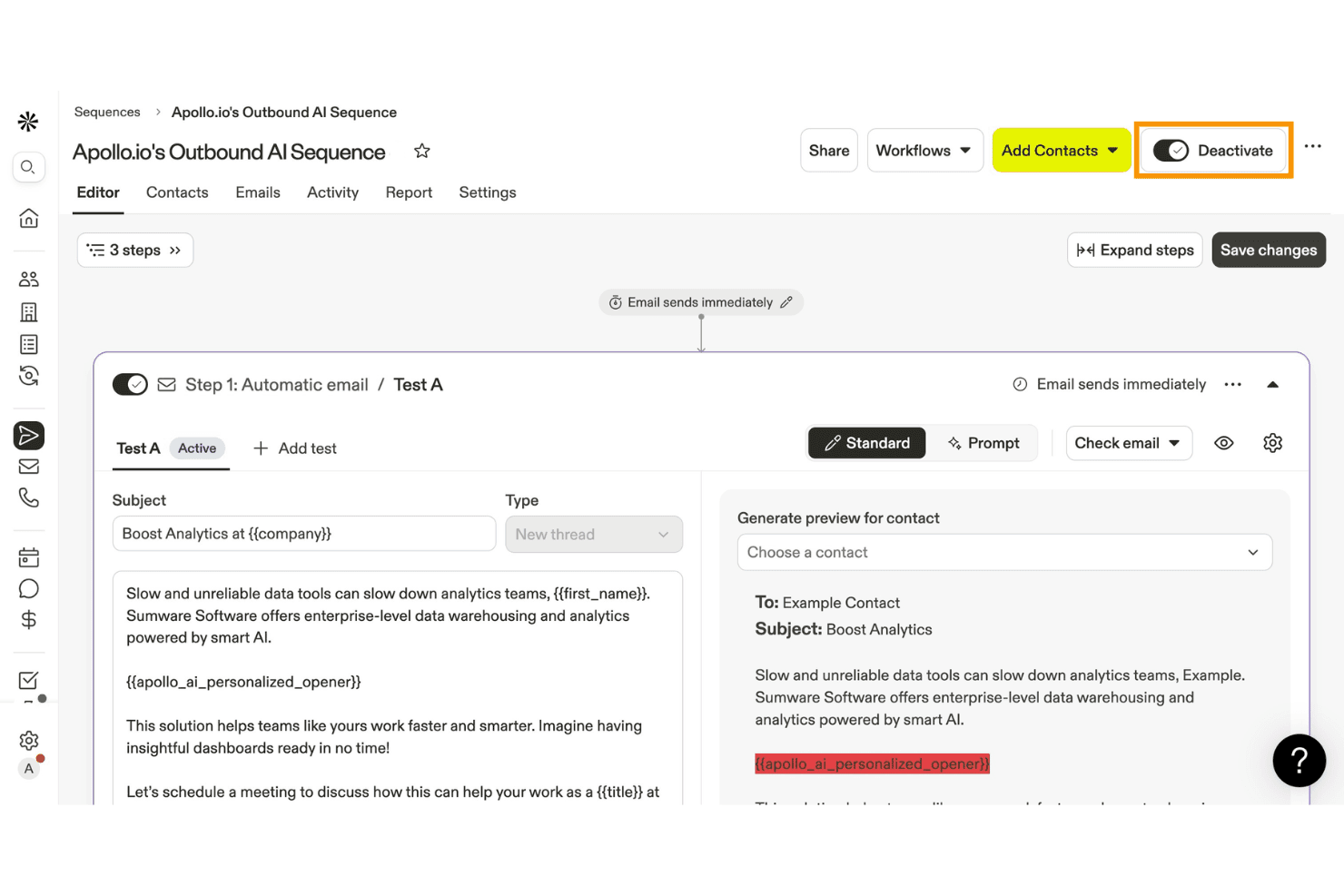
Apollo.io lets users build and automate outbound email sequences with AI. Apollo.io is a B2B sales engagement and intelligence platform that combines a 275M+ contact database with cold email sequencing, AI-powered personalization, and deliverability tooling.
Who Is Apollo.io Best For?
Apollo.io is built for B2B sales and demand generation teams that need to run cold outreach at scale, combining prospecting and sequencing in one platform.
Why I Picked Apollo.io
I picked Apollo.io as one of the best because it's purpose-built for B2B cold outreach at scale, combining a 275M+ contact database with AI Research that injects prospect-specific insights, like recent company news or LinkedIn activity, directly into email copy. I also love the conditional sequence logic, which lets me branch outreach paths based on whether a prospect opened, clicked, or ignored a previous step.
Apollo.io Key Features
- Contact database search: Access a 275M+ contact database with 65+ filter attributes to build and export targeted prospect lists directly within the platform.
- Bounce guard: A configurable monitoring feature that tracks bounce rates per sequence and automatically pauses sending when thresholds hit warning or critical levels.
- A/B testing on email steps: Test multiple email variants within a sequence step to identify which copy drives higher open and reply rates.
- CRM bi-directional sync: Native two-way sync with HubSpot, Salesforce, and Pipedrive keeps contact and sequence data aligned across your sales stack in real time.
Apollo.io Integrations
Apollo.io offers 50+ integrations, including HubSpot, Salesforce, Pipedrive, Gmail, Microsoft Outlook, SendGrid, and Mailgun. Organization plans include API access for custom integrations, and Apollo.io also supports Zapier.
Pros and Cons
Pros:
- Strong deliverability and sequence diagnostics tools
- AI-powered personalization for each recipient
- Huge B2B database for targeted outreach
Cons:
- No visual email builder or newsletter tools
- No true bulk send capability
Learn more about Apollo.io: Best for ecommerce email and SMS campaigns
- Free plan + free demo available
- From $16/month
Visit WebsiteCustomer Rating:4.6/5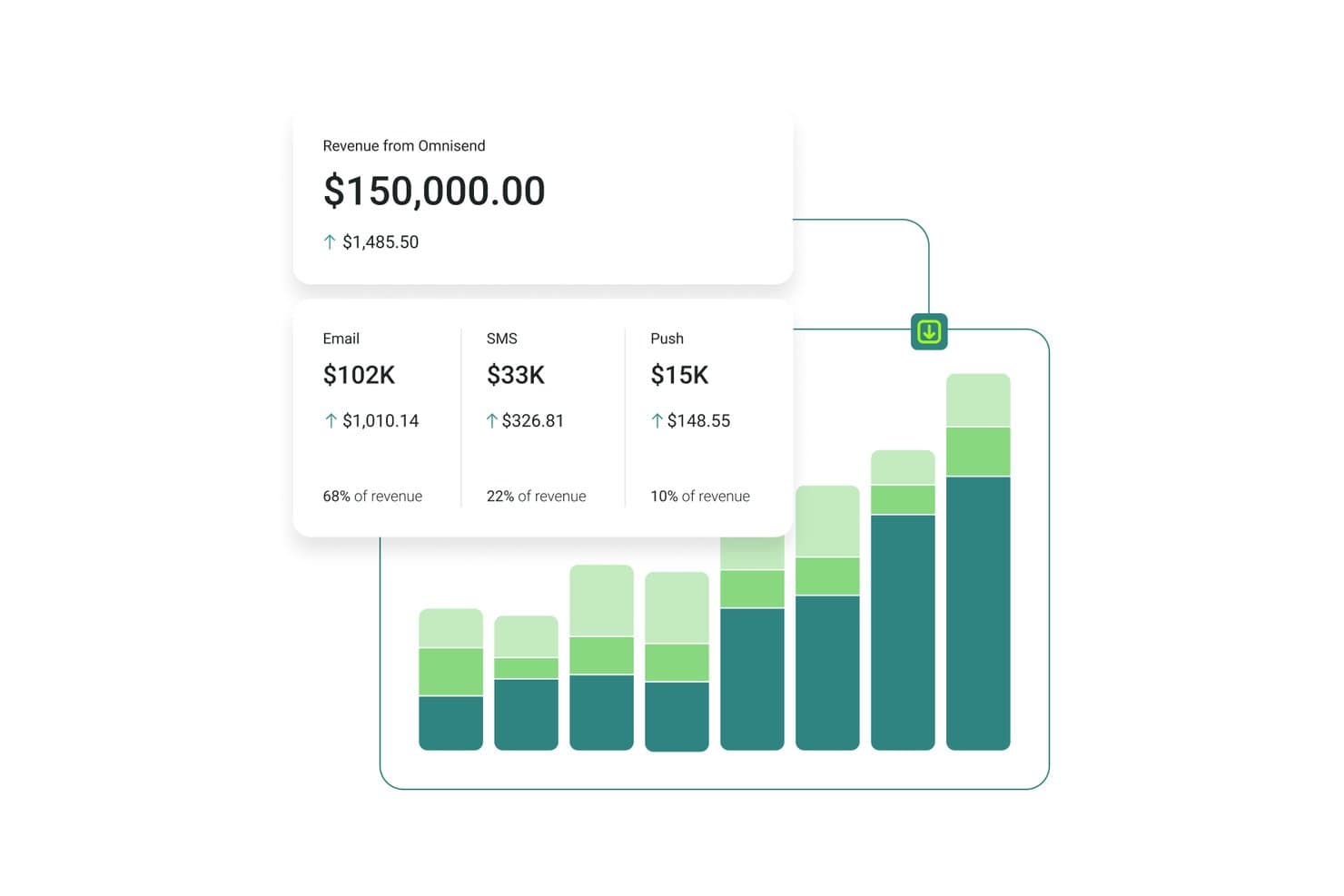
Omnisend tracks email, SMS, and push revenue in one dashboard. Omnisend is an email and SMS marketing platform built for ecommerce brands, combining bulk campaign sending, automation workflows, audience segmentation, and multichannel messaging across email, SMS, and web push.
Who Is Omnisend Best For?
Omnisend is a strong fit for ecommerce brands—especially Shopify, WooCommerce, and BigCommerce merchants—that want email, SMS, and push notifications managed in one place.
Why I Picked Omnisend
Omnisend earns its spot on my shortlist because it's the only platform here that syncs live product catalog data directly into emails, so I can drop real prices, images, and links into a campaign without ever leaving the builder. I also rely on its Customer Lifecycle Map to segment sends by stage, from first-time buyers to lapsed customers, without manually building filters every time. The Campaign Booster auto-resend to non-openers is a feature I use regularly to recover reach on big promotional sends.
Omnisend Key Features
- AI Segment Builder: Lets you describe a target audience in plain language and automatically generates the filters and segment for you.
- Campaign Booster: Automatically resends a campaign to contacts who didn't open the first send, with a new subject line.
- Conditional content blocks: Shows or hides specific email sections for individual recipients based on tags, purchase history, or signup source.
- A/B testing for automations: Tests subject lines, content, and send times within live automation workflows, not just one-off campaigns.
Omnisend Integrations
Omnisend offers 280+ tested integrations, including Shopify, WooCommerce, BigCommerce, Wix, Facebook Lead Ads, Google Ads, Canva, and Gorgias. It also supports API, webhooks, and Zapier connections for custom integrations.
Pros and Cons
Pros:
- Customer lifecycle mapping for dynamic segmentation
- Syncs live product data directly into emails
- Automates cart, browse, and post-purchase sequences
Cons:
- No native enterprise CRM integrations available
- Built primarily for ecommerce-focused businesses
Learn more about Omnisend: Best for visual storytelling in emails
- Free plan + free trial available
- From $38month (billed annually)
Visit WebsiteCustomer Rating:4.7/5
Flodesk enables visual storytelling with drag-and-drop email designs. Flodesk is a mass email sender software built for visual storytelling in emails. It caters to small businesses and creative entrepreneurs who value both aesthetics and functionality in their email marketing efforts. With its user-friendly design interface and unlimited email sending capabilities, Flodesk addresses the need for visually appealing communication without the complexity typically associated with email marketing tools.
Why I Picked Flodesk
I picked Flodesk for its unique ability to blend design flexibility with marketing functionality, particularly for those who prioritize visual storytelling in their email campaigns. The platform's drag-and-drop email builder allows users to create beautiful, responsive emails without any coding knowledge. Additionally, Flodesk's automation features enable users to set up workflows that nurture leads and engage subscribers based on their interactions, providing a seamless way to maintain customer relationships. With these features and unlimited emails, Flodesk helps businesses improve their email marketing.
Flodesk Key Features
In addition to its design and automation capabilities, Flodesk offers:
- Customizable Templates: Users can choose from a variety of templates and customize them to fit their brand's aesthetics.
- Form Building: Create and integrate forms directly into your website to capture leads seamlessly.
- Subscriber Management: Easily manage and segment your email list to target specific audiences effectively.
- Email Analytics: Gain insights into email performance with detailed analytics, helping you refine your strategy over time.
Flodesk Integrations
Integrations include HoneyBook, BookFunnel, Canva, Shopify, Squarespace, ThriveCart, Wix, and Manychat. These integrations enhance productivity and streamline marketing efforts, allowing users to connect Flodesk with various platforms for a comprehensive marketing approach.
Pros and Cons
Pros:
- Intuitive drag-and-drop editor simplifies email creation
- Customizable branding options with no coding required
- Strong support for small and creative business needs
Cons:
- Occasional slow loading times reported by users
- Few integration options beyond major platforms
Learn more about Flodesk: Best for personalized email campaigns
- Free plan + 30-day free trial + free demo available
- From $25/month
Visit WebsiteCustomer Rating:4.6/5
Klaviyo sends mass campaigns with personalized product content. Klaviyo supports businesses that want to send more relevant email campaigns using customer data. Built for companies of different sizes, it combines customer information with email marketing tools so you can create targeted campaigns based on real behavior. Whether your goal is to improve engagement or increase sales, Klaviyo helps unify and activate customer data in real time to guide your messaging decisions.
Why I Picked Klaviyo
I chose Klaviyo for its ability to use customer data to create personalized mass email campaigns. Its segmentation tools let you define specific customer groups based on behavior, purchase history, and engagement, so messages feel more relevant. The platform also supports automated flows and scheduled campaigns, making it easier to send timely emails without manual effort. Together, these features make Klaviyo a practical option for businesses that want more control over their mass email strategy.
Klaviyo Key Features
In addition to personalized email campaigns, Klaviyo offers:
- Omnichannel Marketing: Engage your audience across email, SMS, and social media for a cohesive customer experience.
- AI-Driven Insights: Utilize artificial intelligence to gain insights into customer behavior and optimize your email marketing strategies.
- Customizable Templates: Quickly create visually appealing emails with over 160 customizable templates and a drag-and-drop editor.
- Real-Time Data Integration: Seamlessly integrate with over 350 applications to unify and activate customer data across your marketing efforts.
Klaviyo Integrations
Integrations include Shopify, BigCommerce, WooCommerce, Magento, Salesforce Commerce Cloud, Stripe, Facebook, Instagram, Google Ads, and Zendesk.
Pros and Cons
Pros:
- Omnichannel marketing including SMS and social media
- Comprehensive automation features for personalized marketing
- Advanced segmentation for targeted email campaigns
Cons:
- Higher pricing structure may deter small businesses
- Higher pricing structure may deter small businesses
Learn more about Klaviyo: Best feature-rich free plan
- Free plan + 14-day trial + demo available
- From $9/month
Visit WebsiteCustomer Rating:4.6/5
Sender lets you build email templates to help with mass email sending. Sender helps your team send and automate large-scale email campaigns with tools for building newsletters, segmenting audiences, and managing SMS follow-ups that fit your outreach goals. You’ll find it useful if you’re running email efforts for a small business, ecommerce store, or growing audience and want control over automation and tracking without jumping between tools. engaging content while ensuring your messages reach their intended audience.
Why I Picked Sender
I picked Sender because its feature-rich free plan gives you real mass email sending tools for up to 2,500 subscribers and 15,000 emails/month. This includes automation, segmentation, and a drag-and-drop builder. You’ll find the automation workflows let you trigger sequences based on subscriber behavior and schedule follow-ups, helping you keep your audience engaged without juggling multiple tools. I also like that you can segment lists to tailor messages to different groups and mix in transactional emails as part of your campaigns. These capabilities make it a solid fit for teams focused on growing email outreach on a budget.
Sender Key Features
In addition to its main features, other notable features include:
- A/B Testing: This feature allows you to test different versions of your emails to see which performs better, helping you optimize your campaigns for better results.
- Analytics Dashboard: Track opens, clicks, and delivery metrics to measure engagement.
- Transactional Emails: Sender enables you to automate the sending of transactional emails, ensuring timely communication with your subscribers.
- Lead Capture Tools: The platform provides tools to capture leads directly from your website, helping you grow your email list effectively.
Sender Integrations
Integrations include WordPress, WooCommerce, and Zapier. An API is available for custom integrations.
Pros and Cons
Pros:
- Generous free plan supports up to 2,500 subscribers.
- User-friendly interface simplifies email campaign creation.
- Offers responsive templates for mobile-friendly emails.
Cons:
- Free plan includes Sender branding which may affect professionalism.
- Limited advanced features in comparison to competitors.
Learn more about Sender: Best for automation and personalization
- Free plan + 14-day trial + demo available
- From $100/month
Visit WebsiteCustomer Rating:4.2/5
Customer.io automates mass email workflows using event-based triggers and user data. When you want more control over your email marketing, Customer.io provides a platform built for sending targeted, automated messages based on customer behavior. It works well for teams that need to manage campaigns across growing user bases without relying on manual workflows. Using first-party data helps you send relevant messages to the right users at the right time.
Why I Picked Customer.io
I picked Customer.io because it makes it easier to run large email campaigns using automation and user-based targeting. The Visual Workflow Builder lets you set up email flows with drag-and-drop steps, so you can build multi-step campaigns without heavy technical setup. Event triggers enable teams to send messages based on real customer actions, helping them deliver timely, relevant emails that support ongoing customer communication.
Customer.io Key Features
In addition to its automation and personalization strengths, Customer.io offers:
- Omnichannel Support: Deliver a consistent customer experience across email, SMS, and in-app messaging.
- Design Studio: Collaboratively craft high-quality messages with a user-friendly editor.
- A/B Testing: Experiment with different content and messaging strategies to optimize engagement.
- Ad Audience Sync: Automatically update audience segments across major ad networks for cohesive marketing strategies.
Customer.io Integrations
Integrations include Salesforce, Google Analytics, Segment, Slack, Twilio, Stripe, Shopify, WordPress, Zendesk, and HubSpot.
Pros and Cons
Pros:
- Flexible visual workflow builder aids non-technical users
- Behavioral tracking provides insights into customer preferences
- Multichannel messaging supports email, SMS, and push notifications
Cons:
- Some users may find the platform's complexity overwhelming initially
- Reporting features are less comprehensive than competitors
Learn more about Customer.io: Best for drag-and-drop editing
- Free plan + 14-day free trial available
- From $12/month
Visit WebsiteCustomer Rating:4.7/5
MailerLite lets businesses design, automate, and track email campaigns. MailerLite is an email marketing tool built for businesses that want to create, send, and manage campaigns in one place. It supports teams by offering design tools, automation features, and performance tracking to help manage email communication and engagement.
Why I picked MailerLite: MailerLite gives your team a clean drag-and-drop editor that makes email creation simple, even if no one’s a designer. You can build campaigns from scratch or start with ready-made templates and tweak them to fit your brand. The editor includes blocks for images, buttons, videos, and countdowns, so your team can get creative without touching code. You can also reuse layouts across campaigns to keep things consistent.
Standout features & integrations:
Features include an automation builder that lets you set up custom workflows. You can run interest-based segmentation using click and open data. Surveys and quizzes can be added right inside your emails to collect feedback or qualify leads.
Integrations include Shopify, WordPress, Zapier, Stripe, WooCommerce, PayPal, Squarespace, Typeform, Facebook, and Google Sheets.
Pros and Cons
Pros:
- No-code email elements work well
- Allows reusable block layouts
- Fast setup for first-time users
Cons:
- Mobile previews lack full accuracy
- Automation editor can feel slow
 Best for user privacy
- 14-day free trial + free plan + free demo available
- From $4/month (billed annually)
Visit WebsiteCustomer Rating:4.3/5
Zoho Campaigns helps businesses run privacy-focused email campaigns. Zoho Campaigns is an email marketing tool designed for businesses looking to enhance their email outreach while prioritizing privacy. It's particularly useful for marketing teams aiming to manage campaigns effectively without relying on third-party tracking.
Why I picked Zoho Campaigns: Zoho Campaigns sets itself apart by focusing on user privacy, using its own tracking tools. Features include customizable email templates and automation workflows that help you create and manage campaigns efficiently. You can conduct A/B testing to optimize your emails and gain insights with detailed analytics. Its integration with e-commerce platforms like Shopify supports targeted marketing efforts.
Standout features & integrations:
Features include email send-time optimization, which ensures your messages are delivered at the best times, and domain authentication to improve deliverability. You can manage both email and SMS campaigns from a single interface, and use customizable templates to create engaging content.
Integrations include Zoho CRM, Shopify, WooCommerce, Eventbrite, SurveyMonkey, LinkedIn, Facebook, Twitter, Google Analytics, and Slack.
Pros and Cons
Pros:
- Effective A/B testing
- Comprehensive analytics
- Easy automation workflows
Cons:
- Occasional integration issues
- Basic design templates
Learn more about Zoho Campaigns: Best for multilingual campaigns
- Free plan + free demo available
- From $12/month
Visit WebsiteCustomer Rating:4.3/5
Benchmark Email helps teams design, automate, and track branded emails. Benchmark Email is a marketing platform built to help teams create and send branded emails at scale. It supports businesses of all sizes looking to manage their email content and audience communications from one place. It offers tools for designing emails, automating follow-ups, and tracking engagement.
Why I picked Benchmark Email: Benchmark Email helps your team run campaigns in multiple languages without extra hassle. You can create emails in different languages using its editor, and choose templates that support special characters and right-to-left text. Language settings are easy to adjust in the account dashboard, and you can segment contacts by language. It also lets you preview emails in different languages before sending.
Standout features & integrations:
Features include email templates that you can drag and drop, making it fast to create branded campaigns. Your team can run A/B tests to compare subject lines or layouts. You also get real-time reports that show opens, clicks, and bounces.
Integrations include Shopify, Google Sheets, Zapier, WordPress, Facebook, Slack, Typeform, Eventbrite, PayPal, and Stripe.
Pros and Cons
Pros:
- Great for regional marketing teams
- Easy to toggle between language versions
- Translates templates with little setup
Cons:
- Fewer native CRM features
- Not ideal for transactional emails
Learn more about Benchmark Email:
Alte software-uri pentru trimiterea în masă a e-mailurilor
Iată câteva opțiuni suplimentare de software pentru trimiterea în masă a e-mailurilor care nu au ajuns pe lista mea restrânsă, dar care merită totuși analizate:
- 11SendGridBest for API-based email sending
- 12Elastic EmailBest for AI-powered email design
- 13Constant ContactBest for email and SMS combos
- 14CampaignerBest for advanced automation
- 15SMTP.comBest for high-volume enterprise deliverability
- 16BrevoBest for comprehensive engagement
- 17Vertical ResponseBest for small businesses
- 18Click DimensionsBest for Microsoft Dynamics integration
- 19GMassBest for Gmail integration
- 20EmailOctopusBest for email list growth
How I Evaluate Mass Email Sender Software
I look at two layers: the baseline table stakes—sending 100k contacts reliably, landing in inboxes, segmenting a list—and the differentiators that separate platforms worth recommending.
Core Functionality (Table Stakes For This List)
When I'm selecting tools for my list, I rank each one on a scale from 0 (does not offer the functionality) to 5 (excels in this area) for each core functionality listed below. Then, I calculate the tool's total score into a percentage. Each tool needs to achieve a minimum total score of 75% to be considered for inclusion.
- Bulk Email Sending: I check whether a platform can handle high-volume campaigns with send scheduling, time-zone delivery, and throttling to avoid provider blocks.
- Contact List Management: Importing a CSV of 50k subscribers should be painless. I look for custom fields, tagging, suppression lists, and dynamic list updates.
- Email Builder & Templates: I evaluate drag-and-drop editors for responsive design output, reusable content blocks, and template variety across industries.
- Deliverability Infrastructure: SPF, DKIM, and DMARC setup should be straightforward. Dedicated IP options and warm-up tools matter for teams sending at scale.
- Personalization & Segmentation: Merge tags are baseline. I look for conditional content blocks and behavioral segments like "opened last 3 campaigns."
- Campaign Analytics & Reporting: Every tool tracks opens and clicks. I evaluate whether dashboards surface bounce rates, deliverability trends, and A/B test results.
Once I have a list of tools that meet this criteria, I consider what sets each platform apart.
Differentiating Factors (What Sets Vendors Apart)
Here's how I compare and contrast different vendors:
Standout Features
Visual automation workflows separate basic senders from platforms that can run a full lifecycle program—welcome series, re-engagement flows, and post-purchase sequences triggered by real behavior. A/B testing is another factor I weigh. I look for tools that let you split-test subject lines, content, and send times within a single campaign. For e-commerce teams, revenue attribution tied to specific sends makes it much easier to prove ROI on every campaign.
Beyond Features
Pricing structure matters a lot here. Some platforms charge per subscriber while others bill by emails sent—a team with a large but low-frequency list pays very differently under each model. I also evaluate how well a tool connects to your existing stack, especially CRMs and e-commerce platforms where contact data lives. Compliance tooling is another differentiator I check. Built-in consent management, double opt-in flows, and unsubscribe handling should cover GDPR, CAN-SPAM, and CASL requirements without manual workarounds.
Cum să alegeți software-ul pentru trimiterea în masă a e-mailurilor
Este ușor să vă pierdeți în liste lungi de funcții și structuri complexe de prețuri. Pentru a vă ajuta să rămâneți concentrați pe parcursul procesului unic de selecție a software-ului, iată o listă de factori de care trebuie să țineți cont:
| Factor | Aspecte de luat în considerare |
| Scalabilitate | Poate software-ul să crească odată cu afacerea dumneavoastră? Luați în considerare nevoile viitoare și dacă instrumentul poate gestiona volume mai mari de e-mailuri fără costuri suplimentare. |
| Integrări | Funcționează cu instrumentele existente? Verificați compatibilitatea cu sistemele CRM, platformele de analiză și celelalte instrumente de marketing pe care le utilizați. |
| Posibilități de personalizare | Cât de flexibil este software-ul? Căutați instrumente care vă permit să adaptați fluxurile de lucru și șabloanele pentru a se potrivi brandului și strategiei dumneavoastră de marketing. |
| Ușurința utilizării | Este interfața intuitivă? Asigurați-vă că echipa dumneavoastră poate naviga cu ușurință prin aceasta, fără instruire extinsă sau o curbă de învățare abruptă. |
| Implementare și integrare inițială | Cât de repede puteți începe? Evaluați disponibilitatea tutorialelor, asistenței și resurselor care să vă ajute echipa să înceapă să utilizeze eficient software-ul. |
| Cost | Se aliniază prețul cu bugetul dumneavoastră? Priviți dincolo de costul inițial și luați în considerare cheltuielile pe termen lung, inclusiv upgrade-urile și funcțiile suplimentare. |
| Măsuri de securitate | Cât de sigure sunt datele dumneavoastră? Asigurați-vă că software-ul respectă reglementările și oferă criptare și alte măsuri de securitate pentru protejarea informațiilor clienților. |
| Cerințe de conformitate | Îndeplinește software-ul standardele din industrie? Luați în considerare orice cerințe specifice de conformitate, precum GDPR, și dacă instrumentul le poate respecta. |
Ce este software-ul pentru trimiterea în masă a e-mailurilor?
Software-ul pentru trimiterea în masă a e-mailurilor este un instrument care permite companiilor să trimită volume mari de e-mailuri clienților și potențialilor clienți. Profesioniștii din marketing și proprietarii întreprinderilor mici utilizează de obicei aceste instrumente pentru a interacționa cu audiențele și pentru a promova produse sau servicii. Funcțiile de automatizare, segmentare și analiză ajută la direcționarea comunicărilor, gestionarea campaniilor și măsurarea succesului. Aceste instrumente oferă valoare prin creșterea eficienței comunicării și îmbunătățirea interacțiunii cu clienții.
Funcțiile software-ului pentru trimiterea în masă a e-mailurilor
Atunci când selectați un software pentru trimiterea în masă a e-mailurilor, acordați atenție următoarelor funcții esențiale:
- Automatizarea e-mailurilor: Automatizează trimiterea mesajelor la orele specificate, contribuind la menținerea unei comunicări consecvente cu publicul dumneavoastră.
- Segmentarea: Vă permite să împărțiți lista de e-mailuri în grupuri țintă, îmbunătățind interacțiunea prin trimiterea de conținut relevant.
- Analiză și raportare: Oferă informații despre performanța e-mailurilor, ajutându-vă să urmăriți ratele de deschidere, clicurile și conversiile.
- Șabloane personalizabile: Oferă machete de e-mail predefinite pe care le puteți adapta pentru a se potrivi brandului dumneavoastră, economisind timp pentru activitățile de design.
- Testare A/B: Vă permite să testați diferite versiuni ale e-mailurilor pentru a vedea care are performanțe mai bune, optimizându-vă campaniile.
- Gestionarea listelor: Vă ajută să organizați și să întrețineți listele de abonați, asigurând exactitatea datelor și conformitatea cu reglementările.
- Capacități de integrare: Se conectează cu alte instrumente, precum sistemele CRM și platformele de rețele sociale, îmbunătățindu-vă eforturile de marketing.
- Adaptabilitate pentru dispozitive mobile: Asigură afișarea corectă a e-mailurilor pe toate dispozitivele, îmbunătățind experiența și interacțiunea utilizatorilor.
- Funcții de securitate: Protejează datele sensibile prin criptare și conformitate cu standardele din industrie, protejând informațiile clienților.
- Actualizări în timp real: Oferă acces imediat la datele campaniei, permițându-vă să luați rapid decizii bine fundamentate.
Beneficiile software-ului pentru trimiterea în masă a e-mailurilor
Implementarea unui software pentru trimiterea în masă a e-mailurilor oferă mai multe beneficii pentru echipa și afacerea dumneavoastră. Iată câteva dintre acestea:
- Interacțiune îmbunătățită: Prin utilizarea segmentării și personalizării, trimiteți conținut mai relevant, ceea ce duce la rate mai mari de deschidere și clicuri.
- Eficiența timpului: Funcțiile de automatizare vă permit să programați e-mailuri și să gestionați campanii fără intervenție manuală, economisind timpul echipei.
- Decizii bazate pe date: Instrumentele de analiză și raportare oferă informații despre performanța campaniei, ajutându-vă să luați decizii de marketing bine fundamentate.
- Branding consecvent: Șabloanele personalizabile asigură faptul că e-mailurile corespund aspectului și stilului brandului dumneavoastră, menținând consecvența comunicărilor.
- Acoperire extinsă: Integrarea cu platformele CRM și de rețele sociale extinde eforturile de marketing, ajungând la un public mai larg.
- Economii de costuri: Prin vizarea publicului potrivit cu e-mailuri eficiente, maximizați rentabilitatea investiției din bugetul de marketing.
- Conformitate cu reglementările: Gestionarea listelor și funcțiile de securitate vă ajută să mențineți exactitatea datelor și să respectați reglementările din industrie.
Costurile și prețurile software-ului pentru trimiterea în masă a e-mailurilor
Selectarea unui software pentru trimiterea în masă a e-mailurilor necesită înțelegerea diferitelor modele de prețuri și planuri disponibile. Costurile variază în funcție de caracteristici, dimensiunea echipei, suplimente și alți factori. Tabelul de mai jos rezumă planurile comune, prețurile lor medii și funcțiile incluse de obicei în soluțiile software pentru trimiterea în masă a e-mailurilor:
Tabel comparativ al planurilor pentru software-ul de trimitere în masă a e-mailurilor
| Tipul planului | Preț mediu | Funcții comune |
| Plan gratuit | $0 | Șabloane de e-mail de bază, automatizare limitată și analize de bază. |
| Plan personal | $10-$30 /utilizator /lună | Șabloane personalizabile, segmentare de bază și programarea e-mailurilor. |
| Plan pentru afaceri | $50-$100 /utilizator /lună | Automatizare avansată, analize detaliate și capacități de testare A/B. |
| Plan pentru întreprinderi | $150-$300 /utilizator /lună | Asistență dedicată, integrări avansate și funcții de securitate îmbunătățite. |
Întrebări frecvente despre software-ul de trimitere a e-mailurilor în masă
Iată câteva răspunsuri la întrebările frecvente despre software-ul de trimitere a e-mailurilor în masă:
Care este diferența dintre e-mailurile în bloc și e-mailurile în masă?
E-mailurile în bloc și e-mailurile în masă sunt adesea folosite ca sinonime, ambele referindu-se la trimiterea unui singur mesaj către mai mulți destinatari. Esențial este să vă asigurați că e-mailurile sunt relevante și personalizate, pentru a evita marcarea lor ca spam. Instrumentele care oferă funcții de segmentare și personalizare vă pot ajuta să vă îmbunătățiți strategia.
Care sunt noile reguli pentru expeditorii de e-mailuri în bloc impuse de Google și Yahoo?
Începând din februarie 2024, Google și Yahoo aplică reguli mai stricte pentru expeditorii de e-mailuri în bloc, concentrându-se pe autentificare, ratele de spam și opțiuni simple de dezabonare. Asigurați-vă că e-mailurile respectă aceste cerințe prin implementarea unei autentificări corespunzătoare și oferirea unui proces clar de dezabonare. Acest lucru ajută la menținerea livrabilității și a interacțiunii.
Este legal să trimiteți e-mailuri în masă?
Da, trimiterea e-mailurilor în masă este legală, însă trebuie să respectați reglementări precum CAN-SPAM în SUA sau GDPR în Europa. Aceste legi impun obținerea consimțământului clar al destinatarilor, informații exacte despre expeditor și opțiuni simple de renunțare. Asigurarea conformității ajută la protejarea reputației mărcii și la evitarea sancțiunilor.
Cum pot trimite e-mailuri în masă fără ca acestea să ajungă în spam?
Pentru a evita folderele de spam, concentrați-vă pe igiena listei, utilizând procese de înscriere cu confirmare dublă și curățând periodic lista de e-mailuri. Personalizați conținutul și evitați limbajul asociat spamului. Protocoalele de autentificare precum SPF, DKIM și DMARC contribuie, de asemenea, la îmbunătățirea livrabilității și la consolidarea încrederii furnizorilor de e-mail.
Cât de des ar trebui să trimit e-mailuri în masă?
Frecvența ideală depinde de publicul și conținutul dumneavoastră. Interacțiunea regulată este esențială, însă prea multe e-mailuri pot duce la dezabonări. Testați frecvențe diferite pentru a descoperi ce funcționează cel mai bine pentru publicul dumneavoastră, asigurându-vă că fiecare e-mail oferă valoare și se aliniază obiectivelor de marketing.