

Gerir eficazmente uma equipa de marketing implica coordenar vários projetos, prazos e recursos. Precisa de uma ferramenta de software capaz de lidar com estes desafios, mas o Asana não parece ser a solução certa. Seja devido ao preço, ao excesso de funcionalidades ou à curva de aprendizagem elevada para os novos membros da equipa, é possível que esteja à procura de alternativas.
Nesta lista, vou explorar as principais alternativas ao Asana que poderão adaptar-se melhor ao fluxo de trabalho da sua equipa. Testei e analisei cada opção de forma independente para fornecer uma perspetiva imparcial sobre o que cada uma tem para oferecer. Desde ferramentas de colaboração à gestão de tarefas, encontrará opções que podem melhorar a sua experiência de gestão de projetos.
O que é o Asana?
O Asana é um software de gestão de projetos concebido para ajudar as equipas a organizar, acompanhar e gerir o seu trabalho. É amplamente utilizado por profissionais de marketing, design e desenvolvimento de produtos que precisam de manter as tarefas e os projetos dentro do prazo. A atribuição de tarefas, os prazos e os cronogramas dos projetos ajudam a gerir as cargas de trabalho e a melhorar a colaboração da equipa. Em geral, o Asana proporciona uma forma eficiente de manter a sua equipa organizada e focada nos seus objetivos.
Tabela comparativa das alternativas ao Asana
Esta tabela comparativa resume os detalhes dos preços das minhas principais alternativas ao Asana:
| Tool | Best For | Trial Info | Price | ||
|---|---|---|---|---|---|
| 1 | Best for managing complex project workflows | Free plan + 14-day trial + demo available | From $10/user/month (billed annually) | Website | |
| 2 | Best for enterprise creative and campaign ops | Not available | Pricing upon request | Website | |
| 3 | Best for automation-heavy project workflows | Free plan + 15-day trial + demo available | Pricing upon request | Website | |
| 4 | Best for detailed project tracking and timelines | Not available | From £679.99 one-time purchase | Website | |
| 5 | Best for building custom apps without code | Free plan + free demo available | From $20/user/month (billed annually) | Website | |
| 6 | Best for visual task management | Free plan + free trial available | From $5/user/month (billed annually) | Website | |
| 7 | Best for pre-built reports | 14-day free trial + free demo available | From $8/user/month (billed annually) | Website | |
| 8 | Best for real-time collaboration | 14-day free trial + free demo available | From $45/month (billed annually) | Website | |
| 9 | Best for client-focused project management | Free plan + 14-day trial + demo available | From $9.99/user/month (billed annually) | Website | |
| 10 | Best for knowledge sharing and collaboration | Free plan + 7-day trial available | From $5.78/user/month (billed annually) | Website |


Why Trust Our Software Recommendations
6,700+
Reviews
20
Industry experts
16+
Evaluation factors
14
Years
Our team has been testing and reviewing software since 2012. As marketing leaders ourselves, we know how difficult—and important—it is to choose the right software.
For this guide, we evaluated tools using hands-on testing and independent research, scoring tools using our selection criteria.
Our reviews reflect our human editorial judgment, not a sales pitch.
Expert reviewers:
 Gui DrusinaCreative Director
- Shriya GhateSenior Marketing Lead
 Amanda JacquesMarketing Ops Leader

Análises das melhores alternativas ao Asana
Abaixo encontram-se os meus resumos detalhados das melhores alternativas ao Asana que entraram na minha lista. As minhas análises apresentam uma visão detalhada das principais funcionalidades, vantagens & desvantagens, integrações e casos de utilização ideais de cada ferramenta, para ajudar a encontrar a melhor opção para si.
 Best for managing complex project workflows
- Free plan + 14-day trial + demo available
- From $10/user/month (billed annually)
Visit WebsiteCustomer Rating:4.3/5
Wrike displays team workload by day with task assignments and capacity percentages. Wrike is a work management platform built for teams running complex, multi-stakeholder projects—making it a strong fit for marketing teams that need to coordinate campaigns, manage creative reviews, and track cross-functional deliverables in one place.
Who Is Wrike Best For?
Wrike is a strong fit for mid-sized to larger marketing and operations teams managing multi-layered projects with cross-functional stakeholders, creative reviews, and reporting needs.
Why I Picked Wrike
I picked Wrike as one of the best because it handles genuinely complex project workflows in ways that simpler tools can't. I rely on its multi-level task hierarchy, Gantt chart dependencies, and cross-project dashboards to keep campaigns with many moving parts from falling apart. Its built-in proofing lets my team annotate and compare creative file versions directly in the platform, cutting review cycles that would otherwise sprawl across email threads.
Wrike Key Features
- Workflow automation rules: Set up WHEN–IF–THEN automation to trigger status updates, task assignments, and request routing without manual input.
- Request forms: Build dynamic intake forms that generate tasks, preplanned projects, or automated workflows from submissions.
- Resource bookings: Reserve time from specific team members or job roles and estimate project hours across upcoming work.
- AI project risk prediction: Get low, medium, or high risk estimates with explanatory summaries based on task progress, assignees, and project history.
Wrike Integrations
Wrike offers 400+ pre-built native integrations, including Slack, Salesforce, Power BI, Jira, Google Drive, Adobe Creative Cloud, and GitHub. It also supports an open REST API, webhooks, OAuth 2.0, and Wrike Integrate for custom connections and workflow automation.
Pros and Cons
Pros:
- Dashboards reveal cross-project status and capacity
- Proofing keeps creative approvals on project assets
- Deeper task hierarchy handles campaign dependencies
Cons:
- No built-in instant messaging for quick coordination
- Setup demands more effort than Asana
 Best for enterprise creative and campaign ops
- Not available
- Pricing upon request
Visit WebsiteCustomer Rating:4.6/5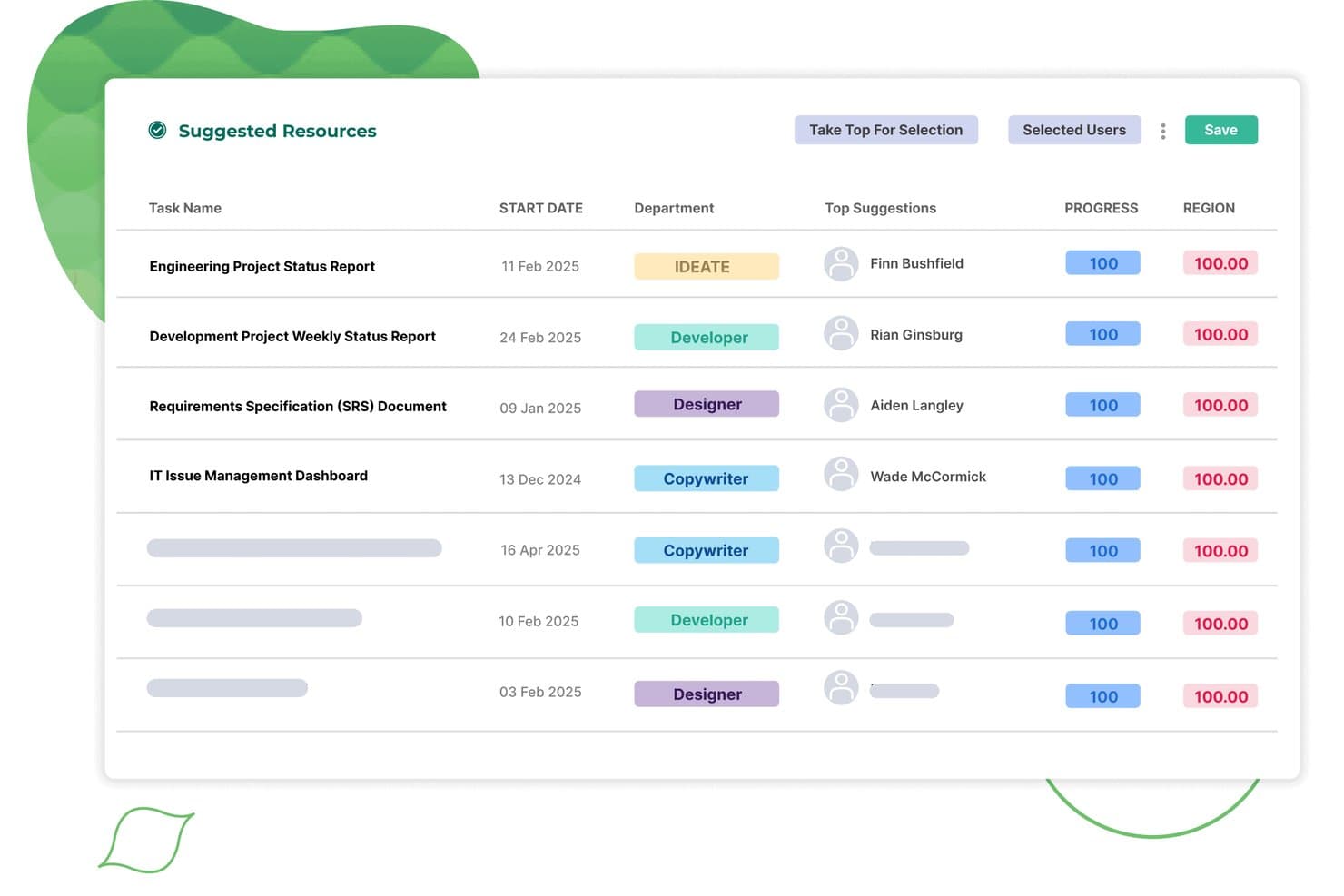
Screendragon auto-assigns suggested resources to tasks by department and match score. Screendragon is an AI-powered work management platform built for enterprise marketing teams and agencies that need to manage high-volume campaigns, creative approvals, and cross-functional workflows in one place.
Who Is Screendragon Best For?
Screendragon is built for enterprise marketing teams and in-house agencies managing high volumes of campaigns, complex approvals, and cross-functional workflows at scale.
Why I Picked Screendragon
I picked Screendragon as one of the best because it's purpose-built for enterprise creative and campaign ops in a way Asana simply isn't. I love that it handles native proofing, annotation, and version comparison directly inside the platform, so my team isn't bouncing between tools to get a campaign approved. The AI-powered briefing and resourcing agents are genuinely useful, automating the kind of repetitive routing work that slows down high-volume creative teams.
Screendragon Key Features
- Resource and capacity planning: Forecast team demand, view availability by skill or role, and assign work based on current workload and project priorities.
- Campaign request intake and briefing forms: Configure standardized briefing forms with automated routing to send approved briefs directly to stakeholders for review.
- Reusable project templates: Build and deploy campaign workflow templates that your operations team can maintain and customize without vendor involvement.
- Custom portfolio dashboards: Access live, role-specific dashboards that pull real-time data across projects, workflows, budgets, and team utilization in one view.
Screendragon Integrations
Screendragon claims 1,000+ integrations, including native integrations with HubSpot, Microsoft Power BI, Slack, Smartsheet, Amazon S3, Google Cloud Platform Storage, Sitecore, Brandfolder, and Workato. It also offers a REST API with OAuth 2.0 and Zapier access by private invite.
Pros and Cons
Pros:
- Custom forms and workflows fit agency processes
- Portfolio views clarify resource availability
- PDF and video annotations support approvals
Cons:
- Cross-team approval chains can slow large projects
- Menus and workflows take time to learn
Learn more about Screendragon: Best for automation-heavy project workflows
- Free plan + 15-day trial + demo available
- Pricing upon request
Visit WebsiteCustomer Rating:4.3/5
Zoho Projects organizes tasks across stages using a Kanban board view. Zoho Projects is a project management platform built for teams that need deep automation, structured workflows, and tight integration with business tools like CRM, invoicing, and analytics—making it a strong fit for marketing teams managing complex, multi-stakeholder campaigns.
Who Is Zoho Projects Best For?
Zoho Projects is a strong fit for marketing teams and operations-heavy organizations that are already in—or considering—the Zoho ecosystem and need deep automation without paying enterprise-tier prices.
Why I Picked Zoho Projects
I picked Zoho Projects as one of the best Asana alternatives because its automation depth goes well beyond simple if-then rules. Blueprint lets you design task workflows that gate status transitions behind required actions, so a campaign asset can't move to "approved" until a reviewer has signed off and filled in the right fields. Pair that with Zia's ability to generate subtasks directly from a project description, and your team spends far less time on setup and far more time on execution.
Zoho Projects Key Features
- Gantt chart scheduling: Visualize task timelines, set dependencies, and compare actual progress against saved project baselines.
- Portfolio dashboard: Track project status, ownership, budget health, and task progress across multiple projects in a single view.
- Resource workload report: View each team member's allocated work with color-coded indicators for over- or under-allocation, grouped by owner, team, or role.
- Zoho CRM integration: Sync tasks, task-field updates, and comments between Zoho Projects and Zoho CRM so project and client data stay aligned.
Zoho Projects Integrations
Zoho Projects offers 50+ marketplace integrations, plus native connections with Zoho CRM, Zoho Books, Google Drive, Microsoft 365, Slack, GitHub, and more. It provides REST APIs and webhooks for custom integrations and supports Zapier.
Pros and Cons
Pros:
- Workload charts reveal overloaded campaign contributors
- Gantt dependencies and baselines expose schedule slippage
- Approval-gated workflows reduce campaign handoff errors
Cons:
- Advanced setup can clutter navigation and configuration
- Cross-project reports offer limited customization
Learn more about Zoho Projects: Best for detailed project tracking and timelines
- Not available
- From £679.99 one-time purchase
Visit WebsiteCustomer Rating:4.7/5
Microsoft Project displays project health, issues, and work charts in one dashboard. Microsoft Project is a scheduling-focused project management tool built for project managers who need to plan complex work, track dependencies, manage resources, and keep detailed timelines under control.
Who Is Microsoft Project Best For?
Microsoft Project is built for project managers who need to plan complex, dependency-heavy work with detailed scheduling, resource tracking, and critical-path control.
Why I Picked Microsoft Project
I picked Microsoft Project because no other tool on this list handles complex, dependency-heavy scheduling with the same depth. I rely on its critical-path tracking and Gantt chart views to manage multi-phase projects where task sequencing actually matters—if one deliverable slips, I can see exactly what else moves. The ability to track up to 400,000 tasks per project with defined predecessors and successors makes it the go-to when project scope is too intricate for a lighter tool.
Microsoft Project Key Features
- Resource tracking: Monitor and manage resource allocation across multiple projects from a single view.
- Baseline tracking: Save project snapshots to compare original plans against actual progress over time.
- Network Diagram view: Visualize task dependencies and project flow in a logic-based diagram format.
- Built-in graphical reports: Access dozens of pre-built reports, including a Project Overview showing phases, milestones, and overdue tasks.
Microsoft Project Integrations
Microsoft Project offers native integrations with Microsoft Power BI and Microsoft Teams for reporting, project collaboration, and file management. Its documented integration set is smaller than Asana’s broader ecosystem, and API availability for custom integrations isn’t stated.
Pros and Cons
Pros:
- Reports milestones, phases, and overdue tasks
- Plans resource allocation across linked projects
- Tracks task dependencies across long timelines
Cons:
- New users need substantial setup guidance
- Sharing feels less fluid for collaborators
Learn more about Microsoft Project: Best for building custom apps without code
- Free plan + free demo available
- From $20/user/month (billed annually)
Visit WebsiteCustomer Rating:4.6/5
Airtable tracks store visits with status, type, and notes per record. Airtable is a no-code database platform that lets marketing teams build custom workflows, track campaigns, and manage projects across linked data without relying on engineering support.
Who Is Airtable Best For?
Airtable is a strong fit for marketing and operations teams that need to build custom workflows around their own data structures rather than conform to a fixed project hierarchy.
Why I Picked Airtable
I picked Airtable as one of the best Asana alternatives because it lets my team build workflows around our actual data structure rather than conforming to a fixed task hierarchy. Where Asana gives you a predefined setup, Airtable lets me link campaign records to assets, budgets, and team members across related tables, then surface the right slice of that data through role-specific interfaces. I also rely on Omni to generate automation workflows from plain-language prompts, which cuts the time I'd otherwise spend configuring multi-step logic from scratch.
Airtable Key Features
- Date dependencies: Automatically recalculates start dates, end dates, and durations across linked records when predecessor tasks shift.
- Airtable Proofing: Lets team members annotate files, compare versions side by side, and highlight PDF text differences without needing full base access.
- Conditional automation groups: Routes work through multi-step automations using "And/Or" logic with up to 50 conditions per group and an "Otherwise" fallback path.
- Resource allocation via timeline view: Displays utilization summaries based on allocated hours and available hours, pulling time-off data from linked-record lookup fields.
Airtable Integrations
Airtable lists integrations with Slack, Salesforce, Google Drive, Google Calendar, Jira, and Asana. Its Web API and webhooks support custom connections and workflow automation.
Pros and Cons
Pros:
- Proofing compares versions and flags PDF changes
- Dependencies recalculate dates across linked tasks
- Custom linked records fit campaign workflows
Cons:
- Record discussions feel basic beside Asana
- Asana task hierarchies may need redesign
Learn more about Airtable: Best for visual task management
- Free plan + free trial available
- From $5/user/month (billed annually)
Visit WebsiteCustomer Rating:4.5/5
Trello's dashboard visualizes project progress with charts and metrics. Trello is a visual work management tool built by Atlassian that lets marketing teams organize campaigns, track deliverables, and automate repetitive tasks using a flexible board-and-card system.
Who Is Trello Best For?
Trello works best for small teams and marketing leads who need a simple, visual way to manage campaigns and deliverables without a steep learning curve.
Why I Picked Trello
I picked Trello as one of the best Asana alternatives because its board-and-card system makes visual task management genuinely intuitive, especially for marketing teams running multiple campaigns at once. I love how the Workspace Calendar pulls due dates from across boards into a single filterable view, so I can see a full month of campaign deliverables without toggling between projects. The built-in automation lets me set rules that move cards, assign work, and post Slack updates automatically when a card hits a certain list.
Trello Key Features
- Custom Fields: Add structured data to cards—like campaign status, priority, or budget—so your team tracks the exact information your workflow requires.
- Card mirroring: Display and edit a single card across multiple boards, keeping cross-team work in sync without duplicating tasks.
- Power-Ups: Connect Trello to 236+ third-party tools, including Slack, Jira, Google Drive, and Microsoft Teams, directly from your boards.
- Advanced checklists: Assign individual checklist items to specific team members and set separate due dates for each subtask within a card.
Trello Integrations
Trello offers 236 marketplace integrations, including Slack, Jira Cloud, Microsoft Teams, Miro, Gmail, and Make. Its REST API supports custom integrations, with documented rate limits.
Pros and Cons
Pros:
- Checklist items support owners and due dates
- Workspace calendar unifies dates across boards
- Visual boards clarify campaign task status
Cons:
- Dashboards lack exports and portfolio rollups
- No native task dependency management
Learn more about Trello: Best for pre-built reports
- 14-day free trial + free demo available
- From $8/user/month (billed annually)
Visit WebsiteCustomer Rating:4.7/5
Workzone organizes client projects and timelines in a Gantt view. Workzone is a project management platform built for marketing and creative teams that need structured workflows, with native proofing, approval tracking, and pre-built reporting to keep campaigns and cross-functional projects on track.
Who Is Workzone Best For?
Workzone suits marketing and creative teams that manage recurring campaigns, need built-in proofing and approvals, and want reporting they don't have to build from scratch.
Why I Picked Workzone
I picked Workzone because its pre-built reports mean my team isn't spending time configuring dashboards before we can see what's actually happening across projects. Status reports, workload views, and late-items summaries are ready to use out of the box, which is a real advantage over Asana's more configuration-heavy reporting. I also appreciate that the native proofing and markup tools keep creative feedback attached directly to the work, so approval decisions don't get lost across email threads or separate review tools.
Workzone Key Features
- Task dependencies: Link tasks so work starts in the right sequence, with Gantt views to visualize your project timeline.
- Project intake forms: Capture incoming requests through structured forms that map directly to project fields.
- Workload and capacity planning: View team workload by person or department to balance assignments before work gets bottlenecked.
- 1,000+ pre-built industry templates: Launch projects from ready-made templates without building your structure from scratch.
Workzone Integrations
Workzone lists 1,000+ integrations, including Slack, Microsoft Teams, Google Drive, Microsoft OneDrive, SharePoint, Salesforce, Zoom, Figma, Asana, and Jira. Zapier and an API add-on support custom integrations.
Pros and Cons
Pros:
- Reusable templates speed campaign launches
- Creative approvals stay beside reviewed files
- Prebuilt reports reduce dashboard setup
Cons:
- Bulk task entry takes extra steps
- No rule-based automation or handoffs
Learn more about Workzone: Best for real-time collaboration
- 14-day free trial + free demo available
- From $45/month (billed annually)
Visit WebsiteCustomer Rating:4.5/5
ProofHub tracks project statuses and task progress via visual reports. ProofHub is a project management and team collaboration platform that brings tasks, discussions, file proofing, and time tracking into one place—making it a practical fit for marketing teams that want to cut down on tool-switching and keep creative workflows moving.
Who Is ProofHub Best For?
ProofHub is a strong fit for creative and marketing teams that need built-in file proofing and approval workflows alongside their project tracking.
Why I Picked ProofHub
I picked ProofHub as one of the best because real-time collaboration is genuinely baked into how the tool works, not bolted on. Built-in proofing lets my team annotate designs and documents directly, collecting feedback and approvals without losing context across email threads. Paired with one-to-one chat, group chat, and topic-based discussions tied to tasks, conversations stay exactly where the work lives.
ProofHub Key Features
- Gantt chart: Map tasks over a visual timeline, set dependencies between tasks, and highlight the critical path to track project deadlines.
- Time tracking: Log time manually or with built-in timers, set time estimates, generate timesheets, and export time data to accounting tools like QuickBooks or FreshBooks.
- Custom roles and permissions: Create custom roles and assign access levels to control what different team members and guests can see and do within your account.
- Forms: Build intake forms to collect work requests, support tickets, or project briefs and feed submissions directly into ProofHub as tasks.
ProofHub Integrations
ProofHub offers native integrations with Slack, Google Calendar, Dropbox, OneDrive, Box, QuickBooks, and FreshBooks. It also provides API access for custom integrations.
Pros and Cons
Pros:
- Shared task, chat, and review workspace
- Direct Asana imports ease project migration
- Native proofing keeps creative approvals in context
Cons:
- No executive portfolio dashboard for rollups
- Recurring tasks offer little conditional automation
Learn more about ProofHub: Best for client-focused project management
- Free plan + 14-day trial + demo available
- From $9.99/user/month (billed annually)
Visit WebsiteCustomer Rating:4.5/5
Teamwork organizes personal tasks by urgency, priority, and due date. Teamwork.com is a project management platform built for client-facing teams—particularly agencies and service businesses—that need to track deliverables, manage billable time, and give clients visibility into project progress without leaving the tool.
Who Is Teamwork Best For?
Teamwork is a natural fit for agencies and client services teams that need to track billable time, manage deliverables, and give clients direct visibility into project progress.
Why I Picked Teamwork
I picked Teamwork as one of the best Asana alternatives because it's purpose-built for client-facing work in a way most project management tools aren't. I love that you can invite clients directly into projects with granular permissions, run time against billable tasks, and generate invoices from logged hours, all without leaving the platform. The built-in proofing tool is a genuine differentiator: clients can review and approve deliverables without needing a Teamwork account.
Teamwork Key Features
- Resource and capacity planning: View team workloads, identify scheduling conflicts, and reassign work to balance capacity across projects.
- Asana importer: Migrate projects, tasks, subtasks, assignees, comments, and attachments directly from Asana into Teamwork.com.
- Custom fields and formula fields: Add custom data fields to tasks and use formula fields to calculate values automatically.
- Intake forms: Collect requests from clients or team members and convert form submissions into project tasks.
Teamwork Integrations
Teamwork.com offers 150+ integrations, including native connections to Slack, Microsoft Teams, Google Calendar, Outlook, SharePoint, Dropbox, Box, QuickBooks Online, and HubSpot. It also provides an API, webhooks, MCP server, and Zapier.
Pros and Cons
Pros:
- Dashboards help track progress across projects
- Billable time connects tasks to client delivery
- External reviewers can approve proofs without accounts
Cons:
- Fewer project views than Asana
- Large projects can bury important details
Learn more about Teamwork: Best for knowledge sharing and collaboration
- Free plan + 7-day trial available
- From $5.78/user/month (billed annually)
Visit WebsiteCustomer Rating:4.3/5
Confluence displays custom Jira charts and reports on a single dashboard. Confluence is Atlassian's collaborative knowledge hub that helps marketing teams centralize campaign documentation, coordinate cross-functional deliverables, and keep project context—briefs, plans, and updates—in one structured, searchable workspace.
Who Is Confluence Best For?
Confluence is a strong fit for marketing teams that need a central hub to organize campaign documentation, briefs, and cross-functional deliverables alongside their project work.
Why I Picked Confluence
I picked Confluence as one of the best Asana alternatives because it's where my team stores and shares every piece of campaign knowledge, from briefs and strategy docs to live deliverable trackers. I love that the marketing campaign plan template lets us assign task owners, track statuses, and organize timelines inside the same space where the actual campaign context lives. The database views, which flip between board, list, and card layouts, let different stakeholders see the same work without anyone needing a separate tool.
Confluence Key Features
- Rovo AI search and chat: Rovo searches across connected tools—including Jira, Google Drive, and Slack—to surface relevant knowledge and answer questions from within Confluence.
- Automation rules: Rule-based workflows with triggers, conditions, branches, and actions handle tasks like sending reminders for incomplete assignments and posting progress updates to Slack or Teams.
- Whiteboard canvas: An infinite collaborative canvas supports real-time brainstorming, diagramming, and planning with up to 200 concurrent collaborators per board.
- Loom video embedding: Teams can record and embed screen and camera videos directly on Confluence pages and whiteboards to share async updates and feedback.
Confluence Integrations
Confluence has native integrations with Jira, Jira Service Management, Trello, Loom, Google Drive, Salesforce, GitHub, and SharePoint. It also offers thousands of Marketplace integrations, plus REST API v2 and GraphQL API access for custom connections.
Pros and Cons
Pros:
- Database views adapt campaign tracking for stakeholders
- Shared pages preserve decisions and version history
- Campaign templates keep briefs beside deliverables
Cons:
- Task reporting offers limited project-wide visibility
- No native subtasks or dependency tracking
Learn more about Confluence:
Outras alternativas ao Asana
Eis algumas alternativas adicionais ao Asana que não entraram na minha lista, mas que vale a pena conhecer:
- 11BasecampBest for centralized team communication
- 12Aha!Best for linking strategy with execution
- 13Bitrix24Best for CRM and project management integration
- 14ClickUpBest for AI-enhanced productivity
- 15SmartsheetBest for complex project visualization
- 16CeloxisBest for tracking project financials
- 17Salesforce CRMBest for salesforce integration
- 18HiveBest for team collaboration
- 19JiraBest for software development teams
- 20monday.comBest for visual project layouts
How I Evaluate Asana Alternatives
For marketing teams managing campaign deadlines, creative approvals, and intake queues, I split my evaluation into core requirements every tool must meet and the differentiators that separate them.
Core Functionality (Table Stakes For This List)
When I'm selecting tools for my list, I rank each one on a scale from 0 (does not offer the functionality) to 5 (excels in this area) for each core functionality listed below. Then, I calculate the tool's total score into a percentage. Each tool needs to achieve a minimum total score of 65% to be considered for inclusion.
- Campaign Project Management: I check whether a tool supports task dependencies, milestones, and multi-project tracking so marketing teams can map out a full product launch from brief to delivery.
- Multiple Project Views: The ability to toggle between list, board, calendar, and Gantt views matters because content teams and campaign managers tend to work in very different visual modes.
- Creative Collaboration & Proofing: I evaluate how each tool handles file annotation, version history, and approval workflows for reviewing assets like ad creatives or landing page designs.
- Workflow Automation: Marketing teams run repetitive processes like routing briefs or updating campaign statuses, so I look for rule-based automation that handles triggers, conditions, and actions.
- Intake & Request Forms: A good alternative should let teams build customizable request forms that convert submissions into routed tasks, replacing messy email and Slack-based intake.
- Reporting & Dashboards: I look for cross-project dashboards that let marketing ops managers track campaign progress, team workload, and deadlines in one place without manual updates.
Once I have a list of tools that meet this criteria, I consider what sets each platform apart.
Differentiating Factors (What Sets Vendors Apart)
Here's how I compare and contrast different vendors:
Standout Features
Resource and capacity planning is a big differentiator when your team juggles multiple campaigns at once. I look for workload views that show who's overloaded before deadlines slip. AI features are also worth evaluating, especially tools that can draft project summaries or flag at-risk tasks automatically. Guest access matters for marketing teams that regularly loop in freelancers and agency partners who need to review creative work without requiring a full paid seat.
Beyond Features
Marketing tech stack integrations are one of the first things I check. A tool that syncs with HubSpot, Salesforce, or Adobe Creative Cloud keeps campaign data connected without manual exports. Pricing structure also matters, particularly how vendors handle guest and reviewer seats for agencies or freelancers. I evaluate onboarding speed, too. Teams migrating from Asana need marketing-specific templates and import tools to get running fast rather than rebuilding every workflow from scratch.
Por que procurar uma alternativa ao Asana?
Embora o Asana seja uma boa opção de software de gestão de projetos, existem vários motivos pelos quais alguns utilizadores procuram soluções alternativas. Alguns exemplos incluem:
- Procura opções de preços mais acessíveis
- As necessidades da sua equipa são mais simples e considera o Asana demasiado complexo
- Pretende um software com melhores capacidades offline
- A sua equipa precisa de mais opções de personalização
- Precisa de uma ferramenta com melhores funcionalidades de controlo do tempo
- A sua empresa opera numa região com suporte limitado do Asana
Se alguma destas situações lhe é familiar, veio ao lugar certo. A minha lista inclui várias opções de software de gestão de projetos mais adequadas para equipas que enfrentam estes desafios com o Asana e procuram soluções alternativas.
Principais funcionalidades do Asana
Eis algumas das principais funcionalidades do Asana, para ajudar a comparar e avaliar o que as soluções alternativas oferecem:
- Gestão de tarefas: Crie, atribua e defina prioridades para as tarefas, mantendo a sua equipa organizada, focada e no caminho certo.
- Vistas de projetos: Quer a sua equipa utilize cronogramas ao estilo dos gráficos de Gantt para visualizar os calendários e as dependências dos projetos, quer vistas de calendário com cores personalizadas, a Asana oferece várias configurações visuais de projetos.
- Automatização de fluxos de trabalho: Automatize aprovações, identifique automaticamente os responsáveis e crie regras personalizadas e funcionalidades de automatização para poupar tempo e reduzir erros.
- Colaboração em equipa: Partilhe ficheiros, comente tarefas e mantenha-se atualizado através de comunicação em tempo real.
- Gestão de portefólios: Monitorize vários projetos num único local para garantir que tudo está alinhado com os seus objetivos.
- Campos personalizados: Adicione pontos de dados específicos às tarefas para acompanhar melhor os requisitos únicos.
- Relatórios e informações: Gere relatórios para acompanhar o progresso e identificar potenciais estrangulamentos.
- Definição de objetivos: Defina objetivos para a equipa ou para a empresa e associe-os a projetos para um melhor alinhamento.
- Integrações: Ligue-se a outras ferramentas e complementos, como o Slack ou o Google Drive, para melhorar os seus fluxos de trabalho.
- Aplicação móvel: Gira tarefas e projetos em qualquer lugar com a aplicação móvel intuitiva da Asana.