

Verktøy for innholdsoppdagelse hjelper deg med å finne, sortere og evaluere populære og relevante innholdskilder på tvers av digitale kanaler. Hvis du bruker dagen på å lete etter nye ideer, overvåke konkurrenter eller følge med på emner målgruppen din bryr seg om, er det viktig å velge riktig verktøy. Forskjellen mellom en uoversiktlig innholdsstrøm og en fokusert og handlingsrettet innholdsplan avhenger av verktøyene du bruker.
I denne veiledningen får du se hvilke plattformer for innholdsoppdagelse jeg stoler på i 2026, hvordan hver av dem dekker ulike markedsføringsbehov, og nøyaktig hva du bør se etter når du skal avgjøre hvilket verktøy som passer for teamet ditt.
Why Trust Our Software Recommendations
6,700+
Reviews
20
Industry experts
16+
Evaluation factors
14
Years
Our team has been testing and reviewing software since 2012. As marketing leaders ourselves, we know how difficult—and important—it is to choose the right software.
For this guide, we evaluated tools using hands-on testing and independent research, scoring tools using our selection criteria.
Our reviews reflect our human editorial judgment, not a sales pitch.
Expert reviewers:
 Gui DrusinaCreative Director
- Shriya GhateSenior Marketing Lead
 Amanda JacquesMarketing Ops Leader

Sammenligningstabell for verktøy for innholdsoppdagelse
Tabellen nedenfor sammenligner prisdetaljene for mine beste utvalgte verktøy for innholdsoppdagelse.
| Tool | Best For | Trial Info | Price | ||
|---|---|---|---|---|---|
| 1 | Best for content performance tracking | Free plan available | From $29/month | Website | |
| 2 | Best for custom newsfeed curation | Free trial available | From $1,600/month (billed annually) | Website | |
| 3 | Best for publishing workflow integration | 7-day free trial available | From $19/month (billed annually) | Website | |
| 4 | Best for consumer behavior monitoring | Not available | Pricing upon request | Website | |
| 5 | Best for automated content recommendations | Free trial available | From $49/month | Website | |
| 6 | Best for real-time trend analysis | Free trial available | From $199/month (billed annually) | Website | |
| 7 | Best for competitive insight reports | 14-day free trial | From $139/month | Website | |
| 8 | Best for global search trend visibility | Free to use | Free to use | Website | |
| 9 | Best for visual topic ideation | Free plan available | From $13.33/month (billed annually) | Website | |
| 10 | Best for audience research insights | Free plan available | From $38/month (billed annually) | Website |


Anmeldelser av de beste verktøyene for innholdsoppdagelse
Nedenfor finner du mine detaljerte sammendrag av de beste verktøyene for innholdsoppdagelse som kom med på kortlisten. Anmeldelsene mine gir en detaljert gjennomgang av funksjonene, de beste bruksområdene og integrasjonene for hvert verktøy, slik at du kan finne det beste alternativet for deg.
 Best for content performance tracking
- Free plan available
- From $29/month
Visit WebsiteCustomer Rating:4.6/5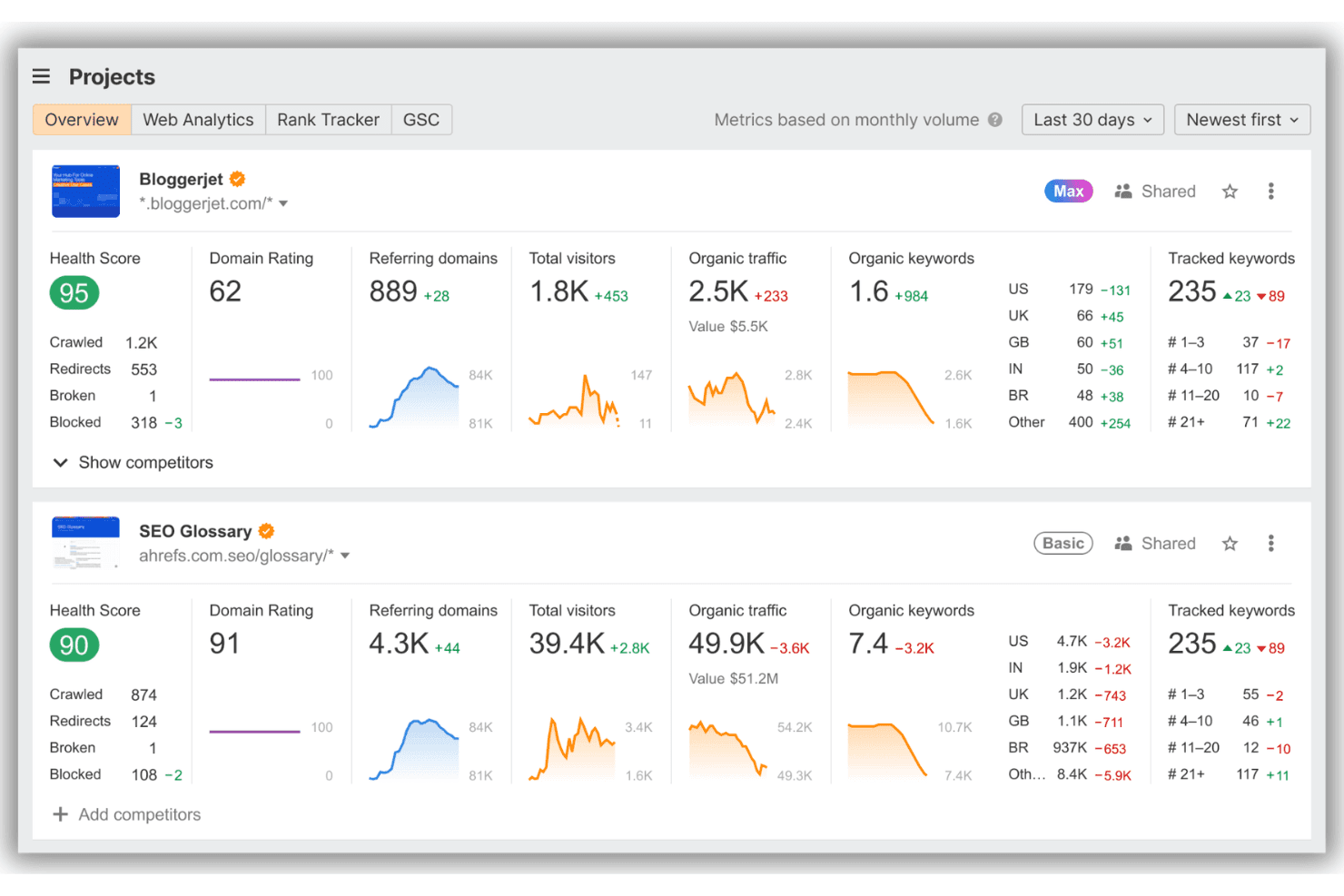
Ahrefs displays a Projects overview dashboard with SEO metrics including health scores, domain ratings, organic traffic, and tracked keywords for multiple websites. Ahrefs is an SEO and content intelligence platform with a dedicated Content Explorer that lets you search a 20.6-billion-page index to surface high-performing content, analyze backlink profiles, and track keyword-level traffic data across competitor domains.
Who Is Ahrefs Best For?
Ahrefs is a strong fit for SEO specialists and content marketers at mid-size to enterprise companies who need data-driven research to guide their content strategy.
Why I Picked Ahrefs
Ahrefs earns its spot on my shortlist because no other content discovery tool matches the depth of performance data it layers onto discovered content. I rely on Content Explorer to filter by page traffic, traffic value, and referring domains simultaneously, which lets me instantly separate genuinely high-performing articles from content that just looks popular. I also use the competitor publishing frequency view to track how often rival domains are putting out content on specific topics, which directly shapes our editorial calendar decisions.
Ahrefs Key Features
- Unlinked brand mention search: Identify pages mentioning your brand that don’t link back for targeted outreach.
- Outdated content discovery: Find high-potential topics on pages that have not been updated recently.
- Author and platform filtering: Filter search results by specific authors and platforms to reveal key content sources.
- 301 and 404 page index: Surface broken or redirected pages for link building and content update opportunities.
Ahrefs Integrations
Ahrefs offers native integrations with Google Search Console, Google Data Studio, WordPress, and IndexNow, and provides an API for custom integrations.
Pros and Cons
Pros:
- Identifies outdated content for refresh opportunities
- Detailed backlinks and organic traffic data
- Largest content index for topic discovery
Cons:
- Credit consumption model limits queries
- No native content curation workflows
 Best for custom newsfeed curation
- Free trial available
- From $1,600/month (billed annually)
Visit WebsiteCustomer Rating:4.5/5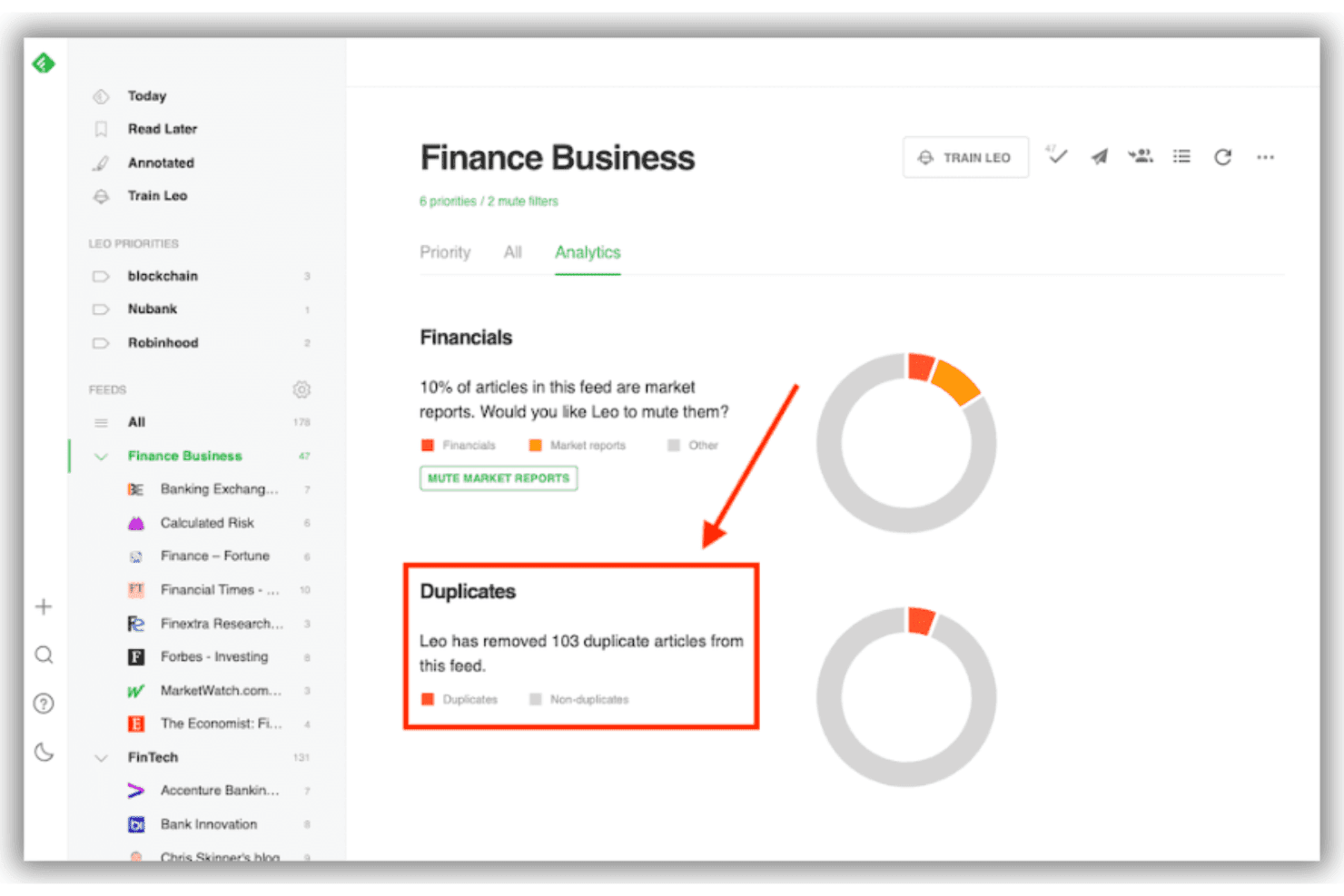
Feedly's Leo AI automatically detects and removes duplicate articles from your feeds, as shown in the Finance Business feed analytics dashboard. Feedly Market Intelligence is an AI-powered content monitoring platform and news aggregator that lets teams track industry trends, competitor activity, and emerging topics across 140 million sources through customizable AI feeds, curated boards, and automated newsletters.
Who Is Feedly Best For?
Feedly Market Intelligence is a strong fit for mid-to-large enterprise teams running dedicated strategy, competitive intelligence, or innovation functions.
Why I Picked Feedly
Feedly earns its spot as one of the best on my shortlist because of how precisely you can shape what your newsfeed surfaces. I love that AI Feeds use natural language inputs, so instead of relying on keyword lists, I can describe a topic the way I'd actually talk about it and Feedly builds the feed around that. The Emerging Trends Dashboard layers on top by catching weak signals before they become obvious, which means my team is tracking conversations earlier than most.
Feedly Key Features
- Team Boards: Collaboratively save, comment on, and organize discovered articles in dedicated spaces for easy team access.
- Automated newsletters: Generate branded, customizable newsletters that push curated content to internal audiences.
- Rest API integration: Push AI-tagged content directly into other platforms, dashboards, or custom workflows using Feedly’s API.
- Company insights cards: Access real-time summaries and key metrics for companies, including related trends and technologies.
Feedly Integrations
Integrations are not publicly documented. Feedly Market Intelligence offers an API for custom integrations.
Pros and Cons
Pros:
- Industry and competitor tracking is highly granular
- Emerging trends surfaced ahead of competitors
- AI feeds adapt to custom topic queries
Cons:
- Lacks influencer discovery or outreach features
- No social sharing or backlink data
Learn more about Feedly: Best for publishing workflow integration
- 7-day free trial available
- From $19/month (billed annually)
Visit WebsiteCustomer Rating:4.6/5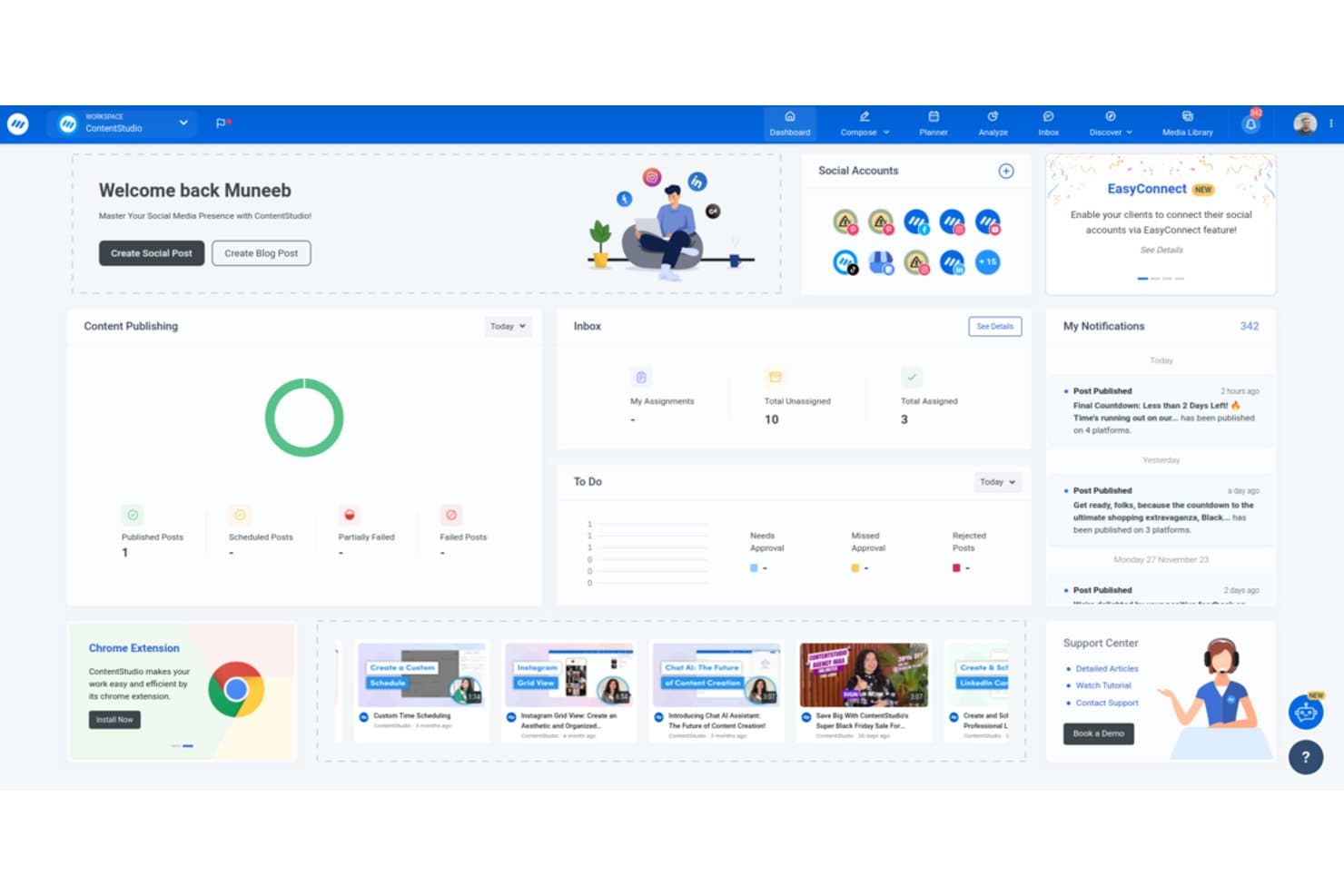
ContentStudio offers a centralized dashboard displaying social account management, content publishing stats, inbox assignments, notifications, and tutorial videos. ContentStudio is a social media and content marketing platform that combines topic and trend discovery, RSS feed curation, AI-assisted content creation, multi-channel publishing, and influencer identification in one workspace.
Who Is ContentStudio Best For?
ContentStudio is a strong fit for social media managers and content marketing teams at agencies who handle publishing across multiple client accounts and channels.
Why I Picked ContentStudio
I've included ContentStudio in my top picks because it's the only content discovery tool where finding an article and scheduling it as a social post are part of the same workflow. When I discover a trending piece in the Discover module, I can push it to any of 12+ social channels in one click, with no copy-pasting or tab-switching required. The RSS auto-posting feature takes this further, automatically turning new feed content into scheduled posts the moment it goes live.
ContentStudio Key Features
- AI Studio for content creation: Generate captions, images, and videos using built-in AI tools within the platform.
- Influencer discovery module: Search for niche-relevant influencers and vet profiles directly through the influencer finder.
- Social inbox and analytics: Respond to messages and track engagement metrics for all connected social accounts in a unified dashboard.
- Competitor analytics: Monitor competitor social posts and analyze their top-performing content to inform your strategy.
ContentStudio Integrations
ContentStudio offers native integrations with Facebook, Instagram, X (Twitter), LinkedIn, TikTok, YouTube, Pinterest, Threads, Google Business Profile, and Canva, and connects with Zapier. An API is available for custom integrations.
Pros and Cons
Pros:
- Built-in influencer finder with engagement metrics
- AI-assisted content suggestions for social channels
- Content discovery and publishing in one view
Cons:
- Sentiment data limited to select sources
- No backlink or SEO analysis features
Learn more about ContentStudio: Best for consumer behavior monitoring
- Not available
- Pricing upon request
Visit WebsiteCustomer Rating:4.3/5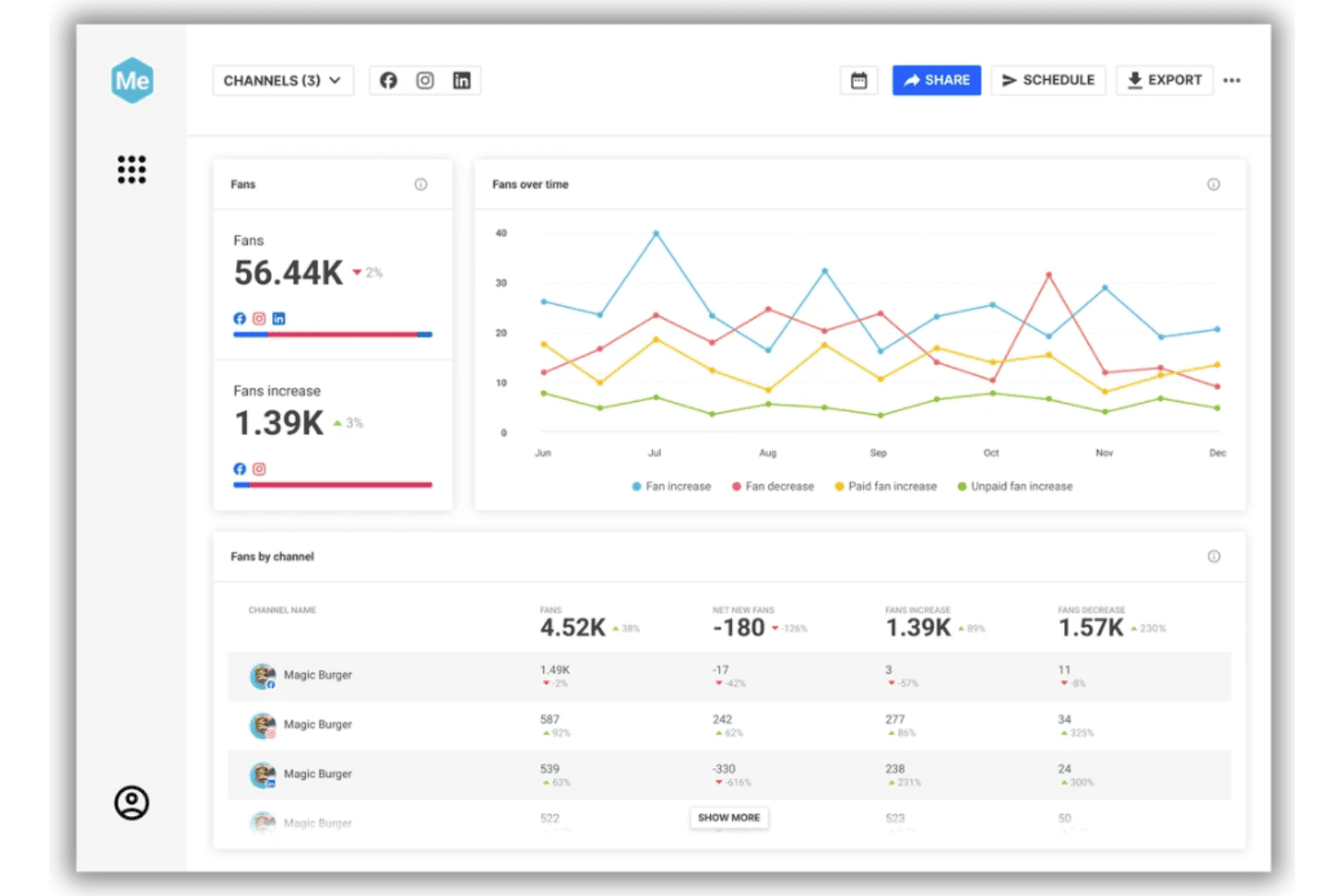
Brandwatch displays a social media analytics dashboard tracking fans, fan growth, and channel performance across Facebook, Instagram, and LinkedIn. Brandwatch is an enterprise social intelligence platform that combines AI-driven trend discovery, consumer conversation monitoring, influencer identification, and competitive benchmarking across 100M+ online and social sources.
Who Is Brandwatch Best For?
Brandwatch is a strong fit for enterprise marketing, PR, and social teams that need large-scale consumer intelligence across multiple channels and data sources.
Why I Picked Brandwatch
Brandwatch earns its spot on my shortlist because of how it surfaces consumer behavior signals that directly shape content strategy. I love the Reddit Social Panels feature, which taps into 100,000+ subreddits to show what real audiences are actively discussing, not just what's trending on branded channels. Iris AI then clusters those conversations into topic patterns, so my team can spot emerging narratives before they peak.
Brandwatch Key Features
- Custom dashboard builder: Create and configure dashboards with flexible widgets to visualize real-time data and insights.
- Boolean query builder: Set up complex keyword and topic searches using Boolean logic for tailored content discovery.
- Influencer discovery database: Access a searchable database of over 30 million influencers for identification and outreach.
- Competitor benchmarking: Compare your brand presence and conversations alongside selected competitors across tracked channels.
Brandwatch Integrations
Brandwatch offers native integrations with Salesforce, HubSpot, Shopify, Zendesk, ServiceNow, Google Drive, Box, Bynder, and Slack. An API is available for custom integrations.
Pros and Cons
Pros:
- Real-time alerts on emerging content trends
- Advanced Boolean queries for precise monitoring
- Deep insights from social and web conversations
Cons:
- Dashboard can feel overwhelming for new users
- No integrated SEO ranking analysis
Learn more about Brandwatch: Best for automated content recommendations
- Free trial available
- From $49/month
Visit WebsiteCustomer Rating:4.4/5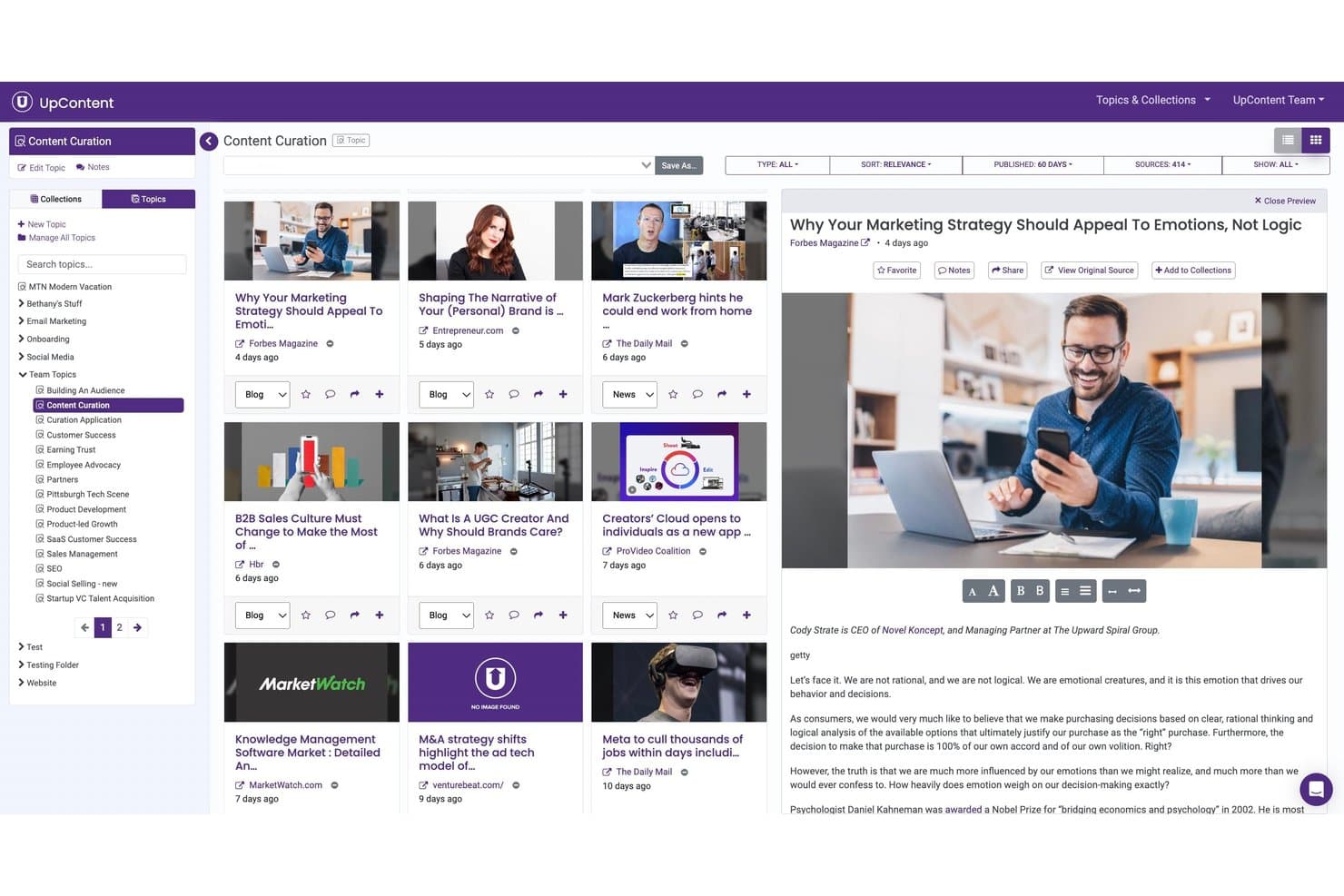
UpContent offers a content curation dashboard where users can browse, preview, and organize discovered articles by topic, source, and relevance. UpContent is a content curation tool that crawls hundreds of thousands of publishers to surface relevant articles by topic or keyword, then distributes them across social, email, and website channels via automated rules and integrations.
Who Is UpContent Best For?
UpContent is a good fit for content marketing teams at small businesses that need a steady stream of curated third-party content for social media management and email newsletters.
Why I Picked UpContent
UpContent earns its spot on my shortlist because of its end-to-end automation for content recommendations. I set up automated rule sets that filter, approve, and push curated articles directly to social, email, and website channels in a single configured flow. The ML-driven article scoring ranks results from a daily crawl of 215,000+ publishers, prioritizing the most topically relevant pieces for each topic I configure.
UpContent Key Features
- Custom content policy rules: Set up granular filters across sources, languages, and topics to meet specific curation standards.
- Collections dashboard: Organize and manage curated content using customizable boards for easy sorting and access.
- Multi-channel distribution options: Publish selected articles directly to social, email, RSS feeds, or website pages from the platform.
- Team approval workflows: Manage article review processes with defined approval steps before sharing curated content.
UpContent Integrations
UpContent offers native integrations with Hootsuite, Buffer, Mailchimp, Salesforce Marketing Cloud, HubSpot, and Yext. An API is available for custom integrations.
Pros and Cons
Pros:
- Supports email, website, and social curation
- Daily crawling of 215,000+ content sources
- Automated topic discovery across many publishers
Cons:
- Requires third-party tools for post scheduling
- No analytics on content performance
Learn more about UpContent: Best for real-time trend analysis
- Free trial available
- From $199/month (billed annually)
Visit WebsiteCustomer Rating:4.5/5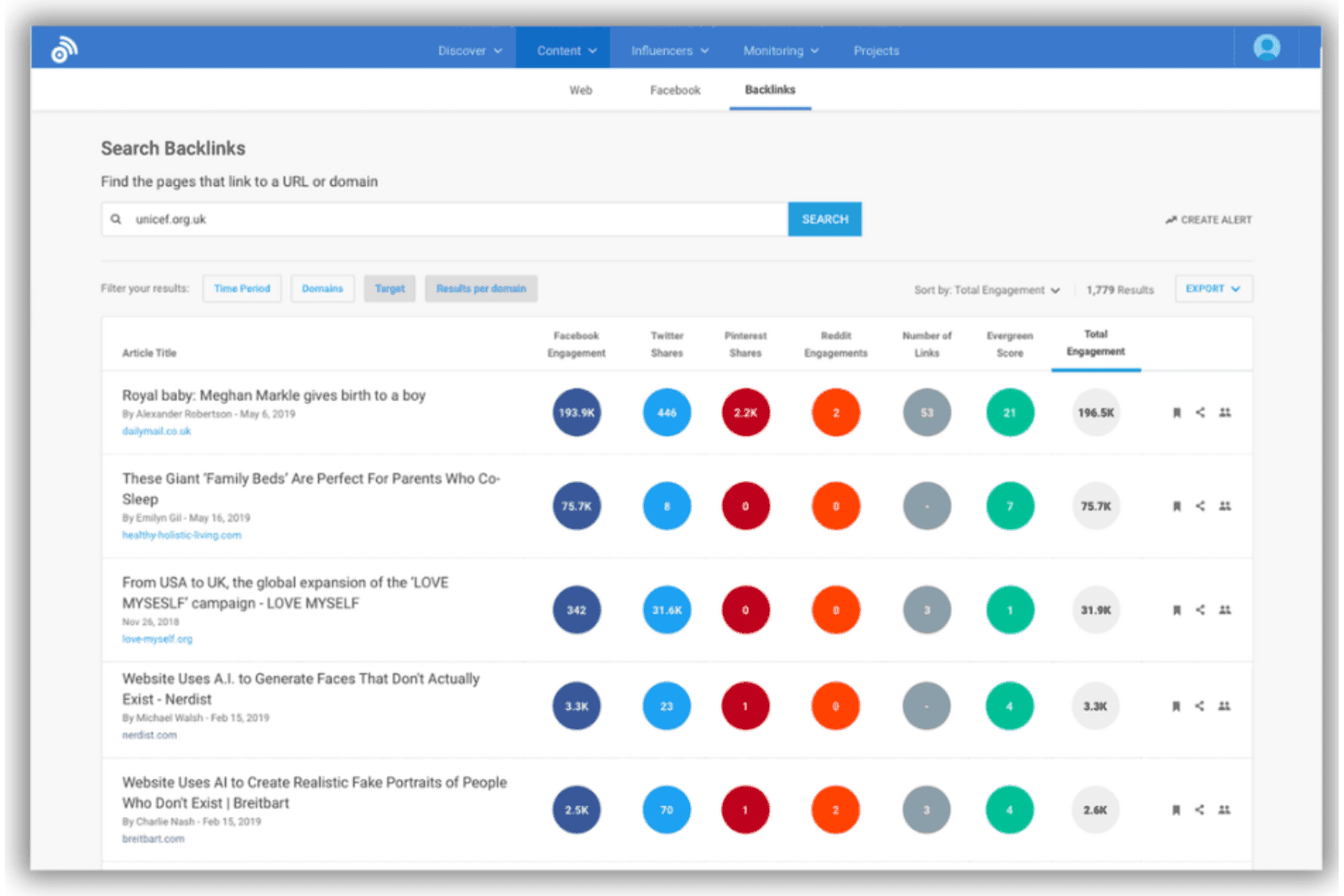
BuzzSumo's Backlinks tool displays pages linking to a domain, sorted by total engagement across Facebook, Twitter, Pinterest, and Reddit. BuzzSumo is a content discovery and research platform that combines real-time trend tracking, content performance analysis, keyword research, influencer identification, and competitor domain analysis across web and social channels.
Who Is BuzzSumo Best For?
Content and PR teams at mid-size to enterprise companies who need to align their content mix and strategy with real-time data will get the most out of BuzzSumo.
Why I Picked BuzzSumo
BuzzSumo earns its spot as one of the best on my shortlist because no other tool I've used surfaces viral content momentum as fast or as granularly. The Trends feature lets me sort by trending score and filter by geography, so I can pinpoint what's gaining traction in a specific market before it peaks. I also rely on the Topics feature to cluster related concepts around a trend, which helps my team build out full content calendars rather than chasing individual headlines.
BuzzSumo Key Features
- Content Analyzer: Analyze billions of published articles to uncover engagement metrics and content performance.
- Backlink Analyzer: Identify which websites are linking to specific content or domains for SEO insights.
- Influencer discovery: Find top influencers across Twitter, YouTube, and TikTok on any topic.
- Monitoring alerts: Track mentions, keywords, and competitors across web and social media in real time.
BuzzSumo Integrations
BuzzSumo offers native integrations with Buffer, X (Twitter), Facebook, Reddit, and more. It connects with Zapier and provides an API for custom integrations.
Pros and Cons
Pros:
- In-depth historical data for trend analysis
- Extensive global content database coverage
- Unmatched real-time trending content detection
Cons:
- Limited workflow tools beyond content insights
- Content sources sometimes miss niche sites
 Best for competitive insight reports
- 14-day free trial
- From $139/month
Visit WebsiteCustomer Rating:4.5/5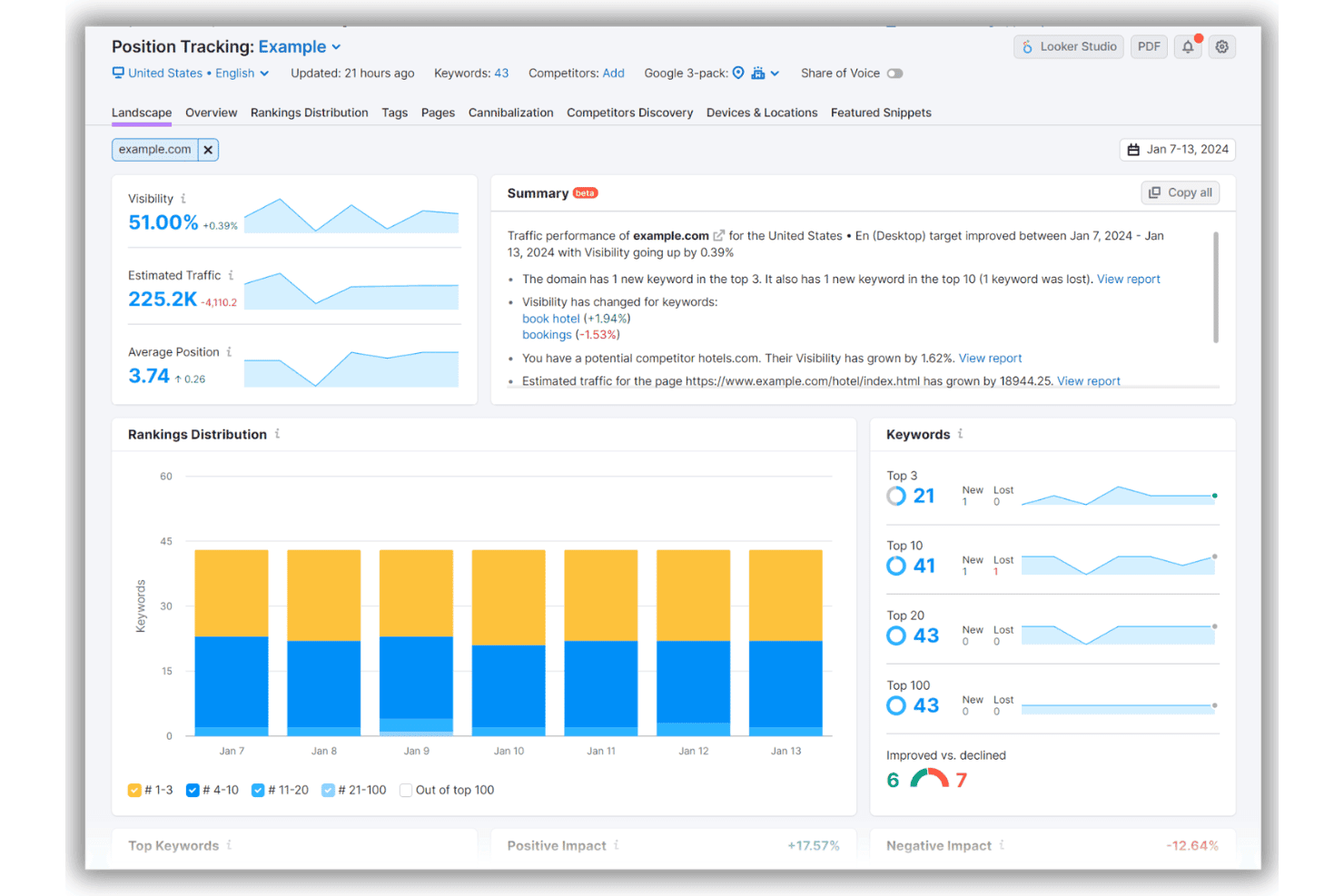
Semrush's Position Tracking tool displays keyword rankings, visibility metrics, and traffic performance for example.com across a weekly date range. Semrush is a digital marketing platform that combines keyword research, topic discovery, content gap analysis, and competitive intelligence tools to help marketers identify what content to create and how it performs across search.
Who Is Semrush Best For?
Semrush is a strong fit for SEO specialists and content marketing managers at mid-size to enterprise brands who need data-backed content strategy decisions.
Why I Picked Semrush
I picked Semrush as one of the best because its Keyword Gap and Content Gap tools let me identify, at a glance, which topics competitors rank for that my site hasn't touched yet. I also use Traffic Analytics to pull a competitor's estimated traffic by page, which makes it easy to build a content report around what's actually working in my space. Add in the scheduled PDF reporting and Looker Studio integration, and I can turn that competitive data into shareable insight reports my whole team can act on.
Semrush Key Features
- Topic Research tool: Surfaces subtopics, headline ideas, and questions based on a starting keyword or domain.
- AI visibility tracking: Monitors how your brand or content appears across AI-powered search environments and aggregates prompt results.
- Social media integration: Connects with platforms like Facebook, LinkedIn, and Twitter to track and analyze published content performance.
- On-page SEO checker: Audits web pages and provides actionable SEO recommendations for content optimization.
Semrush Integrations
Semrush offers native integrations with Google Analytics, Google Search Console, Google Ads, Google Business Profile, Gmail, Google Docs, Facebook, LinkedIn, Pinterest, Instagram, and YouTube. It connects with Zapier and provides an API for custom integrations.
Pros and Cons
Pros:
- Reliable traffic estimates by individual page
- Detailed keyword clustering and topic suggestions
- Pinpoints competitor content and traffic gaps
Cons:
- Limited seat allowances on standard plans
- Limited third-party content curation capabilities

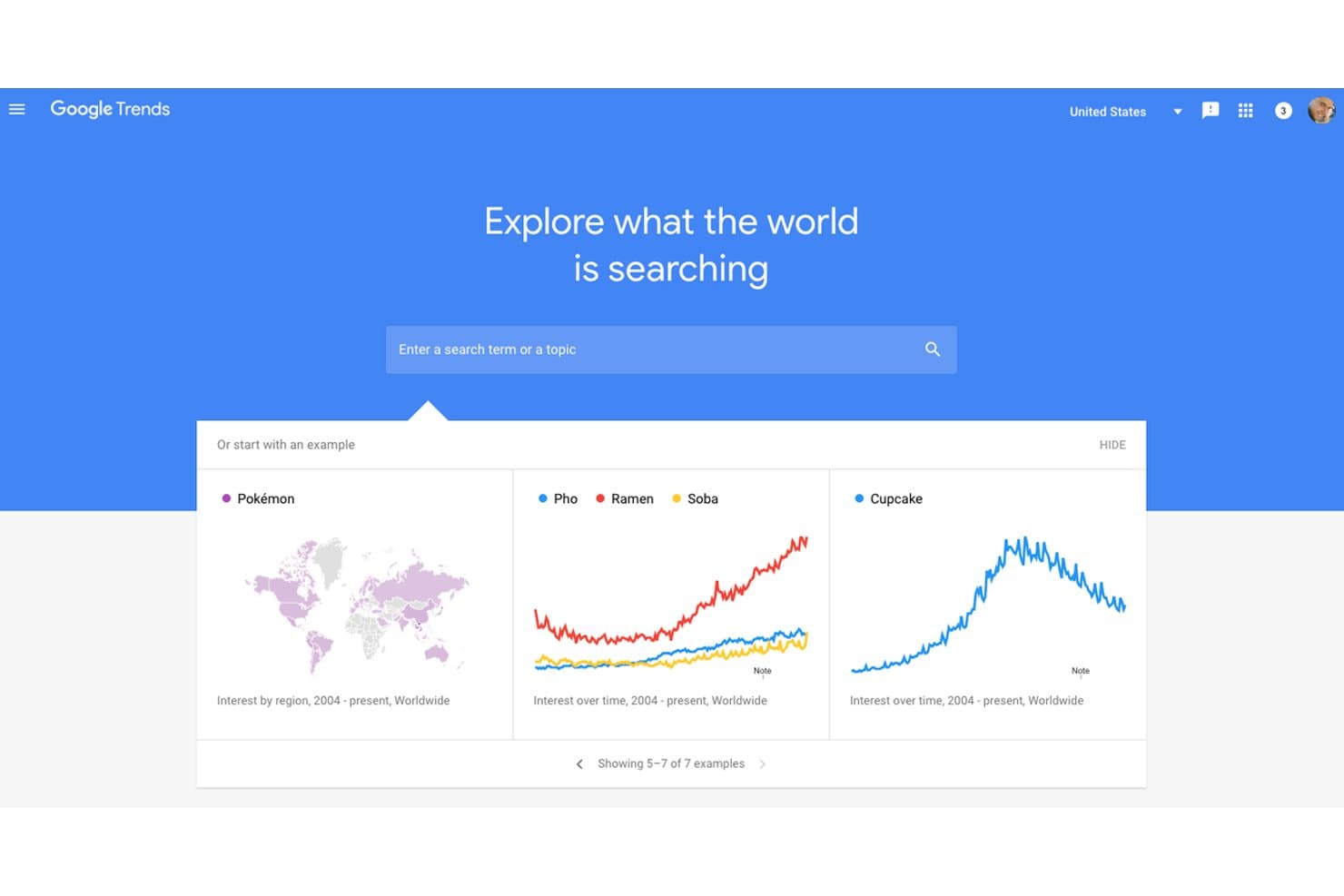
Google Trends offers a homepage with a search bar and example trend comparisons, including food and pop culture topics, to help users discover what the world is searching for. Google Trends is a free search-trend intelligence tool that tracks real-time and historical search interest by keyword, region, and category across Google Search, News, Shopping, Images, and YouTube.
Who Is Google Trends Best For?
Google Trends is a natural fit for SEO specialists and content marketers who need to validate topic ideas against real search demand before investing in content production.
Why I Picked Google Trends
Google Trends earns its spot because no other free tool gives me real-time visibility into search interest across countries, regions, and cities at the same time. I use the geographic breakdown to pinpoint exactly where demand for a topic is surging, which tells me where to localize content before the moment passes. The Related Queries panel also surfaces rising search terms I wouldn't have thought to target, consistently expanding my content calendar with ideas grounded in actual search behavior.
Google Trends Key Features
- Trending Now panel: Shows what is currently spiking in search volume by location and topic.
- Category and search-type filters: Lets you filter results by category and across Web, Image, News, Shopping, and YouTube search types.
- Year in Search reports: Provides access to annual reports summarizing the year's most popular topics and searches.
- Chart export and embed options: Allows users to export trend data charts or embed them in presentations and web pages.
Google Trends Integrations
Native integrations are not publicly documented.
Pros and Cons
Pros:
- Multi-year historical search data available
- Global and regional search interest comparison
- Free access to real-time trend data
Cons:
- Cannot surface specific articles or publishers
- No content performance or engagement metrics
Learn more about Google Trends: Best for visual topic ideation
- Free plan available
- From $13.33/month (billed annually)
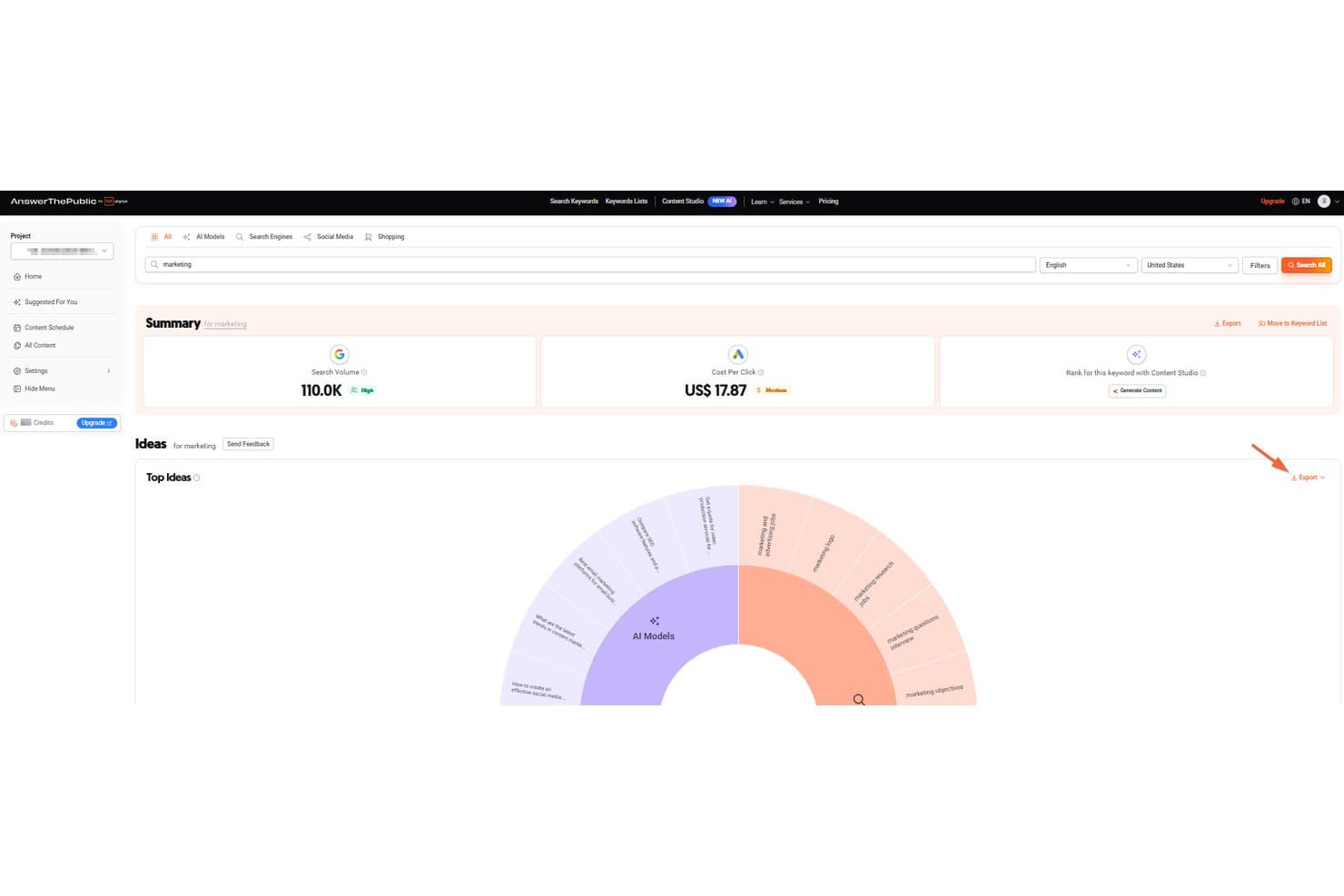
AnswerThePublic offers a keyword research dashboard displaying search volume, cost-per-click, and a visual idea wheel for the term 'marketing'. AnswerThePublic is a search listening tool that pulls autocomplete data from Google, Bing, and YouTube and organizes it into visual maps of questions, prepositions, comparisons, and related search terms.
Who Is AnswerThePublic Best For?
It's a natural fit for content marketers and SEO specialists at small-to-mid-sized businesses who need a fast way to generate topic ideas from real search behavior.
Why I Picked AnswerThePublic
AnswerThePublic earns its spot on my shortlist because of how it turns raw autocomplete data into a visual question map. Instead of scrolling through flat keyword lists, I can see at a glance how a topic branches into questions, prepositions, and comparisons. I particularly like the search listening alerts, which flag new queries around a topic so my team stays on top of shifting search behavior.
AnswerThePublic Key Features
- Multiple data sources: Pulls autocomplete search data from Google, Bing, and YouTube in multiple languages.
- Content Studio: Generates SEO-optimized articles and supports one-click publishing to WordPress, Shopify, and Webflow.
- Bulk CSV export: Lets you export all search visualization data for use in planning and analytics tools.
- Keyword list projects: Allows users to organize and save discovered keywords into separate projects for future reference.
AnswerThePublic Integrations
AnswerThePublic offers an API to connect with tools like Google Web, YouTube, Bing, Amazon, TikTok, Instagram, ChatGPT, and Gemini.
Pros and Cons
Pros:
- Supports research in multiple languages
- Tracks changes in search demand over time
- Visual topic maps are instantly generated
Cons:
- No measurement of discovered content’s impact
- Strict daily query limits on free plan
Learn more about AnswerThePublic: Best for audience research insights
- Free plan available
- From $38/month (billed annually)
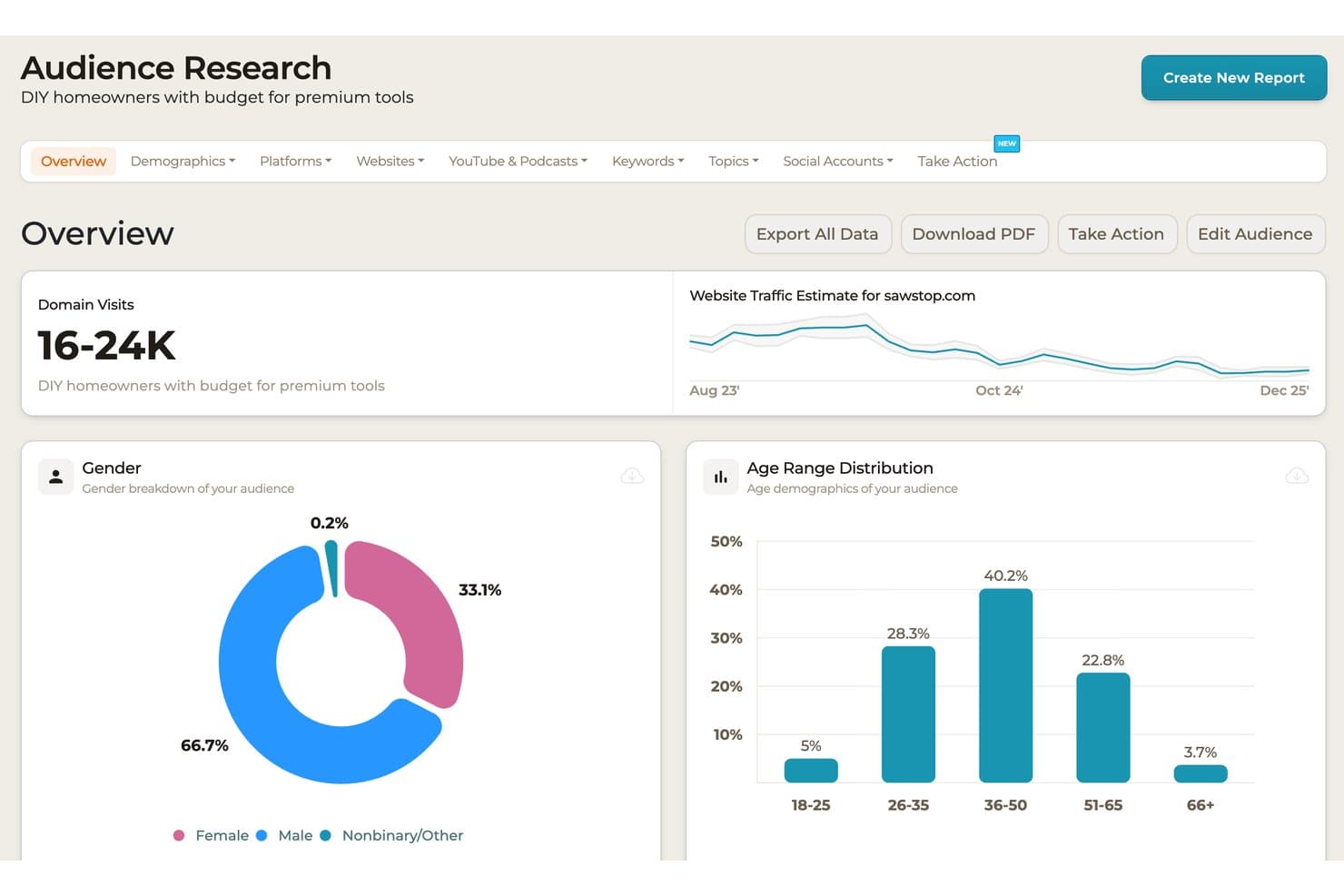
SparkToro offers an audience research overview dashboard showing domain visits, website traffic trends, gender breakdown, and age range distribution for DIY homeowners with a budget for premium tools. SparkToro is an audience intelligence platform that maps where target audiences spend time online, surfacing the podcasts, websites, YouTube channels, social accounts, and publications they actively engage with.
Who Is SparkToro Best For?
SparkToro is a strong fit for content marketers, SEO professionals, and PR teams at agencies or small businesses who need to understand audience behavior before planning campaigns or outreach.
Why I Picked SparkToro
SparkToro earns its spot on my shortlist because no other tool answers the question I ask first before planning any content campaign: where does my specific audience actually spend time? I use the audience search to pull ranked lists of the podcasts, subreddits, and YouTube channels a target audience engages with, which tells me exactly where to publish or pitch. The bio keyword module is also genuinely useful, surfacing the exact language an audience uses to describe themselves, which directly informs content positioning.
SparkToro Key Features
- Demographics analysis: Uncovers aggregated data on age, gender, seniority, company size, and salary for any audience.
- Search keywords insights: Surfaces search terms your audience uses on Google and Bing for better content planning.
- Press and publications discovery: Lists trusted news outlets and digital publishers followed by your audience.
- Apps and AI tools tracking: Reveals which products and software your target audience actively adopts.
SparkToro Integrations
Native integrations are not publicly documented. SparkToro offers API access for custom integrations and supports Model Context Protocol (MCP) server connections for tools like ChatGPT and Claude.
Pros and Cons
Pros:
- Uncovers audience-used search and bio keywords
- Identifies niche influencers and media sources
- Maps where audiences spend time online
Cons:
- Search limits apply to lower subscription tiers
- No competitor monitoring tools
Learn more about SparkToro:
Andre verktøy for innholdsoppdagelse
Her er noen flere alternativer for verktøy for innholdsoppdagelse som ikke kom med på kortlisten min, men som likevel er verdt å se nærmere på:
- 11Exploding TopicsBest for spotting emerging topics early
- 12Brand24Best for social mention tracking
- 13Sprout SocialBest for integrated social listening insights
- 14Scoop.itBest for collaborative topic curation
- 15MeltwaterBest for global media intelligence coverage
- 16ClearscopeBest for keyword-driven topic inspiration
- 17Lumen by TalkwalkerBest for cross-channel media monitoring
- 18Flipboard Best for personalized news aggregation
- 19GlimpseBest for early consumer trend spotting
- 20InoReaderBest for advanced RSS filtering
How I Evaluate Content Discovery Tools
I split my evaluation into core functionality—like trend surfacing and engagement metrics—and differentiators like AI clustering and competitor tracking that separate good tools from great ones.
Core Functionality (Table Stakes For This List)
When I'm selecting tools for my list, I rank each one on a scale from 0 (does not offer the functionality) to 5 (excels in this area) for each core functionality listed below. Then, I calculate the tool's total score into a percentage. Each tool needs to achieve a minimum total score of 75% to be considered for inclusion.
- Topic & Trend Discovery: I evaluate how well a tool surfaces rising topics beyond basic keyword matching—like spotting a trending subtopic in SaaS marketing before it hits mainstream publications.
- Content Performance Metrics: Each tool should show engagement data like social shares, backlinks, and interactions so you can gauge what's actually resonating with your target audience.
- Search & Filtering: I look for filtering by date range, domain, content type, region, and engagement thresholds so you can narrow results to what's relevant to your niche.
- Influencer & Publisher Identification: Tools that connect high-performing content to the authors and publishers behind it give your PR and outreach teams a real head start on partnerships.
- Content Curation & Sharing: I check whether you can save, organize, and distribute discovered content through boards, feeds, or direct integrations with social scheduling tools.
- Competitor & Domain Analysis: The ability to plug in a competitor's domain and see their top-performing content by engagement helps you spot gaps and opportunities in your own strategy.
Once I have a list of tools that meet the criteria, I consider what sets each platform apart.
Differentiating Factors (What Sets Vendors Apart)
Here's how I compare and contrast different vendors:
Standout Features
AI-powered topic clustering is a big one—I look for tools that group related content into themes so you can spot narrative trends without manually sorting through hundreds of articles. Predictive performance scoring is another differentiator, where tools use historical engagement data to flag which topics are likely to gain traction before you commit resources. I also value real-time alerts that notify your team the moment relevant content is published, which is especially useful during product launches or fast-moving news cycles.
Beyond Features
Data source coverage matters a lot here. Some tools index only web articles, while others pull from Reddit, podcasts, newsletters, and social platforms—giving you a much wider view of where conversations happen. I also evaluate how well each tool connects to your existing marketing stack, since pushing discovered content directly into a CMS or scheduler saves real time. Pricing structure is worth a close look too, especially whether a tool charges per seat or by usage like queries and tracked topics.
Slik velger du verktøy for innholdsoppdagelse
Det er lett å gå seg vill i lange funksjonslister og kompliserte prismodeller. For å hjelpe deg med å holde fokus mens du arbeider deg gjennom din unike prosess for programvarevalg, får du her en sjekkliste over faktorer du bør ha i tankene:
| Faktor | Hva du bør vurdere |
|---|---|
| FaktorSkalerbarhet | Hva du bør vurdereKan verktøyet håndtere veksten i innholdsmengde, søk og brukere etter hvert som teamet eller innholdsstrategien din utvides? |
| FaktorIntegrasjoner | Hva du bør vurdereVil verktøyet enkelt kunne kobles til CMS-et, planleggingsverktøyet for sosiale medier eller analyseverktøyene dine? Se etter integrasjoner som er innebygd, automatiseringsverktøy eller et tilgjengelig API for fremtidige behov. |
| FaktorTilpasningsmuligheter | Hva du bør vurdereHvor mye kan du justere dashbord, varsler eller søkefiltre for å tilpasse dem til teamets arbeidsflyt, emner og rapporteringsstiler? |
| FaktorBrukervennlighet | Hva du bør vurdereVil alle i teamet raskt ta verktøyet i bruk, eller vil du bruke for mye tid på opplæring? Vurder introduksjonsmateriell og hvor enkelt grensesnittet er. |
| FaktorImplementering og oppstart | Hva du bør vurdereHvor lang tid tar det å sette opp verktøyet, og trenger du hjelp fra IT-avdelingen eller opplæringsøkter? Vurder leverandørens brukerstøtte og tilgjengelige læringsressurser. |
| FaktorKostnad | Hva du bør vurderePasser prismodellen (per bruker, per søk, trinnvis) med budsjettet ditt nå og etter hvert som du vokser? Vær oppmerksom på skjulte bruksgebyrer eller binding til kontrakter. |
| FaktorSikkerhetstiltak | Hva du bør vurdereHvilke tiltak for personvern, brukertillatelser eller tilgangskontroll tilbyr leverandøren? Deler du sensitive søkeord eller domener som krever ekstra beskyttelse? |
| FaktorTilgjengelig brukerstøtte | Hva du bør vurdereSvarer kundestøtten raskt og er den tilgjengelig når du trenger den? Se etter direktechat, dedikert brukerstøtte og relevante hjelpekanaler for hastesaker. |
Hva er verktøy for innholdsoppdagelse?
Verktøy for innholdsoppdagelse er digitale plattformer som hjelper markedsførere med å finne, organisere og evaluere populære emner, artikler og påvirkere på tvers av flere nettbaserte kilder. De fremhever populært innhold, sporer engasjementsmålinger og identifiserer forfattere eller utgivere – alt for å informere innholdsstrategi, konkurrentundersøkelser og oppsøkende arbeid. Disse verktøyene forenkler arbeidet med å identifisere hva som fenger i bransjen din, noe som gjør det enklere å fylle innholdskalendere og reagere raskt på nye trender.
Funksjoner i verktøy for innholdsoppdagelse
Når du velger verktøy for innholdsoppdagelse, bør du se etter følgende nøkkelfunksjoner:
- Overvåking av emner: Spor temaer og emner på nettet i sanntid, slik at teamet ditt holdes oppdatert om populære samtaler og nye trender i bransjen din.
- Engasjementsanalyse: Få tilgang til data om delinger, kommentarer, tilbakekoblinger og andre interaksjoner for å se hvilke emner og artikler som faktisk fenger målgruppene.
- Avanserte søkefiltre: Begrens resultatene etter søkeord, dato, innholdstype, region eller kilde, slik at du raskt kan finne den mest relevante informasjonen for målene dine.
- Identifisering av påvirkere: Oppdag forfattere, journalister og utgivere som driver samtaler, noe som hjelper med oppsøkende arbeid, partnerskap og spredning av innhold.
- Innholdstavler for kuratering: Organiser oppdagede artikler i tavler eller samlinger, slik at det blir enklere å dele, finne frem til igjen eller samarbeide på tvers av team.
- Sporing av konkurrentenes innhold: Overvåk hva konkurrentene dine publiserer, og hvilke innholdselementer som gjør det godt, slik at du får verdifull innsikt til gap-analyse og utvikling av innholdsideer.
- Alternativer for eksport og deling: Send enkelt kuratert innhold til sosiale kanaler, nyhetsbrev eller intern kommunikasjon med funksjoner for direkte publisering eller eksport som er innebygd i plattformen.
- Tilgang til historiske data: Gå gjennom tidligere engasjement, trender eller innholdsresultater for å informere fremtidige kampanjer og sammenligne strategien din over tid.
Vanlige AI-funksjoner i verktøy for innholdsoppdagelse
I tillegg til standardfunksjonene i verktøy for innholdsoppdagelse som er nevnt ovenfor, tar mange av disse løsningene i bruk kunstig intelligens med funksjoner som:
- Automatisert emnegruppering: Bruker kunstig intelligens til å gruppere relaterte artikler og samtaler i tematiske grupper, noe som gjør det enklere å oppdage nye fortellinger og mangler i innholdet med et øyekast.
- Prediktiv trendanalyse: Utnytter maskinlæring til å forutsi hvilke emner eller søkeord som sannsynligvis vil få gjennomslag, slik at du kan prioritere innholdsideer før de når toppen.
- Smarte innholdsanbefalinger: Gir personlige forslag til artikler, påvirkere eller kilder basert på tidligere interesser, søkemønstre og engasjementsdata.
- Avviksdeteksjon: Identifiserer plutselige økninger eller fall i innholdsengasjement, og varsler deg om virale historier, kriser eller uventede endringer i publikums oppmerksomhet.
- Sentimentanalyse basert på kunstig intelligens: Evaluerer automatisk tonen og holdningen i artikler eller sosiale samtaler, slik at du kan vurdere offentlig oppfatning av emner eller merkevarer.
Fordeler med verktøy for innholdsoppdagelse
Implementering av verktøy for innholdsoppdagelse gir flere fordeler for teamet og virksomheten din. Her er noen av fordelene du kan se frem til:
- Raskere utvikling av innholdsideer: Finn populære emner og artikler umiddelbart for å inspirere til nye innholdsideer, bygge et rikt innholdsbibliotek og forenkle redaksjonell planlegging.
- Smarte konkurrentinnsikter: Overvåk innhold som gjør det godt hos konkurrentene, slik at du kan identifisere mangler og justere strategien din deretter.
- Forbedret oppsøkende arbeid og partnerskap: Finn og evaluer raskt innflytelsesrike forfattere og utgivere for mulige samarbeids- eller spredningsmuligheter.
- Mer informerte beslutninger: Bruk engasjementsanalyse og prediktive målinger til å prioritere innhold som har større sannsynlighet for å fenge målgruppen din.
- Effektiv innholdskuratering: Organiser og distribuer relevante tredjepartsartikler til nyhetsbrev, sosiale medier eller intern deling med bare noen få klikk.
- Raskere reaksjon på trender: Sanntidsvarsler og automatiserte feeder hjelper teamet ditt med å reagere raskt på nye samtaler eller virale historier.
- Optimalisert ressursfordeling: Historisk trendanalyse viser hvor du bør fokusere tid og budsjett for å oppnå størst mulig effekt av innholdsmarkedsføringen.
Kostnader og priser for verktøy for innholdsoppdagelse
Valg av verktøy for innholdsoppdagelse krever en forståelse av de ulike prismodellene og abonnementene som er tilgjengelige. Kostnadene varierer basert på funksjoner, teamstørrelse, tillegg og mer. Tabellen nedenfor oppsummerer vanlige abonnementer, gjennomsnittsprisene deres og typiske funksjoner som er inkludert i løsninger for innholdsoppdagelse:
Sammenligningstabell for verktøy for innholdsoppdagelse
| Plantype | Gjennomsnittspris | Vanlige funksjoner |
|---|---|---|
| PlantypeGratisabonnement | Gjennomsnittspris$0 | Vanlige funksjonerGrunnleggende søk, begrenset antall lagrede emner, minimale historiske data og brukerstøtte fra fellesskapet. |
| PlantypePersonlig abonnement | Gjennomsnittspris$10–$40/bruker/måned | Vanlige funksjonerAvansert filtrering, tavler for innholdskuratering, grunnleggende varsler og begrenset konkurrentovervåking. |
| PlantypeForretningsabonnement | Gjennomsnittspris$40–$100/bruker/måned | Vanlige funksjonerTilgang for flere brukere, utvidede integrasjoner, engasjementsanalyse, identifisering av influensere og høyere søkegrenser. |
| PlantypeVirksomhetsabonnement | Gjennomsnittspris$100–$250+/bruker/måned | Vanlige funksjonerTilpasset emneovervåking, API-tilgang, dedikert brukerstøtte, avansert sikkerhet samt automatisert rapportering og hjelp med oppsett. |
Vanlige spørsmål om verktøy for innholdsoppdagelse
Her er noen svar på vanlige spørsmål om verktøy for innholdsoppdagelse:
Hvordan sporer verktøy for innholdsoppdagelse nye trender?
Disse verktøyene overvåker artikler, innlegg i sosiale medier og aktiviteter fra influensere på tvers av flere nettbaserte kilder. De markerer emner som er i vekst, ved å analysere økninger i engasjement, bruk av nøkkelord eller plutselige økninger i innholdsmengden, slik at du kan oppdage trender tidlig.
Kan verktøy for innholdsoppdagelse integreres med den eksisterende markedsføringsprogramvaren min?
Ja, mange løsninger tilbyr integrasjoner med CMS-plattformer, verktøy for planlegging av innlegg i sosiale medier og analyseverktøy. Kontroller om verktøyet støtter direkte publisering, API-tilgang eller tilkobling til verktøy som Slack eller e-post for enklere automatisering av arbeidsflyten.
Hvilke typer innholdskilder dekker disse verktøyene?
De fleste overvåker nettartikler og sosiale medier, men noen inkluderer nyhetsbrev, podkaster, fora eller videoplattformer. Vurder hvilke innholdstyper og kanaler som er viktige for strategien din når du sammenligner verktøy.
Passer verktøy for innholdsoppdagelse for globale team?
Ja, mange alternativer støtter flerspråklig søk, regionale filtre og internasjonale datakilder. Det er viktig å bekrefte språkdekning og hvor oppdaterte dataene er hvis du trenger innsikt fra mer enn ett geografisk område.
Trenger jeg teknisk ekspertise for å konfigurere og bruke et verktøy for innholdsoppdagelse?
Nei, de fleste plattformer er utviklet for markedsførere og krever lite eller ingen programmering. Avanserte funksjoner for tilpasning, integrasjon eller analyse kan imidlertid ha nytte av noe teknisk kunnskap eller innledende hjelp med oppsettet.