

Verktøy for automatisering av sosiale medier er plattformer som lar deg planlegge innlegg, administrere innhold og følge med på engasjement på tvers av flere sosiale kanaler fra ett sted. Hvis du leter etter måter å spare tid, redusere manuelt arbeid og holde merkevaren din aktiv på nettet, kan det riktige verktøyet for markedsføringsautomatisering gjøre en målbar forskjell for både virksomhetsteam og små bedrifter. Denne listen hjelper deg med å sammenligne ledende alternativer for 2026, slik at du kan finne en alt-i-ett-løsning som passer teamets arbeidsflyter, strategi for markedsføring i sosiale medier og behov for rapportering.
Why Trust Our Software Recommendations
6,700+
Reviews
20
Industry experts
16+
Evaluation factors
14
Years
Our team has been testing and reviewing software since 2012. As marketing leaders ourselves, we know how difficult—and important—it is to choose the right software.
For this guide, we evaluated tools using hands-on testing and independent research, scoring tools using our selection criteria.
Our reviews reflect our human editorial judgment, not a sales pitch.
Expert reviewers:
 Gui DrusinaCreative Director
- Shriya GhateSenior Marketing Lead
 Amanda JacquesMarketing Ops Leader

Sammenligningstabell for verktøy for automatisering av sosiale medier
Denne sammenligningstabellen oppsummerer prisopplysningene for mine beste utvalgte verktøy for automatisering av sosiale medier:
| Tool | Best For | Trial Info | Price | ||
|---|---|---|---|---|---|
| 1 | Best for LinkedIn employee advocacy teams | Free demo available | From £5/user/month (billed annually) | Website | |
| 2 | Best for advanced team permissions | 14-day free trial + free demo available | From $69/user/month (billed annually) | Website | |
| 3 | Best for managing multiple brands in one dashboard | Free trial available | From $24/user/month (billed annually) | Website | |
| 4 | Best for custom workflow automation | Free plan + free demo available | From $9/month (billed annually) | Website | |
| 5 | Best for social listening integration | Free trial + free plan available | From $79/user/month (billed annually) | Website | |
| 6 | Best for client approval workflows | 14-day free trial available | From $29/month | Website | |
| 7 | Best for collaborative post scheduling | Free plan available | From $5/month per channel (billed annually) | Website | |
| 8 | Best for content discovery and curation | 7-day free trial available | From $19/month (billed annually) | Website | |
| 9 | Best for bulk content uploading | 14-day free trial + free demo available | From $25.50/month (billed annually) | Website | |
| 10 | Best for unified inbox management | 30-day free trial | From $79/user/month (billed annually) | Website |


Anmeldelser av verktøy for automatisering av sosiale medier
\u003cspan style=\u0022font-weight: 400\u0022\u003eNedenfor finner du mine detaljerte sammendrag av verktøyene for automatisering av sosiale medier som kom med på kortlisten min. Anmeldelsene mine gir en grundig gjennomgang av funksjonene, de beste bruksområdene og integrasjonene til hver plattform, slik at du kan finne den som passer best for deg.\u003c/span\u003e
 Best for LinkedIn employee advocacy teams
- Free demo available
- From £5/user/month (billed annually)
Visit WebsiteCustomer Rating:5/5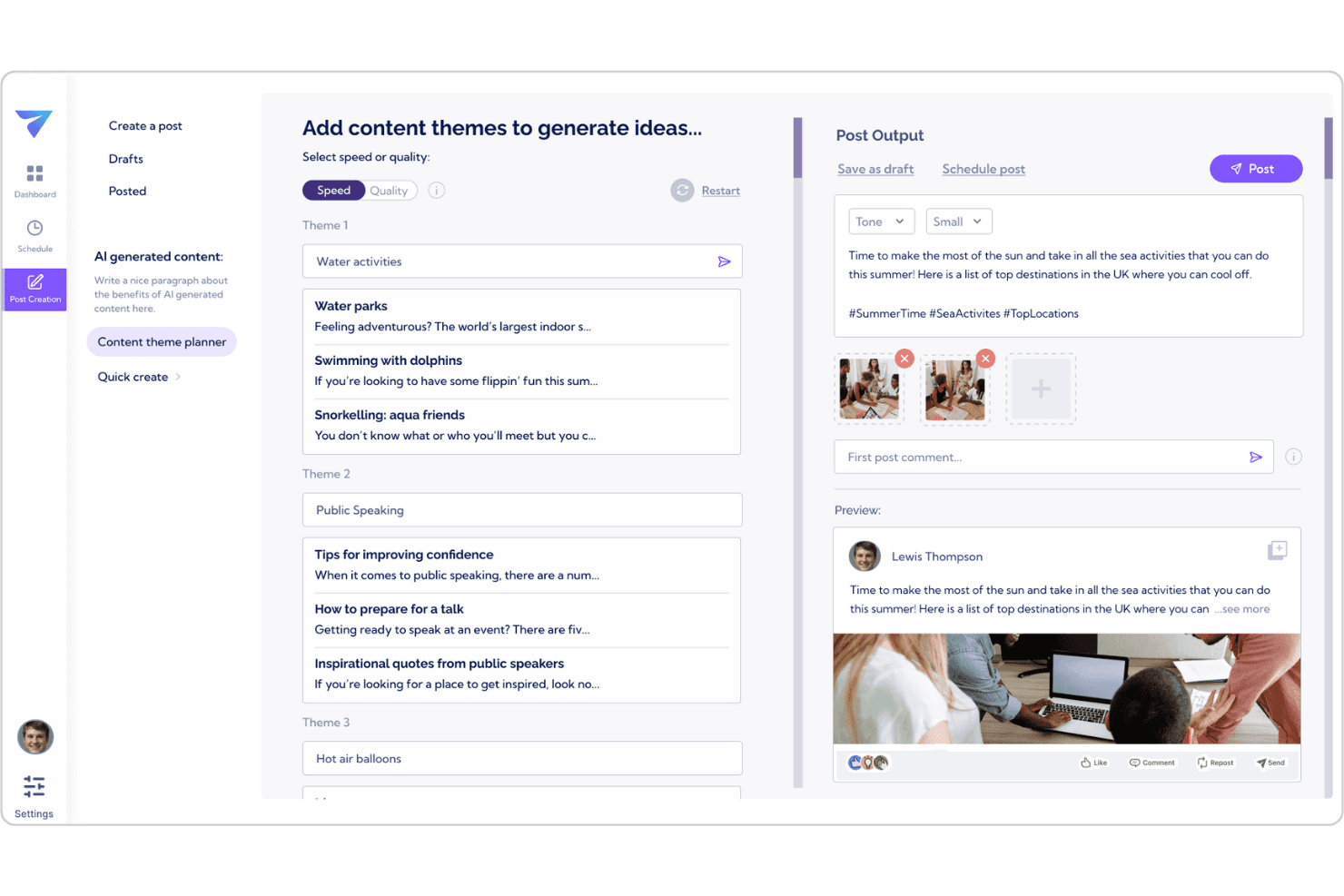
Vulse generates LinkedIn post ideas and drafts using AI-powered content tools. Vulse is a LinkedIn-only employee advocacy platform that combines AI-driven post scheduling, tone-of-voice content generation, team leaderboards, and automated performance reporting.
Who Is Vulse Best For?
Vulse is a strong fit for B2B marketing teams running LinkedIn employee advocacy programs where consistent, on-brand personal posting across a distributed team is the priority.
Why I Picked Vulse
Vulse earns its spot on my shortlist because of how well it handles LinkedIn employee advocacy at scale. I particularly like the tone-of-voice matching feature: when an admin pushes a brand-approved post to the team, Vulse rewrites it in each member's individual style before it hits their drafts. Pair that with automated weekly performance reports and team leaderboards that gamify participation, and you have a system that keeps advocacy programs running without constant nudging.
Vulse Key Features
- Drag-and-drop content calendar: Schedule and rearrange LinkedIn posts across personal profiles and company pages using a visual calendar with color-coded status indicators.
- Automated weekly performance reports: Vulse sends inbox-ready reports with plain-English summaries and personalized recommendations, so you don't have to pull data manually.
- Proprietary Account Score: A single health metric that tracks posting consistency, engagement quality, and audience growth across your LinkedIn presence over time.
- Unified LinkedIn inbox: Aggregates company page mentions, comments, and tags into one feed, letting team members reply from any connected account without sharing credentials.
Vulse Integrations
Native integrations are not clearly documented. However, Vulse connects through LinkedIn’s official Community Management API.
Pros and Cons
Pros:
- Team leaderboards encourage posting participation
- LinkedIn-native analytics and reporting included
- AI rewrites posts in team members’ voices
Cons:
- No automation for inbox replies or DMs
- No support for platforms beyond LinkedIn
Learn more about Vulse: Best for advanced team permissions
- 14-day free trial + free demo available
- From $69/user/month (billed annually)
Visit WebsiteCustomer Rating:4.8/5
Statusbrew manages social publishing, engagement, and analytics. Statusbrew is designed for organizations that need granular control over social media workflows and user access. Marketing teams in regulated industries or large enterprises can use its advanced team permissions to manage who can create, approve, and publish content across multiple brands and social accounts. This level of control helps reduce risk and ensures only the right people have access to sensitive publishing actions.
Why I Picked Statusbrew
For teams that need strict control over who can access and manage social media accounts, Statusbrew stands out with its advanced team permissions. You can assign custom roles, set granular approval workflows, and restrict publishing rights to specific users or groups. I appreciate how this setup helps organizations maintain oversight and accountability, especially when multiple brands or regions are involved. These features make Statusbrew a strong choice for businesses where security and compliance are top priorities in social media automation.
Statusbrew Key Features
In addition to its advanced permission controls, Statusbrew offers several other features for managing social media at scale:
- Unified Social Inbox: Manage messages, comments, and mentions from multiple platforms in one place.
- Automated Publishing: Schedule and queue posts across different social channels with customizable timing.
- Performance Analytics: Access detailed reports on engagement, reach, and audience growth for each connected account.
- Ad Comment Management: Monitor and respond to comments on paid social media campaigns directly from the dashboard.
Statusbrew Integrations
Integrations include TikTok, Reddit, Pinterest, and Meta Threads.
Pros and Cons
Pros:
- Custom white-label reports for clients
- AI sentiment analysis and auto-routing
- Robust multi-step approval workflows
Cons:
- No built-in AI content generation
- Mobile app lacks full desktop power
Learn more about Statusbrew: Best for managing multiple brands in one dashboard
- Free trial available
- From $24/user/month (billed annually)
Visit WebsiteCustomer Rating:4.8/5
SocialBee automates social media scheduling, content curation, and analytics. If you manage multiple brands or clients, SocialBee gives you a single dashboard to organize all your social media accounts. Agencies and marketing teams can use its workspace structure to keep content, scheduling, and analytics separate for each brand. This setup helps reduce confusion and makes it easier to collaborate without mixing up posts or data.
Why I Picked SocialBee
SocialBee stands out for teams that need to manage multiple brands or clients without mixing up content or analytics. I picked it because its dashboard lets you create separate workspaces for each brand, so you can keep posts, schedules, and reports organized. The tool also offers role-based access, which means you can assign team members to specific brands and control who sees what. This structure is especially useful for agencies or marketing teams juggling several clients at once.
SocialBee Key Features
Some other features in SocialBee help teams automate and optimize their social media management:
- Category-Based Scheduling: Organize posts into content categories and set unique schedules for each, so you can balance different types of content across your channels.
- Content Recycling: Automatically re-queue and repurpose evergreen posts to keep your feeds active without manual rescheduling.
- Post Variations: Create multiple versions of a single post to avoid repetition and keep your messaging fresh across platforms.
- Built-In URL Shortener: Shorten links directly within the platform and track click data for each post.
SocialBee Integrations
Integrations include Pinterest, TikTok, YouTube, and Threads.
Pros and Cons
Pros:
- Affordable entry for small agencies
- Unlimited AI credits for post creation
- Separate editors for each platform
Cons:
- Limited social listening features
- Underwhelming mobile app experience
Learn more about SocialBee: 4Best for custom workflow automation
Make
- Free plan + free demo available
- From $9/month (billed annually)
Visit WebsiteCustomer Rating:4.7/5
Make automates workflows by connecting apps and reducing manual tasks. If you need to build highly customized social media workflows, Make offers a flexible automation platform that goes far beyond basic scheduling. It’s a strong fit for marketing teams, agencies, and technical users who want to connect multiple apps and automate complex, multi-step processes. With its visual workflow builder, Make helps you design automations that match your exact campaign and reporting needs.
Why I Picked Make
Unlike most social media automation tools that focus on standard scheduling, Make lets you design custom workflows tailored to your exact needs. You can build multi-step automations that connect social channels with CRMs, analytics platforms, and other business apps. I appreciate how the visual workflow builder allows you to map out complex processes, such as triggering posts based on data changes or automating cross-channel reporting. This level of customization makes Make a strong choice for teams that need more than just basic post scheduling.
Make Key Features
Some other Make features help teams automate and manage their social media operations:
- Prebuilt Templates Library: Access a wide range of ready-made automation templates for common social media tasks.
- Error Handling Tools: Set up custom error notifications and fallback actions to keep workflows running smoothly.
- Scheduling Module: Schedule automations to run at specific times or intervals for campaign consistency.
- Version History: Track changes and revert to previous workflow versions as needed.
Make Integrations
Integrations include Chat ON Desk, Disqus, dlvr.it, and Engage AI.
Pros and Cons
Pros:
- Detailed execution logs for debugging
- Built-in AI agents for content creation
- Cost-effective for multi-step scenarios
Cons:
- No built-in post preview or scheduler
- API limits on X and LinkedIn posting
Learn more about Make: Best for social listening integration
- Free trial + free plan available
- From $79/user/month (billed annually)
Visit WebsiteCustomer Rating:4.5/5
Agorapulse centralizes social messages and interactions in one inbox. Agorapulse gives marketing teams a way to monitor, manage, and respond to social conversations from one place. If you need to track brand mentions, keywords, and competitor activity across multiple channels, its social listening integration stands out. Agencies and brands looking to stay ahead of trends and reputation issues will find these monitoring tools especially useful.
Why I Picked Agorapulse
What sets Agorapulse apart for me is its deep focus on social listening integration. You can set up custom keyword searches to monitor brand mentions, industry topics, and competitor activity across multiple platforms. I appreciate how the unified inbox brings all these conversations together, making it easier to track and respond in real time. For teams that need to keep a close eye on reputation and trends, these listening tools make Agorapulse a strong choice among social media automation tools.
Agorapulse Key Features
Some other features that make Agorapulse valuable for social media automation include:
- Publishing Queue: Organize and schedule posts in advance for multiple channels.
- Team Collaboration Tools: Assign messages, share notes, and manage user roles within your team.
- Reporting Dashboard: Access visual reports on engagement, reach, and content performance.
- Social CRM: Track user interactions and maintain detailed contact profiles for your audience.
Agorapulse Integrations
Integrations include YouTube, Threads, Canva, and Bitly.
Pros and Cons
Pros:
- Shared calendars for client approvals
- Built-in social listening for keywords
- Excellent ROI and analytics reporting
Cons:
- AI features are basic versus rivals
- High learning curve for power reports
Learn more about Agorapulse: Best for client approval workflows
- 14-day free trial available
- From $29/month
Visit WebsiteCustomer Rating:4.5/5
Sendible streamlines social scheduling, monitoring, and reporting. Sendible is designed for agencies and teams that need a structured client approval process for social media content. Marketing professionals managing multiple brands can use its built-in approval workflows to keep clients in the loop and ensure every post meets brand standards. This setup helps reduce back-and-forth and keeps content moving smoothly from draft to published.
Why I Picked Sendible
For teams that need to keep clients involved in the content process, Sendible stands out with its dedicated client approval workflows. I picked Sendible because it lets you set up multi-step approval chains, so clients can review, comment, and approve posts before anything goes live. The platform also provides clear audit trails and status updates for every piece of content, which helps agencies and clients stay aligned. If your workflow depends on client sign-off, these features make Sendible a strong fit for social media automation.
Sendible Key Features
Some other features that make Sendible useful for social media automation include:
- Content Calendar: View, organize, and manage all scheduled posts in a single calendar interface.
- Bulk Scheduling: Upload and schedule multiple posts at once using CSV files.
- Social Listening: Monitor keywords, hashtags, and brand mentions across supported platforms.
- Image Editor: Edit and enhance images directly within the platform before publishing.
Sendible Integrations
Integrations include Instagram, LinkedIn, Threads, TikTok.
Pros and Cons
Pros:
- Optimal time scheduling for engagement
- Seamless Canva and Pexels integration
- Centralized inbox for all comments
Cons:
- Frequent account reconnects needed
- High price for small solo creators
Learn more about Sendible: Best for collaborative post scheduling
- Free plan available
- From $5/month per channel (billed annually)
Visit WebsiteCustomer Rating:4.4/5
Buffer simplifies social media management and publishing across platforms. Buffer is designed for teams that need to collaborate on social media scheduling and approvals. Marketing managers and content creators can use its shared social media calendar and draft workflows to coordinate posts before they go live. This approach helps reduce miscommunication and keeps everyone aligned on campaign timing.
Why I Picked Buffer
Buffer makes it easy for teams to work together on social media content before anything gets published. I picked Buffer because its collaborative post scheduling tools let multiple users draft, review, and approve posts in a shared calendar. The approval workflow helps marketing leads oversee content and catch issues before posts go live. This setup is especially useful for businesses that need to coordinate messaging across several team members or departments.
Buffer Key Features
Some other Buffer features help teams automate and analyze their social media presence:
- Multi-Channel Publishing: Schedule and publish posts across platforms like Instagram, Facebook, LinkedIn, and X from one dashboard.
- Hashtag Manager: Save and insert groups of hashtags into posts to keep content organized and consistent.
- Analytics Dashboard: Track engagement, reach, and performance metrics for each connected account.
- Link Shortening and Tracking: Shorten URLs and monitor click data directly within the platform.
Buffer Integrations
Integrations include Mastodon, Pinterest, Threads, and TikTok.
Pros and Cons
Pros:
- Cleanest and most intuitive interface
- Unlimited AI generation on all tiers
- First to support Bluesky and Threads
Cons:
- No unified inbox for TikTok or YouTube
- Analytics lack deep competitor tracking
 Best for content discovery and curation
- 7-day free trial available
- From $19/month (billed annually)
Visit WebsiteCustomer Rating:4.6/5
ContentStudio helps discover, plan, and publish content across platforms. ContentStudio stands out for teams and agencies that need to discover, curate, and share trending content across multiple channels. Its content discovery engine helps marketers surface relevant articles, videos, and social posts tailored to their audience. If you’re looking to keep your feeds fresh and engaging without manual research, ContentStudio’s automation and curation tools are built for that workflow.
Why I Picked ContentStudio
For marketers who need to keep their social channels filled with relevant, timely content, ContentStudio’s discovery and curation capabilities are hard to match. The platform’s content discovery engine pulls trending articles, videos, and social posts from across the web, letting you quickly find material that fits your audience. I like how you can set up automation rules to curate and share this content directly to your feeds, reducing manual effort. If your workflow depends on surfacing and sharing high-quality third-party content, ContentStudio is built for that need.
ContentStudio Key Features
Some other features that make ContentStudio useful for social media automation include:
- Visual Post Composer: Create and edit posts with a built-in image editor and content formatting tools.
- Approval Workflow: Set up multi-step content approval processes for teams and clients.
- Analytics Dashboard: Track engagement, reach, and performance metrics across all connected channels.
- Hashtag Suggestions: Get real-time hashtag recommendations based on your post content and platform.
ContentStudio Integrations
Integrations include WordPress, Medium, Webflow, and Shopify.
Pros and Cons
Pros:
- Direct publishing to 11+ platforms
- Helpful AI assistant for fast captions
- Unified inbox for all social messages
Cons:
- Higher price point than basic tools
- Occasional glitches with mobile uploads
Learn more about ContentStudio: Best for bulk content uploading
- 14-day free trial + free demo available
- From $25.50/month (billed annually)
Visit WebsiteCustomer Rating:4.4/5
SocialPilot automates social scheduling, analytics, and content curation. SocialPilot is designed for agencies and teams that need to manage high volumes of social content across multiple accounts. Its bulk content uploading feature helps social media managers save time by scheduling hundreds of posts at once. This makes it a strong fit for businesses handling frequent campaigns or working with many clients.
Why I Picked SocialPilot
For teams that need to schedule large volumes of content, SocialPilot’s bulk content uploading stands out. You can upload hundreds of posts at once using a CSV file, which is especially useful for agencies managing multiple clients or campaigns. I like that the tool also lets you preview and edit posts in bulk before scheduling them. This focus on high-volume scheduling makes SocialPilot a practical choice for anyone looking to automate repetitive posting tasks at scale.
SocialPilot Key Features
Some other SocialPilot features help teams manage and optimize their social media presence:
- Client Management Dashboard: Organize multiple client accounts and manage permissions from a single interface.
- Content Calendar: Visualize scheduled posts across all platforms in a drag-and-drop calendar view.
- Social Media Analytics: Track engagement, audience growth, and post performance with built-in analytics tools.
- Team Collaboration Tools: Assign roles, review posts, and approve content within your team.
SocialPilot Integrations
Integrations include LinkedIn, TikTok, Pinterest, and YouTube.
Pros and Cons
Pros:
- Easy approval workflows for large teams
- Managing many accounts is cost-effective
- AI assistant for captions and hashtags
Cons:
- Analytics are limited to company pages
- Social inbox is missing on basic plans
Learn more about SocialPilot: Best for unified inbox management
- 30-day free trial
- From $79/user/month (billed annually)
Visit WebsiteCustomer Rating:4.3/5
Sprout Social delivers data-driven social scheduling, listening, and analytics. Sprout Social brings all your social conversations into a single, unified inbox, making it easier for marketing and customer care teams to stay organized. Agencies and brands managing high message volumes can use its collaborative tools to assign, tag, and respond to messages without missing a beat. This approach helps teams reduce response times and maintain a consistent brand voice across every channel.
Why I Picked Sprout Social
What sets Sprout Social apart for me is its unified inbox, which brings all your social messages, comments, and mentions into one dashboard. This feature is especially valuable for teams juggling multiple accounts or platforms, since it helps prevent missed messages and duplicate responses. I like that you can assign conversations to specific team members and track message status, which supports accountability and smooth collaboration. For organizations that prioritize fast, organized, and consistent communication, Sprout Social’s inbox management tools are a strong fit.
Sprout Social Key Features
Some other features that make Sprout Social a strong option for social media automation include:
- Automated Publishing Calendar: Plan, schedule, and manage posts across multiple platforms from a single calendar view.
- Social Listening Tools: Monitor keywords, hashtags, and brand mentions to track trends and audience sentiment.
- In-Depth Analytics Reports: Generate customizable reports on engagement, reach, and content performance.
- Asset Library: Store, organize, and reuse images, videos, and post templates for consistent branding.
Sprout Social Integrations
Integrations include Pinterest, Reddit, Threads, TikTok.
Pros and Cons
Pros:
- AI Optimal Send Times boost engagement
- Top-tier visual analytics and reports
- Unified Smart Inbox for all messages
Cons:
- No free version for small creators
- Many core features locked in top tiers
Learn more about Sprout Social:
Andre verktøy for automatisering av sosiale medier
\u003cspan style=\u0022font-weight: 400\u0022\u003eHer er noen flere alternativer for verktøy for automatisering av sosiale medier som ikke kom med på kortlisten min, men som fortsatt er verdt å se nærmere på:\u003c/span\u003e
- 11GumloopBest for AI-powered content generation
- 12Brand24Best for real-time brand monitoring
- 13HootsuiteBest for cross-platform analytics reporting
- 14LoomlyBest for visual content calendar planning
- 15Zoho SocialBest for scheduling posts based on audience activity
How I Evaluate Social Media Automation Tools
I look at social media automation tools across two layers: the baseline must-haves and the differentiators—like AI scheduling and multi-client approval flows—that separate strong from weak picks.
Core Functionality (Table Stakes For This List)
When I'm selecting tools for my list, I rank each one on a scale from 0 (does not offer the functionality) to 5 (excels in this area) for each core functionality listed below. Then, I calculate the tool's total score into a percentage. Each tool needs to achieve a minimum total score of 75% to be considered for inclusion.
- Multi-Platform Post Scheduling: I check how many networks a tool covers natively, since teams often need to push the same campaign across Instagram, LinkedIn, TikTok, and X from one composer.
- Content Calendar Management: A visual, drag-and-drop calendar that lets you filter by channel or campaign tag is what I look for—it's how most social teams actually plan their week.
- Bulk Upload & Queue Automation: I evaluate whether you can upload a month's worth of posts via CSV and slot them into recurring time-based queues rather than scheduling each one manually.
- Automated Engagement & Inbox: Tools like Sprout Social and Hootsuite offer unified inboxes, so I look at how each platform handles auto-replies, comment moderation rules, and DM routing.
- Analytics & Automated Reporting: I consider whether the tool can generate scheduled reports with cross-channel metrics—your team and stakeholders shouldn't have to pull data from each network individually.
- Multi-Account & Team Collaboration: For agencies and multi-brand teams, I evaluate how each tool handles workspaces, role-based permissions, and content approval workflows across client accounts.
Once I have a list of tools that meet this criteria, I consider what sets each platform apart.
Differentiating Factors (What Sets Vendors Apart)
Here's how I compare and contrast different vendors:
Standout Features
Ambient clinical intelligence is a major differentiator. Tools that passively capture patient-clinician conversations and generate structured SOAP notes save clinicians from after-hours charting. I also evaluate specialty-specific vocabularies, since a dermatologist and a cardiologist need very different terminology out of the box. Mobile dictation with desktop handoff matters for providers who round at multiple locations and need notes to sync back to the EHR without manual re-entry.
Beyond Features
Accuracy across accents and background noise is something I evaluate closely, especially for multi-provider practices where clinicians speak different first languages. I also check EHR integration depth—certified connections through marketplaces like Epic App Orchard or Oracle Cerner are more reliable than generic API workarounds. Pricing structure matters too. I look at whether vendors offer per-provider subscriptions that scale from a solo practice to a multi-site health system without forcing a full enterprise contract.
Slik velger du verktøy for automatisering av sosiale medier
Det er lett å gå seg vill i lange funksjonslister og komplekse prismodeller. For å hjelpe deg med å holde fokus mens du arbeider deg gjennom den unike prosessen din for valg av programvare, får du her en sjekkliste over faktorer du bør ha i tankene:
| Faktor | Dette bør du vurdere |
|---|---|
| FaktorSkalerbarhet | Dette bør du vurdereVil verktøyet støtte veksten din når det gjelder kanaler, brukere eller merkevarer, uten store kostnader eller forstyrrelser? |
| FaktorIntegrasjoner | Dette bør du vurdereKobles det direkte til CRM-systemet, analyseverktøyene eller innholdsverktøyene dine, eller trenger du alternative løsninger? |
| FaktorTilpasningsmuligheter | Dette bør du vurdereKan du tilpasse arbeidsflyter, instrumentpaneler og varsler slik at de samsvarer med teamets prosesser? |
| FaktorBrukervennlighet | Dette bør du vurdereVil teamet ditt ta det i bruk raskt, eller vil opplæring og støtte være et konstant behov? |
| FaktorImplementering og innføring | Dette bør du vurdereHvor lang tid vil det ta å komme i gang, og hvilke ressurser eller hvilken støtte trenger du? |
| FaktorKostnad | Dette bør du vurdereFinnes det skjulte gebyrer, brukerbegrensninger eller volumbasert prising som kan påvirke budsjettet ditt? |
| FaktorSikkerhetstiltak | Dette bør du vurdereTilbyr verktøyet rollebasert tilgang, datakryptering og samsvar med behovene i bransjen din? |
| FaktorTilgjengelig brukerstøtte | Dette bør du vurdereKan du få tak i brukerstøtte når du trenger det, og finnes det tjenestenivåavtaler eller dedikerte kontaktpersoner for hastesaker? |
Hva er verktøy for automatisering av sosiale medier?
Verktøy for automatisering av sosiale medier er programvareplattformer som hjelper deg med å planlegge, publisere og administrere innhold på tvers av flere sosiale mediekanaler fra ett sted. Disse verktøyene automatiserer repetitive oppgaver som publisering, overvåking av engasjement og sporing av analyseinformasjon. Ved å samle arbeidsflytene gjør de det enklere for markedsføringsteam å opprettholde en konsekvent tilstedeværelse, svare på publikumsinteraksjoner og måle kampanjeresultater uten manuelt arbeid på hver enkelt plattform.
Funksjoner i verktøy for automatisering av sosiale medier
Når du velger verktøy for automatisering av sosiale medier, bør du se etter følgende nøkkelfunksjoner:
- Planlegging av innlegg: Planlegg innhold på forhånd, slik at det publiseres automatisk på flere sosiale medieplattformer på optimale tidspunkter.
- Administrasjon av flere kontoer: Administrer flere profiler eller merkevarer i sosiale medier fra ett enkelt kontrollpanel, slik at det blir enklere å koordinere kampanjer.
- Innholdskalender: Visualiser og organiser kommende innlegg i en kalendervisning, slik at teamene kan planlegge og samordne innholdsstrategier.
- Overvåking av engasjement: Følg med på og svar på kommentarer, meldinger og omtaler direkte i verktøyet, slik at du aldri går glipp av viktige interaksjoner.
- Analyse og rapportering: Få tilgang til detaljerte måltall for innleggenes resultater, publikumsvekst og engasjement for å kunne planlegge fremtidige kampanjer.
- Teamsamarbeid: Tildel roller, angi tillatelser og koordiner oppgaver mellom teammedlemmer for å effektivisere arbeidsflytene for oppretting og godkjenning av innhold.
- Innholdsbibliotek: Lagre, organiser og gjenbruk bilder, videoer og innleggsmaler for konsekvent merkevarebygging og raskere publisering.
- Overvåking av emneknagger og søkeord: Følg med på bestemte emneknagger eller søkeord for å holde deg oppdatert på relevante samtaler og trender i bransjen din.
- Godkjenningsarbeidsflyter: Opprett prosesser for gjennomgang og godkjenning for å sikre at innholdet følger retningslinjene for merkevaren før det publiseres.
Fordeler med verktøy for automatisering av sosiale medier
Implementering av verktøy for automatisering av sosiale medier gir flere fordeler for teamet og virksomheten din. Her er noen av fordelene du kan se frem til:
- Regelmessig publisering: Automatisert planlegging sørger for at innholdet ditt publiseres til riktig tid, også utenom arbeidstid.
- Sentralisert administrasjon: Administrer flere kontoer, merkevarer og kampanjer fra ett enkelt kontrollpanel, noe som reduserer manuelt arbeid og forvirring.
- Raskere responstid: Overvåking av engasjement og samlede innbokser hjelper teamet med å svare raskt på kommentarer og meldinger.
- Datadrevne beslutninger: Innebygde analyse- og rapporteringsfunksjoner gir handlingsrettet innsikt som kan forbedre strategien for sosiale medier.
- Bedre samarbeid: Teamroller, godkjenningsarbeidsflyter og delte innholdsbiblioteker gjør det enklere å koordinere og gjennomgå innhold.
- Styrket merkevaretilstedeværelse: Innholdskalendere og ressursbiblioteker bidrar til å opprettholde en helhetlig stemme og visuell identitet på tvers av alle kanaler.
- Skalerbare arbeidsflyter: Etter hvert som virksomheten vokser, gjør automatiseringsverktøy det enklere å håndtere større publiseringsvolum og mer komplekse kampanjer.
Kostnader og priser for verktøy for automatisering av sosiale medier
Når du velger verktøy for automatisering av sosiale medier, må du ha en forståelse av de ulike prismodellene og abonnementene som er tilgjengelige. Kostnadene varierer avhengig av funksjoner, teamstørrelse, tillegg og mer. Tabellen nedenfor oppsummerer vanlige abonnementer, gjennomsnittsprisene deres og typiske funksjoner som er inkludert i løsninger for automatisering av sosiale medier:
Sammenligningstabell for abonnementer for verktøy for automatisering av sosiale medier
| Abonnementstype | Gjennomsnittspris | Vanlige funksjoner |
|---|---|---|
| AbonnementstypeGratisabonnement | Gjennomsnittspris$0 | Vanlige funksjonerGrunnleggende planlegging av innlegg, begrenset antall kontoer, grunnleggende analyse og brukerstøtte fra fellesskapet. |
| AbonnementstypePersonlig abonnement | Gjennomsnittspris$6-$29/måned | Vanlige funksjonerAdministrasjon av flere kontoer, innholdskalender, overvåking av engasjement og grunnleggende rapportering. |
| AbonnementstypeVirksomhetsabonnement | Gjennomsnittspris$30-$99/måned | Vanlige funksjonerTeamsamarbeid, avansert analyse, godkjenningsarbeidsflyter og prioritert brukerstøtte. |
| AbonnementstypeStorbedriftsabonnement | Gjennomsnittspris$179-$399/måned | Vanlige funksjonerTilpassede integrasjoner, dedikert kundeansvarlig, avansert sikkerhet samt tilpasset oppstart og opplæring. |
Vanlige spørsmål om verktøy for automatisering av sosiale medier
Her er noen svar på vanlige spørsmål om verktøy for automatisering av sosiale medier:
Kan verktøy for automatisering av sosiale medier publisere på alle større plattformer?
Ja, de fleste verktøy for automatisering av sosiale medier støtter publisering på større plattformer som Facebook, X (Twitter), LinkedIn og Instagram. Noen verktøy kan imidlertid ha begrenset funksjonalitet eller forsinket publisering for enkelte nettverk, så sjekk alltid plattformkompatibiliteten før du velger en løsning.
Hvordan håndterer verktøy for automatisering av sosiale medier brukertillatelser og teamroller?
De fleste verktøy lar deg tildele roller og tillatelser for å kontrollere hvem som kan opprette, redigere, godkjenne eller publisere innhold. Dette bidrar til å forhindre utilsiktede innlegg og støtter tydelige godkjenningsprosesser, spesielt for større team som administrerer flere merkevarer eller kanaler.
Er det en risiko for å bli straffet av sosiale nettverk for bruk av automatiseringsverktøy?
Ja, hvis automatiseringsverktøy bryter plattformreglene – for eksempel gjennom søppelinnhold, masseutsendelser eller bruk av uautoriserte API-er – kan kontoer bli begrenset eller utestengt. Velg anerkjente verktøy som overholder hvert nettverks tjenestevilkår, og unngå aggressive automatiseringstaktikker.
Hvilken type analyse tilbyr verktøy for automatisering av sosiale medier?
De fleste verktøy tilbyr analyser av innleggenes resultater, publikumsvekst, engasjementsrater og de beste tidspunktene for publisering. Noen tilbyr også konkurrentreferanser og sentimentanalyse, slik at du kan forbedre strategien basert på faktiske data.
Kan jeg flytte eksisterende innhold og data til et nytt verktøy for automatisering av sosiale medier?
Ja, mange verktøy tilbyr importfunksjoner eller støtte for overføring av eksisterende innholdskalendere, mediebiblioteker og kontodata. Se etter alternativer for CSV-import, integrasjon med skylagring eller hjelp med oppstart for å gjøre overgangen enklere.