

Verktøy for AI-innholdsadministrasjon bruker kunstig intelligens til å organisere, opprette og optimalisere digitalt innhold på tvers av virksomheten din. Hvis du ser etter måter å administrere voksende innholdsbiblioteker, automatisere repetitive oppgaver eller holde teamet samkjørt på, kan disse verktøyene hjelpe deg med å ligge i forkant. Med så mange tilgjengelige alternativer er det viktig å velge riktig plattform for å holde forretningsprosessene effektive og innholdsstrategien på rett spor. Denne listen hjelper deg med å sammenligne de beste verktøyene for AI-innholdsadministrasjon raskt, slik at du kan finne det som passer best til teamets behov og mål.
Why Trust Our Software Recommendations
6,700+
Reviews
20
Industry experts
16+
Evaluation factors
14
Years
Our team has been testing and reviewing software since 2012. As marketing leaders ourselves, we know how difficult—and important—it is to choose the right software.
For this guide, we evaluated tools using hands-on testing and independent research, scoring tools using our selection criteria.
Our reviews reflect our human editorial judgment, not a sales pitch.
Expert reviewers:
 Gui DrusinaCreative Director
- Shriya GhateSenior Marketing Lead
 Amanda JacquesMarketing Ops Leader

Sammenligningstabell for verktøy for AI-innholdsadministrasjon
Denne sammenligningstabellen oppsummerer prisdetaljene for mine utvalgte verktøy for AI-innholdsadministrasjon:
| Tool | Best For | Trial Info | Price | ||
|---|---|---|---|---|---|
| 1 | Best for direct AI assistant integrations | Free demo available | From $699/month | Website | |
| 2 | Best for brand voice consistency | 7-day free trial available | From $59/month (billed annually) | Website | |
| 3 | Best for open-source customization options | Free plan available | From $35/month | Website | |
| 4 | Best for automated content governance | Free demo available | Pricing upon request | Website | |
| 5 | Best for secure cloud-based file management | 14-day free trial | From CAD$21/user/month (billed annually) | Website | |
| 6 | Best with advanced compliance controls | Free demo available | Pricing upon request | Website | |
| 7 | Best for AI-powered content ideation | Free trial available | From $29/month | Website | |
| 8 | Best for collaborative workspace integration | Free plan + free demo available | From $10/user/month (billed annually) | Website | |
| 9 | Best for workflow automation in content teams | Free trial available | From $36/month (billed annually) | Website | |
| 10 | Best for flexible headless architecture | Free plan + free demo available | Pricing upon request | Website |


Anmeldelser av verktøy for AI-innholdsadministrasjon
Nedenfor finner du mine detaljerte oppsummeringer av de beste verktøyene for AI-innholdsadministrasjon som kom med på kortlisten min. Anmeldelsene mine gir et detaljert innblikk i funksjonene, egenskapene og integrasjonene til hver plattform, slik at du kan finne den som passer best for deg.
 Best for direct AI assistant integrations
- Free demo available
- From $699/month
Visit WebsiteCustomer Rating:4.4/5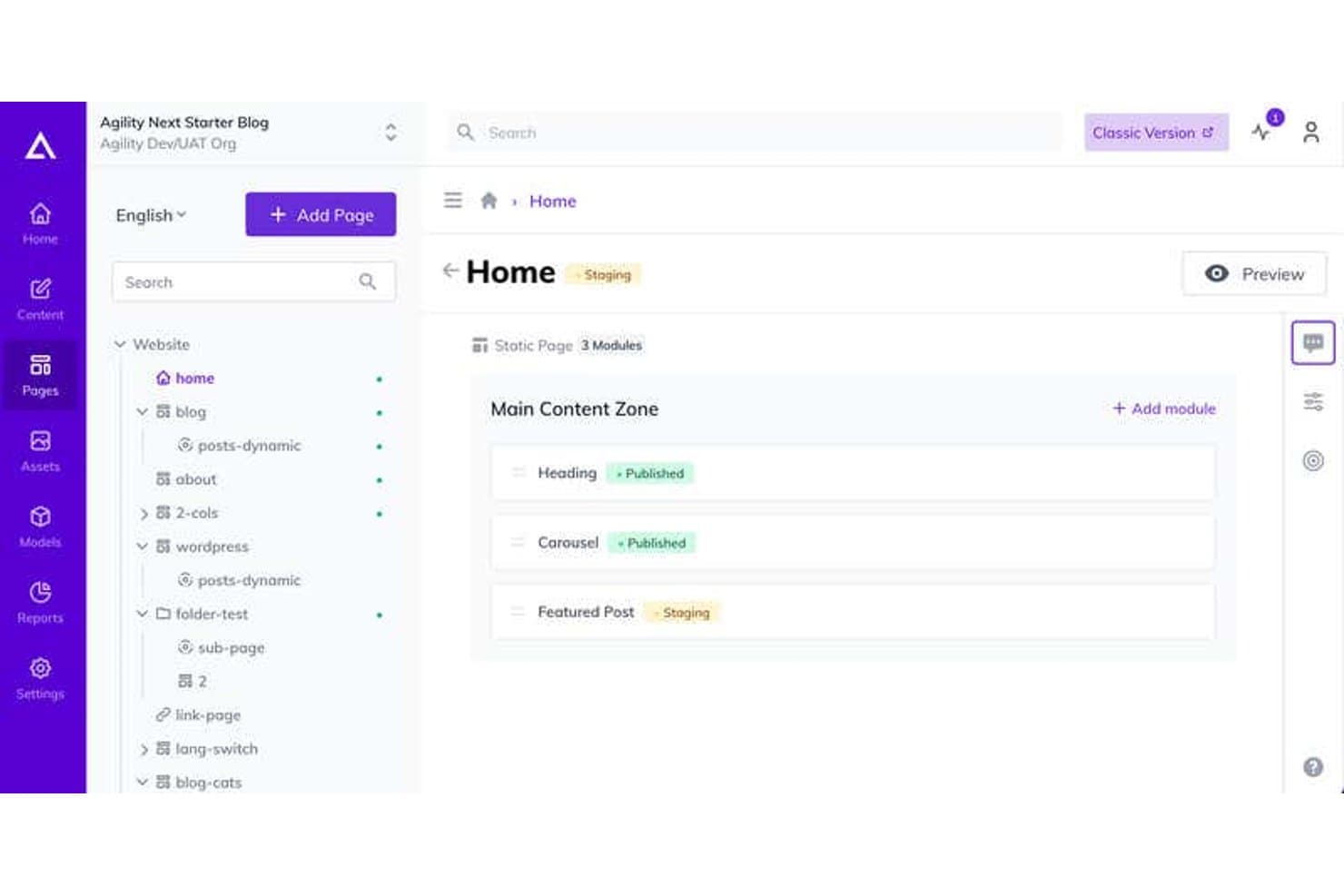
Agility CMS offers a visual page management interface where users can view and manage content modules with staging and published statuses across a site tree. Agility CMS is an enterprise headless content management system that enables marketing and development teams to centralize content, automate tagging, manage workflows, and integrate AI-powered search and organization for digital assets across multiple channels.
Who Is Agility CMS Best For?
Agility CMS suits marketing and digital teams at midsize to large enterprises that need composable content management, omnichannel support, and direct AI workflow integrations.
Why I Picked Agility CMS
I picked Agility CMS as one of the best because I can manage content directly from AI assistants like Claude and GitHub Copilot, use natural language to organize assets, and automate publishing workflows without always switching apps.
Agility CMS Key Features
- Omnichannel content delivery: Distribute structured content to multiple channels and devices from a single platform.
- Version history and rollback: Track all content changes and easily revert to previous versions when needed.
- Role-based permissions: Control who can access, edit, or approve specific content types across teams.
- API-first architecture: Integrate with third-party apps and workflows through robust RESTful APIs and webhooks.
Agility CMS Integrations
Agility CMS offers native integrations with Shopify, Typeform, Salesforce Sales Cloud, Formstack, Bynder, Ahrefs, HubSpot, Microsoft Azure, Vimeo, Vercel, and more. It also integrates with Zapier, and an API is available for custom integrations.
Pros and Cons
Pros:
- Fine-grained role-based publishing control
- Omnichannel structured content delivery
- Direct content management via AI assistants
Cons:
- Requires integrations for advanced personalization
- Requires manual content taxonomy setup
Learn more about Agility CMS: Best for brand voice consistency
- 7-day free trial available
- From $59/month (billed annually)
Visit WebsiteCustomer Rating:4.7/5
Jasper AI dashboard with chat prompt, content apps, and marketing templates. Jasper is an AI content platform designed for marketing teams and content professionals who need to manage high volumes of branded content. It appeals to businesses that want to unify messaging across channels and maintain control over their content assets. The platform helps solve challenges around scaling content production while keeping messaging aligned and on-brand.
Who Is Jasper Best For?
Jasper is a strong fit for marketing teams and content managers at mid-sized to large businesses that need to maintain consistent brand messaging across multiple channels.
Why I Picked Jasper
What sets Jasper apart for me is its focus on brand voice consistency across all content outputs. The platform lets you create and manage detailed brand voice guidelines, so every piece of AI-generated content matches your company’s tone and messaging. I also like that Jasper offers templates and workflows designed specifically for marketing teams who need to keep messaging unified across campaigns and channels. These features make Jasper a strong choice for businesses that can’t afford off-brand or inconsistent content in their marketing efforts.
Jasper Key Features
Some other features that make Jasper useful for AI content management include:
- Content calendar: Plan, schedule, and organize content production within a visual calendar interface.
- Collaboration tools: Assign roles, share projects, and manage team permissions for easier teamwork.
- Multi-channel content generation: Create content tailored for social media posts, blogs, email, and ads from a single workspace.
- Plagiarism checker: Scan generated content to ensure originality and avoid duplicate text issues.
Jasper Integrations
Integrations include Slack, Google BigQuery, Webflow, Microsoft Word, Google Sheets, Google Docs, Zapier, Make, and more.
Pros and Cons
Pros:
- Content calendar for planning and scheduling
- Built-in plagiarism detection for content originality
- Workflow templates for multi-channel campaigns
Cons:
- Brand voice settings can be inconsistent
- Limited advanced formatting within the editor
Learn more about Jasper: Best for open-source customization options
- Free plan available
- From $35/month
Visit WebsiteCustomer Rating:4.5/5
Strapi CMS interface with collection types, fields, and draft publish workflow. Strapi is an open-source content management platform built for developers and technical teams who want full control over their content architecture. It’s a strong fit for organizations that need to customize workflows, data models, and integrations to fit unique business requirements. If you’re looking for a flexible solution that can adapt to complex or evolving content needs, Strapi offers a modular approach that stands out from traditional, out-of-the-box systems.
Who Is Strapi Best For?
Strapi is a good fit for development teams at startups and mid-sized companies that need a highly customizable, open-source content management framework.
Why I Picked Strapi
What drew me to Strapi is its open-source foundation, which gives teams unmatched flexibility to customize every aspect of their content management environment. I see real value in its plugin system and extensible API, which let developers tailor workflows, data structures, and automation to fit unique business needs. Strapi’s headless architecture also means you can connect content to any front-end or channel, making it a strong choice for organizations with complex or evolving digital strategies. For teams that want to build AI-driven content solutions without being boxed in by vendor limitations, Strapi’s customization options are hard to match.
Strapi Key Features
Some other features that make Strapi appealing for AI content management include:
- Role-based access control: Assign granular permissions to users and groups to manage who can view, edit, or publish content.
- Media library management: Organize, upload, and manage images, videos, and other assets directly within the platform.
- Internationalization (i18n): Manage and deliver content in multiple languages for global audiences.
- Webhooks support: Trigger automated actions or connect with external services when content is created, updated, or deleted.
Strapi Integrations
Integrations include Cloudinary, Algolia, SendGrid, Drip, React Native, Expo, Astro, Vercel, and more.
Pros and Cons
Pros:
- Strong developer documentation and support
- Active plugin ecosystem for added functionality
- Open-source codebase allows deep customization
Cons:
- Role-based permissions can be complex to configure
- No built-in AI content generation tools
Learn more about Strapi: Best for automated content governance
- Free demo available
- Pricing upon request
Visit WebsiteCustomer Rating:4.5/5
Adobe Experience Manager is an AI-powered enterprise CMS for marketing teams managing and delivering content at scale across channels. Adobe Experience Manager is an enterprise content management platform with AI-driven capabilities designed for marketing and digital teams that need to manage and deliver content across multiple channels at scale.
Who Is Adobe Experience Manager Best For?
Large marketing teams and digital experience leaders at enterprise organizations that require structured governance, personalization support, and scalable content operations.
Why I Picked Adobe Experience Manager
I picked Adobe Experience Manager for its ability to combine enterprise CMS functionality with automated asset tagging and structured governance workflows. Adobe Sensei supports tasks such as content classification and organization, helping teams manage large content libraries efficiently. Integrated approval workflows and audit trails provide oversight across publishing processes.
Adobe Experience Manager Key Features
- AI-powered asset tagging: Automatically tags images and videos using Adobe Sensei for faster search and organization.
- Omnichannel content delivery: Publishes content across web, mobile, email, and social channels from a single platform.
- Personalization engine: Delivers tailored experiences to different audience segments using AI-driven recommendations.
- Headless CMS capabilities: Supports API-first content delivery for flexible integration with custom apps and digital experiences.
Adobe Experience Manager Integrations
Integrations include Adobe Creative Cloud, Adobe Analytics, Adobe Target, Adobe Commerce, Marketo Engage, Workfront, and Real-Time CDP.
Pros and Cons
Pros:
- Advanced content versioning and audit trails
- Supports omnichannel content delivery at scale
- AI auto-tags and organizes digital assets
Cons:
- Customization often needs developer resources
- Requires significant setup and onboarding time
Learn more about Adobe Experience Manager: 5Best for secure cloud-based file management
Box
- 14-day free trial
- From CAD$21/user/month (billed annually)
Visit WebsiteCustomer Rating:4.3/5
Box displays an insights dashboard with API usage and active users. Box offers secure cloud-based file management with advanced collaboration and workflow features. It’s a strong fit for organizations that need to manage sensitive content and automate document processes at scale. Teams looking for AI-powered content classification and compliance controls will find Box especially relevant in the AI content management space.
Who Is Box Best For?
Box is well-suited for mid-sized to large organizations in regulated industries that require secure, cloud-based content management and collaboration.
Why I Picked Box
What drew me to Box for AI content management is its strong focus on secure cloud-based file management. I see Box as a top choice for teams that need to protect sensitive documents while still enabling collaboration and automated workflows. Its AI-driven content classification and granular permission controls help organizations maintain compliance and reduce risk. I also appreciate how Box automates document retention and supports secure sharing, which is essential for businesses handling confidential or regulated information.
Box Key Features
Some other features that make Box valuable for AI content management include:
- Metadata tagging and search: Add custom metadata to files and use advanced search to quickly locate content across your organization.
- Version history and file recovery: Track changes with detailed version histories and restore previous versions of documents as needed.
- Workflow automation builder: Design and automate multi-step content approval and review processes directly within Box.
- Native e-signature integration: Collect legally binding electronic signatures on documents without leaving the platform.
Box Integrations
Integrations include Microsoft 365, Google Workspace, Salesforce, Slack, Zoom, Adobe, Oracle NetSuite, ServiceNow, Workday, and more.
Pros and Cons
Pros:
- Native e-signature for secure approvals
- Granular permission controls for document access
- AI-driven content classification for sensitive files
Cons:
- Time-consuming metadata tagging setup
- Workflow automation builder lacks advanced logic
Learn more about Box: Best with advanced compliance controls
- Free demo available
- Pricing upon request
Visit WebsiteCustomer Rating:4.2/5
OpenText Core Content dashboard with workflows, tasks, and workspace panels. OpenText offers an AI-powered content management platform designed for organizations with strict regulatory or data governance needs. It’s a strong fit for enterprises in highly regulated industries like finance, healthcare, or government. If you need to manage sensitive content while maintaining control over access, retention, and data privacy, OpenText provides tools to help you meet those requirements.
Who Is OpenText Best For?
Large enterprises in regulated industries that require strict compliance and data governance for their content management.
Why I Picked OpenText
What stands out to me about OpenText is its deep focus on advanced compliance controls, which is essential for organizations handling sensitive or regulated content. The platform offers granular access permissions, audit trails, and automated retention policies that help ensure content is managed according to strict legal and industry standards. I also appreciate its AI-driven classification and risk detection features, which support proactive compliance and reduce manual oversight. For teams that need to demonstrate regulatory adherence and manage complex governance requirements, OpenText brings specialized capabilities that go beyond typical content management solutions.
OpenText Key Features
In addition to its compliance-focused capabilities, OpenText offers several other features relevant to AI content management:
- AI-powered content search: Uses natural language processing to help users quickly find relevant documents and information across large repositories.
- Automated metadata tagging: Applies AI to automatically generate and assign metadata to content, improving organization and discoverability.
- Document version control: Tracks changes and maintains a full history of document edits, allowing users to revert to previous versions as needed.
- Multi-channel publishing: Enables content distribution across web, mobile, and other digital channels from a single platform.
OpenText Integrations
Integrations include SAP, Microsoft 365, Salesforce, Guidewire, Amazon Web Services, Google Cloud, Microsoft Azure, ServiceNow, BMC Helix ITSM, and IBM.
Pros and Cons
Pros:
- Flexible deployment options for cloud or on-premises
- AI-driven content classification and risk detection
- Advanced compliance and audit trail features
Cons:
- Steep technical administrative overhead
- Limited mobile-friendly development features
Learn more about OpenText: Best for AI-powered content ideation
- Free trial available
- From $29/month
Visit WebsiteCustomer Rating:4.4/5
Copy AI interface showing prompt inputs, tone selection, and AI content generation. If you need a platform that automates content creation with AI, Copy AI is worth considering. It’s designed for marketing teams, agencies, and content professionals who want to generate ideas and draft copy quickly. The tool helps tackle creative blocks and speeds up the production of blogs, emails, and social posts.
Who Is Copy AI Best For?
Copy AI is a strong fit for marketing teams and content creators at small to mid-sized businesses who need to generate and refine written content at scale.
Why I Picked Copy AI
What drew me to Copy AI is how it uses AI to spark new content ideas and accelerate the brainstorming process. For teams that need to generate a high volume of fresh copy, its suite of ideation tools—like blog topic generators and social post prompts—helps keep content pipelines full. I also appreciate how you can quickly turn those ideas into first drafts with automated copywriting features. This focus on ideation and rapid content creation makes Copy.ai especially useful for marketers and content managers looking to keep campaigns moving without creative slowdowns.
Copy AI Key Features
Some other features that make Copy AI useful for AI content management include:
- Workflow automation: Automate repetitive content tasks and approvals within the platform to speed up production cycles.
- Brand voice customization: Set and apply brand guidelines so generated content matches your company’s tone and resonates with your target audience.
- Team collaboration tools: Invite team members, assign roles, and manage projects together in shared workspaces.
- Content export options: Download or copy generated content in multiple formats for use across different channels.
Copy AI Integrations
Integrations include Salesforce, HubSpot, Slack, Microsoft Teams, Google Workspace, Notion, and more.
Pros and Cons
Pros:
- Supports exporting content in various formats
- Brand voice settings for consistent output
- AI generates content ideas for multiple formats
Cons:
- No direct publishing to major CMS platforms
- Limited advanced editing within the platform
 Best for collaborative workspace integration
- Free plan + free demo available
- From $10/user/month (billed annually)

Notion AI interface showing prompt input and connected apps for research. Notion brings together notes, docs, databases, and no-code project management in a single workspace. It’s a strong fit for teams that want to centralize content creation, collaboration, and knowledge sharing. If you’re looking for a flexible platform to organize and manage both structured and unstructured content, Notion offers a unified approach that appeals to marketing, product, and operations teams alike.
Who Is Notion Best For?
Notion is well-suited for cross-functional teams at startups and mid-sized companies that need a collaborative workspace for managing content, projects, and documentation.
Why I Picked Notion
What stands out to me about Notion is how it blends content management with real-time collaboration in a single workspace. For teams managing AI-driven content projects, Notion’s ability to combine wikis, databases, and document editing means everyone can contribute, review, and organize information without switching tools. I also appreciate how its flexible page structure lets you embed AI-generated content, track feedback, and manage workflows all in one place. This makes Notion a strong choice for organizations that want to keep content, context, and collaboration tightly integrated.
Notion Key Features
Some other features that make Notion valuable for AI content management include:
- AI-powered writing assistant: Generate, summarize, and edit content directly within any Notion page using built-in AI tools.
- Version history: Track changes and restore previous versions of pages to maintain content accuracy and accountability.
- Custom templates: Create and reuse page and database templates for consistent content structure across projects.
- Granular permissions: Set detailed access controls for pages, databases, and workspaces to manage who can view or edit content.
Notion Integrations
Integrations include Slack, Jira, GitHub, Asana, Google Drive, Figma, Trello, Webex, Datadog, and more.
Pros and Cons
Pros:
- Custom templates speed up repetitive content tasks
- Real-time collaboration supports multi-user editing
- AI assistant generates summaries and content drafts
Cons:
- AI features require paid plan access
- Limited bulk content editing capabilities
Learn more about Notion: Best for workflow automation in content teams
- Free trial available
- From $36/month (billed annually)

Narrato AI assistant with tools for blogs, SEO briefs, images, and social posts. If your content team needs a centralized platform to manage and automate content operations, Narrato is worth a look. It’s designed for marketing teams, agencies, and publishers who want to centralize content creation, collaboration, and approvals. Narrato brings together AI-powered content tools and workflow management to help teams handle high content volumes with less manual effort.
Who Is Narrato Best For?
Narrato is a strong fit for marketing teams and agencies that need to automate and manage high-volume content workflows.
Why I Picked Narrato
What stands out to me about Narrato is how it brings workflow automation directly into the content management process. I picked Narrato because it lets teams build custom workflows with automated task assignments, status tracking, and deadline management—all within a single platform. The built-in generative AI content assistant also helps automate repetitive writing and editing tasks, which is especially useful for teams handling large volumes of content. This focus on workflow automation makes Narrato a strong choice for content marketing teams that want to reduce manual coordination and keep projects moving efficiently.
Narrato Key Features
Some other features that make Narrato valuable for AI content management include:
- AI content idea generator: Generate topic suggestions and outlines based on keywords or themes.
- Content calendar: Plan, schedule, and visualize content production timelines across your team.
- Custom content templates: Create and reuse structured templates for different content types and formats.
- Collaboration tools: Enable in-line commenting, file sharing, and real-time feedback within each project.
Narrato Integrations
Integrations include WordPress, Webflow, LinkedIn, Facebook, Instagram, Contentful, Strapi, and more.
Pros and Cons
Pros:
- Real-time collaboration with in-line comments
- AI-powered content idea and brief generation
- Automated workflow builder for content processes
Cons:
- Limited bulk content import/export options
- Limited content performance analytics
Learn more about Narrato:

dotCMS shows blog posts in a table with URLs, status, and edit history view UIs. dotCMS is a content management platform built for teams that need flexibility in how they deliver digital experiences. It’s a strong fit for organizations with complex content needs, such as multi-brand enterprises or businesses managing content across multiple channels. If you’re looking for a solution that supports both traditional and modern content delivery, dotCMS offers tools to help you manage, structure, and publish content at scale.
Who Is dotCMS Best For?
Digital teams at mid-sized to large enterprises that need flexible content delivery across multiple channels and brands.
Why I Picked dotCMS
What drew me to dotCMS is its flexible headless architecture and support for various AI models, which gives teams full control over how and where content is delivered. For organizations managing content across web, mobile, and emerging digital channels, dotCMS lets you decouple content creation from presentation using APIs and customizable content models. I also like that it supports both headless and hybrid deployments, so you can choose the right approach for each project. This flexibility is especially valuable for businesses that need to future-proof their content management strategy using the best AI tools.
dotCMS Key Features
Some other features that make dotCMS stand out for AI content management include:
- Content approval workflows: Set up multi-step review and approval processes to manage content governance across teams.
- Personalization engine: Deliver targeted content experiences using built-in rules and audience segmentation.
- Version control: Track, compare, and restore previous versions of content items for better content management.
- Multilingual content management: Create, manage, and publish content in multiple languages from a single platform.
dotCMS Integrations
Integrations include OpenAI, Zapier, Prerender.io, and more.
Pros and Cons
Pros:
- Built-in multilingual and localization support
- Hybrid headless and traditional CMS options
- Flexible content modeling for complex structures
Cons:
- Fewer AI-powered content automation features
- Limited built-in analytics and reporting
Learn more about dotCMS:
Andre verktøy for AI-innholdsadministrasjon
Her er noen flere alternativer for verktøy for AI-innholdsadministrasjon som ikke kom med på kortlisten min, men som likevel er verdt å se nærmere på:
- 11HylandBest with document automation for large teams
- 12Kontent.aiBest for modular content workflows in enterprises
- 13AveriBest with multilingual content generation
- 14HubSpot Content HubBest for unified marketing content planning
- 15OptimizelyBest for experimentation-driven content updates
- 16CanvaBest for visual content collaboration
- 17KenticoBest for omnichannel content orchestration
- 18LatelyBest with AI-driven content repurposing
- 19ScreendragonBest for configurable approval processes
- 20FrontifyBest for brand asset organization
- 21ContentfulBest for structured content delivery
- 22VEEDBest for enterprise video content editing
- 23Blaze AIBest for AI-powered content briefs
- 24HootsuiteBest for social content scheduling
- 25SanityBest for real-time content editing
- 26HygraphBest with federated content APIs
- 27ClickUp Best for integrated task and content tracking
- 28GumloopBest for interactive content creation workflows
- 29EasyContentBest for editorial workflow templates
- 30StoryteqBest for dynamic creative asset management
How I Evaluate AI Content Management Tools
Every tool on this list has to deliver AI that actually moves the needle—whether that's cutting content production time in half or surfacing insights you'd otherwise miss. I split my evaluation into core functionality a tool must have to qualify and differentiating factors that separate good options from great ones.
Core Functionality (Table Stakes For This List)
When I'm selecting tools for my list, I rank each one on a scale from 0 (does not offer the functionality) to 5 (excels in this area) for each core functionality listed below. Then, I calculate the tool's total score into a percentage. Each tool needs to achieve a minimum total score of 65% to be considered for inclusion.
- AI Content Generation: I evaluate whether a tool can draft real marketing deliverables—blog posts, ad copy, email sequences—not just offer basic text autocomplete.
- Centralized Content Repository: The platform should give teams one place to store and organize every asset type, from landing page copy to video files.
- AI Tagging & Search: I look for auto-tagging and semantic search that let marketers find the right asset in seconds instead of digging through folders.
- Content Workflow & Governance: Approval chains, version control, and brand guardrails matter here—especially for teams managing assets across multiple campaigns.
- AI Optimization & Insights: Tools earn higher marks when they go beyond grammar checks to offer SEO guidance, content gap analysis, or engagement recommendations.
- Multi-Channel Publishing & Integration: I check for native connections to the platforms marketers actually use, like HubSpot, WordPress, or social scheduling tools.
Once I have a list of tools that meet this criteria, I consider what sets each platform apart.
Differentiating Factors (What Sets Vendors Apart)
Here's how I compare and contrast different vendors:
Standout Features
Custom brand voice models make a real difference—I look for platforms that let teams train AI on their specific tone, terminology, and style guides so every output stays on-brand without heavy editing. AI content repurposing is another feature I value, especially when a tool can turn a single whitepaper into social posts, email snippets, and ad variations. I also evaluate whether a platform offers content performance prediction, giving marketers a signal on engagement or SEO potential before they hit publish.
Beyond Features
Brand safety and AI governance matter a lot when your team is publishing AI-generated content at volume. I check whether platforms offer output guardrails, human-in-the-loop review, and audit trails that track what AI produced versus what a human edited. How well a tool fits your existing martech stack is equally important—native connectors to your CMS, CRM, and analytics platforms keep content workflows from breaking. I also evaluate each vendor's data policies, especially whether customer content is used to train their underlying AI models.
Slik velger du verktøy for AI-innholdsadministrasjon
Det er lett å gå seg vill i lange funksjonslister og komplekse prismodeller. For å hjelpe deg med å holde fokus mens du går gjennom den unike programvarevalgsprosessen din, får du her en sjekkliste over faktorer du bør ha i tankene:
| Faktor | Dette bør du vurdere |
|---|---|
| FaktorSkalerbarhet | Dette bør du vurdereVil verktøyet håndtere det nåværende og fremtidige innholdsvolumet ditt? Ta hensyn til vekstplaner og brukerbegrensninger. |
| FaktorIntegrasjoner | Dette bør du vurdereKobler det seg direkte til CMS-et, analyseverktøyene eller markedsføringsplattformene dine? Kontroller at nødvendige integrasjoner er tilgjengelige. |
| FaktorTilpasningsmuligheter | Dette bør du vurdereKan du tilpasse arbeidsflyter, maler og tillatelser slik at de samsvarer med teamets prosesser? |
| FaktorBrukervennlighet | Dette bør du vurdereVil teamet ta det raskt i bruk? Se etter intuitiv navigasjon og minimale opplæringskrav. |
| FaktorImplementering og innføring | Dette bør du vurdereHvor lang tid vil oppsettet ta, og hvilke ressurser kreves? Spør om støtte ved migrering og hjelp med innføringen. |
| FaktorKostnad | Dette bør du vurdereEr prisnivåene tydelige og forutsigbare? Ta hensyn til brukerplasser, lagring og eventuelle kostnader for tillegg. |
| FaktorSikkerhetstiltak | Dette bør du vurdereTilbyr verktøyet kryptering, tilgangskontroller og samsvar med bransjestandardene dine? |
| FaktorTilgjengelig kundestøtte | Dette bør du vurdereHvilke supportkanaler tilbys, og når er de tilgjengelige? Vurder om du trenger støtte døgnet rundt eller dedikert kundestøtte. |
Hva er verktøy for AI-innholdsadministrasjon?
Verktøy for AI-basert innholdsadministrasjon er programvareplattformer som bruker kunstig intelligens til å hjelpe team med å opprette, organisere og administrere digitalt innhold. Disse verktøyene automatiserer oppgaver som innholdsgenerering, arbeidsflytruting og metadatamerking, noe som gjør det enklere å håndtere store mengder innhold. De støtter samarbeid, administrerer godkjenninger og omfatter ofte analyser for å spore innholdets resultater. Dette hjelper markedsføringsteam med å arbeide mer effektivt og opprettholde enhetlighet på tvers av kanaler.
Funksjoner i verktøy for AI-basert innholdsadministrasjon
Når du velger verktøy for AI-basert innholdsadministrasjon, bør du se etter følgende nøkkelfunksjoner:
- AI-drevet innholdsoppretting: Bruker kunstig intelligens og maskinlæring til å generere, omskrive eller foreslå innhold, slik at team raskt kan lage utkast, overskrifter eller sammendrag.
- Automatisert arbeidsflytstyring: Tildeler oppgaver, sporer fremdrift og sender innhold til gjennomgang eller godkjenning basert på regler som kan tilpasses, slik at behovet for manuell koordinering reduseres.
- Versjonskontroll for innhold: Opprettholder en historikk over redigeringer og endringer, slik at brukere kan gå tilbake til tidligere versjoner eller se hvem som utførte bestemte oppdateringer.
- Automatisering av metadata og merking: Genererer og bruker automatisk merker, kategorier eller metadata på innhold, noe som forbedrer søkbarheten og organiseringen.
- Samarbeidsverktøy: Gjør det mulig for flere brukere å kommentere, redigere og gi tilbakemeldinger i sanntid i plattformen, slik at samarbeid og åpenhet styrkes.
- Innholdskalender: Gir en visuell tidsplan for planlegging, publisering og sporing av innhold på tvers av kanaler, slik at team kan holde orden og overholde tidsfrister.
- Publisering i flere kanaler: Gjør det mulig for brukere å distribuere innhold til markedsføringskampanjer direkte til nettsteder, sosiale medier eller andre plattformer fra verktøyet.
- Innholdsanalyse: Sporer resultatmålinger som visninger, engasjement og konverteringer, slik at team får innsikt i hvilket innhold som fungerer.
- Malfunksjoner: Lar brukere opprette, lagre og gjenbruke maler for ulike innholdstyper, noe som sikrer enhetlighet og sparer tid.
- Tilgangskontroller og tillatelser: Angir brukerroller og tillatelser for å styre hvem som kan se, redigere eller godkjenne innhold, og støtter behov for sikkerhet og samsvar.
Fordeler med verktøy for AI-basert innholdsadministrasjon
Implementering av verktøy for AI-basert innholdsadministrasjon gir flere fordeler for teamet og virksomheten din. Her er noen av fordelene du kan se frem til:
- Raskere innholdsproduksjon: AI-drevet oppretting og automatisering av arbeidsflyter hjelper team med å generere og publisere innhold raskere.
- Mer enhetlig innhold: Malstyring og automatiserte godkjenninger sørger for at merkevareretningslinjer og budskap forblir ensartede på tvers av alle kanaler.
- Mindre manuelt arbeid: Automatisert merking, ruting og planlegging minimerer repetitive oppgaver og frigjør tid til strategisk arbeid.
- Bedre samarbeid: Funksjoner for redigering, kommentering og oppgavetildeling i sanntid holder team samkjørte og prosjekter i fremdrift.
- Bedre organisering av innhold: Automatisering av metadata og versjonskontroll gjør det enklere å finne, administrere og oppdatere digitale ressurser av høy kvalitet.
- Datadrevet beslutningstaking: Innebygde analyser gir innsikt i innholdets resultater, slik at team kan forbedre strategier og fokusere på det som fungerer.
- Skalerbare innholdsoperasjoner: Publisering i flere kanaler og arbeidsflyter som kan tilpasses, støtter økende innholdsbehov uten å tilføre kompleksitet.
Kostnader og priser for verktøy for AI-basert innholdsadministrasjon
Valg av verktøy for AI-basert innholdsadministrasjon krever en forståelse av de ulike prismodellene og abonnementene som er tilgjengelige. Kostnadene varierer basert på funksjoner, teamstørrelse, tillegg og mer. Tabellen nedenfor oppsummerer vanlige abonnementer, gjennomsnittsprisene deres og typiske funksjoner som er inkludert i løsninger for verktøy for AI-basert innholdsadministrasjon:
Sammenligningstabell for abonnementer for verktøy for AI-basert innholdsadministrasjon
| Abonnementstype | Gjennomsnittspris | Vanlige funksjoner |
|---|---|---|
| AbonnementstypeGratisabonnement | Gjennomsnittspris$0 | Vanlige funksjonerGrunnleggende AI-basert innholdsoppretting, begrenset lagringsplass, tilgang for én bruker og grunnleggende arbeidsflytstyring. |
| AbonnementstypePersonlig abonnement | Gjennomsnittspris$5-$25/bruker/måned | Vanlige funksjonerAI-skriveverktøy, innholdskalender, begrensede integrasjoner, grunnleggende analyser og brukerstøtte via e-post. |
| AbonnementstypeBedriftsabonnement | Gjennomsnittspris$25-$75/bruker/måned | Vanlige funksjonerSamarbeid i team, automatisering av arbeidsflyter, avanserte analyser, publisering i flere kanaler og maler. |
| AbonnementstypeVirksomhetsabonnement | Gjennomsnittspris$75-$200+/bruker/måned | Vanlige funksjonerTilpassede arbeidsflyter, API-tilgang, avansert sikkerhet, dedikert brukerstøtte og samsvarsfunksjoner. |
Vanlige spørsmål om verktøy for AI-innholdsadministrasjon
Her er noen svar på vanlige spørsmål om verktøy for AI-innholdsadministrasjon:
Hvordan skiller verktøy for AI-innholdsadministrasjon seg fra tradisjonelle innholdsadministrasjonssystemer?
Verktøy for AI-innholdsadministrasjon bruker kunstig intelligens til å automatisere oppgaver som innholdsoppretting, tagging og ruting av arbeidsflyter. Tradisjonelle systemer baserer seg i større grad på manuelle prosesser og tilbyr færre automatiseringsfunksjoner, noe som gjør AI-verktøy bedre egnet for team som håndterer store innholdsmengder eller komplekse arbeidsflyter.
Kan verktøy for AI-innholdsadministrasjon integreres med den eksisterende markedsføringsstakken min?
Ja, de fleste verktøy for AI-innholdsadministrasjon tilbyr integrasjoner med populære plattformer som CRM-systemer, analyseverktøy og verktøy for planlegging av innlegg i sosiale medier. Sjekk alltid om det finnes integrasjoner eller tilgjengelige API-er, slik at du sikrer kompatibilitet med de nåværende systemene dine og unngår manuell dataoverføring.
Er verktøy for AI-innholdsadministrasjon sikre for sensitivt innhold?
Ja, mange verktøy for AI-innholdsadministrasjon har sikkerhetstiltak som kryptering, tilgangskontroller og samsvarssertifiseringer. Gå gjennom sikkerhetsdokumentasjonen for hvert verktøy for å bekrefte at det oppfyller organisasjonens krav, særlig hvis du håndterer regulert eller konfidensiell informasjon.
Hva bør jeg ta hensyn til når jeg migrerer til et verktøy for AI-innholdsadministrasjon?
Planlegg for datamigrering, opplæring av brukere og justeringer av arbeidsflyter. Se etter verktøy som tilbyr støtte ved oppstart, importverktøy og tydelig dokumentasjon for å minimere forstyrrelser og hjelpe teamet med å realisere verdien raskt.
Krever verktøy for AI-innholdsadministrasjon teknisk ekspertise for å settes opp?
Nei, de fleste moderne verktøy for AI-innholdsadministrasjon er utviklet for brukere uten teknisk bakgrunn og tilbyr intuitive grensesnitt. Avanserte tilpasninger eller integrasjoner kan imidlertid kreve teknisk støtte, så vurder teamets ferdighetsnivå og tilgjengelige ressurser før du velger en løsning.