

En gratis AI-videogenerator for markedsførere er et verktøy som lar deg lage videoer ved hjelp av kunstig intelligens uten å betale på forhånd – vanligvis gjennom et gratis abonnement eller en gratis prøveperiode. Markedsførere etterspør disse løsningene for å eksperimentere med AI-drevet videoproduksjon, unngå budsjettbegrensninger og teste hvilken plattform som passer kampanjebehovene deres.
Med så mange markedsføringskanaler som er avhengige av video, kan det å velge riktig gratisverktøy hjelpe deg med å teste strategier raskt, tilpasse innhold og produsere videoer som holder publikummet ditt engasjert. Denne veiledningen presenterer de beste gratis AI-videogeneratorene som er tilgjengelige nå, slik at du kan sammenligne funksjoner og velge det riktige alternativet for målene dine.
Why Trust Our Software Recommendations
6,700+
Reviews
20
Industry experts
16+
Evaluation factors
14
Years
Our team has been testing and reviewing software since 2012. As marketing leaders ourselves, we know how difficult—and important—it is to choose the right software.
For this guide, we evaluated tools using hands-on testing and independent research, scoring tools using our selection criteria.
Our reviews reflect our human editorial judgment, not a sales pitch.
Expert reviewers:
 Gui DrusinaCreative Director
- Shriya GhateSenior Marketing Lead
 Amanda JacquesMarketing Ops Leader

Sammenligningstabell for gratis AI-videogeneratorer for markedsførere
Denne sammenligningstabellen oppsummerer prisopplysningene for mine utvalgte gratis AI-videogeneratorer for markedsførere:
| Tool | Best For | Trial Info | Price | ||
|---|---|---|---|---|---|
| 1 | Best for transforming articles into short videos | Free trial available | From $29/month | Website | |
| 2 | Best for animated social campaign templates | Free plan available | From $15/month (billed annually) | Website | |
| 3 | Best for script-to-animation automation | Free plan available | From $29/month | Website | |
| 4 | Best for lifelike talking head video generation | 14-day free trial | From $4.70/month (billed annually) | Website | |
| 5 | Best for TikTok-style quick edits | Free plan available | From $25.99/month (billed annually) | Website | |
| 6 | Best for customizable avatar presentations | Free plan available | From $59/month (billed annually) | Website | |
| 7 | Best for brand custom video exports | Free plan available | From $12/user/month | Website | |
| 8 | Best for video creation from text at scale | Free plan available | From $29/month | Website | |
| 9 | Best for AI avatars in explainer videos | Free plan + free demo available | From $14/month (billed annually) | Website | |
| 10 | Best for multilingual video localization | Free plan available | From $24/month (billed annually) | Website |


Anmeldelser av gratis AI-videogeneratorer for markedsførere
Nedenfor finner du mine detaljerte sammendrag av de beste gratis AI-videogeneratorene som kom med på kortlisten min. Anmeldelsene mine gir et detaljert innblikk i de viktigste funksjonene, fordelene og ulempene, integrasjonene og de ideelle bruksområdene for hvert verktøy, slik at du kan finne det beste alternativet for deg. Mens noen av disse verktøyene tilbyr en helt gratis versjon, tilbyr andre en gratis prøveperiode. Jeg har lagt til en merknad om hva som er gratis i hver av anmeldelsene mine.
 Best for transforming articles into short videos
- Free trial available
- From $29/month
Visit WebsiteCustomer Rating:4.8/5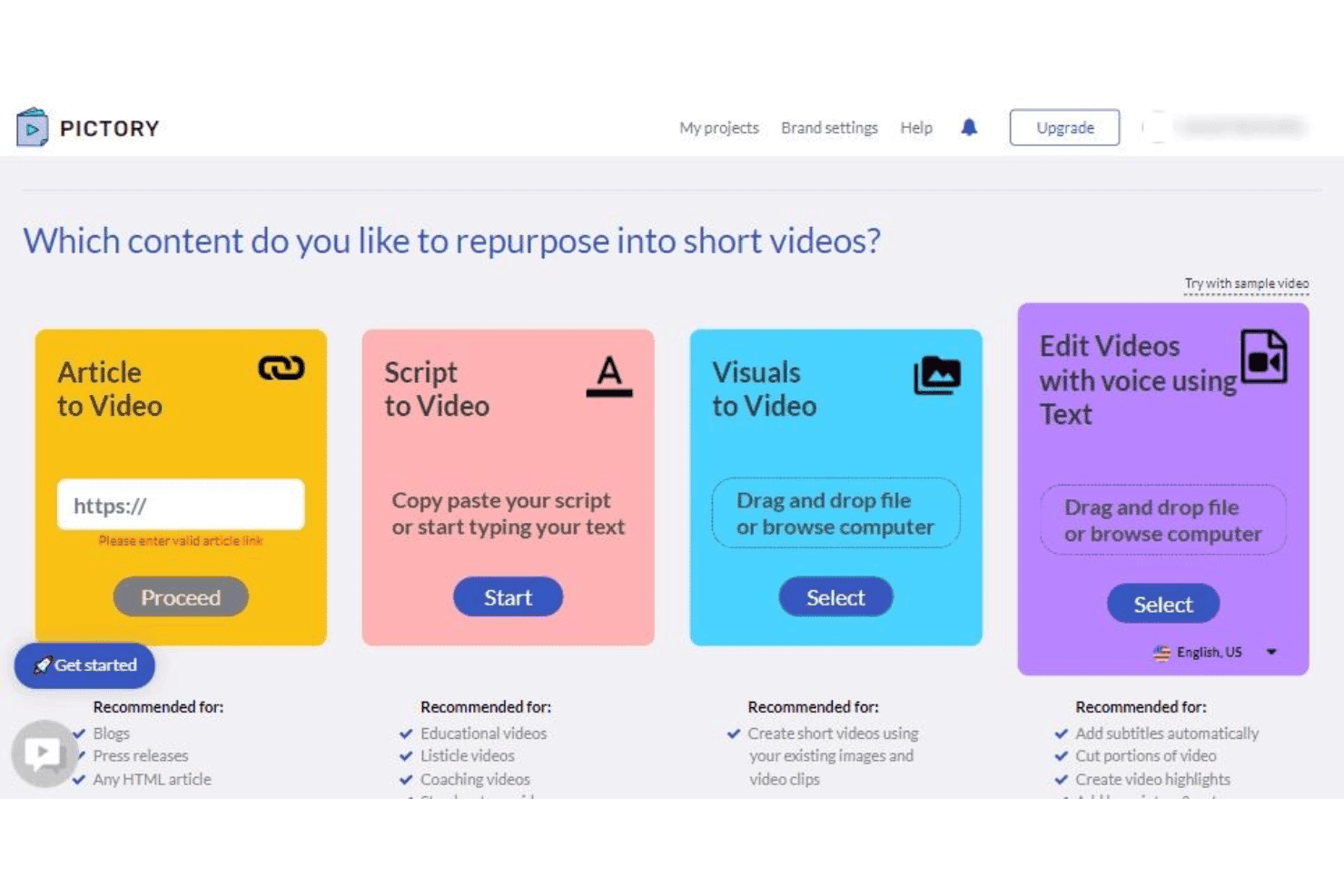
Pictory offers four content repurposing options: Article to Video, Script to Video, Visuals to Video, and Edit Videos with Voice using Text. Pictory is a cloud-based AI video generator that converts written content—articles, blog posts, and scripts—into branded short-form videos using AI scene selection, automated captions, stock footage, and AI voiceovers.
Who Is Pictory Best For?
Pictory is a strong fit for content marketers and small business owners who regularly publish written content and want to extend its reach through video.
Why I Picked Pictory
I've included Pictory in my top picks because its article-to-video pipeline is genuinely one of the fastest I've used. You paste a blog URL or drop in long-form text, and Pictory's AI segments it into scenes, pulls matching stock footage from its 18-million-clip library, and syncs AI-generated captions automatically. I've taken a 1,500-word post and had a publish-ready social cut in under 15 minutes.
Pictory Key Features
- Brand kit storage: Store logos, colors, and fonts for use across all video projects.
- AI avatar presenters: Choose from a selection of digital spokespeople to narrate your videos.
- Multi-language voiceovers: Create AI-generated audio tracks in over two dozen languages.
- Aspect ratio presets: Export videos in vertical, square, or horizontal formats for every social platform.
Pictory Integrations
Pictory offers native integrations with Getty Images, Storyblocks, ElevenLabs, Shopify, WooCommerce, WordPress, Make.com, N8N, and Zapier. An API is available for custom integrations.
What's Free?
Pictory offers a free trial with no credit card required, giving you access to three video projects of up to 10 minutes each. Exported videos include a watermark on the free trial.
Pros and Cons
Pros:
- Covers broad marketing and business topics
- Auto-generated captions sync
- Converts blog URLs into videos
Cons:
- Niche topics often return mismatched stock footage
- No permanently free plan
Learn more about Pictory: Best for animated social campaign templates
- Free plan available
- From $15/month (billed annually)
Visit WebsiteCustomer Rating:4.5/5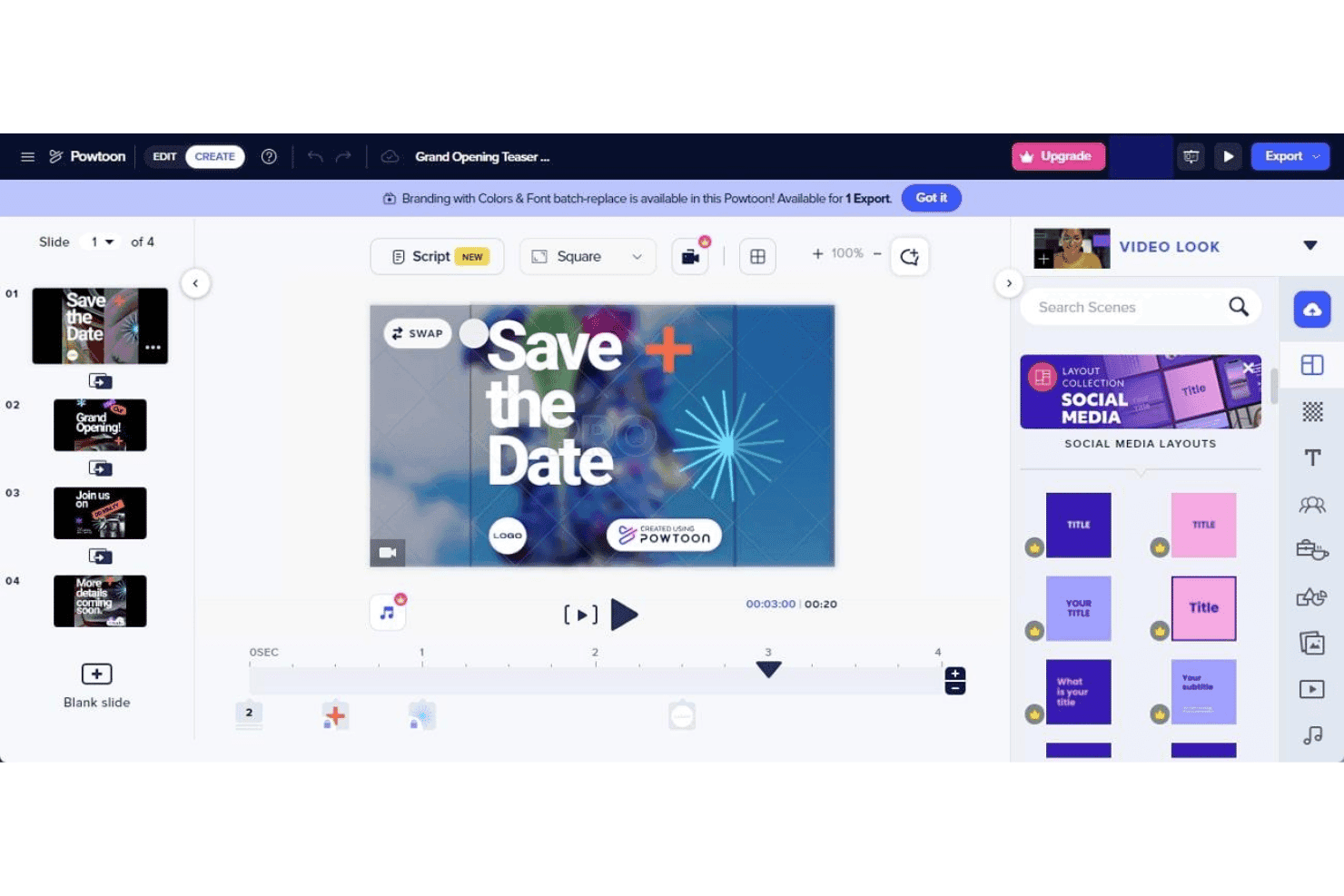
PowToon offers a drag-and-drop video editor with pre-built social media layouts, slide management, and timeline controls for creating animated presentations. PowToon is a cloud-based AI video creation platform that lets marketers produce animated videos, explainer content, and social campaigns using a drag-and-drop editor, AI text-to-video tools, AI avatars, voiceovers, and a built-in stock media library.
Who Is PowToon Best For?
PowToon is a strong fit for small business marketers and solo content creators who need to produce animated video content without a design background or dedicated video production team.
Why I Picked PowToon
I've included PowToon in my top picks because its animated social campaign template library is one of the most purpose-built I've seen in this category. Rather than generic video layouts, the templates are organized around ad formats, explainer structures, and social post styles, with animated characters you can customize directly using the built-in character builder. I also use the AI doc-to-video feature regularly, which converts a PDF or presentation into a fully animated video with minimal manual editing.
PowToon Key Features
- AI text-to-speech and dubbing: Generate natural voiceovers and multi-language narration for videos without recording audio.
- Multi-aspect ratio export: Export videos in vertical, square, and horizontal formats for use across multiple social platforms.
- Stock media library: Access over 4 million stock images, music tracks, video clips, and sound effects directly in the editor.
- Brand kit controls: Upload logos, set fonts, and save brand colors to ensure all videos align with your marketing brand guidelines.
PowToon Integrations
PowToon offers native integrations with HubSpot, Slack, Microsoft Teams, YouTube, Vimeo, Wistia, Facebook, Twitter, and Google Workspace. An API is available for custom integrations.
What's Free?
PowToon offers a free-forever plan with no credit card required, giving you access to the drag-and-drop editor, animated templates, and the stock media library, with exports up to 720p that include a PowToon watermark. AI features like text-to-video and avatar generation are not included on the free plan, as those require paid AI credits.
Pros and Cons
Pros:
- AI doc-to-video converts presentations
- Animated character builder
- Large template library for social campaigns
Cons:
- Free exports capped at 720p resolution
- AI features locked behind paid credits
Learn more about PowToon: Best for script-to-animation automation
- Free plan available
- From $29/month
Visit WebsiteCustomer Rating:4.5/5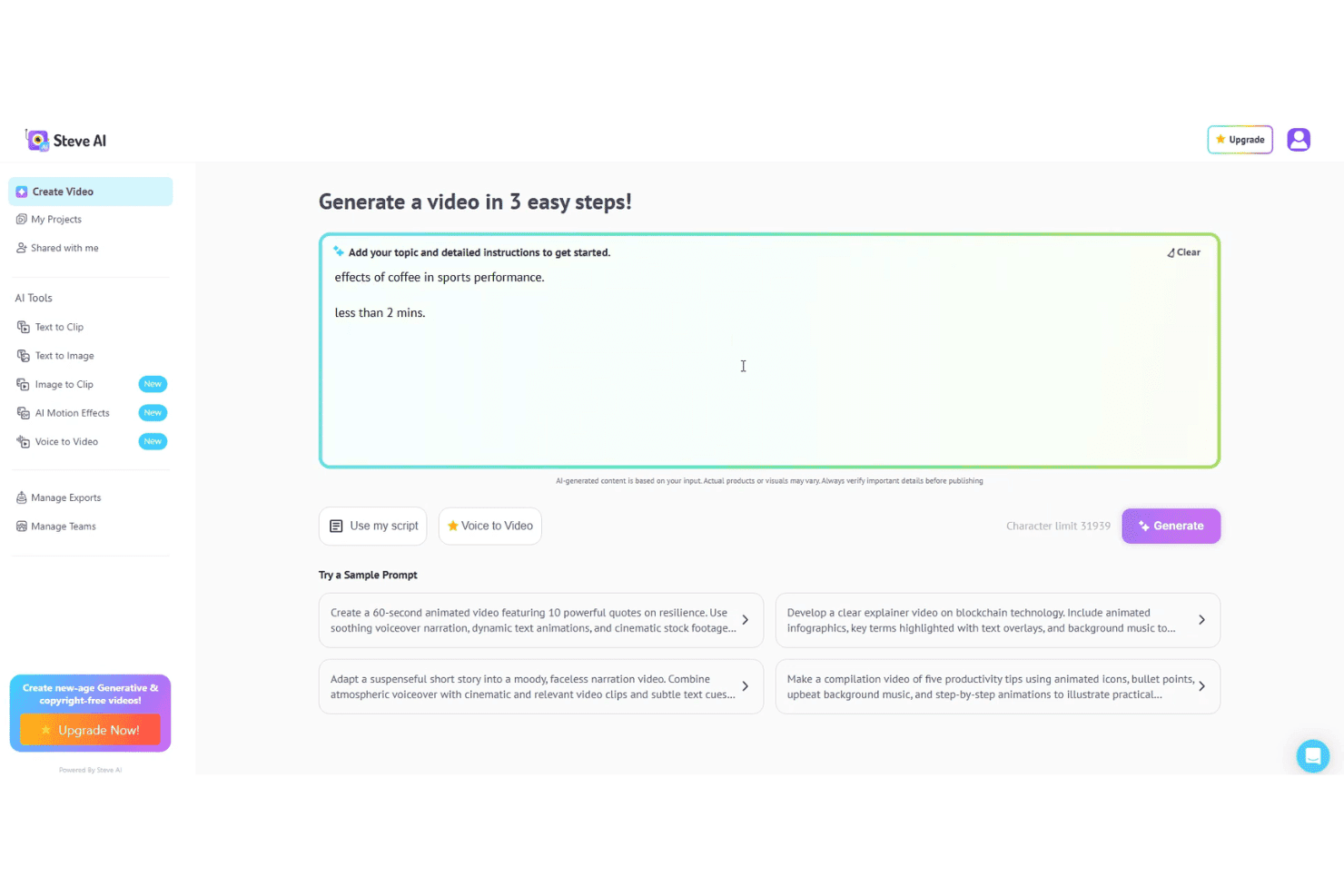
Steve AI lets users generate animated videos from scripts, prompts, or voice input. Steve AI is an AI video generator that converts text prompts, scripts, audio, and blog content into animated, live-action, or generative AI videos, with built-in voiceovers, stock assets, and multi-format export.
Who Is Steve AI Best For?
Steve AI is a strong fit for small business marketers and solo content creators who need to publish video regularly without a dedicated video production team.
Why I Picked Steve AI
Steve AI earns its spot on my shortlist because of how it handles script-to-animation conversion. I paste a script, and the Advanced Prompter builds a fully animated video with AI-selected scenes, motion effects, and synced voiceovers. I also use ClipMaker AI to turn blog posts into short animated clips. The 300+ animated characters and motion effects like kinetic text and camera zooms are all accessible directly in the editor, with no manual animation work required.
Steve AI Key Features
- Marketing-ready templates: Choose from pre-built ad and promo templates designed for popular social platforms and video formats.
- Multi-aspect ratio export: Export videos in vertical, square, and horizontal formats for channels like TikTok, Instagram, and YouTube.
- Brand customization options: Apply your logo, brand colors, and fonts directly within the video editor for brand consistency.
- Premium stock and music library: Access an integrated library of AI images, video clips, and royalty-free music and sound effects.
Steve AI Integrations
Steve AI offers a native integration with YouTube for direct publishing. Native integrations with other platforms are not clearly documented.
What's Free?
Steve AI offers a free-forever plan that includes 1,200 seconds of AI video and 200 credits per month. Exports are available on the free plan but include a watermark and are capped at 720p resolution.
Pros and Cons
Pros:
- Generous free plan monthly video allowance
- Multiple animation styles available
- Converts scripts into animated videos
Cons:
- Limited avatar library
- Free exports include a visible watermark
Learn more about Steve AI: 4Best for lifelike talking head video generation
D-ID
- 14-day free trial
- From $4.70/month (billed annually)
Visit WebsiteCustomer Rating:4.6/5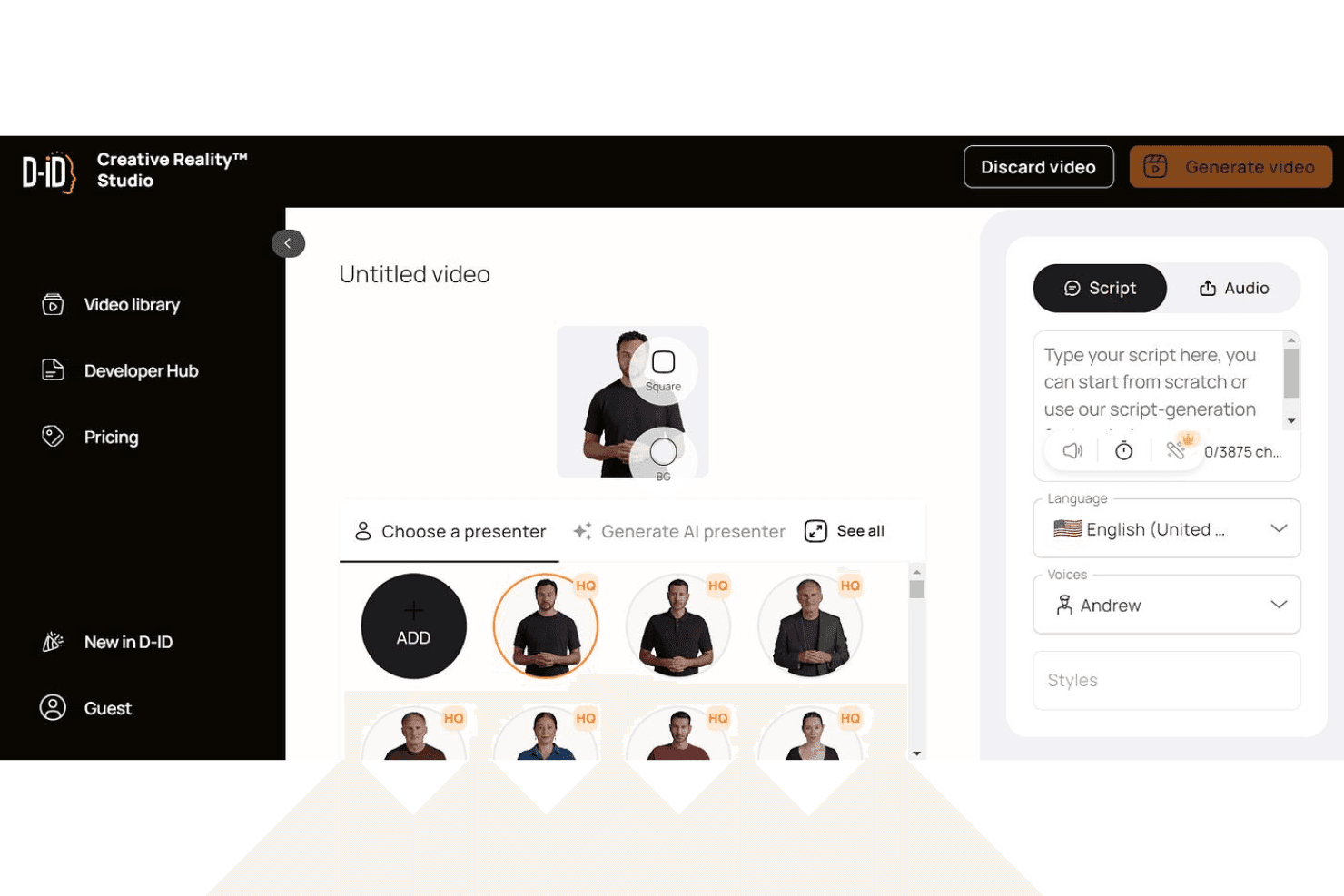
D-ID lets users generate lifelike talking head videos from scripts and AI voices. D-ID is an AI video generation platform that turns text scripts, images, and documents into talking-head videos using realistic digital avatars with multilingual voiceovers and voice cloning.
Who Is D-ID Best For?
D-ID is a strong fit for content marketers and educators who need to produce avatar-driven explainer videos at scale without on-camera talent.
Why I Picked D-ID
D-ID earns its spot on my shortlist because the lip-sync and facial animation quality is genuinely a cut above what I've seen in comparable tools. I use it to create avatar videos from a script or uploaded document, and the output looks like a real presenter rather than an animated cartoon. The voice cloning feature lets me replicate a specific voice across multiple videos, which is especially useful when producing a multilingual series without re-recording.
D-ID Key Features
- Video translate: Generate translations and localized versions of videos in over 120 languages.
- Canva and PowerPoint integrations: Use D-ID directly within Canva or PowerPoint for seamless avatar video generation.
- Custom logo watermarking: Replace D-ID’s watermark with your own logo for branded exports on higher tiers.
- API access: Integrate D-ID’s video generation capabilities into other marketing tools or custom workflows.
D-ID Integrations
D-ID offers native integrations with Canva and Microsoft PowerPoint. An API is available for custom integrations.
What's Free?
D-ID offers a 14-day free trial that includes up to 3 minutes of total video generation with watermarked exports and a personal-use license only, meaning commercial use requires a paid plan.
Pros and Cons
Pros:
- Real-time interactive AI agents available
- 100+ languages supported for voiceover
- Realistic lip-sync on generated avatars
Cons:
- Monthly credits expire and don't roll over
- Avatar gestures are largely static
Learn more about D-ID: Best for TikTok-style quick edits
- Free plan available
- From $25.99/month (billed annually)
Visit WebsiteCustomer Rating:4.5/5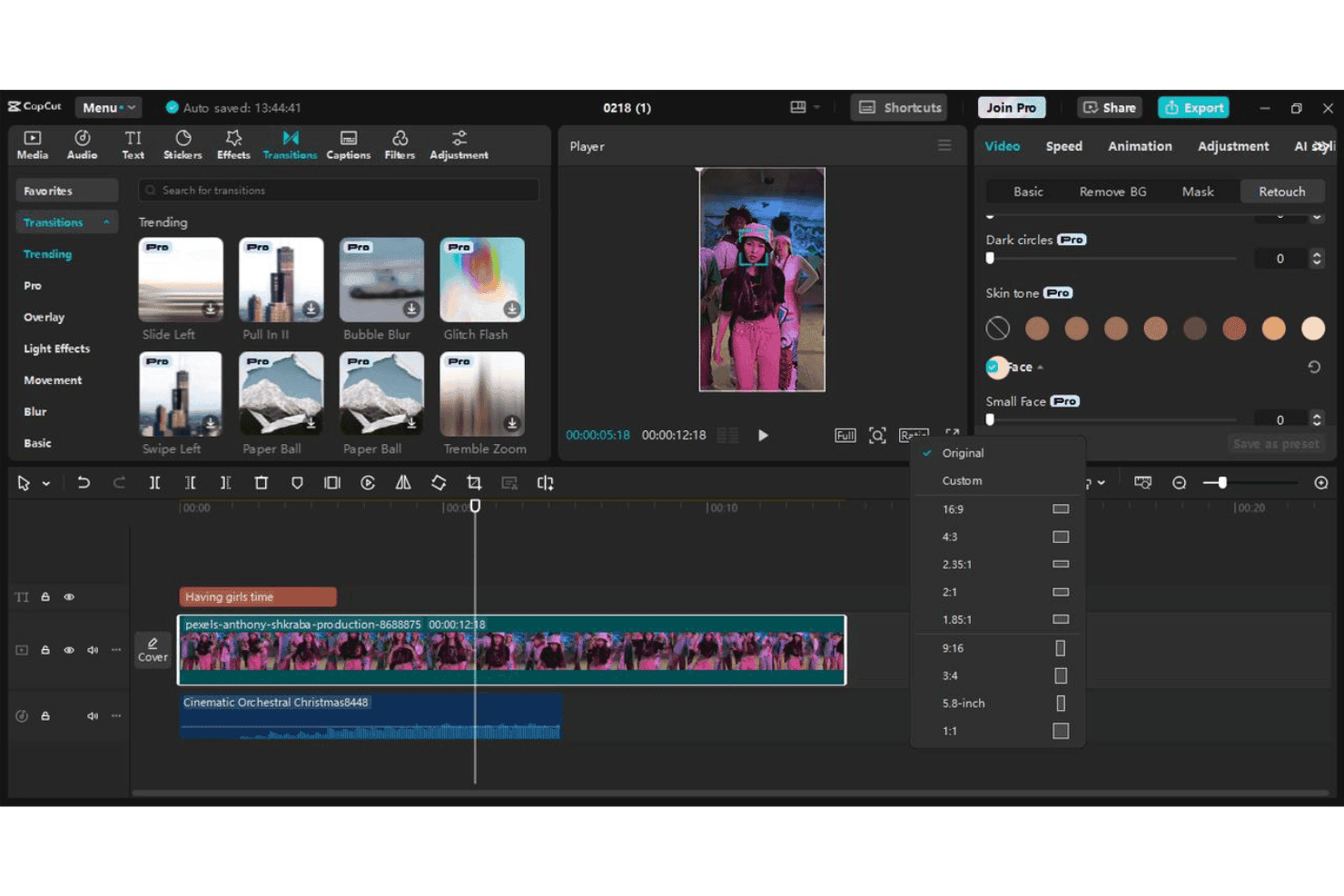
CapCut lets users edit short-form videos with transitions, effects, captions, and aspect ratio presets. CapCut is a free AI video editor from ByteDance that turns text prompts and scripts into short-form videos using AI scene generation, digital avatars, voiceovers, and pre-built marketing templates.
Who Is CapCut Best For?
CapCut is a strong fit for social media marketers and small business owners who produce high volumes of short-form video content for TikTok, Reels, or Shorts.
Why I Picked CapCut
CapCut earns its spot as one of the best on my shortlist because no other free tool is as purpose-built for TikTok-style content production. I use it specifically for its auto-captions, which generate word-by-word highlighted text in the bold, high-contrast style that actually performs in vertical feeds. The platform-specific 9:16 presets and CapCut for Business's URL-to-video feature, which turns a product landing page directly into a short-form ad, make it my go-to for rapid campaign testing.
CapCut Key Features
- AI-driven script writing: Generate complete video scripts from a single prompt or keyword for fast content ideation.
- Digital avatar presenters: Choose from over 100 AI avatars to narrate or present marketing messages in videos.
- Preset marketing templates: Access templates designed for ads, product demos, and branded content tailored for social channels.
- Multi-language voiceovers: Add AI-generated narration in dozens of languages for localized or global campaigns.
CapCut Integrations
CapCut offers native integration with TikTok for direct publishing and supports Google, Facebook, and QR code login options. Native integrations beyond TikTok are not clearly documented.
What's Free?
CapCut offers a free-forever plan across web, desktop, and mobile with no credit card required, including 1080p exports without a watermark on the desktop version. The free tier includes access to templates, text-to-video, and editing tools, but AI-powered features like avatar generation and advanced AI video creation run on a monthly credit allowance that resets each billing cycle.
Pros and Cons
Pros:
- Exports 1080p vertical video without a watermark
- Templates optimized for TikTok and Reels formats
- Templates optimized for TikTok and Reels formats
Cons:
- Commercial licensing requires manual verification
- AI credits cap out quickly on the free plan
 Best for customizable avatar presentations
- Free plan available
- From $59/month (billed annually)
Visit WebsiteCustomer Rating:4.6/5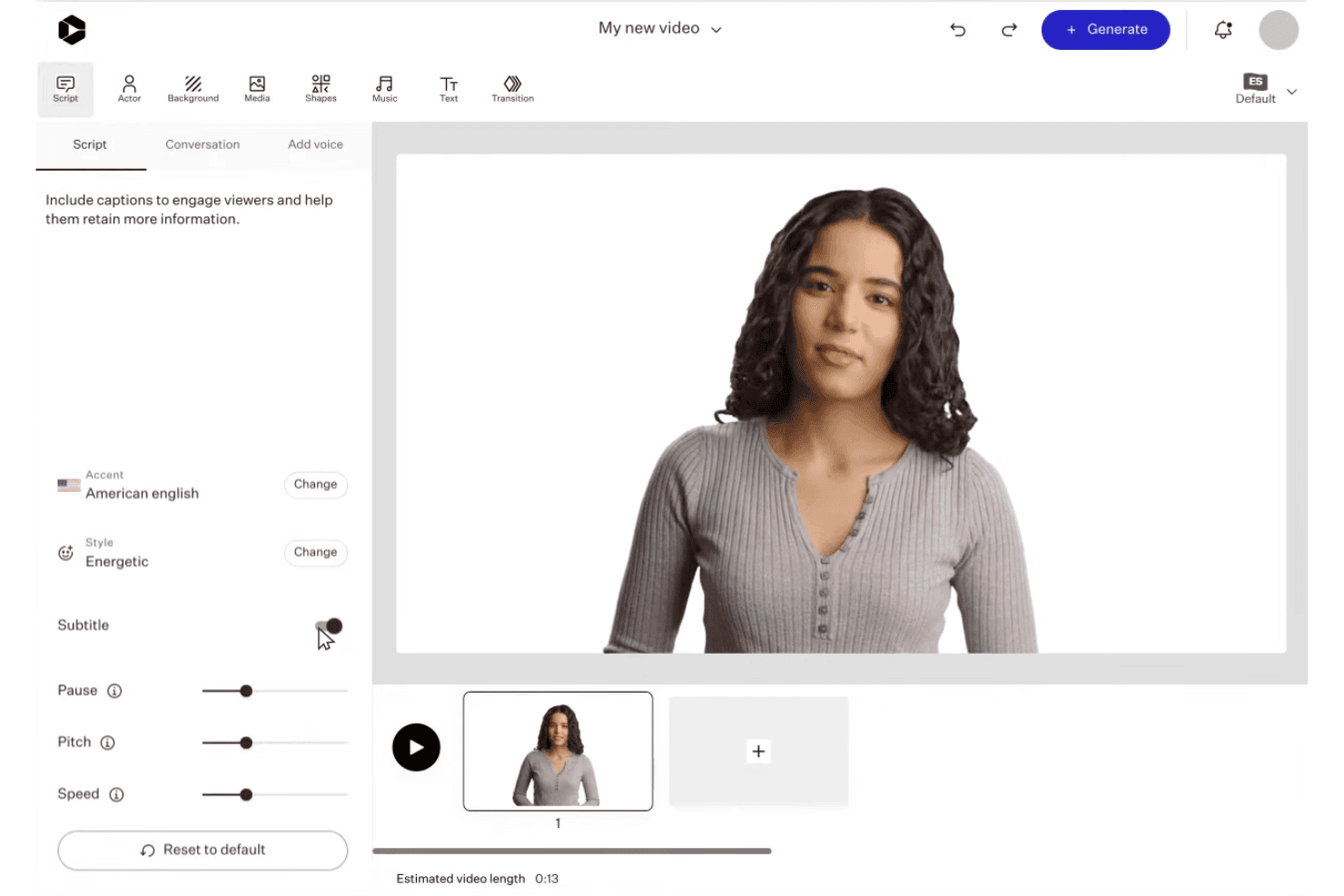
Colossyan lets users customize AI avatar presentations with scripts, voices, and scene editing. Colossyan is an AI video platform that turns text, scripts, PDFs, and URLs into avatar-led videos using 300+ AI presenters, 700+ voices, and built-in brand kits across multiple aspect ratios.
Who Is Colossyan Best For?
Colossyan is a strong fit for content marketing managers and enablement teams who need to produce polished, presenter-style videos from existing written content at scale.
Why I Picked Colossyan
Colossyan earns its spot on my shortlist because no other free AI video tool gives you this much control over how your on-screen presenter looks and behaves. I love that you can adjust avatar emotions, use side-view angles, and drop multiple avatars into a single scene, which lets me build podcast-style explainers that feel genuinely produced. The instant custom avatar feature means I can get a branded presenter on screen without booking a studio shoot.
Colossyan Key Features
- Brand kit management: Store and apply logos, colors, and fonts automatically to every video project.
- Document-to-video workflow: Convert PDFs, PowerPoints, scripts, and URLs directly into draft videos.
- Multi-aspect ratio export: Create videos in vertical, square, or horizontal formats for different social channels.
- Stock media library: Access built-in stock footage, images, and music to enhance your video content.
Colossyan Integrations
Colossyan offers SCORM exports for learning management systems like Workday, Cornerstone, Docebo, Litmos, and Absorb, and provides API access for custom integrations.
What's Free?
Colossyan's free-forever Starter plan includes 20 minutes of AI video generation per month with no credit card required, but all exported videos carry a watermark. Unlimited MP4 downloads are locked behind the paid Professional plan, so free users are limited to share links and course exports.
Pros and Cons
Pros:
- Auto-translation available across 70+ languages
- Up to four avatars in a single scene
- 300+ avatar options with emotion and angle controls
Cons:
- Video rendering times are slower than average
- Fewer templates than HeyGen and Synthesia
Learn more about Colossyan: 7Best for brand custom video exports
VEED
- Free plan available
- From $12/user/month
Visit WebsiteCustomer Rating:4.5/5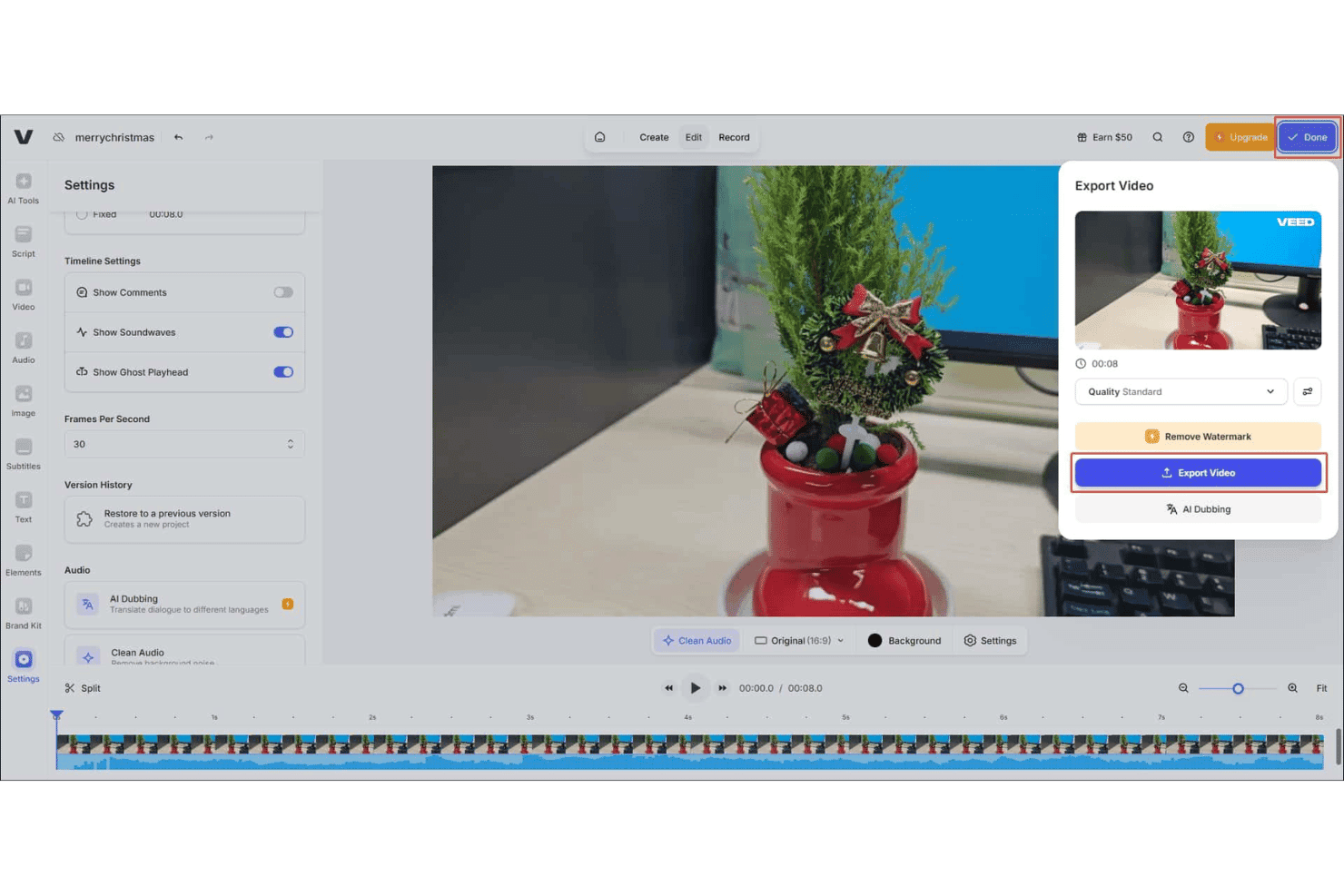
VEED offers a video export panel with quality settings, watermark removal, and AI Dubbing options directly from the editor. VEED is a browser-based AI video generator that lets you create text-to-video content, animate product images, add AI avatars, generate voiceovers in 125+ languages, and apply auto-captions across multiple aspect ratios.
Who Is VEED Best For?
VEED is a strong fit for social media marketers and content teams who need to produce branded, short-form video at volume without a dedicated video production team.
Why I Picked VEED
I picked VEED as one of the best because its Brand Kit lets you lock in your logos, fonts, and colors once and have them carry through every video you generate. That matters when you're running multiple campaigns and need every export to look consistent without rebuilding your brand setup each time. I also like that you can create custom AI avatars tied to your brand identity, so product explainers and ad creatives don't default to a generic AI presenter that has nothing to do with your company.
VEED Key Features
- Multi-model AI video generation: Select from several leading AI video models like Sora 2, Kling, and Seedance to tailor the video style and pacing to your needs.
- Image-to-video animation: Upload product images and generate animated video content directly from static visuals.
- AI voiceover in 125+ languages: Generate natural-sounding audio tracks for your videos in a wide range of languages for global reach.
- Magic B-roll: Instantly add relevant stock B-roll footage to AI-generated videos for more engaging visuals.
VEED Integrations
Native integrations are not clearly documented. VEED offers several APIs, including Fabric 1.0 API, Lip Sync API, Subtitle API, Background Removal API, and Green Screen API, for custom integrations.
What's Free?
VEED offers a free-forever plan with no credit card required, giving you a limited quota of AI video credits to generate and export videos. Free plan exports include a watermark and are capped at 720p resolution; once you use your credit allowance, you'll need to upgrade to a paid plan to continue generating AI video.
Pros and Cons
Pros:
- AI avatar library includes custom avatar creation
- Choose between multiple generative AI video models
- Brand Kit applies across all generated videos
Cons:
- Slow rendering on longer or complex video projects
- Free exports are watermarked and capped at 720p
Learn more about VEED: 8Best for video creation from text at scale
Elai
- Free plan available
- From $29/month
Visit WebsiteCustomer Rating:4.6/5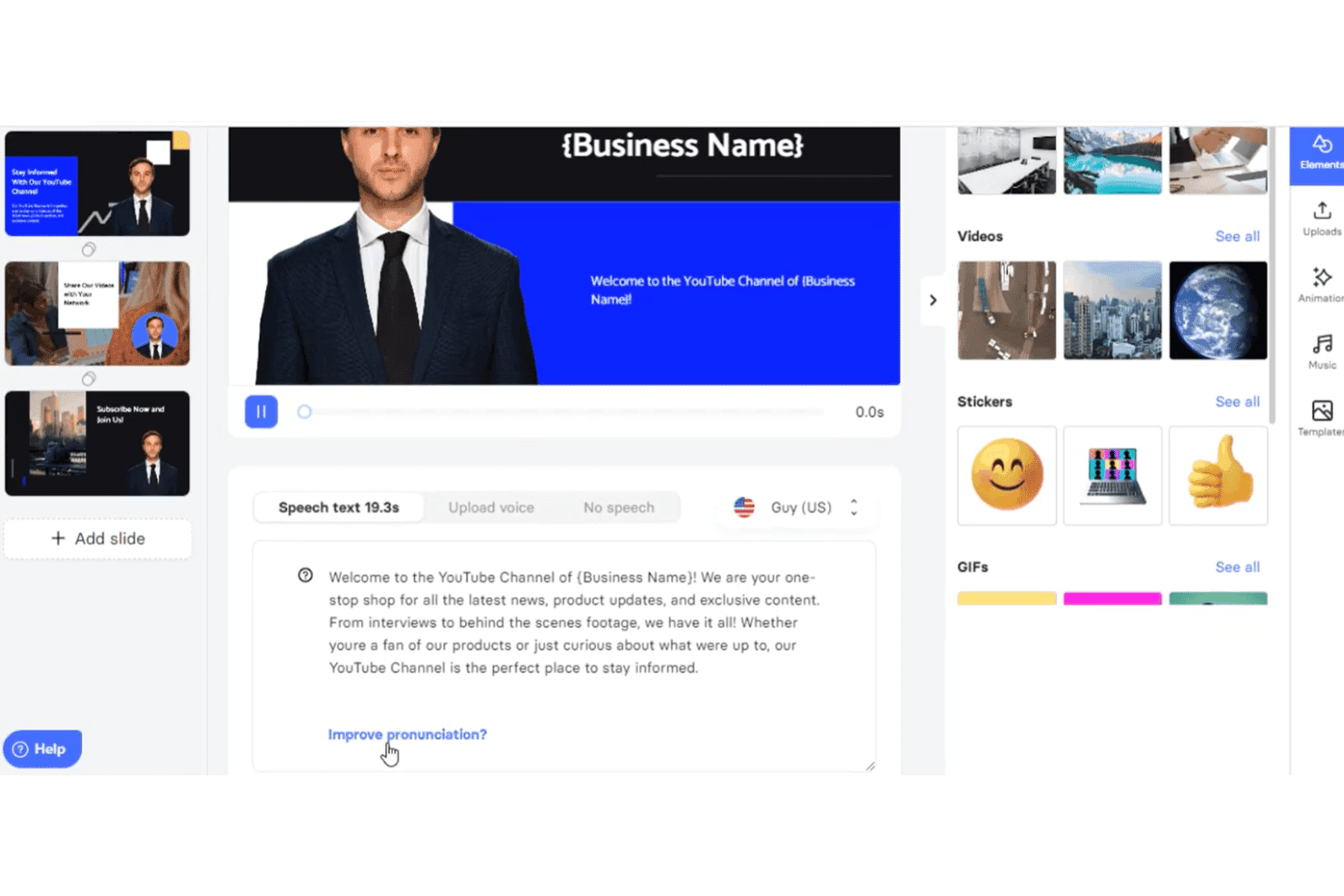
Elai.io lets users create AI videos from text with avatars, voice settings, and slide editing. Elai is an AI video generator that converts text, URLs, scripts, and PowerPoint files into narrated videos using a library of AI avatars and multilingual voiceovers across 75+ languages.
Who Is Elai Best For?
Elai is a strong fit for content marketing teams that regularly repurpose written assets—like blog posts and slide decks—into video at volume.
Why I Picked Elai
I've included Elai in my top picks because it handles text-to-video at volume better than most tools I've tested. I can paste a blog URL directly into the platform and get a narrated AI avatar video without writing a single line of script. The AI Storyboard feature takes that further, letting me turn a rough content outline into a structured, multi-slide video in one workflow.
Elai Key Features
- Brand kit storage: Store your logo, fonts, and brand colors for consistent video branding.
- Multi-language voice cloning: Generate AI narration in 28 languages cloned from your real voice.
- SCORM export: Download completed videos as SCORM files for easy LMS integration.
- Interactive quizzes and branching: Add clickable quizzes and branching elements to create interactive video experiences.
Elai Integrations
Elai.io offers native integrations with Thinkific, uQualio, Tolstoy, Moodle, Medium, Pexels, GIPHY, LottieFiles, and Articulate 360. It also connects with Zapier and provides an API for custom integrations.
What's Free?
Elai's free plan gives you 1 minute of total video rendering credit, which covers a single short video and depletes with every render and re-render. Download availability on the free tier has been flagged as unreliable by users, so treat it as a preview of the platform rather than a functional production tier.
Pros and Cons
Pros:
- Custom AI avatar creation available on paid plans
- Supports 75+ languages for voiceover generation
- Converts blog URLs into videos automatically
Cons:
- Avatar variety is limited on lower-tier plans
- Re-rendering depletes your minutes allotment
Learn more about Elai: Best for AI avatars in explainer videos
- Free plan + free demo available
- From $14/month (billed annually)
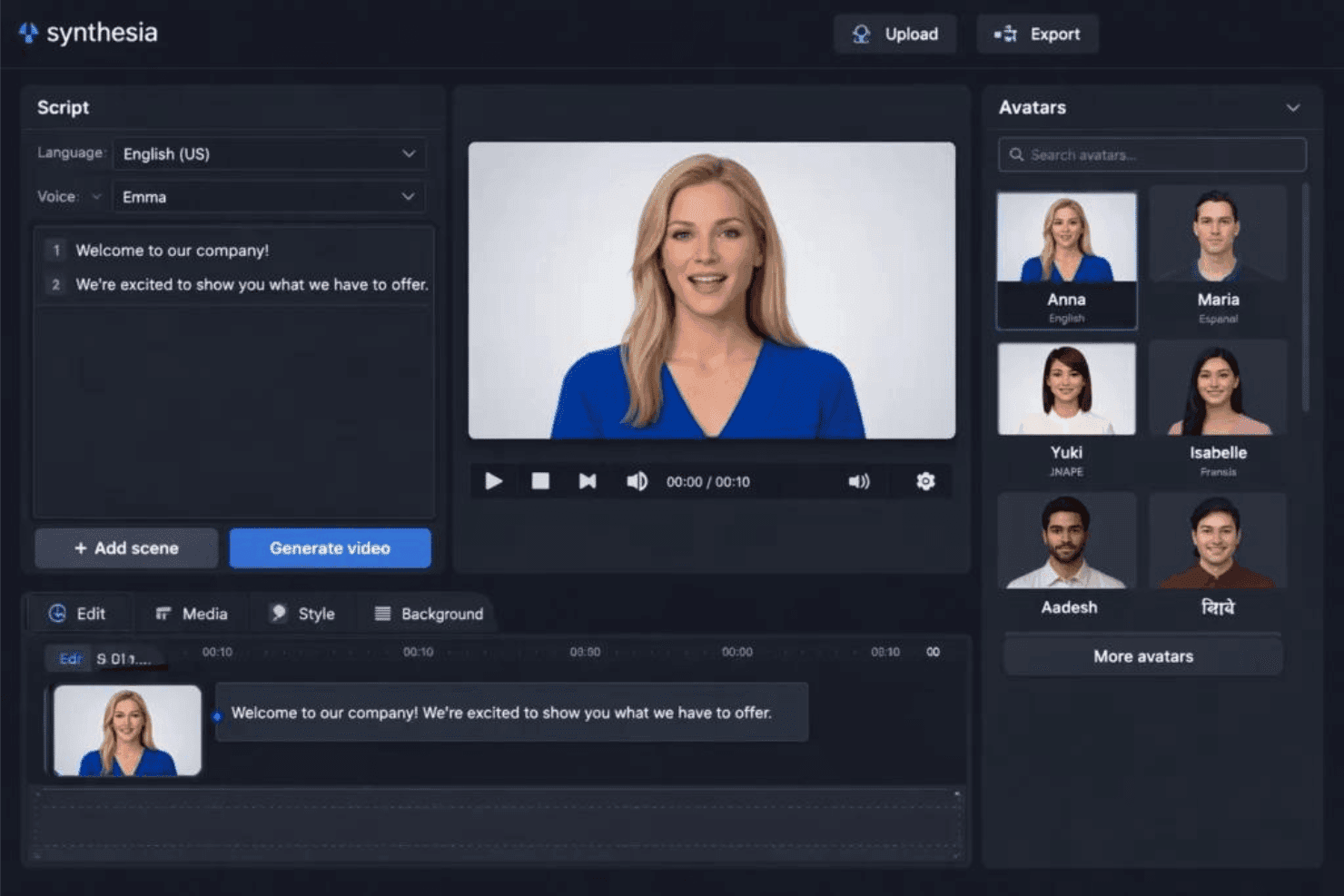
Synthesia offers an AI video editor with customizable avatars, script input, and a one-click video generation feature. Synthesia is an AI video platform that converts text scripts, documents, and prompts into finished videos using AI avatars, multilingual voiceovers, and customizable branded templates.
Who Is Synthesia Best For?
Synthesia works well for content marketing managers and L&D teams who need to produce polished, avatar-led explainer videos without a production crew.
Why I Picked Synthesia
Synthesia earns its spot on my shortlist because its avatar library is genuinely hard to beat. With 240+ stock avatars and the ability to build a personal avatar (a digital likeness of yourself or a brand presenter), I can produce explainer videos that feel presenter-led without booking a studio. I also rely on the 1-Click Translation feature, which re-dubs a finished video into 70+ languages while preserving lip sync, so one explainer asset becomes a full multilingual campaign.
Synthesia Key Features
- AI video assistant: Generate videos from scripts, documents, PDFs, or URLs with a prompt-based AI workflow.
- Brand kit customization: Store and apply logos, colors, and fonts to keep videos on-brand.
- Media library access: Use stock footage, music, and images from Getty Images, Pexels, Soundstripe, and Icons8.
- Multi-aspect ratio export: Export videos in vertical, square, and horizontal formats for various social channels.
Synthesia Integrations
Synthesia offers native integrations with PowerPoint and learning management systems via SCORM export, and provides an API for custom integrations. It also has a Chrome extension for screen recording.
What's Free?
Synthesia offers a free-forever plan that includes 10 minutes of video per month, access to 9 AI avatars, and MP4 exports. Videos on the free plan include a Synthesia watermark, and access to the full avatar library and brand kit requires a paid plan.
Pros and Cons
Pros:
- Free plan includes MP4 video downloads
- 1-click video translation into 70+ languages
- 240+ stock avatars plus custom avatar option
Cons:
- Limited to 9 avatars on free tier
- Free plan adds watermark to all videos
Learn more about Synthesia:
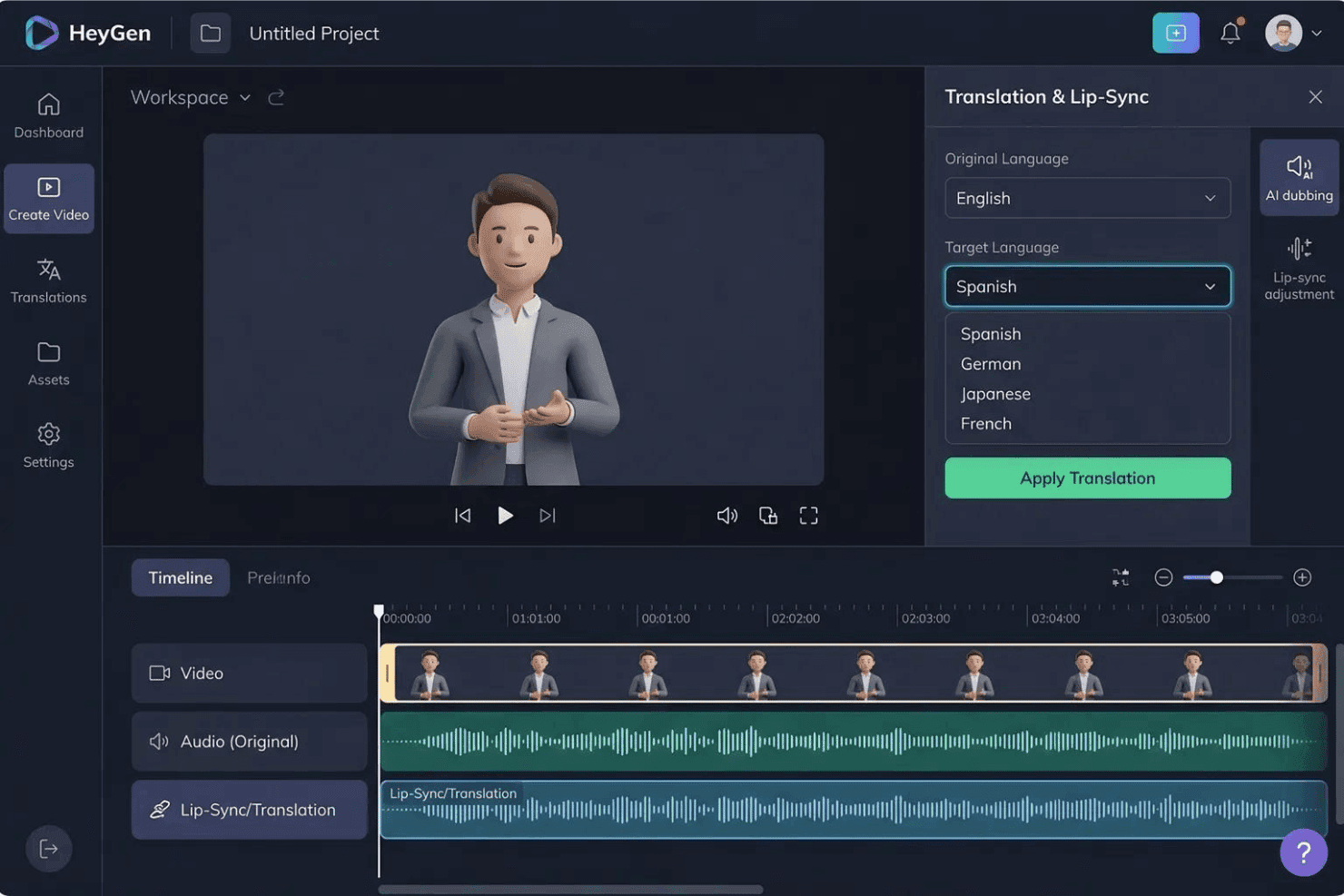
HeyGen offers a Translation & Lip-Sync panel that lets users translate AI avatar videos into multiple languages including Spanish, German, Japanese, and French. HeyGen is an AI video generator built around lifelike avatars, voice cloning, and one-click translation into 175+ languages, with text-to-video, lip-sync localization, and custom digital twin creation.
Who Is HeyGen Best For?
HeyGen is a strong fit for marketing teams at global brands and agencies that regularly produce video content across multiple languages and regional markets.
Why I Picked HeyGen
HeyGen earns its spot on my shortlist because of how it handles video localization at scale. I can take one recorded video and generate lip-synced versions in 175+ languages, with the avatar's voice tone and mouth movement matching each translated script. The custom digital twin feature means I'm not re-shooting or re-casting for each market. HeyGen runs the localization pass automatically, preserving the original speaker's voice characteristics across every language version.
HeyGen Key Features
- AI Studio editor: Create, edit, and preview video scenes using a drag-and-drop timeline with text-based control and real-time feedback.
- Marketing template library: Access ready-made video templates tailored for social ads, promos, explainers, and common marketing formats.
- Multi-aspect ratio export: Export videos in 9:16, 1:1, or 16:9 ratios for TikTok, Instagram, and YouTube without manual cropping.
- Integrated stock asset library: Use a built-in library of stock videos, images, and audio tracks directly within the video editing workflow.
HeyGen Integrations
HeyGen offers native integrations with HubSpot, Salesforce, Adobe Express, Canva, FlowShare, Zoom, and Tolstoy, connects with Zapier, and provides an API for custom integrations.
What's Free?
HeyGen's free-forever plan includes 3 videos per month (up to 1 minute each) with 1080p export, access to 500+ stock avatars, and 1 custom digital twin. Videos export with a watermark, and access to premium features like Avatar V and Video Agent is limited to a short trial period.
Pros and Cons
Pros:
- Realistic custom digital twin creation available
- 175+ languages Instant multi-language video from one recording
- Lip-synced translation across
Cons:
- "Unlimited" plan claims can mislead on actual limits
- Free plan exports are capped at 720p
Learn more about HeyGen:
Andre gratis AI-videogeneratorer for markedsførere
Her er noen flere alternativer for gratis AI-videogeneratorer for markedsførere som ikke kom med på kortlisten min, men som likevel er verdt å sjekke ut:
- 11Lumen5Best for converting blog posts to video instantly
- 12FlikiBest for realistic voiceovers in video ads
- 13Vidnoz AIBest for voiceover-driven promo videos
- 14CreatifyBest for automated ad script generation
- 15RunwayBest for video effects powered by AI
- 16Hailuo AIBest for talking avatar customization
- 17KapwingBest for collaborative editing workflows
- 18EaseMate AIBest for multi-format video exports
- 19RecCloudBest for direct social platform publishing
- 20DreamluxBest for storyboarding from marketing copy
How I Evaluate Free AI Video Generator for Marketers
First, I define what counts as free. For AI video generators, that means a free-forever plan or a full-feature free trial of at least 7 days that lets you export finished videos—watermarks are fine. From there, I split my evaluation into core functionality every tool must meet and the differentiators that set the best options apart.
Core Functionality (Table Stakes For This List)
In addition to my free offer requirements, I also use a scoring system to select tools for my list. Here's how it works:
I rank each one on a scale from 0 (does not offer the functionality) to 5 (excels in this area) for each core functionality listed below. Then, I calculate the tool's total score into a percentage. Each tool needs to achieve a minimum total score of 65% to be considered for inclusion.
- Text-to-video generation: I check whether the tool can take a script or blog excerpt and produce a coherent, multi-scene video—not just a slideshow of static images.
- AI avatars or voiceovers: Having a digital presenter or natural-sounding narration matters for explainer and product demo videos, so I look for variety in voices and avatar options.
- Marketing-ready templates: I evaluate the template library for formats marketers actually use, like short social ads, product promos, and story-format videos for Instagram or TikTok.
- Multi-aspect ratio export: Each tool should support 9:16, 1:1, and 16:9 exports so you can repurpose a single video across YouTube, Reels, and feed posts without recutting.
- Brand customization: I look for the ability to add your logo, brand colors, and fonts to keep generated videos on-brand across campaigns.
- Media library and stock assets: A built-in library of stock footage, images, and music clips helps fill gaps when you don't have original assets ready to go.
Once I have a list of tools that meet the criteria, I consider what sets each platform apart.
Differentiating Factors (What Sets Vendors Apart)
Here's how I compare and contrast different vendors:
Standout Features
Brand kit storage is a feature I pay close attention to—tools that let you save your logo, colors, and fonts mean you're not rebuilding brand elements with every new video. AI avatar presenters are another differentiator, especially for product explainers or onboarding content where a talking head adds credibility without booking a shoot. Multi-language voiceovers round things out for teams running campaigns across regions, letting you localize a single video into multiple languages from one project.
Beyond Features
Free tier limits matter a lot here—I look at how many minutes of video you can generate each month and whether exports come watermarked or resolution-capped, since that affects whether the output is usable in paid campaigns. Content rights are another factor I check, particularly whether the platform's licensing terms allow commercial use of AI-generated videos and avatars. I also consider marketing stack integrations, like direct publishing to social channels or connections with tools like HubSpot and Google Drive.
Slik velger du en gratis AI-videogenerator for markedsførere
Det er lett å gå seg vill i lange funksjonslister og kompliserte prisstrukturer. For å hjelpe deg med å holde fokus mens du arbeider deg gjennom din unike prosess for valg av programvare, får du her en sjekkliste over faktorer du bør ha i bakhodet:
| Faktor | Hva bør vurderes |
|---|---|
| FaktorSkalerbarhet | Hva bør vurderesLar verktøyet deg øke videoproduksjonen etter hvert som kampanjene vokser, eller begrenser gratisnivået produksjonen for mye til team- eller flermerketøy? |
| FaktorIntegrasjoner | Hva bør vurderesKan plattformen kobles til markedsføringsverktøyene du allerede bruker – som Canva eller HubSpot – for håndtering av innhold og kampanjearbeidsflyter? |
| FaktorTilpasningsmuligheter | Hva bør vurderesKan du bruke merkevareelementene dine og tilpasse videoer til ulike kampanjer, eller er det begrensninger på hva du kan redigere på gratisnivået? |
| FaktorBrukervennlighet | Hva bør vurderesFøles grensesnittet intuitivt, slik at teamet kan komme i gang uten omfattende opplæring, eller trenger du spesialkompetanse for å lage profesjonelle resultater? |
| FaktorImplementering og opplæring | Hva bør vurderesHvor raskt kan teamet komme i gang? Finnes det veiledninger, eksempelprosjekter og ressurser for oppstart som kan forkorte innkjøringsperioden? |
| FaktorKostnad | Hva bør vurderesEr begrensningene på gratisnivået bærekraftige for behovene dine, eller må du raskt oppgradere for å få flere kreditter eller høyere oppløsning? |
| FaktorSikkerhetstiltak | Hva bør vurderesHvilke brukerdata, ressurser og kampanjeopplysninger lagrer plattformen, og finnes det kontroller for personvern og tilgang i et delt miljø? |
| FaktorInterne ressursbehov | Hva bør vurderesTrenger du løpende støtte fra design-, IT- eller kreativavdelingen for å få verdi ut av verktøyet, eller kan markedsførere bruke plattformen selvstendig etter oppsettet? |
Hva er gratis AI-videogeneratorer for markedsførere?
Gratis AI-videogeneratorer for markedsførere er programvareverktøy som lar deg lage markedsføringsvideoer ved hjelp av AI, uten kostnader på forhånd. De tilbyr funksjoner som å gjøre tekstinstrukser eller manus om til videoer, generere AI-avatarer og fortellerstemme, og bruke merkevareelementer. Disse plattformene inkluderer vanligvis en gratisplan eller en begrenset prøveperiode, slik at markedsførere kan eksperimentere med videoinnhold til kampanjer, annonser eller sosiale kanaler før de forplikter seg økonomisk.
Funksjoner i gratis AI-videogeneratorer for markedsførere
La oss se på funksjonene som vanligvis finnes i AI-videogeneratorer for markedsførere, og hvilke som vanligvis er inkludert i gratis- og betalingsplaner.
Funksjoner som vanligvis er inkludert i gratis AI-videogeneratorer for markedsførere
- Konvertering fra tekst til video: Gjør skrevne manus, blogginnlegg eller oppsummeringer om til komplette videoer med automatisk genererte scener, slik at du raskt kan lage innhold basert på eksisterende tekst.
- Grunnleggende markedsføringsmaler: Få tilgang til startmaler laget for innlegg i sosiale medier, produktpresentasjoner eller forklaringsvideoer, slik at videoskapingen blir enklere for typiske markedsføringsbehov.
- Enkel merkevaretilpasning: Legg til logoen og grunnleggende farger i eksporterte videoer, slik at du oppnår et visst uttrykk av merkevarekonsistens uten omfattende tilpasning.
- AI-fortellerstemme: Bruk automatisk fortellerstemme i videoene dine, vanligvis med et lite utvalg naturlig klingende stemmer på populære språk.
- Grunnleggende avatarpresentatører: Legg til digitale presentatører eller snakkende ansikter i innholdet ditt ved hjelp av et standardisert bibliotek med AI-genererte avatarer som ikke kan tilpasses.
- Begrenset bibliotek med medieinnhold: Få tilgang til et lite utvalg arkivbilder, videoklipp og musikk for å berike innholdet ditt uten å måtte bruke originalressurser.
- Eksport i flere formatforhold: Eksporter videoer for vertikale, kvadratiske eller horisontale formater i sosiale medier, slik at det blir enkelt å publisere på ulike kanaler fra ett enkelt prosjekt.
- Nedlastinger med vannmerke: Last ned ferdige videoer med et diskret vannmerke, slik at du kan forhåndsvise innhold eller bruke det til intern godkjenning.
Funksjoner som vanligvis er inkludert i betalte AI-videogeneratorer for markedsførere
- Avansert administrasjon av merkevarepakker: Lagre flere logoer, skrifttyper og fargepaletter for mer omfattende automatisk bruk i alle prosjekter, slik at merkevaren fremstår konsekvent.
- Generering av flere videoer samtidig: Generer flere videoer samtidig fra ulike manus eller datastrømmer, noe som gjør det enkelt å skalere kampanjer på tvers av formater og plattformer.
- Eksport i høy oppløsning: Last ned videoer i HD- eller 4K-kvalitet, fjern vannmerker og få ferdige resultater med et polert og profesjonelt uttrykk.
- Oppretting av tilpassede avatarer: Lag personlige AI-avatarer eller talende figurer som passer til bestemte talspersoner, karakterer eller merkevarepersonligheter i videoene dine.
- Omfattende alternativer for fortellerstemmer: Velg mellom dusinvis av språk og aksenter, og få tilgang til mer realistiske eller følelsesladde AI-stemmer for fortellerstemme.
- Bibliotek med førsteklasses medieinnhold: Bruk en stor, innebygd samling av lisensierte arkivvideoer, bilder og musikk for flere kreative muligheter.
- Direkte publisering i sosiale medier: Publiser videoer umiddelbart fra plattformen til kanaler som TikTok, Instagram, Facebook og YouTube uten å måtte laste dem ned først.
- Samarbeidsverktøy: Inviter teammedlemmer til å gjennomgå, redigere eller godkjenne prosjekter sammen på plattformen, noe som forbedrer arbeidsflyten for distribuerte markedsføringsteam.
- AI-drevet videoredigering: Forbedre videoer med AI-baserte redigeringsforslag, fjerning av bakgrunner eller omstrukturering av scener utover manuell plassering av klipp.
- Forbedret analyse: Få tilgang til innsikt om videoengasjement, fullføringsgrad og resultater i sosiale medier direkte fra verktøyet, slik at du kan ta bedre kreative beslutninger i fremtiden.
Fordeler med gratis AI-videogenerator for markedsførere
Implementering av en gratis AI-videogenerator for markedsførere gir flere fordeler for teamet og virksomheten din. Her er noen av fordelene du kan se frem til:
- Raskere produksjon av kreativt innhold: Gjør manus eller en oppdragsbeskrivelse om til polerte videoressurser umiddelbart ved hjelp av AI-basert tekst-til-video og maler, slik at du blir mindre avhengig av ekstern videoproduksjon.
- Lavere produksjonskostnader: Fjern behovet for videografer, redigerere og skuespillere – funksjoner som AI-avatarer, fortellerstemmer og mediebiblioteker lar deg lage videoer helt på plattformen.
- Konsekvent merkevaretilstedeværelse: Enkel tilpasning av merkevaren og grunnleggende merkevarepakker bidrar til å holde logoer og farger sentrale, selv i innhold til sosiale annonser med kort produksjonstid.
- Rekkevidde på tvers av kanaler: Bruk verktøy for eksport i flere størrelsesforhold til å tilpasse én video til TikTok, Instagram, YouTube og flere kanaler uten å redigere den på nytt for hver kanal.
- Enkel gjenbruk av innhold: Gjør blogginnlegg, produkttekster eller webinar-manus om til nytt videoinnhold, slik at du maksimerer effekten av eksisterende markedsføringsmateriell.
- Skalerbar utprøving: Test flere kreative varianter før du investerer i et betalt abonnement, siden gratisnivåer gir mulighet for smidig utprøving og rask videreutvikling.
- Tilgjengelig videoskaping: Brukervennlige redigeringsverktøy, startmaler og ressurser for introduksjon gjør at nesten alle i teamet kan lage video – selv uten tidligere erfaring.
Kostnader og priser for AI-videogenerator for markedsførere
Jeg forstår at du kom til denne artikkelen på jakt etter de beste alternativene for AI-videogeneratorer for markedsførere som er tilgjengelige gratis. Siden gratisabonnementer imidlertid bare tilbyr begrensede funksjoner, er det en god sjanse for at du må oppgradere abonnementet senere og utforske et bredere utvalg av AI-videogeneratorer.
Tabellen nedenfor oppsummerer vanlige abonnementer, gjennomsnittsprisene deres og typiske funksjoner som inngår i en AI-videogenerator for markedsførere:
Sammenligningstabell for abonnementer for AI-videogenerator for markedsførere
| Abonnementstype | Gjennomsnittspris | Vanlige funksjoner |
|---|---|---|
| AbonnementstypeGratisabonnement | Gjennomsnittspris$0 | Vanlige funksjonerGrunnleggende tekst-til-video, eksport med vannmerke, begrenset utvalg av maler, et lite mediebibliotek og grunnleggende alternativer for fortellerstemme. |
| AbonnementstypePersonlig abonnement | Gjennomsnittspris$10–$25/bruker/måned | Vanlige funksjonerFlere maler, HD-eksport, et større utvalg av arkivmedier, flere avatarer, flere stemmealternativer og grunnleggende tilpasning av merkevaren. |
| AbonnementstypeBedriftsabonnement | Gjennomsnittspris$30–$60/bruker/måned | Vanlige funksjonerTilpassede merkevarepakker, prioritert kundestøtte, nedlastinger i høy oppløsning, masseeksport, samarbeidsverktøy og avansert videoredigering. |
| AbonnementstypeAbonnement for større virksomheter | Gjennomsnittspris$75+/bruker/måned | Vanlige funksjonerSSO og avansert sikkerhet, ubegrenset bruk, API-tilgang, dedikert introduksjon, prioritert kundestøtte og detaljert analyse. |
Vanlige spørsmål om gratis AI-videogeneratorer for markedsførere
Her er noen svar på vanlige spørsmål om gratis AI-videogeneratorer for markedsførere:
Kan jeg bruke videoer laget med gratis AI-videogeneratorer til kommersielle formål?
Ja, mange gratis AI-videogeneratorer tillater kommersiell bruk, men du bør alltid gjennomgå lisensvilkårene for å kontrollere vannmerker, bruksrettigheter og innholdsbegrensninger før du publiserer videoene dine.
Vil videoene mine ha vannmerker hvis jeg bruker en gratis plan?
Ja, de fleste gratisplaner legger til et vannmerke på eksporterte videoer. Hvis du trenger innhold uten merkevare for offentlige kampanjer, er det vanligvis nødvendig å oppgradere til en betalt plan.
Støtter gratis AI-videogeneratorer flere språk?
Ja, de fleste gratis AI-videogeneratorer tilbyr grunnleggende funksjoner for taleopptak på flere språk, men utvalget av tilgjengelige stemmer og språk er vanligvis mer begrenset enn det du finner på betalte abonnementer.
Hvor mye videoinnhold kan jeg produsere med en gratis plan?
Gratisplaner begrenser vanligvis videoproduksjonen etter antall minutter per måned eller antall eksporter. Dette er vanligvis tilstrekkelig for testing eller små prosjekter, men dekker kanskje ikke behovene til løpende kampanjer.
Trenger jeg erfaring med design eller redigering for å bruke disse verktøyene?
Nei, gratis AI-videogeneratorer er utviklet for markedsføringsteam og ikke-spesialister. Enkle grensesnitt, maler og ressurser for introduksjon hjelper deg med å lage videoer uten tidligere erfaring med redigering.
Hva skjer med innholdet mitt hvis jeg bytter til en betalt plan?
Ved å bytte til en betalt plan kan du vanligvis fjerne vannmerker, låse opp tidligere eksporter i høyere oppløsning og få ytterligere rettigheter eller redigeringsalternativer for eksisterende prosjekter.