

Å jobbe med markedsføring i dag innebærer å balansere stramme tidsfrister, økende forventninger og presset om å levere resultater med begrensede ressurser. Gratis AI-markedsføringsverktøy kan gi reell støtte ved å tilby automatisering, innsikt og kreativ hjelp uten å belaste budsjettet.
Jeg har testet og vurdert disse verktøyene uavhengig, basert på min erfaring fra markedsføringsbransjen. Målet mitt er å gi deg et objektivt innblikk i de beste gratisalternativene som er tilgjengelige, enten du driver en liten bedrift eller er del av et team i vekst.
I denne artikkelen finner du mine beste anbefalinger for gratis AI-markedsføringsverktøy, der hvert verktøy har en unik fordel som kan dekke behovene dine. La oss se nærmere på hvordan disse verktøyene kan gjøre markedsføringsarbeidet ditt mer effektivt.
Hvorfor du kan stole på våre programvareanbefalinger
6,700+
Reviews
20
Industry experts
16+
Evaluation factors
14
Years
Teamet vårt har testet og anmeldt programvare siden 2012. Vi er selv markedsføringsledere, så vi vet hvor vanskelig og hvor viktig det er å velge riktig programvare.
I denne guiden har vi vurdert verktøyene gjennom praktisk testing og uavhengig research og gitt dem poeng ut fra våre utvelgelseskriterier.
Anmeldelsene våre bygger på vår egen redaksjonelle vurdering. De er ikke et salgsargument.
Ekspertanmeldere:
 Gui DrusinaCreative Director
- Shriya GhateSenior Marketing Lead
 Amanda JacquesMarketing Ops Leader

Sammenligningstabell: Gratis AI-markedsføringsverktøy
Denne sammenligningstabellen oppsummerer prisopplysningene for mine beste utvalgte gratis AI-markedsføringsverktøy.
| Tool | Best For | Trial Info | Price | ||
|---|---|---|---|---|---|
| 1 | Best for AI-powered social scheduling | 14-day free trial | From $29/month | Website | |
| 2 | Best for user-friendly graphic design tools | Free trial + free plan available | From $144/user/year (billed annually) | Website | |
| 3 | Best for team task management | Free plan available | From $20/month | Website | |
| 4 | Best for versatile workspace integration | Free plan available | From $20/user/month | Website | |
| 5 | Best for newsletter creation | 30-day free trial + free plan + free demo available | From $43/month (billed annually) | Website | |
| 6 | Best for ad design templates | Free trial available | From $39/month | Website | |
| 7 | Best for presentation creation | Free plan available | From $8.33/month (billed annually) | Website | |
| 8 | Best for multi-app workflow automation | Free plan available | From $19.99/month (billed annually) | Website | |
| 9 | Best for optimizing content for search engines | Free trial + free demo available | From $49/month (billed annually) | Website | |
| 10 | Best for AI-generated art | Free plan available | From $10/month | Website |


Anmeldelser av de beste gratis AI-markedsføringsverktøyene
Nedenfor finner du mine detaljerte sammendrag av de beste gratis AI-markedsføringsverktøyene som kom med på utvalgslisten min. Anmeldelsene mine gir en grundig gjennomgang av de viktigste funksjonene, fordelene & ulempene, integrasjonene og ideelle bruksområdene for hvert verktøy, slik at du kan finne det som passer best for deg. Noen av disse verktøyene tilbyr en helt gratis versjon, mens andre tilbyr en gratis prøveperiode. Jeg har lagt til en merknad om hva som er gratis i hver av anmeldelsene mine.
 1Best for AI-powered social scheduling
Enji
- 14-day free trial
- From $29/month
Visit WebsiteCustomer Rating:4.3/5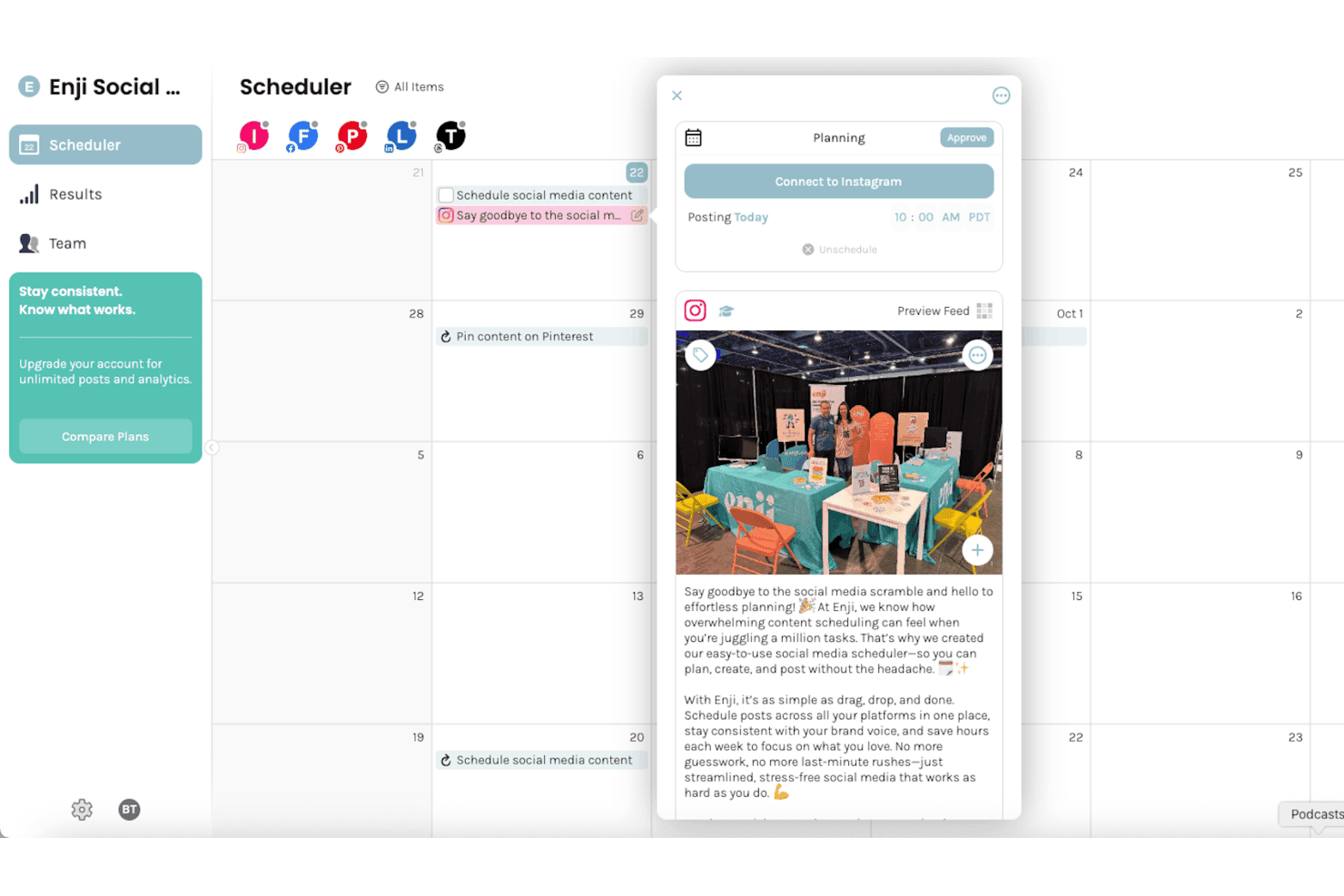
Enji lets users schedule and preview social media posts on a calendar. Enji is a social media marketing platform with a free plan for AI-drafted, brand-voiced captions, content planning, and post scheduling across social channels.
Who Is Enji Best For?
Enji suits small-business social media managers who need AI-powered social scheduling to maintain a consistent posting cadence with a lean team.
Why I Picked Enji
I picked Enji because it uses my custom brand profile to write social media captions and drop them straight into my publishing queue. I can turn high-level marketing goals into ready-to-publish social queues in minutes. It saves me from starting with a blank calendar and guessing what to say next. I can plan captions on the calendar, then approve posts for auto-publishing. The free tier supports 8 scheduled posts monthly and roughly five AI captions, enough to test a modest posting rhythm.
Enji Key Features
- Instagram grid preview: Preview how planned posts appear on your Instagram grid.
- Reels audio tools: Add and preview music or original audio for scheduled Reels.
- Post tagging: Add saved hashtags, account tags, and location tags to posts.
- Social media metrics: Review social media metrics and post-level analytics on the paid Social Media Only plan.
Enji Integrations
Enji has native integrations with Instagram, Facebook, TikTok, Pinterest, LinkedIn, Threads, YouTube, and Canva. Canva integration is paid-plan only; the free plan connects two social accounts, and no API is documented.
What's Free?
Enji offers a free plan alongside a 14-day trial. The free plan supports two connected social accounts, eight scheduled posts per month, and roughly five AI captions.
Pros and Cons
Pros:
- Reviewers praise responsive, hands-on marketing guidance
- Calendar brings captions and plans together
- Brand-voiced drafts need light editing
Cons:
- Reviewers want a mobile app for posting on the go
- AI caption allowance limits monthly output
Learn more about Enji: Best for user-friendly graphic design tools
- Free trial + free plan available
- From $144/user/year (billed annually)
Visit WebsiteCustomer Rating:4.6/5
Canva lets users create professional visuals easily with templates and editing tools. Canva is a graphic design platform aimed at businesses, marketers, and individuals looking to create visually appealing designs with ease. It provides tools for designing social media graphics, presentations, posters, and other visual content without requiring extensive design skills.
Why I picked Canva: Canva offers a free-forever plan that includes access to thousands of templates and design types, which aligns with its USP of graphic design tools. You can use its drag-and-drop editor to create professional designs quickly. The free version also includes basic photo editing tools and a library of images and icons to enhance your projects. This makes it perfect for teams and individuals looking to craft quality visuals without incurring costs.
Standout features & integrations:
Features include a user-friendly drag-and-drop editor that simplifies design creation. Canva offers a wide variety of templates for different design needs, from social media posts to marketing materials. You can also access a library of stock images and elements to enhance your designs.
Integrations include Google Workspace, Dropbox, Asana, Salesforce, Instagram, Facebook, Slack, Pinterest, Microsoft Teams, LinkedIn, HubSpot, and Mailchimp.
What's free? Canva provides a free-forever plan with access to a wide range of templates and design tools without charge.
Pros and Cons
Pros:
- Supports collaboration on designs
- Suitable for non-designers
- Access to stock images
Cons:
- Some elements require additional payment
- Has some design restrictions
Learn more about Canva:

Taskade helps teams organize tasks and collaborate in real time to boost productivity. Taskade is a collaborative task management tool designed for teams and individuals to organize projects, track tasks, and enhance productivity. It helps users with their workflow by offering a unified workspace for task management, note-taking, and collaboration.
Why I picked Taskade: Taskade offers a free plan that includes features like task lists, mind maps, and collaborative notes. You can create unlimited tasks and projects to keep your team organized. The free version also supports real-time collaboration, allowing your team to work together effectively. This makes it an ideal choice for teams looking to stay productive without incurring extra costs.
Standout features & integrations:
Features include a user-friendly interface that simplifies task management and project planning. Taskade offers templates for different project types to help you get started quickly. The platform also supports video conferencing, enabling internal communication with your team.
Integrations include Slack, Google Drive, X/Twitter, Microsoft Teams, Typeform, GitHub, Gmail, YouTube, HubSpot, and OneDrive.
What's free? Taskade provides a free-forever plan with essential task management and collaboration features available without charge.
Pros and Cons
Pros:
- Encourages team collaboration
- Easy to customize templates
- Supports multiple project views
Cons:
- Some features are limited by usage caps
- May need initial setup time
Learn more about Taskade: Best for versatile workspace integration
- Free plan available
- From $20/user/month
Visit WebsiteCustomer Rating:4.6/5
Notion AI simplifies teamwork with notes, tasks, and automation organized in one workspace. Notion AI is a productivity platform that combines note-taking, task automation, and project management, targeting startups, SMBs, and enterprises. It enhances team collaboration and workflow processing through its integrated workspace features.
Why I picked Notion AI: Notion AI provides a free plan that allows you to explore its core functionalities without any initial cost. You can create custom agents for workflow automation and connect various tools to improve productivity. The free version includes basic features like note-taking and task management, which align with its USP of offering a versatile workspace. This makes it particularly useful if you're looking to enhance collaboration and efficiency within your team.
Standout features & integrations:
Features include document translation, flowchart generation, and database autofill. You can also automate tasks and manage projects efficiently. The platform's AI capabilities help ease daily workflow and improve team productivity.
Integrations include Google Drive, Slack, Trello, Asana, Zapier, GitHub, and many others.
What's free? Notion AI offers a free plan that includes basic features for note-taking and task management, with limited trial access to advanced AI functionalities.
Pros and Cons
Pros:
- Easy task automation
- Suitable for teams of all sizes
- Versatile workspace for various needs
Cons:
- Small teams may find it too complex at first
- Most users will need time to learn full features
Learn more about Notion AI: Best for newsletter creation
- 30-day free trial + free plan + free demo available
- From $43/month (billed annually)
Visit WebsiteCustomer Rating:4.5/5
beehiiv offers tools for creating and growing newsletters with built-in analytics. beehiiv is an email marketing platform tailored for content creators and marketers looking to build and grow their audience through newsletters. It provides tools for designing, sending, and analyzing newsletter performance to enhance audience engagement.
Why I picked beehiiv: beehiiv offers a free plan that allows you to send newsletters to up to 2,500 subscribers. This makes it accessible for small teams or individuals starting with email marketing. The free version includes features like drag-and-drop email design and basic analytics. You can also access a variety of templates for your newsletter process.
Standout features & integrations:
Features include a drag-and-drop editor that simplifies email design. It provides advanced analytics to help you understand your audience better. beehiiv offers customizable templates to fit your brand's style.
Integrations include Stripe, Google Analytics, WordPress, Shopify, Zapier, Patreon, Giphy, and Unsplash.
What's free? beehiiv offers a free-forever plan, allowing users to manage up to 500 subscribers without any charge.
Pros and Cons
Pros:
- Offers various templates
- Access to basic analytics
- Suitable for small audiences
Cons:
- Advanced analytics not included
- Limited to basic features only
Learn more about Beehiiv:

AdCreative.ai generates ad designs to boost engagement and streamline ad creation. AdCreative.ai is a creative design platform aimed at marketers and businesses looking to enhance their advertising efforts. It specializes in generating visually appealing ad designs that can improve engagement and conversion rates.
Why I picked AdCreative.ai: The platform offers a free trial that gives you access to its ad design templates. These templates are beneficial for quickly creating professional ads without needing design skills. You can generate multiple variations to test which ads perform best. This makes it ideal for teams looking to organize their ad creation process.
Standout features & integrations:
Features include AI-driven design suggestions to optimize your ad creatives. It provides performance predictions to help you choose the best designs. You can also utilize the platform to generate multiple ad variations in seconds.
Integrations include Facebook, Google Ads, Instagram, LinkedIn, Canva, HubSpot, Shopify, Mailchimp, and Hootsuite.
What's free? AdCreative.ai offers a limited-time free trial where users can explore its features without a long-term commitment.
Pros and Cons
Pros:
- Suitable for non-designers
- Supports creative testing
- Quick ad design process
Cons:
- Most users will need marketing knowledge for best results
- Advanced features need time to learn
Learn more about AdCreative.ai: Best for presentation creation
- Free plan available
- From $8.33/month (billed annually)
Visit WebsiteCustomer Rating:4.5/5
SlidesAI automatically creates clean presentations from text to save time and improve visuals. SlidesAI is an AI-powered presentation tool designed for educators, professionals, and students to quickly create visually appealing presentations. It simplifies the process of generating slides by allowing users to input topics, scripts, or notes, and then automatically creates slide outlines and themes.
Why I picked SlidesAI: SlidesAI offers a free version that includes essential features for presentation creation. You can create presentations in Google Slides and PowerPoint without needing design skills. The free version supports multiple languages and provides basic customization options. This makes it ideal for those looking to save time and enhance engagement with minimal effort.
Standout features & integrations:
Features include the ability to edit themes and remix slides to fit your needs. SlidesAI supports over 100 languages, allowing for diverse use. The platform also provides add-ons for Google Slides and PowerPoint to improve the presentation process.
Integrations include Google Slides and PowerPoint.
What's free? SlidesAI offers a free-forever plan with basic presentation creation features available without charge.
Pros and Cons
Pros:
- Increases audience engagement
- No design skills required
- Supports multiple languages
Cons:
- Generated slides may require further editing
- Limited customization for branding or visual style
Learn more about SlidesAI: Best for multi-app workflow automation
- Free plan available
- From $19.99/month (billed annually)

Zapier automates workflows between apps with free tools to improve efficiency. Zapier is an automation tool designed for businesses and individuals looking to connect different apps and automate workflows. It enables users to create automated actions between apps, saving time and reducing manual tasks.
Why I picked Zapier: Zapier offers a free plan that allows you to automate workflows between apps, which aligns with its USP of workflow automation. You can set up "Zaps" to automate repetitive tasks without coding knowledge. The free version includes access to basic apps and allows for single-step automation. This makes it an excellent choice for small teams looking to improve efficiency without extra costs.
Standout features & integrations:
Features include a simple interface for creating automated workflows that connect your favorite apps. Zapier provides customizable triggers and actions to fit your specific needs. The platform also offers a task history feature to track and manage your Zaps effectively.
Integrations include Google Sheets, Slack, Trello, Mailchimp, Salesforce, Asana, Gmail, HubSpot, Dropbox, and Shopify.
What's free? Zapier offers a free-forever plan with basic automation features and limited task runs per month.
Pros and Cons
Pros:
- Reduces manual work
- Suitable for small teams
- No coding required
Cons:
- New users will need time to learn the platform
- Some apps require a paid plan
Learn more about Zapier: Best for optimizing content for search engines
- Free trial + free demo available
- From $49/month (billed annually)

Surfer SEO helps optimize content and improve search visibility with built-in AI tools. Surfer SEO is a content optimization platform designed for marketing managers, SEO specialists, and content creators. It focuses on enhancing online visibility by optimizing content for search engines and conducting site audits.
Why I picked Surfer SEO: Surfer SEO offers a free Chrome extension that provides essential SEO insights directly in your browser. You can access AI writing tools to help create optimized content without additional costs. The platform also includes free courses on SEO optimization, making it a valuable resource for users looking to improve their SEO skills. These free offerings align with its USP, providing tools to optimize content effectively.
Standout features & integrations:
Features include a content editor for crafting high-quality content and a SERP analyzer for competitor comparison. The platform also offers AI tools for generating and refining articles, which can save you time and improve search rankings.
Integrations include Google Docs, WordPress, ChatGPT, Jasper, Gemini, Semrush, Zapier, Ahrefs, Perplexity, and many others.
What's free? Surfer SEO offers a free Chrome extension and AI writing tools, along with free SEO courses, without any time restrictions.
Pros and Cons
Pros:
- Actionable feedback on content
- Access to free SEO courses
- AI writing tools included
Cons:
- Some users may need additional tools for a complete SEO strategy
- Beginners will need time to learn the platform
Learn more about Surfer SEO:

Lexica offers a free library of AI-generated images and allows users to create a limited number of images each week. Lexica Art is an AI-driven art generation tool designed for artists, graphic designers, and creative professionals. It simplifies the process of creating digital art by providing users with tools to generate images using AI technology.
Why I picked Lexica Art: Lexica offers a wide selection of AI-generated images free for personal and commercial use. This allows you to explore the platform's capabilities without any charge. This makes it suitable for artists looking to experiment with digital art.
Standout features & integrations:
Features include a user-friendly interface that makes it easy for beginners to start browsing and integrating AI-generated art into their work. It offers a large collection of AI-generated images to inspire your projects. The platform also has generation and customization options that allow you to personalize your artwork.
Integrations include popular platforms like Adobe Photoshop, Canva, Figma, Sketch, Procreate, Inkscape, GIMP, and CorelDRAW.
What's free? Lexica provides forever-free access to its vast prompt library, enabling users to search for extensive results using its gallery’s search engine.
Pros and Cons
Pros:
- Strong community support
- Extensive prompt library
- High-quality image generation
Cons:
- Some images may lack originality
- AI-image generation requires a subscription
Learn more about Lexica Art:
Andre gratis AI-markedsføringsverktøy
Her er noen flere AI-markedsføringsverktøy som også tilbyr gratis abonnementer eller prøveperioder. Selv om disse verktøyene ikke kom med på utvalgslisten min, er de likevel verdt å ta en titt på:
- 11ElicitBest for research assistance
- 12Koala AIBest for AI-driven content ideas
- 13Browse AIBest for web data extraction
- 14GumloopBest for automating repetitive marketing tasks
- 15FounderPalBest for startup guidance
- 16IndexlyBest for index monitoring
- 17MidjourneyBest for AI-driven artistic visuals
- 18ThryvBest for small business management
- 19Sivi AIBest for AI-generated graphic designs
- 20ClayBest for personal relationship management
- 21NotebookLMBest for organizing research notes
- 22Outbound.comBest for targeted email campaigns
How I Evaluate Free AI Marketing Tools
I evaluate every tool against baseline criteria—like whether the free plan actually covers ad copy and social posts—then weigh differentiators like AI model quality and integration depth.
Core Functionality (Table Stakes For This List)
When I'm selecting tools for my list, I rank each one on a scale from 0 (does not offer the functionality) to 5 (excels in this area) for each core functionality listed below. Then, I calculate the tool's total score into a percentage. Each tool needs to achieve a minimum total score of 65% to be considered for inclusion.
- AI Content Generation: I look for tools that can produce usable marketing copy across formats—think blog intros, Google Ads headlines, product descriptions, and email subject lines—without heavy editing.
- Genuinely Free Plan: The tool needs a perpetual free tier, not a 14-day trial. I check whether the free plan includes enough usage to actually write a week's worth of social posts or a couple of blog drafts.
- Marketing-Specific Use Cases: General-purpose chatbots don't qualify. I evaluate whether the platform is built around marketing workflows like campaign briefs, landing page copy, or ad variations.
- Multi-Format Output Support: A tool that only writes tweets isn't enough. I look for coverage across at least a few channels—social captions, email sequences, blog content, or ad copy within one platform.
- Brand & Tone Controls: I check whether you can set parameters like tone, target audience, or brand voice so outputs match your guidelines instead of sounding generic across every generation.
- Templates or Prompt Library: Pre-built templates for common tasks—like a product launch email or a LinkedIn carousel outline—save real time. I evaluate the library's depth and how well templates map to actual marketing jobs.
Once I have a list of tools that meet this criteria, I consider what sets each platform apart.
Differentiating Factors (What Sets Vendors Apart)
Here's how I compare and contrast different vendors:
Standout Features
Multimodal generation is a major differentiator. Tools that combine text, image, and video creation in one place save you from juggling a copywriting app, a design tool, and a video editor for a single campaign. I also look for built-in SEO scoring that evaluates drafts against target keywords and SERP data before you hit publish. Campaign workflow automation matters for teams running recurring content calendars, where chaining blog-to-social-to-email sequences into a repeatable flow cuts hours of manual coordination each week.
Beyond Features
Free plan limits matter more than most people realize. I check whether a tool's monthly word or credit cap can actually sustain a real content calendar—say, a week's worth of social posts and a couple of blog drafts—rather than running dry after a few test generations. Integration support is another key factor, particularly whether a tool connects to your CMS or email platform so you're not copy-pasting every output manually. Content ownership policies deserve attention too, since some free tiers reserve the right to use your inputs for model training or restrict commercial use of generated assets.
Slik velger du gratis AI-markedsføringsverktøy
Komplekse funksjonslister og prisstrukturer kan gjøre det vanskelig å finne ut hva du egentlig får fra et gratis AI-markedsføringsverktøy. For å hjelpe deg med å holde fokus mens du går gjennom prosessen med å velge programvare, er dette noen faktorer du bør ha i bakhodet:
| Faktor | Hva du bør vurdere |
| Omfanget av gratistilbudet | Kontroller hva som er inkludert i gratisabonnementet. Sørg for at det dekker de grunnleggende behovene dine uten skjulte kostnader. |
| Skalerbarhet | Sørg for at verktøyet kan vokse med teamet ditt. Det bør kunne håndtere økte datamengder og flere brukerkrav. |
| Integrasjoner | Se etter kompatibilitet med verktøyene du allerede bruker. Dette sikrer en sømløs integrasjon i arbeidsflyten. |
| Brukervennlighet | Velg et verktøy med et brukervennlig grensesnitt. Det bør kreve minimalt med opplæring for teamet ditt. |
| Støttealternativer | Vurder hvilke støtteressurser som er tilgjengelige. Tilgang til veiledninger, vanlige spørsmål og direkte brukerstøtte kan være avgjørende. |
| Tilpasning | Kontroller om du kan tilpasse verktøyet til dine spesifikke behov. Denne fleksibiliteten kan øke produktiviteten. |
| Sikkerhet | Sørg for databeskyttelse og overholdelse av regelverk. Sikkerhet er avgjørende for kundenes tillit. |
| Brukeranmeldelser | Les tilbakemeldinger fra andre brukere. Erfaringene deres kan gi verdifull innsikt i hvor effektivt verktøyet er. |
Hva er gratis AI-markedsføringsverktøy?
AI-markedsføringsverktøy er programvareløsninger som bruker kunstig intelligens til å automatisere og optimalisere markedsføringsoppgaver. De tilbyr vanligvis gratisabonnementer eller prøveperioder, slik at brukerne kan utforske grunnleggende funksjoner uten kostnad. Disse verktøyene brukes ofte av markedsførere, småbedriftseiere og innholdsskapere for å øke produktiviteten og forbedre effektiviteten til kampanjer. Funksjoner som automatisering, dataanalyse og innholdsgenerering hjelper brukerne med å spare tid, øke effektiviteten og oppnå bedre resultater.
Funksjoner i gratis AI-markedsføringsverktøy
La oss gå gjennom funksjonene som vanligvis finnes i AI-markedsføringsverktøy, og se hvilke som vanligvis er inkludert i gratis kontra betalte abonnementer.
Funksjoner som vanligvis finnes i gratis AI-markedsføringsverktøy
- Automatisering: Automatiserer gjentakende oppgaver for å spare tid og øke effektiviteten.
- Grunnleggende analyse: Gir innsikt i kampanjeytelsen for å bidra til datadrevne beslutninger.
- Tilgang til maler: Tilbyr ferdige maler for rask oppstart av markedsføringsmateriell.
- Innholdsgenerering: Genererer markedsføringsinnhold for å hjelpe med kampanjeoppretting og engasjement.
- Enkle integrasjoner: Kobler seg til grunnleggende apper for å effektivisere arbeidsflyter og forbedre produktiviteten.
Funksjoner som vanligvis finnes i betalte AI-markedsføringsverktøy
- Avansert analyse: Gir dypere innsikt og prediktiv analyse for strategisk planlegging.
- Avansert tilpasning: Gjør det mulig for brukerne å tilpasse verktøyet til spesifikke forretningsbehov for utvidet funksjonalitet.
- Arbeidsflyter med flere trinn: Muliggjør komplekse automatiseringsprosesser for å håndtere omfattende markedsføringsoppgaver.
- Samarbeid i sanntid: Støtter teamsamarbeid om prosjekter med løpende oppdateringer og tilbakemeldinger.
- Forbedret sikkerhet: Tilbyr ekstra sikkerhetslag for å sikre databeskyttelse og etterlevelse av regelverk.
Fordeler med gratis AI-markedsføringsverktøy
Implementering av gratis AI-markedsføringsverktøy gir flere fordeler for teamet og virksomheten din. Her er noen av fordelene du kan se frem til:
- Kostnadsbesparelser: Få tilgang til viktige markedsføringsfunksjoner uten å bruke penger, noe som er ideelt for små bedrifter og oppstartsbedrifter.
- Tidsbesparelser: Automatiser gjentakende oppgaver for å frigjøre tid til mer strategiske aktiviteter.
- Økt produktivitet: Bruk maler og funksjoner for innholdsgenerering til raskt å lage markedsføringsmateriell og kampanjer.
- Datadrevet innsikt: Få tilgang til grunnleggende analyse for å ta informerte beslutninger og forbedre markedsføringsstrategier.
- Fleksibilitet: Integrer med grunnleggende apper for å forbedre eksisterende arbeidsflyter og tilpasse dem til behovene til teamet ditt.
- Tilgjengelighet: Prøv ulike verktøy for å finne det som passer best for virksomheten din, uten økonomiske forpliktelser.
Kostnader og priser for gratis AI-markedsføringsverktøy
Jeg forstår at du kom til denne artikkelen på jakt etter de beste AI-markedsføringsverktøyene som er tilgjengelige gratis. Ettersom gratisabonnementer bare tilbyr begrensede funksjoner, er det imidlertid en god sjanse for at du må oppgradere abonnementet ditt i fremtiden.
Tabellen nedenfor oppsummerer vanlige abonnementer, gjennomsnittsprisene deres og typiske funksjoner som er inkludert i AI-markedsføringsverktøy:
Sammenligningstabell for abonnementer på AI-markedsføringsverktøy
| Abonnementstype | Gjennomsnittspris | Vanlige funksjoner |
| Gratisabonnement | $0 | Grunnleggende automatisering, grunnleggende analyse, tilgang til maler, innholdsgenerering og enkle integrasjoner. |
| Personlig abonnement | $8-$149 per bruker/måned | Forbedrede maler, avansert analyse, arbeidsflyter med flere trinn, prioritert kundestøtte og ekstra lagringsplass. |
| Bedriftsabonnement | $14.99-$800 per bruker/måned | Avansert tilpasning, samarbeid i sanntid, forbedret sikkerhet, alternativer for dataeksport og førsteklasses kundestøtte. |
| Virksomhetsabonnement | $60+ per bruker/måned | Skreddersydde løsninger, dedikert kontoadministrasjon, API-tilgang, skaleringsalternativer og sikkerhet på virksomhetsnivå. |
Vanlige spørsmål om gratis AI-markedsføringsverktøy
Her er noen svar på vanlige spørsmål om gratis AI-markedsføringsverktøy:
Hvordan sammenlignes gratis AI-markedsføringsverktøy med betalte verktøy?
Gratis AI-markedsføringsverktøy tilbyr ofte grunnleggende funksjoner som automatisering og analyse. De hjelper deg med å komme i gang uten økonomiske forpliktelser. Betalte verktøy tilbyr imidlertid vanligvis avanserte funksjoner, flere integrasjoner og bedre kundestøtte. Vurder behovene og budsjettet ditt for å avgjøre hva som passer best for deg.
Kan gratis AI-markedsføringsverktøy integreres med annen programvare?
Ja, mange gratis AI-markedsføringsverktøy tilbyr grunnleggende integrasjoner med populære apper som Google Sheets og Slack. Disse integrasjonene hjelper deg med å effektivisere arbeidsflyter og forbedre effektiviteten. Mer avanserte integrasjoner kan imidlertid kreve et betalt abonnement.
Finnes det begrensninger på databruk i gratis AI-markedsføringsverktøy?
Gratis abonnementer har ofte begrensninger på databruk eller antallet oppgaver du kan automatisere. Det betyr at du kan nå en grense hvis teamet ditt vokser eller behovene dine øker. Sjekk begrensningene før du baserer omfattende bruk på et gratis abonnement.
Tilbyr gratis AI-markedsføringsverktøy kundestøtte?
De fleste gratis AI-markedsføringsverktøy tilbyr begrenset kundestøtte, ofte via e-post eller en kunnskapsbase. For mer omfattende støtte, som direktechat eller telefonassistanse, må du kanskje oppgradere til et betalt abonnement.
Hvor sikre er gratis AI-markedsføringsverktøy?
Sikkerheten varierer fra leverandør til leverandør, men de fleste gratis AI-markedsføringsverktøy tilbyr grunnleggende sikkerhetsfunksjoner for å beskytte dataene dine. Hvis sikkerhet er en høy prioritet, bør du se etter verktøy som følger bransjestandarder, eller vurdere et betalt abonnement med forbedrede sikkerhetsalternativer.
Kan gratis AI-markedsføringsverktøy skaleres i takt med virksomheten min?
Gratis AI-markedsføringsverktøy kan være et godt utgangspunkt, men de skalerer kanskje ikke godt med virksomheter i vekst. Etter hvert som behovene dine utvikler seg, kan det hende du må bytte til et betalt abonnement eller utforske andre verktøy som tilbyr bedre skalerbarhet og avanserte funksjoner.