

I migliori strumenti di intelligenza artificiale gratuiti per il marketing ti aiutano ad accelerare attività come la creazione di documenti di briefing, il riutilizzo dei contenuti e l'analisi delle campagne, senza aggiungere complessità al tuo flusso di lavoro.
Se trascorri ore a copiare dati nelle presentazioni, a riscrivere lo stesso testo in cinque formati o a ricercare manualmente i concorrenti, è facile rimanere indietro. Questi strumenti sono progettati per occuparsi di questo tipo di lavoro al posto tuo.
Lavoro nel marketing da oltre 10 anni e ho trascorso più di 500 ore a testare strumenti di intelligenza artificiale gratuiti in campagne reali. In questa guida condividerò quelli che vale davvero la pena utilizzare e gli aspetti a cui prestare attenzione prima di integrarli nel tuo insieme di strumenti.
Perché fidarsi dei nostri consigli sui software
6,700+
Reviews
20
Industry experts
16+
Evaluation factors
14
Years
Il nostro team testa e recensisce software dal 2012. In quanto leader del marketing noi stessi, sappiamo quanto sia difficile — e importante — scegliere il software giusto.
Per questa guida, abbiamo valutato gli strumenti attraverso test pratici e ricerche indipendenti, assegnando un punteggio agli strumenti in base ai nostri criteri di selezione.
Le nostre recensioni riflettono il nostro giudizio editoriale umano, non un discorso di vendita.
Revisori esperti:
 Gui DrusinaDirettore creativo
- Shriya GhateSenior Marketing Lead
 Amanda JacquesResponsabile Marketing Ops

Tabella comparativa: strumenti di intelligenza artificiale gratuiti per il marketing
Questa tabella comparativa riassume i dettagli sui prezzi della mia selezione dei migliori strumenti di intelligenza artificiale gratuiti per il marketing.
| Tool | Best For | Trial Info | Price | ||
|---|---|---|---|---|---|
| 1 | Il migliore con filtri avanzati per i dati dei contatti B2B | Prova gratuita di 14 giorni + piano gratuito + demo gratuita disponibile | A partire da 49/postazione/mese (fatturato annualmente) | Website | |
| 2 | Ideale per i modelli di design grafico | Piano gratuito disponibile | Da $12/mese (fatturazione annuale) | Website | |
| 3 | Ideale per l’analisi dell’e-commerce | Piano gratuito disponibile | Da $59/mese | Website | |
| 4 | Ideale per la programmazione dei social media | Piano gratuito + prova gratuita disponibile | A partire da $5/mese (fatturato annualmente) | Website | |
| 5 | Ideale per la conformità email in Canada | Piano gratuito disponibile | Da CAD $22.04/mese | Website | |
| 6 | Ideale per la gestione delle campagne email | 14 giorni di prova gratuita + demo gratuita disponibile | Da $20/mese | Website | |
| 7 | Ideale per la creazione di contenuti guidata dall’IA | Piano gratuito + prova gratuita di 7 giorni disponibile | Da €25/mese (fatturazione annuale) | Website | |
| 8 | Ideale per l'automazione dell'email marketing | Piano gratuito disponibile | Da $34/mese (fatturazione annuale) | Website | |
| 9 | Ideale per strumenti di collaborazione di squadra | Piano gratuito + prova gratuita di 15 giorni disponibile | Da $49/mese (fatturati annualmente) | Website | |
| 10 | Ideale per il miglioramento della scrittura | Piano gratuito disponibile | Da $11.99/utente/mese (fatturazione annuale) | Website |


Recensioni dei migliori strumenti di intelligenza artificiale gratuiti per il marketing
Di seguito trovi i miei riepiloghi dettagliati dei migliori strumenti di intelligenza artificiale gratuiti per il marketing inclusi nella mia selezione. Le mie recensioni offrono una panoramica dettagliata delle funzionalità principali, dei pro e dei contro, delle integrazioni e dei casi d’uso ideali di ogni strumento, per aiutarti a trovare quello più adatto a te.
 Il migliore con filtri avanzati per i dati dei contatti B2B
- Prova gratuita di 14 giorni + piano gratuito + demo gratuita disponibile
- A partire da 49/postazione/mese (fatturato annualmente)
Visit WebsiteCustomer Rating:4.5/5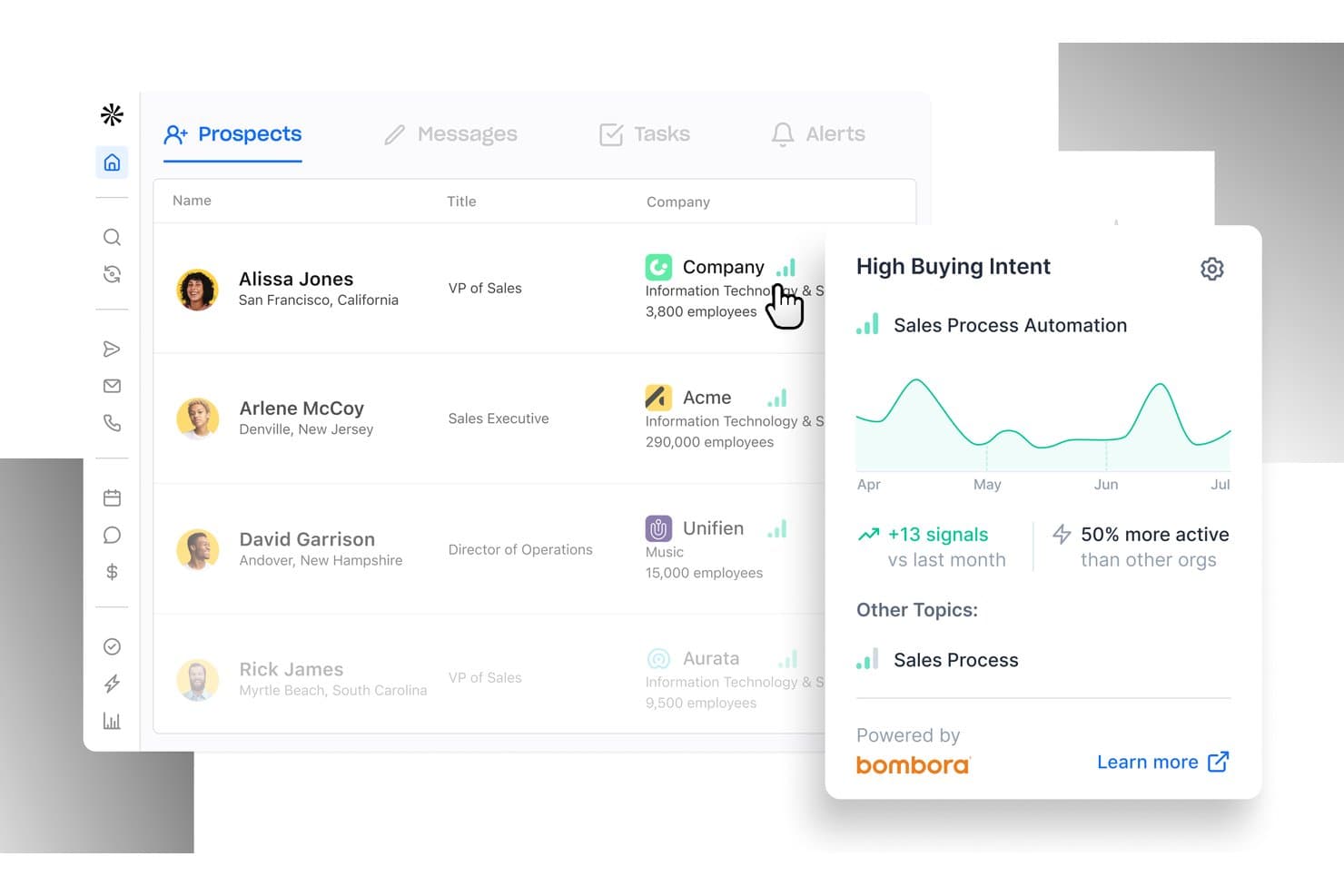
Apollo.io offre una dashboard dei potenziali clienti con segnali di Alta intenzione di acquisto basati sull'intelligenza artificiale, che mostra le tendenze dell'attività di vendita e i dati sull'intenzione. Apollo.io è una piattaforma di intelligence sulle vendite B2B che abbina un database di oltre 240 milioni di contatti a strumenti di contatto via email basati sull'intelligenza artificiale, filtri avanzati per la ricerca di potenziali clienti e strumenti per l'arricchimento dei lead e l'identificazione dei visitatori del sito web.
A chi è più adatto Apollo.io?
Apollo.io è adatto ai professionisti del marketing B2B e ai team addetti alla crescita di startup e piccole e medie imprese che devono creare elenchi mirati di potenziali clienti e gestire campagne email outbound da un'unica piattaforma.
Perché ho scelto Apollo.io
Ho incluso Apollo.io tra le mie scelte principali perché i suoi oltre 65 filtri per i contatti mi consentono di creare rapidamente elenchi di potenziali clienti altamente mirati, filtrando per qualifica professionale, livello di anzianità, fase di finanziamento e dati tecnografici all'interno di un database di oltre 240 milioni di contatti. Mi affido alle personas salvate per definire una volta per tutte il profilo cliente ideale (ICP) e ottenere un elenco aggiornato su richiesta. Lo strumento di scrittura email basato sull'intelligenza artificiale trasforma quindi quell'elenco in sequenze outbound personalizzate, tutte accessibili nel piano gratuito.
Funzionalità principali di Apollo.io
- Strumento di scrittura email basato sull'intelligenza artificiale: genera automaticamente email di contatto personalizzate in base ai dati dei potenziali clienti e ai modelli delle campagne.
- Arricchimento dei moduli inbound: completa istantaneamente i dati mancanti dei lead negli invii dei moduli utilizzando il database di contatti e aziende di Apollo.
- Identificazione dei visitatori del sito web: rivela le aziende anonime che visitano il tuo sito e le abbina a contatti reali.
- Segnali di intenzione di acquisto: mette in evidenza le aziende che mostrano intenzioni di acquisto su 15.000 argomenti, utilizzando dati comportamentali e aziendali aggregati.
Integrazioni di Apollo.io
Apollo.io offre integrazioni native con Salesforce, HubSpot, Outreach, Airtable, Amplitude, Asana e Gmail, oltre a un'API per integrazioni personalizzate.
Cosa è gratuito?
Apollo.io offre un piano Starter gratuito per sempre con crediti email illimitati, anche se nel livello gratuito è possibile collegare solo account Gmail. I crediti mobile e i crediti per l'esportazione sono limitati e l'accesso ai filtri e alle sequenze avanzate è più ristretto rispetto ai piani a pagamento.
Pros and Cons
Pros:
- Enorme database di contatti B2B nel piano gratuito
- L'intelligenza artificiale scrive gratuitamente email outbound personalizzate
- I segnali di intenzione mettono in evidenza gli account pronti all'acquisto
Cons:
- La precisione dei dati dei contatti varia a seconda delle regioni
- I testi generati dall'intelligenza artificiale non offrono controlli sul tono del brand
Learn more about Apollo.io: Ideale per i modelli di design grafico
- Piano gratuito disponibile
- Da $12/mese (fatturazione annuale)
Visit WebsiteCustomer Rating:4.7/5
Canva consente la creazione rapida di grafiche, presentazioni e materiali di marketing Canva è una piattaforma di progettazione grafica pensata per individui e team che hanno bisogno di creare contenuti visivi in modo rapido e semplice. È ampiamente utilizzata per creare grafica per i social media, presentazioni e materiali di marketing senza la necessità di competenze avanzate di design.
Perché ho scelto Canva: Canva offre una vasta libreria di modelli di design grafico, rendendo semplice per il tuo team creare contenuti visivi professionali. La sua interfaccia drag-and-drop permette anche ai principianti di progettare con facilità. Con modelli personalizzabili puoi mantenere la coerenza del marchio in tutti i tuoi materiali di marketing. Le funzioni collaborative di Canva consentono al tuo team di lavorare insieme sulle creazioni in tempo reale.
Funzionalità e integrazioni principali:
Funzionalità includono un'ampia libreria di foto stock e illustrazioni, una vasta gamma di font ed effetti di testo, e strumenti per creare animazioni. Canva offre anche opzioni per stampare i progetti direttamente dalla piattaforma, garantendo materiali fisici di alta qualità.
Integrazioni includono Dropbox, Google Drive, Instagram, Facebook, Pinterest, Slack, HubSpot, Mailchimp, LinkedIn e YouTube.
Cosa è gratuito? Canva offre strumenti di design drag-and-drop, migliaia di modelli gratuiti, funzionalità di collaborazione, archiviazione cloud e accesso da diversi dispositivi.
Pros and Cons
Pros:
- Vasta libreria di modelli
- Interfaccia facile da usare
- Ampia gamma di immagini stock
Cons:
- Funzionalità gratuite limitate
- Strumenti di editing avanzati limitati
Learn more about Canva: Ideale per l’analisi dell’e-commerce
- Piano gratuito disponibile
- Da $59/mese
Visit WebsiteCustomer Rating:4.9/5
Lebesgue offre insight tramite IA, analisi CLV e strumenti per l’inventario per l’e-commerce Lebesgue è una piattaforma di marketing guidata dall’IA, progettata appositamente per le aziende di e-commerce, con particolare attenzione ai brand su Shopify. Offre strumenti per l’analisi dei dati, la valutazione del valore del cliente nel tempo (customer lifetime value) e la gestione dell’inventario, aiutando i rivenditori online ad ottimizzare le proprie strategie di marketing.
Perché ho scelto Lebesgue: Lebesgue si distingue nell’analisi dell’e-commerce offrendo strumenti per il monitoraggio della concorrenza e lo sviluppo di strategie creative. La sua dashboard fornisce una presentazione dei dati intuitiva, rendendo facile per il tuo team comprendere e mettere in pratica le informazioni acquisite. L’inclusione di agenti IA per l’automazione dei compiti di marketing assicura l’efficienza delle tue attività. Grazie all’attribuzione di prima parte, puoi misurare accuratamente l’impatto delle tue campagne.
Funzionalità e integrazioni principali:
Funzionalità includono una dashboard completa per insight sui dati, strumenti per l’analisi del valore della vita del cliente e per la gestione dell’inventario. Il monitoraggio della concorrenza ti aiuta a rimanere competitivo sul mercato, mentre lo sviluppo di strategie creative permette di realizzare campagne marketing efficaci.
Integrazioni includono Shopify, WooCommerce, Google Analytics, Facebook Ads, Google Ads, Klaviyo, Mailchimp, TikTok, Instagram e Pinterest.
Cosa offre gratuitamente? Lebesgue offre cronologia completa degli ordini, monitoraggio degli ordini e delle entrate, tracciamento di COGS e profitti, integrazioni con i canali pubblicitari, report settimanali e giornalieri.
Pros and Cons
Pros:
- Presentazione dei dati intuitiva
- Strumenti analitici completi
- Monitoraggio efficace della concorrenza
Cons:
- Focus limitato all’e-commerce
- Curva di apprendimento per i nuovi utenti
Learn more about Lebesgue: Ideale per la programmazione dei social media
- Piano gratuito + prova gratuita disponibile
- A partire da $5/mese (fatturato annualmente)
Visit WebsiteCustomer Rating:4.4/5
Buffer programma i post, traccia le analisi e gestisce il coinvolgimento per piccoli team Buffer è uno strumento di gestione dei social media pensato per individui e piccoli team per programmare e pubblicare contenuti su più piattaforme. Supporta funzioni chiave come la programmazione dei contenuti, analisi e coinvolgimento del pubblico, rendendolo ideale per creatori e piccole imprese.
Perché ho scelto Buffer: Buffer si distingue per la programmazione dei social media, offrendo funzionalità come la visualizzazione a calendario per pianificare i post e la pubblicazione automatica su più piattaforme. La piattaforma consente di personalizzare i post per diversi canali social, assicurando che i tuoi contenuti siano adattati a ciascun pubblico. La semplicità e la facilità d'uso di Buffer lo rendono accessibile a chi necessita di una gestione efficiente senza complessità superflue. Il suo focus sulla programmazione aiuta il tuo team a mantenere una presenza costante sui social media senza sforzo.
Funzionalità e integrazioni principali:
Funzionalità includono un calendario intuitivo con drag-and-drop per la pianificazione dei post, programmazioni personalizzabili per ciascuna piattaforma e analisi dettagliate per tracciare l'engagement e le performance. Puoi inoltre utilizzare gli strumenti di Buffer per collaborare con i membri del team e gestire i flussi di lavoro di approvazione dei contenuti senza problemi.
Integrazioni includono Twitter, Facebook, Instagram, LinkedIn, Pinterest, Google Analytics, Canva, Unsplash, Pocket e Zapier.
Cosa offre gratis? Buffer offre 10 post programmati per canale (ricaricabili in qualsiasi momento), 100 idee, 1 account utente, Assistente AI, analisi di base, assistenza clienti di livello mondiale e la possibilità di collegare fino a 3 canali.
Pros and Cons
Pros:
- Analisi dettagliate del coinvolgimento
- Supporta più piattaforme social
- Strumenti di collaborazione per i team
Cons:
- Funzionalità limitate nel piano gratuito
- È necessario l'upgrade per le analisi avanzate
 Ideale per la conformità email in Canada
- Piano gratuito disponibile
- Da CAD $22.04/mese
Visit WebsiteCustomer Rating:4.5/5
Cyberimpact gestisce campagne email conformi alla CASL per piccole e medie imprese canadesi Cyberimpact è una piattaforma di email marketing specificamente progettata per le aziende canadesi per garantire la conformità alla Canadian Anti-Spam Legislation (CASL). Si rivolge principalmente alle piccole e medie imprese, offrendo strumenti per la creazione e la gestione di campagne email.
Perché ho scelto Cyberimpact: Cyberimpact si concentra sulla conformità delle email, offrendo funzionalità che aiutano la tua azienda ad aderire alle normative canadesi. Include strumenti integrati per la gestione del consenso, per tracciare e gestire in modo efficace il consenso degli iscritti. La piattaforma offre inoltre template email personalizzabili per creare rapidamente campagne dall’aspetto professionale. Il suo focus sulla conformità assicura che il tuo team eviti problemi legali durante il coinvolgimento dei clienti.
Funzionalità e integrazioni principali:
Funzionalità includono avanzati strumenti di segmentazione per raggiungere pubblici specifici, flussi di lavoro automatizzati per una comunicazione costante e analisi dettagliate per monitorare le prestazioni delle campagne. Queste funzionalità permettono al tuo team di creare strategie di email marketing mirate ed efficaci.
Integrazioni includono Shopify, WooCommerce, Facebook, WordPress, Google Analytics, Salesforce, Zapier, Pipedrive, HubSpot e Mailchimp.
Cosa offre gratuitamente? Cyberimpact offre invii illimitati, utenti illimitati, 30 giorni di assistenza clienti tramite chat, email e telefono, micro sondaggi per 30 giorni e velocità di invio standard.
Pros and Cons
Pros:
- Forte attenzione alla conformità
- Template facili da usare
- Flussi di lavoro automatizzati
Cons:
- Limitato al mercato canadese
- Non ideale per grandi imprese
Learn more about Cyberimpact: Ideale per la gestione delle campagne email
- 14 giorni di prova gratuita + demo gratuita disponibile
- Da $20/mese
Visit WebsiteCustomer Rating:4.3/5
Mailchimp gestisce campagne email, pubblico e monitoraggio delle performance per i team Mailchimp è una piattaforma di marketing all-in-one utilizzata principalmente da piccole imprese e team di marketing per gestire campagne email e coinvolgimento dei clienti. Offre strumenti per l'email marketing, la gestione del pubblico e il monitoraggio delle performance.
Perché ho scelto Mailchimp: Mailchimp è noto per la gestione delle campagne email, offrendo modelli facili da usare e funzionalità di automazione. La piattaforma permette di progettare modelli email personalizzati che rispecchiano il tuo brand e di automatizzare le campagne per risparmiare tempo. Le sue funzionalità di segmentazione del pubblico ti aiutano a raggiungere gruppi di clienti specifici in modo efficace. Le analisi di Mailchimp ti offrono una panoramica sulle prestazioni delle campagne, aiutando il tuo team a prendere decisioni basate sui dati.
Funzionalità principali & Integrazioni:
Funzionalità includono un editor email drag-and-drop per creare modelli personalizzati, una dashboard per la gestione dei contatti e strumenti di A/B testing per ottimizzare le prestazioni delle email. Puoi anche utilizzare l'app mobile per gestire le campagne ovunque ti trovi.
Integrazioni includono Shopify, WooCommerce, WordPress, Salesforce, Zapier, Facebook, Instagram, QuickBooks, Slack ed Eventbrite.
Cosa è gratuito? Mailchimp offre un piano gratuito con fino a 500 contatti e supporto email per i primi 30 giorni, che include le funzionalità di base per l'email marketing e la gestione del pubblico.
Pros and Cons
Pros:
- Automazione semplice delle campagne
- Segmentazione efficace del pubblico
- App mobile per la gestione delle campagne
Cons:
- Opzioni di personalizzazione limitate
- Può risultare complesso per i principianti
Learn more about Mailchimp: Ideale per la creazione di contenuti guidata dall’IA
- Piano gratuito + prova gratuita di 7 giorni disponibile
- Da €25/mese (fatturazione annuale)

neuroflash genera testi e immagini AI per creare contenuti coerenti con il brand neuroflash è una piattaforma di creazione di contenuti AI rivolta alle aziende nei settori marketing, vendite e assistenza clienti. Mette a disposizione strumenti per la generazione di testi e immagini, aiutando gli utenti a produrre contenuti coerenti con il brand in modo efficiente.
Perché ho scelto neuroflash: neuroflash offre un generatore e un editor di contenuti AI completi, elementi centrali della sua funzione. La piattaforma include un Brand Hub per archiviare le conoscenze del marchio, assicurando che i contenuti siano coerenti con il tono della tua azienda. Gli strumenti di profilazione del pubblico aiutano a indirizzare efficacemente i contenuti, aumentando il coinvolgimento. La funzione di previsione delle prestazioni permette di valutare il possibile impatto dei tuoi contenuti prima della pubblicazione.
Caratteristiche principali e integrazioni:
Funzionalità includono un chatbot (ChatFlash) per contenuti interattivi, uno strumento di previsione delle prestazioni per valutare l’efficacia dei testi e strumenti per l’ottimizzazione SEO. La piattaforma offre anche un controllo in tempo reale contro il plagio per garantire l’originalità dei contenuti.
Integrazioni includono Shopify, WooCommerce, Google Analytics, Facebook Ads, Google Ads, Klaviyo, Mailchimp, TikTok, Instagram e Pinterest.
Cosa è gratuito? Neuroflash offre una prova gratuita di 7 giorni con accesso illimitato a tutte le sue funzionalità.
Pros and Cons
Pros:
- Generatore di contenuti completo
- Brand Hub per le linee guida
- Conforme al GDPR
Cons:
- Focalizzato sulla creazione di contenuti
- Funzionalità avanzate disponibili solo a pagamento
Learn more about neuroflash: Ideale per l'automazione dell'email marketing
- Piano gratuito disponibile
- Da $34/mese (fatturazione annuale)

Andsend gestisce le relazioni con i clienti tramite messaggi e follow-up tempestivi Andsend è uno strumento di gestione delle relazioni con i clienti rivolto alle piccole imprese per migliorare le loro conversazioni di vendita. Si concentra sull'aiutare gli utenti a gestire le relazioni, inviare messaggi personalizzati e garantire un follow-up puntuale.
Perché ho scelto Andsend: Andsend eccelle nell'automazione dell'email marketing creando modelli di messaggi personalizzati che imitano il tuo stile di scrittura. Dà priorità alle tue conversazioni, evidenziando i contatti più rilevanti su cui agire. La capacità dello strumento di ricordarti i follow-up ti assicura di non perdere mai un'opportunità. Il suo design intuitivo rende facile per il tuo team mantenere relazioni significative.
Caratteristiche principali e integrazioni:
Caratteristiche includono la stesura di messaggi personalizzati che si adattano al tuo stile, la priorizzazione dei contatti per concentrarsi su quelli più rilevanti e i promemoria automatici per i follow-up. Queste funzionalità aiutano a gestire efficacemente le conversazioni di vendita senza perdere interazioni importanti.
Integrazioni includono Gmail, Outlook, LinkedIn, Slack, HubSpot, Salesforce, Mailchimp, Zapier, Google Calendar e Microsoft Teams.
Cosa è gratuito? Andsend offre un piano gratuito senza necessità di carta di credito, LinkedIn e messenger e-mail, messaggi generati dall'IA, ricerca di contatti illimitata e 50 contatti.
Pros and Cons
Pros:
- Stesura personalizzata dei messaggi
- Promemoria automatici per i follow-up
- Prioritizzazione dei contatti
Cons:
- Potrebbe non essere adatto alle grandi aziende
- Qualche curva di apprendimento per i nuovi utenti
Learn more about Andsend: Ideale per strumenti di collaborazione di squadra
- Piano gratuito + prova gratuita di 15 giorni disponibile
- Da $49/mese (fatturati annualmente)

Bitrix24 combina CRM, gestione dei progetti e comunicazione per la collaborazione del team Bitrix24 è una piattaforma completa di gestione aziendale progettata per team e piccole imprese, finalizzata a facilitare la comunicazione e la collaborazione. Offre strumenti per CRM, gestione dei progetti e comunicazione interna, rendendola una scelta versatile per le organizzazioni che desiderano migliorare il lavoro di squadra.
Perché ho scelto Bitrix24: Bitrix24 offre strumenti avanzati per la collaborazione, tra cui la gestione delle attività e le chat di gruppo. Il tuo team può beneficiare delle sue capacità di gestione dei progetti per mantenere tutto sotto controllo. La piattaforma mette inoltre a disposizione un social intranet per favorire la comunicazione interna e la collaborazione. Grazie alle sue funzionalità di gestione documentale, puoi assicurarti che tutti abbiano accesso ai file e alle informazioni più recenti.
Funzionalità e integrazioni principali:
Funzionalità includono un sistema di telefonia integrato per effettuare chiamate direttamente dalla piattaforma, strumenti di monitoraggio del tempo per controllare la produttività, e un CRM personalizzabile per gestire le relazioni con i clienti. Queste funzionalità supportano una gestione efficiente del team e aumentano la produttività complessiva.
Integrazioni includono Google Drive, Microsoft Office 365, Slack, Mailchimp, Dropbox, Salesforce, Xero, QuickBooks, Zoom e Trello.
Cosa è incluso gratuitamente? Il piano gratuito di Bitrix24 offre 5GB di spazio di archiviazione, dimensione del team illimitata e accesso a collaborazione, attività e progetti, CRM, Bitrix24 Sign, Drive, Contact Center e un website builder.
Pros and Cons
Pros:
- Gestione delle attività completa
- Sistema di telefonia integrato
- Opzioni CRM personalizzabili
Cons:
- Può risultare complesso per i nuovi utenti
- Alcune funzionalità richiedono configurazione tecnica
Learn more about Bitrix24: Ideale per il miglioramento della scrittura
- Piano gratuito disponibile
- Da $11.99/utente/mese (fatturazione annuale)
Visit WebsiteCustomer Rating:4.6/5
Grammarly migliora la scrittura con suggerimenti in tempo reale su grammatica, punteggiatura e stile Grammarly è uno strumento di assistenza alla scrittura utilizzato da scrittori, studenti e professionisti per migliorare grammatica, punteggiatura e stile dei loro contenuti scritti. Offre modifiche in tempo reale e suggerimenti per aumentare la chiarezza e l’efficacia dei tuoi testi.
Perché ho scelto Grammarly: Grammarly si distingue per il miglioramento della scrittura grazie a suggerimenti avanzati su grammatica e stile. Il suo feedback in tempo reale aiuta a individuare errori durante la digitazione, assicurando che i tuoi documenti siano impeccabili. Lo strumento offre anche suggerimenti per arricchire il vocabolario, aumentando la varietà del tuo testo. Con il suo rilevatore di plagio, puoi garantire che i tuoi contenuti siano originali e privi di copie involontarie.
Funzionalità principali & integrazioni:
Funzionalità includono un rilevatore di tono che ti aiuta a mantenere il tono desiderato nei tuoi scritti, un punteggio di leggibilità per garantire che il testo sia facile da comprendere e un dizionario personale per aggiungere parole personalizzate. Questi strumenti aiutano a perfezionare i tuoi scritti per adattarli a diversi pubblici e scopi.
Integrazioni includono Microsoft Word, Google Docs, Gmail, Outlook, Slack, LinkedIn, Facebook, Twitter, Medium e WordPress.
Cosa è gratuito? Grammarly offre funzionalità essenziali di assistenza alla scrittura come verifiche grammaticali e controllo del plagio.
Pros and Cons
Pros:
- Feedback in tempo reale sulla scrittura
- Rilevamento di plagio
- Dizionario personale personalizzabile
Cons:
- Capacità offline limitate
- A volte corregge troppo lo stile
Altri strumenti di intelligenza artificiale gratuiti per il marketing
Ecco alcune opzioni aggiuntive di strumenti di intelligenza artificiale gratuiti per il marketing che non sono entrate nella mia selezione, ma che vale comunque la pena prendere in considerazione:
Come valuto gli strumenti AI gratuiti per il marketing
Divido la mia valutazione in due livelli: la base che ogni strumento deve raggiungere—accesso gratuito reale, risultati di marketing generati dall'AI—e i fattori differenzianti che fanno emergere gli strumenti migliori.
Funzionalità di base (Requisiti fondamentali per questa lista)
Quando seleziono gli strumenti per la mia lista, ne valuto ciascuno su una scala da 0 (non offre la funzionalità) a 5 (eccelle in quest'area) per ciascuna delle funzionalità di base elencate di seguito. Poi calcolo il punteggio totale dello strumento in percentuale. Ogni strumento deve raggiungere un punteggio totale minimo del 65% per essere preso in considerazione.
- Livello di accesso gratuito: Verifico se il piano gratuito consente di ottenere abbastanza risultati per gestire una vera campagna—non solo esplorare la dashboard per qualche giorno.
- Motore di AI generativa: Lo strumento deve utilizzare veri modelli generativi (LLM, modelli di diffusione, ecc.), non semplici template con campi da compilare.
- Risultati specifici per il marketing: Cerco risultati pensati ad hoc come titoli per Google Ads, oggetti per email, o descrizioni di prodotto—non semplici completamenti di testo generici.
- Supporto contenuti multi-canale: Uno strumento che genera solo articoli di blog ma non aiuta con caption social o testi pubblicitari limita il valore che puoi ottenere.
- Personalizzazione brand e pubblico: Valuto se puoi salvare un profilo di tono di voce per il brand o almeno impostare tono, pubblico di destinazione e obiettivo per ogni generazione.
- Opzioni di esportazione e integrazione: Gli strumenti utili consentono di pubblicare i contenuti su piattaforme come WordPress o HubSpot, o almeno di esportarli in formati pronti all'uso.
Una volta che ho una lista di strumenti che soddisfano questi criteri, considero cosa differenzia ogni piattaforma.
Fattori differenzianti (Cosa distingue i fornitori)
Ecco come confronto e metto a confronto i diversi fornitori:
Caratteristiche distintive
L'ottimizzazione SEO integrata è un grande differenziatore—cerco strumenti che valutino l'ottimizzazione SEO on-page della tua bozza o evidenzino lacune di parole chiave mentre scrivi, eliminando la necessità di passare a un altro strumento di ricerca. Anche la generazione AI di immagini e video è importante, soprattutto per i social media manager che hanno bisogno di visual accattivanti assieme alle caption in un unico workspace. Un altro aspetto importante è l'accesso ai dati in tempo reale. Gli strumenti che attingono a tendenze di ricerca live o attività dei competitor producono risultati molto più rilevanti rispetto a quelli limitati ai dati statici di training.
Oltre le caratteristiche
La sostenibilità della versione gratuita è la prima cosa che valuto—alcuni strumenti pubblicizzano un piano gratuito ma bloccano le funzionalità di marketing più importanti dietro limiti di utilizzo che si esauriscono a metà campagna. Anche la qualità del risultato e la sicurezza del brand sono rilevanti. Verifico se i testi generati superano i controlli antiplagio e rispettano le linee guida delle piattaforme pubblicitarie, visto che un titolo Google Ads respinto fa perdere più tempo che scriverlo manualmente. Anche la privacy dei dati merita attenzione, soprattutto quando inserisci segmenti di clientela o brief di campagne nello strumento. Controllo se gli input della versione gratuita vengono usati per addestrare il modello.
Come scegliere strumenti di intelligenza artificiale gratuiti per il marketing
È facile perdersi in lunghi elenchi di funzionalità e strutture tariffarie complesse. Per aiutarti a rimanere concentrato mentre affronti il tuo processo personalizzato di selezione del software, ecco una lista di fattori da tenere a mente:
| Fattore | Cosa considerare |
|---|---|
| FattoreScalabilità | Cosa considerareLo strumento può crescere insieme alla tua azienda? Verifica se supporta utenti, volumi di dati e funzionalità aggiuntivi man mano che le tue esigenze aumentano. |
| FattoreIntegrazioni | Cosa considerareSi collega ai sistemi che già utilizzi? Cerca la compatibilità con il tuo CRM, le piattaforme di posta elettronica e gli altri strumenti di marketing per garantire un flusso di lavoro fluido. |
| FattorePersonalizzazione | Cosa considerarePuoi adattare lo strumento alle tue esigenze specifiche? Verifica se puoi modificare dashboard, report e flussi di lavoro in base ai tuoi processi. |
| FattoreFacilità d'uso | Cosa considerareLo strumento è intuitivo per il tuo team? Testa l'interfaccia per verificarne chiarezza e semplicità, riducendo al minimo i tempi di formazione e la frustrazione degli utenti. |
| FattoreImplementazione e integrazione iniziale | Cosa considerareQuanto rapidamente puoi iniziare? Valuta la disponibilità di tutorial, assistenza e risorse per aiutare il tuo team a diventare operativo in modo efficiente. |
| FattoreCosto | Cosa considerareIl prezzo è trasparente e rientra nel tuo budget? Confronta le funzionalità incluse in ogni piano tariffario per evitare spese impreviste. |
| FattoreMisure di sicurezza | Cosa considerareLo strumento protegge i tuoi dati? Assicurati che disponga di crittografia, autenticazione degli utenti e conformità alle normative pertinenti per proteggere le informazioni sensibili. |
| FattoreDisponibilità dell'assistenza | Cosa considerarePuoi ricevere aiuto quando ne hai bisogno? Verifica se il fornitore offre assistenza 24 ore su 24, 7 giorni su 7, diversi canali di contatto e un team di supporto reattivo. |
Cosa sono gli strumenti di intelligenza artificiale gratuiti per il marketing?
Gli strumenti di IA gratuiti per il marketing sono soluzioni software che sfruttano l'intelligenza artificiale per automatizzare e ottimizzare diverse attività di marketing. I professionisti e i team del marketing utilizzano questi strumenti per migliorare l'efficienza e aumentare il coinvolgimento dei clienti.
Le funzionalità di automazione, analisi dei dati e generazione di contenuti aiutano a gestire le campagne, analizzare le prestazioni e creare contenuti personalizzati. Nel complesso, questi strumenti offrono un valido supporto per semplificare i processi di marketing complessi e ottenere risultati migliori.
Funzionalità degli strumenti di IA gratuiti per il marketing
Esaminiamo le funzionalità comunemente presenti negli strumenti di IA per il marketing e quali sono generalmente incluse nei piani gratuiti rispetto a quelli a pagamento.
Funzionalità degli strumenti di IA gratuiti per il marketing
- Automazione: semplifica le attività ripetitive, come la programmazione delle e-mail, liberando tempo per la pianificazione strategica.
- Analisi di base: fornisce informazioni sulle prestazioni delle campagne per aiutare a prendere decisioni consapevoli.
- Creazione di contenuti: aiuta a generare contenuti testuali o visivi per migliorare i materiali di marketing.
- Gestione dei contatti: organizza e monitora le interazioni con i clienti per migliorare la gestione delle relazioni.
- Marketing via e-mail: consente di inviare e gestire campagne e-mail per coinvolgere efficacemente il pubblico.
- Gestione dei social media: programma e pubblica contenuti su diverse piattaforme per mantenere una presenza online attiva.
- Esportazione dei dati: offre la possibilità di scaricare report e dati per l'analisi e la condivisione offline.
Funzionalità degli strumenti di IA a pagamento per il marketing
- Analisi avanzate: forniscono informazioni approfondite e analisi delle tendenze per ottimizzare le strategie di marketing.
- Analisi predittive: utilizzano i dati storici per prevedere le tendenze future e i comportamenti dei clienti, migliorando il processo decisionale.
- Raccomandazioni basate sull'IA: suggeriscono azioni o contenuti sulla base dell'analisi dei dati per migliorare i risultati delle campagne.
- Dashboard personalizzabili: consentono agli utenti di adattare visualizzazioni e report a esigenze specifiche, facilitando la visualizzazione dei dati.
- Segmentazione avanzata: consente di indirizzare le campagne a segmenti di pubblico specifici per attività di marketing più personalizzate.
- Marketing multicanale: integra diversi canali di marketing per campagne coerenti e coordinate.
- Sicurezza avanzata: offre funzionalità aggiuntive di protezione dei dati per garantire la privacy e la conformità alle normative.
Vantaggi degli strumenti di IA gratuiti per il marketing
L'implementazione di strumenti di IA gratuiti per il marketing offre diversi vantaggi al tuo team e alla tua azienda. Eccone alcuni:
- Maggiore efficienza: automatizza le attività di routine, consentendo al tuo team di concentrarsi su attività più strategiche.
- Migliore processo decisionale: offre informazioni basate sui dati che aiutano a prendere decisioni di marketing consapevoli.
- Personalizzazione avanzata: crea contenuti personalizzati che risuonano con il tuo pubblico, migliorando il coinvolgimento.
- Targeting più efficace: utilizza la segmentazione del pubblico per raggiungere i clienti giusti, aumentando l'efficacia delle campagne.
- Risparmio sui costi: offre funzionalità preziose gratuitamente, aiutandoti a gestire il budget di marketing in modo efficiente.
- Modifiche in tempo reale: consente di modificare le campagne sulla base delle analisi in tempo reale, ottimizzandone le prestazioni.
- Scalabilità: sostiene la tua crescita adattandosi all'aumento delle esigenze senza ulteriori investimenti.
Costi e prezzi degli strumenti di IA gratuiti per il marketing
La scelta di strumenti di IA gratuiti per il marketing richiede una comprensione dei diversi modelli di prezzo e dei piani disponibili. I costi variano in base alle funzionalità, alle dimensioni del team, agli add-on e ad altri fattori.
La tabella seguente riassume i piani più comuni, i relativi prezzi medi e le funzionalità tipicamente incluse nelle soluzioni di strumenti di IA gratuiti per il marketing:
Tabella di confronto dei piani per gli strumenti di IA gratuiti per il marketing
| Tipo di piano | Prezzo medio | Funzionalità comuni |
|---|---|---|
| Tipo di pianoPiano gratuito | Prezzo medio$0 | Funzionalità comuniAutomazione di base, analisi dei dati limitata e modelli standard. |
| Tipo di pianoPiano personale | Prezzo medio$5-$25/utente/mese | Funzionalità comuniAutomazione avanzata, analisi di base e modelli personalizzabili. |
| Tipo di pianoPiano aziendale | Prezzo medio$30-$75/utente/mese | Funzionalità comuniAnalisi avanzate, assistenza prioritaria e integrazione multicanale. |
| Tipo di pianoPiano aziendale avanzato | Prezzo medio$100-$200/utente/mese | Funzionalità comuniSoluzioni personalizzate, assistenza dedicata e funzionalità di sicurezza complete. |
Domande frequenti sugli strumenti di IA gratuiti per il marketing
Ecco alcune risposte alle domande comuni sugli strumenti di IA gratuiti per il marketing:
In che modo gli strumenti di IA gratuiti per il marketing gestiscono la privacy dei dati?
Gli strumenti di IA gratuiti per il marketing generalmente adottano misure per proteggere i tuoi dati, ma è fondamentale esaminare le loro informative sulla privacy. Verifica se lo strumento è conforme a normative come il GDPR o il CCPA. Considera come vengono archiviati ed elaborati i dati e assicurati che siano disponibili la crittografia e controlli di accesso sicuri.
Gli strumenti di IA gratuiti per il marketing possono integrarsi con i miei sistemi attuali?
La maggior parte degli strumenti di IA gratuiti offre integrazioni con piattaforme diffuse come i sistemi CRM e i servizi di posta elettronica. Prima di scegliere uno strumento, verifica se supporta i sistemi specifici che utilizzi. Questo garantisce un flusso di lavoro fluido e aiuta a evitare problemi di compatibilità che potrebbero interrompere i tuoi processi.
Quale tipo di assistenza è disponibile per gli strumenti di IA gratuiti per il marketing?
Le opzioni di assistenza per gli strumenti di IA gratuiti possono variare. Alcuni offrono forum della community e una documentazione completa, mentre altri potrebbero fornire un’assistenza diretta limitata. Verifica se lo strumento offre assistenza via chat o posta elettronica e controlla se sono disponibili tutorial o domande frequenti che ti aiutino a risolvere i problemi autonomamente.
Quanto sono scalabili gli strumenti di IA gratuiti per il marketing?
La scalabilità dipende dallo strumento e dalle tue esigenze specifiche. Alcuni strumenti gratuiti offrono una scalabilità limitata, che potrebbe essere sufficiente per i piccoli team. Se prevedi una crescita, cerca strumenti che offrano piani a pagamento con più funzionalità e una capacità maggiore per gestire volumi di dati e numeri di utenti più elevati.
Gli strumenti di IA gratuiti per il marketing comportano costi nascosti?
Sebbene gli strumenti siano pubblicizzati come gratuiti, alcuni potrebbero comportare costi nascosti. Questi possono includere addebiti per funzionalità premium, maggiore spazio di archiviazione dei dati o utenti aggiuntivi. Esamina attentamente la struttura dei prezzi per comprendere cosa è incluso nel piano gratuito e cosa potrebbe comportare costi aggiuntivi.
Come posso valutare l'efficacia degli strumenti di IA gratuiti per il marketing?
Per valutare l’efficacia, inizia definendo obiettivi e metriche chiari. Utilizza le funzionalità di analisi per monitorare le prestazioni e verificare se lo strumento soddisfa i tuoi obiettivi. Consulta le recensioni degli utenti e i casi di studio per capire come altri hanno ottenuto risultati con lo strumento e valuta la possibilità di effettuare una prova per testarne le funzionalità.