

Una valida alternativa a Confluence offre al tuo team una collaborazione flessibile sui documenti, una facile condivisione delle conoscenze e un'integrazione fluida con i flussi di lavoro esistenti. Se stai cercando alternative a Confluence, probabilmente cerchi strumenti più adatti allo stile del tuo team, che offrano maggiore personalizzazione, facilità d'uso o connessione con le piattaforme che già utilizzi.
Con così tante opzioni disponibili, è importante trovare una soluzione che soddisfi le tue esigenze di collaborazione e cresca insieme alla tua azienda.
Questo elenco ti aiuterà a confrontare rapidamente le migliori alternative ad Atlassian Confluence per il 2026, così potrai scegliere la piattaforma giusta per la documentazione e la gestione dei progetti del tuo team.
Che cos'è Confluence?
Confluence è una piattaforma per la collaborazione tra team e la gestione delle conoscenze sviluppata da Atlassian. Consente agli utenti di creare, organizzare e condividere documenti, note delle riunioni e piani di progetto in uno spazio di lavoro centralizzato.
I team utilizzano Confluence per documentare i processi, archiviare informazioni importanti e collaborare sui contenuti in tempo reale. La sua integrazione con altri strumenti Atlassian, come Jira, lo rende popolare per la gestione dei progetti e il lavoro di squadra interfunzionale.
Tabella di confronto delle alternative a Confluence
Questa tabella di confronto riassume i dettagli sui prezzi delle mie principali alternative a Confluence:
| Tool | Best For | Trial Info | Price | ||
|---|---|---|---|---|---|
| 1 | Ideale per pubblicare centri di assistenza e manuali operativi con il proprio marchio | Prova gratuita di 14 giorni + demo gratuita disponibile | Prezzi su richiesta | Website | |
| 2 | Ideale per flussi di lavoro documentali personalizzabili | Prova gratuita + piano gratuito + demo gratuita disponibili | Da $10/doc maker/mese (fatturazione annuale) | Website | |
| 3 | Ideale per l'organizzazione delle attività in stile kanban | Piano gratuito + prova gratuita di 14 giorni + demo gratuita disponibile | Da $5/utente/mese (fatturato annualmente) | Website | |
| 4 | Ideale con app di produttività integrate | Prova gratuita di 14 giorni disponibile | Da $7/utente/mese (fatturato annualmente) | Website | |
| 5 | Ideale per l'integrazione con Microsoft 365 | Prova gratuita di 30 giorni disponibile | A partire da $4/utente/mese (fatturazione annuale) | Website | |
| 6 | Ideale per la pianificazione automatica del calendario | Piano gratuito disponibile | Da $10/postazione/mese | Website | |
| 7 | Ideale per il monitoraggio di attività e progetti | Piano gratuito disponibile | Da $10.99/utente/mese (fatturazione annuale) | Website | |
| 8 | Ideale per spazi di lavoro collaborativi nell’ecosistema Office | Prova gratuita di 30 giorni | Da $6/utente/mese (fatturazione annuale) | Website | |
| 9 | Ideale per la gestione di caselle di posta condivise | Prova gratuita di 30 giorni + piano gratuito disponibile + demo gratuita disponibile | Da $14/utente/mese (fatturazione annuale) | Website | |
| 10 | Ideale per la comunicazione di squadra in tempo reale | Piano gratuito + demo gratuita disponibile | Da $7.25/utente/mese (fatturazione annuale) | Website |


Perché fidarsi dei nostri consigli sui software
6,700+
Reviews
20
Industry experts
16+
Evaluation factors
14
Years
Il nostro team testa e recensisce software dal 2012. In quanto leader del marketing noi stessi, sappiamo quanto sia difficile — e importante — scegliere il software giusto.
Per questa guida, abbiamo valutato gli strumenti attraverso test pratici e ricerche indipendenti, assegnando un punteggio agli strumenti in base ai nostri criteri di selezione.
Le nostre recensioni riflettono il nostro giudizio editoriale umano, non un discorso di vendita.
Revisori esperti:
 Gui DrusinaDirettore creativo
- Shriya GhateSenior Marketing Lead
 Amanda JacquesResponsabile Marketing Ops

Recensioni delle alternative a Confluence
Di seguito trovi le mie analisi dettagliate delle alternative a Confluence incluse nel mio elenco. Le mie recensioni offrono una panoramica approfondita delle funzionalità, delle integrazioni e dei casi d’uso migliori di ciascuna piattaforma, per aiutarti a trovare quella più adatta alle tue esigenze.
 Ideale per pubblicare centri di assistenza e manuali operativi con il proprio marchio
- Prova gratuita di 14 giorni + demo gratuita disponibile
- Prezzi su richiesta
Visit WebsiteCustomer Rating:4.7/5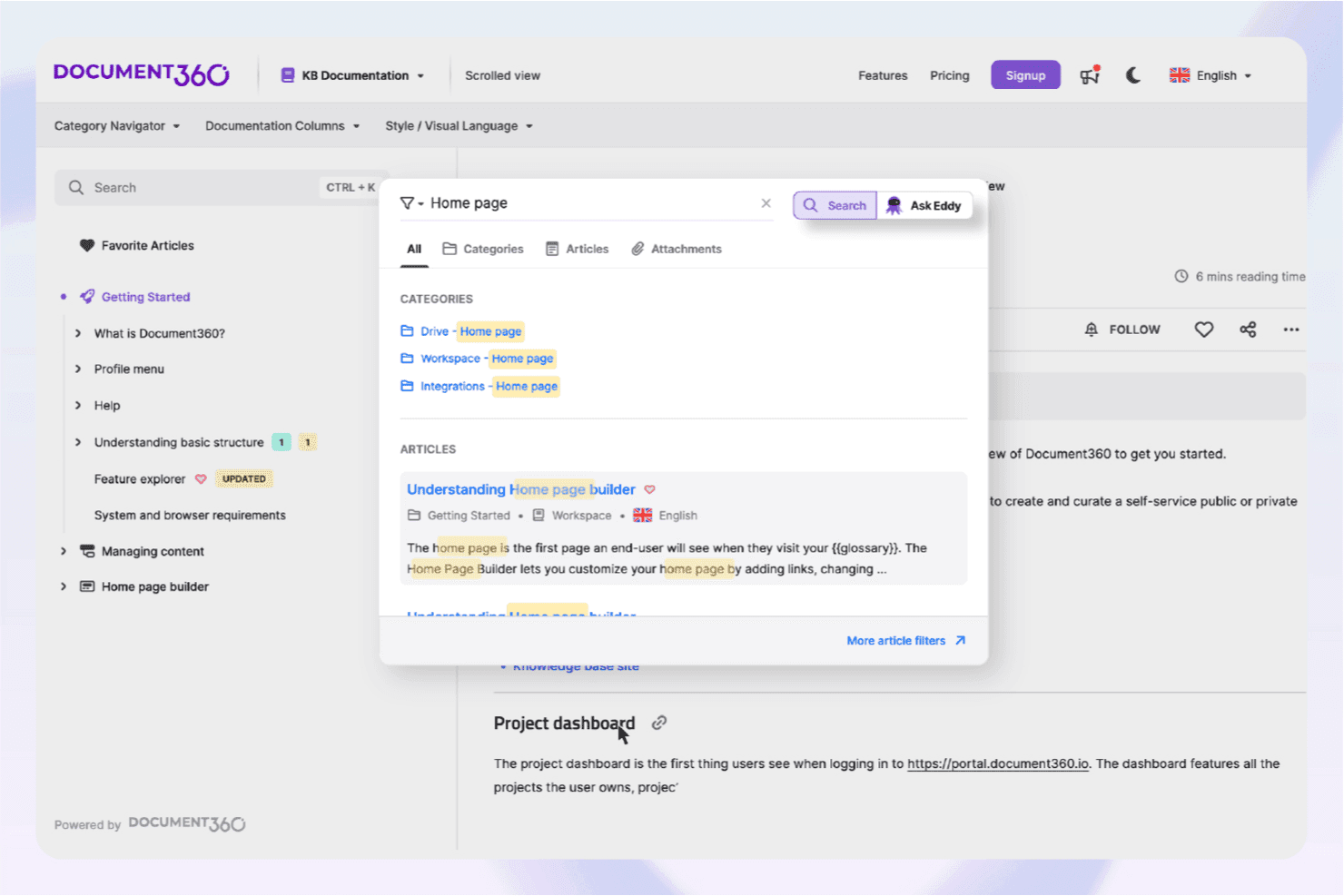
La ricerca assistita dall'AI di Document360 aiuta gli utenti a individuare rapidamente i contenuti pertinenti della base di conoscenza. Document360 offre ai team di marketing, assistenza clienti e prodotto un modo per creare, organizzare e distribuire conoscenze in un hub con il proprio marchio e facile da usare, così che tutti, dentro e fuori dall'azienda, possano trovare rapidamente le risposte di cui hanno bisogno.
Per chi è più adatto Document360?
Document360 è ideale per i team di marketing, prodotto o assistenza clienti che devono creare e gestire basi di conoscenza e manuali operativi con il proprio marchio per destinatari interni o esterni.
Perché Document360 è una buona alternativa a Confluence
Ho scelto Document360 perché permette al mio team di creare centri di assistenza e manuali operativi con il nostro marchio, a cui i clienti possono accedere senza difficoltà. Mi piace il fatto che possiamo personalizzare l'esperienza in modo che rispecchi il nostro marchio, organizzare i contenuti per destinatari diversi e aggiornare rapidamente le risorse man mano che cambiano i nostri processi.
Funzionalità principali di Document360
- Editor basato su Markdown: Crea e formatta articoli utilizzando un editor Markdown integrato e intuitivo.
- Cronologia delle versioni: Tieni traccia delle modifiche e ripristina le versioni precedenti di qualsiasi pagina per semplificare gli audit.
- Analisi avanzate: Monitora il coinvolgimento degli utenti e gli articoli più popolari con report e dashboard integrati.
- Controllo degli accessi basato sui ruoli: Definisci autorizzazioni granulari per i membri del team e gestisci il controllo sui contenuti.
Integrazioni di Document360
Document360 offre integrazioni native con Slack, Microsoft Teams, Zendesk, Freshdesk, Intercom, Segment e Google Analytics. Si connette a Zapier e fornisce un'API per integrazioni personalizzate.
Pros and Cons
Pros:
- Centri di assistenza con il proprio marchio per la documentazione rivolta ai clienti
- L'accesso basato sui ruoli offre un controllo granulare sui contenuti
- Le analisi integrate mostrano quali articoli ottengono i risultati migliori
Cons:
- L'editor Markdown può limitare la flessibilità del design
- Meno funzionalità di collaborazione rispetto a Confluence
Learn more about Document360: 2Ideale per flussi di lavoro documentali personalizzabili
Coda
- Prova gratuita + piano gratuito + demo gratuita disponibili
- Da $10/doc maker/mese (fatturazione annuale)
Visit WebsiteCustomer Rating:4.7/5
Strumento di collaborazione Coda che combina documenti, tabelle e workflow. Se stai cercando un'alternativa a Confluence che ti permetta di creare workflow personalizzati e documenti interattivi, Coda merita attenzione. Coda è ideale per i team che vogliono combinare documenti, fogli di calcolo e applicazioni in un unico luogo, specialmente per la gestione dei progetti, lo sviluppo prodotto o le operazioni. La sua flessibilità si distingue per gli utenti che hanno bisogno di più delle semplici pagine statiche: Coda consente di creare tabelle dinamiche, pulsanti e automazioni direttamente all'interno dei tuoi documenti.
Perché Coda è una buona alternativa a Confluence
A differenza delle tradizionali knowledge base, Coda ti offre gli strumenti per progettare workflow documentali completamente personalizzabili che vanno ben oltre le pagine statiche. Ho scelto Coda perché permette di costruire documenti che combinano testo, tabelle interattive e pulsanti integrati, così il tuo team può gestire progetti e processi in un unico spazio. Puoi automatizzare attività ripetitive con automazioni integrate e creare modelli personalizzati per workflow ricorrenti. Questa flessibilità rende Coda una scelta solida per i team che desiderano adattare il proprio ambiente di lavoro a esigenze aziendali particolari.
Caratteristiche principali di Coda
Altre funzioni di Coda aiutano i team a organizzare e condividere conoscenze in modo più flessibile:
- Incorporamento di pagine: Incorpora documenti Coda o contenuti esterni direttamente nelle tue pagine per un contesto più ricco.
- Controlli di condivisione granulari: Imposta permessi di visualizzazione, commento o modifica a livello di documento o di pagina.
- Pack Marketplace: Estendi le funzionalità tramite i Pack che collegano Coda a strumenti come Slack, Jira e Google Calendar.
- Cronologia delle versioni: Tieni traccia delle modifiche e ripristina versioni precedenti dei tuoi documenti all'occorrenza.
Integrazioni Coda
Le integrazioni includono Figma, Jira, Asana, Airtable, Slack, Microsoft Teams, Gmail, Google Calendar, Salesforce e Dropbox.
Pros and Cons
Pros:
- Automazioni personalizzate integrate
- Blocchi documentali interattivi
- Sostituisce molte app separate
Cons:
- Rallentamenti con grandi quantità di dati
- Opzioni di formattazione testo rigide
Learn more about Coda: Ideale per l'organizzazione delle attività in stile kanban
- Piano gratuito + prova gratuita di 14 giorni + demo gratuita disponibile
- Da $5/utente/mese (fatturato annualmente)
Visit WebsiteCustomer Rating:4.5/5
Trello: strumento di gestione visiva dei progetti per organizzare attività e flussi di lavoro. I team alla ricerca di un modo semplice e visivo per organizzare le attività spesso scelgono Trello per le sue bacheche in stile kanban. Trello è particolarmente adatto a team di marketing, creativi e agili che vogliono gestire progetti, monitorare i progressi e condividere aggiornamenti senza la complessità di una knowledge base tradizionale. A differenza di Confluence, Trello si concentra su schede ed elenchi, facilitando la visualizzazione immediata del lavoro e l'adeguamento rapido delle priorità.
Perché Trello è una buona alternativa a Confluence
Per i team che desiderano un approccio kanban all'organizzazione del lavoro, Trello offre un'alternativa visiva e flessibile rispetto alla struttura basata su documenti di Confluence. Ho scelto Trello perché le sue bacheche, liste e schede permettono di mappare facilmente i flussi di lavoro, assegnare compiti e monitorare i progressi in tempo reale. Puoi aggiungere liste di controllo, allegati e commenti direttamente alle schede, mantenendo tutti i dettagli del progetto in un unico posto. Trello è particolarmente utile per i team che hanno bisogno di una panoramica chiara e visiva delle attività piuttosto che di un classico archivio di conoscenza.
Funzionalità principali di Trello
Altre funzionalità di Trello aiutano i team a gestire informazioni e collaborare anche oltre le bacheche kanban:
- Marketplace Power-Up: Aggiungi funzionalità extra come viste calendario, sondaggi o integrazioni tramite una libreria di plugin e Power-Up.
- Automazione Butler: Automatizza azioni ripetitive sulle bacheche con trigger basati su regole e pulsanti personalizzati.
- Modelli di schede: Standardizza attività o processi ricorrenti creando modelli di schede riutilizzabili.
- Liste di controllo avanzate: Suddividi le attività in passaggi dettagliati con elementi assegnabili e date di scadenza.
Integrazioni Trello
Le integrazioni includono Slack, Jira, Miro, Egnyte, Gmail, IBM Connect, Harvest, GitHub, Google Calendar e Dropbox Paper.
Pros and Cons
Pros:
- Interfaccia altamente visiva e intuitiva
- Meccanismo drag-and-drop semplice
- Potenti componenti aggiuntivi \"Power-Up\"
Cons:
- Facile perdere traccia delle vecchie schede
- Nessuna gerarchia di pagine annidata
Learn more about Trello: Ideale con app di produttività integrate
- Prova gratuita di 14 giorni disponibile
- Da $7/utente/mese (fatturato annualmente)
Visit WebsiteCustomer Rating:4.6/5
Google Workspace unifica documenti, file e collaborazione del team in un unico posto. I team che cercano una suite di strumenti di produttività perfettamente integrata spesso scelgono Google Workspace come alternativa a Confluence. È una soluzione ideale per le organizzazioni che desiderano creare, condividere e collaborare su documenti, fogli di calcolo e presentazioni in tempo reale. Google Workspace si distingue perché collega la creazione di contenuti, la comunicazione e la gestione dei file in un’unica piattaforma unificata.
Perché Google Workspace è una valida alternativa a Confluence
Per i team che vogliono tutti gli strumenti di produttività in un solo posto, Google Workspace offre un’esperienza unificata che Confluence non può eguagliare. Ho scelto Google Workspace perché combina creazione di documenti, fogli di lavoro, presentazioni e drive condivisi in un unico ambiente. La collaborazione in tempo reale in Google Documenti, Fogli e Presentazioni permette ai team di co-modificare e commentare senza cambiare piattaforma. Se per il tuo team è importante passare in modo fluido tra comunicazione, creazione di contenuti e archiviazione di file, Google Workspace integra questi elementi in maniera difficile da replicare con il solo Confluence.
Funzionalità principali di Google Workspace
Altre funzionalità di Google Workspace aiutano i team a gestire le informazioni e collaborare su ampia scala:
- Drive condivisi: Organizza e controlla l’accesso ai file tra reparti o progetti diversi.
- Google Sites: Crea siti web interni o knowledge base senza programmazione.
- Console di amministrazione: Gestisci utenti, permessi e impostazioni di sicurezza da una dashboard centralizzata.
- Google Keep: Salva note, elenchi e promemoria che si sincronizzano su tutti i dispositivi.
Integrazioni di Google Workspace
Le integrazioni includono Salesforce, DocuSign, Asana, Zoom, Slack, Trello, Box, Dropbox, Adobe Acrobat e Jira.
Pros and Cons
Pros:
- Interfaccia molto familiare per la maggior parte degli utenti
- Permessi di condivisione semplici
- Ottimo sistema di commenti
Cons:
- Le cartelle di Drive diventano molto disordinate
- Manca una struttura wiki unificata
Learn more about Google Workspace: Ideale per l'integrazione con Microsoft 365
- Prova gratuita di 30 giorni disponibile
- A partire da $4/utente/mese (fatturazione annuale)
Visit WebsiteCustomer Rating:4.3/5
Piattaforma di collaborazione Microsoft Teams per chat, riunioni e condivisione di file. Se la tua organizzazione utilizza già Microsoft 365, Microsoft Teams offre un'alternativa familiare e profondamente integrata a Confluence. È particolarmente utile per le aziende che vogliono unire chat, riunioni, condivisione di file e spazi di lavoro collaborativi in un unico posto. Teams si distingue per l'integrazione diretta della collaborazione su documenti e della comunicazione all'interno dell'ecosistema Microsoft 365, rendendo semplice collegare progetti e conversazioni.
Perché Microsoft Teams è una valida alternativa a Confluence
Quando hai bisogno di uno spazio di lavoro che si integri perfettamente con Microsoft 365, Microsoft Teams è la scelta naturale per sostituire Confluence. Ho scelto Teams perché riunisce chat, riunioni e collaborazione sui documenti direttamente nello stesso ambiente di Word, Excel e SharePoint. I canali di Teams ti permettono di organizzare conversazioni, file e wiki per progetto o dipartimento, così tutto resta collegato. Se il tuo team già utilizza app Microsoft 365, Teams rende facile gestire conoscenza e comunicazione senza uscire dalla piattaforma.
Funzionalità principali di Microsoft Teams
Altre funzionalità di Microsoft Teams aiutano i team a gestire progetti e condivisione della conoscenza oltre a chat e riunioni di base:
- Schede Wiki: Crea e organizza documentazione interna direttamente all'interno di ogni canale.
- Integrazione delle attività con Planner: Assegna, monitora e gestisci attività utilizzando Microsoft Planner direttamente in Teams.
- Schede app di terze parti: Aggiungi strumenti come Trello, Asana o Adobe Creative Cloud come schede per un accesso rapido.
- Registrazione e trascrizione delle riunioni: Registra le riunioni e genera trascrizioni ricercabili da consultare in seguito.
Integrazioni di Microsoft Teams
Le integrazioni includono Salesforce, ServiceNow, Workday, Adobe Acrobat, Trello, Asana, Mural, GitHub, Polly e Zoom.
Pros and Cons
Pros:
- Sicurezza di livello aziendale
- Incluso nella maggior parte dei piani Office
- Connessione nativa con SharePoint
Cons:
- Prestazioni dell'app lente
- Curva di apprendimento ripida per gli amministratori
Learn more about Microsoft Teams: Ideale per la pianificazione automatica del calendario
- Piano gratuito disponibile
- Da $10/postazione/mese
Visit WebsiteCustomer Rating:4.7/5
Strumento di automazione della pianificazione Reclaim.ai per una gestione più intelligente del calendario. Se il tuo team ha bisogno di qualcosa in più della semplice documentazione statica, Reclaim.ai offre pianificazione automatizzata e una gestione intelligente del calendario. È pensato per professionisti e team che vogliono coordinare riunioni, attività e routine senza il continuo scambio manuale di messaggi. A differenza delle tradizionali basi di conoscenza come Confluence, Reclaim.ai si concentra sull’ottimizzazione del tempo e della collaborazione trovando automaticamente gli orari migliori per lavorare, organizzare riunioni e pause.
Perché Reclaim.ai è una buona alternativa a Confluence
Per i team che desiderano andare oltre la documentazione statica e la pianificazione manuale, Reclaim.ai offre una gestione automatica del calendario che tiene tutti allineati. Ho scelto Reclaim.ai perché trova automaticamente i momenti migliori per riunioni, attività e routine, riducendo la complessità di coordinamento tra agende affollate. Le sue funzionalità intelligenti di blocco del tempo e pianificazione basata sulle priorità aiutano i team a proteggere il tempo di concentrazione, lasciando comunque spazio alla collaborazione. Questo rende Reclaim.ai una scelta solida per le organizzazioni che devono ottimizzare la condivisione delle conoscenze e il coordinamento in tempo reale.
Funzionalità principali di Reclaim.ai
Alcune altre funzionalità di Reclaim.ai aiutano i team a coordinarsi e gestire il tempo in modo più efficiente:
- Pause intelligenti tra le riunioni: Aggiunge automaticamente pause prima e dopo le riunioni per evitare sovrapposizioni.
- Sincronizzazione con il calendario personale: Sincronizza i calendari di lavoro e personali per evitare sovrapposizioni tra account.
- Integrazione delle attività: Si collega agli strumenti di gestione delle attività per programmare i task direttamente sul calendario.
- Dashboard analitica: Fornisce informazioni su come viene utilizzato il tempo tra riunioni, attività e routine.
Integrazioni Reclaim.ai
Le integrazioni includono Google Calendar, Outlook Calendar, Slack, Asana, Jira, Todoist, ClickUp, Linear, Google Tasks e Zoom.
Pros and Cons
Pros:
- Protegge il tempo di concentrazione del team
- Programma automaticamente le attività giornaliere
- Sincronizza calendari di lavoro e personali
Cons:
- Completamente inutile come wiki
- Nessuna archiviazione centrale della conoscenza
Learn more about Reclaim: Ideale per il monitoraggio di attività e progetti
- Piano gratuito disponibile
- Da $10.99/utente/mese (fatturazione annuale)

Strumento di project management Asana per organizzare attività e flussi di lavoro del team. Se il tuo team ha bisogno di un modo strutturato per gestire progetti e attività, Asana offre una valida alternativa alle piattaforme incentrate sui documenti come Confluence. È pensato per team di marketing, project manager e gruppi trasversali che devono monitorare il lavoro, assegnare responsabilità e visualizzare i progressi. Asana si distingue trasformando i piani di progetto e i flussi di lavoro in attività attuabili e monitorabili, invece che in documentazione statica.
Perché Asana è una buona alternativa a Confluence
A differenza delle tradizionali basi di conoscenza, Asana è incentrato sul monitoraggio di attività e progetti, risultando particolarmente adatto per i team che devono organizzare ed eseguire compiti, invece di limitarne la sola documentazione. L'ho scelto perché permette di creare progetti, suddividerli in attività operative e assegnare responsabili e scadenze per mantenere tutti responsabili. Funzionalità come le bacheche Kanban e la visualizzazione timeline aiutano i team a visualizzare in tempo reale progressi e dipendenze. Per i team di marketing e i project leader che vogliono passare dalla documentazione statica alla gestione attiva dei progetti, Asana offre un approccio più dinamico.
Funzionalità principali di Asana
Altre funzionalità di Asana aiutano i team a organizzare e condividere il lavoro oltre al semplice monitoraggio delle attività:
- Campi personalizzati: Aggiungi dati specifici ad attività e progetti per raccogliere dettagli unici per il tuo flusso di lavoro.
- Dipendenze delle attività: Indica le attività in attesa di altre per chiarire le priorità e la sequenza dei lavori.
- Moduli: Raccogli e indirizza le richieste direttamente nei progetti grazie a moduli di raccolta personalizzabili.
- Traguardi: Imposta e monitora punti fondamentali del progetto per evidenziare i progressi e scadenze importanti.
Integrazioni Asana
Le integrazioni includono Slack, Google Drive, Microsoft Teams, Salesforce, Zoom, Dropbox, Gmail, Outlook, Figma e Notion.
Pros and Cons
Pros:
- Timeline di progetto visive
- Responsabili e scadenze ben definiti
- Gestione del carico di lavoro semplice
Cons:
- Non progettato come wiki aziendale
- Manca di pagine gerarchiche
Learn more about Asana: Ideale per spazi di lavoro collaborativi nell’ecosistema Office
- Prova gratuita di 30 giorni
- Da $6/utente/mese (fatturazione annuale)

Spazio di lavoro collaborativo di Microsoft Loop per la creazione di contenuti in tempo reale. I team che già utilizzano Microsoft 365 troveranno Microsoft Loop particolarmente utile per creare spazi di lavoro collaborativi che si collegano direttamente ai loro strumenti Office esistenti. Loop è pensato per le organizzazioni che desiderano co-creare documenti, gestire progetti e condividere conoscenze in tempo reale senza uscire dall'ecosistema Microsoft. A differenza di Confluence, Loop permette di incorporare componenti live da Word, Excel e Teams, così il tuo spazio di lavoro riflette sempre gli aggiornamenti più recenti.
Perché Microsoft Loop è una valida alternativa a Confluence
Se il tuo team si affida a Microsoft 365, Microsoft Loop si distingue per la sua profonda integrazione con la suite Office e il suo focus sugli spazi di lavoro collaborativi. Ho scelto Loop perché consente agli utenti di co-redigere documenti, gestire attività e incorporare componenti live da Word, Excel e Teams direttamente nelle pagine condivise. Questa collaborazione in tempo reale significa che tutti vedono sempre le informazioni più aggiornate, senza dover passare da un'app all'altra. Per le organizzazioni che desiderano uno spazio di lavoro strettamente collegato agli strumenti Microsoft esistenti, Loop offre un modo fluido per riunire persone, contenuti e flussi di lavoro.
Funzionalità principali di Microsoft Loop
Altre funzionalità di Microsoft Loop aiutano i team a organizzarsi e collaborare in modo più flessibile:
- Modelli di spazio di lavoro: Scegli tra modelli predefiniti per creare rapidamente spazi progetto e hub di documentazione.
- Elenchi di attività: Crea, assegna e monitora le attività direttamente all'interno di qualsiasi spazio di lavoro o pagina.
- Commenti e reazioni: Aggiungi commenti e reazioni emoji a qualsiasi blocco di contenuto per feedback e discussioni rapide.
- Cronologia delle versioni: Visualizza e ripristina versioni precedenti di pagine o componenti per tenere traccia delle modifiche.
Integrazioni di Microsoft Loop
Le integrazioni includono Microsoft Teams, Microsoft Outlook, Microsoft Word, Microsoft Excel, Microsoft OneNote, Microsoft OneDrive, Microsoft Designer, Microsoft Defender, Microsoft Copilot e Microsoft Power Platform.
Pros and Cons
Pros:
- Co-redazione in tempo reale
- Interfaccia pulita e moderna
- Contenuti facilmente incorporabili
Cons:
- Permessi granulari deboli
- Opzioni di condivisione esterne limitate
Learn more about Microsoft Loop: Ideale per la gestione di caselle di posta condivise
- Prova gratuita di 30 giorni + piano gratuito disponibile + demo gratuita disponibile
- Da $14/utente/mese (fatturazione annuale)
Visit WebsiteCustomer Rating:4.8/5
Strumento di collaborazione di squadra Missive per caselle di posta condivise e flussi di lavoro email. I team che devono gestire caselle di posta condivise e collaborare sulle comunicazioni esterne possono trovare in Missive una valida alternativa a Confluence. A differenza delle tradizionali basi di conoscenza, Missive combina email, chat e gestione delle attività in un'unica interfaccia, rendendola ideale per i team di assistenza clienti, vendite e operations. Si distingue perché consente agli utenti di assegnare, discutere e organizzare conversazioni insieme alla documentazione interna, tutto nello stesso workspace.
Perché Missive è una buona alternativa a Confluence
Per i team che devono gestire caselle di posta condivise e collaborare sulle comunicazioni esterne, Missive offre un approccio unico rispetto a Confluence. Ho scelto Missive perché permette di organizzare email, chat e attività in un unico spazio di lavoro, così il tuo team può gestire insieme conversazioni e documentazione. Le caselle di posta condivise consentono a più utenti di assegnare, commentare e risolvere i messaggi senza cambiare strumento. Questo rende Missive particolarmente utile per i team a contatto con la clientela che vogliono mantenere strettamente collegati conoscenza, discussioni e attività.
Funzionalità principali di Missive
Altre funzionalità di Missive aiutano i team a organizzare le informazioni e collaborare in modo più efficace:
- Chat interna di team: Avviare chat private o di gruppo accanto alla posta in arrivo per discussioni rapide.
- Etichette condivise: Applicare etichette alle conversazioni affinché tutti possano categorizzare e trovare facilmente i messaggi.
- Bozze collaborative: Più utenti possono modificare insieme le bozze delle email in tempo reale.
- Integrazioni con strumenti di produttività: Collegamento con strumenti come Asana, Trello e Dropbox per gestire attività e file direttamente da Missive.
Integrazioni di Missive
Le integrazioni includono HubSpot, Salesforce, Asana, Trello, Dropbox, Google Drive, Zoom, Aircall, Shopify e GitHub.
Pros and Cons
Pros:
- Ottimo per le comunicazioni esterne
- Assegnazione semplice delle attività email
- Scrittura collaborativa delle bozze
Cons:
- Interfaccia completamente incentrata sulle email
- Manca la struttura a pagine nidificate tipo wiki
Learn more about Missive: 10Ideale per la comunicazione di squadra in tempo reale
Slack
- Piano gratuito + demo gratuita disponibile
- Da $7.25/utente/mese (fatturazione annuale)
Visit WebsiteCustomer Rating:4.6/5
Strumento di messaggistica Slack per collaborazione e produttività in tempo reale. Se la tua squadra ha bisogno di conversazioni rapide e organizzate invece di documenti statici, Slack merita considerazione. Questa piattaforma è progettata per la messaggistica in tempo reale, i canali e la condivisione veloce di file, rendendola ideale per team dinamici in ambito tecnologico, marketing o assistenza clienti. Slack si distingue da Confluence perché dà priorità alla comunicazione istantanea e alle chat ricercabili rispetto alle classiche pagine di base di conoscenza.
Perché Slack è una valida alternativa a Confluence
A differenza degli strumenti di documentazione tradizionali, Slack pone la comunicazione di squadra in tempo reale al centro della collaborazione. Ho scelto Slack come alternativa a Confluence perché consente ai team di organizzare le conversazioni in canali, rendendo facile mantenere discussioni mirate e ricercabili. Le funzionalità di messaggistica istantanea e condivisione file della piattaforma aiutano i team a risolvere rapidamente le domande e condividere aggiornamenti senza attendere modifiche ai documenti. Per i gruppi che necessitano di risposte rapide e dialoghi continui, Slack offre un'alternativa dinamica alle basi di conoscenza statiche.
Funzionalità principali di Slack
Altre funzionalità di Slack lo rendono una scelta flessibile per i team che cercano oltre la documentazione tradizionale:
- Workflow Builder: Automatizza attività di routine e processi direttamente all'interno di Slack usando workflow personalizzabili.
- Integrazioni con app: Collegati a centinaia di strumenti esterni, inclusi Google Drive, Asana e Trello, per portare notifiche e azioni nei tuoi canali.
- Elementi fissati e segnalibri: Mantieni messaggi, file o link importanti facilmente accessibili in cima a qualsiasi canale o conversazione.
- Conversazioni in thread: Organizza risposte e discussioni laterali all'interno di un canale per mantenere le conversazioni principali chiare e focalizzate.
Integrazioni di Slack
Le integrazioni includono Salesforce, Zoom, Google Drive, Trello, Asana, Zendesk, Jira, GitHub, Zapier, HubSpot e Microsoft Office 365.
Pros and Cons
Pros:
- Ricerca potente nei messaggi
- Condivisione file senza sforzo
- Ottimo per brainstorming estemporanei
Cons:
- Le informazioni vecchie si perdono rapidamente
- Nessuna gerarchia di pagine annidate
Learn more about Slack:
Altre alternative a Confluence
Ecco alcune ulteriori alternative a Confluence che non sono state incluse nel mio elenco, ma che vale comunque la pena prendere in considerazione:
- 11monday AI WorkspaceIdeale per l'automazione visiva dei flussi di lavoro
- 12SmartsheetIdeale per la pianificazione di progetti basata su fogli di calcolo
- 13ZoomIdeale per la collaborazione durante riunioni virtuali
- 14BitwardenIdeale per la condivisione sicura delle password in team
Come Valuto le Alternative a Confluence
Valuto ogni opzione su due livelli: la base necessaria a un team marketing—co-editing, wiki strutturati, ricchi contenuti incorporati—e i fattori differenzianti che distinguono i migliori.
Funzionalità Principali (Requisiti Fondamentali per Questa Lista)
Quando seleziono gli strumenti per la mia lista, assegno a ciascuno un punteggio da 0 (non offre la funzionalità) a 5 (eccelle in questo ambito) per ogni funzionalità principale elencata di seguito. Poi, calcolo il punteggio totale dello strumento come percentuale. Ogni strumento deve raggiungere un punteggio totale minimo del 65% per essere considerato per l'inclusione.
- Modifica Collaborativa dei Documenti: Verifico che più membri del team possano co-redigere un brief di campagna contemporaneamente, lasciare commenti annidati e tracciare le modifiche tramite la cronologia delle versioni.
- Base di Conoscenza Centralizzata: Una buona struttura wiki è importante—cerco pagine nidificate, spazi dedicati e modelli che permettano di organizzare linee guida del brand e procedure operative standard in modo logico.
- Incorporamento di Contenuti Multimediali Ricchi: I documenti di marketing vivono (e muoiono) grazie ai contenuti visivi, quindi valuto se è possibile incorporare direttamente in una pagina mockup di Figma, walkthrough di Loom o video di YouTube.
- Ricerca & Scoperta dei Contenuti: Esamino quanto velocemente puoi trovare uno specifico piano di lancio o un documento persona utilizzando ricerca full-text, tag, etichette e filtri tra gli spazi di lavoro.
- Permessi & Controlli di Condivisione: I team condividono documenti con agenzie e freelance costantemente, quindi valuto l’accesso basato sui ruoli, inviti per ospiti e opzioni di condivisione esterna.
- Integrazioni con Terze Parti: Verifico la presenza di connessioni native con strumenti già utilizzati dai marketer—Slack, Google Drive, Figma, Asana, HubSpot—oltre a supporto API o Zapier.
Una volta identificati gli strumenti che soddisfano questi criteri, considero cosa distingue ciascuna piattaforma.
Fattori Differenzianti (Cosa Distingue i Fornitori)
Ecco come confronto e metto a confronto diversi fornitori:
Funzionalità Distintive
L’assistenza alla scrittura tramite AI è un grande elemento distintivo—valuto se uno strumento può aiutare a redigere brief di campagna o a riassumere strategie estese senza lasciare l’area di lavoro. Anche i database con viste dinamiche sono rilevanti perché i team marketing hanno bisogno di calendari editoriali e pipeline di contenuti integrati direttamente nella loro wiki. Le lavagne visuali completano il quadro permettendo ai team di fare brainstorming sulle idee di campagna e mappare i customer journey accanto alle documentazioni che li supportano.
Oltre le Funzionalità
Presto molta attenzione all’onboarding e al time-to-value—nello specifico, se una piattaforma offre strumenti di importazione da Confluence e modelli già pronti per il marketing, così che il team non debba ricostruire tutto da zero. Anche la struttura dei prezzi è importante, in particolare come viene gestito l’accesso per gli ospiti quando si coinvolgono regolarmente agenzie o freelance. Valuto inoltre la capacità di adattarsi a diversi reparti, dato che i wiki di marketing difficilmente rimangono confinati in un solo dipartimento—team di vendite, prodotto e design finiscono spesso nello stesso spazio di lavoro.
Perché cercare un'alternativa a Confluence?
Sebbene Confluence sia una buona scelta tra le alternative a Confluence, ci sono diversi motivi per cui alcuni utenti cercano soluzioni alternative. Potresti cercare un'alternativa a Confluence perché…
- Vuoi un modo più visivo per organizzare il lavoro
- Hai bisogno di funzionalità più semplici per la gestione delle attività
- Hai bisogno di modifiche collaborative in tempo reale
- Trovi l'interfaccia di Confluence troppo complessa
- Hai bisogno di una migliore integrazione con gli strumenti che già utilizzi
- Vuoi controlli delle autorizzazioni più flessibili
Se ti riconosci in una di queste situazioni, sei nel posto giusto. Il mio elenco contiene diverse alternative a Confluence più adatte ai team che affrontano queste difficoltà con Confluence e cercano soluzioni alternative.
Funzionalità principali di Confluence
Ecco alcune delle funzionalità principali di Confluence, per aiutarti a mettere a confronto ciò che offrono le soluzioni alternative:
- Creazione e organizzazione gerarchica delle pagine
- Modifica collaborativa in tempo reale
- Ricerca avanzata negli spazi e nelle pagine
- Modelli personalizzabili per la documentazione
- Commenti in linea e discussioni organizzate in thread
- Autorizzazioni e controlli degli accessi a più livelli
- Integrazione con Jira e altri strumenti Atlassian
- Cronologia delle versioni e ripristino delle pagine
- Assegnazione delle attività e azioni da intraprendere
- Incorporamento di contenuti multimediali ed esterni