

Il software per le ricerche di mercato è una risorsa preziosa per qualsiasi azienda. Con il software giusto, i team possono ottenere informazioni approfondite sul comportamento dei clienti e prendere decisioni basate sui dati. Tuttavia, trovare il software per le ricerche di mercato più adatto può essere difficile, soprattutto considerando le numerose opzioni disponibili.
Grazie alla mia vasta esperienza con i software di marketing, ho testato e confrontato diversi tra i migliori software per le ricerche di mercato disponibili. Ho quindi raccolto i risultati in recensioni approfondite per aiutarti a trovare il software migliore per le tue esigenze specifiche. Sono certo che nell’elenco qui sotto troverai il tuo prossimo software per le ricerche di mercato.
Perché fidarsi dei nostri consigli sui software
6,700+
Reviews
20
Industry experts
16+
Evaluation factors
14
Years
Il nostro team testa e recensisce software dal 2012. In quanto leader del marketing noi stessi, sappiamo quanto sia difficile — e importante — scegliere il software giusto.
Per questa guida, abbiamo valutato gli strumenti attraverso test pratici e ricerche indipendenti, assegnando un punteggio agli strumenti in base ai nostri criteri di selezione.
Le nostre recensioni riflettono il nostro giudizio editoriale umano, non un discorso di vendita.
Revisori esperti:
 Gui DrusinaDirettore creativo
- Shriya GhateSenior Marketing Lead
 Amanda JacquesResponsabile Marketing Ops

Tabella di confronto dei software per ricerche di mercato
\u003cspan style=\u0022font-weight: 400\u0022\u003eAbbiamo analizzato i prezzi e la disponibilità di prove gratuite e versioni demo.\u003c/span\u003e
| Tool | Best For | Trial Info | Price | ||
|---|---|---|---|---|---|
| 1 | Ideale per il social listening multilingue | Prova gratuita di 14 giorni | Da $199/mese (fatturato annualmente) | Website | |
| 2 | Ideale per l'analisi competitiva delle audience digitali | Piano gratuito + prova gratuita di 7 giorni + demo gratuita | A partire da $117,33/mese (fatturazione annuale) | Website | |
| 3 | Ideale per una collaborazione di squadra senza sforzo sui sondaggi | Piano gratuito disponibile | Piano gratuito disponibile; da $7/utente/mese (fatturato annualmente) per Google Workspace | Website | |
| 4 | Ideale per template estesi | Piano gratuito disponibile | A partire da $7.42/mese (fatturato annualmente) | Website | |
| 5 | Ideale per l'analisi dei dati qualitativi | Prova gratuita disponibile | Da $30/mese | Website | |
| 6 | Ideale per insight continui | Demo gratuita disponibile | Prezzo su richiesta | Website | |
| 7 | Ideale per il monitoraggio in tempo reale del brand | Prova gratuita di 7 giorni disponibile | A partire da $99/mese | Website | |
| 8 | Ideale per la raccolta di feedback in modalità conversazionale | Prova gratuita di 14 giorni | Da $19/mese (fatturato annualmente) | Website | |
| 9 | Ideale per ottenere automaticamente informazioni sulle offerte della concorrenza | Demo gratuita disponibile | Prezzo su richiesta | Website | |
| 10 | La migliore verifica UX basata sui dati | Prova gratuita di 14 giorni | Da $49/utente/mese (fatturato annualmente) | Website |


Recensioni dei migliori software per ricerche di mercato
\u003cspan style=\u0022font-weight: 400\u0022\u003eAbbiamo analizzato i prezzi e la disponibilità di prove gratuite e versioni demo, così puoi effettuare un confronto diretto molto più semplice.\u003c/span\u003e
 Ideale per il social listening multilingue
- Prova gratuita di 14 giorni
- Da $199/mese (fatturato annualmente)
Visit WebsiteCustomer Rating:4.7/5This rating combines scores from multiple user review sites to reflect overall customer sentiment about the product.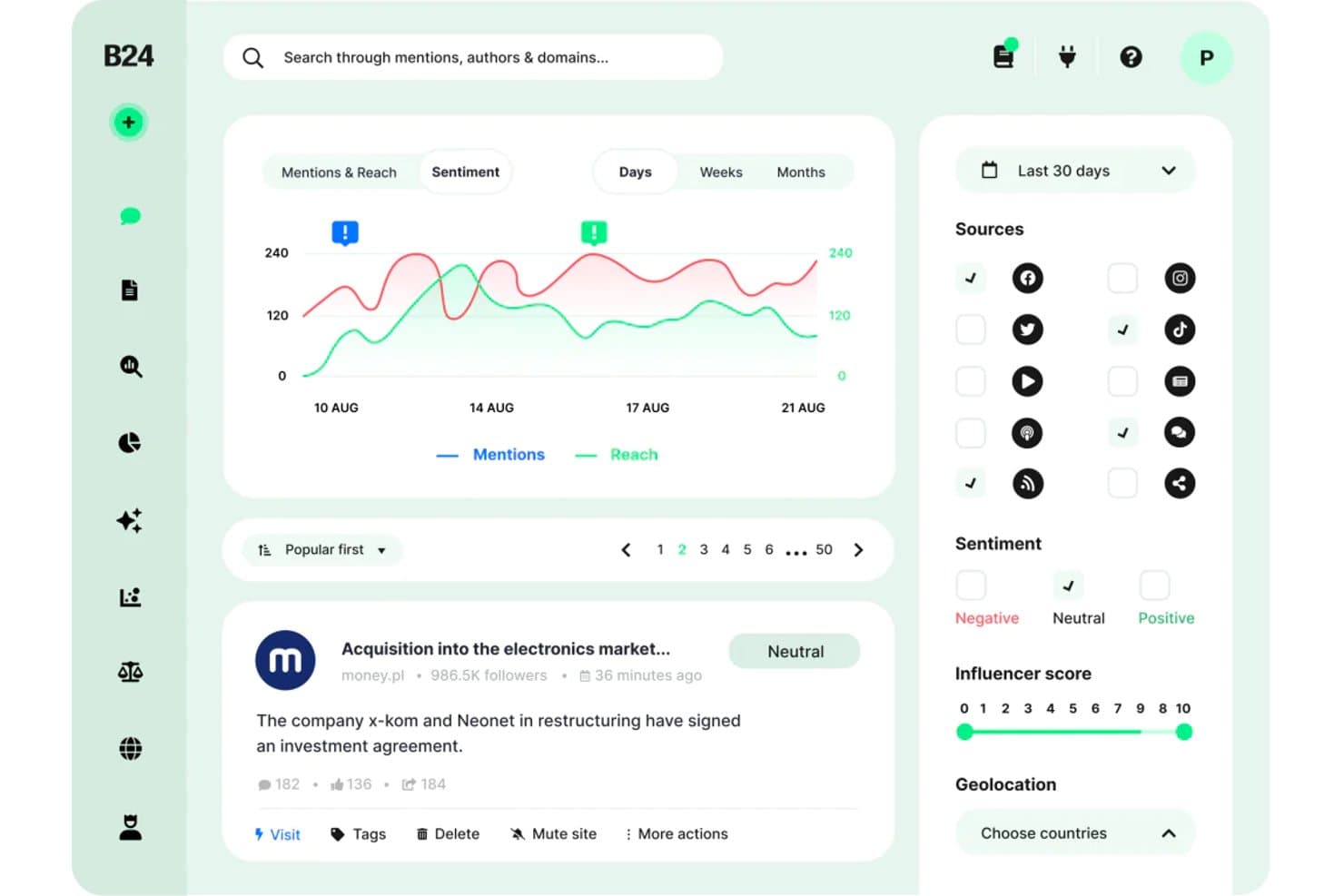
Brand24 offre una dashboard per l'analisi del sentiment con monitoraggio delle menzioni, grafici di copertura, filtri per le fonti e punteggio influencer per la ricerca di mercato. Brand24 è una piattaforma di social listening e monitoraggio dei media alimentata dall'intelligenza artificiale che traccia le menzioni del marchio, il sentiment dei consumatori e le conversazioni online su social media, siti di notizie, blog, forum, podcast e piattaforme di recensioni in tempo reale.
Per chi è ideale Brand24?
I brand manager e gli insights manager di aziende che operano in mercati internazionali o multilingue potranno trarre il massimo vantaggio dalle capacità di monitoraggio cross-linguistico di Brand24.
Perché ho scelto Brand24
Brand24 si è guadagnato un posto nella mia shortlist perché la copertura multilingue del social listening è davvero senza eguali. Mi piace particolarmente il fatto che l'analisi del sentiment sia disponibile in 108 lingue con un tasso di accuratezza del 95%, permettendo così di tracciare in modo affidabile la percezione del consumatore in arabo, spagnolo o polacco, generando dati veri anziché rumore. L'AI Brand Assistant 2.0 mi consente di porre domande in linguaggio naturale direttamente su questo dataset multilingue, facendo emergere temi che altrimenti dovrei ricercare manualmente.
Caratteristiche principali di Brand24
- Punteggio di presenza: Aggrega la visibilità del marchio in un unico indicatore, aggiornato in tempo reale per un monitoraggio semplice.
- Identificazione degli influencer: Individua i principali autori e canali che guidano le conversazioni chiave sul tuo marchio o sui concorrenti.
- Avvisi di tempesta: Notifica istantaneamente eventuali picchi anomali nel volume delle discussioni sul marchio, facilitando la rilevazione di crisi.
- Report white label: Consente di esportare i dati in PDF, Excel o PowerPoint personalizzati con il tuo marchio, per condivisioni su misura e presentazioni.
Integrazioni Brand24
Brand24 offre integrazioni native con Slack e Microsoft Teams. È disponibile un'API per integrazioni personalizzate.
Pros and Cons
Pros:
- Traccia menzioni in 108 lingue simultaneamente
- Copre social, news, podcast e recensioni
- L'AI Brand Assistant risponde a domande di ricerca
Cons:
- Nessuna funzionalità per sondaggi o ricerca primaria
- Metriche di Stories e Reels non pienamente supportate
Learn more about Brand24: Ideale per l'analisi competitiva delle audience digitali
- Piano gratuito + prova gratuita di 7 giorni + demo gratuita
- A partire da $117,33/mese (fatturazione annuale)
Visit WebsiteCustomer Rating:4.5/5This rating combines scores from multiple user review sites to reflect overall customer sentiment about the product.
Semrush Traffic Analytics mostra i report sugli insight dei concorrenti e del pubblico. Semrush è una piattaforma di intelligenza digitale che combina la ricerca di parole chiave, l'analisi del traffico dei concorrenti, l'audit dei backlink e i dati sul comportamento del pubblico attraverso canali di ricerca, social e a pagamento.
Per chi è più indicato Semrush?
Semrush è particolarmente adatto a marketer digitali e strateghi SEO in aziende di medie e grandi dimensioni che necessitano di una profonda visibilità sulla presenza online dei concorrenti.
Perché ho scelto Semrush
Ho scelto Semrush come uno dei migliori strumenti perché il suo tool Traffic Analytics mi offre una scomposizione dettagliata del pubblico di qualsiasi concorrente, incluse le fonti di traffico, le metriche di coinvolgimento e la copertura geografica, tutto senza la necessità di accedere ai loro dati interni. Il tool Keyword Gap mi permette di confrontare fino a cinque concorrenti fianco a fianco per individuare esattamente quali termini di ricerca stanno intercettando che io non sto coprendo. Mi affido anche al Backlink Gap per trovare opportunità di link building che i miei concorrenti hanno già validato.
Funzionalità principali di Semrush
- Esploratore di mercato: Mappa il panorama competitivo di qualsiasi settore, mostrando quota di mercato, demografia del pubblico e principali attori in un'unica vista.
- Ricerca argomenti: Evidenzia sottotemi di tendenza, titoli e domande legati a una qualsiasi parola chiave guida per supportare la pianificazione di contenuti e ricerche.
- Monitoraggio del brand: Tiene traccia delle menzioni online di qualsiasi brand su notizie, blog e piattaforme social quasi in tempo reale.
- Ricerca pubblicitaria: Rivela le copie degli annunci search a pagamento dei concorrenti, le landing page e la cronologia delle spese per parole chiave.
Integrazioni di Semrush
Semrush offre diverse integrazioni con strumenti e servizi diffusi. Le integrazioni native includono Google Analytics, Google Search Console, Google Ads, Google Sheets, Google Docs, Looker Studio, Trello, WordPress, Facebook, LinkedIn, Instagram, Pinterest, YouTube, monday.com, Wix e Zoho Analytics. È compatibile con Zapier ed è disponibile un'API per integrazioni personalizzate.
Pros and Cons
Pros:
- Database di parole chiave esteso in numerosi paesi
- Monitora la visibilità del brand nei risultati di ricerca AI
- Analisi gap tra concorrenti per parole chiave affiancate
Cons:
- Dati limitati su concorrenti di nicchia o locali
- Le funzionalità chiave di competitive intelligence richiedono componenti aggiuntivi a pagamento
 Ideale per una collaborazione di squadra senza sforzo sui sondaggi
- Piano gratuito disponibile
- Piano gratuito disponibile; da $7/utente/mese (fatturato annualmente) per Google Workspace

Le impostazioni di condivisione di Google Forms mostrano la gestione collaborativa dell'accesso al quiz. Google Forms è un generatore di sondaggi gratuito di Google che consente ai team di creare, distribuire e analizzare questionari con raccolta automatica delle risposte e riepiloghi dati in tempo reale su Google Sheets.
Per chi è più indicato Google Forms?
Google Forms è particolarmente adatto per piccoli team e singoli specialisti di marketing che già lavorano all'interno di Google Workspace e hanno bisogno di uno strumento gratuito per raccogliere rapidamente risposte a sondaggi.
Perché ho scelto Google Forms
Ho incluso Google Forms nella mia selezione perché l'accesso multi-editore è integrato di default. L'intero team può aprire lo stesso modulo contemporaneamente, modificare le domande e lasciare commenti senza conflitti di versione. Inoltre, mi piace che la logica condizionale permetta di indirizzare i partecipanti su percorsi di domande diversi in base alle risposte precedenti, rendendo così un singolo modulo in grado di svolgere il lavoro di molti. I dati delle risposte fluiscono automaticamente su Google Sheets in tempo reale, così il mio team può suddividere e filtrare i risultati insieme non appena arrivano le risposte.
Funzionalità principali di Google Forms
- Tipi di domande multipli: Scegli tra scelta multipla, caselle di controllo, menu a discesa, scale lineari e campi di testo aperto per associare ogni domanda al formato di risposta più adatto.
- Validazione delle risposte: Imposta regole che richiedono ai rispondenti di inserire formati specifici, intervalli numerici o schemi di testo prima dell'invio.
- Modelli di sondaggio preimpostati: Inizia da una libreria di formati di sondaggio già pronti invece di creare ogni modulo da zero.
- Grafici riepilogativi automatici: Visualizza grafici a barre, a torta e conteggi delle risposte generati automaticamente direttamente in Google Forms senza esportare i dati.
Integrazioni di Google Forms
Google Forms si connette nativamente con altre app di Google Workspace, tra cui Google Sheets, Google Drive, Google Docs e Google Calendar. Migliaia di altre applicazioni sono disponibili tramite Google Workspace Marketplace e si collega con Zapier. È inoltre disponibile una RESTful API per integrazioni personalizzate.
Pros and Cons
Pros:
- Risposte illimitate su ogni sondaggio
- Design dei moduli semplice da usare
- Gemini AI genera moduli di bozza a partire da prompt
Cons:
- I modelli sono poco flessibili nella personalizzazione del layout
- Le analisi integrate sono basilari senza esportazione su Sheets
Learn more about Google Forms: Ideale per template estesi
- Piano gratuito disponibile
- A partire da $7.42/mese (fatturato annualmente)

Zoho Survey aiuta gli utenti a creare, distribuire e analizzare facilmente i sondaggi. Zoho Survey è uno strumento online per sondaggi e questionari pensato per individui e aziende che desiderano raccogliere feedback e approfondimenti dal proprio pubblico di riferimento. Serve principalmente a marketer, ricercatori e team HR facilitando la creazione, distribuzione e analisi dei sondaggi.
Perché ho scelto Zoho Survey: offre un'interfaccia intuitiva drag-and-drop che rende facile la creazione dei sondaggi per il tuo team. Grazie ai report in tempo reale, puoi analizzare velocemente le risposte e ottenere insight preziosi. I modelli personalizzabili ti aiutano a strutturare i sondaggi in base alle tue esigenze specifiche. Inoltre, funzionalità avanzate come la logica di salto e il piping assicurano che i tuoi sondaggi siano dinamici e coinvolgenti.
Funzionalità e integrazioni principali:
Le funzionalità includono modelli personalizzabili, reportistica in tempo reale e logiche avanzate come logica di salto e piping. Puoi creare e distribuire facilmente i sondaggi grazie all'interfaccia drag-and-drop. La piattaforma supporta anche più lingue, rendendola versatile per team globali.
Le integrazioni includono Asana, Dropbox, Google Drive, Google Sheets, Mailchimp, Microsoft Teams, Salesforce, Slack, Trello e Zoho Projects.
Pros and Cons
Pros:
- Logiche avanzate per i sondaggi
- Supporto multilingue
- Interfaccia drag-and-drop intuitiva
Cons:
- Assistenza clienti limitata
- Richiede connessione internet
Learn more about Zoho Survey: Ideale per l'analisi dei dati qualitativi
- Prova gratuita disponibile
- Da $30/mese

Dovetail centralizza e analizza gli insight dei clienti per decisioni guidate dai dati. Dovetail è una piattaforma di customer insights che aiuta product manager, designer, ricercatori, team di vendita e professionisti del customer success a centralizzare e analizzare le conoscenze sui clienti. Trasforma rapidamente feedback degli utenti, chiamate e documenti in approfondimenti azionabili, consentendo decisioni guidate dai dati.
Perché ho scelto Dovetail: La piattaforma offre funzionalità che aiutano a organizzare e analizzare gli insight dei clienti in modo efficiente. Gli insight basati sull'IA possono trasformare grandi quantità di feedback in dati significativi. Dovetail offre inoltre protezione della privacy dei dati e integrazione con altri strumenti, garantendo la sicurezza dei tuoi insight. La sua capacità di standardizzare i processi di ricerca tra i team la rende una risorsa preziosa per promuovere una cultura orientata al cliente nella tua organizzazione.
Funzionalità e integrazioni principali:
Funzionalità includono insight supportati da intelligenza artificiale, analisi rapida dei dati dei clienti e protezione della privacy dei dati. Il tuo team può inoltre usufruire di strumenti per organizzare gli insight e integrare altre piattaforme. Queste funzionalità aiutano a centralizzare il processo di trasformazione del feedback in insight concretamente utilizzabili.
Integrazioni includono Workday, SAP SuccessFactors, ADP, Oracle HCM, BambooHR, Microsoft Dynamics 365, Salesforce, ServiceNow, Google Workspace e Slack.
Pros and Cons
Pros:
- Analisi dei dati rapida
- Insight supportati dall'IA
- Standardizza i processi di ricerca
Cons:
- Accesso offline limitato
- Complessità nella configurazione iniziale
Learn more about Dovetail:

Attest punta a semplificare la ricerca con insight globali, strumenti di brand tracking e test. Attest è una piattaforma di ricerca sui consumatori che semplifica il processo di ricerca per i professionisti del marketing e delle analisi di mercato. Offre accesso a un pubblico globale e mette a disposizione strumenti per il monitoraggio del brand, la profilazione dei consumatori, il test creativo, l’analisi di mercato e lo sviluppo di nuovi prodotti.
Perché ho scelto Attest: La piattaforma dispone di un costruttore di sondaggi intuitivo che offre risultati rapidi, supportato da solide misure per la qualità dei dati. Puoi facilmente monitorare le tendenze, confrontare le risposte e ottenere insight utili tramite la sua dashboard interattiva. Attest fornisce inoltre consulenza di esperti e modelli per aiutarti a condurre ricerche efficaci e prendere decisioni informate.
Caratteristiche distintive e integrazioni:
Caratteristiche includono permessi utente personalizzabili, prezzi trasparenti e supporto dedicato di esperti. Puoi condurre ricerche multi-mercato e multi-onda in 70 lingue, garantendo insight locali. La piattaforma pone inoltre l’accento sulla rapidità degli insight tramite intelligenza artificiale sicura e metodi di raccolta dati di alta qualità.
Integrazioni includono Tableau, Google Data Studio e Zapier.
Pros and Cons
Pros:
- Esportazione dati semplice
- Ottimo supporto clienti
- Sondaggi personalizzabili
Cons:
- Configurazione complessa
- Rivolto solo alle grandi imprese
Learn more about Attest: Ideale per il monitoraggio in tempo reale del brand
- Prova gratuita di 7 giorni disponibile
- A partire da $99/mese
Visit WebsiteCustomer Rating:5/5This rating combines scores from multiple user review sites to reflect overall customer sentiment about the product.
BrandMentions traccia le menzioni online del marchio e offre approfondimenti sulla reputazione. BrandMentions monitora le menzioni del marchio su varie piattaforme online, inclusi social media, notizie, blog e video. Si rivolge principalmente ad aziende e professionisti del marketing, aiutandoli a monitorare la reputazione del brand e a ottenere informazioni sulle strategie di marketing.
Perché ho scelto BrandMentions: Offre funzionalità come avvisi in tempo reale e analisi del sentiment, permettendoti di monitorare le menzioni del marchio in modo efficiente. Puoi interagire con i clienti, monitorare i concorrenti e gestire la presenza online del tuo brand. La sua rilevazione delle menzioni più rapida rispetto ad altri strumenti aumenta la tua capacità di restare aggiornato. L’ampia copertura della piattaforma ti aiuta a misurare efficacemente il successo delle tue campagne di marketing.
Funzionalità e integrazioni principali:
Funzionalità comprendono avvisi in tempo reale, analisi del sentiment e monitoraggio dei media. Puoi tracciare le menzioni del marchio su social media, notizie, blog e video. Lo strumento consente anche di esportare facilmente i risultati ai fini del reporting.
Integrazioni includono Facebook, Twitter, Instagram, LinkedIn, YouTube, Reddit, Pinterest, TikTok, Google News e Quora.
Pros and Cons
Pros:
- Avvisi in tempo reale
- Analisi del sentiment
- Facile da usare
Cons:
- Curva di apprendimento
- Bug occasionali
Learn more about BrandMentions: Ideale per la raccolta di feedback in modalità conversazionale
- Prova gratuita di 14 giorni
- Da $19/mese (fatturato annualmente)
Visit WebsiteCustomer Rating:4.4/5This rating combines scores from multiple user review sites to reflect overall customer sentiment about the product.
La dashboard di SurveySparrow mostra le analisi delle risposte ai sondaggi conversazionali. SurveySparrow è una piattaforma di feedback e sondaggi che presenta i questionari come conversazioni in stile chat, con strumenti per il monitoraggio NPS, valutazioni a 360 gradi e ricerche tramite panel di pubblico.
Per chi è più indicato SurveySparrow?
SurveySparrow è particolarmente adatto ai team di customer experience e prodotto delle PMI che desiderano aumentare i tassi di risposta ai sondaggi grazie a formati conversazionali.
Perché ho scelto SurveySparrow
SurveySparrow si è guadagnato un posto nella mia selezione perché il suo formato di sondaggio in stile chat cambia davvero il modo in cui i rispondenti interagiscono con le domande. Invece di presentare un muro di campi, vengono mostrate una domanda per volta in un flusso conversazionale, il che secondo SurveySparrow porta fino al 40% di tassi di risposta più alti. Mi affido inoltre alla logica di salto e al piping delle domande per mantenere i sondaggi sempre pertinenti, così i rispondenti vedono solo le domande che li riguardano. Per la ricerca di mercato continuativa, la funzione di sondaggi ricorrenti mi permette di programmare e automatizzare gli invii ripetuti senza doverli ricreare ogni volta.
Funzionalità principali di SurveySparrow
- Sondaggi NPS: Conduci sondaggi Net Promoter Score con follow-up automatici basati sui punteggi dei rispondenti.
- Distribuzione multicanale: Somministra i sondaggi tramite email, integrazione su web, SMS, codice QR o link in-app da un'unica piattaforma.
- Report e dashboard personalizzati: Filtra, segmenta e visualizza i dati raccolti con dashboard in tempo reale condivisibili.
- Sondaggi white-label: Personalizza la brand identity di ogni esperienza di sondaggio con loghi, colori e domini dedicati.
Sulla base della documentazione di supporto, che elenca 68 articoli sulle integrazioni, posso identificare le seguenti integrazioni native verificate dal centro assistenza: Excel Online, Power BI, monday.com, Slack, Salesforce, Zendesk, Microsoft Teams, Intercom, Pipedrive, Facebook, Tableau, HubSpot, Freshsales, Google Sheets, Google Tag Manager, Segment, MS Dynamics 365, Adobe Marketo Engage, Webex, Airtable, Klaviyo, UiPath, Google Workspace, Azure SQL, Amazon (probabilmente Redshift) e IBM, oltre a Zapier e accesso API.
Integrazioni SurveySparrow
SurveySparrow offre integrazioni native con Salesforce, HubSpot, Slack, Microsoft Teams, Google Sheets, Zendesk, Tableau, Power BI, Pipedrive e monday.com, oltre a molte altre. È compatibile con Zapier ed è disponibile un'API per integrazioni personalizzate.
Pros and Cons
Pros:
- Analisi del sentiment alimentata dall'IA tramite lo strumento CogniVue
- Modelli integrati di analisi congiunta e pricing
- Sondaggi offline su dispositivi mobili per ricerche sul campo
Cons:
- Limitata possibilità di analisi incrociata delle risposte
- Report avanzati disponibili solo nei piani superiori
Learn more about SurveySparrow: 9Ideale per ottenere automaticamente informazioni sulle offerte della concorrenza
Klue
- Demo gratuita disponibile
- Prezzo su richiesta
 Learn more about Klue:
 10La migliore verifica UX basata sui dati
Loop11
- Prova gratuita di 14 giorni
- Da $49/utente/mese (fatturato annualmente)
Learn more about Loop11:
Altri software per ricerche di mercato
Ecco alcune altre opzioni di software per le ricerche di mercato che non sono entrate nel mio elenco, ma che vale comunque la pena prendere in considerazione.
- 11BrandwatchIdeale per l'analisi dei dati social globali
- 12Google TrendsLe migliori informazioni sui dati di ricerca in tempo reale
- 13Kantar MarketplaceLe migliori informazioni sul pubblico multipiattaforma
- 14NIQLe migliori informazioni su consumatori e acquirenti
Come Valuto i Software di Ricerca di Mercato
Divido la mia valutazione in due livelli: la base che ogni strumento qualificato deve offrire—come accesso a panel, logica dei sondaggi e analisi—e i fattori differenzianti che distinguono i migliori dal resto.
Funzionalità Principali (Requisiti Fondamentali per Questa Lista)
Quando seleziono gli strumenti per la mia lista, valuto ciascuno su una scala da 0 (non offre la funzionalità) a 5 (eccelle in quest'area) per ogni funzionalità principale elencata di seguito. Successivamente, calcolo il punteggio totale dello strumento in percentuale. Ogni strumento deve raggiungere un punteggio totale minimo del 75% per essere considerato per l'inclusione.
- Progettazione di Sondaggi e Questionari: Valuto la varietà di tipi di domande, la logica di salto e le metodologie avanzate disponibili—elementi come studi Conjoint o MaxDiff che i team di ricerca realmente necessitano per progetti su prezzi e preferenze sulle funzionalità.
- Accesso a Panel e Audience: Conta se la piattaforma offre panel di rispondenti nativi o forti integrazioni di terze parti, soprattutto per i team che conducono studi in segmenti di nicchia B2B o su audience consumer a bassa incidenza.
- Analisi Quantitativa dei Dati: Cerco la presenza di tabelle incrociate integrate, ponderazione e test di significatività in modo che gli analisti possano passare dai dati grezzi dei sondaggi a insight segmentati senza dover esportare tutto in uno strumento di statistica separato.
- Capacità di Ricerca Qualitativa: Codifica delle risposte aperte, etichettatura del sentiment e analisi delle risposte video sono gli aspetti che valuto qui—funzionalità che permettono di estrarre temi strutturati da interviste, focus group o risposte testuali su larga scala.
- Reportistica e Visualizzazione dei Dati: Le parti coinvolte necessitano di output professionali, quindi valuto se una piattaforma offre dashboard interattivi, grafici esportabili e report pronti per le presentazioni che un brand manager può condividere direttamente con la leadership.
- Intelligence di Mercato e Competitiva: Le funzionalità di ricerca secondaria come benchmarking dei concorrenti, monitoraggio delle tendenze o accesso a dati di categoria sindacati completano l'utilità di una piattaforma oltre la ricerca primaria tramite sondaggi.
Una volta che ho una lista di strumenti che soddisfano questi criteri, considero cosa distingue ciascuna piattaforma.
Fattori Differenzianti (Cosa Distingue i Fornitori)
Ecco come confronto e metto a confronto i diversi fornitori:
Funzionalità Distintive
Modelli di test di concetti e annunci con benchmarking normativo fanno risparmiare settimane ai team nella progettazione degli studi—verifico se una piattaforma offre framework predefiniti per la valutazione di messaggi, packaging o creatività. Anche il rilevamento di insight tramite AI è importante, soprattutto per team che elaborano migliaia di risposte aperte dove la codifica manuale non è pratica. Per i team brand che eseguono studi trimestrali di notorietà o percezione, il monitoraggio longitudinale con gestione automatizzata delle ondate mantiene i dati coerenti senza dover ricostruire i progetti da zero.
Oltre le Funzionalità
La qualità del panel è una delle prime cose che valuto—il rilevamento delle frodi, i controlli di attenzione e la verifica dei rispondenti influiscono direttamente sull'affidabilità dei tuoi dati. Esamino anche quanto bene una piattaforma si integra nel tuo stack esistente, in particolare integrazioni con strumenti CRM e BI che consentono ai team di insight di trasferire i risultati in Salesforce o Tableau senza esportazioni manuali. Anche la struttura dei prezzi è importante, poiché i modelli pay-per-response si adattano ai progetti ad hoc mentre gli abbonamenti sono più sensati per i team che gestiscono programmi di ricerca continua.
Come scegliere il software per le ricerche di mercato
È facile perdersi tra lunghi elenchi di funzionalità e strutture di prezzo complesse. Per aiutarti a rimanere concentrato mentre affronti il tuo specifico processo di selezione del software, ecco una lista di controllo dei fattori da tenere a mente.
| Fattore | Cosa considerare |
| Scalabilità | Il software può crescere insieme alla tua azienda? |
| Integrazioni | Si integra con gli strumenti utilizzati dal tuo team? |
| Personalizzazione | Puoi adattare il software alle tue esigenze? |
| Semplicità d’uso | È intuitivo per il tuo team? |
| Budget | Rientra nei tuoi vincoli finanziari? |
| Misure di sicurezza | Offre funzionalità di sicurezza avanzate? |
| Assistenza | L’assistenza clienti è facilmente disponibile quando serve? |
| Analisi dei dati | Offre strumenti completi per l’analisi dei dati? |
Usa questa lista di controllo per mantenere organizzato e mirato il processo di selezione del software.
Tendenze nel software per le ricerche di mercato
Durante la mia ricerca, ho raccolto innumerevoli aggiornamenti di prodotto, comunicati stampa e registri delle versioni da diversi fornitori di software per le ricerche di mercato. Ecco alcune delle tendenze emergenti che sto monitorando.
- Intelligenza artificiale: l'intelligenza artificiale sta diventando parte integrante degli strumenti di ricerca di mercato, offrendo analisi avanzate dei dati, analisi predittive e automazione delle attività di routine. Le aziende integrano l'intelligenza artificiale per fornire informazioni più approfondite e previsioni più accurate.
- Ascolto dei social media: le piattaforme integrano sempre più funzioni di ascolto dei social media per raccogliere in tempo reale le opinioni dei consumatori dai social media. Questo aiuta le aziende a rimanere al passo con le tendenze e a reagire rapidamente ai cambiamenti del mercato.
- Riscontri video: la raccolta di risposte video sta diventando sempre più popolare, poiché fornisce dati più ricchi e sfumati rispetto ai sondaggi tradizionali. I fornitori utilizzano questo metodo per offrire informazioni più approfondite sui consumatori.
- Personalizzazione: le esperienze utente personalizzate stanno diventando la norma, con software che offrono sondaggi e report più personalizzabili. Questa tendenza è guidata dalla necessità di ottenere informazioni più pertinenti e utilizzabili.
- Qualità dei dati migliorata: si presta sempre maggiore attenzione al miglioramento della validità e dell'affidabilità dei dati attraverso tecniche di convalida sofisticate e processi migliori di verifica dei partecipanti.
Che cos'è il software per la ricerca di mercato?
Il software per la ricerca di mercato è uno strumento utilizzato per raccogliere, analizzare e interpretare dati relativi a mercati, concorrenti e consumatori. I professionisti del marketing, gli analisti aziendali e i responsabili di prodotto utilizzano questi strumenti per ottenere informazioni utili e prendere decisioni consapevoli.
Funzionalità come la raccolta dei dati, la creazione di sondaggi e la reportistica analitica aiutano a raccogliere informazioni preziose sul mercato, comprendere il comportamento dei consumatori e identificare le tendenze del mercato. Questi strumenti aiutano gli utenti a prendere decisioni basate sui dati che possono migliorare le strategie aziendali.
Funzionalità del software per la ricerca di mercato
Quando selezioni un software per la ricerca di mercato, presta attenzione alle seguenti funzionalità principali.
- Raccolta e aggregazione dei dati: raccoglie e consolida dati provenienti da diverse fonti, consentendo un'analisi completa.
- Creazione e distribuzione di sondaggi: facilita la progettazione e la distribuzione di sondaggi per raccogliere in modo efficiente informazioni e riscontri dei clienti.
- Strumenti di analisi dei dati: fornisce strumenti analitici per interpretare e visualizzare i dati e identificare tendenze e schemi.
- Reportistica e pannelli di controllo: genera report dettagliati e pannelli di controllo interattivi per presentare i risultati in un formato facilmente comprensibile.
- Capacità di integrazione: si connette ad altri strumenti software per ampliare le funzionalità e ottimizzare i flussi di lavoro.
- Accessibilità da dispositivi mobili: garantisce agli utenti l'accesso al software e alle sue funzionalità dai dispositivi mobili, offrendo flessibilità e praticità.
- Segmentazione dei clienti: consente di suddividere i clienti in gruppi distinti sulla base di diversi criteri, favorendo attività di marketing mirate.
- Aggiornamenti dei dati in tempo reale: offre aggiornamenti in tempo reale per garantire che i dati analizzati siano attuali e pertinenti.
- Funzionalità di collaborazione: consente ai membri del team di lavorare insieme all'interno della piattaforma, migliorando produttività e comunicazione.
- Modelli personalizzabili: fornisce modelli predefiniti che possono essere adattati a esigenze di ricerca specifiche, risparmiando tempo e fatica nella configurazione.
Vantaggi del software per la ricerca di mercato
L'implementazione di un software per la ricerca di mercato, inclusi gli strumenti di analisi della concorrenza, offre diversi vantaggi al tuo team e alla tua azienda. Ecco alcuni dei benefici che puoi aspettarti.
- Maggiore accuratezza dei dati: la raccolta automatizzata dei dati garantisce dati più precisi e affidabili, riducendo gli errori umani e i pregiudizi.
- Informazioni più rapide: gli strumenti di analisi avanzati consentono di elaborare i dati più rapidamente, fornendo informazioni tempestive per prendere decisioni consapevoli.
- Maggiore comprensione dei clienti: ottieni informazioni più approfondite sulle preferenze e sui comportamenti dei clienti, aiutando ad adattare i prodotti e le strategie di marketing.
- Efficienza dei costi: ottimizza i processi di ricerca e riduce la necessità di ricorrere ad agenzie di ricerca esterne, diminuendo i costi complessivi.
- Migliore pianificazione strategica: l'accesso a dati completi consente una pianificazione strategica e previsioni più efficaci.
- Riduzione dei rischi: identifica tempestivamente i potenziali rischi e le opportunità del mercato, consentendo di adottare misure proattive.
- Vantaggio competitivo: rimani un passo avanti rispetto alla concorrenza grazie a tendenze di mercato e informazioni sui consumatori aggiornate.
Costi e prezzi del software per la ricerca di mercato
La scelta di un software per le ricerche di mercato richiede la comprensione dei vari modelli di prezzo e dei piani disponibili. I costi variano in base alle funzionalità, alle dimensioni del team, ai componenti aggiuntivi e ad altro ancora. La tabella seguente riassume i piani più comuni, i relativi prezzi medi e le funzionalità tipicamente incluse nelle soluzioni software per le ricerche di mercato.
Tabella comparativa dei piani per i software di ricerca di mercato
| Tipo di piano | Prezzo medio | Funzionalità comuni |
| Piano gratuito | $0 | Sondaggi di base, numero limitato di risposte, esportazione di base dei dati e assistenza della comunità. |
| Piano personale | $10-$30/utente/mese | Sondaggi avanzati, più risposte, strumenti di analisi dei dati, assistenza via e-mail e modelli. |
| Piano aziendale | $50-$150/utente/mese | Sondaggi personalizzabili, analisi avanzata dei dati, integrazioni, assistenza prioritaria e strumenti per la collaborazione tra team. |
| Piano aziendale avanzato | $200-$500+/utente/mese | Personalizzazione completa, report avanzati, responsabile account dedicato, accesso API e funzionalità di sicurezza avanzate. |
Panoramica dei tipi di piano dei software per le ricerche di mercato, con relativi costi e funzionalità.
Domande frequenti sui software per le ricerche di mercato
Ecco alcune risposte alle domande comuni sui software per le ricerche di mercato:
Come si conduce una ricerca SaaS con un software per le ricerche di mercato?
Per condurre una ricerca di mercato per il SaaS, inizia definendo gli obiettivi della ricerca. Individua un problema che richiede una soluzione migliore e identifica i tuoi potenziali clienti. Analizza la tua nicchia, le dimensioni del mercato e i concorrenti. Infine, parla direttamente con i potenziali clienti per raccogliere informazioni utili.
Quali sono tre errori comuni commessi quando si utilizza un software per le ricerche di mercato?
Tra gli errori comuni nelle ricerche di mercato rientrano il non sapere cosa si sta cercando, l’utilizzo di materiali di riferimento inadeguati e la ricerca sul gruppo sbagliato. È inoltre un errore affidarsi a un unico insieme di dati e scegliere un gruppo di riferimento soggettivo. Per evitarli, definisci chiaramente i tuoi obiettivi e utilizza fonti di dati diversificate e affidabili.
Come si garantisce l'accuratezza dei dati del software per le ricerche di mercato?
Per garantire l’accuratezza, utilizza più fonti di dati e verifica le informazioni incrociandole. Impiega sia metodi di ricerca qualitativi sia quantitativi. Aggiorna regolarmente i dati e utilizza strumenti affidabili per la raccolta e l’analisi dei dati. In questo modo ridurrai il rischio di distorsioni ed errori.
I software per le ricerche di mercato possono integrarsi con altri strumenti aziendali?
Sì, molte soluzioni software per le ricerche di mercato offrono integrazioni con altri strumenti aziendali. Questi possono includere sistemi CRM, strumenti di visualizzazione dei dati, software per la gestione dei progetti e persino software di analisi dell’intelligence del marchio per una visione più completa della percezione del mercato. L’integrazione contribuisce a semplificare il flusso dei dati e migliora l’efficienza dei processi di ricerca. Verifica sempre la compatibilità con gli strumenti che già utilizzi prima di scegliere un software.