

Gestire efficacemente un team di marketing significa coordinare più progetti, scadenze e risorse. Hai bisogno di uno strumento software in grado di affrontare queste sfide, ma Asana non sembra essere la soluzione adatta. Che sia per i prezzi, per le numerose funzionalità o per la curva di apprendimento elevata per i nuovi membri del team, potresti essere alla ricerca di alternative.
In questo articolo esplorerò le migliori alternative ad Asana, che potrebbero adattarsi meglio al flusso di lavoro del tuo team. Ho testato e recensito ogni opzione in modo indipendente per offrirti una valutazione imparziale di ciò che ciascuna soluzione ha da offrire. Dagli strumenti di collaborazione alla gestione delle attività, troverai opzioni che possono migliorare la tua esperienza nella gestione dei progetti.
Che cos'è Asana?
Asana è un software per la gestione dei progetti progettato per aiutare i team a organizzare, monitorare e gestire il proprio lavoro. È ampiamente utilizzato da professionisti del marketing, del design e dello sviluppo di prodotti che devono mantenere attività e progetti nei tempi previsti. L'assegnazione delle attività, le scadenze e le tempistiche dei progetti aiutano a gestire i carichi di lavoro e a migliorare la collaborazione del team. Nel complesso, Asana offre un modo efficiente per mantenere il team organizzato e concentrato sui propri obiettivi.
Tabella comparativa delle alternative ad Asana
Questa tabella comparativa riassume i dettagli sui prezzi delle migliori alternative ad Asana che ho selezionato:
| Tool | Best For | Trial Info | Price | ||
|---|---|---|---|---|---|
| 1 | Ideale per gestire flussi di lavoro di progetti complessi | Prova gratuita di 14 giorni + piano gratuito disponibile | Da $10/utente/mese (fatturazione annuale) | Website | |
| 2 | Ideale per le attività creative e di gestione delle campagne aziendali | Demo gratuita disponibile | Prezzi su richiesta | Website | |
| 3 | Ideale per flussi di lavoro di progetto fortemente automatizzati | Prova gratuita di 15 giorni + piano gratuito + demo gratuita disponibile | Da $4/utente/mese (fatturati annualmente) | Website | |
| 4 | Ideale per il monitoraggio dettagliato dei progetti e delle tempistiche | Prova gratuita di 30 giorni | Da $10/utente/mese (fatturato annualmente) | Website | |
| 5 | Ideale per creare app personalizzate senza codice | Piano gratuito + demo gratuita disponibile | Da $20/utente/mese (fatturato annualmente) | Website | |
| 6 | Ideale per la gestione visiva delle attività | Piano gratuito + prova gratuita di 14 giorni + demo gratuita disponibile | Da $5/utente/mese (fatturazione annuale) | Website | |
| 7 | Ideale per report preimpostati | Prova gratuita di 14 giorni + demo gratuita disponibile | Da $8/utente/mese (fatturazione annuale) | Website | |
| 8 | Ideale per la collaborazione in tempo reale | Prova gratuita di 14 giorni + demo gratuita disponibile | Da $45/mese (fatturato annualmente) | Website | |
| 9 | Ideale per la gestione di progetti incentrati sul cliente | Prova gratuita di 14 giorni + demo gratuita disponibile | A partire da $9,99/utente/mese (fatturazione annuale) | Website | |
| 10 | Ideale per la comunicazione centralizzata del team | Prova gratuita di 30 giorni + demo gratuita disponibile | Da $15/utente/mese | Website |


Perché fidarsi dei nostri consigli sui software
6,700+
Reviews
20
Industry experts
16+
Evaluation factors
14
Years
Il nostro team testa e recensisce software dal 2012. In quanto leader del marketing noi stessi, sappiamo quanto sia difficile — e importante — scegliere il software giusto.
Per questa guida, abbiamo valutato gli strumenti attraverso test pratici e ricerche indipendenti, assegnando un punteggio agli strumenti in base ai nostri criteri di selezione.
Le nostre recensioni riflettono il nostro giudizio editoriale umano, non un discorso di vendita.
Revisori esperti:
 Gui DrusinaDirettore creativo
- Shriya GhateSenior Marketing Lead
 Amanda JacquesResponsabile Marketing Ops

Recensioni delle migliori alternative ad Asana
Di seguito trovi i miei riepiloghi dettagliati delle migliori alternative ad Asana incluse nel mio elenco. Le mie recensioni offrono una panoramica dettagliata delle funzionalità principali, dei pro & contro, delle integrazioni e dei casi d’uso ideali di ogni strumento, per aiutarti a trovare quello più adatto a te.
 Ideale per gestire flussi di lavoro di progetti complessi
- Prova gratuita di 14 giorni + piano gratuito disponibile
- Da $10/utente/mese (fatturazione annuale)
Visit WebsiteCustomer Rating:4.3/5This rating combines scores from multiple user review sites to reflect overall customer sentiment about the product.
Suddivisione visiva del carico di lavoro del team di progetto in Wrike, che mostra l'allocazione delle singole attività e le percentuali di capacità durante la settimana. Wrike è uno strumento di gestione dei progetti creato per i team che gestiscono progetti complessi su più dipartimenti. È ideale per le organizzazioni che necessitano di visualizzazioni di lavoro avanzate, automazione delle attività e reportistica robusta per monitorare iniziative su larga scala.
Perché Wrike è una buona alternativa ad Asana:
Ho scelto Wrike perché offre maggiore flessibilità ai team che lavorano su progetti complessi e trasversali. Mentre Asana è noto per la sua semplicità, Wrike si distingue grazie a strumenti avanzati come diagrammi di Gantt integrati, moduli di richiesta personalizzabili e dashboard in tempo reale. Queste funzionalità aiutano a visualizzare le tempistiche, gestire i carichi di lavoro e automatizzare il passaggio delle attività in modo più efficace. Wrike offre anche un maggiore controllo su dati e reportistica, rendendolo una scelta più solida se il tuo team necessita di visibilità su più progetti o dipartimenti.
Caratteristiche principali e integrazioni:
Caratteristiche includono automazione delle attività basata su AI per ridurre il lavoro manuale, moduli di richiesta centralizzati per standardizzare l'accesso ai progetti e dashboard in tempo reale che forniscono approfondimenti operativi sull'intero portafoglio. Le visualizzazioni di lavoro di Wrike—come le bacheche Kanban e i diagrammi di Gantt—rendono semplice monitorare tempistiche, dipendenze e carichi di lavoro.
Integrazioni includono oltre 400 connessioni native preconfigurate, tra cui Microsoft, Google, Dropbox, Salesforce e Marketo.
Pros and Cons
Pros:
- Chat integrata per ridurre il contesto di cambio durante la collaborazione
- Visualizzazione semplice delle performance del flusso di lavoro
- Individui e team possono monitorare i carichi di lavoro
Cons:
- Non adatto a organizzazioni di piccole dimensioni
- Limitato a 10 flussi di lavoro per spazio
 Ideale per le attività creative e di gestione delle campagne aziendali
- Demo gratuita disponibile
- Prezzi su richiesta
Visit WebsiteCustomer Rating:4.6/5This rating combines scores from multiple user review sites to reflect overall customer sentiment about the product.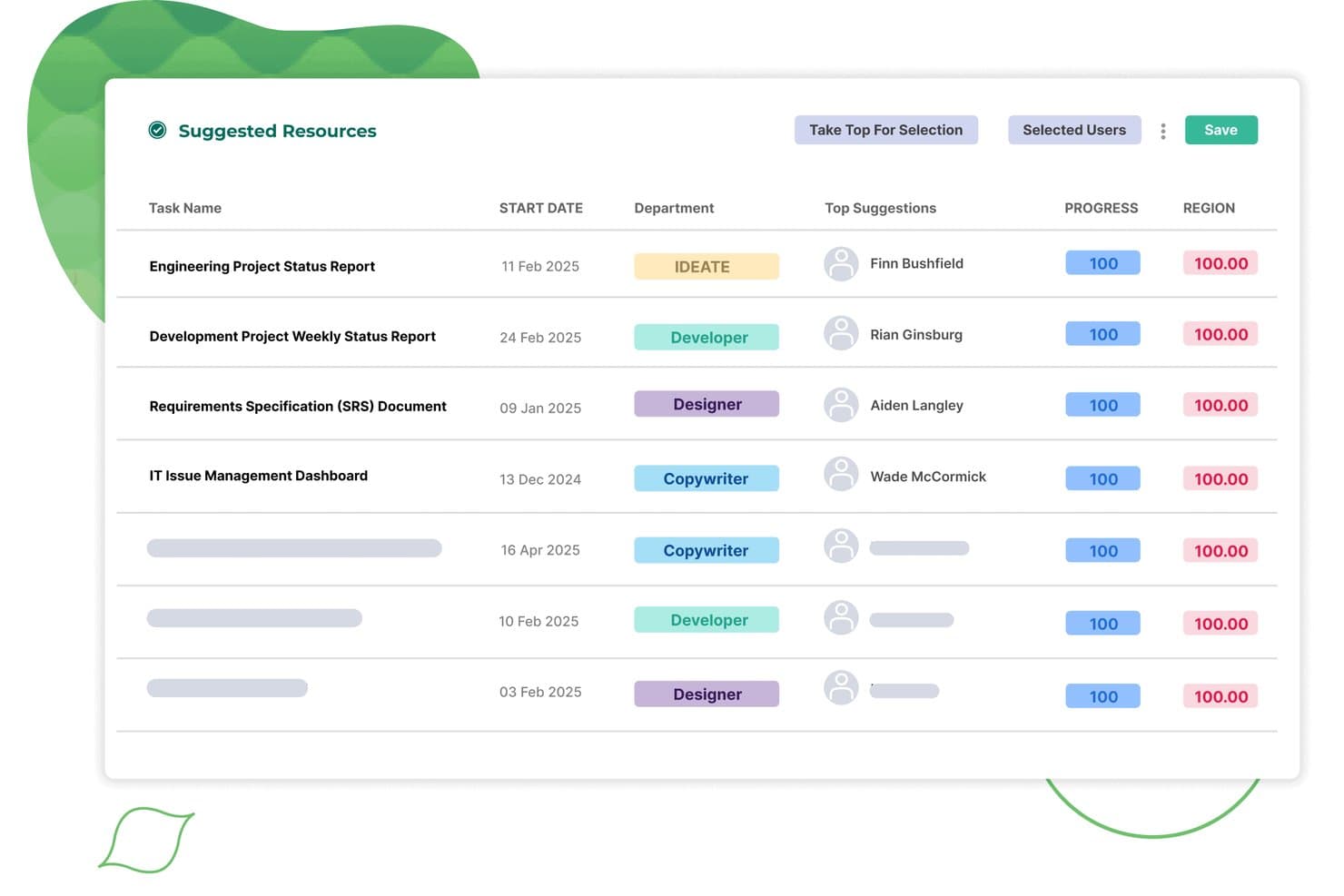
Screendragon assegna automaticamente alle attività le risorse suggerite in base al reparto e al punteggio di corrispondenza. Screendragon è una piattaforma per la gestione dei flussi di lavoro progettata per i team di marketing, le agenzie e le aziende che devono gestire campagne creative complesse, approvazioni e conformità tra reparti e aree geografiche.
Per chi è più adatto Screendragon?
Screendragon è adatto ai team di marketing aziendale e delle agenzie che gestiscono campagne creative complesse tra più reparti o sedi.
Perché Screendragon è una buona alternativa ad Asana
Ho scelto Screendragon perché offre al mio team un hub centrale per la gestione delle campagne, delle approvazioni e della conformità tra i reparti. Mi affido ai suoi flussi di lavoro personalizzabili per coordinare le risorse creative su larga scala, mentre le autorizzazioni basate sui ruoli contribuiscono a mantenere al sicuro i materiali di marketing sensibili e pronti per gli audit.
Caratteristiche principali di Screendragon
- Gestione delle risorse digitali: Archivia, organizza e accedi ai file e alle risorse creative direttamente all'interno dei flussi di lavoro dei progetti.
- Strumenti per la pianificazione delle risorse: Assegna i membri del team e monitora il carico di lavoro per evitare conflitti e colli di bottiglia.
- Monitoraggio del budget: Monitora i budget dei progetti in tempo reale e gestisci le approvazioni dei costi.
- Monitoraggio integrato del tempo: Registra le ore relative a specifiche attività e progetti per ottenere report più accurati.
Integrazioni di Screendragon
Le integrazioni native non sono documentate in modo chiaro. Screendragon supporta le integrazioni tramite la sua API per configurazioni personalizzate.
Pros and Cons
Pros:
- Gestisce su larga scala le approvazioni delle campagne tra più reparti
- Le autorizzazioni basate sui ruoli supportano le esigenze di conformità del marketing
- Pianificazione delle risorse integrata per la programmazione tra team
Cons:
- L'interfaccia può risultare complessa per i nuovi utenti
- I flussi di lavoro personalizzati richiedono spesso una formazione dedicata per gli amministratori
Learn more about Screendragon: Ideale per flussi di lavoro di progetto fortemente automatizzati
- Prova gratuita di 15 giorni + piano gratuito + demo gratuita disponibile
- Da $4/utente/mese (fatturati annualmente)
Visit WebsiteCustomer Rating:4.3/5This rating combines scores from multiple user review sites to reflect overall customer sentiment about the product.
La Kanban board di Zoho Projects mostra lo stato delle attività, opzioni di automazione e tracciamento dei problemi, aiutando i team a gestire progetti complessi con flussi di lavoro dettagliati. Per i team che cercano una soluzione flessibile ma completa per gestire i progetti, Zoho Projects rappresenta un'alternativa interessante ad Asana. Progettato per una vasta gamma di settori, dalla costruzione all'informatica, Zoho Projects si rivolge a professionisti come marketer e freelance che desiderano ottimizzare i propri processi di lavoro. Risponde alle problematiche di gestione delle attività, monitoraggio del tempo e collaborazione di squadra, garantendo al contempo la privacy degli utenti e offrendo solide possibilità di integrazione.
Perché ho scelto Zoho Projects
Ho scelto Zoho Projects come valida alternativa ad Asana per il suo focus su automazione e personalizzazione. La piattaforma consente di automatizzare le attività di routine grazie a un'interfaccia drag-and-drop, facendo risparmiare tempo prezioso al team. Inoltre, le ampie opzioni di personalizzazione dei progetti permettono di adattare i flussi di lavoro alle esigenze specifiche, aumentando la produttività. Queste funzionalità, unite a un affidabile sistema di tracciamento dei problemi, rendono Zoho Projects una scelta interessante per i team che desiderano ottimizzare la gestione dei progetti.
Funzionalità principali di Zoho Projects
Oltre alle capacità di automazione e personalizzazione, Zoho Projects offre numerose altre funzionalità che ne aumentano il valore come alternativa ad Asana.
- Gestione delle attività: Permette di creare, assegnare e monitorare le attività con facilità, assicurando che i progetti rimangano nei tempi previsti.
- Monitoraggio del tempo: Consente di controllare il tempo impiegato per ogni attività, elemento fondamentale sia per la fatturazione che per l'analisi della produttività.
- Diagrammi di Gantt: Offrono una panoramica visiva delle tempistiche per una migliore pianificazione e controllo del progetto, aiutando a comprendere immediatamente l'avanzamento.
- Accesso mobile: Mette a disposizione un'applicazione mobile che consente di gestire i progetti in mobilità, garantendo connessione e controllo ovunque ci si trovi.
Integrazioni di Zoho Projects
Le integrazioni includono Google Drive, Microsoft Office 365, Slack, Dropbox, GitHub, Bitbucket e Zoho CRM. Inoltre, è disponibile un'API per integrazioni personalizzate.
Pros and Cons
Pros:
- Automazione avanzata delle attività e dei flussi di lavoro
- Monitoraggio integrato del tempo e dei problemi
- Prezzi accessibili per team in crescita
Cons:
- Curva di apprendimento iniziale più ripida
- Meno integrazioni native rispetto ad Asana
Learn more about Zoho Projects: Ideale per il monitoraggio dettagliato dei progetti e delle tempistiche
- Prova gratuita di 30 giorni
- Da $10/utente/mese (fatturato annualmente)
Visit WebsiteCustomer Rating:4.7/5This rating combines scores from multiple user review sites to reflect overall customer sentiment about the product.
Microsoft Project gestisce in modo efficace tempistiche dettagliate e dipendenze. Microsoft Project è uno strumento di gestione progetti progettato per le aziende che hanno bisogno di pianificare, monitorare ed eseguire progetti complessi. È ideale per i team che cercano flussi di lavoro strutturati e un'organizzazione dettagliata delle attività.
Perché Microsoft Project è una valida alternativa ad Asana:
Microsoft Project offre strumenti avanzati per monitorare i progressi, gestire le dipendenze e visualizzare i tempi tramite diagrammi di Gantt. Il tuo team può assegnare attività, allocare risorse e tracciare i carichi di lavoro tutto all'interno di una sola piattaforma. Include opzioni di pianificazione dettagliate per aiutarti a gestire efficacemente le scadenze. Con la sua attenzione alle tempistiche e al monitoraggio, Microsoft Project è perfettamente indicato per gestire requisiti di progetto complessi.
Funzionalità principali & integrazioni:
Le funzionalità includono strumenti di gestione delle risorse che ti aiutano ad assegnare e bilanciare i carichi di lavoro tra i membri del team. Le funzioni di reportistica integrate forniscono approfondimenti sui progressi e sulle prestazioni del progetto. Le capacità di rilevazione delle ore permettono al tuo team di registrare le ore direttamente nel piano di progetto.
Le integrazioni comprendono Microsoft Teams, Power BI, SharePoint, Dynamics 365, Excel, Outlook, OneDrive, Planner, Azure DevOps e Skype.
Pros and Cons
Pros:
- Capacità estese di gestione delle risorse
- Pianificazione avanzata con dipendenze tra attività
- Integrazione con la suite Microsoft 365
Cons:
- Supporto limitato per la gestione progetti Agile
- Meno intuitivo per progetti piccoli e semplici
Learn more about Microsoft Project: Ideale per creare app personalizzate senza codice
- Piano gratuito + demo gratuita disponibile
- Da $20/utente/mese (fatturato annualmente)
Visit WebsiteCustomer Rating:4.6/5This rating combines scores from multiple user review sites to reflect overall customer sentiment about the product.
Airtable ti permette di creare flussi di lavoro personalizzati con strumenti e visualizzazioni no-code. Airtable è una piattaforma versatile che unisce la semplicità dei fogli di calcolo con la funzionalità di un database. È ideale per i team che hanno bisogno di organizzare dati, gestire progetti o creare flussi di lavoro su misura.
Perché Airtable è una buona alternativa ad Asana:
Airtable permette di creare app personalizzate adattate alle esigenze specifiche del tuo team, senza richiedere competenze di programmazione. La sua interfaccia drag-and-drop rende semplice progettare flussi di lavoro, automatizzare attività ripetitive e visualizzare dati in diversi formati come griglie, calendari e bacheche Kanban. Puoi adattare la piattaforma ai tuoi progetti e processi unici. Con Airtable, non sei limitato da strutture rigide, dando al tuo team la flessibilità di lavorare nel modo che preferisce.
Caratteristiche e integrazioni principali:
Le funzionalità includono automazioni del flusso di lavoro che gestiscono le attività ripetitive per farti risparmiare tempo, un designer di interfacce per creare interfacce personalizzate per i tuoi flussi, e varie visualizzazioni come calendario e galleria per mostrare i dati nel modo più adatto al tuo team.
Le integrazioni includono Slack, Google Drive, Salesforce, Jira, Zendesk, Box, Gmail, Miro, Typeform e Dropbox.
Pros and Cons
Pros:
- Ambiente low-code accessibile anche a chi non è sviluppatore
- Forte supporto dalla community e molte risorse disponibili
- Aggiornamenti regolari con nuove funzionalità
Cons:
- Può risultare complicato per i nuovi utenti
- Le funzionalità avanzate possono richiedere conoscenze tecniche
Learn more about Airtable: Ideale per la gestione visiva delle attività
- Piano gratuito + prova gratuita di 14 giorni + demo gratuita disponibile
- Da $5/utente/mese (fatturazione annuale)
Visit WebsiteCustomer Rating:4.5/5This rating combines scores from multiple user review sites to reflect overall customer sentiment about the product.
Trello offre un approccio semplice e visivo in stile Kanban per la gestione delle attività. Trello è uno strumento di gestione di attività e progetti progettato per team e singoli che preferiscono un flusso di lavoro organizzato visivamente. Aiuta gli utenti a gestire le attività, monitorare i progressi e collaborare utilizzando un'interfaccia basata su bacheche.
Perché Trello è una buona alternativa ad Asana:
Trello utilizza bacheche, elenchi e schede personalizzabili per rendere l'organizzazione delle attività visivamente intuitiva e facile da navigare. Il tuo team può creare flussi di lavoro, assegnare compiti e impostare scadenze tutto all'interno della stessa interfaccia. La funzionalità di trascinamento consente di modificare rapidamente i piani quando cambiano le priorità.
Funzionalità principali e integrazioni:
Le funzionalità includono un'interfaccia facile da usare che permette di creare e gestire le attività con semplicità, bacheche e schede personalizzabili per adattarsi al flusso di lavoro del team e collaborazione in tempo reale per mantenere tutti allineati.
Le integrazioni includono Slack, Jira, Miro, Evernote, Salesforce, Google Drive, Dropbox, Microsoft Teams, Confluence e GitHub.
Pros and Cons
Pros:
- Facile da configurare e utilizzare
- Altamente personalizzabile per adattarsi ai flussi di lavoro
- Supporta la collaborazione in tempo reale
Cons:
- Funzionalità di reportistica e analisi limitate
- Può diventare disordinato con progetti di grandi dimensioni
Learn more about Trello: Ideale per report preimpostati
- Prova gratuita di 14 giorni + demo gratuita disponibile
- Da $8/utente/mese (fatturazione annuale)
Visit WebsiteCustomer Rating:4.7/5This rating combines scores from multiple user review sites to reflect overall customer sentiment about the product.
La visualizzazione della timeline dei progetti di Workzone mostra come i diversi progetti e le attività dei clienti siano pianificati nel tempo, offrendo ai team una chiara visibilità sui carichi di lavoro, le scadenze e l'avanzamento delle attività sui diversi account. Per i team che cercano una soluzione di gestione dei progetti in grado di soddisfare esigenze di diversi settori e di affrontare le sfide legate a comunicazioni disorganizzate e scadenze mancate, Workzone offre una valida alternativa ad Asana. Le sue funzionalità sono pensate per migliorare la collaborazione e favorire la chiarezza su più progetti, rendendolo particolarmente interessante per i team di marketing, IT e operations. Grazie a strumenti per la visibilità dei progetti, la collaborazione e la revisione dei documenti, Workzone contribuisce a ottimizzare i flussi di lavoro e ad aumentare l'efficienza, offrendo un ambiente strutturato in cui i team possono prosperare.
Perché ho scelto Workzone
Ho scelto Workzone come forte alternativa ad Asana per le sue soluzioni personalizzate rivolte a settori diversi e per le sue solide capacità di monitoraggio dei progetti. I modelli personalizzabili di Workzone e i report preimpostati offrono struttura e chiarezza ai team che gestiscono diversi progetti urgenti. La funzione di revisione documentale della piattaforma migliora la collaborazione permettendo ai team di esaminare e approvare i file senza difficoltà. Queste funzionalità affrontano le comuni problematiche di comunicazione disorganizzata e processi incoerenti, rendendo Workzone una scelta affidabile per i team che mirano all'efficienza.
Funzionalità principali di Workzone
Oltre alle sue funzioni di monitoraggio dei progetti e revisione dei documenti, Workzone offre numerose altre funzionalità che ne aumentano l'attrattiva come alternativa ad Asana:
- Dipendenze tra attività: Consente al team di impostare relazioni tra le attività, garantendo che i progetti avanzino in modo logico.
- Monitoraggio del tempo: Permette di tenere traccia del tempo speso su ciascuna attività, facilitando la gestione delle risorse e delle tempistiche di progetto.
- Modelli di progetto: Offre oltre 1.000 modelli per avviare rapidamente nuovi progetti e mantenere coerenza tra le attività.
- Branding personalizzato: Permette al team di personalizzare l'interfaccia con logo e colori dell'azienda, favorendo un'esperienza di brand coerente.
Integrazioni di Workzone
Le integrazioni includono Slack, Microsoft Teams, Google Drive, Salesforce, Box, Dropbox, Everhour, Freshbooks, GitHub, Harvest, Hubspot, JIRA, Microsoft Office 365, OneDrive, Quickbooks Online, Toggl, Yammer e Zoho Books. Gli utenti possono inoltre creare integrazioni personalizzate tramite la REST API di Workzone o collegarsi a oltre 1.000 app tramite Zapier.
Pros and Cons
Pros:
- Ottima visibilità in tempo reale sui progetti
- Approvazione dei documenti integrata
- Formazione illimitata e supporto dal vivo
Cons:
- Funzionalità di budgeting avanzate limitate
- Il prezzo è meno adatto ai team piccoli
Learn more about Workzone: Ideale per la collaborazione in tempo reale
- Prova gratuita di 14 giorni + demo gratuita disponibile
- Da $45/mese (fatturato annualmente)
Visit WebsiteCustomer Rating:4.5/5This rating combines scores from multiple user review sites to reflect overall customer sentiment about the product.
ProofHub unisce la gestione dei progetti e la collaborazione per flussi di lavoro più fluidi. ProofHub è uno strumento di gestione dei progetti e collaborazione di squadra progettato per aziende che necessitano di una piattaforma centrale per pianificare, gestire ed eseguire progetti. Si rivolge a team che cercano modi efficaci per collaborare, monitorare i progressi e rimanere organizzati.
Perché ProofHub è una buona alternativa ad Asana:
ProofHub unisce la gestione dei progetti a strumenti di collaborazione in tempo reale come discussioni, chat e condivisione di file. Il tuo team può creare attività, impostare scadenze e monitorare i progressi senza dover utilizzare più strumenti. Offre anche funzionalità di revisione, quindi il tuo team può esaminare e approvare file direttamente sulla piattaforma. Con ProofHub, tutti rimangono aggiornati e si riducono i ritardi causati da incomprensioni.
Funzionalità principali & integrazioni:
Le funzionalità includono modelli di progetto che aiutano il team a impostare rapidamente flussi di lavoro coerenti. Gli strumenti di monitoraggio del tempo consentono di misurare la produttività e assicurarsi che le attività rispettino le tempistiche. Puoi anche utilizzare ruoli personalizzati per controllare gli accessi e gestire i permessi in modo efficace.
Le integrazioni includono Google Drive, Dropbox, Box, OneDrive, QuickBooks, FreshBooks, Google Calendar, iCal, Slack e Microsoft Teams.
Pros and Cons
Pros:
- Facile da personalizzare i flussi di lavoro per i progetti
- Ottimo per la comunicazione e il feedback del team
- Offre strumenti di monitoraggio del tempo integrati
Cons:
- Manca di analisi e report avanzati
- L'onboarding può richiedere formazione aggiuntiva
Learn more about ProofHub: Ideale per la gestione di progetti incentrati sul cliente
- Prova gratuita di 14 giorni + demo gratuita disponibile
- A partire da $9,99/utente/mese (fatturazione annuale)
Visit WebsiteCustomer Rating:4.5/5This rating combines scores from multiple user review sites to reflect overall customer sentiment about the product.
Teamwork è perfetto per il lavoro con i clienti grazie a strumenti di fatturazione, pianificazione e permessi. Teamwork è una piattaforma di gestione dei progetti progettata per aiutare le aziende a gestire i progetti dei clienti, comunicare efficacemente e ottenere risultati nei tempi previsti. È pensata per i team che devono gestire più progetti mantenendo al centro la relazione con il cliente.
Perché Teamwork è una valida alternativa ad Asana:
Teamwork combina strumenti di project management con funzionalità pensate per la collaborazione con i clienti, come l’accesso dei clienti a progetti specifici e strumenti di fatturazione. Puoi monitorare le ore fatturabili, impostare i budget dei progetti e gestire le fatture direttamente sulla piattaforma. Sono inoltre presenti funzionalità di gestione delle risorse per assegnare i membri del team in modo efficiente in base ai carichi di lavoro. Con Teamwork potrai mantenere i progetti organizzati e garantire trasparenza ai clienti.
Caratteristiche principali e integrazioni:
Le funzionalità includono modelli di attività per impostare rapidamente progetti ricorrenti. Il pianificatore del carico di lavoro ti offre una panoramica chiara della capacità del team, aiutando a prevenire il burnout. Inoltre, la funzione portfolio progetti permette di monitorare più progetti e i loro stati a colpo d'occhio.
Le integrazioni comprendono Google Drive, Dropbox, OneDrive, Box.com, Harvest, HubSpot, Xero, QuickBooks Online, Microsoft Teams e Slack.
Pros and Cons
Pros:
- Monitoraggio dettagliato del tempo e della fatturazione
- Gestione avanzata delle risorse
- Modelli di progetto personalizzabili
Cons:
- Potrebbe esserci una curva di apprendimento per i nuovi utenti
- Occasionali problemi di prestazioni con progetti di grandi dimensioni
Learn more about Teamwork: 10Ideale per la comunicazione centralizzata del team
Basecamp
- Prova gratuita di 30 giorni + demo gratuita disponibile
- Da $15/utente/mese
Visit WebsiteCustomer Rating:4.2/5This rating combines scores from multiple user review sites to reflect overall customer sentiment about the product.
Basecamp semplifica la comunicazione del team con strumenti come bacheche e calendari. Basecamp è uno strumento di gestione progetti e collaborazione di squadra progettato per le aziende che necessitano di un modo semplice per organizzare il lavoro e comunicare in modo efficiente. Aiuta i team a gestire le attività, condividere file e restare allineati attraverso uno spazio di lavoro centralizzato.
Perché Basecamp è una valida alternativa ad Asana:
Basecamp semplifica la comunicazione del team grazie a funzionalità come le bacheche per le discussioni e la chat di gruppo in tempo reale per aggiornamenti rapidi. Puoi utilizzare le liste di cose da fare per assegnare e monitorare le attività e un calendario per pianificare scadenze e traguardi. La piattaforma organizza tutti i tuoi progetti, attività e conversazioni in un unico posto, riducendo la comunicazione dispersiva. Il tuo team può trovare rapidamente ciò di cui ha bisogno senza dover cercare tra email o altri strumenti.
Caratteristiche di rilievo e integrazioni:
Le funzionalità includono i check-in automatici che invitano il tuo team a condividere aggiornamenti regolari, un calendario centralizzato per tenere traccia delle date importanti, e l'archiviazione di documenti e file per organizzare tutto il materiale di progetto in un unico spazio.
Le integrazioni includono Slack, Trello, Asana, GitHub, Jira, Microsoft Outlook, Google Calendar, Dropbox, Zapier ed Evernote.
Pros and Cons
Pros:
- Configurazione e onboarding semplici
- Prestazioni affidabili con tempi di inattività minimi
- Accessibile da più dispositivi
Cons:
- Manca di funzionalità native di monitoraggio del tempo
- Non ideale per requisiti progettuali complessi
Altre alternative ad Asana
Ecco alcune alternative aggiuntive ad Asana che non sono state incluse nel mio elenco, ma che vale comunque la pena prendere in considerazione:
- 11Aha!Ideale per collegare strategia ed esecuzione
- 12ConfluenceIdeale per la condivisione della conoscenza e la collaborazione
- 13Bitrix24Ideale per integrazione tra CRM e gestione progetti
- 14ClickUpIdeale per la produttività migliorata dall'IA
- 15SmartsheetIdeale per la visualizzazione di progetti complessi
- 16CeloxisIdeale per il monitoraggio finanziario dei progetti
Come Valuto le Alternative a Asana
Per i team marketing che gestiscono scadenze di campagne, approvazioni creative e code di richieste, suddivido la mia valutazione tra requisiti fondamentali che ogni strumento deve soddisfare e i fattori differenzianti che li distinguono.
Funzionalità di Base (Requisiti Fondamentali per Questa Lista)
Quando seleziono gli strumenti per la mia lista, valuto ognuno su una scala da 0 (funzionalità assente) a 5 (eccelle in quest'area) per ogni funzione chiave elencata qui sotto. Poi calcolo il punteggio totale dello strumento in percentuale. Ogni strumento deve raggiungere un punteggio totale minimo del 65% per essere considerato per l'inclusione.
- Gestione di Progetti di Campagna: Verifico se uno strumento supporta dipendenze tra attività, traguardi e monitoraggio multi-progetto affinché i team marketing possano pianificare un intero lancio di prodotto dal brief alla consegna.
- Viste Multiple di Progetto: La possibilità di passare da vista elenco, bacheca, calendario e Gantt è importante perché i team di contenuto e i responsabili di campagna tendono a lavorare con modalità visive molto differenti.
- Collaborazione Creativa & Revisione: Valuto come ogni strumento gestisce l'annotazione di file, la cronologia delle versioni e i flussi di approvazione per la revisione di asset come creatività pubblicitarie o design di landing page.
- Automazione dei Flussi di Lavoro: I team marketing gestiscono processi ripetitivi come l'inoltro dei brief o l'aggiornamento degli stati delle campagne, perciò ricerco automazioni basate su regole che gestiscono trigger, condizioni e azioni.
- Moduli di Richiesta e Intake: Una buona alternativa dovrebbe permettere ai team di creare moduli di richiesta personalizzabili che convertono le richieste in attività instradate, sostituendo l'intake disordinato via email e Slack.
- Reportistica & Dashboard: Cerco dashboard trasversali ai progetti che permettono ai responsabili delle operazioni marketing di monitorare l'avanzamento delle campagne, il carico di lavoro del team e le scadenze in un unico posto senza aggiornamenti manuali.
Una volta ottenuta una lista di strumenti che soddisfano questi criteri, considero cosa distingue ciascuna piattaforma.
Fattori Differenzianti (Cosa Distingue i Fornitori)
Ecco come confronto e metto a confronto i vari fornitori:
Funzionalità Distintive
La pianificazione delle risorse e della capacità è un grande fattore distintivo quando il tuo team gestisce più campagne contemporaneamente. Cerco viste di carico di lavoro che mostrino chi è sovraccarico prima che le scadenze vengano mancate. Anche le funzionalità di intelligenza artificiale meritano una valutazione, soprattutto per gli strumenti che possono redigere sintesi di progetto o evidenziare automaticamente le attività a rischio. L'accesso ospite è rilevante per i team marketing che coinvolgono regolarmente freelance e agenzie che devono rivedere lavori creativi senza richiedere un abbonamento completo a pagamento.
Oltre le Funzionalità
L'integrazione con il tech stack di marketing è una delle prime cose che verifico. Uno strumento che si sincronizza con HubSpot, Salesforce o Adobe Creative Cloud mantiene i dati delle campagne collegati senza esportazioni manuali. Anche la struttura dei prezzi è rilevante, in particolare come i fornitori gestiscono i posti ospite e revisore per agenzie o freelance. Valuto anche la rapidità di onboarding. I team che migrano da Asana hanno bisogno di template specifici per il marketing e strumenti di importazione per iniziare rapidamente anziché dover ricostruire ogni flusso di lavoro da zero.
Perché cercare un'alternativa ad Asana?
Sebbene Asana sia una buona scelta come software per la gestione dei progetti, ci sono diversi motivi per cui alcuni utenti cercano soluzioni alternative. Eccone alcuni esempi:
- Stai cercando opzioni di prezzo più convenienti
- Le esigenze del tuo team sono più semplici e Asana ti sembra troppo complesso
- Desideri un software con migliori funzionalità offline
- Il tuo team ha bisogno di più opzioni di personalizzazione
- Hai bisogno di uno strumento con funzionalità migliori per il monitoraggio del tempo
- La tua azienda opera in una regione con un supporto limitato per Asana
Se ti riconosci in una di queste situazioni, sei nel posto giusto. Il mio elenco contiene diverse opzioni di software per la gestione dei progetti più adatte ai team che affrontano queste difficoltà con Asana e cercano soluzioni alternative.
Funzionalità principali di Asana
Ecco alcune delle funzionalità principali di Asana, per aiutarti a confrontare ciò che offrono le soluzioni alternative:
- Gestione delle attività: Crea, assegna e assegna priorità alle attività per mantenere il tuo team organizzato, concentrato e sulla buona strada.
- Visualizzazioni dei progetti: Che il tuo team utilizzi sequenze temporali in stile diagramma di Gantt per visualizzare le pianificazioni e le dipendenze dei progetti o visualizzazioni del calendario con colori personalizzati, Asana offre diverse configurazioni visive dei progetti.
- Automazione dei flussi di lavoro: Automatizza le approvazioni, assegna automaticamente tag agli assegnatari e crea regole personalizzate e funzioni di automazione per risparmiare tempo e ridurre gli errori.
- Collaborazione del team: Condividi file, commenta le attività e rimani aggiornato grazie alla comunicazione in tempo reale.
- Gestione del portafoglio progetti: Monitora più progetti in un unico posto per assicurarti che tutto sia in linea con i tuoi obiettivi.
- Campi personalizzati: Aggiungi punti dati specifici alle attività per monitorare meglio i requisiti esclusivi.
- Report e analisi: Genera report per visualizzare i progressi e individuare potenziali colli di bottiglia.
- Definizione degli obiettivi: Imposta gli obiettivi del team o dell'azienda e collegali ai progetti per un migliore allineamento.
- Integrazioni: Connettiti con altri strumenti e componenti aggiuntivi come Slack o Google Drive per migliorare i tuoi flussi di lavoro.
- App mobile: Gestisci attività e progetti ovunque ti trovi con l'app mobile intuitiva di Asana.