

Un generador de vídeo de IA gratuito para profesionales del marketing es una herramienta que permite crear vídeos mediante inteligencia artificial sin pagar por adelantado, normalmente a través de un plan gratuito o una prueba gratuita. Los profesionales del marketing buscan estas soluciones para experimentar con la creación de vídeos basada en IA, evitar las barreras presupuestarias y comprobar qué plataforma se adapta mejor a las necesidades de sus campañas.
Dado que muchos canales de marketing dependen del vídeo, elegir la herramienta gratuita adecuada puede ayudarte a probar estrategias rápidamente, personalizar contenido y producir vídeos que mantengan a tu audiencia interesada. Esta guía presenta los mejores generadores de vídeo de IA gratuitos disponibles actualmente para ayudarte a comparar sus funciones y elegir la opción adecuada para tus objetivos.
Por qué confiar en nuestras recomendaciones de software
6,700+
Reviews
20
Industry experts
16+
Evaluation factors
14
Years
Nuestro equipo lleva probando y evaluando software desde 2012. Como líderes de marketing, sabemos lo difícil —y lo importante— que es elegir el software adecuado.
Para esta guía, evaluamos las herramientas mediante pruebas prácticas e investigación independiente, puntuando las herramientas según nuestros criterios de selección.
Nuestras reseñas reflejan nuestro criterio editorial humano, no un discurso de ventas.
Revisores expertos:
 Gui DrusinaDirector creativo
- Shriya GhateSenior Marketing Lead
 Amanda JacquesLíder de Marketing Ops

Tabla comparativa de generadores de vídeo de IA gratuitos para profesionales del marketing
Esta tabla comparativa resume los detalles de precios de mi selección de los mejores generadores de vídeo de IA gratuitos para profesionales del marketing:
| Tool | Best For | Trial Info | Price | ||
|---|---|---|---|---|---|
| 1 | Ideal para transformar artículos en videos cortos | Prueba gratuita disponible | Desde $29/mes | Website | |
| 2 | Ideal para plantillas animadas de campañas sociales | Plan gratuito disponible | Desde $15/mes (facturado anualmente) | Website | |
| 3 | Ideal para la automatización de guiones a animaciones | Plan gratuito disponible | Desde $29/mes | Website | |
| 4 | Ideal para generar videos de presentador realista con avatares | Prueba gratuita de 14 días | Desde $4.70/mes (facturado anualmente) | Website | |
| 5 | Ideal para ediciones rápidas estilo TikTok | Plan gratuito disponible | Desde $25.99/mes (facturado anualmente) | Website | |
| 6 | Ideal para presentaciones de avatares personalizables | Plan gratuito disponible | Desde $59/mes (facturado anualmente) | Website | |
| 7 | Ideal para exportaciones de video personalizadas de marca | Plan gratuito disponible | Desde $12/usuario/mes | Website | |
| 8 | Mejor opción para creación de videos a partir de texto a gran escala | Plan gratuito disponible | Desde $29/mes | Website | |
| 9 | Mejor para avatares IA en videos explicativos | Plan gratuito disponible | Desde $19/mes | Website | |
| 10 | Mejor para localización de videos multilingües | Plan gratuito disponible | Desde $29/mes | Website |


Reseñas de generadores de vídeo de IA gratuitos para profesionales del marketing
A continuación encontrarás mis resúmenes detallados de los mejores generadores de vídeo de IA gratuitos que llegaron a mi lista de preseleccionados. Mis reseñas ofrecen un análisis detallado de las funciones principales, las ventajas & desventajas, las integraciones y los casos de uso ideales de cada herramienta para ayudarte a encontrar la mejor opción para ti. Aunque algunas de estas herramientas ofrecen una versión completamente gratuita, otras ofrecen un periodo de prueba gratuito. He añadido una nota sobre qué incluye la opción gratuita en cada una de mis reseñas.
 Ideal para transformar artículos en videos cortos
- Prueba gratuita disponible
- Desde $29/mes
Visit WebsiteCustomer Rating:4.8/5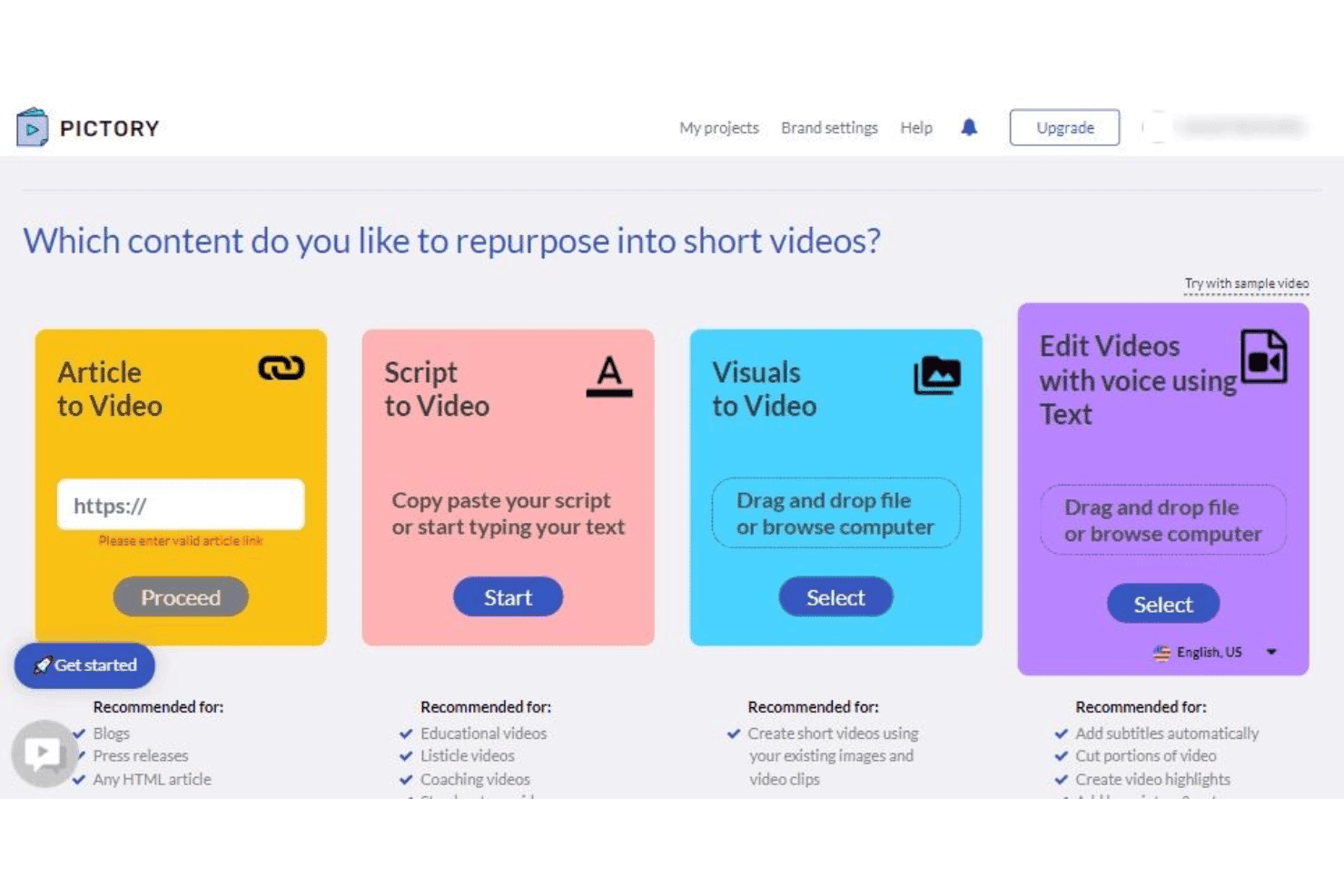
Pictory ofrece cuatro opciones para reutilizar contenido: Artículo a Video, Guion a Video, Visuales a Video y Editar Videos con Voz usando Texto. Pictory es un generador de videos con IA basado en la nube que convierte contenido escrito—artículos, publicaciones de blog y guiones—en videos cortos de marca utilizando selección de escenas por IA, subtítulos automatizados, material de archivo de stock y locuciones generadas por IA.
¿Para Quién Es Mejor Pictory?
Pictory es ideal para profesionales del marketing de contenidos y propietarios de pequeñas empresas que publican contenido escrito regularmente y quieren ampliar su alcance a través del video.
Por Qué Elegí Pictory
Incluí Pictory en mis principales opciones porque su proceso de conversión de artículos a video es realmente uno de los más rápidos que he usado. Pegas una URL de blog o introduces texto largo, y la IA de Pictory lo segmenta en escenas, selecciona metraje de stock coincidente de su biblioteca de 18 millones de clips, y sincroniza automáticamente los subtítulos generados por IA. He convertido una publicación de 1,500 palabras en un video social listo para publicar en menos de 15 minutos.
Características Clave de Pictory
- Almacenamiento de kit de marca: Guarda logotipos, colores y fuentes para utilizarlos en todos los proyectos de video.
- Presentadores avatar con IA: Elige entre una selección de presentadores virtuales para narrar tus videos.
- Locuciones multilingües: Crea pistas de audio generadas por IA en más de dos docenas de idiomas.
- Preajustes de relación de aspecto: Exporta videos en formato vertical, cuadrado u horizontal para cada plataforma social.
Integraciones de Pictory
Pictory ofrece integraciones nativas con Getty Images, Storyblocks, ElevenLabs, Shopify, WooCommerce, WordPress, Make.com, N8N y Zapier. Hay una API disponible para integraciones personalizadas.
¿Qué es Gratis?
Pictory ofrece una prueba gratuita sin necesidad de tarjeta de crédito, que te da acceso a tres proyectos de video de hasta 10 minutos cada uno. Los videos exportados incluyen una marca de agua durante la prueba gratuita.
Pros and Cons
Pros:
- Convierte URLs de blogs en videos
- Subtítulos generados automáticamente y sincronizados
- Cubre temas amplios de marketing y negocios
Cons:
- No hay un plan gratuito permanente
- Los temas de nicho suelen devolver metraje de stock poco apropiado
Learn more about Pictory: Ideal para plantillas animadas de campañas sociales
- Plan gratuito disponible
- Desde $15/mes (facturado anualmente)
Visit WebsiteCustomer Rating:4.5/5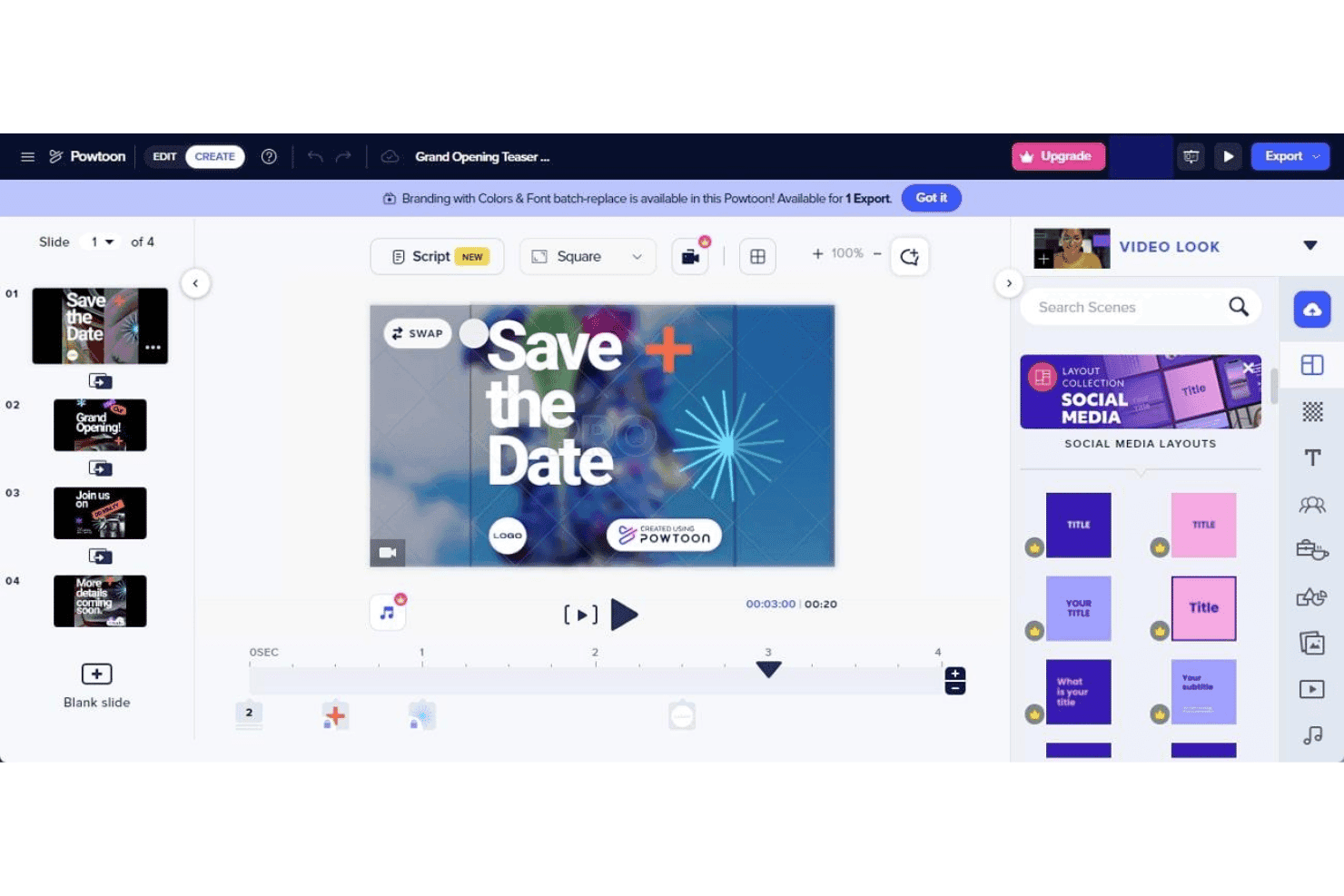
PowToon ofrece un editor de video de arrastrar y soltar con diseños preconstruidos para redes sociales, gestión de diapositivas y controles de línea de tiempo para crear presentaciones animadas. PowToon es una plataforma de creación de videos con IA basada en la nube que permite a los especialistas en marketing producir videos animados, contenido explicativo y campañas en redes sociales usando un editor de arrastrar y soltar, herramientas de texto a video con IA, avatares con IA, locuciones y una biblioteca interna de material multimedia.
¿Para Quién es Mejor PowToon?
PowToon es ideal para pequeños negocios y creadores de contenido individuales que necesitan producir videos animados sin experiencia en diseño o un equipo dedicado de producción de video.
Por Qué Elegí PowToon
He incluido PowToon en mis principales recomendaciones porque su biblioteca de plantillas para campañas sociales animadas es una de las más especializadas que he visto en esta categoría. En lugar de diseños genéricos, las plantillas están organizadas según formatos de anuncios, estructuras explicativas y estilos de publicaciones en redes, con personajes animados personalizables directamente desde el generador de personajes incluido. También utilizo con regularidad la función de IA de documento a video, que convierte un PDF o presentación en un video animado completo con una mínima edición manual.
Características Clave de PowToon
- Sintetizador y doblaje de voz con IA: Genera locuciones naturales y narraciones multilingües para videos sin grabar audio.
- Exportación en varios formatos de aspecto: Exporta videos en formatos vertical, cuadrado y horizontal para usarlos en diversas plataformas sociales.
- Biblioteca de material multimedia: Accede a más de 4 millones de imágenes de stock, pistas musicales, videoclips y efectos de sonido directamente en el editor.
- Controles de kit de marca: Sube logotipos, define fuentes y guarda colores corporativos para asegurar que todos los videos sigan las guías de marca de tu marketing.
Integraciones de PowToon
PowToon ofrece integraciones nativas con HubSpot, Slack, Microsoft Teams, YouTube, Vimeo, Wistia, Facebook, Twitter y Google Workspace. Hay una API disponible para integraciones personalizadas.
¿Qué es Gratis?
PowToon ofrece un plan gratuito para siempre sin requerir tarjeta de crédito, que te da acceso al editor de arrastrar y soltar, plantillas animadas y la biblioteca de material multimedia, con exportaciones de hasta 720p que incluyen una marca de agua de PowToon. Funciones de IA como texto a video y generación de avatares no están incluidas en el plan gratuito, ya que requieren créditos de IA de pago.
Pros and Cons
Pros:
- Gran biblioteca de plantillas para campañas sociales
- Generador de personajes animados
- La función de documento a video con IA convierte presentaciones
Cons:
- Funciones de IA restringidas a créditos de pago
- Exportaciones gratuitas limitadas a resolución 720p
Learn more about PowToon: Ideal para la automatización de guiones a animaciones
- Plan gratuito disponible
- Desde $29/mes
Visit WebsiteCustomer Rating:4.5/5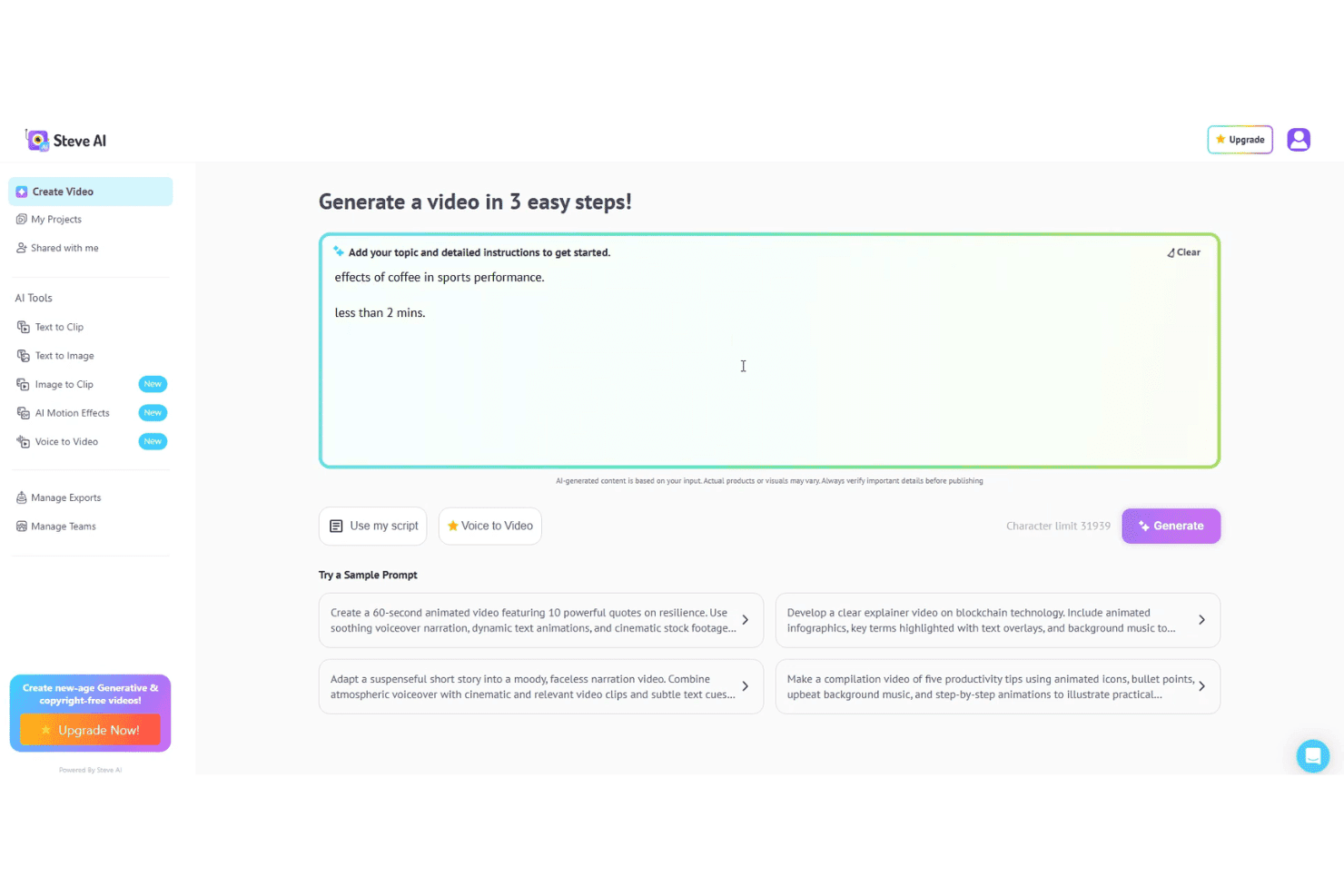
Steve AI permite a los usuarios generar videos animados a partir de guiones, indicaciones o entrada por voz. Steve AI es un generador de videos con inteligencia artificial que convierte indicaciones de texto, guiones, archivos de audio y contenido de blogs en videos animados, de acción en vivo o generativos con voz en off integrada, recursos de archivo y exportación en múltiples formatos.
¿Para Quién Es Steve AI?
Steve AI es ideal para mercadólogos de pequeñas empresas y creadores de contenido independientes que necesitan publicar videos con regularidad sin contar con un equipo dedicado de producción audiovisual.
Por Qué Elegí Steve AI
Steve AI merece su lugar en mi lista corta por cómo maneja la conversión de guiones en animaciones. Pego un guion y el Prompter Avanzado crea un video totalmente animado con escenas seleccionadas por IA, efectos de movimiento y voz en off sincronizada. También utilizo ClipMaker AI para convertir publicaciones de blog en clips animados cortos. Los más de 300 personajes animados y los efectos de movimiento como texto cinético y zoom de cámara están todos disponibles directamente en el editor, sin necesidad de animar manualmente.
Funciones Clave de Steve AI
- Plantillas listas para marketing: Elige entre plantillas de anuncios y promociones prediseñadas para redes sociales y formatos de video populares.
- Exportación en múltiples proporciones: Exporta videos en formato vertical, cuadrado y horizontal para canales como TikTok, Instagram y YouTube.
- Opciones de personalización de marca: Aplica tu logotipo, colores y fuentes de marca directamente en el editor de video para mantener la coherencia de marca.
- Biblioteca premium de recursos y música: Accede a una biblioteca integrada de imágenes creadas con IA, videoclips y música libre de derechos y efectos de sonido.
Integraciones de Steve AI
Steve AI ofrece una integración nativa con YouTube para publicación directa. Las integraciones nativas con otras plataformas no están claramente documentadas.
¿Qué Es Gratis?
Steve AI ofrece un plan gratuito para siempre que incluye 1,200 segundos de video con IA y 200 créditos por mes. Las exportaciones están disponibles en el plan gratuito pero incluyen una marca de agua y tienen un límite de resolución de 720p.
Pros and Cons
Pros:
- Convierte guiones en videos animados
- Múltiples estilos de animación disponibles
- Generosa cuota mensual de videos en el plan gratuito
Cons:
- Las exportaciones gratuitas incluyen una marca de agua visible
- Biblioteca de avatares limitada
Learn more about Steve AI: 4Ideal para generar videos de presentador realista con avatares
D-ID
- Prueba gratuita de 14 días
- Desde $4.70/mes (facturado anualmente)
Visit WebsiteCustomer Rating:4.6/5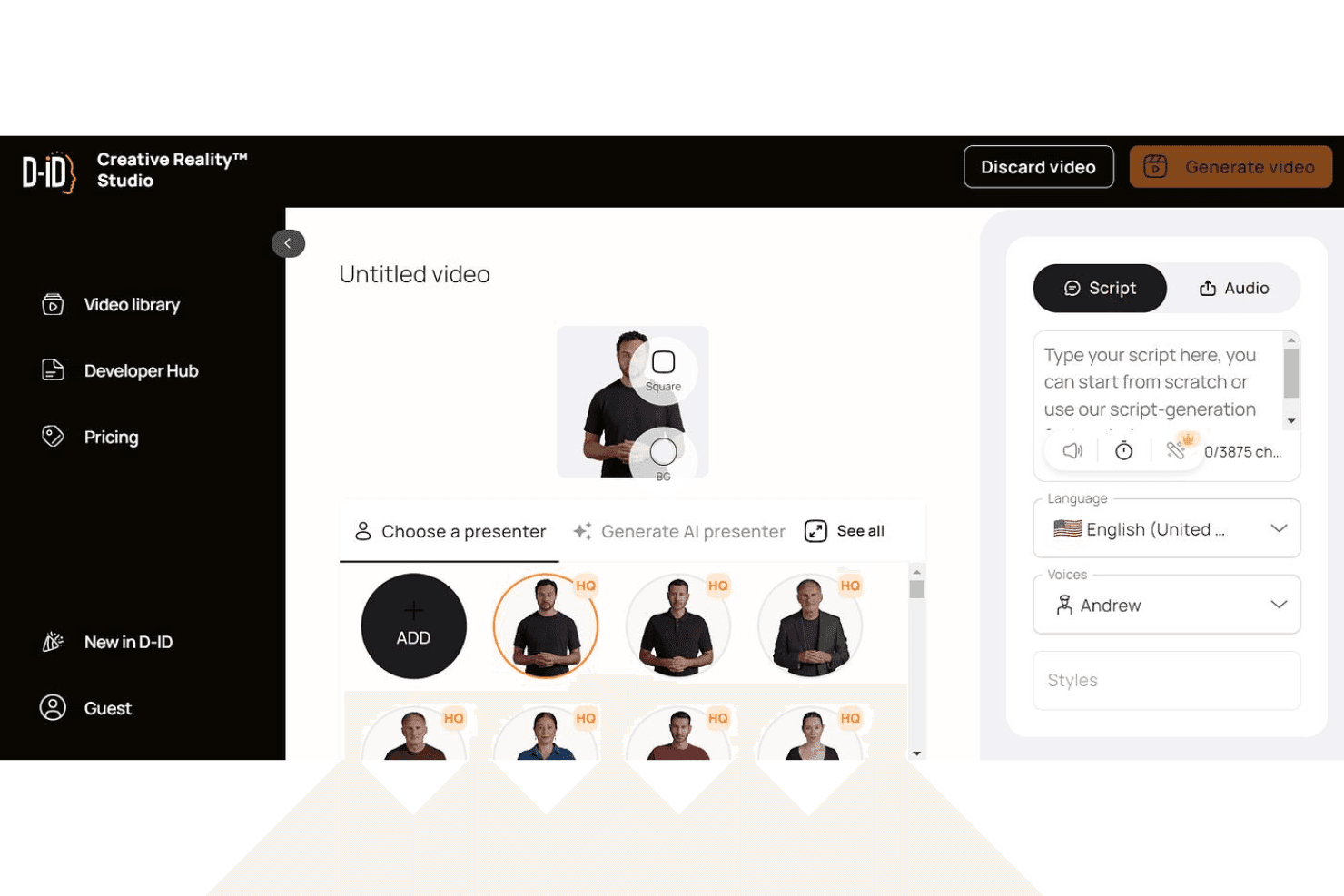
D-ID permite a los usuarios generar videos de presentadores realistas a partir de guiones y voces de IA. D-ID es una plataforma de generación de videos con IA que convierte guiones de texto, imágenes y documentos en videos de presentadores digitales hiperrealistas utilizando avatares con doblaje multilingüe y clonación de voz.
¿Para quién es mejor D-ID?
D-ID es ideal para profesionales del marketing de contenidos y educadores que necesitan producir videos explicativos con avatares a gran escala sin necesidad de talento frente a la cámara.
Por qué elegí D-ID
D-ID merece estar en mi lista corta porque la calidad de la sincronización labial y la animación facial está realmente un paso por encima de lo que he visto en herramientas similares. Lo utilizo para crear videos de avatares a partir de un guion o documento cargado, y el resultado se parece más a un presentador real que a un dibujo animado. La función de clonación de voz me permite replicar una voz específica en varios videos, lo cual es especialmente útil cuando produzco una serie multilingüe sin volver a grabar.
Características clave de D-ID
- Traducción de videos: Genera traducciones y versiones localizadas de videos en más de 120 idiomas.
- Integraciones con Canva y PowerPoint: Usa D-ID directamente dentro de Canva o PowerPoint para una generación de videos con avatares sin complicaciones.
- Personalización de marca: Sustituye la marca de agua de D-ID por tu propio logotipo para exportaciones con branding en planes superiores.
- Acceso a API: Integra la capacidad de generación de videos de D-ID en otras herramientas de marketing o flujos de trabajo personalizados.
Integraciones de D-ID
D-ID ofrece integraciones nativas con Canva y Microsoft PowerPoint. También dispone de una API para integraciones personalizadas.
¿Qué es gratis?
D-ID ofrece una prueba gratuita de 14 días que incluye hasta 3 minutos en total de generación de video con marcas de agua y solo para uso personal, lo que significa que el uso comercial requiere un plan de pago.
Pros and Cons
Pros:
- Sincronización labial realista en los avatares generados
- Más de 100 idiomas disponibles para doblaje
- Agentes de IA interactivos en tiempo real disponibles
Cons:
- Los gestos del avatar son en gran parte estáticos
- Los créditos mensuales expiran y no se acumulan
Learn more about D-ID: Ideal para ediciones rápidas estilo TikTok
- Plan gratuito disponible
- Desde $25.99/mes (facturado anualmente)
Visit WebsiteCustomer Rating:4.5/5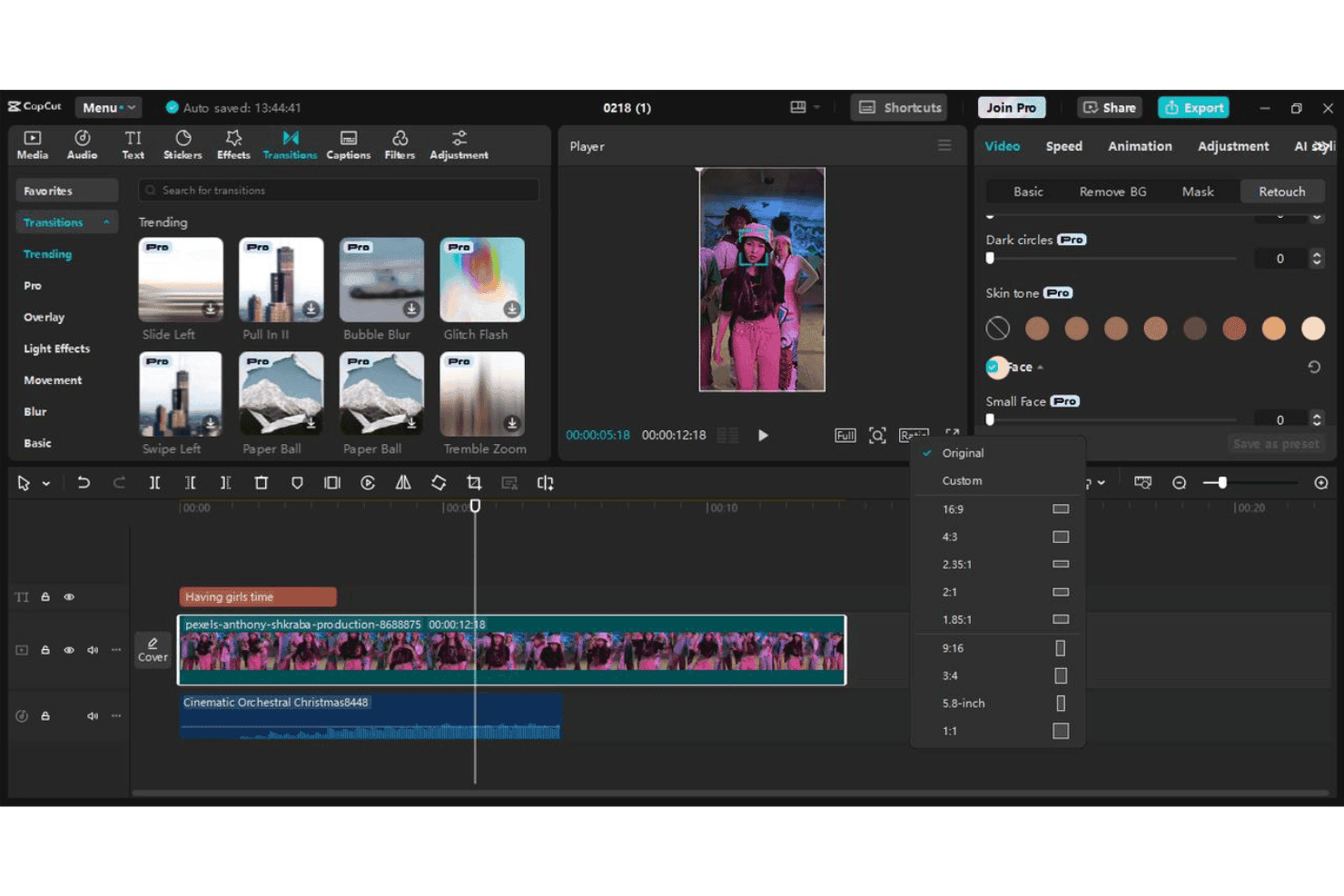
CapCut permite a los usuarios editar videos de formato corto con transiciones, efectos, subtítulos y preajustes de relación de aspecto. CapCut es un editor de video con IA gratuito de ByteDance que convierte indicaciones de texto y guiones en videos de formato corto mediante generación de escenas con IA, avatares digitales, locuciones de voz y plantillas de marketing prediseñadas.
¿Para quién es mejor CapCut?
CapCut es ideal para los especialistas en marketing en redes sociales y propietarios de pequeñas empresas que producen grandes volúmenes de contenido en video de formato corto para TikTok, Reels o Shorts.
Por qué elegí CapCut
CapCut se gana su lugar como uno de los mejores en mi lista porque ninguna otra herramienta gratuita está tan diseñada para la producción de contenido al estilo TikTok. Lo utilizo especialmente por sus subtítulos automáticos, que generan texto destacado palabra por palabra en un estilo en negrita y alto contraste que realmente funciona en los feeds verticales. Los preajustes específicos de la plataforma en formato 9:16 y la función de CapCut for Business de transformar una página de destino directamente en un anuncio de video corto, hacen que sea mi preferida para pruebas rápidas de campaña.
Características clave de CapCut
- Redacción de guiones con IA: Genera guiones de video completos a partir de una sola indicación o palabra clave para una rápida ideación de contenido.
- Presentadores avatar digitales: Elige entre más de 100 avatares IA para narrar o presentar mensajes de marketing en videos.
- Plantillas de marketing prediseñadas: Accede a plantillas diseñadas para anuncios, demostraciones de productos y contenido de marca adaptado a canales sociales.
- Locuciones en varios idiomas: Añade narraciones generadas por IA en decenas de idiomas para campañas localizadas o globales.
Integraciones de CapCut
CapCut ofrece integración nativa con TikTok para publicación directa y admite opciones de inicio de sesión con Google, Facebook y código QR. No se documentan claramente integraciones nativas más allá de TikTok.
¿Qué es gratis?
CapCut ofrece un plan gratuito para siempre en la web, escritorio y móvil sin necesidad de tarjeta de crédito, incluyendo exportaciones a 1080p sin marca de agua en la versión de escritorio. El nivel gratuito incluye acceso a plantillas, texto a video y herramientas de edición, pero las funciones impulsadas por IA como la generación de avatares y creación avanzada de video con IA funcionan con un límite mensual de créditos que se reinicia cada ciclo de facturación.
Pros and Cons
Pros:
- Plantillas optimizadas para formatos de TikTok y Reels
- Plantillas optimizadas para formatos de TikTok y Reels
- Exporta videos verticales en 1080p sin marca de agua
Cons:
- Los créditos de IA se agotan rápidamente en el plan gratuito
- La licencia comercial requiere verificación manual
 Ideal para presentaciones de avatares personalizables
- Plan gratuito disponible
- Desde $59/mes (facturado anualmente)
Visit WebsiteCustomer Rating:4.6/5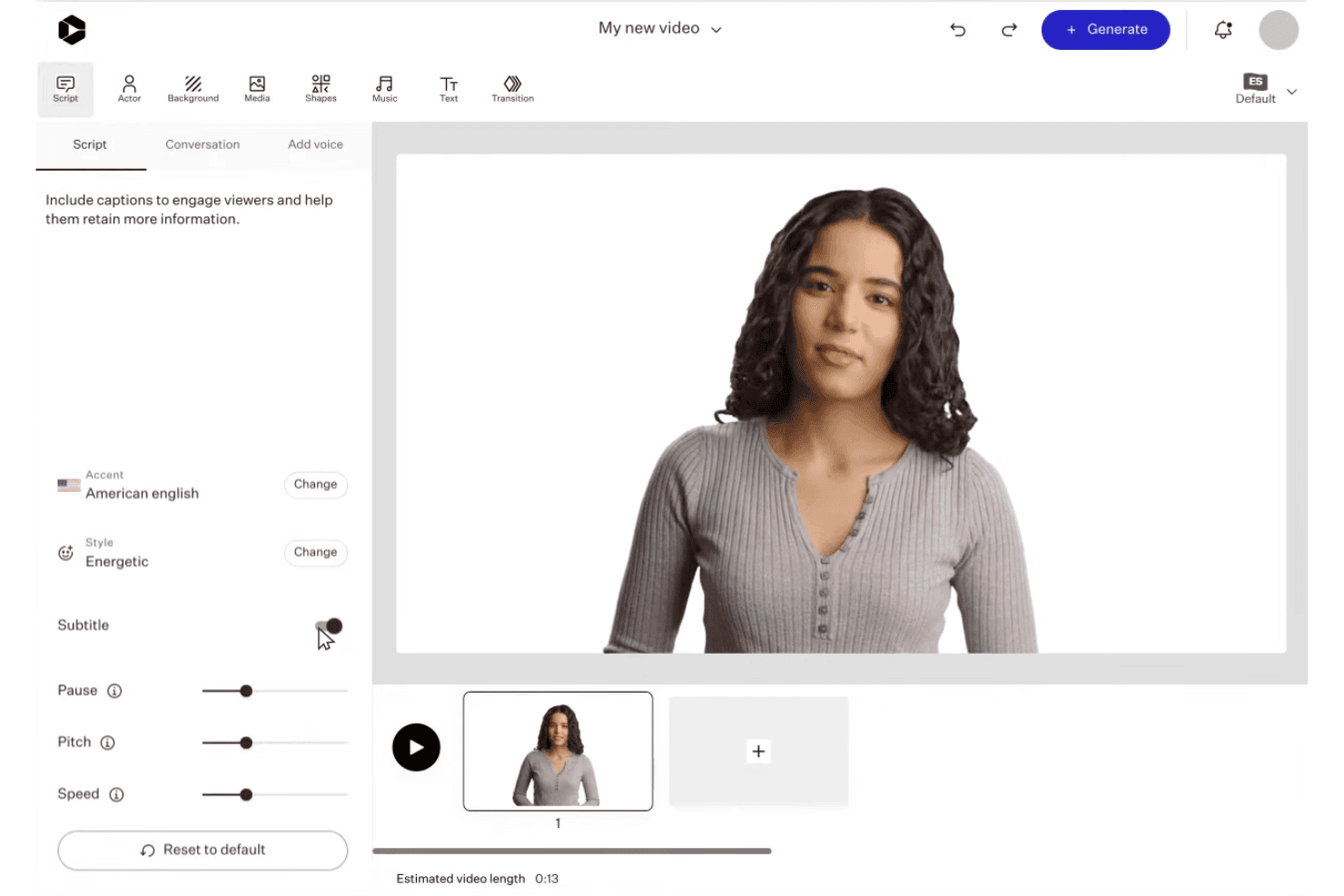
Colossyan permite a los usuarios personalizar presentaciones de avatares IA con guiones, voces y edición de escenas. Colossyan es una plataforma de video con IA que convierte textos, guiones, PDF y URLs en videos con avatares utilizando más de 300 presentadores IA, más de 700 voces y kits de marca integrados en múltiples proporciones de aspecto.
¿Para Quién es Mejor Colossyan?
Colossyan es ideal para responsables de marketing de contenidos y equipos de capacitación que necesitan producir videos pulidos, al estilo presentador, a partir de contenido escrito existente a escala.
Por Qué Elegí Colossyan
Colossyan se gana su lugar en mi lista porque ninguna otra herramienta gratuita de video con IA te da tanto control sobre cómo se ve y se comporta tu presentador en pantalla. Me encanta que puedes ajustar las emociones del avatar, usar ángulos laterales y colocar varios avatares en una sola escena, lo que me permite crear explicaciones estilo pódcast que resultan realmente producidas. La función de avatar personalizado instantáneo significa que puedo disponer de un presentador de marca en pantalla sin reservar una sesión en el estudio.
Características Clave de Colossyan
- Gestión de kit de marca: Guarda y aplica logotipos, colores y fuentes automáticamente en cada proyecto de video.
- Flujo de trabajo de documento a video: Convierte PDF, presentaciones, guiones y URLs directamente en borradores de video.
- Exportación en múltiples proporciones: Crea videos en formato vertical, cuadrado u horizontal para distintos canales sociales.
- Biblioteca de medios de stock: Accede a metraje, imágenes y música de stock integrados para mejorar tu contenido de video.
Integraciones de Colossyan
Colossyan ofrece exportaciones SCORM para sistemas de gestión de aprendizaje como Workday, Cornerstone, Docebo, Litmos y Absorb, y proporciona acceso por API para integraciones personalizadas.
¿Qué es Gratis?
El plan Starter gratuito para siempre de Colossyan incluye 20 minutos de generación de video con IA por mes sin requerir tarjeta de crédito, pero todos los videos exportados incluyen una marca de agua. Las descargas ilimitadas en MP4 quedan reservadas para el plan Professional de pago, por lo que los usuarios gratuitos están limitados a enlaces para compartir y exportaciones de cursos.
Pros and Cons
Pros:
- Más de 300 opciones de avatares con control de emociones y ángulos
- Hasta cuatro avatares en una sola escena
- Traducción automática disponible en más de 70 idiomas
Cons:
- Menos plantillas que HeyGen y Synthesia
- Los tiempos de renderizado de video son más lentos que el promedio
Learn more about Colossyan: 7Ideal para exportaciones de video personalizadas de marca
VEED
- Plan gratuito disponible
- Desde $12/usuario/mes
Visit WebsiteCustomer Rating:4.5/5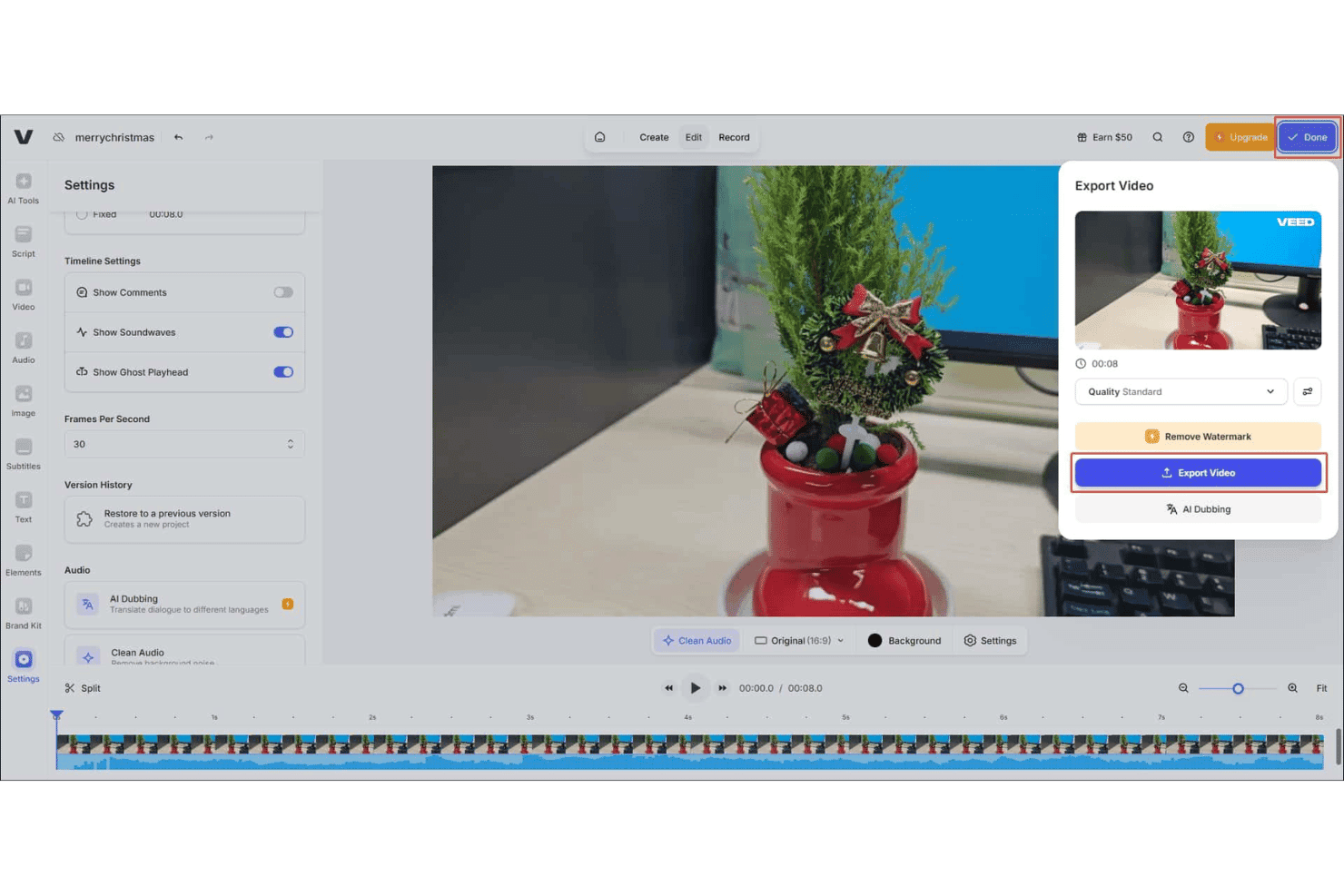
VEED ofrece un panel de exportación de video con configuraciones de calidad, opciones para eliminar la marca de agua y Doblaje IA directamente desde el editor. VEED es un generador de videos con IA basado en navegador que te permite crear contenido de texto a video, animar imágenes de productos, añadir avatares con IA, generar locuciones en más de 125 idiomas y aplicar subtítulos automáticos en múltiples formatos de aspecto.
¿Para quién es mejor VEED?
VEED es ideal para responsables de marketing en redes sociales y equipos de contenido que necesitan producir videos de marca, de corta duración y a gran volumen sin un equipo de producción dedicado.
Por qué elegí VEED
Elegí VEED como uno de los mejores porque su Kit de Marca te permite fijar tus logos, fuentes y colores una sola vez y usarlos en todos los videos que generes. Esto es importante si manejas múltiples campañas y necesitas que todas las exportaciones mantengan la coherencia, sin tener que configurar tu marca cada vez. También me gusta que puedes crear avatares personalizados con IA vinculados a la identidad de tu marca, así los videos explicativos de productos y anuncios no dependen de un presentador genérico de IA que no tiene relación con tu empresa.
Características clave de VEED
- Generación de video con IA multimodelo: Elige entre varios modelos de IA líderes como Sora 2, Kling y Seedance para adaptar el estilo y ritmo del video a tus necesidades.
- Animación de imagen a video: Sube imágenes de productos y genera contenido animado directamente desde imágenes estáticas.
- Locución con IA en más de 125 idiomas: Genera pistas de audio con sonido natural para tus videos en un amplio rango de idiomas para alcance global.
- Magic B-roll: Añade al instante material de archivo relevante a los videos generados con IA para obtener imágenes más atractivas.
Integraciones de VEED
Las integraciones nativas no están claramente documentadas. VEED ofrece varias API, incluidas Fabric 1.0 API, Lip Sync API, Subtitle API, Background Removal API y Green Screen API, para integraciones personalizadas.
¿Qué es gratis?
VEED ofrece un plan gratuito para siempre, sin necesidad de tarjeta de crédito, que te da una cuota limitada de créditos de video con IA para generar y exportar videos. Las exportaciones del plan gratuito incluyen marca de agua y están limitadas a resolución 720p; una vez que uses tu cuota de créditos, deberás actualizar a un plan de pago para continuar generando videos con IA.
Pros and Cons
Pros:
- El Kit de Marca se aplica en todos los videos generados
- Elige entre varios modelos generativos de video con IA
- La biblioteca de avatares con IA permite crear avatares personalizados
Cons:
- Las exportaciones gratuitas tienen marca de agua y límite de 720p
- Renderizado lento en proyectos de video largos o complejos
Learn more about VEED: 8Mejor opción para creación de videos a partir de texto a gran escala
Elai
- Plan gratuito disponible
- Desde $29/mes
Visit WebsiteCustomer Rating:4.6/5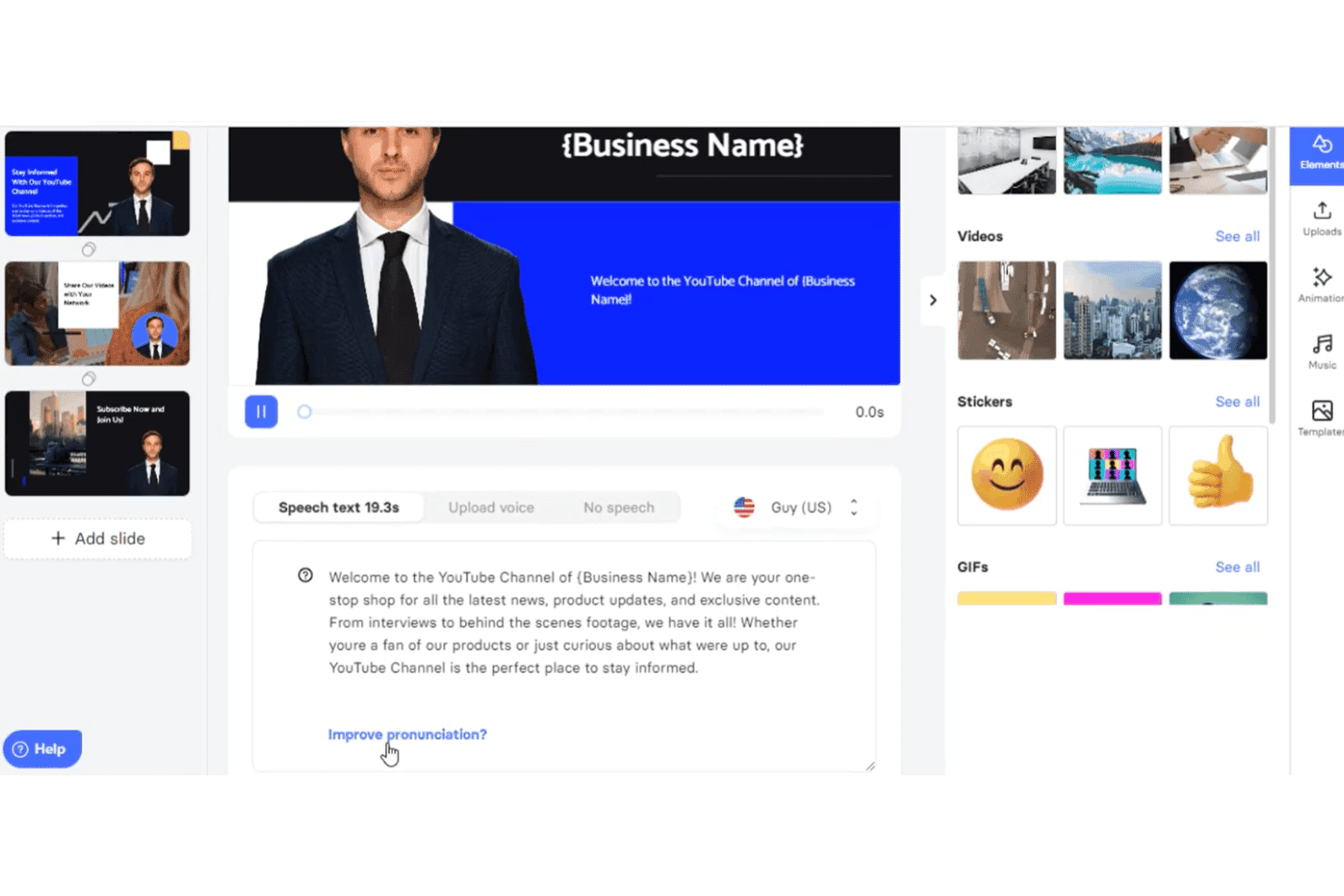
Elai.io permite a los usuarios crear videos con IA a partir de texto, con avatares, opciones de voz y edición de diapositivas. Elai es un generador de videos con IA que convierte textos, URL, guiones y archivos PowerPoint en videos narrados utilizando una biblioteca de avatares de IA y locuciones multilingües en más de 75 idiomas.
¿Para quién es mejor Elai?
Elai es ideal para equipos de marketing de contenidos que suelen reutilizar recursos escritos—como publicaciones de blog y presentaciones—transformándolos en videos a gran escala.
Por qué elegí Elai
Incluí a Elai entre mis mejores opciones porque maneja la conversión de texto a video en volumen mejor que la mayoría de las herramientas que he probado. Puedo pegar una URL de blog directamente en la plataforma y obtener un video narrado con avatar de IA sin escribir una sola línea de guion. La función Storyboard IA lleva esto aún más lejos, permitiéndome convertir un esquema de contenido preliminar en un video estructurado de varias diapositivas en un solo flujo de trabajo.
Características clave de Elai
- Almacenamiento de kit de marca: Guarda tu logotipo, fuentes y colores de marca para mantener la coherencia en los videos.
- Clonación de voz multilingüe: Genera narraciones con IA en 28 idiomas clonadas a partir de tu propia voz.
- Exportación SCORM: Descarga videos terminados como archivos SCORM para facilitar la integración con LMS.
- Cuestionarios interactivos y ramificación: Agrega cuestionarios interactivos y elementos de ramificación para crear experiencias de video interactivas.
Integraciones de Elai
Elai.io ofrece integraciones nativas con Thinkific, uQualio, Tolstoy, Moodle, Medium, Pexels, GIPHY, LottieFiles y Articulate 360. También se conecta con Zapier y proporciona una API para integraciones personalizadas.
¿Qué es gratis?
El plan gratuito de Elai te otorga 1 minuto de crédito total para renderizar videos, lo que cubre un solo video corto y se consume con cada renderizado y volver a renderizar. Los usuarios han señalado que la descarga en la versión gratuita es poco confiable, así que considérelo más como una vista previa de la plataforma que como una solución de producción funcional.
Pros and Cons
Pros:
- Convierte automáticamente URLs de blogs en videos
- Soporta más de 75 idiomas para la generación de locuciones
- Creación de avatares de IA personalizados disponible en planes de pago
Cons:
- Volver a renderizar consume tu asignación de minutos
- La variedad de avatares es limitada en los planes de menor precio
Learn more about Elai: Mejor para avatares IA en videos explicativos
- Plan gratuito disponible
- Desde $19/mes
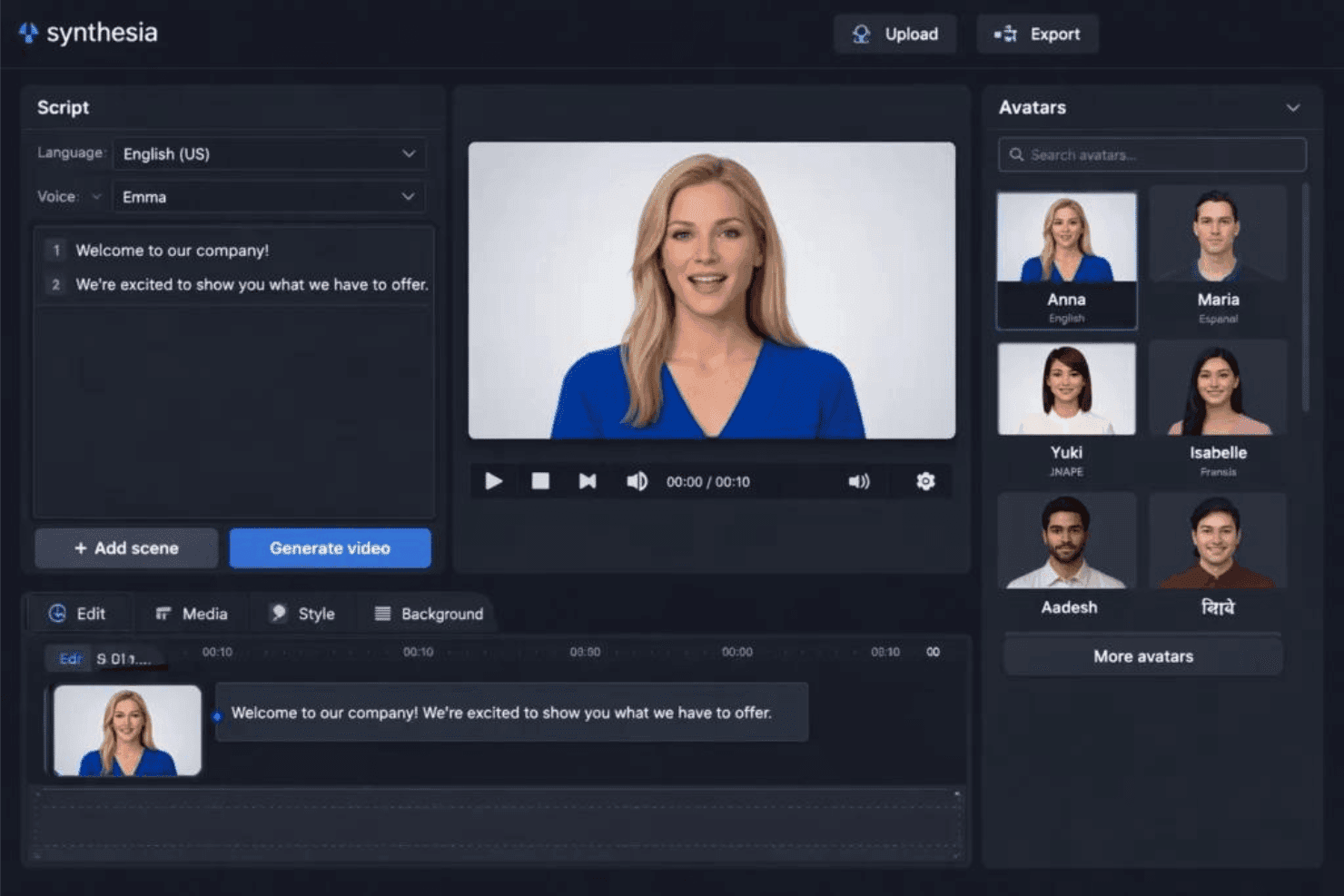
Synthesia ofrece un editor de videos con IA que permite personalizar avatares, ingresar guiones y generar videos con un solo clic. Synthesia es una plataforma de videos con IA que convierte guiones de texto, documentos y prompts en videos terminados utilizando avatares de IA, locuciones multilingües y plantillas de marca personalizables.
¿Para quién es mejor Synthesia?
Synthesia es ideal para gerentes de marketing de contenidos y equipos de formación y desarrollo (L&D) que necesitan producir videos explicativos de alta calidad, liderados por avatares, sin requerir un equipo de producción.
Por qué elegí Synthesia
Synthesia merece un lugar en mi lista porque su biblioteca de avatares es realmente difícil de superar. Con más de 240 avatares prediseñados y la posibilidad de crear un avatar personal (una representación digital tuya o de un presentador de marca), puedo producir videos explicativos de aspecto profesional sin reservar un estudio. También confío en la función de Traducción en 1 Clic, que vuelve a grabar la voz de un video terminado en más de 70 idiomas manteniendo la sincronización labial, así que un solo recurso se convierte en una campaña multilingüe completa.
Características clave de Synthesia
- Asistente de video con IA: Genera videos a partir de guiones, documentos, PDFs o URLs con un flujo de trabajo basado en indicaciones de IA.
- Personalización del kit de marca: Guarda y aplica logotipos, colores y tipografías para mantener los videos alineados con la marca.
- Acceso a biblioteca multimedia: Utiliza videos de stock, música e imágenes de Getty Images, Pexels, Soundstripe e Icons8.
- Exportación en varios formatos: Exporta videos en formato vertical, cuadrado y horizontal para diferentes canales sociales.
Integraciones de Synthesia
Synthesia ofrece integraciones nativas con PowerPoint y sistemas de gestión del aprendizaje mediante exportación SCORM, y proporciona una API para integraciones personalizadas. También cuenta con una extensión de Chrome para grabación de pantalla.
¿Qué es gratis?
Synthesia ofrece un plan gratuito para siempre que incluye 10 minutos de video al mes, acceso a 9 avatares de IA y exportaciones en MP4. Los videos del plan gratuito tienen una marca de agua de Synthesia, y el acceso a la biblioteca completa de avatares y al kit de marca requiere un plan de pago.
Pros and Cons
Pros:
- Más de 240 avatares de stock y opción de avatar personalizado
- Traducción de video en 1 clic a más de 70 idiomas
- El plan gratuito incluye descargas de videos en MP4
Cons:
- El plan gratuito añade marca de agua a todos los videos
- Limitado a 9 avatares en el nivel gratuito
Learn more about Synthesia:
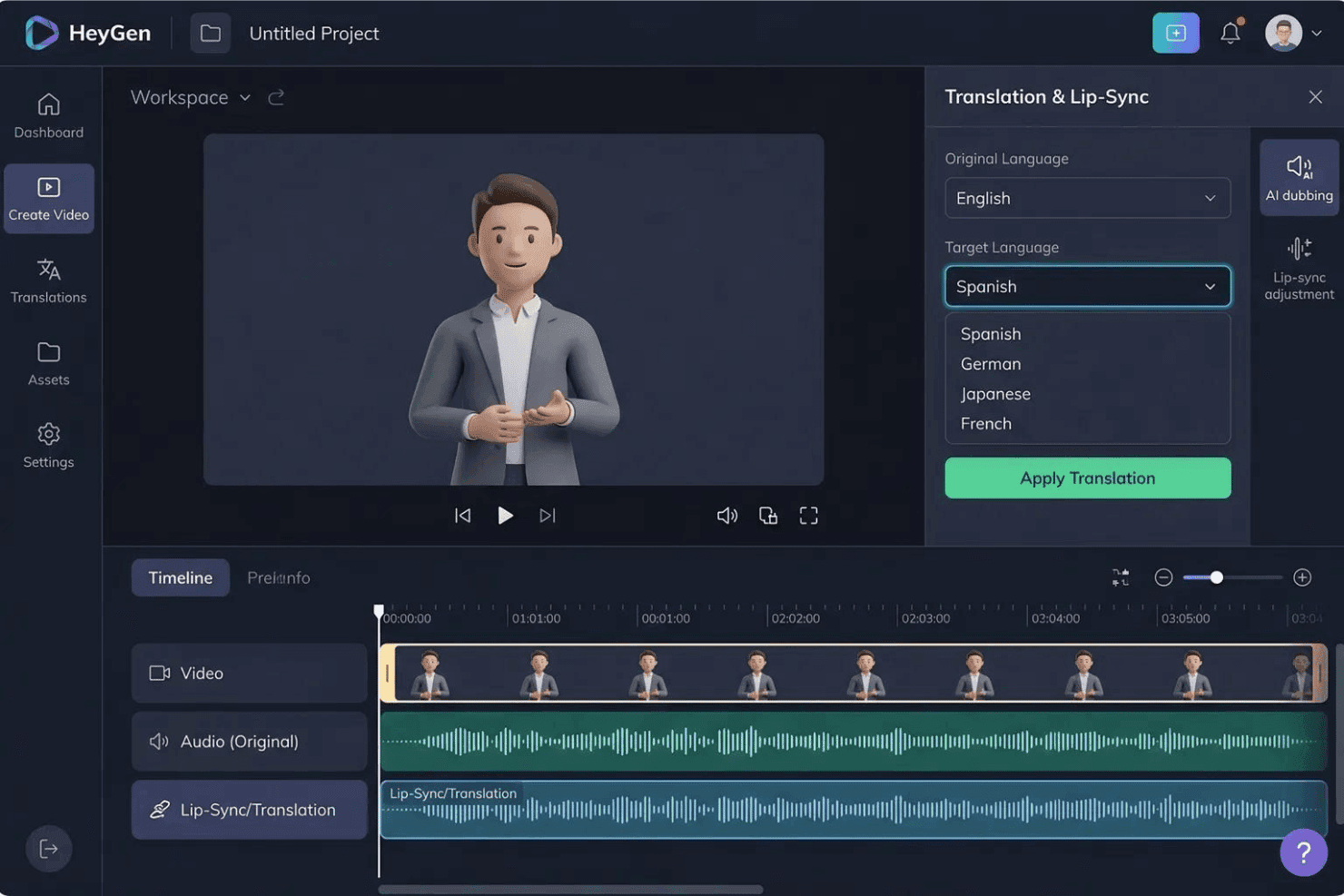
HeyGen ofrece un panel de Traducción y Sincronización Labial que permite a los usuarios traducir videos de avatares de IA a varios idiomas, incluidos español, alemán, japonés y francés. HeyGen es un generador de videos con IA centrado en avatares realistas, clonación de voz y traducción en un solo clic a más de 175 idiomas, con funciones de texto a video, localización con sincronización labial y creación de gemelos digitales personalizados.
¿Para quién es mejor HeyGen?
HeyGen es ideal para equipos de marketing de marcas y agencias globales que producen contenido de video en varios idiomas y mercados regionales de forma regular.
Por qué elegí HeyGen
Incluyo HeyGen en mi lista destacada por la manera en que maneja la localización de videos a escala. Puedo tomar un solo video grabado y generar versiones sincronizadas labialmente en más de 175 idiomas, con el tono de voz y el movimiento de la boca del avatar ajustados a cada guion traducido. La función de gemelo digital personalizado significa que no tengo que volver a grabar ni buscar nuevos actores para cada mercado. HeyGen realiza automáticamente el proceso de localización, preservando las características vocales originales del hablante en todas las versiones idiomáticas.
Características clave de HeyGen
- Editor AI Studio: Crea, edita y previsualiza escenas de video usando una línea de tiempo con control por texto y retroalimentación en tiempo real gracias a su función de arrastrar y soltar.
- Biblioteca de plantillas de marketing: Acceso a plantillas de video listas para anuncios sociales, promociones, explicativos y formatos de marketing comunes.
- Exportación en múltiples relaciones de aspecto: Exporta videos en formatos 9:16, 1:1 o 16:9 para TikTok, Instagram y YouTube sin recortes manuales.
- Biblioteca integrada de recursos audiovisuales: Utiliza una biblioteca integrada de videos, imágenes y pistas de audio de stock directamente en el flujo de edición.
Integraciones de HeyGen
HeyGen ofrece integraciones nativas con HubSpot, Salesforce, Adobe Express, Canva, FlowShare, Zoom y Tolstoy, se conecta con Zapier y proporciona una API para integraciones personalizadas.
¿Qué es gratuito?
El plan gratuito para siempre de HeyGen incluye 3 videos al mes (de hasta 1 minuto cada uno) con exportación en 1080p, acceso a más de 500 avatares de stock y 1 gemelo digital personalizado. Los videos se exportan con marca de agua y el acceso a funciones premium como Avatar V y Video Agent está limitado a un periodo de prueba corto.
Pros and Cons
Pros:
- Traducción sincronizada labialmente
- Más de 175 idiomas Video multilingüe instantáneo a partir de una sola grabación
- Creación realista de gemelos digitales personalizados disponible
Cons:
- Las exportaciones del plan gratuito están limitadas a 720p
- Las afirmaciones del plan 'Ilimitado' pueden ser engañosas sobre los límites reales
Learn more about HeyGen:
Otros generadores de vídeo de IA gratuitos para profesionales del marketing
Estas son algunas opciones adicionales de generadores de vídeo de IA gratuitos para profesionales del marketing que no llegaron a mi lista de preseleccionados, pero que merece la pena consultar:
- 11Lumen5Ideal para convertir entradas de blog en video al instante
- 12FlikiEl mejor para locuciones realistas en anuncios de video
- 13Vidnoz AIIdeal para vídeos promocionales dirigidos por locución
- 14CreatifyIdeal para la generación automatizada de guiones publicitarios
- 15RunwayMejor para efectos de vídeo potenciados por IA
- 16Hailuo AILa mejor para la personalización de avatares parlantes
- 17KapwingMejor para flujos de trabajo de edición colaborativa
- 18EaseMate AIIdeal para exportaciones de vídeo en múltiples formatos
- 19RecCloudMejor para publicación directa en plataformas sociales
- 20DreamluxIdeal para crear guiones gráficos a partir de textos publicitarios
Cómo evalúo generadores de video con IA gratuitos para marketers
Primero, defino qué cuenta como gratuito. Para los generadores de video con IA, esto significa un plan gratuito para siempre o una prueba gratuita de todas las funciones por al menos 7 días que te permita exportar videos terminados—las marcas de agua están permitidas. A partir de ahí, divido mi evaluación en la funcionalidad básica que toda herramienta debe cumplir y los diferenciadores que hacen destacar a las mejores opciones.
Funcionalidad básica (Requisitos mínimos para esta lista)
Además de mis requisitos de oferta gratuita, también utilizo un sistema de puntuación para seleccionar las herramientas para mi lista. Así es como funciona:
Califico cada una en una escala de 0 (no ofrece la funcionalidad) a 5 (sobresale en esta área) para cada funcionalidad básica que aparece a continuación. Luego, calculo la puntuación total de la herramienta en porcentaje. Cada herramienta necesita lograr una puntuación total mínima del 65% para ser considerada para inclusión.
- Generación de video a partir de texto: Verifico si la herramienta puede tomar un guion o extracto de blog y producir un video coherente de varias escenas—no solo una presentación de imágenes estáticas.
- Avatares o locuciones con IA: Tener un presentador digital o una narración de sonido natural es importante para videos explicativos y demostraciones de productos, así que busco variedad en voces y opciones de avatar.
- Plantillas listas para marketing: Evalúo la biblioteca de plantillas en busca de formatos que los marketers realmente usan, como anuncios sociales cortos, promociones de productos y videos tipo historia para Instagram o TikTok.
- Exportación en varias relaciones de aspecto: Cada herramienta debería soportar exportación en 9:16, 1:1 y 16:9 para que puedas reutilizar un solo video en YouTube, Reels y publicaciones de feed sin volver a editar.
- Personalización de marca: Busco la capacidad de agregar tu logotipo, colores y fuentes de marca para mantener los videos generados alineados con tu identidad en todas las campañas.
- Biblioteca de medios y recursos de stock: Una biblioteca integrada de videos, imágenes y clips de música de stock ayuda a cubrir vacíos cuando no tienes recursos originales listos.
Una vez que tengo una lista de herramientas que cumplen con los criterios, considero qué diferencia a cada plataforma.
Factores diferenciadores (Qué distingue a los proveedores)
Así es como comparo y contrasto diferentes proveedores:
Características destacadas
Presto especial atención al almacenamiento del paquete de marca—las herramientas que te permiten guardar tu logotipo, colores y fuentes evitan que tengas que reconstruir elementos de marca en cada nuevo video. Los presentadores avatar con IA son otro diferenciador, especialmente para videos explicativos de productos o contenido de onboarding donde una persona que habla aporta credibilidad sin contratar una grabación. Las locuciones en varios idiomas completan la experiencia para equipos que llevan campañas en distintas regiones, permitiendo localizar un solo video a varios idiomas a partir de un único proyecto.
Más allá de las características
Los límites del plan gratuito son un factor importante aquí—reviso cuántos minutos de video puedes generar cada mes y si las exportaciones llevan marca de agua o tienen límite de resolución, ya que eso determina si el contenido se puede usar en campañas pagadas. Los derechos de contenido son otro factor que reviso, en particular si los términos de la plataforma permiten el uso comercial de los videos y avatares generados con IA. También considero las integraciones con el stack de marketing, como publicación directa en redes sociales o conexiones con herramientas como HubSpot y Google Drive.
Cómo elegir un generador de vídeo de IA gratuito para profesionales del marketing
Es fácil perderse entre largas listas de funciones y complejas estructuras de precios. Para ayudarte a mantener la atención mientras avanzas en tu proceso particular de selección de software, aquí tienes una lista de factores que debes tener en cuenta:
| Factor | Qué tener en cuenta |
|---|---|
| FactorEscalabilidad | Qué tener en cuenta¿La herramienta te permitirá aumentar la producción de vídeos a medida que crezcan tus campañas o el nivel gratuito limita demasiado la producción para el uso de equipos o varias marcas? |
| FactorIntegraciones | Qué tener en cuenta¿La plataforma se conecta con las herramientas de marketing que ya utilizas, como Canva o HubSpot, para la gestión de recursos y los flujos de trabajo de las campañas? |
| FactorPersonalización | Qué tener en cuenta¿Puedes aplicar los elementos de tu marca y adaptar los vídeos para diferentes campañas o existen límites sobre lo que puedes editar en el nivel gratuito? |
| FactorFacilidad de uso | Qué tener en cuenta¿La interfaz resulta intuitiva para que tu equipo pueda empezar a utilizarla sin una formación prolongada o necesitas conocimientos especializados para crear resultados pulidos? |
| FactorIncorporación para la implementación | Qué tener en cuenta¿Con qué rapidez puede empezar tu equipo? ¿Hay tutoriales, proyectos de ejemplo y recursos de incorporación disponibles para acortar el tiempo de adaptación? |
| FactorCoste | Qué tener en cuenta¿Los límites del nivel gratuito son sostenibles para tus necesidades o necesitarás actualizar rápidamente el plan para obtener más créditos o una mayor resolución? |
| FactorMedidas de seguridad | Qué tener en cuenta¿Qué datos de los usuarios, recursos e información de las campañas almacena la plataforma y existen controles de privacidad y acceso en un entorno compartido? |
| FactorNecesidades de recursos internos | Qué tener en cuenta¿Necesitarás apoyo continuo de diseño, TI o del equipo creativo para obtener valor de la herramienta o los profesionales de marketing pueden utilizar la plataforma de forma independiente después de la configuración? |
¿Qué son los generadores de vídeos con IA gratuitos para profesionales del marketing?
Los generadores de vídeos con IA gratuitos para profesionales del marketing son herramientas de software que permiten crear vídeos de marketing mediante IA, sin costes iniciales. Ofrecen funciones como convertir indicaciones de texto o guiones en vídeos, generar avatares y voces en off con IA y aplicar elementos de marca. Estas plataformas suelen incluir un plan gratuito o una prueba limitada, lo que permite a los profesionales del marketing experimentar con contenido de vídeo para campañas, anuncios o canales sociales antes de asumir un compromiso económico.
Funciones de los generadores de vídeos con IA gratuitos para profesionales del marketing
Repasemos las funciones que suelen encontrarse en los generadores de vídeos con IA para profesionales del marketing y cuáles suelen estar incluidas en los planes gratuitos frente a los de pago.
Funciones habituales de los generadores de vídeos con IA gratuitos para profesionales del marketing
- Conversión de texto a vídeo: Convierte guiones escritos, entradas de blog o resúmenes en vídeos completos con escenas generadas automáticamente, lo que ayuda a crear contenido rápidamente a partir del material que ya tienes redactado.
- Plantillas básicas de marketing: Accede a plantillas iniciales diseñadas para publicaciones en redes sociales, destacados de productos o vídeos explicativos, agilizando el proceso de creación de vídeos para los casos de uso habituales del marketing.
- Personalización de marca sencilla: Añade tu logotipo y colores básicos a los vídeos exportados, lo que permite mantener cierta coherencia de marca sin una personalización avanzada.
- Voces en off generadas por IA: Utiliza narración de voz automática para tus vídeos, normalmente con una pequeña selección de voces naturales en idiomas populares.
- Presentadores avatar básicos: Añade presentadores digitales o personas que hablan a cámara a tu contenido utilizando una biblioteca estándar y no personalizable de avatares generados por IA.
- Biblioteca limitada de recursos multimedia: Accede a una pequeña colección de fotografías, clips de vídeo y música de archivo para enriquecer tu contenido sin necesidad de recursos originales.
- Exportación en varios formatos: Exporta vídeos para formatos sociales verticales, cuadrados u horizontales, lo que facilita su publicación en diferentes canales a partir de un único proyecto.
- Descargas con marca de agua: Descarga vídeos terminados con una marca de agua discreta para poder previsualizar los recursos o utilizarlos para su aprobación interna.
Funciones habituales de los generadores de vídeos con IA de pago para profesionales del marketing
- Gestión avanzada del kit de marca: Guarda varios logotipos, fuentes y paletas de colores para aplicarlos automáticamente en más proyectos y garantizar una sólida coherencia de marca.
- Generación masiva de vídeos: Genera varios vídeos a la vez a partir de distintos guiones o fuentes de datos, facilitando la ampliación de campañas en diferentes formatos y plataformas.
- Exportaciones de alta resolución: Descarga vídeos en alta definición o calidad 4K, elimina las marcas de agua y obtén resultados finales pulidos y profesionales.
- Creación de avatares personalizados: Crea avatares de IA personalizados o presentadores virtuales que se adapten a portavoces, personajes o personalidades de marca específicos para tus vídeos.
- Amplias opciones de voz en off: Elige entre docenas de idiomas y acentos, y accede a voces de narración de IA más realistas o expresivas.
- Biblioteca de contenido multimedia prémium: Utiliza una amplia colección integrada de vídeos, imágenes y música de archivo con licencia para disfrutar de opciones creativas más enriquecedoras.
- Publicación directa en redes sociales: Publica vídeos al instante desde la plataforma en canales como TikTok, Instagram, Facebook y YouTube sin descargarlos primero.
- Herramientas de colaboración: Invita a los miembros del equipo a revisar, editar o aprobar proyectos conjuntamente dentro de la plataforma, mejorando el flujo de trabajo de los equipos de marketing distribuidos.
- Edición de vídeo con IA: Perfecciona los vídeos con sugerencias de edición basadas en IA, eliminación de fondos o reestructuración de escenas, además de la organización manual de clips.
- Análisis mejorados: Accede directamente desde la herramienta a información sobre la interacción con los vídeos, las tasas de finalización o el rendimiento en redes sociales para orientar futuras decisiones creativas.
Beneficios del Generador de vídeo con IA para profesionales del marketing
Implementar un generador de vídeo con IA gratuito para profesionales del marketing ofrece varias ventajas para tu equipo y tu empresa. Estas son algunas de las que puedes esperar:
- Creación más rápida de recursos creativos: Convierte al instante guiones o informes en recursos de vídeo pulidos mediante texto a vídeo con IA y plantillas, reduciendo tu dependencia de la producción de vídeo externa.
- Menores costes de producción: Elimina la necesidad de videógrafos, editores y actores; funciones como los avatares de IA, las voces en off y las bibliotecas multimedia te permiten crear vídeos completamente dentro de la plataforma.
- Presencia de marca coherente: La personalización sencilla de la marca y los kits de marca básicos ayudan a mantener los logotipos y colores en primer plano, incluso en contenido publicitario para redes sociales de creación rápida.
- Alcance multicanal: Utiliza herramientas de exportación con varias proporciones para adaptar un solo vídeo a TikTok, Instagram, YouTube y otras plataformas sin volver a editarlo para cada una.
- Fácil reutilización de contenido: Convierte publicaciones de blog, textos de productos o guiones de seminarios web en contenido de vídeo nuevo para maximizar el impacto de tus materiales de marketing existentes.
- Experimentación escalable: Prueba varias versiones creativas antes de invertir en un plan de pago, ya que los niveles gratuitos permiten realizar pruebas ágiles e iteraciones rápidas.
- Creación de vídeos accesible: Los editores fáciles de usar, las plantillas iniciales y los recursos de incorporación permiten que casi cualquier persona del equipo cree vídeos, incluso sin experiencia previa.
Costes y precios de un generador de vídeo con IA para profesionales del marketing
Entiendo que has llegado a este artículo buscando las mejores opciones gratuitas de generadores de vídeo con IA para profesionales del marketing. Sin embargo, como los planes gratuitos solo ofrecen funciones limitadas, es muy posible que en el futuro necesites ampliar tu plan y explorar una gama más amplia de generadores de vídeo con IA.
La tabla siguiente resume los planes habituales, sus precios medios y las funciones que suelen incluir los generadores de vídeo con IA para profesionales del marketing:
Tabla comparativa de planes de un generador de vídeo con IA para profesionales del marketing
| Tipo de plan | Precio medio | Funciones habituales |
|---|---|---|
| Tipo de planPlan gratuito | Precio medio$0 | Funciones habitualesTexto a vídeo básico, exportaciones con marca de agua, plantillas limitadas, una pequeña biblioteca multimedia y opciones básicas de voz en off. |
| Tipo de planPlan personal | Precio medio$10–$25/usuario/mes | Funciones habitualesMás plantillas, exportación en HD, contenido multimedia de archivo ampliado, avatares adicionales, más opciones de voz y personalización básica de la marca. |
| Tipo de planPlan empresarial | Precio medio$30–$60/usuario/mes | Funciones habitualesKits de marca personalizados, asistencia prémium, descargas en alta resolución, exportaciones masivas, herramientas de colaboración y edición de vídeo avanzada. |
| Tipo de planPlan para empresas | Precio medio$75+/usuario/mes | Funciones habitualesInicio de sesión único y seguridad avanzada, uso ilimitado, acceso a la API, incorporación personalizada, asistencia prioritaria y análisis detallados. |
Preguntas frecuentes sobre el generador de vídeos con IA gratuito para profesionales del marketing
Estas son algunas respuestas a preguntas habituales sobre los generadores de vídeos con IA gratuitos para profesionales del marketing:
¿Puedo utilizar con fines comerciales los vídeos creados con generadores de vídeos con IA gratuitos?
Sí, muchos generadores de vídeos con IA gratuitos permiten el uso comercial, pero siempre debes revisar las condiciones de licencia para comprobar si existen marcas de agua, derechos de uso y restricciones de contenido antes de publicar tus vídeos.
¿Mis vídeos tendrán marcas de agua si utilizo un plan gratuito?
Sí, la mayoría de los planes gratuitos añaden una marca de agua a los vídeos exportados. Si necesitas contenido sin marca para campañas públicas, normalmente tendrás que cambiar a un plan de pago.
¿Los generadores de vídeos con IA gratuitos admiten varios idiomas?
Sí, la mayoría de los generadores de vídeos con IA gratuitos ofrecen funciones básicas de voz en off en varios idiomas, pero la variedad de voces e idiomas disponibles suele ser más limitada que la de los planes de pago.
¿Cuánto contenido de vídeo puedo producir con un plan gratuito?
Los planes gratuitos suelen limitar la cantidad de vídeos mediante los minutos disponibles al mes o el número de exportaciones. Normalmente es suficiente para realizar pruebas o pequeños proyectos, pero puede no cubrir las necesidades de campañas continuas.
¿Necesito experiencia en diseño o edición para utilizar estas herramientas?
No, los generadores de vídeos con IA gratuitos están diseñados para equipos de marketing y personas no especializadas. Las interfaces sencillas, las plantillas y los recursos de incorporación te ayudan a crear vídeos sin experiencia previa en edición.
¿Qué ocurre con mi contenido si cambio a un plan de pago?
Cambiar a un plan de pago normalmente te permite eliminar las marcas de agua, desbloquear las exportaciones anteriores en una resolución superior y obtener derechos adicionales u opciones de edición para tus proyectos existentes.