

Pazarlamacılar için ücretsiz bir AI video oluşturucu, peşin ödeme yapmadan (genellikle ücretsiz bir plan veya ücretsiz deneme aracılığıyla) yapay zekâ kullanarak videolar oluşturmanızı sağlayan bir araçtır. Pazarlamacılar; AI destekli video oluşturmayı denemek, bütçe engellerinden kaçınmak ve hangi platformun kampanya ihtiyaçlarına uygun olduğunu test etmek için bu çözümleri tercih ediyor.
Bu kadar çok pazarlama kanalı videoya dayandığından, doğru ücretsiz aracı seçmek stratejileri hızlıca test etmenize, içeriği kişiselleştirmenize ve kitlenizin ilgisini canlı tutan videolar üretmenize yardımcı olabilir. Bu kılavuz, şu anda kullanılabilen en iyi ücretsiz AI video oluşturucuları bir araya getirerek özellikleri karşılaştırmanıza ve hedefleriniz için doğru seçeneği belirlemenize yardımcı olur.
Why Trust Our Software Recommendations
6,700+
Reviews
20
Industry experts
16+
Evaluation factors
14
Years
Our team has been testing and reviewing software since 2012. As marketing leaders ourselves, we know how difficult—and important—it is to choose the right software.
For this guide, we evaluated tools using hands-on testing and independent research, scoring tools using our selection criteria.
Our reviews reflect our human editorial judgment, not a sales pitch.
Expert reviewers:
 Gui DrusinaCreative Director
- Shriya GhateSenior Marketing Lead
 Amanda JacquesMarketing Ops Leader

Pazarlamacılar İçin Ücretsiz AI Video Oluşturucu Karşılaştırma Tablosu
Bu karşılaştırma tablosu, pazarlamacılar için en iyi ücretsiz AI video oluşturucu seçimlerimin fiyatlandırma ayrıntılarını özetler:
Sorted by: Default
| Tool | Starting Price | Website | |
|---|---|---|---|
Best for transforming articles into short videos | 4.8 out of 5 | $29/month Free trial available | Website |
Best for animated social campaign templates | 4.5 out of 5 | $15/month Free plan available | Website |
Best for script-to-animation automation | 4.5 out of 5 | $29/month Free plan available | Website |
Best for lifelike talking head video generation | 4.6 out of 5 | $4.70/month 14-day free trial | Website |
Best for TikTok-style quick edits | 4.5 out of 5 | $25.99/month Free plan available | Website |
Best for customizable avatar presentations | 4.6 out of 5 | $59/month Free plan available | Website |
Best for brand custom video exports | 4.5 out of 5 | $12/user/month Free plan available | Website |
Best for video creation from text at scale | 4.6 out of 5 | $29/month Free plan available | Website |
Best for AI avatars in explainer videos | Not rated | $14/month Free plan + free demo available | Website |
Best for multilingual video localization | Not rated | $24/month Free plan available | Website |


Pazarlamacılar İçin Ücretsiz AI Video Oluşturucu İncelemeleri
Kısa listeme giren en iyi ücretsiz AI video oluşturuculara ilişkin ayrıntılı özetlerimi aşağıda bulabilirsiniz. İncelemelerim, sizin için en iyisini bulmanıza yardımcı olmak amacıyla her aracın temel özelliklerine, avantajlarına & dezavantajlarına, entegrasyonlarına ve ideal kullanım alanlarına ayrıntılı bir bakış sunar. Bu araçlardan bazıları tamamen ücretsiz bir sürüm sunarken, diğerleri ücretsiz deneme süresi sunar. İncelemelerimin her birine hangi özelliklerin ücretsiz olduğuna dair bir not ekledim.
 Best for transforming articles into short videos
- Free trial available
- From $29/month
Visit WebsiteCustomer Rating:4.8/5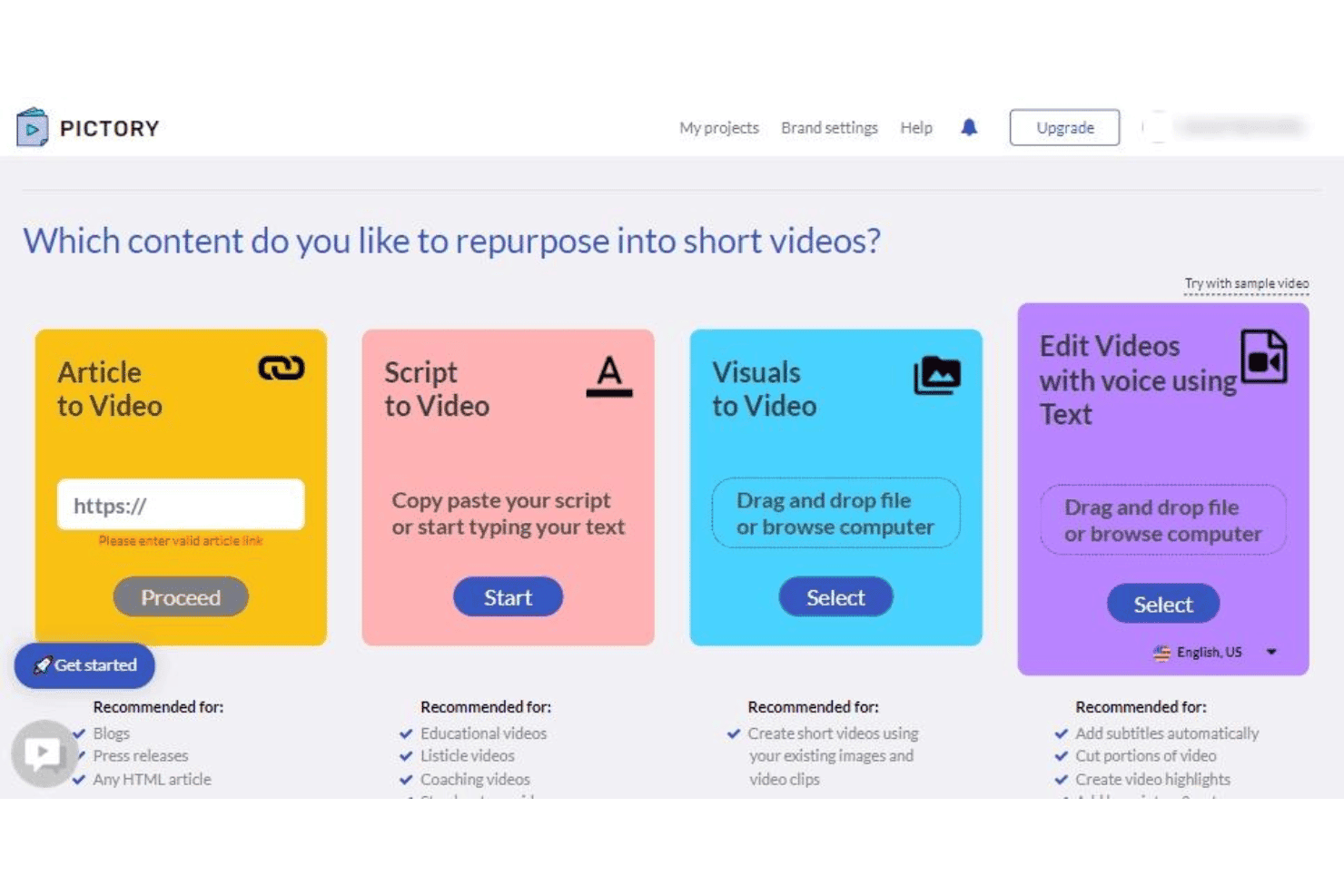
Pictory offers four content repurposing options: Article to Video, Script to Video, Visuals to Video, and Edit Videos with Voice using Text. Pictory is a cloud-based AI video generator that converts written content—articles, blog posts, and scripts—into branded short-form videos using AI scene selection, automated captions, stock footage, and AI voiceovers.
Who Is Pictory Best For?
Pictory is a strong fit for content marketers and small business owners who regularly publish written content and want to extend its reach through video.
Why I Picked Pictory
I've included Pictory in my top picks because its article-to-video pipeline is genuinely one of the fastest I've used. You paste a blog URL or drop in long-form text, and Pictory's AI segments it into scenes, pulls matching stock footage from its 18-million-clip library, and syncs AI-generated captions automatically. I've taken a 1,500-word post and had a publish-ready social cut in under 15 minutes.
Pictory Key Features
- Brand kit storage: Store logos, colors, and fonts for use across all video projects.
- AI avatar presenters: Choose from a selection of digital spokespeople to narrate your videos.
- Multi-language voiceovers: Create AI-generated audio tracks in over two dozen languages.
- Aspect ratio presets: Export videos in vertical, square, or horizontal formats for every social platform.
Pictory Integrations
Pictory offers native integrations with Getty Images, Storyblocks, ElevenLabs, Shopify, WooCommerce, WordPress, Make.com, N8N, and Zapier. An API is available for custom integrations.
What's Free?
Pictory offers a free trial with no credit card required, giving you access to three video projects of up to 10 minutes each. Exported videos include a watermark on the free trial.
Pros and Cons
Pros:
- Covers broad marketing and business topics
- Auto-generated captions sync
- Converts blog URLs into videos
Cons:
- Niche topics often return mismatched stock footage
- No permanently free plan
Learn more about Pictory: Best for animated social campaign templates
- Free plan available
- From $15/month (billed annually)
Visit WebsiteCustomer Rating:4.5/5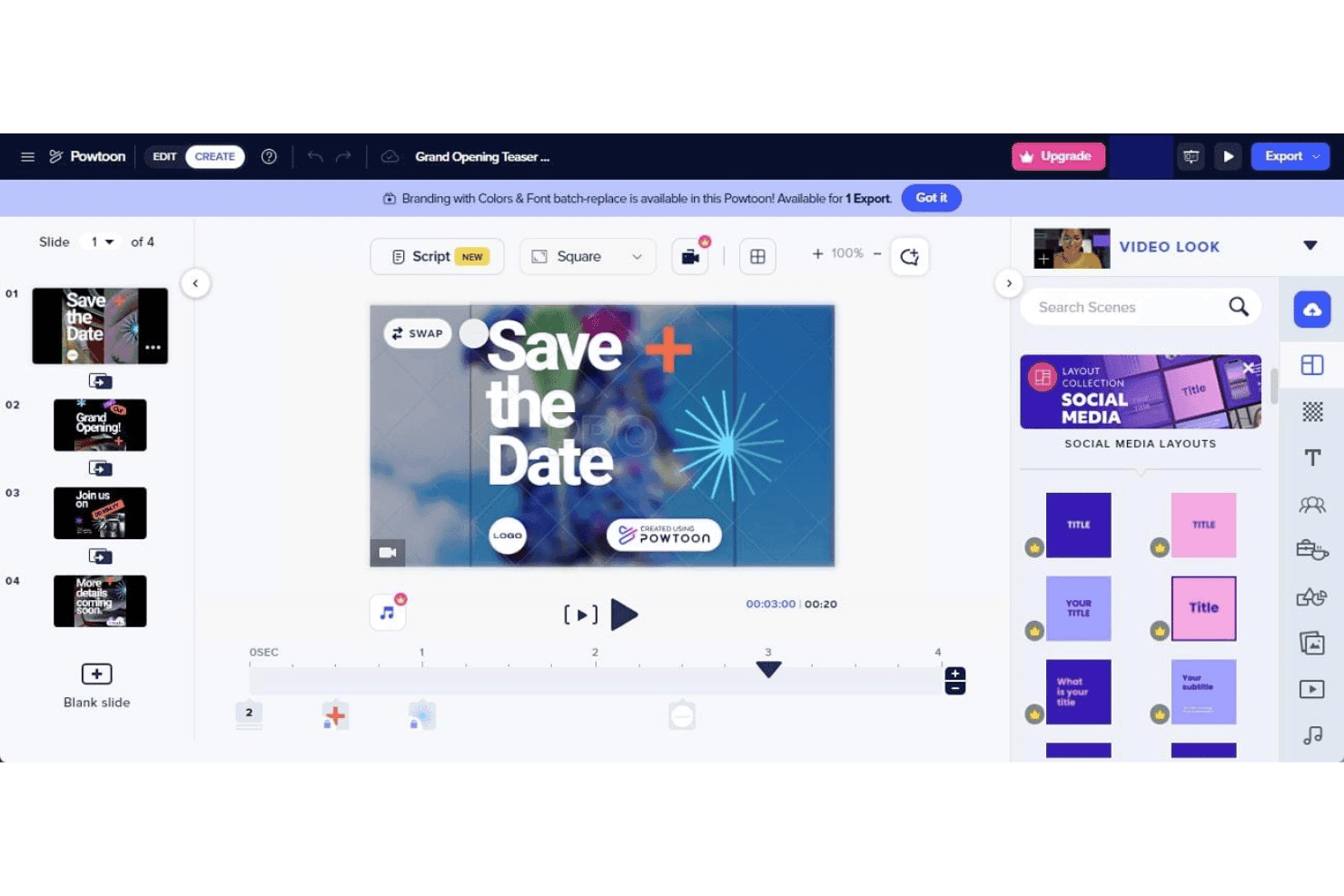
PowToon offers a drag-and-drop video editor with pre-built social media layouts, slide management, and timeline controls for creating animated presentations. PowToon is a cloud-based AI video creation platform that lets marketers produce animated videos, explainer content, and social campaigns using a drag-and-drop editor, AI text-to-video tools, AI avatars, voiceovers, and a built-in stock media library.
Who Is PowToon Best For?
PowToon is a strong fit for small business marketers and solo content creators who need to produce animated video content without a design background or dedicated video production team.
Why I Picked PowToon
I've included PowToon in my top picks because its animated social campaign template library is one of the most purpose-built I've seen in this category. Rather than generic video layouts, the templates are organized around ad formats, explainer structures, and social post styles, with animated characters you can customize directly using the built-in character builder. I also use the AI doc-to-video feature regularly, which converts a PDF or presentation into a fully animated video with minimal manual editing.
PowToon Key Features
- AI text-to-speech and dubbing: Generate natural voiceovers and multi-language narration for videos without recording audio.
- Multi-aspect ratio export: Export videos in vertical, square, and horizontal formats for use across multiple social platforms.
- Stock media library: Access over 4 million stock images, music tracks, video clips, and sound effects directly in the editor.
- Brand kit controls: Upload logos, set fonts, and save brand colors to ensure all videos align with your marketing brand guidelines.
PowToon Integrations
PowToon offers native integrations with HubSpot, Slack, Microsoft Teams, YouTube, Vimeo, Wistia, Facebook, Twitter, and Google Workspace. An API is available for custom integrations.
What's Free?
PowToon offers a free-forever plan with no credit card required, giving you access to the drag-and-drop editor, animated templates, and the stock media library, with exports up to 720p that include a PowToon watermark. AI features like text-to-video and avatar generation are not included on the free plan, as those require paid AI credits.
Pros and Cons
Pros:
- AI doc-to-video converts presentations
- Animated character builder
- Large template library for social campaigns
Cons:
- Free exports capped at 720p resolution
- AI features locked behind paid credits
Learn more about PowToon: Best for script-to-animation automation
- Free plan available
- From $29/month
Visit WebsiteCustomer Rating:4.5/5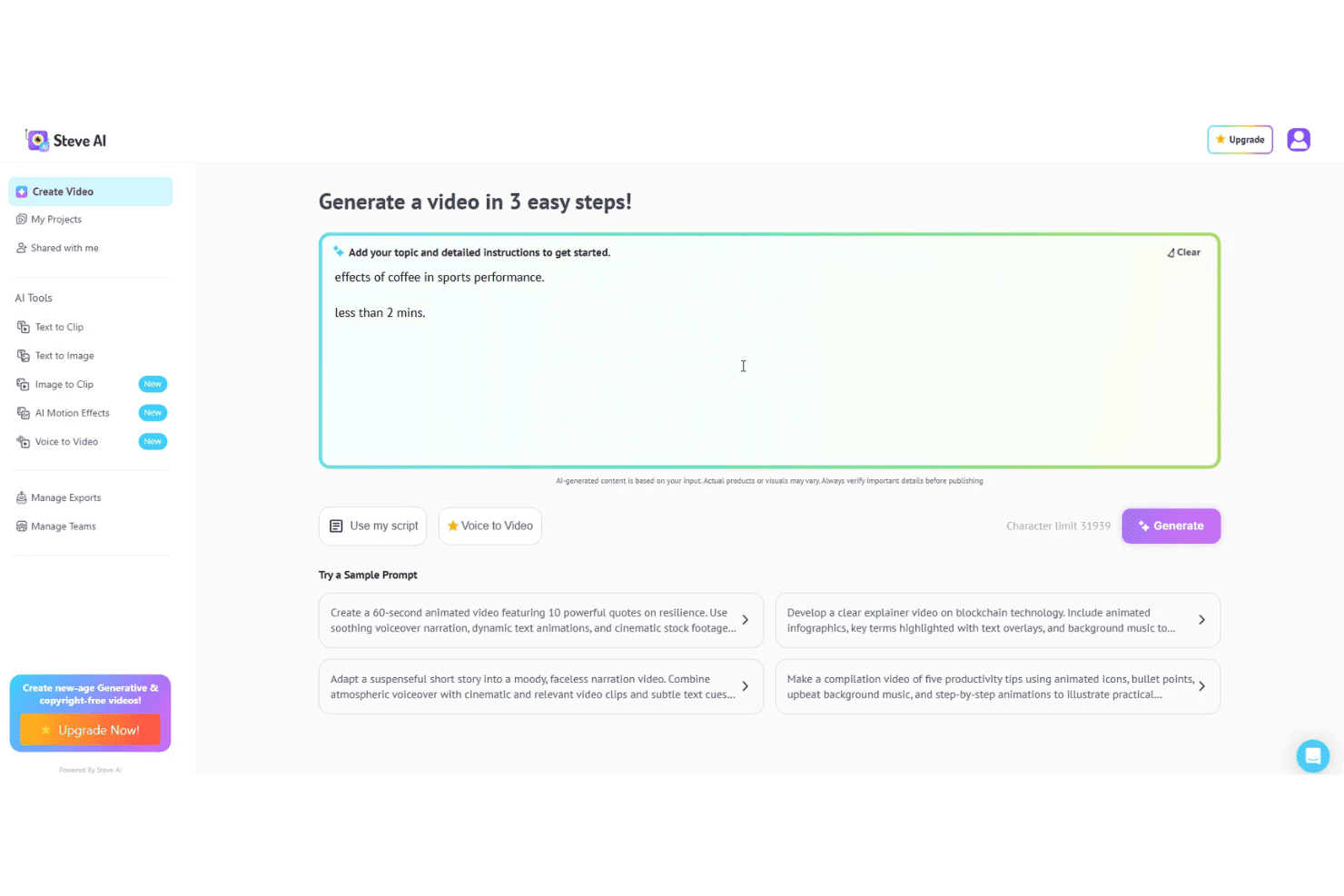
Steve AI lets users generate animated videos from scripts, prompts, or voice input. Steve AI is an AI video generator that converts text prompts, scripts, audio, and blog content into animated, live-action, or generative AI videos, with built-in voiceovers, stock assets, and multi-format export.
Who Is Steve AI Best For?
Steve AI is a strong fit for small business marketers and solo content creators who need to publish video regularly without a dedicated video production team.
Why I Picked Steve AI
Steve AI earns its spot on my shortlist because of how it handles script-to-animation conversion. I paste a script, and the Advanced Prompter builds a fully animated video with AI-selected scenes, motion effects, and synced voiceovers. I also use ClipMaker AI to turn blog posts into short animated clips. The 300+ animated characters and motion effects like kinetic text and camera zooms are all accessible directly in the editor, with no manual animation work required.
Steve AI Key Features
- Marketing-ready templates: Choose from pre-built ad and promo templates designed for popular social platforms and video formats.
- Multi-aspect ratio export: Export videos in vertical, square, and horizontal formats for channels like TikTok, Instagram, and YouTube.
- Brand customization options: Apply your logo, brand colors, and fonts directly within the video editor for brand consistency.
- Premium stock and music library: Access an integrated library of AI images, video clips, and royalty-free music and sound effects.
Steve AI Integrations
Steve AI offers a native integration with YouTube for direct publishing. Native integrations with other platforms are not clearly documented.
What's Free?
Steve AI offers a free-forever plan that includes 1,200 seconds of AI video and 200 credits per month. Exports are available on the free plan but include a watermark and are capped at 720p resolution.
Pros and Cons
Pros:
- Generous free plan monthly video allowance
- Multiple animation styles available
- Converts scripts into animated videos
Cons:
- Limited avatar library
- Free exports include a visible watermark
Learn more about Steve AI: 4Best for lifelike talking head video generation
D-ID
- 14-day free trial
- From $4.70/month (billed annually)
Visit WebsiteCustomer Rating:4.6/5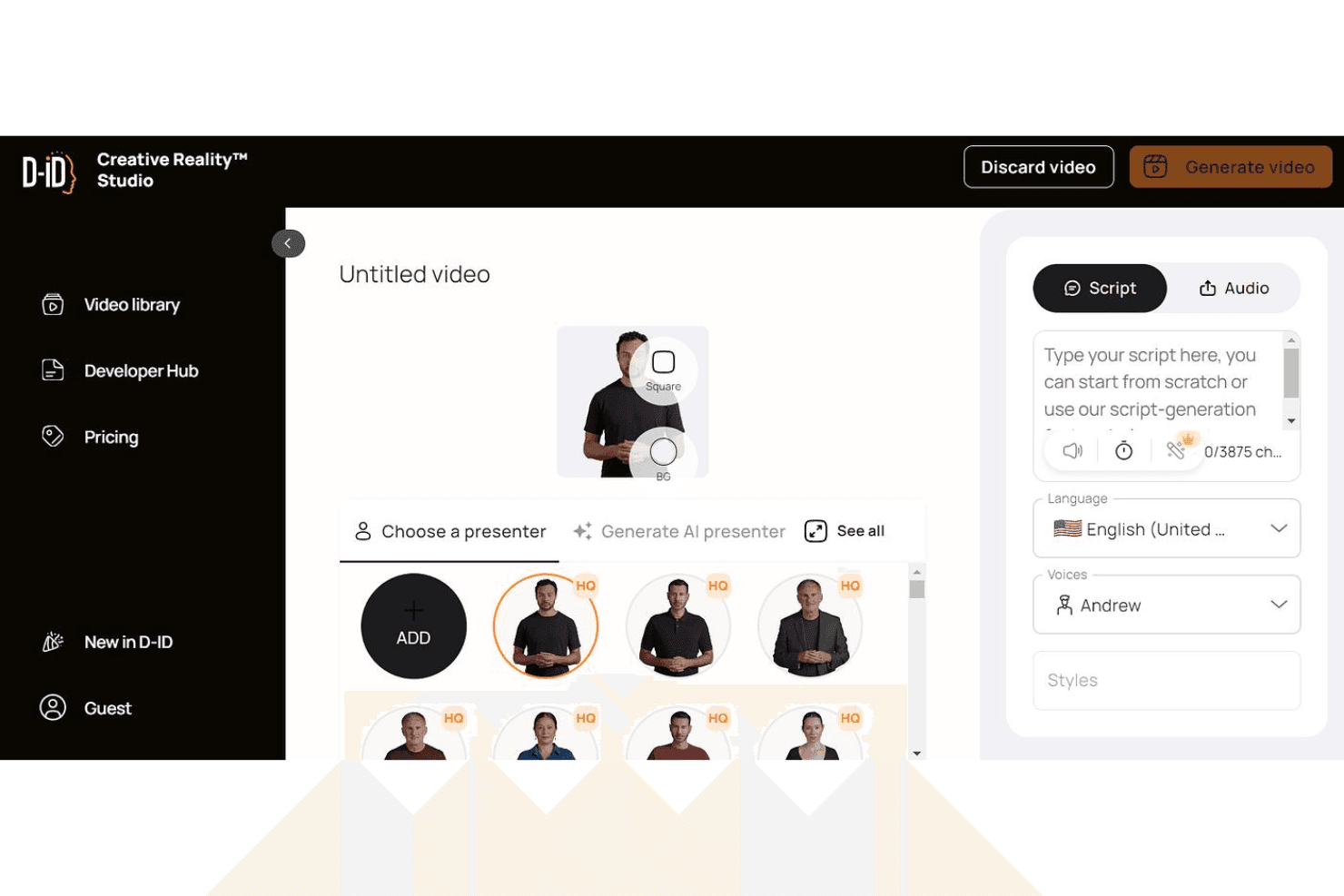
D-ID lets users generate lifelike talking head videos from scripts and AI voices. D-ID is an AI video generation platform that turns text scripts, images, and documents into talking-head videos using realistic digital avatars with multilingual voiceovers and voice cloning.
Who Is D-ID Best For?
D-ID is a strong fit for content marketers and educators who need to produce avatar-driven explainer videos at scale without on-camera talent.
Why I Picked D-ID
D-ID earns its spot on my shortlist because the lip-sync and facial animation quality is genuinely a cut above what I've seen in comparable tools. I use it to create avatar videos from a script or uploaded document, and the output looks like a real presenter rather than an animated cartoon. The voice cloning feature lets me replicate a specific voice across multiple videos, which is especially useful when producing a multilingual series without re-recording.
D-ID Key Features
- Video translate: Generate translations and localized versions of videos in over 120 languages.
- Canva and PowerPoint integrations: Use D-ID directly within Canva or PowerPoint for seamless avatar video generation.
- Custom logo watermarking: Replace D-ID’s watermark with your own logo for branded exports on higher tiers.
- API access: Integrate D-ID’s video generation capabilities into other marketing tools or custom workflows.
D-ID Integrations
D-ID offers native integrations with Canva and Microsoft PowerPoint. An API is available for custom integrations.
What's Free?
D-ID offers a 14-day free trial that includes up to 3 minutes of total video generation with watermarked exports and a personal-use license only, meaning commercial use requires a paid plan.
Pros and Cons
Pros:
- Real-time interactive AI agents available
- 100+ languages supported for voiceover
- Realistic lip-sync on generated avatars
Cons:
- Monthly credits expire and don't roll over
- Avatar gestures are largely static
Learn more about D-ID: Best for TikTok-style quick edits
- Free plan available
- From $25.99/month (billed annually)
Visit WebsiteCustomer Rating:4.5/5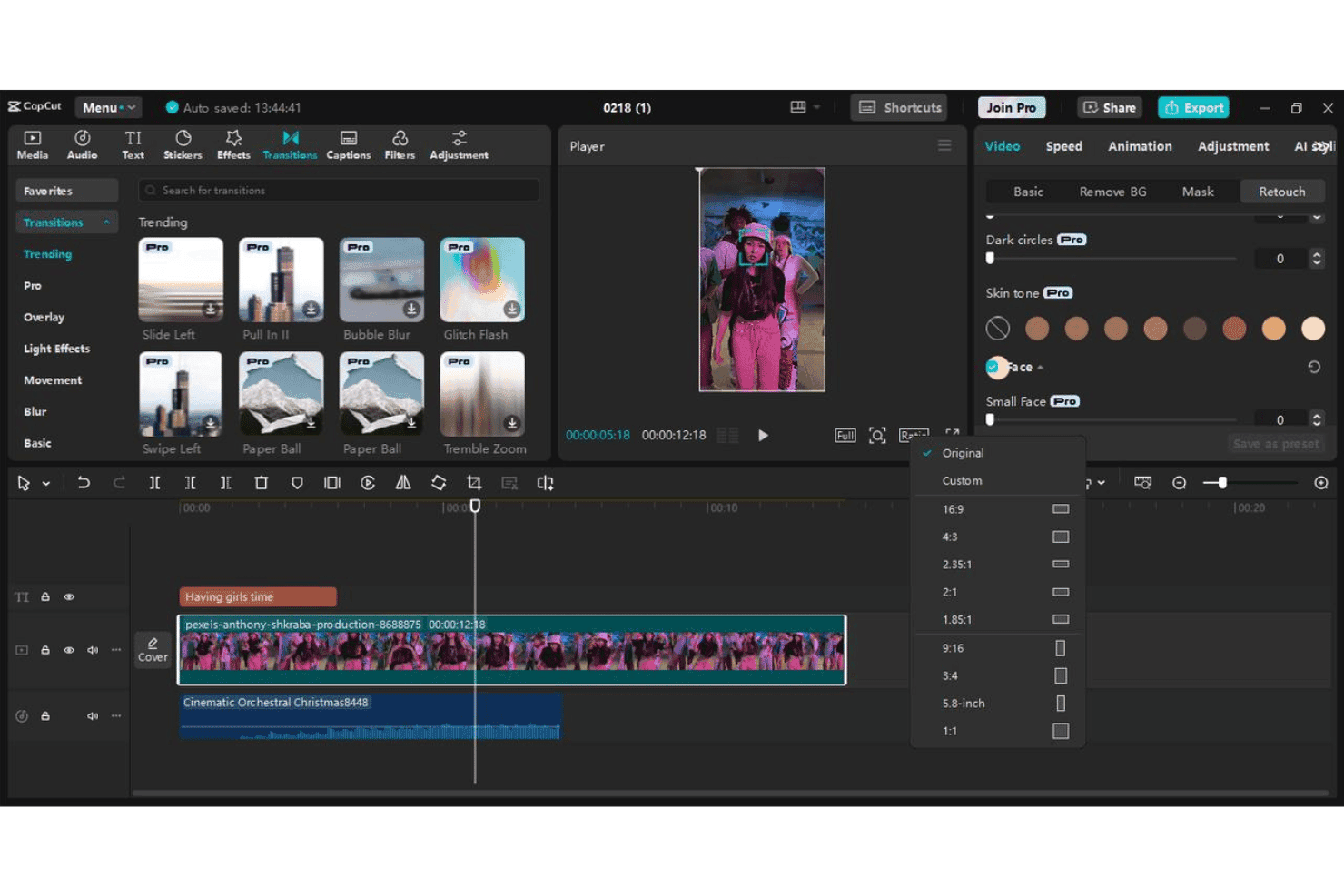
CapCut lets users edit short-form videos with transitions, effects, captions, and aspect ratio presets. CapCut is a free AI video editor from ByteDance that turns text prompts and scripts into short-form videos using AI scene generation, digital avatars, voiceovers, and pre-built marketing templates.
Who Is CapCut Best For?
CapCut is a strong fit for social media marketers and small business owners who produce high volumes of short-form video content for TikTok, Reels, or Shorts.
Why I Picked CapCut
CapCut earns its spot as one of the best on my shortlist because no other free tool is as purpose-built for TikTok-style content production. I use it specifically for its auto-captions, which generate word-by-word highlighted text in the bold, high-contrast style that actually performs in vertical feeds. The platform-specific 9:16 presets and CapCut for Business's URL-to-video feature, which turns a product landing page directly into a short-form ad, make it my go-to for rapid campaign testing.
CapCut Key Features
- AI-driven script writing: Generate complete video scripts from a single prompt or keyword for fast content ideation.
- Digital avatar presenters: Choose from over 100 AI avatars to narrate or present marketing messages in videos.
- Preset marketing templates: Access templates designed for ads, product demos, and branded content tailored for social channels.
- Multi-language voiceovers: Add AI-generated narration in dozens of languages for localized or global campaigns.
CapCut Integrations
CapCut offers native integration with TikTok for direct publishing and supports Google, Facebook, and QR code login options. Native integrations beyond TikTok are not clearly documented.
What's Free?
CapCut offers a free-forever plan across web, desktop, and mobile with no credit card required, including 1080p exports without a watermark on the desktop version. The free tier includes access to templates, text-to-video, and editing tools, but AI-powered features like avatar generation and advanced AI video creation run on a monthly credit allowance that resets each billing cycle.
Pros and Cons
Pros:
- Exports 1080p vertical video without a watermark
- Templates optimized for TikTok and Reels formats
- Templates optimized for TikTok and Reels formats
Cons:
- Commercial licensing requires manual verification
- AI credits cap out quickly on the free plan
 Best for customizable avatar presentations
- Free plan available
- From $59/month (billed annually)
Visit WebsiteCustomer Rating:4.6/5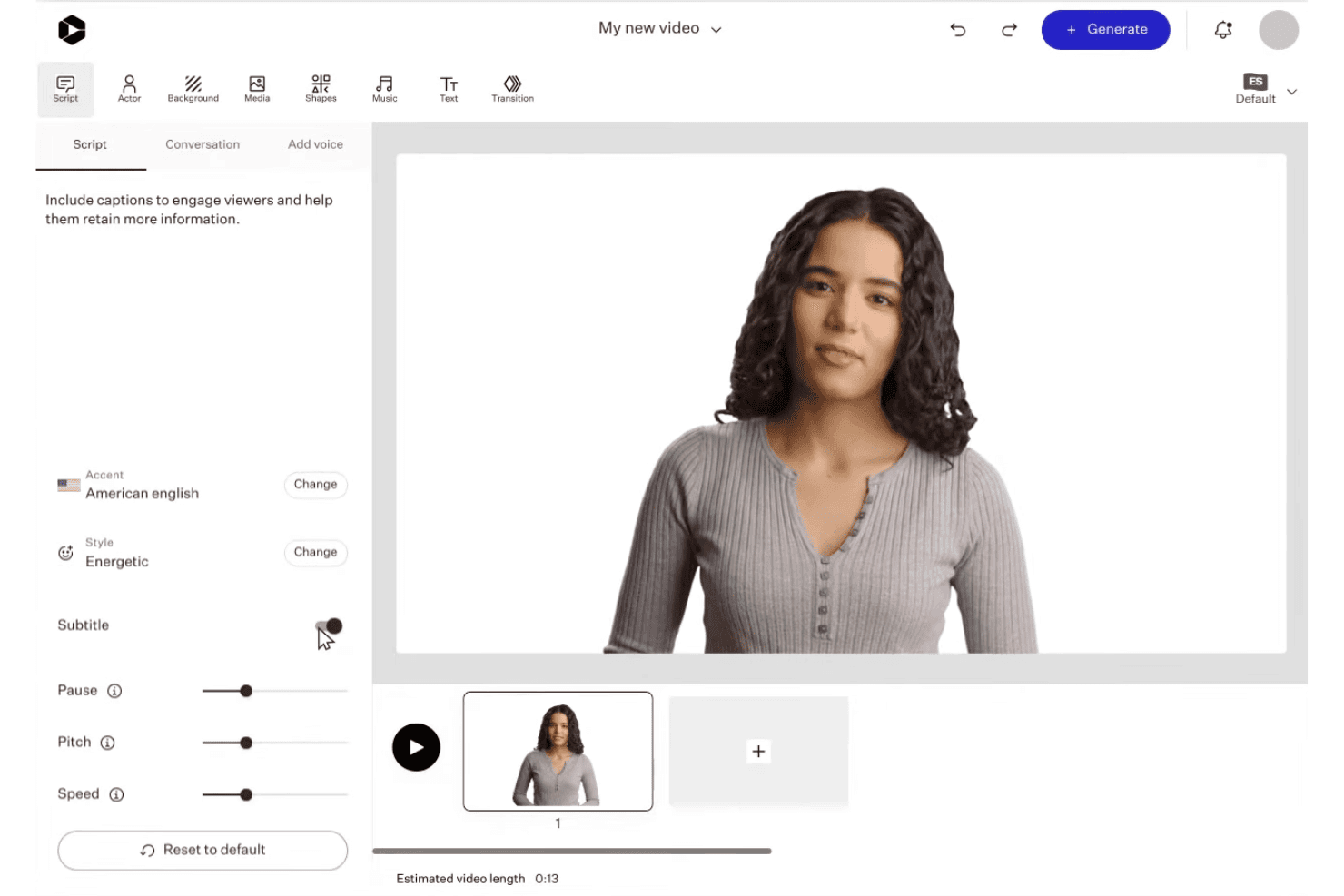
Colossyan lets users customize AI avatar presentations with scripts, voices, and scene editing. Colossyan is an AI video platform that turns text, scripts, PDFs, and URLs into avatar-led videos using 300+ AI presenters, 700+ voices, and built-in brand kits across multiple aspect ratios.
Who Is Colossyan Best For?
Colossyan is a strong fit for content marketing managers and enablement teams who need to produce polished, presenter-style videos from existing written content at scale.
Why I Picked Colossyan
Colossyan earns its spot on my shortlist because no other free AI video tool gives you this much control over how your on-screen presenter looks and behaves. I love that you can adjust avatar emotions, use side-view angles, and drop multiple avatars into a single scene, which lets me build podcast-style explainers that feel genuinely produced. The instant custom avatar feature means I can get a branded presenter on screen without booking a studio shoot.
Colossyan Key Features
- Brand kit management: Store and apply logos, colors, and fonts automatically to every video project.
- Document-to-video workflow: Convert PDFs, PowerPoints, scripts, and URLs directly into draft videos.
- Multi-aspect ratio export: Create videos in vertical, square, or horizontal formats for different social channels.
- Stock media library: Access built-in stock footage, images, and music to enhance your video content.
Colossyan Integrations
Colossyan offers SCORM exports for learning management systems like Workday, Cornerstone, Docebo, Litmos, and Absorb, and provides API access for custom integrations.
What's Free?
Colossyan's free-forever Starter plan includes 20 minutes of AI video generation per month with no credit card required, but all exported videos carry a watermark. Unlimited MP4 downloads are locked behind the paid Professional plan, so free users are limited to share links and course exports.
Pros and Cons
Pros:
- Auto-translation available across 70+ languages
- Up to four avatars in a single scene
- 300+ avatar options with emotion and angle controls
Cons:
- Video rendering times are slower than average
- Fewer templates than HeyGen and Synthesia
Learn more about Colossyan: 7Best for brand custom video exports
VEED
- Free plan available
- From $12/user/month
Visit WebsiteCustomer Rating:4.5/5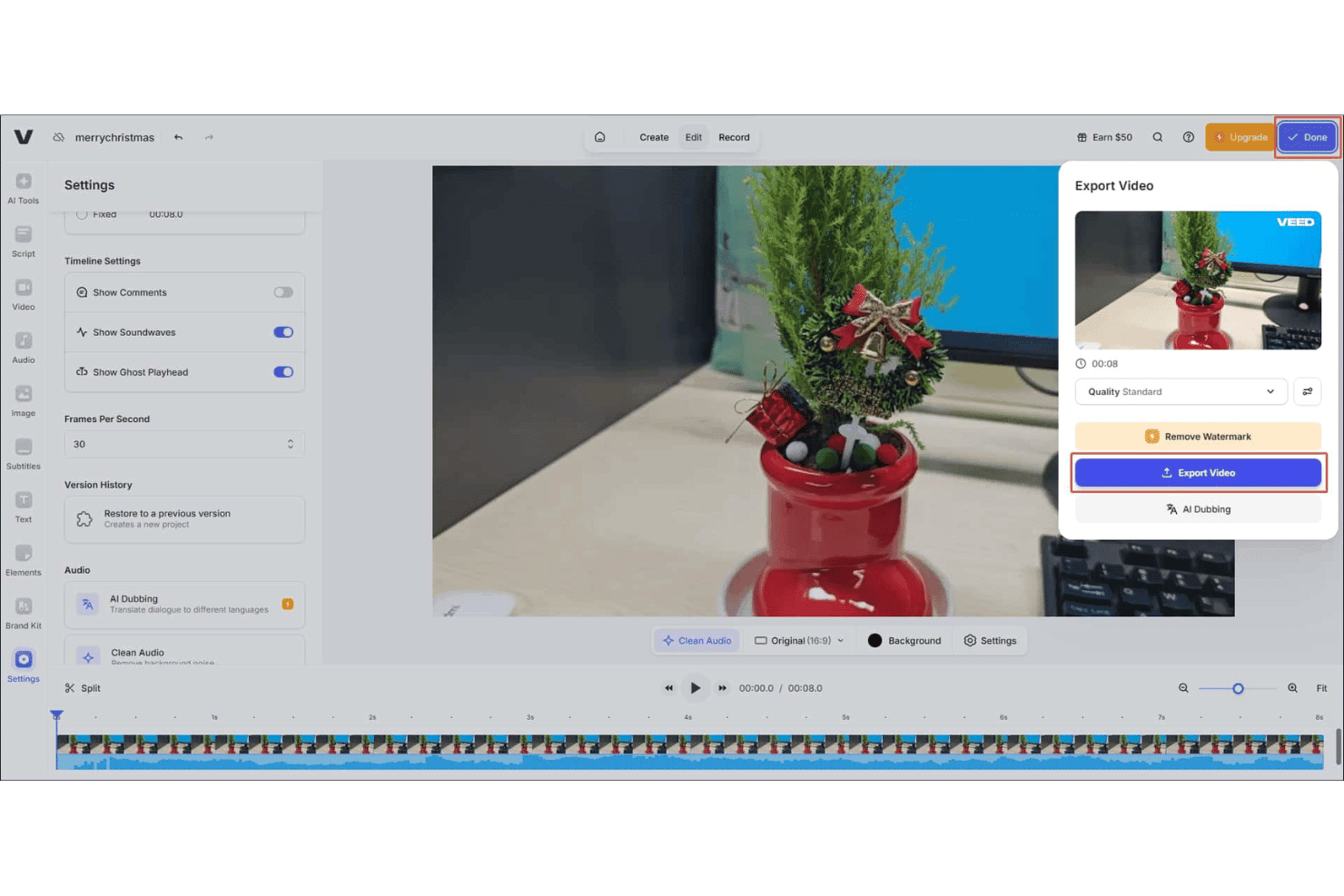
VEED offers a video export panel with quality settings, watermark removal, and AI Dubbing options directly from the editor. VEED is a browser-based AI video generator that lets you create text-to-video content, animate product images, add AI avatars, generate voiceovers in 125+ languages, and apply auto-captions across multiple aspect ratios.
Who Is VEED Best For?
VEED is a strong fit for social media marketers and content teams who need to produce branded, short-form video at volume without a dedicated video production team.
Why I Picked VEED
I picked VEED as one of the best because its Brand Kit lets you lock in your logos, fonts, and colors once and have them carry through every video you generate. That matters when you're running multiple campaigns and need every export to look consistent without rebuilding your brand setup each time. I also like that you can create custom AI avatars tied to your brand identity, so product explainers and ad creatives don't default to a generic AI presenter that has nothing to do with your company.
VEED Key Features
- Multi-model AI video generation: Select from several leading AI video models like Sora 2, Kling, and Seedance to tailor the video style and pacing to your needs.
- Image-to-video animation: Upload product images and generate animated video content directly from static visuals.
- AI voiceover in 125+ languages: Generate natural-sounding audio tracks for your videos in a wide range of languages for global reach.
- Magic B-roll: Instantly add relevant stock B-roll footage to AI-generated videos for more engaging visuals.
VEED Integrations
Native integrations are not clearly documented. VEED offers several APIs, including Fabric 1.0 API, Lip Sync API, Subtitle API, Background Removal API, and Green Screen API, for custom integrations.
What's Free?
VEED offers a free-forever plan with no credit card required, giving you a limited quota of AI video credits to generate and export videos. Free plan exports include a watermark and are capped at 720p resolution; once you use your credit allowance, you'll need to upgrade to a paid plan to continue generating AI video.
Pros and Cons
Pros:
- AI avatar library includes custom avatar creation
- Choose between multiple generative AI video models
- Brand Kit applies across all generated videos
Cons:
- Slow rendering on longer or complex video projects
- Free exports are watermarked and capped at 720p
Learn more about VEED: 8Best for video creation from text at scale
Elai
- Free plan available
- From $29/month
Visit WebsiteCustomer Rating:4.6/5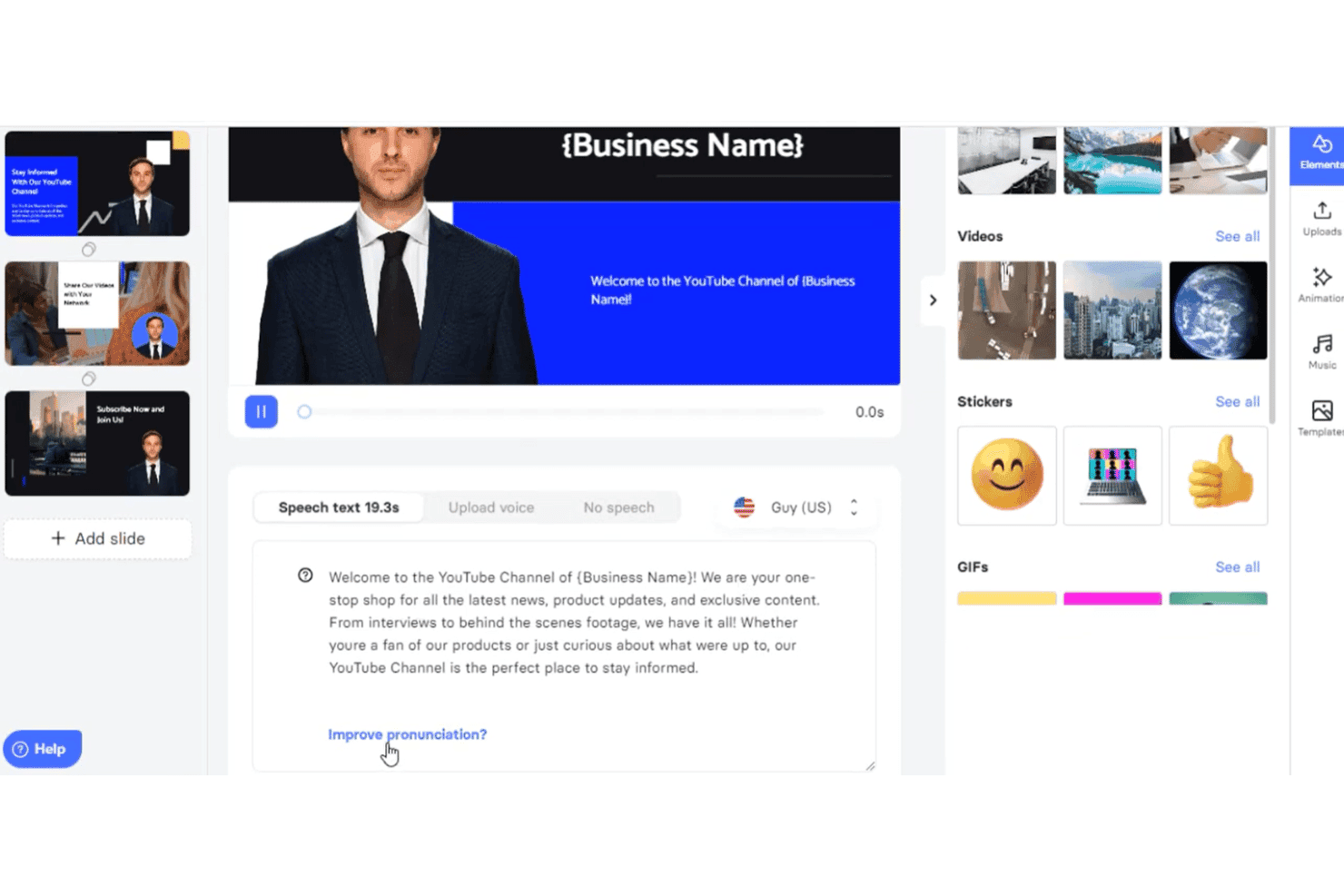
Elai.io lets users create AI videos from text with avatars, voice settings, and slide editing. Elai is an AI video generator that converts text, URLs, scripts, and PowerPoint files into narrated videos using a library of AI avatars and multilingual voiceovers across 75+ languages.
Who Is Elai Best For?
Elai is a strong fit for content marketing teams that regularly repurpose written assets—like blog posts and slide decks—into video at volume.
Why I Picked Elai
I've included Elai in my top picks because it handles text-to-video at volume better than most tools I've tested. I can paste a blog URL directly into the platform and get a narrated AI avatar video without writing a single line of script. The AI Storyboard feature takes that further, letting me turn a rough content outline into a structured, multi-slide video in one workflow.
Elai Key Features
- Brand kit storage: Store your logo, fonts, and brand colors for consistent video branding.
- Multi-language voice cloning: Generate AI narration in 28 languages cloned from your real voice.
- SCORM export: Download completed videos as SCORM files for easy LMS integration.
- Interactive quizzes and branching: Add clickable quizzes and branching elements to create interactive video experiences.
Elai Integrations
Elai.io offers native integrations with Thinkific, uQualio, Tolstoy, Moodle, Medium, Pexels, GIPHY, LottieFiles, and Articulate 360. It also connects with Zapier and provides an API for custom integrations.
What's Free?
Elai's free plan gives you 1 minute of total video rendering credit, which covers a single short video and depletes with every render and re-render. Download availability on the free tier has been flagged as unreliable by users, so treat it as a preview of the platform rather than a functional production tier.
Pros and Cons
Pros:
- Custom AI avatar creation available on paid plans
- Supports 75+ languages for voiceover generation
- Converts blog URLs into videos automatically
Cons:
- Avatar variety is limited on lower-tier plans
- Re-rendering depletes your minutes allotment
Learn more about Elai: Best for AI avatars in explainer videos
- Free plan + free demo available
- From $14/month (billed annually)
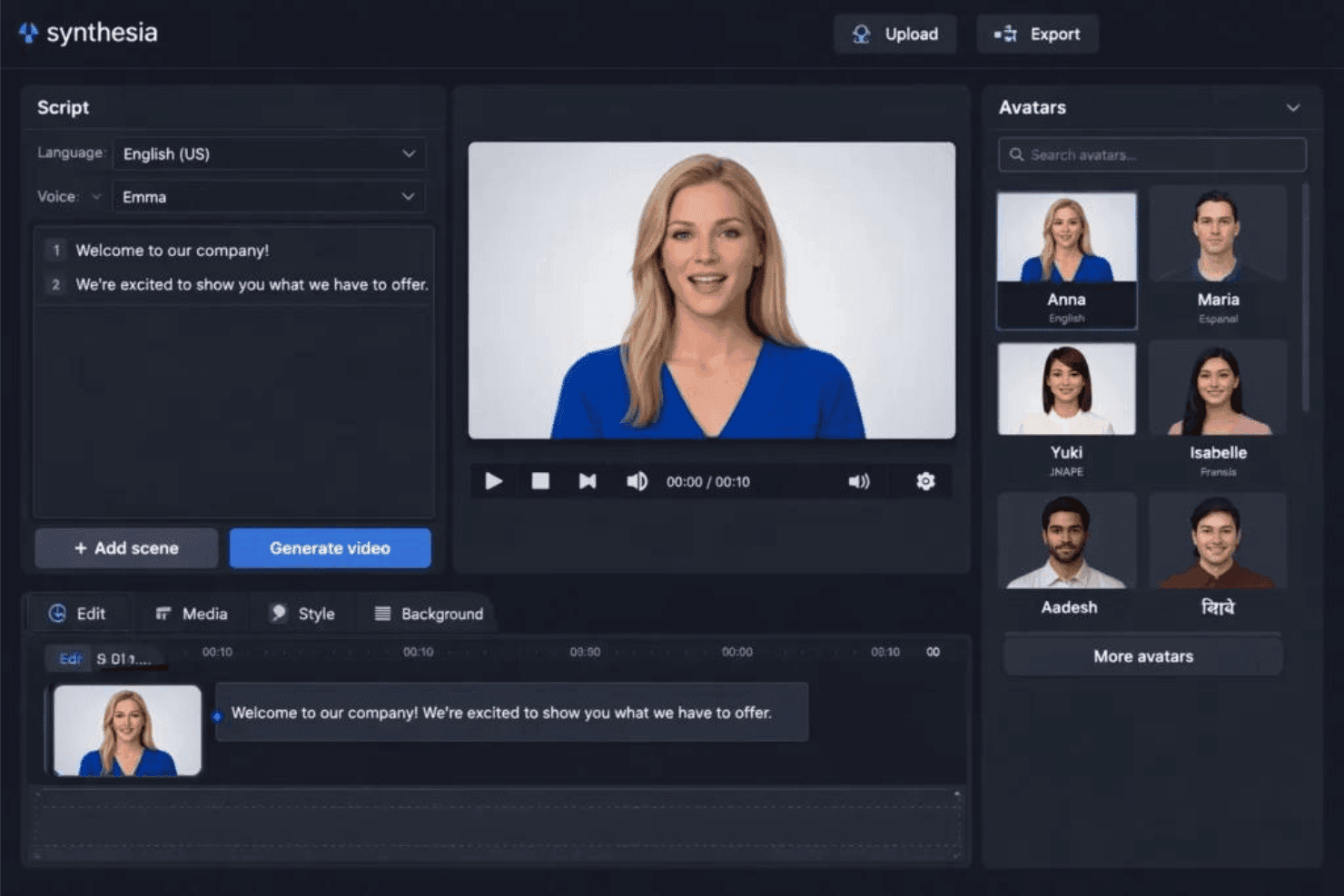
Synthesia offers an AI video editor with customizable avatars, script input, and a one-click video generation feature. Synthesia is an AI video platform that converts text scripts, documents, and prompts into finished videos using AI avatars, multilingual voiceovers, and customizable branded templates.
Who Is Synthesia Best For?
Synthesia works well for content marketing managers and L&D teams who need to produce polished, avatar-led explainer videos without a production crew.
Why I Picked Synthesia
Synthesia earns its spot on my shortlist because its avatar library is genuinely hard to beat. With 240+ stock avatars and the ability to build a personal avatar (a digital likeness of yourself or a brand presenter), I can produce explainer videos that feel presenter-led without booking a studio. I also rely on the 1-Click Translation feature, which re-dubs a finished video into 70+ languages while preserving lip sync, so one explainer asset becomes a full multilingual campaign.
Synthesia Key Features
- AI video assistant: Generate videos from scripts, documents, PDFs, or URLs with a prompt-based AI workflow.
- Brand kit customization: Store and apply logos, colors, and fonts to keep videos on-brand.
- Media library access: Use stock footage, music, and images from Getty Images, Pexels, Soundstripe, and Icons8.
- Multi-aspect ratio export: Export videos in vertical, square, and horizontal formats for various social channels.
Synthesia Integrations
Synthesia offers native integrations with PowerPoint and learning management systems via SCORM export, and provides an API for custom integrations. It also has a Chrome extension for screen recording.
What's Free?
Synthesia offers a free-forever plan that includes 10 minutes of video per month, access to 9 AI avatars, and MP4 exports. Videos on the free plan include a Synthesia watermark, and access to the full avatar library and brand kit requires a paid plan.
Pros and Cons
Pros:
- Free plan includes MP4 video downloads
- 1-click video translation into 70+ languages
- 240+ stock avatars plus custom avatar option
Cons:
- Limited to 9 avatars on free tier
- Free plan adds watermark to all videos
Learn more about Synthesia:
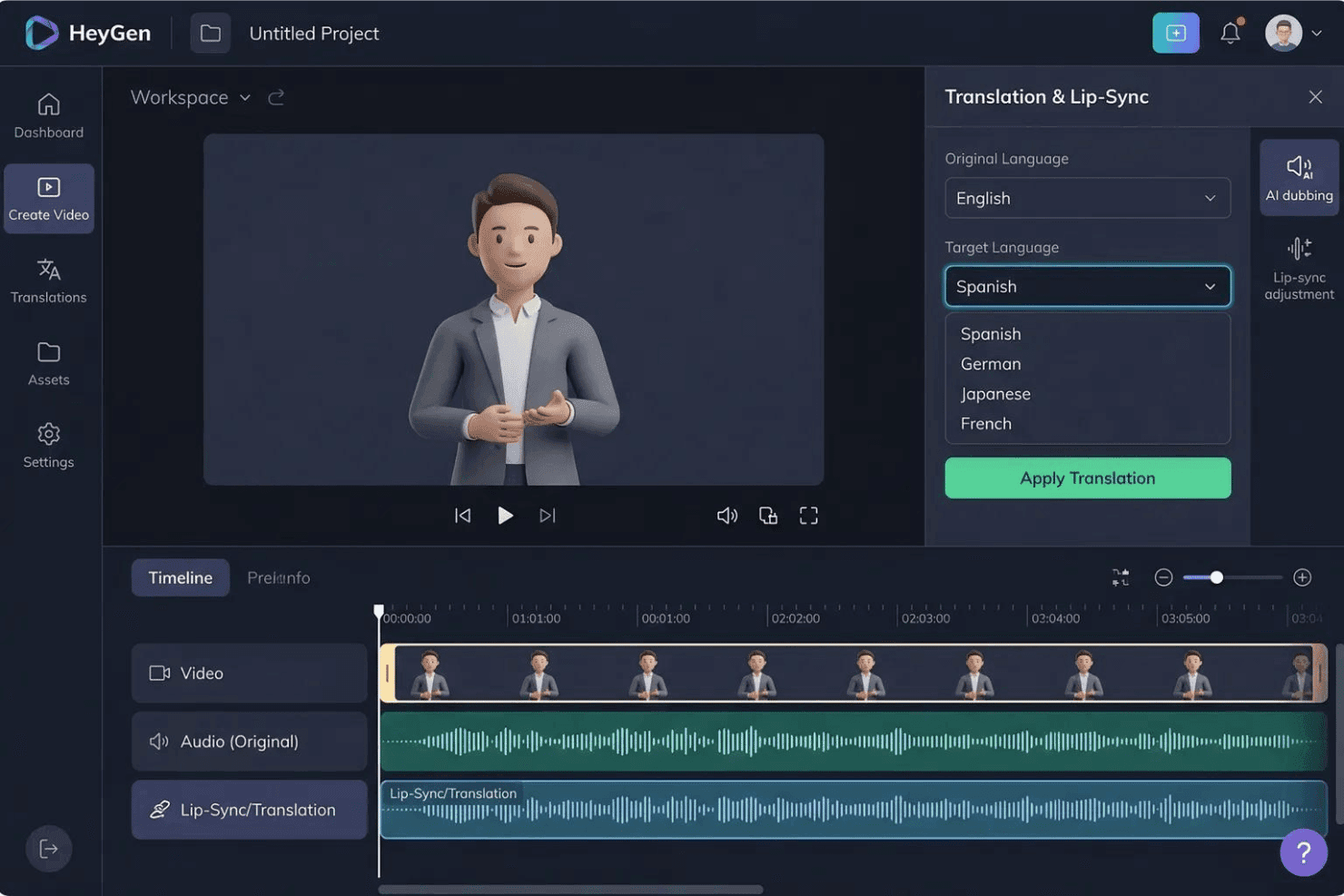
HeyGen offers a Translation & Lip-Sync panel that lets users translate AI avatar videos into multiple languages including Spanish, German, Japanese, and French. HeyGen is an AI video generator built around lifelike avatars, voice cloning, and one-click translation into 175+ languages, with text-to-video, lip-sync localization, and custom digital twin creation.
Who Is HeyGen Best For?
HeyGen is a strong fit for marketing teams at global brands and agencies that regularly produce video content across multiple languages and regional markets.
Why I Picked HeyGen
HeyGen earns its spot on my shortlist because of how it handles video localization at scale. I can take one recorded video and generate lip-synced versions in 175+ languages, with the avatar's voice tone and mouth movement matching each translated script. The custom digital twin feature means I'm not re-shooting or re-casting for each market. HeyGen runs the localization pass automatically, preserving the original speaker's voice characteristics across every language version.
HeyGen Key Features
- AI Studio editor: Create, edit, and preview video scenes using a drag-and-drop timeline with text-based control and real-time feedback.
- Marketing template library: Access ready-made video templates tailored for social ads, promos, explainers, and common marketing formats.
- Multi-aspect ratio export: Export videos in 9:16, 1:1, or 16:9 ratios for TikTok, Instagram, and YouTube without manual cropping.
- Integrated stock asset library: Use a built-in library of stock videos, images, and audio tracks directly within the video editing workflow.
HeyGen Integrations
HeyGen offers native integrations with HubSpot, Salesforce, Adobe Express, Canva, FlowShare, Zoom, and Tolstoy, connects with Zapier, and provides an API for custom integrations.
What's Free?
HeyGen's free-forever plan includes 3 videos per month (up to 1 minute each) with 1080p export, access to 500+ stock avatars, and 1 custom digital twin. Videos export with a watermark, and access to premium features like Avatar V and Video Agent is limited to a short trial period.
Pros and Cons
Pros:
- Realistic custom digital twin creation available
- 175+ languages Instant multi-language video from one recording
- Lip-synced translation across
Cons:
- "Unlimited" plan claims can mislead on actual limits
- Free plan exports are capped at 720p
Learn more about HeyGen:
Pazarlamacılar İçin Diğer Ücretsiz AI Video Oluşturucular
Kısa listeme giremeyen ancak yine de göz atmaya değer bazı ek ücretsiz AI video oluşturucu seçenekleri şunlardır:
- 11Lumen5Best for converting blog posts to video instantly
- 12FlikiBest for realistic voiceovers in video ads
- 13Vidnoz AIBest for voiceover-driven promo videos
- 14CreatifyBest for automated ad script generation
- 15RunwayBest for video effects powered by AI
- 16Hailuo AIBest for talking avatar customization
- 17KapwingBest for collaborative editing workflows
- 18EaseMate AIBest for multi-format video exports
- 19RecCloudBest for direct social platform publishing
- 20DreamluxBest for storyboarding from marketing copy
How I Evaluate Free AI Video Generator for Marketers
First, I define what counts as free. For AI video generators, that means a free-forever plan or a full-feature free trial of at least 7 days that lets you export finished videos—watermarks are fine. From there, I split my evaluation into core functionality every tool must meet and the differentiators that set the best options apart.
Core Functionality (Table Stakes For This List)
In addition to my free offer requirements, I also use a scoring system to select tools for my list. Here's how it works:
I rank each one on a scale from 0 (does not offer the functionality) to 5 (excels in this area) for each core functionality listed below. Then, I calculate the tool's total score into a percentage. Each tool needs to achieve a minimum total score of 65% to be considered for inclusion.
- Text-to-video generation: I check whether the tool can take a script or blog excerpt and produce a coherent, multi-scene video—not just a slideshow of static images.
- AI avatars or voiceovers: Having a digital presenter or natural-sounding narration matters for explainer and product demo videos, so I look for variety in voices and avatar options.
- Marketing-ready templates: I evaluate the template library for formats marketers actually use, like short social ads, product promos, and story-format videos for Instagram or TikTok.
- Multi-aspect ratio export: Each tool should support 9:16, 1:1, and 16:9 exports so you can repurpose a single video across YouTube, Reels, and feed posts without recutting.
- Brand customization: I look for the ability to add your logo, brand colors, and fonts to keep generated videos on-brand across campaigns.
- Media library and stock assets: A built-in library of stock footage, images, and music clips helps fill gaps when you don't have original assets ready to go.
Once I have a list of tools that meet the criteria, I consider what sets each platform apart.
Differentiating Factors (What Sets Vendors Apart)
Here's how I compare and contrast different vendors:
Standout Features
Brand kit storage is a feature I pay close attention to—tools that let you save your logo, colors, and fonts mean you're not rebuilding brand elements with every new video. AI avatar presenters are another differentiator, especially for product explainers or onboarding content where a talking head adds credibility without booking a shoot. Multi-language voiceovers round things out for teams running campaigns across regions, letting you localize a single video into multiple languages from one project.
Beyond Features
Free tier limits matter a lot here—I look at how many minutes of video you can generate each month and whether exports come watermarked or resolution-capped, since that affects whether the output is usable in paid campaigns. Content rights are another factor I check, particularly whether the platform's licensing terms allow commercial use of AI-generated videos and avatars. I also consider marketing stack integrations, like direct publishing to social channels or connections with tools like HubSpot and Google Drive.
Pazarlamacılar İçin Ücretsiz AI Video Oluşturucu Nasıl Seçilir?
Uzun özellik listeleri ve karmaşık fiyatlandırma yapıları içinde kaybolmak kolaydır. Kendinize özgü yazılım seçim sürecinizde ilerlerken odağınızı korumanıza yardımcı olmak için göz önünde bulundurmanız gereken faktörleri içeren bir kontrol listesi hazırladım:
| Faktör | Dikkate Alınması Gerekenler |
|---|---|
| FaktörÖlçeklenebilirlik | Dikkate Alınması GerekenlerKampanyalarınız büyüdükçe araç video üretimini artırmanıza olanak tanıyor mu, yoksa ücretsiz katman ekip veya birden fazla marka kullanımı için üretimi çok mu kısıtlıyor? |
| FaktörEntegrasyonlar | Dikkate Alınması GerekenlerPlatform, varlık yönetimi ve kampanya iş akışları için Canva veya HubSpot gibi hâlihazırda kullandığınız pazarlama araçlarına bağlanıyor mu? |
| FaktörÖzelleştirilebilirlik | Dikkate Alınması GerekenlerMarka ögelerinizi uygulayıp videoları farklı kampanyalara uyarlayabiliyor musunuz, yoksa ücretsiz katmanda düzenleyebilecekleriniz sınırlı mı? |
| FaktörKullanım kolaylığı | Dikkate Alınması GerekenlerArayüz sezgisel mi; böylece ekibiniz uzun bir eğitim almadan kullanmaya başlayabilir mi, yoksa özenle hazırlanmış çıktılar oluşturmak için özel becerilere mi ihtiyacınız var? |
| FaktörUygulama için işe alıştırma | Dikkate Alınması GerekenlerEkibiniz ne kadar hızlı başlayabilir? Başlangıç süresini kısaltmak için eğitimler, örnek projeler ve işe alıştırma kaynakları mevcut mu? |
| FaktörMaliyet | Dikkate Alınması GerekenlerÜcretsiz katman sınırları ihtiyaçlarınız için sürdürülebilir mi, yoksa daha fazla kredi veya daha yüksek çözünürlük için kısa sürede yükseltme yapmanız mı gerekecek? |
| FaktörGüvenlik önlemleri | Dikkate Alınması GerekenlerPlatform hangi kullanıcı verilerini, varlıkları ve kampanya bilgilerini depoluyor; ortak bir ortamda gizlilik ve erişim için denetimler mevcut mu? |
| FaktörDâhilî kaynak gereksinimleri | Dikkate Alınması GerekenlerAraçtan verim almak için sürekli tasarım, BT veya yaratıcı destek almanız mı gerekecek, yoksa pazarlamacılar kurulumdan sonra platformu bağımsız olarak kullanabilir mi? |
Pazarlamacılar İçin Ücretsiz Yapay Zekâ Video Oluşturucuları Nedir?
Pazarlamacılar için ücretsiz yapay zekâ video oluşturucuları, önceden ödeme yapmadan yapay zekâ kullanarak pazarlama videoları oluşturmanızı sağlayan yazılım araçlarıdır. Metin istemlerini veya senaryoları videolara dönüştürme, yapay zekâ avatarları ve seslendirmeleri oluşturma ve marka ögelerini uygulama gibi özellikler sunarlar. Bu platformlar genellikle ücretsiz bir plan veya sınırlı bir deneme sürümü içerir; böylece pazarlamacılar mali bir taahhütte bulunmadan önce kampanyalar, reklamlar veya sosyal kanallar için video içeriklerini deneyebilir.
Pazarlamacılar İçin Ücretsiz Yapay Zekâ Video Oluşturucusunun Özellikleri
Pazarlamacılar için yapay zekâ video oluşturucularında yaygın olarak bulunan özellikleri ve bunlardan hangilerinin genellikle ücretsiz veya ücretli planlara dâhil edildiğini inceleyelim.
Pazarlamacılar İçin Ücretsiz Yapay Zekâ Video Oluşturucularında Genellikle Bulunan Özellikler
- Metinden videoya dönüştürme: Yazılı senaryoları, blog gönderilerini veya brifleri, otomatik olarak oluşturulan sahnelerle eksiksiz videolara dönüştürerek mevcut metinlerinizden hızlıca içerik oluşturmanıza yardımcı olur.
- Temel pazarlama şablonları: Sosyal medya gönderileri, ürün öne çıkarma içerikleri veya açıklayıcı videolar için tasarlanmış başlangıç şablonlarına erişerek tipik pazarlama kullanım alanlarında video oluşturma sürecini kolaylaştırır.
- Basit marka özelleştirmesi: Dışa aktarılan videolara logonuzu ve temel renklerinizi ekleyerek kapsamlı özelleştirmeye ihtiyaç duymadan marka tutarlılığı sağlar.
- Yapay zekâ seslendirmeleri: Videolarınız için otomatik ses anlatımı kullanabilir; genellikle yaygın dillerde doğal tınlayan sınırlı sayıda sesten yararlanabilirsiniz.
- Temel avatar sunucuları: Standart ve özelleştirilemeyen, yapay zekâ tarafından oluşturulmuş avatar kitaplığını kullanarak içeriğinize dijital sunucular veya konuşan kişiler ekleyebilirsiniz.
- Sınırlı stok medya kitaplığı: Özgün varlıklara ihtiyaç duymadan içeriğinizi zenginleştirmek için küçük bir stok fotoğraf, video klibi ve müzik koleksiyonuna erişebilirsiniz.
- Çoklu en-boy oranında dışa aktarma: Videoları dikey, kare veya yatay sosyal medya formatlarında dışa aktarabilir; tek bir projeden farklı kanallarda yayınlamayı kolaylaştırabilirsiniz.
- Filigranlı indirmeler: Tamamlanmış videoları, varlıkları önizleyebilmeniz veya iç onay süreçlerinde kullanabilmeniz için göze batmayan bir filigranla indirebilirsiniz.
Pazarlamacılar İçin Ücretli Yapay Zekâ Video Oluşturucularında Genellikle Bulunan Özellikler
- Gelişmiş marka kiti yönetimi: Tüm projelere otomatik olarak daha kapsamlı biçimde uygulanmak üzere birden fazla logo, yazı tipi ve renk paleti depolayarak güçlü marka tutarlılığı sağlayın.
- Toplu video oluşturma: Farklı senaryolardan veya veri akışlarından aynı anda birden fazla video oluşturun; kampanyaları formatlar ve platformlar arasında ölçeklendirmeyi kolaylaştırın.
- Yüksek çözünürlüklü dışa aktarma: Videoları yüksek çözünürlükte veya 4K kalitesinde indirin, filigranları kaldırın ve özenli, profesyonel son çıktılar elde edin.
- Özel avatar oluşturma: Videolarınız için belirli sözcülere, karakterlere veya marka kişiliklerine uygun kişiselleştirilmiş AI avatarları ya da konuşan karakterler oluşturun.
- Kapsamlı seslendirme seçenekleri: Düzinelerce dil ve aksan arasından seçim yapın; daha gerçekçi veya duygu yüklü AI anlatım seslerine erişin.
- Üst düzey stok medya kitaplığı: Daha zengin yaratıcı seçenekler için lisanslı stok videolar, görseller ve müziklerden oluşan geniş yerleşik koleksiyonu kullanın.
- Doğrudan sosyal medyada yayınlama: Videoları önce indirmeden platformdan doğrudan TikTok, Instagram, Facebook ve YouTube gibi kanallarda anında paylaşın.
- İş birliği araçları: Ekip üyelerini platform içinde projeleri birlikte incelemeye, düzenlemeye veya onaylamaya davet ederek dağıtık pazarlama ekiplerinin iş akışını iyileştirin.
- AI destekli video düzenleme: Manuel klip düzenlemenin ötesine geçerek AI destekli düzenleme önerileri, arka plan kaldırma veya sahne yeniden yapılandırma özellikleriyle videoları geliştirin.
- Gelişmiş analizler: Gelecekteki yaratıcı kararları yönlendirmek için video etkileşimi, tamamlanma oranları veya sosyal medya performansına ilişkin içgörülere doğrudan araç üzerinden erişin.
Pazarlamacılar için Ücretsiz AI Video Oluşturucunun Faydaları
Pazarlamacılar için ücretsiz bir AI video oluşturucu kullanmak, ekibiniz ve işletmeniz açısından çeşitli faydalar sağlar. Yararlanabileceğiniz birkaç avantaj şunlardır:
- Daha hızlı yaratıcı üretim: AI metinden videoya teknolojisini ve şablonları kullanarak senaryoları veya brifleri anında özenli video varlıklarına dönüştürün; böylece dışarıdan video prodüksiyonuna daha az bağımlı olursunuz.
- Daha düşük üretim maliyetleri: Kameramanlara, editörlere ve oyunculara olan ihtiyacı ortadan kaldırın; AI avatarları, seslendirmeler ve medya kitaplıkları gibi özellikler videoları tamamen platform içinde oluşturmanızı sağlar.
- Tutarlı marka varlığı: Basit marka özelleştirmeleri ve temel marka kitleri, hızlı hazırlanan sosyal medya reklam içeriklerinde bile logoların ve renklerin ön planda kalmasına yardımcı olur.
- Çok kanallı erişim: Tek bir videoyu her kanal için yeniden kurgulamanıza gerek kalmadan TikTok, Instagram, YouTube ve daha fazlasına uyarlamak için çoklu en-boy oranı dışa aktarma araçlarını kullanın.
- Kolay içerik yeniden kullanımı: Mevcut pazarlama materyallerinizin etkisini en üst düzeye çıkarmak için blog gönderilerini, ürün metinlerini veya web semineri senaryolarını yeni video içeriklerine dönüştürün.
- Ölçeklenebilir denemeler: Ücretli bir plana yatırım yapmadan önce birden fazla yaratıcı varyasyonu test edin; ücretsiz katmanlar çevik denemelere ve hızlı yinelemelere olanak tanır.
- Erişilebilir video oluşturma: Kullanıcı dostu düzenleyiciler, başlangıç şablonları ve başlangıç kaynakları sayesinde ekipteki neredeyse herkes, önceden deneyimi olmasa bile video oluşturabilir.
Pazarlamacılar için AI Video Oluşturucunun Maliyetleri ve Fiyatlandırması
Bu makaleye, pazarlamacılar için ücretsiz olarak sunulan en iyi AI video oluşturucu seçeneklerini aradığınız için geldiğinizi biliyorum. Ancak ücretsiz planlar yalnızca sınırlı özellikler sunduğundan, gelecekte planınızı yükseltmeniz ve daha geniş bir AI video oluşturucu yelpazesini değerlendirmeniz gerekebilir.
Aşağıdaki tablo, pazarlamacılar için bir AI video oluşturucuda bulunan yaygın planları, ortalama fiyatlarını ve tipik özellikleri özetlemektedir:
Pazarlamacılar için AI Video Oluşturucu Plan Karşılaştırma Tablosu
| Plan Türü | Ortalama Fiyat | Yaygın Özellikler |
|---|---|---|
| Plan TürüÜcretsiz Plan | Ortalama Fiyat$0 | Yaygın ÖzelliklerTemel metinden videoya, filigranlı dışa aktarma, sınırlı şablonlar, küçük bir medya kitaplığı ve temel seslendirme seçenekleri. |
| Plan TürüKişisel Plan | Ortalama Fiyat$10–$25/user/month | Yaygın ÖzelliklerDaha fazla şablon, HD dışa aktarma, genişletilmiş stok medya, ek avatarlar, daha fazla ses seçeneği ve temel marka özelleştirmesi. |
| Plan Türüİşletme Planı | Ortalama Fiyat$30–$60/user/month | Yaygın ÖzelliklerÖzel marka kitleri, premium destek, yüksek çözünürlüklü indirmeler, toplu dışa aktarma, iş birliği araçları ve gelişmiş video düzenleme. |
| Plan TürüKurumsal Plan | Ortalama Fiyat$75+/user/month | Yaygın ÖzelliklerSSO ve gelişmiş güvenlik, sınırsız kullanım, API erişimi, özel başlangıç desteği, öncelikli destek ve ayrıntılı analizler. |
Pazarlamacılar için Ücretsiz Yapay Zekâ Video Oluşturucu SSS'leri
Pazarlamacılar için ücretsiz yapay zekâ video oluşturucularla ilgili sık sorulan soruların bazı yanıtları:
Ücretsiz yapay zekâ video oluşturucularla hazırlanan videoları ticari amaçlarla kullanabilir miyim?
Evet, birçok ücretsiz yapay zekâ video oluşturucusu ticari kullanıma izin verir, ancak videolarınızı yayımlamadan önce filigranlar, kullanım hakları ve içerik kısıtlamaları olup olmadığını kontrol etmek için lisans koşullarını her zaman incelemelisiniz.
Ücretsiz bir plan kullanırsam videolarımda filigran olur mu?
Evet, çoğu ücretsiz plan dışa aktarılan videolara filigran ekler. Herhangi bir markaya ait olmayan içeriğe ihtiyacınız varsa, herkese açık kampanyalar için genellikle ücretli bir plana geçmeniz gerekir.
Ücretsiz yapay zekâ video oluşturucular birden fazla dili destekler mi?
Evet, çoğu ücretsiz yapay zekâ video oluşturucusu temel çok dilli seslendirme özellikleri sunar, ancak kullanılabilir ses ve dil çeşitliliği genellikle ücretli planlarda bulabileceklerinizden daha sınırlıdır.
Ücretsiz bir planda ne kadar video içeriği üretebilirim?
Ücretsiz planlar genellikle video çıktısını aylık dakika sayısı veya dışa aktarma sayısıyla sınırlar. Bu genellikle testler ya da küçük projeler için yeterlidir, ancak devam eden kampanya ihtiyaçlarını karşılamayabilir.
Bu araçları kullanmak için tasarım veya kurgu deneyimine ihtiyacım var mı?
Hayır, ücretsiz yapay zekâ video oluşturucular pazarlama ekipleri ve uzman olmayan kullanıcılar için tasarlanmıştır. Basit arayüzler, şablonlar ve başlangıç kaynakları, daha önce kurgu deneyiminiz olmadan video oluşturmanıza yardımcı olur.
Ücretli bir plana geçersem içeriğime ne olur?
Ücretli bir plana geçmek genellikle filigranları kaldırmanıza, geçmişteki dışa aktarımların daha yüksek çözünürlükteki sürümlerinin kilidini açmanıza ve mevcut projeleriniz için ek haklar veya düzenleme seçenekleri elde etmenize olanak tanır.