

E-posta imzası yazılımı her ekip için temel bir araçtır. Doğru çözümle, güncellemeler ve yönetim için harcanan zamandan tasarruf ederken tüm iletişimlerinizde tutarlı ve profesyonel bir marka kimliği sağlayabilirsiniz. Ancak, özellikle değerlendirilecek çok sayıda seçenek varken doğru e-posta imzası yazılımını seçmek zor olabilir.
Pazarlama araçlarıyla ilgili deneyimimi kullanarak önde gelen çeşitli e-posta imzası çözümlerini test edip karşılaştırdım. Bulgularıma dayanarak, ekibinizin kendine özgü ihtiyaçları için en iyi yazılımı belirlemenize yardımcı olmak üzere ayrıntılı incelemeler hazırladım.
Why Trust Our Software Recommendations
6,700+
Reviews
20
Industry experts
16+
Evaluation factors
14
Years
Our team has been testing and reviewing software since 2012. As marketing leaders ourselves, we know how difficult—and important—it is to choose the right software.
For this guide, we evaluated tools using hands-on testing and independent research, scoring tools using our selection criteria.
Our reviews reflect our human editorial judgment, not a sales pitch.
Expert reviewers:
 Gui DrusinaCreative Director
- Shriya GhateSenior Marketing Lead
 Amanda JacquesMarketing Ops Leader

E-posta İmzası Yazılımı Karşılaştırma Tablosu
Bu karşılaştırma tablosu, en iyi e-posta imzası yazılımı seçimlerim için fiyatlandırma ayrıntılarını özetlemektedir:
Sorted by: Default
| Tool | Starting Price | Website | |
|---|---|---|---|
Best for template-based signatures | 4.5 out of 5 | $10.70/month Free plan available | Book Demo |
Best for automated team-wide updates | 4.7 out of 5 | $0.88/user/month Free trial available | Website |
Best for sending email through AI agents & automations | Not rated | $9/month Free plan available | Website |
Best for quick setup | 4.9 out of 5 | $8/month 14-day free trial | Website |
Best for custom design options | 4.6 out of 5 | $54/month Free demo available | Website |
Best for real-time analytics | 4.8 out of 5 | Pricing upon request 14-day free trial | Website |
Best for marketing teams | 4.6 out of 5 | $75/month Free demo available | Website |
Best for freelancers and small teams | 4.4 out of 5 | $6/user/month Free demo available | Website |
Best for large-scale deployments | Not rated | $0.82/user/month 14-day free trial | Website |
Best for enterprise-level compliance | Not rated | $123/user/month 14-day free trial | Website |


En İyi E-posta İmzası Yazılımı İncelemeleri
Aşağıda, kısa listeme giren en iyi e-posta imzası yazılımlarının ayrıntılı özetlerini bulabilirsiniz. İncelemelerim, size en uygun aracı bulmanıza yardımcı olmak için her aracın temel özelliklerine, artılarına & eksilerine, entegrasyonlarına ve ideal kullanım alanlarına ayrıntılı bir bakış sunmaktadır.
 Best for template-based signatures
- Free plan available
- From $10.70/month (billed annually)
Visit WebsiteCustomer Rating:4.5/5
You can customize padding and layout settings while building an email template with a signature block. Mailchimp is an email marketing platform that lets you design, customize, and manage branded email templates and campaigns using a drag-and-drop editor and built-in content tools.
Who Is Mailchimp Best For?
Mailchimp is a good fit for small to mid-sized marketing teams that already use it for email campaigns and want consistent, on-brand signatures without adopting a separate tool.
Why I Picked Mailchimp
I picked Mailchimp as one of the best because its template library gives marketing teams a real head start on building branded email signatures without starting from scratch. With over 130 pre-built templates and a drag-and-drop email builder, I can customize layouts, swap in brand colors, add a logo block, and set a consistent footer across campaigns. The Content Studio also lets my team store and reuse brand assets directly within the platform, so signature elements stay consistent across every send. I like that the legacy builder even supports custom HTML, which means I can fine-tune a signature's code when the visual editor isn't enough.
Mailchimp Key Features
- Dynamic content blocks: Swap out email content automatically based on audience segments, so different subscriber groups see tailored signature or footer variations in the same send.
- Generative AI copy tools: Use Mailchimp's built-in AI to draft and refine text within email layouts, including taglines or contact details in signature areas.
- A/B testing: Test different signature layouts, CTAs, or footer designs across audience splits to see which version drives better engagement.
- Send time optimization: Automatically schedule emails to go out when individual contacts are most likely to open them, based on past engagement data.
Mailchimp Integrations
Mailchimp offers 300+ native integrations, including Shopify, WooCommerce, Canva, Square, Wix, Squarespace, Stripe, Salesforce, LinkedIn, Wordpress, Facebook, and connects with Zapier. An API is available for custom integrations.
Pros and Cons
Pros:
- Automation features help standardize recurring emails.
- Segmentation lets you tailor messages to different audiences.
- Supports branded email signatures within campaign templates.
Cons:
- Signature design relies on template footer blocks.
- Advanced automation features require higher-tier paid plans.
Learn more about Mailchimp : Best for automated team-wide updates
- Free trial available
- From $0.88/user/month (billed annually)
Visit WebsiteCustomer Rating:4.7/5
BulkSignature offers centralized email signature management. BulkSignature is an email signature management platform designed for teams that need centralized control, automated updates, and bulk deployment of branded signatures across major email providers.
Who Is BulkSignature Best For?
BulkSignature is a good fit for IT administrators and marketing teams at small to mid-sized businesses managing email signatures across large groups of users.
Why I Picked BulkSignature
BulkSignature earns its spot on my shortlist because of how well it handles automated, team-wide signature updates through direct directory sync with Google Workspace and Microsoft 365. When someone joins the company or changes roles, BulkSignature pulls their updated details automatically—no manual edits, no chasing down individual users. I also like the department-level deployment, which lets you push different signature templates to different teams in a single click. On top of that, the scheduled banner feature means my team can plan marketing campaigns in advance and have the right banner rotate into signatures automatically on the right date.
Here are the key features:
BulkSignature Key Features
- Role-based permissions: Assign different access levels so marketing manages campaign banners while IT controls signature deployment and configuration.
- CTR tracking: Monitor click-through rates on signature banners to measure the performance of email signature marketing campaigns in real time.
- Drag-and-drop signature builder: Design branded email footers using customizable templates, colors, fonts, logos, and social media icons without writing any code.
- GDPR and SOC 2 Type II compliance: Manage signatures within a security framework that meets data protection and access control standards.
BulkSignature Integrations
BulkSignature offers native integrations with Google Workspace and Microsoft 365 for automated signature management. An API is available for custom integrations.
Pros and Cons
Pros:
- Compliance support
- Marketing banners built-in
- Fully automated signature personalization
Cons:
- May require initial setup support
- Limited to Google Workspace and Microsoft 365
Learn more about BulkSignature: Best for sending email through AI agents & automations
- Free plan available
- From $9/month
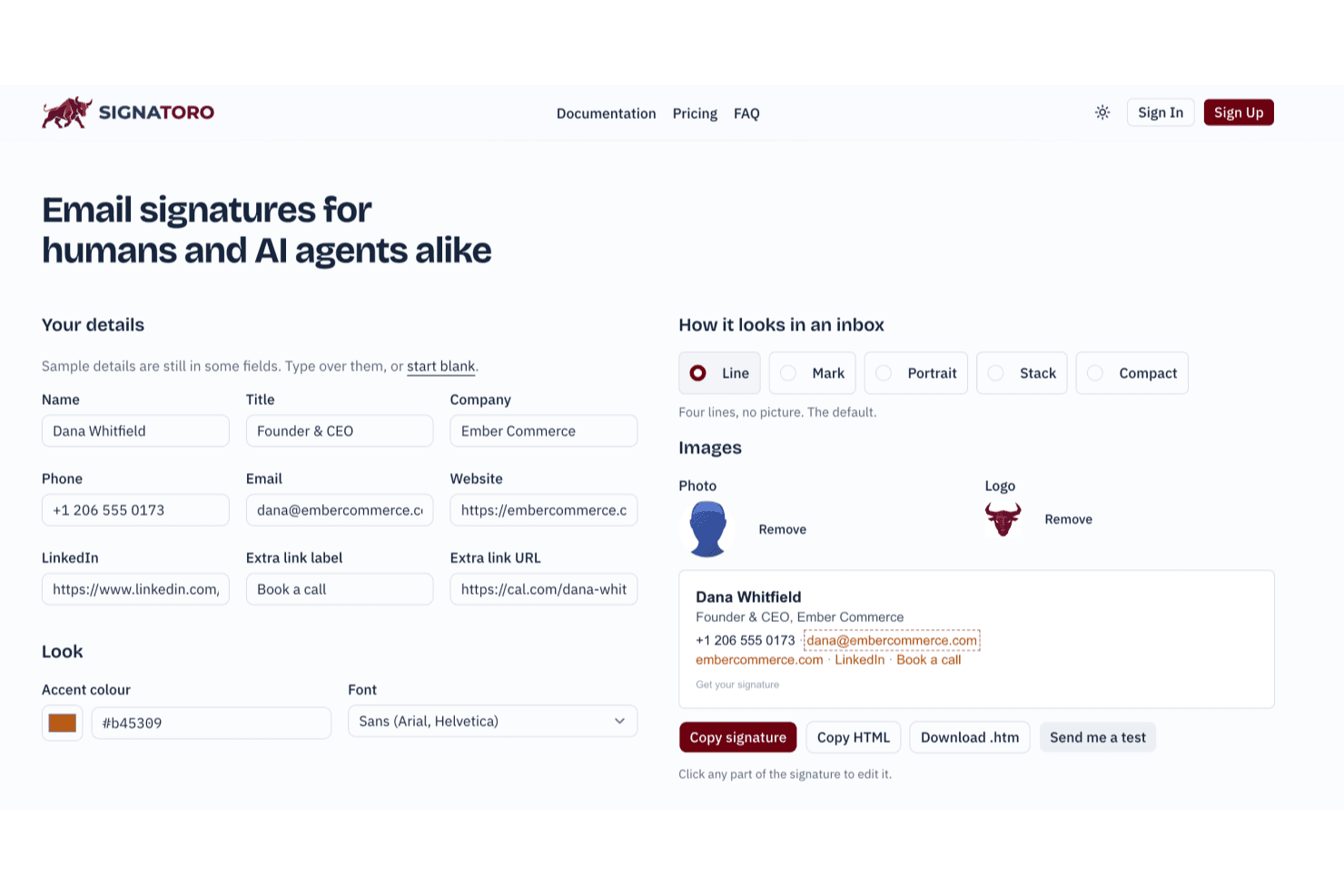
Signatoro lets users build and preview email signatures in real time. Signatoro is an email signature platform that lets individuals and small teams build, save, and deploy branded signatures across major mail apps, with native support for AI agents and automations fetching signatures via MCP and API.
Who Is Signatoro Best For?
Signatoro is a strong fit for small teams of 2–50 people who need branded signatures that AI agents and automations can fetch and use at send time.
Why I Picked Signatoro
I picked Signatoro as one of the best because it's the only tool in this category built with AI agents as a first-class use case. Via its MCP server, tools like Claude or ChatGPT can fetch a saved signature at send time as HTML or plain text, so every outbound message your agent sends carries the right branded signature automatically. Company owners also get dedicated AI agent slots (up to 25 on the largest plan), each with a configurable AI disclosure line baked in.
Signatoro Key Features
- Five signature layouts: Choose from Line, Mark, Portrait, Stack, and Compact layouts, each with font and accent color options.
- Review badge and booking button: Add a static Trustpilot, Google Reviews, or G2 badge alongside a Calendly or Cal.com booking button directly in your signature.
- Shared company branding controls: Company owners set the logo, layout, color, font, and review badge once, while each member keeps their own name, title, and photo.
- Compliance footnote with history: Add a legal or confidentiality footnote to all member signatures, with footnote-change history available on the largest team plan.
Signatoro Integrations
Signatoro offers a native Zoho Mail integration and supports MCP and API connections for AI assistants, including Claude and ChatGPT. Zapier is also listed among supported automation tools.
Pros and Cons
Pros:
- AI agents fetch signatures for outbound messages
- Consistent branding across teammates and devices
- Clean, polished signature layouts
Cons:
- Team updates require members to repaste signatures
- Limited layouts and styling choices
Learn more about Signatoro:

Bybrand offers quick, easy email signature management for small to medium businesses. Bybrand is an email signature management platform that lets you create, edit, and deploy professional signatures across your organization with centralized controls, template options, and integrations for popular email services.
Who Is Bybrand Best For?
Bybrand is a good fit for marketing and IT teams at small to mid-sized businesses that need to roll out consistent, branded email signatures across their organization.
Why I Picked Bybrand
Bybrand earns its spot on my shortlist because getting signatures deployed across a team genuinely takes minutes, not days. I like that you can start from one of 40+ pre-tested templates, fill in your details, and push the signature out to your whole team in a single session. The placeholder automation is what makes this fast at scale—you build one signature, add placeholders for names, titles, and contact details, then upload your employee list via CSV or a connected integration, and Bybrand populates everything at once. The bulk-send feature means I'm not manually updating each person's signature when something changes.
Bybrand Key Features
- Disclaimer editor: Add legally compliant disclaimer text to email signatures directly within the editor, keeping every outgoing message on the right side of compliance.
- Version history: Preview and restore any previous version of a signature within a 30-day window, so accidental edits can be undone.
- HTML editing mode: Edit signature code directly in HTML for precise customization beyond what the visual editor offers.
- Image hosting and asset storage: Store logos, icons, and images within Bybrand so linked assets stay live and consistent across all deployed signatures.
Bybrand Integrations
Bybrand offers native integrations with Google Workspace, Microsoft Outlook, Asana, Freshdesk, Zoho CRM, Google Sheets, Bitly, and Zoho Desk. An API is available for custom integrations.
Pros and Cons
Pros:
- Analytics for tracking effectiveness
- Efficient management tools
- Variety of templates
Cons:
- Basic customization options
- Limited advanced features
Learn more about Bybrand: Best for custom design options
- Free demo available
- From $54/month (billed annually)
Visit WebsiteCustomer Rating:4.6/5
Newoldstamp offers customizable email signature designs for branding-focused businesses. Newoldstamp is an email signature management platform that lets you create, customize, and centrally manage branded signatures with design tools, analytics, and marketing campaign features.
Who Is Newoldstamp Best For?
Newoldstamp is a good fit for marketing and IT teams at small to mid-sized businesses that need centralized control over company-wide email signatures.
Why I Picked Newoldstamp
I included Newoldstamp for the design control it offers without requiring coding or design skills. I particularly like the advanced template customization options—you can adjust fonts, colors, social icons, field order, and even fine-tune uploaded images by cropping, reshaping, or resizing them directly in the editor. The live preview lets you see every change in real time before deploying anything. For teams that need department-level signature layouts, Newoldstamp lets you build and manage distinct designs for each division.
Newoldstamp Key Features
- Master signature template: Design one master template and automatically apply it company-wide.
- Signature auto-update: Push changes to signature design, logos, and banners across the entire organization without requiring employees to reinstall anything.
- Banner campaign scheduling: Add promotional banners to employee signatures and schedule them for different segments to run targeted marketing campaigns.
- Campaign analytics: Track banner impressions, link clicks, and CTA performance in real time across departments.
Newoldstamp Integrations
Newoldstamp offers native integrations with Google Workspace (Gmail), Microsoft 365 (Outlook), and Apple Mail. An API is available for custom integrations.
Pros and Cons
Pros:
- Enhances brand identity
- Drag-and-drop editor
- Wide range of templates
Cons:
- May require frequent updates
- Limited advanced analytics
Learn more about Newoldstamp: Best for real-time analytics
- 14-day free trial
- Pricing upon request
Visit WebsiteCustomer Rating:4.8/5
Signitic enhances email signatures with analytics for marketing teams. Signitic is an email signature management platform that lets you centrally create, deploy, and manage branded signatures, run banner campaigns, and access analytics across Google Workspace and Microsoft 365.
Who Is Signitic Best For?
Signitic is a good fit for marketing and IT teams at small to mid-sized companies that need centralized control over employee email signatures across Google Workspace or Microsoft 365.
Why I Picked Signitic
Signitic earns its spot on my shortlist because of how well its real-time analytics tie directly into campaign management. I can track impressions, clicks, and interactions on each signature banner as they happen, which means I'm not waiting until a campaign ends to know whether a webinar promotion or product launch is landing. I also like that Signitic's A/B testing lets me run multiple banner versions simultaneously, so I can act on live performance data rather than guessing after the fact. The combination of real-time stats and campaign scheduling in one dashboard makes it genuinely useful for marketing teams running time-sensitive campaigns through email.
Signitic Key Features
- Drag-and-drop signature editor: Build and customize signatures by adding logos, banners, social network links, and CTAs without any coding.
- Management by team or entity: Assign different signature templates to specific departments, subsidiaries, or employee groups and apply rules per entity.
- Personalized targeting: Distribute banner campaigns by team, job function, or domain name to control which employees carry which message.
- Digital business cards (vCards): Create dynamic, always-up-to-date digital business cards that employees can share via QR code.
Signitic Integrations
Signitic offers native integrations with Google Workspace and Microsoft 365. An API is available for custom integrations.
Pros and Cons
Pros:
- Customizable promotional banners
- Detailed analytics reports
- Real-time engagement tracking
Cons:
- Data-heavy analytics dashboard
- Integration setup can be tricky
Learn more about Signitic:

Rocketseed streamlines email signature management for marketing teams. Rocketseed is an email signature management platform that lets you centrally control branded signatures, add marketing banners, and track engagement across Microsoft 365 and Google Workspace.
Who Is Rocketseed Best For?
Rocketseed is a strong fit for mid-size to enterprise businesses that need IT or marketing teams to manage email signatures centrally across large employee groups.
Why I Picked Rocketseed
Rocketseed earns a spot on my shortlist because it offers marketing teams far more than a standard signature. I love that you can run multiple live banner campaigns in rotation directly within employee email signatures—so if my team is promoting a product launch and a webinar, both can run at the same time. The advanced segmentation and recipient targeting rules let me assign specific banners based on sender role or recipient domain, so a sales rep's emails can carry a different campaign message than those from customer support. Additionally, campaign retargeting re-serves banners to recipients based on their previous click behavior, which helps nurture warm leads without extra effort.
Rocketseed Key Features
- Tamper-proof signature templates: Employees can't edit or override centrally managed signature designs, keeping every email on-brand.
- Active Directory sender data sync: Rocketseed pulls employee details directly from Active Directory to auto-populate signature fields across your organization.
- Real-time click alerts: Set click-throughs on signature banners to trigger instant email notifications to senders or campaign managers for immediate follow-up.
- Personalized email disclaimers: Add dynamically personalized, auto-date-stamped legal disclaimers to every signature for compliance and audit purposes.
Rocketseed Integrations
Rocketseed offers native integrations with Microsoft 365 and Google Workspace. An API is available for custom integrations.
Pros and Cons
Pros:
- Centralized management
- Real-time analytics
- Dynamic banner campaigns
Cons:
- Dependent on email platforms
- Limited to marketing use
Learn more about Rocketseed: Best for freelancers and small teams
- Free demo available
- From $6/user/month (billed annually)
Visit WebsiteCustomer Rating:4.4/5
MySignature simplifies email signature management for freelancers and small teams. MySignature is an email signature software platform that lets you create, customize, and manage professional signatures with templates, branding tools, and analytics for use across major email clients.
Who Is MySignature Best For?
MySignature is a good fit for freelancers and small teams who need a straightforward way to create and manage professional email signatures without a steep learning curve.
Why I Picked MySignature
I picked MySignature as one of the best because it's genuinely built with freelancers and small teams in mind. For freelancers specifically, I like that you can add a portfolio link, appointment scheduler URL, and social profile links directly into your signature—so every email you send doubles as a lightweight personal brand touchpoint. The email tracking feature is also a practical touch: I've used it to confirm whether a client actually opened an invoice before following up. For small teams, the one-click signature deployment lets you push a unified design to everyone at once, so you're not chasing teammates to manually update their signatures.
MySignature Key Features
- AI-powered signature enhancement: Open the signature editor and click "Enhance with AI" to get optimized layout and color suggestions for your signature design.
- Clickable CTA buttons and banners: Add interactive call-to-action buttons and promotional banners directly to your signature to link to landing pages, events, or offers.
- Digital business card with QR code: Create a digital business card, store it on iOS or Android, and share your contact details via QR code for in-person or virtual networking.
- Signature analytics dashboard: Track daily and monthly click performance across all links, banners, images, and buttons in your signature from a central dashboard.
MySignature Integrations
MySignature integrates with Gmail, Outlook, Apple Mail, Office 365, and Thunderbird.
Pros and Cons
Pros:
- Customizable templates
- Centralized signature management
- Simple drag-and-drop designer
Cons:
- Basic design features
Learn more about MySignature: Best for large-scale deployments
- 14-day free trial
- From $0.82/user/month (billed annually)

Exclaimer centralizes email signature management for large organizations. Exclaimer is an email signature management platform that lets you centrally design, control, and deploy branded signatures across Microsoft 365 and Google Workspace environments.
Who Is Exclaimer Best For?
Exclaimer is a strong fit for IT and marketing teams at mid-size to enterprise organizations that need centralized control over email signatures across large user bases.
Why I Picked Exclaimer
I picked Exclaimer as one of the best because it's genuinely built to handle signature management at scale in a way most tools aren't. The feature I keep coming back to is directory synchronization—Exclaimer pulls user data directly from Azure Active Directory or Google Directory and populates it into signatures in real time. That means when someone changes their title or department, every future email reflects it automatically, with no manual updates. I also like the advanced signature rules, which let my team assign different templates by department, region, seniority level, or business unit. For a global org managing multiple sub-brands or going through a merger, that kind of precision targeting is hard to replicate.
Exclaimer Key Features
- Drag-and-drop designer: Build and customize signature templates visually without writing any HTML code.
- Campaign scheduling: Schedule targeted banner campaigns within signatures, with personalized messaging timed to specific audiences.
- Role-based access controls (RBAC): Assign granular admin permissions so marketing or HR teams can manage their own signature designs without IT involvement.
- Analytics dashboard: Track email signature performance, including click-through data, directly within the platform.
Exclaimer Integrations
Exclaimer offers native integrations with Microsoft 365, Google Workspace, and Azure Active Directory. An API is available for custom integrations.
Pros and Cons
Pros:
- Advanced policy rules
- Centralized deployment system
- Extensive customization options
Cons:
- Limited offline functionality
- Can be complex to set up
Learn more about Exclaimer:

CodeTwo ensures compliant email signature management for large organizations. CodeTwo is an email signature management platform for Microsoft 365 and Exchange that lets you centrally design, deploy, and automate signatures with advanced compliance and rule-based controls.
Who Is CodeTwo Best For?
CodeTwo is a strong fit for IT administrators and compliance teams at mid-size to enterprise organizations running Microsoft 365 or Exchange environments.
Why I Picked CodeTwo
CodeTwo earns its spot on my shortlist because it's the only email signature solution that's been certified directly by Microsoft—meaning its cloud infrastructure is periodically pen-tested by Microsoft's own security specialists. That's a level of third-party validation I haven't seen from any other signature vendor. CodeTwo is also certified to ISO/IEC 27001 and ISO/IEC 27018, which means it meets internationally recognized standards for information security and personal data protection in the cloud. I also like that it automates legally required disclaimers across every outgoing email, helping organizations stay compliant with regulations like GDPR, HIPAA, and CASL without relying on individual users to do it themselves.
CodeTwo Key Features
- Rule-based signature assignment: Automatically apply different signatures based on sender, recipient, department, job title, or keywords in the email subject or body.
- Microsoft Entra ID sync: Pull user contact details and photos directly from Entra ID (Azure Active Directory), with attributes refreshed every 20 minutes to keep signatures current.
- Sent Items update: Display cloud-added signatures in users' Sent Items folders across all devices, supporting data retention and audit requirements.
- Email marketing scheduler: Plan and automate time-based email signature campaigns, with URL tagging to track results in web analytics platforms like Google Analytics.
CodeTwo Integrations
CodeTwo has native integrations across the Microsoft ecosystem, including Microsoft 365, Exchange, and Azure. An API is available for custom integrations.
Pros and Cons
Pros:
- Advanced rule settings
- Versatile signature templates
- Compliance-focused features
Cons:
- Requires IT expertise
- Complex setup process
Learn more about CodeTwo:
Diğer E-posta İmzası Yazılımları
Kısa listeme giremeyen ancak yine de göz atmaya değer bazı ek e-posta imzası yazılımı seçenekleri şunlardır:
- 11TemplafyBest for brand consistency
- 12LetsignitBest for easy user management
- 13XinkBest for small to medium businesses
- 14CrosswareBest for Exchange Server users
- 15SigsyncBest for Office 365 integration
- 16OpensenseBest for targeted email marketing
- 17HoneyBookBest for creative professionals and agencies
- 18WiseStampBest for enterprise organizations
How I Evaluate Email Signature Software
I split my evaluation into two layers: the baseline any tool must clear—like server-side deployment and email client support—and differentiators like campaign analytics and CRM sync.
Core Functionality (Table Stakes For This List)
When I'm selecting tools for my list, I rank each one on a scale from 0 (does not offer the functionality) to 5 (excels in this area) for each core functionality listed below. Then, I calculate the tool's total score into a percentage. Each tool needs to achieve a minimum total score of 65% to be considered for inclusion.
- Centralized Signature Management: I check whether admins can push signature updates to every user from a single console, so teams aren't chasing people to paste in new HTML.
- Email Client Integration: The tool should work across Microsoft 365, Google Workspace, and Exchange, since most organizations run at least two of these.
- Brand & Template Control: I look for locked templates with field mapping to directory attributes like name, title, and department to keep every signature on-brand.
- Marketing Banner Campaigns: Scheduling and rotating promotional banners within signatures matters here, whether you're promoting a webinar, a product launch, or a seasonal offer.
- Analytics & Click Tracking: Reporting on banner impressions and click-through rates tells you whether your signature campaigns actually drive engagement or just take up space.
- User Segmentation & Targeting: I evaluate how each tool assigns different signatures or campaigns to specific groups, such as giving your sales team one banner and your support team another.
Once I have a list of tools that meet the criteria, I consider what sets each platform apart.
Differentiating Factors (What Sets Vendors Apart)
Here's how I compare and contrast different vendors:
Standout Features
CRM and MAP sync is a big differentiator for me. I want to see signature-driven clicks flow into platforms like Salesforce or HubSpot so marketing can attribute pipeline to a specific banner campaign. ABM capabilities also matter—tools that let you serve tailored banners to target accounts rather than blasting the same promo to every recipient give demand gen teams a real edge. I also check for embedded scheduling links, which turn every outbound email into a booking opportunity with click data tied back to campaign reporting.
Beyond Features
Deployment model matters more than most buyers expect. Server-side injection ensures signatures render consistently across desktop, webmail, and mobile—client-side tools often break on phones. I also evaluate compliance posture, especially GDPR readiness and SOC 2 certification, since signature data touches every outbound email your organization sends. Implementation speed is another factor I weigh. Marketing teams rolling out a campaign for a product launch can't wait weeks for directory sync setup, so I look at how quickly Azure AD or Google Directory integrations go live.
E-posta İmzası Yazılımı Nasıl Seçilir
Uzun özellik listeleri ve karmaşık fiyatlandırma yapıları içinde kaybolmak kolaydır. Kendinize özgü yazılım seçimi sürecinizde ilerlerken odağınızı korumanıza yardımcı olmak için göz önünde bulundurmanız gereken faktörlerin bir kontrol listesi aşağıdadır:
| Faktör | Dikkat Edilmesi Gerekenler |
| Ölçeklenebilirlik | Performanstan ödün vermeden daha fazla kullanıcıyı destekleyerek ekibinizle sorunsuz şekilde ölçeklenebilen bir yazılım seçin. |
| Entegrasyonlar | Yazılımın mevcut e-posta platformunuzla ve günlük olarak kullandığınız diğer araçlarla entegre olup olmadığını kontrol edin. |
| Kullanım Kolaylığı | Ekibiniz için kapsamlı bir eğitim gerektirmeden hızlı uygulamaya olanak tanıyan sezgisel bir arayüz arayın. |
| Bütçe | Finansal kısıtlarınıza uygun olanı bulmak için fiyatlandırma planlarını karşılaştırdığınızdan emin olun. Buna toplam maliyet, gizli ücretler vb. dahildir. |
| Güvenlik Önlemleri | Hassas şirket bilgilerini koruyan ve veri düzenlemelerine uyan yazılımlara öncelik verin. |
| Destek | Yazılımın sunduğu müşteri desteği seçeneklerini değerlendirdiğinizden emin olun. 7/24 hizmet sunuyorlar mı, yoksa kendileriyle iletişime geçmek zor mu? |
| Analizler | Etkinliği ölçmek için tıklama oranları gibi imza performansına ilişkin içgörüler sunan araçları değerlendirin. |
E-posta İmzası Yazılımındaki Trendler
Araştırmam sırasında farklı e-posta imzası yazılımı sağlayıcılarından sayısız ürün güncellemesi, basın bülteni ve sürüm günlüğü derledim. Takip ettiğim yeni trendlerden bazıları şunlar:
- Dinamik İçerik Kişiselleştirme: Daha fazla tedarikçi, alıcının profiline göre değişen dinamik içerikler sunuyor. Bu trend, işletmelerin iletişimlerinde daha kişiselleştirilmiş bir yaklaşım sergilemesine yardımcı oluyor. Örneğin imzalar artık hedeflenmiş pazarlama mesajları, harekete geçirici mesajlar veya özel teklifler içerebiliyor.
- Gelişmiş Analiz ve Raporlama: E-posta imzası araçları, etkileşim ve performans hakkında giderek daha ayrıntılı analizler sunuyor. Bu trend, işletmelerin imzalarındaki hangi unsurların en fazla etkileşimi sağladığını takip etmesine olanak tanıyor.
- CRM Sistemleriyle Entegrasyon: Bazı tedarikçiler, CRM sistemleriyle sorunsuz entegrasyona odaklanıyor. Bu trend, pazarlama çalışmalarını satış verileriyle uyumlu hâle getirmek ve ekiplerin müşteri etkileşimlerini kapsamlı bir şekilde görmesini sağlamak açısından faydalı.
- Gelişmiş Güvenlik Özellikleri: Veri gizliliği kuruluşlar için daha önemli hâle geldikçe e-posta imzası araçları gelişmiş güvenlik önlemlerini bünyelerine katıyor. Bu özellikler, imzaların GDPR gibi düzenlemelere uygun olmasını ve hassas bilgilerin korunmasını sağlıyor.
- AI Destekli İmza Tasarımı: AI, marka yönergelerine ve kullanıcı tercihlerine göre imza tasarımları önermek için kullanılıyor. Bu trend, kullanıcıların profesyonel görünümlü imzalar oluşturmasına yardımcı oluyor.
E-posta İmzası Yazılımı Nedir?
E-posta imzası yazılımı, işletmelerin kuruluş genelinde profesyonel e-posta imzaları oluşturmasına ve yönetmesine yardımcı olan bir araçtır. Pazarlama ekipleri, BT yöneticileri ve satış profesyonelleri bu araçları genellikle marka ve iletişim tutarlılığını sağlamak için kullanır.
Dinamik içerik kişiselleştirme, gelişmiş analiz ve CRM sistemleriyle entegrasyon gibi temel özellikler; kişiselleştirme, performans takibi ve pazarlama çalışmalarının uyumlu hâle getirilmesine yardımcı olur. Genel olarak bu araçlar, işletmelere gönderdikleri her e-postada tutarlı ve profesyonel bir marka imajını koruma olanağı sunar.
E-posta İmzası Yazılımının Özellikleri
E-posta imzası yazılımı seçerken aşağıdaki temel özelliklere dikkat edin:
- Dinamik İçerik Kişiselleştirme: İmzaların alıcı profillerine göre değişmesine olanak tanıyarak e-postalara kişiselleştirilmiş bir dokunuş ekler.
- Merkezi Yönetim: Bir kuruluş genelindeki tüm e-posta imzalarını güncellemek ve yönetmek için tek bir platform sunar.
- Şablon Özelleştirme: Markanın özgün tarzına uyacak şekilde düzenlenebilen çeşitli e-posta imzası şablonları sunar.
- Analiz ve Raporlama: E-posta imzalarının etkinliğini ölçmeye yardımcı olmak için tıklama oranları gibi etkileşim ölçümlerini takip eder.
- CRM Sistemleriyle Entegrasyon: E-posta iletişimlerini satış ve pazarlama çalışmalarıyla uyumlu hâle getirmek için CRM platformlarıyla senkronize olur.
- Gelişmiş Güvenlik Özellikleri: Veri düzenlemelerine uygunluğu sağlar ve e-posta imzalarındaki hassas bilgileri korur.
- AI Destekli Tasarım Önerileri: Marka yönergeleri ve kullanıcı tercihleriyle uyumlu imza tasarımları önermek için AI kullanır.
- Gerçek Zamanlı Güncellemeler: Değişiklikleri tüm imzalara anında uygular ve tüm iletişimlerde tutarlılık sağlar.
- Kurallara Dayalı İmzalar: Kuruluş içindeki farklı departmanlar veya roller için farklı imzalar kullanılmasına olanak tanır.
- İşe Alıştırma ve Destek Araçları: Yazılıma geçişi ve yazılımın kullanımını kolaylaştırmak için eğitim videoları, ürün tanıtımları ve destek seçenekleri içerir.
E-posta İmzası Yazılımının Faydaları
E-posta imzası yazılımını uygulamak, ekibiniz ve işletmeniz için çeşitli faydalar sağlar. Yararlanabileceğiniz birkaç fayda şunlardır:
- Tutarlı Markalama: Kuruluş genelinde tek tip e-posta imzaları kullanarak her e-postanın marka kimliğinizi yansıtmasını sağlar.
- Geliştirilmiş Pazarlama Erişimi: Etkileşimi artırmak ve daha etkili bir şekilde daha geniş kitlelere ulaşmak için dinamik içeriklerden ve kişiselleştirilmiş imzalardan yararlanır.
- Gelişmiş Güvenlik Uyumluluğu: Hassas verileri korumak ve düzenlemelere uymak için gelişmiş güvenlik özelliklerini entegre eder.
- Zamandan Tasarruf Sağlayan Yönetim: Kontrolü merkezileştirerek manuel müdahaleye gerek kalmadan imzaların hızlıca güncellenmesine ve dağıtılmasına olanak tanır.
- Artırılmış Verimlilik: İmza oluşturma sürecini hızlandırmak için AI destekli tasarım önerileri ve özelleştirilebilir şablonlar sunar.
- Uygulanabilir İçgörüler: E-posta imzası oluşturucusunun performansını takip etmek ve bilinçli pazarlama kararları almak için analiz ve raporlama olanağı sağlar.
- Satışlarla Daha İyi Uyum: E-posta iletişimlerinin satış ve pazarlama stratejileriyle senkronize olmasını sağlamak için CRM sistemleriyle entegre olur.
E-posta İmzası Yazılımının Maliyetleri ve Fiyatlandırması
E-posta imzası yazılımını seçmek, mevcut çeşitli fiyatlandırma modellerini ve planları anlamayı gerektirir. Maliyetler özelliklere, ekip büyüklüğüne, eklentilere ve daha fazlasına göre değişir. Aşağıdaki tablo, e-posta imzası yazılımı çözümlerinde yaygın planları, ortalama fiyatlarını ve genellikle sunulan özellikleri özetlemektedir:
E-posta İmzası Yazılımı İçin Plan Karşılaştırma Tablosu
| Plan Türü | Ortalama Fiyat | Yaygın Özellikler |
| Ücretsiz Plan | $0 | Temel şablonlar, sınırlı özelleştirme ve temel destek. |
| Kişisel Plan | $5-$15/kullanıcı/ay | Özelleştirilebilir şablonlar, analizler ve e-posta platformu entegrasyonu. |
| İşletme Planı | $15-$30/kullanıcı/ay | Merkezi yönetim, dinamik içerik ve gelişmiş güvenlik özellikleri. |
| Kurumsal Plan | $30-$50/kullanıcı/ay | Gelişmiş analizler, CRM entegrasyonu, kural tabanlı imzalar ve öncelikli destek. |
E-posta İmzası Yazılımı Hakkında SSS
E-posta imzası yazılımı hakkında sık sorulan bazı soruların yanıtları:
E-posta imzalarının sınırlamaları nelerdir?
E-posta imzası sınırlamaları çoğunlukla e-posta istemcileri tarafından uygulanan boyut ve içerik kısıtlamalarıyla ilgilidir. Örneğin Gmail, en fazla 10.000 karaktere izin verir ve görsellerin yaklaşık 80 piksel yüksekliğinde olmasını önerir. Bu sınırları anlamak, farklı platformlarda doğru şekilde görüntülenen imzalar oluşturmanıza yardımcı olur.
E-posta imzasında yasal olarak hangi bilgiler bulunmalıdır?
Özel e-posta imzaları için yasal gereklilikler yargı bölgesine göre değişebilir; ancak genellikle şirket adı, kayıt numarası ve kayıtlı ofis adresini içerir. Bu unsurların eklenmesi, ticari düzenlemelere uyulmasını sağlar ve alıcılara profesyonel bir imaj sunar.
E-posta imzasına neler eklenemez?
Tüm e-posta istemcilerinde düzgün görüntülenmeyebilecek logoları, sosyal medya simgelerini, pazarlama banner’larını veya grafikleri kullanmaktan kaçınmak en iyisidir. Birçok e-posta istemcisi bu görselleri ek olarak depolayabilir ve bu da iletişimi karmaşıklaştırabilir. Bunun yerine, profesyonel imzanın temiz ve işlevsel kalması için metne ve köprülere odaklanın. E-postalarınızın tasarladığınız şekilde gelen kutusuna teslim edildiğinden emin olmak için bir e-posta test yazılımı kullanın.
E-posta imzasında nelerden kaçınılmalıdır?
İmzanın karmaşık görünmesine neden olabilecek gereksiz iletişim bilgilerini, özel yazı tiplerini veya birden fazla rengi eklemekten kaçının. İmzanızı çok fazla bilgiyle doldurmak, ana mesajdan uzaklaştırabilir. Temel iletişim bilgileriyle yetinin ve sade, profesyonel bir görünüm koruyun.
E-posta imzası yazılımı marka bilinirliğini nasıl geliştirebilir?
E-posta imzası yazılımı, imza biçimini standartlaştırarak tüm e-posta iletişimlerinde tutarlı marka kullanımı sağlamaya yardımcı olur. beyaz etiketli e-posta pazarlama yazılımı ile birlikte kullanıldığında marka renklerinin, yazı tiplerinin ve logolarının eklenmesine olanak tanır; böylece her işletme e-postası şirketinizin imajı ve mesajlarıyla uyumlu olur.
E-posta imzalarının mobil uyumlu olmasını nasıl sağlayabilirim?
E-posta imzalarının mobil uyumlu olmasını sağlamak için tasarımı sade ve duyarlı tutun. Ölçeklenebilir görseller kullanın ve küçük ekranlarda düzgün görüntülenmeyebilecek geniş düzenlerden kaçının. İmzanızı çeşitli cihazlarda test etmek, her yerde iyi görünmesini sağlamaya yardımcı olabilir.