

Yapay zekâ video oluşturma yazılımları; düzenleme, görseller, seslendirmeler ve hatta senaryoları yönetmek için yapay zekâ kullanarak otomatik olarak videolar oluşturmanıza olanak tanır. En iyi yapay zekâ video oluşturma araçlarını arıyorsanız muhtemelen pazarlama, eğitim veya sosyal medya için profesyonel görünümlü videoları daha hızlı ve kolay bir şekilde üretmeyi amaçlıyorsunuz. Bu listede hangi platformların video oluşturmayı daha akıllı hâle getirdiğini, güçlü yönlerini iş akışınıza nasıl uyarlayacağınızı ve ekibiniz için bu 2026 doğru aracı seçmek adına bilmeniz gerekenleri keşfedeceksiniz.
Why Trust Our Software Recommendations
6,700+
Reviews
20
Industry experts
16+
Evaluation factors
14
Years
Our team has been testing and reviewing software since 2012. As marketing leaders ourselves, we know how difficult—and important—it is to choose the right software.
For this guide, we evaluated tools using hands-on testing and independent research, scoring tools using our selection criteria.
Our reviews reflect our human editorial judgment, not a sales pitch.
Expert reviewers:
 Gui DrusinaCreative Director
- Shriya GhateSenior Marketing Lead
 Amanda JacquesMarketing Ops Leader

Yapay Zekâ Video Oluşturma Yazılımları Karşılaştırma Tablosu
Bu karşılaştırma tablosu, en iyi yapay zekâ video oluşturma yazılımı seçimlerim için fiyatlandırma ayrıntılarını özetlemektedir:
Sorted by: Default
| Tool | Starting Price | Website | |
|---|---|---|---|
Best for walkthrough videos without voice recording | 5.0 out of 5 | $29/creator/month Free plan + free demo available | Website |
Best for personalized training videos | 4.6 out of 5 | $59/month Free plan available | Website |
Best for animating still photos into video | 4.6 out of 5 | $4.70/month 14-day free trial | Website |
Best for instant video production from PPTs | 4.3 out of 5 | $24/month Free plan available | Website |
Best for customizable video templates | Not rated | $17/month Not available | Website |
Best for team-based visual branding | 4.6 out of 5 | $144/user/year Free plan + free trial available | Website |
Best for turning scripts into video highlights | 4.8 out of 5 | $29/month Free trial available | Website |
Best for fast subtitle generation | 4.5 out of 5 | $12/user/month Free plan available | Website |
Best for creating lifelike AI presenters | Not rated | $14/month Free plan + free demo available | Website |
Best for multilingual talking avatars | Not rated | $24/month Free plan available | Website |


En İyi Yapay Zekâ Video Oluşturma Yazılımları İncelemeleri
Aşağıda, kısa listeme giren en iyi yapay zekâ video oluşturma yazılımlarının ayrıntılı özetlerini bulabilirsiniz. İncelemelerim, size en uygun olanı bulmanıza yardımcı olmak için her platformun özelliklerine, yeteneklerine ve en iyi kullanım alanlarına ayrıntılı bir bakış sunuyor.
 Best for walkthrough videos without voice recording
- Free plan + free demo available
- From $29/creator/month (billed annually)
Visit WebsiteCustomer Rating:5/5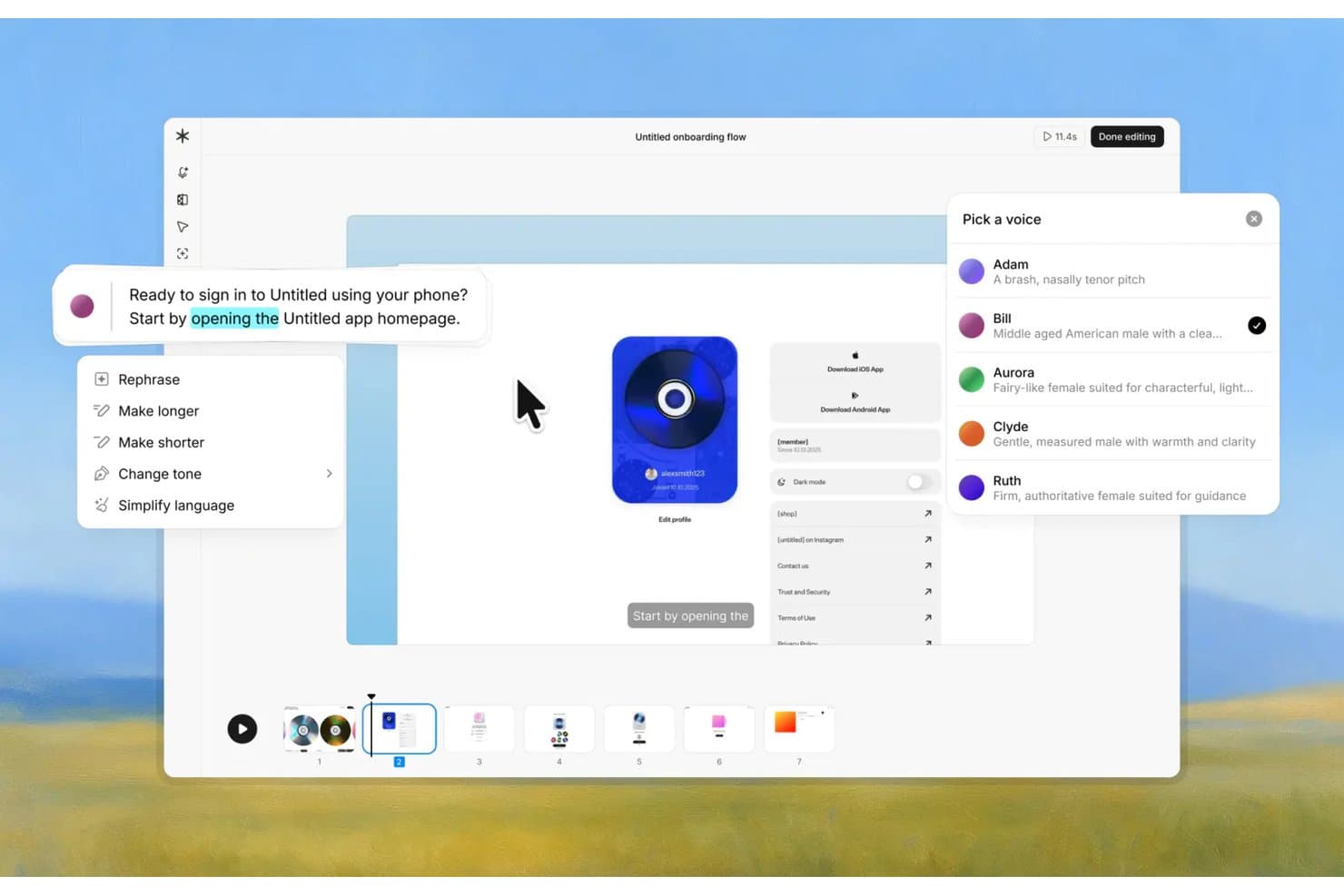
Guideless lets users pick AI voices and edit script text for video guides. Guideless is an AI video tool that turns recorded browser workflows into narrated software walkthrough videos and step-by-step written guides, with automatic captions, voiceovers, and smart zoom highlights.
Who Is Guideless Best For?
Guideless is a strong fit for product and customer success teams that need to turn browser-recorded workflows into polished, narrated training videos without scripting or recording their own voice.
Why I Picked Guideless
I picked Guideless as one of the best because it's the only tool I've found that turns a recorded browser workflow into a fully narrated training video without you ever touching a microphone. You run the Chrome extension, click through your software process, and Guideless writes the narration, generates an AI voiceover in 40+ languages, and applies smart zoom highlights to each step automatically. Its "living guide" model lets you update only the steps that changed and regenerate their voiceover without re-recording the whole thing.
Guideless Key Features
- AI rewrite presets: Apply one-click options like Shorten, Make More Descriptive, or SEO Optimize to individual steps or the full guide transcript.
- Blur and annotation tools: Mark up screenshots or blur sensitive information directly within the editor before publishing.
- Multi-format export: Publish finished guides as MP4 video (up to 4K), PDF, or Markdown for use in Notion, GitHub, or help centers.
- Guide analytics: Track views, play rate, completion, and drop-off points at both the guide and workspace level.
Guideless Integrations
Guideless supports integrations with Slack, Notion, and Confluence for sharing software guides.
Pros and Cons
Pros:
- Exports narrated walkthroughs and written guides
- Living guides update changed steps without rerecording
- Natural-sounding AI voiceovers need little editing
Cons:
- No avatars, timeline editing, or social formats
- Browser workflows only, not general video generation
Learn more about Guideless: Best for personalized training videos
- Free plan available
- From $59/month (billed annually)
Visit WebsiteCustomer Rating:4.6/5
Colossyan offers an AI video creator and course builder dashboard with templates for employee onboarding and internal communications training. Colossyan is an AI video creation platform that focuses on generating professional training and instructional videos with customizable AI presenters, multi-language support, and scenario-based video editing.
Who Is Colossyan Best For?
Corporate learning and development teams who need to create interactive training videos tailored for employee onboarding, skills development, or compliance programs.
Why I Picked Colossyan
I picked Colossyan as one of the best because I can create highly personalized training videos using its AI presenters, auto-translate scripts for multilingual teams, and adapt video scenarios for different learning needs.
Colossyan Key Features
- Script collaboration: Invite teammates to edit and comment on scripts together in real time.
- Video length settings: Set and adjust video duration for any project.
- Multiple slide support: Combine several slides and scenes in a single video.
- Brand kit uploads: Upload your own brand logos, colors, and fonts for consistent branding.
Colossyan Integrations
Integrations include SCORM export, Zapier, and YouTube. A custom API is available for custom integrations.
Pros and Cons
Pros:
- Customizable avatars with expressive gestures
- Auto-translation supports dozens of languages
- Scenario-based branching for interactive training videos
Cons:
- Limited scene-by-scene editing flexibility
- AI-generated voices can sound robotic
Learn more about Colossyan: 3Best for animating still photos into video
D-ID
- 14-day free trial
- From $4.70/month (billed annually)
Visit WebsiteCustomer Rating:4.6/5
D-ID offers an AI video creation interface where users can select a digital presenter, type a script, choose language and voice settings, and generate a talking-head video. D-ID is an AI video creation platform that specializes in animating still photos, generating digital presenters, and turning written text into video content with lifelike movement.
Who Is D-ID Best For?
Creative teams and content marketers at agencies or brands who want to produce engaging video from static images without complex production resources.
Why I Picked D-ID
I picked D-ID because I like how quickly I can animate still photos into video clips, using lifelike AI-driven expressions and synced lip movements from a text or audio script. My team often uses its Creative Reality Studio to turn static portraits into engaging explainer or training content.
D-ID Key Features
- API access: Integrate photo animation and video creation into your existing platforms.
- Batch processing: Upload and animate multiple images in a single workflow.
- Customized AI avatars: Generate branded digital presenters for your videos.
- Multilingual voice support: Create videos using different languages and accents.
D-ID Integrations
Integrations include Canva, PowerPoint, TikTok, Facebook, Instagram, LMS systems, stock media, and API support.
Pros and Cons
Pros:
- Handles multiple languages and voice cloning
- Supports text-to-video with AI avatars
- Animates still photos with realistic movement
Cons:
- No built-in stock media assets
- Limited avatar gesture control options
Learn more about D-ID: Best for instant video production from PPTs
- Free plan available
- From $24/month (billed annually)
Visit WebsiteCustomer Rating:4.3/5
AI Studios is an AI video platform for creating avatar-led videos from scripts and presentations. AI Studios is an AI video creation platform where you can generate videos from scripts, use customizable AI avatars, and convert presentation files directly into narrated video content.
Who Is AI Studios Best For?
Training and internal communications teams who want to quickly turn presentations into AI-narrated videos.
Why I Picked AI Studios
I picked AI Studios because I can upload a PowerPoint file and automatically generate a full-length AI-narrated video, complete with avatars and scene transitions. My team uses its PPT-to-video workflow whenever we need to deliver dynamic training or explainer content fast.
AI Studios Key Features
- Custom AI avatars: Create and personalize digital presenters for your videos.
- Script-based video editing: Modify or generate video content directly from text input.
- Multilingual voice synthesis: Produce narrated videos in a wide range of languages.
- Template library: Access pre-made layouts and styles for faster video creation.
AI Studios Integrations
Integrations include ElevenLabs. A custom API is available for custom integrations.
Pros and Cons
Pros:
- Multilingual voiceover and subtitle support
- Offers diverse AI avatars for narration
- Converts PowerPoint files directly to video
Cons:
- Avatar gestures and expressions feel restricted
- Limited editing options after video generation
Learn more about AI Studios: Best for customizable video templates
- Not available
- From $17/month (billed annually)

InVideo offers a template library with 100+ options including sport, fashion, real estate, and lifestyle templates to jumpstart AI video creation. InVideo is a cloud-based AI video creation platform with a strong focus on customizable templates, drag-and-drop editing, text-to-video generation, stock media, and AI-powered video assistant features.
Who Is InVideo Best For?
Marketing teams and small businesses looking to produce branded social media or promotional videos using a wide range of customizable templates.
Why I Picked InVideo
I picked InVideo as a top contender because I can access thousands of professionally designed video templates, swap media and text in seconds, and use AI-powered recommendations to customize scenes for different brand and content needs.
InVideo Key Features
- AI script generator: Create video scripts from simple prompts or keywords.
- Text-to-video functionality: Quickly convert written text into animated video content.
- Built-in stock media library: Access millions of royalty-free images, video clips, and music tracks.
- Automated voiceovers: Generate realistic AI voiceovers in multiple languages and accents.
InVideo Integrations
InVideo offers native integrations with Pexels, Pixabay, and Unsplash for stock media access. An API is available for custom integrations.
Pros and Cons
Pros:
- Built-in access to extensive stock footage
- AI-powered text-to-video conversion is fast
- Wide selection of dynamic video templates
Cons:
- AI voiceover quality varies by language
- Scene-by-scene editing options are basic
Learn more about InVideo: Best for team-based visual branding
- Free plan + free trial available
- From $144/user/year (billed annually)
Visit WebsiteCustomer Rating:4.6/5
Canva offers an AI-powered video creation interface where users can generate B-roll footage using text prompts and browse video search results directly within the editor. Canva is an online design platform that lets you create, edit, and collaborate on videos, social graphics, presentations, and branded content with AI-powered design tools and templates.
Who Is Canva Best For?
Marketing teams and creative departments in small to midsize companies who need to collaborate on brand assets and video content.
Why I Picked Canva
I picked Canva as one of the best because I can manage brand assets, assign team permissions, and create reusable video and design templates that help our entire team collaborate on branded visual content for all our channels.
Canva Key Features
- AI video generator: Produce videos directly from text and media prompts using built-in AI tools.
- Animation controls: Animate individual elements or complete scenes with timeline editing.
- Stock content library: Access millions of royalty-free stock videos, audio, and images for your projects.
- One-click background removal: Remove backgrounds from video and image assets instantly with AI-powered tools.
Canva Integrations
Canva offers native integrations with Google Drive, Dropbox, Meta, YouTube, Slack, LinkedIn, HubSpot, Mailchimp, OneDrive, Pinterest, and Zapier. An API is available for custom integrations.
Pros and Cons
Pros:
- Quick video resizing for social platforms
- Easy brand kit setup for multiple teams
- Wide variety of AI-powered video templates
Cons:
- No support for AI-generated voiceovers
- Limited advanced video editing tools
Learn more about Canva: Best for turning scripts into video highlights
- Free trial available
- From $29/month
Visit WebsiteCustomer Rating:4.8/5
Pictory is an AI video platform that turns long-form content into short, shareable videos. Pictory is an AI video creation software that lets you transform long-form scripts and video content into short, engaging video highlights using text-to-video technology, automatic scene selection, and subtitle generation.
Who Is Pictory Best For?
Marketing and content teams who need to convert blog posts, webinars, or scripts into short-form video clips for digital channels.
Why I Picked Pictory
I picked Pictory as one of the best because I can upload a script and the platform turns it into video highlights, automatically matching scenes and generating subtitles for social sharing. I like that it pulls visual assets directly from your text.
Pictory Key Features
- Bulk video creation: Produce multiple videos at once from a list of scripts.
- Automatic video summarization: Generate concise highlight reels from long-form videos.
- Caption and subtitle editing: Customize and fine-tune captions and subtitles before export.
- Stock media library access: Search and use royalty-free images, videos, and music directly within the platform.
Pictory Integrations
Pictory offers native integrations with Hootsuite and YouTube. An API is available for custom integrations.
Pros and Cons
Pros:
- Auto-captions with manual editing control
- Bulk video creation from multiple scripts
- Scene detection quickly identifies key moments
Cons:
- AI voices sometimes lack natural tone
- Limited control over advanced video editing
Learn more about Pictory: 8Best for fast subtitle generation
VEED
- Free plan available
- From $12/user/month
Visit WebsiteCustomer Rating:4.5/5
VEED is a browser-based AI video platform for editing, subtitles, transcription, and voice generation. VEED is an online AI video creation platform offering automated video transcription, subtitle generation, audio enhancement, AI video editing, and text-to-speech features in a browser-based workspace.
Who Is VEED Best For?
Video editors, marketers, and social media managers who need fast, automated subtitle and transcription workflows for global video distribution.
Why I Picked VEED
I picked VEED as one of the best for fast subtitle generation because I can instantly auto-generate and edit subtitles, convert speech to text with high accuracy, and export subtitles in multiple formats suitable for YouTube, LinkedIn, and other platforms.
VEED Key Features
- AI video generator: Create new videos from text or prompts using AI automation.
- Green screen editor: Remove and replace video backgrounds directly in your browser.
- Text-to-speech tool: Instantly generate voiceovers from written scripts in multiple languages.
- Video noise reduction: Remove unwanted background noise from audio tracks in your videos.
VEED Integrations
VEED offers native integrations with YouTube, Zoom, Google Drive, and Dropbox. An API is available for custom integrations.
Pros and Cons
Pros:
- Browser-based video creation and editing
- Fast AI-driven transcription processing
- Supports multiple languages for subtitles
Cons:
- No advanced animation or motion graphics
- Limited manual video editing controls
Learn more about VEED: Best for creating lifelike AI presenters
- Free plan + free demo available
- From $14/month (billed annually)

Synthesia offers a dashboard with featured templates and recent AI-generated videos for quick video creation and management. Synthesia is an AI video creation platform where you generate videos from text using customizable avatars, automated voiceovers, and multiple language options.
Who Is Synthesia Best For?
Corporate trainers, marketers, and learning teams who need video content with AI-generated presenters across multiple languages.
Why I Picked Synthesia
I picked Synthesia as one of the best because I can generate videos with digital presenters who look alarmingly real, match voices to 120+ languages, and swap presenters or scripts in minutes for quick updates.
Synthesia Key Features
- Template library: Choose from a large collection of ready-made video templates.
- Screen recording: Capture your screen to add product demos or software walkthroughs.
- Built-in media assets: Access stock images, icons, and background music within the editor.
- Video collaboration tools: Invite teammates to review, comment, and edit projects together.
Synthesia Integrations
Synthesia offers native integrations with 360Learning, HubSpot, Shopify, WordPress, Workato, YouTube, and Zingly. PowerPoint import is available, and an API is available for custom integrations.
Pros and Cons
Pros:
- Script changes update videos instantly
- Supports video generation in over 120 languages
- Digital avatars mimic real presenters convincingly
Cons:
- No built-in interactive video elements
- Limited customization of avatar appearance
Learn more about Synthesia:

HeyGen offers a Video Agent interface that turns ideas into production-ready AI videos using avatars, brand assets, and community style templates. HeyGen is an AI video creation platform that lets you generate talking avatar videos, convert text to speech in multiple languages, and customize video scenes with ease.
Who Is HeyGen Best For?
Marketers and learning teams who need engaging talking avatar videos for audiences in multiple languages.
Why I Picked HeyGen
I picked HeyGen as one of the best because I can create multilingual talking avatar videos by uploading a script and choosing from 300+ avatars, then instantly translate content for global audiences in more than 40 languages.
HeyGen Key Features
- Custom avatar creation: Generate your own avatar using a video upload and voice sample.
- AI video generator: Produce videos directly from scripts with automatic scene composition.
- Expanded stock assets: Access thousands of royalty-free images, videos, and background tracks.
- Collaboration workspace: Invite and manage multiple team members on shared video projects.
HeyGen Integrations
HeyGen offers native integrations with Canva, Zapier, and provides an API for custom integrations.
Pros and Cons
Pros:
- Real-time script editing updates video instantly
- Custom avatar creation from user video uploads
- Multilingual avatar lip-sync is highly accurate
Cons:
- Advanced brand customization features are missing
- Limited control over avatar gestures and movement
Learn more about HeyGen:
Diğer Yapay Zekâ Video Oluşturma Yazılımları
İşte kısa listeme giremeyen ancak yine de göz atmaya değer bazı ek yapay zekâ video oluşturma yazılımı seçenekleri:
- 11Hour OneBest for generating talking head updates
- 12CaptionsBest for auto-captioned video reels
- 13Lumen5Best for fast blog-to-video transformation
- 14Steve AIBest for transforming blogs into animated videos
- 15ElaiBest for building localized video content at scale
- 16Vidnoz AIBest for voice cloning for synthetic voices
- 17CreatifyBest for ecommerce product demo videos
- 18AkoolBest for face-swapping in marketing videos
- 19ChatGPTBest for generating video scripts and storyboards
- 20JoggAIBest for script-based avator video creation
How I Evaluate AI Video Creation Software
To make this list, a tool needs to deliver real, measurable AI value—whether that's turning a blog post into a polished social video or generating a localized avatar-led ad without a single camera. I evaluate every tool across two layers: the core functionality it must offer to qualify, and the differentiating factors that separate the best options from the rest.
Core Functionality (Table Stakes For This List)
When I'm selecting tools for my list, I rank each one on a scale from 0 (does not offer the functionality) to 5 (excels in this area) for each core functionality listed below. I then calculate the tool's total score into a percentage, using 75% as a benchmark to help assess its overall fit for the list.
- AI Video Generation: I look for how many input types a platform supports—text prompts, pasted scripts, blog URLs, uploaded docs—and whether it produces coherent scenes with matched visuals and pacing.
- AI Avatars or Voiceovers: The avatar library size, realism of lip-sync and gestures, and availability of custom or cloned avatars all factor into my evaluation here.
- Text-to-Speech & Multilingual Support: I check language count, voice variety per language, and whether the TTS output sounds natural enough to use in customer-facing campaigns without re-recording.
- Template & Scene Library: A strong template library should be categorized by use case—ads, product demos, social posts—and include integrated stock footage, images, and music tracks.
- AI Editing Automation: I evaluate how many editing tasks the platform handles automatically, from auto-captioning and aspect ratio resizing to filler-word removal and smart scene trimming.
- Brand Customization & Export: Saved brand kits with logos, fonts, and color palettes that auto-apply across new projects matter here, along with export options covering multiple resolutions and aspect ratios for channels like TikTok, LinkedIn, and YouTube.
Once I have a list of tools that meet the criteria, I consider what sets each platform apart.
Differentiating Factors (What Sets Vendors Apart)
Here's how I compare and contrast different vendors:
Standout Features
I look for personalization at scale—tools that let you swap in dynamic variables like name, company, or region across thousands of video variants are a must for ABM and outbound campaigns. I also evaluate repurposing capabilities, since an AI clipping agent that turns a 60-minute webinar into short-form clips for Reels or Shorts saves hours of manual editing. Built-in analytics matter too; I check whether a platform tracks watch time and drop-off points so you can iterate on creative with real performance data rather than guesswork.
Beyond Features
I check whether each platform offers native integrations with the tools marketing teams already use—CRMs, marketing automation platforms, and direct social publishing to channels like LinkedIn and TikTok. A tool that can't plug into your existing stack creates bottlenecks between creation and distribution. Content rights also matter more than most buyers realize; I look for clear commercial licensing on AI avatars, voices, and stock media, plus consent controls for voice cloning, since running a paid campaign with unlicensed synthetic media is a legal risk no brand should take.
Yapay Zekâ Video Oluşturma Yazılımı Nasıl Seçilir?
Uzun özellik listeleri ve karmaşık fiyatlandırma yapılarına kapılmak kolaydır. Kendinize özgü yazılım seçimi süreciniz üzerinde çalışırken odaklanmanıza yardımcı olmak için göz önünde bulundurmanız gereken faktörlerin bir kontrol listesini aşağıda bulabilirsiniz:
| Faktör | Dikkate Alınması Gerekenler |
| Ölçeklenebilirlik | İhtiyaçlarınız büyüdükçe platform büyük video gruplarını veya yüksek sayıda kullanıcıyı işleyebilir mi? İş akışı otomasyonu, dosya dışa aktarma kapasitesi ve kullanıcı koltuğu esnekliği gibi özellikleri arayın. |
| Entegrasyonlar | İçerik yönetim sistemleri, bulut depolama veya öğrenme platformları gibi mevcut araçlarınıza bağlanabiliyor mu? Yerel entegrasyonlar, manuel aktarımı ve yeniden çalışmayı azaltabilir. |
| Özelleştirilebilirlik | Marka unsurlarını, avatarları ve şablonları şirket standartlarına uyacak şekilde özelleştirebilir misiniz? Görsel ve mesajlaşma gereksinimlerinizin geçici çözümlere gerek kalmadan karşılanabildiğinden emin olun. |
| Kullanım kolaylığı | Ekibinizin kullanmaya başlamak için kapsamlı bir eğitime ihtiyacı olacak mı? Ekibinizin yeni yazılımları kullanma konusundaki rahatlığına uygun ve içeriklerde hızlı değişiklikleri destekleyen bir çözümü önceliklendirin. |
| Uygulama ve kullanıma alma | Satın alma işleminden kullanıma açılışa kadar ne kadar hızlı yayına geçebilirsiniz? Kullanıma alma materyallerini, destek bulunabilirliğini ve tam kullanıma geçiş için tipik kullanıcı zaman çizelgelerini kontrol edin. |
| Maliyet | Fiyatlandırma modelleri hacminiz ve kullanım alışkanlıklarınızla uyumlu mu? Video başına maliyetleri, kullanıcı lisanslarını, aşım ücretlerini ve gelecekteki harcamaların öngörülebilirliğini analiz edin. |
| Güvenlik önlemleri | Sağlayıcı, gizli içerik ve kullanıcı verileri için yeterli koruma sunuyor mu? Şifreleme, erişim kontrolleri ve kuruluş politikalarına uyumluluk gibi özellikleri arayın. |
| Destek bulunabilirliği | Ekibinizin çalışma saatleri sırasında yardım kaynakları mevcut mu? Özellikle üretim teslim tarihleri yaklaşırken canlı sohbetin, telefon desteğinin veya eşzamansız desteğin önemini değerlendirin. |
Yapay Zekâ Video Oluşturma Yazılımı Nedir?
Yapay zekâ video oluşturma yazılımı, minimum düzeyde manuel düzenlemeyle metin, görseller, sunumlar, senaryolar veya hikâye taslaklarından videolar oluşturmak için yapay zekâ kullanan bir içerik oluşturmaya yönelik yapay zekâ aracı türüdür. Bu platformlar genellikle yapay zekâ video oluşturucuyu, yapay zekâ video düzenleyiciyi ve yapay zekâ video yapım aracını tek bir çalışma alanında birleştirerek ekiplerin geleneksel prodüksiyon kaynaklarına ihtiyaç duymadan profesyonel video içerikleri oluşturmasına yardımcı olur.
Bu araçlar görselleri, anlatımı, altyazıları ve sahne zamanlamasını otomatik olarak oluşturmak için yapay zekâ modellerini ve video modeli teknolojisini kullanır. Manuel video düzenlemenin öğrenme eğrisini azaltırken yüksek kaliteli videoları daha hızlı üretmek isteyen içerik oluşturma ekipleri, pazarlamacılar, eğitmenler ve yeni başlayanlar için kullanışlıdır.
Yapay Zekâ Video Oluşturma Yazılımının Özellikleri
Yapay zekâ video oluşturma yazılımı seçerken aşağıdaki temel özelliklere dikkat edin:
- Yapay zekâ avatarları: İnsan oyunculara veya video çekimlerine ihtiyaç duymadan, video içeriklerinizi otomatik olarak anlatacak ve kişiselleştirecek gerçeğe yakın dijital sunucular oluşturun.
- Senaryodan videoya dönüştürme: Yazılı senaryoları veya metinleri, otomatik olarak oluşturulan görseller, geçişler ve zamanlamayla eksiksiz video sahnelerine dönüştürün.
- Çok dilli seslendirme: Video içeriklerinizi farklı kitlelere hızlıca uyarlamak için birden fazla dilde ve aksanda doğal ses veren seslendirmeler oluşturun.
- Altyazı oluşturma: Videolarınız için otomatik olarak altyazı oluşturup senkronize ederek erişilebilirliği ve izleyicilerin kavrayışını artırın.
- Şablon kitaplığı: Hızlı oluşturmayı mümkün kılan ve projeler arasında görsel tutarlılık sağlayan çok çeşitli önceden tasarlanmış video şablonlarına erişin.
- Medya varlığı entegrasyonu: Marka kimliğini korumak ve görsellerinizi zenginleştirmek için görselleri, logoları ve marka varlıklarını doğrudan videolarınıza aktarın.
- Sahne düzenleme araçları: Sürükle ve bırak işlevi ile esnek zaman çizelgesi denetimlerini kullanarak tek tek sahneleri değiştirin, yeniden düzenleyin veya özelleştirin.
- Dışa aktarma seçenekleri: Tamamlanan videoları web, sosyal medya veya yayıncılığa uygun çeşitli formatlarda ve çözünürlüklerde indirin ya da paylaşın.
- İş birliği özellikleri: Birden fazla kullanıcının aynı projeler üzerinde çalışmasına, taslakları paylaşmasına ve platform içinde geri bildirim vermesine olanak tanıyın.
- Analiz ve raporlama: Video içeriğinizin etkisini ölçmek için izleyici etkileşimini, video oynatma istatistiklerini ve performans ölçümlerini takip edin.
Yapay Zekâ Video Oluşturma Yazılımının Faydaları
Yapay zekâ video oluşturma yazılımını uygulamak ekibiniz ve işletmeniz için çeşitli faydalar sağlar. Yararlanabileceğiniz birkaç fayda şunlardır:
- Daha hızlı içerik üretimi: Yapay zekâ destekli araçlar senaryo dönüştürme, seslendirme ve düzenleme işlemlerini otomatikleştirerek günler yerine dakikalar içinde video oluşturmanızı sağlar.
- Daha düşük prodüksiyon maliyetleri: Yapay zekâ avatarları ve sentetik sesler kullanarak stüdyo, oyuncu veya pahalı video çekimleri gereksinimini ortadan kaldırın.
- Küresel kitleye erişim: Çok dilli seslendirme ve altyazı özellikleri, videoları dünya genelindeki kitlelere kolayca uyarlamanızı sağlar.
- Tutarlı marka kimliği: Yerleşik şablonlar ve varlık entegrasyonu, her videonun kuruluşunuzun tarzı ve yönergeleriyle uyumlu olmasını sağlamaya yardımcı olur.
- Daha kolay ölçeklendirme: Toplu işleme ve otomatik iş akışları, büyüdükçe büyük miktarlardaki video içeriğini yönetmenizi sağlar.
- Gelişmiş iş birliği: Gerçek zamanlı düzenleme, paylaşım ve geri bildirim araçları departmanlar arasındaki ekip çalışmasını destekler.
- Erişilebilirliğin iyileştirilmesi: Otomatik oluşturulan altyazılar ve çeşitli avatar seçenekleri, içeriğinizin tüm izleyiciler için daha kapsayıcı olmasına yardımcı olur.
Yapay Zekâ Video Oluşturma Yazılımının Maliyetleri ve Fiyatlandırması
Yapay zekâ video oluşturma yazılımı seçmek, mevcut çeşitli fiyatlandırma modellerinin ve planların anlaşılmasını gerektirir. Maliyetler özelliklere, ekip büyüklüğüne, eklentilere ve diğer unsurlara göre değişir. Aşağıdaki tablo, yapay zekâ video oluşturma yazılımı çözümlerindeki yaygın planları, bunların ortalama fiyatlarını ve genellikle dahil edilen özellikleri özetlemektedir:
Yapay Zekâ Video Oluşturma Yazılımı Plan Karşılaştırma Tablosu
| Plan Türü | Ortalama Fiyat | Yaygın Özellikler |
| Ücretsiz Plan | $0 | Sınırlı video dışa aktarma, videolarda filigran, temel şablonlar, kısıtlı avatar ve ses seçenekleri ve topluluk desteği. |
| Kişisel Plan | $5-$25/kullanıcı/ay | Daha yüksek dışa aktarma limitleri, premium şablonlara erişim, özelleştirilebilir avatarlar, genişletilmiş medya kitaplığı ve temel destek. |
| İşletme Planı | $30-$80/kullanıcı/ay | Ekip iş birliği araçları, gelişmiş düzenleme, öncelikli destek, marka varlık yönetimi ve çok dilli video oluşturma. |
| Kurumsal Plan | $100+/kullanıcı/ay | Özel entegrasyonlar, özel hesap yöneticisi, gelişmiş güvenlik, API erişimi, kuruma özel başlangıç süreci ve uyumluluk seçenekleri. |
AI Video Oluşturma Yazılımı SSS
AI video oluşturma yazılımı hakkında sık sorulan soruların bazı yanıtları:
AI video oluşturma yazılımı geleneksel video prodüksiyonunun yerini gerçekten alabilir mi?
Evet, AI video oluşturma yazılımı seslendirme, düzenleme ve görsel oluşturma gibi geleneksel olarak video prodüksiyon ekipleri tarafından yürütülen birçok görevi gerçekleştirebilir. Üst düzey projeler için özel çekimlerin yerini almasa da hız ve ölçeklenebilirliğin önemli olduğu pazarlama, eğitim veya açıklayıcı videolar için güçlü bir seçenektir.
AI tarafından oluşturulan videolarda kendi markamı kullanabilir miyim?
Evet, çoğu platform tutarlı bir marka görünümü için logoları, marka renklerini ve özel görselleri yüklemenize olanak tanır. Bazıları ayrıca özel video şablonlarını da destekler; böylece her proje, manuel yeniden çalışma gerektirmeden kuruluşunuzun görsel kimliğiyle uyumlu olur.
AI tarafından oluşturulan seslendirmeler ve altyazılar ne kadar doğrudur?
AI tarafından oluşturulan seslendirmeler ve altyazılar, özellikle açık ve iyi yapılandırılmış metinler kullanıldığında çoğu kullanım senaryosu için oldukça doğrudur. Ancak adların, sektörel terimlerin ve zor ifadelerin doğru şekilde ele alındığından emin olmak için çıktıyı gözden geçirmeniz ve düzenlemeniz gerekebilir.
Videoları hangi dosya biçimlerinde dışa aktarabilirim?
Çoğu AI video oluşturma yazılımı MP4, MOV ve bazen WebM gibi yaygın video biçimlerine dışa aktarma yapar. Bazı araçlar hızlı yayımlama ve dağıtım için YouTube veya LinkedIn gibi platformlara doğrudan yükleme olanağı da sunar.
Bulut tabanlı video oluşturma araçlarını kullanırken içeriğim ne kadar güvende?
Bulut tabanlı platformların çoğu verilerinizi korumak için şifreleme kullanır ve erişim denetimleri sunar. Videolarınız hassas veya gizli bilgiler içeriyorsa içerik yüklemeden önce uyumluluk ve güvenlik sertifikaları hakkında sağlayıcıya danışın.