

360insights Review 2026: Pros, Cons, Features, and Pricing


360insights is local marketing software for brands coordinating marketing programs, incentives, and partner experiences across reseller, dealer, and distributor networks. I’d consider it when your team needs to give local partners co-marketing funds, campaigns, and rewards while controlling execution across a distributed channel. Compared with Yext, 360insights is the stronger choice when partner engagement and incentive management matter more than centralized listings and location data.
360insights Evaluation Summary
- Pricing upon request
- Free demo available
Why Trust Our Software Recommendations
Our team has been testing and reviewing software since 2012. As marketing leaders ourselves, we know how difficult—and important—it is to choose the right software.
For this guide, we evaluated tools using hands-on testing and independent research, scoring tools using our selection criteria.
Our reviews reflect our human editorial judgment, not a sales pitch.
Expert reviewers:
360insights Overview
I’d choose 360insights when your business manages reseller, dealer, or distributor marketing at scale. Its campaign management, co-marketing funds, incentive programs, partner portals, and reporting support workflows that general local marketing tools often handle less deeply. However, custom pricing, a more involved onboarding process, and a denser interface can make it harder to judge value quickly. Integrations and support are suited to coordinated channel programs, though smaller teams may prefer simpler setup. Compare it carefully against tools built for listings or single-location campaigns before selecting it for partner-led growth.
pros
-
Centralizes MDF allocation, approvals, claims, reimbursement, and reporting.
-
Supports partner-specific campaigns, co-branded assets, and role-based experiences.
-
Handles multi-geo currencies and incentives, including rebates, SPIFFs, and loyalty.
cons
-
Initial configuration requires training before teams manage complex workflows.
-
Text-format personalization remains limited for campaign communications.
-
It prioritizes partner incentives over listings and local SEO.


How We Test & Score Tools
We’ve spent years building, refining, and improving our software testing and scoring system. The rubric is designed to capture the nuances of software selection and what makes a tool effective, focusing on critical aspects of the decision-making process.
Below, you can see exactly how our testing and scoring works across seven criteria. It allows us to provide an unbiased evaluation of the software based on core functionality, standout features, ease of use, onboarding, customer support, integrations, customer reviews, and value for money.
Core Functionality (25% of final scoring)
The starting point of our evaluation is always the core functionality of the tool. Does it have the basic features and functions that a user would expect to see? Are any of those core features locked to higher-tiered pricing plans? At its core, we expect a tool to stand up against the baseline capabilities of its competitors.
Standout Features (25% of final scoring)
Next, we evaluate uncommon standout features that go above and beyond the core functionality typically found in tools of its kind. A high score reflects specialized or unique features that make the product faster, more efficient, or offer additional value to the user.
We also evaluate how easy it is to integrate with other tools typically found in the tech stack to expand the functionality and utility of the software. Tools offering plentiful native integrations, 3rd party connections, and API access to build custom integrations score best.
Ease of Use (10% of final scoring)
We consider how quick and easy it is to execute the tasks defined in the core functionality using the tool. High scoring software is well designed, intuitive to use, offers mobile apps, provides templates, and makes relatively complex tasks seem simple.
Onboarding (10% of final scoring)
We know how important rapid team adoption is for a new platform, so we evaluate how easy it is to learn and use a tool with minimal training. We evaluate how quickly a team member can get set up and start using the tool with no experience. High scoring solutions indicate little or no support is required.
Customer Support (10% of final scoring)
We review how quick and easy it is to get unstuck and find help by phone, live chat, or knowledge base. Tools and companies that provide real-time support score best, while chatbots score worst.
Customer Reviews (10% of final scoring)
Beyond our own testing and evaluation, we consider the net promoter score from current and past customers. We review their likelihood, given the option, to choose the tool again for the core functionality. A high scoring software reflects a high net promoter score from current or past customers.
Value for Money (10% of final scoring)
Lastly, in consideration of all the other criteria, we review the average price of entry level plans against the core features and consider the value of the other evaluation criteria. Software that delivers more, for less, will score higher.
Core Features
Campaign Management
Create and distribute partner-specific campaigns with localized assets, messaging, and execution workflows. The value is centralized campaign control while partners receive materials relevant to their market.
Co-Marketing Funds Management
Allocate marketing development funds, route requests for approval, and track claims, reimbursements, and remaining balances. This gives teams a clear record of how each partner uses allocated budget.
Partner Portals
Give resellers, dealers, and distributors dedicated portals for accessing campaigns, funds, incentives, and marketing resources. Role-based experiences help each partner see the programs and materials relevant to their responsibilities.
Co-Branded Asset Management
Provide co-branded marketing assets that partners can use within approved campaign workflows. This helps local teams customize materials while maintaining brand consistency across partner-led activity.
Incentive Program Management
Configure rebates, SPIFFs, loyalty programs, and other partner incentives from one platform. These program types let you match rewards to different partner behaviors, markets, and channel goals.
Multi-Geo Program Support
Manage incentives and marketing programs across multiple geographies and currencies. This is useful for channel teams coordinating partner activity across regions without treating every market as a separate program.
Ease of Use
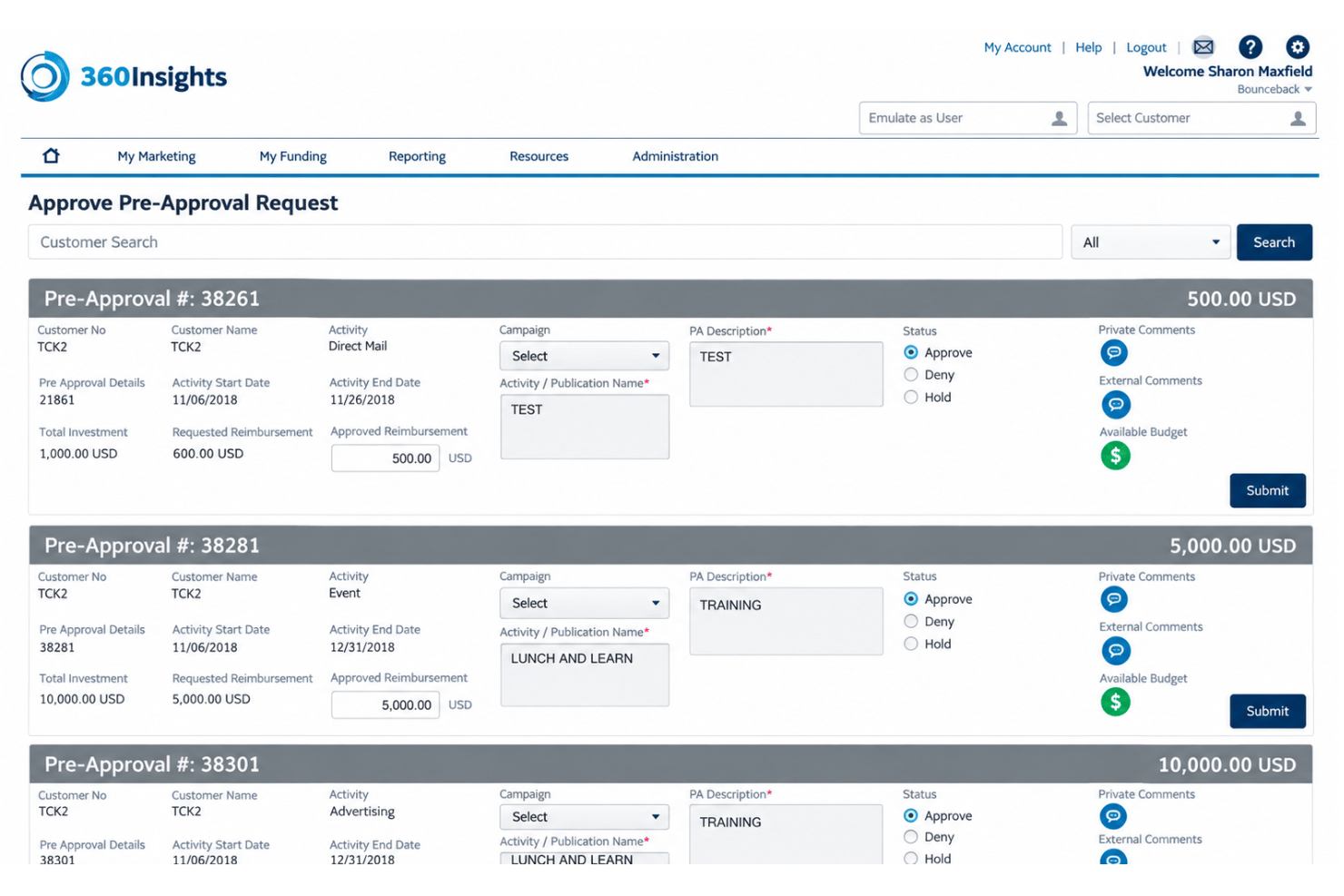
360insights is usable once your team learns its workflows, but it isn’t the easiest local marketing platform to adopt. User reviews praise its user-friendly interface, customizable categories, and end-user experience. However, initial configuration and training take time, especially for MDF approvals, claims, reimbursements, incentives, partner portals, and multi-geo programs. I’d recommend it for channel teams managing complex partner marketing, not smaller teams seeking a quick, self-guided setup.
Integrations
360insights supports Tableau integration and secure integration of data from sources such as Salesforce. It also supports API-based connections with third-party applications and SFTP for secure file-based data exchange.
360insights Specs
- API
- Calendar Management
- Contact Management
- Customer Management
- Dashboard
- Data Export
- Data Import
- Data Visualization
- External Integrations
- Forecasting
- Lead Management
- Lead Scoring
- Marketing Automation
- Multi-User
- Notifications
- PayPal
- Stripe
- Third-Party Plugins/Add-Ons