

Bloomreach-recension 2026: Fördelar, nackdelar, funktioner och priser
I judge Bloomreach email marketing by more than its campaign tools: this review weighs the features, trade-offs, and pricing to see whether it fits your broader marketing needs.

We review tools independently, and commissions help fund our testing. See our transparency policy, our methodology, or suggest a tool.
Bloomreach is email marketing software that uses real-time customer data to personalize campaigns across email, SMS, and web. It’s a better fit than Klaviyo for ecommerce teams that want to coordinate on-site personalization and customer journeys across multiple channels, not just email and SMS.
Bloomreach Evaluation Summary
4.7/5
- From $60,000/year
- Free demo available
Varför du kan lita på våra programvarurekommendationer
6,700+
Reviews
20
Industry experts
16+
Evaluation factors
14
Years
Vårt team har testat och recenserat programvara sedan 2012. Som marknadsföringsledare själva vet vi hur svårt — och viktigt — det är att välja rätt programvara.
För den här guiden utvärderade vi verktyg genom praktisk testning och oberoende research, och betygsatte verktygen enligt våra urvalskriterier.
Våra recensioner speglar vårt mänskliga redaktionella omdöme, inte ett säljbudskap.
Expertgranskare:
 Gui DrusinaKreativ direktör
- Shriya GhateSenior Marketing Lead
 Amanda JacquesMarketing Ops Leader

Bloomreach Overview
I’d judge Bloomreach as an enterprise marketing platform with email at its core, not a basic newsletter tool. Real-time profiles, segmentation, a drag-and-drop editor, testing, and journey automation can trigger cart recovery from browsing data and extend campaigns to SMS and web. Compared with email-only tools, it offers broader orchestration and revenue reporting, though data setup and platform complexity call for technical planning. Included onboarding, 175+ integrations, training, and 24/7 in-app chat support adoption. I’d choose it for larger ecommerce teams coordinating personalized journeys across channels.
Pros
- Real-time behavioral profiles support precise, frequently refreshed email segments.
- Journey automation triggers emails from browsing, cart, and purchase signals.
- AI send-time optimization and multivariate testing refine campaign delivery.
Cons
- Custom annual contracts start around $60,000, pricing out smaller teams.
- Implementation can take 8–12 weeks and demands advance data planning.
- Reviewers report limited dashboard flexibility and vague error logs.
Is Bloomreach Right For Your Needs?
Who Would be a Good Fit for Bloomreach?
I’d recommend Bloomreach for established businesses with customer data, technical support, and a need for tailored email journeys. Its real-time segments, triggered and batch email, personalization, and visual journey builder support programs that go beyond basic newsletters.
- Large RetailersRetailers with sizable customer lists can use real-time segments and personalized email to tailor campaigns to customer behavior.
- Ecommerce BrandsEcommerce teams can connect platforms such as Shopify, Adobe Commerce, or BigCommerce and coordinate email with product recommendations.
- Omnichannel TeamsMarketing teams coordinating email with other channels can use Bloomreach’s journey orchestration and all-channel plans.
- Lifecycle MarketersLifecycle teams can build visual journeys and send triggered messages alongside batch campaigns.
- Data-Rich BusinessesTeams with customer data in platforms such as Snowflake, Databricks, or Twilio Segment can connect those sources to support segmentation and personalization.
- Enterprise Marketing TeamsLarger teams with technical resources can plan the 8–12-week implementation and use Bloomreach’s API or custom integrations to connect their stack.
Who Would be a Bad Fit for Bloomreach?
Bloomreach is a poor fit when you need inexpensive, self-serve email or lack the time and technical resources for implementation. Custom pricing, data planning, and a learning curve can be difficult to justify for simple campaigns or small programs.
- Small BusinessesSmall businesses with limited budgets may find Bloomreach’s custom pricing hard to justify, as most brands pay $60K or more annually.
- Early-Stage StartupsStartups that need to launch email quickly may struggle with the 8–12-week implementation and advance data planning.
- Newsletter TeamsTeams sending occasional newsletters may not need real-time segments, journey orchestration, and advanced personalization.
- Solo MarketersA marketer without technical support may find implementation and self-teaching difficult, despite the drag-and-drop editor and Academy resources.
- Basic Email ProgramsBusinesses that need only simple batch email may pay for capabilities such as triggered messaging, personalization, and journey building they don’t plan to use.
- Tight-Deadline ProjectsTeams with an immediate launch deadline may not have time to prepare data and complete Bloomreach’s multiweek setup.
How We Test & Score Tools
We’ve spent years building, refining, and improving our software testing and scoring system. The rubric is designed to capture the nuances of software selection and what makes a tool effective, focusing on critical aspects of the decision-making process.
Below, you can see exactly how our testing and scoring works across seven criteria. It allows us to provide an unbiased evaluation of the software based on core functionality, standout features, ease of use, onboarding, customer support, integrations, customer reviews, and value for money.
Core Functionality (25% of final scoring)
The starting point of our evaluation is always the core functionality of the tool. Does it have the basic features and functions that a user would expect to see? Are any of those core features locked to higher-tiered pricing plans? At its core, we expect a tool to stand up against the baseline capabilities of its competitors.
Standout Features (25% of final scoring)
Next, we evaluate uncommon standout features that go above and beyond the core functionality typically found in tools of its kind. A high score reflects specialized or unique features that make the product faster, more efficient, or offer additional value to the user.
We also evaluate how easy it is to integrate with other tools typically found in the tech stack to expand the functionality and utility of the software. Tools offering plentiful native integrations, 3rd party connections, and API access to build custom integrations score best.
Ease of Use (10% of final scoring)
We consider how quick and easy it is to execute the tasks defined in the core functionality using the tool. High scoring software is well designed, intuitive to use, offers mobile apps, provides templates, and makes relatively complex tasks seem simple.
Onboarding (10% of final scoring)
We know how important rapid team adoption is for a new platform, so we evaluate how easy it is to learn and use a tool with minimal training. We evaluate how quickly a team member can get set up and start using the tool with no experience. High scoring solutions indicate little or no support is required.
Customer Support (10% of final scoring)
We review how quick and easy it is to get unstuck and find help by phone, live chat, or knowledge base. Tools and companies that provide real-time support score best, while chatbots score worst.
Customer Reviews (10% of final scoring)
Beyond our own testing and evaluation, we consider the net promoter score from current and past customers. We review their likelihood, given the option, to choose the tool again for the core functionality. A high scoring software reflects a high net promoter score from current or past customers.
Value for Money (10% of final scoring)
Lastly, in consideration of all the other criteria, we review the average price of entry level plans against the core features and consider the value of the other evaluation criteria. Software that delivers more, for less, will score higher.
Core Features
Drag-And-Drop Email Builder
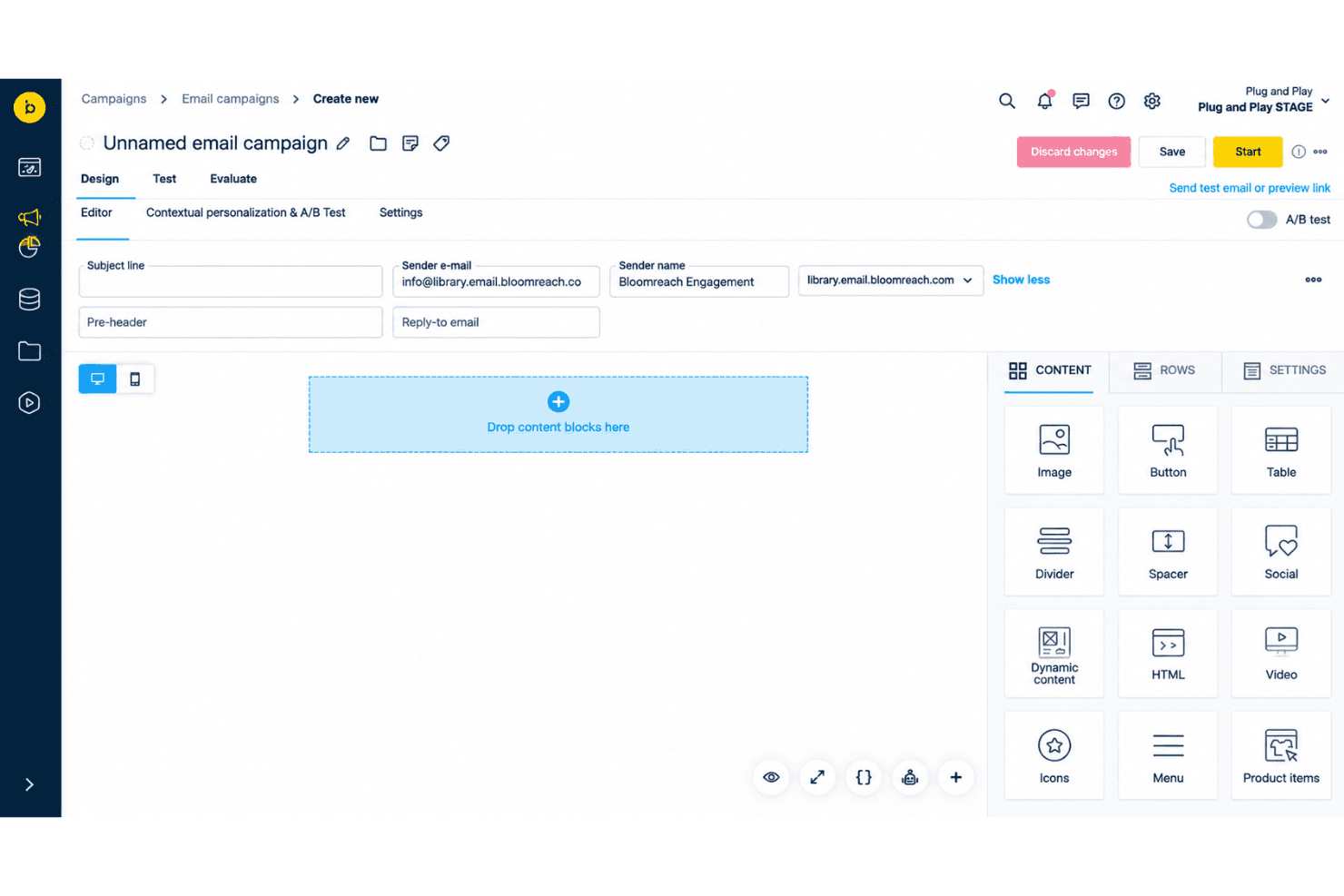
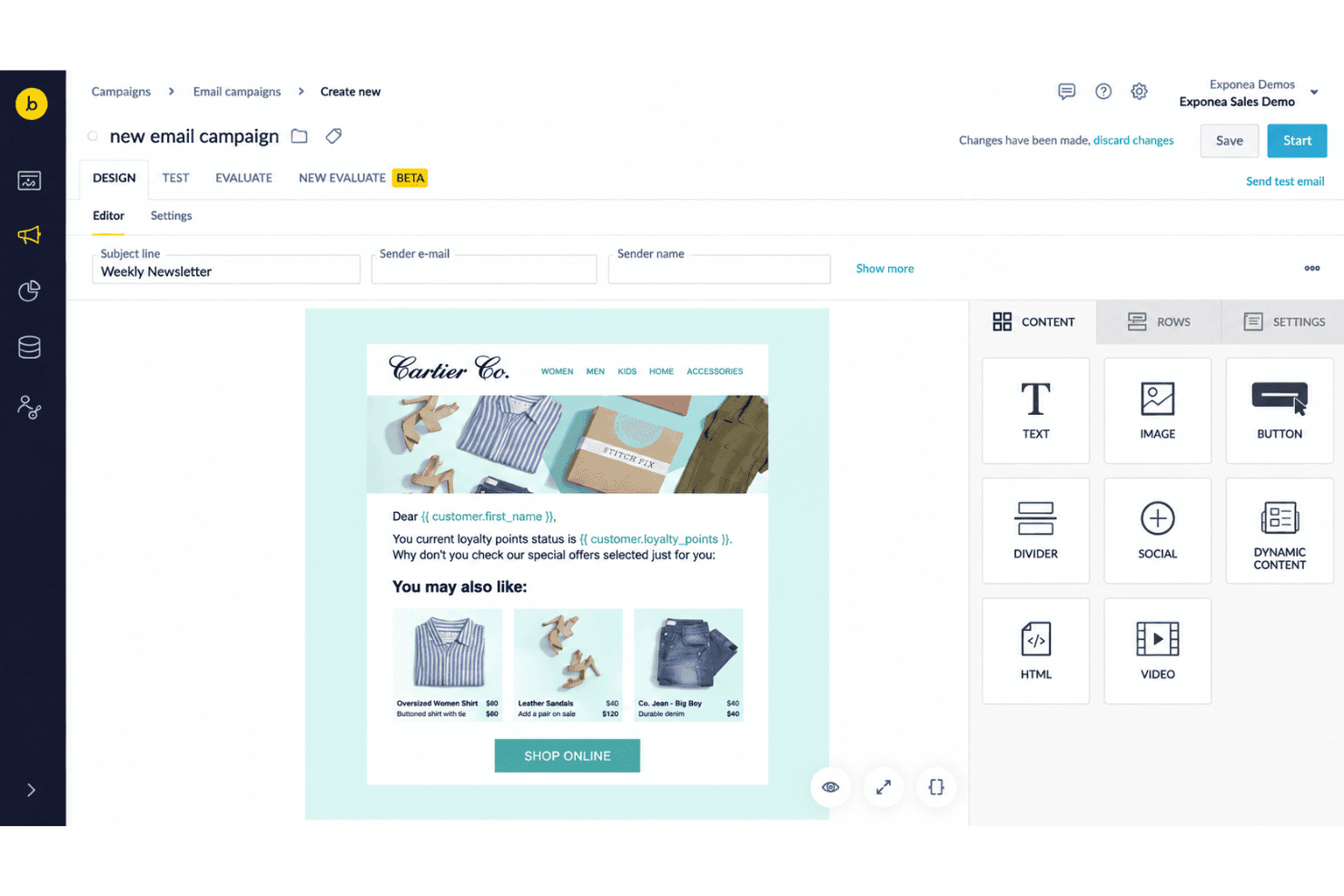
Bloomreach’s visual builder lets you create emails with text, images, product blocks, and conditional content, while an HTML editor gives developers more control. Dynamic recommendation blocks can show items such as abandoned-cart products, so each email can feature relevant products without building separate versions.
Audience Segmentation
Build audiences with customer attributes and behavioral events, then apply those filters to email campaigns. For example, you can target repeat buyers or customers who browsed a product category, with segment sizes calculated in real time.
Automated Email Journeys
Use the journey builder to send emails when customers browse, abandon a cart, make a purchase, or meet other tracked conditions. You can also add recurring sends, such as a replenishment message after a purchase.
A/B Testing
Compare email variations using A/B tests in the campaign workflow. Testing different subject lines or content helps you identify which version earns more clicks from your audience.
Personalized Send-Time Optimization
Bloomreach predicts when each customer is most likely to engage and schedules email delivery for that hour, optimizing for clicks by default. You can set a maximum wait window, so a scheduled newsletter reaches customers at a better time without waiting indefinitely.
Email Performance Reporting
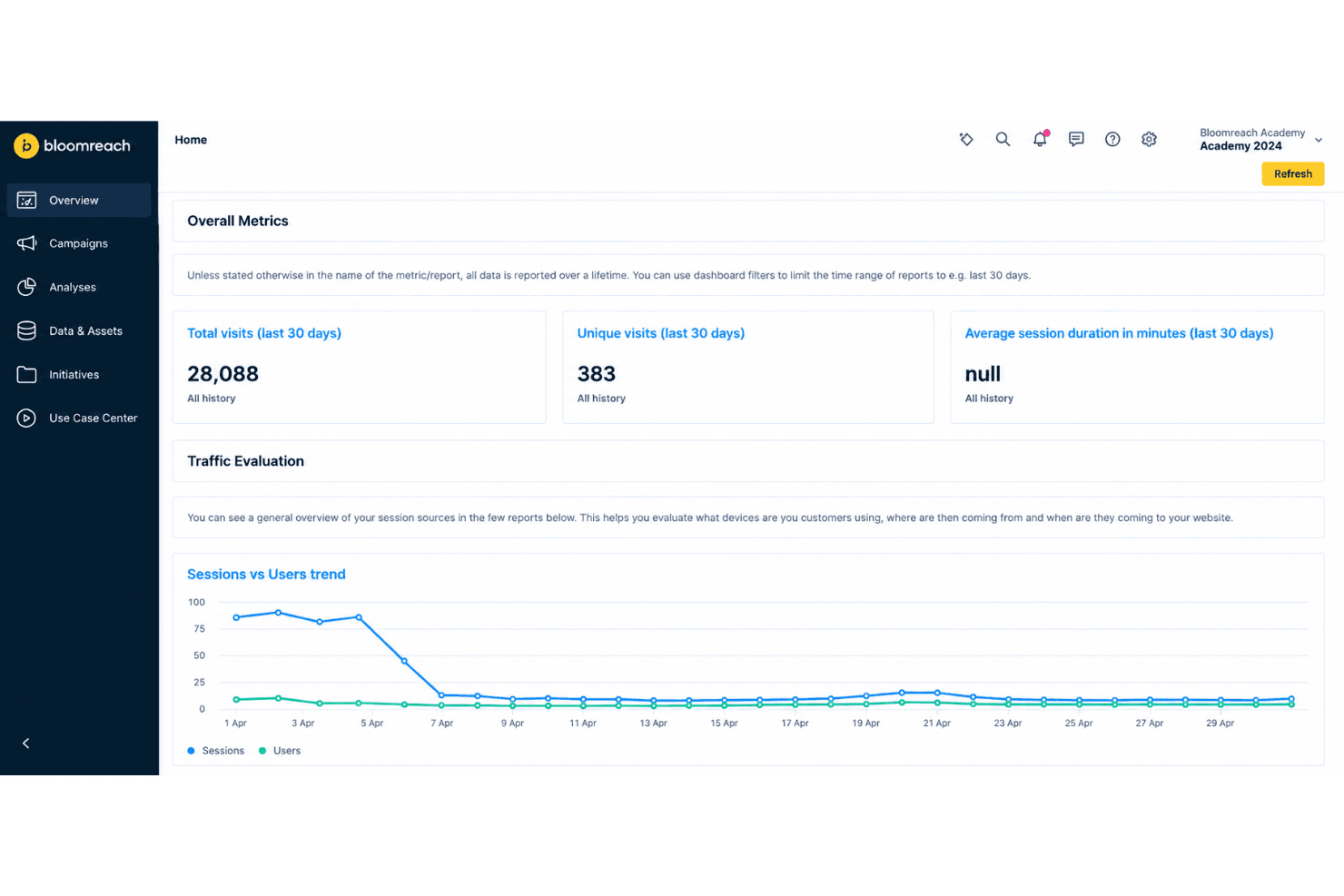
Bloomreach’s email dashboard brings deliverability, revenue, and unsubscribe reports together and supports campaign comparisons. Your team can review delivery rates and attributed purchases to assess results; the dashboard’s default revenue attribution window is 48 hours after an email open or click.
Ease of Use
Bloomreach is capable but less approachable than simpler email tools. Its drag-and-drop editor, real-time segments, and visual journey builder make campaign work clear once your data is in place. The harder part is implementation: setup can take 8–12 weeks and requires advance data planning. User reviews also flag limited dashboard flexibility and vague error logs, so expect a learning curve and technical support needs rather than a plug-and-play experience.
Integrations
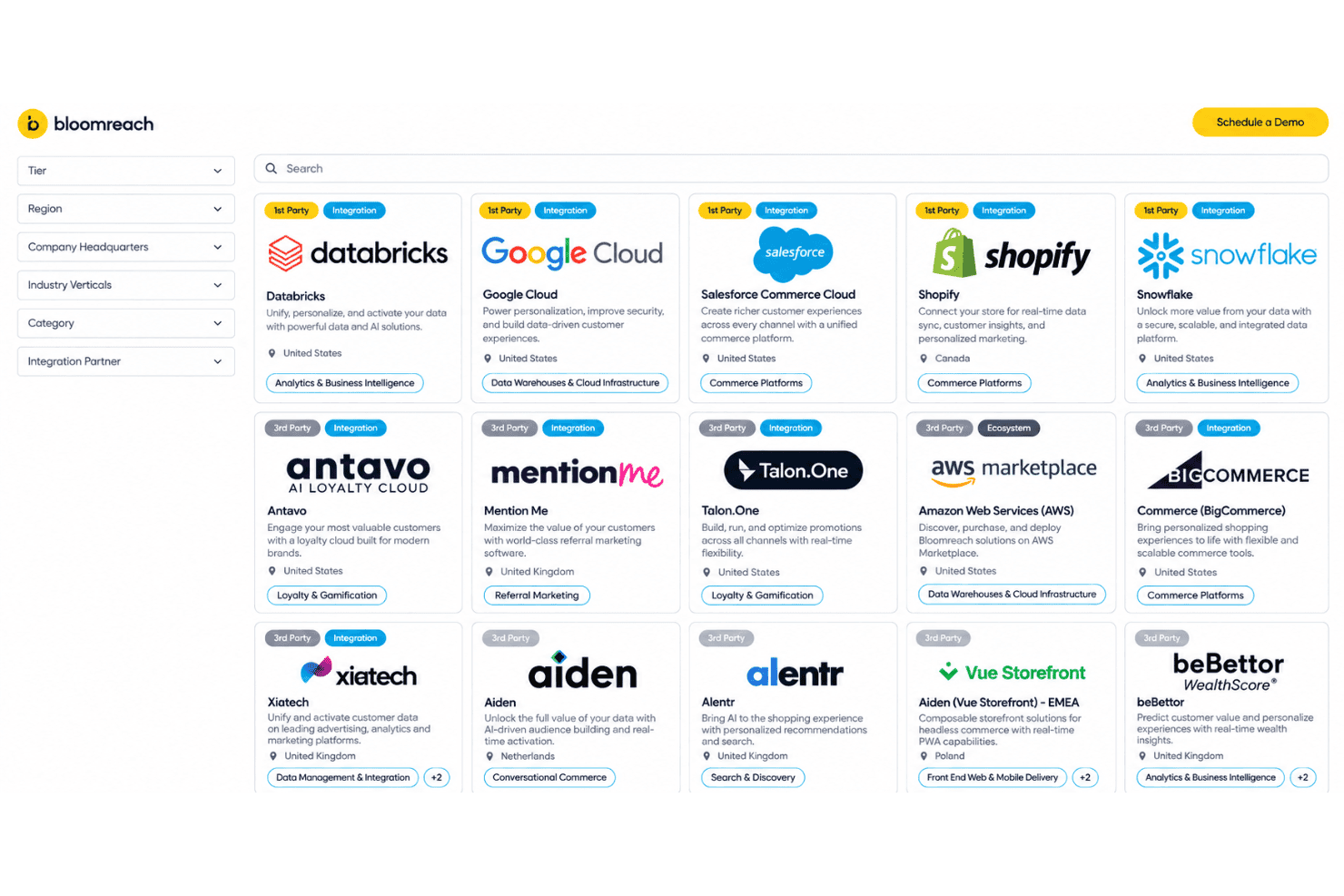
Bloomreach integrates with Shopify, Snowflake, Databricks, Twilio Segment, Google Ads, Facebook and Instagram Ads, and TikTok Ads, among others. It also supports Adobe Commerce (Magento) and BigCommerce through legacy connectors for existing implementations.
Bloomreach offers a REST API for custom integrations and connects with third-party integration tools such as Zapier.
New Product Updates from Bloomreach
Bloomreach Adds Smart Triggers for Weblayers
Bloomreach adds smart triggering for weblayers, allowing the Web SDK to check real-time visitor conditions before display. This helps teams deliver weblayers based on current user behavior instead of relying only on preset conditions. Highlights include:
- Smart Weblayer Triggers: Evaluates real-time visitor conditions before deciding whether to display a weblayer.
- Behavior-Based Display: Helps teams control when weblayers appear based on current visitor activity.
Visit Bloomreach’s official site for more details.
Bloomreach Adds Security Checks for the Experiments Editor
Bloomreach adds a security validation step before loading the Experiments editor. The update restricts editor access to authorized users, helping protect experiment configurations from unauthorized changes. Highlights include:
- Authorization Check: Verifies user access before the Experiments editor loads.
- Restricted Editor Access: Prevents unauthorized users from opening or interacting with experiments.
- Improved Security: Adds tighter control over who can make changes within the Experiments editor.
Visit Bloomreach’s official site for more details.
 Opens new window
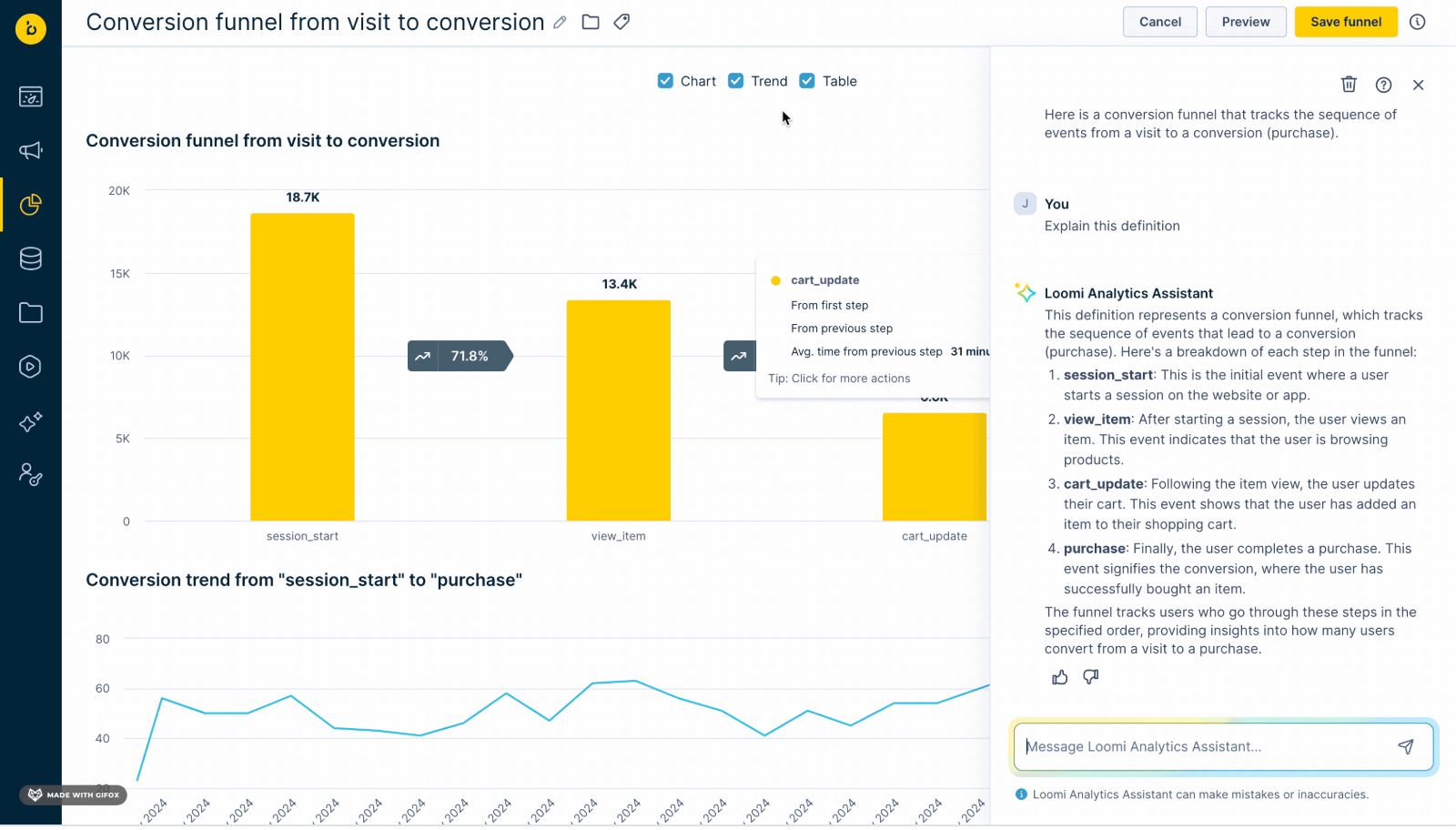
Bloomreach Improves Loomi Analytics Accuracy and Editing
Bloomreach has improved Loomi Analytics with enhanced analysis workflows, metric accuracy, and data handling. This update helps users update existing reports, generate accurate insights, and improve analytics reliability. Highlights include:
- Analysis Editing: Update existing reports, segmentations, running aggregates, and funnels without recreating them.
- Event-Based Metrics: Count events accurately to reflect actions taken instead of customer totals.
- Running Aggregate Updates: Apply rolling window settings correctly for more reliable calculations.
Visit Bloomreach’s official site for more details.
Bloomreach Specs
- A/B Testing: Yes
- Analytics: Yes
- API: Yes
- Audience Targeting: Yes
- Automated Conversion: No
- Batch Permissions & Access: Yes
- Behavioral Tracking: Yes
- Brand Management: No
- Campaign Management: Yes
- Contact Management: Yes
- Contact Sharing: No
- Conversion Tracking: Yes
- CRM Integration: Yes
- Customer Management: Yes
- Dashboards: Yes
- Data Export: Yes
- Data Import: Yes
- Email Integration: Yes
- External Integrations: Yes
- Keyword Tracking: No
- Landing Pages: No
- Lead Management: No
- Lead Scoring: No
- Link Tracking: Yes
- Marketing Automation: Yes
- Multi-User: Yes
- Notifications: Yes
- Password & Access Management: Yes
- Social-Media Integration: Yes


