

Gerir dados de contas pode ser uma verdadeira dor de cabeça, especialmente quando tem de lidar com vários sistemas. Precisa de dados precisos para tomar decisões informadas, mas os processos manuais e as ferramentas desatualizadas conduzem frequentemente a erros e perda de tempo. É aqui que entra o software de gestão de dados de contas. Ajuda a manter tudo organizado e acessível, permitindo que a sua equipa se concentre no que realmente importa.
Na minha experiência, escolher a ferramenta certa pode transformar a forma como gere os dados. Testei e analisei várias opções para lhe apresentar uma lista imparcial das melhores soluções disponíveis no mercado. Encontrará informações sobre funcionalidades, facilidade de utilização e sobre como cada ferramenta pode aliviar os seus desafios específicos. Vejamos as opções que podem tornar a gestão dos seus dados muito mais simples.
Why Trust Our Software Recommendations
6,700+
Reviews
20
Industry experts
16+
Evaluation factors
14
Years
Our team has been testing and reviewing software since 2012. As marketing leaders ourselves, we know how difficult—and important—it is to choose the right software.
For this guide, we evaluated tools using hands-on testing and independent research, scoring tools using our selection criteria.
Our reviews reflect our human editorial judgment, not a sales pitch.
Expert reviewers:
 Gui DrusinaCreative Director
- Shriya GhateSenior Marketing Lead
 Amanda JacquesMarketing Ops Leader

Tabela de comparação de software de gestão de dados de contas
Esta tabela de comparação resume os detalhes de preços das minhas principais escolhas de software de gestão de dados de contas:
| Tool | Best For | Trial Info | Price | ||
|---|---|---|---|---|---|
| 1 | Best for B2B account enrichment and scoring | Free plan + 14-day free trial + free demo available | From $49/user/month (billed annually) | Website | |
| 2 | Best for creating customizable databases | Free plan + free demo available | From $20/user/month (billed annually) | Website | |
| 3 | Best for marketing, sales, and support teams | Pricing Upon Request | Website | ||
| 4 | Best for accurate B2B contacts | Free plan available | Pricing starts at $1200/month | Website | |
| 5 | Best account data management software for enterprises | Pricing is available upon request | Website | ||
| 6 | Best for visual contact pipeline managemen | 14-day free trial available | From $14/user/month (billed annually) | Website | |
| 7 | Best account data management software for data enrichment | Not available | From $136/user/month | Website | |
| 8 | Best account data management software for small businesses | Free plan + 15-day free trial + free demo available | From $49/organization/month (billed annually) | Website | |
| 9 | Best account data management software for ease of use | 14-day free trial + free demo available | From $19.90/user/month (billed annually) | Website | |
| 10 | Best account data management software with a user-friendly interface | 14-day free trial | From $34/month | Website |


Melhor software de gestão de dados de contas
Apresento abaixo uma descrição detalhada de cada software de gestão de dados de contas. Abordo aquilo que a ferramenta faz melhor, as funcionalidades de destaque, capturas de ecrã do produto, detalhes sobre integrações, informações sobre preços e vantagens e desvantagens.
 Best for B2B account enrichment and scoring
- Free plan + 14-day free trial + free demo available
- From $49/user/month (billed annually)
Visit WebsiteCustomer Rating:4.5/5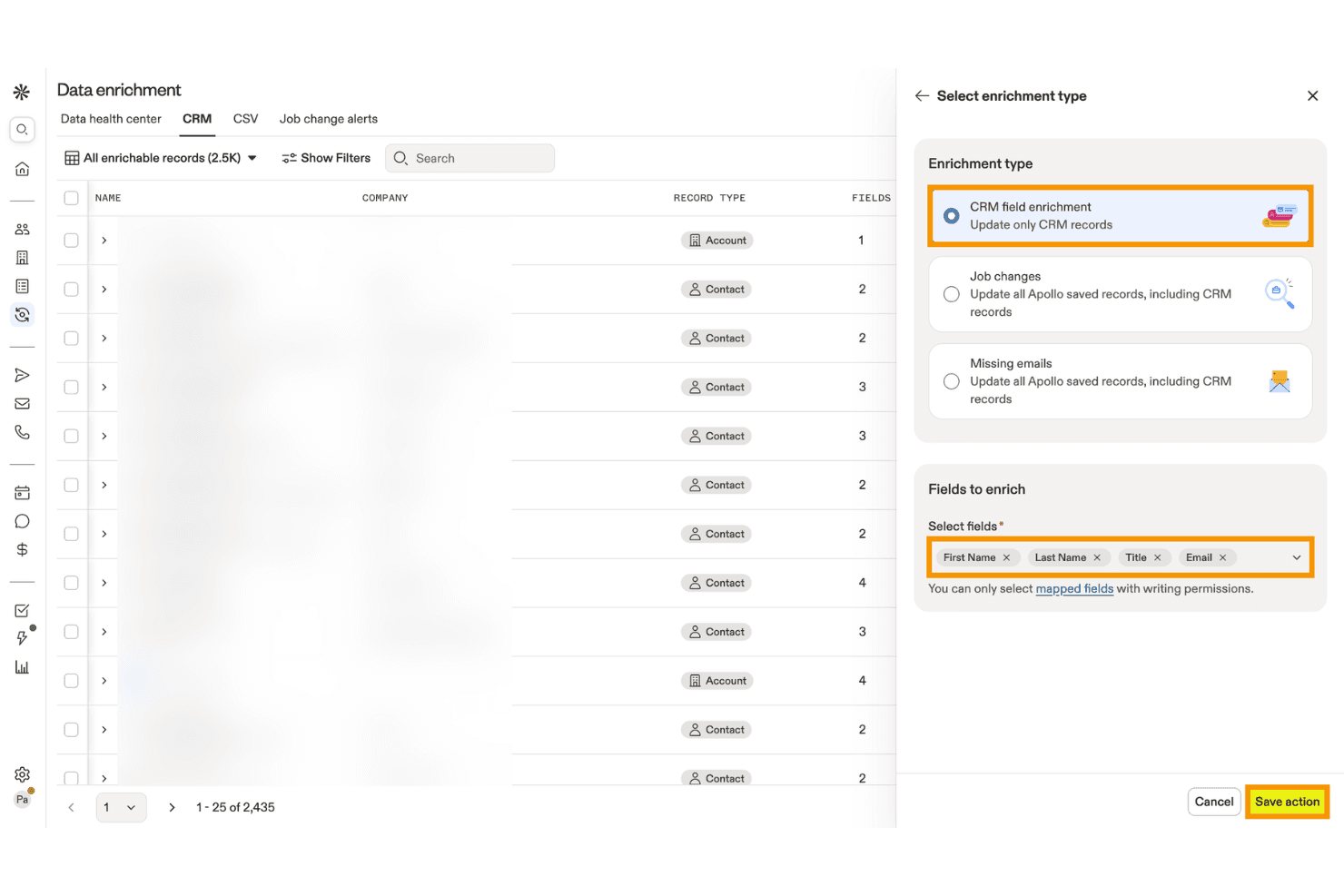
Apollo.io lets users enrich CRM records with selected contact fields. Apollo.io is a B2B sales intelligence and account data management platform that combines contact and company enrichment, deduplication, AI-powered scoring, intent data, and CRM integration across a database of 275M+ contacts and 73M+ companies.
Who Is Apollo.io Best For?
Apollo.io is a strong fit for mid-market demand generation and marketing operations teams that need affordable, high-volume B2B account enrichment and AI-powered scoring without enterprise-level complexity.
Why I Picked Apollo.io
Apollo.io earns its spot on my shortlist because its B2B account enrichment and AI-powered scoring capabilities are genuinely hard to replicate at this price point. I love how the AI scoring models train directly on your CRM's win/loss history and layer in Bombora intent signals across 15,000+ topics, so you're prioritizing accounts showing real buying behavior rather than guessing. The Data Health Center also does solid work surfacing duplicate records and stale fields across connected CRMs automatically.
Apollo.io Key Features
- CRM enrichment jobs: Scheduled or on-demand jobs that automatically update missing or stale fields in your connected CRM using Apollo's live database.
- CSV enrichment: Upload a CSV file, review the enriched output, and receive a completion report before importing records into any external system.
- 65+ segmentation filters: Search and filter accounts by firmographic, technographic, and behavioral attributes to build precise target account lists.
- Role-based permission profiles: Admins on the Organization plan can control feature-level access across prospecting, enrichment, email visibility, and engagement for each team member.
Apollo.io Integrations
Apollo.io offers native bidirectional integrations with Salesforce, HubSpot, Zoho CRM, Pipedrive, Microsoft Dynamics, Adobe Marketo Engage, and Snowflake. It also provides an open REST API and marketplace integrations, including Zapier.
Pros and Cons
Pros:
- AI-powered intent signals layered into scoring
- Real-time enrichment and duplicate detection dashboard
- Massive global B2B contact and account coverage
Cons:
- No advanced cross-system identity resolution
- Intent data sourced entirely from Bombora
Learn more about Apollo.io: Best for creating customizable databases
- Free plan + free demo available
- From $20/user/month (billed annually)
Visit WebsiteCustomer Rating:4.6/5
Airtable templates are pre-designed databases that enable efficient data management and organization. Airtable is a project management and collaboration tool that combines the capabilities of a spreadsheet and a database. It provides users with a flexible and visually appealing interface for organizing and managing various data types. Airtable allows you to create and customize tables, or "bases," to store and manipulate information.
Why I picked Airtable: Airtable is more suitable for project management. However, if you are a small team, you can also use it for account data management. The best thing about the tool is that it lets users create custom fields with specific data types, such as text, number, date, and dropdowns. This ensures data accuracy by enforcing consistent formatting and preventing incorrect entries. By defining field validation rules, you can further enhance data accuracy and maintain consistency.
Airtable provides powerful filtering and sorting options that enable simple data retrieval. You can apply filters based on specific criteria and instantly view a subset of records that meet the defined conditions. Sorting options allow you to arrange data in ascending or descending order based on any field, making it easy to find the desired information.
Airtable Standout Features and Integrations:
Standout features include a collaborative workspace where team members can collaborate on data entry, validation, and updates. This helps maintain data accuracy and consistency by involving multiple stakeholders in data management.
Integrations include Asana, Basecamp, Dropbox, Box, Eventbrite, Evernote, Facebook, GitHub, Google Calendar, Instagram, Jira, Miro, and LinkedIn. You can also avail additional integrations through Zapier and API.
Airtable costs from $10/user/month (billed annually) and comes with a free forever plan.
Pros and Cons
Pros:
- Powerful relational database capabilities
- Intuitive and visually appealing interface
- Customizable data organization
Cons:
- Limited reporting features
- Limited advanced data analysis capabilities
Learn more about Airtable:

NetSuite integrates data from various departments and enables real-time data monitoring and reporting of KPIs. NetSuite is a cloud-based business management software platform that helps businesses manage various aspects of their business, including financials, customer relationship management (CRM), inventory management, e-commerce, and more.
Why I picked NetSuite CRM: NetSuite CRM provides a complete solution for managing customer relationships throughout the entire customer lifecycle. It enables marketing, sales, and support teams to have a unified view of customer data, interactions, and preferences, facilitating personalized and targeted engagement.
NetSuite CRM also integrates with financial and operational data within the NetSuite platform. This integration enables marketing, sales, and support teams to access vital account information in real-time, such as billing history, order status, and support tickets. Having this consolidated data enhances collaboration and enables teams to provide better customer service and support.
NetSuite CRM Standout Features and Integrations:
Standout features include robust reporting and business intelligence capabilities. It provides pre-built and customizable reports and dashboards, enabling marketing, sales, and support teams to monitor key performance indicators, measure campaign success, and track customer satisfaction. This data-driven approach helps teams make informed decisions.
Integrations include Shopify, BigCommerce, Adobe Commerce, WooCommerce, Amazon, eBay, Walmart, Shopify POS, Amazon Supply Chain, and ShipStation.
Pros and Cons
Pros:
- Robust reporting features
- Cloud-based platform
- Robust security features
Cons:
- Steep learning curve
- The initial setup can be complex
Learn more about NetSuite CRM : Best for accurate B2B contacts
- Free plan available
- Pricing starts at $1200/month
Visit WebsiteCustomer Rating:3.9/5
The platform's real-time validation feature and the extensive reach of over 140 million business records contribute to its unique selling proposition. CIENCE GO Data is a comprehensive tool that provides accurate B2B contact information, including over 100 million verified contacts and 10 billion monthly signals for in-market buyers. The platform's unique selling point is its real-time validation and use of real-world data, which ensures the accuracy of sales data.
Why I picked CIENCE GO Data: I chose CIENCE GO Data because it provides a vast database of over 100 million verified B2B contacts, which is essential for any business looking to establish or expand its sales outreach. In determining the best tool for this purpose, I compared various options and found that CIENCE GO Data's emphasis on real-world validation of sales data makes it stand out. This approach ensures that the contact information is not only extensive but also accurate and up-to-date.
CIENCE GO Data Standout Features & Integrations
Standout features include outbound sales engagement with automation, AI models trained for industry-specific content creation, and powerful web analytics. Additionally, CIENCE offers services such as outbound SDR team-as-a-service and inbound SDR, as well as AI models for multi-channel outbound campaigns and artificial voice prospecting conversations. The company also provides resources such as lead prioritization guides, pricing information, and industry-related content through their blog and podcast.
Integrations include HubSpot CRM, CIENCE GO Digital, CIENCE GO Show, and HubSpot Sales Hub.
Pros and Cons
Pros:
- Targeted advertising capabilities to reach specific audiences.
- CRM support for managing leads and customer relationships.
- Customized data packages and services tailored to business needs.
Cons:
- Additional training may be required for clients to fully utilize the platform.
- Potentially more expensive compared to other lead generation services.
Learn more about CIENCE GO Data: Best account data management software for enterprises
- Pricing is available upon request

The Oracle CX Sales mobile app provides users with on-the-go access to critical sales information, customer data, and collaboration tools for efficient sales management. Oracle CX Sales, also known as Oracle Customer Experience Sales, is a comprehensive sales automation and customer relationship management (CRM) software offered by Oracle Corporation. It is part of the Oracle CX Cloud suite, encompassing various applications designed to enhance the customer experience across different touchpoints. It is a good choice for enterprise-level account data management due to its wide range of features and ability to handle large volumes of data.
Why I picked Oracle CX Sales: To maintain data accuracy and integrity, Oracle CX Sales provides tools for data cleansing and deduplication. These features help identify and merge duplicate or inconsistent customer records, ensuring a clean and reliable customer database.
The software enables businesses to segment customer data based on various criteria such as demographics, behavior, purchase history, or custom-defined attributes. This segmentation capability allows for more precise targeting and personalized communication with different customer segments.
Oracle CX Sales Standout Features and Integrations:
Standout features include automated data enrichment capabilities that enhance customer data with additional insights. It can automatically update and enrich customer records with social media profiles, industry information, firmographics, and other relevant data sources.
Integrations include ServiceNow, DbVisualizer, Oracle Sales, Crowdin, 4MDG, Oracle Service, and CipherTrust Cloud Key Manager.
Pros and Cons
Pros:
- Native mobile app
- Good reporting and analytics features
- Native integration with other Oracle products
Cons:
- Complex to set up and configure
- Steep learning curve
Learn more about Oracle CX Sales: Best for visual contact pipeline managemen
- 14-day free trial available
- From $14/user/month (billed annually)

The pipeline management feature of Pipedrive enables users to visually track and manage sales opportunities throughout different stages of the sales process. Pipedrive is a customer relationship management (CRM) and account data management platform that is trusted by more than 100,000 sales teams.
Why I picked Pipedrive: The feature I liked most is the pipeline management feature. It provides an intuitive overview of your sales process and customer interactions. The pipeline displays the various stages of your sales cycle, allowing you to see the progress of each account so that you can identify bottlenecks or opportunities. This visual representation helps sales teams stay organized and focused on moving deals forward.
Within each pipeline stage, Pipedrive enables you to track and log activities related to each account. You can record calls, emails, meetings, and other interactions directly within the platform. This feature ensures that all relevant information and account-related activities are captured and accessible in one centralized location, facilitating better account data management.
Pipedrive Standout Features and Integrations:
Standout features include workflow automation capabilities to automate repetitive tasks and improve efficiency. Users can automate actions such as sending follow-up emails, assigning tasks, updating data fields, and triggering notifications. Additionally, Pipedrive implements strong security measures to protect customer data. It employs industry-standard encryption protocols such as regular security audits and vulnerability assessments.
Integrations are available with 350+ connectors, including Zapier, Google Meet, Zoom Meetings, Facebook Messenger, LinkPort, DocuSign, Lemlist, JustCall, Asana, and HubSpot. You can also avail additional integrations through Pipedrive API and Zapier.
Pros and Cons
Pros:
- Mobile app is available
- Ideal for small to medium-sized businesses
- Modern and intuitive interface
Cons:
- Limited reporting capabilities
- Learning curve for new users
Learn more about Pipedrive : Best account data management software for data enrichment
- Not available
- From $136/user/month

The lead management feature of SAP Sales Cloud enables users to capture, qualify, and nurture leads for enhanced sales conversion and revenue growth. SAP Sales Cloud is a customer relationship management (CRM) solution that helps businesses manage their sales processes and customer relationships and drive revenue growth. It provides tools for managing leads, contacts, accounts, opportunities, and sales pipelines. The platform allows users to track customer interactions, log activities, and capture important information to ensure a complete and up-to-date view of each customer.
Why I picked SAP Sales Cloud: It enriches customer data by automatically pulling in additional information from external sources. This includes company details, social profiles, news updates, and more. By enriching the data, users can have a more comprehensive and up-to-date view of their customers, improving customer segmentation and targeting accuracy.
SAP Sales Cloud integrates with various data sources and systems, such as CRM, marketing automation, and ERP systems. This integration ensures that the data remains consistent across different platforms. It eliminates data silos and provides a centralized source of truth for accurate and reliable information.
SAP Sales Cloud Standout Features and Integrations:
Standout features include robust segmentation capabilities, allowing users to define and create dynamic customer segments based on specific criteria. Users can segment customers based on demographics, behavior, purchase history, and other relevant data points. This enables personalized targeting and tailored marketing efforts, leading to more effective and relevant communication with customers.
Integrations include Microsoft Outlook, Screendragon, Inxmail, Mediafly, Simplifier, EVALANCHE, In Mind Cloud, and Prosafety.
Pros and Cons
Pros:
- Advanced reporting and analytics
- Personalized customer engagement
- Robust data management capabilities
Cons:
- Learning curve for users new to SAP systems
- Initial setup and customization may require technical expertise
Learn more about SAP Sales Cloud: Best account data management software for small businesses
- Free plan + 15-day free trial + free demo available
- From $49/organization/month (billed annually)

The deal management feature of Bitrix24 helps users track and organize sales opportunities, from initial contact to final closure. Bitrix24 is a business management and CRM solution that provides various capabilities, including CRM (Customer Relationship Management), project management, document management, team communication, and more. Bitrix24 is particularly popular among small and medium-sized businesses due to its affordability, user-friendly interface, and extensive functionality.
Why I picked Bitrix24: Bitrix24 allows businesses to create custom fields and forms within the CRM. This feature enables businesses to capture specific data points relevant to their operations and customer interactions. Custom fields ensure the data collected is tailored to the business's needs.
Bitrix24 offers robust search and filtering capabilities within its CRM. This allows users to easily retrieve specific data based on various criteria, such as customer attributes, transaction history, or specific keywords. The advanced search functionality simplifies data retrieval, saving time and effort.
Bitrix24 Standout Features and Integrations:
Standout features include segmentation tools that allow businesses to categorize and group their contacts based on specific criteria or characteristics. Businesses can target specific customer segments by segmenting contacts with tailored marketing campaigns or personalized communication. This segmentation feature enhances data organization and accuracy, and enables targeted messaging.
Integrations include Gmail, Google Calendar, Google Drive, MS Office, Dropbox, Box, Xero, Mailchimp, Docusign, and Recurly.
Pros and Cons
Pros:
- Wide range of features
- Extensive integrations
- Efficient deal management
Cons:
- Steep learning curve for new users
- Limited customization options
Learn more about Bitrix24 : Best account data management software for ease of use
- 14-day free trial + free demo available
- From $19.90/user/month (billed annually)

The project management feature of Scoro enables businesses to efficiently plan, organize, and track tasks, resources, and milestones to ensure successful project execution. Scoro is a business and project management solution that provides a drag-and-drop interface for account data management. In addition, it also provides features for time tracking, collaboration, CRM, billing, and reporting.
Why I picked Scoro: While Scoro is primarily a business management software, it also provides some account data management features. It helps users store and manage customer account data in a centralized location. This data can include contact details, communication history, transactions, projects, invoices, etc. It enables a 360-degree view of each customer and contact so that you can keep track of sales opportunities.
In addition, Scoro also provides features to track sales goals and performance. For example, you can create customizable dashboards that track sales targets of individual sales reps and the entire team.
Scoro Standout Features and Integrations:
Standout features include project and task management features that help users track and manage activities related to customer accounts. This can be useful for organizing and coordinating account-related tasks and activities.
Integrations include Slack, Asana, Jira Software, Evernote, Trello, Harvest, Basecamp, GitHub, Zapier, and Gmail. You can also avail additional integrations through Zapier.
Pros and Cons
Pros:
- Enables team collaboration
- Customizable fields and workflows
- Integrates with popular third-party tools
Cons:
- Not highly customizable
- Limited focus on specialized account data management
Learn more about Scoro : Best account data management software with a user-friendly interface
- 14-day free trial
- From $34/month

AllClients provides a detailed overview of each client, including their preferences, history, and interactions with the company. AllClients is a customer relationship management (CRM) software platform that helps businesses manage and organize client information, track interactions, and manage communication. It also offers features such as contact management, email marketing, task management, and automated workflows to enhance customer relationships.
Why I picked AllClients: AllClients provides users with intuitive filtering options that allow them to quickly and easily sort and segment their client data. Whether filtering contacts based on specific criteria or creating targeted lists for marketing campaigns, the easy filtering feature simplifies the process. It enables users to access the necessary information with just a few clicks.
The platform is designed to be intuitive and accessible, making it easy for users to navigate and utilize its various functionalities. The clean layout and straightforward navigation ensure that users can quickly find what they need and perform tasks efficiently.
AllClients Standout Features and Integrations:
Standout features include a data entry feature that allows users to input and update client information within the system. With this feature, users can easily enter relevant details about their clients, such as names, contact information, demographics, and other custom fields specific to their business needs.
Integrations include Mailchimp, HubSpot CRM, Constant Contact, Campaign Monitor, Robly, ActiveDEMAND, and Akita.
Pros and Cons
Pros:
- Customizable fields for client data
- Easy contact filtering
- User-friendly interface
Cons:
- Limited customization options
- Steep learning curve
Learn more about AllClients :
Outro software de gestão de dados de contas
Durante a minha pesquisa, encontrei mais algumas ferramentas que não entraram na lista das principais ferramentas de gestão de dados de contas, mas que vale a pena analisar:
- 11OCLBest for account data management and collaboration
- 12CapsuleBest for data sorting and segmentation
- 13Salesforce CRMBest all-in-one solution for account data management
- 14SmartsheetBest for capturing account data through customizable sheets and forms
- 15CopperBest for Google Workspace users
- 16WrikeBest for creating custom workflows and data fields
- 17SugarAIBest for managing account hierarchy
- 18ClickUpBest account data management software for collaboration
- 19Zoho CRMBest for a wide range of features
- 20monday CRMBest for creating customizable data fields
- 21JiraBest for issue tracking
- 22InsightlyBest for managing both customer accounts and projects
- 23Microsoft Dynamics 365 SalesBest for Microsoft users
- 24Freshdesk Best unified platform for support and account data management
How I Evaluate Account Data Management Software
I evaluate in two layers: the baseline a tool must have—like lead-to-account matching and CRM enrichment sync—and the differentiators that separate strong options from the rest.
Core Functionality (Table Stakes For This List)
When I'm selecting tools for my list, I rank each one on a scale from 0 (does not offer the functionality) to 5 (excels in this area) for each core functionality listed below. Then, I calculate the tool's total score into a percentage. Each tool needs to achieve a minimum total score of 65% to be considered for inclusion.
- Account Data Enrichment: I check whether a tool can auto-append firmographic and technographic fields to account records—things like employee count, industry, tech stack, and revenue range.
- Deduplication & Cleansing: Messy CRM data is the norm, so I look for automated duplicate detection and merge logic that can handle fuzzy matches across misspelled company names and domain variants.
- CRM & MAP Integration: Each tool needs bidirectional sync with platforms like Salesforce or HubSpot, so enriched records flow back into the systems your marketing and sales teams already use.
- Account Segmentation & List Building: I evaluate how well a tool lets you filter and build target account lists using attributes like industry, headcount, or tech usage for ABM campaign targeting.
- Data Unification & Matching: Strong lead-to-account matching matters here—I look at how well a platform resolves scattered leads, contacts, and accounts into clean, unified account views.
- Account Scoring & Prioritization: I consider whether you can score and tier accounts based on fit and engagement signals, so your team focuses outreach on the accounts most likely to convert.
Once I have a list of tools that meet the criteria, I consider what sets each platform apart.
Differentiating Factors (What Sets Vendors Apart)
Here's how I compare and contrast different vendors:
Standout Features
Intent data is a major differentiator—I look for tools that surface in-market accounts based on real-time buying signals, so your ABM team can act on demand before a competitor does. Predictive AI modeling takes this further by scoring accounts on propensity to buy, not just static firmographic fit. Account hierarchy mapping also matters when you're targeting enterprise organizations with complex parent-child structures and need to coordinate marketing across subsidiaries.
Beyond Features
Data quality and coverage vary widely across vendors, so I evaluate how fresh and global a provider's underlying database is—stale records lead to wasted ad spend and bounced emails. Compliance also matters here, especially when your account lists include contacts across regions with different privacy laws like GDPR or CCPA. I also consider tech stack fit beyond CRM, checking for native connectors to data warehouses like Snowflake or ABM platforms where your enriched account data ultimately needs to land.
Como escolher software de gestão de dados de contas
É fácil ficar preso a listas intermináveis de funcionalidades e estruturas de preços complexas. Para o ajudar a manter o foco enquanto analisa o seu processo único de seleção de software, apresentamos uma lista de fatores a ter em conta:
| Fator | O que deve considerar |
|---|---|
| FatorEscalabilidade | O que deve considerarO software crescerá com a sua empresa? Considere se consegue lidar com um aumento do número de utilizadores ou do volume de dados sem problemas. Procure preços e capacidade escaláveis. |
| FatorIntegrações | O que deve considerarFunciona com as ferramentas que a sua equipa já utiliza? Verifique a compatibilidade com os sistemas existentes para evitar silos de dados e trabalho manual adicional. |
| FatorPersonalização | O que deve considerarPode adaptá-lo às suas necessidades? Procure campos e fluxos de trabalho personalizáveis para adaptar o software aos seus processos específicos. |
| FatorFacilidade de utilização | O que deve considerarA sua equipa considerá-lo-á intuitivo? Avalie a interface de utilizador e a navegação. Uma curva de aprendizagem acentuada pode atrasar a adoção e reduzir a produtividade. |
| FatorImplementação e integração inicial | O que deve considerarCom que rapidez pode começar? Avalie o tempo e os recursos necessários para a configuração. Considere a disponibilidade de tutoriais, guias e apoio à integração inicial. |
| FatorCusto | O que deve considerarEstá dentro do seu orçamento? Compare os planos de preços com as suas limitações financeiras. Tenha atenção a taxas ocultas e verifique se existem descontos nas subscrições anuais. |
| FatorMedidas de segurança | O que deve considerarQuão seguros estão os seus dados? Certifique-se de que o software oferece encriptação, cópias de segurança dos dados e controlos de acesso para proteger informações sensíveis. |
| FatorRequisitos de conformidade | O que deve considerarCumpre os regulamentos do setor? Se trabalha num setor regulamentado, certifique-se de que o software cumpre as normas relevantes, como o RGPD ou a HIPAA. |
O que é o software de gestão de dados de contas?
O software de gestão de dados de contas é uma ferramenta que ajuda as empresas a organizar, armazenar e gerir eficazmente as informações relacionadas com as suas contas. Os gestores de marketing, contabilistas e analistas de dados utilizam geralmente estas ferramentas para garantir a exatidão e a acessibilidade dos dados. A segurança dos dados, as capacidades de integração e o controlo do acesso dos utilizadores ajudam a proteger as informações, a ligar sistemas e a gerir permissões. No geral, estas ferramentas simplificam a gestão de dados e melhoram os processos de tomada de decisões.
Funcionalidades
Ao selecionar um software de gestão de dados de contas, procure as seguintes funcionalidades principais:
- Segurança dos dados: Protege informações sensíveis através de encriptação e controlos de acesso, garantindo que apenas os utilizadores autorizados podem aceder aos dados.
- Capacidades de integração: Liga-se a outras ferramentas e sistemas de software para criar um fluxo de trabalho contínuo e reduzir a introdução manual de dados.
- Controlo do acesso dos utilizadores: Permite gerir permissões e funções, garantindo que os utilizadores têm acesso apenas aos dados de que necessitam.
- Painéis personalizáveis: Disponibiliza uma vista personalizada dos seus dados, ajudando-o a concentrar-se nas métricas mais importantes para a sua empresa.
- Relatórios e análises: Gera informações e visualizações a partir dos seus dados, apoiando a tomada de decisões informadas.
- Sincronização de dados em tempo real: Mantém os seus dados atualizados em todas as plataformas, garantindo a exatidão e a consistência.
- Escalabilidade: Acompanha o crescimento da sua empresa, acomodando um maior volume de dados e mais utilizadores sem problemas de desempenho.
- Ferramentas de conformidade: Garante o cumprimento de regulamentações do setor, como o GDPR ou o HIPAA, reduzindo os riscos legais.
- Interface intuitiva: Oferece um design de navegação simples que reduz a curva de aprendizagem e aumenta a adoção por parte dos utilizadores.
- Assistência à integração: Disponibiliza recursos como tutoriais e guias que ajudam os novos utilizadores a familiarizarem-se rapidamente com o software.
Benefícios
A implementação de um software de gestão de dados de contas proporciona vários benefícios à sua equipa e à sua empresa. Eis alguns dos benefícios que pode esperar:
- Maior exatidão dos dados: Reduz os erros através da sincronização dos dados em tempo real em todas as plataformas, garantindo que todos têm acesso às informações mais atualizadas.
- Tomada de decisões melhorada: Disponibiliza informações valiosas através de relatórios e análises, ajudando-o a tomar decisões informadas com base em dados exatos.
- Maior eficiência: Automatiza tarefas repetitivas e integra-se com outros sistemas, poupando tempo à sua equipa e reduzindo o trabalho manual.
- Maior segurança: Protege informações sensíveis com encriptação e controlos de acesso, mantendo os seus dados seguros contra acessos não autorizados.
- Escalabilidade: Adapta-se às necessidades crescentes da sua empresa, gerindo mais dados e utilizadores sem comprometer o desempenho.
- Conformidade regulamentar: Ajuda-o a cumprir as regulamentações do setor através de ferramentas de conformidade integradas, reduzindo o risco de problemas legais.
- Experiência de utilização simples: Oferece uma interface intuitiva que reduz a curva de aprendizagem, facilitando a adoção e a utilização por parte da sua equipa.
Custos e preços
A seleção de um software de gestão de dados de contas exige uma compreensão dos vários modelos de preços e planos disponíveis. Os custos variam consoante as funcionalidades, a dimensão da equipa, os complementos e outros fatores. A tabela abaixo resume os planos comuns, os respetivos preços médios e as funcionalidades normalmente incluídas nas soluções de software de gestão de dados de contas:
Tabela de comparação de planos para software de gestão de dados de contas
| Tipo de plano | Preço médio | Funcionalidades comuns |
|---|---|---|
| Tipo de planoPlano gratuito | Preço médio$0 | Funcionalidades comunsArmazenamento básico de dados, integrações limitadas e relatórios básicos. |
| Tipo de planoPlano pessoal | Preço médio$5-$25/utilizador/mês | Funcionalidades comunsArmazenamento de dados, controlo do acesso dos utilizadores, integrações básicas e assistência padrão. |
| Tipo de planoPlano empresarial | Preço médio$50-$100/utilizador/mês | Funcionalidades comunsIntegrações avançadas, segurança reforçada, painéis personalizados e análises. |
| Tipo de planoPlano empresarial de grande dimensão | Preço médio$150-$300/utilizador/mês | Funcionalidades comunsArmazenamento ilimitado de dados, assistência premium, ferramentas de conformidade e personalização completa. |
Perguntas frequentes
Eis as respostas a algumas perguntas frequentes que poderá ter sobre software de gestão de dados de contas:
O software de gestão de dados de contas pode integrar-se com outras ferramentas?
Sim, o software de gestão de dados de contas pode integrar-se com outras ferramentas, como sistemas de CRM, plataformas de marketing e software financeiro. Estas integrações permitem um fluxo de dados contínuo entre sistemas, reduzindo a introdução manual de dados e os erros. Antes de comprar, confirme se o software é compatível com as ferramentas específicas utilizadas pela sua equipa.
É necessária formação para utilizar o software de gestão de dados de contas?
Sim, é frequentemente necessária formação para tirar o máximo partido do software de gestão de dados de contas. Muitos fornecedores disponibilizam recursos como tutoriais online, webinars e guias para ajudar a sua equipa a aprender a utilizar o sistema. Tirar partido destes recursos pode acelerar o processo de integração e garantir que a sua equipa utiliza o software de forma eficaz.
Como posso garantir a segurança dos dados com o software de gestão de dados de contas?
Para garantir a segurança dos dados, escolha um software que disponibilize encriptação, controlos de acesso e cópias de segurança regulares. Verifique se o fornecedor segue práticas de segurança padrão do setor e cumpre os regulamentos relevantes. Reveja regularmente as suas definições de segurança e forme a sua equipa sobre as melhores práticas para proteger informações sensíveis.