

As ferramentas de marketing por e-mail com AI podem ajudá-lo a trabalhar mais rapidamente, automatizando tarefas repetitivas, aperfeiçoando a segmentação do público e melhorando a personalização sem aumentar a sua carga de trabalho. Se está a tentar aumentar a produção sem levar a sua equipa ao esgotamento, já passei por isso. Enquanto responsável de marketing, testei várias plataformas com tecnologia de AI e utilizei a nossa metodologia de avaliação interna para identificar as que realmente tornam mais simples a execução de campanhas de e-mail. Neste guia, apresentarei as principais ferramentas para que possa escolher uma que se adeque à sua equipa, aos seus objetivos e à sua forma de trabalhar.
Why Trust Our Software Recommendations
6,700+
Reviews
20
Industry experts
16+
Evaluation factors
14
Years
Our team has been testing and reviewing software since 2012. As marketing leaders ourselves, we know how difficult—and important—it is to choose the right software.
For this guide, we evaluated tools using hands-on testing and independent research, scoring tools using our selection criteria.
Our reviews reflect our human editorial judgment, not a sales pitch.
Expert reviewers:
 Gui DrusinaCreative Director
- Shriya GhateSenior Marketing Lead
 Amanda JacquesMarketing Ops Leader

Tabela comparativa de ferramentas de marketing por e-mail com AI
Esta tabela comparativa resume os detalhes de preços das minhas principais escolhas de ferramentas de marketing por e-mail com AI.
| Tool | Best For | Trial Info | Price | ||
|---|---|---|---|---|---|
| 1 | Best for small businesses | Free plan available | From $10.70/month (billed annually) | Website | |
| 2 | Best for B2B prospecting-led email outreach | Free plan + 14-day free trial + free demo available | From $49/user/month (billed annually) | Website | |
| 3 | Best for e-commerce marketing | Free plan + free demo available | From $16/month | Website | |
| 4 | Best for simple drag-and-drop editing | Not available | From $5.99/month | Website | |
| 5 | Best for AI-powered marketing and service agents | Free plan + 30-day free trial + free demo available | From $25/month | Website | |
| 6 | Best for automating inbox triage with AI rules | 30-day free trial + free demo available | From $14/user/month (billed annually) | Website | |
| 7 | Best for behavior-based messaging | Free plan + 14-day trial + demo available | From $100/month | Website | |
| 8 | Best for cold email outreach | Free trial available | From $37.6/month | Website | |
| 9 | Best for AMP email support | Free plan available | From $149/month (billed annually) | Website | |
| 10 | Best for automation workflows | 14-day free trial + free demo available | From $15/month (billed annually) | Website |


Avaliações das melhores ferramentas de marketing por e-mail com AI
Apresentamos abaixo os meus resumos detalhados das melhores ferramentas de marketing por e-mail com AI que chegaram à minha seleção. As minhas avaliações oferecem uma análise detalhada das principais funcionalidades, vantagens & desvantagens, integrações e casos de utilização ideais de cada ferramenta, para o ajudar a encontrar a melhor opção para si.
 Best for small businesses
- Free plan available
- From $10.70/month (billed annually)
Visit WebsiteCustomer Rating:4.5/5
Mailchimp uses AI to simplify and personalize small business marketing. Mailchimp is an AI-powered email marketing platform that combines automated campaign creation, audience segmentation, predictive analytics, and content optimization tools for marketing teams.
Who Is Mailchimp Best For?
Mailchimp is a natural fit for small businesses that need an accessible, all-in-one email marketing platform without a steep learning curve.
Why I Picked Mailchimp
Mailchimp earns its spot on my shortlist because it packages AI-driven marketing tools into an interface that doesn't require a dedicated marketing ops team to use. I particularly like its AI content optimizer, which suggests subject lines and body copy adjustments based on engagement data from your audience. For small businesses running lean, the pre-built automation journeys—like abandoned cart emails and welcome sequences—mean you can set up a functioning campaign strategy without building workflows from scratch. I also find the predictive segmentation feature genuinely useful, since it identifies which contacts are most likely to convert so you can prioritize your sends.
Mailchimp Key Features
- Drag-and-drop email builder: Design emails visually using a library of customizable templates without writing any code.
- A/B testing: Test different subject lines, send times, or content variations to see which version drives better engagement.
- Audience dashboard: View a consolidated snapshot of your subscriber list, including growth trends and engagement metrics.
- Multivariate campaign reporting: Track open rates, click maps, and revenue data across campaigns from a single reporting view.
Mailchimp Integrations
Mailchimp offers 300+ native integrations, including Shopify, WooCommerce, Salesforce, QuickBooks Online, Eventbrite, Canva, Squarespace, Stripe, Google Analytics, Facebook, and Zapier. An API is available for custom integrations.
Pros and Cons
Pros:
- Easy drag-and-drop builder
- Offers built-in analytics
- Supports audience segmentation
Cons:
- Limited support for large enterprises
- Some design customization limits
Learn more about Mailchimp : Best for B2B prospecting-led email outreach
- Free plan + 14-day free trial + free demo available
- From $49/user/month (billed annually)
Visit WebsiteCustomer Rating:4.5/5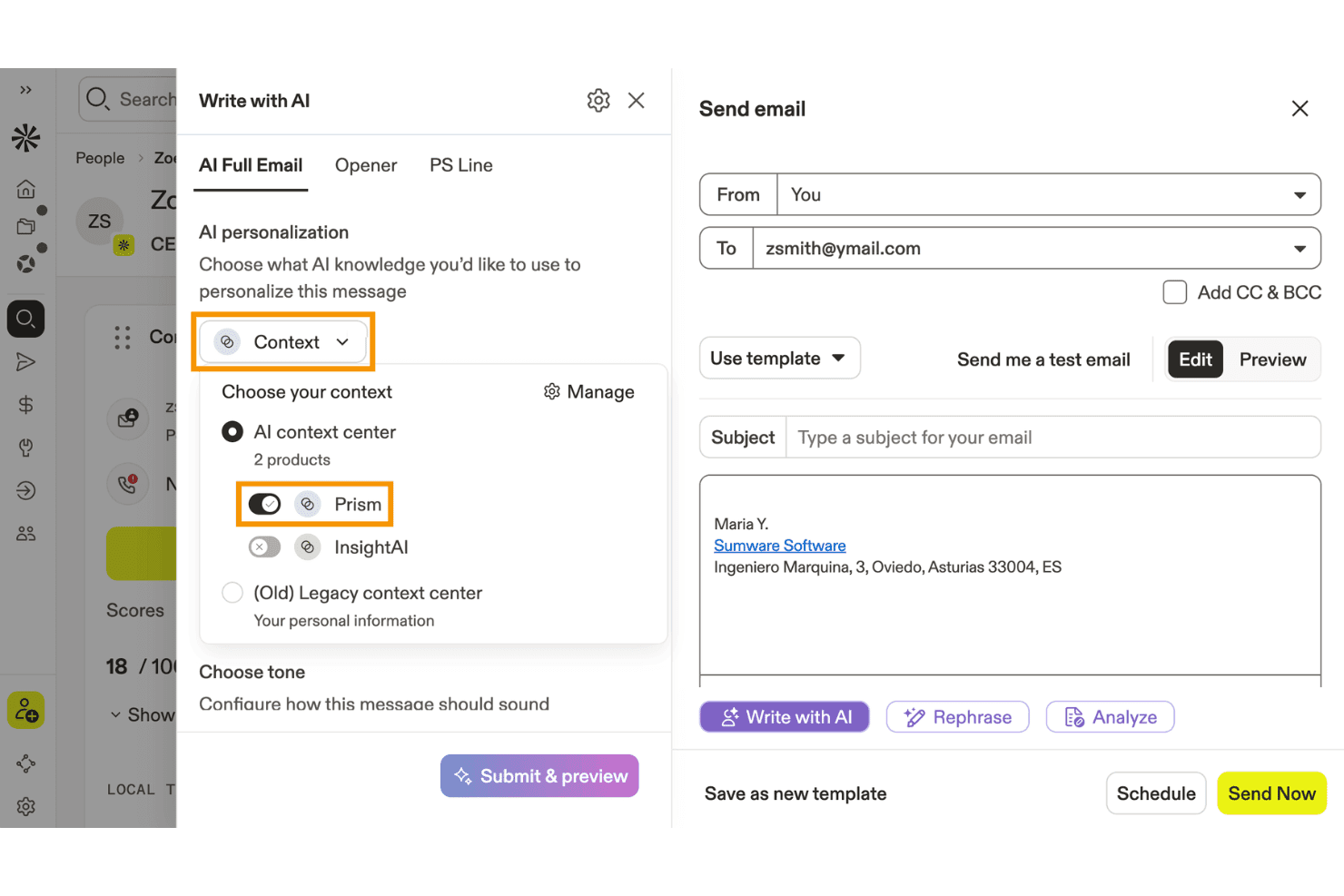
Apollo.io lets users personalize AI-written emails using product context. Apollo.io is a B2B sales engagement platform that combines a 275M+ contact database with AI-powered email sequencing, prospecting, and outreach automation.
Who Is Apollo.io Best For?
Apollo.io is a strong fit for B2B demand generation teams running outbound prospecting and cold email campaigns to fill pipeline.
Why I Picked Apollo.io
I've included Apollo.io in my top picks because it's the strongest tool on this list for B2B teams running prospecting-led outreach at scale. The AI Context Center lets you train the platform on your ICP, messaging pillars, and brand voice, so generated emails reflect your positioning rather than generic copy. Pair that with signal-based personalization pulling from job changes, funding rounds, and tech stack data, and you're sending emails that are specific to each prospect's situation.
Apollo.io Key Features
- AI Writing Assistant: Generates complete email copy, subject lines, and personalized openers from plain-language prompts directly within the platform.
- Email deliverability stack: Includes SPF/DKIM/DMARC authentication setup, email warmup, custom tracking subdomains, and inbox placement monitoring.
- Built-in A/B testing: Lets you test multiple email variants within a sequence step and compare open rates, reply rates, and click rates per variant.
- Multi-mailbox sending rotation: Distributes outbound email volume across multiple connected mailboxes to protect sender reputation at scale.
Apollo.io Integrations
Apollo.io offers native integrations with Salesforce, HubSpot, Zoho CRM, Pipedrive, Adobe Marketo Engage, and SendGrid. It also supports custom integrations through its API and Zapier.
Pros and Cons
Pros:
- Built-in A/B testing for outbound emails
- Prospect-level personalization using real-time B2B signals
- AI writing assistant tuned to brand voice
Cons:
- Lacks AI-driven send-time optimization
- No behavioral or lifecycle-based segmentation
Learn more about Apollo.io: Best for e-commerce marketing
- Free plan + free demo available
- From $16/month
Visit WebsiteCustomer Rating:4.6/5
Omnisend automates email marketing for online retail businesses. Omnisend is an AI-powered email marketing platform designed for ecommerce teams, offering automation, segmentation, product recommendations, and pre-built templates tailored to online stores.
Who Is Omnisend Best For?
Omnisend is a strong fit for ecommerce businesses of all sizes that need email marketing tools built around online retail workflows and customer purchase behavior.
Why I Picked Omnisend
Omnisend earns its spot on my shortlist because it's one of the few email marketing platforms built specifically around ecommerce workflows rather than retrofitted for them. I particularly like the AI-powered segmentation, where you describe the audience you want to reach and Omnisend builds the segment using real-time purchase and behavior data. I also use the prebuilt automation flows for abandoned carts, browse recovery, and post-purchase follow-ups, which are ready to launch without building from scratch. The product listing blocks and AI product recommendations inside the email builder make it easy to pull live store inventory directly into campaigns.
Omnisend Key Features
- A/B testing: Test subject lines, content, and send times across email campaigns to identify what drives the best open and click rates.
- Web push notifications: Send browser-based push messages for flash sales, restocks, or abandoned carts without needing an email address or phone number.
- Discount code blocks: Insert unique, auto-generated discount codes directly into email templates to drive conversions without manual code management.
- Deliverability reporting: Track bounces, unsubscribes, and failures to monitor inbox placement and maintain sender reputation over time.
Omnisend Integrations
Omnisend offers native integrations with Shopify, WooCommerce, BigCommerce, Wix, Magento, and PrestaShop, and connects with Zapier. An API is available for custom integrations.
Pros and Cons
Pros:
- Comprehensive reporting tools
- Effective customer segmentation
- Supports multi-channel communication
Cons:
- Limited support for non-e-commerce businesses
- Limited design customization
Learn more about Omnisend: Best for simple drag-and-drop editing
- Not available
- From $5.99/month
Visit WebsiteCustomer Rating:4.4/5
Hostinger Reach offers an AI-powered email chat interface with pre-built prompt templates like Welcome Newsletter, Educational Content, and Promotions and Sales to generate email campaigns. Hostinger Reach is an AI email marketing platform that generates campaigns from text prompts, builds emails with a visual editor, manages and segments contact lists, and automates delivery with AI-optimized send times.
Who Is Hostinger Reach Best For?
Hostinger Reach is a natural fit for small business owners and solo marketers who want to run email campaigns without a dedicated marketing team.
Why I Picked Hostinger Reach
Hostinger Reach is one of my top picks because I love how its drag-and-drop content editor makes it easy to customize AI-generated email templates without touching a single line of code. After AI writes the copy and builds the layout from a text prompt, I can jump into the editor to swap images, adjust text blocks, and rearrange sections. Reach also saves my brand colors, logo, and style settings automatically, so every email I drag and drop into shape is already on-brand from the start.
Hostinger Reach Key Features
- AI subject line generator: Automatically writes and tests subject line options based on your email content to improve open rates.
- Send-time optimization: AI analyzes your audience data to schedule each campaign at the time most likely to get engagement.
- Contact segmentation: Describe your target audience in plain language and Reach builds a filtered segment from your contact list instantly.
- Automated email sequences: Choose from pre-built automation templates, including welcome series and promotional campaigns, to trigger emails based on subscriber actions.
Hostinger Reach Integrations
Hostinger Reach does not support third-party integrations. It syncs contacts with WordPress and Hostinger Website Builder through built-in 1-click connections, and an API is available for pushing contacts into Reach from external tools.
Pros and Cons
Pros:
- No cap on stored contact list size
- Auto-configures SPF, DKIM, and DMARC records
- AI generates full email drafts from prompts
Cons:
- Very few third-party integration options available
- Cannot duplicate an existing email campaign
Learn more about Hostinger Reach: Best for AI-powered marketing and service agents
- Free plan + 30-day free trial + free demo available
- From $25/month
Visit WebsiteCustomer Rating:4.6/5
Klaviyo’s AI agents support email and service workflows using customer data. Klaviyo is an AI-driven email and SMS marketing platform that combines campaign automation, predictive analytics, segmentation, and customer journey mapping for ecommerce and digital brands.
Who Is Klaviyo Best For?
Klaviyo is a strong fit for ecommerce brands and direct-to-consumer marketers who need a dedicated platform for email and SMS marketing.
Why I Picked Klaviyo
Klaviyo earns its spot on my shortlist because of K:AI, its built-in AI agent system that goes well beyond standard automation. I'm particularly impressed by the Marketing Agent, which ingests your website data and generates fully designed, on-brand email campaigns in just a few clicks—no prompts required. On the service side, the Customer Agent handles order status questions, product recommendations, and returns across web chat, SMS, and email around the clock. I also like that Klaviyo's AI spans over 40 features, from Segments AI that builds audience targeting from your full customer data set to personalized send time optimization that delivers messages when each individual subscriber is most likely to engage.
Klaviyo Key Features
- Automated flows: Build triggered email, SMS, and push notification sequences using a drag-and-drop builder, pre-built templates, and Flows AI.
- Omnichannel campaigns: Run coordinated email, SMS, and mobile push campaigns with AI-driven audience targeting and send time optimization.
- Predictive analytics: Forecast each customer's next order date, lifetime value, churn risk, and spending potential directly from their profile data.
- Benchmarks: Compare your email and SMS performance metrics against 100 peer brands to identify gaps in conversion rate and cart recovery.
Klaviyo Integrations
Klaviyo offers native integrations with Shopify, WooCommerce, BigCommerce, Salesforce Commerce Cloud, Google Ads, Stripe, Zendesk, and Recharge. An API is available for custom integrations.
Pros and Cons
Pros:
- Centralized data for cross-channel targeting and retargeting
- Campaign builder supports advanced triggers and conditional logic
- Powerful automation for behavior-based email and SMS flows
Cons:
- Advanced tagging and organization less robust than some competitors
- Pricing increases quickly as contact list grows
Learn more about Klaviyo: Best for automating inbox triage with AI rules
- 30-day free trial + free demo available
- From $14/user/month (billed annually)
Visit WebsiteCustomer Rating:4.8/5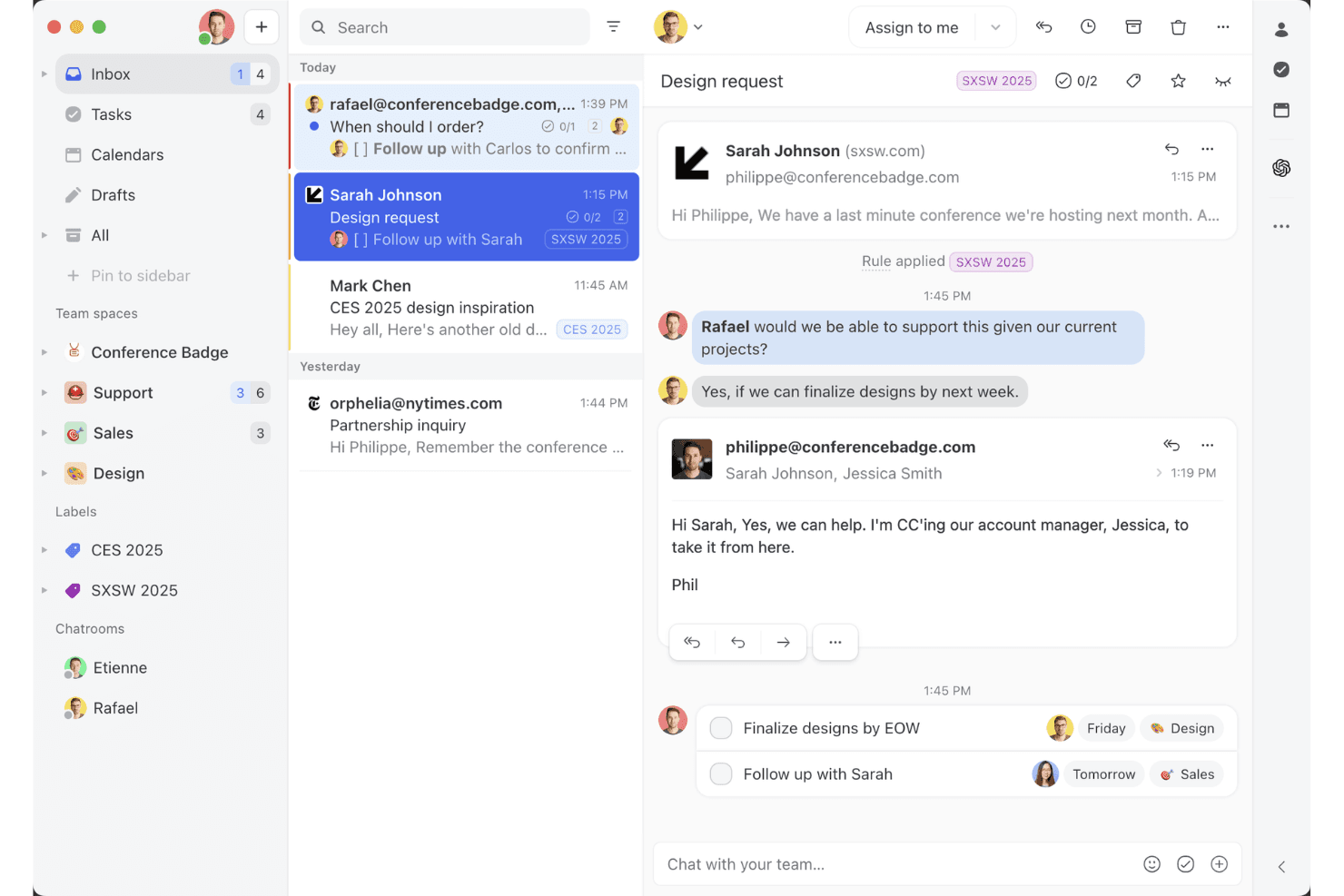
Missive’s shared inbox view shows how teams can collaborate on email threads, assign tasks, and manage client conversations in one workspace. Missive is a collaborative team inbox platform that combines shared email management, AI-powered reply drafting, automated inbox triage, and multi-channel messaging across email, SMS, and social channels.
Who Is Missive Best For?
Missive is a strong fit for customer-facing teams—support, sales, and success—that need to triage and respond to high volumes of incoming email without letting anything slip through the cracks.
Why I Picked Missive
I picked Missive as one of the best because its AI Rules feature does something I genuinely haven't seen done this well elsewhere: it lets you write plain-language prompts that automatically triage incoming email by analyzing sentiment, classifying message type, and triggering actions like assignment or escalation. In practice, that means my team can set a rule that detects urgency in a subject line and instantly routes it to the right person, no manual sorting required. The AI assistant also reads full thread context before drafting replies, so responses stay on-brand without extra prompting.
Missive Key Features
- Conversation summarization: Instantly condenses long email threads into a short summary so your team can get up to speed without reading every message.
- Canned responses with variable fields: Lets you build reusable reply templates with dynamicfields for faster, consistent responses across your team.
- Multi-channel unified inbox: Aggregates email, SMS, WhatsApp, and social DMs into one shared workspace for managing all customer conversations.
- Workflow automation rules: Triggers actions like auto-assignment, round-robin routing, and auto-reply based on conditions you define without writing any code.
- Missive MCP Server: Connect external AI tools (like Claude or ChatGPT) to query email threads, check calendars, and draft replies—while keeping agent review required before sending.
Missive Integrations
Missive offers 25+ native integrations, including HubSpot, Salesforce, Pipedrive, Shopify, Google Workspace, Microsoft 365, OpenAI, Anthropic, and Google Gemini. It also supports custom integrations through its REST API, webhooks, Zapier, and its new MCP Server on Productive and Business plans (requires admin activation), but lacks native connectors for Mailchimp, Klaviyo, and other email marketing platforms.
Pros and Cons
Pros:
- Fast conversation summaries for long email threads
- Team AI assistant reads full thread context
- AI rules automate inbox triage at scale
Cons:
- Lacks A/B testing and marketing analytics
- No campaign or bulk email features
Learn more about Missive: Best for behavior-based messaging
- Free plan + 14-day trial + demo available
- From $100/month
Visit WebsiteCustomer Rating:4.2/5
Customer.io sends behavior-based messages to boost engagement. Customer.io is an AI-powered email marketing platform that lets you automate campaigns, segment audiences, and trigger messages based on user behavior across multiple channels.
Who Is Customer.io Best For?
Customer.io is a strong fit for product-led SaaS companies and digital businesses that need to send targeted, event-driven messages to users based on real-time behavior.
Why I Picked Customer.io
Customer.io earns its spot on my shortlist because of how precisely it handles behavior-based messaging. I love that you can trigger campaigns based on any combination of user events, profile attributes, or actions in real time—so if a user completes a specific step in your onboarding flow but skips another, you can branch them into a completely different message path automatically. The anonymous event tracking is a feature I find especially useful, since it captures behavior before a user even signs up, letting you personalize onboarding from the very first interaction. Additionally, the AI-powered recommended send time feature delivers each message at the moment a specific customer is most likely to engage, rather than applying a one-size-fits-all send schedule.
Customer.io Key Features
- Visual workflow builder: Design multi-step, multi-channel campaign flows using a drag-and-drop canvas with conditional branching logic.
- AI-powered segmentation: Build dynamic audience segments that update automatically based on real-time user data and event activity.
- Transactional messaging: Send one-off triggered emails like password resets or receipts directly through the same platform as your marketing campaigns.
- In-app messaging: Deliver targeted messages inside your product to engage users at key moments without switching to a separate tool.
Customer.io Integrations
Customer.io offers native integrations with Segment, Amplitude, Mixpanel, Snowflake, and Twilio, and connects with Zapier. An API is available for custom integrations.
Pros and Cons
Pros:
- Real-time data tracking
- Easy workflow automation
- Supports behavior-based messaging
Cons:
- Complexity in workflow management
- Limited design customization
Learn more about Customer.io:

Instantly uses AI to scale and personalize cold email outreach. Instantly is an AI-powered email marketing platform for sending, managing, and analyzing cold email campaigns at scale.
Who Is Instantly Best For?
Instantly is a strong fit for sales teams, growth marketers, and agencies that run high-volume cold email outreach campaigns.
Why I Picked Instantly
Instantly is one of my top picks because I love how it handles cold email outreach at scale without sacrificing deliverability. The unlimited email account rotation is a standout mechanic—my team can connect dozens of sending addresses and Instantly distributes sends across them, which keeps individual sender reputation healthy. I also use the AI Spintax and Spam Word Checker to optimize copy before a campaign goes live, catching deliverability issues before they cost us replies. A/Z testing lets us run unlimited email variations, and Instantly's AI scales the best-performing version.
Instantly Key Features
- AI-powered personalization: Generate personalized email content for each prospect using AI-driven variables and custom fields.
- Inbox warm-up: Gradually increase sending volume across connected accounts to build sender reputation before full campaign deployment.
- Campaign analytics dashboard: Track open rates, reply rates, bounce rates, and conversion metrics across all active campaigns in one view.
- Lead finder: Search and filter a built-in B2B contact database to source and add verified prospects directly into your outreach campaigns.
Instantly Integrations
Integrations include Salesforce, Pipedrive, HubSpot, and Calendly. Instantly offers an API for custom integrations.
Pros and Cons
Pros:
- AI-driven personalization
- Advanced targeting filters
- Unlimited email account connections
Cons:
- Limited offline support
- May need technical setup
Learn more about Instantly: Best for AMP email support
- Free plan available
- From $149/month (billed annually)
Visit WebsiteCustomer Rating:4.6/5
Mailmodo uses AI to create interactive emails that drive conversions. Mailmodo is an AI email marketing platform that lets you create, send, and automate interactive campaigns using AMP emails, dynamic content, and advanced personalization tools.
Who Is Mailmodo Best For?
Mailmodo is a good fit for marketing teams at B2B and B2C companies that want to go beyond static email and run interactive, conversion-focused campaigns.
Why I Picked Mailmodo
Mailmodo earns its spot as one of the best on my shortlist because of how it handles AMP email in a way no other platform does. With Mailmodo, I can embed forms, polls, quizzes, and even spin-the-wheel games directly inside an email—so recipients complete actions without ever leaving their inbox. That's a genuinely different experience from a standard click-through campaign. I also like that Mailmodo uses both AMP for Email and CSS interactivity to cover clients beyond Gmail, and automatically serves a plain HTML fallback when a recipient's client doesn't support either format.
Mailmodo Key Features
- AI segment generator: Build audience segments using natural language prompts instead of manual filter logic.
- Email sequence builder: Set up automated, multi-step email sequences that trigger based on contact behavior or lifecycle stage.
- AI campaign analyzer: Review campaign performance data and get AI-generated recommendations to improve future sends.
- List and contact segmentation: Organize contacts into targeted groups based on attributes, events, or engagement history.
Mailmodo Integrations
Mailmodo offers native integrations with HubSpot, Salesforce, Zoho CRM, Pabbly, Webhooks, and Google Sheets. It also connects with Zapier and provides an API for custom integrations.
Pros and Cons
Pros:
- Easy to embed forms and widgets
- Built-in analytics for tracking
- Supports interactive AMP emails
Cons:
- Limited third-party integrations
- Requires AMP HTML knowledge
Learn more about Mailmodo: Best for automation workflows
- 14-day free trial + free demo available
- From $15/month (billed annually)
Visit WebsiteCustomer Rating:4.4/5
ActiveCampaign boosts sales with AI-powered, personalized automation. ActiveCampaign is an AI-powered email marketing platform that combines campaign management, advanced automation workflows, predictive content, and CRM integration for marketing teams.
Who Is ActiveCampaign Best For?
ActiveCampaign is a good fit for small to mid-sized marketing teams that run multi-step email campaigns and need granular control over audience segmentation and automated messaging.
Why I Picked ActiveCampaign
ActiveCampaign is one of my top picks because its automation goes beyond basic trigger-and-send logic. The AI-Suggested Actions feature recommends complete multi-step marketing sequences based on billions of anonymized data points—so instead of building a nurture workflow from scratch, I get a structured campaign with messaging, timing, and branching paths already mapped out. The split and conditional actions in the automation builder let my team route contacts based on real behavior, like whether someone clicked a specific link or made a purchase, rather than just moving everyone through the same linear sequence. The Pre-built AI Actions Library also lets me embed live intelligence directly into any automation without writing a single line of code.
ActiveCampaign Key Features
- AI Campaign Builder: Generate a full email campaign—layout, copy, subject lines, and images—from a plain-language prompt.
- Predictive sending optimization: Automatically determines the best send time for each individual subscriber based on their past engagement patterns.
- AI-Suggested Segments: Identifies high-value audience segments you may not have thought to create, like likely repeat buyers or at-risk subscribers.
- Site and event tracking: Monitors how contacts interact with your website and triggers automations based on specific pages visited or actions taken.
ActiveCampaign Integrations
ActiveCampaign offers 900+ native integrations, including Shopify, WooCommerce, Salesforce, HubSpot, Facebook, Google Analytics, Unbounce, Calendly, Eventbrite, and Stripe. It also connects with Zapier and provides an API for custom integrations.
Pros and Cons
Pros:
- Customizable workflows
- Built-in CRM system
- Predictive sending feature
Cons:
- Limited design options
- Steeper learning curve for beginners
Learn more about ActiveCampaign:
Outras ferramentas de marketing por e-mail com AI
Eis algumas opções adicionais de ferramentas de marketing por e-mail com AI que não chegaram à minha seleção, mas que vale a pena conhecer:
- 11Iterable Best for cross-channel marketing
- 12BeehiivBest for newsletter creators
- 13Elastic EmailBest for AI-built templates
- 14Braze Best for mobile engagement
- 15Click DimensionsBest for Microsoft Dynamics users
- 16Movable InkBest for dynamic content
- 17Seventh SenseBest for personalized send times
- 18VitaMailBest for AI email generation
- 19SmartpingBest for AI-driven email personalization
- 20popcornBest for automated lead tracking
How I Evaluate AI Email Marketing Tools
Every tool on this list needs to deliver real AI value—not just a chatbot bolted onto a legacy email builder. I split my evaluation into two layers: the core functionality a tool must have to even qualify, and the differentiating factors that separate a good option from the best fit for your team.
Core Functionality (Table Stakes For This List)
When I'm selecting tools for my list, I rank each one on a scale from 0 (does not offer the functionality) to 5 (excels in this area) for each core functionality listed below. Then, I calculate the tool's total score into a percentage. Each tool needs to achieve a minimum total score of 65% to be considered for inclusion.
- AI Content Generation: I evaluate whether the tool can draft full email copy, subject lines, and CTAs from a prompt—not just offer spell-check or basic text suggestions.
- Predictive Personalization: Each tool should go beyond static merge tags and use AI to tailor content blocks, product recommendations, or offers per recipient.
- Smart Segmentation: I look for ML-driven audience grouping based on engagement patterns or lifecycle signals, like auto-identifying at-risk subscribers before a re-engagement campaign.
- Send-Time Optimization: The tool should use AI to determine the best delivery window per recipient, not just let you pick a time zone-based batch send.
- AI A/B Testing & Optimization: I check whether the platform can auto-select and scale a winning variant across subject lines or content rather than requiring manual winner picks.
- Performance Analytics & Insights: Reporting should surface AI-generated takeaways and recommended next steps, not just standard open and click dashboards.
Once I have a list of tools that meet the criteria, I consider what sets each platform apart.
Differentiating Factors (What Sets Vendors Apart)
Here's how I compare and contrast different vendors:
Standout Features
Journey orchestration AI is a big differentiator—I look for tools that build and adapt multi-step lifecycle flows on their own rather than requiring manual trigger mapping. Brand voice training matters too, especially for teams sending high-volume campaigns where tone consistency is hard to maintain. I also evaluate whether a platform offers predictive revenue attribution, tying email performance to downstream revenue and LTV instead of stopping at opens and clicks.
Beyond Features
Integration depth is one of the first things I check—a tool that syncs natively with your CRM and ecommerce platform keeps audience data fresh and triggers accurate. Data privacy policies also deserve close attention, particularly whether a vendor uses your customer data to train shared AI models. I evaluate deliverability support too, including dedicated IP options, warmup automation, and authentication setup like DKIM and DMARC, since even the smartest AI content means nothing if it lands in spam.
Como escolher uma ferramenta de marketing por e-mail com AI
É fácil perder-se em listas extensas de funcionalidades e estruturas de preços complexas. Para o ajudar a manter o foco enquanto conduz o seu processo específico de seleção de software, apresentamos uma lista de verificação dos fatores a ter em conta:
| Fator | O que deve considerar |
| Escalabilidade | A ferramenta consegue acompanhar o crescimento da sua empresa? Considere se permite aumentar os volumes de e-mail e adicionar utilizadores sem diminuir o desempenho. Procure planos flexíveis que respondam às necessidades de equipas em crescimento e de bases de clientes cada vez maiores. |
| Integrações | Integra-se com as ferramentas que já utiliza? Verifique a compatibilidade com sistemas de CRM, plataformas de análise e outras ferramentas de marketing de que depende. A falta de integração pode criar silos de dados e perturbar os fluxos de trabalho. |
| Personalização | Pode adaptar a ferramenta às suas necessidades? Avalie se é possível personalizar modelos, fluxos de trabalho e relatórios. Uma ferramenta que se adapta aos seus processos pode poupar tempo e aumentar a eficiência. |
| Facilidade de utilização | A ferramenta é intuitiva e fácil de utilizar? Avalie se a sua equipa consegue aprender rapidamente a utilizá-la sem formação extensa. As ferramentas complicadas podem causar frustração e baixas taxas de adoção. |
| Implementação e integração inicial | Quão simples é o processo de configuração? Considere o tempo e os recursos necessários para colocar a ferramenta em funcionamento. Procure fornecedores que ofereçam integração inicial orientada, recursos de formação e apoio durante a transição. |
| Custo | O preço cabe no seu orçamento? Avalie o custo total, incluindo eventuais taxas ocultas. Compare os níveis de preços e as funcionalidades que oferecem. Certifique-se de que o valor justifica a despesa. |
| Medidas de segurança | Como protege a ferramenta os seus dados? Verifique a existência de encriptação, controlos de acesso e conformidade com os regulamentos de proteção de dados. As falhas de segurança podem provocar violações de dados e perda de confiança. |
| Disponibilidade do apoio | Que opções de apoio são disponibilizadas? Considere se tem acesso a apoio 24 horas por dia, 7 dias por semana, gestores de conta dedicados ou fóruns da comunidade. Um apoio atempado pode resolver problemas rapidamente e minimizar o tempo de inatividade. |
O que são ferramentas de marketing por e-mail com IA?
As ferramentas de marketing por e-mail com IA utilizam inteligência artificial para melhorar e automatizar campanhas de marketing por e-mail através do processamento de linguagem natural, da aprendizagem automática e da análise de dados. Os profissionais de marketing, proprietários de empresas e equipas de vendas utilizam geralmente estas ferramentas para melhorar o envolvimento, a personalização do conteúdo e a eficiência. As funcionalidades de automatização, segmentação, personalização e criação de conteúdo ajudam a direcionar a mensagem para o público certo, a criar mensagens personalizadas e a medir o sucesso das campanhas. Estas ferramentas proporcionam um valor significativo ao poupar tempo e aumentar a eficácia dos esforços de marketing por e-mail.
Funcionalidades das ferramentas de marketing por e-mail com IA
Ao selecionar ferramentas de marketing por e-mail com IA, esteja atento às seguintes funcionalidades essenciais:
- Automatização de e-mails: Automatize todo o processo da sua campanha, desde o agendamento e o envio até à gestão dos acompanhamentos. Isto poupa-lhe imenso tempo e ajuda a manter os seus contactos no caminho certo, mesmo que o café ainda não tenha feito efeito.
- Segmentação de contactos: Agrupe os seus contactos com base no comportamento, nos interesses ou nos dados demográficos, para poder enviar a mensagem certa à pessoa certa. Não terá de adivinhar quem quer o quê — as pessoas receberão efetivamente conteúdo relevante para si.
- Opções de personalização: Crie e-mails que pareçam uma nota atenciosa, em vez de uma mensagem genérica enviada em massa. Insira dinamicamente nomes, preferências ou histórico de compras de cada subscritor, para que os seus e-mails se destaquem numa caixa de entrada congestionada.
- Testes A/B: Teste as suas linhas de assunto, o conteúdo e os esquemas. Veja rapidamente o que funciona (e o que não funciona), para poder ajustar as suas mensagens e obter melhores resultados de cada vez.
- Painel de análise: Acompanhe as aberturas, os cliques, as conversões e os abandonos a partir de uma localização central. Os dados permitem-lhe ver facilmente o que está a gerar interesse e onde há margem para fazer ajustes que melhorem os resultados.
- Editor de arrastar e largar: Crie e-mails visualmente apelativos sem se preocupar com código. Utilize blocos de construção simples para criar modelos personalizados com um aspeto profissional, prontos para as mais recentes adições de conteúdo antes de clicar em enviar.
- Gestão da conformidade: Fique descansado, sabendo que as suas campanhas estão configuradas para cumprir o RGPD, a CAN-SPAM e outras regulamentações de privacidade. Pode concentrar-se no marketing em vez de se preocupar com problemas legais.
- Suporte para integrações: Ligue a sua ferramenta de e-mail a outras plataformas que já utiliza (como sites de comércio eletrónico ou sistemas CRM) para obter fluxos de trabalho mais simples e um melhor desempenho.
Funcionalidades comuns de IA nas ferramentas de marketing por e-mail
Para além das funcionalidades padrão das ferramentas de marketing por e-mail com IA apresentadas acima, muitas destas soluções estão a incorporar IA com funcionalidades como:
- Evitar filtros de spam: A IA analisa os seus e-mails para sinalizar qualquer elemento que possa ativar filtros de spam, permitindo-lhe aperfeiçoar o conteúdo e maximizar a capacidade de entrega.
- Geração automática de conteúdo: Utilize a IA para criar textos de e-mail envolventes, adaptados a cada destinatário, poupando tempo na criação de mensagens e aumentando as taxas de resposta através de comunicações personalizadas em grande escala.
- Otimização da hora de envio: A IA analisa o comportamento anterior dos utilizadores para agendar os e-mails no momento exato em que cada destinatário tem maior probabilidade de interagir. Desta forma, evita o buraco negro digital e garante que os seus e-mails são vistos.
- Análise preditiva: A IA analisa os números para prever as taxas de abertura, os cliques ou o risco de cancelamento, permitindo-lhe ajustar a sua estratégia em tempo real e manter-se um passo à frente das tendências.
- Sugestões inteligentes para linhas de assunto: Receba sugestões baseadas em IA para linhas de assunto apelativas, com base no que funcionou no passado, ajudando-o a conseguir essas aberturas tão importantes.
- Mapeamento da jornada do cliente: A IA acompanha e adapta-se às ações de cada utilizador, conduzindo-o automaticamente através de uma série personalizada de pontos de contacto para um envolvimento ideal, sem necessidade de supervisão constante.
Benefícios das ferramentas de marketing por e-mail com IA
A implementação de ferramentas de marketing por e-mail com IA proporciona vários benefícios para a sua equipa e para a sua empresa. Eis alguns dos benefícios que pode esperar:
- Poupança de tempo: A automação trata de tarefas repetitivas, como o envio de e-mails e a gestão de listas, libertando tempo da sua equipa para atividades mais estratégicas.
- Maior envolvimento: A personalização adapta o conteúdo às preferências individuais, aumentando as taxas de abertura e de cliques.
- Decisões baseadas em dados: A análise fornece informações sobre o desempenho das campanhas, ajudando a aperfeiçoar estratégias e a melhorar os resultados.
- Marketing direcionado: A segmentação permite direcionar com precisão diferentes grupos de público, conduzindo a campanhas mais eficazes.
- Maior alcance: O envolvimento multicanal permite-lhe contactar os clientes através de e-mail, SMS e notificações push, ampliando o seu alcance.
- Maior relevância: O conteúdo dinâmico, que utiliza IA generativa e dados em tempo real, garante que as suas mensagens sejam oportunas e pertinentes para cada destinatário.
- Segurança e conformidade: As salvaguardas de segurança protegem os seus dados e garantem a conformidade com os regulamentos, mantendo a confiança dos clientes.
Custos e preços das ferramentas de marketing por e-mail com IA
A seleção de ferramentas de marketing por e-mail com IA requer uma compreensão dos vários modelos de preços e planos disponíveis. Os custos variam consoante as funcionalidades, o tamanho da equipa, os complementos e outros fatores. A tabela abaixo resume os planos comuns, os respetivos preços médios e as funcionalidades normalmente incluídas nas soluções de ferramentas de marketing por e-mail com IA:
Tabela comparativa de planos para ferramentas de marketing por e-mail com IA
| Tipo de plano | Preço médio | Funcionalidades comuns |
| Plano gratuito | $0 | Automação básica de e-mails, análise limitada e modelos padrão. |
| Plano pessoal | $10-$30 /utilizador /mês | Segmentação avançada, suporte prioritário e opções de personalização melhoradas. |
| Plano empresarial | $50-$100 /utilizador /mês | Testes A/B, marketing multicanal e fluxos de trabalho de automação avançados. |
| Plano empresarial de grande dimensão | $150-$300 /utilizador /mês | Integrações personalizadas, gestão de conta dedicada e funcionalidades de segurança abrangentes. |
Perguntas frequentes sobre ferramentas de marketing por e-mail com IA
Eis algumas respostas a perguntas frequentes sobre ferramentas de marketing por e-mail com IA:
Como afeta a IA o marketing por e-mail?
A IA melhora o marketing por e-mail ao determinar o momento ideal para enviar e-mails e ao personalizar as linhas de assunto. Alinha os horários de envio com diferentes fusos horários e hábitos dos utilizadores, aumentando a probabilidade de envolvimento dos clientes e melhorando a resposta do público.
O que é a regra 80/20 no marketing por e-mail?
A regra 80/20 sugere que cerca de 80% dos efeitos provêm de 20% das causas. No marketing por e-mail, isto significa que um pequeno número dos seus esforços gera frequentemente a maior parte dos seus resultados. Concentre-se nas tarefas de maior impacto, que proporcionam os maiores retornos.
Como funciona o marketing automatizado por e-mail?
O marketing automatizado por e-mail envolve a definição de regras e acionadores para campanhas de e-mail. Cria a campanha, agenda os e-mails e define as condições de envio. Os destinatários recebem os e-mails com base nessas condições, proporcionando uma experiência personalizada.
Como pode a IA personalizar o marketing por e-mail?
A IA personaliza o marketing por e-mail ao analisar os dados dos clientes para adaptar o conteúdo. Utiliza a aprendizagem automática para compreender as preferências e os comportamentos dos utilizadores, garantindo que as mensagens sejam relevantes e envolventes. Isto conduz a taxas de abertura mais elevadas e a melhores relações com os clientes.
Quais são os desafios da IA no marketing por e-mail?
Os desafios da IA no marketing por e-mail incluem preocupações relacionadas com a privacidade dos dados, a integração com os sistemas existentes e a necessidade de conhecimentos técnicos. Garantir a conformidade com os regulamentos e manter a segurança dos dados são aspetos fundamentais para uma implementação bem-sucedida.