

O Google Ads pode ser uma ferramenta poderosa, mas nem sempre é a opção mais adequada para todas as estratégias de marketing. Muitos diretores de marketing enfrentam desafios como o aumento dos custos, opções de segmentação limitadas para públicos B2B de nicho ou retornos decrescentes sobre o investimento publicitário. Se está a ter dificuldades em alcançar o retorno do investimento que espera, pode ser altura de explorar uma alternativa ao Google Ads que esteja mais alinhada com os seus objetivos e ofereça soluções mais adaptadas ao seu público.
Enquanto especialista em marketing B2B, trabalhei com organizações para otimizar as suas estratégias publicitárias. De um modo geral, a minha experiência permitiu-me obter conhecimentos sobre plataformas publicitárias que podem proporcionar melhores resultados para empresas como a sua, ao concentrarem-se nas funcionalidades e capacidades certas.
Para o ajudar a começar a sua pesquisa, analisei uma série de ferramentas e plataformas que constituem alternativas sólidas ao Google Ads. Avaliei as respetivas opções de segmentação, estruturas de preços e eficácia global para o marketing B2B. Tendo isso em conta, estas recomendações foram concebidas para o ajudar a encontrar o próximo software capaz de elevar as suas campanhas e maximizar o impacto do seu marketing.
O que é o Google Ads?
O Google Ads é um software de marketing digital que permite criar anúncios online para alcançar potenciais clientes. É normalmente utilizado por profissionais de marketing, proprietários de empresas e anunciantes que pretendem promover os seus produtos ou serviços.
O software oferece funcionalidades como segmentação de anúncios, licitação de palavras-chave e monitorização do desempenho para o ajudar a otimizar as suas campanhas de forma eficiente. De um modo geral, o Google Ads proporciona uma plataforma sólida para aumentar a visibilidade da sua marca e impulsionar as vendas.
Tabela comparativa das alternativas ao Google Ads
Esta tabela comparativa resume os detalhes dos preços das minhas principais alternativas ao Google Ads:
| Tool | Best For | Trial Info | Price | ||
|---|---|---|---|---|---|
| 1 | Best for AI-driven solutions | 30-day free trial + demo available | From $2000/month | Website | |
| 2 | Best for native advertising | Not available | Pricing upon request | Website | |
| 3 | Best for reaching Bing users | Not available | Pricing upon request | Website | |
| 4 | Best for app discovery | Not available | Pricing upon request | Website | |
| 5 | Best for audio engagement | Not available | Pricing upon request | Website | |
| 6 | Best for social reach | Not available | Pricing upon request | Website | |
| 7 | Best for B2B targeting | Not available | Pricing upon request | Website | |
| 8 | Best for visual content | Not available | Pricing upon request | Website | |
| 9 | Best for retail environments | Free plan available | Pricing upon request | Website | |
| 10 | Best for diverse ad solutions | Not available | Pricing upon request | Website |


Why Trust Our Software Recommendations
6,700+
Reviews
20
Industry experts
16+
Evaluation factors
14
Years
Our team has been testing and reviewing software since 2012. As marketing leaders ourselves, we know how difficult—and important—it is to choose the right software.
For this guide, we evaluated tools using hands-on testing and independent research, scoring tools using our selection criteria.
Our reviews reflect our human editorial judgment, not a sales pitch.
Expert reviewers:
 Gui DrusinaCreative Director
- Shriya GhateSenior Marketing Lead
 Amanda JacquesMarketing Ops Leader

Avaliações das melhores alternativas ao Google Ads
Apresentamos abaixo os meus resumos detalhados das melhores alternativas ao Google Ads que entraram na minha lista de seleção. As minhas avaliações oferecem uma análise aprofundada das principais funcionalidades, vantagens e desvantagens, integrações e casos de utilização ideais de cada ferramenta, para o ajudar a encontrar a melhor opção para si.
 Best for AI-driven solutions
- 30-day free trial + demo available
- From $2000/month
Visit WebsiteCustomer Rating:3.8/5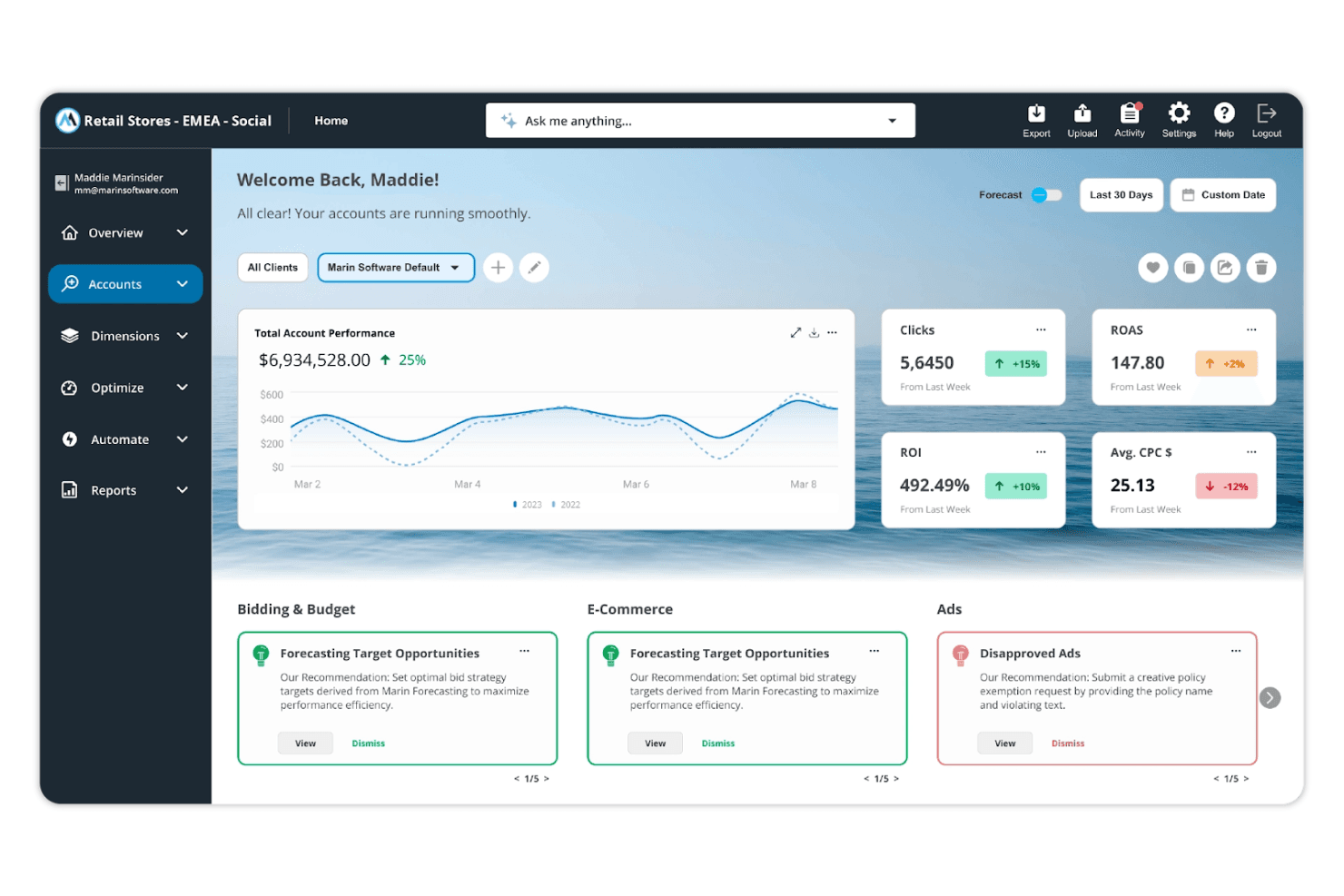
Marin Software displays account performance metrics and AI-driven recommendations. MarinOne is a cross-channel performance marketing platform built for agencies and enterprise advertisers who need to manage, optimize, and report on paid campaigns across search, social, retail, and display networks from a single interface.
Who Is Marin Software Best For?
MarinOne is a strong fit for digital marketing agencies and enterprise advertisers managing paid campaigns across search, social, and retail media from a single platform.
Why I Picked Marin Software
I picked Marin Software as one of the best because its AI-driven approach to cross-channel campaign management goes well beyond what most single-publisher tools offer. I particularly like Marin Advisor, which layers ChatGPT directly onto your PPC accounts alongside Marin's own bidding logic, and the AI-powered Anomaly Detector, which flags performance deviations automatically so you're not manually hunting for budget leaks. Add in AI-powered forecasting and dynamic spend allocation across campaigns, and you get a genuinely intelligent layer on top of your media mix.
Marin Software Key Features
- Cross-channel publisher aggregation: Pull campaign data from search, social, retail, and display networks—including Microsoft Advertising, Meta, LinkedIn, TikTok, Amazon, and Walmart—into a single interface.
- Analytics Grid: Analyze performance across accounts and campaigns in a customizable grid with custom columns, shareable dashboards, and white-labeled reporting.
- Bulk uploads and multi-edit: Create or edit thousands of campaigns, groups, keywords, and ads at once using bulk sheets or the platform's multi-edit workflow.
- Marin Scripts: Build custom, advanced optimizations using scripted logic directly within the platform.
MarinOne Integrations
MarinOne supports integrations with Google Ads, Microsoft Advertising, Meta, LinkedIn Ads, TikTok, Amazon Ads, Google Analytics 4, HubSpot, Salesforce, and Google BigQuery. It also connects with Google Sheets and Excel, and offers a REST API for custom integrations.
Pros and Cons
Pros:
- Bulk edits cover campaigns across publishers
- Automated bidding exposes keyword-level bid adjustments
- Cross-channel reporting unifies non-Google campaign views
Cons:
- Impression-share bidding can exhaust capped budgets
- Filtered graphs can mismatch selected views
Learn more about Marin Software:
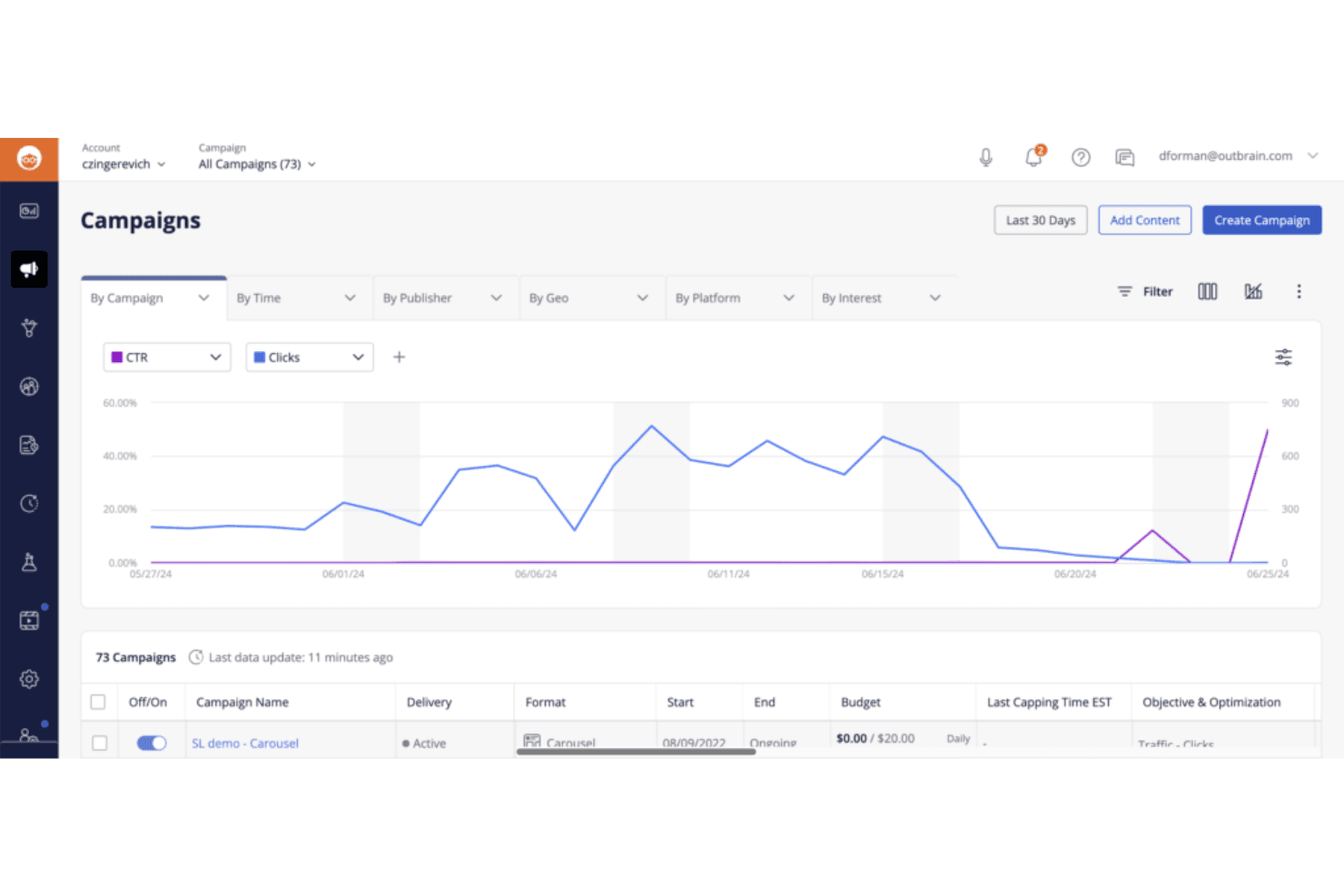
Outbrain lets users monitor campaign CTR and clicks over time. Outbrain is a native advertising platform that lets marketers reach audiences across 10,000+ publisher sites, newsletters, and partner apps—making it a strong option if you want to drive clicks and conversions outside the Google and social media ecosystems.
Who Is Outbrain Best For?
Outbrain is a strong fit for marketers who want to reach audiences on the open web through native ads on premium publisher sites, outside of search and social channels.
Why I Picked Outbrain
Outbrain earns its spot on my shortlist because it puts your ads in front of readers on 10,000+ premium publisher sites, newsletters, and partner apps—inventory that sits entirely outside Google Search and social feeds. I particularly like its Carousel format, which lets you showcase up to 10 individually linked product cards within a single native placement, making it genuinely useful for running product-focused campaigns without touching a social platform. Its contextual and interest-based targeting, layered with retargeting and lookalike audiences, gives you real control over who sees those placements across the open web.
Outbrain Key Features
- Conversion bid strategy: Automated bidding optimizes campaigns toward CPA or ROAS goals by adjusting CPCs based on your conversion event data.
- Programmatic DSP buying: Advertisers can access Outbrain's publisher inventory through any DSP of their choice, including curated deal packages designed for specific KPIs.
- First-party audience imports: Advertisers can import their own audience segments via integrations with Nielsen, Oracle, Adobe, Neustar, and LiveRamp for custom targeting.
- Creative automation tools: The platform generates headline and image variations using AI during campaign setup, including a Title Enhancer and Image Optimizer.
Outbrain Integrations
Native integrations include Krux, Nielsen, Oracle, Adobe, Neustar, and LiveRamp for audience imports. Outbrain also supports Google Analytics conversion imports, Shopify conversion-pixel tracking, and a REST API for custom integrations.
Pros and Cons
Pros:
- Carousel placements showcase multiple products
- Audience controls include retargeting and contextual targeting
- Broad publisher reach beyond search and social
Cons:
- Publisher exclusions and placement quality draw complaints
- Clicks can bring inconsistent conversion quality
Learn more about Outbrain:
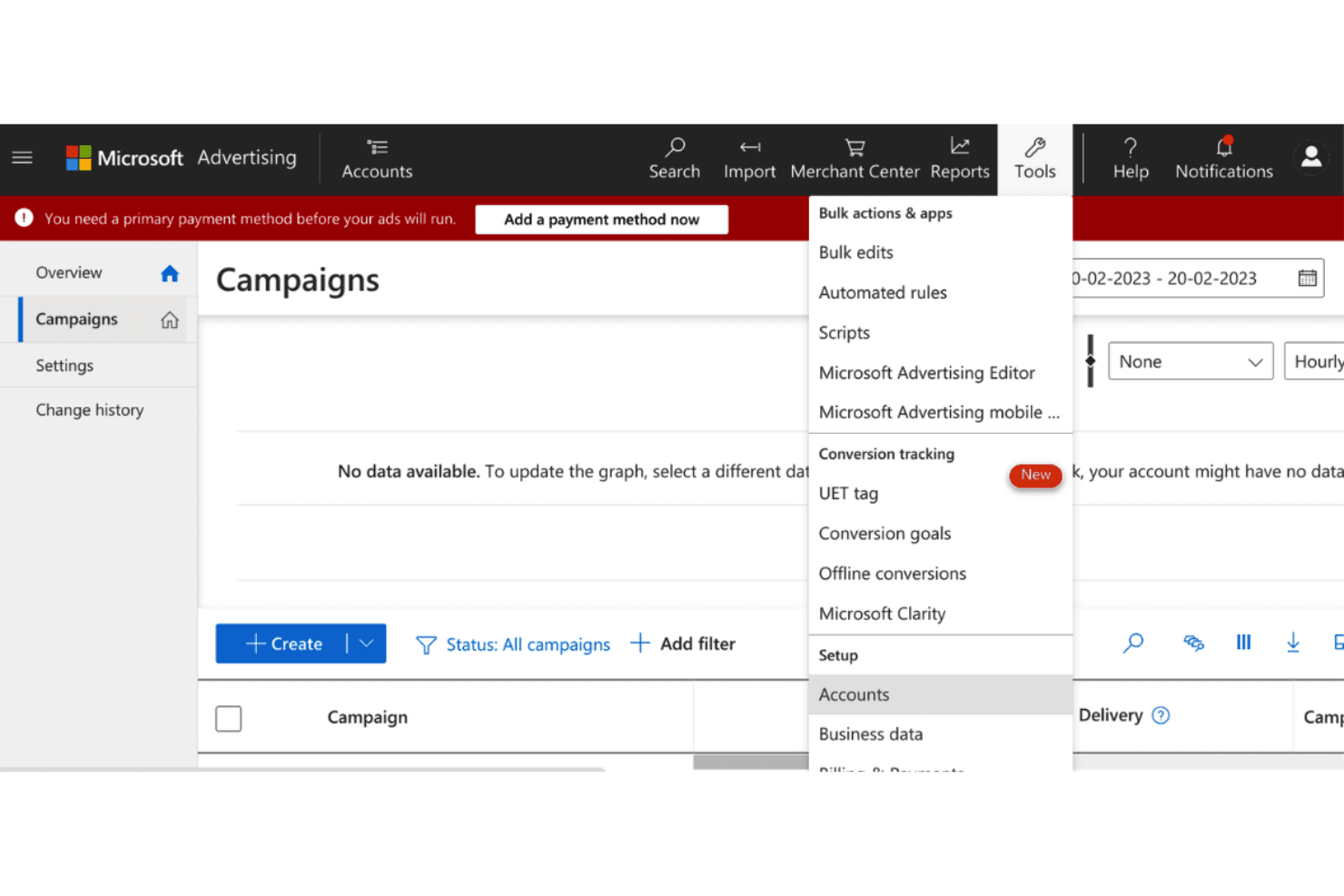
Microsoft Ads provides conversion tracking and bulk editing tools. Microsoft Advertising is a paid search and display platform that lets PPC managers, agencies, and e-commerce marketers run campaigns across Bing, Microsoft properties, and partner networks like Yahoo, AOL, and DuckDuckGo—with LinkedIn profile targeting as a standout B2B differentiator.
Who Is Microsoft Advertising Best For?
Microsoft Advertising is a strong fit for PPC managers and agencies already running Google Ads campaigns who want to extend their reach across Bing, Yahoo, and other Microsoft network properties without rebuilding campaigns from scratch.
Why I Picked Microsoft Advertising
I've included Microsoft Advertising in my top picks because it's the most direct way to run paid search campaigns across Bing, Yahoo, AOL, and DuckDuckGo without rebuilding everything from scratch. I especially like the Google Import feature, which pulls in your existing campaign structure, keywords, bids, and budgets in one go. On top of that, LinkedIn profile targeting by industry, company, and job function gives B2B campaigns a reach angle you simply don't get inside Google Ads.
Microsoft Advertising Key Features
- Shopping campaigns: Create product ads directly from your Microsoft Merchant Center catalog, with support for local inventory ads, merchant promotions, and dynamic remarketing.
- Performance Max campaigns: Run one campaign across Microsoft's full ad inventory, with automated bidding that optimizes toward your target CPA or ROAS goals.
- Universal Event Tracking (UET): Install a single tag on your website to enable conversion tracking, audience remarketing, and Microsoft Clarity integration across your campaigns.
- Video and Connected TV ads: Serve video creative across Microsoft properties, publisher partner sites, streaming platforms, and TV-like viewing experiences.
Microsoft Advertising Integrations
Microsoft Advertising has documented native connectivity with Microsoft Clarity for conversion insights. It also supports Google Merchant Center product-feed imports and a REST API for custom integrations.
Pros and Cons
Pros:
- Reviewers report lower CPCs than Google
- LinkedIn targeting reaches company and job-function audiences
- Reach Bing and Yahoo searchers beyond Google
Cons:
- Reviewers cite unexplained suspensions and slow support
- Lower search volume can limit niche reach
Learn more about Microsoft Ads:
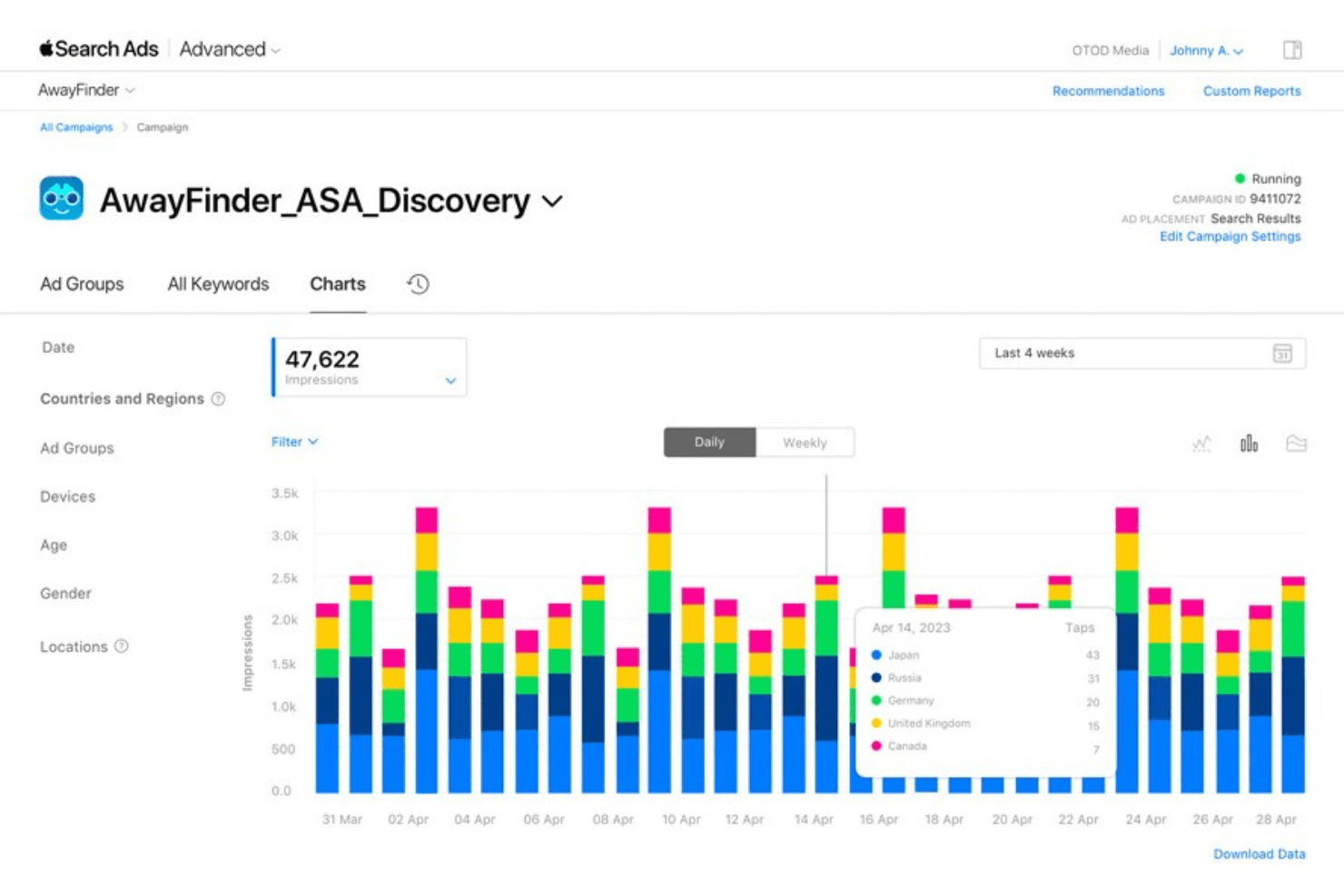
Apple Search Ads tracks daily impressions by country over four weeks. Apple Ads is a paid advertising platform built specifically for the App Store, making it a natural fit for app developers and mobile marketers who want to reach high-intent users at the moment they're searching for new apps.
Who Is Apple Ads Best For?
Apple Ads is a strong fit for app developers and mobile marketers who want to reach high-intent users searching the App Store.
Why I Picked Apple Search Ads
I picked Apple Search Ads because it's the only ad channel that puts your app in front of users who are actively searching the App Store, which means you're reaching people at peak intent. I particularly like the Search Results placement, where you can bid on branded, category, and competitor keywords to intercept searches directly relevant to your app. The Today tab and product page placements extend that reach further across the App Store ecosystem, and the Maximize Conversions bidding strategy uses AI to optimize toward installs automatically.
Apple Search Ads Key Features
- Audience refinement settings: Narrow your campaign audience by device type, location, customer type, age, and gender to control who sees your ads.
- Custom product pages: Create up to 70 custom product pages in App Store Connect with unique screenshots, preview videos, and promotional text to use as ad creative.
- Apple Ads Platform API: Manage campaigns and pull reports programmatically using OAuth 2-authenticated API access.
- Campaign scheduling: Set start and end dates plus day-and-time scheduling to control exactly when your ads run.
Apple Ads Integrations
Native integrations are not clearly documented. Apple Ads offers the Apple Ads Platform API and Attribution API for custom campaign management, reporting, and app-install attribution.
Pros and Cons
Pros:
- Tracks app installs within the platform
- Targets branded and competitor keywords
- Reaches high-intent App Store searches
Cons:
- Acquisition costs can exceed Google campaigns
- Ads reach only App Store audiences
Learn more about Apple Search Ads:
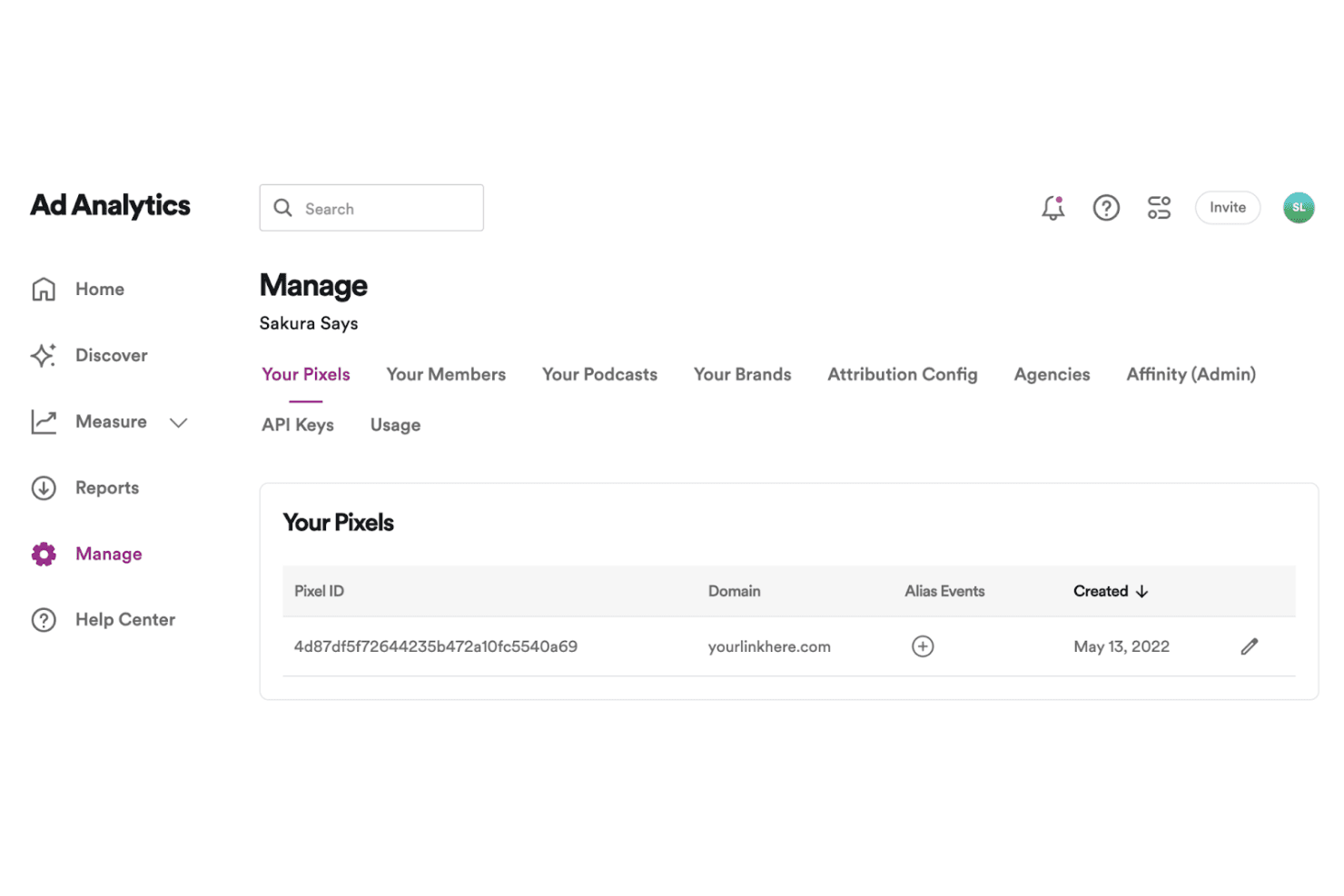
Spotify Ads lets users manage pixel tracking for ad attribution. Spotify Ads Manager is an audio-first advertising platform that lets marketers reach listeners through music and podcast content, making it a distinct channel for brand awareness and audience engagement outside search and social.
Who Is Spotify Ads Manager Best For?
Spotify Ads Manager is a strong fit for brands and agencies focused on audio-first campaigns that want to reach engaged listeners during music and podcast content.
Why I Picked Spotify Ads Manager
I picked Spotify Ads Manager because audio engagement is a channel most Google Ads alternatives simply don't touch. While listeners stream music or podcasts, your ads run non-skippable and sound-on, which means you're not competing for a glance—you're commanding actual attention. I also appreciate the contextual targeting here: you can align ads with specific music genres or podcast topics, so a fitness brand can reach listeners mid-workout playlist rather than hoping a keyword match lands right.
Spotify Ads Manager Key Features
- Campaign objectives: Set campaigns toward brand awareness, Spotify engagement, web traffic, or app installs to match your marketing goal.
- Spotify Pixel and Conversions API: Track website, app, and offline conversion events after ad exposure and use that data to build retargeting audiences.
- Report Builder: Customize campaign reports by metrics and dimensions, and schedule them for email or in-platform delivery.
- Daypart targeting: Choose specific days and times for your ads to run, based on listeners' local time zones.
Spotify Ads Manager Integrations
Spotify Ads Manager supports integrations with Google Tag Manager, AppsFlyer, Kochava, and reporting partners such as Supermetrics and TapClicks. Its Ads API supports custom campaign management and reporting.
Pros and Cons
Pros:
- Target audiences by music genre and podcast topic
- Reach listeners with non-skippable, sound-on audio
- Reviewers praise clear campaign and budget menus
Cons:
- Ad delivery stays within Spotify’s ecosystem
- Reviewers report difficulty measuring campaign impact
Learn more about Spotify Ads:
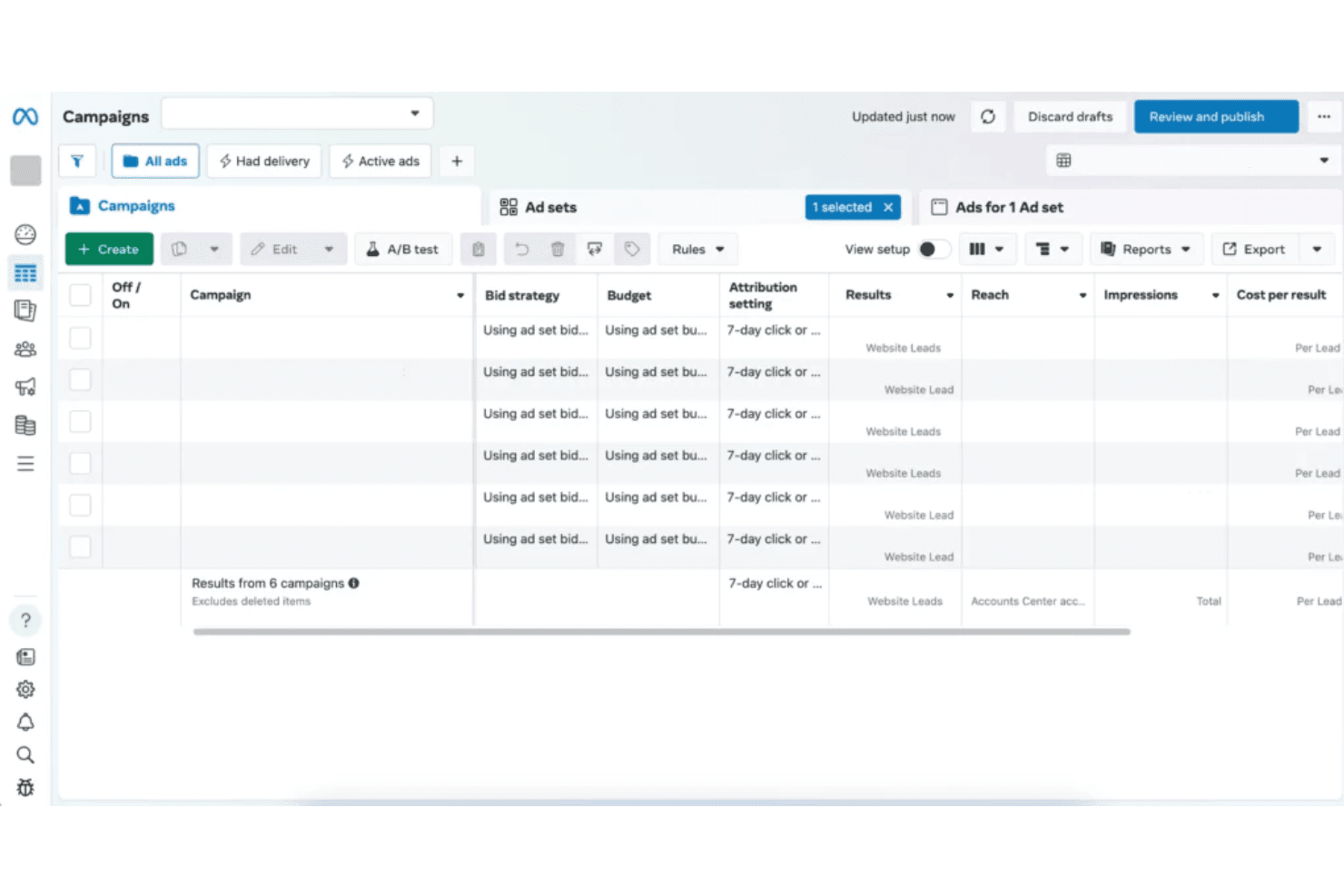
Meta Ads lets users manage and review multiple campaigns in one view. Meta Ads is a paid social advertising platform that lets marketers reach targeted audiences across Facebook, Instagram, Messenger, and beyond—making it a strong choice for brands looking to diversify spend outside of search and tap into interest- and behavior-based targeting.
Who Is Meta Ads Best For?
Meta Ads is a strong fit for marketers who want to reach and retarget audiences based on interest, behavior, and demographics across Facebook, Instagram, and beyond.
Why I Picked Meta Ads
I picked Meta Ads because no other platform in this category matches its breadth of social reach across Facebook, Instagram, Messenger, WhatsApp, Threads, and Audience Network, all managed from a single Ads Manager account. I particularly like how Custom and Lookalike Audiences let you target by behavior, interests, and similarity to your existing customers in ways that Google's intent-based model simply doesn't replicate. For e-commerce campaigns, the Commerce Manager catalog sync with Shopify and WooCommerce means product-feed-driven ads can go live across placements without manual uploads.
Meta Ads Key Features
- Multi-objective campaign creation: Ads Manager supports six campaign objectives—Awareness, Traffic, Engagement, Leads, App promotion, and Sales—each with distinct destination and optimization options.
- Conversions API: Connects server-side, app, offline, and CRM data directly to Meta's ad systems for targeting and measurement beyond what the Meta Pixel alone can capture.
- Aggregated Event Measurement: Tracks web and app conversion events for iOS 14+ users using privacy-protective processing, including differential privacy and data aggregation.
- Meta Advantage+: An AI-driven optimization layer that automates campaign delivery decisions to improve performance against your chosen objective.
Meta Ads Integrations
Meta Ads has documented integrations with Shopify, WooCommerce, ActiveCampaign, Salesforce, and Mailchimp. Its Marketing API, Graph API, and webhooks support custom connections.
Pros and Cons
Pros:
- Combines awareness, lead, and sales campaigns
- Targets interests, behaviors, and customer lookalikes
- Reaches audiences across social and app placements
Cons:
- Budget settings may not prevent overspend
- Attribution can diverge from analytics reports
Learn more about Meta Ads:
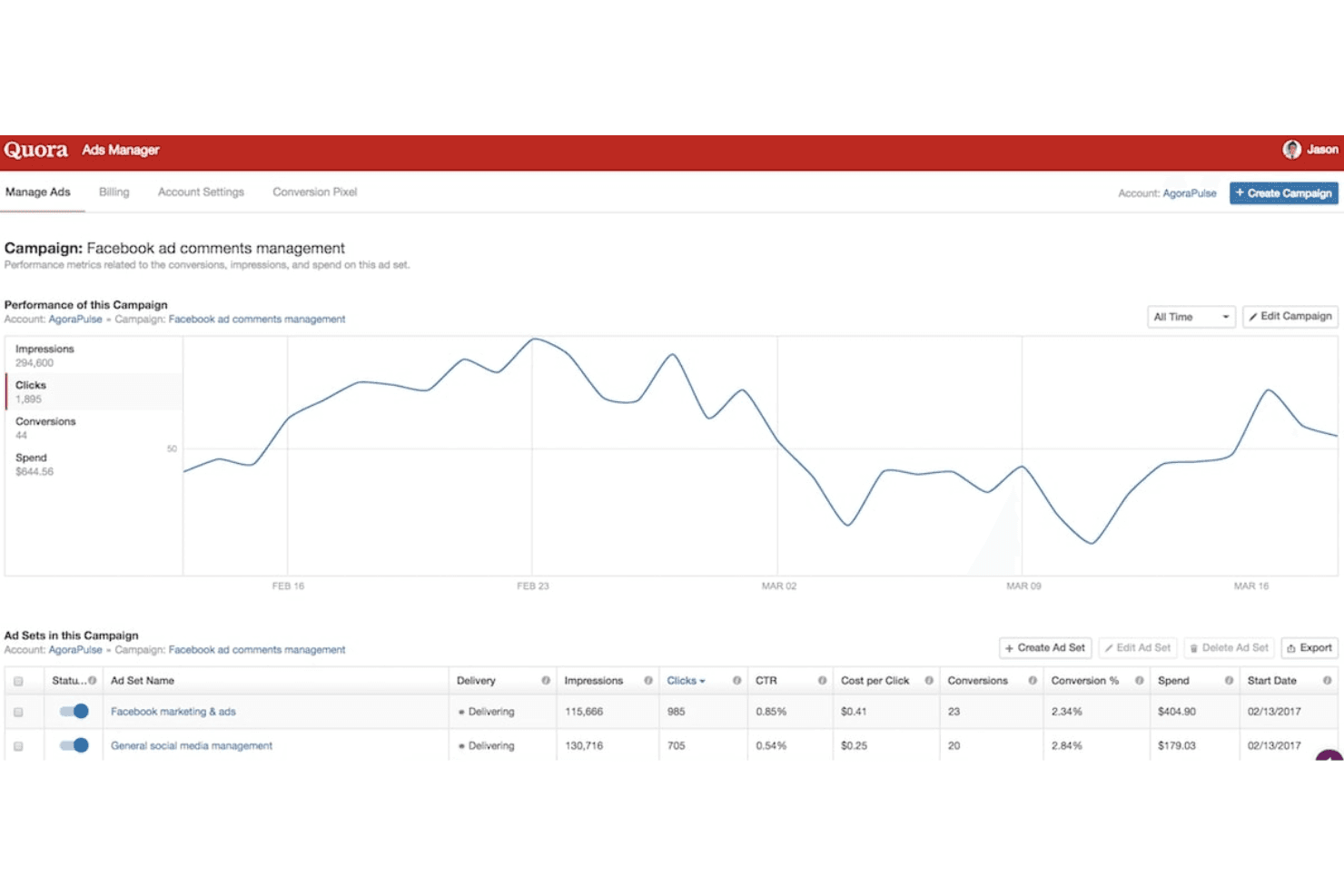
Quora Ads tracks campaign clicks, impressions, and conversions over time. Quora Ads is a self-serve paid social platform that lets B2B marketers, agencies, and small businesses reach high-intent audiences through contextual question, topic, and keyword targeting—placing ads alongside the specific conversations buyers are already having.
Who Is Quora Ads Best For?
Quora Ads is a strong fit for B2B marketers who want to reach decision-makers while they're actively researching solutions, using topic, question, and Bombora-powered audience targeting.
Why I Picked Quora Ads
I picked Quora Ads because it lets B2B marketers reach decision-makers mid-research, placing ads directly on the question pages buyers are already reading. I especially like the Bombora integration, which layers in firmographic targeting by job function, seniority, and company size on top of Quora's native topic and question targeting. That combination means I can target, say, a CFO actively reading about enterprise spend management tools, not just anyone browsing a vaguely related topic.
Quora Ads Key Features
- Lead Gen Forms: Native forms collect leads directly on Quora without sending users to an external landing page.
- Bulk Add tool: Imports keywords from other ad platforms and surfaces comparable Quora topics, interests, or questions.
- Conversion API: Sends conversion events server-side to complement the browser-based Quora Pixel for more accurate campaign measurement.
- Scheduled email reports: Delivers recurring or one-time campaign reports at the account, campaign, ad set, or ad level on a set cadence.
Quora Ads Integrations
Quora Ads integrations include Campaign Manager 360, Google Tag Manager, Bombora, AppsFlyer, Adjust, Singular, and Supermetrics. It supports Zapier for lead access and offers a Conversions API for custom server-side tracking.
Pros and Cons
Pros:
- Contextual placements can earn strong engagement
- Native lead forms capture in-platform prospects
- Question targeting reaches active researchers
Cons:
- Clicks may produce weak post-click engagement
- Quora-only placements limit broader reach
Learn more about Quora Ads:
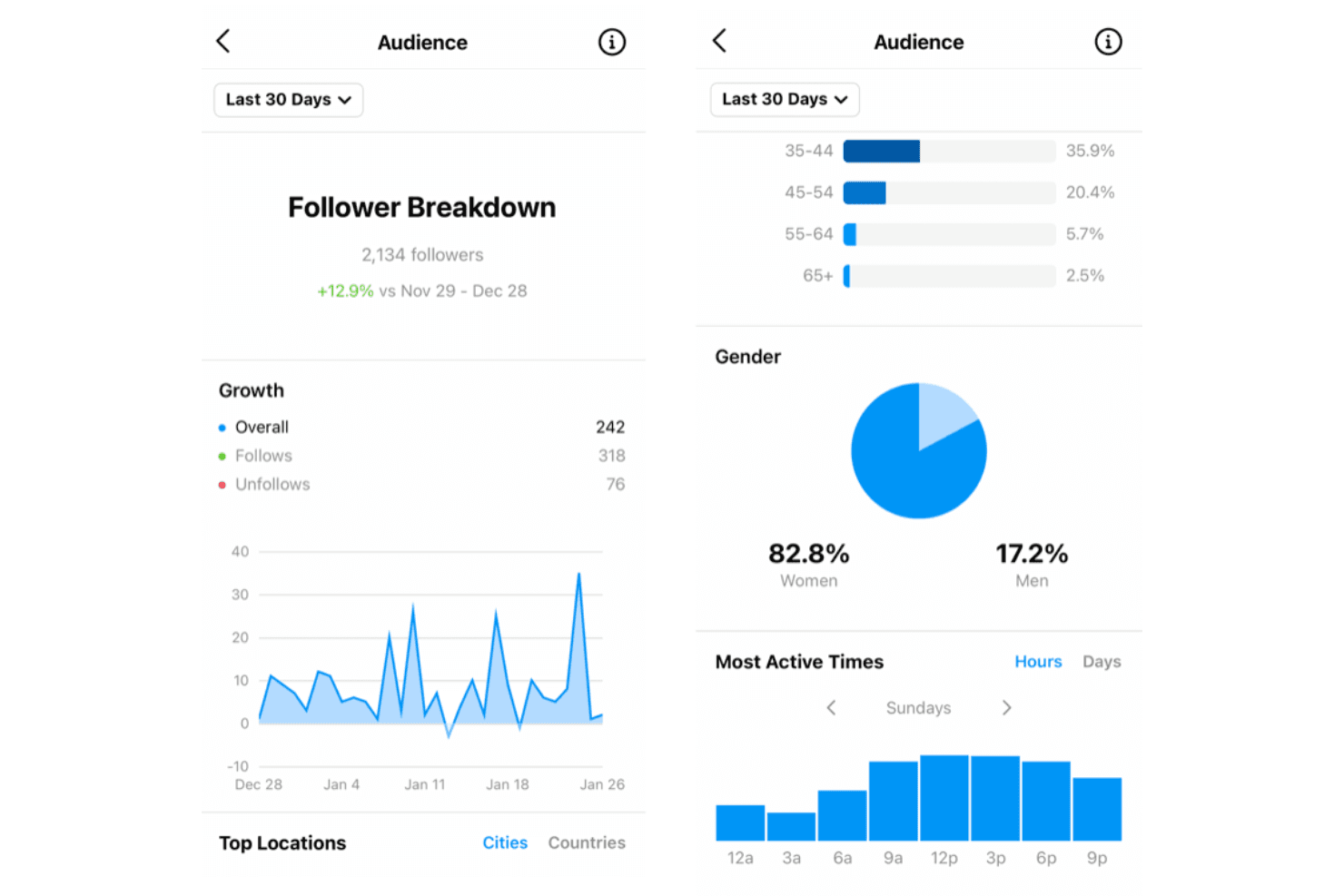
Instagram Ads reveals follower growth, gender, and active time data. Instagram Ads is Meta's paid social advertising platform that lets marketers, ecommerce brands, and small businesses run visually driven campaigns across Instagram's Feed, Stories, Reels, and Explore placements to reach and convert audiences outside Google's ecosystem.
Who Is Instagram Ads Best For?
Instagram Ads is a strong fit for ecommerce marketers and visually driven brands that want to reach engaged audiences through Feed, Stories, and Reels placements outside Google's ecosystem.
Why I Picked Instagram Ads
Instagram Ads earns its spot on my shortlist because no other platform matches its visual-first ad formats for brands that sell through imagery. I love how Feed, Stories, and Reels placements let you show products in motion or in context, and catalog syncing via Meta Pixel means retargeting cart abandoners happens automatically. The Instagram Search placement also captures intent-driven moments inside the app, reaching shoppers who are actively looking.
Instagram Ads Key Features
- Detailed interest and behavior targeting: Ads Manager lets you build audiences based on interests, behaviors, demographics, and engagement signals like Pages people follow and events they RSVP to.
- Flexible bid strategy selection: Choose from spend-based (Highest volume, Highest value), goal-based (Cost per result, ROAS goals), or manual (Bid cap) bidding to match your campaign objectives.
- Conversions API integration: Send website, app, offline, and CRM event data directly to Meta's servers, reducing reliance on browser-based tracking affected by ad blockers or connectivity issues.
- Multi-objective campaign creation: Set up campaigns across Awareness, Traffic, Engagement, and Advantage+ objectives for Sales, App promotion, and Leads within a single Ads Manager interface.
Instagram Ads Integrations
Instagram Ads doesn't have any native integrations clearly documented. It supports Meta's Marketing API and Conversions API for custom connections, plus catalog data from feeds, partner platforms, website crawling, batch API, and Meta Pixel.
Pros and Cons
Pros:
- Instagram search captures in-app shopping intent
- Reaches audiences through social discovery
- Visual formats showcase products in context
Cons:
- No external search-engine reach for high-intent queries
- Paid promotion can strain small budgets
Learn more about Instagram Ads:
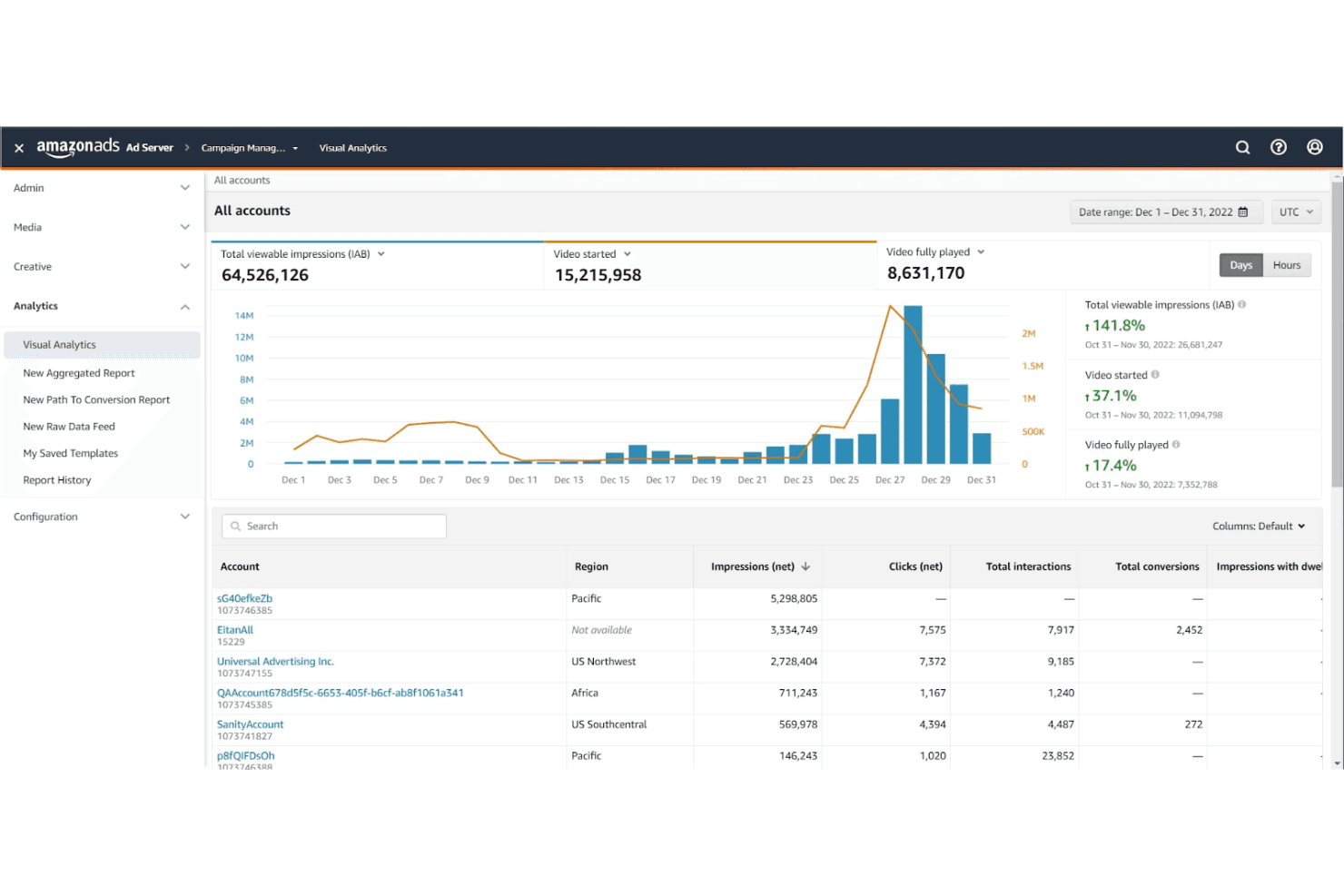
Amazon Ads displays campaign visual analytics and account-level performance metrics. Amazon Ads is a retail-first advertising platform that lets product sellers and ecommerce marketers run Sponsored Products, display, video, and streaming campaigns backed by Amazon's first-party shopper data.
Who Is Amazon Ads Best For?
Amazon Ads is the go-to platform for ecommerce marketers and product sellers who want to reach shoppers with high purchase intent directly on Amazon.
Why I Picked Amazon Ads
I picked Amazon Ads because no other platform puts your ads in front of shoppers who are already in purchase mode. If you're selling on Amazon, Sponsored Products lets you appear directly in search results at the exact moment someone is ready to buy, backed by Amazon's own first-party purchase data. I also appreciate that Sponsored Brands can drive traffic to a full Brand Store, so you're not just capturing demand but building a branded retail presence. That combination of intent-based targeting and native retail context is what makes it the best fit for retail environments.
Amazon Ads Key Features
- Sponsored Brands campaigns: Run image, video, or collection ads in prominent Amazon placements to drive shoppers to a Brand Store or product detail page.
- Amazon Marketing Cloud: Analyze pseudonymized campaign signals and first-party data in a privacy-safe clean room to build custom audiences and measure cross-channel impact.
- Amazon Ads Agent: Use a conversational AI interface to get audience sizing, reach forecasts, budget recommendations, and campaign optimizations across sponsored and programmatic formats.
- Multi-signal targeting: Combine contextual signals—content related to a keyword, product, or category—with behavioral signals like purchases and search activity within a single ad group.
Amazon Ads Integrations
Amazon Ads has two documented native integrations: Amazon Simple Queue Service (SQS) and Amazon Data Firehose, which receive Amazon Marketing Stream data. Its REST API, Amazon Marketing Cloud APIs, and S3 file uploads support custom data and campaign connections.
Pros and Cons
Pros:
- Reviewers praise gains in product visibility
- First-party signals connect ads with purchases
- High-intent shoppers see product ads
Cons:
- Rising niche CPCs can squeeze returns
- No campaigns on alternative search engines
Learn more about Amazon Ads:
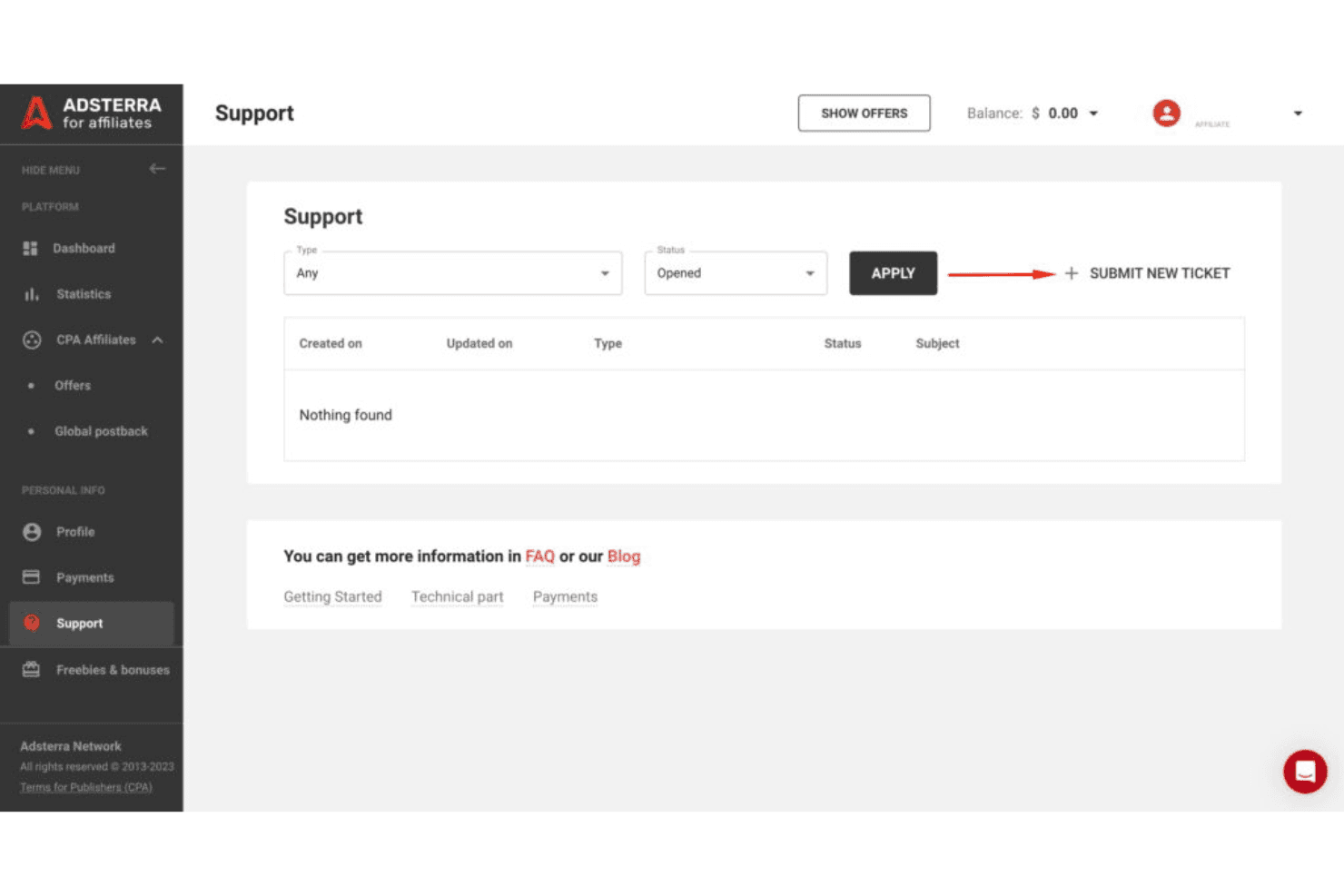
Adsterra lets affiliates submit and track support tickets directly in the platform. Adsterra is a self-serve display advertising network that lets advertisers run Popunder, In-Page Push, Native Banner, and Social Bar campaigns across publisher inventory in 248 locations—making it a practical option for affiliates, media buyers, and agencies looking to reach audiences outside of search and social.
Who Is Adsterra Best For?
Adsterra suits affiliates and media buyers who want to run display campaigns across a wide range of formats—like Popunder, In-Page Push, and Social Bar—without relying on search or social platforms.
Why I Picked Adsterra
I picked Adsterra as one of the best because it covers ad formats you simply won't find bundled together elsewhere, including Popunder, Social Bar, In-Page Push, and Native Banners, all running across publisher inventory in 248 locations. I particularly like the CPA Goal tool, which uses machine learning to automatically drop underperforming placements based on your eCPA threshold, so your budget concentrates on what actually converts. Paired with SmartCPM's second-price auction logic, you're competing for placements without manually chasing bids across every geo.
Adsterra Key Features
- S2S postback conversion tracking: Advertisers can track conversions server-to-server by matching Adsterra's click-ID token to a third-party tracker parameter, with support for simple, payout, and currency-conversion postbacks.
- Traffic Estimator: A built-in tool that evaluates competition for your selected targeting, recommends bids, and estimates expected impressions or clicks before you launch.
- 20+ audience targeting settings: Campaigns can be filtered by country, region, city, device, OS, browser, language, connection type, mobile carrier, and time of day.
- RTB platform: Adsterra's real-time bidding infrastructure connects DSP and SSP partners to buy and sell ad impressions through live auctions via XML, JSON, or OpenRTB endpoints.
Adsterra Integrations
Adsterra documents integrations with CPV Lab Pro, TUNE, and Cake for S2S conversion tracking. Its advertiser API supports custom integrations through GET, POST, and PATCH requests, with JSON, XML, and CSV formats.
Pros and Cons
Pros:
- Placement-level bidding supports conversion-focused optimization
- Reviewers report smooth campaign setup
- Multiple display formats broaden reach beyond search
Cons:
- No documented search or social placements
- Reviewers report unwanted redirects and ad quality issues
Learn more about Adsterra:
Outras alternativas ao Google Ads
Eis algumas alternativas adicionais ao Google Ads que não entraram na minha lista de seleção, mas que vale a pena conhecer:
- 11SkaiBest for omnichannel marketing
- 12FluencyBest for ad management automation
- 13AdRollBest for retargeting solutions
- 14TaboolaBest for content recommendations
- 15LinkedIn AdsBest for professional audiences
- 16Reddit AdsBest for niche communities
- 17Yelp AdsBest for local businesses
How I Evaluate Google Ads Alternatives
I split my evaluation into two layers: the baseline—ad inventory, targeting, and conversion tracking—and the differentiators that matter when you're moving budget away from Google.
Core Functionality (Table Stakes For This List)
When I'm selecting tools for my list, I rank each one on a scale from 0 (does not offer the functionality) to 5 (excels in this area) for each core functionality listed below. Then, I calculate the tool's total score into a percentage. Each tool needs to achieve a minimum total score of 75% to be considered for inclusion.
- Paid Ad Campaign Management: I look for full control over budgets, bidding strategies, and scheduling—the kind of setup where you can run dayparted campaigns or cap spend by audience segment.
- Audience Targeting Options: Each platform gets evaluated on targeting depth, from basic demographics to behavioral signals, retargeting lists, and lookalike audiences built from first-party data.
- Ad Inventory & Reach: I check whether the platform gives you access to meaningful non-Google inventory, whether that's a search engine like Bing, a social feed like TikTok, or a native network like Taboola.
- Multi-Format Ad Support: Platforms that support search, display, native, and video give media buyers more flexibility than those locked into a single format.
- Performance Analytics & Reporting: I evaluate whether dashboards surface actionable metrics like CTR, CPA, and ROAS with segmentation options, not just top-level spend summaries.
- Conversion Tracking & Attribution: Proper pixel or tag-based tracking and attribution modeling matter here—I look for platforms that let you track events, import offline conversions, and measure beyond last-click.
Once I have a list of tools that meet this criteria, I consider what sets each platform apart.
Differentiating Factors (What Sets Vendors Apart)
Here's how I compare and contrast different vendors:
Standout Features
Cross-channel ad management is a major differentiator. Platforms like Microsoft Advertising and Meta let you run campaigns across multiple properties from one interface. That matters when you're distributing budget across several networks at once. I also look at first-party data activation. Being able to upload CRM lists or customer segments for targeting becomes crucial as cookie-based tracking loses ground. Contextual and intent targeting rounds this out, giving you ways to reach relevant audiences based on page content or search behavior rather than tracking pixels.
Beyond Features
Cost structure matters when you're shifting budget across platforms. I evaluate whether a platform charges platform fees on top of media spend and whether minimum spend thresholds fit SMB or agency budgets. Integrations with tools like Google Analytics, HubSpot, or Salesforce also weigh heavily—without clean data flow into your existing stack, reporting becomes manual and fragmented. Compliance and brand safety round out my evaluation. Platforms that offer placement transparency, fraud protection, and support for regulated industries give advertisers more confidence when diversifying spend.
Por que procurar uma alternativa ao Google Ads?
Embora o Google Ads seja uma solução valiosa, existem várias razões pelas quais alguns utilizadores procuram soluções alternativas. Pode estar à procura de uma alternativa ao Google Ads porque…
- O custo total por clique (CPC) excede o seu orçamento
- As suas opções de segmentação são limitadas
- A sua equipa precisa de ferramentas mais simples
- Está a enfrentar restrições regionais
- A escalabilidade do software não está a dar resposta às necessidades
Se alguma destas situações lhe é familiar, veio ao lugar certo. A minha lista contém várias opções mais adequadas para equipas que enfrentam estes desafios e procuram soluções alternativas.
Principais funcionalidades das alternativas ao Google Ads
Eis algumas das principais funcionalidades do Google Ads que a sua solução alternativa deve disponibilizar:
- Segmentação por palavras-chave: Permite à sua equipa segmentar palavras ou expressões específicas e contextuais, garantindo que os seus anúncios aparecem em resultados de pesquisa relevantes.
- Programação de anúncios: Permite escolher horas específicas do dia para apresentar as suas opções publicitárias, otimizando a visibilidade e o envolvimento.
- Segmentação geográfica: Permite concentrar os anúncios em localizações específicas, alcançando públicos e utilizadores-alvo com base no local onde se encontram.
- Segmentação demográfica: Ajuda a sua equipa a concentrar-se em grupos etários, géneros ou níveis de rendimento específicos, para alcançar o público certo.
- Extensões de anúncios: Fornece informações adicionais, como números de telefone ou ligações para páginas específicas, tornando os seus anúncios mais informativos.
- Acompanhamento de conversões: Monitoriza as ações realizadas pelos utilizadores depois de interagirem com os seus anúncios, ajudando os responsáveis pela tomada de decisões a medir o sucesso.
- Relatórios de desempenho: Oferece informações detalhadas sobre o desempenho dos anúncios, permitindo-lhe tomar decisões informadas com base na geração de potenciais clientes e nos utilizadores ativos mensais.
- Gestão de licitações: Ajusta automaticamente as suas licitações para obter o máximo impacto, ajudando-o a manter-se competitivo nos leilões.
- Remarketing: Volta a envolver, através de marketing por e-mail, os utilizadores que já interagiram com o seu site, mantendo a sua marca presente na mente do público.
- Anúncios de pesquisa responsivos: Testa automaticamente diferentes combinações de títulos e descrições para descobrir o que funciona melhor, tanto online como através de plataformas de redes sociais.