

Verktøy for markedsføringsmåling er markedsføringsverdenens ukjente fondsforvaltere. Disse oversiktene inneholder all informasjonen du trenger for å begrunne neste års markedsføringsbudsjett.
I tillegg hjelper de deg med å finne og løse problemer med markedsføringsresultatene. Når det finnes så mange alternativer, kan det imidlertid være utfordrende å finne den riktige programvaren for markedsføringsmåling som samsvarer med markedsføringsmålene dine.
Vel, du trenger ikke bekymre deg mer. Med min markedsføringskunnskap og vårt detaljerte system for programvarevurdering har vi valgt ut den beste programvaren for markedsføringsmåling, slik at du kan avgjøre hva som fungerte og hva som ikke gjorde det.
Why Trust Our Software Recommendations
6,700+
Reviews
20
Industry experts
16+
Evaluation factors
14
Years
Our team has been testing and reviewing software since 2012. As marketing leaders ourselves, we know how difficult—and important—it is to choose the right software.
For this guide, we evaluated tools using hands-on testing and independent research, scoring tools using our selection criteria.
Our reviews reflect our human editorial judgment, not a sales pitch.
Expert reviewers:
 Gui DrusinaCreative Director
- Shriya GhateSenior Marketing Lead
 Amanda JacquesMarketing Ops Leader

Sammenligningstabell: Verktøy for markedsføringsmåling
Denne sammenligningstabellen oppsummerer prisdetaljene for mine utvalgte toppverktøy for markedsføringsmåling.
| Tool | Best For | Trial Info | Price | ||
|---|---|---|---|---|---|
| 1 | Best for simple, automated marketing reports | 14-day free trial + free demo available | From $44/month (billed annually) | Website | |
| 2 | Best for real-time social media monitoring | 14-day free trial | From $199/month (billed annually) | Website | |
| 3 | Best for real-time ad campaign optimization | 7-day free trial | From $49/month/brand | Website | |
| 4 | Best for chat-based data queries | Free plan available | From $16/month (billed annually) | Website | |
| 5 | Best for measuring competitor’s marketing campaigns | Free plan available | From $29/month | Website | |
| 6 | Best for measuring website performance | Free plan available | From $50,000/year (billed annually) | Website | |
| 7 | Best for handling enormous amounts of marketing data | 14-day free trial | Pricing upon request | Website | |
| 8 | Best for understanding how visitors experience websites | Free plan available | From $39/month (billed annually) | Website | |
| 9 | Best for measuring content marketing results | 14-day free trial | From $139/month | Website | |
| 10 | Best for SEO auditing | 7-day free trial + free demo available | From $79/month (billed annually) | Website |


Anmeldelser av de beste verktøyene for markedsføringsmåling
Nedenfor finner du mine detaljerte sammendrag av de beste verktøyene for markedsføringsmåling som kom med på kortlisten. Anmeldelsene mine gir et detaljert innblikk i de viktigste funksjonene, fordelene & ulempene, integrasjonene og ideelle bruksområdene for hvert verktøy, slik at du kan finne det beste for deg.
 Best for simple, automated marketing reports
- 14-day free trial + free demo available
- From $44/month (billed annually)
Visit WebsiteCustomer Rating:4.8/5
DashThis allows users to customize their dashboards to measure the metrics most relevant to them. DashThis is an automated marketing reporting platform that offers an eye-catching design and customizable dashboards to adapt to your needs.
Why I picked DashThis: I like that DashThis makes measuring marketing metrics simple with over 34 integrations with digital marketing platforms to consolidate data in one place. Its automation features include pre-made and custom templates and cloning options so you don't need to spend time creating reports from scratch, preset widgets and dashboards, and daily data importation.
DashThis Standout Features and Integrations
Features include unlimited client accounts, data sources, and users, report sharing options, white label and report customization, including custom domains and themes, a drag-and-drop widget interface, and multiple currencies and language support.
Integrations include Google Analytics, TikTok Ads, HubSpot, Klaviyo, Facebook Insights, Google Ads, Facebook Ads, Instagram, LinkedIn, YouTube, Google Search Console, Google My Business, SEMrush, Moz, Ahrefs, Mailchimp, Campaign Monitor, and more.
Pros and Cons
Pros:
- Visually-appealing data visualization
- Many integration options available
- Intuitive and easy to navigate platform
Cons:
- Occasional data sync delays, requiring manual refresh
- Limited chart types
Learn more about DashThis: Best for real-time social media monitoring
- 14-day free trial
- From $199/month (billed annually)
Visit WebsiteCustomer Rating:4.7/5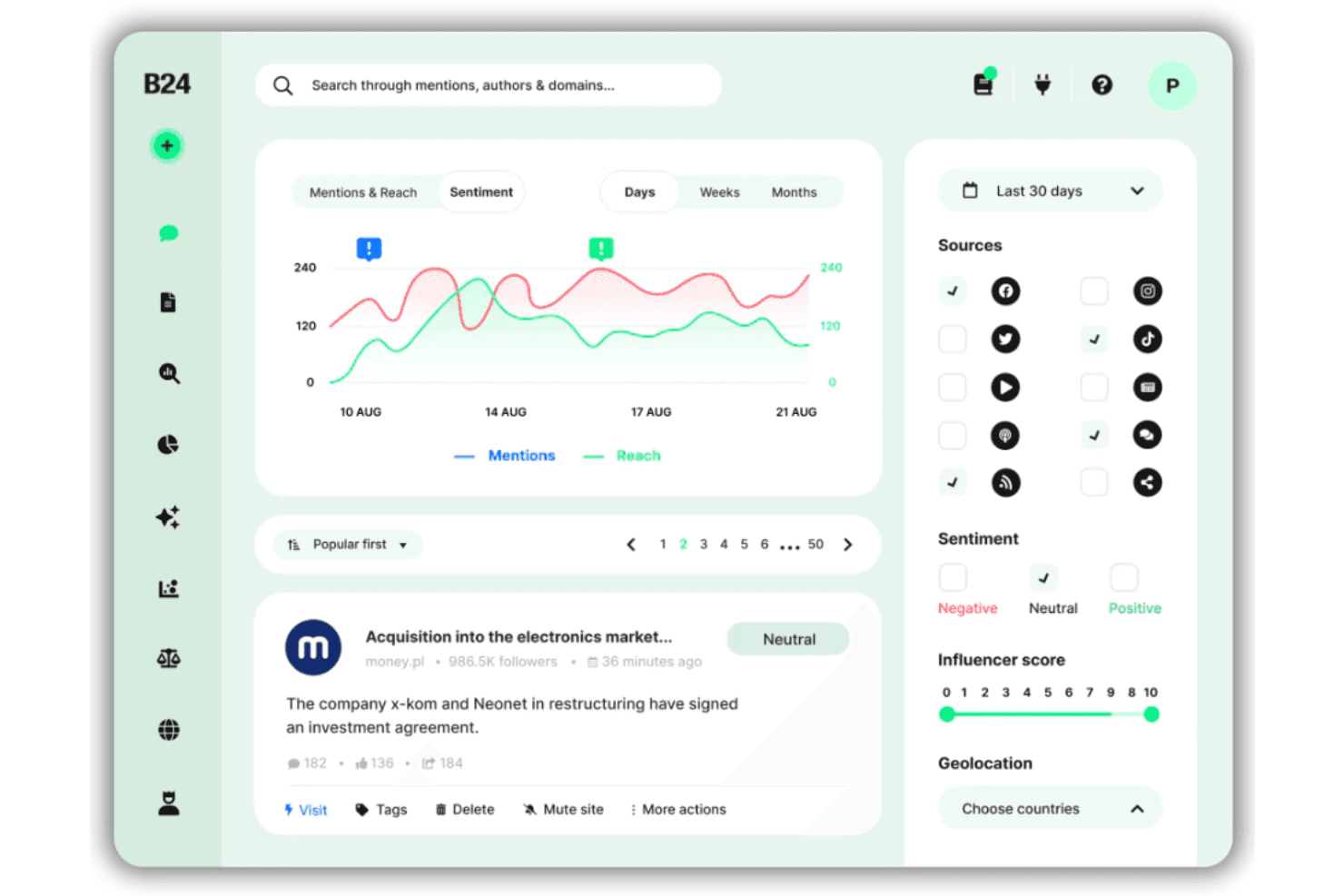
Brand24 offers a sentiment analysis dashboard with mention tracking, reach metrics, source filtering, and influencer scoring across social media platforms. Brand24 is a social listening and media monitoring platform that tracks brand mentions, sentiment, reach, and share of voice across social media, news, blogs, podcasts, and forums in real time.
Who Is Brand24 Best For?
Brand24 is a strong fit for PR teams, social media managers, and marketing agencies that need to track brand reputation and online conversations at scale.
Why I Picked Brand24
Brand24 earns its spot on my shortlist because of how fast it surfaces online conversations. I like that Storm Alerts flags unusual spikes in mention volume the moment they happen, which is what you need to catch a PR crisis or a viral campaign early. The AI Brand Assistant adds real value too: I can ask it direct questions like "what's driving negative sentiment this week?" and get answers grounded in actual mention data, not generic summaries.
Brand24 Key Features
- Presence score: Calculates your brand’s online visibility using custom metrics across multiple digital channels.
- Advertising value equivalency (AVE): Estimates the earned media value of tracked mentions for PR performance benchmarking.
- Source and influencer analysis: Identifies the most impactful authors, publishers, and domains driving your brand’s online conversation.
- Custom reporting exports: Generates white-labeled reports in PDF, Excel, and PowerPoint formats for sharing measurement insights with stakeholders.
Brand24 Integrations
Brand24 offers native integrations with Slack and Microsoft Teams, and provides API access for custom integrations.
Pros and Cons
Pros:
- Share of voice benchmarks against competitors
- Sentiment analysis tracks brand perception
- AI detects sudden mention spikes automatically
Cons:
- Mention caps limit large agency workflows
- No paid media or conversion data tracked
Learn more about Brand24: Best for real-time ad campaign optimization
- 7-day free trial
- From $49/month/brand
Visit WebsiteCustomer Rating:5/5
Meerkads Command Center dashboard showing unified multi-channel performance metrics, including spend, revenue, ROAS, conversions, platform benchmarks, and a visual conversion funnel overview. Meerkads is an AI-powered performance marketing platform that connects your Google Ads, Meta Ads, and ecommerce data for cross-channel campaign analysis, AI-driven optimization recommendations, creative intelligence, and automated reporting.
Who Is Meerkads Best For?
Meerkads is a good fit for DTC ecommerce brands and performance marketing teams managing paid ad spend across Google, Meta, and TikTok.
Why I Picked Meerkads
I picked Meerkads as one of the best for real-time ad campaign optimization because of how its always-on monitoring and AI-driven recommendations work together. Meerkads continuously monitors your campaigns across Google Ads and Meta Ads and flags performance issues before they compound, which means you're not discovering a budget drain three days after it started. I also like that the AI performance scoring gives you a fast read on which campaigns, ad sets, and individual ads are underperforming, so your team can act on signals rather than dig through raw data to find them.
Meerkads Key Features
- Creative fatigue detection: Identifies when individual ad creatives are losing audience engagement so you can refresh assets before performance drops.
- True ROAS reconciliation: Syncs Shopify revenue data with your ad spend to calculate actual return on ad spend beyond platform-reported figures.
- Product-level reporting: Breaks down ad performance by individual product so you can see which SKUs are driving or dragging campaign results.
- Audience overlap analysis: Surfaces audience overlap across your ad sets to help you identify cannibalization between campaigns.
Meerkads Integrations
Meerkads offers a smaller set of native integrations focused on ad platforms and ecommerce, including Google Ads, Meta Ads, TikTok Ads, Google Analytics 4, Google Search Console, and Shopify. Additional integrations with Amazon, Pinterest Ads, Klaviyo, Omnisend, WooCommerce, Magento, Microsoft Ads, and others are planned but not yet live. Zapier support and a public API are not clearly documented.
Pros and Cons
Pros:
- Built-in cross-channel ROAS comparison view
- AI flags creative fatigue before performance drops
- Reconciles ad spend against actual Shopify revenue
Cons:
- Many planned features are not yet available
- Limited to Google and Meta ad channels
Learn more about Meerkads: Best for chat-based data queries
- Free plan available
- From $16/month (billed annually)

Querri answers plain-language data questions and generates marketing performance insights. Querri is designed to help marketing teams analyze and understand their data across different channels. The platform connects marketing data sources and presents performance metrics in one place, making it easier to monitor campaigns and measure results. It also supports chat-based data queries, allowing users to ask questions about their marketing data and receive answers directly from the platform.
Why I Picked Querri
I picked Querri for its chat-based data queries, which allow users to ask questions about marketing data and receive answers directly from the platform. The tool connects data from sources like HubSpot and Salesforce so teams can analyze campaign performance in one place. It also cleans and organizes incoming data to help keep reports accurate. Users can query marketing metrics and generate reports using simple language instead of technical queries.
Querri Key Features
In addition to chat-based data queries, Querri offers:
- Automated Report Generation: Facilitates the creation of performance reports and branded presentations, saving time and enhancing decision-making.
- Lead Funnel Analysis: Provides insights into the customer journey, helping marketers optimize their strategies for better conversion rates.
- Cross-Channel Attribution: Enables the analysis of marketing efforts across different channels, providing a holistic view of campaign performance.
Querri Integrations
Integrations include HubSpot, Salesforce, Google Drive, Slack, Marketo, Mailchimp, LinkedIn Ads, Facebook Ads, Google Ads, and Twitter Ads to support marketing data analysis across channels.
Pros and Cons
Pros:
- Quickly retrieves insights from connected marketing and CRM data sources
- Chat-based queries make data exploration accessible for non-technical marketers
- Ask questions in plain English instead of writing SQL queries
Cons:
- Limited number of native data source connectors for marketing platforms
- Query responses occasionally fail or return delayed results during analysis
Learn more about Querri: Best for measuring competitor’s marketing campaigns
- Free plan available
- From $29/month
Visit WebsiteCustomer Rating:4.6/5
Get an understanding of a website’s overall domain ranking in comparison to every other domain across the entire internet. Ahrefs provides tools that help businesses measure their competition’s digital marketing efforts and see how they can overtake them.
Why I picked Ahrefs: Not considering your competition’s marketing efforts when creating a marketing strategy is a huge mistake. With Ahrefs, you can get an overview of your competitors’ ranking strategies, including their organic traffic, backlink, and paid traffic campaigns. You can also analyze your competition’s content pieces and replicate their best work for your campaigns.
Ahrefs Standout Features and Integrations
Features include auditing tools that help you identify technical SEO and content optimization opportunities. Ahrefs’ keyword research feature will help you identify the keywords your customers search for and track where you rank in the search engine results for those terms.
Integrations include over 30 native connections with some of the most popular business applications. These include platforms such as AgencyAnalytics, DashThis, Databox, Desktop.com, Google Search Console, Klipfolio, Marketing Miner, Rambox, Rank Ranger, Reportz, and other software options. Ahrefs also provides an API that allows you to create custom integrations.
Pros and Cons
Pros:
- Crucial for rank tracking
- Essential for search engine presence
- Excellent for keyword discovery
Cons:
- Doesn’t check bulk search engine ranks
- No free trial or plan
 Best for measuring website performance
- Free plan available
- From $50,000/year (billed annually)
Visit WebsiteCustomer Rating:4.6/5
Discover audience demographic information to learn how you can personalize future campaigns. Google Analytics is the ideal measurement tool that allows marketing teams to monitor website performance from a single dashboard. It allows you to see what is bringing visitors to their site, where sales come from, how long audiences stay on parts of a website, and many more beneficial metrics.
Why I picked Google Analytics: I chose this marketing measurement tool because it’s widely considered to be the standard platform for monitoring your website’s performance. Google Analytics is best for tracking metrics such as visitors, referrals from other channels, and conversion rates. With this information, you can identify areas of your website that are performing well and where you need to make improvements.
Google Analytics Standout Features and Integrations
Features include the ability to collect comprehensive demographic data regarding your audience. When implementing content marketing strategies, Google Analytics can measure engagement to help you determine which topics are most popular. You can also rely on the platform to measure your social media marketing efforts and other custom campaigns’ effectiveness.
Integrations include over 1,000 native connections with tools to help increase your team’s productivity. These integrations include platforms such as Freshservice, GetResponse, HoneyBook, Jotform, Mailchimp, Orange Logic, Outgrow, Salesforce, SEMrush, Zendesk, and other software options.
Pros and Cons
Pros:
- Easy to implement
- Effectively tracks campaigns
- Customizable data
Cons:
- Amount of data is overwhelming
- Doesn’t capture user-level data
Learn more about Google Analytics: Best for handling enormous amounts of marketing data
- 14-day free trial
- Pricing upon request
Visit WebsiteCustomer Rating:4.5/5
Get real-time visual analytics and an interactive data dashboard to get deep insights into marketing campaigns. Tableau can help businesses with enormous amounts of marketing campaign data and process it for organization-wide analysis. The software can display relevant information in attractive reports and charts.
Why I picked Tableau: I put Tableau on this list for consideration by large organizations with vast amounts of marketing measurement data. Tableau can process your entire dataset in a matter of minutes instead of waiting days or weeks. This is important as your marketing department collects more data since Tableau can handle it all without impacting performance.
Tableau Standout Features and Integrations
Features include the ability to collect data from multiple organizational departments and develop efficient visualizations. The data highlighter feature allows you to quickly identify the information you’re looking for without any difficulties.
Integrations include excellent native connection options that allow you to deploy the data you want to connect to. These native integrations include Anaplan, Box, Databricks, Dropbox, Google Analytics, Kognitio, OData, Oracle Eloqua, QuickBooks, Salesforce, and other software options.
Pros and Cons
Pros:
- Connects to multiple data sources
- Numerous display possibilities
- Simple user interface
Cons:
- Training is a paid subscription
- Adjusting dashboard views is complex
Learn more about Tableau: Best for understanding how visitors experience websites
- Free plan available
- From $39/month (billed annually)
Visit WebsiteCustomer Rating:4.5/5
See how far visitors scroll when on a website. Hotjar provides methods to help marketing teams see what users are doing on a website. Businesses can use this information to improve visitors’ experiences on their sites.
Why I picked Hotjar: Many of the tools I added to this list measure the results of your marketing strategies, but what makes Hotjar different is its ability to show you exactly how people experience your website after finding your campaign. Hotjar’s tools allow you to see how your audience navigates through your entire website. By mapping out your visitor’s journey on your website, you’ll be able to identify what areas of your website that need improvement.
Hotjar Standout Features and Integrations
Features include gathering holistic, actionable insights through tools such as heatmaps, surveys, and conversion funnels. Hotjar can also record real audience sessions on your website so you can get a firsthand view of their experience.
Integrations include native integrations with third-party tools such as Google Analytics, Google Optimize, HubSpot, Microsoft Teams, Mixpanel, Omniconvert, Optimizely, Segment, Slack, Unbounce, and other software options. If you have a paid Zapier account, you can create custom integrations with applications such as Airtable, Asana, ConvertKit, Mailchimp, Miro, Pipedrive, Salesforce, Smartsheet, Trello, Zendesk, and other software options.
Pros and Cons
Pros:
- Easy to use
- Powerful and user-friendly
- Shows how to improve websites
Cons:
- Navigating the dashboard is complex
- Effects website speed
Learn more about Hotjar (by Contentsquare): Best for measuring content marketing results
- 14-day free trial
- From $139/month
Visit WebsiteCustomer Rating:4.5/5
Perform organic research to identify trends for specific keywords and see whether they’re worth targeting. SEMrush provides tools to help marketing teams measure the results of their content marketing campaigns and monitor their ranking on search engines. The data from SEMrush can help marketing departments improve their overall content marketing strategy.
Why I picked SEMrush: What I like best about SEMrush is its content optimization tool that provides a quantitative score and optimization recommendations. The tools that SEMrush provides will help increase your business’s visibility on major search engines. You can start by inputting your article into SEMrush, adding the keyword you’re looking to rank for and get a quantitative score with helpful optimization suggestions.
SEMrush Standout Features and Integrations
Features include keyword research tools that will help you find the best keywords to target with your digital marketing strategies. SEMrush’s competitor analysis feature allows you to compare your marketing strategies’ performance against your competition by providing advertising research, traffic analytics, and social media tracking capabilities.
Integrations include connections with the platforms that many marketing teams use to implement their latest strategies. These integrations include native connections with tools such as AgencyAnalytics, AIOSEO, Bramework, Databox, monday.com, Respona, Supermetrics, Surfer, Whatagraph, Zoho, and other software options.
Pros and Cons
Pros:
- User-friendly interface
- Helps all organization levels
- Analyzes significant amounts of data
Cons:
- Steep learning curve
- Price is high
 10Best for SEO auditing
Moz Pro
- 7-day free trial + free demo available
- From $79/month (billed annually)
Visit WebsiteCustomer Rating:4.5/5
Research keywords and identify how difficult it is to rank a website on major search engines. Moz Pro provides features that enable marketing teams to audit their website to determine what improvements to make to help it rank well on search engines.
Why I picked Moz Pro: When creating an SEO marketing strategy, you will need to understand what changes to make on your website to help it rank on search engines. The SEO audit tool from Moz Pro will crawl your entire site and discover what you need to do to optimize it for search engine ranking. The site crawl tool will place the issues it finds under critical or warning categories that will help you find and fix critical technical SEO issues immediately.
Moz Pro Standout Features and Integrations
Features include a link explorer tool that allows you to get the information you need to perform more effective link-building campaigns. The Fresh Web Explorer feature will help you find recent mentions of your brand on the internet.
Integrations include Google Analytics and WebCEO to help you connect more data to Moz Pro and get even deeper insights. Moz Pro also provides an API that you can use to create custom integrations.
Pros and Cons
Pros:
- Simplifies finding technical SEO issues
- Excellent backlink analysis
- Provides detailed SEO data
Cons:
- Free trial has limited features
- User interface isn’t user-friendly
Learn more about Moz Pro:
Andre verktøy for markedsføringsmåling
Her er noen flere alternativer for verktøy til markedsføringsmåling som ikke kom med på kortlisten min, men som likevel er verdt å undersøke:
- 11AdverityBest for custom marketing KPIs
- 12HubSpot Marketing HubBest for measuring inbound marketing campaigns
- 13SupermetricsBest for integrating 150+ data sources
- 14KissmetricsBest for fine tuning specific digital marketing campaigns
- 15Adobe AnalyticsBest diverse marketing measurement technologies
- 16Google Search ConsoleBest for search engine performance
- 17MixpanelBest for analyzing customer behavior
- 18Salesforce Marketing Cloud IntelligenceBest for artificial intelligence
- 19GoHighLevelBest for agencies
- 20CoefficientBest for spreadsheet-based analytics
- 21WoopraBest customer journey analytics tool
- 22UnbounceBest for measuring the results of A/B tests
- 23OptimizelyBest for testing customer experiences
- 24Mailchimp Best for measuring email marketing campaign performance
- 25Crazy EggBest for measuring website visitors’ experiences
- 26Sprout SocialBest for collecting social media insights
- 27SimilarwebBest for measuring all digital marketing activities
- 28monday AI WorkspaceBest for automated cross-platform data integration
- 29ClickyBest for discovering how visitors use a website
- 30BrandwatchBest for measuring social media conversation metrics
How I Evaluate Marketing Measurement Tools
I split my evaluation into two layers: baseline requirements like cross-channel attribution and conversion tracking, and differentiators that separate a useful tool from a genuinely strategic one.
Core Functionality (Table Stakes For This List)
When I'm selecting tools for my list, I rank each one on a scale from 0 (does not offer the functionality) to 5 (excels in this area) for each core functionality listed below. Then, I calculate the tool's total score into a percentage. Each tool needs to achieve a minimum total score of 65% to be considered for inclusion.
- Multi-Touch Attribution Models: I evaluate whether the tool offers multiple attribution models and how far beyond basic last-click it goes—like data-driven or custom-weighted options for longer sales cycles.
- Cross-Channel Data Integration: Connecting ad platforms, CRM, email, and web analytics under one roof matters, so I check native connector depth and API flexibility.
- ROI & Performance Reporting: I look for campaign-level ROAS, CAC, and LTV calculations that go beyond vanity metrics—especially the ability to filter by audience segment or creative.
- Incrementality or MMM Analysis: Geo-lift tests and marketing mix models help prove true impact, so I evaluate whether the tool supports these methods natively or through partnerships.
- Conversion & Revenue Tracking: Full-funnel tracking from first click to closed revenue is what I look for, including support for offline conversions and server-side event collection.
- Custom Dashboards & Reports: Stakeholders from paid media managers to CMOs need different views, so I check for role-based dashboards, scheduling, and export options.
Once I have a list of tools that meet this criteria, I consider what sets each platform apart.
Differentiating Factors (What Sets Vendors Apart)
Here's how I compare and contrast different vendors:
Standout Features
Cookieless tracking is a big differentiator right now. I look for tools with server-side collection and first-party identity resolution that keep attribution accurate as third-party cookies disappear. Scenario planning tools also carry weight—budget simulators that let you model different spend allocations before shifting dollars between channels help avoid costly guesswork. AI-powered insights round things out, especially anomaly detection and automated recommendations that flag opportunities a manual review would miss.
Beyond Features
Integration ecosystem depth matters a lot here. I check whether a tool connects natively to data warehouses like Snowflake and BigQuery, since that's where most measurement teams centralize their data. Target buyer fit is equally important—a platform built for B2B pipeline attribution serves a very different use case than one designed for DTC ecommerce. I also evaluate pricing models closely, particularly whether costs scale with ad spend or data volume, which can make a tool unsustainable as campaigns grow.
Slik velger du verktøy for markedsføringsmåling
Det er lett å gå seg vill i lange funksjonslister og komplekse prisstrukturer. For å hjelpe deg med å holde fokus mens du arbeider deg gjennom den unike prosessen med å velge programvare, får du her en sjekkliste over faktorer du bør ha i bakhodet:
| Faktor | Hva du bør vurdere |
|---|---|
| FaktorSkalerbarhet | Hva du bør vurdereVil verktøyet vokse sammen med virksomheten din? Vurder fremtidige behov og om verktøyet kan håndtere økte datamengder eller flere brukere uten ekstra kostnader eller kompleksitet. |
| FaktorIntegrasjoner | Hva du bør vurdereFungerer det med de nåværende systemene dine? Kontroller kompatibiliteten med CRM-systemet, e-postmarkedsføringen og andre viktige plattformer for å unngå forstyrrelser i arbeidsflyten. |
| FaktorTilpasningsmuligheter | Hva du bør vurdereKan du tilpasse det etter behovene dine? Se etter muligheter for å justere oversikter, rapporter og måltall slik at de passer teamets spesifikke mål og prosesser. |
| FaktorBrukervennlighet | Hva du bør vurdereEr det brukervennlig? Vurder om teamet raskt kan lære seg verktøyet og bruke det effektivt uten omfattende opplæring eller støtte. |
| FaktorImplementering og oppstart | Hva du bør vurdereHvor lang tid tar det å komme i gang? Vurder tiden det tar å sette opp verktøyet, tilgjengelig støtte og ressursene som kreves for å integrere det i den eksisterende arbeidsflyten. |
| FaktorKostnad | Hva du bør vurderePasser det inn i budsjettet ditt? Sammenlign prisen med budsjettet ditt, og ta hensyn til både kortsiktige utgifter og langsiktig verdi. Se etter skjulte gebyrer eller kostnader for oppgraderinger. |
| FaktorSikkerhetstiltak | Hva du bør vurdereEr dataene dine beskyttet? Sørg for at verktøyet oppfyller virksomhetens sikkerhetsstandarder, inkludert datakryptering og samsvar med relevante forskrifter som GDPR. |
Hva er verktøy for markedsføringsmåling?
Verktøy for markedsføringsmåling er programvare og applikasjoner som er utviklet for å spore og analysere resultatene av markedsføringskampanjer. De gir nøkkeltall som engasjementsrater, konverteringsrater, ROI og mønstre i kundeatferd.
Formålet er å gjøre det mulig for virksomheter å tallfeste effektiviteten av markedsføringsstrategiene sine, identifisere områder som kan forbedres og forstå kundenes responser for å vurdere om du får verdi for pengene du vil investere.
Funksjoner
Når du velger verktøy for markedsføringsmåling, bør du se etter følgende nøkkelfunksjoner:
- Dataintegrasjon: Kobler seg til ulike plattformer for å samle omfattende innsikt fra forskjellige kilder, slik at du får et helhetlig bilde av markedsføringsarbeidet.
- Sanntidsanalyse: Gir oppdaterte data for å hjelpe deg med å ta beslutninger i tide og justere kampanjer etter behov.
- Tilpassbare dashbord: Lar brukerne tilpasse visningen slik at de kan fokusere på de mest relevante nøkkeltallene og rapportene for deres behov.
- ROI-sporing: Måler avkastningen på investeringene i markedsføringsaktiviteter for å fastslå kampanjenes effektivitet og lønnsomhet.
- Prediktiv analyse: Bruker historiske data til å forutsi fremtidige trender og resultater, noe som bidrar til strategisk planlegging.
- Attribusjon på tvers av kanaler: Identifiserer hvert markedsføringskanals bidrag til den samlede suksessen, slik at ressurser kan fordeles effektivt.
- Brukervennlig grensesnitt: Sikrer enkel bruk, slik at teammedlemmer kan navigere i verktøyet uten omfattende opplæring.
- KI-drevet innsikt: Utnytter kunstig intelligens til å avdekke mønstre og forslag for optimalisering av markedsføringsstrategier.
- Sikkerhetstiltak: Beskytter sensitive data med kryptering og overholdelse av regelverk som GDPR.
- Rapportering og visualisering: Genererer tydelige, visuelle rapporter som gjør dataene enkle å forstå og dele med interessenter.
Fordeler
Implementering av verktøy for markedsføringsmåling gir flere fordeler for teamet og virksomheten din. Her er noen av fordelene du kan se frem til:
- Bedre beslutningstaking: Med sanntidsanalyse og KI-drevet innsikt kan du ta informerte beslutninger raskt og justere strategiene etter behov.
- Bedre forståelse av ROI: ROI-sporing hjelper deg med å se hvilke kampanjer som gir verdi, slik at du kan rette ressursene mot de mest lønnsomme initiativene.
- Bedre ressursfordeling: Attribusjon på tvers av kanaler viser hvordan hver kanal bidrar til suksess, slik at du kan fordele budsjetter og innsats mer effektivt.
- Økt effektivitet: Tilpassbare dashbord og brukervennlige grensesnitt sparer tid ved å gi tilgang til de mest relevante dataene uten komplisert navigering.
- Fremtidig planlegging: Prediktiv analyse gir innsikt i fremtidige trender og støtter strategisk planlegging og proaktive justeringer av markedsføringen.
- Datasikkerhet: Sikkerhetstiltak sørger for at dataene dine er beskyttet, at kravene til samsvar oppfylles og at kundenes tillit opprettholdes.
- Tydelig kommunikasjon: Funksjoner for rapportering og visualisering gjør det enkelt å dele innsikt med interessenter, noe som legger til rette for åpen kommunikasjon og samarbeid.
Kostnader og priser
Valg av verktøy for markedsføringsmåling krever en forståelse av de ulike prismodellene og abonnementene som er tilgjengelige. Kostnadene varierer basert på funksjoner, teamstørrelse, tillegg og mer. Tabellen nedenfor oppsummerer vanlige abonnementer, gjennomsnittsprisene deres og typiske funksjoner som er inkludert i løsninger for markedsføringsmåling:
Sammenligningstabell for abonnementer for verktøy for markedsføringsmåling
| Abonnementstype | Gjennomsnittspris | Vanlige funksjoner |
|---|---|---|
| AbonnementstypeGratisabonnement | Gjennomsnittspris$0 | Vanlige funksjonerGrunnleggende analyse, begrensede integrasjoner og standardrapportering. |
| AbonnementstypePersonlig abonnement | Gjennomsnittspris$10-$30 per bruker per måned | Vanlige funksjonerForbedret analyse, flere integrasjoner og tilpassbare dashbord. |
| AbonnementstypeForretningsabonnement | Gjennomsnittspris$50-$100 per bruker per måned | Vanlige funksjonerAvansert analyse, attribusjon på tvers av kanaler og verktøy for teamsamarbeid. |
| AbonnementstypeVirksomhetsabonnement | Gjennomsnittspris$150+ per bruker per måned | Vanlige funksjonerFullt funksjonssett, dedikert kundestøtte og tilpassede sikkerhetsalternativer. |
Vanlige spørsmål om verktøy for markedsføringsmåling
Her er noen svar på vanlige spørsmål om verktøy for markedsføringsmåling:
Hvilke ulike typer verktøy for markedsføringsmåling finnes?
Det finnes to hovedtyper verktøy for markedsføringsmåling, avhengig av hvordan du samler inn data. Måleverktøy på nettstedet eller hostede måleverktøy bruker et kodestykke som installeres på nettstedet ditt for å generere unik analyse knyttet til nettstedet. Tredjeparts- eller eksterne måleverktøy samler inn innsikt fra tredjepartskilder, for eksempel søkemotorer, for å generere dataanalyser om flere nettsteder. Innenfor disse to gruppene faller verktøy for markedsføringsmåling inn i følgende fem kategorier:
- Tradisjonell analyse: Disse gir kvantitative data om nettstedstrafikk, for eksempel sidevisninger og fluktfrekvens.
- Atferdsanalyse: Denne kategorien omfatter kvalitative data om atferden til individuelle besøkende på nettstedet eller besøkende sett under ett.
- Analyse av kundereisen: Du kan bruke verktøy for markedsføringsmåling i denne kategorien til å overvåke data om kundekontaktpunkter på tvers av flere kanaler.
- Innholdsanalyse: Dette er redaksjonelle analyser som måler resultatene til innholdet på nettstedet.
- SEO-analyse: Denne kategorien gir data om søkeordenes resultater, søketrafikk, tilbakekoblinger og konkurrenter.
Støtter verktøy for markedsføringsmåling sporing på tvers av flere kanaler?
Velg et verktøy som samler data fra digitale kontaktpunkter, sosiale kontaktpunkter og kontaktpunkter utenfor nettet. Dette hjelper deg med å unngå dobbelttelling eller oversett påvirkning.
Hvordan håndterer verktøy for markedsføringsmåling skalerbarhet?
Spør hvordan de håndterer store datasett og brukertilgang. De bør opprettholde hastighet og konsistens etter hvert som datamengden øker.
Hvordan kontrollerer jeg datakvaliteten i verktøy for markedsføringsmåling?
Se etter om de kobler seg til rådatakilder, automatiserer importer og opprettholder konsekvent navngivning. Dårlig datakvalitet gjør rapportene dine upålitelige.