

Det kan være en virkelig hodepine å håndtere kontodata, spesielt når du jonglerer med flere systemer. Du trenger nøyaktige data for å kunne ta velinformerte beslutninger, men manuelle prosesser og utdaterte verktøy fører ofte til feil og bortkastet tid. Det er her programvare for kontodatabehandling kommer inn i bildet. Den hjelper deg med å holde alt organisert og tilgjengelig, slik at teamet ditt kan konsentrere seg om det som virkelig betyr noe.
Basert på min erfaring kan det å velge riktig verktøy forandre måten du håndterer data på. Jeg har testet og vurdert ulike alternativer for å gi deg en upartisk liste over de beste løsningene på markedet. Du finner innsikt i funksjoner, brukervennlighet og hvordan hvert verktøy kan løse de spesifikke utfordringene dine. La oss se nærmere på alternativene som kan gjøre databehandlingen enklere.
Hvorfor du kan stole på våre programvareanbefalinger
6,700+
Reviews
20
Industry experts
16+
Evaluation factors
14
Years
Teamet vårt har testet og anmeldt programvare siden 2012. Vi er selv markedsføringsledere, så vi vet hvor vanskelig og hvor viktig det er å velge riktig programvare.
I denne guiden har vi vurdert verktøyene gjennom praktisk testing og uavhengig research og gitt dem poeng ut fra våre utvelgelseskriterier.
Anmeldelsene våre bygger på vår egen redaksjonelle vurdering. De er ikke et salgsargument.
Ekspertanmeldere:
 Gui DrusinaCreative Director
- Shriya GhateSenior Marketing Lead
 Amanda JacquesMarketing Ops Leader

Sammenligningstabell for programvare for kontodatabehandling
Denne sammenligningstabellen oppsummerer prisopplysningene for mine beste utvalgte programmer for kontodatabehandling:
| Tool | Best For | Trial Info | Price | ||
|---|---|---|---|---|---|
| 1 | Best for B2B account enrichment and scoring | Free plan + 14-day free trial + free demo available | From $49/user/month (billed annually) | Website | |
| 2 | Best for creating customizable databases | Free plan available; 14-day free trial | From $20/user/month (billed annually) | Website | |
| 3 | Best for marketing, sales, and support teams | Pricing Upon Request | Website | ||
| 4 | Best for accurate B2B contacts | Free plan available | Pricing starts at $1200/month | Website | |
| 5 | Best account data management software for enterprises | Pricing is available upon request | Website | ||
| 6 | Best for visual contact pipeline managemen | 14-day free trial available | From $14/user/month (billed annually) | Website | |
| 7 | Best account data management software for data enrichment | Free demo available | Pricing upon request | Website | |
| 8 | Best account data management software for small businesses | Free plan + 15-day free trial + free demo available | From $49/organization/month (billed annually) | Website | |
| 9 | Best account data management software for ease of use | 14-day free trial + free demo available | From $19.90/user/month (billed annually) | Website | |
| 10 | Best account data management software with a user-friendly interface | 14-day free trial | From $34/month | Website |


Beste programvare for kontodatabehandling
Nedenfor har jeg gitt en detaljert beskrivelse av hver programvare for kontodatabehandling. Jeg har dekket hva verktøyet er best på, fremtredende funksjoner, produktbilder, integrasjonsdetaljer, prisopplysninger samt fordeler og ulemper.
 Best for B2B account enrichment and scoring
- Free plan + 14-day free trial + free demo available
- From $49/user/month (billed annually)
Visit WebsiteCustomer Rating:4.5/5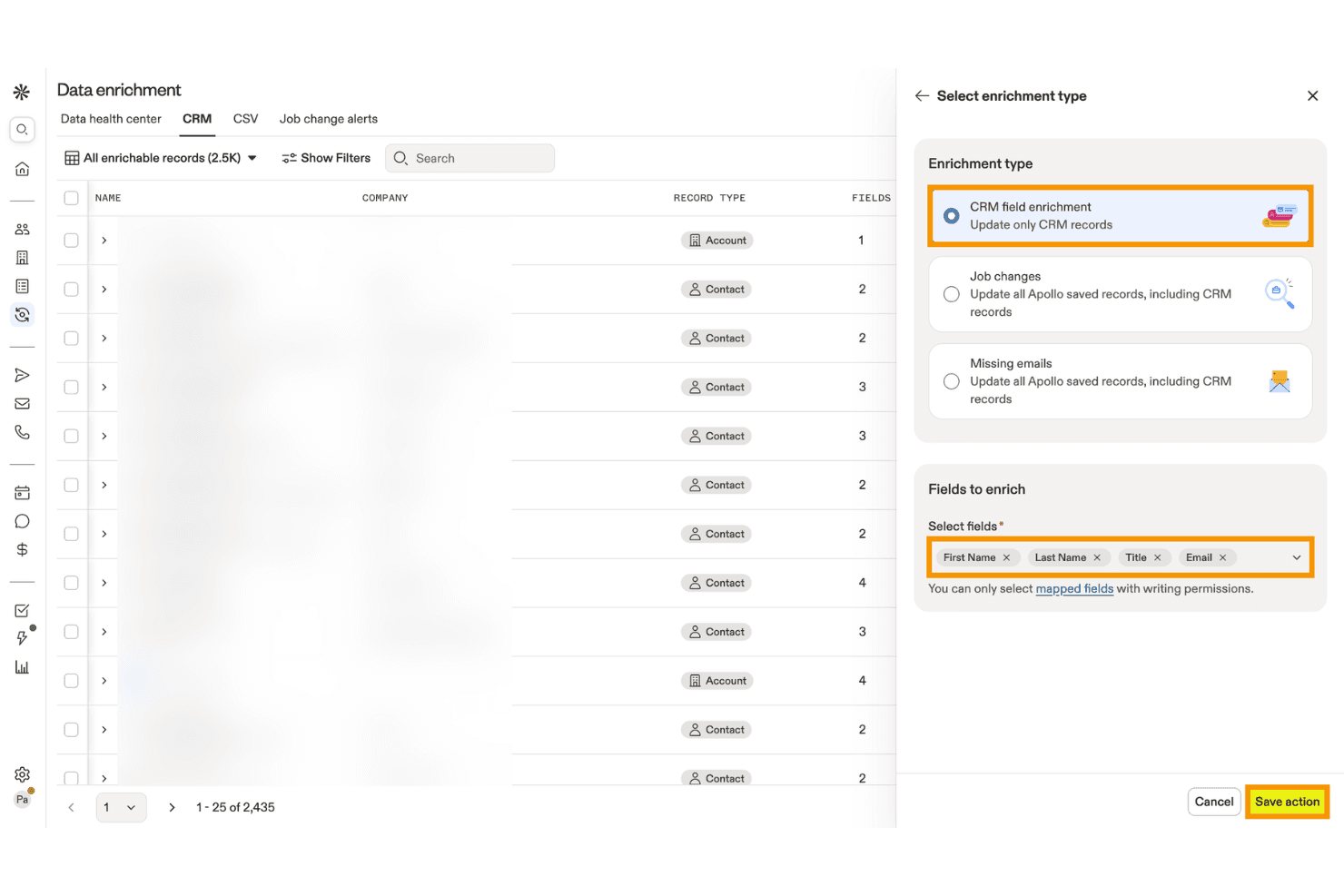
Apollo.io lets users enrich CRM records with selected contact fields. Apollo.io is a B2B sales intelligence and account data management platform that combines contact and company enrichment, deduplication, AI-powered scoring, intent data, and CRM integration across a database of 275M+ contacts and 73M+ companies.
Who Is Apollo.io Best For?
Apollo.io is a strong fit for mid-market demand generation and marketing operations teams that need affordable, high-volume B2B account enrichment and AI-powered scoring without enterprise-level complexity.
Why I Picked Apollo.io
Apollo.io earns its spot on my shortlist because its B2B account enrichment and AI-powered scoring capabilities are genuinely hard to replicate at this price point. I love how the AI scoring models train directly on your CRM's win/loss history and layer in Bombora intent signals across 15,000+ topics, so you're prioritizing accounts showing real buying behavior rather than guessing. The Data Health Center also does solid work surfacing duplicate records and stale fields across connected CRMs automatically.
Apollo.io Key Features
- CRM enrichment jobs: Scheduled or on-demand jobs that automatically update missing or stale fields in your connected CRM using Apollo's live database.
- CSV enrichment: Upload a CSV file, review the enriched output, and receive a completion report before importing records into any external system.
- 65+ segmentation filters: Search and filter accounts by firmographic, technographic, and behavioral attributes to build precise target account lists.
- Role-based permission profiles: Admins on the Organization plan can control feature-level access across prospecting, enrichment, email visibility, and engagement for each team member.
Apollo.io Integrations
Apollo.io offers native bidirectional integrations with Salesforce, HubSpot, Zoho CRM, Pipedrive, Microsoft Dynamics, Adobe Marketo Engage, and Snowflake. It also provides an open REST API and marketplace integrations, including Zapier.
Pros and Cons
Pros:
- AI-powered intent signals layered into scoring
- Real-time enrichment and duplicate detection dashboard
- Massive global B2B contact and account coverage
Cons:
- No advanced cross-system identity resolution
- Intent data sourced entirely from Bombora
Learn more about Apollo.io: Best for creating customizable databases
- Free plan available; 14-day free trial
- From $20/user/month (billed annually)
Visit WebsiteCustomer Rating:4.6/5
Airtable templates are pre-designed databases that enable efficient data management and organization. Airtable is a project management and collaboration tool that combines the capabilities of a spreadsheet and a database. It provides users with a flexible and visually appealing interface for organizing and managing various data types. Airtable allows you to create and customize tables, or "bases," to store and manipulate information.
Why I picked Airtable: Airtable is more suitable for project management. However, if you are a small team, you can also use it for account data management. The best thing about the tool is that it lets users create custom fields with specific data types, such as text, number, date, and dropdowns. This ensures data accuracy by enforcing consistent formatting and preventing incorrect entries. By defining field validation rules, you can further enhance data accuracy and maintain consistency.
Airtable provides powerful filtering and sorting options that enable simple data retrieval. You can apply filters based on specific criteria and instantly view a subset of records that meet the defined conditions. Sorting options allow you to arrange data in ascending or descending order based on any field, making it easy to find the desired information.
Airtable Standout Features and Integrations:
Standout features include a collaborative workspace where team members can collaborate on data entry, validation, and updates. This helps maintain data accuracy and consistency by involving multiple stakeholders in data management.
Integrations include Asana, Basecamp, Dropbox, Box, Eventbrite, Evernote, Facebook, GitHub, Google Calendar, Instagram, Jira, Miro, and LinkedIn. You can also avail additional integrations through Zapier and API.
Airtable costs from $10/user/month (billed annually) and comes with a free forever plan.
Pros and Cons
Pros:
- Powerful relational database capabilities
- Intuitive and visually appealing interface
- Customizable data organization
Cons:
- Limited reporting features
- Limited advanced data analysis capabilities
Learn more about Airtable:

NetSuite integrates data from various departments and enables real-time data monitoring and reporting of KPIs. NetSuite is a cloud-based business management software platform that helps businesses manage various aspects of their business, including financials, customer relationship management (CRM), inventory management, e-commerce, and more.
Why I picked NetSuite CRM: NetSuite CRM provides a complete solution for managing customer relationships throughout the entire customer lifecycle. It enables marketing, sales, and support teams to have a unified view of customer data, interactions, and preferences, facilitating personalized and targeted engagement.
NetSuite CRM also integrates with financial and operational data within the NetSuite platform. This integration enables marketing, sales, and support teams to access vital account information in real-time, such as billing history, order status, and support tickets. Having this consolidated data enhances collaboration and enables teams to provide better customer service and support.
NetSuite CRM Standout Features and Integrations:
Standout features include robust reporting and business intelligence capabilities. It provides pre-built and customizable reports and dashboards, enabling marketing, sales, and support teams to monitor key performance indicators, measure campaign success, and track customer satisfaction. This data-driven approach helps teams make informed decisions.
Integrations include Shopify, BigCommerce, Adobe Commerce, WooCommerce, Amazon, eBay, Walmart, Shopify POS, Amazon Supply Chain, and ShipStation.
Pros and Cons
Pros:
- Robust reporting features
- Cloud-based platform
- Robust security features
Cons:
- Steep learning curve
- The initial setup can be complex
Learn more about NetSuite CRM : Best for accurate B2B contacts
- Free plan available
- Pricing starts at $1200/month
Visit WebsiteCustomer Rating:3.9/5
The platform's real-time validation feature and the extensive reach of over 140 million business records contribute to its unique selling proposition. CIENCE GO Data is a comprehensive tool that provides accurate B2B contact information, including over 100 million verified contacts and 10 billion monthly signals for in-market buyers. The platform's unique selling point is its real-time validation and use of real-world data, which ensures the accuracy of sales data.
Why I picked CIENCE GO Data: I chose CIENCE GO Data because it provides a vast database of over 100 million verified B2B contacts, which is essential for any business looking to establish or expand its sales outreach. In determining the best tool for this purpose, I compared various options and found that CIENCE GO Data's emphasis on real-world validation of sales data makes it stand out. This approach ensures that the contact information is not only extensive but also accurate and up-to-date.
CIENCE GO Data Standout Features & Integrations
Standout features include outbound sales engagement with automation, AI models trained for industry-specific content creation, and powerful web analytics. Additionally, CIENCE offers services such as outbound SDR team-as-a-service and inbound SDR, as well as AI models for multi-channel outbound campaigns and artificial voice prospecting conversations. The company also provides resources such as lead prioritization guides, pricing information, and industry-related content through their blog and podcast.
Integrations include HubSpot CRM, CIENCE GO Digital, CIENCE GO Show, and HubSpot Sales Hub.
Pros and Cons
Pros:
- Targeted advertising capabilities to reach specific audiences.
- CRM support for managing leads and customer relationships.
- Customized data packages and services tailored to business needs.
Cons:
- Additional training may be required for clients to fully utilize the platform.
- Potentially more expensive compared to other lead generation services.
Learn more about CIENCE GO Data: Best account data management software for enterprises
- Pricing is available upon request

The Oracle CX Sales mobile app provides users with on-the-go access to critical sales information, customer data, and collaboration tools for efficient sales management. Oracle CX Sales, also known as Oracle Customer Experience Sales, is a comprehensive sales automation and customer relationship management (CRM) software offered by Oracle Corporation. It is part of the Oracle CX Cloud suite, encompassing various applications designed to enhance the customer experience across different touchpoints. It is a good choice for enterprise-level account data management due to its wide range of features and ability to handle large volumes of data.
Why I picked Oracle CX Sales: To maintain data accuracy and integrity, Oracle CX Sales provides tools for data cleansing and deduplication. These features help identify and merge duplicate or inconsistent customer records, ensuring a clean and reliable customer database.
The software enables businesses to segment customer data based on various criteria such as demographics, behavior, purchase history, or custom-defined attributes. This segmentation capability allows for more precise targeting and personalized communication with different customer segments.
Oracle CX Sales Standout Features and Integrations:
Standout features include automated data enrichment capabilities that enhance customer data with additional insights. It can automatically update and enrich customer records with social media profiles, industry information, firmographics, and other relevant data sources.
Integrations include ServiceNow, DbVisualizer, Oracle Sales, Crowdin, 4MDG, Oracle Service, and CipherTrust Cloud Key Manager.
Pros and Cons
Pros:
- Native mobile app
- Good reporting and analytics features
- Native integration with other Oracle products
Cons:
- Complex to set up and configure
- Steep learning curve
Learn more about Oracle CX Sales: Best for visual contact pipeline managemen
- 14-day free trial available
- From $14/user/month (billed annually)

The pipeline management feature of Pipedrive enables users to visually track and manage sales opportunities throughout different stages of the sales process. Pipedrive is a customer relationship management (CRM) and account data management platform that is trusted by more than 100,000 sales teams.
Why I picked Pipedrive: The feature I liked most is the pipeline management feature. It provides an intuitive overview of your sales process and customer interactions. The pipeline displays the various stages of your sales cycle, allowing you to see the progress of each account so that you can identify bottlenecks or opportunities. This visual representation helps sales teams stay organized and focused on moving deals forward.
Within each pipeline stage, Pipedrive enables you to track and log activities related to each account. You can record calls, emails, meetings, and other interactions directly within the platform. This feature ensures that all relevant information and account-related activities are captured and accessible in one centralized location, facilitating better account data management.
Pipedrive Standout Features and Integrations:
Standout features include workflow automation capabilities to automate repetitive tasks and improve efficiency. Users can automate actions such as sending follow-up emails, assigning tasks, updating data fields, and triggering notifications. Additionally, Pipedrive implements strong security measures to protect customer data. It employs industry-standard encryption protocols such as regular security audits and vulnerability assessments.
Integrations are available with 350+ connectors, including Zapier, Google Meet, Zoom Meetings, Facebook Messenger, LinkPort, DocuSign, Lemlist, JustCall, Asana, and HubSpot. You can also avail additional integrations through Pipedrive API and Zapier.
Pros and Cons
Pros:
- Mobile app is available
- Ideal for small to medium-sized businesses
- Modern and intuitive interface
Cons:
- Limited reporting capabilities
- Learning curve for new users
Learn more about Pipedrive : Best account data management software for data enrichment
- Free demo available
- Pricing upon request

The lead management feature of SAP Sales Cloud enables users to capture, qualify, and nurture leads for enhanced sales conversion and revenue growth. SAP Sales Cloud is a customer relationship management (CRM) solution that helps businesses manage their sales processes and customer relationships and drive revenue growth. It provides tools for managing leads, contacts, accounts, opportunities, and sales pipelines. The platform allows users to track customer interactions, log activities, and capture important information to ensure a complete and up-to-date view of each customer.
Why I picked SAP Sales Cloud: It enriches customer data by automatically pulling in additional information from external sources. This includes company details, social profiles, news updates, and more. By enriching the data, users can have a more comprehensive and up-to-date view of their customers, improving customer segmentation and targeting accuracy.
SAP Sales Cloud integrates with various data sources and systems, such as CRM, marketing automation, and ERP systems. This integration ensures that the data remains consistent across different platforms. It eliminates data silos and provides a centralized source of truth for accurate and reliable information.
SAP Sales Cloud Standout Features and Integrations:
Standout features include robust segmentation capabilities, allowing users to define and create dynamic customer segments based on specific criteria. Users can segment customers based on demographics, behavior, purchase history, and other relevant data points. This enables personalized targeting and tailored marketing efforts, leading to more effective and relevant communication with customers.
Integrations include Microsoft Outlook, Screendragon, Inxmail, Mediafly, Simplifier, EVALANCHE, In Mind Cloud, and Prosafety.
Pros and Cons
Pros:
- Advanced reporting and analytics
- Personalized customer engagement
- Robust data management capabilities
Cons:
- Learning curve for users new to SAP systems
- Initial setup and customization may require technical expertise
Learn more about SAP Sales Cloud: Best account data management software for small businesses
- Free plan + 15-day free trial + free demo available
- From $49/organization/month (billed annually)

The deal management feature of Bitrix24 helps users track and organize sales opportunities, from initial contact to final closure. Bitrix24 is a business management and CRM solution that provides various capabilities, including CRM (Customer Relationship Management), project management, document management, team communication, and more. Bitrix24 is particularly popular among small and medium-sized businesses due to its affordability, user-friendly interface, and extensive functionality.
Why I picked Bitrix24: Bitrix24 allows businesses to create custom fields and forms within the CRM. This feature enables businesses to capture specific data points relevant to their operations and customer interactions. Custom fields ensure the data collected is tailored to the business's needs.
Bitrix24 offers robust search and filtering capabilities within its CRM. This allows users to easily retrieve specific data based on various criteria, such as customer attributes, transaction history, or specific keywords. The advanced search functionality simplifies data retrieval, saving time and effort.
Bitrix24 Standout Features and Integrations:
Standout features include segmentation tools that allow businesses to categorize and group their contacts based on specific criteria or characteristics. Businesses can target specific customer segments by segmenting contacts with tailored marketing campaigns or personalized communication. This segmentation feature enhances data organization and accuracy, and enables targeted messaging.
Integrations include Gmail, Google Calendar, Google Drive, MS Office, Dropbox, Box, Xero, Mailchimp, Docusign, and Recurly.
Pros and Cons
Pros:
- Wide range of features
- Extensive integrations
- Efficient deal management
Cons:
- Steep learning curve for new users
- Limited customization options
Learn more about Bitrix24 : Best account data management software for ease of use
- 14-day free trial + free demo available
- From $19.90/user/month (billed annually)

The project management feature of Scoro enables businesses to efficiently plan, organize, and track tasks, resources, and milestones to ensure successful project execution. Scoro is a business and project management solution that provides a drag-and-drop interface for account data management. In addition, it also provides features for time tracking, collaboration, CRM, billing, and reporting.
Why I picked Scoro: While Scoro is primarily a business management software, it also provides some account data management features. It helps users store and manage customer account data in a centralized location. This data can include contact details, communication history, transactions, projects, invoices, etc. It enables a 360-degree view of each customer and contact so that you can keep track of sales opportunities.
In addition, Scoro also provides features to track sales goals and performance. For example, you can create customizable dashboards that track sales targets of individual sales reps and the entire team.
Scoro Standout Features and Integrations:
Standout features include project and task management features that help users track and manage activities related to customer accounts. This can be useful for organizing and coordinating account-related tasks and activities.
Integrations include Slack, Asana, Jira Software, Evernote, Trello, Harvest, Basecamp, GitHub, Zapier, and Gmail. You can also avail additional integrations through Zapier.
Pros and Cons
Pros:
- Enables team collaboration
- Customizable fields and workflows
- Integrates with popular third-party tools
Cons:
- Not highly customizable
- Limited focus on specialized account data management
Learn more about Scoro : Best account data management software with a user-friendly interface
- 14-day free trial
- From $34/month

AllClients provides a detailed overview of each client, including their preferences, history, and interactions with the company. AllClients is a customer relationship management (CRM) software platform that helps businesses manage and organize client information, track interactions, and manage communication. It also offers features such as contact management, email marketing, task management, and automated workflows to enhance customer relationships.
Why I picked AllClients: AllClients provides users with intuitive filtering options that allow them to quickly and easily sort and segment their client data. Whether filtering contacts based on specific criteria or creating targeted lists for marketing campaigns, the easy filtering feature simplifies the process. It enables users to access the necessary information with just a few clicks.
The platform is designed to be intuitive and accessible, making it easy for users to navigate and utilize its various functionalities. The clean layout and straightforward navigation ensure that users can quickly find what they need and perform tasks efficiently.
AllClients Standout Features and Integrations:
Standout features include a data entry feature that allows users to input and update client information within the system. With this feature, users can easily enter relevant details about their clients, such as names, contact information, demographics, and other custom fields specific to their business needs.
Integrations include Mailchimp, HubSpot CRM, Constant Contact, Campaign Monitor, Robly, ActiveDEMAND, and Akita.
Pros and Cons
Pros:
- Customizable fields for client data
- Easy contact filtering
- User-friendly interface
Cons:
- Limited customization options
- Steep learning curve
Learn more about AllClients :
Annen programvare for kontodatabehandling
I løpet av undersøkelsen fant jeg noen flere verktøy som ikke kom med på listen over de beste verktøyene for kontodatabehandling, men som er verdt å se nærmere på:
- 11OCLBest for account data management and collaboration
- 12CapsuleBest for data sorting and segmentation
- 13Salesforce CRMBest all-in-one solution for account data management
- 14SmartsheetBest for capturing account data through customizable sheets and forms
- 15CopperBest for Google Workspace users
- 16WrikeBest for creating custom workflows and data fields
- 17SugarAIBest for managing account hierarchy
- 18ClickUpBest account data management software for collaboration
- 19Zoho CRMBest for a wide range of features
- 20monday CRMBest for creating customizable data fields
- 21InsightlyBest for managing both customer accounts and projects
- 22Microsoft Dynamics 365 SalesBest for Microsoft users
- 23JiraBest for issue tracking
- 24Freshdesk Best unified platform for support and account data management
How I Evaluate Account Data Management Software
I evaluate in two layers: the baseline a tool must have—like lead-to-account matching and CRM enrichment sync—and the differentiators that separate strong options from the rest.
Core Functionality (Table Stakes For This List)
When I'm selecting tools for my list, I rank each one on a scale from 0 (does not offer the functionality) to 5 (excels in this area) for each core functionality listed below. Then, I calculate the tool's total score into a percentage. Each tool needs to achieve a minimum total score of 65% to be considered for inclusion.
- Account Data Enrichment: I check whether a tool can auto-append firmographic and technographic fields to account records—things like employee count, industry, tech stack, and revenue range.
- Deduplication & Cleansing: Messy CRM data is the norm, so I look for automated duplicate detection and merge logic that can handle fuzzy matches across misspelled company names and domain variants.
- CRM & MAP Integration: Each tool needs bidirectional sync with platforms like Salesforce or HubSpot, so enriched records flow back into the systems your marketing and sales teams already use.
- Account Segmentation & List Building: I evaluate how well a tool lets you filter and build target account lists using attributes like industry, headcount, or tech usage for ABM campaign targeting.
- Data Unification & Matching: Strong lead-to-account matching matters here—I look at how well a platform resolves scattered leads, contacts, and accounts into clean, unified account views.
- Account Scoring & Prioritization: I consider whether you can score and tier accounts based on fit and engagement signals, so your team focuses outreach on the accounts most likely to convert.
Once I have a list of tools that meet the criteria, I consider what sets each platform apart.
Differentiating Factors (What Sets Vendors Apart)
Here's how I compare and contrast different vendors:
Standout Features
Intent data is a major differentiator—I look for tools that surface in-market accounts based on real-time buying signals, so your ABM team can act on demand before a competitor does. Predictive AI modeling takes this further by scoring accounts on propensity to buy, not just static firmographic fit. Account hierarchy mapping also matters when you're targeting enterprise organizations with complex parent-child structures and need to coordinate marketing across subsidiaries.
Beyond Features
Data quality and coverage vary widely across vendors, so I evaluate how fresh and global a provider's underlying database is—stale records lead to wasted ad spend and bounced emails. Compliance also matters here, especially when your account lists include contacts across regions with different privacy laws like GDPR or CCPA. I also consider tech stack fit beyond CRM, checking for native connectors to data warehouses like Snowflake or ABM platforms where your enriched account data ultimately needs to land.
Slik velger du programvare for kontodatabehandling
Det er lett å gå seg vill i lange funksjonslister og kompliserte prisstrukturer. For å hjelpe deg med å holde fokus når du går gjennom den unike prosessen din for valg av programvare, får du her en sjekkliste over faktorer du bør ha i bakhodet:
| Faktor | Hva du bør vurdere |
|---|---|
| FaktorSkalerbarhet | Hva du bør vurdereVil programvaren vokse sammen med virksomheten din? Vurder om den kan håndtere en økning i antall brukere eller datamengde uten problemer. Se etter skalerbare priser og kapasitet. |
| FaktorIntegrasjoner | Hva du bør vurdereFungerer den sammen med verktøyene teamet ditt allerede bruker? Kontroller at den er kompatibel med eksisterende systemer for å unngå datasiloer og ekstra manuelt arbeid. |
| FaktorTilpasningsmuligheter | Hva du bør vurdereKan du tilpasse den etter behovene dine? Se etter tilpassbare felt og arbeidsflyter, slik at programvaren kan tilpasses de spesifikke prosessene dine. |
| FaktorBrukervennlighet | Hva du bør vurdereVil teamet ditt oppleve den som intuitiv? Vurder brukergrensesnittet og navigeringen. En bratt læringskurve kan bremse innføringen og produktiviteten. |
| FaktorImplementering og innføring | Hva du bør vurdereHvor raskt kan du komme i gang? Vurder hvor mye tid og hvilke ressurser som kreves for oppsettet. Ta hensyn til tilgjengeligheten av opplæringsmateriell, veiledninger og støtte ved innføringen. |
| FaktorKostnad | Hva du bør vurdereEr den innenfor budsjettet ditt? Sammenlign prisplanene med de økonomiske rammene dine. Vær oppmerksom på skjulte gebyrer, og undersøk om det gis rabatter på årsabonnementer. |
| FaktorSikkerhetstiltak | Hva du bør vurdereHvor sikre er dataene dine? Sørg for at programvaren tilbyr kryptering, sikkerhetskopiering av data og tilgangskontroller for å beskytte sensitiv informasjon. |
| FaktorEtterlevelseskrav | Hva du bør vurdereOppfyller den bransjereglene? Hvis du arbeider i en regulert bransje, må du sørge for at programvaren overholder relevante standarder, for eksempel GDPR eller HIPAA. |
Hva er programvare for håndtering av kontodata?
Programvare for håndtering av kontodata er et verktøy som hjelper virksomheter med å organisere, lagre og administrere kontorelatert informasjon på en effektiv måte. Markedsføringsledere, regnskapsførere og dataanalytikere bruker vanligvis disse verktøyene for å sikre datanøyaktighet og tilgjengelighet. Datasikkerhet, integrasjonsmuligheter og tilgangskontroll for brukere bidrar til å beskytte informasjon, koble sammen systemer og administrere tillatelser. Alt i alt forenkler disse verktøyene datahåndteringen og forbedrer beslutningsprosessene.
Funksjoner
Når du velger programvare for håndtering av kontodata, bør du se etter følgende viktige funksjoner:
- Datasikkerhet: Beskytter sensitiv informasjon gjennom kryptering og tilgangskontroller, slik at bare autoriserte brukere får tilgang til dataene.
- Integrasjonsmuligheter: Kobler seg til andre verktøy og programvaresystemer for å skape en sømløs arbeidsflyt og redusere manuell dataregistrering.
- Tilgangskontroll for brukere: Gjør det mulig å administrere tillatelser og roller, slik at brukerne bare får tilgang til dataene de trenger.
- Tilpassbare oversikter: Gir en personlig visning av dataene dine og hjelper deg med å fokusere på måleverdiene som betyr mest for virksomheten din.
- Rapportering og analyse: Genererer innsikt og visualiseringer fra dataene dine, slik at du kan ta velinformerte beslutninger.
- Datasynkronisering i sanntid: Holder dataene dine oppdatert på tvers av alle plattformer og sikrer nøyaktighet og konsistens.
- Skalerbarhet: Vokser med virksomheten din og håndterer økt datamengde og flere brukere uten ytelsesproblemer.
- Verktøy for overholdelse av regelverk: Sikrer at bransjeregler som GDPR eller HIPAA følges, og reduserer juridisk risiko.
- Intuitivt grensesnitt: Tilbyr et brukervennlig design som reduserer læringskurven og øker brukeradopsjonen.
- Støtte ved oppstart: Tilbyr ressurser som veiledninger og instruksjoner som hjelper nye brukere med å komme raskt i gang med programvaren.
Fordeler
Implementering av programvare for håndtering av kontodata gir flere fordeler for teamet og virksomheten din. Her er noen av fordelene du kan se frem til:
- Forbedret datanøyaktighet: Reduserer feil ved å synkronisere data i sanntid på tvers av alle plattformer, slik at alle har tilgang til den mest oppdaterte informasjonen.
- Bedre beslutningstaking: Gir verdifull innsikt gjennom rapportering og analyse, slik at du kan ta velinformerte beslutninger basert på nøyaktige data.
- Økt effektivitet: Automatiserer repetitive oppgaver og integreres med andre systemer, noe som sparer tid for teamet ditt og reduserer manuelt arbeid.
- Bedre sikkerhet: Beskytter sensitiv informasjon med kryptering og tilgangskontroller og holder dataene dine sikre mot uautorisert tilgang.
- Skalerbarhet: Tilpasser seg virksomhetens voksende behov og håndterer mer data og flere brukere uten at det går på bekostning av ytelsen.
- Overholdelse av regelverk: Hjelper deg med å oppfylle bransjeregler ved å tilby innebygde verktøy for overholdelse av regelverk, noe som reduserer risikoen for juridiske problemer.
- Brukervennlig opplevelse: Tilbyr et intuitivt grensesnitt som reduserer læringskurven og gjør det enkelt for teamet ditt å ta løsningen i bruk.
Kostnader & priser
Valg av programvare for håndtering av kontodata krever en forståelse av de ulike prismodellene og abonnementene som er tilgjengelige. Kostnadene varierer basert på funksjoner, teamstørrelse, tillegg og mer. Tabellen nedenfor oppsummerer vanlige abonnementer, gjennomsnittsprisene deres og typiske funksjoner som er inkludert i løsninger for håndtering av kontodata:
Sammenligningstabell for abonnementer for programvare for håndtering av kontodata
| Abonnementstype | Gjennomsnittspris | Vanlige funksjoner |
|---|---|---|
| AbonnementstypeGratisabonnement | Gjennomsnittspris$0 | Vanlige funksjonerGrunnleggende datalagring, begrensede integrasjoner og grunnleggende rapportering. |
| AbonnementstypePersonlig abonnement | Gjennomsnittspris$5-$25/bruker/måned | Vanlige funksjonerDatalagring, tilgangskontroll for brukere, grunnleggende integrasjoner og standard kundestøtte. |
| AbonnementstypeForretningsabonnement | Gjennomsnittspris$50-$100/bruker/måned | Vanlige funksjonerAvanserte integrasjoner, forbedret sikkerhet, tilpassede oversikter og analyse. |
| AbonnementstypeStorbedriftsabonnement | Gjennomsnittspris$150-$300/bruker/måned | Vanlige funksjonerUbegrenset datalagring, førsteklasses kundestøtte, verktøy for overholdelse av regelverk og full tilpasning. |
Andre spør også
Her er svarene på noen vanlige spørsmål du kanskje har om programvare for administrasjon av kontodata:
Kan programvare for administrasjon av kontodata integreres med andre verktøy?
Ja, programvare for administrasjon av kontodata kan integreres med andre verktøy, for eksempel CRM-systemer, markedsføringsplattformer og økonomiprogramvare. Disse integrasjonene muliggjør sømløs dataflyt mellom systemene, noe som reduserer manuell dataregistrering og antall feil. Før du kjøper, bør du kontrollere om programvaren støtter de spesifikke verktøyene teamet ditt bruker, for å sikre kompatibilitet.
Kreves det opplæring for å bruke programvare for administrasjon av kontodata?
Ja, det kreves ofte opplæring for å få størst mulig utbytte av programvare for administrasjon av kontodata. Mange leverandører tilbyr ressurser som nettbaserte veiledninger, webinarer og guider for å hjelpe teamet ditt med å lære systemet. Ved å benytte deg av disse ressursene kan du fremskynde innføringsprosessen og sikre at teamet bruker programvaren effektivt.
Hvordan sikrer jeg datasikkerheten med programvare for administrasjon av kontodata?
For å sikre datasikkerheten bør du velge programvare som tilbyr kryptering, tilgangskontroller og regelmessige sikkerhetskopier. Kontroller at leverandøren følger sikkerhetspraksis som er standard i bransjen, og overholder relevante forskrifter. Gå regelmessig gjennom sikkerhetsinnstillingene og lær opp teamet ditt i beste praksis for å beskytte sensitiv informasjon.