

Why Trust Our Software Recommendations
6,700+
Reviews
20
Industry experts
16+
Evaluation factors
14
Years
Our team has been testing and reviewing software since 2012. As marketing leaders ourselves, we know how difficult—and important—it is to choose the right software.
For this guide, we evaluated tools using hands-on testing and independent research, scoring tools using our selection criteria.
Our reviews reflect our human editorial judgment, not a sales pitch.
Expert reviewers:
 Gui DrusinaCreative Director
- Shriya GhateSenior Marketing Lead
 Amanda JacquesMarketing Ops Leader

Sammenligningstabell for SEO-verktøy for byråer
| Tool | Best For | Trial Info | Price | ||
|---|---|---|---|---|---|
| 1 | Best integrations for workflow automation | 14-day free trial + free demo available | From $103.20/month (billed annually) | Website | |
| 2 | Best support for managing local SEO at scale | 14-day free trial + free demo | From $31/month (billed annually) | Website | |
| 3 | Best SEO and AI visibility data coverage | Free plan available | From $29/month | Website | |
| 4 | Best all-in-one competitor and keyword analysis | 7-day free trial + free demo | From $50/month (billed annually) | Website | |
| 5 | Best actionable insights with AI-powered tools | 7-day free trial + free demo available | From $79/month (billed annually) | Website | |
| 6 | Best white-label widgets to capture new leads | 14-day free trial | From $99/month (billed annually) | Website | |
| 7 | Best automated client reporting for large teams | Free demo + 14-day free trial | From $20/client/month (billed annually) | Website | |
| 8 | Best competitive digital visibility data | 14-day free trial | From $139/month | Website | |
| 9 | Best customizable SEO marketing reports | 7-day free trial | From $39/month (billed annually) | Website | |
| 10 | Best unified search and AI platform tracking | 14-day free trial | From $96/month (billed annually) | Website |



Anmeldelser av de beste SEO-verktøyene for byråer
Nedenfor finner du mine detaljerte sammendrag av de beste SEO-verktøyene for byråer som kom med på kortlisten min. Anmeldelsene mine gir en detaljert oversikt over funksjonene, integrasjonene og prisene til hver plattform, slik at du kan finne den beste for deg.
 Best integrations for workflow automation
- 14-day free trial + free demo available
- From $103.20/month (billed annually)
Visit WebsiteCustomer Rating:4.8/5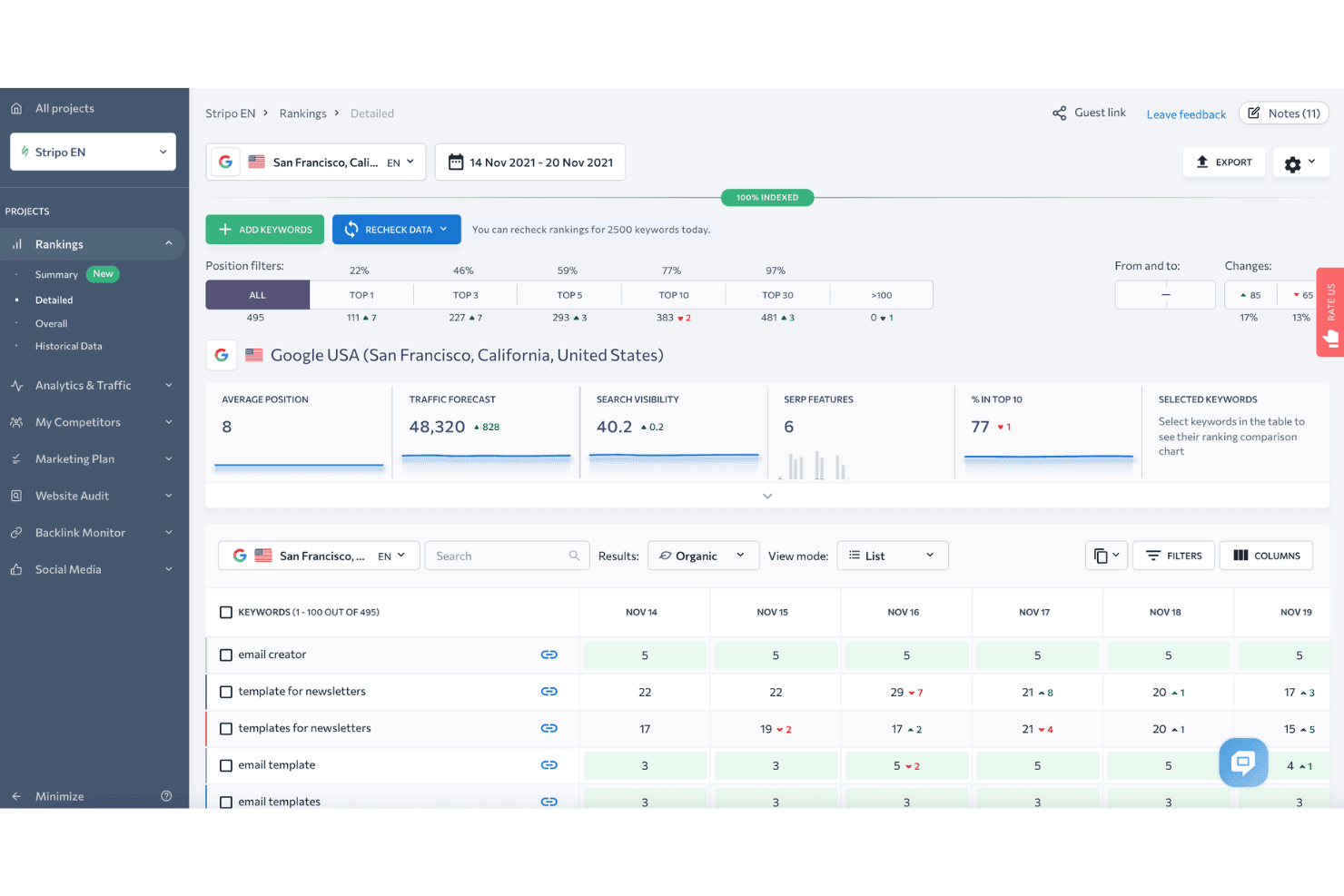
SE Ranking displays a detailed keyword rankings dashboard with position filters, traffic forecast, and daily ranking changes for tracked keywords. SE Ranking is a cloud-based SEO platform covering rank tracking, site auditing, keyword research, backlink analysis, competitor research, white-label reporting, and AI search visibility monitoring across multiple client projects.
Who Is SE Ranking Best For?
SE Ranking is a strong fit for small to mid-sized agencies that need a full SEO toolkit across multiple client accounts without paying enterprise-tier prices.
Why I Picked SE Ranking
SE Ranking earns its spot on my shortlist because of how well its automation ecosystem connects to real agency workflows. I use its verified n8n node and Make.com connector to trigger rank tracking alerts and push data directly into client dashboards without manual exports. The MCP server takes this further, feeding live SE Ranking data into Claude or ChatGPT so I can generate analysis without switching tools.
SE Ranking Key Features
- White-label reporting: Create customizable, branded reports clients can access via a dedicated portal.
- Keyword grouper: Automatically cluster large lists of keywords by topic and intent for scaled research.
- Local rank tracker: Monitor rankings within specific cities or regions and manage Google Business Profile data.
- Backlink monitoring: Track new and lost backlinks across domains with historical data and authority metrics.
SE Ranking Integrations
SE Ranking offers native integrations with Google Analytics 4, Google Search Console, Google Ads, Matomo Analytics, Looker Studio, Whatagraph, AgencyAnalytics, and Reportz. It connects with Zapier, Make.com, n8n, and provides an API for custom integrations.
Pros and Cons
Pros:
- Agency Pack with manager and client seats
- White-label client portals and guest access
- Reliable daily rank tracking across regions
Cons:
- Limited JavaScript-rendered site auditing
- Backlink database smaller than competitors
Learn more about SE Ranking: Best support for managing local SEO at scale
- 14-day free trial + free demo
- From $31/month (billed annually)
Visit WebsiteCustomer Rating:4.7/5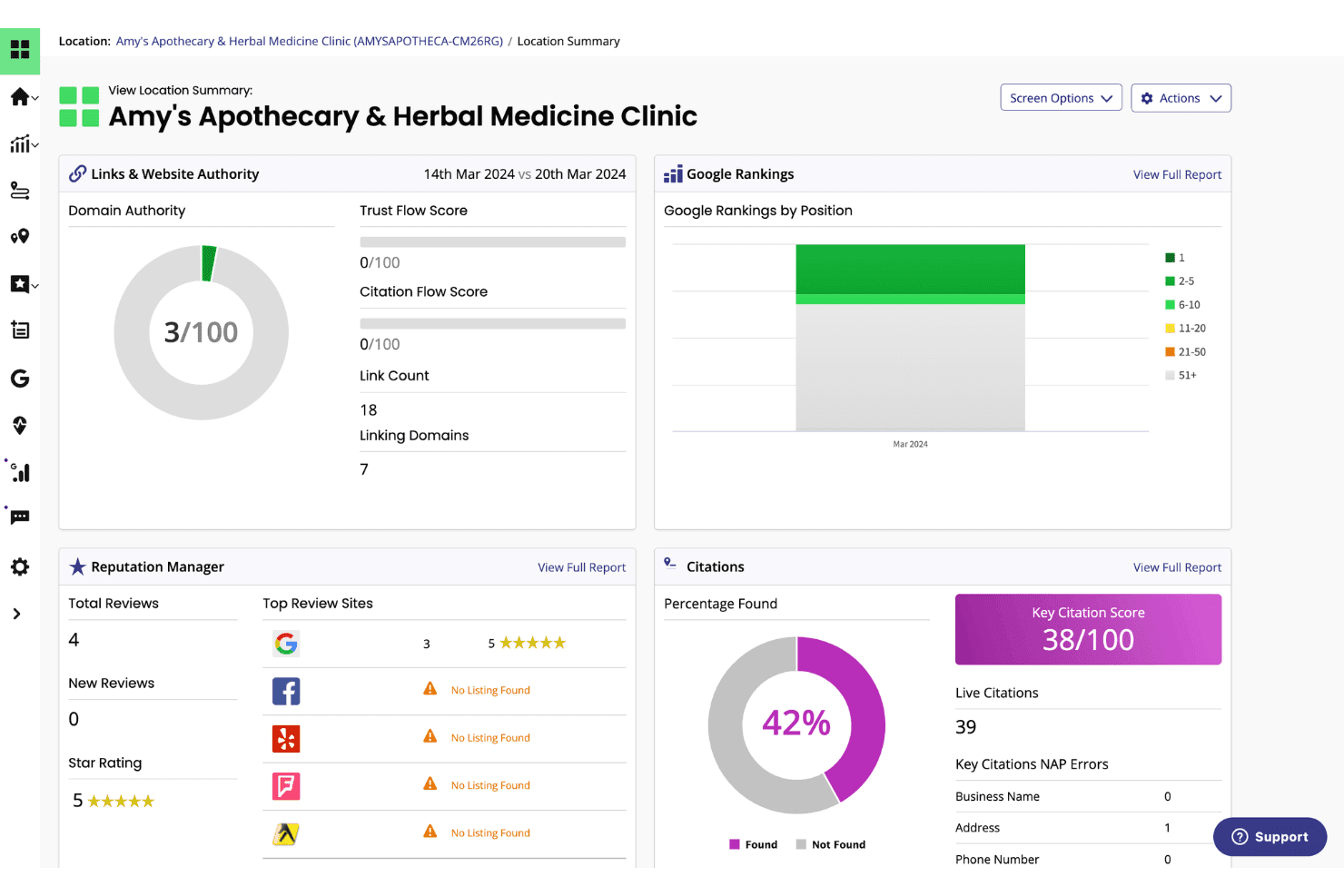
BrightLocal displays a location summary dashboard with Google rankings, citation scores, domain authority, and reputation metrics for a local business. BrightLocal is a local SEO platform built for agencies and multi-location businesses, combining local rank tracking, citation management, Google Business Profile auditing, and review monitoring in one dashboard.
Who Is BrightLocal Best For?
Agencies and white-label SEO providers managing local search campaigns for brick-and-mortar or service-area business clients will get the most from BrightLocal.
Why I Picked BrightLocal
BrightLocal earns its spot on my shortlist because of how well it handles local rank tracking across an entire client portfolio. I love the Local Search Grid, which maps Google rankings across a geographic area on a visual geo-grid, so I can instantly see where a client is dominant and where coverage falls off. Each client also gets their own white-labeled external dashboard login, which means I can set up automated reporting once and let clients check in on their own performance.
BrightLocal Key Features
- Citation Tracker: Audits and monitors business listings for accuracy and identifies new citation opportunities across top directories.
- GBP Audit: Benchmarks a client's Google Business Profile against local competitors with actionable insights for optimization.
- Active Sync: Automatically keeps business information consistent across major local data sources and listings.
- Showcase reviews widget: Lets you publish customer reviews directly to your website to support social proof and trust signals.
BrightLocal Integrations
BrightLocal offers native integrations with Google Business Profile, Google Analytics 4, Facebook, and Zapier. An API is available for custom integrations.
Pros and Cons
Pros:
- Automated citation management and monitoring
- White-labeled dashboards for unlimited clients
- Local rank tracking with geo-grid visualization
Cons:
- Limited technical site auditing features
- No backlink analysis or toxic link audit
Learn more about BrightLocal: Best SEO and AI visibility data coverage
- Free plan available
- From $29/month
Visit WebsiteCustomer Rating:4.6/5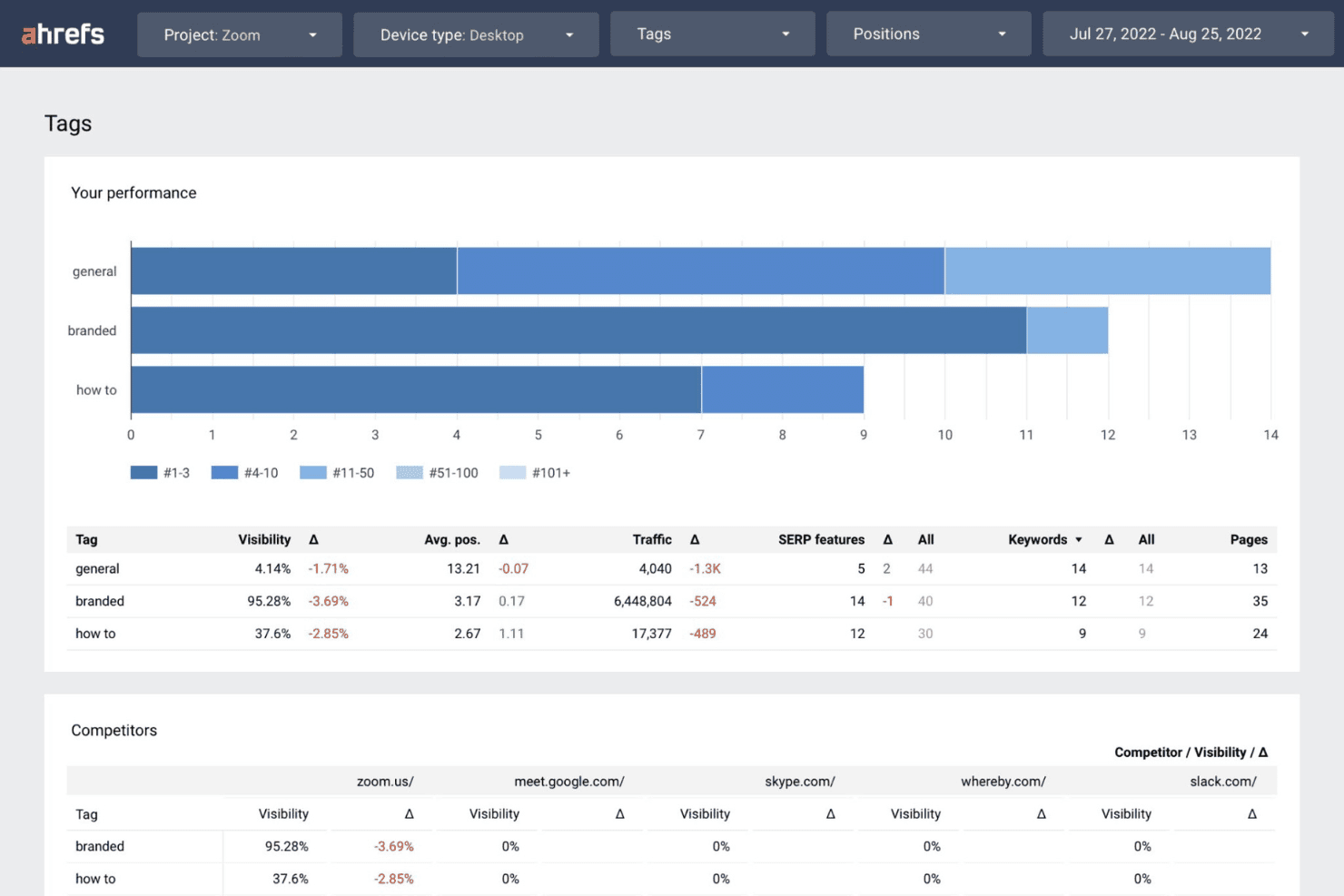
Ahrefs displays a Tags performance dashboard showing visibility, traffic, and keyword data segmented by branded, general, and how-to categories alongside competitor comparisons. Ahrefs is a full-suite SEO platform built around one of the largest backlink indexes in the industry, offering keyword research, rank tracking, site auditing, and competitive intelligence across multiple client accounts.
Who Is Ahrefs Best For?
Ahrefs is a strong fit for agency SEO directors and account managers who prioritize data depth for competitive research, link building, and multi-client keyword tracking.
Why I Picked Ahrefs
I picked Ahrefs as one of the best because its coverage spans both traditional and AI search visibility in a way no competitor currently matches. Brand Radar tracks client brand mentions and citations across LLMs like ChatGPT, Claude, and Gemini, and Custom Prompts lets me monitor exactly which AI answers a client appears in. I also lean on Keywords Explorer's click data to filter out high-volume keywords that generate zero actual traffic, which keeps client content strategies grounded in real search behaviour.
Ahrefs Key Features
- Site Explorer: Analyze competitor backlink profiles, organic traffic, and paid keywords in detail.
- Site Audit: Run scalable technical SEO crawls to surface on-page errors and site health issues.
- Rank Tracker: Monitor keyword rankings across devices, locations, and multiple search engines.
- Report Builder: Create custom dashboards and automated, client-ready SEO performance reports.
Ahrefs Integrations
Ahrefs offers native integrations with Google Search Console and Looker Studio, supports MCP Server for AI assistants like ChatGPT and Claude, and provides an API for custom integrations.
Pros and Cons
Pros:
- Advanced competitor and SERP analysis tools
- AI visibility tracking for search engines
- Largest and freshest backlink index available
Cons:
- White-label reporting options are limited
- No native client login or portal
 Best all-in-one competitor and keyword analysis
- 7-day free trial + free demo
- From $50/month (billed annually)
Visit WebsiteCustomer Rating:4.6/5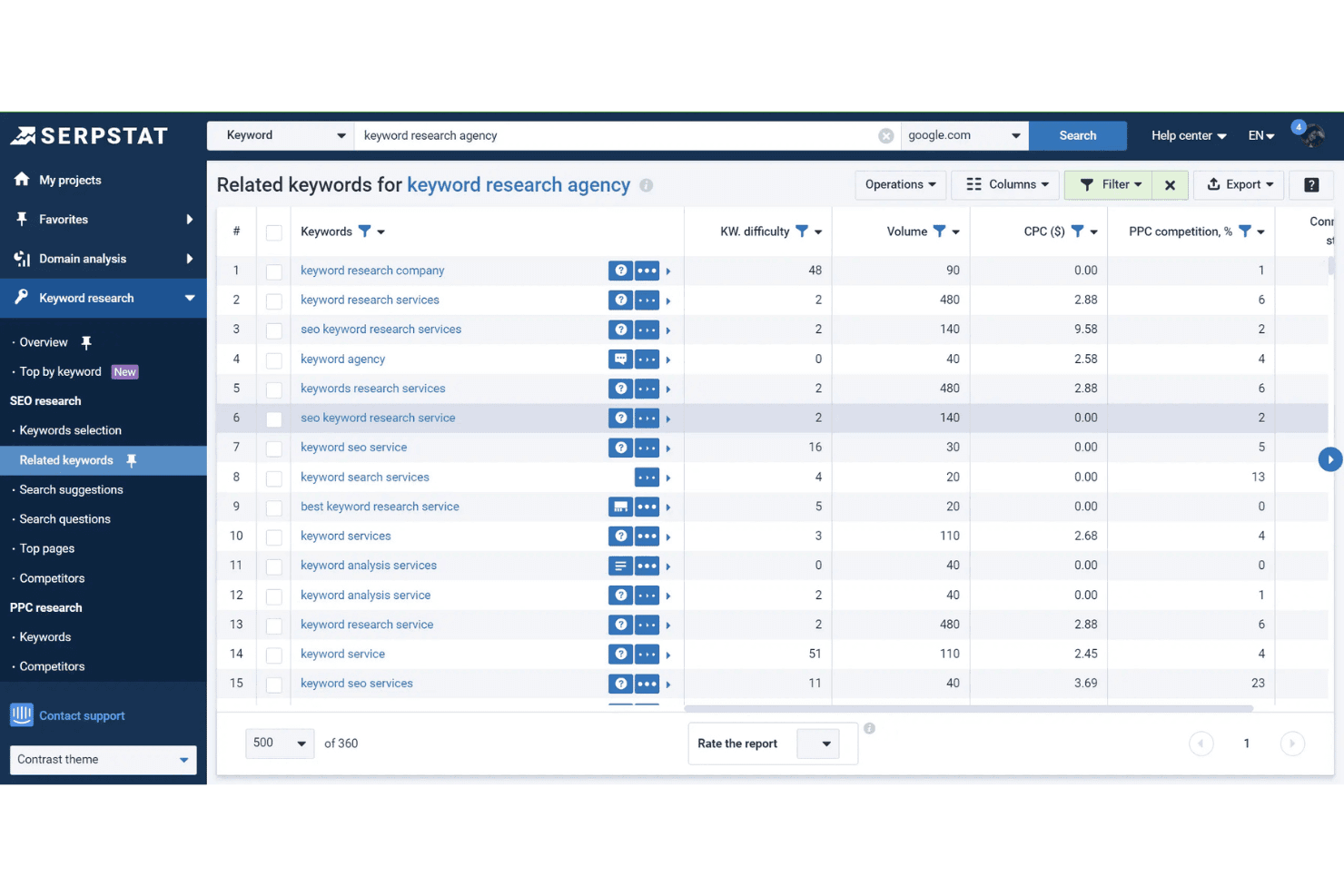
Serpstat's Related Keywords tool displays keyword difficulty, search volume, CPC, and PPC competition data for 'keyword research agency'. Serpstat is a search marketing platform that brings keyword research, competitor analysis, rank tracking, site auditing, and backlink analysis together across 230 countries and multiple client projects.
Who Is Serpstat Best For?
Serpstat is a strong fit for small-to-mid-sized digital marketing agencies that need an affordable all-in-one SEO platform to manage multiple client accounts.
Why I Picked Serpstat
Serpstat earns its spot on my shortlist because of how deeply its competitor analysis module works for agency use cases. I can pull a competitor's top-performing pages, their full keyword set, and traffic share all from one view, making client gap analysis quick before a strategy call. The keyword clustering tool is also genuinely useful: I can group thousands of raw keywords automatically, which speeds up content planning for clients with complex or large-scale site structures.
Serpstat Key Features
- Rank tracker: Monitor keyword positions across 230 countries for both desktop and mobile.
- Site audit: Scan sites for technical SEO issues with customizable audit scheduling.
- API access: Pull search analytics and audit data directly into custom workflows.
- Batch analysis: Analyze up to 100,000 domains or keywords at once for bulk review.
Serpstat Integrations
Serpstat offers native integrations with Google Sheets, Google Search Console, Reportz, Stackby, Oviond, Datorama, SEOtools for Excel, and Looker Studio. It also provides browser extensions for Chrome, Firefox, Edge, and Opera, with API access available for custom integrations.
Pros and Cons
Pros:
- Automated keyword clustering for large datasets
- Groups large lists of keywords
- Competitor analysis across global and local markets
Cons:
- White-label reporting requires top-tier plan
- Backlink data is less extensive than Ahrefs
 Best actionable insights with AI-powered tools
- 7-day free trial + free demo available
- From $79/month (billed annually)
Visit WebsiteCustomer Rating:4.5/5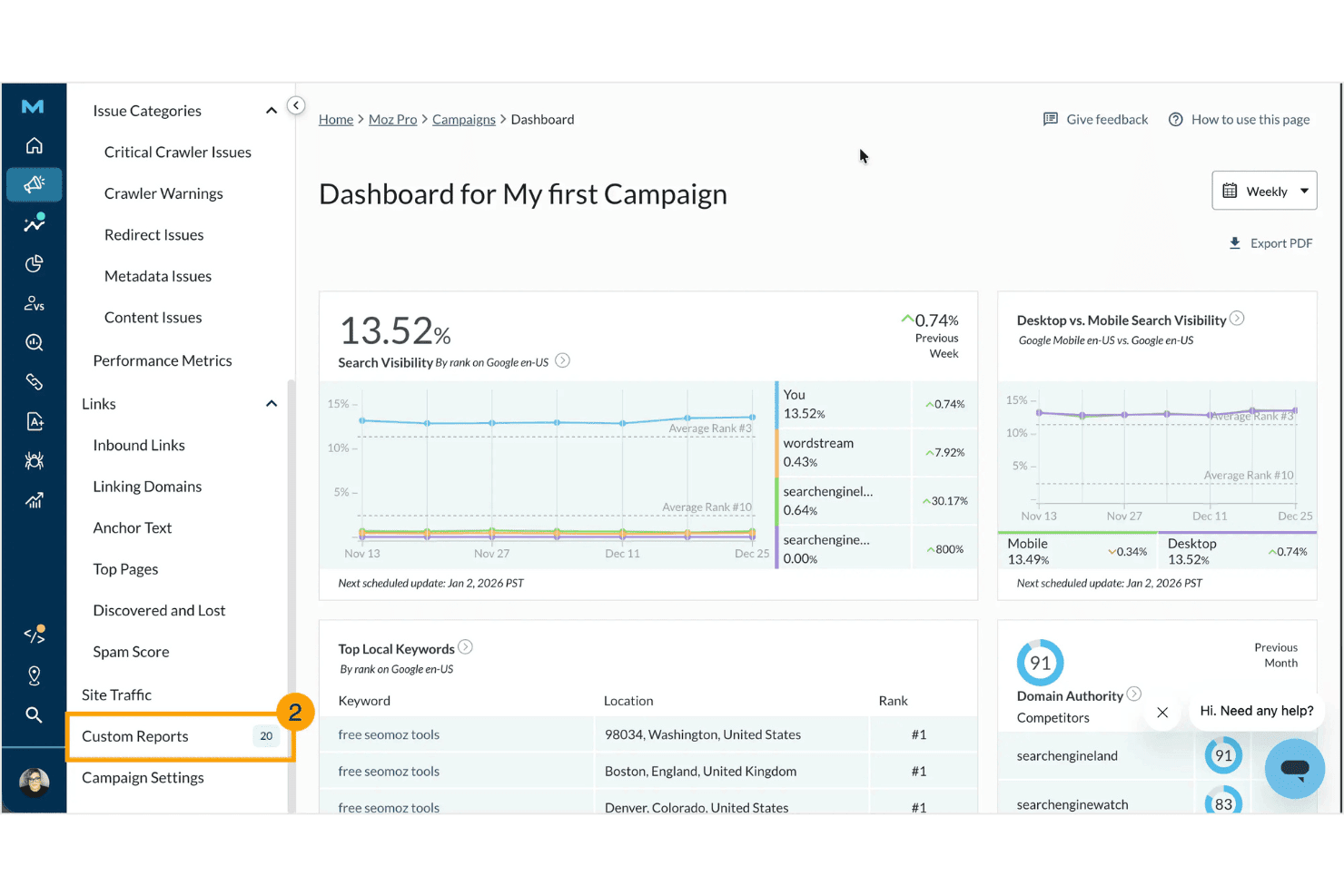
Moz Pro displays a campaign dashboard with search visibility metrics, top local keywords, domain authority scores, and competitor comparisons. Moz Pro is an SEO platform built around keyword research, rank tracking, site auditing, backlink analysis, and white-labeled reporting, with added AI-powered tools for tracking brand visibility across generative search engines.
Who Is Moz Pro Best For?
Moz Pro is a strong fit for small-to-mid-sized digital marketing agencies that need reliable client reporting, trusted authority metrics, and an accessible interface for their SEO teams.
Why I Picked Moz Pro
Moz Pro earns its spot on my shortlist because of how it pairs its long-established authority metrics with genuinely useful AI tools. I particularly like the AI Prompt Tracking feature, which shows how often a client's brand appears across ChatGPT, Gemini, and Google AI Mode responses. The AI Content Briefs add another layer by turning keyword data into structured content guidance that's immediately actionable for whoever's writing the copy.
Moz Pro Key Features
- Custom branded reports: Generate white-labeled, agency-ready SEO reports with drag-and-drop customization.
- Campaign-based client management: Organize multiple client sites and projects within separate campaigns on one dashboard.
- Comprehensive site crawl: Audit entire websites to identify technical SEO issues and optimization opportunities.
- Backlink profile analysis: Access detailed link data for clients and competitors, including new and lost backlinks.
Moz Pro Integrations
Moz Pro offers native integrations with Google Analytics, Google Search Console, HubSpot, and Looker Studio. An API is available for custom integrations.
Pros and Cons
Pros:
- White-labeled SEO and client audit reports
- Trusted Domain Authority and spam score metrics
- AI prompt tracking for generative search
Cons:
- No direct client portal access
- Backlink data lags larger competitors
Learn more about Moz Pro: Best white-label widgets to capture new leads
- 14-day free trial
- From $99/month (billed annually)
Visit WebsiteCustomer Rating:4.8/5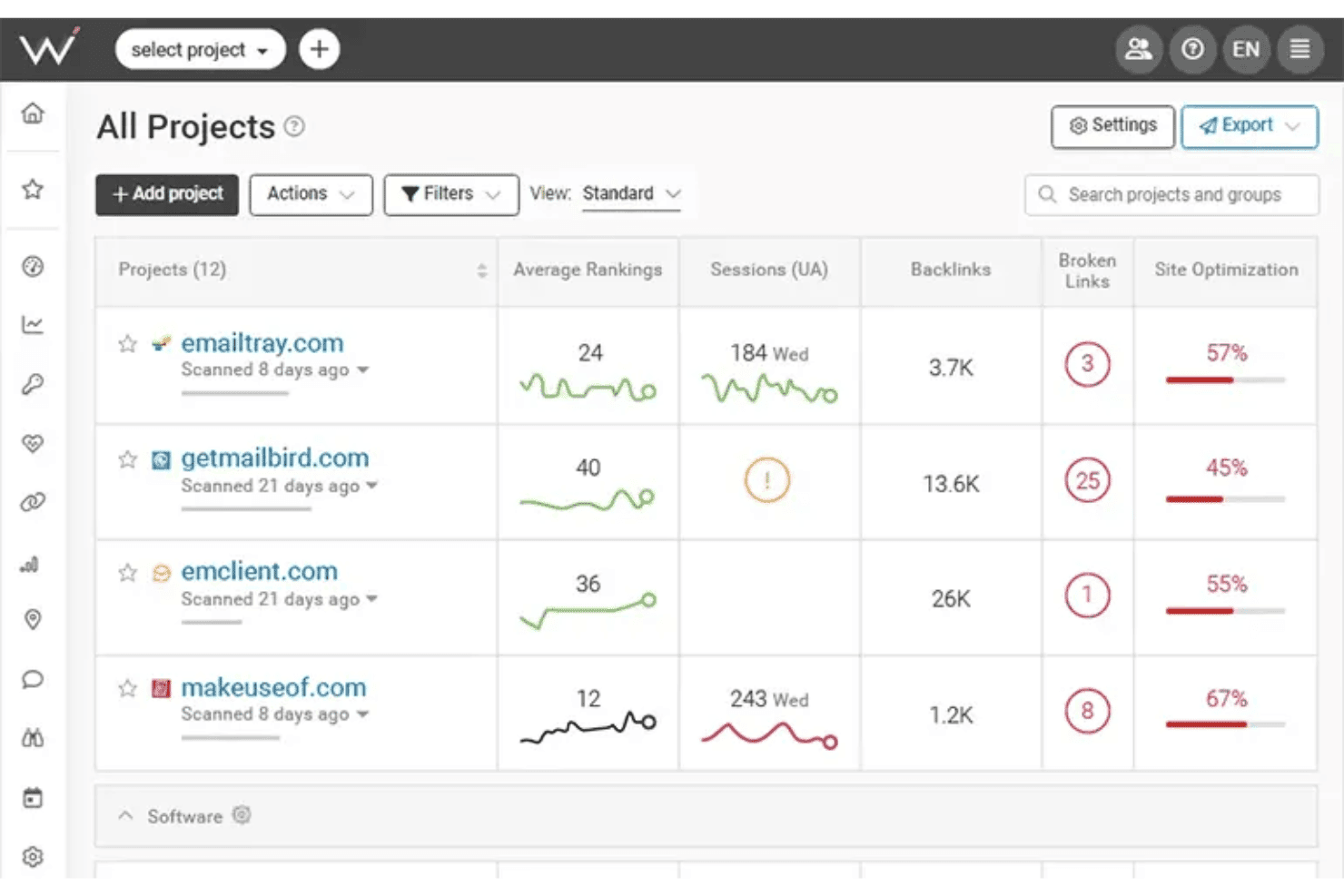
WebCEO displays an All Projects dashboard where users can monitor average rankings, sessions, backlinks, broken links, and site optimization scores across multiple websites. WebCEO is a cloud-based SEO platform built for agencies, covering rank tracking, site auditing, backlink analysis, keyword research, competitor intelligence, and white-label reporting across unlimited client projects from a single dashboard.
Who Is WebCEO Best For?
WebCEO is a strong fit for digital marketing agencies that manage multiple client accounts and want to offer branded SEO services under their own domain.
Why I Picked WebCEO
WebCEO earns its spot on my shortlist because the white-label lead-gen widget is genuinely rare in the SEO tools market. I embed a customizable audit button on a client-facing page, and when a prospect runs a scan, I get a branded SEO report delivered under my agency's domain. On top of that, the full white-label hub lets me run WebCEO tools on my own custom domain, with role-based client logins and automated, scheduled report delivery.
WebCEO Key Features
- Comprehensive rank tracking: Monitor keyword rankings daily across multiple search engines, locations, and devices.
- Team collaboration tools: Assign tasks, manage user roles, and track team progress within a unified dashboard.
- Competitor SEO analysis: Analyze competitor backlinks, content strategies, and keywords for actionable insights.
- Automated technical site audits: Crawl entire websites to detect on-page errors, mobile issues, and Core Web Vitals data.
WebCEO Integrations
WebCEO offers native integrations with Google Analytics, Google Ads, Google Search Console, Facebook, and LinkedIn. An API is available for custom integrations.
Pros and Cons
Pros:
- Scheduled automated branded SEO report delivery
- Identifies mobile performance issues
- White-label SEO lead capture widget available
Cons:
- No desktop software version is available
- Charges extra fees per scan on agency plans
Learn more about WebCEO: Best automated client reporting for large teams
- Free demo + 14-day free trial
- From $20/client/month (billed annually)
Visit WebsiteCustomer Rating:4.7/5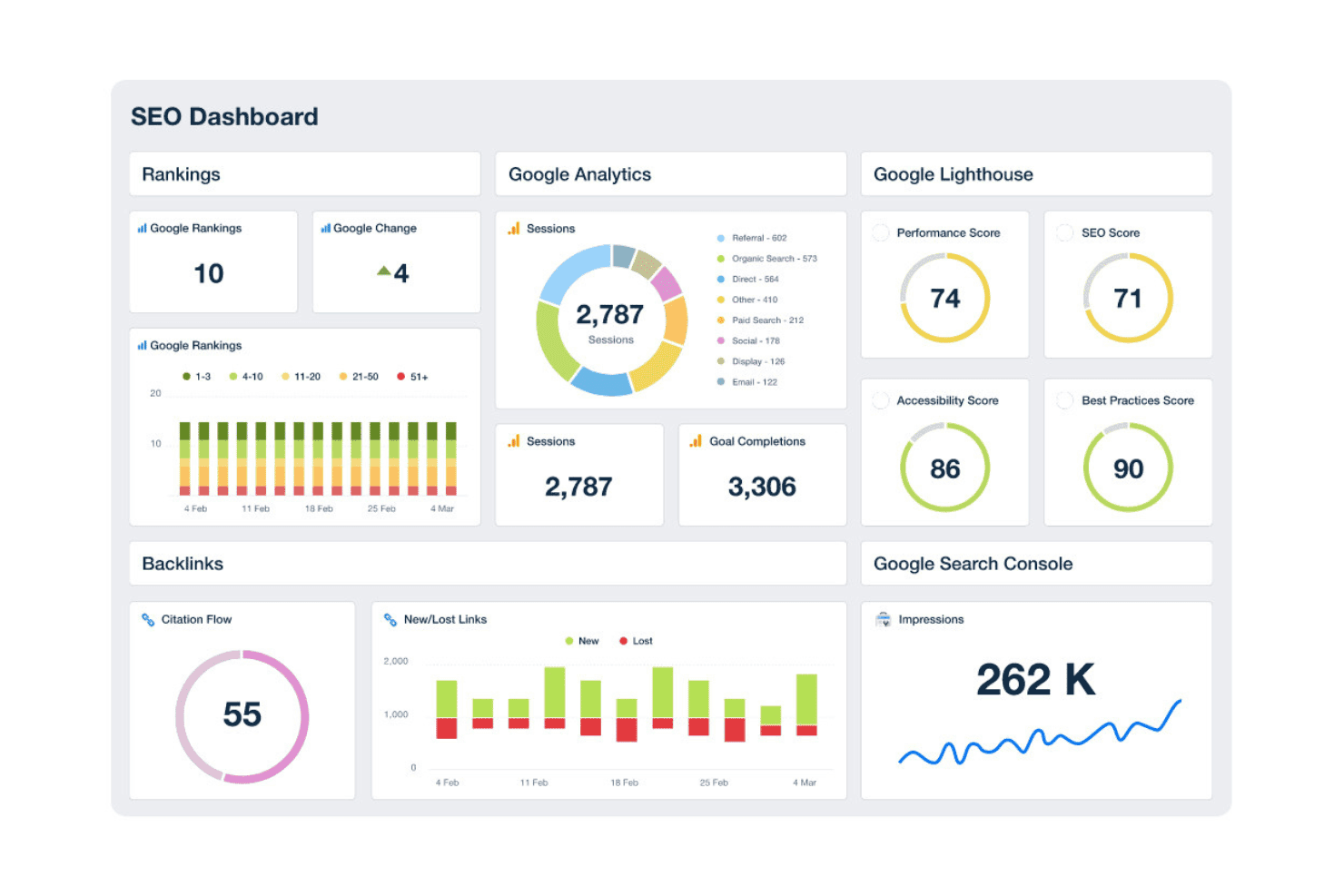
AgencyAnalytics offers a comprehensive SEO dashboard displaying rankings, Google Analytics sessions, Lighthouse scores, backlinks, and search console impressions in one unified view. AgencyAnalytics is a white-label reporting and SEO monitoring platform built for digital marketing agencies, combining automated client dashboards, rank tracking, site auditing, and backlink monitoring across multiple client accounts.
Who Is AgencyAnalytics Best For?
AgencyAnalytics is a natural fit for small-to-mid-sized digital marketing agencies managing multiple client accounts who need white-label reporting without building custom dashboards.
Why I Picked AgencyAnalytics
I've included AgencyAnalytics in my top picks because no other tool in this space matches its automated report scheduling at scale. I can build a branded report template once, apply it across 20+ client accounts, and schedule delivery without touching it again each month. The white-label client portal, custom domain setup, and drag-and-drop report builder mean clients receive polished, agency-branded dashboards at a URL I control, not a generic third-party subdomain.
AgencyAnalytics Key Features
- AI insights and anomaly detection: Uses machine learning to highlight trends, anomalies, and emerging opportunities in performance data.
- Backlink monitoring: Tracks new and lost backlinks across integrated sources for each client account.
- Integration library: Connects with over 80 marketing, SEO, and paid media platforms for centralized reporting.
- Site audit tool: Automatically crawls client sites to surface technical SEO issues and on-page recommendations.
AgencyAnalytics Integrations
AgencyAnalytics offers 85+ native integrations, including Google Analytics, Google Search Console, Ahrefs, Semrush, Moz, Facebook Ads, Google Ads, Shopify, HubSpot, Mailchimp, and CallRail. An API is available for custom integrations.
Pros and Cons
Pros:
- Permissions for individual client portal access
- Offers customized dashboard layouts
- Automated white-label reporting across clients
Cons:
- Site audits have limited technical depth
- Keyword research features require third-party tools
Learn more about AgencyAnalytics: Best competitive digital visibility data
- 14-day free trial
- From $139/month
Visit WebsiteCustomer Rating:4.5/5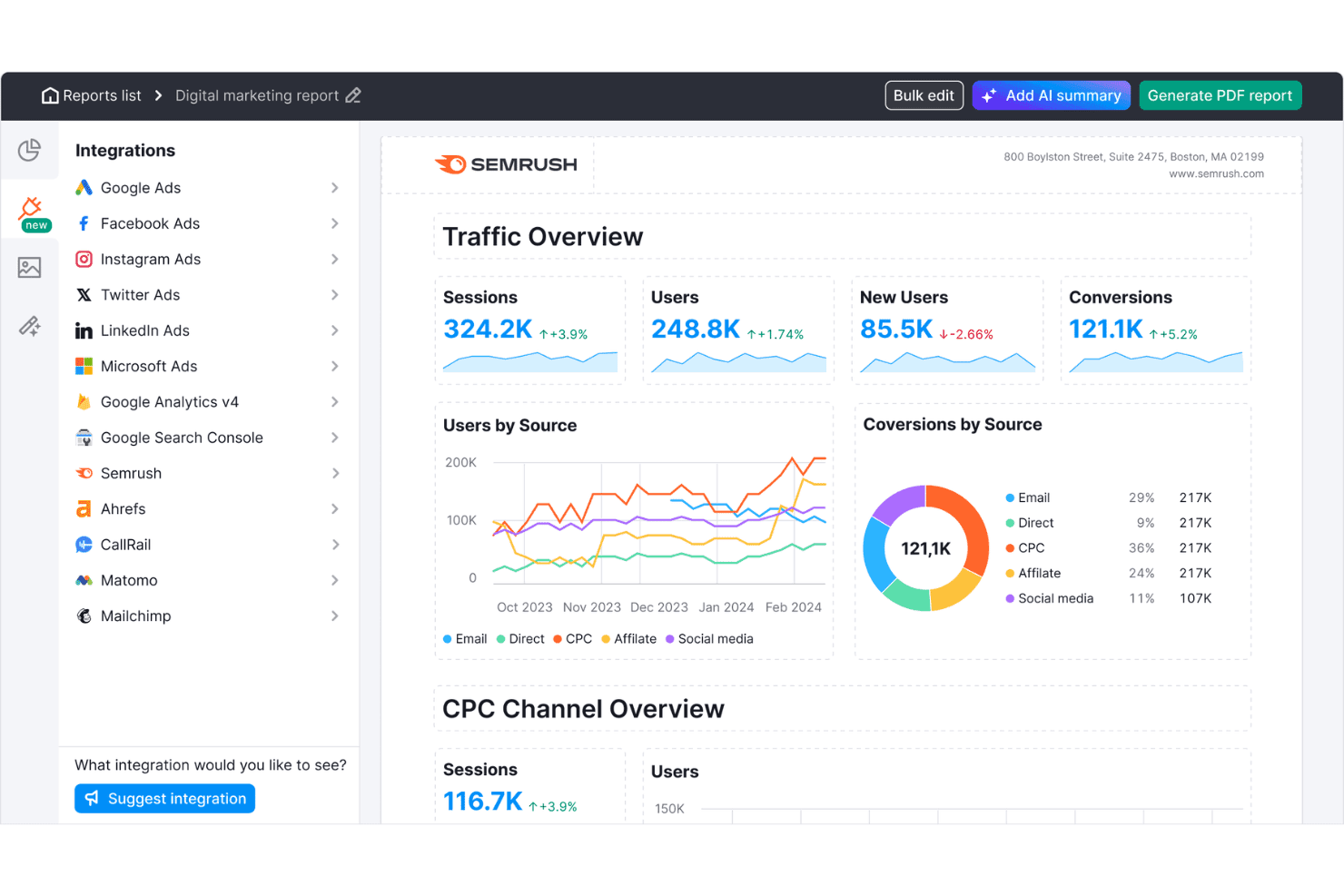
Semrush offers a digital marketing report dashboard with traffic overview, users by source, conversions by source, and CPC channel metrics. Semrush is an online visibility platform that gives agencies keyword research, rank tracking, site auditing, backlink analysis, competitor intelligence, and white-label reporting across dozens of client accounts from a single dashboard.
Who Is Semrush Best For?
Semrush is a strong fit for mid-size to large digital agencies managing SEO campaigns across a high volume of client accounts simultaneously.
Why I Picked Semrush
I picked Semrush as one of the best because its competitive intelligence data is unmatched at agency scale. The Keyword Gap tool lets me stack up to five competitor domains side-by-side to surface keywords they rank for that my clients don't, and the Backlink Gap tool does the same for link-building opportunities. With a 28B keyword database spanning 142 geo databases, I can run this analysis across any client vertical without hitting coverage gaps.
Semrush Key Features
- Site Audit tool: Scans client websites for technical SEO issues, duplicate content, broken links, and crawlability problems.
- Position Tracking: Monitors keyword rankings daily across multiple search engines, locations, and devices for each client project.
- Client Manager dashboard: Organizes all client accounts, projects, and campaign deliverables in one unified workspace with role-based permissions.
- White-label reporting: Generates branded SEO and marketing reports on a scheduled basis for easy client delivery and presentation.
Semrush Integrations
Semrush offers native integrations with Google Analytics, Google Search Console, Google Sheets, Looker Studio, Facebook, Pinterest, LinkedIn, Instagram, YouTube, All in One SEO, monday.com, and Zoho Analytics. An API is available for custom integrations.
Pros and Cons
Pros:
- Site audit with core web vitals checks
- Large geospecific keyword and link databases
- Competitive keyword and backlink gap analysis
Cons:
- Limits on tracked keywords and domains
- White-label reporting requires paid add-on
 Best customizable SEO marketing reports
- 7-day free trial
- From $39/month (billed annually)
Visit WebsiteCustomer Rating:4.4/5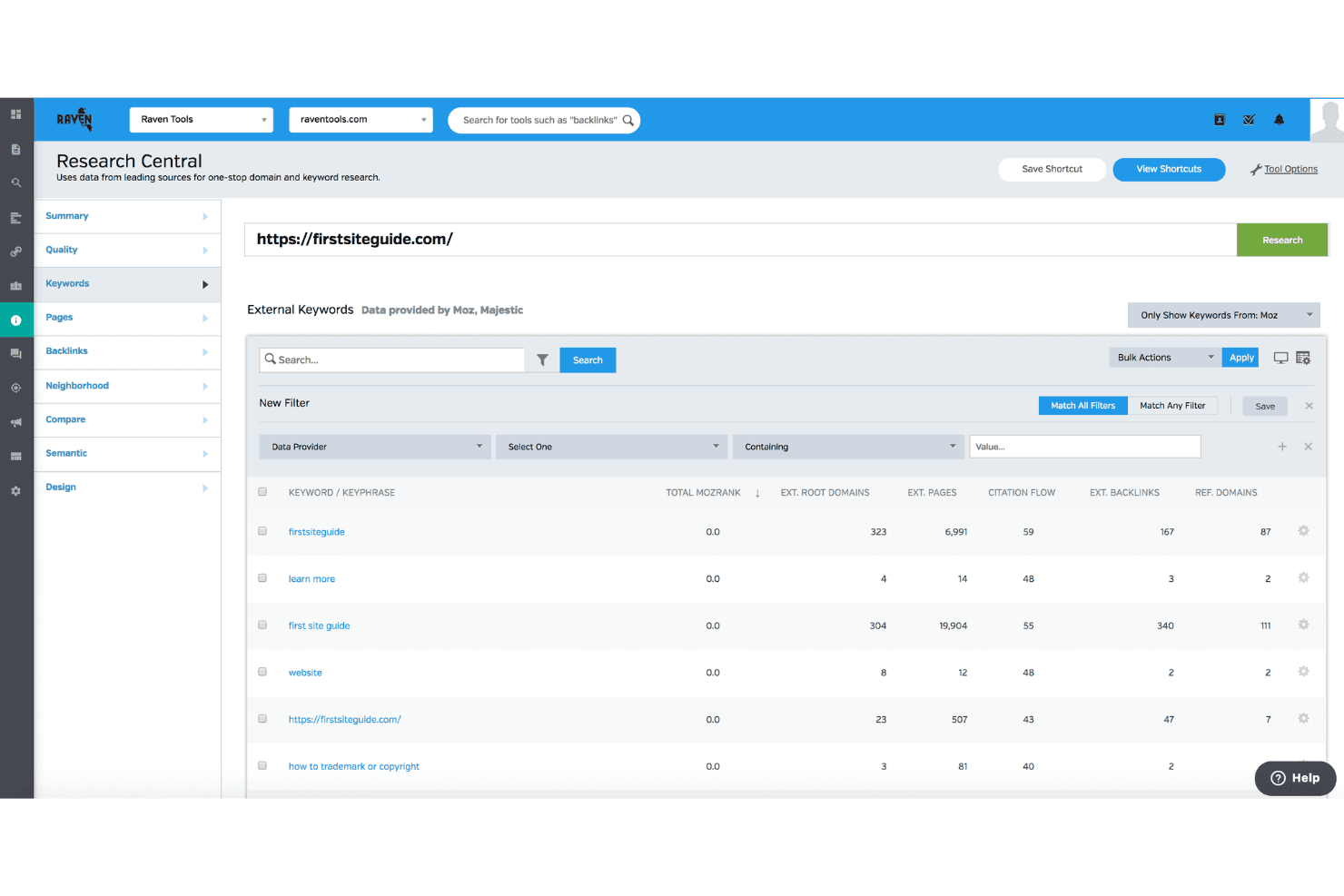
Raven Tools offers a Research Central feature that displays external keyword data including MozRank, citation flow, and backlink metrics for any domain. Raven Tools is an agency-focused SEO platform built around white-label client reporting, with rank tracking across multiple search engines, site auditing, backlink analysis powered by Majestic and Moz, and keyword research.
Who Is Raven Tools Best For?
Raven Tools is a strong fit for small-to-mid-sized digital marketing agencies that manage multiple client accounts and prioritize branded, automated reporting.
Why I Picked Raven Tools
Raven Tools earns its spot on my shortlist because of how far the report builder actually goes. I can pull from 20+ data sources and 30+ prebuilt modules to build a single branded deliverable that includes rank tracking, backlink growth, and Google Analytics data side by side. The custom domain hosting and custom-sender email scheduling mean clients receive reports from my agency's address, not Raven's, which matters when you're managing relationships across a dozen accounts.
Raven Tools Key Features
- Site Auditor: Scans websites for technical SEO issues and generates a site health score with prioritized fixes.
- Multi-engine rank tracking: Tracks keyword positions across Google, Bing, Yahoo, Yandex, and Baidu with support for location targeting.
- Backlink Explorer: Provides access to backlink data through Majestic and Moz integrations without requiring separate subscriptions.
- Task Manager: Lets your team assign, manage, and track SEO-related tasks directly within each client campaign.
Raven Tools Integrations
Raven Tools offers native integrations with Google Analytics, Google Search Console, Google Ads, Bing Webmaster Tools, Facebook Ads, Majestic, Moz, YouTube, LinkedIn, Twitter, MailChimp, Constant Contact, and CallRail. An API is available for custom integrations.
Pros and Cons
Pros:
- Built-in backlink data from Majestic and Moz
- Unlimited automated reports for multiple clients
- Custom white-label reporting with email scheduling
Cons:
- No keyword difficulty scoring in research tools
- Lacks historical keyword difficulty tracking
Learn more about Raven Tools: Best unified search and AI platform tracking
- 14-day free trial
- From $96/month (billed annually)
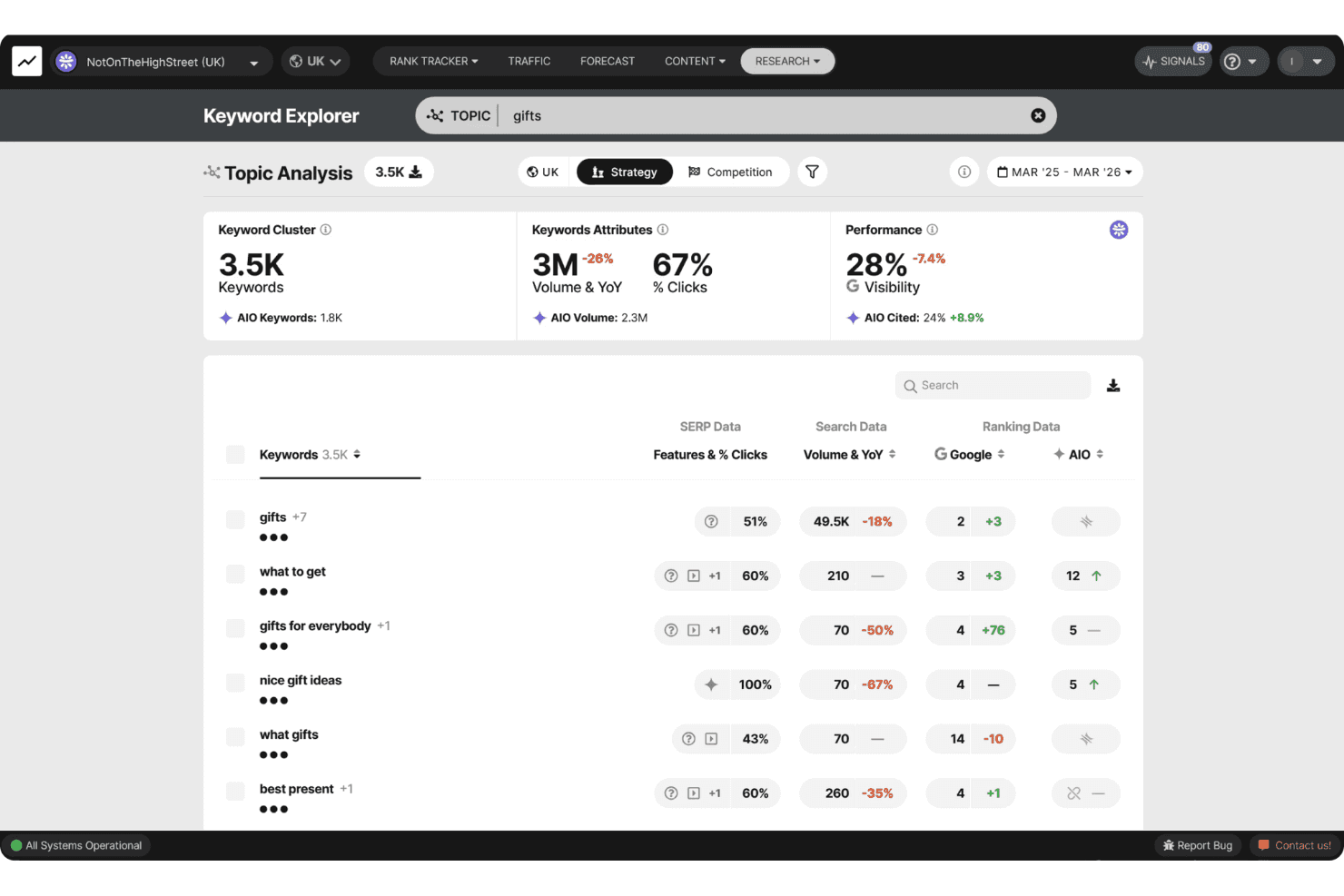
SEOmonitor offers a Keyword Explorer with Topic Analysis, showing keyword clusters, search volume, visibility metrics, and AIO data for the topic 'gifts'. SEOmonitor is an agency-focused SEO platform that combines keyword rank tracking across Google and AI search engines (ChatGPT, Gemini, Perplexity), keyword research, SEO forecasting, and AI content writing in a single workspace.
Who Is SEOmonitor Best For?
SEOmonitor is a strong fit for SEO agencies managing multiple client campaigns who need unified visibility across both traditional Google rankings and AI search platforms.
Why I Picked SEOmonitor
SEOmonitor earns its spot on my shortlist because it's the only platform I've used that tracks Google rankings and AI search visibility (ChatGPT, Gemini, Perplexity) within the same keyword strategy. I rely on the Draft Campaigns feature to build pitch-ready SEO forecasts for prospective clients before paying for a single tracked keyword. The blended Google and AI Overviews CTR model also shows how AI search is shifting click-through rates on the specific keywords my clients care about most.
SEOmonitor Key Features
- Agency dashboard: Monitor portfolio performance and client health tracking from a single unified view.
- AI content writer: Automate content research, planning, briefs, and article creation for client campaigns.
- Keyword vault: Store unlimited keywords with continuous monthly search volume updates for ongoing opportunities.
- Native Looker Studio connector: Create visual, client-ready SEO reports with live data feeds.
SEOmonitor Integrations
SEOmonitor offers native integrations with Google Analytics, Google Search Console, Google Sheets, and Looker Studio. An API is available for custom integrations.
Pros and Cons
Pros:
- Detailed forecasting for multi-client campaigns
- Daily ranking updates for all tracked keywords
- Tracks both Google and AI search rankings
Cons:
- Requires external tools for link tracking
- Focuses mainly on organic search analytics
Learn more about SEOmonitor :
Andre SEO-verktøy for byråer
Her er noen flere alternativer for SEO-verktøy for byråer som ikke kom med på kortlisten min, men som likevel er verdt å sjekke ut:
- 11Screaming FrogBest in-depth site crawling for technical audits
- 12SitebulbBest visual data layouts for technical audits
- 13AccuRankerBest real-time LLM performance tracking
- 14WhatagraphBest scalable cross-channel data foundation
- 15DashThisBest dashboards for multi-channel reporting
- 16SeobilityBest for intuitive optimization guidance
- 17MorningscoreBest gamified task checklists for growth tracking
- 18NightwatchBest AI and search attribution reporting
- 19SEOptimerBest embeddable website audit for lead capture
- 20SEO PowerSuiteBest unlimited keyword and backlink tracking
How I Evaluate SEO Tools for Agencies
I split my evaluation into core functionality every agency platform must cover—like white-label reporting and multi-client workspaces—and the differentiators that separate good from great.
Core Functionality (Table Stakes For This List)
When I'm selecting tools for my list, I rank each one on a scale from 0 (does not offer the functionality) to 5 (excels in this area) for each core functionality listed below. Then, I calculate the tool's total score as a percentage. Each tool needs to achieve a minimum total score of 65% to be considered for inclusion.
- Multi-Client Management: I check whether the platform lets you run separate client workspaces with role-based permissions so account managers only see what they need.
- Rank Tracking: Daily tracking across engines, locations, and devices matters—especially for agencies managing local campaigns in dozens of markets at once.
- Site Auditing: I evaluate crawl depth and issue detection, looking for scheduled recrawls that flag new technical problems before your next client check-in.
- Backlink Analysis: The backlink index needs to surface new and lost links, referring domains, and authority metrics for both client sites and their competitors.
- Keyword Research: I look for search volume, difficulty scores, and SERP data broad enough to support keyword discovery across different client verticals.
- White-Label Reporting: Agencies need branded, automated reports with their own logo, colours, and ideally a custom domain portal clients can log into directly.
Once I have a list of tools that meet the criteria, I consider what sets each platform apart.
Differentiating Factors (What Sets Vendors Apart)
Here's how I compare and contrast different vendors:
Standout Features
Local SEO tracking stands out for agencies with multi-location clients—I look for geo-specific rank monitoring alongside Google Business Profile management. AI content optimization matters when you're producing content across multiple client verticals. Built-in content briefs and SERP analyzers save your team from switching between separate tools. Bulk analysis rounds things out, letting you run batch keyword research or mass crawls across your full client roster.
Beyond Features
Pricing model is the first thing I evaluate—per-project pricing that grows predictably as you add clients beats paying for multiple individual seats. Integration coverage matters just as much. Native connections to Google Search Console, GA4, and Looker Studio are table stakes, but I also check for CRM links to tools like HubSpot or Asana. Data accuracy rounds out the picture; a large backlink index and reliable daily rank updates separate tools you can trust for client deliverables from those you can't.
Slik velger du SEO-verktøy for byråer
Det er lett å gå seg vill i lange funksjonslister og komplekse prismodeller. For å hjelpe deg med å holde fokus mens du går gjennom den unike prosessen din for valg av programvare, får du her en sjekkliste over faktorer du bør ha i tankene:
| Faktor | Hva du bør vurdere |
|---|---|
| FaktorSkalerbarhet | Hva du bør vurdereVil verktøyet håndtere kundevekst eller endringer i byråstrukturen uten ekstra manuelt arbeid eller uventede fakturabeløp? |
| FaktorIntegrasjoner | Hva du bør vurdereKan det kobles til analyse-, rapporterings- og arbeidsflytplattformene teamet og kundene dine allerede bruker? |
| FaktorTilpasningsmuligheter | Hva du bør vurdereKan dashbord, rapporter og brukerroller tilpasses fullt ut etter hver kundes behov, eller må du tilpasse deg leverandørens maler? |
| FaktorBrukervennlighet | Hva du bør vurdereVil både teamet og kundene dine raskt komme i gang, eller vil bratte læringskurver skape friksjon og mer arbeid med opplæring? |
| FaktorImplementering og innføring | Hva du bør vurdereHvor lang tid vil oppsettet ta? Tilbyr leverandøren dokumentasjon, direktestøtte eller hjelp med datamigrering, slik at du kan komme ryddig i gang? |
| FaktorKostnad | Hva du bør vurdereUtover veiledende priser, finnes det tilleggsgebyrer for kundelisenser, dataeksport, merkevaretilpasset rapportering eller høyere datagrenser? |
| FaktorSikkerhetstiltak | Hva du bør vurdereKan du stole på plattformen med kundedata om resultater og sensitive ressurser? Tilbyr den tilgangskontroller, sikkerhetskopiering av data og tydelige sikkerhetsstandarder? |
| FaktorTilgjengelig kundestøtte | Hva du bør vurdereTilbys direkte støtte eller prioritert støtte når du arbeider med kunde-leveranser under stramme tidsfrister, eller risikerer du å måtte klare deg alene hvis det oppstår et problem? |
Hva er SEO-verktøy for byråer?
SEO-verktøy for byråer er spesialiserte plattformer som lar deg administrere flere kundekampanjer, automatisere rangsporing og levere rapporter med byråets egen merkevare i stor skala. Disse verktøyene er utviklet for arbeidsflyter i byråer og tilbyr oversikter for flere kunder, kontroll over brukertillatelser og avanserte revisjonsfunksjoner som hjelper deg med å håndtere kravene ved administrasjon av komplekse SEO-programmer på tvers av ulike bransjer og kundeporteføljer.
Funksjoner
Når du velger SEO-verktøy for byråer, bør du se etter følgende viktige funksjoner:
- Administrasjon av flere kunder: Administrer separate kundeprosjekter, kontroller brukertillatelser og forhindre at data blandes mellom kontoer for effektiv drift av byrået.
- Rapportering med byråets egen merkevare: Generer merkevaretilpassede og tilpasningsbare rapporter og oversikter som styrker byråets identitet når du presenterer resultater for kunder.
- Omfattende nettstedrevisjon: Skann automatisk kundenes nettsteder for tekniske SEO-feil, problemer på siden og optimaliseringsmuligheter, med detaljerte og handlingsrettede anbefalinger.
- Søkeordsanalyse og sporing: Finn verdifulle søkeordmuligheter, spor rangeringer på tvers av flere søkemotorer, steder og enheter, og analyser endringer i resultatsidene for søkemotorer.
- Analyse av tilbakekoblinger: Overvåk tilbakekoblingsprofiler, identifiser nye og tapte lenker, evaluer henvisende domener og vurder konkurrentenes lenkestrategier for omfattende innsikt i ekstern SEO.
- Lokale SEO-verktøy: Spor stedsspesifikke rangeringer, overvåk lokale oppføringer og administrer Google-bedriftsprofiler på tvers av flere kundelokasjoner for virksomheter som fokuserer på synlighet i lokale søk.
- Verktøy for masseanalyse: Kjør søkeordskontroller, tilbakekoblingsrevisjoner og nettstedsgjennomganger i grupper for effektivt å håndtere store datamengder for flere kunder i én enkelt arbeidsflyt.
- Rollebasert tilgangskontroll: Definer roller og tillatelser for teammedlemmer og kunder, slik at alle bare ser dataene og verktøyene som er relevante for deres ansvarsområder.
- Planlegging og automatisering av rapporter: Konfigurer automatisert levering av tilbakevendende resultatrapporter og oversikter til kunder, slik at du sparer tid og reduserer manuelt rapporteringsarbeid.
- Integrasjoner med markedsføringsplattformer: Koble til analyse-, annonserings- og CRM-verktøy for å samle SEO-rapporteringen i byråets bredere markedsføringsarbeid.
Fordeler
Implementering av SEO-verktøy for byråer gir flere fordeler for teamet og virksomheten din. Her er noen av fordelene du kan se frem til:
- Forenklet kundeadministrasjon: Dedikerte arbeidsområder og brukertillatelser gjør det enkelt å organisere, overvåke og betjene flere kunder uten dataoverlapp eller forvirring.
- Bedre kundebevaring: Automatisert rapportering med byråets egen merkevare og merkevaretilpassede oversikter hjelper deg med å vise kontinuerlig verdi og styrke byråets profesjonelle image.
- Skalerte SEO-operasjoner: Masseanalyse og automatisering av arbeidsflyter gjør teamet i stand til å håndtere store mengder revisjoner, rangsporing og undersøkelser på tvers av ulike kundeporteføljer.
- Forbedret kampanjeresultat: Omfattende nettstedrevisjoner, søkeordsporing og analyse av tilbakekoblinger gir handlingsrettet innsikt for å optimalisere hver kundes strategier og levere målbare resultater.
- Raskere rapporteringssykluser: Automatisert planlegging av rapporter eliminerer manuell innhenting av data og leverer hyppige, nøyaktige oppdateringer til kunder med minimal innsats.
- Bedre samarbeid og åpenhet: Rollebasert tilgangskontroll og delbare oversikter fremmer tillit, legger til rette for tydelig kommunikasjon og holder alle oppdatert på kampanjens fremdrift.
- Bedre samordning av teknologistakken: Integrasjoner med analyse-, CRM- og markedsføringsplattformer samler byråets SEO-arbeid i kundenes bredere rapportering og arbeidsflyter.
Kostnader & priser
Valg av SEO-verktøy for byråer krever en forståelse av de ulike prismodellene og abonnementene som er tilgjengelige. Kostnadene varierer basert på funksjoner, teamstørrelse, tillegg og mer. Tabellen nedenfor oppsummerer vanlige abonnementer, gjennomsnittsprisene deres og typiske funksjoner som er inkludert i løsninger med SEO-verktøy for byråer:
Sammenligningstabell for abonnementer for SEO-verktøy for byråer
| Plantype | Gjennomsnittlig pris | Vanlige funksjoner |
|---|---|---|
| PlantypeGratisplan | Gjennomsnittlig pris$0 | Vanlige funksjonerBegrenset søkeordsporing, grunnleggende revisjoner, minimal rapportering og tilgang for én bruker. |
| PlantypePersonlig plan | Gjennomsnittlig pris$25-$75/bruker/måned | Vanlige funksjonerUtvidet rangsporingsfunksjonalitet, søkeordundersøkelser, standardiserte nettstedsrevisjoner, eksport av rapporter og e-poststøtte. |
| PlantypeBedriftsplan | Gjennomsnittlig pris$100-$300/måned | Vanlige funksjonerArbeidsområder for flere kunder, rapportering med egen merkevare, masseanalyse, API-tilgang, integrasjoner og teamstyring. |
| PlantypeVirksomhetsplan | Gjennomsnittlig pris$500+/måned | Vanlige funksjonerUbegrenset kundeadministrasjon, avansert automatisering, tilpassede SLA-er, dedikert oppstart og førsteklasses kundestøtte. |
Vanlige spørsmål om SEO-verktøy for byråer
Her er noen svar på vanlige spørsmål om SEO-verktøy for byråer:
Hvordan hjelper SEO-verktøy for byråer med å administrere flere kunder?
De lar deg opprette separate arbeidsområder, angi rollebaserte tillatelser og organisere kampanjer, slik at du kan administrere dusinvis av kundekontoer sikkert og effektivt fra én enkelt plattform. Innebygde SEO-funksjoner gjør det enklere for SEO-fagfolk å balansere daglige SEO-oppgaver – fra å spore et nettstedskart til å gjennomføre SEO på siden – uten å miste oversikten over individuelle kontomål eller langsiktige referanseverdier for SEO-strategien.
Kan SEO-verktøy for byråer automatisere kunderapportering?
Ja, de fleste tilbyr automatisert rapportering med byråprofilering, som planlegger oppdateringer til kunder, inkluderer byråets merkevare og reduserer behovet for manuelle datauttrekk hver måned. Dette bidrar til å dokumentere verdien av SEO-arbeidet ditt ved å vise kundene nøyaktig hvordan AI-drevet innsikt og strategisk innholdsproduksjon bidrar til topplasseringer i søkemotorer. Du kan til og med bygge et interaktivt kontrollpanel for tydelig SEO-rapportering.
Hvilke integrasjoner bør jeg se etter i SEO-verktøy rettet mot byråer?
Se etter direkte tilkoblinger til analyseplattformer som Google Analytics 4 og Google Search Console (GSC), samt integrasjoner med prosjektstyrings- og CRM-verktøy som brukes i byråets arbeidsflyt. Hvis du arbeider med omfattende innholdsmarkedsføring eller kjører betalte kampanjer, bør du se etter verktøy som kan kobles til PPC-kontrollpaneler, verktøy for sporing av sosiale medier og programvare for oppsøkende arbeid, slik at alle dataene dine holdes samlet på ett sted.
Finnes det sikkerhetsrisikoer ved å dele sensitive kundedata på disse plattformene?
Nei, anerkjente leverandører tilbyr tilgangskontroller, datasegregering og kryptering for å holde sensitiv informasjon trygg. Enten kundene dine er små bedrifter eller store merkevarer, gjør disse beskyttelsestiltakene det mulig for både nybegynnere og avanserte tekniske team å samarbeide trygt om backend-konfigurasjoner som schema-markering uten å eksponere sensitive bedriftsdata eller risikere integriteten til de aktive SEO-programvareoppsettene deres.
Hvordan bør byråer sammenligne priser på tvers av SEO-plattformer?
Sammenlign totalkostnadene basert på antall kunder, sporede søkeord, gjennomsøkingskreditter og brukerplasser – ikke se bare på grunnprisen, ettersom ekstrakostnader og tillegg raskt kan bli betydelige. Sørg for at abonnementet inkluderer de spesifikke verktøyene du trenger for SEO-innholdsproduksjon av høy kvalitet, slik at du ikke blir tvunget til å kjøpe separat programvare senere.