

Programvare for markedsundersøkelser er en verdifull ressurs for alle virksomheter. Med riktig programvare kan team få dyp innsikt i kundeatferd og ta datadrevne beslutninger. Det kan imidlertid være utfordrende å finne riktig programvare for markedsundersøkelser, særlig med så mange tilgjengelige alternativer.
Med min omfattende erfaring med markedsføringsprogramvare testet og sammenlignet jeg flere av de beste tilgjengelige programmene for markedsundersøkelser. Deretter samlet jeg resultatene mine i grundige anmeldelser for å hjelpe deg med å finne den beste programvaren for dine unike behov. Jeg er sikker på at du vil finne din neste programvare for markedsundersøkelser i listen nedenfor.
Hvorfor du kan stole på våre programvareanbefalinger
6,700+
Reviews
20
Industry experts
16+
Evaluation factors
14
Years
Teamet vårt har testet og anmeldt programvare siden 2012. Vi er selv markedsføringsledere, så vi vet hvor vanskelig og hvor viktig det er å velge riktig programvare.
I denne guiden har vi vurdert verktøyene gjennom praktisk testing og uavhengig research og gitt dem poeng ut fra våre utvelgelseskriterier.
Anmeldelsene våre bygger på vår egen redaksjonelle vurdering. De er ikke et salgsargument.
Ekspertanmeldere:
 Gui DrusinaCreative Director
- Shriya GhateSenior Marketing Lead
 Amanda JacquesMarketing Ops Leader

Sammenligningstabell for programvare for markedsundersøkelser
Vi har undersøkt priser og tilgjengeligheten av gratis prøveperioder og demoversjoner.
| Tool | Best For | Trial Info | Price | ||
|---|---|---|---|---|---|
| 1 | Best for multilingual social listening coverage | Free trial available | From $199/month (billed annually) | Website | |
| 2 | Best for competitive digital audience analysis | 14-day free trial | From $139/month | Website | |
| 3 | Best for effortless team collaboration on surveys | Free plan available | From $8.40/user/month | Website | |
| 4 | Best for extensive templates | Free plan available | From $7.42/month (billed annually) | Website | |
| 5 | Best for qualitative data analysis | Free trial available | From $30/month | Website | |
| 6 | Best for rapid audience targeting at scale | Free plan available | From $30/user/month (billed annually) | Website | |
| 7 | Best for engaging surveys | Free plan available | From $28/month (billed annually) | Website | |
| 8 | Best for content insights | Free trial available | From $199/month (billed annually) | Website | |
| 9 | Best for multi-channel experience data integration | Free demo available | Pricing upon request | Website | |
| 10 | Best for quick-turn consumer insight validation | Free demo available | From $150/month | Website |


Anmeldelser av den beste programvaren for markedsundersøkelser
Vi har undersøkt priser og tilgjengeligheten av gratis prøveperioder og demoversjoner, slik at du kan gjøre en mye enklere sammenligning side om side.
 Best for multilingual social listening coverage
- Free trial available
- From $199/month (billed annually)
Visit WebsiteCustomer Rating:4.7/5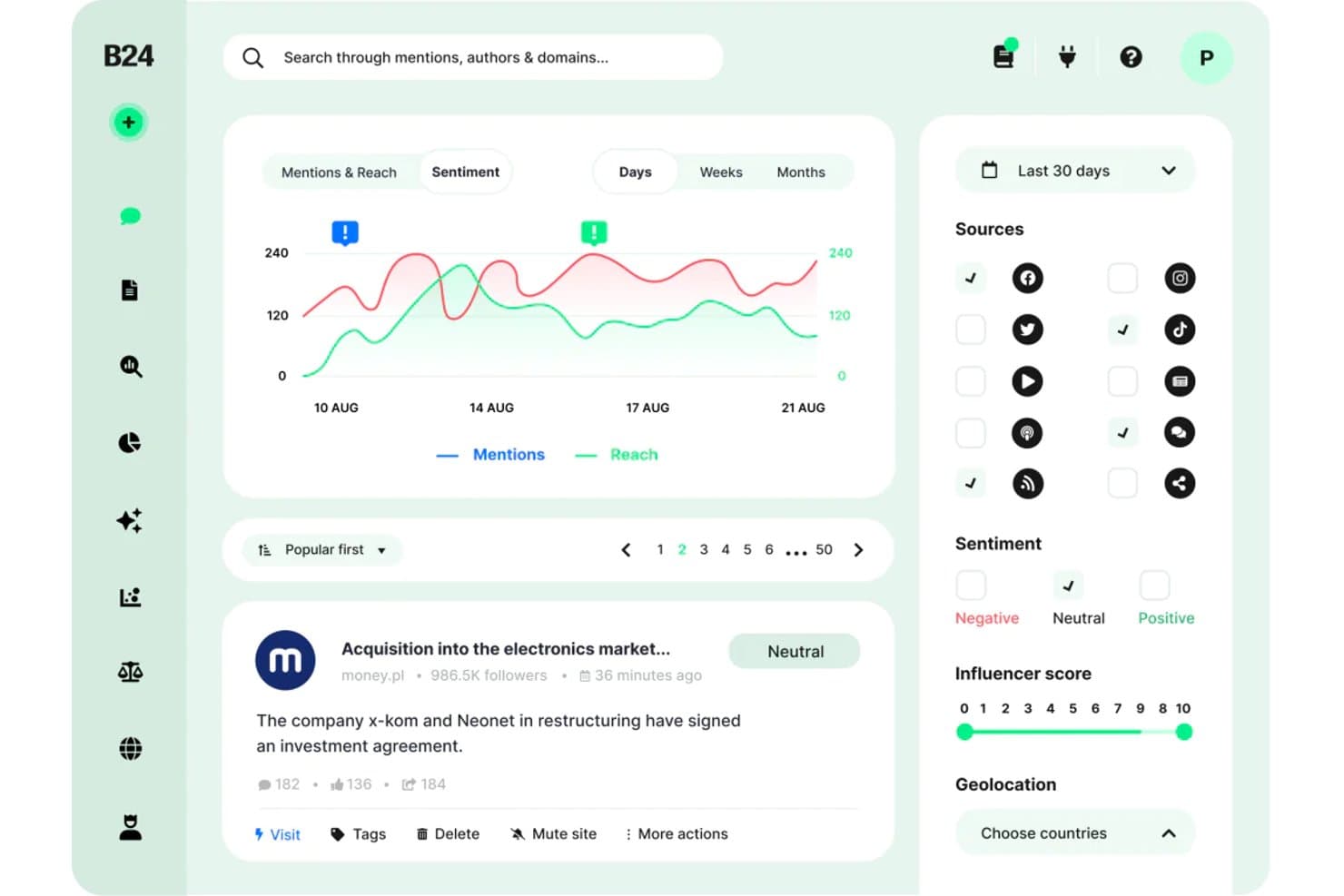
Brand24 offers a sentiment analysis dashboard with mention tracking, reach charts, source filtering, and influencer scoring for market research. Brand24 is an AI-powered social listening and media monitoring platform that tracks brand mentions, consumer sentiment, and online conversations across social media, news sites, blogs, forums, podcasts, and review platforms in real time.
Who Is Brand24 Best For?
Brand and insights managers at companies operating across international or multilingual markets will get the most from Brand24's cross-language monitoring capabilities.
Why I Picked Brand24
Brand24 earns its spot on my shortlist because its multilingual social listening coverage is genuinely unmatched. I particularly like that sentiment analysis runs across 108 languages at a 95% accuracy rate, so tracking consumer perception in Arabic, Spanish, or Polish produces reliable data rather than noise. The AI Brand Assistant 2.0 lets me ask natural-language questions directly against that multilingual dataset, surfacing themes I'd otherwise have to dig for manually.
Brand24 Key Features
- Presence score: Aggregates brand visibility into a single metric updated in real time for easy monitoring.
- Influencer identification: Surfaces top authors and channels driving key conversations about your brand or competitors.
- Storm alerts: Instantly notifies you of unusual spikes in brand discussion volume to aid crisis detection.
- White-labeled reports: Lets you export data in branded PDF, Excel, or PowerPoint formats for custom sharing and presentations.
Brand24 Integrations
Brand24 offers native integrations with Slack and Microsoft Teams. An API is available for custom integrations.
Pros and Cons
Pros:
- AI Brand Assistant answers research queries
- Covers social, news, podcasts, and reviews
- Tracks mentions across 108 languages simultaneously
Cons:
- Stories and Reels metrics not fully supported
- No survey or primary research capabilities
Learn more about Brand24: Best for competitive digital audience analysis
- 14-day free trial
- From $139/month
Visit WebsiteCustomer Rating:4.5/5
Semrush Traffic Analytics shows competitor and audience insight reporting. Semrush is a digital intelligence platform that combines keyword research, competitor traffic analysis, backlink auditing, and audience behavior data across search, social, and paid channels.
Who Is Semrush Best For?
Semrush is a strong fit for digital marketers and SEO strategists at mid-size to enterprise companies who need deep visibility into competitor online presence.
Why I Picked Semrush
I picked Semrush as one of the best because its Traffic Analytics tool gives me a detailed breakdown of any competitor's audience, including traffic sources, engagement metrics, and geographic reach, all without needing access to their internal data. The Keyword Gap tool lets me line up to five competitors side by side to spot exactly which search terms they're capturing that I'm not. I also lean on the Backlink Gap tool to find link-building opportunities my competitors have already validated.
Semrush Key Features
- Market explorer: Maps the competitive landscape of any industry, showing market share, audience demographics, and top players in one view.
- Topic research: Surfaces trending subtopics, headlines, and questions tied to any seed keyword to guide content and research planning.
- Brand monitoring: Tracks online mentions of any brand across news, blogs, and social platforms in near real time.
- Advertising research: Reveals competitors' paid search ad copy, landing pages, and keyword spend history.
Semrush Integrations
Semrush supports a variety of integrations with popular tools and services. Native integrations include Google Analytics, Google Search Console, Google Ads, Google Sheets, Google Docs, Looker Studio, Trello, WordPress, Facebook, LinkedIn, Instagram, Pinterest, YouTube, monday.com, Wix, and Zoho Analytics. It connects with Zapier, and an API is available for custom integrations.
Pros and Cons
Pros:
- Side-by-side competitor gap analysis for keywords
- Tracks brand visibility in AI search results
- Extensive keyword database across numerous countries
Cons:
- Key competitive intelligence tools require paid add-ons
- Thin data on niche or localized competitors
 Best for effortless team collaboration on surveys
- Free plan available
- From $8.40/user/month

Google Forms sharing settings show collaborative quiz access management. Google Forms is a free survey builder from Google that lets teams create, distribute, and analyze questionnaires with automatic response collection and live data summaries in Google Sheets.
Who Is Google Forms Best For?
Google Forms is a natural fit for small teams and individual marketers already working inside Google Workspace who need a no-cost way to collect survey responses quickly.
Why I Picked Google Forms
Google Forms earns its spot on my shortlist because multi-editor access is baked in by default. My whole team can open the same form simultaneously, edit questions, and leave comments without any version conflicts. I also like that conditional logic lets us branch respondents into different question paths based on earlier answers, which makes a single form do the work of several. Response data flows automatically into Google Sheets in real time, so my team can slice and filter results together the moment submissions come in.
Google Forms Key Features
- Multiple question types: Choose from multiple choice, checkboxes, dropdown menus, linear scales, and open-text fields to match each question to the right response format.
- Response validation: Set rules that require respondents to enter specific formats, number ranges, or text patterns before submitting.
- Pre-built survey templates: Start from a library of ready-made survey formats rather than building every form from a blank page.
- Automatic summary charts: View auto-generated bar charts, pie charts, and response tallies directly inside Google Forms without exporting your data.
Google Forms Integrations
Google Forms connects natively with other Google Workspace apps, including Google Sheets, Google Drive, Google Docs, and Google Calendar. Thousands of additional apps are available through the Google Workspace Marketplace, and it connects with Zapier. A RESTful API is also available for custom integrations.
Pros and Cons
Pros:
- Gemini AI generates draft forms from prompts
- Easy to use form designs
- Unlimited responses on every survey
Cons:
- Built-in analytics are basic without Sheets export
- Templates lack depth in layout customization
Learn more about Google Forms: Best for extensive templates
- Free plan available
- From $7.42/month (billed annually)

Zoho Survey helps users create, distribute, and analyze surveys easily. Zoho Survey is an online survey and questionnaire tool for individuals and businesses to collect feedback and insights from their target audience. It primarily serves marketers, researchers, and HR teams by facilitating survey creation, distribution, and analysis.
Why I picked Zoho Survey: It offers an intuitive drag-and-drop interface that makes survey creation easy for your team. With real-time reporting, you can quickly analyze responses and gain insights. Customizable templates help you build surveys that fit your specific needs. Additionally, advanced features like skip logic and piping ensure that your surveys are dynamic and engaging.
Standout features & integrations:
Features include customizable templates, real-time reporting, and advanced survey logic like skip logic and piping. You can easily create and distribute surveys with its drag-and-drop interface. The platform also supports multiple languages, making it versatile for global teams.
Integrations include Asana, Dropbox, Google Drive, Google Sheets, Mailchimp, Microsoft Teams, Salesforce, Slack, Trello, and Zoho Projects.
Pros and Cons
Pros:
- Easy drag-and-drop interface
- Multiple language support
- Advanced survey logic
Cons:
- Requires internet connection
- Limited customer support
Learn more about Zoho Survey:

Dovetail centralizes and analyzes customer insights for data-driven decisions. Dovetail is a customer insights platform to help product managers, designers, researchers, sales teams, and customer success professionals centralize and analyze customer knowledge. It quickly transforms user feedback, calls, and documents into actionable insights, enabling data-driven decision-making.
Why I picked Dovetail: The platform offers features that help you organize and analyze customer insights efficiently. Its AI-powered insights can convert vast amounts of feedback into meaningful data. Dovetail also provides data privacy protection and integration with other tools, ensuring your insights are secure. Its ability to standardize research processes across teams makes it a valuable asset for fostering a customer-centric culture in your organization.
Standout features & integrations:
Features include AI-driven insights, fast analysis of customer data, and data privacy protection. Your team can also benefit from tools for organizing insights and integrating with other platforms. These features help centralize the process of transforming feedback into actionable insights.
Integrations include Workday, SAP SuccessFactors, ADP, Oracle HCM, BambooHR, Microsoft Dynamics 365, Salesforce, ServiceNow, Google Workspace, and Slack.
Pros and Cons
Pros:
- Standardizes research processes
- AI-powered insights
- Fast data analysis
Cons:
- Initial setup complexity
- Limited offline access
Learn more about Dovetail: Best for rapid audience targeting at scale
- Free plan available
- From $30/user/month (billed annually)
Visit WebsiteCustomer Rating:4.6/5
SurveyMonkey shows audience targeting options for survey response collection. SurveyMonkey is a survey and market research platform that combines customizable survey building, a built-in audience panel, and response analytics tools in one place.
Who Is SurveyMonkey Best For?
SurveyMonkey is a strong fit for marketing and insights teams at mid-size to enterprise companies who need fast access to targeted survey respondents.
Why I Picked SurveyMonkey
I've included SurveyMonkey in my top picks because its built-in Audience panel gives you direct access to 335M+ respondents across 130+ countries without ever leaving the platform. I like that you can layer over 200 targeting options with custom screening questions to zero in on niche segments, like reaching only female CPG buyers aged 25-34 in the Midwest. In practice, my team can go from survey launch to real-time results in as little as an hour, which makes it genuinely useful when you need fast data to support a campaign decision or product pitch.
SurveyMonkey Key Features
- Sentiment analysis: Automatically categorizes open-ended responses as positive, neutral, or negative so you can gauge emotion across large response sets.
- Thematic analysis: Uses AI to group open-ended responses into key themes, so you don't have to manually sort through hundreds of written answers.
- Message and claims testing: Measures the effectiveness of marketing slogans, taglines, and value propositions with your target audience before launch.
- Crosstabs: Lets you compare answers across multiple survey questions to surface segment-level insights, like product interest broken down by gender and income.
SurveyMonkey Integrations
SurveyMonkey offers 200+ integrations through its App Directory and built-in Connect hub, including Salesforce, Microsoft Power BI, Tableau, Marketo, and Zoom, as well as Microsoft Teams, Google Drive, Microsoft OneDrive, HubSpot, and Mailchimp. It also connects with Zapier and has an API for custom integrations.
Pros and Cons
Pros:
- Multilingual surveys consolidated into one dataset
- Templates for building surveys quickly
- Access to respondents across multiple countries
Cons:
- Reporting and visualization gated to higher tiers
- Limited support for complex survey logic
Learn more about SurveyMonkey: Best for engaging surveys
- Free plan available
- From $28/month (billed annually)
Visit WebsiteCustomer Rating:4.7/5
Typeform helps create engaging forms for lead generation and feedback. Typeform is a platform for creating forms, surveys, and quizzes that enhance customer engagement and data collection. Its primary users include marketers, HR professionals, and customer success teams, who use it for lead generation, feedback collection, and research.
Why I picked Typeform: Typeform offers customizable form designs and multimedia embedding, making your surveys more interactive. Follow-up questions help you gather deeper insights from your respondents. Additionally, it supports over 300 integrations, ensuring it fits smoothly into your existing workflows. Your team can create unlimited forms with access to thousands of templates, even on the free plan.
Standout features & integrations:
Features include customizable designs, embedded multimedia content, and follow-up questions for deeper insights. You can gather more data easily, with 96% of users reporting a better brand experience. The free plan allows unlimited form creation and access to over 3,000 templates.
Integrations include Slack, Mailchimp, Google Calendar, Zapier, HubSpot, Salesforce, Airtable, Trello, Asana, and WordPress.
Pros and Cons
Pros:
- Follow-up questions available
- Multimedia embedding
- Customizable designs
Cons:
- Template limitations
- Limited analytics
Learn more about Typeform: Best for content insights
- Free trial available
- From $199/month (billed annually)
Visit WebsiteCustomer Rating:4.5/5
BuzzSumo helps users find trending content, influencers, and track mentions. BuzzSumo is a content research and media monitoring tool for marketers, PR professionals, and content creators. It helps users discover trending content, identify key influencers, and monitor online mentions.
Why I picked BuzzSumo: It offers content discovery tools that scan billions of articles and social posts, helping you find relevant and high-performing content ideas. You can track real-time trends and set up alerts for your brand mentions. Its influencer identification feature allows your team to connect with industry leaders. Additionally, the comprehensive media monitoring tools ensure you stay informed about competitor activities and industry updates.
Standout features & integrations:
Features include content analysis, trending feeds, question analysis, and custom alerts. You can also leverage its Chrome extension for on-the-go research and the API for automation.
Integrations include Slack, Zapier, Twitter, YouTube, Facebook, and TikTok.
Pros and Cons
Pros:
- Influencer identification
- Real-time trend analysis
- Extensive content database
Cons:
- No direct customer support for basic plans
- Steep learning curve
 Best for multi-channel experience data integration
- Free demo available
- Pricing upon request
Visit WebsiteCustomer Rating:3.9/5
Qualtrics dashboard tracks customer experience metrics across channels. Qualtrics is an experience management platform that unifies survey data, contact center signals, digital feedback, and behavioral data into a single research and analytics system.
Who Is Qualtrics Best For?
Qualtrics is a strong fit for enterprise research and CX teams that need to pull insights from multiple listening channels into one place.
Why I Picked Qualtrics
Qualtrics earns its spot on my shortlist because it's one of the few tools that genuinely connects survey responses with contact center transcripts, digital behavior, and social signals in one system. I find the Experience ID feature particularly useful—it builds a unified profile for each respondent across every touchpoint. That means my team can analyze how a customer's survey sentiment compares to their support call history without any manual data stitching.
Qualtrics Key Features
- Conjoint analysis: Lets you run discrete choice and MaxDiff studies to measure how respondents prioritize product features or price points.
- Text iQ: Applies AI-driven text analysis to open-ended responses, automatically tagging sentiment and topics across large datasets.
- Stats iQ: A built-in statistical analysis tool that runs regression, correlation, and significance testing directly on your survey data.
- Survey flow logic: Supports advanced branching, embedded data, and randomization blocks to build complex, adaptive survey experiences.
Qualtrics Integrations
Qualtrics offers native integrations through its extensions framework, including Salesforce, HubSpot, Slack, Microsoft Teams, Tableau, Jira, Zendesk, Adobe Analytics, Marketo, and ServiceNow. It also connects with Zapier and provides an API for custom integrations.
Pros and Cons
Pros:
- Unifies survey, digital, and call data
- AI-powered open-ended response analysis
- Built-in conjoint and MaxDiff study types
Cons:
- Support quality varies by contract tier
- Weak offline and mobile data collection
Learn more about Qualtrics:

Suzy survey workflow shows rapid consumer insight project launch tools. Suzy is a consumer intelligence platform that combines market trend monitoring, survey-based research, and AI-powered insight synthesis to help brand, marketing, and product teams validate decisions quickly.
Who Is Suzy Best For?
Suzy is a strong fit for brand, marketing, and insights teams at consumer-focused companies that need to validate ideas, concepts, or creative quickly without waiting on a traditional research agency.
Why I Picked Suzy
I've included Suzy in my top picks because it's one of the few research tools where I can spot a trend signal in the morning and have consumer validation data by the afternoon. Suzy's Signals feed monitors 10,000+ media sources and social platforms, then scores each trend for intensity and brand relevance. From there, I can launch a survey, MaxDiff, or monadic test against Suzy's verified consumer panels without ever leaving the platform.
Suzy Key Features
- Signal Intelligence Score: Evaluates every trend across intensity, industry relevance, role relevance, and potency, so your team knows which signals to prioritize before acting
- AI-moderated interviews: Runs qualitative in-depth interviews and focus groups with live or AI moderation, without coordinating a separate research agency
- TURF analysis: Identifies the combination of product features or messages that reaches the widest distinct audience across your target consumer segments
- On-brand report generation: Pulls your research data, strategy docs, and competitive intel into stakeholder-ready decks formatted in your brand's colors and fonts automatically
Suzy Integrations
Native integrations are not clearly documented on Suzy's website. The platform is designed as a self-contained research ecosystem, so you upload external data like CRM lists, strategy documents, and third-party reports directly into the platform rather than connecting through named integrations. Zapier and API support are not clearly available.
Pros and Cons
Pros:
- Proprietary panel with AI bot detection
- Quant and qual methods in one workflow
- Survey results return in hours, not weeks
Cons:
- Focus group theme labeling tools lag competitors
- Limited panel coverage outside English-speaking markets
Learn more about Suzy:
Annen programvare for markedsundersøkelser
Her er noen flere alternativer for programvare for markedsundersøkelser som ikke kom med på kortlisten min, men som likevel er verdt å se nærmere på.
- 11AttestBest for continuous insights
- 12BrandMentionsBest for real-time brand monitoring
- 13SurveySparrowBest for conversational feedback collection
- 14MeltwaterBest AI-driven media intelligence
- 15NVivoBest for AI-assisted qualitative data analysis
- 16AlchemerBest for omnichannel feedback automation
- 17KlueBest for automated competitive deal insights
- 18Loop11Best data-driven UX testing
- 19BrandwatchBest for global social data analytics
- 20Google TrendsBest real-time search data insights
How I Evaluate Market Research Software
I split my evaluation into two layers: the baseline every qualifying tool must offer—like panel access, survey logic, and analysis—and the differentiators that separate the best from the rest.
Core Functionality (Table Stakes For This List)
When I'm selecting tools for my list, I rank each one on a scale from 0 (does not offer the functionality) to 5 (excels in this area) for each core functionality listed below. Then, I calculate the tool's total score into a percentage. Each tool needs to achieve a minimum total score of 75% to be considered for inclusion.
- Survey & Questionnaire Design: I evaluate the range of question types, skip logic, and advanced methodologies available—things like Conjoint or MaxDiff studies that research teams actually need to run pricing and feature-preference projects.
- Panel & Audience Access: Whether the platform provides native respondent panels or strong third-party integrations matters, especially for teams fielding studies against niche B2B segments or low-incidence consumer audiences.
- Quantitative Data Analysis: I look for built-in cross-tabulation, weighting, and significance testing so analysts can move from raw survey data to segmented insights without exporting everything into a separate stats tool.
- Qualitative Research Capabilities: Open-end coding, sentiment tagging, and video response analysis are what I check here—features that let you pull structured themes from interviews, focus groups, or free-text answers at scale.
- Reporting & Data Visualization: Stakeholders need polished outputs, so I evaluate whether a platform offers interactive dashboards, exportable charts, and presentation-ready reports that a brand manager can share directly with leadership.
- Market & Competitive Intelligence: Secondary research features like competitor benchmarking, trend tracking, or access to syndicated category data round out a platform's usefulness beyond primary survey research.
Once I have a list of tools that meet this criteria, I consider what sets each platform apart.
Differentiating Factors (What Sets Vendors Apart)
Here's how I compare and contrast different vendors:
Standout Features
Concept and ad testing templates with normative benchmarks save teams weeks of study design—I check whether a platform offers pre-built frameworks for messaging, packaging, or creative evaluation. AI-powered insight detection also matters, especially for teams processing thousands of open-ended responses where manual coding isn't practical. For brand teams running quarterly awareness or perception studies, longitudinal tracking with automated wave management keeps data consistent without rebuilding projects from scratch.
Beyond Features
Panel quality is one of the first things I evaluate—fraud detection, attention checks, and respondent verification directly affect whether your data is trustworthy. I also look at how well a platform fits into your existing stack, particularly CRM and BI tool integrations that let insights teams push findings into Salesforce or Tableau without manual exports. Pricing structure matters too, since per-response models suit ad-hoc projects while subscription plans make more sense for teams running continuous research programs.
Slik velger du programvare for markedsundersøkelser
Det er lett å gå seg vill i lange funksjonslister og komplekse prismodeller. For å hjelpe deg med å holde fokus mens du arbeider deg gjennom den unike prosessen med å velge programvare, får du her en sjekkliste over faktorer du bør ha i tankene.
| Faktor | Hva du bør vurdere |
| Skalerbarhet | Kan programvaren vokse med virksomheten din? |
| Integrasjoner | Kan den integreres med verktøyene teamet ditt bruker? |
| Tilpasningsmuligheter | Kan du tilpasse programvaren etter behovene dine? |
| Brukervennlighet | Er den brukervennlig for teamet ditt? |
| Budsjett | Passer den innenfor de økonomiske rammene dine? |
| Sikkerhetstiltak | Tilbyr den avanserte sikkerhetsfunksjoner? |
| Kundestøtte | Er kundestøtte lett tilgjengelig når du trenger den? |
| Dataanalyse | Tilbyr den omfattende verktøy for dataanalyse? |
Bruk denne sjekklisten for å holde prosessen med å velge programvare organisert og fokusert.
Trender innen programvare for markedsundersøkelser
I arbeidet med undersøkelsen hentet jeg inn utallige produktoppdateringer, pressemeldinger og endringslogger fra ulike leverandører av programvare for markedsundersøkelser. Her er noen av trendene som er i ferd med å vokse frem, og som jeg følger med på.
- Kunstig intelligens: AI blir stadig mer integrert i verktøy for markedsundersøkelser og tilbyr avansert dataanalyse, prediktiv analyse og automatisering av rutineoppgaver. Selskaper tar i bruk AI for å gi dypere innsikt og mer nøyaktige prognoser.
- Sosial lytting: Plattformene integrerer i økende grad sosial lytting for å fange opp forbrukernes holdninger i sanntid fra sosiale medier. Dette hjelper virksomheter med å ligge i forkant av trender og reagere raskt på markedsendringer.
- Videotilbakemeldinger: Innsamling av videosvar blir stadig mer populært, ettersom det gir rikere og mer nyanserte data enn tradisjonelle undersøkelser. Leverandører benytter denne metoden for å tilby mer inngående innsikt i forbrukerne.
- Personalisering: Tilpassede brukeropplevelser blir stadig mer vanlig, og programvaren tilbyr mer tilpassbare undersøkelser og rapporter. Denne trenden drives av behovet for mer relevante og handlingsrettede innsikter.
- Forbedret datakvalitet: Det blir stadig større fokus på å forbedre datas validitet og pålitelighet gjennom avanserte valideringsteknikker og bedre prosesser for kontroll av respondenter.
Hva er programvare for markedsundersøkelser?
Programvare for markedsundersøkelser er et verktøy som brukes til å samle inn, analysere og tolke data om markeder, konkurrenter og forbrukere. Markedsføringsansvarlige, forretningsanalytikere og produktansvarlige bruker disse verktøyene for å få innsikt og ta informerte beslutninger.
Funksjoner som datainnsamling, oppretting av undersøkelser og analytisk rapportering bidrar til å samle inn verdifull markedsinnsikt, forstå forbrukeratferd og identifisere markedstrender. Disse verktøyene hjelper brukerne med å ta datadrevne beslutninger som kan forbedre forretningsstrategier.
Funksjoner i programvare for markedsundersøkelser
Når du velger programvare for markedsundersøkelser, bør du se etter følgende viktige funksjoner.
- Datainnsamling og sammenstilling: Samler inn og konsoliderer data fra ulike kilder, noe som muliggjør omfattende analyse.
- Oppretting og distribusjon av undersøkelser: Forenkler utforming og distribusjon av undersøkelser for effektivt å samle inn kundeinnsikt og tilbakemeldinger.
- Dataanalyse verktøy: Tilbyr analytiske verktøy for å tolke og visualisere data samt identifisere trender og mønstre.
- Rapportering og dashbord: Genererer detaljerte rapporter og interaktive dashbord for å presentere funn i et lett forståelig format.
- Integrasjonsmuligheter: Kobler seg til andre programvareverktøy for å utvide funksjonaliteten og effektivisere arbeidsflyter.
- Mobiltilgjengelighet: Sikrer at brukerne kan få tilgang til programvaren og funksjonene fra mobile enheter, noe som gir fleksibilitet og brukervennlighet.
- Kundesegmentering: Gjør det mulig å kategorisere kunder i tydelige grupper basert på ulike kriterier, noe som støtter målrettet markedsføring.
- Sanntids dataoppdateringer: Tilbyr oppdateringer i sanntid for å sikre at dataene som analyseres, er aktuelle og relevante.
- Samarbeidsfunksjoner: Gjør det mulig for teammedlemmer å samarbeide på plattformen, noe som forbedrer produktivitet og kommunikasjon.
- Tilpassbare maler: Tilbyr forhåndsbygde maler som kan tilpasses spesifikke forskningsbehov, slik at tid og innsats ved oppsett spares.
Fordeler med programvare for markedsundersøkelser
Implementering av programvare for markedsundersøkelser, inkludert verktøy for konkurrentanalyse, gir flere fordeler for teamet og virksomheten din. Her er noen av fordelene du kan se frem til.
- Bedre datanøyaktighet: Automatisert datainnsamling sikrer mer nøyaktige og pålitelige data, samtidig som menneskelige feil og skjevheter reduseres.
- Raskere innsikt: Avanserte analyseverktøy muliggjør raskere databehandling, slik at du får tidsriktig innsikt for å ta informerte beslutninger.
- Bedre forståelse av kundene: Få dypere innsikt i kundenes preferanser og atferd, slik at du kan tilpasse produktene og markedsføringsstrategiene dine.
- Kostnadseffektivitet: Effektiviser forskningsprosessene og reduser behovet for eksterne analysebyråer, slik at de samlede kostnadene blir lavere.
- Bedre strategisk planlegging: Tilgang til omfattende data muliggjør mer effektiv strategisk planlegging og prognostisering.
- Risikoreduksjon: Identifiser potensielle markedsrisikoer og -muligheter tidlig, slik at du kan iverksette proaktive tiltak.
- Konkurransefortrinn: Ligg i forkant av konkurrentene med oppdaterte markedstrender og forbrukerinnsikt.
Kostnader og priser for programvare for markedsundersøkelser
Å velge programvare for markedsundersøkelser krever en forståelse av de ulike prismodellene og abonnementene som er tilgjengelige. Kostnadene varierer basert på funksjoner, teamstørrelse, tillegg og mer. Tabellen nedenfor oppsummerer vanlige abonnementer, gjennomsnittsprisene deres og typiske funksjoner som er inkludert i løsninger for programvare for markedsundersøkelser.
Sammenligningstabell for abonnementer på programvare for markedsundersøkelser
| Abonnementstype | Gjennomsnittlig pris | Vanlige funksjoner |
| Gratisabonnement | $0 | Grunnleggende spørreundersøkelser, begrenset antall svar, grunnleggende dataeksport og brukerstøtte fra fellesskapet. |
| Personlig abonnement | $10-$30/bruker/måned | Avanserte spørreundersøkelser, flere svar, verktøy for dataanalyse, e-poststøtte og maler. |
| Bedriftsabonnement | $50-$150/bruker/måned | Tilpassbare spørreundersøkelser, forbedret dataanalyse, integrasjoner, prioritert brukerstøtte og verktøy for teamsamarbeid. |
| Virksomhetsabonnement | $200-$500+/bruker/måned | Full tilpasning, avansert rapportering, dedikert kundeansvarlig, API-tilgang og avanserte sikkerhetsfunksjoner. |
En oversikt over abonnementstyper for programvare for markedsundersøkelser samt kostnadene og funksjonene deres.
Vanlige spørsmål om programvare for markedsundersøkelser
Her er noen svar på vanlige spørsmål om programvare for markedsundersøkelser:
Hvordan gjennomfører man SaaS-undersøkelser med programvare for markedsundersøkelser?
For å gjennomføre markedsundersøkelser for SaaS bør du begynne med å fastsette undersøkelsesmålene dine. Identifiser et problem som trenger en bedre løsning, og finn frem til de potensielle kundene dine. Analyser nisjen, markedsstørrelsen og konkurrentene dine. Snakk til slutt direkte med potensielle kunder for å samle inn innsikt.
Hva er tre vanlige feil som gjøres ved bruk av programvare for markedsundersøkelser?
Vanlige feil i markedsundersøkelser omfatter at man ikke vet hva man leter etter, bruker dårlige referansekilder og undersøker feil gruppe. Det er også en feil å stole på ett enkelt datasett og velge en subjektiv fokusgruppe. Unngå dette ved å være tydelig på målene dine og bruke varierte og pålitelige datakilder.
Hvordan sikrer man nøyaktigheten til dataene i programvaren for markedsundersøkelser?
For å sikre nøyaktigheten bør du bruke flere datakilder og kontrollere informasjonen mot hverandre. Benytt både kvalitative og kvantitative undersøkelsesmetoder. Oppdater dataene regelmessig, og bruk anerkjente verktøy til datainnsamling og analyse. Dette reduserer risikoen for skjevheter og feil.
Kan programvare for markedsundersøkelser integreres med andre forretningsverktøy?
Ja, mange løsninger for programvare for markedsundersøkelser tilbyr integrasjoner med andre forretningsverktøy. Dette kan omfatte CRM-systemer, verktøy for datavisualisering, prosjektstyringsprogramvare og til og med programvare for merkevareinnsikt for å få et mer helhetlig bilde av markedsoppfatningen. Integrasjon bidrar til å effektivisere dataflyten og forbedrer effektiviteten i undersøkelsesprosessene. Kontroller alltid kompatibiliteten med de eksisterende verktøyene dine før du velger programvare.