

AI-verktøy for e-postmarkedsføring kan hjelpe deg med å jobbe raskere ved å automatisere repetitive oppgaver, forbedre målrettingen mot målgrupper og tilpasse innholdet bedre uten å øke arbeidsbelastningen. Hvis du prøver å øke produksjonen uten å slite ut teamet ditt, har jeg vært i samme situasjon. Som markedssjef har jeg testet en rekke AI-drevne plattformer og brukt vår interne vurderingsmetodikk for å finne dem som faktisk gjør gjennomføringen av e-postkampanjer enklere. I denne veiledningen går jeg gjennom de beste verktøyene, slik at du kan velge et som passer teamet ditt, målene dine og måten du jobber på.
Why Trust Our Software Recommendations
6,700+
Reviews
20
Industry experts
16+
Evaluation factors
14
Years
Our team has been testing and reviewing software since 2012. As marketing leaders ourselves, we know how difficult—and important—it is to choose the right software.
For this guide, we evaluated tools using hands-on testing and independent research, scoring tools using our selection criteria.
Our reviews reflect our human editorial judgment, not a sales pitch.
Expert reviewers:
 Gui DrusinaCreative Director
- Shriya GhateSenior Marketing Lead
 Amanda JacquesMarketing Ops Leader

Sammenligningstabell for AI-verktøy for e-postmarkedsføring
Denne sammenligningstabellen oppsummerer prisopplysningene for mine utvalgte AI-verktøy for e-postmarkedsføring.
| Tool | Best For | Trial Info | Price | ||
|---|---|---|---|---|---|
| 1 | Best for B2B prospecting-led email outreach | Free plan + 14-day free trial + free demo available | From $49/user/month (billed annually) | Website | |
| 2 | Best for small businesses | Free plan available | From $13/month | Website | |
| 3 | Best for e-commerce marketing | Free plan + free demo available | From $11.20/month | Website | |
| 4 | Best for simple drag-and-drop editing | Free plan available | From $5.99/month | Website | |
| 5 | Best for AI-powered marketing and service agents | Free plan available | From $20/month | Website | |
| 6 | Best for automating inbox triage with AI rules | 30-day free trial | From $24/user/month (billed annually) | Website | |
| 7 | Best for behavior-based messaging | 14-day free trial + free demo available | From $100/month | Website | |
| 8 | Best for cold email outreach | Free trial available | From $37.6/month | Website | |
| 9 | Best for AI-driven customer interactions | Free plan available; 7-day free trial | From $24.17/month (billed annually) | Website | |
| 10 | Best for AMP email support | Free plan available | From $149/month (billed annually) | Website |


Anmeldelser av de beste AI-verktøyene for e-postmarkedsføring
Nedenfor finner du mine detaljerte sammendrag av de beste AI-verktøyene for e-postmarkedsføring som kom med på kortlisten. Anmeldelsene mine gir en detaljert gjennomgang av de viktigste funksjonene, fordelene og ulempene, integrasjonene og ideelle bruksområdene for hvert verktøy, slik at du kan finne det som passer best for deg.
 Best for B2B prospecting-led email outreach
- Free plan + 14-day free trial + free demo available
- From $49/user/month (billed annually)
Visit WebsiteCustomer Rating:4.5/5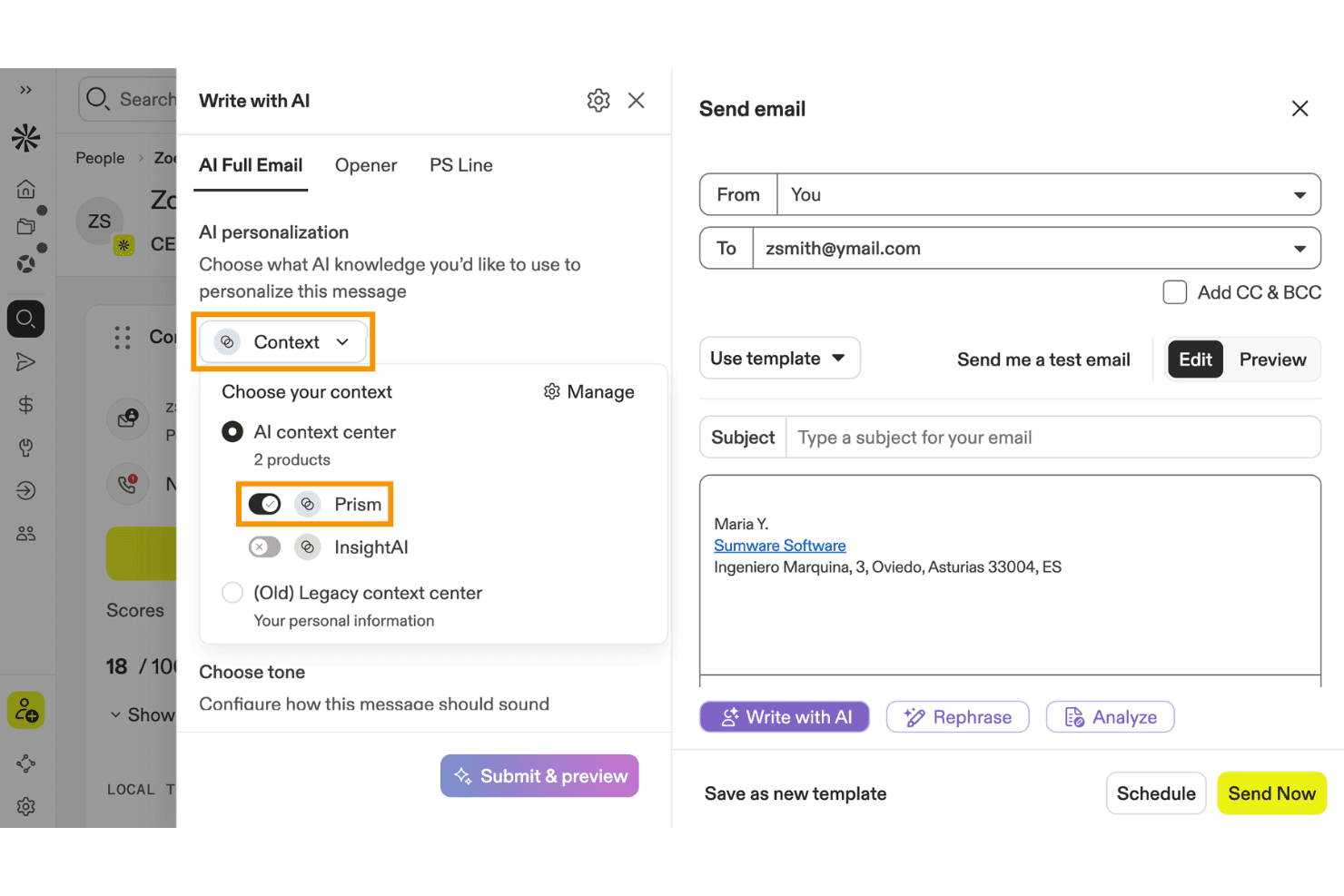
Apollo.io lets users personalize AI-written emails using product context. Apollo.io is a B2B sales engagement platform that combines a 275M+ contact database with AI-powered email sequencing, prospecting, and outreach automation.
Who Is Apollo.io Best For?
Apollo.io is a strong fit for B2B demand generation teams running outbound prospecting and cold email campaigns to fill pipeline.
Why I Picked Apollo.io
I've included Apollo.io in my top picks because it's the strongest tool on this list for B2B teams running prospecting-led outreach at scale. The AI Context Center lets you train the platform on your ICP, messaging pillars, and brand voice, so generated emails reflect your positioning rather than generic copy. Pair that with signal-based personalization pulling from job changes, funding rounds, and tech stack data, and you're sending emails that are specific to each prospect's situation.
Apollo.io Key Features
- AI Writing Assistant: Generates complete email copy, subject lines, and personalized openers from plain-language prompts directly within the platform.
- Email deliverability stack: Includes SPF/DKIM/DMARC authentication setup, email warmup, custom tracking subdomains, and inbox placement monitoring.
- Built-in A/B testing: Lets you test multiple email variants within a sequence step and compare open rates, reply rates, and click rates per variant.
- Multi-mailbox sending rotation: Distributes outbound email volume across multiple connected mailboxes to protect sender reputation at scale.
Apollo.io Integrations
Apollo.io offers native integrations with Salesforce, HubSpot, Zoho CRM, Pipedrive, Adobe Marketo Engage, and SendGrid. It also supports custom integrations through its API and Zapier.
Pros and Cons
Pros:
- Built-in A/B testing for outbound emails
- Prospect-level personalization using real-time B2B signals
- AI writing assistant tuned to brand voice
Cons:
- Lacks AI-driven send-time optimization
- No behavioral or lifecycle-based segmentation
Learn more about Apollo.io:

Mailchimp uses AI to simplify and personalize small business marketing. Mailchimp is an AI-powered email marketing platform that combines automated campaign creation, audience segmentation, predictive analytics, and content optimization tools for marketing teams.
Who Is Mailchimp Best For?
Mailchimp is a natural fit for small businesses that need an accessible, all-in-one email marketing platform without a steep learning curve.
Why I Picked Mailchimp
Mailchimp earns its spot on my shortlist because it packages AI-driven marketing tools into an interface that doesn't require a dedicated marketing ops team to use. I particularly like its AI content optimizer, which suggests subject lines and body copy adjustments based on engagement data from your audience. For small businesses running lean, the pre-built automation journeys—like abandoned cart emails and welcome sequences—mean you can set up a functioning campaign strategy without building workflows from scratch. I also find the predictive segmentation feature genuinely useful, since it identifies which contacts are most likely to convert so you can prioritize your sends.
Mailchimp Key Features
- Drag-and-drop email builder: Design emails visually using a library of customizable templates without writing any code.
- A/B testing: Test different subject lines, send times, or content variations to see which version drives better engagement.
- Audience dashboard: View a consolidated snapshot of your subscriber list, including growth trends and engagement metrics.
- Multivariate campaign reporting: Track open rates, click maps, and revenue data across campaigns from a single reporting view.
Mailchimp Integrations
Mailchimp offers 300+ native integrations, including Shopify, WooCommerce, Salesforce, QuickBooks Online, Eventbrite, Canva, Squarespace, Stripe, Google Analytics, Facebook, and Zapier. An API is available for custom integrations.
Pros and Cons
Pros:
- Easy drag-and-drop builder
- Offers built-in analytics
- Supports audience segmentation
Cons:
- Limited support for large enterprises
- Some design customization limits
Learn more about Mailchimp : Best for e-commerce marketing
- Free plan + free demo available
- From $11.20/month
Visit WebsiteCustomer Rating:4.6/5
Omnisend automates email marketing for online retail businesses. Omnisend is an AI-powered email marketing platform designed for ecommerce teams, offering automation, segmentation, product recommendations, and pre-built templates tailored to online stores.
Who Is Omnisend Best For?
Omnisend is a strong fit for ecommerce businesses of all sizes that need email marketing tools built around online retail workflows and customer purchase behavior.
Why I Picked Omnisend
Omnisend earns its spot on my shortlist because it's one of the few email marketing platforms built specifically around ecommerce workflows rather than retrofitted for them. I particularly like the AI-powered segmentation, where you describe the audience you want to reach and Omnisend builds the segment using real-time purchase and behavior data. I also use the prebuilt automation flows for abandoned carts, browse recovery, and post-purchase follow-ups, which are ready to launch without building from scratch. The product listing blocks and AI product recommendations inside the email builder make it easy to pull live store inventory directly into campaigns.
Omnisend Key Features
- A/B testing: Test subject lines, content, and send times across email campaigns to identify what drives the best open and click rates.
- Web push notifications: Send browser-based push messages for flash sales, restocks, or abandoned carts without needing an email address or phone number.
- Discount code blocks: Insert unique, auto-generated discount codes directly into email templates to drive conversions without manual code management.
- Deliverability reporting: Track bounces, unsubscribes, and failures to monitor inbox placement and maintain sender reputation over time.
Omnisend Integrations
Omnisend offers native integrations with Shopify, WooCommerce, BigCommerce, Wix, Magento, and PrestaShop, and connects with Zapier. An API is available for custom integrations.
Pros and Cons
Pros:
- Comprehensive reporting tools
- Effective customer segmentation
- Supports multi-channel communication
Cons:
- Limited support for non-e-commerce businesses
- Limited design customization
Learn more about Omnisend: Best for simple drag-and-drop editing
- Free plan available
- From $5.99/month
Visit WebsiteCustomer Rating:4.4/5
Hostinger Reach offers an AI-powered email chat interface with pre-built prompt templates like Welcome Newsletter, Educational Content, and Promotions and Sales to generate email campaigns. Hostinger Reach is an AI email marketing platform that generates campaigns from text prompts, builds emails with a visual editor, manages and segments contact lists, and automates delivery with AI-optimized send times.
Who Is Hostinger Reach Best For?
Hostinger Reach is a natural fit for small business owners and solo marketers who want to run email campaigns without a dedicated marketing team.
Why I Picked Hostinger Reach
Hostinger Reach is one of my top picks because I love how its drag-and-drop content editor makes it easy to customize AI-generated email templates without touching a single line of code. After AI writes the copy and builds the layout from a text prompt, I can jump into the editor to swap images, adjust text blocks, and rearrange sections. Reach also saves my brand colors, logo, and style settings automatically, so every email I drag and drop into shape is already on-brand from the start.
Hostinger Reach Key Features
- AI subject line generator: Automatically writes and tests subject line options based on your email content to improve open rates.
- Send-time optimization: AI analyzes your audience data to schedule each campaign at the time most likely to get engagement.
- Contact segmentation: Describe your target audience in plain language and Reach builds a filtered segment from your contact list instantly.
- Automated email sequences: Choose from pre-built automation templates, including welcome series and promotional campaigns, to trigger emails based on subscriber actions.
Hostinger Reach Integrations
Hostinger Reach does not support third-party integrations. It syncs contacts with WordPress and Hostinger Website Builder through built-in 1-click connections, and an API is available for pushing contacts into Reach from external tools.
Pros and Cons
Pros:
- No cap on stored contact list size
- Auto-configures SPF, DKIM, and DMARC records
- AI generates full email drafts from prompts
Cons:
- Very few third-party integration options available
- Cannot duplicate an existing email campaign
Learn more about Hostinger Reach: Best for AI-powered marketing and service agents
- Free plan available
- From $20/month
Visit WebsiteCustomer Rating:4.6/5
Klaviyo’s AI agents support email and service workflows using customer data. Klaviyo is an AI-driven email and SMS marketing platform that combines campaign automation, predictive analytics, segmentation, and customer journey mapping for ecommerce and digital brands.
Who Is Klaviyo Best For?
Klaviyo is a strong fit for ecommerce brands and direct-to-consumer marketers who need a dedicated platform for email and SMS marketing.
Why I Picked Klaviyo
Klaviyo earns its spot on my shortlist because of K:AI, its built-in AI agent system that goes well beyond standard automation. I'm particularly impressed by the Marketing Agent, which ingests your website data and generates fully designed, on-brand email campaigns in just a few clicks—no prompts required. On the service side, the Customer Agent handles order status questions, product recommendations, and returns across web chat, SMS, and email around the clock. I also like that Klaviyo's AI spans over 40 features, from Segments AI that builds audience targeting from your full customer data set to personalized send time optimization that delivers messages when each individual subscriber is most likely to engage.
Klaviyo Key Features
- Automated flows: Build triggered email, SMS, and push notification sequences using a drag-and-drop builder, pre-built templates, and Flows AI.
- Omnichannel campaigns: Run coordinated email, SMS, and mobile push campaigns with AI-driven audience targeting and send time optimization.
- Predictive analytics: Forecast each customer's next order date, lifetime value, churn risk, and spending potential directly from their profile data.
- Benchmarks: Compare your email and SMS performance metrics against 100 peer brands to identify gaps in conversion rate and cart recovery.
Klaviyo Integrations
Klaviyo offers native integrations with Shopify, WooCommerce, BigCommerce, Salesforce Commerce Cloud, Google Ads, Stripe, Zendesk, and Recharge. An API is available for custom integrations.
Pros and Cons
Pros:
- Centralized data for cross-channel targeting and retargeting
- Campaign builder supports advanced triggers and conditional logic
- Powerful automation for behavior-based email and SMS flows
Cons:
- Advanced tagging and organization less robust than some competitors
- Pricing increases quickly as contact list grows
Learn more about Klaviyo: Best for automating inbox triage with AI rules
- 30-day free trial
- From $24/user/month (billed annually)
Visit WebsiteCustomer Rating:4.8/5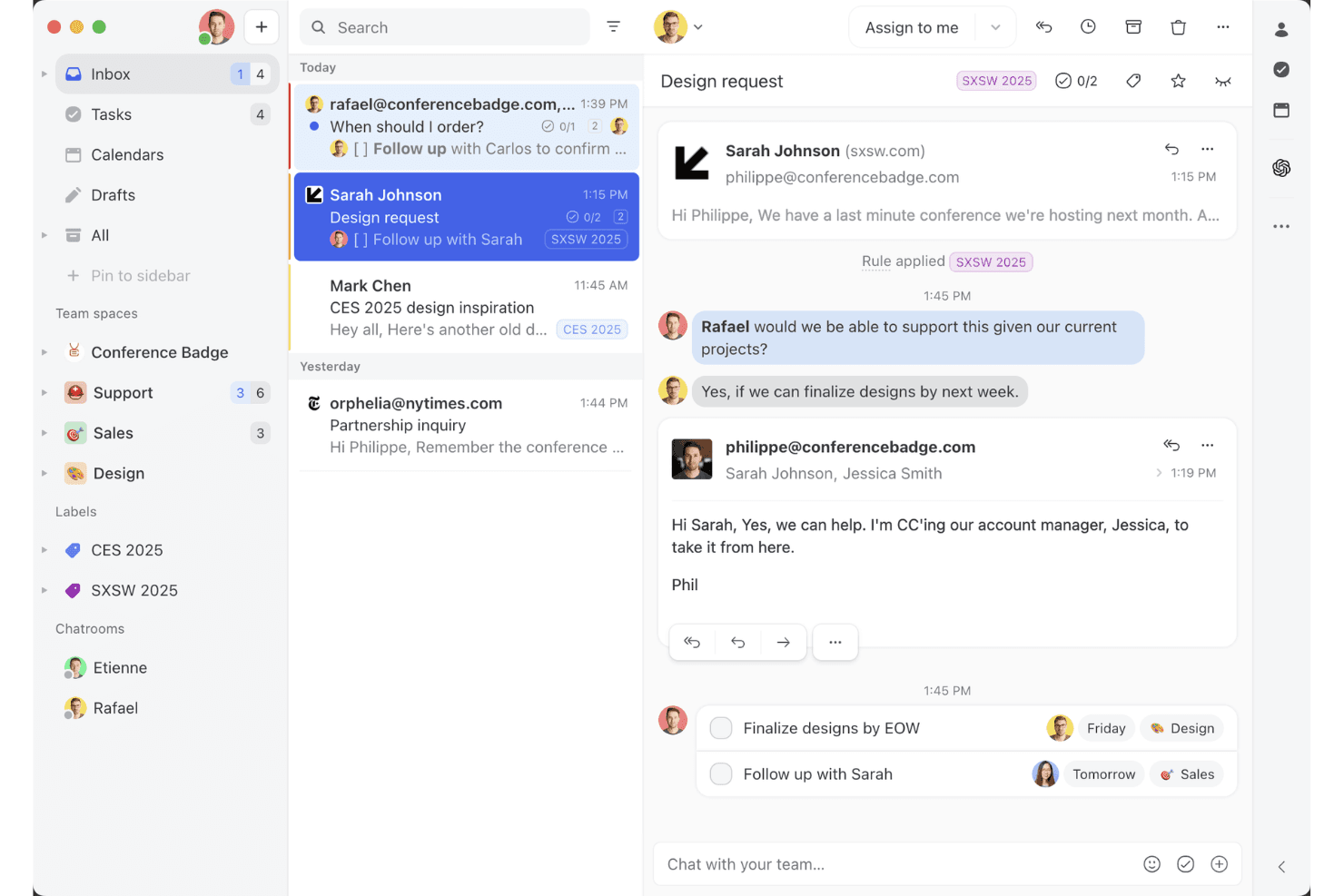
Missive’s shared inbox view shows how teams can collaborate on email threads, assign tasks, and manage client conversations in one workspace. Missive is a collaborative team inbox platform that combines shared email management, AI-powered reply drafting, automated inbox triage, and multi-channel messaging across email, SMS, and social channels.
Who Is Missive Best For?
Missive is a strong fit for customer-facing teams—support, sales, and success—that need to triage and respond to high volumes of incoming email without letting anything slip through the cracks.
Why I Picked Missive
I picked Missive as one of the best because its AI Rules feature does something I genuinely haven't seen done this well elsewhere: it lets you write plain-language prompts that automatically triage incoming email by analyzing sentiment, classifying message type, and triggering actions like assignment or escalation. In practice, that means my team can set a rule that detects urgency in a subject line and instantly routes it to the right person, no manual sorting required. The AI assistant also reads full thread context before drafting replies, so responses stay on-brand without extra prompting.
Missive Key Features
- Conversation summarization: Instantly condenses long email threads into a short summary so your team can get up to speed without reading every message.
- Canned responses with variable fields: Lets you build reusable reply templates with dynamicfields for faster, consistent responses across your team.
- Multi-channel unified inbox: Aggregates email, SMS, WhatsApp, and social DMs into one shared workspace for managing all customer conversations.
- Workflow automation rules: Triggers actions like auto-assignment, round-robin routing, and auto-reply based on conditions you define without writing any code.
- Missive MCP Server: Connect external AI tools (like Claude or ChatGPT) to query email threads, check calendars, and draft replies—while keeping agent review required before sending.
Missive Integrations
Missive offers 25+ native integrations, including HubSpot, Salesforce, Pipedrive, Shopify, Google Workspace, Microsoft 365, OpenAI, Anthropic, and Google Gemini. It also supports custom integrations through its REST API, webhooks, Zapier, and its new MCP Server on Productive and Business plans (requires admin activation), but lacks native connectors for Mailchimp, Klaviyo, and other email marketing platforms.
Pros and Cons
Pros:
- Fast conversation summaries for long email threads
- Team AI assistant reads full thread context
- AI rules automate inbox triage at scale
Cons:
- Lacks A/B testing and marketing analytics
- No campaign or bulk email features
Learn more about Missive: Best for behavior-based messaging
- 14-day free trial + free demo available
- From $100/month
Visit WebsiteCustomer Rating:4.2/5
Customer.io sends behavior-based messages to boost engagement. Customer.io is an AI-powered email marketing platform that lets you automate campaigns, segment audiences, and trigger messages based on user behavior across multiple channels.
Who Is Customer.io Best For?
Customer.io is a strong fit for product-led SaaS companies and digital businesses that need to send targeted, event-driven messages to users based on real-time behavior.
Why I Picked Customer.io
Customer.io earns its spot on my shortlist because of how precisely it handles behavior-based messaging. I love that you can trigger campaigns based on any combination of user events, profile attributes, or actions in real time—so if a user completes a specific step in your onboarding flow but skips another, you can branch them into a completely different message path automatically. The anonymous event tracking is a feature I find especially useful, since it captures behavior before a user even signs up, letting you personalize onboarding from the very first interaction. Additionally, the AI-powered recommended send time feature delivers each message at the moment a specific customer is most likely to engage, rather than applying a one-size-fits-all send schedule.
Customer.io Key Features
- Visual workflow builder: Design multi-step, multi-channel campaign flows using a drag-and-drop canvas with conditional branching logic.
- AI-powered segmentation: Build dynamic audience segments that update automatically based on real-time user data and event activity.
- Transactional messaging: Send one-off triggered emails like password resets or receipts directly through the same platform as your marketing campaigns.
- In-app messaging: Deliver targeted messages inside your product to engage users at key moments without switching to a separate tool.
Customer.io Integrations
Customer.io offers native integrations with Segment, Amplitude, Mixpanel, Snowflake, and Twilio, and connects with Zapier. An API is available for custom integrations.
Pros and Cons
Pros:
- Real-time data tracking
- Easy workflow automation
- Supports behavior-based messaging
Cons:
- Complexity in workflow management
- Limited design customization
Learn more about Customer.io:

Instantly uses AI to scale and personalize cold email outreach. Instantly is an AI-powered email marketing platform for sending, managing, and analyzing cold email campaigns at scale.
Who Is Instantly Best For?
Instantly is a strong fit for sales teams, growth marketers, and agencies that run high-volume cold email outreach campaigns.
Why I Picked Instantly
Instantly is one of my top picks because I love how it handles cold email outreach at scale without sacrificing deliverability. The unlimited email account rotation is a standout mechanic—my team can connect dozens of sending addresses and Instantly distributes sends across them, which keeps individual sender reputation healthy. I also use the AI Spintax and Spam Word Checker to optimize copy before a campaign goes live, catching deliverability issues before they cost us replies. A/Z testing lets us run unlimited email variations, and Instantly's AI scales the best-performing version.
Instantly Key Features
- AI-powered personalization: Generate personalized email content for each prospect using AI-driven variables and custom fields.
- Inbox warm-up: Gradually increase sending volume across connected accounts to build sender reputation before full campaign deployment.
- Campaign analytics dashboard: Track open rates, reply rates, bounce rates, and conversion metrics across all active campaigns in one view.
- Lead finder: Search and filter a built-in B2B contact database to source and add verified prospects directly into your outreach campaigns.
Instantly Integrations
Integrations include Salesforce, Pipedrive, HubSpot, and Calendly. Instantly offers an API for custom integrations.
Pros and Cons
Pros:
- AI-driven personalization
- Advanced targeting filters
- Unlimited email account connections
Cons:
- Limited offline support
- May need technical setup
Learn more about Instantly: Best for AI-driven customer interactions
- Free plan available; 7-day free trial
- From $24.17/month (billed annually)
Visit WebsiteCustomer Rating:4.7/5
Tidio’s dashboard combines live chat, automation, and AI-driven insights to improve customer engagement. Tidio is an AI-powered email marketing and customer communication platform that combines chatbot automation, live chat, and campaign management tools for businesses looking to automate and personalize their outreach.
Who Is Tidio Best For?
Tidio is a strong fit for small to mid-sized ecommerce businesses that want to combine email marketing with AI-driven chat and customer support in one platform.
Why I Picked Tidio
Tidio earns its spot as one of the best on my shortlist because of how its Lyro AI agent handles customer interactions. Lyro is trained exclusively on your own support content and uses Claude (Anthropic AI) to generate responses, which means it stays on-brand and doesn't fabricate answers. I particularly like the Lyro Smart Actions feature, which lets the AI take action on tasks like order updates and lead qualification without any human involvement. Pair that with Flows, a no-code automation builder that triggers personalized messages at key moments in the customer journey, and you get a platform that covers AI-driven interactions across the full customer lifecycle.
Tidio Key Features
- AI Reply Assistant: Uses GPT-4 to instantly rewrite basic agent responses into polished, professional replies during live chat conversations.
- Pre-chat survey: Collects customer contact details before a chat session begins, feeding lead data directly into customer profiles.
- Ticketing workflows: Automates repetitive support actions like sending auto-replies and closing unresponsive tickets without manual intervention.
- Live visitor list: Shows all active website visitors and the pages they're browsing in real time, so agents can proactively start conversations.
Tidio Integrations
Tidio offers native integrations with Shopify, WordPress, Wix, BigCommerce, Mailchimp, HubSpot, Google Analytics, Messenger, Instagram, and Zapier. An API is available for custom integrations.
Pros and Cons
Pros:
- Provides AI-driven workflow insights
- Offers real-time chat support
- Automates repetitive customer interactions
Cons:
- May require setup assistance
- Limited email design flexibility
Learn more about Tidio: 10Best for AMP email support
Mailmodo
- Free plan available
- From $149/month (billed annually)
Visit WebsiteCustomer Rating:4.6/5
Mailmodo uses AI to create interactive emails that drive conversions. Mailmodo is an AI email marketing platform that lets you create, send, and automate interactive campaigns using AMP emails, dynamic content, and advanced personalization tools.
Who Is Mailmodo Best For?
Mailmodo is a good fit for marketing teams at B2B and B2C companies that want to go beyond static email and run interactive, conversion-focused campaigns.
Why I Picked Mailmodo
Mailmodo earns its spot as one of the best on my shortlist because of how it handles AMP email in a way no other platform does. With Mailmodo, I can embed forms, polls, quizzes, and even spin-the-wheel games directly inside an email—so recipients complete actions without ever leaving their inbox. That's a genuinely different experience from a standard click-through campaign. I also like that Mailmodo uses both AMP for Email and CSS interactivity to cover clients beyond Gmail, and automatically serves a plain HTML fallback when a recipient's client doesn't support either format.
Mailmodo Key Features
- AI segment generator: Build audience segments using natural language prompts instead of manual filter logic.
- Email sequence builder: Set up automated, multi-step email sequences that trigger based on contact behavior or lifecycle stage.
- AI campaign analyzer: Review campaign performance data and get AI-generated recommendations to improve future sends.
- List and contact segmentation: Organize contacts into targeted groups based on attributes, events, or engagement history.
Mailmodo Integrations
Mailmodo offers native integrations with HubSpot, Salesforce, Zoho CRM, Pabbly, Webhooks, and Google Sheets. It also connects with Zapier and provides an API for custom integrations.
Pros and Cons
Pros:
- Easy to embed forms and widgets
- Built-in analytics for tracking
- Supports interactive AMP emails
Cons:
- Limited third-party integrations
- Requires AMP HTML knowledge
Learn more about Mailmodo:
Andre AI-verktøy for e-postmarkedsføring
Her er noen flere alternativer for AI-verktøy for e-postmarkedsføring som ikke kom med på kortlisten min, men som likevel er verdt å se nærmere på:
- 11ActiveCampaignBest for automation workflows
- 12Iterable Best for cross-channel marketing
- 13BeehiivBest for newsletter creators
- 14Elastic EmailBest for AI-built templates
- 15Braze Best for mobile engagement
- 16Click DimensionsBest for Microsoft Dynamics users
- 17Movable InkBest for dynamic content
- 18Seventh SenseBest for personalized send times
- 19VitaMailBest for AI email generation
- 20SmartpingBest for AI-driven email personalization
How I Evaluate AI Email Marketing Tools
Every tool on this list needs to deliver real AI value—not just a chatbot bolted onto a legacy email builder. I split my evaluation into two layers: the core functionality a tool must have to even qualify, and the differentiating factors that separate a good option from the best fit for your team.
Core Functionality (Table Stakes For This List)
When I'm selecting tools for my list, I rank each one on a scale from 0 (does not offer the functionality) to 5 (excels in this area) for each core functionality listed below. Then, I calculate the tool's total score into a percentage. Each tool needs to achieve a minimum total score of 65% to be considered for inclusion.
- AI Content Generation: I evaluate whether the tool can draft full email copy, subject lines, and CTAs from a prompt—not just offer spell-check or basic text suggestions.
- Predictive Personalization: Each tool should go beyond static merge tags and use AI to tailor content blocks, product recommendations, or offers per recipient.
- Smart Segmentation: I look for ML-driven audience grouping based on engagement patterns or lifecycle signals, like auto-identifying at-risk subscribers before a re-engagement campaign.
- Send-Time Optimization: The tool should use AI to determine the best delivery window per recipient, not just let you pick a time zone-based batch send.
- AI A/B Testing & Optimization: I check whether the platform can auto-select and scale a winning variant across subject lines or content rather than requiring manual winner picks.
- Performance Analytics & Insights: Reporting should surface AI-generated takeaways and recommended next steps, not just standard open and click dashboards.
Once I have a list of tools that meet the criteria, I consider what sets each platform apart.
Differentiating Factors (What Sets Vendors Apart)
Here's how I compare and contrast different vendors:
Standout Features
Journey orchestration AI is a big differentiator—I look for tools that build and adapt multi-step lifecycle flows on their own rather than requiring manual trigger mapping. Brand voice training matters too, especially for teams sending high-volume campaigns where tone consistency is hard to maintain. I also evaluate whether a platform offers predictive revenue attribution, tying email performance to downstream revenue and LTV instead of stopping at opens and clicks.
Beyond Features
Integration depth is one of the first things I check—a tool that syncs natively with your CRM and ecommerce platform keeps audience data fresh and triggers accurate. Data privacy policies also deserve close attention, particularly whether a vendor uses your customer data to train shared AI models. I evaluate deliverability support too, including dedicated IP options, warmup automation, and authentication setup like DKIM and DMARC, since even the smartest AI content means nothing if it lands in spam.
Slik velger du et AI-verktøy for e-postmarkedsføring
Det er lett å gå seg vill i lange funksjonslister og komplekse prismodeller. For å hjelpe deg med å holde fokus mens du går gjennom din unike prosess for valg av programvare, får du her en sjekkliste over faktorer du bør ha i tankene:
| Faktor | Hva du bør vurdere |
| Skalerbarhet | Kan verktøyet vokse med virksomheten din? Vurder om det støtter økende e-postvolumer og flere brukere uten redusert ytelse. Se etter fleksible abonnementer som passer for voksende team og større kundebaser. |
| Integrasjoner | Kan det integreres med verktøyene du allerede bruker? Kontroller kompatibiliteten med CRM-systemer, analyseplattformer og andre markedsføringsverktøy du er avhengig av. Manglende integrasjon kan føre til datasiloer og forstyrre arbeidsflytene. |
| Tilpasningsmuligheter | Kan du tilpasse verktøyet etter behovene dine? Vurder om du kan tilpasse maler, arbeidsflyter og rapporter. Et verktøy som tilpasser seg prosessene dine, kan spare tid og øke effektiviteten. |
| Brukervennlighet | Er verktøyet intuitivt og brukervennlig? Vurder om teamet raskt kan lære å bruke det uten omfattende opplæring. Kompliserte verktøy kan føre til frustrasjon og lav brukeradopsjon. |
| Implementering og innføring | Hvor smidig er oppsettsprosessen? Vurder hvor mye tid og hvilke ressurser som trengs for å få verktøyet i gang. Se etter leverandører som tilbyr veiledet innføring, opplæringsressurser og støtte under overgangen. |
| Kostnad | Passer prisen inn i budsjettet ditt? Vurder totalkostnaden, inkludert eventuelle skjulte gebyrer. Sammenlign prisnivåene og hvilke funksjoner de tilbyr. Sørg for at verdien forsvarer kostnaden. |
| Sikkerhetstiltak | Hvordan beskytter verktøyet dataene dine? Se etter kryptering, tilgangskontroller og samsvar med personvern- og databeskyttelsesregelverk. Sikkerhetsbrudd kan føre til datalekkasjer og tap av tillit. |
| Tilgjengelig kundestøtte | Hvilke alternativer for kundestøtte tilbys? Vurder om du har tilgang til døgnåpen støtte, egne kundeansvarlige eller brukerfora. Rask støtte kan løse problemer raskt og minimere nedetid. |
Hva er verktøy for AI-e-postmarkedsføring?
Verktøy for AI-e-postmarkedsføring bruker kunstig intelligens til å forbedre og automatisere e-postmarkedsføringskampanjer ved hjelp av naturlig språkbehandling, maskinlæring og dataanalyse. Markedsførere, bedriftseiere og salgsteam bruker vanligvis disse verktøyene for å forbedre engasjement, innholdstilpasning og effektivitet. Funksjoner for automatisering, segmentering, personalisering og innholdsoppretting bidrar til å nå riktig målgruppe, utforme skreddersydde meldinger og måle kampanjenes suksess. Disse verktøyene gir betydelig verdi ved å spare tid og øke effektiviteten i e-postmarkedsføringen.
Funksjoner i verktøy for AI-e-postmarkedsføring
Når du velger verktøy for AI-e-postmarkedsføring, bør du se etter følgende viktige funksjoner:
- E-postautomatisering: Automatiser hele kampanjeprosessen, fra planlegging og utsending til håndtering av oppfølginger. Dette sparer deg for masse tid og bidrar til å holde kontakten på rett spor, selv om kaffen ennå ikke har begynt å virke.
- Kontaktsegmentering: Gruppér kontaktene dine basert på atferd, interesser eller demografi, slik at du kan sende riktig melding til riktig person. Du slipper å gjette hvem som ønsker hva – de får faktisk innhold som er relevant for dem.
- Personaliseringsalternativer: Utform e-poster som føles som en gjennomtenkt hilsen i stedet for en generell masseutsendelse. Sett inn navn, preferanser eller kjøpshistorikk dynamisk for hver abonnent, slik at e-postene dine skiller seg ut i en overfylt innboks.
- A/B-testing: Test emnelinjer, innhold og oppsett. Se raskt hva som fungerer (og hva som ikke gjør det), slik at du kan justere meldingene dine og oppnå bedre resultater hver gang.
- Analyseoversikt: Følg med på åpninger, klikk, konverteringer og frafall fra ett sentralt sted. Dataene gjør det enkelt å se hva som treffer målgruppen, og hvor det er rom for justeringer som kan forbedre resultatene.
- Dra-og-slipp-redigering: Design flotte e-poster uten å måtte bry deg om kode. Bruk enkle byggeklosser til å lage tilpassede maler som ser profesjonelle ut og er klare for de nyeste innholdstilleggene før du trykker på send.
- Overholdelseshåndtering: Du kan føle deg trygg på at kampanjene dine er satt opp for å oppfylle GDPR, CAN-SPAM og andre personvernregler. Da kan du fokusere på markedsføring i stedet for å bekymre deg for juridiske fallgruver.
- Integrasjonsstøtte: Koble e-postverktøyet ditt til andre plattformer du allerede bruker (for eksempel e-handelsnettsteder eller CRM-systemer) for mer effektive arbeidsflyter og bedre ytelse.
Vanlige AI-funksjoner i verktøy for e-postmarkedsføring
I tillegg til standardfunksjonene i verktøy for AI-e-postmarkedsføring som er nevnt ovenfor, tar mange av disse løsningene i bruk AI-funksjoner som:
- Unngåelse av søppelpostfiltre: AI analyserer e-postene dine for å markere alt som kan utløse søppelpostfiltre, slik at du kan forbedre innholdet og maksimere leveringsgraden.
- Automatisk innholdsoppretting: Bruk AI til å lage engasjerende e-posttekster som er tilpasset hver mottaker. Da sparer du tid på å utforme meldinger og øker svarprosenten med personlig kommunikasjon i stor skala.
- Optimalisering av utsendingstidspunkt: AI analyserer tidligere brukeradferd for å planlegge e-poster på det nøyaktige tidspunktet hver mottaker har størst sannsynlighet for å engasjere seg. På den måten unngår du det digitale sorte hullet og får e-postene dine sett.
- Prediktiv analyse: AI bearbeider tallene for å forutsi åpningsrater, klikkfrekvenser eller risiko for frafall, slik at du kan justere strategien i sanntid og ligge et skritt foran utviklingen.
- Smartere forslag til emnelinjer: Få AI-drevne forslag til fengende emnelinjer basert på det som har fungert tidligere, slik at du lykkes med de så viktige åpningene.
- Kartlegging av kundereisen: AI følger med på og tilpasser seg hver brukers handlinger, og flytter dem automatisk gjennom en skreddersydd serie kontaktpunkter for optimalt engasjement uten behov for detaljstyring.
Fordeler med verktøy for AI-e-postmarkedsføring
Implementering av verktøy for AI-e-postmarkedsføring gir flere fordeler for teamet og virksomheten din. Her er noen av fordelene du kan se frem til:
- Tidsbesparelser: Automatisering håndterer repetitive oppgaver som å sende e-poster og administrere lister, slik at teamet ditt får mer tid til strategiske aktiviteter.
- Forbedret engasjement: Personalisering tilpasser innholdet til individuelle preferanser, noe som øker åpnings- og klikkfrekvensen.
- Datadrevne beslutninger: Analyse gir innsikt i kampanjeresultater, slik at du kan forbedre strategiene og oppnå bedre resultater.
- Målrettet markedsføring: Segmentering gjør det mulig å målrette ulike målgrupper presist, noe som fører til mer effektive kampanjer.
- Økt rekkevidde: Engasjement på flere kanaler lar deg komme i kontakt med kunder via e-post, SMS og push-varsler, slik at du når ut til flere.
- Økt relevans: Dynamisk innhold som bruker generativ AI og sanntidsdata, sørger for at meldingene dine er aktuelle og relevante for hver mottaker.
- Sikkerhet og samsvar: Sikkerhetstiltak beskytter dataene dine og sørger for at regelverket overholdes, slik at kundenes tillit opprettholdes.
Kostnader og priser for verktøy for AI-e-postmarkedsføring
Ved valg av verktøy for AI-e-postmarkedsføring er det viktig å forstå de ulike prismodellene og abonnementene som er tilgjengelige. Kostnadene varierer basert på funksjoner, teamstørrelse, tillegg og mer. Tabellen nedenfor oppsummerer vanlige abonnementer, gjennomsnittsprisene deres og typiske funksjoner som inngår i løsninger for verktøy for AI-e-postmarkedsføring:
Sammenligningstabell for abonnementer for verktøy for AI-e-postmarkedsføring
| Abonnementstype | Gjennomsnittlig pris | Vanlige funksjoner |
| Gratisabonnement | $0 | Grunnleggende e-postautomatisering, begrenset analyse og standardmaler. |
| Personlig abonnement | $10-$30 /bruker /måned | Avansert segmentering, prioritert kundestøtte og utvidede personaliseringsalternativer. |
| Forretningsabonnement | $50-$100 /bruker /måned | A/B-testing, markedsføring på flere kanaler og avanserte automatiseringsarbeidsflyter. |
| Virksomhetsabonnement | $150-$300 /bruker /måned | Tilpassede integrasjoner, dedikert kontoadministrasjon og omfattende sikkerhetsfunksjoner. |
Vanlige spørsmål om verktøy for AI-e-postmarkedsføring
Her er noen svar på vanlige spørsmål om verktøy for AI-e-postmarkedsføring:
Hvordan påvirker AI e-postmarkedsføring?
AI forbedrer e-postmarkedsføringen ved å finne det optimale tidspunktet for utsending av e-poster og personalisere emnelinjer. Utsendingstidspunktene tilpasses ulike tidssoner og brukervaner, noe som øker sannsynligheten for kundeengasjement og styrker målgruppens respons.
Hva er 80/20-regelen i e-postmarkedsføring?
80/20-regelen antyder at rundt 80 % av virkningene skyldes 20 % av årsakene. I e-postmarkedsføring betyr dette at en liten del av innsatsen din ofte står for størstedelen av resultatene. Fokuser på oppgavene med stor effekt, som gir best avkastning.
Hvordan fungerer automatisert e-postmarkedsføring?
Automatisert e-postmarkedsføring innebærer å angi regler og utløsere for e-postkampanjer. Du oppretter kampanjen, planlegger e-postene og angir betingelser for utsending. Mottakerne får e-poster basert på disse betingelsene, noe som gir en personlig opplevelse.
Hvordan kan AI personalisere e-postmarkedsføring?
AI personaliserer e-postmarkedsføring ved å analysere kundedata for å tilpasse innholdet. Teknologien bruker maskinlæring til å forstå brukernes preferanser og atferd, slik at meldingene blir relevante og engasjerende. Dette fører til høyere åpningsfrekvens og bedre kunderelasjoner.
Hvilke utfordringer er knyttet til AI i e-postmarkedsføring?
Utfordringer med AI i e-postmarkedsføring omfatter bekymringer rundt personvern, integrasjon med eksisterende systemer og behovet for teknisk kompetanse. Det er avgjørende å sørge for at regelverket overholdes og at datasikkerheten opprettholdes, for å lykkes med implementeringen.