

En AI-skriveassistent er et programvareverktøy som bruker kunstig intelligens til å hjelpe deg med å overvinne skrivesperre, utarbeide utkast, redigere og optimalisere skriftlig innhold raskere. Hvis du leter etter den beste AI-skriveassistenten, ønsker du sannsynligvis å produsere tekst av høyere kvalitet, spare tid på repetitive oppgaver og holde budskapet ditt skarpt – enten du skriver blogginnlegg, e-poster eller kampanjetekst.
I denne listen hjelper jeg deg med å finne de riktige verktøyene for arbeidsflyten din i 2026, forklarer hva som skiller hvert av dem fra de andre, og deler hvorfor erfarne markedsførere stoler på disse assistentene for å oppnå bedre resultater.
Hvorfor du kan stole på våre programvareanbefalinger
6,700+
Reviews
20
Industry experts
16+
Evaluation factors
14
Years
Teamet vårt har testet og anmeldt programvare siden 2012. Vi er selv markedsføringsledere, så vi vet hvor vanskelig og hvor viktig det er å velge riktig programvare.
I denne guiden har vi vurdert verktøyene gjennom praktisk testing og uavhengig research og gitt dem poeng ut fra våre utvelgelseskriterier.
Anmeldelsene våre bygger på vår egen redaksjonelle vurdering. De er ikke et salgsargument.
Ekspertanmeldere:
 Gui DrusinaCreative Director
- Shriya GhateSenior Marketing Lead
 Amanda JacquesMarketing Ops Leader

Sammenligningstabell for AI-skriveassistenter
Denne sammenligningstabellen oppsummerer prisdetaljene for mine beste utvalgte AI-skriveassistenter:
| Tool | Best For | Trial Info | Price | ||
|---|---|---|---|---|---|
| 1 | Best for end-to-end content workflows | Free trial + free demo available | From $59/month (billed annually) | Website | |
| 2 | Best for flexible prompting versatility | Free plan available | From $8/month | Website | |
| 3 | Best for long-form content reasoning | Free plan available | From $20/month | Website | |
| 4 | Best for enterprise-grade compliance controls | Free trial + free demo available | Pricing upon request | Website | |
| 5 | Best for optimizing content with SERP analysis | Free trial + free demo available | From $49/month (billed annually) | Website | |
| 6 | Best for SEO-driven content creation | Free trial + free demo available | From $79/month (billed annually) | Website | |
| 7 | Best for predictive copy performance insights | Free trial + free demo available | From $39/month (billed annually) | Website | |
| 8 | Best for maintaining consistent brand voice | 7-day free trial available | From $59/month (billed annually) | Website | |
| 9 | Best for campaign ideation workflows | Free trial available | From $29/month | Website | |
| 10 | Best for fast short-form copy drafts | Free plan available | From $7.50/month | Website |


Anmeldelser av de beste AI-skriveassistentene
Nedenfor finner du mine detaljerte sammendrag av de beste AI-skriveassistentene som kom med på kortlisten. Anmeldelsene mine gir et detaljert innblikk i funksjonene, egenskapene og de beste bruksområdene for hver plattform, slik at du kan finne den som passer best for deg.
 Best for end-to-end content workflows
- Free trial + free demo available
- From $59/month (billed annually)
Visit WebsiteCustomer Rating:4.8/5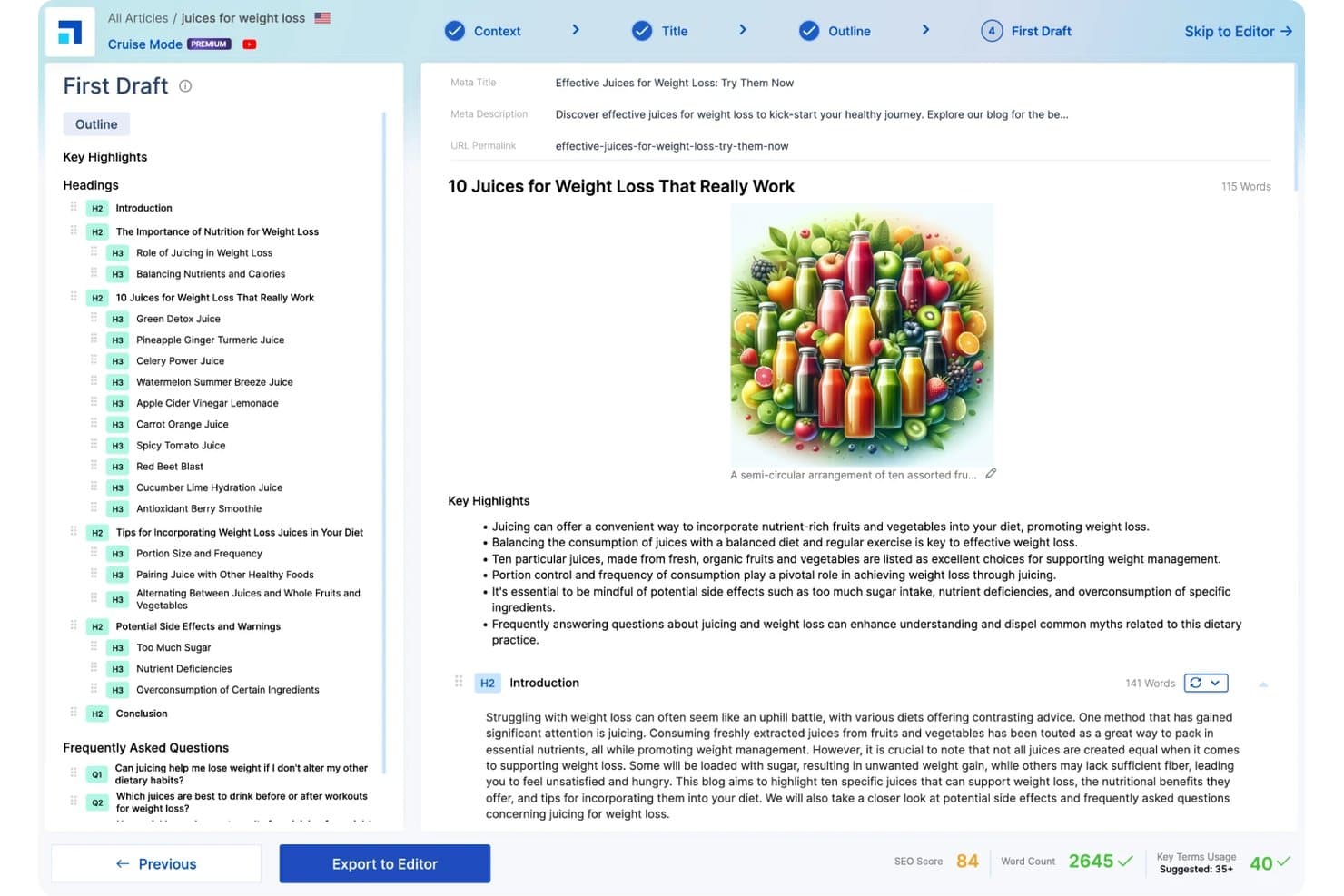
Scalenut generates AI-powered first drafts with SEO scoring, structured outlines, and automated content writing. Scalenut is an AI writing assistant that combines long-form content generation, keyword clustering, SERP analysis, and SEO optimization into a single content workflow platform.
Who Is Scalenut Best For?
Scalenut is a strong fit for SEO content strategists and content marketing managers at small businesses who publish blog-driven content regularly.
Why I Picked Scalenut
Scalenut earns its spot because it genuinely covers the whole content workflow in one place. I use Cruise Mode to go from a target keyword to a structured, SERP-informed draft in minutes, with NLP keyword terms already mapped into the outline. From there, the GEO-Content Optimizer scores the piece against competing pages and flags specific on-page gaps to resolve before publishing.
Scalenut Key Features
- Brand tone customization: Adjustable brand voice and style controls to match your company's writing guidelines.
- SERP analyzer: Analyze top-ranking pages for any keyword to guide topic selection and content structure.
- Content optimizer: Real-time SEO scoring and NLP keyword integration while drafting or revising.
- Internal linking automation: Identify and suggest internal links to improve site structure and topic authority.
Scalenut Integrations
Scalenut offers native integrations with Semrush, Copyscape, Shopify, and WordPress, and provides an API for custom integrations.
Pros and Cons
Pros:
- SERP-based content scoring before publishing
- Built-in NLP keyword suggestions during writing
- Cruise Mode drafts SEO briefs quickly
Cons:
- Weak short-form copy template variety
- AI drafts often need significant human editing
Learn more about Scalenut: Best for flexible prompting versatility
- Free plan available
- From $8/month
Visit WebsiteCustomer Rating:4.4/5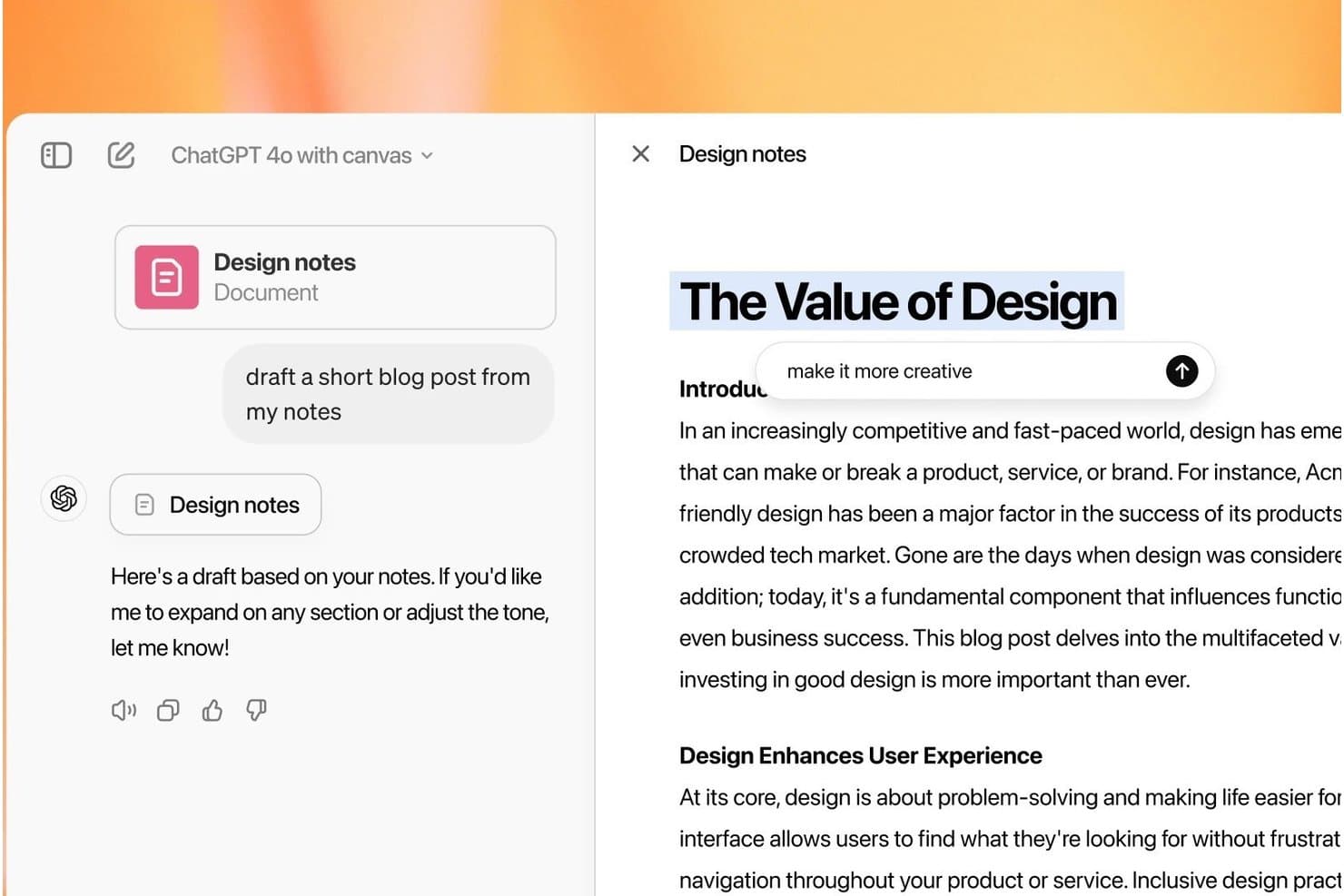
ChatGPT offers a canvas editing interface that lets users draft and refine blog posts directly from uploaded notes with inline editing prompts. ChatGPT is a conversational AI writing assistant from OpenAI that generates, edits, rewrites, and repurposes content across formats using a prompt-based interface backed by multiple large language models.
Who Is ChatGPT Best For?
ChatGPT is a strong fit for content marketers and copywriters who work across multiple formats and channels and prefer open-ended, prompt-driven workflows over rigid templates.
Why I Picked ChatGPT
I picked ChatGPT as one of the best because no other tool lets me shift writing modes as freely mid-session. I can draft a punchy product ad, then immediately ask it to expand the same idea into a 1,500-word blog post without starting a new conversation. Custom GPTs let me encode brand voice rules once and apply them automatically, cutting out the need to re-explain context every time I start a new task.
ChatGPT Key Features
- Multi-model access: Switch between GPT-5.5, GPT-5.6, and other variants in one interface for different writing needs.
- Custom GPTs: Build specialized GPTs tailored to your specific brand, tone, or workflow requirements.
- Document ingestion: Upload files and ChatGPT will extract, analyze, or rewrite content directly from the original documents.
- Projects workspace: Organize drafts, sources, and writing assets into centralized project folders for easy collaboration and retrieval.
ChatGPT Integrations
ChatGPT offers native integrations with Clay, Slack, Figma, Airtable, Salesforce, Atlassian Rovo, and more. An API is available for custom integrations.
Pros and Cons
Pros:
- Real-time web search grounds content in facts
- Adapts tone and style across any format
- Handles long-form and short-form equally well
Cons:
- Outputs require heavy editing for brand consistency
- No built-in SEO scoring or keyword tools
Learn more about ChatGPT: Best for long-form content reasoning
- Free plan available
- From $20/month
Visit WebsiteCustomer Rating:4.4/5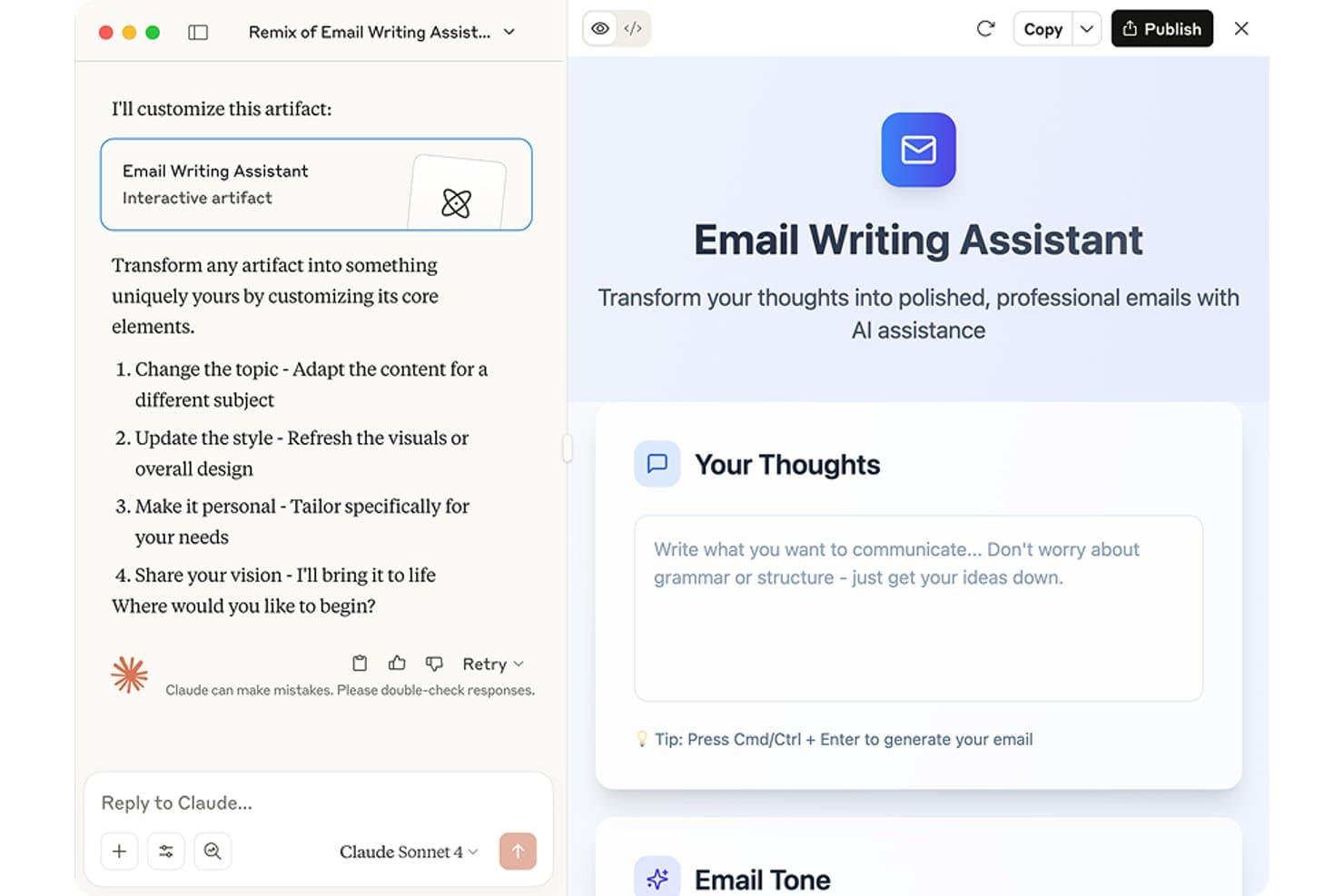
Claude offers an Email Writing Assistant artifact that transforms rough thoughts into polished, professional emails with AI assistance. Claude is an AI assistant built by Anthropic that generates, edits, rewrites, and summarizes written content across long-form documents, research tasks, and conversational formats using advanced large language models.
Who Is Claude Best For?
Claude is a strong fit for content marketers and writers who regularly work with long documents, research-heavy briefs, or complex multi-step writing tasks.
Why I Picked Claude
Claude earns its spot on my shortlist because of how well it handles long, complex writing tasks without losing coherence. Its 200,000-token context window means I can feed it an entire research report and get a structured, on-point draft in return. I also use its extended thinking mode when a piece needs multi-step reasoning worked through before a single word of copy appears.
Claude Key Features
- Claude Cowork mode: Lets you assign complex, multi-step writing tasks and have them completed autonomously in a separate workspace.
- File upload for document grounding: Allows direct upload of source files so AI can reference and summarize entire documents during writing.
- Memory across conversations: Retains key details from previous chats, letting you build on past work for ongoing projects without re-explaining context.
- Desktop and mobile app support: Offers full-featured writing assistance on web, desktop, and mobile for flexible use across devices.
Claude Integrations
Native integrations are not publicly listed. An API is available for custom integrations.
Pros and Cons
Pros:
- Holds context across very long documents
- Follows nuanced tone instructions with high accuracy
- Exceptional reasoning through multi-step writing tasks
Cons:
- Responses can be verbose without tight prompting
- No dedicated marketing templates or prompt library
Learn more about Claude: Best for enterprise-grade compliance controls
- Free trial + free demo available
- Pricing upon request
Visit WebsiteCustomer Rating:4.4/5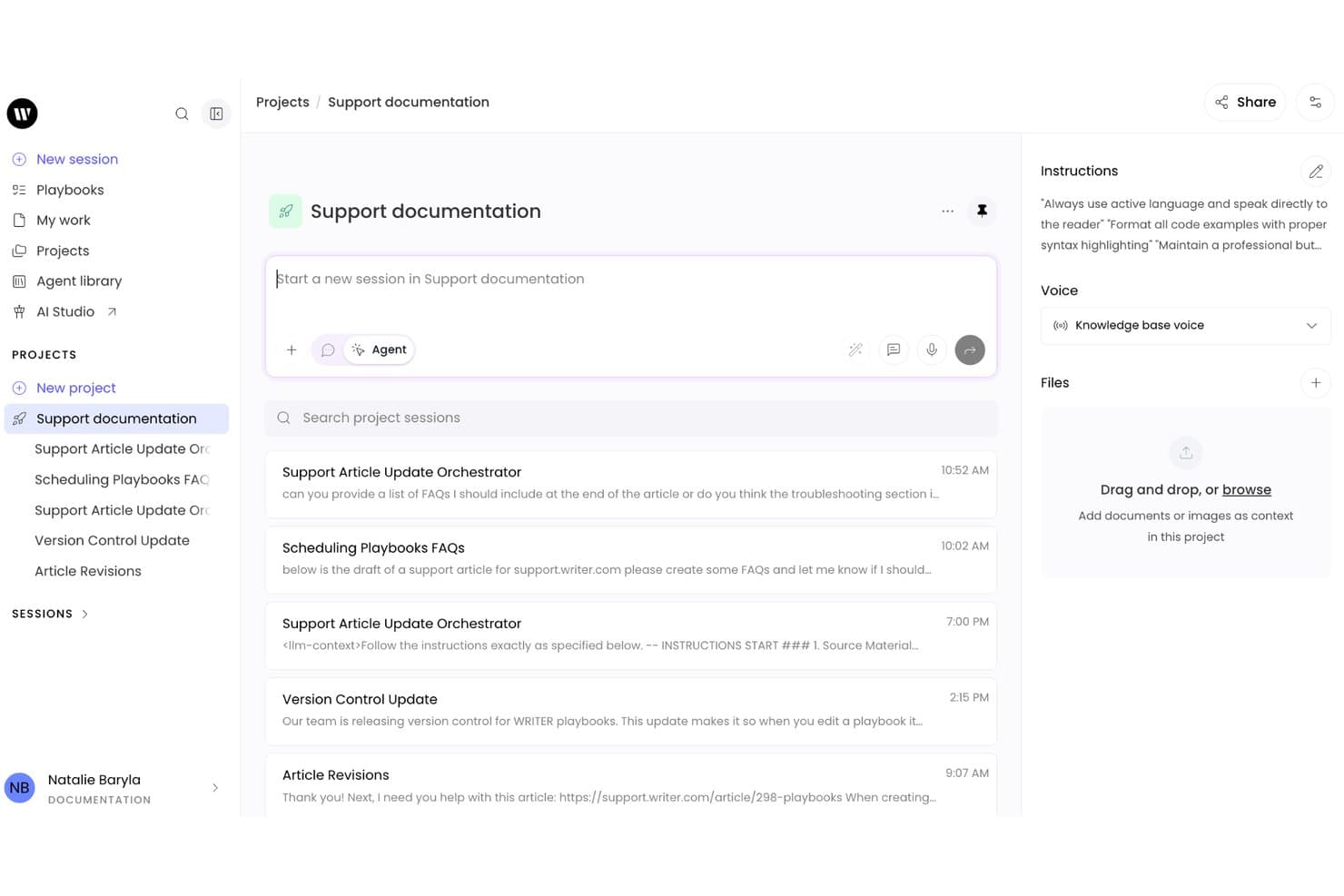
Writer combines a project-based workspace with AI writing sessions, custom instructions, and support documentation workflows for collaborative content creation. Writer is an enterprise AI writing platform built on proprietary Palmyra LLMs that combines generative content creation, brand voice enforcement, compliance controls, and autonomous agent workflows for large organizations.
Who Is Writer Best For?
Writer is a strong fit for content marketing managers and marketing operations teams at large enterprises in regulated industries like finance, healthcare, and legal.
Why I Picked Writer
Writer earns its spot as one of the best on my shortlist because no other AI writing tool gives you this level of governance over generated content. I particularly like that guardrails are set centrally and enforced across every output, so individual users can't bypass compliance rules even accidentally. The proprietary Palmyra LLMs also mean your prompts and content stay off third-party APIs entirely, which matters when you're operating under HIPAA or GDPR requirements.
Writer Key Features
- Playbooks: Build repeatable, team-wide workflows for content creation and approval.
- Skills: Apply specialized tasks like SEC filing parsing or compliance checking as reusable modules.
- Knowledge Graph: Integrate and ground AI outputs in company-specific data sources for accurate content.
- Presentations: Generate fully branded, on-brand slide decks directly from your prompts and data.
Writer Integrations
Writer offers native connectors with Asana, Atlassian, Gong, HubSpot, Semrush, Snowflake, Webflow, Databricks, and more. An API is available for custom integrations.
Pros and Cons
Pros:
- Keeps prompts off third-party model APIs
- Trains AI on your own brand content
- Centrally enforced brand voice across all outputs
Cons:
- Agent workflows require significant technical configuration
- Not designed for solo content creators
Learn more about Writer: Best for optimizing content with SERP analysis
- Free trial + free demo available
- From $49/month (billed annually)
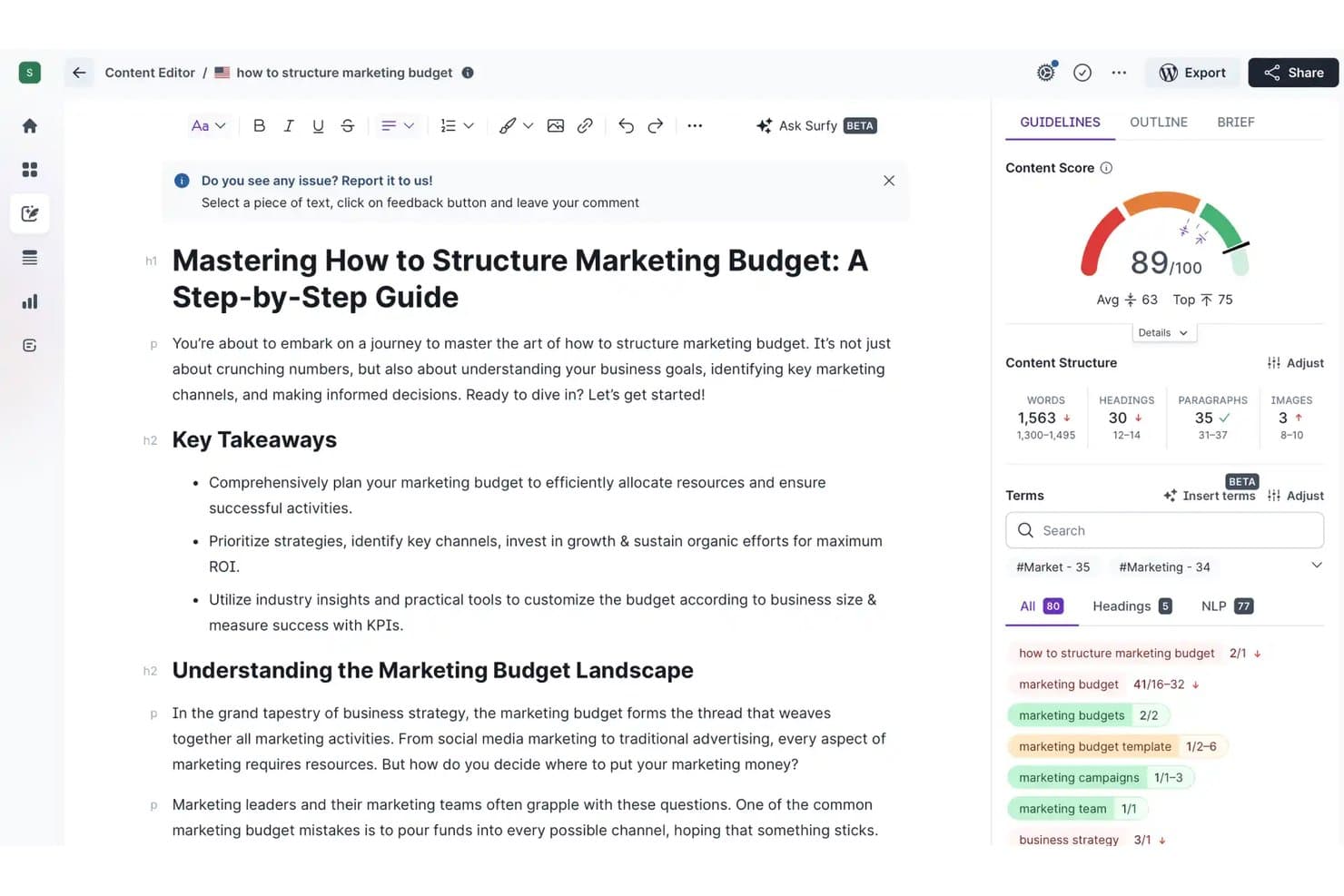
Surfer SEO includes a Content Editor with an AI-powered writing assistant, real-time content scoring, and SEO term recommendations. Surfer SEO is an AI-powered content optimization platform that combines a real-time content editor, SERP-based SEO scoring, an AI writing assistant (Surfy), and automated internal linking to help you create and refine long-form content.
Who Is Surfer SEO Best For?
Surfer SEO suits SEO content strategists and content marketing teams who publish long-form articles and need data-driven guidance to rank in organic search.
Why I Picked Surfer SEO
Surfer SEO earns its spot on my shortlist because no other AI writing tool ties content generation this directly to live SERP data. I use the Content Score, which analyzes 500+ ranking factors in real time, to see exactly where a draft falls short before publishing. The Auto-Optimize feature then fills those gaps by inserting relevant terms and missing sections without breaking the article's tone. That feedback loop, from writing to scoring to fixing, is what I keep coming back to.
Surfer SEO Key Features
- Surfy in-editor AI assistant: Offers real-time editing, rephrasing, and content refinement inside the content editor with simple slash commands.
- Humanizer module: Detects and removes AI-generated text patterns for more natural language output in finished drafts.
- Outline builder: Creates article structures and compiles key questions and headings based on competitor content.
- Auto internal linking: Scans your site and inserts relevant internal links in drafts based on optimal anchor opportunities.
Surfer SEO Integrations
Surfer SEO offers native integrations with Jasper, Contentful, ChatGPT, WordPress, Google Docs, and Zapier. An API is available for custom integrations.
Pros and Cons
Pros:
- Humanizer reduces AI detection risk
- Surfy AI writes directly inside the editor
- Real-time SERP-based content scoring
Cons:
- Credit limits restrict high-volume content output
- AI writing quality trails dedicated tools
Learn more about Surfer SEO: Best for SEO-driven content creation
- Free trial + free demo available
- From $79/month (billed annually)
Visit WebsiteCustomer Rating:4.8/5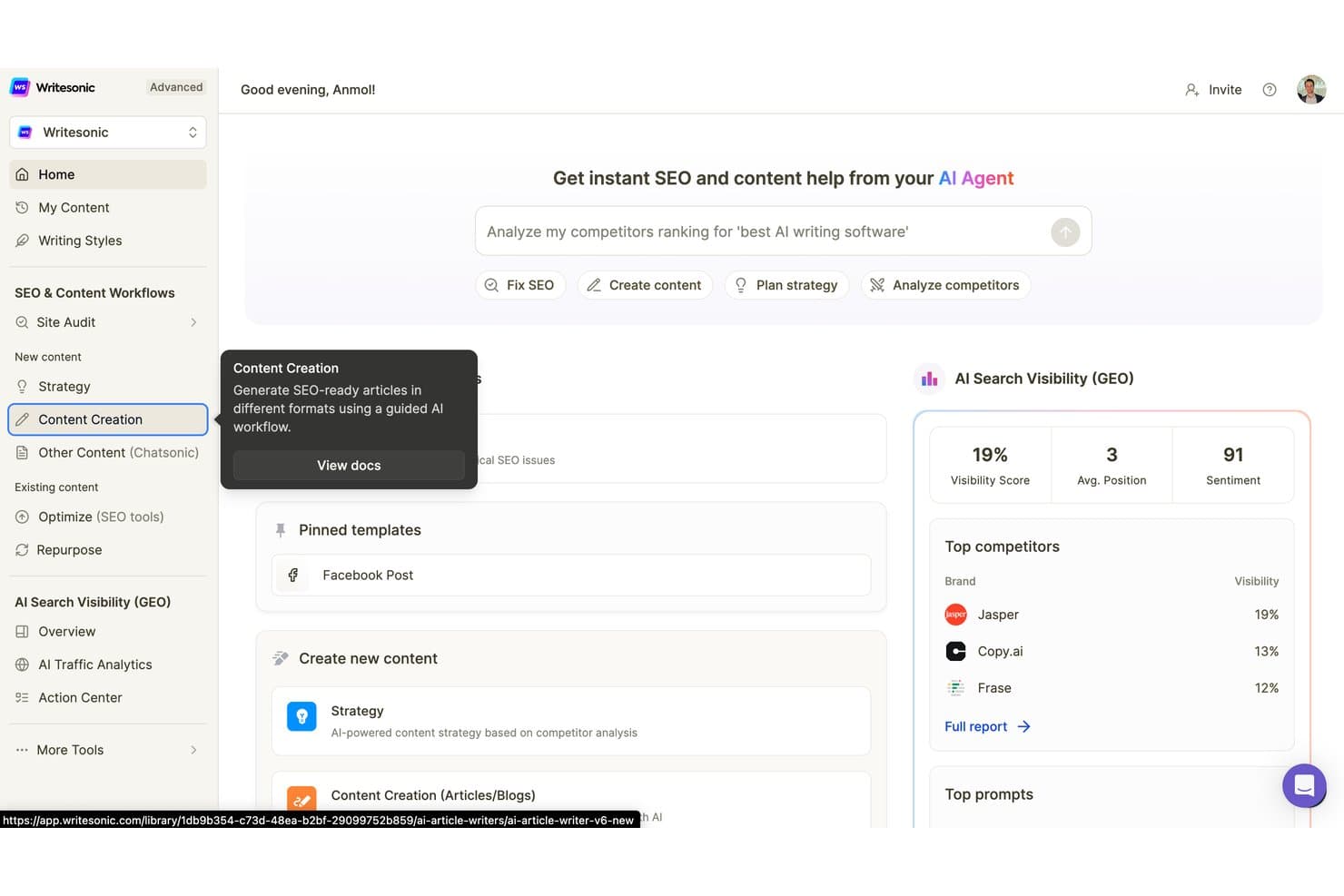
Writesonic supports AI-powered SEO and content creation through tools for site audits, content strategy, competitor analysis, and AI search visibility scoring. Writesonic is an AI writing platform built around an agentic content pipeline that lets you generate content, access multiple models (GPT-4, Claude, Gemini), and utilize brand voice controls and native SEO and GEO optimization tools.
Who Is Writesonic Best For?
Writesonic is a strong fit for SEO content strategists and content marketing teams at agencies or growing businesses publishing at scale.
Why I Picked Writesonic
Writesonic earns its spot on my shortlist because of how deeply SEO is baked into the article generation pipeline itself. Ahrefs data, Google Keyword Planner, and live SERP analysis all feed directly into the article outline and structure, so I'm not toggling between separate tools. What I find genuinely useful is the dual-rank optimization: the pipeline targets both Google's E-E-A-T signals and AI search engines like ChatGPT and Perplexity simultaneously.
Writesonic Key Features
- Template library: Over 80 prebuilt templates for blogs, ads, emails, landing pages, and social posts.
- Multi-language support: Generate and translate content across 25+ languages with localization controls.
- Brand voice profiles: Store and apply custom tone and writing style guides to maintain consistency in every draft.
- API access: Open API for integrating Writesonic’s writing and SEO tools into your existing CMS or content workflow.
Writesonic Integrations
Writesonic offers native integrations with WordPress, Contentful, Fastly, Codex, Ahrefs, Akamai, Drupal, Cloudflare, and more. An API is available for custom integrations.
Pros and Cons
Pros:
- Multi-model access within a single subscription
- 80+ templates across major marketing formats
- Built-in GEO optimization for AI search
Cons:
- Credit limits restrict high-volume content teams
- Long-form outputs often need editorial revision
Learn more about Writesonic: Best for predictive copy performance insights
- Free trial + free demo available
- From $39/month (billed annually)
Visit WebsiteCustomer Rating:4.8/5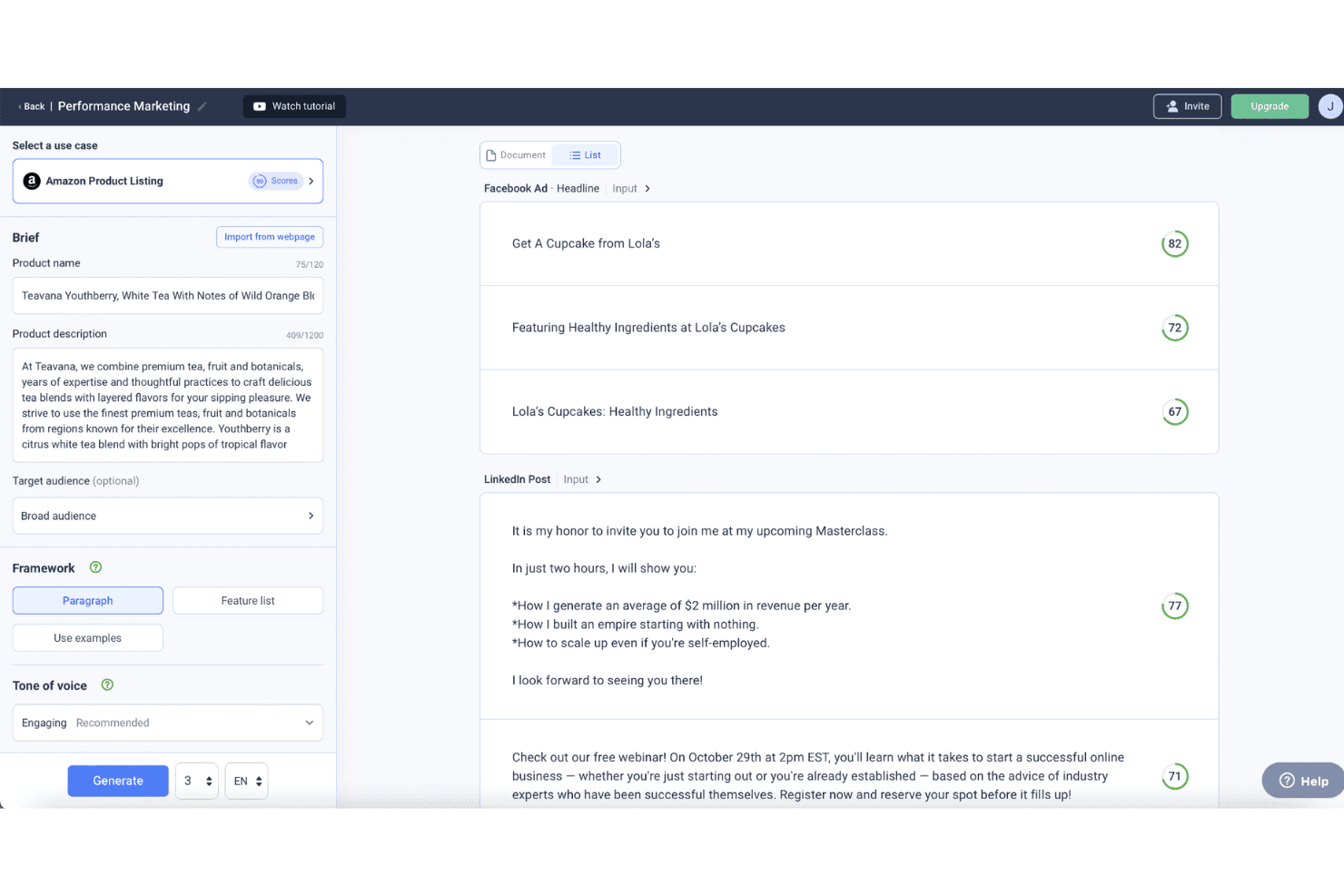
Anyword lets users compare generated ad copy for Facebook Ads and LinkedIn Posts with predictive performance scores and a brief input panel. Anyword is a Gen-AI content platform for marketing teams that combines short and long-form copy generation, brand voice controls, and predictive performance scoring across ads, emails, social posts, and landing pages.
Who Is Anyword Best For?
Anyword is a strong fit for mid-market and enterprise marketing teams that run paid campaigns and need data-backed copy decisions across multiple channels.
Why I Picked Anyword
Anyword earns its spot on my shortlist because no other AI writing tool I've used forecasts copy performance before you publish it. The Predictive Performance Score benchmarks your drafts against a dataset of tens of thousands of real-world A/B-tested ads, so I can pick the highest-scoring variation with actual data behind it, not gut feel. I also use the Content Intelligence feature to audit existing pages and surface specific copy changes that are likely to lift conversion.
Anyword Key Features
- Short form editor: Create on-brand ads, emails, and social posts using AI-powered suggestions and templates.
- Long form editor: Generate and optimize blog posts and landing page drafts with built-in content improvement tools.
- Brand voice compliance: Centralize messaging guidelines, tones, audiences, and approved copy for consistent output.
- Chrome extension: Access AI writing and performance scoring directly in your browser across ad and content platforms.
Anyword Integrations
Anyword offers native integrations with Sprinklr, Salesforce, Wrike, Gong, Oktopost, Drupal, HubSpot, Outreach, and more, and provides an API for custom integrations.
Pros and Cons
Pros:
- Data-backed copy decisions before publishing
- Brand voice applied consistently across channels
- Predictive performance scoring across copy variants
Cons:
- Template variety lags behind rival tools
- Long-form content quality trails some competitors
Learn more about Anyword: Best for maintaining consistent brand voice
- 7-day free trial available
- From $59/month (billed annually)
Visit WebsiteCustomer Rating:4.7/5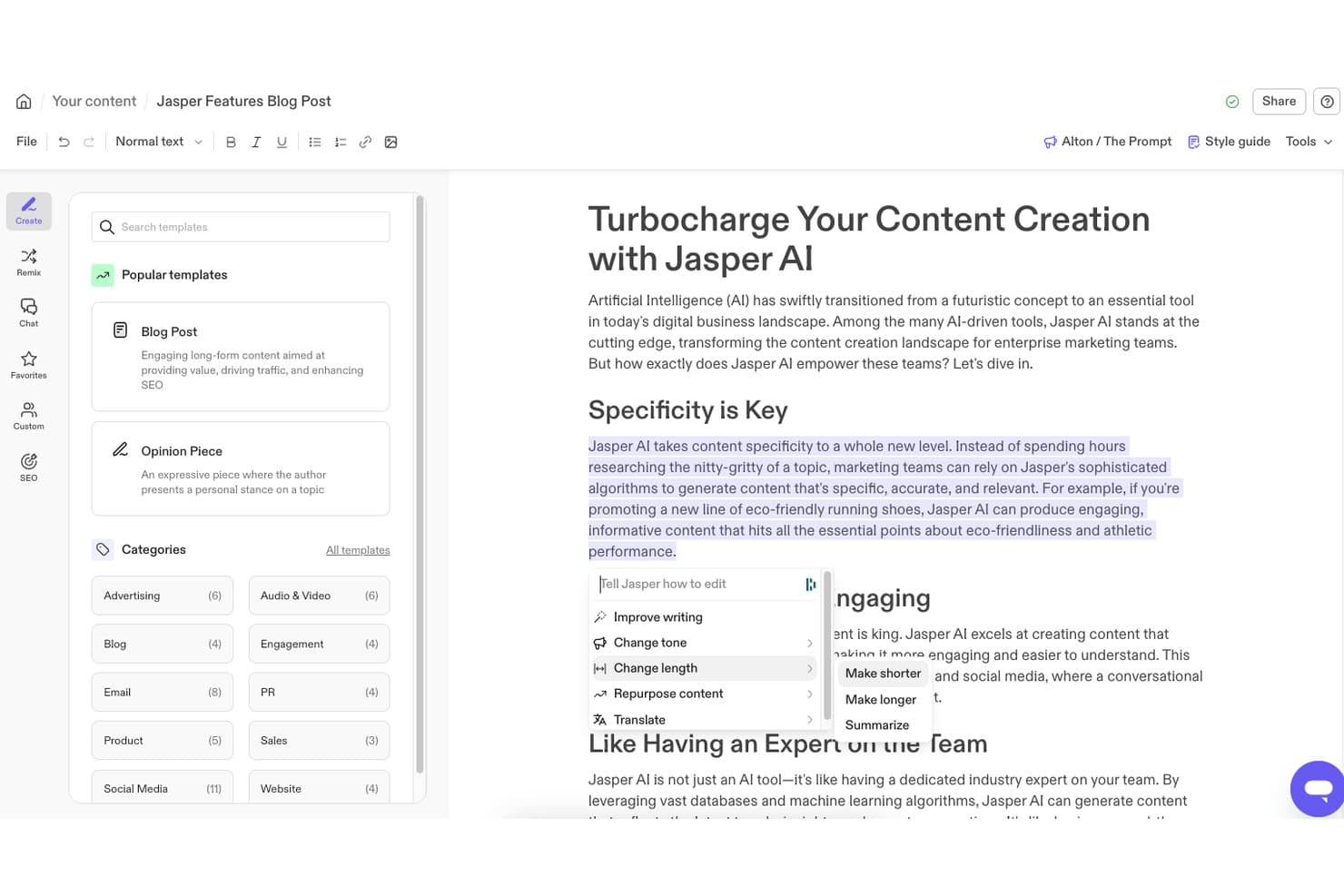
Jasper lets users access an inline AI editing toolbar with options like Improve Writing, Change Tone, Change Length, and Translate directly within the document editor. Jasper is an AI writing platform built for marketing teams, offering content generation, brand voice configuration, campaign templates, multi-channel copy tools, and an agentic layer for automating end-to-end content workflows.
Who Is Jasper Best For?
Jasper is a strong fit for mid-market and enterprise marketing teams that produce high volumes of content across multiple brands, channels, or regions.
Why I Picked Jasper
Jasper earns its spot as one of the best on my shortlist because of Brand IQ, its dedicated brand compliance layer. I love that I can train multiple saved brand voices from real content samples, then have them applied automatically across every output. The Style Guide enforcement is especially useful: Jasper flags brand violations mid-draft and suggests on-brand replacements, so my team isn't manually auditing every asset for consistency.
Jasper Key Features
- Grid for high-volume content creation: Generate and manage large batches of marketing copy or creative writing assets for campaigns or multi-channel publishing.
- Canvas collaborative editor: Work with team members in real time to draft, edit, and organize marketing content.
- Jasper Agents: Use AI-powered agents for tasks like optimization, translation, or research directly inside your workspace.
- Native integration ecosystem: Connect Jasper to tools like Google Docs, WordPress, Semrush, Slack, and Salesforce for seamless content workflows.
Jasper Integrations
Jasper offers native integrations with Asana, WordPress, Semrush, HubSpot, Salesforce, Adobe Express, Make, Slack, and more. It also connects with Zapier, and an API is available for custom integrations.
Pros and Cons
Pros:
- Access to multiple LLMs within one interface
- 50+ templates for major marketing formats
- Brand IQ enforces voice across team outputs
Cons:
- Long-form drafts can drift off-topic
- Outputs frequently need fact-checking before publishing
Learn more about Jasper: Best for campaign ideation workflows
- Free trial available
- From $29/month
Visit WebsiteCustomer Rating:4.4/5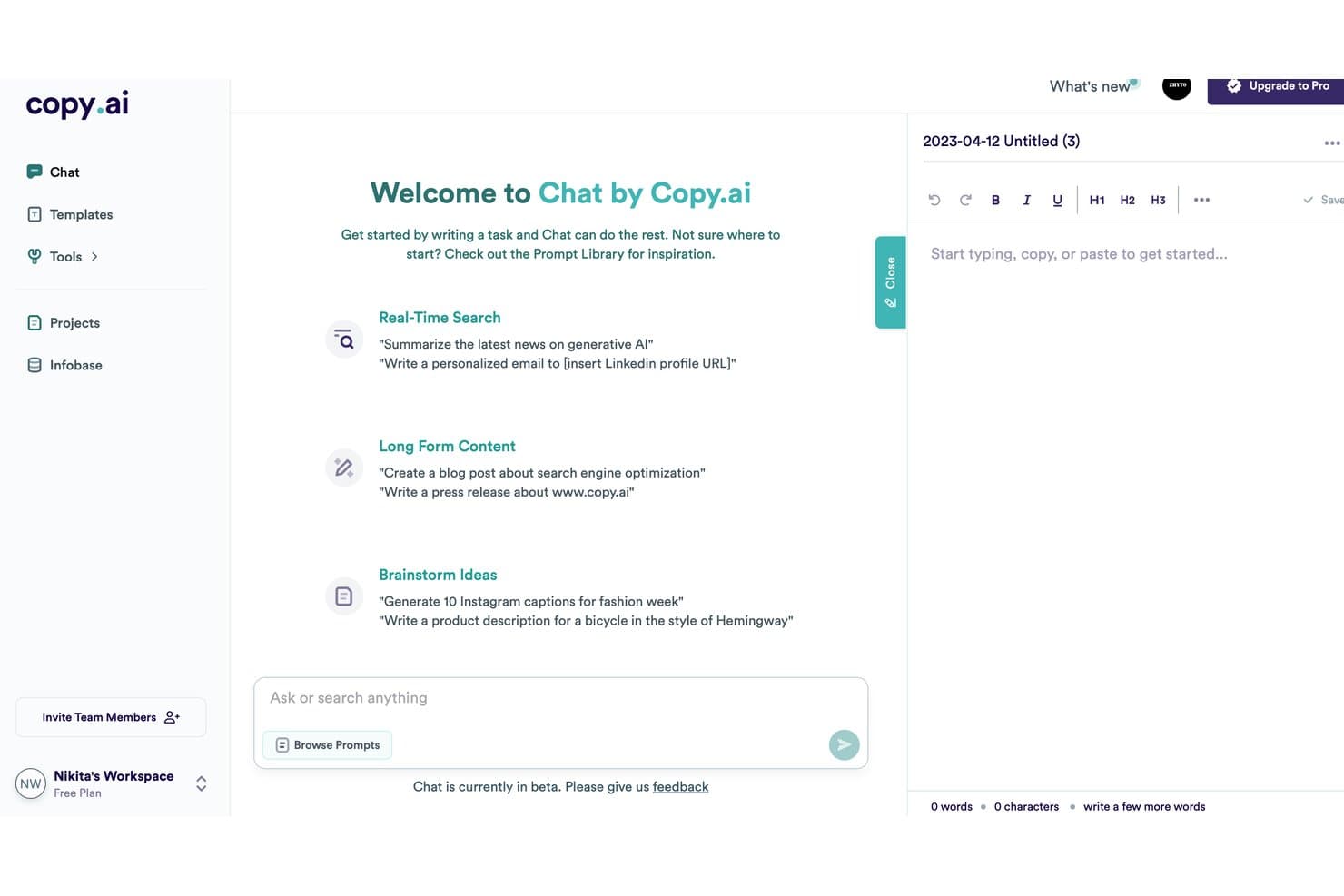
Copy.ai uses a chat-based interface for real-time search, long-form content creation, and brainstorming ideas. Copy.ai is an AI writing platform built around brand voice training, multi-model generation (GPT-4, Claude, Gemini), and automated workflows that produce campaign copy across email, social, ads, and blog formats at scale.
Who Is Copy.ai Best For?
Copy.ai is a strong fit for B2B marketing teams that manage high-volume content production across multiple channels and need brand voice consistency at scale.
Why I Picked Copy.ai
I picked Copy.ai as one of the best because its Workflow Builder genuinely changes how I approach campaign planning. I can chain together brand voice settings, research steps, and multi-format drafts in a single automated run, so one campaign brief can produce ad copy, email sequences, and social captions simultaneously. The Brand Voice feature, trained directly on my existing content, keeps every output consistent without manual editing between formats.
Copy.ai Key Features
- Multi-model generation: Switch between GPT-4, Claude, and Gemini for each writing task without leaving the platform.
- Infobase contextual grounding: Centralize company details, product specs, and competitor insights for AI to use in outputs.
- Prebuilt copy templates: Access over 90 templates for blog posts, social captions, ad copy, product descriptions, and more.
- Zapier and CRM integration: Connect with Salesforce, HubSpot, and 2,000+ other platforms to automate content workflows.
Copy.ai Integrations
Copy.ai offers native integrations with Notion, Google Docs, and Coda. It also connects with Zapier and provides an API for custom integrations.
Pros and Cons
Pros:
- 90+ templates span major marketing formats
- Infobase grounds outputs in company-specific context
- Workflow builder chains multi-step campaigns automatically
Cons:
- Workflow setup requires significant upfront configuration
- Long-form content quality can feel generic

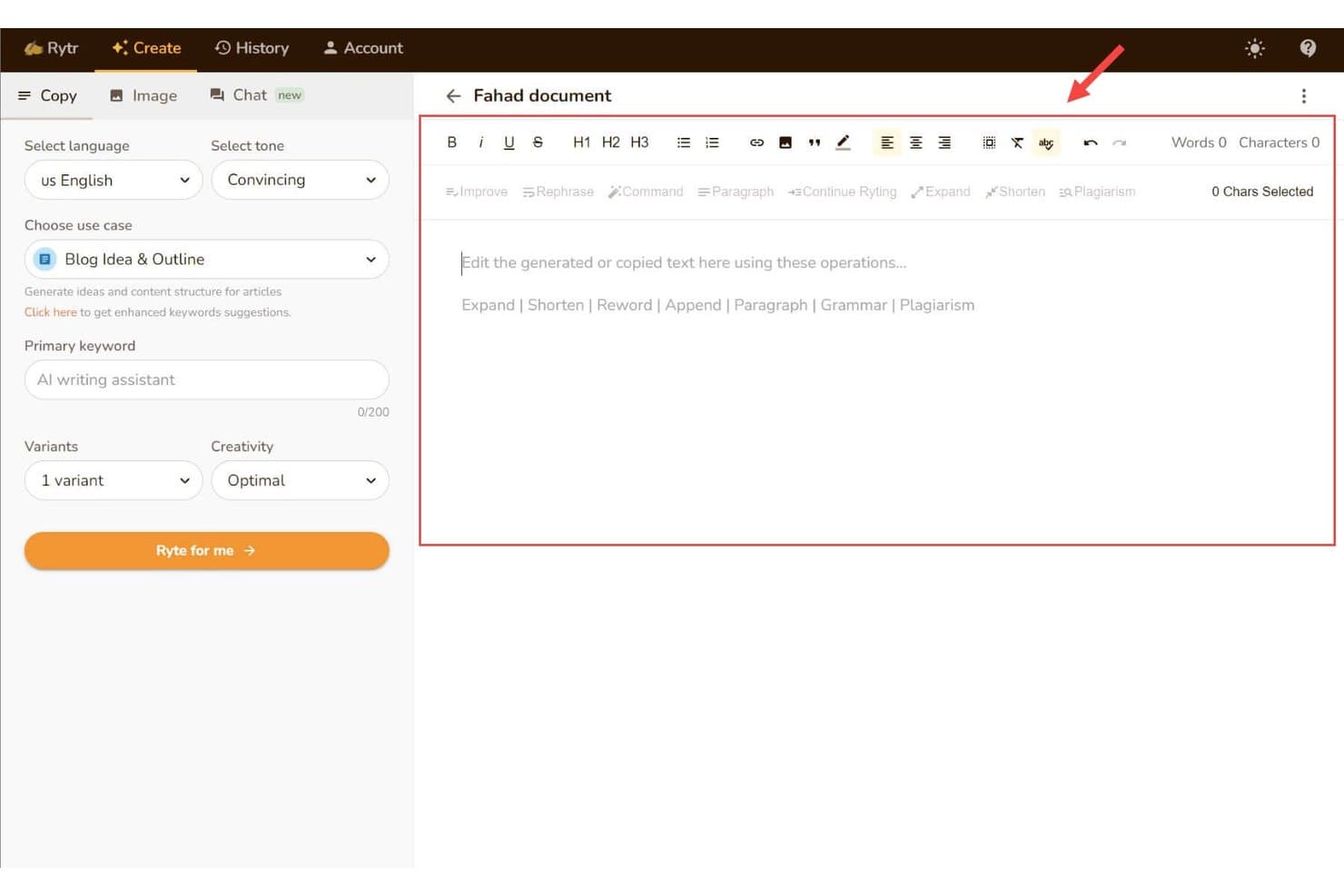
Rytr lets users draft and edit content in a rich text editor with AI writing tools such as Expand, Shorten, Rephrase, and a Blog Idea & Outline setup panel. Rytr is an AI writing assistant that generates short-form copy across 40+ use cases, including emails, social posts, blog intros, and ad copy, with built-in tone controls, rewriting tools, and a custom voice-matching feature.
Who Is Rytr Best For?
Rytr is a good fit for freelancers and small marketing teams who need a budget-friendly way to produce short-form copy quickly without a steep learning curve.
Why I Picked Rytr
Rytr earns its spot on my shortlist because it genuinely nails the short-form use case. I use the 40+ use-case templates to spin up social captions, email subject lines, and ad CTAs in under a minute. The Magic Command feature handles freeform requests when no template fits, and the My Voice tool analyzes a writing sample to mirror tone, which cuts the editing time I'd otherwise spend cleaning up generic-sounding output.
Rytr Key Features
- Multi-language support: Generate and translate content in over 35 languages.
- Plagiarism checker: Scan drafts for originality without leaving the workflow.
- SEO meta content generator: Create titles, descriptions, and keyword-rich snippets for pages and posts.
- Chrome extension: Write and edit directly inside web forms, CMS, and supported apps.
Rytr Integrations
Native integrations are not publicly listed. Rytr offers an API for custom integrations.
Pros and Cons
Pros:
- Generates copy in 35+ languages natively
- Built-in plagiarism checker within the editor
- Templates cover 40+ short-form copy formats
Cons:
- Generated content can feel generic or repetitive
- Long-form output quality drops noticeably
Learn more about Rytr:
Andre AI-skriveassistenter
Her er noen flere alternativer for AI-skriveassistenter som ikke kom med på kortlisten min, men som likevel er verdt å se nærmere på:
- 11FraseBest for research-backed content briefs
- 12GrammarlyBest for real-time grammar refinement
- 13Hypotenuse AIBest for large-scale product description creation
- 14HubSpot CMSBest for integrated content and CRM workflows
- 15QuillBotBest for academic-style rewriting and paraphrasing
- 16WordtuneBest for real-time sentence rephrasing suggestions
- 17SimplifiedBest for collaborative design-to-copy workflows
- 18NEURONwriterBest for semantic content optimization
- 19PeppertypeAIBest for quick multi-format copy generation
- 20Semrush Content HubBest for keyword-driven topic ideation
How I Evaluate AI Writing Assistants
To earn a spot on this list, an AI writing assistant needs to do more than autocomplete sentences—it should help you produce publish-ready marketing copy that holds up across channels. I split my evaluation into two layers: the core functionality every tool must deliver and the differentiating factors that separate good options from great ones.
Core Functionality (Table Stakes For This List)
When I'm selecting tools for my list, I rank each one on a scale from 0 (does not offer the functionality) to 5 (excels in this area) for each core functionality listed below. Then, I calculate the tool's total score into a percentage. Each tool needs to achieve a minimum total score of 75% to be considered for inclusion.
- Generative text output: I evaluate how well a tool handles both short-form copy like ad headlines and long-form pieces like blog posts or landing pages.
- Marketing copy templates: A strong template library covers formats marketers actually use daily, from email subject lines and social captions to PAS frameworks.
- Tone and brand voice control: I look for tools that let you save custom brand voice profiles and apply them across outputs, not just pick from generic presets.
- Content editing and rewriting: Beyond grammar fixes, I check whether the tool can rephrase, expand, or summarize existing drafts while preserving your intended meaning.
- SEO optimization support: Good tools help you weave in target keywords, generate meta descriptions, and score content against search intent before you publish.
- Multi-language generation: I consider how many languages each tool supports and whether output quality stays consistent for global campaign needs.
Once I have a list of tools that meet the criteria, I consider what sets each platform apart.
Differentiating Factors (What Sets Vendors Apart)
Here's how I compare and contrast different vendors:
Standout Features
Brand voice training matters a lot here. I look for tools that learn from your existing content so a five-person team sounds like one consistent writer. Multi-model access is another differentiator—platforms that let you switch between LLMs make it easy to match the right model to each task. Contextual research grounding also stands out, where a tool pulls from live web sources or uploaded documents to reduce hallucinations in data-heavy pieces.
Beyond Features
Integration ecosystem is one of the first things I check. A tool that connects natively to WordPress, Google Docs, or HubSpot fits into your content stack without extra steps. Pricing model also plays a big role—some tools charge per seat while others use word or credit limits, which can get expensive fast when you're scaling output across a team. I also evaluate data privacy policies, especially whether your inputs are used to train the vendor's models.
Slik velger du en AI-skriveassistent
Det er lett å gå seg vill i lange funksjonslister og komplekse prisstrukturer. For å hjelpe deg med å holde fokus mens du går gjennom den unike prosessen din for valg av programvare, får du her en sjekkliste over faktorer du bør ha i mente:
| Faktor | Hva du bør vurdere |
|---|---|
| FaktorSkalerbarhet | Hva du bør vurdereKan verktøyet håndtere arbeidsmengden til teamet ditt hvis du skalerer fra enkeltbrukere til dusinvis av brukere? Se etter retningslinjer for ordgrenser og muligheter for å legge til brukere etter hvert som behovene dine vokser. |
| FaktorIntegrasjoner | Hva du bør vurdereKobler det seg direkte til den eksisterende innholdsverktøykjeden din – for eksempel Google Docs, WordPress eller CRM-systemet ditt? Vurder hvor godt API-et og utvidelsesøkosystemet passer med dagens arbeidsflyter. |
| FaktorTilpasningsmuligheter | Hva du bør vurdereKan du justere tone, formateringsregler eller trinn i arbeidsflyten slik at de samsvarer med merkevaren din? Vurder hvor grundig du kan tilpasse prosessen for å generere innhold for teamet ditt. |
| FaktorBrukervennlighet | Hva du bør vurdereVil brukerne raskt lære seg å bruke det, eller trenger de opplæring? Velg løsninger som tilbyr intuitiv navigasjon og veiledning i appen, slik at de raskere tar løsningen i bruk. |
| FaktorImplementering og innføring | Hva du bør vurdereHvor lang tid vil det ta å komme i gang? Vurder læringskurven, opplæringsressurser og behov for migrering – særlig hvis løsningen skal rulles ut til flere team. |
| FaktorKostnad | Hva du bør vurdereSammenlign både priser per bruker og bruksbasert prissetting. Ta hensyn til eventuelle kostnader for oppsett, overskridelse av inkludert bruk eller kundestøtte, slik at du kan beregne de totale utgiftene når bruken øker. |
| FaktorSikkerhetstiltak | Hva du bør vurdereEr tiltakene for personvern og databeskyttelse tydelige og robuste? Se gjennom kontrollene for modelltrening, tilgangstillatelser og hvorvidt innholdet ditt forblir konfidensielt. |
| FaktorTilgjengelig kundestøtte | Hva du bør vurdereHvilke kanaler for kundestøtte tilbys? Rask direktemelding eller grundige ressurser i hjelpesenteret kan redusere nedetid hvis du støter på problemer eller trenger veiledning. |
Hva er AI-skriveassistenter?
AI-skriveassistenter er programvareverktøy som bruker kunstig intelligens til å hjelpe deg med å opprette, redigere og forbedre skriftlig innhold for ulike markedsføringsbehov. Disse plattformene genererer ny tekst, skriver om utkast og optimaliserer tone eller struktur basert på innspillene dine. Markedsførere bruker dem til å fremskynde produksjonen av innhold, opprettholde enhetlighet og tilpasse budskap på tvers av kampanjer og kanaler.
Funksjoner
Når du velger en AI-skriveassistent, bør du se etter følgende viktige funksjoner:
- Generering av tekst: Bruker avanserte AI-modeller til å utarbeide originalt innhold basert på instruksjonene, briefene eller det eksisterende materialet ditt for blogginnlegg, annonser, e-poster og mer.
- Maler for markedsføringstekst: Tilbyr innebygde rammeverk for vanlige formater som innlegg i sosiale medier, landingssider eller produktbeskrivelser, slik at du sparer tid på strukturert skriving.
- Tilpasning av tone og merkevarens stemme: Lar deg definere eller velge retningslinjer for merkevarens stemme og tone, slik at innholdet samsvarer med organisasjonens stil og budskap.
- Omskriving og utvidelse av innhold: Støtter omformulering, utvidelse eller oppsummering av utkast, slik at eksisterende materiale kan gjenbrukes og forbedres for ulike kanaler.
- Verktøy for SEO-optimalisering: Inkluderer forslag til søkeord, generering av metainnhold og resultatvurdering for å hjelpe innholdet ditt med å rangere høyere i søkemotorer.
- Støtte for flere språk: Gjør det mulig å generere og oversette innhold på tvers av flere språk for å nå internasjonale målgrupper.
- Samarbeidsfunksjoner: Gjør det mulig for teammedlemmer å redigere, gjennomgå og kommentere utkast sammen direkte i plattformen, slik at gruppearbeidet flyter godt.
- Plagiatkontroll: Skanner automatisk resultatene for å sikre at innholdet er originalt, og flagger duplisert tekst før publisering.
- Automatisering av arbeidsflyt: Tilbyr tilpassbare maler, biblioteker med instruksjoner og automatiseringsalternativer som gjør repetitive skrive- eller redigeringsoppgaver raskere.
- Integrasjonsmuligheter: Kobler seg til populære plattformer og innholdsverktøy, slik at du kan importere, eksportere eller synkronisere utkast med de eksisterende systemene dine.
Fordeler
Implementering av en AI-skriveassistent gir flere fordeler for teamet og virksomheten din. Her er noen av fordelene du kan se frem til:
- Raskere innholdsproduksjon: AI-genererte utkast, maler og automatisering av arbeidsflyt hjelper deg med å gå fra idé til publisert innhold langt raskere.
- Enhetlig merkevarekommunikasjon: Tilpasning av merkevarens stemme sikrer at alle teammedlemmer utformer budskap som samsvarer med virksomhetens tone og stil.
- Skalerbar innholdsproduksjon: Støtte for flere språk og funksjoner for masseproduksjon gjør det enkelt å møte økende innholdsbehov på tvers av kampanjer og geografiske områder.
- Bedre samarbeid: Innebygde funksjoner for redigering og kommentering i sanntid holder teamene samkjørte og effektiviserer gjennomgangsprosessen.
- Bedre SEO-resultater: Innebygde optimaliseringsverktøy og veiledning om søkeord hjelper alt innhold med å bli funnet i søk.
- Redusert manuelt arbeid: Automatiserings- og omskrivingsfunksjoner frigjør teamet ditt fra repetitive utkast- og redigeringsoppgaver, slik at de kan konsentrere seg om arbeid med høy verdi.
- Risikoreduksjon: Plagiatkontroll og sikkerhetstiltak bidrar til å beskytte merkevarens omdømme og holde sensitiv informasjon sikker.
Kostnader og priser
Å velge en AI-skriveassistent krever en forståelse av de ulike prismodellene og abonnementene som er tilgjengelige. Kostnadene varierer ut fra funksjoner, teamstørrelse, tilleggstjenester og mer, og gratis AI-programvare for skriving er tilgjengelig for mer grunnleggende behov. Tabellen nedenfor oppsummerer vanlige abonnementer, gjennomsnittsprisene deres og typiske funksjoner som inngår i løsninger for AI-skriveassistenter:
Sammenligningstabell for abonnementer for AI-skriveassistent
| Abonnementstype | Gjennomsnittspris | Vanlige funksjoner |
|---|---|---|
| AbonnementstypeGratisabonnement | Gjennomsnittspris$0 | Vanlige funksjonerGrunnleggende tekstgenerering, et begrenset antall maler, viktige omskrivingsverktøy og begrenset bruk per måned. |
| AbonnementstypePersonlig abonnement | Gjennomsnittspris$5-$25 per bruker per måned | Vanlige funksjonerStørre malbibliotek, forhåndsinnstillinger for merkevarens stemme, støtte for flere språk, forbedrede SEO-verktøy og prioritert kundestøtte. |
| AbonnementstypeBedriftsabonnement | Gjennomsnittspris$25-$70 per bruker per måned | Vanlige funksjonerSamarbeidsfunksjoner, automatisering av arbeidsflyt, avanserte integrasjoner, administrasjon av flere brukere og høyere bruksgrenser. |
| AbonnementstypeAbonnement for virksomheter | Gjennomsnittspris$70+ per bruker per måned | Vanlige funksjonerTilpasset oppstart, dedikert kontostøtte, forbedret sikkerhet, API-tilgang, alternativer for samsvar og SLA-garantier. |
Vanlige spørsmål om AI-skriveassistenter
Her er noen svar på vanlige spørsmål om AI-skriveassistenter:
Hvor nøyaktig er AI-generert innhold til markedsføringsbruk?
AI-generert innhold er vanligvis nøyaktig for generelle emner, men bør gjennomgås for merkevarespesifikke budskap og komplekse påstander. Det er best å kontrollere referansene og legge til menneskelige redigeringer for nyanser og samsvar.
Kan AI-skriveassistenter hjelpe med flerspråklige kampanjer?
Ja, de fleste verktøy tilbyr støtte for flere språk for utarbeiding og oversettelse av innhold på tvers av de viktigste språkene. Gjennomgå alltid lokaliseringene for å sikre at budskapet passer til den kulturelle konteksten og hensikten.
Hvordan holder jeg merkevarens stemme konsekvent på tvers av innholdet?
Se etter plattformer som støtter tilpassede innstillinger for merkevarens stemme eller lar deg laste opp stilveiledninger. Disse verktøyene kan bidra til å sikre at hvert utkast opprettholder teamets tone og foretrukne språk.
Vil dataene mine bli brukt til å trene opp AI-en?
Noen leverandører bruker inndataene dine til å forbedre modellene sine, mens andre tilbyr private moduser eller kontroller for datalagring. Gå alltid gjennom leverandørens personvernerklæring og kontraktsvilkår før du tar løsningen i bruk.
Hvordan integreres AI-skriveassistenter med de eksisterende arbeidsflytene mine?
Når du velger en AI-skriveassistent, må du forstå de ulike prismodellene og abonnementene som er tilgjengelige, inkludert gratis AI-skriveprogramvare for team med mer grunnleggende behov. Kostnadene varierer basert på funksjoner, teamstørrelse, tillegg og mer.De fleste løsninger integreres med populære innholdsstyringssystemer, tekstbehandlere og samarbeidsverktøy, slik at du kan importere, eksportere eller utarbeide innhold i den vanlige programvarestakken din.