

Recensione di SEO PowerSuite: Pro, Contro, Caratteristiche e Prezzi
SEO PowerSuite offre una suite potente di strumenti SEO che si distingue per la sua accessibilità e la gamma completa di funzionalità, rendendola ideale sia per i principianti che per i professionisti del marketing.

Recensiamo gli strumenti in modo indipendente, e le commissioni aiutano a finanziare i nostri test. Consulta la nostra politica sulla trasparenza, la nostra metodologia o suggerisci uno strumento.
SEO PowerSuite is a desktop-based SEO reporting tool that covers rank tracking, backlink analysis, site auditing, and white-label report generation. I'd consider it if your team needs agency-grade SEO capabilities without paying Semrush's recurring subscription fees. You get comparable core functionality at a significantly lower cost, which makes it a practical pick for agencies or in-house teams managing multiple sites on a tighter budget.
SEO PowerSuite Evaluation Summary
4.6/5
- From $29.10/month (billed annually)
- Free plan available
Perché fidarsi dei nostri consigli sui software
6,700+
Reviews
20
Industry experts
16+
Evaluation factors
14
Years
Il nostro team testa e recensisce software dal 2012. In quanto leader del marketing noi stessi, sappiamo quanto sia difficile — e importante — scegliere il software giusto.
Per questa guida, abbiamo valutato gli strumenti attraverso test pratici e ricerche indipendenti, assegnando un punteggio agli strumenti in base ai nostri criteri di selezione.
Le nostre recensioni riflettono il nostro giudizio editoriale umano, non un discorso di vendita.
Revisori esperti:
 Gui DrusinaDirettore creativo
- Shriya GhateSenior Marketing Lead
 Amanda JacquesResponsabile Marketing Ops

SEO PowerSuite Overview
In my opinion, SEO PowerSuite is a solid choice for SEO professionals and small to medium businesses looking for a well-rounded toolset without breaking the bank. It offers excellent value for its price, especially with its comprehensive features. You might find its interface less intuitive compared to other SEO tools, like Semrush and Ahrefs, but it compensates with robust reporting capabilities. Onboarding can be a bit challenging, but their support team is quite responsive. For those who prioritize features over a sleek interface, SEO PowerSuite stands out. It's particularly well-suited for agencies and in-house teams that need detailed analysis and reporting without the high costs of more premium tools.
Pros
- You can perform detailed SEO analysis with its diverse toolset.
- It offers excellent reporting capabilities for tracking progress.
- Your team gets responsive customer support when needed.
Cons
- The interface can feel outdated compared to other tools.
- Onboarding might be challenging for new users.
- You may find the software less intuitive than other options.
Is SEO PowerSuite Right For Your Needs?
Who Would be a Good Fit for SEO PowerSuite?
SEO PowerSuite is a great fit for small to medium businesses and digital marketing agencies needing comprehensive technical SEO tools without high costs. If your team requires detailed SEO reporting and analysis, SEO PowerSuite's diverse toolset can meet those needs. Its affordability and robust features make it ideal for in-house SEO teams and freelancers who want to enhance their SEO strategies without breaking the bank. The software's ability to track progress and offer responsive support is perfect for those who value data-driven decisions.
- Digital Marketing AgenciesYour agency benefits from its detailed reporting and analysis tools, helping you track and improve client outcomes.
- Small BusinessesSEO PowerSuite offers affordable SEO solutions, perfect for small businesses wanting to enhance their online presence.
- Freelance SEO SpecialistsFreelancers can leverage its comprehensive toolset to deliver high-quality SEO services without hefty software costs.
- In-House SEO TeamsYour team will appreciate the extensive features and support, enabling effective management of SEO campaigns.
- E-commerce BusinessesE-commerce sites can track search rankings and site audits, helping improve visibility and drive more traffic.
- Content CreatorsContent creators use its analysis tools to optimize content for better search engine performance and audience reach.
Who Would be a Bad Fit for SEO PowerSuite?
SEO PowerSuite might not suit large enterprises or tech-savvy teams looking for cloud-based solutions that offer seamless integrations with other software. If your team relies heavily on real-time collaboration or requires a sleek, modern interface, you might find SEO PowerSuite lacking. Its desktop-based nature could hinder teams that need access from multiple devices or locations. Additionally, if you expect a highly intuitive user experience, SEO PowerSuite's interface might feel cumbersome, especially for those accustomed to more user-friendly platforms.
- Large EnterprisesYour enterprise may find it lacks the scalability and integration options needed for complex operations.
- Tech-Savvy TeamsTeams expecting advanced, cloud-based features and seamless integrations might find its desktop-based approach limiting.
- Remote WorkforcesIf your team needs real-time collaboration across locations, SEO PowerSuite's desktop nature could be a barrier.
- Design AgenciesAgencies prioritizing sleek, modern interfaces might find its interface outdated compared to other solutions.
- Startups with Limited IT SupportStartups without dedicated IT support could struggle with its onboarding and setup requirements.
- Mobile-First CompaniesCompanies that need mobile accessibility won't find SEO PowerSuite's desktop-only setup accommodating.
Come Testiamo e Valutiamo gli Strumenti
Abbiamo passato anni a costruire, perfezionare e migliorare il nostro sistema di test e valutazione del software. Il nostro metodo è progettato per cogliere le sfumature nella selezione del software e ciò che rende uno strumento efficace, concentrandoci sugli aspetti critici del processo decisionale. Qui sotto puoi vedere esattamente come funziona il nostro sistema di test e valutazione su sette criteri. Questo ci permette di offrire una valutazione imparziale del software basata su funzionalità principali, funzioni distintive, facilità d’uso, onboarding, supporto clienti, integrazioni, recensioni dei clienti e rapporto qualità-prezzo.
Funzionalità principali (25% del punteggio finale)
Il punto di partenza della nostra valutazione è sempre la funzionalità principale dello strumento. Include le caratteristiche e le funzioni basilari che un utente si aspetterebbe di trovare? Alcune di queste funzionalità sono bloccate nei piani premium? Ci aspettiamo che ogni strumento soddisfi almeno le capacità di base dei suoi concorrenti.
Funzionalità distintive (25% del punteggio finale)
Successivamente, valutiamo le funzionalità uniche che vanno oltre la normale funzionalità principale, quelle poco comuni negli strumenti simili. Un punteggio alto riflette caratteristiche specializzate o uniche che rendono il prodotto più veloce, efficiente o offrono un valore aggiunto all’utente. Valutiamo anche quanto sia semplice integrare il software con altri strumenti abitualmente usati in una tech stack, per espandere le funzionalità e l’utilità del prodotto. Sono valutate positivamente soluzioni con molte integrazioni native, connessioni di terze parti e API per creare integrazioni personalizzate.
Facilità d’uso (10% del punteggio finale)
Consideriamo la rapidità e semplicità con cui si possono eseguire le attività principali tramite lo strumento. I software con punteggio più alto sono ben progettati, intuitivi, dispongono di app mobili, offrono template e semplificano compiti complessi.
Onboarding (10% del punteggio finale)
Sappiamo quanto sia importante l’adozione rapida in azienda, quindi valutiamo la facilità di apprendimento e utilizzo di uno strumento con formazione minima. Analizziamo quanto velocemente un utente senza esperienza può iniziare a usare il software. Le soluzioni migliori richiedono poco o nessun supporto.
Supporto clienti (10% del punteggio finale)
Analizziamo la rapidità e facilità nel trovare aiuto tramite telefono, chat dal vivo o knowledge base. Gli strumenti che offrono supporto in tempo reale ottengono il punteggio migliore: i chatbot invece i peggiori.
Recensioni dei clienti (10% del punteggio finale)
Oltre ai nostri test, consideriamo il net promoter score di attuali ed ex clienti. Valutiamo la probabilità che, potendo scegliere, l’utente decida di utilizzare ancora quello strumento per le funzionalità principali. Un software con un punteggio alto corrisponde ad un alto net promoter score tra clienti attuali o passati.
Rapporto qualità-prezzo (10% del punteggio finale)
Infine, tenendo conto di tutti gli altri criteri, confrontiamo il prezzo medio dei piani base rispetto alle funzionalità principali e agli altri fattori di valutazione. I software che offrono di più, a meno, ottengono i punteggi più alti.
Core Features
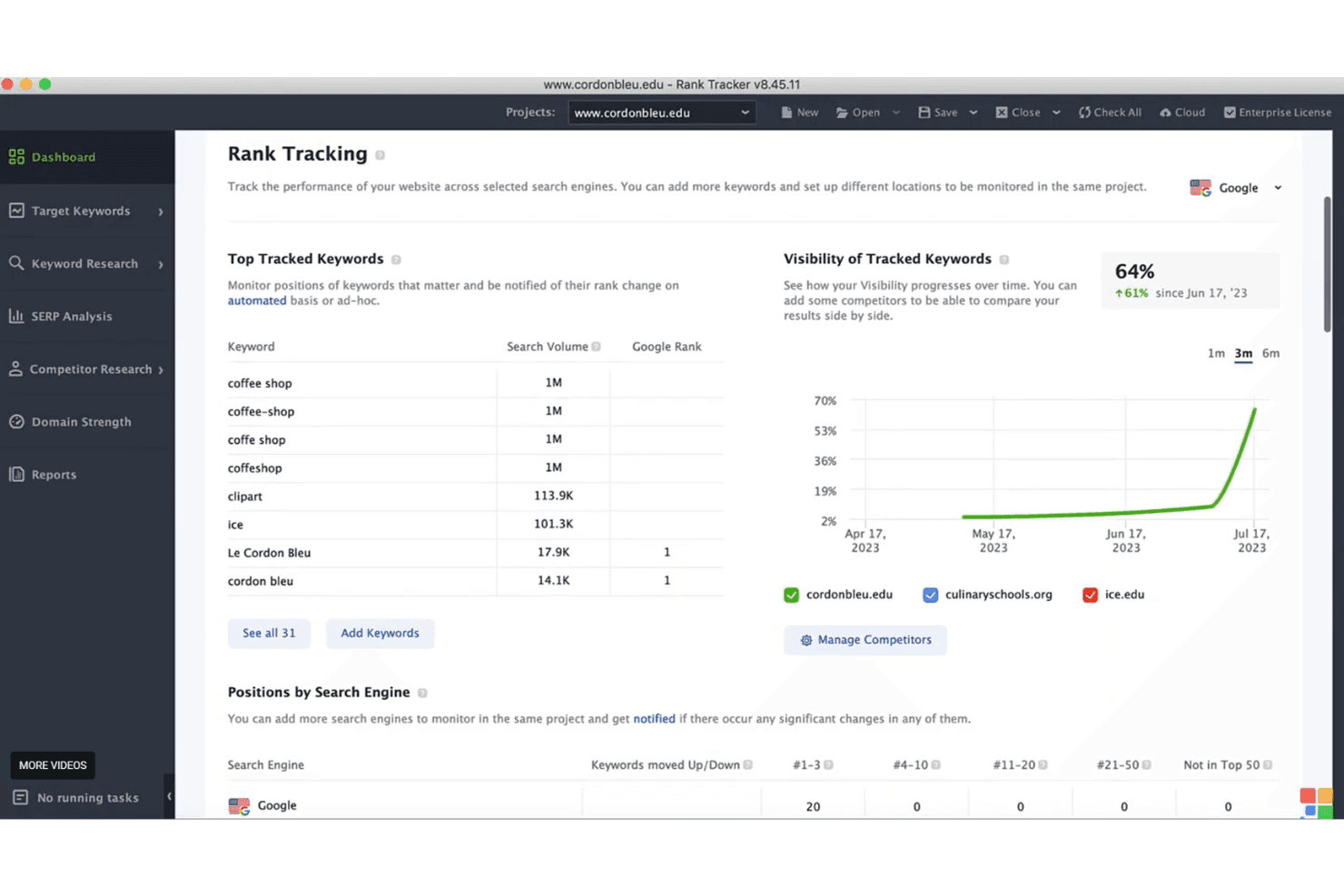
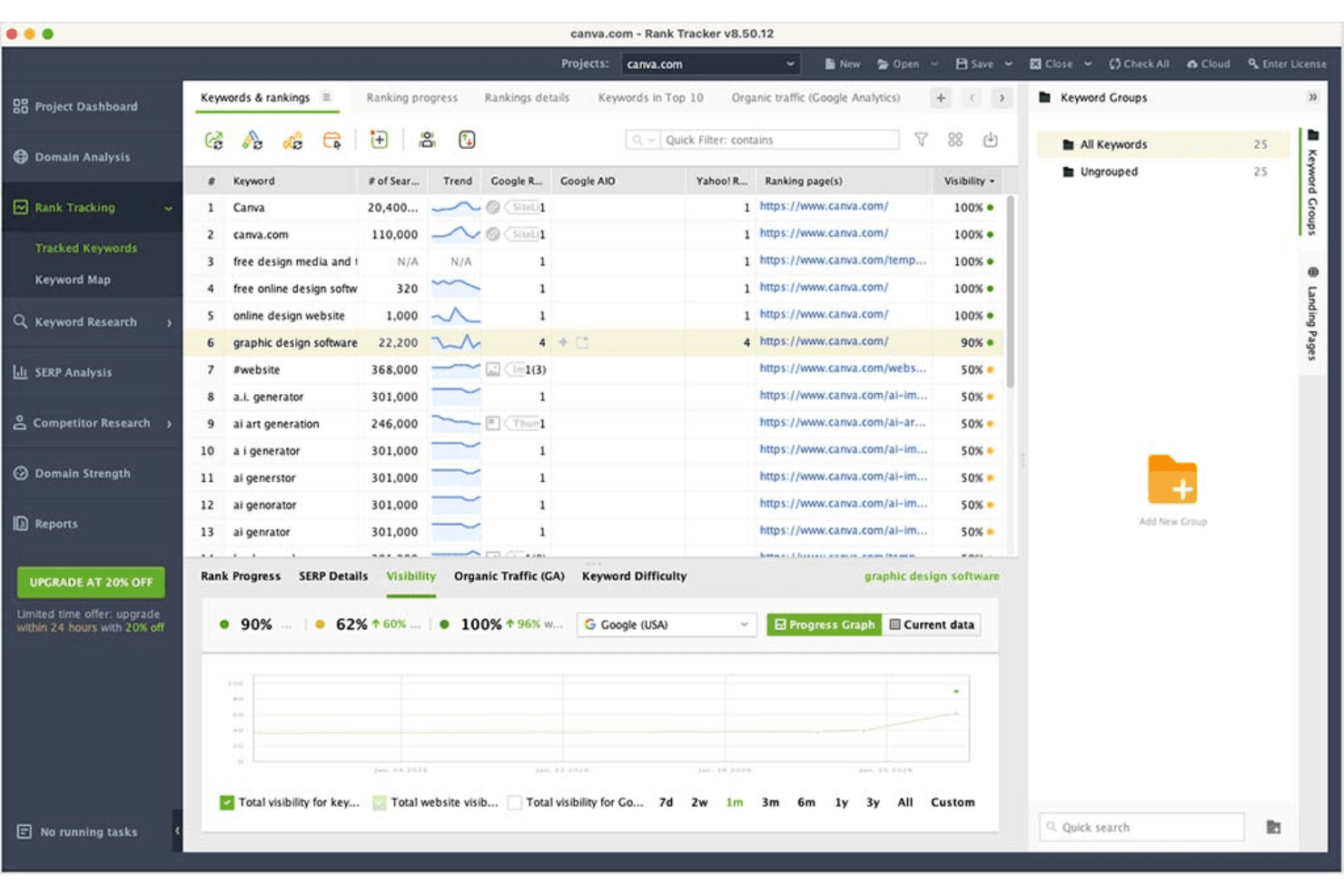
Rank Tracking
Monitor your website's keyword rankings over time with detailed graphs and reports. It helps your team changes in the SERP and adjust strategies quickly.
Website Audit
Analyze your site's health with comprehensive audits that pinpoint technical issues, like broken links. This feature ensures your site performs well in search engines.
Backlink Analysis
Discover and evaluate backlinks with SEO SpyGlass, helping you understand your link profile. It lets you spot opportunities and risks in your link-building strategy.
Keyword Research
Track keywords using advanced research tools that uncover search volume and competition. It empowers your team to target the right audience effectively.
Competitor Analysis
Uncover competitors' strategies and compare your site's performance with theirs. This insight helps your team stay ahead in the SEO race.
Reporting
Generate detailed, customizable SEO reports to keep stakeholders informed. These reports allow you to track key metrics and showcase results effectively.
Ease of Use
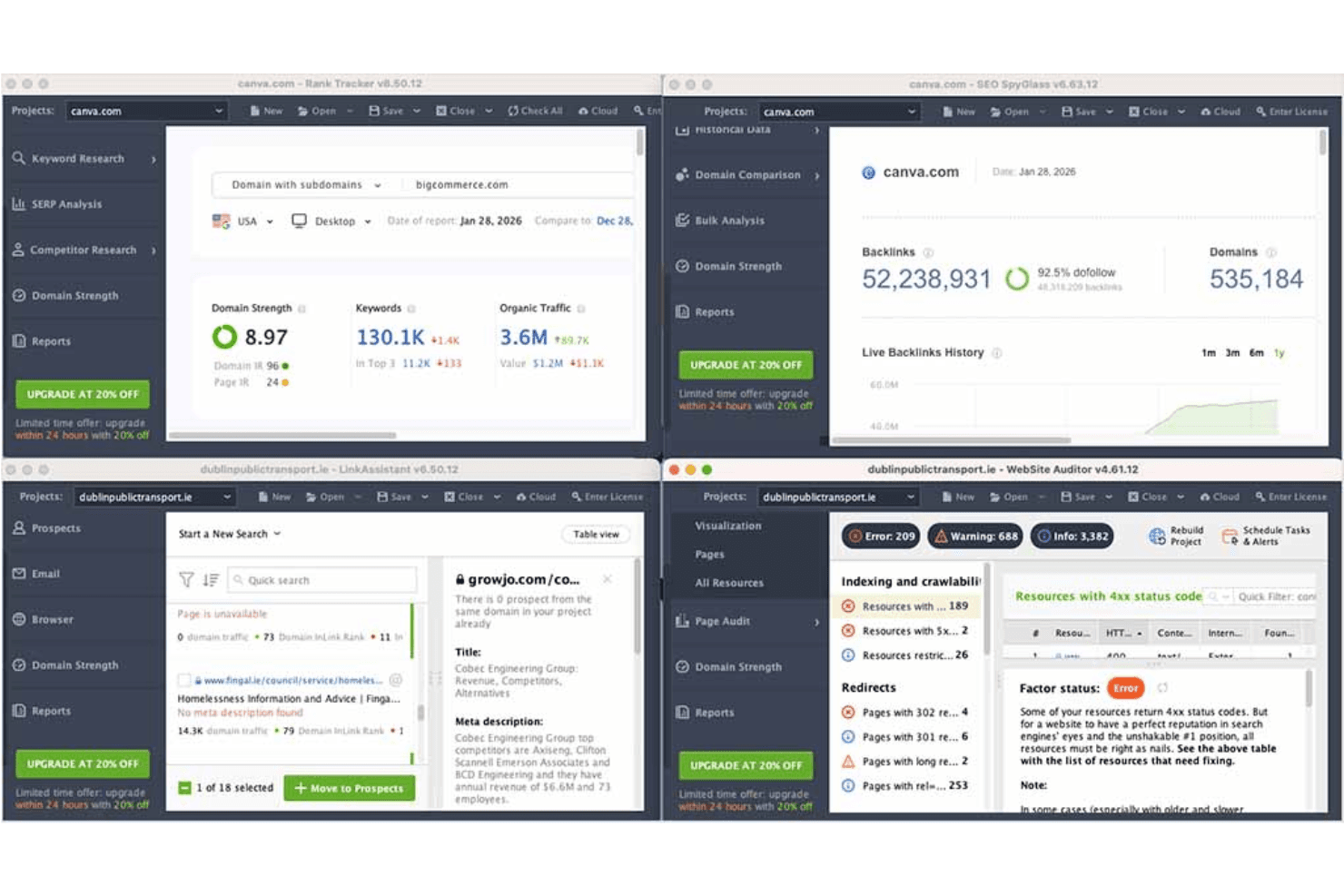
SEO PowerSuite offers a decent user experience but may feel less intuitive compared to some other tools. Its desktop-based nature requires a learning curve, especially for those new to SEO software. However, once you get the hang of it, the comprehensive features and detailed reports can significantly enhance your SEO campaigns. The interface might seem outdated, but it delivers the necessary functionalities to help your team manage SEO tasks effectively.
Integrations
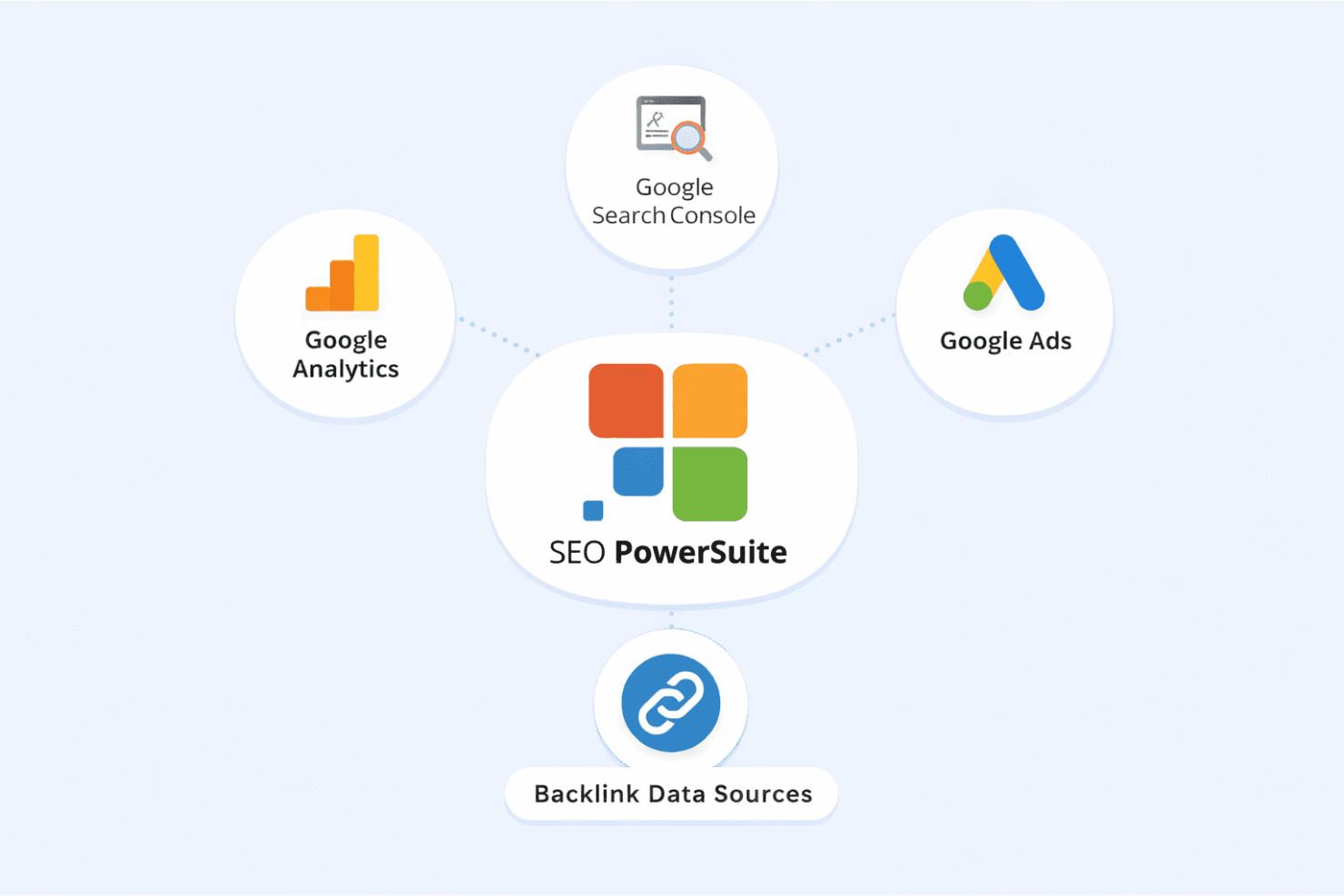
SEO PowerSuite integrates with Google Analytics, Google Search Console, and Google Ads to bring search and traffic data into the platform. It uses backlink data sources for in-depth link analysis, but it does not offer native connections to other third-party tools like CRM, Slack, or Trello.
SEO PowerSuite Specs
- API: Yes
- Audience Targeting: Yes
- Brand Management: No
- Conversion Tracking: No
- Dashboard: Yes
- Data Export: Yes
- Data Import: Yes
- Data Visualization: Yes
- External Integrations: Yes
- Keyword Tracking: Yes
- Link Tracking: Yes
- Marketing Automation: No
- Multi-Account: No
- Multi-User: No
- Notifications: Yes
- Social-Media Integration: No


