

Gli strumenti di gestione dei contenuti con AI utilizzano l'intelligenza artificiale per organizzare, creare e ottimizzare i contenuti digitali della tua azienda. Se stai cercando soluzioni per gestire raccolte di contenuti in crescita, automatizzare le attività ripetitive o mantenere il tuo team allineato, questi strumenti possono aiutarti a essere sempre un passo avanti. Con così tante opzioni disponibili, scegliere la piattaforma giusta è essenziale per mantenere efficienti i processi aziendali e la strategia dei contenuti sulla buona strada. Questo elenco ti aiuterà a confrontare rapidamente i principali strumenti di gestione dei contenuti con AI, così potrai trovare quello più adatto alle esigenze e agli obiettivi del tuo team.
Perché fidarsi dei nostri consigli sui software
6,700+
Reviews
20
Industry experts
16+
Evaluation factors
14
Years
Il nostro team testa e recensisce software dal 2012. In quanto leader del marketing noi stessi, sappiamo quanto sia difficile — e importante — scegliere il software giusto.
Per questa guida, abbiamo valutato gli strumenti attraverso test pratici e ricerche indipendenti, assegnando un punteggio agli strumenti in base ai nostri criteri di selezione.
Le nostre recensioni riflettono il nostro giudizio editoriale umano, non un discorso di vendita.
Revisori esperti:
 Gui DrusinaDirettore creativo
- Shriya GhateSenior Marketing Lead
 Amanda JacquesResponsabile Marketing Ops

Tabella di confronto degli strumenti di gestione dei contenuti con AI
Questa tabella di confronto riassume i dettagli dei prezzi della mia selezione dei migliori strumenti di gestione dei contenuti con AI:
| Tool | Best For | Trial Info | Price | ||
|---|---|---|---|---|---|
| 1 | Ideale per integrazioni dirette con assistenti AI | Demo gratuita disponibile | A partire da $699/mese | Website | |
| 2 | Ideale per la coerenza della voce del brand | Prova gratuita di 7 giorni + demo gratuita disponibile | Da $59/utente/mese (fatturazione annuale) | Website | |
| 3 | Il migliore per opzioni di personalizzazione open-source | Piano gratuito + prova gratuita disponibile | A partire da $45/mese | Website | |
| 4 | Ideale per la governance automatizzata dei contenuti | Demo gratuita disponibile | Prezzo su richiesta | Website | |
| 5 | Ideale per la gestione sicura dei file su cloud | Piano gratuito + demo gratuita disponibili | Da $8/utente/mese | Website | |
| 6 | Ideale per controlli avanzati di conformità | Demo gratuita disponibile | Prezzo su richiesta | Website | |
| 7 | Ideale per l'ideazione di contenuti basata sull'IA | Prova gratuita disponibile | A partire da $29/mese | Website | |
| 8 | Ideale per l'integrazione in uno spazio di lavoro collaborativo | Piano gratuito + demo gratuita disponibile | Da $10/membro/mese (fatturazione annuale) | Website | |
| 9 | Ideale per l’automazione dei flussi di lavoro nei team di contenuti | Prova gratuita disponibile | Da $36/mese (fatturato annualmente) | Website | |
| 10 | Ideale per architettura headless flessibile | Piano gratuito + demo gratuita disponibile | Prezzo su richiesta | Website |


Recensioni degli strumenti di gestione dei contenuti con AI
Di seguito trovi i miei riepiloghi dettagliati dei migliori strumenti di gestione dei contenuti con AI inclusi nella mia selezione. Le mie recensioni offrono una panoramica dettagliata delle funzionalità, delle capacità e delle integrazioni di ciascuna piattaforma, per aiutarti a trovare quella più adatta a te.
 Ideale per integrazioni dirette con assistenti AI
- Demo gratuita disponibile
- A partire da $699/mese
Visit WebsiteCustomer Rating:4.4/5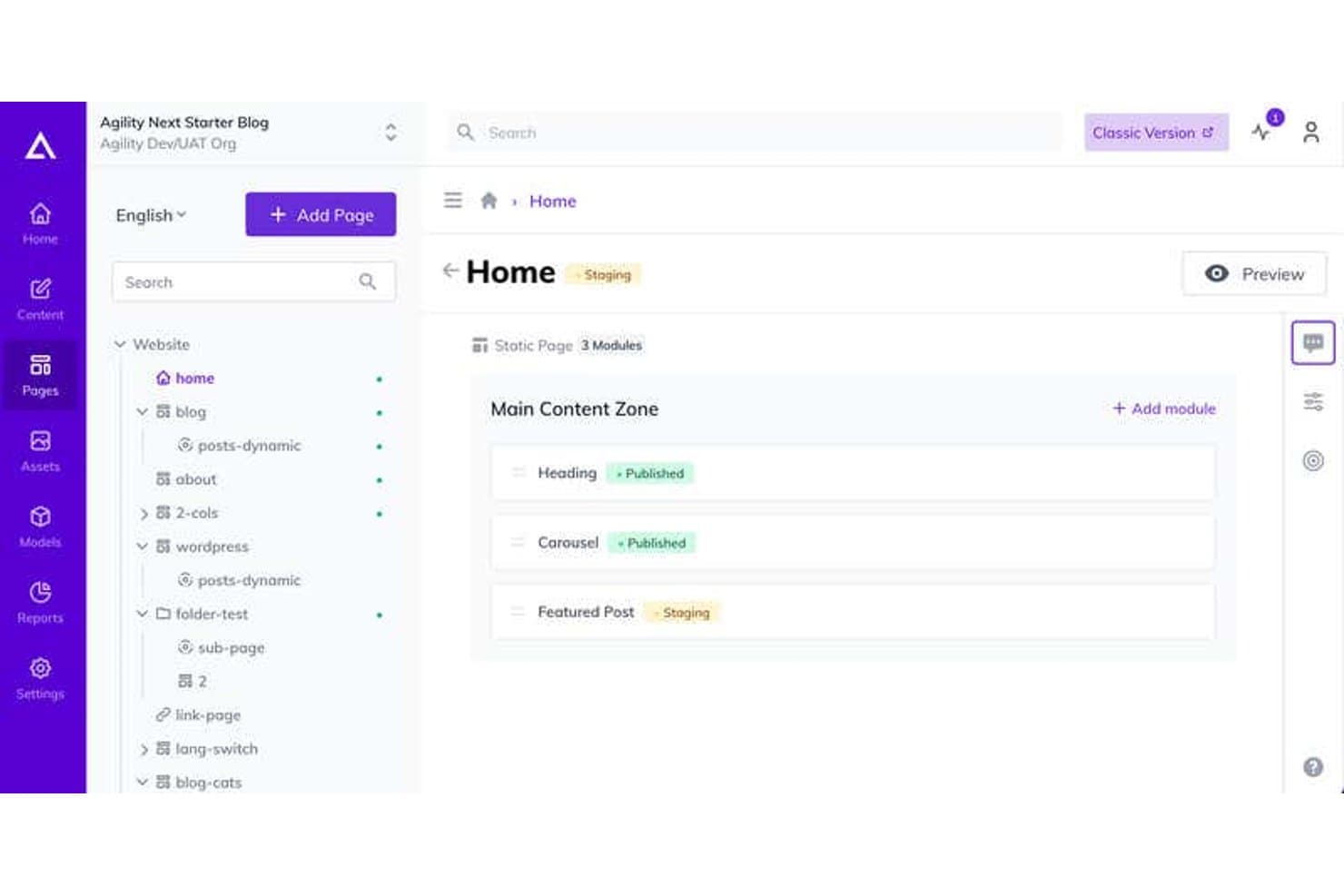
Agility CMS offre un'interfaccia visiva di gestione delle pagine dove gli utenti possono visualizzare e gestire i moduli di contenuto con stati di staging e pubblicazione all'interno di una struttura ad albero del sito. Agility CMS è un sistema di gestione dei contenuti headless per le imprese che consente ai team di marketing e sviluppo di centralizzare i contenuti, automatizzare l'etichettatura, gestire i flussi di lavoro e integrare la ricerca e l'organizzazione delle risorse digitali basate su AI su più canali.
Per chi è ideale Agility CMS?
Agility CMS è adatto a team di marketing e digitali di imprese di medie e grandi dimensioni che necessitano di una gestione dei contenuti componibile, supporto omnicanale e integrazioni dirette dei flussi di lavoro con l'AI.
Perché ho scelto Agility CMS
Ho scelto Agility CMS tra i migliori perché posso gestire i contenuti direttamente da assistenti AI come Claude e GitHub Copilot, utilizzare il linguaggio naturale per organizzare le risorse e automatizzare i flussi di pubblicazione senza dover sempre cambiare applicazione.
Funzionalità principali di Agility CMS
- Distribuzione di contenuti omnicanale: Distribuire contenuti strutturati su più canali e dispositivi da un'unica piattaforma.
- Storico versioni e ripristino: Tracciare tutte le modifiche ai contenuti e ripristinare facilmente le versioni precedenti quando necessario.
- Permessi basati sui ruoli: Controllare chi può accedere, modificare o approvare tipi specifici di contenuto tra i vari team.
- Architettura API-first: Integrare app e flussi di lavoro di terze parti tramite API RESTful robuste e webhook.
Integrazioni di Agility CMS
Agility CMS offre integrazioni native con Shopify, Typeform, Salesforce Sales Cloud, Formstack, Bynder, Ahrefs, HubSpot, Microsoft Azure, Vimeo, Vercel e altre ancora. Si integra anche con Zapier, e un'API è disponibile per integrazioni personalizzate.
Pros and Cons
Pros:
- Gestione diretta dei contenuti tramite assistenti AI
- Consegna di contenuti strutturati omnicanale
- Controllo di pubblicazione dettagliato basato sui ruoli
Cons:
- Necessaria configurazione manuale della tassonomia dei contenuti
- Richiede integrazioni per personalizzazioni avanzate
Learn more about Agility CMS: Ideale per la coerenza della voce del brand
- Prova gratuita di 7 giorni + demo gratuita disponibile
- Da $59/utente/mese (fatturazione annuale)
Visit WebsiteCustomer Rating:4.7/5
Dashboard di Jasper AI con prompt di chat, app per i contenuti e template di marketing. Jasper è una piattaforma di contenuti basata sull’intelligenza artificiale progettata per team di marketing e professionisti dei contenuti che hanno bisogno di gestire grandi volumi di contenuti di marca. È ideale per le aziende che desiderano unificare il messaggio su diversi canali e mantenere il controllo sulle proprie risorse di contenuto. La piattaforma aiuta a risolvere le sfide legate alla scalabilità della produzione di contenuti mantenendo coerenza e fedeltà al brand.
Per chi è Jasper?
Jasper è particolarmente adatto a team di marketing e content manager di aziende di medie e grandi dimensioni che hanno bisogno di mantenere un messaggio di brand coerente su più canali.
Perché ho scelto Jasper
Ciò che distingue Jasper, secondo me, è la sua attenzione alla coerenza della voce del brand in tutti i contenuti prodotti. La piattaforma consente di creare e gestire linee guida dettagliate sul tono di voce, così ogni contenuto generato dall’IA rispecchia lo stile e il messaggio della tua azienda. Apprezzo inoltre che Jasper offra template e workflow specificamente pensati per i team di marketing che devono mantenere messaggi uniformi tra campagne e canali. Queste funzionalità rendono Jasper una scelta ideale per le aziende che non possono permettersi errori di tono o contenuti incoerenti nelle attività di marketing.
Funzionalità principali di Jasper
Altre funzionalità che rendono Jasper utile per la gestione dei contenuti IA includono:
- Calendario dei contenuti: Pianifica, programma e organizza la produzione dei contenuti tramite un’interfaccia calendario visuale.
- Strumenti di collaborazione: Assegna ruoli, condividi progetti e gestisci i permessi del team per facilitare il lavoro di gruppo.
- Generazione di contenuti multicanale: Crea contenuti su misura per post social, blog, email e annunci da un’unica piattaforma.
- Controllo plagio: Analizza i contenuti generati per garantirne l’originalità e prevenire duplicazioni.
Integrazioni Jasper
Le integrazioni includono Slack, Google BigQuery, Webflow, Microsoft Word, Google Sheets, Google Docs, Zapier, Make e altre ancora.
Pros and Cons
Pros:
- Template workflow per campagne multicanale
- Rilevamento plagio integrato per garantire l’originalità
- Calendario dei contenuti per pianificazione e programmazione
Cons:
- Formattazione avanzata limitata all’interno dell’editor
- Impostazioni della voce del brand talvolta incoerenti
Learn more about Jasper: Il migliore per opzioni di personalizzazione open-source
- Piano gratuito + prova gratuita disponibile
- A partire da $45/mese
Visit WebsiteCustomer Rating:4.5/5
Interfaccia di Strapi CMS con tipi di collezione, campi e flusso di lavoro bozza/pubblicazione. Strapi è una piattaforma di gestione dei contenuti open-source pensata per sviluppatori e team tecnici che desiderano il pieno controllo sull'architettura dei contenuti. È una soluzione ideale per le organizzazioni che hanno bisogno di personalizzare flussi di lavoro, modelli di dati e integrazioni per soddisfare requisiti aziendali specifici. Se stai cercando una soluzione flessibile capace di adattarsi a esigenze di contenuto complesse o in evoluzione, Strapi offre un approccio modulare che si distingue rispetto ai sistemi tradizionali e preconfezionati.
Per chi è più adatto Strapi?
Strapi è adatto a team di sviluppo di startup e aziende di medie dimensioni che necessitano di un framework di gestione dei contenuti altamente personalizzabile e open-source.
Perché ho scelto Strapi
Ciò che mi ha colpito di Strapi è la sua base open-source, che offre ai team una flessibilità senza pari per personalizzare ogni aspetto dell'ambiente di gestione dei contenuti. Trovo di grande valore il suo sistema di plugin e l'API estendibile, che consentono agli sviluppatori di adattare flussi di lavoro, strutture dati e automazioni alle esigenze specifiche del business. L'architettura headless di Strapi permette inoltre di collegare i contenuti a qualsiasi front-end o canale, rendendolo una scelta solida per le organizzazioni con strategie digitali complesse o in evoluzione. Per i team che desiderano creare soluzioni di contenuto guidate dall'AI senza essere vincolati dai limiti dei fornitori, le opzioni di personalizzazione offerte da Strapi sono difficili da eguagliare.
Caratteristiche principali di Strapi
Altre funzionalità che rendono Strapi interessante per la gestione di contenuti AI includono:
- Controllo degli accessi basato sui ruoli: Assegna permessi granulari a utenti e gruppi per gestire chi può visualizzare, modificare o pubblicare contenuti.
- Gestione della libreria multimediale: Organizza, carica e gestisci immagini, video e altre risorse direttamente nella piattaforma.
- Internazionalizzazione (i18n): Gestisci e distribuisci contenuti in più lingue per un pubblico globale.
- Supporto ai webhook: Attiva azioni automatiche o connettiti a servizi esterni quando i contenuti vengono creati, aggiornati o eliminati.
Integrazioni di Strapi
Le integrazioni includono Cloudinary, Algolia, SendGrid, Drip, React Native, Expo, Astro, Vercel e altro ancora.
Pros and Cons
Pros:
- Codice open-source che consente personalizzazione approfondita
- Ecosistema di plugin attivo per funzionalità aggiuntive
- Documentazione per sviluppatori solida e buon supporto
Cons:
- Nessuno strumento integrato per la generazione di contenuti AI
- Le autorizzazioni basate sui ruoli possono essere complesse da configurare
Learn more about Strapi: Ideale per la governance automatizzata dei contenuti
- Demo gratuita disponibile
- Prezzo su richiesta
Visit WebsiteCustomer Rating:4.5/5
Adobe Experience Manager è un CMS aziendale potenziato dall’intelligenza artificiale per team marketing che gestiscono e distribuiscono contenuti in scala su diversi canali. Adobe Experience Manager è una piattaforma di gestione dei contenuti aziendale con funzionalità basate sull'intelligenza artificiale, pensata per i team di marketing e digitali che devono gestire e distribuire contenuti su più canali su larga scala.
Per chi è più adatto Adobe Experience Manager?
Grandi team di marketing e responsabili dell'esperienza digitale in organizzazioni aziendali che necessitano di una governance strutturata, supporto alla personalizzazione e operazioni sui contenuti scalabili.
Perché ho scelto Adobe Experience Manager
Ho scelto Adobe Experience Manager per la sua capacità di combinare le funzionalità di CMS aziendale con la catalogazione automatica delle risorse e i flussi di lavoro di governance strutturata. Adobe Sensei supporta attività come la classificazione e l'organizzazione dei contenuti, aiutando i team a gestire in modo efficiente ampie librerie di contenuti. I flussi di lavoro di approvazione integrati e le tracce di audit offrono supervisione durante tutti i processi di pubblicazione.
Caratteristiche principali di Adobe Experience Manager
- Catalogazione delle risorse tramite intelligenza artificiale: Tag automatico di immagini e video tramite Adobe Sensei per una ricerca e organizzazione più rapide.
- Distribuzione omnicanale dei contenuti: Pubblicazione dei contenuti su web, mobile, email e canali social da un'unica piattaforma.
- Motore di personalizzazione: Offre esperienze su misura a diversi segmenti di pubblico grazie a raccomandazioni basate sull'intelligenza artificiale.
- Funzionalità headless CMS: Supporta la distribuzione dei contenuti con un approccio API-first per un'integrazione flessibile con app personalizzate ed esperienze digitali.
Integrazioni di Adobe Experience Manager
Le integrazioni includono Adobe Creative Cloud, Adobe Analytics, Adobe Target, Adobe Commerce, Marketo Engage, Workfront e Real-Time CDP.
Pros and Cons
Pros:
- L'IA assegna automaticamente tag e organizza le risorse digitali
- Supporta la distribuzione omnicanale dei contenuti su larga scala
- Versionamento avanzato dei contenuti e tracce di audit
Cons:
- Richiede un tempo significativo per configurazione e onboarding
- Personalizzazioni spesso richiedono risorse di sviluppo
Learn more about Adobe Experience Manager: 5Ideale per la gestione sicura dei file su cloud
Box
- Piano gratuito + demo gratuita disponibili
- Da $8/utente/mese
Visit WebsiteCustomer Rating:4.3/5
Box mostra una dashboard degli insights con l'utilizzo delle API e utenti attivi. Box offre una gestione sicura dei file basata su cloud con funzionalità avanzate di collaborazione e workflow. È particolarmente indicato per organizzazioni che devono gestire contenuti sensibili e automatizzare processi documentali su larga scala. I team che cercano classificazione dei contenuti basata su AI e controlli di conformità troveranno Box particolarmente rilevante nell'ambito della gestione dei contenuti con intelligenza artificiale.
A Chi È Rivolto Box?
Box è perfetto per organizzazioni di medie e grandi dimensioni attive in settori regolamentati che necessitano di gestione e collaborazione sicura dei contenuti nel cloud.
Perché Ho Scelto Box
Ciò che mi ha colpito di Box per la gestione dei contenuti con AI è la sua forte attenzione alla sicurezza nella gestione dei file nel cloud. Ritengo Box una delle migliori soluzioni per i team che devono proteggere documenti sensibili, pur consentendo collaborazione e flussi di lavoro automatizzati. La classificazione dei contenuti basata su AI e i controlli granulari dei permessi aiutano le organizzazioni a mantenere la conformità e ridurre i rischi. Apprezzo anche come Box automatizzi la conservazione dei documenti e supporti la condivisione sicura, elementi essenziali per le aziende che gestiscono informazioni riservate o regolamentate.
Funzionalità Principali di Box
Altre funzionalità che rendono Box prezioso per la gestione dei contenuti con AI includono:
- Tagging dei metadati e ricerca: Aggiungi metadati personalizzati ai file e utilizza la ricerca avanzata per trovare rapidamente i contenuti in tutta l'organizzazione.
- Cronologia delle versioni e recupero file: Tieni traccia delle modifiche con storici dettagliati delle versioni e ripristina versioni precedenti dei documenti quando necessario.
- Costruttore di automazione workflow: Progetta e automatizza processi di approvazione e revisione dei contenuti a più fasi direttamente su Box.
- Integrazione nativa della firma elettronica: Raccogli firme elettroniche legalmente vincolanti sui documenti senza lasciare la piattaforma.
Integrazioni Box
Le integrazioni includono Microsoft 365, Google Workspace, Salesforce, Slack, Zoom, Adobe, Oracle NetSuite, ServiceNow, Workday e altro ancora.
Pros and Cons
Pros:
- Classificazione dei contenuti basata su AI per file sensibili
- Controlli granulari dei permessi per l'accesso ai documenti
- Firma elettronica nativa per approvazioni sicure
Cons:
- Il costruttore di automazione dei workflow manca di logica avanzata
- Configurazione del tagging dei metadati dispendiosa in termini di tempo
Learn more about Box: Ideale per controlli avanzati di conformità
- Demo gratuita disponibile
- Prezzo su richiesta
Visit WebsiteCustomer Rating:4.2/5
Dashboard di OpenText Core Content con pannelli di workflow, attività e area di lavoro. OpenText offre una piattaforma di gestione dei contenuti potenziata dall'intelligenza artificiale, progettata per organizzazioni con rigorose esigenze normative o di governance dei dati. È particolarmente adatta alle aziende dei settori altamente regolamentati come finanza, sanità o pubblica amministrazione. Se hai bisogno di gestire contenuti sensibili mantenendo il controllo su accesso, conservazione e privacy dei dati, OpenText fornisce strumenti per aiutarti a soddisfare questi requisiti.
A chi è più indicato OpenText?
Grandi imprese in settori regolamentati che richiedono una rigorosa conformità e governance dei dati per la gestione dei propri contenuti.
Perché ho scelto OpenText
Ciò che mi colpisce di OpenText è la particolare attenzione ai controlli avanzati per la compliance, essenziale per le organizzazioni che gestiscono contenuti sensibili o regolamentati. La piattaforma offre permessi di accesso dettagliati, tracciamento delle attività e politiche di conservazione automatizzate, che contribuiscono ad assicurare la gestione dei contenuti in conformità con standard legali e industriali rigorosi. Apprezzo anche le sue funzionalità di classificazione e rilevamento dei rischi basate su intelligenza artificiale, che supportano la conformità proattiva e riducono la supervisione manuale. Per i team che devono dimostrare l'aderenza alle normative e gestire requisiti di governance complessi, OpenText offre capacità specialistiche che vanno oltre le soluzioni comuni di gestione dei contenuti.
Funzionalità chiave di OpenText
Oltre alle sue capacità focalizzate sulla compliance, OpenText offre diverse altre funzionalità rilevanti per la gestione dei contenuti basata su intelligenza artificiale:
- Ricerca di contenuti alimentata da IA: Utilizza l'elaborazione del linguaggio naturale per aiutare gli utenti a trovare rapidamente documenti e informazioni rilevanti in grandi archivi.
- Tagging automatico dei metadati: Applica l'IA per generare e assegnare automaticamente metadati ai contenuti, migliorando l'organizzazione e la reperibilità.
- Gestione delle versioni dei documenti: Tiene traccia delle modifiche e mantiene la cronologia completa delle revisioni dei documenti, consentendo agli utenti di ripristinare le versioni precedenti se necessario.
- Pubblicazione multicanale: Permette la distribuzione dei contenuti su web, mobile e altri canali digitali da un'unica piattaforma.
Integrazioni di OpenText
Le integrazioni includono SAP, Microsoft 365, Salesforce, Guidewire, Amazon Web Services, Google Cloud, Microsoft Azure, ServiceNow, BMC Helix ITSM e IBM.
Pros and Cons
Pros:
- Funzioni avanzate di conformità e tracciabilità
- Classificazione dei contenuti e rilevamento dei rischi alimentati da IA
- Opzioni di distribuzione flessibili per cloud o locale
Cons:
- Funzionalità di sviluppo mobile-friendly limitate
- Elevato carico amministrativo tecnico
Learn more about OpenText: Ideale per l'ideazione di contenuti basata sull'IA
- Prova gratuita disponibile
- A partire da $29/mese
Visit WebsiteCustomer Rating:4.4/5
Interfaccia di Copy AI con campi per l'inserimento dei prompt, selezione del tono e generazione di contenuti tramite IA. Se hai bisogno di una piattaforma che automatizzi la creazione di contenuti con l'IA, Copy AI è una soluzione da prendere in considerazione. È progettata per team di marketing, agenzie e professionisti dei contenuti che desiderano generare idee e creare rapidamente bozze di testi. Lo strumento aiuta a superare i blocchi creativi e accelera la produzione di blog, e-mail e post per i social.
Per chi è più indicato Copy AI?
Copy AI è particolarmente adatto ai team di marketing e ai creatori di contenuti delle piccole e medie imprese che devono generare e perfezionare contenuti scritti su larga scala.
Perché ho scelto Copy AI
Ciò che mi ha colpito di Copy AI è il modo in cui utilizza l'IA per stimolare nuove idee di contenuti e accelerare il processo di brainstorming. Per i team che devono generare grandi quantità di testi originali, la sua suite di strumenti per l'ideazione, come i generatori di argomenti per blog e i suggerimenti per i post sui social, aiuta a mantenere sempre pieni i flussi di produzione dei contenuti. Apprezzo anche la possibilità di trasformare rapidamente queste idee in prime bozze grazie alle funzionalità di copywriting automatizzato. Questa attenzione all'ideazione e alla creazione rapida di contenuti rende Copy.ai particolarmente utile per professionisti del marketing e responsabili dei contenuti che desiderano mantenere attive le campagne senza rallentamenti creativi.
Funzionalità principali di Copy AI
Tra le altre funzionalità che rendono Copy AI utile per la gestione dei contenuti generati dall'IA figurano:
- Automazione dei flussi di lavoro: Automatizza le attività ripetitive relative ai contenuti e le approvazioni direttamente nella piattaforma per velocizzare i cicli di produzione.
- Personalizzazione della voce del marchio: Imposta e applica le linee guida del marchio affinché i contenuti generati riflettano il tono della tua azienda e siano in sintonia con il pubblico di riferimento.
- Strumenti per la collaborazione in team: Invita i membri del team, assegna ruoli e gestisci i progetti insieme in spazi di lavoro condivisi.
- Opzioni di esportazione dei contenuti: Scarica o copia i contenuti generati in diversi formati per utilizzarli su vari canali.
Integrazioni di Copy AI
Le integrazioni includono Salesforce, HubSpot, Slack, Microsoft Teams, Google Workspace, Notion e altre.
Pros and Cons
Pros:
- L'IA genera idee di contenuti per diversi formati
- Impostazioni della voce del marchio per ottenere risultati coerenti
- Supporta l'esportazione dei contenuti in vari formati
Cons:
- Funzionalità di modifica avanzata limitate nella piattaforma
- Nessuna pubblicazione diretta sulle principali piattaforme CMS
 Ideale per l'integrazione in uno spazio di lavoro collaborativo
- Piano gratuito + demo gratuita disponibile
- Da $10/membro/mese (fatturazione annuale)

Interfaccia Notion AI che mostra l'inserimento di prompt e app collegate per la ricerca. Notion unisce note, documenti, database e gestione di progetti senza codice in un unico spazio di lavoro. È particolarmente adatto ai team che desiderano centralizzare la creazione dei contenuti, la collaborazione e la condivisione delle conoscenze. Se cerchi una piattaforma flessibile per organizzare e gestire sia contenuti strutturati che non strutturati, Notion offre un approccio unificato che conquista team di marketing, prodotto e operations.
A chi è più adatto Notion?
Notion è ideale per team trasversali di startup e aziende di medie dimensioni che hanno bisogno di uno spazio di lavoro collaborativo per gestire contenuti, progetti e documentazione.
Perché ho scelto Notion
Quello che mi colpisce di Notion è come combina la gestione dei contenuti con la collaborazione in tempo reale in un unico spazio di lavoro. Per i team che gestiscono progetti di contenuti guidati dall'IA, la capacità di Notion di unire wiki, database e modifica dei documenti consente a tutti di contribuire, revisionare e organizzare le informazioni senza cambiare strumento. Apprezzo anche la struttura flessibile delle pagine, che permette di incorporare contenuti generati dall'IA, tracciare feedback e gestire flussi di lavoro tutto in un unico posto. Questo rende Notion una scelta eccellente per le organizzazioni che vogliono integrare in modo stretto contenuti, contesto e collaborazione.
Caratteristiche principali di Notion
Altre funzionalità che rendono Notion prezioso per la gestione dei contenuti IA includono:
- Assistente di scrittura basato su IA: genera, riassume e modifica i contenuti direttamente all'interno di qualsiasi pagina Notion usando strumenti IA integrati.
- Cronologia delle versioni: traccia le modifiche e ripristina le versioni precedenti delle pagine per mantenere accuratezza e responsabilità dei contenuti.
- Modelli personalizzati: crea e riutilizza modelli di pagine e database per una struttura dei contenuti coerente tra i vari progetti.
- Permessi granulari: imposta controlli di accesso dettagliati per pagine, database e workspace per gestire chi può visualizzare o modificare i contenuti.
Integrazioni di Notion
Le integrazioni includono Slack, Jira, GitHub, Asana, Google Drive, Figma, Trello, Webex, Datadog e molte altre.
Pros and Cons
Pros:
- L'assistente IA genera riassunti e bozze di contenuto
- La collaborazione in tempo reale supporta la modifica da parte di più utenti
- I modelli personalizzati velocizzano le attività di contenuto ripetitive
Cons:
- Capacità limitate di modifica massiva dei contenuti
- Le funzionalità IA richiedono il piano a pagamento
Learn more about Notion: Ideale per l’automazione dei flussi di lavoro nei team di contenuti
- Prova gratuita disponibile
- Da $36/mese (fatturato annualmente)

Assistente AI di Narrato con strumenti per blog, briefing SEO, immagini e post social. Se il tuo team di content necessita di una piattaforma centralizzata per gestire e automatizzare le operazioni di creazione dei contenuti, Narrato merita attenzione. È pensato per team di marketing, agenzie ed editori che desiderano centralizzare la creazione, la collaborazione e le approvazioni dei contenuti. Narrato unisce strumenti AI per la gestione dei contenuti e la gestione dei flussi di lavoro, permettendo ai team di gestire grandi volumi di contenuto con meno sforzi manuali.
Per chi è ideale Narrato?
Narrato è particolarmente adatto a team di marketing e agenzie che devono automatizzare e gestire flussi di lavoro con grandi volumi di contenuti.
Perché ho scelto Narrato
Ciò che mi colpisce di Narrato è come integra l’automazione dei flussi di lavoro direttamente nel processo di gestione dei contenuti. Ho scelto Narrato perché permette ai team di costruire flussi di lavoro personalizzati con assegnazione automatica dei compiti, monitoraggio degli stati e gestione delle scadenze—il tutto su un’unica piattaforma. L’assistente AI generativo integrato aiuta inoltre ad automatizzare compiti ripetitivi di scrittura e revisione, cosa particolarmente utile per i team che gestiscono volumi elevati di contenuti. Questo focus sull’automazione dei flussi di lavoro rende Narrato una scelta robusta per i team di content marketing che vogliono ridurre la coordinazione manuale e mantenere i progetti in movimento in modo efficiente.
Caratteristiche principali di Narrato
Altre funzionalità che rendono Narrato prezioso per la gestione dei contenuti con l’AI includono:
- Generatore di idee per contenuti AI: Genera suggerimenti di argomenti e scalette in base a parole chiave o temi.
- Calendario dei contenuti: Pianifica, programma e visualizza le tempistiche di produzione dei contenuti in tutto il team.
- Template personalizzati per i contenuti: Crea e riutilizza modelli strutturati per diversi tipi e formati di contenuto.
- Strumenti di collaborazione: Abilita commenti in tempo reale, condivisione di file e feedback direttamente all’interno di ogni progetto.
Integrazioni di Narrato
Le integrazioni includono WordPress, Webflow, LinkedIn, Facebook, Instagram, Contentful, Strapi e altri ancora.
Pros and Cons
Pros:
- Creazione automatizzata di flussi di lavoro per i processi di contenuto
- Generazione di idee e briefing per contenuti tramite AI
- Collaborazione in tempo reale con commenti in-linea
Cons:
- Analisi delle performance dei contenuti limitata
- Opzioni limitate per l'importazione/esportazione massiva dei contenuti
Learn more about Narrato: 10Ideale per architettura headless flessibile
dotCMS
- Piano gratuito + demo gratuita disponibile
- Prezzo su richiesta

dotCMS mostra i post del blog in una tabella con URL, stato e cronologia delle modifiche visualizzabile tramite l'interfaccia. dotCMS è una piattaforma di gestione dei contenuti progettata per i team che necessitano di flessibilità nella distribuzione delle esperienze digitali. È particolarmente indicata per organizzazioni con esigenze complesse di contenuti, come imprese multi-brand o aziende che gestiscono contenuti su più canali. Se cerchi una soluzione che supporti sia la distribuzione tradizionale sia quella moderna dei contenuti, dotCMS offre strumenti per gestire, strutturare e pubblicare i contenuti su larga scala.
Per chi è più indicato dotCMS?
Team digitali di aziende di medie e grandi dimensioni che hanno bisogno di una distribuzione flessibile dei contenuti su più canali e brand.
Perché ho scelto dotCMS
Ciò che mi ha colpito di dotCMS è la sua architettura headless flessibile e il supporto per vari modelli di intelligenza artificiale, che offre ai team pieno controllo su come e dove i contenuti vengono distribuiti. Per le organizzazioni che gestiscono contenuti su web, mobile e nuovi canali digitali, dotCMS consente di separare la creazione dei contenuti dalla loro presentazione utilizzando API e modelli di contenuto personalizzabili. Apprezzo anche il fatto che supporti sia implementazioni headless che ibride, così puoi scegliere l’approccio migliore per ogni progetto. Questa flessibilità è particolarmente preziosa per le aziende che desiderano rendere la gestione dei contenuti a prova di futuro, sfruttando i migliori strumenti AI.
Funzionalità principali di dotCMS
Altre funzionalità che distinguono dotCMS per la gestione dei contenuti con AI includono:
- Flussi di approvazione dei contenuti: Imposta processi di revisione e approvazione a più step per gestire la governance dei contenuti tra i team.
- Motore di personalizzazione: Offri esperienze di contenuto mirate utilizzando regole integrate e segmentazione del pubblico.
- Controllo delle versioni: Monitora, confronta e ripristina versioni precedenti degli elementi di contenuto per una gestione migliore.
- Gestione dei contenuti multilingue: Crea, gestisci e pubblica contenuti in più lingue da un’unica piattaforma.
Integrazioni di dotCMS
Le integrazioni includono OpenAI, Zapier, Prerender.io e altre ancora.
Pros and Cons
Pros:
- Modellazione flessibile dei contenuti per strutture complesse
- Opzioni ibride tra headless e CMS tradizionale
- Supporto integrato per multilingua e localizzazione
Cons:
- Funzionalità limitate di analisi e reportistica integrate
- Meno funzionalità di automazione dei contenuti basate su AI
Learn more about dotCMS:
Altri strumenti di gestione dei contenuti con AI
Ecco alcune ulteriori opzioni di strumenti di gestione dei contenuti con AI che non sono entrate nella mia selezione, ma che vale comunque la pena prendere in considerazione:
- 11HylandIdeale per l'automazione documentale in grandi team
- 12Kontent.aiIdeale per flussi di lavoro modulari sui contenuti in ambito enterprise
- 13AveriIdeale per la generazione di contenuti multilingue
- 14HubSpot Content HubIdeale per la pianificazione unificata dei contenuti di marketing
Come Valuto gli Strumenti di Gestione dei Contenuti con l'AI
Ogni strumento in questa lista deve offrire un'intelligenza artificiale che faccia davvero la differenza—che si tratti di dimezzare i tempi di produzione dei contenuti o di far emergere insight che altrimenti sfuggirebbero. Divido la mia valutazione tra funzionalità essenziali che un tool deve possedere e fattori differenzianti che separano le opzioni valide da quelle eccezionali.
Funzionalità Essenziali (Requisiti Minimi per Questa Lista)
Quando seleziono gli strumenti per la mia lista, valuto ciascuno su una scala da 0 (non offre la funzionalità) a 5 (eccelle in quest'area) per ognuna delle funzionalità essenziali elencate di seguito. Successivamente, calcolo il punteggio totale dello strumento in percentuale. Ogni tool deve raggiungere un punteggio totale minimo del 65% per poter essere incluso.
- Generazione di Contenuti con l'AI: Valuto se lo strumento sa redigere veri materiali di marketing—articoli per blog, testi pubblicitari, sequenze di email—non solo offrire il completamento automatico di semplici testi.
- Archivio Centralizzato dei Contenuti: La piattaforma dovrebbe fornire ai team un unico luogo dove conservare e organizzare ogni tipologia di asset, dai testi per pagine di destinazione ai file video.
- Tagging & Ricerca con l'AI: Cerco funzioni di auto-tagging e ricerca semantica che permettano ai marketer di trovare l'asset giusto in pochi secondi, senza scavare tra le cartelle.
- Workflow & Governance dei Contenuti: Catene di approvazione, controllo delle versioni e linee guida di brand sono essenziali—soprattutto per i team che gestiscono asset su più campagne.
- Ottimizzazione & Insight con l'AI: Gli strumenti ottengono un punteggio più alto quando, oltre ai correttori grammaticali, offrono indicazioni SEO, analisi dei gap nei contenuti o suggerimenti per migliorare il coinvolgimento.
- Pubblicazione Multi-Canale & Integrazione: Verifico la presenza di connessioni native con le piattaforme realmente usate dai marketer, come HubSpot, WordPress o tool di scheduling dei social.
Una volta stilata la lista degli strumenti che soddisfano questi criteri, considero ciò che distingue davvero ciascuna piattaforma.
Fattori Differenzianti (Cosa Distingue i Fornitori)
Ecco come paragono e confronto i diversi fornitori:
Funzioni Distintive
Modelli AI di voce brand personalizzata fanno davvero la differenza: cerco piattaforme che permettano ai team di addestrare l'AI sul proprio tono, terminologia e guide di stile, così che ogni output sia coerente col brand senza doverlo editare pesantemente. La riproposizione di contenuti con l'AI è un'altra funzione che apprezzo, soprattutto se lo strumento trasforma un unico whitepaper in post social, snippet per email e varianti pubblicitarie. Valuto inoltre se la piattaforma offre la previsione delle performance dei contenuti, fornendo ai marketer un'indicazione su coinvolgimento o potenziale SEO prima di pubblicare.
Oltre le Funzionalità
Sicurezza del brand e governance dell'AI sono fondamentali quando il team pubblica molti contenuti generati dall'intelligenza artificiale. Verifico se le piattaforme propongono barriere di sicurezza per le uscite, revisione umana nel processo e tracciabilità degli interventi (audit trail) per sapere cosa ha prodotto l'AI rispetto a ciò che è stato poi modificato da una persona. Anche la compatibilità con il martech stack esistente è cruciale: connettori nativi verso CMS, CRM e piattaforme di analytics evitano che i workflow dei contenuti si interrompano. Infine, valuto le politiche sui dati di ogni vendor, in particolare se i contenuti dei clienti vengono utilizzati per addestrare i loro modelli di intelligenza artificiale sottostanti.
Come scegliere gli strumenti di gestione dei contenuti con AI
È facile perdersi in lunghi elenchi di funzionalità e strutture tariffarie complesse. Per aiutarti a rimanere concentrato mentre affronti il tuo specifico processo di selezione del software, ecco un elenco dei fattori da tenere a mente:
| Fattore | Cosa considerare |
|---|---|
| FattoreScalabilità | Cosa considerareLo strumento sarà in grado di gestire il volume attuale e futuro dei tuoi contenuti? Considera i piani di crescita e i limiti relativi agli utenti. |
| FattoreIntegrazioni | Cosa considerareSi collega nativamente al tuo CMS, alle piattaforme di analisi o di marketing? Verifica la presenza delle integrazioni necessarie. |
| FattorePersonalizzazione | Cosa considerarePuoi adattare flussi di lavoro, modelli e autorizzazioni ai processi del tuo team? |
| FattoreFacilità d'uso | Cosa considerareIl tuo team lo adotterà rapidamente? Cerca una navigazione intuitiva e requisiti minimi di formazione. |
| FattoreImplementazione e avviamento | Cosa considerareQuanto tempo richiederà la configurazione e quali risorse saranno necessarie? Informati sul supporto alla migrazione e sull'assistenza durante l'avviamento. |
| FattoreCosti | Cosa considerareI livelli di prezzo sono chiari e prevedibili? Considera le licenze utente, lo spazio di archiviazione e gli eventuali costi aggiuntivi. |
| FattoreMisure di sicurezza | Cosa considerareLo strumento offre crittografia, controlli degli accessi e conformità agli standard del tuo settore? |
| FattoreDisponibilità dell'assistenza | Cosa considerareQuali canali di assistenza sono disponibili e in quali orari? Valuta se hai bisogno di un'assistenza 24 ore su 24, 7 giorni su 7, o dedicata. |
Cosa sono gli strumenti di gestione dei contenuti con AI?
Gli strumenti di gestione dei contenuti basati sull'AI sono piattaforme software che utilizzano l'intelligenza artificiale per aiutare i team a creare, organizzare e gestire i contenuti digitali. Questi strumenti automatizzano attività come la generazione dei contenuti, l'instradamento dei flussi di lavoro e l'assegnazione dei metadati, facilitando la gestione di grandi volumi di contenuti. Supportano la collaborazione, gestiscono le approvazioni e spesso includono analisi per monitorare le prestazioni dei contenuti, aiutando i team di marketing a lavorare in modo più efficiente e a mantenere la coerenza tra i vari canali.
Funzionalità degli strumenti di gestione dei contenuti basati sull'AI
Quando selezioni strumenti di gestione dei contenuti basati sull'AI, presta attenzione alle seguenti funzionalità chiave:
- Creazione di contenuti basata sull'AI: utilizza l'intelligenza artificiale e l'apprendimento automatico per generare, riscrivere o suggerire contenuti, aiutando i team a produrre rapidamente bozze, titoli o riepiloghi.
- Gestione automatizzata dei flussi di lavoro: assegna attività, monitora i progressi e instrada i contenuti per la revisione o l'approvazione in base a regole personalizzabili, riducendo il coordinamento manuale.
- Controllo delle versioni dei contenuti: conserva una cronologia delle modifiche e degli aggiornamenti, consentendo agli utenti di ripristinare versioni precedenti o di verificare chi ha apportato specifiche modifiche.
- Automazione dei metadati e dei tag: genera e applica automaticamente tag, categorie o metadati ai contenuti, migliorando la ricercabilità e l'organizzazione.
- Strumenti di collaborazione: consentono a più utenti di commentare, modificare e fornire feedback in tempo reale all'interno della piattaforma, favorendo il lavoro di squadra e la trasparenza.
- Calendario dei contenuti: fornisce una pianificazione visiva per programmare, pubblicare e monitorare i contenuti tra i vari canali, aiutando i team a rimanere organizzati e a rispettare le scadenze.
- Pubblicazione multicanale: consente agli utenti di distribuire i contenuti per le campagne di marketing direttamente su siti web, social media o altre piattaforme dall'interno dello strumento.
- Analisi dei contenuti: monitora metriche delle prestazioni come visualizzazioni, coinvolgimento e conversioni, fornendo ai team informazioni utili sui contenuti più efficaci.
- Gestione dei modelli: consente agli utenti di creare, archiviare e riutilizzare modelli per diversi tipi di contenuti, garantendo coerenza e risparmiando tempo.
- Controlli di accesso e autorizzazioni: definisce ruoli e autorizzazioni degli utenti per gestire chi può visualizzare, modificare o approvare i contenuti, supportando le esigenze di sicurezza e conformità.
Vantaggi degli strumenti di gestione dei contenuti basati sull'AI
L'implementazione di strumenti di gestione dei contenuti basati sull'AI offre diversi vantaggi al tuo team e alla tua azienda. Eccone alcuni che puoi aspettarti:
- Produzione più rapida dei contenuti: la creazione basata sull'AI e l'automazione dei flussi di lavoro aiutano i team a generare e pubblicare i contenuti più rapidamente.
- Maggiore coerenza dei contenuti: la gestione dei modelli e le approvazioni automatizzate garantiscono che le linee guida del marchio e i messaggi rimangano uniformi su tutti i canali.
- Riduzione del lavoro manuale: l'assegnazione automatizzata dei tag, l'instradamento e la programmazione riducono al minimo le attività ripetitive e liberano tempo per il lavoro strategico.
- Migliore collaborazione: le funzionalità di modifica, commento e assegnazione delle attività in tempo reale mantengono i team allineati e fanno avanzare i progetti.
- Organizzazione più efficace dei contenuti: l'automazione dei metadati e il controllo delle versioni facilitano la ricerca, la gestione e l'aggiornamento di risorse digitali di alta qualità.
- Processo decisionale basato sui dati: le analisi integrate forniscono informazioni sulle prestazioni dei contenuti, aiutando i team a perfezionare le strategie e a concentrarsi su ciò che funziona.
- Operazioni sui contenuti scalabili: la pubblicazione multicanale e i flussi di lavoro personalizzabili supportano esigenze crescenti relative ai contenuti senza aggiungere complessità.
Costi e prezzi degli strumenti di gestione dei contenuti basati sull'AI
La selezione di strumenti di gestione dei contenuti basati sull'AI richiede la comprensione dei diversi modelli e piani tariffari disponibili. I costi variano in base alle funzionalità, alle dimensioni del team, ai componenti aggiuntivi e ad altri fattori. La tabella seguente riassume i piani più comuni, i relativi prezzi medi e le funzionalità tipicamente incluse nelle soluzioni di gestione dei contenuti basate sull'AI:
Tabella comparativa dei piani per gli strumenti di gestione dei contenuti basati sull'AI
| Tipo di piano | Prezzo medio | Funzionalità comuni |
|---|---|---|
| Tipo di pianoPiano gratuito | Prezzo medio$0 | Funzionalità comuniCreazione di contenuti di base basata sull'AI, spazio di archiviazione limitato, accesso per un singolo utente e gestione di base dei flussi di lavoro. |
| Tipo di pianoPiano personale | Prezzo medio$5-$25/user/month | Funzionalità comuniStrumenti di scrittura basati sull'AI, calendario dei contenuti, integrazioni limitate, analisi di base e assistenza via e-mail. |
| Tipo di pianoPiano aziendale | Prezzo medio$25-$75/user/month | Funzionalità comuniCollaborazione del team, automazione dei flussi di lavoro, analisi avanzate, pubblicazione multicanale e modelli. |
| Tipo di pianoPiano aziendale avanzato | Prezzo medio$75-$200+/user/month | Funzionalità comuniFlussi di lavoro personalizzati, accesso API, sicurezza avanzata, assistenza dedicata e funzionalità di conformità. |
Domande frequenti sugli strumenti di gestione dei contenuti basati sull'intelligenza artificiale
Ecco alcune risposte alle domande comuni sugli strumenti di gestione dei contenuti basati sull’intelligenza artificiale:
In che modo gli strumenti di gestione dei contenuti basati sull'intelligenza artificiale differiscono dai sistemi tradizionali di gestione dei contenuti?
Gli strumenti di gestione dei contenuti basati sull’intelligenza artificiale utilizzano l’intelligenza artificiale per automatizzare attività come la creazione dei contenuti, l’assegnazione di tag e l’instradamento dei flussi di lavoro. I sistemi tradizionali si affidano maggiormente ai processi manuali e offrono meno funzionalità di automazione, rendendo gli strumenti basati sull’intelligenza artificiale più adatti ai team che gestiscono grandi volumi di contenuti o flussi di lavoro complessi.
Gli strumenti di gestione dei contenuti basati sull'intelligenza artificiale possono integrarsi con il mio attuale ecosistema di marketing?
Sì, la maggior parte degli strumenti di gestione dei contenuti basati sull’intelligenza artificiale offre integrazioni con piattaforme diffuse come CRM, strumenti di analisi e strumenti per la pianificazione dei post sui social media. Verifica sempre la disponibilità di integrazioni native o API per garantire la compatibilità con i sistemi attuali ed evitare trasferimenti manuali dei dati.
Gli strumenti di gestione dei contenuti basati sull'intelligenza artificiale sono sicuri per i contenuti sensibili?
Sì, molti strumenti di gestione dei contenuti basati sull’intelligenza artificiale includono misure di sicurezza come crittografia, controlli degli accessi e certificazioni di conformità. Esamina la documentazione sulla sicurezza di ogni strumento per verificare che soddisfi i requisiti della tua organizzazione, soprattutto se gestisci informazioni soggette a normative o riservate.
Cosa devo considerare quando eseguo la migrazione a uno strumento di gestione dei contenuti basato sull'intelligenza artificiale?
Pianifica la migrazione dei dati, la formazione degli utenti e gli adeguamenti dei flussi di lavoro. Cerca strumenti che offrano supporto per l’avvio, utilità per l’importazione e documentazione chiara, così da ridurre al minimo le interruzioni e aiutare il tuo team a ottenere rapidamente valore.
Gli strumenti di gestione dei contenuti basati sull'intelligenza artificiale richiedono competenze tecniche per la configurazione?
No, la maggior parte degli strumenti moderni di gestione dei contenuti basati sull’intelligenza artificiale è progettata per utenti non tecnici e offre interfacce intuitive. Tuttavia, le personalizzazioni avanzate o le integrazioni potrebbero richiedere un certo supporto tecnico, quindi valuta il livello di dimestichezza del tuo team e le risorse disponibili prima di scegliere una soluzione.