

Gli strumenti di email marketing basati sull'IA possono aiutarti a lavorare più velocemente automatizzando le attività ripetitive, perfezionando il targeting del pubblico e migliorando la personalizzazione senza aumentare il tuo carico di lavoro. Se stai cercando di aumentare la produttività senza esaurire il tuo team, ci sono già passato. In qualità di responsabile marketing, ho testato diverse piattaforme basate sull'IA e utilizzato la nostra metodologia di valutazione interna per individuare quelle che rendono effettivamente più fluida la gestione delle campagne email. In questa guida analizzerò i migliori strumenti, così potrai scegliere quello più adatto al tuo team, ai tuoi obiettivi e al tuo modo di lavorare.
Perché fidarsi dei nostri consigli sui software
6,700+
Reviews
20
Industry experts
16+
Evaluation factors
14
Years
Il nostro team testa e recensisce software dal 2012. In quanto leader del marketing noi stessi, sappiamo quanto sia difficile — e importante — scegliere il software giusto.
Per questa guida, abbiamo valutato gli strumenti attraverso test pratici e ricerche indipendenti, assegnando un punteggio agli strumenti in base ai nostri criteri di selezione.
Le nostre recensioni riflettono il nostro giudizio editoriale umano, non un discorso di vendita.
Revisori esperti:
 Gui DrusinaDirettore creativo
- Shriya GhateSenior Marketing Lead
 Amanda JacquesResponsabile Marketing Ops

Tabella comparativa degli strumenti di email marketing basati sull'IA
Questa tabella comparativa riassume i dettagli dei prezzi della mia selezione dei migliori strumenti di email marketing basati sull’IA.
| Tool | Best For | Trial Info | Price | ||
|---|---|---|---|---|---|
| 1 | Ideale per le piccole imprese | Prova gratuita di 30 giorni + piano gratuito + demo gratuita disponibile | A partire da $13/mese | Website | |
| 2 | Ideale per il contatto email B2B basato sulla prospezione | Piano gratuito disponibile | A partire da 49 $/utente/mese (con fatturazione annuale) | Website | |
| 3 | Ideale per il marketing e-commerce | Piano gratuito + demo gratuita disponibile | Da $16/mese (fatturazione annuale) | Website | |
| 4 | Ideale per la modifica semplice drag-and-drop | Nessuna prova gratuita disponibile | A partire da $2.99/mese | Website | |
| 5 | Ideale per marketing e servizio clienti potenziati dall'intelligenza artificiale | Demo gratuita + piano gratuito disponibile | A partire da $45/mese | Website | |
| 6 | Ideale per automatizzare il triage della posta in arrivo con regole IA | Prova gratuita di 30 giorni disponibile | A partire da $14/utente/mese (con fatturazione annuale) | Website | |
| 7 | Ideale per messaggistica basata sul comportamento | Prova gratuita di 14 giorni + demo gratuita disponibile | A partire da $100/mese | Website | |
| 8 | Ideale per l’email outreach a freddo | Prova gratuita disponibile | Da $37.6/mese | Website | |
| 9 | Ideale per il supporto alle email AMP | Prova gratuita di 21 giorni + demo gratuita disponibile | Da $39/mese (fatturazione annuale) | Website | |
| 10 | Ideale per i flussi di automazione | Prova gratuita di 14 giorni + demo gratuita disponibile | Da $15/mese (fatturazione annuale) | Website |


Recensioni dei migliori strumenti di email marketing basati sull'IA
Di seguito trovi i miei riepiloghi dettagliati dei migliori strumenti di email marketing basati sull’IA inclusi nella mia selezione. Le mie recensioni offrono uno sguardo approfondito alle funzionalità principali, ai pro e contro, alle integrazioni e ai casi d’uso ideali di ogni strumento, per aiutarti a trovare quello più adatto a te.
 Ideale per le piccole imprese
- Prova gratuita di 30 giorni + piano gratuito + demo gratuita disponibile
- A partire da $13/mese
Visit WebsiteCustomer Rating:4.5/5
Mailchimp utilizza l'IA per semplificare e personalizzare il marketing delle piccole imprese. Mailchimp è una piattaforma di email marketing alimentata dall'IA che combina creazione automatizzata di campagne, segmentazione del pubblico, analisi predittiva e strumenti di ottimizzazione dei contenuti per i team di marketing.
Per chi è ideale Mailchimp?
Mailchimp è la scelta perfetta per le piccole imprese che necessitano di una piattaforma di email marketing accessibile e completa, senza una curva d'apprendimento ripida.
Perché ho scelto Mailchimp
Mailchimp merita il suo posto nella mia shortlist perché racchiude strumenti di marketing basati sull'IA in un'interfaccia che non richiede un team dedicato di marketing operativo per essere utilizzata. In particolare, apprezzo molto il suo ottimizzatore di contenuti basato sull'IA, che suggerisce modifiche alle linee oggetto e al testo del corpo sulla base dei dati di coinvolgimento del tuo pubblico. Per le piccole aziende con risorse limitate, le automazioni preimpostate — come le email di carrello abbandonato e le sequenze di benvenuto — consentono di impostare una strategia di campagne funzionante senza dover creare workflow da zero. Trovo inoltre davvero utile la funzione di segmentazione predittiva, che identifica quali contatti hanno maggiori probabilità di conversione, così potrai dare priorità agli invii.
Funzionalità principali di Mailchimp
- Editor email drag-and-drop: Progetta email in modo visuale utilizzando una libreria di modelli personalizzabili senza scrivere codice.
- Test A/B: Sperimenta diverse linee oggetto, orari di invio o varianti di contenuto per vedere quale versione ottiene il maggior coinvolgimento.
- Dashboard pubblico: Visualizza una panoramica unificata della tua lista di iscritti, con dati su tendenze di crescita e metriche di engagement.
- Reportistica multivariata delle campagne: Monitora tassi di apertura, mappe di clic e dati di fatturato su tutte le campagne da un'unica vista di report.
Integrazioni Mailchimp
Mailchimp offre oltre 300 integrazioni native, tra cui Shopify, WooCommerce, Salesforce, QuickBooks Online, Eventbrite, Canva, Squarespace, Stripe, Google Analytics, Facebook e Zapier. È disponibile un'API per integrazioni personalizzate.
Pros and Cons
Pros:
- Supporta la segmentazione del pubblico
- Analisi integrate offerte
- Editor drag-and-drop molto semplice
Cons:
- Alcuni limiti nella personalizzazione grafica
- Supporto limitato per grandi aziende
Learn more about Mailchimp : Ideale per il contatto email B2B basato sulla prospezione
- Piano gratuito disponibile
- A partire da 49 $/utente/mese (con fatturazione annuale)
Visit WebsiteCustomer Rating:4.5/5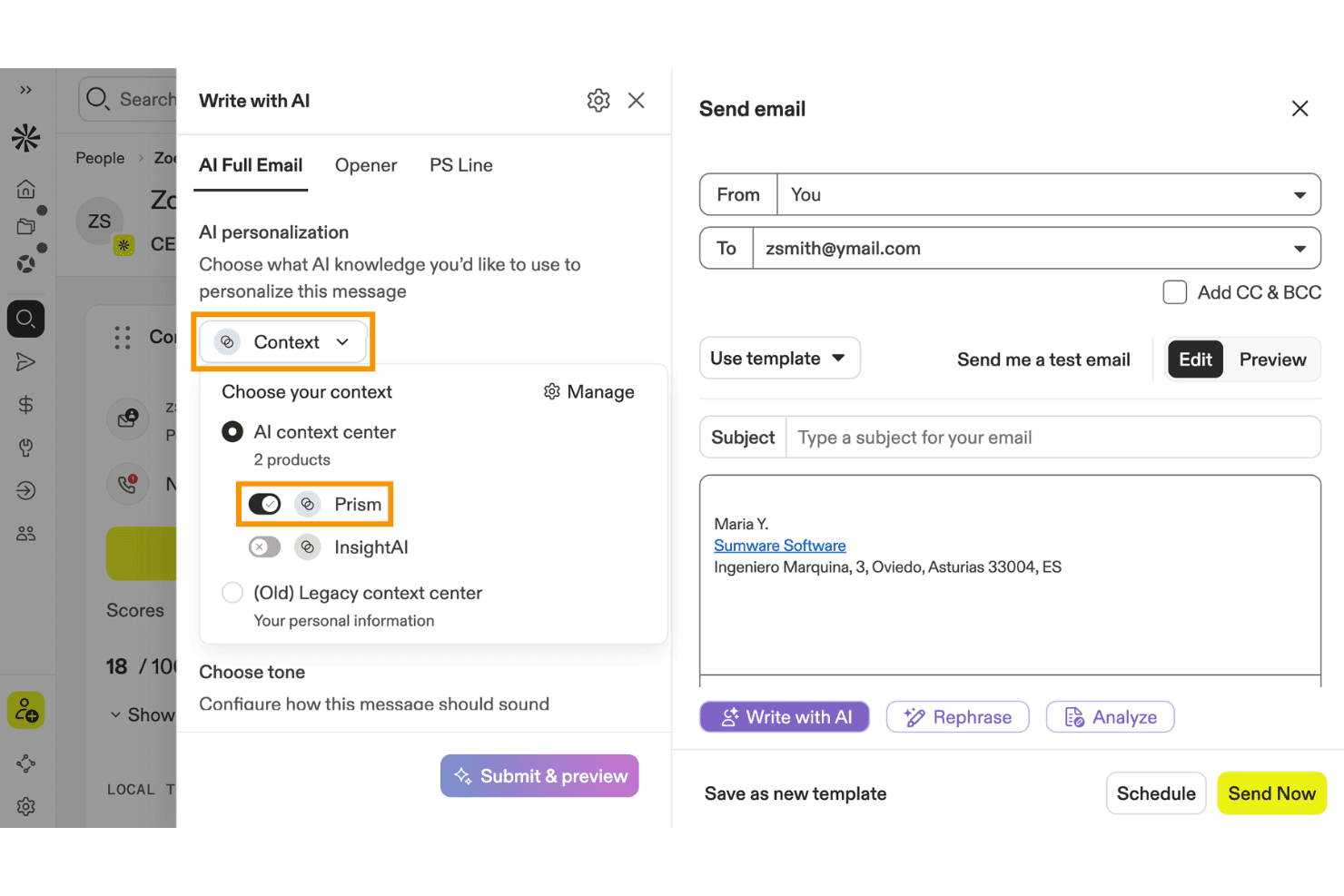
Apollo.io consente agli utenti di personalizzare le email scritte dall'IA utilizzando il contesto del prodotto. Apollo.io è una piattaforma di coinvolgimento commerciale B2B che combina un database di oltre 275 milioni di contatti con sequenze email basate sull'IA, attività di prospezione e automazione dei contatti.
Per chi è più indicato Apollo.io?
Apollo.io è particolarmente adatto ai team B2B di generazione della domanda che gestiscono attività di prospezione in uscita e campagne di email a freddo per alimentare la pipeline commerciale.
Perché ho scelto Apollo.io
Ho incluso Apollo.io tra le mie scelte principali perché è lo strumento più efficace di questo elenco per i team B2B che gestiscono attività di contatto su larga scala basate sulla prospezione. AI Context Center consente di addestrare la piattaforma sul proprio ICP, sui pilastri della messaggistica e sul tono di voce del marchio, così le email generate riflettono il proprio posizionamento anziché proporre testi generici. Abbinando questa funzione alla personalizzazione basata sui segnali, che utilizza informazioni sui cambi di lavoro, sui round di finanziamento e sull'insieme di tecnologie utilizzate, è possibile inviare email specifiche per la situazione di ogni potenziale cliente.
Funzionalità principali di Apollo.io
- Assistente di scrittura basato sull'IA: genera testi completi per le email, oggetti e aperture personalizzate a partire da comandi in linguaggio naturale direttamente all'interno della piattaforma.
- Strumenti per la recapitabilità delle email: include la configurazione dell'autenticazione SPF/DKIM/DMARC, il riscaldamento delle email, sottodomini di tracciamento personalizzati e il monitoraggio del posizionamento nella posta in arrivo.
- Test A/B integrati: consente di testare più varianti di email all'interno di un passaggio della sequenza e di confrontare i tassi di apertura, risposta e clic per ciascuna variante.
- Rotazione dell'invio tra più caselle email: distribuisce il volume delle email in uscita tra più caselle collegate per proteggere la reputazione del mittente su larga scala.
Integrazioni di Apollo.io
Apollo.io offre integrazioni native con Salesforce, HubSpot, Zoho CRM, Pipedrive, Adobe Marketo Engage e SendGrid. Supporta inoltre integrazioni personalizzate tramite API e Zapier.
Pros and Cons
Pros:
- Assistente di scrittura basato sull'IA ottimizzato per il tono di voce del marchio
- Personalizzazione a livello di potenziale cliente utilizzando segnali B2B in tempo reale
- Test A/B integrati per le email in uscita
Cons:
- Nessuna segmentazione basata sul comportamento o sul ciclo di vita
- Manca l'ottimizzazione dell'orario di invio basata sull'IA
Learn more about Apollo.io: Ideale per il marketing e-commerce
- Piano gratuito + demo gratuita disponibile
- Da $16/mese (fatturazione annuale)
Visit WebsiteCustomer Rating:4.6/5
Omnisend automatizza l'email marketing per le attività di vendita online. Omnisend è una piattaforma di email marketing alimentata dall'intelligenza artificiale, progettata per i team di e-commerce, che offre automazione, segmentazione, consigli sui prodotti e modelli preimpostati su misura per i negozi online.
Per chi è ideale Omnisend?
Omnisend è particolarmente adatto alle aziende di e-commerce di qualsiasi dimensione che necessitano di strumenti di email marketing creati attorno ai flussi di lavoro della vendita al dettaglio online e al comportamento d'acquisto dei clienti.
Perché ho scelto Omnisend
Omnisend si è guadagnato un posto nella mia lista perché è una delle poche piattaforme di email marketing costruite specificamente intorno ai flussi di lavoro dell'e-commerce, piuttosto che adattate successivamente. Apprezzo particolarmente la segmentazione alimentata dall'intelligenza artificiale: si descrive il pubblico che si vuole raggiungere e Omnisend costruisce il segmento utilizzando dati di acquisto e comportamento in tempo reale. Utilizzo anche i flussi di automazione predefiniti per carrelli abbandonati, recupero della navigazione e follow-up post-acquisto, tutti pronti all'uso senza doverli creare da zero. I blocchi per la lista prodotti e i suggerimenti AI sui prodotti nel costruttore di email rendono facile inserire l'inventario del negozio in tempo reale direttamente nelle campagne.
Funzionalità principali di Omnisend
- Test A/B: Testa oggetti, contenuti e orari di invio tra le campagne email per identificare cosa genera i migliori tassi di apertura e di clic.
- Notifiche push web: Invia messaggi push su browser per vendite lampo, riassortimenti o carrelli abbandonati senza necessità di indirizzo email o numero di telefono.
- Blocchi codici sconto: Inserisci codici sconto unici e generati automaticamente direttamente nei modelli email per incrementare le conversioni senza gestione manuale dei codici.
- Report sulla consegnabilità: Monitora rimbalzi, cancellazioni e insuccessi per controllare la visibilità in posta in arrivo e mantenere una reputazione del mittente positiva nel tempo.
Integrazioni di Omnisend
Omnisend offre integrazioni native con Shopify, WooCommerce, BigCommerce, Wix, Magento e PrestaShop, e si collega con Zapier. È disponibile un'API per integrazioni personalizzate.
Pros and Cons
Pros:
- Supporta la comunicazione multicanale
- Segmentazione clienti efficace
- Strumenti di reportistica completi
Cons:
- Personalizzazione del design limitata
- Supporto limitato per attività non e-commerce
Learn more about Omnisend: Ideale per la modifica semplice drag-and-drop
- Nessuna prova gratuita disponibile
- A partire da $2.99/mese
Visit WebsiteCustomer Rating:4.4/5
Hostinger Reach offre un'interfaccia chat email con AI e template predefiniti come Newsletter di Benvenuto, Contenuti Educativi e Promozioni e Sconti per generare campagne email. Hostinger Reach è una piattaforma di email marketing con AI che genera campagne da prompt testuali, crea email con un editor visuale, gestisce e segmenta le liste di contatti e automatizza l'invio con orari ottimizzati dall'AI.
Per chi è ideale Hostinger Reach?
Hostinger Reach è la scelta ideale per proprietari di piccole imprese e marketer indipendenti che desiderano gestire campagne email senza un team marketing dedicato.
Perché ho scelto Hostinger Reach
Hostinger Reach è una delle mie scelte preferite perché adoro come il suo editor drag-and-drop renda facile personalizzare i modelli email generati da AI senza scrivere una sola riga di codice. Dopo che l'AI scrive il testo e struttura il layout partendo da un prompt, posso entrare nell'editor per cambiare immagini, modificare blocchi di testo e riordinare le sezioni. Reach inoltre salva automaticamente i miei colori aziendali, logo e impostazioni di stile, così ogni email che creo con il drag-and-drop è già in linea con il mio brand fin dall'inizio.
Funzionalità chiave di Hostinger Reach
- Generatore AI di oggetti email: Scrive e testa automaticamente varianti di oggetto in base al contenuto della tua email per migliorare i tassi di apertura.
- Ottimizzazione orario d'invio: L'AI analizza i dati del tuo pubblico per programmare ogni campagna nel momento con maggiori probabilità di coinvolgimento.
- Segmentazione dei contatti: Descrivi il tuo target in linguaggio naturale e Reach costruisce all'istante un segmento filtrato dalla tua lista di contatti.
- Sequenze email automatizzate: Scegli tra modelli di automazione preimpostati, inclusi il percorso di benvenuto e le campagne promozionali, per attivare email in base alle azioni degli iscritti.
Integrazioni di Hostinger Reach
Hostinger Reach non supporta integrazioni di terze parti. Sincronizza i contatti con WordPress e Hostinger Website Builder tramite connessioni integrate con 1 clic ed è disponibile un API per importare contatti da strumenti esterni verso Reach.
Pros and Cons
Pros:
- L'AI genera bozza completa di email dai prompt
- Configura automaticamente record SPF, DKIM e DMARC
- Nessun limite alla dimensione della lista contatti memorizzata
Cons:
- Non è possibile duplicare una campagna email esistente
- Molto poche opzioni di integrazione di terze parti disponibili
Learn more about Hostinger Reach: Ideale per marketing e servizio clienti potenziati dall'intelligenza artificiale
- Demo gratuita + piano gratuito disponibile
- A partire da $45/mese
Visit WebsiteCustomer Rating:4.6/5
Gli agenti AI di Klaviyo supportano i flussi email e di servizio utilizzando i dati dei clienti. Klaviyo è una piattaforma di email e SMS marketing basata sull'intelligenza artificiale che combina automazione delle campagne, analisi predittiva, segmentazione e mappatura del percorso cliente per marchi e-commerce e digitali.
Per chi è ideale Klaviyo?
Klaviyo è particolarmente adatto ai brand e-commerce e ai marketer direct-to-consumer che necessitano di una piattaforma dedicata all'email e SMS marketing.
Perché ho scelto Klaviyo
Klaviyo merita un posto nella mia shortlist grazie a K:AI, il suo sistema integrato di agenti AI che va ben oltre la semplice automazione standard. Sono particolarmente colpito dal Marketing Agent, che acquisisce i dati dal tuo sito web e genera campagne email completamente progettate e in linea col tuo brand in pochi clic, senza bisogno di prompt. Dal lato servizio, il Customer Agent gestisce in modo continuo domande sullo stato degli ordini, raccomandazioni di prodotti e resi tramite chat web, SMS ed email. Inoltre, mi piace che l'intelligenza artificiale di Klaviyo copra oltre 40 funzionalità, da Segments AI che costruisce audience targetizzate usando tutto il set dati clienti all'ottimizzazione dei tempi di invio personalizzati per consegnare i messaggi quando ogni singolo iscritto ha maggiori probabilità di interagire.
Funzionalità principali di Klaviyo
- Flussi automatizzati: Crea sequenze di email, SMS e notifiche push attivate tramite un builder drag-and-drop, template preimpostati e Flows AI.
- Campagne omnicanale: Gestisci campagne coordinate su email, SMS e push mobile con targeting di pubblico e ottimizzazione delle tempistiche guidati dall’AI.
- Analisi predittiva: Prevedi la data del prossimo ordine di ciascun cliente, il valore nel tempo, il rischio di abbandono e il potenziale di spesa direttamente dai loro dati profilo.
- Benchmark: Confronta i tuoi parametri di performance di email e SMS con 100 brand simili per individuare gap nel tasso di conversione e recupero carrello.
Integrazioni di Klaviyo
Klaviyo offre integrazioni native con Shopify, WooCommerce, BigCommerce, Salesforce Commerce Cloud, Google Ads, Stripe, Zendesk e Recharge. È disponibile un'API per integrazioni personalizzate.
Pros and Cons
Pros:
- Automazione potente per email e SMS basati sul comportamento
- Il campaign builder supporta trigger avanzati e logica condizionale
- Dati centralizzati per targeting e retargeting multicanale
Cons:
- Il prezzo cresce rapidamente all'aumentare della lista contatti
- Tagging avanzato e organizzazione meno robusti rispetto ad alcuni concorrenti
Learn more about Klaviyo: Ideale per automatizzare il triage della posta in arrivo con regole IA
- Prova gratuita di 30 giorni disponibile
- A partire da $14/utente/mese (con fatturazione annuale)
Visit WebsiteCustomer Rating:4.8/5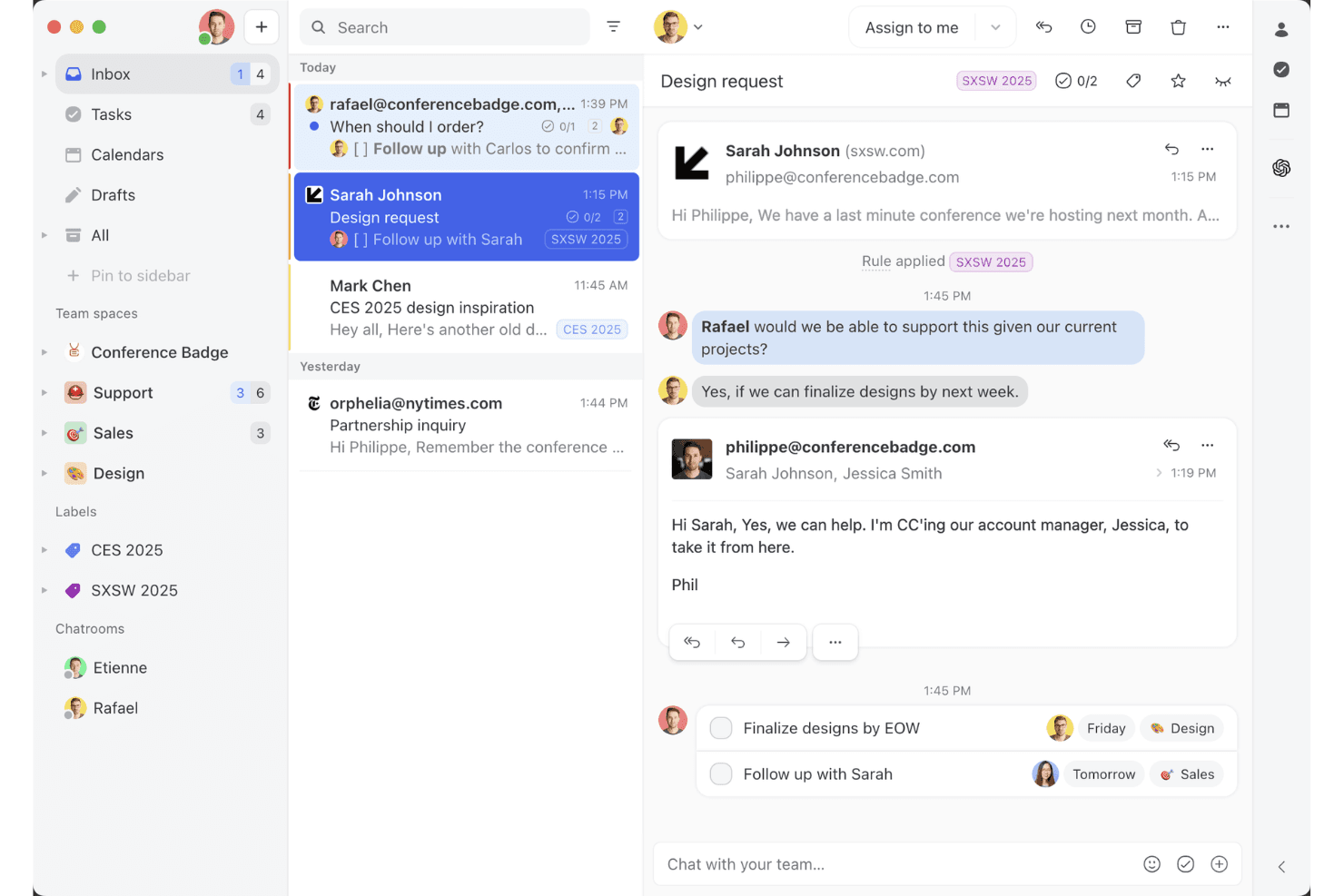
La vista della posta in arrivo condivisa di Missive mostra come i team possono collaborare sulle conversazioni email, assegnare attività e gestire le conversazioni con i clienti in un unico spazio di lavoro. Missive è una piattaforma di posta in arrivo collaborativa per team che combina la gestione condivisa delle email, la stesura di risposte basata sull'IA, il triage automatizzato della posta in arrivo e la messaggistica multicanale tramite email, SMS e canali social.
Per chi è più indicato Missive?
Missive è particolarmente adatto ai team a contatto con i clienti—assistenza, vendite e successo dei clienti—che devono gestire e rispondere a grandi volumi di email in arrivo senza lasciarsi sfuggire nulla.
Perché ho scelto Missive
Ho scelto Missive come una delle soluzioni migliori perché la sua funzionalità Regole IA fa qualcosa che sinceramente non avevo mai visto realizzato così bene altrove: consente di scrivere prompt in linguaggio naturale che eseguono automaticamente il triage delle email in arrivo analizzando il sentiment, classificando il tipo di messaggio e attivando azioni come l'assegnazione o l'escalation. In pratica, il mio team può impostare una regola che rileva l'urgenza nell'oggetto e la inoltra istantaneamente alla persona giusta, senza alcun ordinamento manuale. L'assistente IA legge anche il contesto completo della conversazione prima di preparare le risposte, così i messaggi rimangono coerenti con il marchio senza bisogno di ulteriori istruzioni.
Funzionalità principali di Missive
- Riepilogo delle conversazioni: Condensa istantaneamente le lunghe conversazioni email in un breve riepilogo, così il team può aggiornarsi senza leggere ogni messaggio.
- Risposte predefinite con campi variabili: Consente di creare modelli di risposta riutilizzabili con campi dinamici per rispondere più rapidamente e in modo coerente in tutto il team.
- Posta in arrivo unificata multicanale: Riunisce email, SMS, WhatsApp e messaggi diretti sui social in un unico spazio di lavoro condiviso per gestire tutte le conversazioni con i clienti.
- Regole di automazione dei flussi di lavoro: Attiva azioni come l'assegnazione automatica, l'instradamento a rotazione e le risposte automatiche in base alle condizioni definite, senza dover scrivere codice.
- Server MCP di Missive: Collega strumenti di IA esterni (come Claude o ChatGPT) per interrogare le conversazioni email, controllare i calendari e preparare risposte, mantenendo tuttavia obbligatoria la revisione da parte dell'operatore prima dell'invio.
Integrazioni di Missive
Missive offre oltre 25 integrazioni native, tra cui HubSpot, Salesforce, Pipedrive, Shopify, Google Workspace, Microsoft 365, OpenAI, Anthropic e Google Gemini. Supporta inoltre integrazioni personalizzate tramite API REST, webhook, Zapier e il suo nuovo Server MCP nei piani Productive e Business (è necessaria l'attivazione da parte dell'amministratore), ma non dispone di connettori nativi per Mailchimp, Klaviyo e altre piattaforme di marketing tramite email.
Pros and Cons
Pros:
- Le regole IA automatizzano il triage della posta in arrivo su larga scala
- L'assistente IA del team legge il contesto completo della conversazione
- Riepiloghi rapidi per le conversazioni email lunghe
Cons:
- Nessuna funzionalità per campagne o email in blocco
- Mancano i test A/B e le analisi di marketing
Learn more about Missive: Ideale per messaggistica basata sul comportamento
- Prova gratuita di 14 giorni + demo gratuita disponibile
- A partire da $100/mese
Visit WebsiteCustomer Rating:4.2/5
Customer.io invia messaggi basati sul comportamento per aumentare il coinvolgimento. Customer.io è una piattaforma di email marketing potenziata dall'IA che ti permette di automatizzare campagne, segmentare il pubblico e inviare messaggi innescati dal comportamento degli utenti su più canali.
Per Chi è Ideale Customer.io?
Customer.io è particolarmente indicato per aziende SaaS guidate dal prodotto e per attività digitali che hanno bisogno di inviare messaggi mirati e basati su eventi agli utenti, in risposta a comportamenti in tempo reale.
Perché Ho Scelto Customer.io
Customer.io ha meritato il suo posto nella mia selezione grazie all'estrema precisione nella gestione dei messaggi basati sul comportamento. Amo il fatto che sia possibile attivare campagne partendo da qualsiasi combinazione di eventi utente, attributi di profilo o azioni in tempo reale—quindi se un utente completa un determinato step nell'onboarding ma ne salta un altro, può essere automaticamente indirizzato verso un percorso comunicativo completamente diverso. Trovo particolarmente utile il tracciamento anonimo degli eventi, poiché permette di rilevare il comportamento anche prima che l'utente si registri, consentendo una personalizzazione dell'onboarding sin dal primo contatto. Inoltre, la funzione basata sull'IA che consiglia il momento migliore per l'invio recapita ogni messaggio nel momento in cui il singolo cliente è più propenso a interagire, invece di affidarsi a una programmazione standardizzata per tutti.
Funzionalità Principali di Customer.io
- Builder visuale dei workflow: Progetta flussi multi-step e multi-canale utilizzando una tela drag-and-drop con logica di diramazione condizionale.
- Segmentazione potenziata dall'IA: Crea segmenti di pubblico dinamici che si aggiornano automaticamente in base ai dati e alle attività degli utenti in tempo reale.
- Messaggi transazionali: Invia email singole e innescate come reset password o ricevute direttamente attraverso la stessa piattaforma delle campagne di marketing.
- Messaggistica in-app: Spedisci messaggi mirati all'interno del tuo prodotto per coinvolgere gli utenti nei momenti chiave senza dover passare ad altri strumenti.
Integrazioni di Customer.io
Customer.io offre integrazioni native con Segment, Amplitude, Mixpanel, Snowflake e Twilio, e si collega a Zapier. È disponibile anche un’API per integrazioni personalizzate.
Pros and Cons
Pros:
- Supporta messaggi basati sul comportamento
- Automazione dei workflow semplice
- Tracciamento dati in tempo reale
Cons:
- Personalizzazione del design limitata
- Gestione complessa dei workflow
Learn more about Customer.io: Ideale per l’email outreach a freddo
- Prova gratuita disponibile
- Da $37.6/mese
Visit WebsiteCustomer Rating:4.8/5
Instantly utilizza l'IA per scalare e personalizzare campagne di email a freddo. Instantly è una piattaforma di email marketing alimentata dall'IA per inviare, gestire e analizzare campagne di email a freddo su larga scala.
Per Chi è Meglio Instantly?
Instantly è una soluzione ideale per team di vendita, responsabili della crescita e agenzie che gestiscono campagne di email a freddo ad alto volume.
Perché Ho Scelto Instantly
Instantly è una delle mie scelte migliori perché adoro come gestisce campagne di email a freddo su larga scala senza sacrificare la deliverability. La rotazione illimitata degli account email è una caratteristica eccezionale: il mio team può collegare decine di indirizzi mittenti e Instantly distribuisce l’invio tra questi account, mantenendo sana la reputazione dei singoli mittenti. Utilizzo anche AI Spintax e il Controllo Parole Spam per ottimizzare il testo prima che una campagna venga lanciata, individuando problemi di recapito prima che ci facciano perdere risposte. I test A/Z ci permettono di provare variazioni illimitate di email, e l'IA di Instantly scala la versione con le migliori performance.
Caratteristiche Principali di Instantly
- Personalizzazione tramite IA: Genera contenuti email personalizzati per ciascun potenziale cliente utilizzando variabili e campi personalizzati guidati dall’intelligenza artificiale.
- Riscaldamento della casella di posta: Aumenta gradualmente il volume di invii tra più account collegati per costruire una solida reputazione del mittente prima dell’avvio della campagna completa.
- Dashboard di analisi delle campagne: Monitora tassi di apertura, risposta, rimbalzo e metriche di conversione in tutte le campagne attive in un’unica vista.
- Lead finder: Cerca e filtra un database B2B integrato per trovare e aggiungere potenziali clienti verificati direttamente alle campagne di outreach.
Integrazioni di Instantly
Le integrazioni includono Salesforce, Pipedrive, HubSpot e Calendly. Instantly offre un’API per integrazioni personalizzate.
Pros and Cons
Pros:
- Connessione illimitata di account email
- Filtri di targeting avanzati
- Personalizzazione guidata dall'IA
Cons:
- Potrebbe richiedere configurazione tecnica
- Supporto offline limitato
Learn more about Instantly: Ideale per il supporto alle email AMP
- Prova gratuita di 21 giorni + demo gratuita disponibile
- Da $39/mese (fatturazione annuale)
Visit WebsiteCustomer Rating:4.6/5
Mailmodo utilizza l'IA per creare email interattive che aumentano le conversioni. Mailmodo è una piattaforma di email marketing basata sull'IA che permette di creare, inviare e automatizzare campagne interattive utilizzando email AMP, contenuti dinamici e avanzati strumenti di personalizzazione.
Per chi è ideale Mailmodo?
Mailmodo è adatto ai team di marketing di aziende B2B e B2C che vogliono andare oltre l’email statica e gestire campagne interattive focalizzate sulla conversione.
Perché ho scelto Mailmodo
Mailmodo si guadagna un posto tra i migliori della mia lista per il modo in cui gestisce le email AMP, diversamente da qualsiasi altra piattaforma. Con Mailmodo posso inserire moduli, sondaggi, quiz e persino giochi della ruota della fortuna direttamente all’interno di un’email, così i destinatari possono completare azioni senza mai uscire dalla posta elettronica. È un’esperienza realmente diversa rispetto a una classica campagna con clic. Apprezzo anche che Mailmodo utilizzi sia AMP for Email sia l’interattività CSS per raggiungere client oltre Gmail, offrendo automaticamente una versione HTML semplice quando il client del destinatario non supporta uno dei due formati.
Caratteristiche principali di Mailmodo
- Generatore di segmenti AI: Crea segmenti di pubblico utilizzando prompt in linguaggio naturale invece della logica manuale dei filtri.
- Costruttore di sequenze email: Imposta sequenze email automatiche e su più fasi che si attivano in base al comportamento del contatto o alla fase del ciclo di vita.
- Analizzatore di campagne AI: Esamina i dati sulle performance delle campagne e ricevi suggerimenti generati dall’IA per migliorare gli invii futuri.
- Segmentazione di liste e contatti: Organizza i contatti in gruppi mirati in base ad attributi, eventi o cronologia di coinvolgimento.
Integrazioni di Mailmodo
Mailmodo offre integrazioni native con HubSpot, Salesforce, Zoho CRM, Pabbly, Webhooks e Google Sheets. Si collega anche a Zapier e mette a disposizione un’API per integrazioni personalizzate.
Pros and Cons
Pros:
- Supporta email AMP interattive
- Analitiche integrate per il monitoraggio
- Facile da incorporare moduli e widget
Cons:
- Richiede conoscenza dell'HTML AMP
- Integrazioni con terze parti limitate
Learn more about Mailmodo: Ideale per i flussi di automazione
- Prova gratuita di 14 giorni + demo gratuita disponibile
- Da $15/mese (fatturazione annuale)
Visit WebsiteCustomer Rating:4.4/5
ActiveCampaign aumenta le vendite con automazione personalizzata potenziata dall'intelligenza artificiale. ActiveCampaign è una piattaforma di email marketing potenziata dall'IA che combina gestione delle campagne, flussi di lavoro automatizzati avanzati, contenuti predittivi e integrazione CRM per i team di marketing.
Per Chi È Ideale ActiveCampaign?
ActiveCampaign è adatto a team di marketing di piccole e medie dimensioni che gestiscono campagne email articolate su più fasi e necessitano di un controllo dettagliato sulla segmentazione del pubblico e sulla messaggistica automatizzata.
Perché Ho Scelto ActiveCampaign
ActiveCampaign è tra le mie scelte principali perché la sua automazione va oltre la classica logica trigger-and-send. La funzione Azioni Suggerite dall’IA raccomanda sequenze complete di marketing multi-step basate su miliardi di dati anonimi — così, invece di costruire un workflow da zero, ottengo una campagna strutturata con messaggi, tempistiche e percorsi ramificati già mappati. Le azioni di split e condition nel builder delle automazioni permettono al mio team di instradare i contatti in base a comportamenti reali, come se qualcuno abbia cliccato su uno specifico link o effettuato un acquisto, invece di muovere tutti seguendo lo stesso percorso lineare. La Libreria di Azioni AI Predefinite consente anche di integrare l’intelligenza dal vivo in qualsiasi automazione senza scrivere una sola riga di codice.
Funzionalità Principali di ActiveCampaign
- Generatore di Campagne AI: Genera una campagna email completa — layout, testo, oggetto e immagini — partendo da una semplice richiesta in linguaggio naturale.
- Ottimizzazione predittiva dell’invio: Determina automaticamente il momento migliore per inviare email a ciascun abbonato in base ai loro pattern di coinvolgimento passati.
- Segmenti suggeriti dall’IA: Identifica segmenti di pubblico di alto valore che potresti non aver pensato di creare, come probabili acquirenti ricorrenti o abbonati a rischio.
- Tracciamento sito ed eventi: Monitora come i contatti interagiscono con il tuo sito web e attiva automazioni in base a pagine specifiche visitate o azioni eseguite.
Integrazioni di ActiveCampaign
ActiveCampaign offre oltre 900 integrazioni native, tra cui Shopify, WooCommerce, Salesforce, HubSpot, Facebook, Google Analytics, Unbounce, Calendly, Eventbrite e Stripe. Si connette anche con Zapier e fornisce un'API per integrazioni personalizzate.
Pros and Cons
Pros:
- Funzione di invio predittivo
- CRM integrato
- Flussi di lavoro personalizzabili
Cons:
- Curva di apprendimento ripida per i principianti
- Opzioni di design limitate
Learn more about ActiveCampaign:
Altri strumenti di email marketing basati sull'IA
Ecco alcune ulteriori opzioni di strumenti di email marketing basati sull’IA che non sono entrate nella mia selezione, ma che vale comunque la pena valutare:
- 11Iterable Ideale per il marketing cross-canale
- 12BeehiivIdeale per i creatori di newsletter
- 13Elastic EmailIdeale per template creati tramite IA
- 14Braze Ideale per il coinvolgimento mobile
- 15Click DimensionsIdeale per gli utenti di Microsoft Dynamics
- 16Movable InkIdeale per contenuti dinamici
- 17Seventh SenseIdeale per orari di invio personalizzati
- 18VitaMailIdeale per la generazione di email tramite IA
- 19SmartpingIdeale per la personalizzazione email guidata dall'IA
- 20popcornIdeale per il tracciamento automatico dei lead
Come Valuto gli Strumenti di Email Marketing con AI
Ogni strumento in questo elenco deve offrire un reale valore aggiunto grazie all'intelligenza artificiale—non solo un chatbot collegato a un vecchio generatore di email. Ho suddiviso la mia valutazione in due livelli: la funzionalità di base che uno strumento deve avere anche solo per qualificarsi, e i fattori che differenziano una buona opzione dalla scelta migliore per il tuo team.
Funzionalità di Base (Requisiti Minimi per l'Elenco)
Quando seleziono gli strumenti per la mia lista, valuto ciascuno su una scala da 0 (non offre la funzionalità) a 5 (eccelle in quest'area) per ogni funzionalità di base elencata di seguito. Poi calcolo il punteggio totale dello strumento in percentuale. Ogni strumento deve raggiungere un punteggio totale minimo del 65% per essere considerato.
- Generazione di contenuti con AI: Valuto se lo strumento può scrivere interamente il testo dell’email, l’oggetto e le CTA partendo da un prompt—non solo suggerire correzioni ortografiche o suggerimenti testuali di base.
- Personalizzazione predittiva: Ogni strumento dovrebbe andare oltre i semplici segnaposto statici e utilizzare l’AI per personalizzare blocchi di contenuto, raccomandazioni di prodotti o offerte per ciascun destinatario.
- Segmentazione intelligente: Cerco raggruppamenti di pubblico guidati da machine learning sulla base di modelli di coinvolgimento o segnali di ciclo di vita, come l’identificazione automatica degli iscritti a rischio prima di una campagna di riattivazione.
- Ottimizzazione dell'orario di invio: Lo strumento dovrebbe usare l’AI per determinare la finestra di consegna migliore per ogni destinatario, non solo per permettere l’invio in batch per fuso orario.
- AI per A/B Testing e Ottimizzazione: Controllo se la piattaforma può selezionare e ampliare automaticamente una variante vincente tra oggetti o contenuti, invece di richiedere la scelta manuale del vincitore.
- Analisi delle prestazioni e insight: I report dovrebbero mostrare osservazioni generate dall’AI e i prossimi passi consigliati, non solo dashboard standard di apertura e clic.
Una volta individuati gli strumenti che soddisfano i criteri, considero cosa distingue ogni piattaforma dalle altre.
Fattori di Differenziazione (Cosa Distingue i Fornitori)
Ecco come confronto e metto a confronto i diversi fornitori:
Funzionalità Distintive
L’orchestrazione dei flussi tramite AI è un elemento distintivo importante—cerco strumenti che costruiscono e adattano flussi di ciclo di vita multi-step autonomamente, invece di richiedere la mappatura manuale dei trigger. Anche l’addestramento del tono di voce del brand è rilevante, soprattutto per i team che inviano campagne ad alto volume, dove la coerenza stilistica è difficile da mantenere. Valuto anche se una piattaforma offre l’attribuzione predittiva delle entrate, collegando le prestazioni delle email ai ricavi e al valore a vita del cliente, anziché fermarsi solo alle aperture e ai clic.
Oltre le Funzionalità
La profondità di integrazione è una delle prime cose che verifico—uno strumento che si sincronizza nativamente con CRM e piattaforme ecommerce mantiene aggiornati i dati del pubblico e attiva trigger accurati. Le politiche sulla privacy dei dati meritano anche un’attenta valutazione, in particolare se il fornitore usa i dati dei tuoi clienti per addestrare modelli di AI condivisi. Valuto inoltre il supporto alla deliverability, inclusi opzioni di IP dedicato, automazione del riscaldamento e impostazione delle autenticazioni come DKIM e DMARC, poiché anche il contenuto AI più avanzato è inutile se finisce nello spam.
Come scegliere uno strumento di email marketing basato sull'IA
È facile perdersi in lunghi elenchi di funzionalità e strutture tariffarie complesse. Per aiutarti a rimanere concentrato mentre affronti il tuo processo di selezione del software, unico per le tue esigenze, ecco un elenco di fattori da tenere a mente:
| Fattore | Cosa considerare |
| Scalabilità | Lo strumento può crescere insieme alla tua attività? Verifica se supporta l'aumento dei volumi di email e l'aggiunta di utenti senza una diminuzione delle prestazioni. Cerca piani flessibili adatti ai team in crescita e a una base clienti in espansione. |
| Integrazioni | Si integra con gli strumenti che già utilizzi? Verifica la compatibilità con i sistemi CRM, le piattaforme di analisi e gli altri strumenti di marketing su cui fai affidamento. La mancanza di integrazione può creare silos di dati e interrompere i flussi di lavoro. |
| Personalizzazione | Puoi adattare lo strumento alle tue esigenze? Valuta se puoi personalizzare modelli, flussi di lavoro e report. Uno strumento che si adatta ai tuoi processi può farti risparmiare tempo e aumentare l'efficienza. |
| Facilità d'uso | Lo strumento è intuitivo e facile da usare? Valuta se il tuo team può imparare rapidamente a utilizzarlo senza una formazione approfondita. Gli strumenti complessi possono causare frustrazione e bassi tassi di adozione. |
| Implementazione e avvio | Quanto è semplice il processo di configurazione? Considera il tempo e le risorse necessari per rendere operativo lo strumento. Cerca fornitori che offrano un avvio guidato, risorse formative e assistenza durante la transizione. |
| Costo | Il prezzo rientra nel tuo budget? Valuta il costo totale, comprese eventuali commissioni nascoste. Confronta i livelli tariffari e le funzionalità offerte. Assicurati che il valore giustifichi la spesa. |
| Misure di sicurezza | In che modo lo strumento protegge i tuoi dati? Verifica la presenza di crittografia, controlli degli accessi e conformità alle normative sulla protezione dei dati. Le carenze nella sicurezza possono causare violazioni e perdita di fiducia. |
| Disponibilità dell'assistenza | Quali opzioni di assistenza vengono offerte? Valuta se hai accesso all'assistenza 24 ore su 24, 7 giorni su 7, a responsabili dedicati dell'account o a forum della community. Un'assistenza tempestiva può risolvere rapidamente i problemi e ridurre al minimo i tempi di inattività. |
Cosa sono gli strumenti di email marketing basati sull'IA?
Gli strumenti di email marketing basati sull'IA utilizzano l'intelligenza artificiale per migliorare e automatizzare le campagne di email marketing attraverso l'elaborazione del linguaggio naturale, l'apprendimento automatico e l'analisi dei dati. I professionisti del marketing, i titolari di aziende e i team di vendita utilizzano generalmente questi strumenti per migliorare il coinvolgimento, la personalizzazione dei contenuti e l'efficienza. Le funzionalità di automazione, segmentazione, personalizzazione e creazione di contenuti aiutano a rivolgersi al pubblico giusto, creare messaggi personalizzati e misurare il successo delle campagne. Questi strumenti offrono un valore significativo perché fanno risparmiare tempo e aumentano l'efficacia delle attività di email marketing.
Funzionalità degli strumenti di email marketing basati sull'IA
Quando scegli gli strumenti di email marketing basati sull'IA, presta attenzione alle seguenti funzionalità chiave:
- Automazione delle email: Automatizza l'intero processo della campagna, dalla programmazione e dall'invio alla gestione delle azioni successive. In questo modo risparmi moltissimo tempo e mantieni sotto controllo le tue attività di contatto, anche se il caffè non ha ancora iniziato a fare effetto.
- Segmentazione dei contatti: Raggruppa i tuoi contatti in base al comportamento, agli interessi o ai dati demografici, così puoi inviare il messaggio giusto alla persona giusta. Non dovrai più indovinare chi vuole cosa: riceveranno davvero contenuti pertinenti per loro.
- Opzioni di personalizzazione: Crea email che sembrino un messaggio scritto con cura anziché un invio generico. Inserisci dinamicamente nomi, preferenze o cronologia degli acquisti per ogni iscritto, così le tue email si distinguono in una casella di posta affollata.
- Test A/B: Metti alla prova oggetti, contenuti e impaginazione. Scopri rapidamente cosa funziona (e cosa no), così puoi perfezionare i messaggi e ottenere risultati migliori ogni volta.
- Pannello di analisi: Tieni sotto controllo aperture, clic, conversioni e abbandoni da un'unica posizione centrale. I dati ti permettono di capire facilmente cosa riscuote successo e dove c'è margine per apportare modifiche e migliorare i risultati.
- Strumento di modifica con trascinamento: Progetta email dall'aspetto professionale senza preoccuparti del codice. Utilizza semplici blocchi di costruzione per creare modelli personalizzati dall'aspetto curato e pronti per le ultime aggiunte di contenuti prima dell'invio.
- Gestione della conformità: Dormi sonni tranquilli sapendo che le tue campagne sono configurate per rispettare il GDPR, il CAN-SPAM e altre normative sulla privacy. Puoi concentrarti sul marketing invece di preoccuparti dei rischi legali.
- Supporto per le integrazioni: Collega il tuo strumento di email marketing alle altre piattaforme che già utilizzi (come siti di e-commerce o CRM) per flussi di lavoro più fluidi e prestazioni migliori.
Funzionalità comuni dell'IA negli strumenti di email marketing
Oltre alle funzionalità standard degli strumenti di email marketing basati sull'IA elencate sopra, molte di queste soluzioni stanno integrando l'IA con funzionalità come:
- Prevenzione dei filtri antispam: L'IA analizza le tue email per segnalare qualsiasi elemento che potrebbe attivare i filtri antispam, così puoi perfezionare i contenuti e massimizzare la loro consegnabilità.
- Generazione automatizzata dei contenuti: Utilizza l'IA per creare testi email coinvolgenti e personalizzati per ogni destinatario, risparmiando tempo nella stesura dei messaggi e aumentando i tassi di risposta con comunicazioni personalizzate su larga scala.
- Ottimizzazione dell'orario di invio: L'IA analizza il comportamento passato degli utenti per programmare le email esattamente nel momento in cui ogni destinatario ha maggiori probabilità di interagire. In questo modo eviti il buco nero digitale e fai sì che le tue email vengano visualizzate.
- Analisi predittiva: L'IA elabora i dati per prevedere i tassi di apertura, i clic o il rischio di abbandono, così puoi adattare la tua strategia in tempo reale e restare un passo avanti rispetto alle tendenze.
- Suggerimenti intelligenti per gli oggetti: Ricevi idee generate dall'IA per oggetti accattivanti basati su ciò che ha funzionato in passato, aiutandoti a ottenere quelle aperture così importanti.
- Mappatura del percorso del cliente: L'IA monitora e si adatta alle azioni di ogni utente, facendolo avanzare automaticamente attraverso una serie personalizzata di punti di contatto per ottenere il massimo coinvolgimento senza bisogno di controllare ogni dettaglio.
Vantaggi degli strumenti di email marketing basati sull'IA
L'implementazione di strumenti di email marketing basati sull'IA offre diversi vantaggi al tuo team e alla tua azienda. Ecco alcuni dei vantaggi che puoi aspettarti:
- Risparmio di tempo: l'automazione gestisce attività ripetitive come l'invio di email e la gestione degli elenchi, liberando il tempo del tuo team per attività più strategiche.
- Maggiore coinvolgimento: la personalizzazione adatta i contenuti alle preferenze individuali, aumentando i tassi di apertura e di clic.
- Decisioni basate sui dati: gli strumenti di analisi forniscono informazioni sulle prestazioni delle campagne, aiutandoti a perfezionare le strategie e a migliorare i risultati.
- Marketing mirato: la segmentazione consente di rivolgersi con precisione a diversi gruppi di pubblico, portando a campagne più efficaci.
- Maggiore portata: il coinvolgimento multicanale consente di connettersi con i clienti tramite email, SMS e notifiche push, ampliando la propria portata.
- Maggiore rilevanza: i contenuti dinamici che utilizzano l'IA generativa e i dati in tempo reale garantiscono che i messaggi siano tempestivi e pertinenti per ogni destinatario.
- Sicurezza e conformità: le misure di sicurezza proteggono i tuoi dati e garantiscono la conformità alle normative, mantenendo la fiducia dei clienti.
Costi e prezzi degli strumenti di email marketing basati sull'IA
La scelta degli strumenti di email marketing basati sull'IA richiede la comprensione dei vari modelli di prezzo e dei piani disponibili. I costi variano in base alle funzionalità, alle dimensioni del team, agli elementi aggiuntivi e ad altro ancora. La tabella seguente riassume i piani più comuni, i relativi prezzi medi e le funzionalità tipicamente incluse nelle soluzioni di strumenti di email marketing basati sull'IA:
Tabella comparativa dei piani per gli strumenti di email marketing basati sull'IA
| Tipo di piano | Prezzo medio | Funzionalità comuni |
| Piano gratuito | $0 | Automazione di base delle email, analisi limitate e modelli standard. |
| Piano personale | $10-$30 /utente /mese | Segmentazione avanzata, assistenza prioritaria e opzioni di personalizzazione avanzate. |
| Piano aziendale | $50-$100 /utente /mese | Test A/B, marketing multicanale e flussi di lavoro di automazione avanzati. |
| Piano aziendale | $150-$300 /utente /mese | Integrazioni personalizzate, gestione dedicata dell'account e funzionalità di sicurezza complete. |
Domande frequenti sugli strumenti di email marketing basati sull'IA
Ecco alcune risposte alle domande comuni sugli strumenti di email marketing basati sull’IA:
In che modo l'IA influisce sull'email marketing?
L’IA migliora l’email marketing determinando il momento ottimale per inviare le email e personalizzando le righe dell’oggetto. Allinea gli orari di invio ai diversi fusi orari e alle abitudini degli utenti, aumentando la probabilità di coinvolgimento dei clienti e migliorando la risposta del pubblico.
Che cos'è la regola dell'80/20 nell'email marketing?
La regola dell’80/20 suggerisce che circa l’80% degli effetti deriva dal 20% delle cause. Nell’email marketing, ciò significa che un numero ridotto delle tue attività genera spesso la maggior parte dei risultati. Concentrati sulle attività ad alto impatto che producono i maggiori ritorni.
Come funziona l'email marketing automatizzato?
L’email marketing automatizzato prevede la configurazione di regole e attivatori per le campagne email. Crei la campagna, programmi le email e imposti le condizioni per l’invio. I destinatari ricevono le email in base a tali condizioni, ottenendo un’esperienza personalizzata.
In che modo l'IA può personalizzare l'email marketing?
L’IA personalizza l’email marketing analizzando i dati dei clienti per adattare i contenuti. Utilizza l’apprendimento automatico per comprendere le preferenze e i comportamenti degli utenti, garantendo che i messaggi siano pertinenti e coinvolgenti. Ciò porta a tassi di apertura più elevati e a migliori relazioni con i clienti.
Quali sono le difficoltà legate all'IA nell'email marketing?
Le difficoltà legate all’IA nell’email marketing includono le problematiche relative alla privacy dei dati, l’integrazione con i sistemi esistenti e la necessità di competenze tecniche. Garantire la conformità alle normative e mantenere la sicurezza dei dati sono aspetti fondamentali per un’implementazione efficace.