

Il software di marketing locale è essenziale per le aziende che gestiscono più sedi e basi di clienti diversificate. La soluzione giusta può aiutare a semplificare attività come la gestione delle schede delle attività commerciali, la raccolta di informazioni preziose e l'ottimizzazione delle campagne di marketing. Tuttavia, scegliere il software migliore per le proprie esigenze può essere difficile, poiché sono disponibili moltissime opzioni.
Utilizzando la mia esperienza nel testare e recensire strumenti di marketing, ho analizzato diverse delle principali soluzioni di marketing locale. Ho raccolto i risultati in recensioni dettagliate per aiutarti a scegliere il software migliore per le tue esigenze di marketing locale.
Perché fidarsi dei nostri consigli sui software
6,700+
Reviews
20
Industry experts
16+
Evaluation factors
14
Years
Il nostro team testa e recensisce software dal 2012. In quanto leader del marketing noi stessi, sappiamo quanto sia difficile — e importante — scegliere il software giusto.
Per questa guida, abbiamo valutato gli strumenti attraverso test pratici e ricerche indipendenti, assegnando un punteggio agli strumenti in base ai nostri criteri di selezione.
Le nostre recensioni riflettono il nostro giudizio editoriale umano, non un discorso di vendita.
Revisori esperti:
 Gui DrusinaDirettore creativo
- Shriya GhateSenior Marketing Lead
 Amanda JacquesResponsabile Marketing Ops

Tabella comparativa dei software di marketing locale
Questa tabella comparativa riassume i dettagli sui prezzi delle mie migliori selezioni di software di marketing locale:
| Tool | Best For | Trial Info | Price | ||
|---|---|---|---|---|---|
| 1 | Ideale per la visibilità nella ricerca basata sull'intelligenza artificiale tra più sedi | Demo gratuita disponibile | A partire da $80/sede/mese | Website | |
| 2 | Ideale per il marketing di franchising su scala agenziale | Demo gratuita disponibile | Da $119/mese | Website | |
| 3 | Ideale per la gestione della reputazione basata sull'IA per attività con più sedi | Demo gratuita disponibile | Prezzi su richiesta | Website | |
| 4 | Ideale per la visibilità nella ricerca locale basata sull'IA | Demo gratuita disponibile | Da $39/mese | Website | |
| 5 | Ideale per la generazione di contatti potenziali iperlocali | Non disponibile | A partire da ₹800/mese/punto vendita | Website | |
| 6 | Ideale per la gestione dei feedback dei clienti | Demo gratuita disponibile | Prezzi su richiesta | Website | |
| 7 | Ideale per l'accuratezza delle schede delle sedi | Demo gratuita disponibile | Prezzo su richiesta | Website | |
| 8 | Ideale per il marketing locale su scala franchising | Demo gratuita disponibile | Prezzi su richiesta | Website | |
| 9 | Ideale per il controllo della presenza online basato sull'intelligenza artificiale | Demo gratuita disponibile | Prezzi su richiesta | Website | |
| 10 | Ideale per la ricerca organica multi-sede su larga scala | Demo gratuita disponibile | Prezzi disponibili su richiesta | Website |



Recensioni dei migliori software di marketing locale
Di seguito sono riportati i miei riepiloghi dettagliati dei migliori software di marketing locale presenti nel mio elenco. Le mie recensioni esaminano approfonditamente le caratteristiche principali, i pro & contro, le integrazioni e i casi d’uso ideali di ogni strumento, per aiutarti a trovare quello più adatto a te.
 Ideale per la visibilità nella ricerca basata sull'intelligenza artificiale tra più sedi
- Demo gratuita disponibile
- A partire da $80/sede/mese
Visit WebsiteCustomer Rating:4.6/5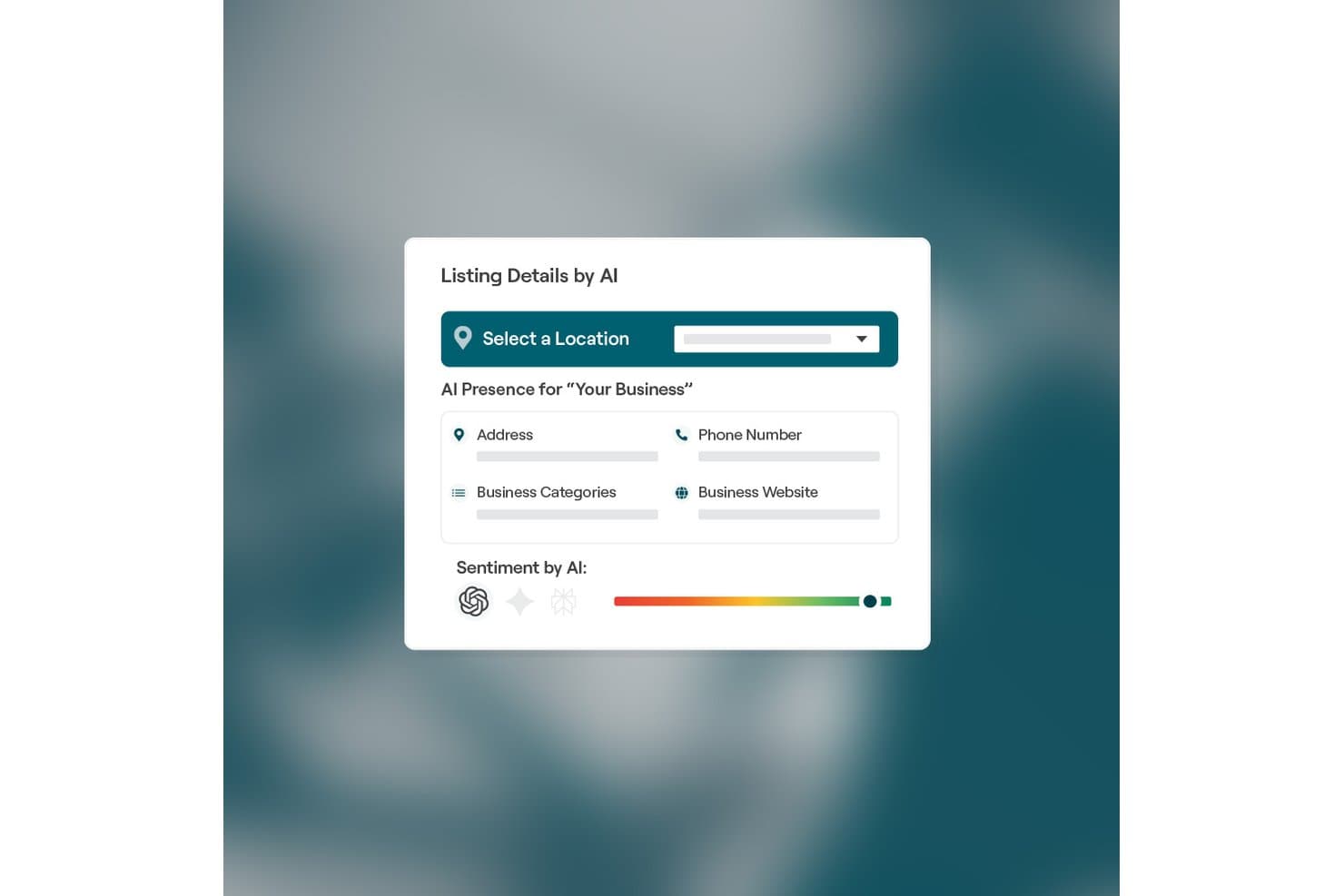
Reputation.com mostra dettagli delle schede basati sull'intelligenza artificiale e il punteggio del sentiment. Reputation.com è una piattaforma di marketing locale e gestione della reputazione che combina la gestione delle schede aziendali, il monitoraggio e la risposta alle recensioni, la SEO locale e strumenti di visibilità nella ricerca basati sull'intelligenza artificiale per più sedi.
Per chi è più adatto Reputation.com?
Reputation.com è progettato per i marchi con più sedi—reti di franchising, sistemi sanitari, gruppi automobilistici e portafogli di immobili gestiti—che devono gestire recensioni, schede e visibilità nella ricerca basata sull'intelligenza artificiale su larga scala.
Perché ho scelto Reputation.com
Ho scelto Reputation.com come una delle soluzioni migliori perché il suo strumento GEO Readiness misura direttamente come le tue sedi vengono visualizzate nei risultati di ricerca generati dall'intelligenza artificiale, inclusi Google AI Overviews e i motori simili a ChatGPT, aspetti che la maggior parte delle piattaforme concorrenti semplicemente non affronta. AI Reputation Manager completa questa funzione mostrando esattamente ciò che i motori di intelligenza artificiale 'vedono' quando mostrano il tuo marchio, così puoi intervenire sulle lacune invece di procedere per supposizioni. Per i marchi con più sedi che osservano il passaggio dalla ricerca tradizionale alle risposte generate dall'intelligenza artificiale, questa visibilità è davvero difficile da replicare altrove.
Funzionalità principali di Reputation.com
- Incremento delle recensioni: automatizza la generazione di recensioni tramite l'API privata di Google e pubblica le recensioni verificate sul tuo sito web, con il supporto delle Valutazioni dei venditori Google per gli annunci.
- RepScore: un KPI composito che riunisce nove dimensioni dell'esperienza del cliente e della visibilità locale in un'unica metrica per confrontare le prestazioni tra le sedi.
- Reputation®IQ: un'interfaccia basata sull'intelligenza artificiale che consente di interrogare tutti i dati sulla reputazione in linguaggio naturale, fornendo risposte pronte per supportare le decisioni senza creare report personalizzati.
- Distribuzione dei sondaggi multicanale: invia sondaggi personalizzati e con il tuo marchio tramite web, e-mail, SMS, SMS conversazionali e chioschi, con logica condizionale e supporto NPS integrati.
Integrazioni di Reputation.com
Reputation.com supporta integrazioni tramite RepConnect con HubSpot, Salesforce, CDK, Epic, Yardi, Entrata, RealPage e UKG. Supporta inoltre Google Analytics, Adobe Analytics, REST API e trasferimenti di dati tramite API, CSV o SFTP per connettività personalizzata.
Pros and Cons
Pros:
- Monitora la visibilità nella ricerca basata sull'intelligenza artificiale e sui modelli linguistici di grandi dimensioni
- Gestione in blocco delle recensioni su oltre 130 siti
- Un unico KPI per tutti i segnali della reputazione
Cons:
- Non offre campagne pubblicitarie a pagamento con targeting geografico
- La suite di pubblicazione sui social richiede un upgrade a pagamento
Learn more about Reputation.com: Ideale per il marketing di franchising su scala agenziale
- Demo gratuita disponibile
- Da $119/mese
Visit WebsiteCustomer Rating:4.5/5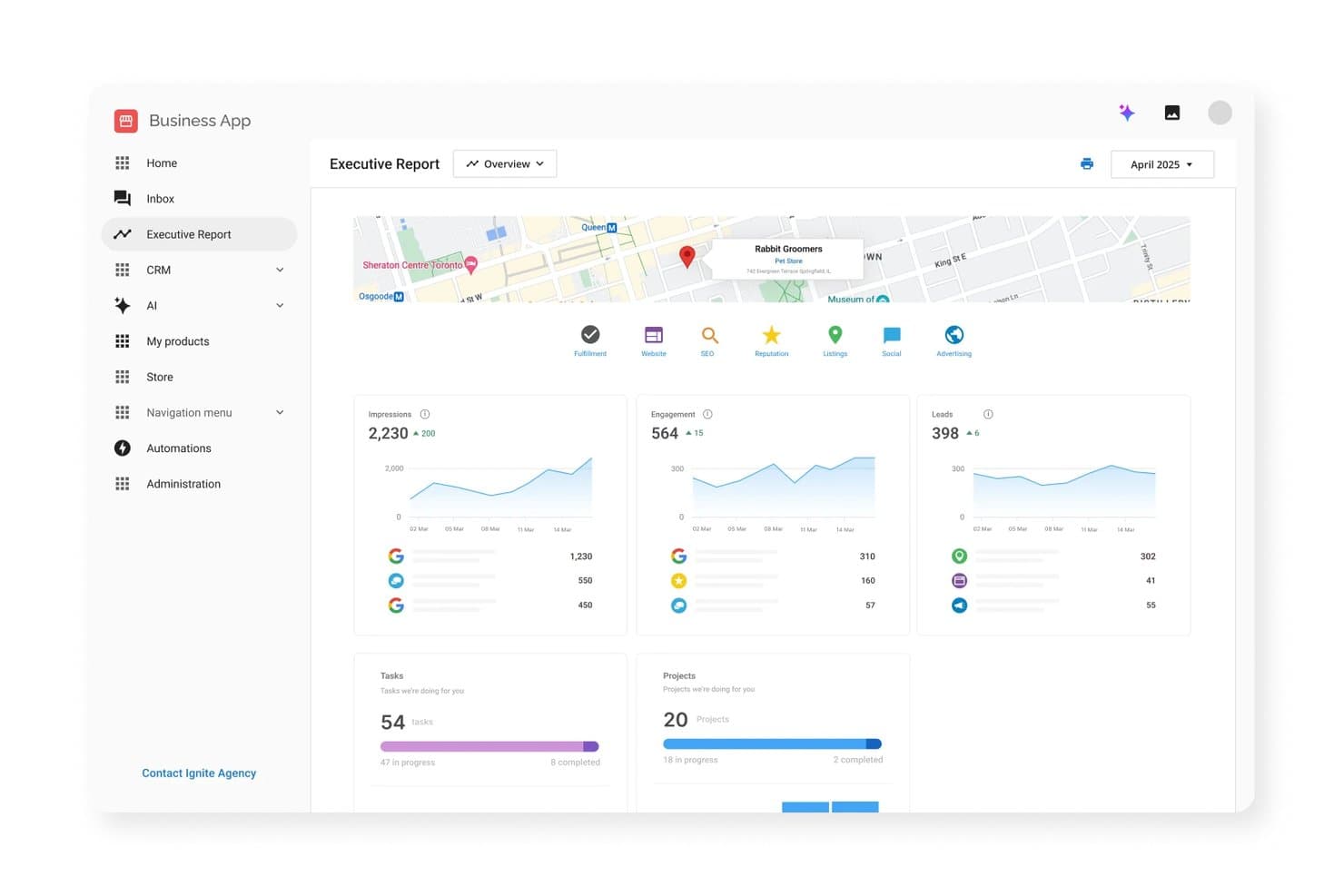
L'app aziendale di Vendasta centralizza le prestazioni del marketing locale in un unico pannello di controllo. Vendasta è una piattaforma di marketing locale focalizzata sulle agenzie che combina la gestione delle schede, il monitoraggio della reputazione e delle recensioni, la SEO locale, la pubblicazione sui social media e la pubblicità digitale in un'unica suite con marchio bianco progettata per gestire più sedi aziendali su larga scala.
Per chi è più adatta Vendasta?
Vendasta è progettata per agenzie di marketing e reti di franchising che devono gestire la visibilità locale, la reputazione e la pubblicità di decine o centinaia di sedi da un'unica piattaforma.
Perché ho scelto Vendasta
Vendasta è entrata nella mia selezione perché gestisce molto bene il marketing su scala agenziale e per reti di franchising con decine o centinaia di sedi da un'unica piattaforma. Sono particolarmente colpito dalla sua forza lavoro AI, che consente ai franchisor di definire una volta sola gli standard del marchio e applicarli automaticamente in ogni sede, e dal suo pannello di controllo multi-sede, che aggrega contemporaneamente i dati sulla reputazione, sulle schede e sui profili dell'attività su Google di migliaia di sedi. La sua AI per la reputazione monitora più di 100 siti di recensioni e genera automaticamente risposte con un tono coerente per ogni sede: un livello di copertura che sarebbe altrimenti impossibile gestire manualmente su larga scala.
Funzionalità principali di Vendasta
- Griglia SEO locale: monitora il posizionamento nella ricerca locale in base alla geolocalizzazione, consentendo di vedere come si comporta ogni sede per parole chiave specifiche in aree diverse.
- Generatore di citazioni: invia i dati NAP ai principali aggregatori come Neustar Localeze e Foursquare, distribuendo informazioni aziendali accurate a oltre 300 directory collegate.
- Vendasta Ads: gestisce campagne pubblicitarie sulla rete di ricerca, sui social, nella pubblicità display e video su Google, Bing, Meta e TikTok, con suggerimenti basati sull'AI per le parole chiave e i testi degli annunci.
- Rapporto istantaneo: analizza il web per generare una verifica per ogni azienda che copre SEO, recensioni, social media e prestazioni del sito web, utilizzabile per la ricerca di potenziali clienti o per i rapporti destinati ai clienti.
Integrazioni di Vendasta
Vendasta dispone di integrazioni documentate con Google Business Profile, Apple Business Connect, HubSpot, WordPress, QuickBooks Online, Jobber, PetExec, Zoom, Google Meet e Stripe. Si collega inoltre a Google Ads, Bing Ads, Facebook, Instagram e TikTok tramite Vendasta Ads.
Pros and Cons
Pros:
- Pannello di controllo multi-sede per la gestione del marchio in franchising
- Portale clienti con marchio bianco per il branding dell'agenzia
- Monitoraggio delle recensioni basato sull'AI e automazione delle risposte
Cons:
- Le funzionalità multi-sede sono disponibili solo nei piani di fascia alta
- Nessun localizzatore di sedi dedicato né strumento per la visibilità nell'AI
Learn more about Vendasta: Ideale per la gestione della reputazione basata sull'IA per attività con più sedi
- Demo gratuita disponibile
- Prezzi su richiesta

Chatmeter è entrata a far parte di Alchemer, integrando la gestione della reputazione in un'unica piattaforma. Chatmeter è una piattaforma di marketing locale per attività con più sedi che combina la gestione delle schede su oltre 140 elenchi, il monitoraggio della reputazione e delle recensioni basato sull'IA, la pubblicazione di contenuti sui social media localizzati e strumenti SEO a livello di sede.
Per chi è più indicato Chatmeter?
Chatmeter è pensato per i marchi con più sedi e per i professionisti del marketing in franchising che gestiscono la reputazione, le schede e la SEO locale da decine a migliaia di sedi.
Perché ho scelto Chatmeter
Chatmeter si è guadagnato un posto nella mia lista ristretta perché il suo sistema di gestione della reputazione basato sull'IA va ben oltre la semplice aggregazione delle recensioni. Sono particolarmente colpito da Pulse AI Signals, che consente di porre domande in linguaggio naturale su migliaia di recensioni e ottenere immediatamente risposte sintetizzate, e dal monitoraggio dei rischi, che segnala le menzioni di discriminazione o problemi di sicurezza prima che si aggravino. Entrambe le funzionalità sono progettate appositamente per i marchi che gestiscono decine o centinaia di sedi, dove la revisione manuale semplicemente non è un'opzione.
Funzionalità principali di Chatmeter
- Gestione delle schede locali: Sincronizza dati aziendali accurati su oltre 140 elenchi grazie a partnership API dirette con Google, Apple Maps, Bing, Yelp e Facebook.
- Generatore di risposte basato sull'IA: Produce risposte generate dall'IA e incentrate sulle persone alle recensioni dei clienti direttamente all'interno della piattaforma.
- Suite social: Consente di creare, programmare e pubblicare contenuti localizzati su Facebook, Instagram, Google Posts, X e LinkedIn da un unico pannello di controllo.
- Integrazioni con strumenti di BI: Collega i dati dei report a Tableau, Power BI, Domo e Qlik per analisi più approfondite tra le diverse sedi.
Integrazioni di Chatmeter
Chatmeter si integra con Google Business Profile, Apple Maps, Bing Places, Yelp, Facebook, Tableau, Power BI, Domo e Qlik. Supporta inoltre un'API aperta per integrazioni personalizzate e si collega a Uber Eats, DoorDash e Grubhub.
Pros and Cons
Pros:
- Monitoraggio delle recensioni e dei rischi basato sull'IA
- Suite social inclusa in ogni piano
- Gestione specializzata delle schede su Apple Maps
Cons:
- Nessuna funzionalità nativa per gli annunci con targeting geografico
- Non è possibile rispondere alle recensioni di Yelp dalla piattaforma
Learn more about Chatmeter: Ideale per la visibilità nella ricerca locale basata sull'IA
- Demo gratuita disponibile
- Da $39/mese
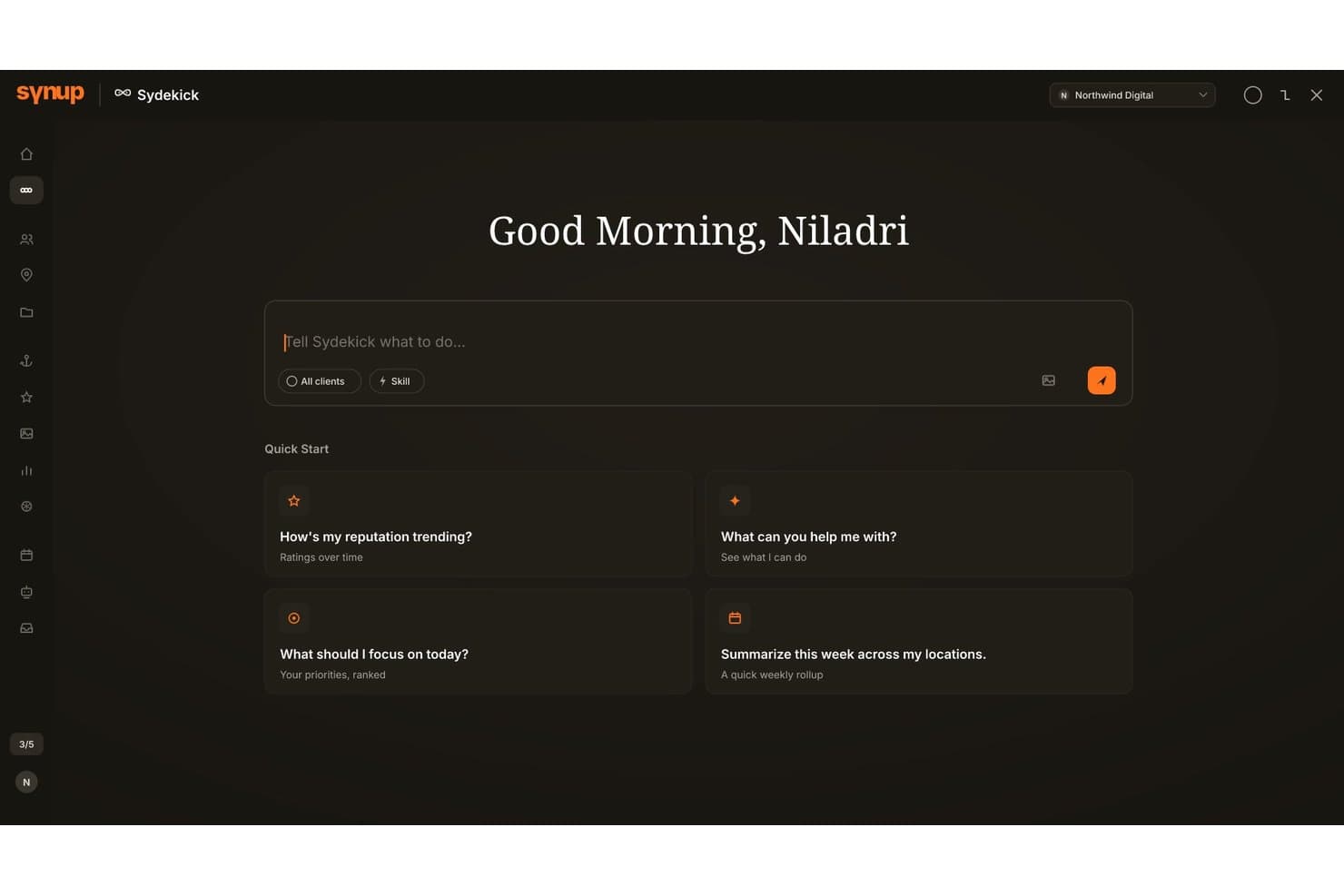
L'assistente IA di Synup aiuta gli utenti a gestire la reputazione e le priorità. Synup è una piattaforma di marketing locale che combina la gestione delle schede, il monitoraggio della reputazione, la SEO locale, la pubblicazione sui social e il monitoraggio della visibilità nella ricerca basato sull'IA in oltre 100 directory e motori di IA come ChatGPT, Gemini e Perplexity.
Per chi è più adatto Synup?
Synup è particolarmente adatto ai direttori del marketing per i franchising e ai responsabili del marketing per attività con più sedi che necessitano di un controllo centralizzato sulla visibilità nella ricerca locale senza rinunciare alla flessibilità a livello di singola sede.
Perché ho scelto Synup
Synup merita un posto tra le migliori soluzioni della mia lista perché è l'unica piattaforma di marketing locale che ho visto con un prodotto AEO dedicato, in grado di monitorare la visibilità della tua attività all'interno di ChatGPT, Gemini, Perplexity e Microsoft Copilot. Apprezzo molto la Mappa della visibilità delle parole chiave nell'IA, che assegna un codice colore alla tua presenza nei vari motori di IA per parola chiave, così puoi vedere esattamente dove stai perdendo terreno. Lo strumento di monitoraggio del posizionamento su una griglia geografica 7×7 aggiunge un ulteriore livello che trovo davvero utile, tracciando 49 punti di dati nell'area dei tuoi servizi invece di fornire un'unica posizione media.
Funzionalità principali di Synup
- Monitoraggio della reputazione: Monitora le recensioni su oltre 30 fonti e offre la stesura assistita dall'IA delle risposte per Google Maps e Facebook direttamente dalla piattaforma.
- Campagne per la generazione di recensioni: Invia messaggi di posta elettronica e SMS personalizzati con il marchio agli elenchi di clienti per richiedere nuove recensioni sulle principali piattaforme.
- Pagine di destinazione locali: Crea pagine ottimizzate per Schema e indicizzabili singolarmente per ogni sede utilizzando uno strumento senza codice con funzionalità di trascinamento, popolato con dati aziendali aggiornati.
- Autorizzazioni basate sui ruoli: Assegna livelli di accesso specifici ai membri del team o agli affiliati, controllando ciò che ogni utente può visualizzare o modificare nelle varie sedi.
Integrazioni di Synup
Synup si collega a oltre 100 directory di editori, tra cui Google Business Profile, Apple Business Connect, Bing Places, Facebook e Waze, oltre a più di 30 fonti di recensioni come Yelp, TripAdvisor e Trustpilot. La sua API REST offre oltre 140 endpoint per integrazioni personalizzate.
Pros and Cons
Pros:
- Monitora la visibilità nei motori di IA per la ricerca locale
- Potente monitoraggio del posizionamento su griglia geografica per ogni sede
- Monitoraggio e correzione delle schede basati sull'IA
Cons:
- Risposte dirette alle recensioni limitate a due piattaforme
- Nessuno strumento integrato per campagne pubblicitarie con targeting basato sulla posizione
Learn more about Synup: Ideale per la generazione di contatti potenziali iperlocali
- Non disponibile
- A partire da ₹800/mese/punto vendita
Visit WebsiteCustomer Rating:4.5/5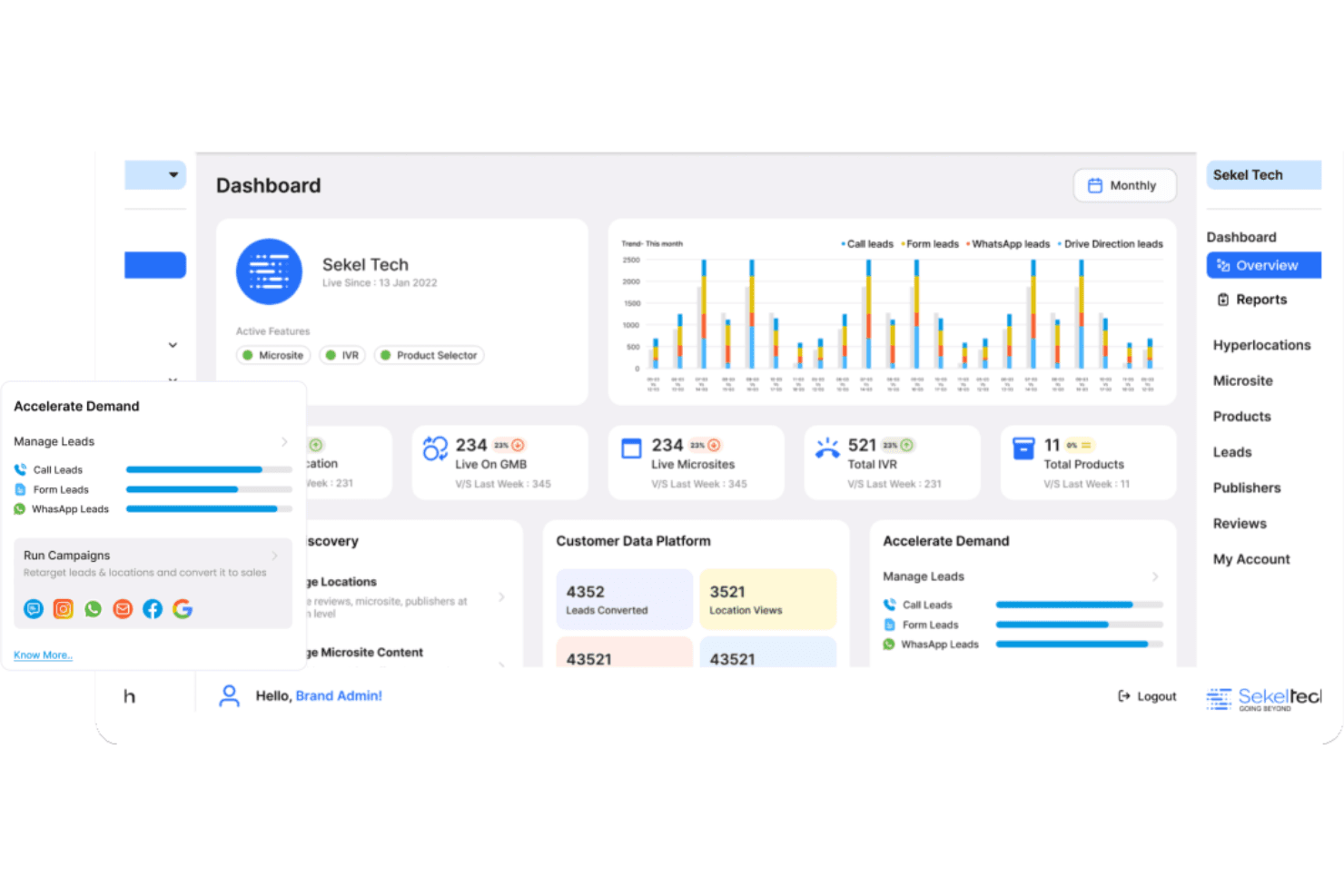
Sekel Tech genera contatti potenziali e si rivolge a segmenti di pubblico iperlocali selezionati. Sekel Tech è una piattaforma di marketing iperlocale che combina la gestione dinamica delle schede, la SEO locale, la gestione della reputazione, i contenuti localizzati e la pubblicità a pagamento a livello di concessionario in un unico sistema per più sedi.
Per chi è più adatto Sekel Tech?
Sekel Tech è particolarmente adatto ai marchi con più sedi e alle reti di concessionari, soprattutto nei settori della vendita al dettaglio, automobilistico e dei franchising, che hanno bisogno di trasformare la visibilità nelle ricerche locali in vendite in negozio su larga scala.
Perché ho scelto Sekel Tech
Ho scelto Sekel Tech come una delle migliori soluzioni perché è progettato specificamente per trasformare le ricerche locali in vendite in negozio, non solo in visibilità. La sua gestione dinamica delle schede si sincronizza in tempo reale con Google Business Profile, Apple Maps e oltre 50 piattaforme, mentre le campagne Google e Meta Ads a livello di concessionario vengono eseguite con una commissione sui media dello 0%. Mi piace anche il fatto che monitori l'intero percorso dal contatto potenziale alla vendita, permettendo di vedere quali pagine delle sedi e quali campagne stanno effettivamente portando clienti nei negozi.
Funzionalità principali di Sekel Tech
- IA agentica di Sekel: Un copilota basato sull'IA che monitora oltre 150 piattaforme per raccogliere informazioni sulla concorrenza, automatizza il coinvolgimento dei clienti tramite WhatsApp e voce e converte le interazioni in attività per il CRM.
- Ruoli amministrativi gerarchici: Un modello di autorizzazioni Brand → Zona → Stato → Città → Negozio consente ai team aziendali di stabilire regole e limiti, lasciando agli operatori locali la possibilità di personalizzare contenuti e campagne.
- Piattaforma per i dati dei clienti (CDP): Una CDP integrata riunisce i dati di prima parte con il CRM, la gestione dei contatti potenziali e la gestione delle informazioni sui prodotti in un unico sistema.
- SellrApp: Un'app di gestione della vendita al dettaglio basata sul cloud che gestisce cataloghi di prodotti, monitoraggio dei contatti potenziali, gestione degli ordini, assistenza in garanzia e EPOS intelligente su dispositivi mobili e web.
Integrazioni di Sekel Tech
Sekel Tech supporta oltre 20 integrazioni, tra cui Google Ads, Meta Ads, Google Maps, Salesforce, HubSpot, Zoho, Shopify, WooCommerce, Magento e Adobe Commerce. Supporta inoltre integrazioni tramite API aperte per una connettività personalizzata.
Pros and Cons
Pros:
- Monitora le conversioni dalle vendite online a quelle in negozio
- Nessuna commissione sui media per le campagne pubblicitarie
- Ruoli amministrativi gerarchici per il controllo di più sedi
Cons:
- Si concentra principalmente sui marchi e sui mercati indiani
- Poche recensioni indipendenti al di fuori dell'India
Learn more about Sekel Tech: Ideale per la gestione dei feedback dei clienti
- Demo gratuita disponibile
- Prezzi su richiesta
Visit WebsiteCustomer Rating:4.8/5
Birdeye automatizza le campagne via e-mail e SMS tra le diverse sedi. Birdeye è una piattaforma di marketing locale progettata per i marchi con più sedi, che combina la gestione della reputazione, le schede locali, la pubblicazione sui social, pagine delle sedi ottimizzate per la SEO e la generazione e risposta alle recensioni basate sull'intelligenza artificiale su oltre 200 siti di recensioni.
Per chi è più adatto Birdeye?
Birdeye è particolarmente adatto ai marchi con più sedi e alle reti di franchising che necessitano di un controllo centralizzato sulle recensioni dei clienti, sulle schede locali e sul marketing a livello di sede su larga scala.
Perché ho scelto Birdeye
Birdeye è entrato nella mia selezione perché nessun'altra piattaforma che ho valutato si avvicina alla sua profondità nella gestione dei feedback dei clienti su larga scala. L'agente per la risposta alle recensioni può gestire autonomamente decine di migliaia di recensioni, come ha dimostrato H&R Block durante la stagione fiscale, gestendo oltre 49.000 recensioni senza intervento manuale. Apprezzo anche il fatto che la piattaforma raccolga recensioni da oltre 200 siti in un unico pannello di controllo, con analisi del tono e confronto con i concorrenti integrati a livello di sede.
Funzionalità principali di Birdeye
- Strumento per la creazione di pagine locali: distribuisce pagine di destinazione generate dall'IA e ottimizzate per la SEO per ogni sede, senza richiedere risorse di sviluppo.
- Ricerca tramite IA: monitora la visibilità del marchio e delle sedi nei risultati generati dall'IA su ChatGPT, Gemini, Perplexity e nelle panoramiche IA di Google.
- Automazione del marketing: gestisce campagne personalizzate via e-mail e SMS specifiche per ogni sede, che si adattano dinamicamente in base alla sede utilizzando la segmentazione del pubblico in linguaggio naturale.
- Reportistica per più sedi: fornisce pannelli di controllo in tempo reale a livello di sede, con confronti affiancati, rilevamento delle anomalie e interrogazioni in linguaggio naturale.
Integrazioni di Birdeye
Birdeye si collega a oltre 3.000 sistemi software, tra cui Salesforce, HubSpot, Google Business Profile, Apple Business Connect, Bing Places, Yelp, Facebook, Shopify, Square e QuickBooks. Offre inoltre API aperte, webhook e un portale per sviluppatori per le integrazioni personalizzate.
Pros and Cons
Pros:
- Automazione delle recensioni su oltre 200 siti e sedi
- L'IA monitora la visibilità nei risultati di ricerca IA/LLM
- Reportistica per più sedi con rilevamento delle anomalie
Cons:
- Nessuna console nativa per gli annunci a pagamento con targeting geografico
- Nessun supporto per video in diretta o Reel sui social
Learn more about Birdeye: 7Ideale per l'accuratezza delle schede delle sedi
Yext
- Demo gratuita disponibile
- Prezzo su richiesta
Visit WebsiteCustomer Rating:4.4/5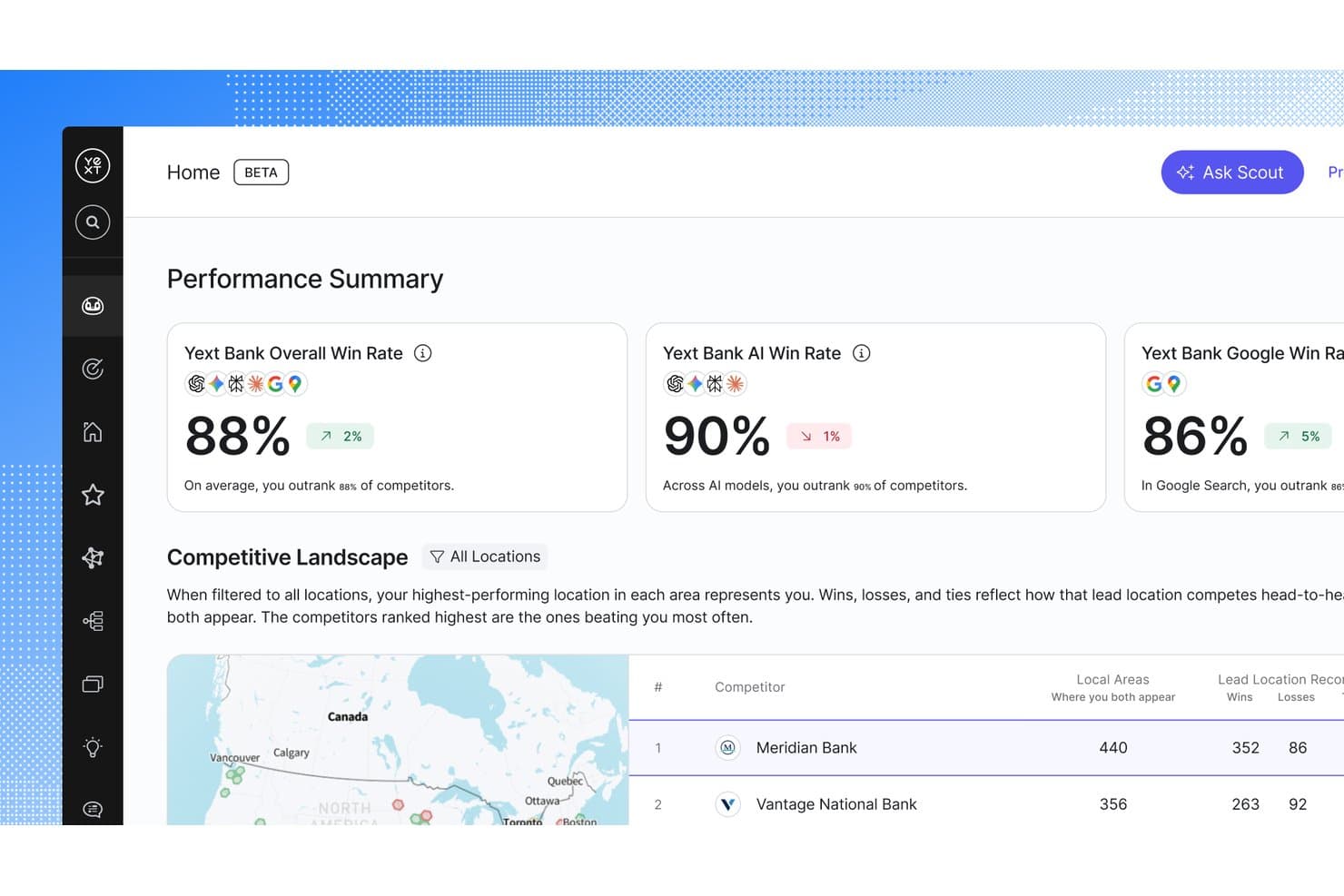
Yext monitora i tassi di vittoria e le classifiche dei concorrenti sulle piattaforme di ricerca. Yext è una piattaforma di marketing locale che gestisce le schede delle attività, la reputazione, le pagine di destinazione locali, la pubblicazione sui social media e la visibilità nelle ricerche basate sull'intelligenza artificiale su centinaia di editori e directory.
Per chi è più adatto Yext?
Yext è progettato per i marchi aziendali e le organizzazioni in franchising che gestiscono schede, recensioni e visibilità locale in centinaia o migliaia di sedi.
Perché ho scelto Yext
Yext si è guadagnato un posto nella mia lista ristretta perché nessun'altra piattaforma si avvicina alla sua accuratezza delle schede su oltre 200 editori tramite connessioni API dirette, senza intermediari aggregatori. Mi piace il fatto che Listings Verifier rilevi e corregga automaticamente le sovrascritture di terze parti prima che causino danni alla visibilità. Inoltre, Yext Scout ora monitora la presenza del tuo marchio all'interno di ChatGPT, Gemini e delle panoramiche AI di Google, un territorio che la maggior parte degli strumenti di marketing locale non ha ancora esplorato.
Funzionalità principali di Yext
- Agente per la reputazione basato sull'intelligenza artificiale: Monitora, aggrega e prepara bozze di risposta alle recensioni su oltre 80 piattaforme, con analisi del sentiment e regole configurabili per le risposte automatiche.
- Grafo della conoscenza: Un archivio dati centrale che sincronizza contemporaneamente un singolo aggiornamento su schede, pagine, social media e recensioni in tutte le sedi.
- Yext Pages: Uno strumento di creazione senza codice che genera migliaia di pagine di destinazione locali ricche di dati strutturati e indicizzabili individualmente, alimentate dai dati aggiornati del Grafo della conoscenza.
- Strumenti di governance per il franchising: Autorizzazioni basate sui ruoli, blocco dei campi fondamentali per il marchio e flussi di approvazione tra affiliati e sede centrale per la gestione di grandi organizzazioni con più sedi.
Integrazioni di Yext
Yext si collega a oltre 200 editori, tra cui Google Business Profile, Apple Business Connect, Bing Places, Yelp, Facebook, UberEats e Amazon Alexa. Si integra inoltre con Salesforce, Google Looker Studio, Drupal e Freshdesk, con API e webhook per connessioni personalizzate.
Pros and Cons
Pros:
- Aggiorna istantaneamente le schede su oltre 200 editori
- Monitora le menzioni del marchio nei risultati di ricerca basati sull'intelligenza artificiale
- Automatizza le risposte alle recensioni con bozze generate dall'intelligenza artificiale
Cons:
- I dati vengono ripristinati se l'abbonamento viene annullato
- Non è progettato per piccole imprese o PMI
Learn more about Yext: 8Ideale per il marketing locale su scala franchising
SOCi
- Demo gratuita disponibile
- Prezzi su richiesta
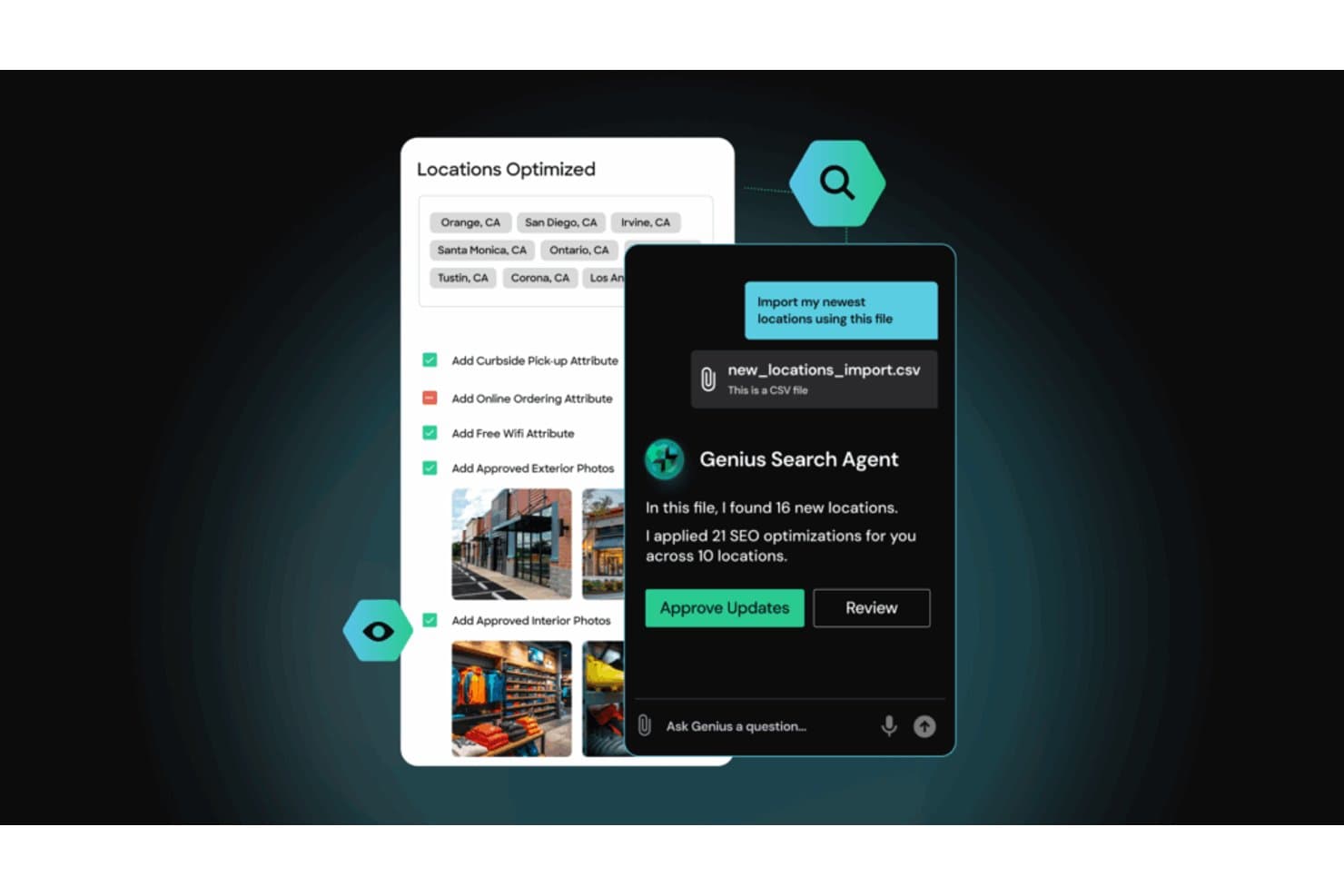
L'Agente di ricerca Genius di SOCi automatizza le ottimizzazioni SEO su più sedi. SOCi è una piattaforma di marketing locale basata sull'intelligenza artificiale che gestisce schede, reputazione, contenuti social, SEO locale e annunci a pagamento per centinaia o migliaia di sedi aziendali da un'unica dashboard.
Per chi è più indicato SOCi?
SOCi è progettato per reti di franchising e marchi aziendali multisede che devono gestire il marketing locale di centinaia o migliaia di sedi da un'unica piattaforma.
Perché ho scelto SOCi
SOCi è entrato nella mia rosa di soluzioni preferite perché nessun'altra piattaforma che ho visto gestisce il marketing locale su scala franchising con questo livello di autonomia. I suoi Agenti Genius non si limitano a segnalare i problemi: rispondono attivamente alle recensioni, aggiornano le schede su oltre 140 directory e pubblicano contenuti social localizzati senza che qualcuno debba attivare manualmente ogni azione. Sono particolarmente colpito dalla funzionalità di visibilità nell'AI/LLM, che ottimizza la reperibilità delle sedi nelle Panoramiche AI di Google, in ChatGPT e in Perplexity, una capacità che la maggior parte delle piattaforme non ha ancora implementato.
Funzionalità principali di SOCi
- Agente Genius per la reputazione: genera automaticamente risposte alle recensioni in linea con il marchio su Google, Yelp, Facebook e TripAdvisor, con analisi del sentiment e flussi di escalation per le recensioni sensibili.
- SOCi Shield: un livello di conformità integrato che analizza e blocca i contenuti non conformi prima che vengano pubblicati nelle schede, nei post sui social e nelle risposte alle recensioni.
- SOCi Surveys: raccoglie il feedback diretto dei clienti tramite e-mail, SMS, codici QR e incorporamenti web, con report NPS e CSAT e integrazioni con Salesforce e Olo Engage.
- Struttura organizzativa gerarchica: organizza le sedi per marchio, regione, mercato e punto vendita, con autorizzazioni basate sui ruoli e flussi di approvazione per ogni livello.
Integrazioni di SOCi
SOCi si integra con oltre 140 piattaforme, tra cui Google Business Profile, Apple Maps, Bing Places, Yelp, Facebook, Instagram, TikTok, Salesforce, Olo e TripAdvisor. Le integrazioni personalizzate sono disponibili tramite la sua API.
Pros and Cons
Pros:
- Automatizza le risposte alle recensioni per tutte le sedi
- Ottimizza la ricerca e la visibilità basate sull'intelligenza artificiale
- Ridimensiona i controlli di conformità e di governance del marchio
Cons:
- Disponibile solo per aziende di livello enterprise
- La pubblicazione dei post sui social può richiedere passaggi manuali
Learn more about SOCi: Ideale per il controllo della presenza online basato sull'intelligenza artificiale
- Demo gratuita disponibile
- Prezzi su richiesta
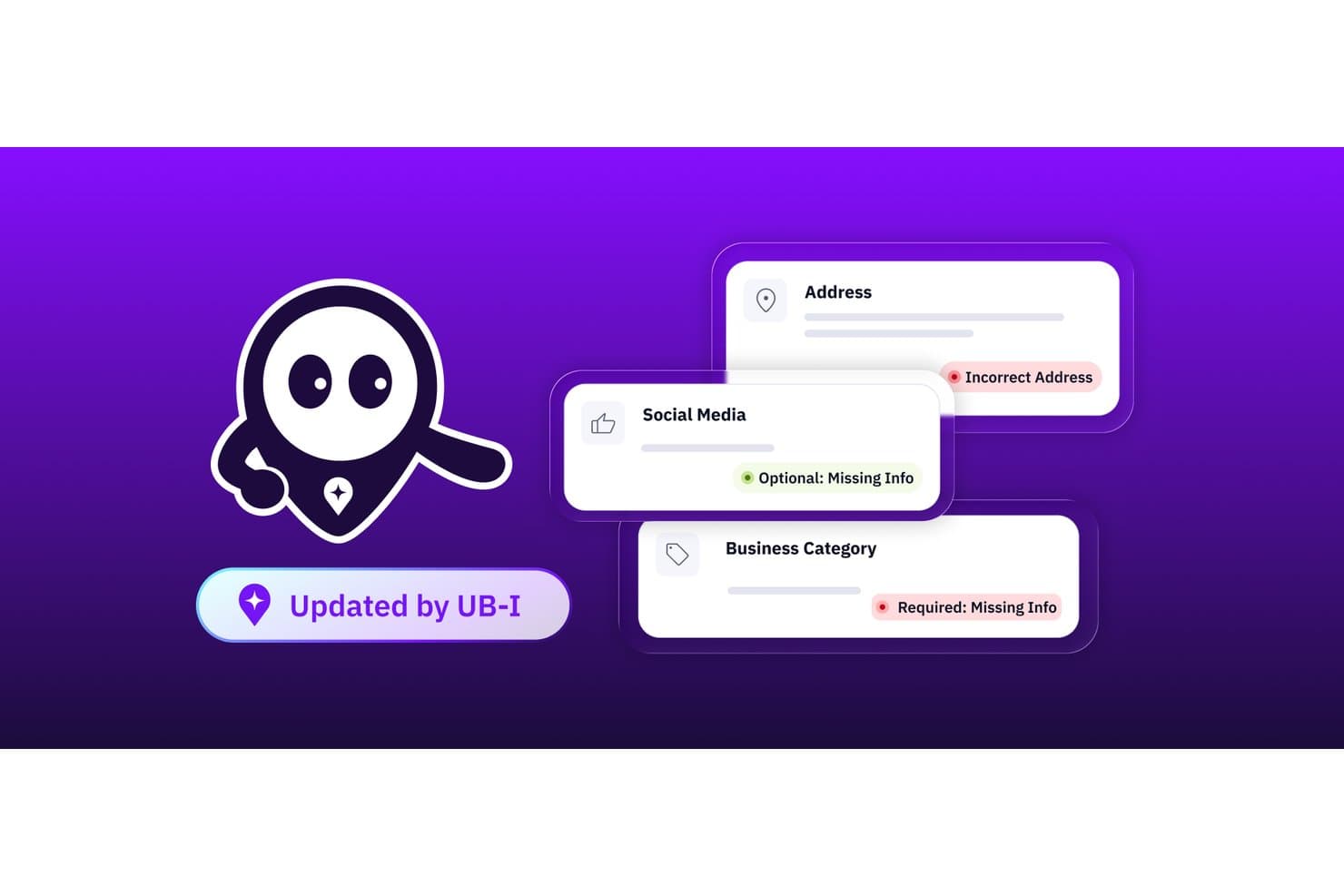
Uberall segnala automaticamente i dati errati, mancanti o richiesti nelle schede delle attività commerciali. Uberall è una piattaforma di marketing per attività con più sedi che centralizza la gestione delle schede, la SEO locale, la gestione delle recensioni, la pubblicazione sui social localizzati e la visibilità nelle ricerche basata sull'intelligenza artificiale su oltre 150 directory e piattaforme.
Per chi è più adatto Uberall?
Uberall è particolarmente adatto ai direttori del marketing dei franchising e ai team dei brand con più sedi che necessitano di un controllo centralizzato sulle schede, sulle recensioni e sui contenuti locali per decine o migliaia di sedi.
Perché ho scelto Uberall
Ho scelto Uberall come uno dei migliori perché il suo approccio basato sull'intelligenza artificiale al controllo della presenza online va oltre quello di qualsiasi altro strumento di questa categoria che abbia visto. UB-I, la sua intelligenza artificiale agentica, monitora le schede su oltre 150 directory in tempo reale e corregge autonomamente i profili non funzionanti o i dati obsoleti senza attendere l'intervento manuale. Apprezzo anche GEO Studio, che monitora il modo in cui le sedi vengono visualizzate all'interno di ChatGPT, Perplexity e delle panoramiche AI di Google, una funzionalità che la maggior parte delle piattaforme concorrenti non ha ancora implementato.
Funzionalità principali di Uberall
- Portale di marketing distribuito: Un sistema di autorizzazioni basato sui ruoli che consente ai team aziendali di bloccare i campi fondamentali per il brand, offrendo al contempo agli operatori locali una flessibilità controllata per personalizzare i contenuti entro limiti approvati.
- Risposte collettive basate sull'intelligenza artificiale: Genera e invia risposte scritte dall'intelligenza artificiale a più recensioni contemporaneamente, ampliando la gestione della reputazione su grandi reti di sedi senza intervento manuale.
- Generatore di pagine locali: Uno strumento senza codice per creare pagine di destinazione delle singole sedi, indicizzabili individualmente e con markup di dati strutturati, dotate di inviti all'azione integrati per le indicazioni stradali, le chiamate con un clic e la prenotazione di appuntamenti.
- Report di analisi del sentiment: Monitora il sentiment dei clienti in tutte le sedi su una scala con punteggio, evidenziando tendenze basate sui temi e informazioni utili ricavate dai dati delle recensioni in un'unica dashboard.
Integrazioni di Uberall
Uberall offre oltre 1.000 integrazioni pronte all'uso, tra cui Google Business Profile, Apple Business Connect, Bing Places, Yelp, TripAdvisor, Facebook, Instagram, LinkedIn e TikTok. Si collega inoltre a Salesforce, Zendesk, Canva, Power BI, Tableau, Google Analytics 4 e Google Search Console e supporta integrazioni personalizzate tramite un'API REST aperta.
Pros and Cons
Pros:
- Correzioni delle schede di più sedi basate sull'intelligenza artificiale
- GEO Studio monitora la visibilità nelle ricerche basate sull'intelligenza artificiale
- Gestione del marketing distribuito per i franchising
Cons:
- I prezzi su preventivo personalizzato creano frizioni per gli acquirenti
- L'intelligenza artificiale per le risposte alle recensioni offre una personalizzazione limitata
Learn more about Uberall: 10Ideale per la ricerca organica multi-sede su larga scala
Rio SEO
- Demo gratuita disponibile
- Prezzi disponibili su richiesta
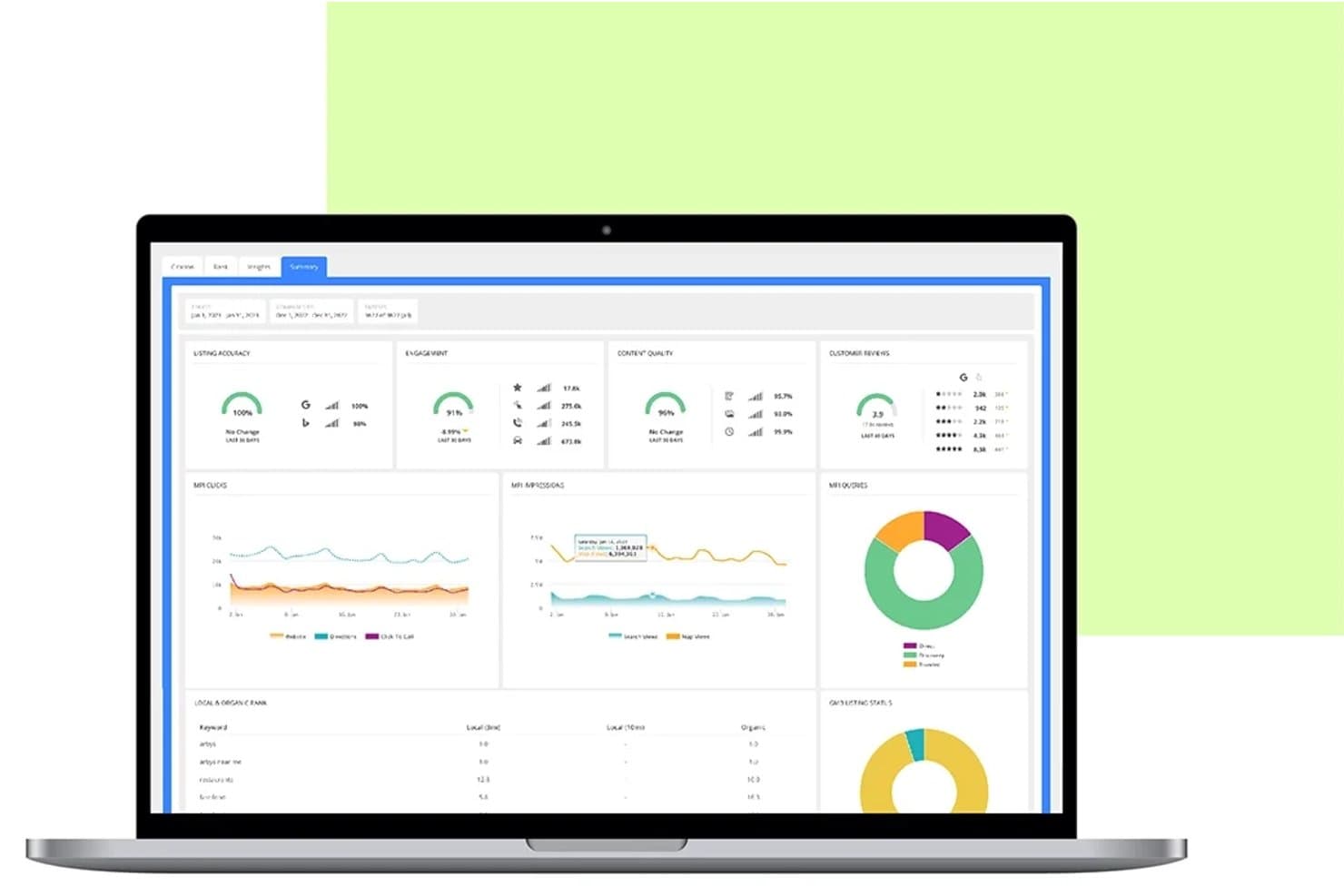
Rio SEO centralizza in un unico pannello le prestazioni delle schede locali e delle recensioni. Rio SEO è una piattaforma di marketing locale per aziende che combina la gestione delle schede, la SEO locale, la gestione della reputazione e delle recensioni, la pubblicazione di contenuti localizzati e la reportistica multi-sede in un'unica suite progettata per grandi marchi e franchising con più sedi.
Per chi è più adatto Rio SEO?
Rio SEO è progettato per i team di marketing aziendali che gestiscono centinaia o migliaia di sedi e necessitano di visibilità nella ricerca organica, gestione delle recensioni e accuratezza delle schede, tutto in un'unica piattaforma.
Perché ho scelto Rio SEO
Rio SEO si è guadagnato un posto nella mia selezione perché nessun'altra piattaforma eguaglia la sua profondità per la ricerca organica multi-sede su larga scala. Sono particolarmente colpito dal suo status di Partner in primo piano di Google Business Profile, che offre ai marchi aziendali un accesso a livello di API per distribuire istantaneamente aggiornamenti in blocco a migliaia di sedi. A questo si aggiungono le Pagine locali ottimizzate per i dati strutturati, create per ogni sede, e il monitoraggio del posizionamento in tempo reale per ogni area geografica: il risultato è un motore di visibilità organica davvero efficace.
Funzionalità principali di Rio SEO
- Soppressione delle schede duplicate: identifica e rimuove automaticamente le schede anomale o duplicate nelle directory, risolvendo i conflitti di proprietà prima che danneggino la visibilità nella ricerca.
- Risposte alle recensioni redatte dall'IA: genera suggerimenti di risposta contestualizzati per le recensioni su oltre 100 piattaforme, con la possibilità di rispondere in blocco a un massimo di 50 recensioni alla volta.
- Genius Text Analytics: analisi del sentiment basata sull'apprendimento automatico applicata ai contenuti delle recensioni, che mette in evidenza tendenze e schemi relativi agli argomenti sia a livello di sede sia a livello aziendale.
- Integrazione con i sondaggi Voice of Customer: collega i dati sulle prestazioni del marketing locale agli strumenti di sondaggio e feedback digitale di Forsta, per una visione unificata dell'esperienza del cliente tra le diverse sedi.
Integrazioni di Rio SEO
Rio SEO si integra con Google Business Profile, Apple Business Connect, Bing Places, Yelp, Facebook, Nextdoor, TripAdvisor, oltre 100 piattaforme di recensioni e centinaia di directory. Le API di Google Business Profile e Apple Business Connect supportano gli aggiornamenti massivi delle schede.
Pros and Cons
Pros:
- Particolarmente efficace per gli aggiornamenti massivi delle schede delle attività
- Strumenti basati sull'IA per le risposte alle recensioni e l'analisi del sentiment
- Servizi gestiti inclusi per le attività di SEO locale
Cons:
- Nessun modulo nativo per gli annunci a pagamento con targeting geografico
- Complessità dell'interfaccia segnalata dagli utenti aziendali
Learn more about Rio SEO:
Altri software di marketing locale
Ecco alcune opzioni aggiuntive di software di marketing locale che non sono entrate nel mio elenco, ma che vale comunque la pena prendere in considerazione.
- 11SingleInterfaceIdeale per ottenere informazioni utili per il remarketing basato sul pubblico delle chiamate
- 12LocaliQ.comIdeale per la conversione dei lead tramite IA su più canali
- 13BrightLocalIdeale per la SEO locale e la gestione proprietaria delle citazioni
- 14ThryvIdeale per la visibilità locale delle piccole imprese
- 15MomentFeedIdeale per ottenere risultati nelle ricerche di prossimità per aziende con più sedi
- 16Surefire LocalIdeale per approfondimenti sulle attività locali
Come valuto i software di marketing locale
Valuto gli strumenti di marketing locale su due livelli: le funzionalità fondamentali che determinano se uno strumento appartiene a questo elenco e gli elementi distintivi che contano a seconda che si stia facendo marketing per una singola attività locale, gestendo un marchio regionale o coordinando centinaia di sedi in franchising.
Funzionalità fondamentali (requisiti per questo elenco)
Quando seleziono gli strumenti per il mio elenco, assegno a ciascuno un punteggio su una scala da 0 (non offre la funzionalità) a 5 (eccelle in quest'area) per ogni funzionalità fondamentale elencata di seguito. Poi calcolo il punteggio totale dello strumento trasformandolo in una percentuale. Ogni strumento deve raggiungere un punteggio totale minimo del 65% per essere preso in considerazione.
- Gestione delle schede locali: valuto in che modo ogni strumento aiuta le attività a gestire le informazioni locali, come nomi, indirizzi, orari e categorie. Le piattaforme più avanzate possono sincronizzare gli aggiornamenti tra directory, mappe e motori di ricerca, una funzione particolarmente utile quando si gestiscono informazioni relative a più sedi.
- SEO locale & visibilità: valuto in che modo ogni strumento aiuta a migliorare o misurare la visibilità nella ricerca locale. Questo può includere la gestione del Profilo dell'attività su Google, il monitoraggio del posizionamento locale, la gestione delle citazioni, gli audit NAP e le informazioni sulla ricerca a livello di sede.
- Gestione della reputazione & delle recensioni: cerco strumenti che aiutino a monitorare, aggregare, richiedere o gestire le risposte alle recensioni dei clienti. Per le attività con più sedi, valuto anche se le recensioni possono essere gestite e analizzate separatamente per ciascuna sede.
- Contenuti & campagne localizzati: verifico se i team possono creare e distribuire contenuti di marketing per sedi o mercati specifici. Questo può includere pagine di destinazione locali, post sui social, promozioni o modelli approvati dal marchio che le singole sedi possono personalizzare.
- Pubblicità iperlocale & social: valuto se una piattaforma può raggiungere il pubblico in base alla posizione attraverso la pubblicazione sui social locali, la pubblicità con targeting geografico, le promozioni a livello di punto vendita o funzionalità simili di targeting geografico.
- Analisi & reportistica locale: cerco report che suddividano le prestazioni per sede, mercato o campagna. Questo può includere la visibilità nella ricerca locale, le recensioni, il coinvolgimento nelle campagne e altre metriche a livello di sede che aiutano a capire cosa funziona nei diversi mercati.
Una volta ottenuto un elenco di strumenti che soddisfano i criteri, valuto ciò che distingue ciascuna piattaforma.
Fattori distintivi (ciò che differenzia i fornitori)
Ecco come confronto i diversi fornitori:
Funzionalità di spicco
I creatori di pagine di destinazione locali si distinguono quando possono creare pagine ottimizzate singolarmente per ogni sede senza richiedere ai team di realizzare manualmente ogni pagina. Cerco anche localizzatori di punti vendita che colleghino la scoperta locale ad azioni come ottenere indicazioni stradali, chiamare una sede o prenotare un appuntamento.
Per le reti più grandi, i portali di marketing distribuito sono un altro elemento distintivo utile perché offrono agli operatori locali l'accesso a risorse e campagne approvate, aiutando al contempo i team aziendali a mantenere gli standard del marchio. Valuto anche le risposte alle recensioni assistite dall'IA, l'ascolto dei social, le informazioni locali sulla concorrenza e i più recenti strumenti di visibilità nella ricerca basati sull'IA quando aggiungono funzionalità significative oltre alle funzioni fondamentali di marketing locale della piattaforma.
Oltre le funzionalità
La struttura dei prezzi è molto importante in questo caso. Verifico se un fornitore applica un costo per sede, in base al pacchetto di funzionalità o tramite un contratto personalizzato, perché l'economia può cambiare considerevolmente tra una piccola attività e una grande rete in franchising.
Valuto anche quanto bene una piattaforma gestisce i dati delle sedi e si connette al più ampio ecosistema del marketing locale. Le integrazioni dirette con servizi come Profilo dell'attività su Google, Apple Business Connect e le principali piattaforme di recensioni possono influire sull'efficienza con cui i team gestiscono la propria presenza locale. Anche le integrazioni con CRM, POS, automazione del marketing e analisi sono importanti quando i dati del marketing locale devono collegarsi al resto dell'insieme di strumenti di marketing.
Per i team che gestiscono più sedi e per quelli in franchising, valuto anche scalabilità e governance. Le autorizzazioni basate sui ruoli, le gerarchie delle sedi, i flussi di approvazione e le operazioni collettive possono determinare se i team aziendali e locali riescono a lavorare in modo indipendente senza perdere il controllo sugli standard del marchio.
Come scegliere il software di marketing locale
È facile perdersi in lunghi elenchi di funzionalità e strutture tariffarie complesse. Ecco una lista di controllo dei fattori da ricordare, per aiutarti a rimanere concentrato mentre affronti il tuo specifico processo di scelta del software.
| Fattore | Cosa considerare |
| Scalabilità | Assicurati che il software cresca insieme alla tua azienda. Cerca soluzioni in grado di supportare un numero crescente di sedi o di clienti. |
| Integrazioni | Per semplificare i flussi di lavoro, verifica che si colleghi agli strumenti che già utilizzi, come i CRM o le piattaforme di social media. |
| Personalizzazione | Puoi adattare il software alle tue strategie di marketing e al tuo marchio? Dashboard e report personalizzabili sono un buon segnale. |
| Facilità d'uso | Il tuo team non dovrebbe avere difficoltà con interfacce complesse. Scegli design intuitivi che riducano al minimo il tempo necessario per la formazione |
| Budget | Allinea il costo al tuo piano finanziario. Valuta se il modello di prezzo è adatto alle dimensioni e alle esigenze della tua azienda, indipendentemente dal fatto che si tratti di un abbonamento o di un pagamento una tantum. |
| Misure di sicurezza | Assicurati che i dati dei clienti siano protetti. Cerca funzionalità come la crittografia e la conformità alle normative sulla protezione dei dati. |
| Assistenza | Un'assistenza clienti affidabile può farti risparmiare tempo e stress. Verifica se offre assistenza 24 ore su 24, 7 giorni su 7, e diverse modalità di contatto. |
| Analisi | Un software efficace dovrebbe offrire informazioni sulle prestazioni delle campagne e sul comportamento dei clienti, aiutandoti a prendere decisioni consapevoli. |
Tendenze nel software di marketing locale
Durante la mia ricerca, ho raccolto innumerevoli aggiornamenti di prodotto, comunicati stampa e registri dei fornitori di software di marketing locale. Ecco alcune delle tendenze emergenti che sto tenendo d'occhio.
- Personalizzazioni basate sull’intelligenza artificiale: un numero sempre maggiore di strumenti utilizza l’intelligenza artificiale per adattare i messaggi di marketing ai singoli clienti. Questa tendenza aiuta le aziende a entrare in contatto con il proprio pubblico a livello personale, migliorando il coinvolgimento. Alcuni fornitori hanno introdotto funzionalità di intelligenza artificiale che consigliano contenuti in base al comportamento dei clienti.
- Ottimizzazione per la ricerca vocale: con la diffusione degli assistenti vocali, l’ottimizzazione per la ricerca vocale sta diventando essenziale. Il software di marketing locale si sta adattando offrendo strumenti che aiutano le aziende a garantire che le proprie informazioni siano ottimizzate per la ricerca vocale. I fornitori stanno integrando funzionalità per analizzare e ottimizzare le query di ricerca vocale.
- Funzionalità di ricerca visiva: la ricerca visiva sta guadagnando terreno e consente agli utenti di effettuare ricerche utilizzando immagini invece di parole chiave. Questa tendenza è significativa per le aziende locali che fanno affidamento sull’attrattiva visiva, come ristoranti e negozi. Alcune piattaforme offrono ora modalità per ottimizzare i contenuti per i motori di ricerca visiva.
- Funzionalità incentrate sulla sostenibilità: poiché i consumatori diventano sempre più attenti alle tematiche ambientali, le aziende cercano modi per mettere in evidenza le proprie pratiche sostenibili. Il software di marketing locale sta iniziando a offrire funzionalità che consentono alle aziende di mostrare iniziative ecologiche, aiutandole ad attirare questo segmento demografico in crescita.
- Marketing sui social media iperlocale: il targeting di quartieri o comunità specifici attraverso i social media sta diventando sempre più popolare. Le soluzioni software forniscono strumenti per creare e gestire campagne iperlocali, consentendo alle aziende di interagire in modo più efficace con i clienti di aree specifiche. Questa tendenza aiuta le aziende ad adattare i propri messaggi al pubblico locale.
Che cos’è il software di marketing locale?
Il software di marketing locale aiuta le aziende a gestire il proprio marketing a livello locale. Viene utilizzato da professionisti del marketing, titolari di piccole imprese e agenzie per rafforzare la propria presenza in comunità o regioni specifiche.
Questi strumenti consentono di gestire le schede locali, monitorare le recensioni dei clienti e interagire con il pubblico locale. Sono progettati per aumentare la visibilità e migliorare il coinvolgimento dei clienti nei mercati regionali.
Funzionalità del software di marketing locale
Quando scegli un software di marketing locale, cerca le seguenti funzionalità chiave.
- Gestione delle schede locali: aiuta a garantire che le informazioni sulla tua attività siano accurate e coerenti su più piattaforme.
- Monitoraggio delle recensioni: consente di tenere traccia dei feedback dei clienti e rispondere in modo efficiente, migliorando la reputazione.
- Pubblicità con targeting geografico: consente di raggiungere specifici pubblici locali, massimizzando la rilevanza delle attività di marketing.
- Gestione dei social media: consente di programmare e pubblicare post per interagire con la comunità locale su diverse piattaforme.
- Dashboard analitica: fornisce informazioni sulle prestazioni nella ricerca locale e sul comportamento dei clienti, orientando le strategie di marketing.
- Strumenti per campagne iperlocali: supporta la creazione e la gestione di campagne di marketing personalizzate per quartieri o comunità specifici.
- Strumenti per la coerenza del marchio: garantisce che tutti i materiali di marketing siano conformi agli standard del marchio, mantenendo un’immagine uniforme.
- Ottimizzazione per la ricerca vocale: aiuta la tua attività ad adattarsi alla crescente diffusione delle ricerche attivate con la voce, migliorando l’accessibilità.
- Comunicazione automatizzata: facilita l’invio di messaggi personalizzati e promemoria ai clienti senza interventi manuali.
- Funzionalità di ricerca visiva: consente di ottimizzare i contenuti per i motori di ricerca visiva, migliorando la reperibilità per le aziende orientate all’impatto visivo.
Vantaggi del software di marketing locale
L’implementazione di un software di marketing locale offre diversi vantaggi al tuo team e alla tua azienda. Eccone alcuni di cui potrai usufruire.
- Maggiore visibilità locale: garantisce che le informazioni sulla tua attività siano accurate e facili da trovare, aumentando la tua presenza nelle ricerche locali.
- Maggiore coinvolgimento dei clienti: consente di entrare in contatto con il pubblico attraverso messaggi personalizzati e interazioni sui social media.
- Gestione efficiente della reputazione: consente di monitorare e rispondere rapidamente alle recensioni, mantenendo un’immagine positiva.
- Attività di marketing mirate: supporta la pubblicità con targeting geografico e le campagne iperlocali, raggiungendo il pubblico giusto con contenuti pertinenti.
- Decisioni basate sui dati: fornisce informazioni tramite dashboard analitiche, aiutandoti a perfezionare le strategie in base al comportamento dei clienti.
- Branding coerente: garantisce che tutti i materiali di marketing siano conformi agli standard del marchio, presentando un’immagine unificata su tutte le piattaforme.
Costi e prezzi del software di marketing locale
La selezione di un software di marketing locale richiede la comprensione dei vari modelli di prezzo e dei piani disponibili. I costi variano in base alle funzionalità, alle dimensioni del team, ai componenti aggiuntivi e ad altri fattori. La tabella seguente riassume i piani standard, i prezzi medi e le funzionalità tipiche delle soluzioni software di marketing locale.
Tabella di confronto dei piani per i software di marketing locale
| Tipo di piano | Prezzo medio | Funzionalità comuni |
| Piano gratuito | $0 | Gestione di base delle schede, analisi limitate e strumenti per il coinvolgimento della comunità |
| Piano personale | $5-$25/ utente/mese | Monitoraggio avanzato delle recensioni, programmazione dei social media e assistenza clienti di base |
| Piano aziendale | $30-$75/ utente/mese | Analisi avanzate, pubblicità con targeting geografico e automazione del marketing via email |
| Piano per grandi aziende | $100-$250/utente/mese | Strumenti di branding personalizzati, responsabile dell'account dedicato e reportistica completa |
Domande frequenti sui software di marketing locale
Ecco alcune risposte alle domande comuni sui software di marketing locale.
In che modo il software di marketing locale può migliorare il posizionamento della mia attività nelle ricerche locali?
Il software di marketing locale contribuisce a ottimizzare le informazioni sulla tua attività su diverse piattaforme, garantendone coerenza e accuratezza. Questo migliora la tua visibilità nei risultati delle ricerche locali. Gli strumenti aiutano inoltre a gestire le recensioni dei clienti e a interagire con il pubblico locale, fattori che possono migliorare ulteriormente il tuo posizionamento.
Il software di marketing locale è adatto alle piccole imprese?
Sì, il software di marketing locale è spesso progettato pensando alle piccole imprese. Offre funzionalità come la gestione delle schede locali e il monitoraggio delle recensioni dei clienti, essenziali per consentire alle piccole imprese di competere nei propri mercati locali. Questi strumenti possono aiutarti a interagire in modo più efficace con i clienti locali e a costruire una forte presenza nella comunità.
Cosa devo considerare nella scelta di un software di marketing locale?
Valuta la capacità del software di gestire le schede locali, le sue funzionalità di analisi e il modo in cui favorisce il coinvolgimento dei clienti. Considera se offre funzionalità come la pubblicità con targeting geografico e la gestione dei social media. Esamina l’interfaccia utente per assicurarti che sia intuitiva e facile da usare per il tuo team.
In che modo il software di marketing locale aiuta a coinvolgere i clienti?
Il software di marketing locale offre strumenti per automatizzare la comunicazione con i clienti, ad esempio inviando messaggi personalizzati e promemoria. Aiuta a gestire e rispondere alle recensioni dei clienti, creando opportunità di interazione. Puoi costruire relazioni più solide e rafforzare la fidelizzazione dei clienti coinvolgendoli attraverso vari canali.
Il software di marketing locale può integrarsi con gli altri strumenti che utilizzo?
La maggior parte delle soluzioni software di marketing locale offre integrazioni con strumenti diffusi come Google My Business, le piattaforme di social media e i servizi di marketing via email. Queste integrazioni ti consentono di ottimizzare le attività di marketing e di fare in modo che tutti i tuoi sistemi funzionino insieme in modo efficiente.
Come posso misurare il successo delle mie attività utilizzando gli strumenti di marketing locale?
Puoi misurare il successo monitorando il posizionamento nelle ricerche locali, le recensioni dei clienti e i tassi di coinvolgimento. Utilizza i pannelli di analisi forniti dal software per ottenere informazioni sulle prestazioni delle tue attività di marketing. Esamina regolarmente queste metriche per adeguare le strategie e migliorare i risultati.