

Gestire gli asset del brand può essere una vera seccatura per i responsabili marketing. Devi destreggiarti tra loghi, immagini e documenti, cercando al contempo di mantenere la coerenza. I software per la gestione degli asset del brand (software BAM) possono aiutarti organizzando tutto in un'unica posizione centrale, semplificando il tuo lavoro e facendoti risparmiare tempo.
Ho testato e recensito questi strumenti, concentrandomi su ciò che conta davvero per te e per il tuo team. Il mio obiettivo è offrirti una panoramica imparziale delle migliori opzioni disponibili. In questo articolo troverai le mie scelte migliori, ciascuna valutata in base ai suoi punti di forza specifici.
Perché fidarsi dei nostri consigli sui software
6,700+
Reviews
20
Industry experts
16+
Evaluation factors
14
Years
Il nostro team testa e recensisce software dal 2012. In quanto leader del marketing noi stessi, sappiamo quanto sia difficile — e importante — scegliere il software giusto.
Per questa guida, abbiamo valutato gli strumenti attraverso test pratici e ricerche indipendenti, assegnando un punteggio agli strumenti in base ai nostri criteri di selezione.
Le nostre recensioni riflettono il nostro giudizio editoriale umano, non un discorso di vendita.
Revisori esperti:
 Gui DrusinaDirettore creativo
- Shriya GhateSenior Marketing Lead
 Amanda JacquesResponsabile Marketing Ops

Tabella comparativa dei software per la gestione degli asset del brand
Questa tabella comparativa riassume i dettagli dei prezzi delle mie migliori selezioni di software per la gestione degli asset del brand:
| Tool | Best For | Trial Info | Price | ||
|---|---|---|---|---|---|
| 1 | Ideale per la catalogazione dei metadati tramite AI | Demo gratuita disponibile | Prezzo su richiesta | Website | |
| 2 | Ideale per l'archiviazione cloud | Demo gratuita disponibile | Prezzo su richiesta | Website | |
| 3 | Ideale per mantenere la coerenza del marchio | Prova gratuita di 7 giorni + piano gratuito disponibile | Da $10/utente/mese (fatturato annualmente) | Website | |
| 4 | Ideale per la collaborazione end-to-end sui progetti | Demo gratuita disponibile | Prezzo su richiesta | Website | |
| 5 | Il migliore con utenti illimitati su ogni piano | Piano gratuito disponibile | Da $99/mese | Website | |
| 6 | Ideale per portali brandizzati per la condivisione di risorse | Demo gratuita disponibile | Prezzo su richiesta | Website | |
| 7 | Ideale per la scoperta di asset tramite IA | Piano gratuito disponibile | Da $10/mese (fatturazione annuale) | Website | |
| 8 | Ideale per asset di brand con regole integrate | Versione di prova gratuita disponibile | Da $80/mese (fatturazione annuale) | Website | |
| 9 | Ideale per le approvazioni creative | Piano gratuito disponibile | A partire da $39/utente/mese | Website | |
| 10 | Ideale per team di design | Demo gratuita disponibile | Prezzo su richiesta | Website |


Recensioni dei migliori software per la gestione degli asset del brand
Di seguito trovi le mie sintesi dettagliate dei migliori software per la gestione degli asset del brand inclusi nel mio elenco. Le mie recensioni offrono una panoramica dettagliata delle funzionalità principali, dei pro e contro, delle integrazioni e dei casi d’uso ideali di ogni strumento, per aiutarti a trovare quello più adatto a te.
 Ideale per la catalogazione dei metadati tramite AI
- Demo gratuita disponibile
- Prezzo su richiesta
Visit WebsiteCustomer Rating:4.4/5
Il portale brand di Papirfly centralizza linee guida, asset e creazione di campagne in un'unica interfaccia. Per chi cerca una soluzione di gestione degli asset di marca che dia priorità alla coerenza e alla conformità del brand, Papirfly è un'opzione solida. La piattaforma è pensata per le organizzazioni che hanno bisogno di gestire e distribuire materiali del brand in modo efficiente, dai loghi ai modelli di marketing, assicurandosi che ogni asset sia conforme all'identità del marchio. L'attenzione agli asset critici per il brand, insieme a strumenti basati sull'intelligenza artificiale e alla gestione della conformità, aiuta a risolvere la sfida di mantenere l'integrità del marchio nei team globali.
Perché ho scelto Papirfly
Ho scelto Papirfly per la sua capacità di centralizzare la gestione del brand con funzionalità come la catalogazione dei metadati tramite intelligenza artificiale e i portali del brand personalizzabili. Questi strumenti permettono al team di categorizzare gli asset secondo esigenze specifiche e di fornire linee guida del brand in modo strutturato e accessibile. La gestione della conformità è un'altra caratteristica fondamentale, che garantisce che gli asset rispettino gli standard normativi limitando il rischio di non conformità. Insieme, queste capacità rendono Papirfly una scelta valida per i team che necessitano di una piattaforma focalizzata sulla gestione degli asset di marca.
Caratteristiche principali di Papirfly
Oltre alle sue funzionalità principali, ho trovato utili anche le seguenti:
- Gestione delle campagne: consente di pianificare, eseguire e monitorare campagne di marketing garantendo la coerenza del brand.
- Workflow di approvazione: semplifica il processo di revisione con flussi di lavoro personalizzabili per garantire che tutti gli asset rispettino gli standard del brand prima della pubblicazione.
- Libreria degli asset digitali: offre un archivio centralizzato e sicuro per la conservazione e la gestione degli asset di marca.
- Controlli sulle autorizzazioni utente: permette di impostare accessi specifici per ruolo, assicurando che solo gli utenti autorizzati possano modificare o distribuire i materiali del brand.
Integrazioni di Papirfly
Attualmente, Papirfly non elenca integrazioni native.
Pros and Cons
Pros:
- Funzionalità di ricerca asset alimentata da AI
- Template di design per aziende integrati
- Analisi centralizzate delle performance delle campagne
Cons:
- Integrazioni pubblicamente elencate limitate
- Può richiedere onboarding per i template
Learn more about Papirfly: Ideale per l'archiviazione cloud
- Demo gratuita disponibile
- Prezzo su richiesta
Visit WebsiteCustomer Rating:4.6/5
MediaValet offre un'archiviazione cloud sicura e scalabile per asset di marca. MediaValet è una piattaforma di gestione delle risorse digitali progettata per team che necessitano di ampie capacità di archiviazione cloud per i loro asset di marca. Offre soluzioni di archiviazione sicure e scalabili, pensate per le aziende con grandi volumi di contenuti digitali.
Perché ho scelto MediaValet: MediaValet offre un’ampia archiviazione cloud, ideale per i team che gestiscono grandi quantità di risorse digitali. Garantisce funzionalità di sicurezza di alto livello per proteggere i tuoi contenuti preziosi. La scalabilità della piattaforma assicura che possa adattarsi alla crescita delle esigenze aziendali. In aggiunta, garantisce un accesso facile e opzioni di condivisione che rendono la collaborazione semplice e immediata per il tuo team.
Funzionalità principali & integrazioni:
Funzionalità comprendono avanzate misure di sicurezza per mantenere i tuoi asset protetti. Opzioni di archiviazione scalabili soddisfano le crescenti necessità di contenuti digitali, garantendo sempre spazio a disposizione. L’accesso e la condivisione semplici rendono la collaborazione efficace per il tuo team.
Integrazioni includono Adobe Creative Cloud, Microsoft Office 365, Slack, Salesforce, WordPress, Google Workspace, Dropbox, Hootsuite, SharePoint e Canva.
Pros and Cons
Pros:
- Ampia archiviazione cloud
- Funzionalità di sicurezza di alto livello
- Scalabile con la crescita aziendale
- Accesso e condivisione semplici
- Supporta caricamenti di file di grandi dimensioni
Cons:
- La configurazione iniziale può essere complessa
- Può richiedere formazione per i nuovi utenti
- Accesso offline limitato
- Richiede una connessione Internet stabile
- Le opzioni di personalizzazione sono basilari
Learn more about MediaValet: 3Ideale per mantenere la coerenza del marchio
Marq
- Prova gratuita di 7 giorni + piano gratuito disponibile
- Da $10/utente/mese (fatturato annualmente)
Visit WebsiteCustomer Rating:4.5/5
marq mostra gli strumenti per la gestione delle risorse di marchio. marq è un software di abilitazione del marchio che aiuta i team a creare, personalizzare e condividere contenuti con il proprio brand. Offre strumenti per mantenere la coerenza del marchio e gestire i contenuti in modo efficiente in diversi settori.
Perché ho scelto marq: Ho scelto marq per la sua solida creazione di modelli che permette di bloccare elementi come loghi e font, garantendo così la coerenza del marchio su tutte le risorse. I suoi campi intelligenti automatizzano la compilazione dei dati, facendo risparmiare tempo sugli aggiornamenti. Inoltre, la gestione centralizzata dei contenuti di marq semplifica l'accesso a modelli e risorse, mentre gli strumenti di distribuzione dei contenuti rendono la pubblicazione su più piattaforme senza soluzione di continuità.
Funzionalità principali & integrazioni:
Le funzionalità includono un modello self-service che consente al team di gestire autonomamente le richieste di contenuto, riducendo backlog e tempi di attesa. marq offre anche processi di approvazione in tempo reale, permettendo revisioni e approvazioni rapide dei progetti, fondamentale per il rapido rilascio dei contenuti. Inoltre, marq fornisce analisi che offrono informazioni sulle prestazioni dei contenuti brandizzati, consentendo di prendere decisioni basate sui dati.
Le integrazioni includono Bynder, PhotoShelter, Flowcode, CANTO, Brandfolder, Acquia, HubSpot, Asana, Google Sheets e Slack.
Pros and Cons
Pros:
- Editor intuitivo drag-and-drop
- Archiviazione centralizzata delle risorse di marchio
- Offre dimensioni pagina personalizzate e creazione di modelli semplice
Cons:
- Nessuna app mobile
- Potrebbero esserci costi di configurazione aggiuntivi
Learn more about Marq: Ideale per la collaborazione end-to-end sui progetti
- Demo gratuita disponibile
- Prezzo su richiesta
Visit WebsiteCustomer Rating:4.6/5
Dashboard marketing di Screendragon che riassume allocazione del budget, performance della spesa di brand, capacità vs. domanda, tempi di ciclo e stato di salute dei progetti. Screendragon è una piattaforma di gestione dei flussi di lavoro no-code creata per i team marketing enterprise e le agenzie, che unisce gestione dei progetti, approvazioni digitali, pianificazione delle risorse, librerie di asset di brand e monitoraggio dei budget in un unico sistema.
Per chi è ideale Screendragon?
Screendragon è particolarmente adatto a team marketing aziendali, agenzie interne e grandi reparti creativi che gestiscono un elevato volume di progetti complessi con più stakeholder.
Perché ho scelto Screendragon
Ho scelto Screendragon come uno dei migliori perché copre l'intero ciclo di lavoro sugli asset di brand, dall'acquisizione del brief fino all'approvazione finale, senza dover passare ad uno strumento separato. Trovo davvero utile il sistema di raccolta brief e intake alimentato da AI: moduli adattivi raccolgono le richieste di brand con regole aziendali integrate, così i progetti partono con il contesto giusto prima ancora che venga creato un solo asset. Da lì, i flussi di lavoro approvativi automatizzati instradano i contenuti attraverso i checkpoint legali, normativi e di brand, con agenti AI per conformità e revisione che riducono il carico delle verifiche manuali in ogni fase.
Caratteristiche principali di Screendragon
- Libreria degli asset di brand: Archivia, tagga e organizza gli asset del brand con metadati personalizzati, filtri e permessi di accesso controllati, inclusa la scadenza legata ai diritti d'uso.
- Controllo delle versioni: Traccia ogni iterazione di un asset di brand con un audit trail completo, così i team sanno sempre qual è la versione attuale e chi l'ha modificata.
- Gestione toolkit per la localizzazione: Confeziona e distribuisci modelli e asset di brand alle squadre regionali con regole integrate che preservano gli standard globali del marchio.
- Dashboard di progetto configurabili: Crea viste personalizzate attraverso le campagne attive di brand, visualizzando stato delle task, scadenze e dati sul carico di lavoro in un'unica schermata.
Integrazioni di Screendragon
Screendragon offre integrazioni preconfigurate che si collegano agli strumenti già utilizzati dai team, inclusi Aprimo, HubSpot, Microsoft Power BI, Amazon S3, Sitecore, Ziflow, Brandfolder, Smartsheet e Workato, oltre a connettori per Jira, Salesforce, Adobe, Google Drive, Box, OneDrive, SAP e Microsoft 365. Un Connection Manager interno fornisce controllo centralizzato per monitorare e risolvere i problemi d'integrazione, e un'API aperta REST con autenticazione OAuth 2.0 è disponibile per integrazioni personalizzate.
Pros and Cons
Pros:
- Moduli dinamici che automatizzano la raccolta dei brief creativi
- Listini tariffari integrati per la fatturazione delle agenzie
- Controlli granulari di accesso agli asset basati sui ruoli
Cons:
- Nessuna app mobile dedicata disponibile
- La configurazione iniziale della piattaforma richiede molto tempo
Learn more about Screendragon: Il migliore con utenti illimitati su ogni piano
- Piano gratuito disponibile
- Da $99/mese
Visit WebsiteCustomer Rating:4.9/5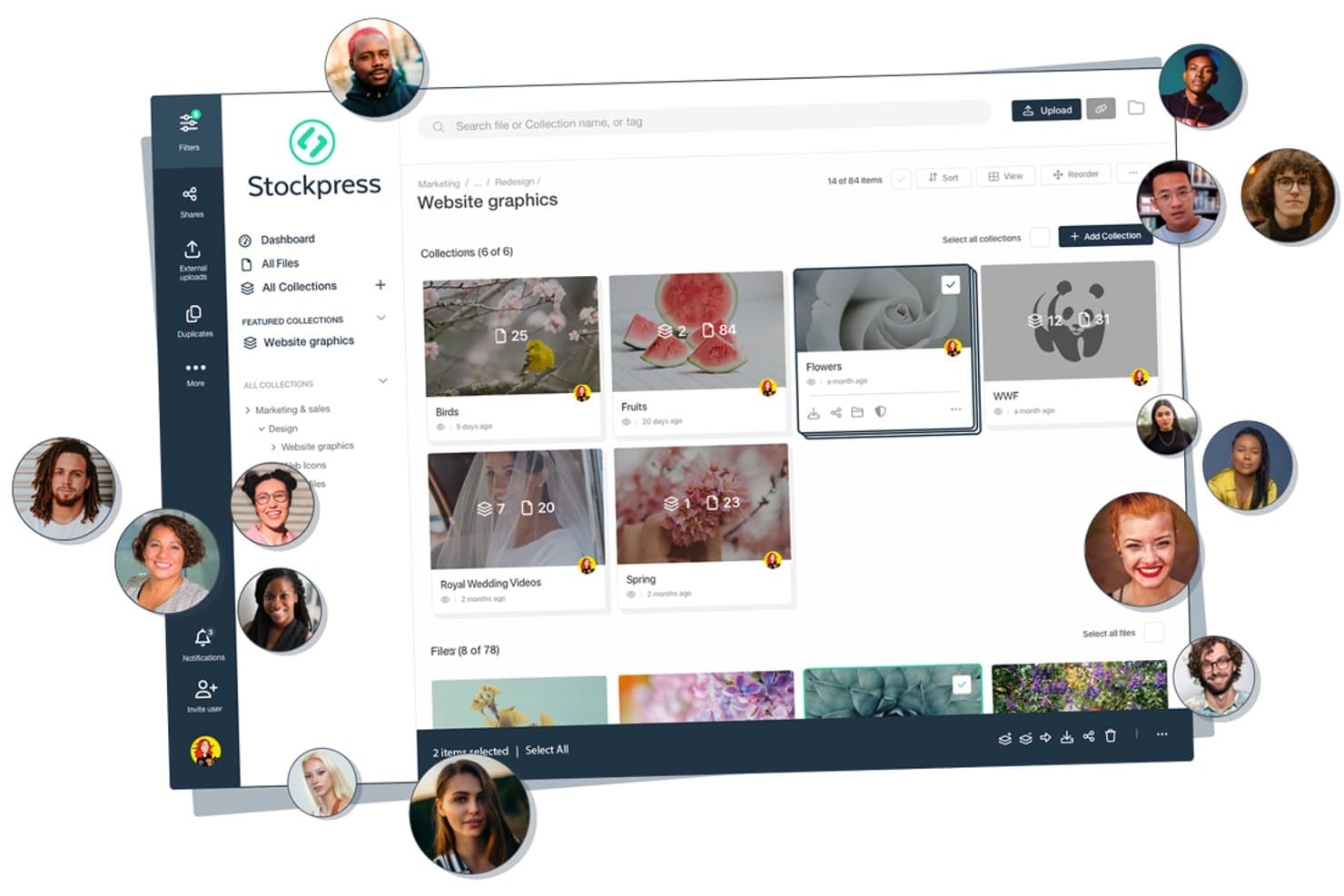
Stockpress offre una dashboard visiva per la gestione degli asset in cui i team possono organizzare i file in collezioni denominate, collaborare con più utenti e gestire gli asset del marchio in una gerarchia di cartelle strutturata. Stockpress è una piattaforma cloud di gestione delle risorse digitali che centralizza gli asset del marchio—loghi, immagini, video, font e documenti—con ricerca potenziata dall'IA, tagging dei metadati, controllo delle versioni e condivisione e permessi personalizzabili.
Per chi è Stockpress?
Stockpress è ideale per i team marketing e creativi di aziende in crescita che collaborano regolarmente con agenzie esterne, partner o rivenditori.
Perché ho scelto Stockpress
Stockpress merita il suo posto nella mia lista perché il modello utenti illimitati cambia davvero il modo in cui lavorano i team di brand. Posso aggiungere tutte le agenzie, i rivenditori e i freelancer allo spazio di lavoro senza preoccuparmi dell'aumento dei costi. Funzionalità come ruoli utente personalizzati, pagine di caricamento per ospiti e link condivisi protetti da password con tracciamento delle visualizzazioni mi permettono di garantire a ogni partner esterno il giusto livello di accesso, sia che si tratti di caricare file grezzi o scaricare asset di brand approvati.
Caratteristiche principali di Stockpress
- Ricerca e tagging potenziati dall'IA: Trova gli asset rapidamente utilizzando tag generati automaticamente, riconoscimento facciale e tecnologia di ricerca visiva.
- Collezioni intelligenti e sotto-collezioni: Organizza gli asset per progetto, campagna o marchio con collezioni dinamiche e nidificazione illimitata.
- Strumenti di modifica immagini integrati: Ritaglia, ridimensiona, rimuovi sfondi e applica altre modifiche direttamente sulla piattaforma.
- Tracciamento dettagliato delle attività: Monitora caricamenti, download e cronologia delle condivisioni con reportistica dettagliata a livello di singolo asset.
Integrazioni di Stockpress
Stockpress offre integrazioni native con Adobe Creative Cloud, Figma, Canva, Box, Dropbox, Google Drive, Slack, Klaviyo, Mailchimp, WordPress e Webflow. È disponibile un'API per integrazioni personalizzate.
Pros and Cons
Pros:
- Utenti illimitati su ogni piano
- Tagging IA e ricerca con riconoscimento facciale
- Supporta tutti i tipi di file senza limiti
Cons:
- Nessun microsito dedicato alle linee guida di brand
- Mancano workflow automatizzati per la gestione dei diritti
Learn more about Stockpress: Ideale per portali brandizzati per la condivisione di risorse
- Demo gratuita disponibile
- Prezzo su richiesta
Visit WebsiteCustomer Rating:4.6/5
Acquia DAM (Widen) fornisce informazioni sull'utilizzo delle risorse tramite la sua dashboard. Acquia DAM, precedentemente noto come Widen, è una piattaforma di gestione delle risorse digitali progettata per centralizzare e organizzare i materiali del marchio. Fornisce ai team di marketing e creativi un'unica posizione in cui archiviare, gestire e distribuire i contenuti digitali, mantenendo la coerenza del brand.
Perché ho scelto Acquia DAM: Ho scelto Acquia DAM per la sua capacità di mantenere le risorse del marchio organizzate e accessibili a tutti i team. La piattaforma include una libreria di asset che consente di categorizzare, trovare e utilizzare facilmente i file creativi, particolarmente utile per le grandi organizzazioni che gestiscono contenuti diversificati. Mi piacciono anche i suoi portali brandizzati per la condivisione sicura delle risorse con partner esterni, garantendo che tutti lavorino secondo gli stessi standard di marca. Le funzionalità basate sull'intelligenza artificiale, come il tagging automatico e la traduzione, aggiungono un ulteriore livello di efficienza riducendo le attività manuali ripetitive.
Funzionalità e integrazioni principali:
Funzionalità includono portali brandizzati per la condivisione esterna, modelli per creare materiali coerenti con il brand e un videomaker integrato che supporta editing e traduzione. I suoi strumenti di pubblicazione dei contenuti permettono di incorporare risorse ottimizzate nei siti web tracciandone le prestazioni.
Integrazioni includono Salesforce, HubSpot, Slack, Microsoft Dynamics Customer Relationship Management (CRM), Microsoft Teams, Zendesk, Dropbox, Google Drive, Microsoft Office 365, Smartsheet, Asana e Google Sheets.
Pros and Cons
Pros:
- Archiviazione centralizzata delle risorse digitali
- Tagging e traduzione basati su AI
- Portali brandizzati per la condivisione sicura
Cons:
- Opzioni di personalizzazione limitate
- Processo di onboarding complesso
Learn more about Acquia DAM (Widen): 7Ideale per la scoperta di asset tramite IA
Air
- Piano gratuito disponibile
- Da $10/mese (fatturazione annuale)
Visit WebsiteCustomer Rating:4.6/5
Lo spazio di lavoro visivo di Air aiuta i team creativi a visualizzare in anteprima e organizzare gli asset di brand grazie alla ricerca e ai tag basati su IA. Air è una piattaforma progettata per aiutarti a gestire e scalare i tuoi asset creativi. Centralizza i flussi di lavoro, consentendo al tuo team di collaborare, approvare e condividere contenuti senza intoppi.
Perché ho scelto Air: Ho scelto Air per il suo approccio visivo alla gestione degli asset creativi. Le anteprime scorrevoli ti permettono di vedere rapidamente all'interno dei file di design, dei video e dei documenti, aiutando il tuo team a trovare rapidamente ciò di cui ha bisogno. La ricerca basata sull'IA va oltre i nomi dei file riconoscendo oggetti, volti e persino le parole pronunciate, rendendo il recupero degli asset intuitivo. Apprezzo anche il fatto che si possano gestire approvazioni, feedback e le versioni dei file in un unico posto, riducendo i gap comunicativi e mantenendo una chiara traccia creativa.
Caratteristiche e integrazioni principali:
Caratteristiche includono tag intelligenti generati automaticamente dall'IA che creano parole chiave e riepiloghi ricercabili per i tuoi contenuti, aiutando te e il tuo team a rimanere organizzati. L'accatastamento delle versioni tiene traccia di ogni iterazione dei file preservando gli asset originali, così da non perdere nulla. Air offre anche la trascrizione di video e audio per rendere i file multimediali immediatamente ricercabili, oltre al commento contestuale per approvazioni più fluide.
Integrazioni includono Adobe Creative Cloud, Google Calendar, Slack, Google Drive, Photoshop, Figma, WooCommerce, Shopify, Salesforce, gli strumenti di Microsoft Office, Microsoft Excel e Adobe Experience Manager.
Pros and Cons
Pros:
- Anteprime visive per una navigazione rapida
- Ricerca e tagging tramite IA
- Strumenti integrati per feedback e approvazione
Cons:
- Funzionalità offline limitate
- Curva di apprendimento per i nuovi utenti
Learn more about Air: Ideale per asset di brand con regole integrate
- Versione di prova gratuita disponibile
- Da $80/mese (fatturazione annuale)
Visit WebsiteCustomer Rating:4.6/5
Lingo organizza le risorse del brand in una libreria ricercabile con tag dettagliati, formati e cronologia delle versioni. Lingo è un software di gestione delle risorse del brand basato su cloud che aiuta il tuo team a conservare, organizzare e distribuire asset come loghi, immagini, template, video e linee guida in un unico luogo centrale. Collega ogni asset alle linee guida del brand così tu e il tuo team sapete sempre come e quando utilizzare la versione giusta.
Perché ho scelto Lingo: Ho scelto Lingo perché gestisce le risorse del marchio con regole integrate e kit self-service. Puoi creare kit di asset che combinano file con relativo contesto d’uso (linee guida, note, istruzioni) così anche chi non è designer può accedere a ciò che serve senza dover chiamare il team creativo. Lingo offre anche conversione automatica dei file e controllo sulle esportazioni, quindi quando qualcuno ha bisogno di una variante (ad esempio, PNG invece di SVG o una dimensione particolare), non sarà necessario produrla manualmente.
Funzionalità e integrazioni principali:
Funzionalità come statistiche d’uso in tempo reale per vedere quali asset il team utilizza di più (o non utilizza affatto), aiutandoti a ottimizzare, eliminare o investire nelle giuste risorse di brand. Include anche collegamenti diretti, quindi quando aggiorni una risorsa in Lingo, ovunque venga usato quel link si aggiorna automaticamente — riducendo il rischio di materiali obsoleti o fuori brand.
Integrazioni includono Figma, Dropbox e Google Drive. Puoi anche utilizzare le API di Lingo per creare connessioni personalizzate.
Pros and Cons
Pros:
- Kit illimitati consentono una gestione flessibile delle risorse
- La ricerca AI elimina la necessità di taggare manualmente
- Le conversioni automatiche dei file riducono i tempi di produzione
Cons:
- Manca di strumenti complessi per workflow approvativi
- Meno integrazioni disponibili su scala aziendale
Learn more about Lingo: Ideale per le approvazioni creative
- Piano gratuito disponibile
- A partire da $39/utente/mese
Visit WebsiteCustomer Rating:5/5
Artwork Flow semplifica le approvazioni delle risorse per conformità ed efficienza. Artwork Flow è uno strumento di gestione delle risorse di marca pensato per i team creativi che desiderano semplificare il processo di approvazione. Si rivolge a settori come farmaceutico, alimentare e bevande e cosmetica, concentrandosi sulla conformità e l'efficienza nella gestione delle risorse digitali.
Perché ho scelto Artwork Flow: Artwork Flow eccelle nelle approvazioni creative grazie ai suoi strumenti di revisione online potenziati dall'IA che semplificano il processo di controllo. L'automazione del flusso di lavoro riduce le attività manuali, permettendo al tuo team di concentrarsi sulla creatività. L'automazione della conformità assicura il rispetto degli standard del settore senza complicazioni. Il controllo delle versioni e le funzionalità di ricerca intelligente della piattaforma rendono la gestione e il reperimento delle risorse semplici.
Funzionalità e integrazioni di rilievo:
Le funzionalità includono la revisione potenziata dall'IA, che migliora il processo di controllo individuando precocemente gli errori di design. L'automazione della conformità del software consente di mantenere facilmente gli standard di settore. Inoltre, il controllo delle versioni e la catalogazione intelligente rendono efficiente la gestione delle risorse.
Le integrazioni comprendono Adobe Creative Cloud, Slack, Trello, Asana, Microsoft Teams, Google Drive, Dropbox, Box, Jira e Monday.com.
Pros and Cons
Pros:
- Strumento di revisione potenziato dall'IA
- Verifiche di conformità complete
- Automazione efficiente del flusso di lavoro
- Interfaccia intuitiva
- Velocità di lancio sul mercato
Cons:
- Prezzi diretti non trasparenti
- Curva di apprendimento per i nuovi utenti
- Richiede internet per tutte le funzionalità
- Opzioni di personalizzazione limitate
- Complessità nella configurazione iniziale
Learn more about Artwork Flow:

Frontify aiuta i team di design a gestire e condividere le linee guida del marchio in modo efficiente. Frontify è una piattaforma di gestione delle risorse digitali progettata per i team di design che hanno bisogno di gestire e collaborare sulle risorse del marchio. Fornisce strumenti per creare, organizzare e condividere linee guida del marchio per garantire coerenza su tutti i materiali.
Perché ho scelto Frontify: Frontify si rivolge ai team di design grazie alla sua interfaccia intuitiva e alle funzionalità collaborative. Offre linee guida del marchio personalizzabili che aiutano a mantenere coerenza su tutti i canali. Lo spazio di lavoro collaborativo della piattaforma consente al tuo team di lavorare insieme in modo efficiente, indipendentemente dalla posizione. Il controllo delle versioni garantisce che tutti lavorino con le risorse più aggiornate, essenziale per preservare l’integrità del marchio.
Funzionalità & integrazioni distintive:
Le funzionalità includono modelli personalizzabili che ti permettono di mantenere la coerenza del marchio su tutti gli elementi visivi. Lo spazio di lavoro collaborativo favorisce il lavoro di squadra, permettendo al tuo team di lavorare efficacemente insieme. Il controllo delle versioni assicura che tutti utilizzino le risorse più recenti, aiutando a mantenere l’integrità del marchio.
Le integrazioni includono Adobe Creative Cloud, Sketch, Slack, Microsoft Teams, Google Workspace, Dropbox, Trello, Asana, Jira e InVision.
Pros and Cons
Pros:
- Ideale per team di design
- Linee guida del marchio personalizzabili
- Spazio di lavoro collaborativo
- Solido controllo delle versioni
- Supporta la collaborazione a distanza
Cons:
- Può essere necessario un training iniziale
- Funzionalità offline limitate
- Richiede una connessione Internet stabile
- Le opzioni di personalizzazione possono risultare complesse
- Il supporto diretto può essere limitato
Learn more about Frontify:
Altri software per la gestione degli asset del brand
Ecco alcune altre opzioni di software per la gestione degli asset del brand che non sono entrate nel mio elenco, ma che vale comunque la pena esaminare:
- 11Acquia DAMIdeale per le capacità di integrazione
- 12BrandyIdeale per linee guida di brand
- 13EthosIdeale per le piccole imprese
- 14ioMoVoIdeale per intuizioni basate sull'IA
- 15SparkfiveIdeale per esigenze di conformità
- 16FilecampIdeale per utenti illimitati
- 17BrandfolderIdeale per un'interfaccia intuitiva
- 18BynderIdeale per la scalabilità
- 194ALLPORTALIdeale per flussi di lavoro personalizzati
Come valuto il software di Brand Asset Management
Valuto questi strumenti su due livelli: il minimo indispensabile che una piattaforma deve garantire—come ospitare linee guida di brand aggiornabili online, non solo archiviare PDF—e i fattori differenzianti che distinguono le piattaforme.
Funzionalità di base (requisiti fondamentali per l’inclusione in questa lista)
Quando seleziono gli strumenti per la mia lista, ne classifico ciascuno su una scala da 0 (funzionalità assente) a 5 (eccellenza in questo ambito) per ogni funzionalità di base elencata di seguito. Successivamente, calcolo il punteggio totale dello strumento in percentuale. Ogni strumento deve raggiungere un punteggio minimo totale del 65% per essere considerato nell’inclusione.
- Libreria centralizzata di asset: Ricerco un unico hub su cloud dove i team conservano loghi, video, font e template—organizzati in collezioni invece che dispersi in alberi di cartelle generiche.
- Ospitare linee guida del brand: La piattaforma deve permettere di pubblicare linee guida interattive e aggiornabili—non solo PDF statici—così che aggiornamenti a codici colore o regole sull’uso del logo siano disponibili all’istante.
- Metadati & capacità di ricerca: Valuto quanto rapidamente si possa trovare una variante specifica di un asset, come un logo bianco su trasparente in formato SVG, usando tag, filtri e ricerca assistita dall’IA.
- Controlli d’accesso & permessi: Qui conta la condivisione basata sui ruoli. Verifico se si può concedere a un’agenzia esterna l’accesso in sola lettura a una cartella di campagna senza esporre asset interni.
- Tracciamento diritti & versioni: Licenze scadute e file obsoleti rappresentano un vero rischio. Cerco alert automatici di scadenza, cronologia delle versioni e la possibilità di segnalare asset con restrizioni d’uso.
- Integrazione con strumenti creativi: I team importano asset in Adobe Creative Cloud, Figma, Canva o il loro CMS ogni giorno. Valuto il supporto nativo ai plugin e se il connettore mantiene gli asset sincronizzati in tempo reale.
Una volta raccolta una lista di strumenti conformi ai criteri, esamino ciò che differenzia ciascuna piattaforma.
Fattori differenzianti (cosa distingue i fornitori)
Ecco come confronto e metto a paragone i diversi fornitori:
Funzionalità distintive
I template brandizzati rappresentano un’importante differenza. Cerco piattaforme che consentano a chi non è designer di personalizzare layout protetti—sostituendo immagini o testo senza alterare la posizione del logo o i font. Anche i flussi di approvazione sono fondamentali, specie quando i team regionali devono approvare materiali co-branded prima della pubblicazione. Verifico se lo strumento indirizza gli asset ai revisori con annotazioni inline. Le analisi dell’utilizzo completano il quadro, mostrando quali asset vengono scaricati e quali restano inutilizzati, aiutando i responsabili del brand a ritirare i contenuti sottoperformanti e concentrarsi su ciò che funziona.
Oltre le funzionalità
La scalabilità è particolarmente importante qui. Un piccolo team creativo di cinque persone e una multinazionale che gestisce decine di sub-brand hanno bisogno di strutture molto diverse, quindi valuto se la piattaforma supporta gerarchie multi-brand e si adatta senza perdere performance. Sicurezza e conformità hanno un peso rilevante—controllo la presenza di certificazioni SOC 2 Type II e log di audit, specie quando i partner esterni accedono agli asset. La trasparenza dei prezzi chiude la mia analisi. Osservo se i costi dipendono da utenti, spazio di archiviazione o volume di asset, e se funzionalità come i portali brandizzati sono incluse o soggette a costi aggiuntivi.
Come scegliere un software per la gestione degli asset del brand
È facile perdersi in lunghi elenchi di funzionalità e strutture tariffarie complesse. Per aiutarti a rimanere concentrato mentre affronti il tuo specifico processo di selezione del software, ecco una checklist dei fattori da tenere presenti:
| Fattore | Cosa considerare |
| Scalabilità | Assicurati che il software possa crescere insieme alla tua azienda. Cerca soluzioni in grado di gestire quantità maggiori di dati e utenti man mano che il tuo team si espande. |
| Integrazioni | Verifica se il software si integra con gli strumenti che già utilizzi, come Adobe Creative Cloud o Slack, per migliorare l'efficienza del flusso di lavoro. |
| Personalizzazione | Scegli un software che ti permetta di adattare i flussi di lavoro e le interfacce alle esigenze specifiche del tuo team, facilitando l'allineamento ai requisiti del tuo brand. |
| Facilità d'uso | Opta per un'interfaccia intuitiva che riduca al minimo la curva di apprendimento, assicurandoti che il tuo team possa adottare rapidamente il software senza una formazione approfondita. |
| Budget | Considera il costo totale, inclusi eventuali componenti aggiuntivi o aggiornamenti futuri, per assicurarti che rientri nei tuoi piani finanziari. |
| Misure di sicurezza | Dai priorità alle soluzioni che offrono solide funzionalità di protezione dei dati, come la crittografia e i controlli degli accessi, per mantenere sicuri gli asset del tuo brand. |
| Assistenza | Valuta il livello di assistenza clienti disponibile, inclusi canali come la chat dal vivo o il telefono, per assicurarti di ricevere aiuto tempestivo quando necessario. |
| Prestazioni | Cerca un software con elevata affidabilità e disponibilità del servizio, così da garantire al tuo team l'accesso agli asset senza interruzioni. |
Tendenze nei software per la gestione degli asset del brand
Nella mia ricerca, ho raccolto innumerevoli aggiornamenti sui prodotti, comunicati stampa e registri delle versioni di diversi fornitori di software per la gestione delle risorse del marchio. Ecco alcune delle tendenze emergenti che sto tenendo d’occhio:
- Etichettatura basata sull’IA: L’IA aiuta ad aggiungere automaticamente etichette alle risorse e a categorizzarle, risparmiando tempo e riducendo gli errori manuali. Questa funzionalità sta diventando sempre più comune, poiché fornitori come Bynder e MediaValet integrano l’IA per migliorare la ricercabilità e l’organizzazione delle risorse.
- Analisi avanzate: Sempre più strumenti offrono analisi per monitorare le prestazioni e l’utilizzo delle risorse. Questi dati aiutano i team a prendere decisioni informate sulla strategia dei contenuti. Fornitori come Brandfolder offrono informazioni dettagliate su come e dove vengono utilizzate le risorse.
- Strumenti per la coerenza del marchio: Garantire un branding coerente in tutti i materiali è fondamentale. Strumenti come Frontify offrono linee guida e modelli del marchio per mantenere tutti allineati, un aspetto sempre più importante per preservare l’integrità del marchio.
- Gestione delle autorizzazioni degli utenti: Autorizzazioni utente avanzate consentono un controllo migliore su chi può accedere e modificare le risorse. Questo è fondamentale per mantenere la sicurezza e viene migliorato su piattaforme come 4ALLPORTAL.
- Collaborazione basata sul cloud: Le funzionalità di collaborazione in tempo reale sono in crescita e consentono ai team di lavorare insieme senza problemi da qualsiasi luogo. Soluzioni come Acquia DAM stanno migliorando le funzionalità di collaborazione, rendendo più semplice per i team remoti rimanere connessi.
Che cos’è il software per la gestione delle risorse del marchio?
Il software per la gestione delle risorse del marchio è uno strumento che aiuta le aziende a organizzare, archiviare e gestire le risorse digitali del proprio marchio, come loghi, immagini e video. I professionisti del marketing, i responsabili del marchio e i team creativi utilizzano generalmente questi strumenti per mantenere la coerenza del marchio e migliorare la collaborazione. Funzionalità come l’etichettatura basata sull’IA, le analisi avanzate e la collaborazione basata sul cloud supportano una gestione efficiente delle risorse e migliorano la produttività del team. Nel complesso, questi strumenti offrono una piattaforma centralizzata che semplifica la gestione delle risorse del marchio, garantendo che siano facilmente accessibili e utilizzate in modo coerente in tutta l’organizzazione.
Funzionalità del software per la gestione delle risorse del marchio
Quando selezioni un software per la gestione delle risorse del marchio, presta attenzione alle seguenti funzionalità chiave:
- Etichettatura basata sull’IA: Aggiunge automaticamente etichette alle risorse e le categorizza, risparmiando tempo e migliorando la ricercabilità.
- Analisi avanzate: Fornisce informazioni dettagliate sull’utilizzo e sulle prestazioni delle risorse, aiutando i team a prendere decisioni informate sui contenuti.
- Strumenti per la coerenza del marchio: Garantisce che tutti i materiali rispettino le linee guida del marchio, mantenendo l’uniformità su tutte le piattaforme.
- Gestione delle autorizzazioni degli utenti: Controlla l’accesso alle risorse, migliorando la sicurezza, proteggendo la proprietà intellettuale sensibile e le informazioni.
- Collaborazione basata sul cloud: Consente ai team di lavorare insieme in tempo reale da qualsiasi luogo, migliorando la comunicazione e la produttività.
- Flussi di lavoro personalizzabili: Permette di adattare i processi alle esigenze specifiche del team, migliorando l’efficienza operativa.
- Archiviazione scalabile: Supporta quantità crescenti di contenuti digitali, garantendo lo spazio necessario.
- Condivisione sicura dei file: Protegge i contenuti rendendoli al contempo accessibili agli utenti autorizzati, garantendo la sicurezza dei dati.
Vantaggi del software per la gestione delle risorse del marchio
L’implementazione di un software per la gestione delle risorse del marchio offre diversi vantaggi al tuo team e alla tua azienda. Ecco alcuni dei benefici che puoi aspettarti:
- Maggiore coerenza del marchio: Garantisce che tutti i membri del team utilizzino le stesse linee guida del marchio, mantenendo un’immagine uniforme del marchio in tutti i materiali.
- Collaborazione migliorata: Gli strumenti basati sul cloud consentono il lavoro di squadra in tempo reale, facilitando la collaborazione tra i team da qualsiasi luogo.
- Risparmio di tempo: L’etichettatura basata sull’IA e i flussi di lavoro automatizzati riducono le attività manuali, lasciando più tempo per il lavoro strategico.
- Maggiore sicurezza: La gestione delle autorizzazioni degli utenti e la condivisione sicura dei file proteggono le risorse sensibili dagli accessi non autorizzati.
- Decisioni migliori: Le analisi avanzate forniscono informazioni dettagliate sulle prestazioni delle risorse, aiutando i team a prendere decisioni informate sui contenuti.
- Scalabilità: Le soluzioni di archiviazione scalabili crescono insieme alla tua azienda, garantendo sempre lo spazio necessario per le tue risorse.
Costi e prezzi del software per la gestione delle risorse del marchio
La scelta di un software per la gestione delle risorse del marchio richiede la comprensione dei vari modelli di prezzo e dei piani disponibili. I costi variano in base alle funzionalità, alle dimensioni del team, ai componenti aggiuntivi e ad altri fattori. La tabella seguente riassume i piani più comuni, i relativi prezzi medi e le funzionalità tipicamente incluse nelle soluzioni software per la gestione delle risorse del marchio:
Tabella comparativa dei piani per il software di gestione delle risorse del marchio
| Tipo di piano | Prezzo medio | Funzionalità comuni |
| Piano gratuito | $0 | Spazio di archiviazione di base, utenti limitati e funzionalità di ricerca di base. |
| Piano personale | $5-$25/ utente/mese | Spazio di archiviazione ampliato, accesso per singoli utenti e funzionalità di condivisione di base. |
| Piano aziendale | $30-$75/ utente/mese | Analisi avanzate, strumenti per la collaborazione del team e flussi di lavoro personalizzabili. |
| Piano per grandi aziende | $100-$200/ utente/mese | Spazio di archiviazione scalabile, funzionalità di sicurezza avanzate e opzioni di integrazione complete. |
Domande frequenti sul software di gestione delle risorse del marchio
Ecco alcune risposte alle domande comuni sul software di gestione delle risorse del marchio:
Come funziona il software di gestione delle risorse?
Il software di gestione delle risorse fornisce un database centralizzato per tenere traccia e monitorare tutte le risorse. È possibile accedere facilmente a informazioni come la posizione della risorsa, il suo stato e la cronologia della manutenzione. Questa visibilità aiuta a gestire le risorse in modo efficiente e a prendere decisioni informate sul loro utilizzo e sulla manutenzione.
Qual è la principale difficoltà nel settore della gestione delle risorse?
Una delle principali difficoltà consiste nel garantire la gestione e la sicurezza dei dati. Poiché le aziende gestiscono volumi sempre maggiori di risorse digitali, mantenerle al sicuro e organizzate diventa fondamentale. Le soluzioni che offrono funzionalità di sicurezza robuste e strumenti efficienti per la gestione dei dati possono contribuire a ridurre queste difficoltà.
Quali sono i 3 principi della gestione delle risorse?
I principi fondamentali includono la gestione del ciclo di vita, la gestione del rischio e l’ottimizzazione delle prestazioni. La gestione del ciclo di vita garantisce che le risorse siano utilizzate in modo efficace per tutta la loro durata. La gestione del rischio aiuta a proteggere le risorse da potenziali minacce, mentre l’ottimizzazione delle prestazioni si concentra sulla massimizzazione dell’efficienza delle risorse.
Perché è importante la gestione delle risorse del marchio?
La gestione delle risorse del marchio è importante perché garantisce la coerenza di tutti i materiali di marketing. Aiuta a mantenere un’immagine coordinata del marchio, fondamentale per il riconoscimento e la fiducia nei confronti del marchio. Organizzando e controllando le risorse del marchio, i team possono evitare errori e risparmiare tempo.
In che modo il software di gestione delle risorse del marchio può migliorare la collaborazione?
Questi strumenti migliorano la collaborazione consentendo ai team di accedere alle risorse e lavorarci in tempo reale, indipendentemente dalla loro posizione. Funzionalità come l’archiviazione basata sul cloud e le impostazioni delle autorizzazioni degli utenti permettono a più utenti di collaborare in modo efficiente, mantenendo al contempo il controllo sull’accesso alle risorse.
Cosa devo considerare quando scelgo un software di gestione delle risorse del marchio?
Considera la scalabilità del software, le funzionalità di integrazione e la facilità d’uso. Assicurati che sia in linea con le esigenze del tuo team e che possa crescere insieme alla tua azienda. Cerca soluzioni che offrano solide misure di sicurezza e flussi di lavoro personalizzabili, in linea con i requisiti del tuo flusso di lavoro.