

Gestire la reputazione online della propria azienda può sembrare complicato. In qualità di responsabile marketing, sai quanto siano importanti le recensioni dei clienti per l'immagine del tuo marchio. Le recensioni negative possono danneggiarla, mentre quelle positive possono aumentare la tua credibilità e costruire fiducia.
Il software per la gestione delle recensioni Google può aiutarti a monitorare, rispondere e analizzare il feedback dei clienti in modo efficiente. In base alla mia esperienza, avere gli strumenti giusti può rendere questo compito meno gravoso e più efficace.
Ho testato e recensito in modo indipendente diverse opzioni per offrirti una panoramica imparziale delle migliori soluzioni software disponibili. Puoi aspettarti una guida basata su una ricerca approfondita, che aiuterà il tuo team a scegliere lo strumento più adatto alle proprie esigenze.
Perché fidarsi dei nostri consigli sui software
6,700+
Reviews
20
Industry experts
16+
Evaluation factors
14
Years
Il nostro team testa e recensisce software dal 2012. In quanto leader del marketing noi stessi, sappiamo quanto sia difficile — e importante — scegliere il software giusto.
Per questa guida, abbiamo valutato gli strumenti attraverso test pratici e ricerche indipendenti, assegnando un punteggio agli strumenti in base ai nostri criteri di selezione.
Le nostre recensioni riflettono il nostro giudizio editoriale umano, non un discorso di vendita.
Revisori esperti:
 Gui DrusinaDirettore creativo
- Shriya GhateSenior Marketing Lead
 Amanda JacquesResponsabile Marketing Ops

Riepilogo dei migliori software per la gestione delle recensioni Google
Questa tabella comparativa riassume i dettagli sui prezzi delle mie migliori selezioni di software per la gestione delle recensioni Google, per aiutarti a trovare quello più adatto al tuo budget e alle esigenze della tua azienda.
| Tool | Best For | Trial Info | Price | ||
|---|---|---|---|---|---|
| 1 | Ideale per analizzare il sentiment delle recensioni Google | Prova gratuita disponibile | A partire da $10/sede/mese | Website | |
| 2 | Ideale per il monitoraggio di più sedi esclusivamente su Google | Prova gratuita di 24 ore + piano gratuito + dimostrazione gratuita disponibile | A partire da 6,99 $/mese | Website | |
| 3 | Ideale per risposte alle recensioni alimentate dall’IA | Demo gratuita disponibile | Prezzo su richiesta | Website | |
| 4 | Ideale per l'automazione della gestione delle recensioni | Prova gratuita di 14 giorni disponibile | Da $45/località/mese | Website | |
| 5 | Ideale per team social media | Prova gratuita di 14 giorni disponibile | Da $64/mese (fatturato annualmente) | Website | |
| 6 | Ideale per il supporto multicanale | Demo gratuita disponibile | Prezzo su richiesta | Website | |
| 7 | Ideale per integrare facilmente widget | Prova gratuita di 7 giorni | A partire da $29/mese | Website | |
| 8 | Ideale per le piccole imprese | Prova gratuita di 14 giorni | Da $25/mese (fatturazione annuale) | Website | |
| 9 | Ideale per utenti Zoho | Piano gratuito disponibile | Da $8,33/mese (fatturato annualmente) | Website | |
| 10 | Ideale per la pianificazione dei social media | Prova gratuita di 14 giorni + demo gratuita disponibile | Da $25,50/mese (fatturato annualmente) | Website |


Recensione dei migliori software per la gestione delle recensioni Google
Di seguito trovi i miei riepiloghi dettagliati dei migliori software per la gestione delle recensioni Google presenti nella mia selezione. Le mie recensioni analizzano le funzionalità principali, i pro & i contro, le integrazioni e i casi d’uso ideali di ogni strumento, per aiutarti a trovare quello più adatto.
 Ideale per analizzare il sentiment delle recensioni Google
- Prova gratuita disponibile
- A partire da $10/sede/mese

RightResponse AI offre una dashboard completa per gestire le recensioni dei clienti. RightResponse AI ti aiuta a suddividere le recensioni Google nei temi e nelle frasi che contano davvero per la tua attività, non solo in base a parole chiave o valutazioni a stelle. Ottieni una visione più chiara di ciò che dicono i clienti, di come cambia il sentiment tra le varie sedi e di dove i concorrenti potrebbero guadagnare terreno — il tutto utilizzando risposte generate dall'IA che riflettono i dati e il tono della tua azienda.
Perché ho scelto RightResponse AI: Ho scelto RightResponse AI per il modo in cui analizza il sentiment dei clienti sulle recensioni Google a livello specifico dell’attività. Invece di etichettare semplicemente le recensioni come “positive” o “negative”, mappa le frasi in categorie che ti interessano, offrendoti una comprensione più chiara del motivo per cui i clienti lasciano determinate valutazioni. Questo semplifica l’identificazione di lacune nei servizi, opportunità di formazione e problematiche ricorrenti in più sedi.
Funzionalità principali & Integrazioni:
Le funzionalità includono un monitoraggio dei concorrenti che confronta le tue valutazioni medie e le tendenze nel volume delle recensioni rispetto agli altri, il tracciamento del ranking su Google Maps con approfondimenti sulla concorrenza a livello di categoria, risposte generate dall’IA che tengono conto dei dettagli dei recensori e filtri configurabili che escludono alcune recensioni dall’automazione delle risposte. Sono inoltre disponibili approfondimenti sul sentiment a livello di frase che permettono di confrontare i feedback tra diverse sedi o periodi. È anche in fase di rilascio un sistema di richiesta recensioni alimentato dall’IA per invii personalizzati.
Le integrazioni includono WhatsApp, Gmail, Outlook, Google Maps e altre app tramite Zapier.
Pros and Cons
Pros:
- Strumenti di benchmarking con i concorrenti
- Analisi del sentiment per sede
- Risposte personalizzate e basate su dati reali dall’IA
Cons:
- Curva di apprendimento per la configurazione
- Nessuna integrazione pubblica elencata
Learn more about RightResponse AI: Ideale per il monitoraggio di più sedi esclusivamente su Google
- Prova gratuita di 24 ore + piano gratuito + dimostrazione gratuita disponibile
- A partire da 6,99 $/mese
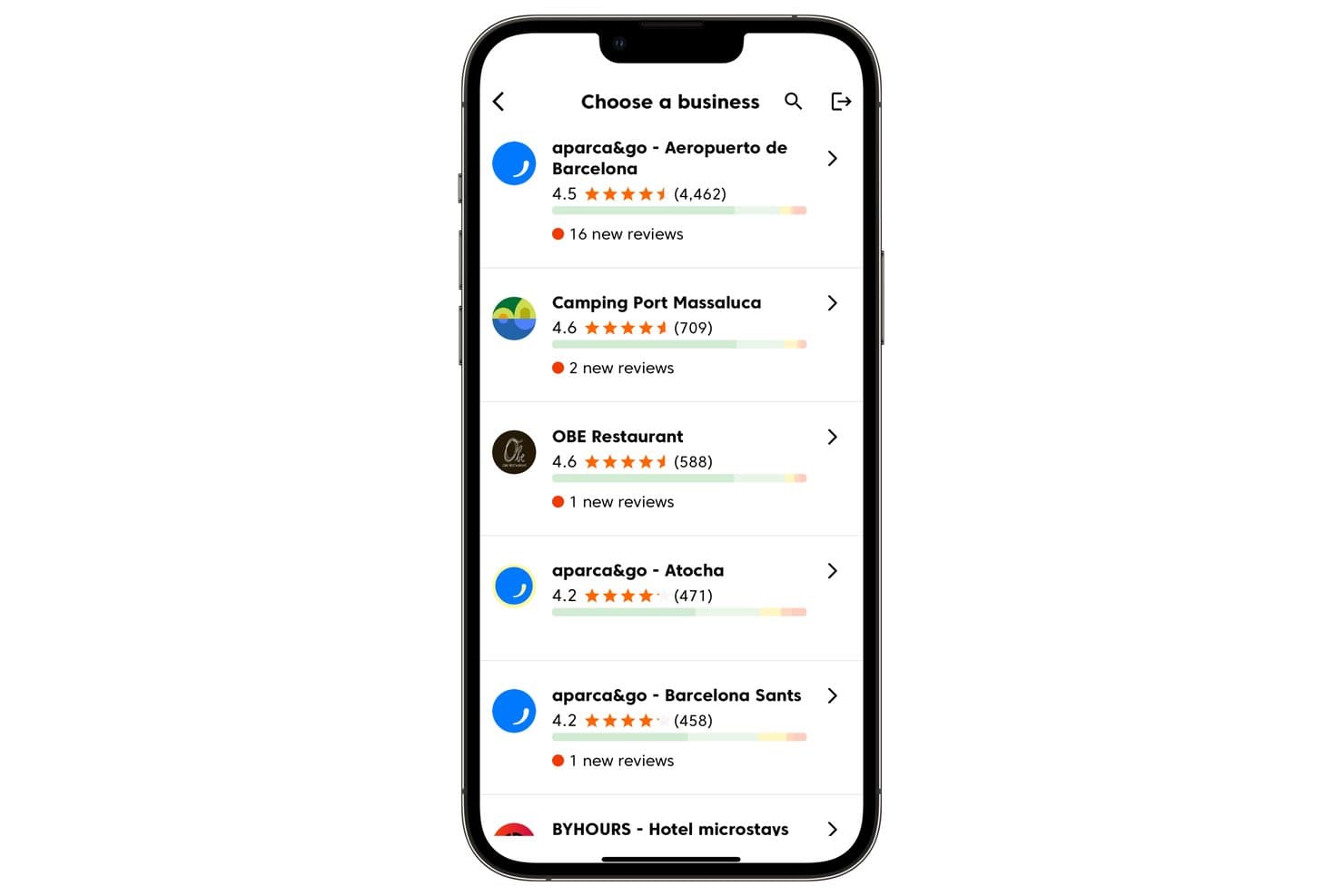
Cinquo consente agli utenti di gestire più sedi aziendali e monitorare le nuove recensioni. Cinquo è uno strumento di gestione delle recensioni esclusivamente per Google che centralizza il monitoraggio di più sedi, l'automazione delle risposte basata sull'IA tramite il suo agente CINTIA, le richieste di recensioni basate su codici QR tracciabili e l'analisi operativa delle valutazioni in un unico pannello di controllo per dispositivi mobili e computer.
Per chi è più adatto Cinquo?
Cinquo è particolarmente adatto alle aziende con più sedi e agli specialisti della SEO locale che desiderano informazioni approfondite sulle recensioni specifiche di Google senza pagare commissioni per ogni sede.
Perché ho scelto Cinquo
Cinquo è entrato nella mia selezione perché offre dati specifici di Google più approfonditi di qualsiasi strumento multipiattaforma che abbia provato. Apprezzo il fatto che calcoli la valutazione effettiva in stelle, senza arrotondamenti (ad esempio 4,41 invece di 4,49), e indichi esattamente quante recensioni a 5 stelle servono per raggiungere il traguardo successivo. Aggiungendo l'automazione delle risposte tramite l'IA di CINTIA per ogni sede e le notifiche istantanee in tempo reale, si ottiene una configurazione di monitoraggio progettata appositamente che i team con più sedi troveranno difficile replicare altrove a questo prezzo.
Funzionalità principali di Cinquo
- Accesso delegato degli utenti basato su Gmail: I membri del team accedono a Cinquo con i propri account Gmail senza dover essere aggiunti come gestori del Profilo dell'attività su Google.
- Rilevatore di recensioni segnalabili per la rimozione: Segnala le recensioni che potrebbero violare le norme di Google e le rende disponibili per un'eventuale richiesta di rimozione.
- Controlli per l'automazione delle risposte in base alla valutazione in stelle: CINTIA può essere configurato per pubblicare automaticamente le risposte relative a specifiche valutazioni in stelle, mantenendo le altre in attesa di revisione manuale.
- Codici QR assegnati ai dipendenti: Ogni membro del personale riceve un codice QR univoco e tracciabile che attribuisce alla persona specifica le recensioni risultanti nel pannello di controllo.
Integrazioni di Cinquo
Cinquo dispone di un'integrazione nativa con il Profilo dell'attività su Google per la sincronizzazione in tempo reale di recensioni, valutazioni e sedi.
Pros and Cons
Pros:
- Calcola le valutazioni in stelle di Google senza arrotondamenti
- L'accesso Gmail delegato mantiene sicuri i ruoli del Profilo dell'attività su Google
- Codici QR tracciabili per dipendenti e sedi
Cons:
- Nessuna analisi del sentiment o delle metriche dei concorrenti
- Nessun monitoraggio delle recensioni su più piattaforme
Learn more about Cinquo: Ideale per risposte alle recensioni alimentate dall’IA
- Demo gratuita disponibile
- Prezzo su richiesta
Visit WebsiteCustomer Rating:4.8/5This rating combines scores from multiple user review sites to reflect overall customer sentiment about the product.
Birdeye offre una varietà di avvisi, inclusi quelli per recensioni senza risposta, per un monitoraggio e una gestione più efficace della reputazione. Birdeye è una piattaforma per la reputazione e l’esperienza cliente basata sull’IA, progettata per aziende multi-sede e enterprise, che consente di gestire recensioni, schede, social media, sondaggi e interazioni con i clienti da un unico sistema centralizzato. Serve oltre 200.000 clienti a livello globale in settori quali odontoiatria, sanità, automotive, retail, legale e servizi per la casa, dove la visibilità locale e la reputazione online influiscono direttamente sulla crescita.
Perché ho scelto Birdeye
Ho scelto Birdeye per i suoi agenti BirdAI, che automatizzano la generazione, il monitoraggio e le risposte alle recensioni su oltre 200 piattaforme, restando sempre in linea con la voce del marchio e il contesto di settore. Questi agenti AI sempre attivi riducono il lavoro manuale e aiutano le aziende a gestire la reputazione in modo coerente e su larga scala. Birdeye si distingue anche per Search AI e Listings AI, che ottimizzano attivamente la visibilità locale e migliorano il posizionamento sui risultati di ricerca di Google e su quelli gestiti dall’IA. Insieme a Insights AI, la piattaforma rende facile monitorare il sentiment dei clienti nelle diverse sedi, individuare trend e risolvere problemi prima che incidano sulla percezione del marchio.
Caratteristiche principali di Birdeye
Oltre alle funzionalità principali di Birdeye basate sull’IA per recensioni e ricerca, la piattaforma offre:
- Social AI: Gestione e programmazione dei contenuti social su più sedi da un’unica dashboard, con pubblicazione assistita dall’IA per mantenere la coerenza del brand.
- Surveys AI: Raccolta del feedback di clienti e pazienti, misurazione della soddisfazione e individuazione dei rischi di abbandono grazie a sondaggi automatizzati e personalizzabili.
- Messaging AI & Unified Inbox: Centralizza SMS, chat del sito e messaggi social in un’unica casella, aiutando i team a rispondere efficacemente su tutti i canali.
- Reports AI & Analisi a livello di sede: Reportistica avanzata a livello enterprise, per monitorare le performance per sede, area geografica o marchio.
Integrazioni Birdeye
Birdeye supporta oltre 3.000 integrazioni, tra cui Salesforce, HubSpot, QuickBooks, Facebook, Google My Business, Slack, Microsoft Teams, Zendesk, Shopify e Mailchimp.
Pros and Cons
Pros:
- Dashboard unificata che semplifica la gestione di più clienti.
- Analisi avanzata e report a livello di sede per monitorare le performance su vasta scala.
- Gli agenti BirdAI automatizzano la gestione della reputazione su oltre 200 piattaforme di recensioni.
Cons:
- Il processo di onboarding può richiedere tempo per organizzazioni che gestiscono molte sedi.
- Le funzionalità orientate all’enterprise possono risultare eccessive per aziende di piccole o singole sedi.
Learn more about Birdeye: Ideale per l'automazione della gestione delle recensioni
- Prova gratuita di 14 giorni disponibile
- Da $45/località/mese
Visit WebsiteCustomer Rating:4.9/5This rating combines scores from multiple user review sites to reflect overall customer sentiment about the product.
Reviewflowz avvisa i team istantaneamente sulle recensioni per risposte rapide e intelligenti. Reviewflowz invia avvisi in tempo reale sulle recensioni a strumenti come Slack, Teams ed email, aiutando i team a rispondere rapidamente al feedback dei clienti. Questa automazione mantiene le aziende informate sulle nuove recensioni, supporta risposte veloci e può migliorare la soddisfazione del cliente.
Perché ho scelto Reviewflowz: Ho scelto Reviewflowz perché il suo sistema di risposta alimentato dall’IA ti aiuta a gestire le recensioni senza aggiungere lavoro manuale extra. Puoi adattare gli agenti IA di risposta per riflettere il tono del tuo brand, includere una firma e aggiungere i dettagli di contatto. Questi agenti possono rispondere automaticamente alle recensioni in base alle regole che imposti, come valutazione in stelle, parole chiave, piattaforma o tempistiche. Inoltre, invia avvisi personalizzabili così da essere notificato immediatamente e poter rispondere subito.
Funzionalità e integrazioni principali:
Le funzionalità includono una dashboard centralizzata che raccoglie recensioni da più piattaforme, notifiche personalizzabili per avvisare il tuo team sulle nuove attività e analisi del sentiment per aiutarti a valutare il tono del feedback dei clienti.
Le integrazioni includono Google My Business, Yelp, TripAdvisor, Trustpilot, Zendesk, Intercom, Slack, Google Sheets, ChatGPT, Claude e Microsoft Teams.
Pros and Cons
Pros:
- Monitoraggio recensioni dei concorrenti
- Widget dinamici per recensioni
- Richieste di recensione tramite magic link
Cons:
- Non supporta la gestione delle schede
- L'Assistente Chat AI (Lenny) è limitato ai piani superiori
Learn more about ReviewFlowz: Ideale per team social media
- Prova gratuita di 14 giorni disponibile
- Da $64/mese (fatturato annualmente)
Visit WebsiteCustomer Rating:4.9/5This rating combines scores from multiple user review sites to reflect overall customer sentiment about the product.
Vista Social unifica recensioni e social media per semplificare i flussi di lavoro del team. Vista Social centralizza la gestione e il monitoraggio delle recensioni dalle principali piattaforme, tra cui Google My Business, Facebook e TrustPilot. La sua integrazione con vari canali social semplifica i flussi di lavoro per mantenere relazioni positive con i clienti. Puoi facilmente seguire eventuali recensioni negative, aiutando a trasformare gli scettici in clienti soddisfatti.
Perché ho scelto Vista Social: Vista Social riunisce le recensioni da piattaforme come Google, Yelp e Facebook in un unico posto, rendendo semplice per le aziende monitorare e rispondere rapidamente. Oltre alla gestione delle recensioni, include strumenti per la pubblicazione, analisi, coinvolgimento e listening sociale, offrendo una suite completa per gestire la presenza online. La sua interfaccia intuitiva permette agli utenti di ordinare, filtrare e personalizzare la visualizzazione delle recensioni, aiutandoli a sviluppare strategie più mirate ed efficaci.
Funzionalità e integrazioni principali:
Funzionalità includono analisi del sentiment per identificare il tono delle recensioni, un tracciatore della cronologia delle recensioni per le interazioni passate e uno strumento di monitoraggio dei concorrenti per vedere come si posiziona il tuo brand. Puoi anche impostare avvisi per nuove recensioni per rimanere sempre aggiornato.
Integrazioni includono Facebook, Twitter, Instagram, LinkedIn, Google My Business, YouTube, Pinterest, TikTok, Reddit e Slack.
Pros and Cons
Pros:
- Risposte alle recensioni generate dall'AI
- Monitoraggio recensioni cross-platform
- Benchmark competitor sulle recensioni
Cons:
- Integrazioni limitate con piattaforme non-Google
- Notifiche delle recensioni in ritardo
Learn more about Vista Social: Ideale per il supporto multicanale
- Demo gratuita disponibile
- Prezzo su richiesta
Visit WebsiteCustomer Rating:4.3/5This rating combines scores from multiple user review sites to reflect overall customer sentiment about the product.
Simplify360 unifica le chat dei clienti tra social, messaggistica e recensioni. Simplify360 offre supporto multicanale, consentendo alle aziende di connettersi con i clienti sui social media, sulle app di messaggistica e sui siti di recensioni in un unico posto. Consolida le interazioni, semplifica i processi di lavoro, migliora i tempi di risposta e garantisce una comunicazione coerente.
Perché ho scelto Simplify360: Simplify360 si integra con oltre 20 canali di comunicazione, permettendoti di ottimizzare i processi di coinvolgimento e supporto clienti su un'unica piattaforma. I suoi strumenti guidati dall'intelligenza artificiale automatizzano fino al 90% delle risposte alle recensioni e offre risponditori automatici ed escalation via email per le recensioni ad alta priorità, aiutando a mantenere una reputazione positiva del marchio. Le sue analisi approfondite e le funzioni di reportistica forniscono informazioni sul sentiment dei clienti e sulle prestazioni dell'assistenza.
Funzionalità eccezionali & integrazioni:
Funzionalità includono una dashboard personalizzabile che consente di dare priorità alle recensioni più importanti. La piattaforma offre anche avvisi automatici per le nuove recensioni, assicurando risposte tempestive. Strumenti dettagliati di reportistica aiutano a monitorare le prestazioni e a identificare le tendenze nei feedback dei clienti.
Integrazioni includono Facebook, Twitter, Instagram, LinkedIn, YouTube, Google My Business, WhatsApp, Pinterest, TripAdvisor e Trustpilot.
Pros and Cons
Pros:
- Risposte alle recensioni generate da IA
- Categorizzazione automatica delle recensioni
- Notifiche in tempo reale per le recensioni
Cons:
- Strumenti di analisi del sentiment di base
- Nessun flag automatico per recensioni negative
Learn more about Simplify360: Ideale per integrare facilmente widget
- Prova gratuita di 7 giorni
- A partire da $29/mese

EmbedSocial offre oltre 80 widget personalizzabili facili da integrare in qualsiasi sito. EmbedSocial offre oltre 80 widget di recensioni preconfigurati, personalizzabili e completamente responsive per dispositivi mobili, che possono essere integrati in qualsiasi sito web con un semplice codice JavaScript. È compatibile con diversi builder di siti web e piattaforme CMS, consentendo alle aziende di mostrare i feedback dei clienti e aumentare la credibilità utilizzando vere testimonianze sociali.
Perché ho scelto EmbedSocial: Gli strumenti di intelligenza artificiale di EmbedSocial, come il riepilogo delle recensioni e l’Assistente IA per le risposte, aiutano le aziende a comprendere rapidamente i feedback e a rispondere con messaggi personalizzati. I suoi widget sono completamente responsive, supportano CSS personalizzati e funzionano su qualsiasi piattaforma che supporti JavaScript. Questo rende semplice adeguarsi all’aspetto e allo stile di qualsiasi sito. Inoltre, i suoi widget combinati possono raccogliere recensioni da più fonti, offrendo una panoramica completa del sentiment dei clienti.
Caratteristiche principali & integrazioni:
Caratteristiche includono riepiloghi delle recensioni generati dall’IA che aiutano i potenziali clienti a cogliere velocemente i feedback, un pianificatore di post su Google per automatizzare gli aggiornamenti e la possibilità di generare report sulle recensioni per più profili. Il tuo team apprezzerà anche l’ampia compatibilità con la maggior parte dei costruttori di siti web e delle piattaforme eCommerce.
Integrazioni includono Google, Facebook, Instagram, Twitter, LinkedIn, Shopify, WooCommerce, Wix, Squarespace e WordPress.
Pros and Cons
Pros:
- Riepiloghi delle recensioni basati sull’IA
- Modelli di risposte automatiche
- Widget di recensioni personalizzabili
Cons:
- La personalizzazione richiede conoscenze CSS
- Analisi del sentiment delle recensioni limitata
Learn more about EmbedSocial: Ideale per le piccole imprese
- Prova gratuita di 14 giorni
- Da $25/mese (fatturazione annuale)
Visit WebsiteCustomer Rating:4.9/5This rating combines scores from multiple user review sites to reflect overall customer sentiment about the product.
Freshreview aiuta le piccole imprese a raccogliere e mostrare recensioni con facilità. Freshreview è un sistema di gestione della reputazione online che semplifica la raccolta, il monitoraggio e la presentazione dei feedback dei clienti su 16 siti di recensioni. Con una configurazione minima e senza curve di apprendimento complesse, consente alle piccole imprese di costruire credibilità e far crescere la propria reputazione.
Perché ho scelto Freshreview: L’interfaccia intuitiva di Freshreview e i piani tariffari convenienti permettono di automatizzare le richieste di recensioni multicanale tramite WhatsApp, SMS ed email per garantire un flusso costante di feedback. La piattaforma fornisce inoltre codici QR personalizzabili, così i clienti in negozio possono lasciare subito il loro commento. L’analisi del sentiment basata sull’IA offre alle aziende dati utili monitorando e gestendo le recensioni da una dashboard centralizzata.
Funzionalità e integrazioni di spicco:
Funzionalità comprendono la possibilità di monitorare le recensioni su più piattaforme, richieste automatiche di feedback per coinvolgere i clienti e analisi per seguire l’andamento nel tempo. Il tuo team può inoltre personalizzare il layout delle recensioni per allinearlo al tuo brand.
Integrazioni includono Google, Facebook, Yelp, HubSpot, Salesforce, Mailchimp, Shopify, WooCommerce, Squarespace e WordPress.
Pros and Cons
Pros:
- Risposte ottimizzate dall’IA alle recensioni
- Campagne di recensioni multicanale
- Template di risposta ottimizzati SEO
Cons:
- Nessun supporto alle video testimonianze
- Nessuno strumento di analisi del sentiment
Learn more about Freshreview: Ideale per utenti Zoho
- Piano gratuito disponibile
- Da $8,33/mese (fatturato annualmente)

Zoho Publish ottimizza i flussi di lavoro grazie all’integrazione senza soluzione di continuità con le app Zoho. Zoho Publish si integra in modo nativo con altre applicazioni Zoho, creando un flusso di dati solido che migliora il coinvolgimento dei clienti, il monitoraggio dei lead e i processi di supporto. Questo riduce la necessità di passare tra diverse piattaforme e aumenta la produttività del team.
Perché ho scelto Zoho Publish: Zoho Publish sincronizza le schede aziendali tra directory come Google Maps, garantendo che le informazioni corrette siano disponibili per i clienti, oltre a monitorare e rispondere alle recensioni dei clienti in tempo reale. Questo sistema di feedback a ciclo chiuso permette di reagire alle esperienze dei clienti e ottimizzare proattivamente la presenza nelle directory. L’integrazione con altri strumenti Zoho consente di collegare recensioni a lead o ticket in Zoho CRM oppure di rivedere valutazioni e sentiment in Zoho Analytics.
Funzionalità e integrazioni principali:
Funzionalità includono il monitoraggio delle recensioni per tracciare il feedback dei clienti su varie piattaforme, risposte automatiche per risparmiare tempo e analisi del sentiment per dare priorità alle recensioni. La piattaforma offre anche analisi dettagliate per aiutare a migliorare le strategie aziendali.
Integrazioni includono Zoho CRM, Zoho Desk, Google My Business, Facebook, Yelp, TripAdvisor, Twitter, LinkedIn, Instagram e Slack.
Pros and Cons
Pros:
- Integrazione delle recensioni su più piattaforme
- Notifiche in tempo reale sulle recensioni
- Workflow di risposta automatizzata
Cons:
- Nessun filtro basato su parole chiave
- Nessun monitoraggio delle recensioni dei concorrenti
Learn more about Zoho Publish: Ideale per la pianificazione dei social media
- Prova gratuita di 14 giorni + demo gratuita disponibile
- Da $25,50/mese (fatturato annualmente)

SocialPilot unifica recensioni e post per un branding forte e coerente. SocialPilot unisce la gestione delle recensioni Google a potenti funzionalità di pianificazione dei social media. Monitora, risponde e raccoglie le recensioni mentre gestisce la pubblicazione dei contenuti, aiutando i brand a mantenersi coerenti e a connettersi meglio su tutti i canali.
Perché ho scelto SocialPilot: SocialPilot semplifica la gestione delle recensioni Google combinando il monitoraggio delle recensioni con la gestione complessiva dei social media. Puoi visualizzare, rispondere e tenere sotto controllo le recensioni insieme alle tue conversazioni sui social. Automatizza le attività comuni di gestione della reputazione, come la programmazione delle risposte alle domande più frequenti e offre modelli personalizzabili che rispecchiano la voce e il tono del tuo brand. Inoltre, ti avvisa immediatamente ogni volta che arriva una nuova recensione Google, così non perderai mai l'occasione di interagire rapidamente con i tuoi clienti.
Funzionalità e integrazioni principali:
Funzionalità includono uno strumento di curazione dei contenuti per aiutarti a trovare argomenti e idee di tendenza. La piattaforma offre una funzione di gestione dei clienti, consentendo di gestire facilmente più account clienti. Puoi anche personalizzare i report per condividere insight con il tuo team o i tuoi clienti.
Integrazioni includono Facebook, Twitter, Instagram, LinkedIn, Pinterest, TikTok, Google My Business, Tumblr, VK e Xing.
Pros and Cons
Pros:
- Automazione delle richieste di recensione in blocco
- Monitoraggio delle recensioni su più sedi
- Avvisi automatici per feedback negativi
Cons:
- Nessun supporto per recensioni video
- Modelli di report poco flessibili
Learn more about Social Pilot:
Altri software per la gestione delle recensioni Google
Ecco alcune altre opzioni di software per la gestione delle recensioni Google che non sono entrate nella mia selezione, ma che vale comunque la pena prendere in considerazione:
- 11SynupIdeale per la gestione della SEO locale
- 12LocaloIdeale per aumentare la SEO locale
- 13Local VikingIdeale per il tracciamento geo-grid
- 14MerchyntIdeale per la crescita delle recensioni locali
- 15GomingaIdeale per grandi aziende
- 16ReputationStackerIdeale per la generazione di recensioni conforme a HIPAA
Come valuto i software per la gestione delle recensioni su Google
Mi concentro su due aspetti: se uno strumento gestisce le basi—sincronizzazione GBP in tempo reale, gestione centralizzata delle risposte e richieste di recensioni automatizzate—e se offre qualcosa che lo distingue dagli altri.
Funzionalità core (requisiti indispensabili per questa lista)
Quando seleziono gli strumenti per la mia lista, valuto ognuno su una scala da 0 (non offre la funzionalità) a 5 (eccelle in quest'area) per ciascuna delle funzionalità core elencate sotto. Poi calcolo il punteggio totale dello strumento in percentuale. Ogni strumento deve raggiungere un punteggio totale minimo del 65% per poter essere preso in considerazione.
- Connessione a Google Business Profile: Controllo se ogni strumento si sincronizza con GBP tramite API per aggiornamenti in tempo reale di recensioni e valutazioni, o se si affida a scraping più lenti e importazioni manuali.
- Monitoraggio delle recensioni & alert: Le notifiche in tempo reale sono fondamentali quando una recensione da una stella arriva nella sede più trafficata il venerdì sera, quindi valuto velocità di avviso, opzioni di canale e filtri.
- Strumenti di risposta alle recensioni: Cerco la possibilità di rispondere direttamente dalla dashboard usando template, bozze suggerite dall'IA o azioni massive—soprattutto per i team che gestiscono decine di sedi.
- Automazione richiesta recensioni: Che sia una serie di SMS post-acquisto o un QR code su uno scontrino, la piattaforma dovrebbe automatizzare l’invio tramite email e SMS per aumentare il volume di recensioni.
- Supporto multi-sede: Gruppi in franchising e agenzie necessitano di gerarchie di sedi, permessi basati sui ruoli e dashboard raggruppate—valuto quanto uno strumento riesca a scalare oltre poche sedi senza problemi.
- Analisi e reportistica delle recensioni: Esamino se la piattaforma offre ripartizione del sentiment, monitoraggio delle tendenze di valutazione e individuazione di parole chiave che aiutano a collegare i dati delle recensioni alle decisioni di campagna o operative.
Una volta stilata la lista degli strumenti che rispettano questi criteri, considero cosa distingue ciascuna piattaforma.
Fattori differenzianti (cosa distingue i fornitori)
Ecco come confronto le diverse soluzioni:
Funzionalità distintive
Il benchmarking rispetto alla concorrenza è un grande elemento distintivo—voglio vedere come le valutazioni e la velocità di raccolta recensioni di un cliente si confrontano con i concorrenti vicini. I widget che incorporano le recensioni Google con markup schema sulle landing page possono aumentare sia le conversioni che la SEO locale. Valuto anche se una piattaforma integra il monitoraggio del posizionamento locale e la programmazione dei post GBP, dato che queste funzioni evitano di dover usare strumenti separati. Anche il riassunto delle recensioni tramite IA merita attenzione, soprattutto per i marchi con centinaia di sedi dove leggere ogni recensione non è realistico.
Oltre le funzionalità
La struttura dei prezzi è molto importante. I costi per sede possono crescere velocemente per i gruppi in franchising, quindi valuto se il modello scala in modo ragionevole aggiungendo nuove sedi. Anche la conformità è un elemento che analizzo attentamente: gli strumenti che inviano richieste di recensioni via SMS devono rispettare i regolamenti di opt-in, e le piattaforme devono seguire le regole di Google contro il filtro delle recensioni. Considero inoltre quanto bene ogni strumento si integri con i CRM e i sistemi POS, visto che l’invio della richiesta subito dopo una transazione è uno dei flussi che genera più conversioni.
Come scegliere il software per la gestione delle recensioni Google
È facile perdersi in lunghi elenchi di funzionalità e strutture tariffarie complesse. Per aiutarti a rimanere concentrato mentre affronti il tuo specifico processo di selezione del software, ecco una lista di fattori da tenere a mente:
| Fattore | Cosa considerare |
| Scalabilità | Assicurati che il software possa crescere insieme alla tua azienda. Cerca strumenti in grado di gestire un numero crescente di recensioni e di ampliare le funzionalità secondo necessità. |
| Integrazioni | Verifica se si integra con le piattaforme che utilizzi, come i sistemi CRM o i canali dei social media, per semplificare il tuo flusso di lavoro. |
| Personalizzazione | Scegli uno strumento che ti consenta di adattare dashboard e report alle tue esigenze, offrendoti il controllo sul modo in cui visualizzi e gestisci le recensioni. |
| Facilità d'uso | Scegli un software con un'interfaccia intuitiva per ridurre al minimo il tempo di formazione del tuo team ed evitare frustrazioni. |
| Budget | Considera il tuo budget e cerca una soluzione che offra un buon rapporto qualità-prezzo, bilanciando le funzionalità e la convenienza economica. |
| Misure di sicurezza | Verifica che lo strumento sia conforme alle normative sulla protezione dei dati e offra solide misure di sicurezza per proteggere i dati dei clienti. |
| Assistenza | Cerca fornitori che offrano un solido supporto clienti attraverso più canali, assicurandoti che l'aiuto sia disponibile quando necessario. |
| Analisi | Assicurati che il software fornisca analisi approfondite per aiutarti a prendere decisioni basate sui dati e a migliorare le tue strategie di gestione delle recensioni. |
Tendenze nel software per la gestione delle recensioni Google
Nella mia ricerca, ho raccolto innumerevoli aggiornamenti sui prodotti, comunicati stampa e registri delle versioni di diversi fornitori di software per la gestione delle recensioni Google. Ecco alcune delle tendenze emergenti che sto tenendo d’occhio:
- Analisi basate sull’IA: L’IA viene utilizzata per analizzare il sentiment dei clienti e prevedere le tendenze. Questo aiuta le aziende a comprendere i feedback a un livello più approfondito. Alcuni fornitori offrono dashboard basate sull’IA che evidenziano gli insight principali e suggeriscono azioni.
- Recensioni video: I contenuti video stanno diventando sempre più popolari e alcune piattaforme ora consentono ai clienti di caricare recensioni video. Questo aggiunge un tocco personale e può aumentare la fiducia. Le aziende possono sfruttarle per creare contenuti di marketing più coinvolgenti.
- Feedback in tempo reale: La raccolta istantanea dei feedback sta guadagnando terreno e consente alle aziende di affrontare i problemi man mano che si presentano. Questa funzionalità aiuta a migliorare la soddisfazione e la fidelizzazione dei clienti. I fornitori stanno sviluppando strumenti che avvisano immediatamente le aziende quando viene pubblicata una recensione.
- Widget per le recensioni personalizzati: Un numero sempre maggiore di strumenti offre widget per le recensioni personalizzabili, in linea con l’estetica del brand. Questo rende più semplice per le aziende mostrare le recensioni sui propri siti web in modo coerente con la propria identità visiva.
- Monitoraggio del sentiment nel tempo: I fornitori si stanno concentrando su strumenti che monitorano i cambiamenti del sentiment nel tempo, aiutando le aziende a vedere come evolve la loro reputazione. Questa tendenza consente una pianificazione strategica a lungo termine basata sui modelli dei feedback dei clienti.
Che cos’è il software per la gestione delle recensioni Google?
Il software per la gestione delle recensioni Google aiuta le aziende a monitorare, rispondere e analizzare le recensioni dei clienti su Google. Viene utilizzato da professionisti del marketing, team del servizio clienti e titolari di aziende per migliorare la reputazione online e la soddisfazione dei clienti.
Le sue funzionalità includono l’analisi del sentiment, la raccolta dei feedback in tempo reale e widget per le recensioni personalizzabili, utili per comprendere il sentiment dei clienti, affrontare tempestivamente i problemi e mantenere la coerenza del brand. Nel complesso, questi strumenti forniscono alle aziende insight preziosi per migliorare il servizio e costruire la fiducia dei clienti.
Funzionalità del software per la gestione delle recensioni Google
Quando scegli un software per la gestione delle recensioni Google, presta attenzione alle seguenti funzionalità principali:
- Analisi del sentiment: Questa funzionalità ti aiuta a comprendere il tono dei feedback dei clienti per prendere decisioni informate basate sul sentiment dei clienti.
- Raccolta dei feedback in tempo reale: Ti consente di ricevere e gestire le recensioni man mano che arrivano, migliorando la soddisfazione e il coinvolgimento dei clienti.
- Widget per le recensioni personalizzabili: Ti consente di mostrare le recensioni sul tuo sito web in modo coerente con l’aspetto del tuo brand, aumentando fiducia e credibilità.
- Avvisi automatici sulle recensioni: Notifica immediatamente al tuo team la pubblicazione di nuove recensioni, garantendo risposte tempestive e una gestione proattiva della reputazione.
- Dashboard centralizzata: Fornisce una panoramica completa delle recensioni presenti su tutte le piattaforme per gestire e monitorare i feedback dei clienti.
- Monitoraggio del posizionamento locale: Monitora la posizione della tua azienda nei risultati di ricerca locali per aiutarti a ottimizzare la tua strategia di ottimizzazione per i motori di ricerca locali.
- Insight basati sull’IA: Utilizza l’intelligenza artificiale per evidenziare le tendenze e gli insight principali nelle recensioni dei clienti, guidando le decisioni strategiche.
- Supporto per le recensioni video: Consente ai clienti di inviare recensioni video, aggiungendo un tocco personale ai feedback e potenziando le attività di marketing.
- Impostazioni personalizzate delle notifiche: Ti consente di adattare avvisi e notifiche al tuo flusso di lavoro, così il tuo team rimane informato senza essere sommerso dalle comunicazioni.
Vantaggi del software per la gestione delle recensioni Google
L’implementazione di un software per la gestione delle recensioni Google offre diversi vantaggi al tuo team e alla tua azienda. Ecco alcuni dei benefici che puoi aspettarti:
- Maggiore soddisfazione dei clienti: La raccolta dei feedback in tempo reale e gli avvisi automatici ti aiutano ad affrontare rapidamente i problemi e ad aumentare la soddisfazione dei clienti.
- Reputazione del brand migliorata: L’analisi del sentiment e le dashboard centralizzate ti consentono di monitorare e migliorare efficacemente la tua reputazione online.
- Maggiore visibilità locale: Il monitoraggio del posizionamento locale aiuta a ottimizzare le attività di ottimizzazione per i motori di ricerca locali e aumenta la visibilità della tua azienda nelle ricerche locali.
- Gestione efficiente delle recensioni: I widget personalizzabili e le dashboard centralizzate rendono più efficiente la gestione e la visualizzazione delle recensioni.
- Decisioni basate sui dati: Gli insight basati sull’IA forniscono tendenze e analisi preziose, guidando le decisioni strategiche della tua azienda.
- Contenuti di marketing coinvolgenti: Il supporto per le recensioni video consente ai clienti di condividere esperienze personali, arricchisce i tuoi contenuti di marketing e costruisce fiducia.
- Esperienza utente personalizzata: Le impostazioni personalizzate delle notifiche garantiscono che il tuo team riceva avvisi pertinenti, mantenendolo informato e concentrato su ciò che conta.
Costi e prezzi del software di gestione delle recensioni Google
La scelta di un software per la gestione delle recensioni Google richiede la comprensione dei diversi modelli e piani tariffari disponibili. I costi variano in base alle funzionalità, alle dimensioni del team, agli strumenti aggiuntivi e ad altri fattori. La tabella seguente riassume i piani più comuni, i relativi prezzi medi e le funzionalità tipicamente incluse nelle soluzioni software per la gestione delle recensioni Google:
Tabella comparativa dei piani per il software di gestione delle recensioni Google
| Tipo di piano | Prezzo medio | Funzionalità comuni |
| Piano gratuito | $0/utente/ mese | Monitoraggio di base delle recensioni, risposta limitata ai riscontri e report essenziali. |
| Piano personale | $5-$25/ utente/mese | Monitoraggio delle recensioni, avvisi automatizzati, analisi del sentiment e report e analisi di base. |
| Piano aziendale | $30-$75/ utente/mese | Supporto per più sedi, pannelli di controllo personalizzabili, analisi avanzate e richieste automatizzate di recensioni. |
| Piano per grandi aziende | $100-$200/utente/mese | Report completi, analisi basate sull'intelligenza artificiale, supporto dedicato e funzionalità complete di integrazione. |
Qual è il prossimo passo?
Pronto a crescere? Iscriviti alla newsletter di The CMO per rimanere aggiornato sulle tendenze e ricevere direttamente nella tua casella di posta gli ultimi consigli, le risorse e le guide della nostra community di esperti leader del marketing.