

Un generatore video IA gratuito per professionisti del marketing è uno strumento che consente di creare video utilizzando l'intelligenza artificiale senza pagare in anticipo, in genere tramite un piano gratuito o una prova gratuita. I professionisti del marketing cercano queste soluzioni per sperimentare la creazione di video basata sull'IA, evitare gli ostacoli legati al budget e testare quale piattaforma sia più adatta alle esigenze delle loro campagne.
Poiché così tanti canali di marketing fanno affidamento sui video, scegliere lo strumento gratuito giusto può aiutarti a testare rapidamente le strategie, personalizzare i contenuti e produrre video che mantengano il coinvolgimento del pubblico. Questa guida presenta i migliori generatori video IA gratuiti disponibili oggi, aiutandoti a confrontare le funzionalità e a scegliere l'opzione più adatta ai tuoi obiettivi.
Perché fidarsi dei nostri consigli sui software
6,700+
Reviews
20
Industry experts
16+
Evaluation factors
14
Years
Il nostro team testa e recensisce software dal 2012. In quanto leader del marketing noi stessi, sappiamo quanto sia difficile — e importante — scegliere il software giusto.
Per questa guida, abbiamo valutato gli strumenti attraverso test pratici e ricerche indipendenti, assegnando un punteggio agli strumenti in base ai nostri criteri di selezione.
Le nostre recensioni riflettono il nostro giudizio editoriale umano, non un discorso di vendita.
Revisori esperti:
 Gui DrusinaDirettore creativo
- Shriya GhateSenior Marketing Lead
 Amanda JacquesResponsabile Marketing Ops

Tabella comparativa dei generatori video IA gratuiti per professionisti del marketing
Questa tabella comparativa riassume i dettagli sui prezzi delle mie migliori scelte di generatori video IA gratuiti per professionisti del marketing:
| Tool | Best For | Trial Info | Price | ||
|---|---|---|---|---|---|
| 1 | Ideale per trasformare articoli in brevi video | Prova gratuita disponibile | A partire da $29/mese | Website | |
| 2 | Ideale per modelli animati di campagne social | Piano gratuito disponibile | A partire da $15/mese (fatturazione annuale) | Website | |
| 3 | Ideale per l'automazione da script ad animazione | Piano gratuito disponibile | A partire da $29/mese | Website | |
| 4 | Ideale per la generazione di video talking head realistici | Prova gratuita di 14 giorni | Da $4,70/mese (fatturato annualmente) | Website | |
| 5 | Il migliore per montaggi rapidi in stile TikTok | Piano gratuito disponibile | Da $25,99/mese (fatturato annualmente) | Website | |
| 6 | Ideale per presentazioni con avatar personalizzabili | Piano gratuito disponibile | Da $59/mese (fatturato annualmente) | Website | |
| 7 | Ideale per esportazioni video personalizzate del brand | Piano gratuito disponibile | Da $12/utente/mese | Website | |
| 8 | Ideale per la creazione di video da testo su larga scala | Piano gratuito disponibile | Da $29/mese | Website | |
| 9 | Ideale per avatar AI in video esplicativi | Piano gratuito disponibile | Da $19/mese | Website | |
| 10 | Ideale per la localizzazione video multilingue | Piano gratuito disponibile | A partire da $29/mese | Website |


Recensioni dei generatori video IA gratuiti per professionisti del marketing
Di seguito trovi i miei riepiloghi dettagliati dei migliori generatori video IA gratuiti inclusi nel mio elenco. Le mie recensioni offrono un’analisi approfondita delle funzionalità principali, dei pro & contro, delle integrazioni e dei casi d’uso ideali di ogni strumento, per aiutarti a trovare quello più adatto a te. Sebbene alcuni di questi strumenti offrano una versione completamente gratuita, altri propongono un periodo di prova gratuito. In ciascuna recensione ho aggiunto una nota su ciò che è gratuito.
 Ideale per trasformare articoli in brevi video
- Prova gratuita disponibile
- A partire da $29/mese
Visit WebsiteCustomer Rating:4.8/5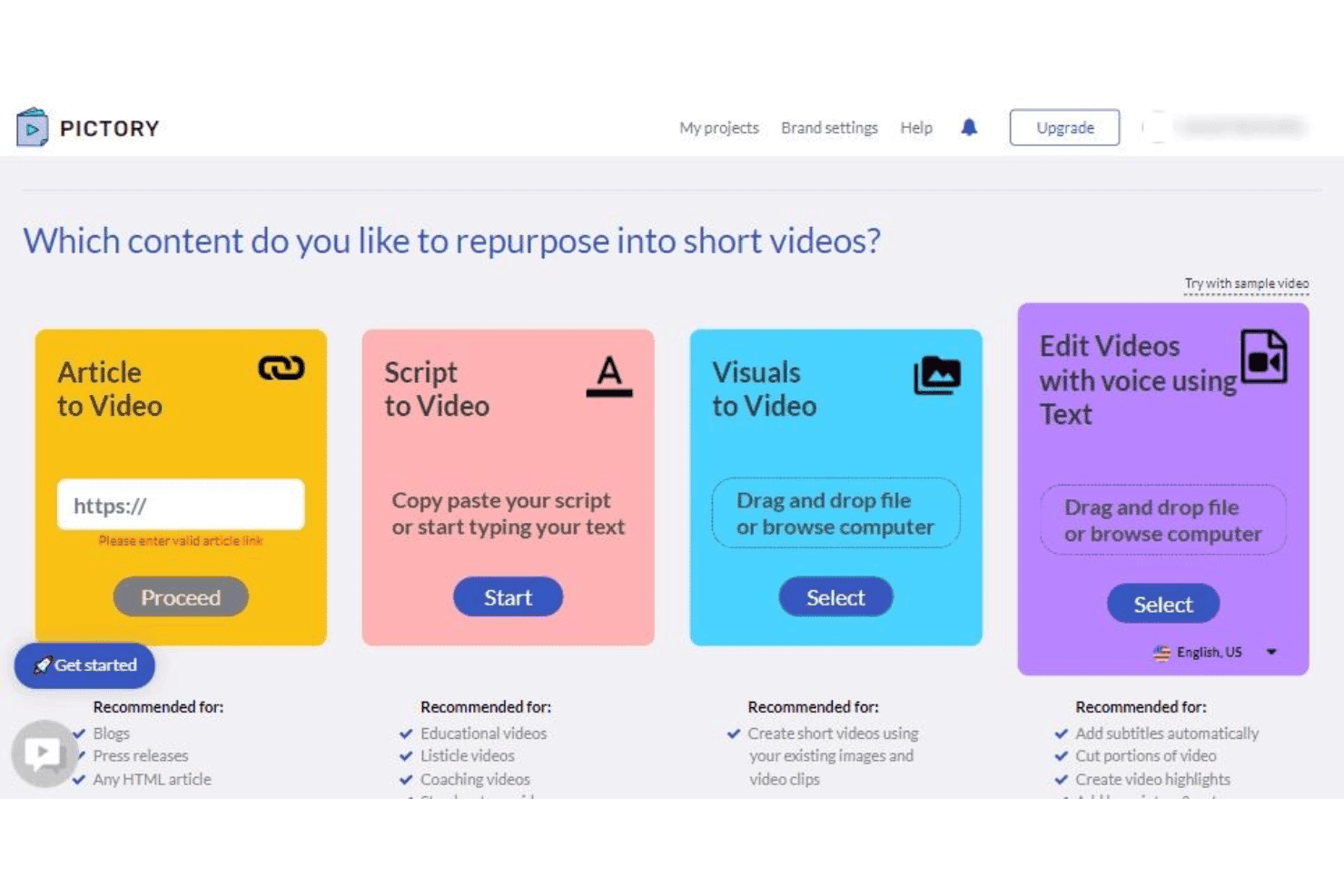
Pictory offre quattro opzioni di riproposizione contenuti: Da articolo a video, Da script a video, Da immagini a video e Modifica video con voce usando il testo. Pictory è un generatore video IA basato su cloud che trasforma contenuti scritti—articoli, post di blog e script—in video brevi brandizzati utilizzando selezione automatica delle scene tramite IA, sottotitoli automatici, filmati di repertorio e voci fuori campo generate dall'IA.
Per chi è ideale Pictory?
Pictory è particolarmente adatto per content marketer e proprietari di piccole imprese che pubblicano regolarmente contenuti scritti e vogliono ampliarne la diffusione tramite il video.
Perché ho scelto Pictory
Ho inserito Pictory tra le mie opzioni preferite perché la sua pipeline da articolo a video è davvero una delle più rapide che abbia mai utilizzato. Basta incollare l'URL di un blog o inserire un testo lungo, e l'IA di Pictory lo segmenta in scene, seleziona filmati di repertorio abbinati dal suo archivio di 18 milioni di clip e sincronizza automaticamente i sottotitoli generati dall'IA. Ho trasformato un post di 1.500 parole in una versione social pronta da pubblicare in meno di 15 minuti.
Funzionalità principali di Pictory
- Archivio kit di brand: Conserva loghi, colori e font da utilizzare su tutti i progetti video.
- Presentatori avatar IA: Scegli tra una selezione di portavoce digitali che narrano i tuoi video.
- Voiceover in più lingue: Crea tracce audio generate dall'IA in oltre due dozzine di lingue.
- Preimpostazioni formato: Esporta video in verticale, quadrato o orizzontale per ogni piattaforma social.
Integrazioni Pictory
Pictory offre integrazioni native con Getty Images, Storyblocks, ElevenLabs, Shopify, WooCommerce, WordPress, Make.com, N8N e Zapier. È disponibile un'API per integrazioni personalizzate.
Cosa è gratis?
Pictory offre una prova gratuita senza bisogno di carta di credito, consentendo l’accesso a tre progetti video di massimo 10 minuti ciascuno. I video esportati durante la prova gratuita includono una filigrana.
Pros and Cons
Pros:
- Converte URL di blog in video
- Sottotitoli generati automaticamente e sincronizzati
- Copre ampi argomenti di marketing e business
Cons:
- Nessun piano gratuito permanente
- Argomenti di nicchia restituiscono spesso filmati di repertorio non pertinenti
Learn more about Pictory: Ideale per modelli animati di campagne social
- Piano gratuito disponibile
- A partire da $15/mese (fatturazione annuale)
Visit WebsiteCustomer Rating:4.5/5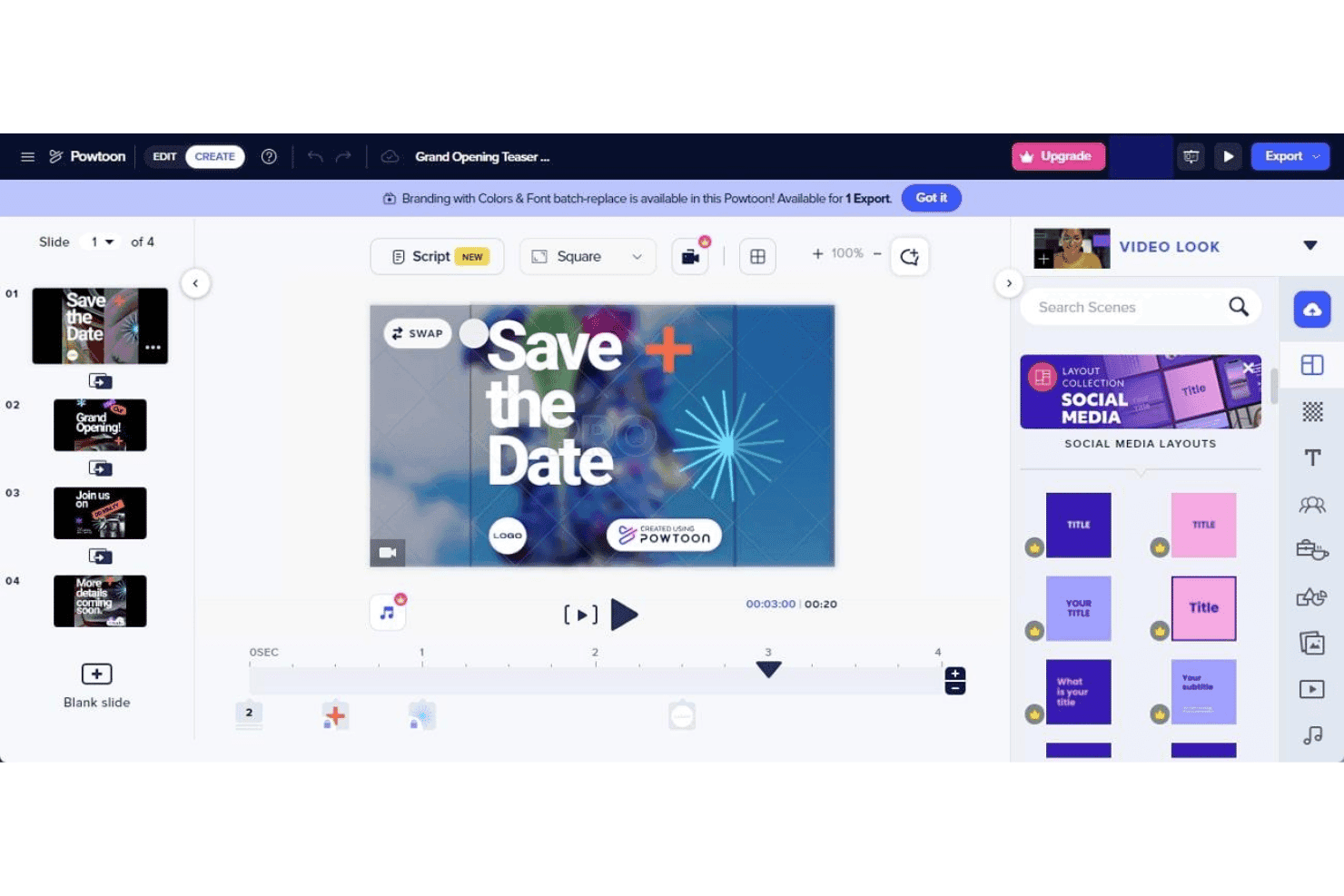
PowToon offre un editor video drag-and-drop con layout pre-costruiti per i social media, gestione delle slide e controlli timeline per creare presentazioni animate. PowToon è una piattaforma cloud per la creazione di video con intelligenza artificiale che consente ai marketer di produrre video animati, contenuti esplicativi e campagne social utilizzando un editor drag-and-drop, strumenti AI da testo a video, avatar AI, doppiaggi vocali e una vasta libreria interna di media stock.
Per chi è PowToon?
PowToon è particolarmente indicato per i marketer di piccole imprese e per i creatori di contenuti individuali che devono realizzare video animati senza avere competenze di design o un team dedicato alla produzione video.
Perché ho scelto PowToon
Ho incluso PowToon tra le mie scelte migliori perché la sua libreria di modelli per campagne social animate è una delle più orientate allo scopo che abbia mai visto in questa categoria. Invece di proporre layout video generici, i modelli sono organizzati per formati pubblicitari, strutture esplicative e stili di post social, con personaggi animati personalizzabili direttamente tramite il costruttore di personaggi integrato. Utilizzo regolarmente anche la funzione AI doc-to-video, che converte un PDF o una presentazione in un video animato completo con pochissima modifica manuale.
Funzionalità principali di PowToon
- AI da testo a voce e doppiaggio: Genera voiceover naturali e narrazioni multilingue per i video senza dover registrare l'audio.
- Esportazione in più formati: Esporta video in verticale, quadrato e orizzontale per l'utilizzo su diverse piattaforme social.
- Libreria di media stock: Accedi a oltre 4 milioni di immagini stock, tracce musicali, clip video ed effetti sonori direttamente nell'editor.
- Controlli per il brand kit: Carica loghi, imposta i font e salva i colori del brand per assicurarti che tutti i video siano coerenti con le linee guida del tuo marchio.
Integrazioni di PowToon
PowToon offre integrazioni native con HubSpot, Slack, Microsoft Teams, YouTube, Vimeo, Wistia, Facebook, Twitter e Google Workspace. È disponibile un'API per integrazioni personalizzate.
Cosa è gratuito?
PowToon offre un piano gratuito per sempre senza richiesta di carta di credito, che dà accesso all’editor drag-and-drop, ai modelli animati e alla libreria di media stock, con esportazioni fino a 720p che includono il watermark PowToon. Le funzionalità AI come da testo a video e la generazione di avatar non sono incluse nel piano gratuito, poiché richiedono crediti AI a pagamento.
Pros and Cons
Pros:
- Ampia libreria di modelli per campagne social
- Costruttore di personaggi animati
- AI Doc-to-video converte presentazioni
Cons:
- Funzionalità AI disponibili solo con crediti a pagamento
- Le esportazioni gratuite raggiungono un massimo di 720p di risoluzione
Learn more about PowToon: Ideale per l'automazione da script ad animazione
- Piano gratuito disponibile
- A partire da $29/mese
Visit WebsiteCustomer Rating:4.5/5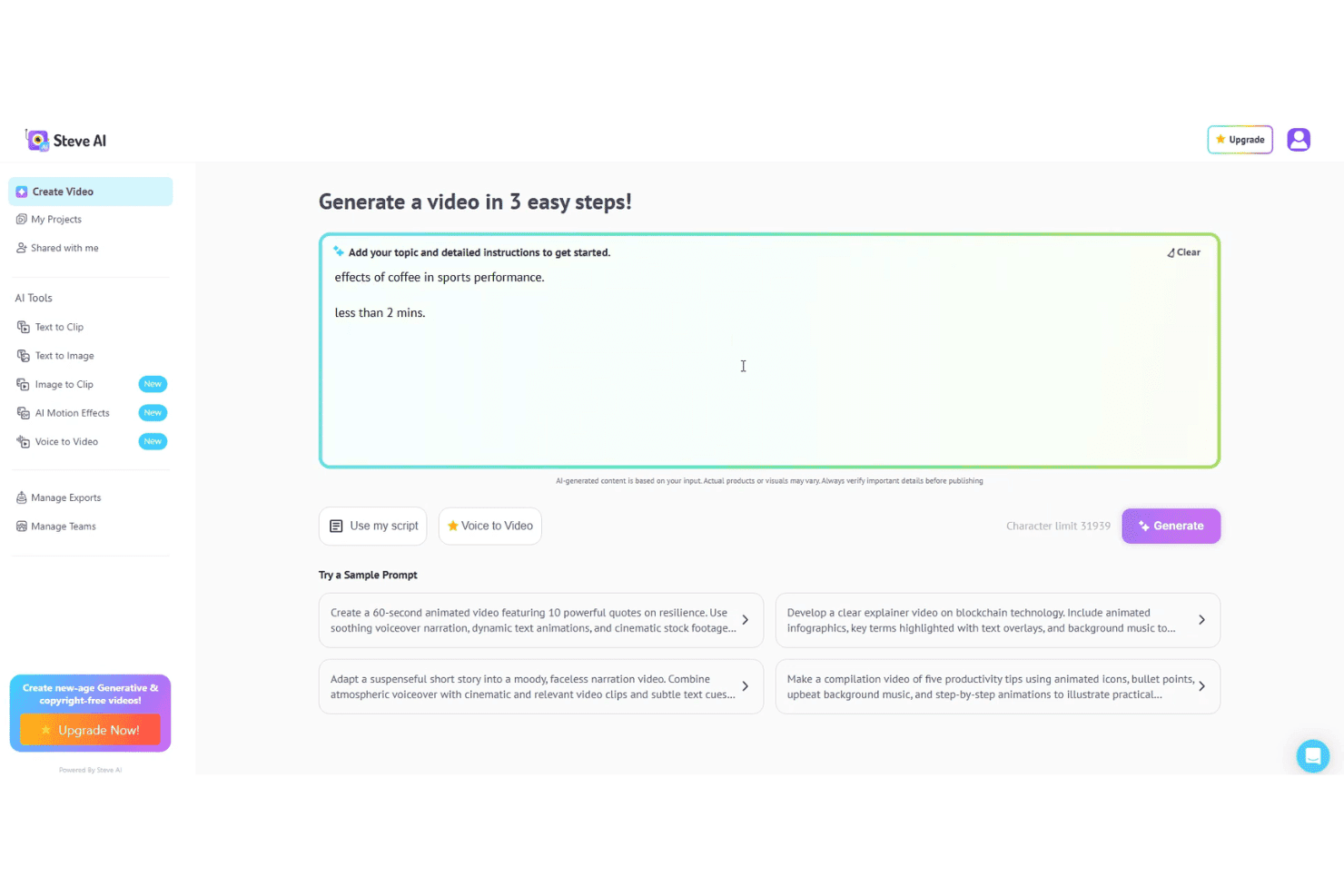
Steve AI consente agli utenti di generare video animati da script, prompt o input vocale. Steve AI è un generatore video basato su intelligenza artificiale che trasforma prompt testuali, script, audio e contenuti di blog in video animati, dal vivo o generativi AI, con voiceover integrato, risorse stock e esportazione in più formati.
Per Chi È Ideale Steve AI?
Steve AI è particolarmente adatto a marketer di piccole imprese e creatori di contenuti indipendenti che hanno bisogno di pubblicare video regolarmente senza un team dedicato alla produzione video.
Perché Ho Scelto Steve AI
Steve AI merita il suo posto nella mia lista per come gestisce la conversione da script ad animazione. Inserisco uno script e il Prompter Avanzato crea un video animato completo con scene selezionate dall’AI, effetti di movimento e voiceover sincronizzati. Uso anche ClipMaker AI per trasformare articoli di blog in brevi clip animate. I più di 300 personaggi animati e gli effetti di movimento come testo cinetico e zoom della fotocamera sono tutti accessibili direttamente nell’editor, senza necessità di animazione manuale.
Funzionalità Principali di Steve AI
- Template pronti per il marketing: Scegli tra modelli pubblicitari e promozionali preimpostati progettati per le principali piattaforme social e formati video.
- Esportazione in vari formati: Esporta i video in formato verticale, quadrato e orizzontale per canali come TikTok, Instagram e YouTube.
- Opzioni di personalizzazione del brand: Applica il logo, i colori e i font del tuo brand direttamente nell’editor video per mantenere la coerenza del marchio.
- Libreria premium di contenuti e musica: Accedi a una libreria integrata di immagini AI, videoclip e musica o effetti sonori senza diritti d'autore.
Integrazioni Steve AI
Steve AI offre un’integrazione nativa con YouTube per la pubblicazione diretta. Le integrazioni native con altre piattaforme non sono chiaramente documentate.
Cosa è Gratis?
Steve AI offre un piano gratuito per sempre che include 1.200 secondi di video AI e 200 crediti al mese. Le esportazioni sono disponibili anche con il piano gratuito ma includono una filigrana e sono limitate alla risoluzione 720p.
Pros and Cons
Pros:
- Converte gli script in video animati
- Stili di animazione multipli disponibili
- Piano gratuito generoso con minuti video mensili
Cons:
- Le esportazioni gratuite includono una filigrana visibile
- Libreria di avatar limitata
Learn more about Steve AI: 4Ideale per la generazione di video talking head realistici
D-ID
- Prova gratuita di 14 giorni
- Da $4,70/mese (fatturato annualmente)
Visit WebsiteCustomer Rating:4.6/5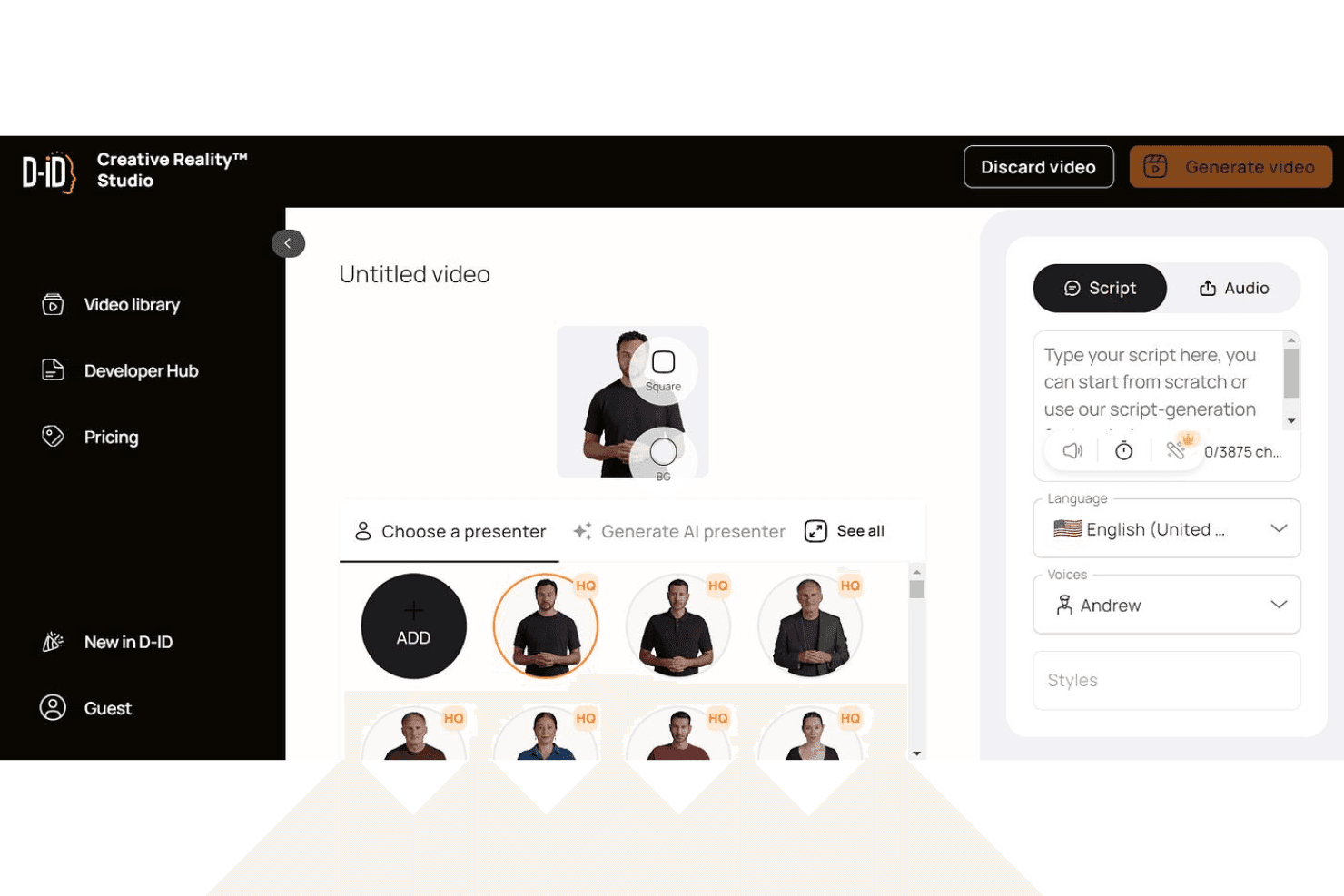
D-ID consente agli utenti di generare video talking head realistici da script e voci AI. D-ID è una piattaforma di generazione video AI che trasforma testi, immagini e documenti in video talking-head utilizzando avatar digitali realistici con doppiaggi multilingua e clonazione vocale.
Per chi è più adatta D-ID?
D-ID è particolarmente indicata per i content marketer e i formatori che devono produrre video esplicativi con avatar su larga scala senza bisogno di presentatori in camera.
Perché ho scelto D-ID
D-ID si guadagna un posto nella mia lista ristretta perché la qualità della sincronizzazione labiale e dell'animazione facciale è davvero superiore rispetto a quella di strumenti simili. La utilizzo per creare video avatar a partire da uno script o da un documento caricato e il risultato appare come un vero presentatore, non come un cartone animato. La funzione di clonazione vocale mi permette di replicare una voce specifica su più video, il che è particolarmente utile quando realizzo una serie multilingue senza dover registrare nuovamente.
Caratteristiche principali di D-ID
- Traduzione video: Genera traduzioni e versioni localizzate dei video in oltre 120 lingue.
- Integrazioni con Canva e PowerPoint: Usa D-ID direttamente all'interno di Canva o PowerPoint per creare video avatar in modo fluido.
- Personalizzazione del watermark con il tuo logo: Sostituisci il watermark di D-ID con il tuo logo per esportazioni brandizzate sui piani superiori.
- Accesso API: Integra le funzionalità di generazione video di D-ID in altri strumenti di marketing o flussi di lavoro personalizzati.
Integrazioni di D-ID
D-ID offre integrazioni native con Canva e Microsoft PowerPoint. È disponibile anche un'API per integrazioni personalizzate.
Cosa è gratuito?
D-ID offre una prova gratuita di 14 giorni che comprende fino a 3 minuti totali di generazione video con esportazioni con watermark e solo per uso personale; l'uso commerciale richiede un piano a pagamento.
Pros and Cons
Pros:
- Sincronizzazione labiale realistica sugli avatar generati
- Oltre 100 lingue supportate per il voiceover
- Agenti AI interattivi in tempo reale disponibili
Cons:
- I gesti degli avatar sono in gran parte statici
- I crediti mensili scadono e non si accumulano
Learn more about D-ID: Il migliore per montaggi rapidi in stile TikTok
- Piano gratuito disponibile
- Da $25,99/mese (fatturato annualmente)
Visit WebsiteCustomer Rating:4.5/5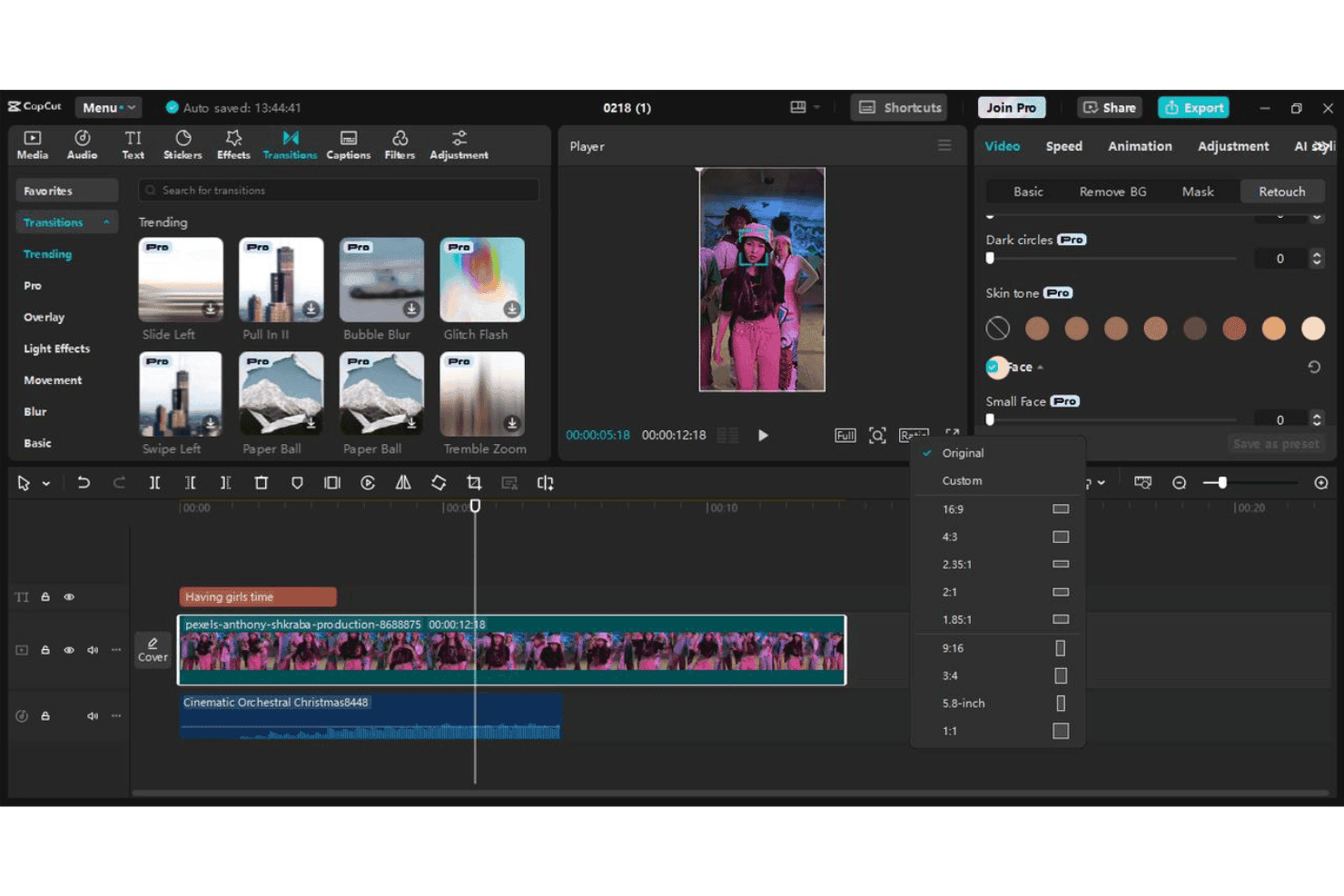
CapCut consente agli utenti di modificare video brevi con transizioni, effetti, sottotitoli e preset di formato. CapCut è un editor video AI gratuito di ByteDance che trasforma prompt testuali e script in video brevi generati tramite IA, utilizzando generazione di scene artificiali, avatar digitali, doppiaggi e modelli di marketing preimpostati.
Per chi è più adatto CapCut?
CapCut è ideale per i marketer dei social media e i piccoli imprenditori che producono grandi volumi di video brevi per TikTok, Reels o Shorts.
Perché ho scelto CapCut
CapCut conquista il suo posto tra i migliori nella mia lista perché nessun altro strumento gratuito è così specificamente progettato per la produzione di contenuti in stile TikTok. Lo utilizzo in particolare per i suoi sottotitoli automatici, che generano testo evidenziato parola per parola nello stile audace e ad alto contrasto che ottiene effettivamente risultati nei feed verticali. I preset 9:16 specifici per la piattaforma e la funzione di CapCut for Business che trasforma un URL di una pagina prodotto direttamente in uno spot pubblicitario breve lo rendono la mia scelta preferita per test rapidi di campagne.
Funzionalità chiave di CapCut
- Scrittura di script guidata dall'IA: Genera script video completi da un semplice prompt o parola chiave per una rapida ideazione dei contenuti.
- Presentatori avatar digitali: Scegli tra oltre 100 avatar AI per narrare o presentare messaggi promozionali nei video.
- Modelli di marketing preimpostati: Accedi a modelli pensati per annunci pubblicitari, demo di prodotto e contenuti brandizzati per i social.
- Doppiaggi in più lingue: Aggiungi una narrazione AI generata vocalmente in decine di lingue per campagne localizzate o globali.
Integrazioni di CapCut
CapCut offre un'integrazione nativa con TikTok per la pubblicazione diretta e supporta l'accesso con Google, Facebook e tramite codice QR. Le integrazioni native oltre TikTok non sono chiaramente documentate.
Cosa è gratuito?
CapCut offre un piano gratuito per sempre su web, desktop e dispositivi mobili senza necessità di carta di credito, inclusi esportazioni a 1080p senza filigrana nella versione desktop. Il livello gratuito comprende l'accesso a modelli, testo in video e strumenti di editing, ma le funzionalità AI come la generazione di avatar e la creazione avanzata di video AI si basano su un credito mensile che si rinnova a ogni ciclo di fatturazione.
Pros and Cons
Pros:
- Modelli ottimizzati per i formati TikTok e Reels
- Modelli ottimizzati per i formati TikTok e Reels
- Esporta video verticali a 1080p senza filigrana
Cons:
- I crediti AI si esauriscono rapidamente nel piano gratuito
- La licenza commerciale richiede una verifica manuale
 Ideale per presentazioni con avatar personalizzabili
- Piano gratuito disponibile
- Da $59/mese (fatturato annualmente)
Visit WebsiteCustomer Rating:4.6/5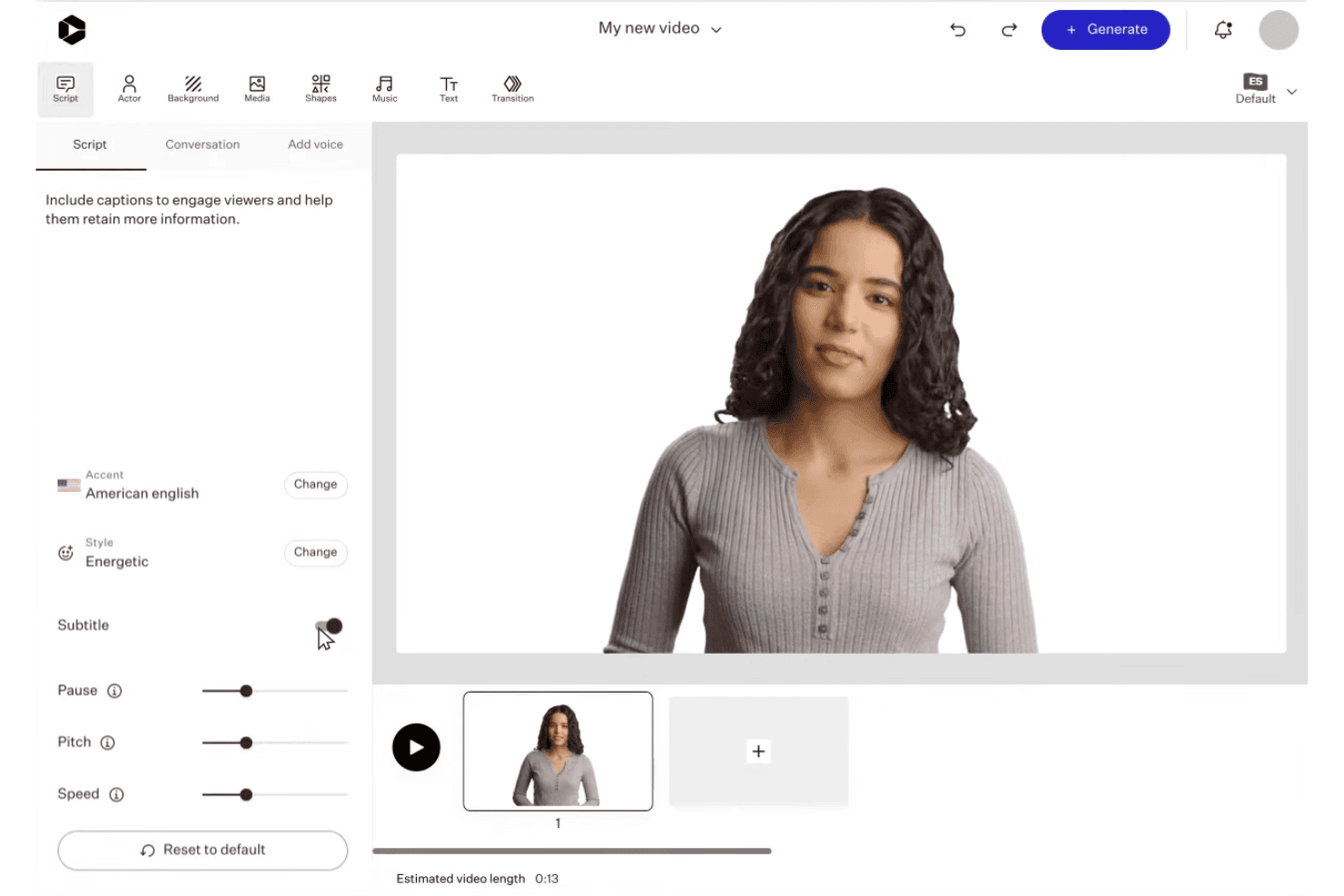
Colossyan permette agli utenti di personalizzare presentazioni con avatar AI, script, voci e modifica delle scene. Colossyan è una piattaforma video AI che trasforma testi, script, PDF e URL in video guidati da avatar utilizzando oltre 300 presentatori AI, più di 700 voci e kit di brand integrati in vari formati di aspetto.
Per chi è ideale Colossyan?
Colossyan è particolarmente adatto a responsabili del content marketing e team di enablement che devono produrre video professionali in stile presentatore a partire da contenuti scritti esistenti su larga scala.
Perché ho scelto Colossyan
Colossyan ottiene il suo posto nella mia shortlist perché nessun altro strumento video AI gratuito offre così tanto controllo su aspetto e comportamento del presentatore a schermo. Mi piace molto poter regolare le emozioni dell'avatar, utilizzare angolazioni di profilo e inserire più avatar nella stessa scena, il che mi consente di creare spiegazioni in stile podcast che sembrano davvero ben prodotte. La funzione di avatar personalizzato istantaneo permette di avere subito un presentatore brandizzato senza dover prenotare uno studio.
Caratteristiche principali di Colossyan
- Gestione del kit di brand: Memorizza e applica loghi, colori e font automaticamente a ogni progetto video.
- Flusso lavoro da documento a video: Converte PDF, PowerPoint, script e URL direttamente in video draft.
- Esportazione in multi-formato: Crea video in verticale, quadrato o orizzontale per diversi canali social.
- Libreria di media stock: Accedi a filmati, immagini e musica stock integrati per arricchire i tuoi contenuti video.
Integrazioni di Colossyan
Colossyan offre esportazione SCORM per sistemi di gestione dell’apprendimento come Workday, Cornerstone, Docebo, Litmos e Absorb, e fornisce accesso API per integrazioni personalizzate.
Cosa è gratuito?
Il piano Starter gratuito di Colossyan include 20 minuti di generazione video AI al mese senza necessità di carta di credito, ma tutti i video esportati avranno una filigrana. I download illimitati in MP4 sono disponibili solo con il piano Professional a pagamento, quindi gli utenti del piano gratuito possono solo condividere link e esportare corsi.
Pros and Cons
Pros:
- Oltre 300 opzioni di avatar con controllo di emozioni e angolazioni
- Fino a quattro avatar in una sola scena
- Disponibile traduzione automatica in oltre 70 lingue
Cons:
- Meno template rispetto a HeyGen e Synthesia
- Tempi di rendering video più lenti della media
Learn more about Colossyan: 7Ideale per esportazioni video personalizzate del brand
VEED
- Piano gratuito disponibile
- Da $12/utente/mese
Visit WebsiteCustomer Rating:4.5/5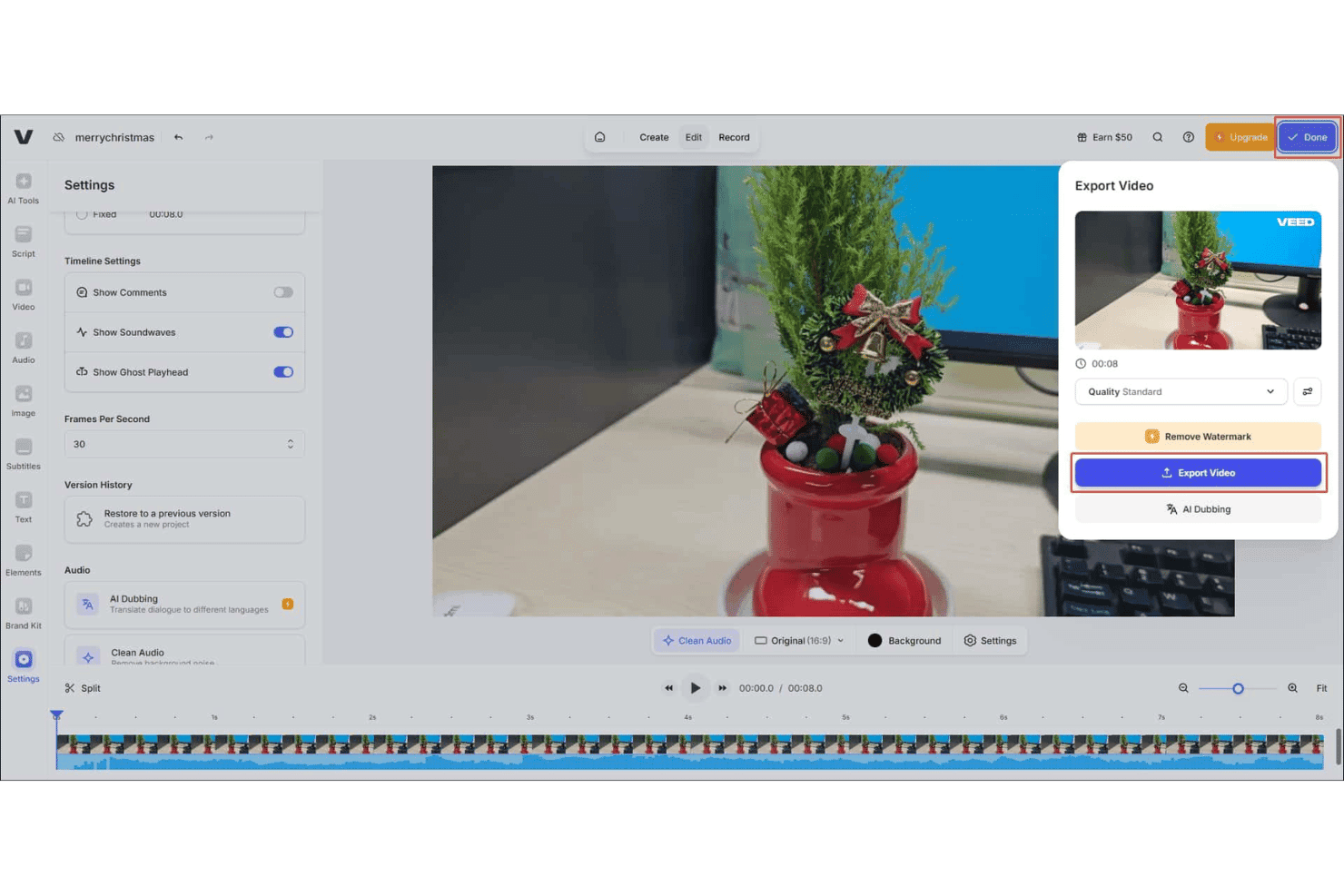
VEED offre un pannello di esportazione video con impostazioni di qualità, rimozione filigrana e opzioni di Doppiaggio AI direttamente dall'editor. VEED è un generatore video AI basato su browser che ti permette di creare contenuti da testo a video, animare immagini di prodotto, aggiungere avatar AI, generare doppiaggi vocali in oltre 125 lingue e applicare sottotitoli automatici su diversi rapporti d'aspetto.
Per chi è ideale VEED?
VEED è particolarmente adatto a marketer dei social media e team di contenuti che necessitano di produrre video brandizzati e in formato breve in grande quantità senza un team di produzione video dedicato.
Perché ho scelto VEED
Ho scelto VEED come uno dei migliori perché il suo Brand Kit consente di impostare una sola volta loghi, font e colori e averli applicati automaticamente a ogni video generato. Questo è importante quando si gestiscono molte campagne e si ha bisogno che ogni esportazione sia coerente senza dover riconfigurare ogni volta gli elementi del brand. Mi piace anche la possibilità di creare avatar AI personalizzati legati all'identità del marchio, così che i video dimostrativi dei prodotti e le creatività pubblicitarie non debbano limitarsi a presentatori AI generici che non hanno nulla a che vedere con la tua azienda.
Funzionalità chiave di VEED
- Generazione video AI multi-modello: Scegli tra diversi modelli AI video leader come Sora 2, Kling e Seedance per personalizzare lo stile e il ritmo del video secondo le tue esigenze.
- Animazione da immagine a video: Carica immagini di prodotti e genera contenuti video animati direttamente da visual statiche.
- Doppiaggio vocale AI in oltre 125 lingue: Genera tracce audio con voce naturale per i tuoi video in una vasta gamma di lingue per raggiungere clienti globali.
- Magic B-roll: Aggiungi istantaneamente filmati rilevanti di stock B-roll ai video generati da AI per ottenere visual più coinvolgenti.
Integrazioni VEED
Le integrazioni native non sono chiaramente documentate. VEED offre varie API, inclusa Fabric 1.0 API, Lip Sync API, Subtitle API, Background Removal API e Green Screen API, per integrazioni personalizzate.
Cosa è gratis?
VEED offre un piano gratuito per sempre senza necessità di carta di credito, che prevede una quota limitata di crediti AI video per generare ed esportare video. Le esportazioni nel piano gratuito includono una filigrana e sono limitate a una risoluzione di 720p; una volta esauriti i crediti, sarà necessario passare a un piano a pagamento per continuare a generare video AI.
Pros and Cons
Pros:
- Il Brand Kit si applica a tutti i video generati
- Puoi scegliere tra diversi modelli AI generativi per i video
- La libreria di avatar AI include la creazione di avatar personalizzati
Cons:
- Le esportazioni gratuite sono con filigrana e limitate a 720p
- Rendering lento su progetti video lunghi o complessi
Learn more about VEED: 8Ideale per la creazione di video da testo su larga scala
Elai
- Piano gratuito disponibile
- Da $29/mese
Visit WebsiteCustomer Rating:4.6/5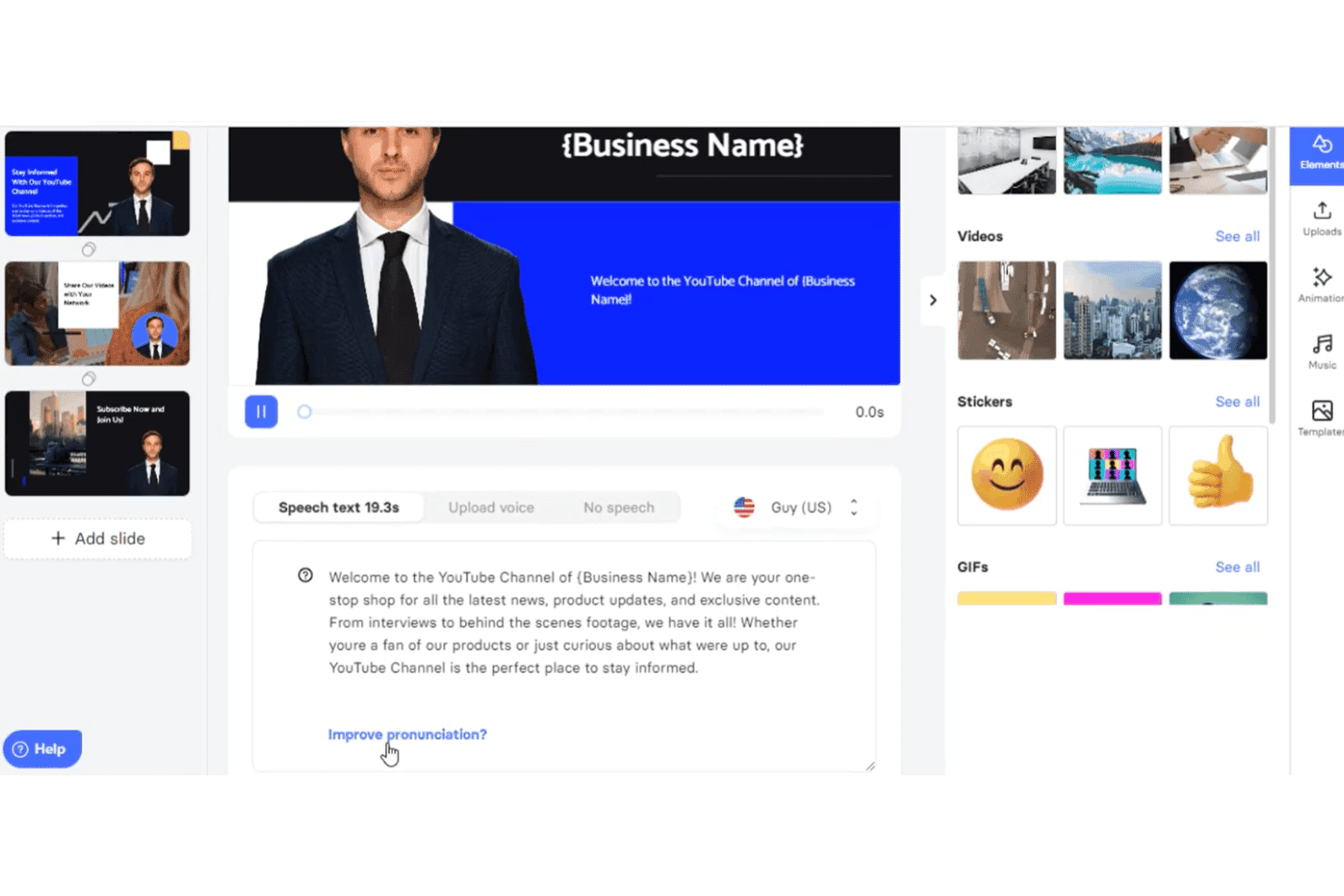
Elai.io consente agli utenti di creare video AI dal testo con avatar, impostazioni vocali ed editing delle slide. Elai è un generatore di video AI che trasforma testi, URL, script e file PowerPoint in video narrati utilizzando una libreria di avatar AI e doppiaggi multilingue in oltre 75 lingue.
Per chi è ideale Elai?
Elai è particolarmente adatto a team di content marketing che convertono regolarmente asset scritti—come post di blog e presentazioni—in video su larga scala.
Perché ho scelto Elai
Ho inserito Elai tra le mie scelte principali perché gestisce la trasformazione da testo a video su larga scala meglio di molti altri strumenti che ho testato. Posso incollare direttamente l'URL di un blog nella piattaforma e ottenere un video narrato con avatar AI senza dover scrivere una sola riga di script. La funzione AI Storyboard va oltre, permettendomi di trasformare una semplice scaletta di contenuti in un video strutturato, diviso su più slide, in un unico flusso di lavoro.
Funzionalità principali di Elai
- Archivio brand kit: Memorizza il tuo logo, i font e i colori del brand per una brand identity coerente nei video.
- Clonazione della voce in più lingue: Genera narrazione AI in 28 lingue clonata dalla tua voce reale.
- Esportazione SCORM: Scarica i video completati come file SCORM per una facile integrazione con LMS.
- Quiz interattivi e ramificazioni: Aggiungi quiz cliccabili ed elementi ramificati per creare esperienze video interattive.
Integrazioni Elai
Elai.io offre integrazioni native con Thinkific, uQualio, Tolstoy, Moodle, Medium, Pexels, GIPHY, LottieFiles e Articulate 360. Si collega inoltre con Zapier e offre un'API per integrazioni personalizzate.
Cosa offre gratis?
Il piano gratuito di Elai offre 1 minuto di credito totale per il rendering video, che copre un singolo video breve e si esaurisce ad ogni rendering e ri-rendering. La possibilità di scaricare nel livello gratuito è stata segnalata dagli utenti come inaffidabile, quindi trattalo come un'anteprima della piattaforma e non come un vero piano operativo.
Pros and Cons
Pros:
- Converte automaticamente URL di blog in video
- Supporta oltre 75 lingue per la generazione della voce fuori campo
- Creazione personalizzata di avatar AI disponibile nei piani a pagamento
Cons:
- Il ri-rendering consuma la dotazione di minuti
- La varietà di avatar è limitata nei piani di fascia bassa
Learn more about Elai: Ideale per avatar AI in video esplicativi
- Piano gratuito disponibile
- Da $19/mese
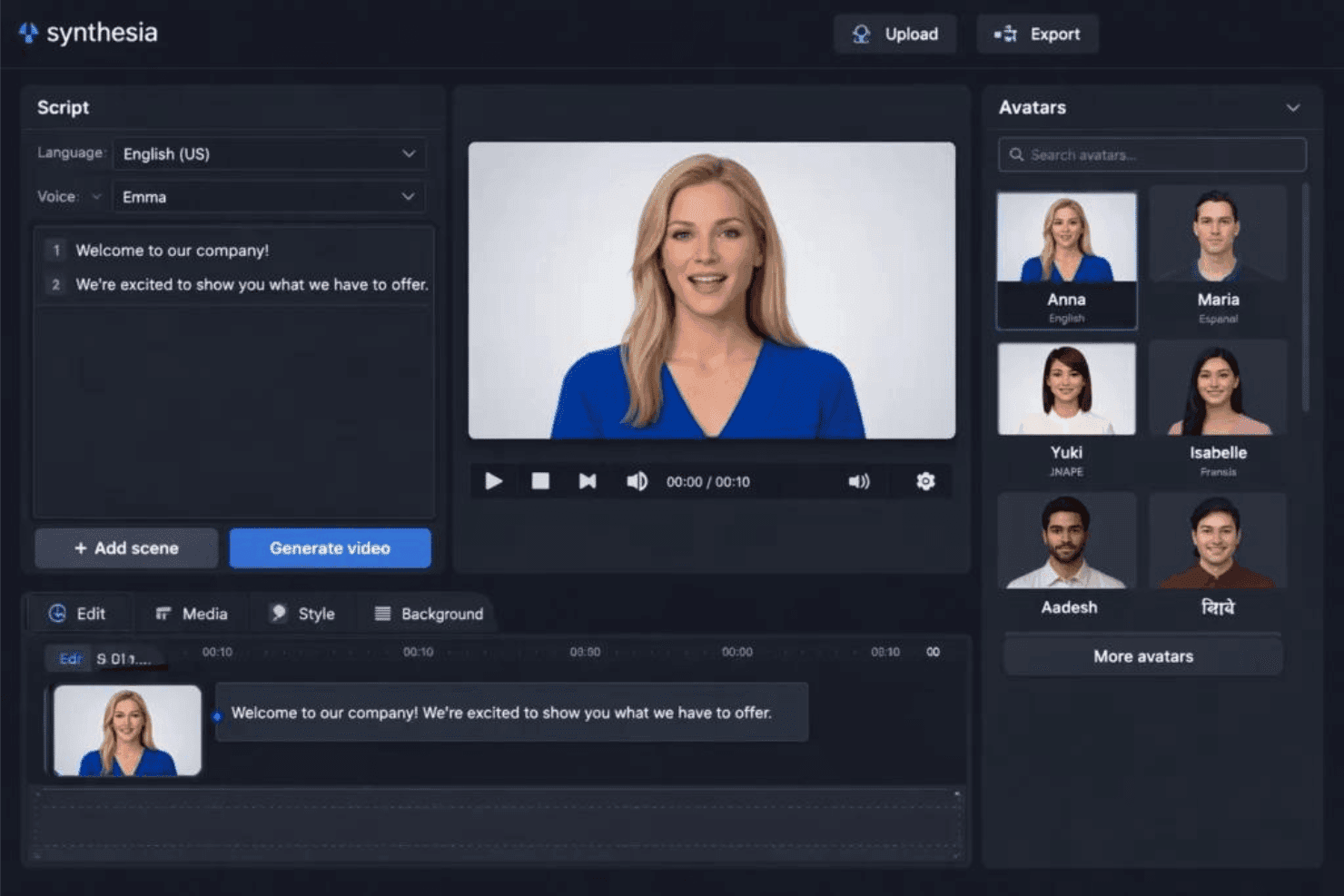
Synthesia offre un editor video AI con avatar personalizzabili, inserimento di script e generazione video con un click. Synthesia è una piattaforma video basata sull'intelligenza artificiale che converte script testuali, documenti e prompt in video finiti utilizzando avatar AI, doppiaggi multilingue e template personalizzabili con il proprio brand.
Per chi è migliore Synthesia?
Synthesia è ideale per i responsabili del content marketing e i team di formazione aziendale (L&D) che devono produrre video esplicativi di livello professionale guidati da avatar, senza bisogno di una troupe di produzione.
Perché ho scelto Synthesia
Synthesia merita un posto nella mia selezione perché la sua libreria di avatar è davvero difficile da superare. Con oltre 240 avatar disponibili e la possibilità di creare un avatar personale (un sosia digitale proprio o di un presentatore del brand), posso realizzare video esplicativi con un effetto presentatore senza prenotare uno studio. Mi affido anche alla funzione Traduzione con 1 click, che ridoppia un video già terminato in oltre 70 lingue mantenendo la sincronizzazione labiale: così un solo video esplicativo diventa una vera campagna multilingue.
Caratteristiche principali di Synthesia
- Assistente video AI: Genera video da script, documenti, PDF o URL con un flusso di lavoro AI basato su prompt.
- Personalizzazione del kit brand: Salva e applica loghi, colori e font per mantenere video coerenti con il marchio.
- Accesso a libreria multimediale: Usa video, musiche e immagini stock da Getty Images, Pexels, Soundstripe e Icons8.
- Esportazione in più formati: Esporta video in formato verticale, quadrato e orizzontale per diversi canali social.
Integrazioni di Synthesia
Synthesia offre integrazioni native con PowerPoint e sistemi di gestione dell'apprendimento tramite esportazione SCORM, e mette a disposizione un'API per integrazioni personalizzate. Dispone anche di un'estensione Chrome per registrare lo schermo.
Cosa è gratuito?
Synthesia propone un piano gratuito per sempre che include 10 minuti di video al mese, accesso a 9 avatar AI e esportazione in formato MP4. I video del piano gratuito presentano una filigrana Synthesia, e l'accesso alla libreria avatar completa e al kit brand richiede un abbonamento a pagamento.
Pros and Cons
Pros:
- Oltre 240 avatar disponibili più opzione avatar personalizzato
- Traduzione video in 1 click in oltre 70 lingue
- Il piano gratuito include download video MP4
Cons:
- Il piano gratuito aggiunge una filigrana a tutti i video
- Numero di avatar limitato a 9 nel piano gratuito
Learn more about Synthesia: 10Ideale per la localizzazione video multilingue
HeyGen
- Piano gratuito disponibile
- A partire da $29/mese
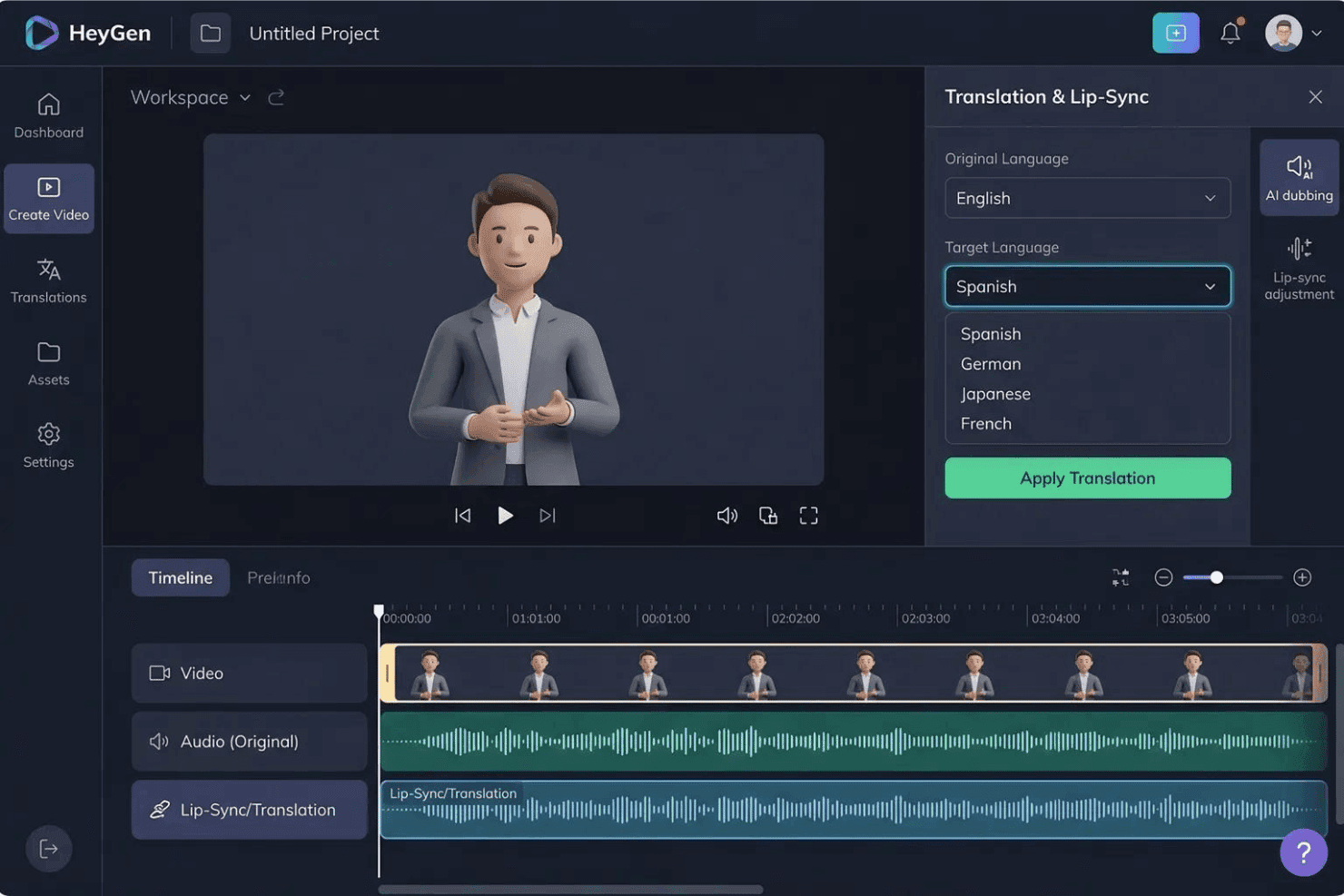
HeyGen offre un pannello di Traduzione & Lip-Sync che consente agli utenti di tradurre video di avatar AI in più lingue tra cui spagnolo, tedesco, giapponese e francese. HeyGen è un generatore di video AI costruito attorno ad avatar realistici, clonazione vocale e traduzione con un clic in oltre 175 lingue, con funzionalità di text-to-video, localizzazione lip-sync e creazione di gemelli digitali personalizzati.
Per chi è più indicato HeyGen?
HeyGen è particolarmente indicato per i team di marketing di brand globali e agenzie che producono regolarmente contenuti video in più lingue e mercati regionali.
Perché ho scelto HeyGen
HeyGen merita il suo posto nella mia lista grazie al modo in cui gestisce la localizzazione video su larga scala. Posso prendere un singolo video registrato e generare versioni sincronizzate con le labbra in oltre 175 lingue, facendo sì che il tono della voce dell'avatar e i movimenti della bocca corrispondano ad ogni script tradotto. La funzione di gemello digitale personalizzato significa che non devo riprendere o rifare il casting per ogni mercato. HeyGen esegue automaticamente la localizzazione, preservando le caratteristiche vocali dell'oratore originale in ogni versione linguistica.
Caratteristiche principali di HeyGen
- Editor AI Studio: Crea, modifica e visualizza in anteprima scene video utilizzando una timeline drag-and-drop, con controllo tramite testo e feedback in tempo reale.
- Libreria di template di marketing: Accedi a modelli video pronti all'uso, adattati per annunci social, promozioni, spiegazioni e i formati di marketing più comuni.
- Esportazione multi-formato: Esporta video nei formati 9:16, 1:1 o 16:9 per TikTok, Instagram e YouTube senza bisogno di ritagli manuali.
- Libreria integrata di asset stock: Utilizza una libreria integrata di video, immagini e tracce audio stock direttamente all'interno del workflow di editing video.
Integrazioni HeyGen
HeyGen offre integrazioni native con HubSpot, Salesforce, Adobe Express, Canva, FlowShare, Zoom e Tolstoy, si connette con Zapier e mette a disposizione una API per integrazioni personalizzate.
Cosa è gratuito?
Il piano gratuito per sempre di HeyGen include 3 video al mese (fino a 1 minuto ciascuno) con esportazione in 1080p, accesso a oltre 500 avatar stock e 1 gemello digitale personalizzato. I video esportati includono una filigrana, e l’accesso a funzionalità premium come Avatar V e Video Agent è limitato ad un breve periodo di prova.
Pros and Cons
Pros:
- Traduzione sincronizzata con il labiale
- Oltre 175 lingue Video multilingue istantaneo da una sola registrazione
- Creazione realistica di gemelli digitali personalizzati disponibile
Cons:
- Le esportazioni del piano gratuito sono limitate a 720p
- Le affermazioni sul piano "Illimitato" possono trarre in inganno sui limiti reali
Learn more about HeyGen:
Altri generatori video IA gratuiti per professionisti del marketing
Ecco alcune ulteriori opzioni di generatori video IA gratuiti per professionisti del marketing che non sono state incluse nel mio elenco, ma che vale comunque la pena valutare:
- 11Lumen5Ideale per convertire istantaneamente post di blog in video
- 12FlikiIdeale per doppiaggi realistici negli annunci video
- 13Vidnoz AIIdeale per video promozionali guidati da voiceover
- 14CreatifyIdeale per la generazione automatizzata di script pubblicitari
- 15RunwayIdeale per effetti video alimentati dall'IA
- 16Hailuo AIIdeale per la personalizzazione di avatar parlanti
- 17KapwingIdeale per flussi di lavoro di editing collaborativo
- 18EaseMate AIIdeale per esportazioni video in più formati
- 19RecCloudIdeale per la pubblicazione diretta sulle piattaforme social
- 20DreamluxIdeale per creare storyboard da testi di marketing
Come valuto i generatori video AI gratuiti per marketer
Per prima cosa, definisco cosa si intende per gratuito. Per i generatori video AI, significa un piano gratuito per sempre o una prova gratuita completa di almeno 7 giorni che consenta di esportare i video finiti—i watermark vanno bene. Da lì, suddivido la mia valutazione in funzionalità di base che ogni strumento deve offrire e i fattori che distinguono le migliori opzioni.
Funzionalità di base (requisiti fondamentali per questa lista)
Oltre alle mie richieste sull’offerta gratuita, uso anche un sistema di punteggio per selezionare gli strumenti per la mia lista. Ecco come funziona:
Valuto ciascuno su una scala da 0 (non offre la funzionalità) a 5 (eccelle in quest’area) per ciascuna delle funzionalità di base elencate di seguito. Poi, calcolo il punteggio totale dello strumento in percentuale. Ogni strumento deve ottenere un punteggio totale minimo del 65% per essere preso in considerazione per l’inclusione.
- Generazione da testo a video: Verifico se lo strumento può prendere una sceneggiatura o un estratto di un blog e produrre un video coerente, suddiviso in più scene—non solo una presentazione di immagini statiche.
- Avatar o voiceover AI: Avere un presentatore digitale o una narrazione dal suono naturale è importante per video esplicativi e dimostrazioni di prodotto, quindi cerco varietà nelle voci e nelle opzioni di avatar.
- Template pronti per il marketing: Valuto la libreria di modelli per i formati effettivamente utilizzati dai marketer, come brevi annunci social, promozioni di prodotto e storie per Instagram o TikTok.
- Esportazione in diversi formati di proporzione: Ogni strumento dovrebbe supportare esportazioni in 9:16, 1:1 e 16:9 così puoi riutilizzare un singolo video su YouTube, Reels e post nel feed senza doverlo ritagliare di nuovo.
- Personalizzazione del brand: Cerco la possibilità di aggiungere logo, colori e font del tuo brand per mantenere i video generati coerenti attraverso le campagne.
- Libreria multimediale e asset stock: Una libreria integrata di filmati stock, immagini e clip musicali aiuta a colmare le lacune quando non si hanno asset originali pronti all’uso.
Una volta che ho una lista di strumenti che rispettano i criteri, considero cosa distingue ciascuna piattaforma.
Fattori differenzianti (cosa distingue i fornitori)
Ecco come confronto e metto in rilievo le differenze tra vari fornitori:
Caratteristiche distintive
La memorizzazione del kit di brand è una caratteristica a cui presto particolare attenzione—gli strumenti che permettono di salvare logo, colori e font ti evitano di dover ricostruire gli elementi di brand per ogni nuovo video. I presentatori avatar AI sono un altro differenziatore, soprattutto per video dimostrativi o contenuti onboarding dove una persona parlante aggiunge credibilità senza dover organizzare riprese. I voiceover multilingue completano il tutto per i team che gestiscono campagne in più regioni, permettendo di localizzare un singolo video in più lingue partendo da uno stesso progetto.
Oltre le funzionalità
I limiti del piano gratuito sono molto importanti qui—valuto quanti minuti di video puoi generare ogni mese e se le esportazioni vengono con watermark o con risoluzione ridotta, dato che ciò influisce sull’utilizzabilità del materiale prodotto in campagne a pagamento. I diritti sui contenuti sono un altro fattore che controllo, in particolare se i termini di licenza della piattaforma consentono l’utilizzo commerciale di video e avatar generati da AI. Prendo in considerazione anche le integrazioni con lo stack marketing, come la pubblicazione diretta sui canali social o le connessioni con strumenti come HubSpot e Google Drive.
Come scegliere un generatore video IA gratuito per professionisti del marketing
È facile perdersi in lunghi elenchi di funzionalità e strutture tariffarie complesse. Per aiutarti a rimanere concentrato mentre affronti il tuo specifico processo di selezione del software, ecco una lista di fattori da tenere presenti:
| Fattore | Cosa considerare |
|---|---|
| FattoreScalabilità | Cosa considerareLo strumento consente di aumentare la produzione di video con la crescita delle campagne oppure il piano gratuito limita eccessivamente la produzione per l'utilizzo da parte di team o di più brand? |
| FattoreIntegrazioni | Cosa considerareLa piattaforma si collega agli strumenti di marketing che già utilizzate, come Canva o HubSpot, per la gestione delle risorse e dei flussi di lavoro delle campagne? |
| FattorePersonalizzazione | Cosa considerareÈ possibile applicare gli elementi del brand e adattare i video a campagne diverse oppure ci sono limiti a ciò che si può modificare con il piano gratuito? |
| FattoreFacilità d'uso | Cosa considerareL'interfaccia è intuitiva, così il team può iniziare a utilizzarla senza una formazione approfondita, oppure sono necessarie competenze specialistiche per creare contenuti di qualità? |
| FattoreOnboarding per l'implementazione | Cosa considerareQuanto rapidamente può iniziare a utilizzare lo strumento il team? Sono disponibili tutorial, progetti di esempio e risorse per l'onboarding che consentano di ridurre i tempi di avvio? |
| FattoreCosto | Cosa considerareI limiti del piano gratuito sono sostenibili per le vostre esigenze oppure sarà necessario passare rapidamente a un piano superiore per ottenere più crediti o una risoluzione maggiore? |
| FattoreMisure di sicurezza | Cosa considerareQuali dati degli utenti, risorse e informazioni sulle campagne vengono archiviati dalla piattaforma e sono disponibili controlli per la privacy e l'accesso in un ambiente condiviso? |
| FattoreEsigenze di risorse interne | Cosa considerareSarà necessario un supporto continuativo di progettazione, IT o creativo per ottenere valore dallo strumento oppure, una volta completata la configurazione, i professionisti del marketing possono utilizzare la piattaforma in autonomia? |
Cosa sono i generatori di video AI gratuiti per professionisti del marketing?
I generatori di video AI gratuiti per professionisti del marketing sono strumenti software che consentono di creare video di marketing utilizzando l'intelligenza artificiale, senza costi iniziali. Offrono funzionalità come la trasformazione di prompt testuali o script in video, la generazione di avatar AI e voci fuori campo e l'applicazione degli elementi del brand. Queste piattaforme includono in genere un piano gratuito o una prova limitata, consentendo ai professionisti del marketing di sperimentare con i contenuti video per campagne, annunci o canali social prima di assumere un impegno finanziario.
Funzionalità dei generatori di video AI gratuiti per professionisti del marketing
Vediamo le funzionalità comunemente presenti nei generatori di video AI per professionisti del marketing e quali sono solitamente incluse nei piani gratuiti rispetto a quelli a pagamento.
Funzionalità tipiche dei generatori di video AI gratuiti per professionisti del marketing
- Conversione da testo a video: Trasformate script scritti, articoli di blog o brief in video completi con scene generate automaticamente, per creare rapidamente contenuti a partire dai testi già disponibili.
- Modelli di marketing di base: Accedete a modelli iniziali progettati per post sui social, presentazioni di prodotti o video esplicativi, semplificando il processo di creazione video per i tipici casi d'uso del marketing.
- Personalizzazione semplice del brand: Aggiungete il logo e i colori di base ai video esportati, ottenendo un certo livello di coerenza del brand senza una personalizzazione approfondita.
- Voci fuori campo AI: Utilizzate la narrazione vocale automatica per i vostri video, solitamente con una piccola selezione di voci naturali nelle lingue più diffuse.
- Presentatori avatar di base: Aggiungete presentatori digitali o persone che parlano alla videocamera ai vostri contenuti, utilizzando una libreria standard e non personalizzabile di avatar generati dall'AI.
- Libreria limitata di contenuti multimediali stock: Accedete a una piccola raccolta di foto stock, clip video e musica per arricchire i contenuti senza dover disporre di risorse originali.
- Esportazione in più proporzioni: Esportate i video nei formati social verticali, quadrati o orizzontali, semplificando la pubblicazione su canali diversi a partire da un unico progetto.
- Download con filigrana: Scaricate i video completati con una filigrana discreta, così da poter visualizzare in anteprima le risorse o utilizzarle per l'approvazione interna.
Funzionalità tipiche dei generatori di video AI a pagamento per professionisti del marketing
- Gestione avanzata del kit del brand: archivia più loghi, caratteri e tavolozze di colori per un'applicazione automatica più approfondita a tutti i progetti, garantendo una forte coerenza del brand.
- Generazione video in blocco: genera più video contemporaneamente a partire da script o flussi di dati diversi, semplificando la scalabilità delle campagne su formati e piattaforme differenti.
- Esportazioni ad alta risoluzione: scarica video in qualità ad alta definizione o 4K, rimuovendo i watermark e ottenendo risultati finali curati e professionali.
- Creazione di avatar personalizzati: crea avatar IA personalizzati o presentatori virtuali per abbinarli a portavoce, personaggi o identità del brand specifici nei tuoi video.
- Ampia scelta di voiceover: scegli tra dozzine di lingue e accenti e accedi a voci narranti IA più realistiche o espressive.
- Libreria di contenuti multimediali premium: utilizza un'ampia raccolta integrata di video, immagini e musica stock con licenza per avere maggiori possibilità creative.
- Pubblicazione diretta sui social: pubblica istantaneamente i video dalla piattaforma su canali come TikTok, Instagram, Facebook e YouTube senza doverli prima scaricare.
- Strumenti di collaborazione: invita i membri del team a rivedere, modificare o approvare insieme i progetti direttamente nella piattaforma, migliorando il flusso di lavoro dei team di marketing distribuiti.
- Editing video basato sull'IA: perfeziona i video con suggerimenti di modifica basati sull'IA, rimozione dello sfondo o ristrutturazione delle scene, oltre alla semplice disposizione manuale delle clip.
- Analisi avanzate: accedi direttamente dallo strumento a informazioni sul coinvolgimento nei video, sui tassi di completamento o sulle prestazioni sui social per orientare le future decisioni creative.
Vantaggi dei generatori di Video IA gratuiti per i marketer
L'implementazione di un generatore video IA gratuito per marketer offre numerosi vantaggi al tuo team e alla tua azienda. Eccone alcuni che puoi aspettarti:
- Produzione creativa più rapida: trasforma istantaneamente script o brief in risorse video curate utilizzando la conversione da testo a video basata sull'IA e i modelli, riducendo la dipendenza dalla produzione video esterna.
- Costi di produzione inferiori: elimina la necessità di videografi, montatori e attori: funzionalità come avatar IA, voiceover e librerie multimediali ti consentono di creare video interamente sulla piattaforma.
- Presenza coerente del brand: la semplice personalizzazione del brand e i kit del brand di base aiutano a mantenere loghi e colori in primo piano, anche nei contenuti pubblicitari per i social con tempi di produzione rapidi.
- Copertura multicanale: utilizza strumenti di esportazione con più proporzioni per adattare un singolo video a TikTok, Instagram, YouTube e altri canali senza doverlo rimontare per ciascuno.
- Facile riutilizzo dei contenuti: trasforma articoli del blog, testi di prodotto o script di webinar in nuovi contenuti video, massimizzando l'impatto dei materiali di marketing esistenti.
- Sperimentazione scalabile: testa più varianti creative prima di investire in un piano a pagamento, poiché i livelli gratuiti consentono prove agili e iterazioni rapide.
- Creazione video accessibile: editor intuitivi, modelli iniziali e risorse per l'avvio consentono a quasi chiunque nel team di creare video, anche senza esperienza precedente.
Costi e prezzi dei generatori video IA per marketer
Mi rendo conto che sei arrivato a questo articolo cercando le migliori opzioni gratuite di generatori video IA per marketer. Tuttavia, poiché i piani gratuiti offrono solo funzionalità limitate, è molto probabile che in futuro dovrai ampliare il tuo piano ed esplorare una gamma più ampia di generatori video IA.
La tabella seguente riassume i piani più comuni, i relativi prezzi medi e le funzionalità tipicamente incluse in un generatore video IA per marketer:
Tabella comparativa dei piani per generatori video IA per marketer
| Tipo di piano | Prezzo medio | Funzionalità comuni |
|---|---|---|
| Tipo di pianoPiano gratuito | Prezzo medio$0 | Funzionalità comuniConversione di base da testo a video, esportazioni con watermark, modelli limitati, una piccola libreria multimediale e opzioni di voiceover di base. |
| Tipo di pianoPiano personale | Prezzo medio$10–$25/utente/mese | Funzionalità comuniPiù modelli, esportazione HD, raccolta ampliata di contenuti stock, avatar aggiuntivi, più opzioni vocali e personalizzazione di base del brand. |
| Tipo di pianoPiano aziendale | Prezzo medio$30–$60/utente/mese | Funzionalità comuniKit del brand personalizzati, assistenza premium, download ad alta risoluzione, esportazioni in blocco, strumenti di collaborazione e editing video avanzato. |
| Tipo di pianoPiano per grandi aziende | Prezzo medio$75+/utente/mese | Funzionalità comuniSSO e sicurezza avanzata, utilizzo illimitato, accesso API, onboarding dedicato, assistenza prioritaria e analisi dettagliate. |
Generatore video AI gratuito per esperti di marketing: domande frequenti
Ecco alcune risposte alle domande più comuni sui generatori video AI gratuiti per esperti di marketing:
Posso utilizzare per scopi commerciali i video creati con generatori video AI gratuiti?
Sì, molti generatori video AI gratuiti consentono l’uso commerciale, ma dovresti sempre verificare i termini di licenza per controllare la presenza di filigrane, i diritti di utilizzo e le limitazioni sui contenuti prima di pubblicare i tuoi video.
I miei video avranno filigrane se utilizzo un piano gratuito?
Sì, la maggior parte dei piani gratuiti aggiunge una filigrana ai video esportati. Se hai bisogno di contenuti senza marchio per campagne pubbliche, di solito è necessario passare a un piano a pagamento.
I generatori video AI gratuiti supportano più lingue?
Sì, la maggior parte dei generatori video AI gratuiti offre funzionalità di base per la voce fuori campo multilingue, ma la varietà di voci e lingue disponibili tende a essere più limitata rispetto a quella dei piani a pagamento.
Quanti contenuti video posso produrre con un piano gratuito?
I piani gratuiti limitano generalmente la produzione video in base ai minuti mensili o al numero di esportazioni. Di solito è sufficiente per test o piccoli progetti, ma potrebbe non coprire le esigenze di campagne continuative.
Ho bisogno di esperienza nella progettazione o nel montaggio per utilizzare questi strumenti?
No, i generatori video AI gratuiti sono progettati per i team di marketing e per i non specialisti. Interfacce semplici, modelli e risorse introduttive ti aiutano a creare video senza una precedente esperienza nel montaggio.
Che cosa succede ai miei contenuti se passo a un piano a pagamento?
Il passaggio a un piano a pagamento di solito consente di rimuovere le filigrane, sbloccare le esportazioni precedenti in una risoluzione maggiore e ottenere diritti o opzioni di modifica aggiuntivi per i progetti esistenti.