

Le migliori alternative a Smartsheet offrono al tuo team di operazioni di marketing un software flessibile per la gestione dei progetti, collaborazione in tempo reale e integrazioni adatte al tuo flusso di lavoro. Se stai cercando le migliori alternative, probabilmente hai bisogno di una soluzione per la gestione dei progetti in grado di monitorare i progetti, supportare le bacheche kanban e gestire con facilità progetti complessi. Molti strumenti offrono funzionalità avanzate, componenti aggiuntivi e integrazioni all’interno di un ecosistema più ampio, concentrandosi al contempo su un’esperienza intuitiva e facile da usare, con una curva di apprendimento ridotta. Alcuni offrono anche una versione gratuita e opzioni pensate per i team di servizi professionali. Usa questo elenco per confrontare le funzionalità e trovare la soluzione più adatta alle tue esigenze di operazioni di marketing nel 2026.
Che cos’è Smartsheet?
Smartsheet è una piattaforma basata sul cloud per la gestione dei progetti e la collaborazione, progettata per aiutare i team a pianificare, monitorare e automatizzare il lavoro. Combina un’interfaccia flessibile con l’automazione dei flussi di lavoro, la condivisione dei file e gli aggiornamenti in tempo reale. I team di marketing la utilizzano per gestire campagne e report, anche se alcuni cercano alternative per migliorarne l’usabilità, ampliare le funzionalità o adattarla meglio agli strumenti già in uso.
Tabella comparativa delle alternative a Smartsheet
Questa tabella comparativa riassume i dettagli sui prezzi delle mie principali alternative a Smartsheet:
| Tool | Best For | Trial Info | Price | ||
|---|---|---|---|---|---|
| 1 | Ideale per le operazioni creative e le approvazioni delle campagne | Demo gratuita disponibile | Prezzi su richiesta | Website | |
| 2 | Ideale per progetti flessibili in stile database | Piano gratuito + demo gratuita disponibile | A partire da $20/utente/mese (con fatturazione annuale) | Website | |
| 3 | Ideale per database di team a codice sorgente aperto | Prova gratuita + piano gratuito disponibili | A partire da $10/utente/mese (con fatturazione annuale) | Website | |
| 4 | Ideale per il monitoraggio centralizzato dei progetti del team | Prova gratuita di 14 giorni + demo gratuita disponibile | A partire da $8/utente/mese (con fatturazione annuale) | Website | |
| 5 | Ideale per la gestione dei progetti incentrata sui clienti | Prova gratuita di 14 giorni | A partire da $9.99/utente/mese (fatturato annualmente) | Website | |
| 6 | Ideale per la pianificazione di progetti aziendali | Demo gratuita disponibile | Prezzi su richiesta | Website | |
| 7 | Ideale per la semplice collaborazione tra team | Prova gratuita di 30 giorni + demo gratuita disponibile | A partire da $15/utente/mese | Website | |
| 8 | Ideale per la gestione completa del lavoro | Piano gratuito disponibile | A partire da $7/utente/mese (con fatturazione annuale) | Website | |
| 9 | Ideale per la gestione delle attività e delle sequenze temporali | Piano gratuito disponibile | A partire da $10.99/utente/mese (fatturato annualmente) | Website | |
| 10 | Ideale per la pianificazione dei progetti basata sui diagrammi di Gantt | Prova gratuita di 14 giorni | A partire da $7/utente/mese (con fatturazione annuale) | Website |


Perché fidarsi dei nostri consigli sui software
6,700+
Reviews
20
Industry experts
16+
Evaluation factors
14
Years
Il nostro team testa e recensisce software dal 2012. In quanto leader del marketing noi stessi, sappiamo quanto sia difficile — e importante — scegliere il software giusto.
Per questa guida, abbiamo valutato gli strumenti attraverso test pratici e ricerche indipendenti, assegnando un punteggio agli strumenti in base ai nostri criteri di selezione.
Le nostre recensioni riflettono il nostro giudizio editoriale umano, non un discorso di vendita.
Revisori esperti:
 Gui DrusinaDirettore creativo
- Shriya GhateSenior Marketing Lead
 Amanda JacquesResponsabile Marketing Ops

Recensioni delle alternative a Smartsheet
Di seguito trovi le mie sintesi dettagliate delle migliori alternative a Smartsheet incluse nel mio elenco ristretto. Le mie recensioni offrono un’analisi dettagliata delle funzionalità, delle integrazioni e dei casi d’uso migliori di ciascuna piattaforma, per aiutarti a trovare quella più adatta a te.
 Ideale per le operazioni creative e le approvazioni delle campagne
- Demo gratuita disponibile
- Prezzi su richiesta
Visit WebsiteCustomer Rating:4.6/5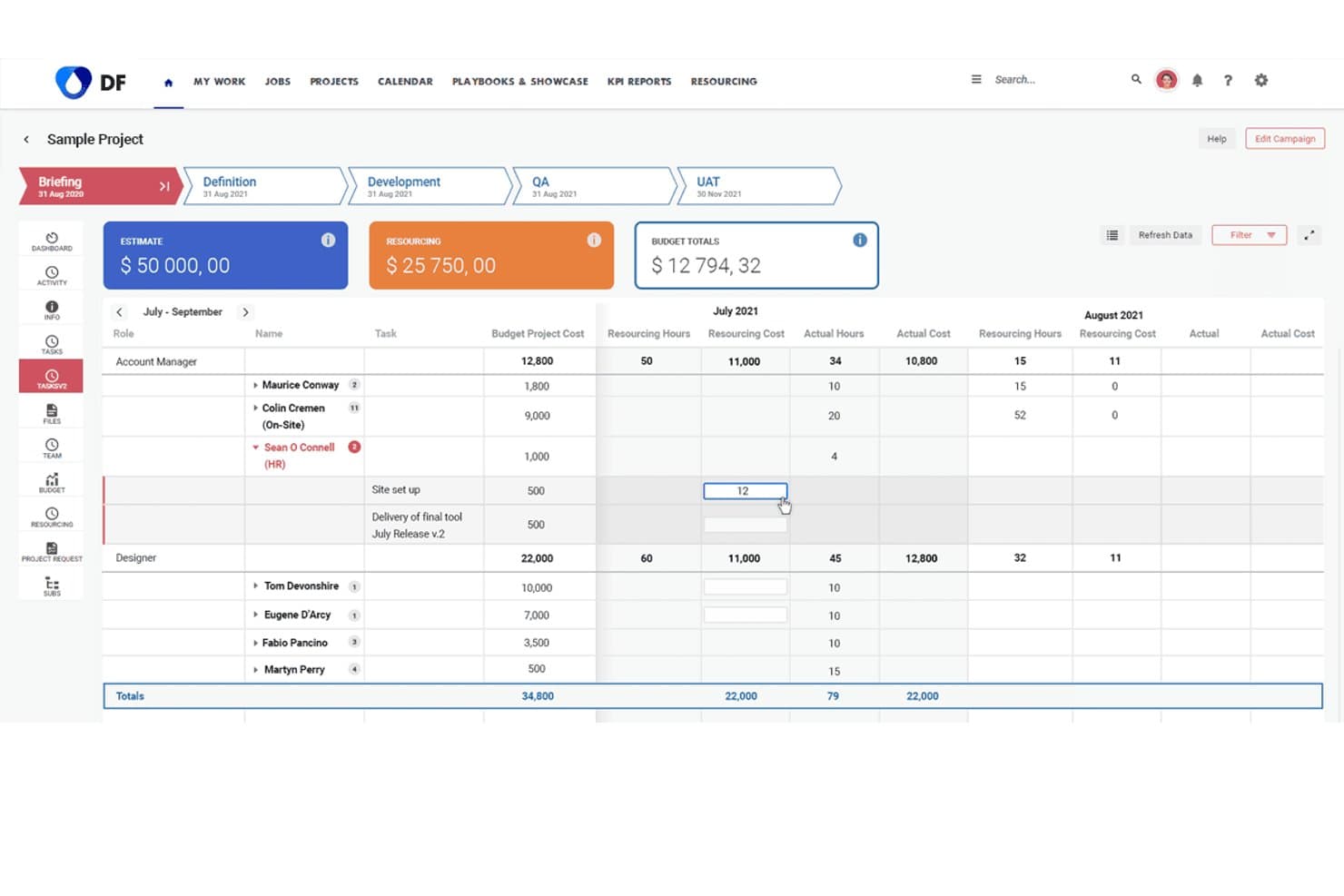
Screendragon monitora i costi e le ore delle risorse nei diversi ruoli del progetto. Screendragon aiuta i team di marketing e creativi a semplificare la gestione dei flussi di lavoro, centralizzare le approvazioni e migliorare la visibilità sulle campagne, risultando particolarmente adatto alle agenzie e ai team interni che gestiscono progetti complessi.
Per chi è più adatto Screendragon?
Screendragon è adatto alle agenzie e ai team di marketing interni che gestiscono flussi di lavoro creativi complessi e approvazioni di campagne ad alto volume.
Perché Screendragon è una buona alternativa a Smartsheet
Ho scelto Screendragon come una delle soluzioni migliori perché eccelle nella gestione delle operazioni creative e delle approvazioni delle campagne, risultando adatto alle agenzie e ai team di marketing impegnati. Utilizzo il suo strumento visivo per la creazione di flussi di lavoro per centralizzare i feedback, accelerare le approvazioni creative e monitorare le fasi delle campagne tra più reparti. Questo significa lanci più rapidi e meno colli di bottiglia quando si gestiscono progetti creativi complessi.
Caratteristiche principali di Screendragon
- Monitoraggio del budget: Monitora i budget dei progetti e controlla i costi sulla stessa piattaforma utilizzata per i flussi di lavoro.
- Gestione delle risorse: Assegna i membri del team ai progetti in base alla disponibilità e alle competenze.
- Controllo delle versioni: Gestisci le versioni dei file creativi con caricamenti corredati da timestamp e registri di controllo chiari.
- Report personalizzati: Crea report su misura per monitorare lo stato dei progetti, il carico di lavoro e le metriche di produttività.
Integrazioni di Screendragon
Le integrazioni native non sono documentate in modo chiaro. Screendragon offre un'API per le integrazioni personalizzate.
Pros and Cons
Pros:
- Centralizza le approvazioni creative e i feedback sulle campagne
- Include il controllo delle versioni integrato per le risorse
- Offre report personalizzati per le metriche dei progetti creativi
Cons:
- Le integrazioni native sono limitate e non documentate
- Può risultare complesso per la semplice gestione delle attività
Learn more about Screendragon: Ideale per progetti flessibili in stile database
- Piano gratuito + demo gratuita disponibile
- A partire da $20/utente/mese (con fatturazione annuale)
Visit WebsiteCustomer Rating:4.6/5
Airtable offre una sequenza temporale Gantt con raggruppamento delle attività e dipendenze. Airtable è una piattaforma di database senza codice che consente ai team di marketing di progettare flussi di lavoro personalizzati, gestire le risorse delle campagne e automatizzare le attività ripetitive. Se hai bisogno di un sistema flessibile per organizzare progetti e dati oltre i fogli di calcolo, vale la pena dare un'occhiata ad Airtable.
Per chi è più indicato Airtable?
I team di marketing di aziende di medie dimensioni che desiderano automatizzare e personalizzare la gestione delle campagne.
Perché Airtable è una buona alternativa a Smartsheet
Ho scelto Airtable perché il suo strumento per la creazione di automazioni consente al mio team di attivare flussi di lavoro in più passaggi—come assegnare un brief completato al revisore corretto o aggiornare lo stato della campagna nelle tabelle collegate—senza scrivere una sola riga di codice. Utilizzo anche le funzionalità di intelligenza artificiale per generare brief creativi e ottenere informazioni utili dai dati delle campagne direttamente all'interno della piattaforma. In pratica, questo significa che il mio team dedica meno tempo ai passaggi manuali e più tempo al lavoro effettivo sulle campagne. Per i team di marketing che gestiscono più canali o regioni, i record collegati di Airtable mantengono tutto connesso in un unico luogo.
Funzionalità principali di Airtable
- Progettazione dell'interfaccia: Crea dashboard e visualizzazioni di app personalizzate con funzionalità di trascinamento direttamente dai dati Airtable esistenti.
- Visualizzazioni multiple: Passa dalla visualizzazione a griglia, calendario, Kanban e galleria per visualizzare gli stessi dati in modi diversi.
- Sincronizzazione dei dati: Importa dati in tempo reale da fonti esterne in Airtable, così i record rimangono aggiornati in ogni flusso di lavoro collegato.
- Controlli di governance e sicurezza: Gestisci autorizzazioni, autenticazione e accesso ai dati su larga scala da un pannello di amministrazione centralizzato.
Integrazioni di Airtable
Le integrazioni includono Google Drive, Box, Dropbox, Salesforce, Slack, Jira, Tableau, WordPress, ChatGPT e altro.
Pros and Cons
Pros:
- Righe illimitate nei piani a pagamento
- API REST integrata per l'automazione dei flussi di lavoro
- Progettazione dell'interfaccia per dashboard personalizzate
Cons:
- Le autorizzazioni sono meno granulari rispetto a Smartsheet
- L'app mobile non dispone di alcune funzionalità desktop
Learn more about Airtable: Ideale per database di team a codice sorgente aperto
- Prova gratuita + piano gratuito disponibili
- A partire da $10/utente/mese (con fatturazione annuale)
Visit WebsiteCustomer Rating:4.7/5
Baserow offre uno strumento di monitoraggio in formato foglio di calcolo con filtri, ordinamento e strumenti di collaborazione. Se desideri un database a codice sorgente aperto che il tuo team di marketing possa personalizzare completamente, Baserow offre componenti flessibili per il monitoraggio delle campagne, la gestione delle risorse e la reportistica. È una soluzione ideale per i team che devono progettare i propri flussi di lavoro senza il supporto degli sviluppatori.
Per chi è più adatto Baserow?
Team di marketing di startup e agenzie che desiderano creare database personalizzati per le campagne senza dover programmare.
Perché Baserow è una buona alternativa a Smartsheet
Ho scelto Baserow perché la sua struttura di database a codice sorgente aperto permette al mio team di creare esattamente le tabelle, le viste e i campi di cui abbiamo bisogno, senza dover aspettare uno sviluppatore. Utilizzo i tipi di campo personalizzati, come allegati, URL e formule, per monitorare le risorse delle campagne e i dati sulle prestazioni in un unico posto. Le viste galleria e Kanban mi permettono di cambiare il modo in cui visualizzo gli stessi dati a seconda che stia esaminando risorse creative o gestendo le fasi dei contenuti. In pratica, questo significa che il mio team non è costretto a utilizzare un formato rigido da foglio di calcolo, come può accadere con Smartsheet.
Funzionalità principali di Baserow
- Commenti sulle righe: Aggiungi commenti organizzati in thread direttamente sui singoli record per mantenere i feedback collegati a dati specifici.
- Autorizzazioni basate sui ruoli: Controlla chi può visualizzare, modificare o gestire ogni database con impostazioni di accesso a livello di utente.
- Architettura basata innanzitutto sull'API: Ogni database Baserow genera automaticamente un'API REST per il collegamento a strumenti esterni.
- Collaborazione in tempo reale: Più membri del team possono modificare e aggiornare simultaneamente lo stesso database senza conflitti.
Integrazioni di Baserow
Le integrazioni includono n8n, Zapier, Make, GitHub Issues, GitLab Issues, Jira Issues, Google Cloud Storage, Posthog e altro.
Pros and Cons
Pros:
- Piattaforma a codice sorgente aperto con opzione di hosting autonomo
- Righe illimitate in tutti i piani a pagamento
- Tipi di campo personalizzati per i dati di marketing
Cons:
- Nessuna vista Gantt o cronologia integrata
- Nessuna funzionalità integrata per report o dashboard
Learn more about Baserow: Ideale per il monitoraggio centralizzato dei progetti del team
- Prova gratuita di 14 giorni + demo gratuita disponibile
- A partire da $8/utente/mese (con fatturazione annuale)
Visit WebsiteCustomer Rating:4.7/5
Elenco dei progetti Workzone con monitoraggio dei progressi, attività e assegnazioni al team. Workzone è una piattaforma di gestione dei progetti pensata per i team di marketing che devono gestire campagne complesse con più parti interessate. Se desideri un monitoraggio dettagliato delle attività, una visibilità trasversale sui progetti e autorizzazioni granulari per gli utenti, vale la pena prendere in considerazione Workzone.
Per chi è più adatto Workzone?
Team di marketing di medie dimensioni che gestiscono più progetti e necessitano di uno stretto controllo sull'accesso degli utenti.
Perché Workzone è una buona alternativa a Smartsheet
Ho scelto Workzone perché i suoi controlli delle autorizzazioni mi permettono di decidere esattamente cosa ogni parte interessata può vedere e fare, fino al livello del singolo progetto o della singola attività. Questo è importante quando gestisco campagne con agenzie esterne o clienti che non dovrebbero avere accesso a tutti i progetti presenti nel mio spazio di lavoro. Mi affido inoltre al suo pannello di controllo trasversale ai progetti per monitorare contemporaneamente i progressi di più campagne, senza dover passare da una visualizzazione separata all'altra. Per i team di marketing che gestiscono diversi progetti contemporaneamente con collaboratori interni ed esterni, Workzone mantiene ordinato l'accesso e chiara la visibilità.
Funzionalità principali di Workzone
- Visualizzazione con diagramma di Gantt: Visualizza le dipendenze tra le attività e le tempistiche dei progetti in un diagramma interattivo con funzione di trascinamento.
- Revisione di immagini e video: Inserisci annotazioni direttamente nella piattaforma su risorse creative, immagini, documenti e video, per ottenere feedback e approvazioni.
- Modelli di progetto predefiniti: Avvia campagne ripetibili con un solo clic utilizzando oltre 1.000 modelli per settore e reparto.
- Monitoraggio del tempo: Registra le ore effettive dedicate alle attività e confrontale con le ore preventivate nei vari progetti.
Integrazioni di Workzone
Le integrazioni includono Box, Dropbox, Everhour, Google Drive, HubSpot, Jira, Microsoft Teams, OneDrive, Slack e altro ancora.
Pros and Cons
Pros:
- Revisione creativa integrata per le risorse di marketing
- I moduli di richiesta dei progetti standardizzano la raccolta delle campagne
- Modelli predefiniti per i flussi di lavoro di marketing
Cons:
- Opzioni limitate per la reportistica personalizzata
- Nessuna gestione delle risorse integrata
Learn more about Workzone: Ideale per la gestione dei progetti incentrata sui clienti
- Prova gratuita di 14 giorni
- A partire da $9.99/utente/mese (fatturato annualmente)
Visit WebsiteCustomer Rating:4.4/5
Teamwork offre un foglio presenze settimanale con monitoraggio delle attività e registri giornalieri. Se hai bisogno di una piattaforma per la gestione dei progetti che combini la collaborazione con i clienti, il monitoraggio del tempo e la fatturazione, Teamwork.com merita di essere preso in considerazione. Le agenzie e i team di marketing utilizzano questo strumento per gestire i progetti dei clienti, monitorare le ore fatturabili e mantenere tutte le comunicazioni in un unico luogo.
Per chi è più adatto Teamwork.com?
Agenzie e team di marketing a contatto con i clienti che gestiscono progetti fatturabili.
Perché Teamwork.com è una buona alternativa a Smartsheet
Ho scelto Teamwork.com perché gestisce l'intero ciclo di vita dei progetti dei clienti in un unico luogo, dalla gestione delle attività al monitoraggio del tempo fino alla fatturazione. Utilizzo la registrazione integrata del tempo per monitorare le ore fatturabili associate ad attività e progetti specifici, quindi trasferisco direttamente questi dati nelle fatture dei clienti senza dover cambiare strumento. Apprezzo anche il portale clienti, che mi consente di offrire ai clienti visibilità sull'avanzamento dei progetti e di condividere i materiali finali senza esporre l'area di lavoro interna del mio team. Per i team di marketing delle agenzie che gestiscono numerosi account cliente, è difficile trovare altrove una separazione simile tra viste interne e viste rivolte ai clienti.
Funzionalità principali di Teamwork.com
- Vista del diagramma di Gantt: Visualizza le dipendenze tra le attività e le tempistiche dei progetti con un'interfaccia di trascinamento.
- Gestione del carico di lavoro: Visualizza la capacità del team su tutti i progetti e riassegna le attività per bilanciare il lavoro.
- Modelli di progetto: Crea strutture di progetto riutilizzabili per tipi di campagne ricorrenti o per l'inserimento di nuovi clienti.
- Monitoraggio del budget: Imposta i budget dei progetti, monitora la spesa in tempo reale e segnala quando i progetti superano il budget.
Integrazioni di Teamwork.com
Le integrazioni includono Slack, Microsoft Office, Harvest, HubSpot, Xero, BugHerd, ChatGPT, Skyvia, Stripe e altro.
Pros and Cons
Pros:
- Modelli di progetto per flussi di lavoro di marketing ripetibili
- Pannello del portafoglio per la visibilità su più progetti
- Strumenti di revisione per i materiali di marketing
Cons:
- Nessuna griglia in stile foglio di calcolo per modificare i dati
- Nessuna previsione integrata delle risorse
Learn more about Teamwork.com: Ideale per la pianificazione di progetti aziendali
- Demo gratuita disponibile
- Prezzi su richiesta
Visit WebsiteCustomer Rating:4.3/5
Dashboard delle campagne di Adobe Workfront con record, filtri e un assistente IA. Adobe Workfront è una piattaforma di gestione dei progetti pensata per grandi team di marketing e agenzie che devono gestire flussi di lavoro e approvazioni complessi. Penso che la troverai particolarmente utile se il tuo team gestisce campagne ad alto volume e ha bisogno di una collaborazione avanzata tra i vari reparti.
Per chi è più adatto Adobe Workfront?
Team di marketing aziendali che gestiscono campagne complesse e multicanale tra diversi reparti.
Perché Adobe Workfront è una buona alternativa a Smartsheet
Ho scelto Adobe Workfront perché si connette direttamente ad Adobe Creative Cloud, consentendo al mio team di inviare risorse da Photoshop o InDesign direttamente in un flusso di lavoro di revisione e approvazione senza dover cambiare piattaforma. Apprezzo il modo in cui il sistema strutturato di raccolta delle richieste consente agli stakeholder di inviare i brief delle campagne tramite moduli personalizzati, che vengono poi instradati automaticamente al team appropriato. In pratica, questo significa meno e-mail e nessuna richiesta persa. Per i team aziendali che gestiscono una produzione creativa ad alto volume, è difficile trovare un livello di controllo del flusso di lavoro comparabile.
Funzionalità principali di Adobe Workfront
- Modulo Workfront Planning: Gestisci le tempistiche delle campagne e i record di esecuzione in uno spazio di pianificazione dedicato con visualizzazioni calendario e cronologia.
- Gestione delle risorse: Visualizza la capacità del team, assegna il lavoro alle singole persone e bilancia i carichi di lavoro utilizzando strumenti di pianificazione basati sulle competenze.
- Generazione dei brief basata sull'IA: Converti automaticamente documenti di origine, come file PowerPoint o Word, in brief di progetto strutturati e operativi.
- Dashboard di reportistica: Crea dashboard personalizzate con widget di report che acquisiscono i dati aggiornati dei progetti per una visibilità in tempo reale sull'avanzamento delle campagne.
Integrazioni di Adobe Workfront
Le integrazioni includono Adobe Creative Cloud, Adobe Experience Manager, Frame.io, Adobe Express, GenStudio e un'API per integrazioni personalizzate.
Pros and Cons
Pros:
- Integrazione approfondita con gli strumenti di Adobe Creative Cloud
- Flussi di lavoro di approvazione automatizzati per le risorse creative
- Moduli di richiesta personalizzabili per la raccolta delle informazioni sulle campagne
Cons:
- Processo di configurazione complesso per i nuovi utenti
- Richiede licenze separate per alcune integrazioni Adobe
Learn more about Adobe Workfront: Ideale per la semplice collaborazione tra team
- Prova gratuita di 30 giorni + demo gratuita disponibile
- A partire da $15/utente/mese
Visit WebsiteCustomer Rating:4.2/5
Vista della pianificazione di Basecamp con configurazione degli eventi, calendario e notifiche del team. Basecamp è una piattaforma di gestione dei progetti che riunisce attività, messaggi, file e pianificazioni in un unico luogo. I team di marketing che desiderano un hub semplice e centralizzato per la comunicazione e la collaborazione sui progetti si affidano spesso a Basecamp per mantenere tutti allineati.
Per chi è più adatto Basecamp?
Team di marketing piccoli e medi alla ricerca di uno spazio di lavoro unificato per progetti e comunicazione.
Perché Basecamp è una buona alternativa a Smartsheet
Ho scelto Basecamp perché sostituisce il mix frammentato di e-mail, fogli di calcolo e conversazioni in chat che rallenta i team di marketing. Ogni progetto dispone di uno spazio dedicato con una bacheca dei messaggi, elenchi di attività, una pianificazione condivisa e uno spazio di archiviazione dei file, tutto in un unico luogo. Apprezzo particolarmente la funzione di chat Campfire, che mantiene le conversazioni relative ai progetti contestualizzate e separate dalle discussioni generali del team. Per i team di marketing che non hanno bisogno di griglie di dati complesse, ma necessitano di uno spazio chiaro e organizzato per ogni campagna, Basecamp offre tutto questo senza sovraccarico.
Caratteristiche principali di Basecamp
- Bacheca delle schede: Organizza attività e flussi di lavoro su una bacheca in stile kanban all'interno di qualsiasi progetto.
- Grafici delle colline: Monitora visivamente l'avanzamento degli elenchi di attività, mostrando cosa è ancora in fase di definizione rispetto a ciò che è in esecuzione.
- Porte: Collega strumenti esterni come Google Docs, Figma o Dropbox direttamente all'interno di un progetto Basecamp.
- Menu Hey!: Riunisce tutte le notifiche di ogni progetto in un'unica casella di posta centralizzata.
Integrazioni di Basecamp
Le integrazioni includono Slack, Google Hangouts, Jira, Trello, Asana, GitHub, Dropbox, Harvest, Everhour e altro.
Pros and Cons
Pros:
- Bacheche dei messaggi integrate per le discussioni sui progetti
- I Grafici delle colline visualizzano l'avanzamento dei progetti in modo originale
- La Bacheca delle schede offre una gestione delle attività in stile kanban
Cons:
- Nessuna visualizzazione dei dati in stile foglio di calcolo o griglia
- Automazione limitata per le attività ricorrenti
 Ideale per la gestione completa del lavoro
- Piano gratuito disponibile
- A partire da $7/utente/mese (con fatturazione annuale)

Pannello di controllo delle attività di ClickUp con priorità, responsabili e gerarchia del progetto. ClickUp è una piattaforma flessibile per la gestione dei progetti che aiuta i team di marketing a centralizzare attività, documenti e pianificazione delle campagne in un unico luogo. La troverai particolarmente utile se il tuo team gestisce più flussi di lavoro e ha bisogno di un controllo granulare sull'organizzazione dei progetti.
Per chi è più adatto ClickUp?
I team di marketing di aziende in rapida crescita che hanno bisogno di spazi di lavoro personalizzabili e di un controllo dettagliato dei flussi di lavoro.
Perché ClickUp è una buona alternativa a Smartsheet
Ho scelto ClickUp perché le sue visualizzazioni personalizzate: Elenco, Bacheca, Gantt e Calendario, permettono al mio team di passare da un formato all'altro a seconda del tipo di lavoro che stiamo gestendo. Mi piace il fatto che ClickUp Docs sia integrato direttamente nello spazio di lavoro, così il mio team può collegare brief, piani delle campagne e procedure operative standard alle attività senza dover passare da uno strumento all'altro. In pratica, questo significa che possiamo creare gerarchie di attività nidificate che rispecchiano il modo in cui i nostri progetti di marketing si articolano realmente: per campagna, canale e risultato. Per i team che trovano Smartsheet troppo rigido, la flessibilità di ClickUp nelle visualizzazioni e nella struttura rappresenta un vantaggio concreto.
Funzionalità principali di ClickUp
- Campi personalizzati: Aggiungi menu a discesa, selettori di data o campi di testo a qualsiasi attività per acquisire dati specifici della campagna.
- Automazioni: Imposta regole basate su attivazioni per spostare le attività, assegnare responsabili o aggiornare gli stati senza inserimenti manuali.
- Obiettivi: Monitora i progressi verso gli OKR di marketing collegando direttamente attività e traguardi a obiettivi misurabili.
- Monitoraggio del tempo: Registra le ore direttamente nelle attività per monitorare come viene impiegato il tempo nelle campagne e nei progetti.
Integrazioni di ClickUp
Le integrazioni includono Slack, GitHub, HubSpot, Google Drive, Outlook, Figma, Zoom, Microsoft Teams, Dropbox e altro.
Pros and Cons
Pros:
- Pannelli di controllo personalizzati per il monitoraggio delle campagne e dei progetti
- Strumenti di gestione delle risorse per bilanciare i carichi di lavoro del team
- Tag incrociati per le attività, per una visibilità tra più team
Cons:
- Rallentamenti occasionali con grandi quantità di dati dei progetti
- Tipi di elementi personalizzati disponibili solo nei piani superiori
Learn more about ClickUp : Ideale per la gestione delle attività e delle sequenze temporali
- Piano gratuito disponibile
- A partire da $10.99/utente/mese (fatturato annualmente)

Visualizzazione dell'elenco delle attività di Asana con scadenze, progetti e monitoraggio dei collaboratori. Asana è una piattaforma di gestione dei progetti pensata per i team che devono coordinare campagne di marketing complesse e monitorare i materiali da consegnare su più canali. Se vuoi visualizzare i flussi di lavoro, assegnare attività e automatizzare le approvazioni in un unico posto, Asana è una scelta valida.
Per chi è più adatta Asana?
I team di marketing di aziende in crescita che devono coordinare progetti e automatizzare i flussi di lavoro tra più reparti.
Perché Asana è una buona alternativa a Smartsheet
Ho scelto Asana perché la sua automazione dei flussi di lavoro consente al mio team di creare trigger basati su regole, ad esempio assegnare automaticamente un'attività quando viene approvato un brief della campagna o notificare gli stakeholder quando cambia una scadenza. Mi affido anche alla sua visualizzazione della sequenza temporale per mappare le dipendenze della campagna e individuare i conflitti di pianificazione prima che diventino problemi. In pratica, questo significa che il mio team dedica meno tempo a rincorrere gli aggiornamenti sullo stato e più tempo all'esecuzione. Per i team di marketing che gestiscono più progetti tra diverse aree geografiche o canali, Asana mantiene tutti allineati senza continui aggiornamenti.
Funzionalità principali di Asana
- Campi personalizzati: Aggiungi alle attività etichette di dati personalizzate, come la fase della campagna o il budget, quindi ordinale, filtrale e crea report su di esse tra i progetti.
- Portafogli: Monitora più progetti da un'unica dashboard per seguire i progressi e individuare gli ostacoli tra le campagne.
- Dashboard di reportistica: Crea grafici in tempo reale che visualizzano lo stato delle attività, il carico di lavoro e lo stato di salute dei progetti del tuo team.
- Moduli: Crea moduli standardizzati per la raccolta delle richieste che confluiscono direttamente nei progetti Asana, così ogni richiesta arriva con il contesto corretto.
Integrazioni di Asana
Le integrazioni includono Slack, Google Drive, Microsoft Teams, Salesforce, Jira, Dropbox, Zoom, HubSpot, Zendesk e altro.
Pros and Cons
Pros:
- Visualizzazione della sequenza temporale per la pianificazione visiva delle campagne
- Automazione delle attività con trigger basati su regole personalizzate
- Dashboard dei portafogli per la supervisione di più progetti
Cons:
- Nessuna modifica nativa della griglia in stile foglio di calcolo
- Le funzionalità dei diagrammi di Gantt richiedono piani a pagamento
Learn more about Asana: 10Ideale per la pianificazione dei progetti basata sui diagrammi di Gantt
GanttPRO
- Prova gratuita di 14 giorni
- A partire da $7/utente/mese (con fatturazione annuale)
Visit WebsiteCustomer Rating:4.8/5
GanttPRO offre un diagramma di Gantt con monitoraggio delle attività e assegnazioni al team. GanttPRO è una piattaforma di gestione dei progetti basata su diagrammi di Gantt interattivi, che si adatta bene ai team di marketing che necessitano di una pianificazione visiva e del controllo delle tempistiche. Se gestisci campagne con molte dipendenze o scadenze variabili, apprezzerai la facilità con cui puoi organizzare, modificare e condividere i programmi dei progetti.
A chi è più adatto GanttPRO?
Responsabili di progetto marketing di piccole e medie imprese che necessitano di tempistiche visive chiare e dipendenze tra le attività.
Perché GanttPRO è una buona alternativa a Smartsheet
Ho scelto GanttPRO perché la sua interfaccia con diagramma di Gantt rende la pianificazione delle campagne davvero visiva, a differenza della disposizione a griglia di Smartsheet. Utilizzo la sequenza temporale con funzione di trascinamento per spostare istantaneamente le scadenze delle attività dipendenti: quando un contenuto subisce un ritardo, tutte le attività successive si aggiornano automaticamente. Apprezzo anche la funzione di monitoraggio della linea di riferimento, che consente al mio team di confrontare il piano di progetto originale con i progressi effettivi, così possiamo individuare dove le campagne stanno subendo deviazioni prima che la situazione sfugga di mano. In pratica, questo significa meno lanci mancati e una responsabilità più chiara all'interno del team.
Funzionalità principali di GanttPRO
- Evidenziazione del percorso critico: Identifica automaticamente le attività che influiscono direttamente sulla data di completamento del progetto.
- Vista bacheca: Passa dalla vista con diagramma di Gantt a una vista bacheca in stile Kanban per gestire le attività nel formato più adatto al tuo flusso di lavoro.
- Gestione del carico di lavoro: Visualizza e riequilibra i carichi di attività dei membri del team tra i vari progetti per evitare un'assegnazione eccessiva o insufficiente.
- Registri delle ore: Monitora e registra il tempo effettivamente dedicato alle attività e alle tappe fondamentali, con opzioni per aggiungere commenti ed esportare report.
Integrazioni di GanttPRO
Le integrazioni includono Slack, Google Drive, Jira Cloud, OneDrive, Microsoft Project, Microsoft Teams e Microsoft Excel, oltre a un'API aperta per integrazioni personalizzate.
Pros and Cons
Pros:
- La modifica del diagramma di Gantt è rapida e interattiva
- Le dipendenze tra le attività si aggiornano automaticamente con le modifiche
- La vista bacheca supporta i flussi di lavoro di marketing agili
Cons:
- Nessun modulo integrato per le richieste di inserimento
- Nessuna integrazione nativa con CRM o posta elettronica
Learn more about GanttPRO:
Altre alternative a Smartsheet
Ecco alcune ulteriori alternative a Smartsheet che non sono state incluse nel mio elenco ristretto, ma che vale comunque la pena valutare:
- 11monday AI WorkspaceIdeale per il monitoraggio visivo dei progetti
- 12WrikeIdeale per flussi di lavoro e pannelli personalizzabili
- 13PlanviewIdeale per la pianificazione del portafoglio e strategica
- 14ProofHubIdeale per la collaborazione centralizzata del team
- 15TrelloIdeale per l'organizzazione delle attività kanban
- 16ActiveCollabIdeale per progetti con gestione di tempi e fatturazione
- 17GoodDayIdeale per l'automazione e il monitoraggio dei flussi di lavoro
- 18SmartSuiteIdeale per la gestione personalizzabile del lavoro
- 19CodaIdeale per documenti con funzionalità di database
- 20NotionIdeale per documenti flessibili e gestione dei progetti
Come Valuto le Alternative a Smartsheet
Analizzo questi strumenti su due livelli: la funzionalità di base—cronologie delle campagne, dipendenze tra attività, approvazioni—che ogni candidato deve offrire, e gli elementi distintivi che rendono uno strumento particolarmente adatto ai team marketing.
Funzionalità Principali (Requisiti Essenziali per Questa Lista)
Quando seleziono gli strumenti da includere nella mia lista, valuto ciascuno su una scala da 0 (non offre la funzionalità) a 5 (eccelle in quest'area) per ogni funzionalità principale elencata di seguito. Poi, calcolo il punteggio totale dello strumento come una percentuale. Ogni strumento deve raggiungere un punteggio totale minimo del 65% per essere considerato per l'inclusione.
- Viste di Progetto Flessibili: Verifico se uno strumento offre viste a griglia, Kanban, Gantt e calendario, così i team marketing possono passare da una cronologia di campagna a una bacheca stile sprint.
- Gestione di Attività & Workflow: Ogni strumento deve avere assegnazione delle attività, dipendenze, sottoattività e monitoraggio dello stato solide per gestire campagne a più fasi dalla definizione del brief al lancio.
- Collaborazione & Revisione: Cerco commenti in tempo reale, @menzioni, condivisione file e idealmente flussi di annotazione o approvazione per la revisione degli asset creativi prima della pubblicazione.
- Automazioni & Template: Qui sono importanti template riutilizzabili di campagne e automazioni basate su regole—ad esempio, l'assegnazione automatica di un designer quando un'attività passa a "Pronto per la Progettazione."
- Reportistica & Dashboard: I responsabili marketing hanno bisogno di mostrare i progressi agli stakeholder, quindi valuto se ogni strumento offre dashboard personalizzabili, viste del carico di lavoro e report esportabili.
- Ecosistema di Integrazioni: Lo strumento dovrebbe connettersi allo stack martech già usato dal team—CRM come Salesforce o HubSpot, strumenti creativi, Slack o Teams e piattaforme per l'archiviazione dei file.
Una volta che ho una lista di strumenti che soddisfano questi criteri, considero ciò che distingue davvero ciascuna piattaforma.
Fattori Differenzianti (Cosa Distingue i Fornitori)
Ecco come confronto e metto in risalto i diversi fornitori:
Funzionalità Distintive
Pianificazione delle risorse e della capacità è una voce importante: voglio vedere viste del carico di lavoro che mostrano quali designer o copywriter sono sovraccarichi prima di assegnare un nuovo brief di campagna. Anche i moduli di raccolta richieste fanno la differenza quando il tuo team riceve richieste da vendite o prodotto; i migliori strumenti indirizzano automaticamente quei brief nel giusto flusso di lavoro. Valuto inoltre se una piattaforma offre funzionalità AI come riassunti di stato generati automaticamente, che fanno risparmiare tempo nella reportistica verso il management.
Oltre le Funzionalità
Qui la compatibilità con lo stack martech conta molto. Controllo se uno strumento si collega nativamente a CRM, piattaforme pubblicitarie e app creative già usate dal team, perché una configurazione ricca di compromessi ne ostacola rapidamente l'adozione. Anche la trasparenza dei prezzi è un fattore che considero; valuto come i costi crescono all'aumentare degli utenti o passando tra i diversi piani, in particolare per i team in crescita che partono da dimensioni ridotte. Valuto inoltre il time-to-value esaminando template di marketing disponibili e risorse per l'onboarding che aiutano i team a diventare operativi in pochi giorni, non mesi.
Perché cercare un’alternativa a Smartsheet?
Sebbene Smartsheet sia una buona scelta come software per le operazioni di marketing, ci sono diversi motivi per cui alcuni utenti cercano soluzioni alternative. Potresti essere alla ricerca di un’alternativa a Smartsheet perché…
- Hai bisogno di strumenti di chat o messaggistica integrati
- Vuoi più opzioni visive per il monitoraggio dei progetti
- Hai bisogno di integrazioni più approfondite con gli strumenti di marketing
- Preferisci un’interfaccia più semplice e meno simile a un foglio di calcolo
- Hai bisogno di funzionalità di automazione più flessibili
- Vuoi un supporto migliore per i flussi di lavoro creativi
Se ti riconosci in una di queste situazioni, sei nel posto giusto. Il mio elenco include diverse opzioni di software per le operazioni di marketing più adatte ai team che affrontano queste difficoltà con Smartsheet e cercano soluzioni alternative.
Funzionalità principali di Smartsheet
Ecco alcune delle funzionalità principali di Smartsheet, utili per confrontare le soluzioni alternative e capire cosa offrono:
- Vista griglia: Organizza, modifica e gestisci i dati del progetto in un layout familiare in stile foglio di calcolo che supporta l'ordinamento, il filtraggio e la modifica in linea.
- Grafici di Gantt: Visualizza le tempistiche del progetto, le dipendenze e le tappe fondamentali con viste interattive dei grafici di Gantt per una programmazione e una pianificazione migliori.
- Flussi di lavoro automatizzati: Configura regole per automatizzare le attività ripetitive, le notifiche e le approvazioni, riducendo il lavoro manuale e mantenendo i progetti in linea con i piani.
- Cruscotti: Crea cruscotti personalizzabili per visualizzare metriche di progetto in tempo reale, grafici e KPI, ottenendo rapidamente informazioni utili e report.
- Gestione delle risorse: Assegna, monitora e bilancia i carichi di lavoro del team tra i progetti per evitare colli di bottiglia e ottimizzare la produttività.
- Moduli: Crea moduli personalizzati per raccogliere dati strutturati da parti interessate o clienti direttamente nei fogli del progetto.
- Strumenti di collaborazione: Commenta le righe, tagga i membri del team e allega file direttamente nei fogli per mantenere tutte le comunicazioni sul progetto contestualizzate.
- Vista calendario: Visualizza le attività e le scadenze in formato calendario, facilitando la gestione degli orari e l'individuazione dei conflitti.
- Collegamento delle celle: Collega i dati tra i fogli per mantenere la coerenza e creare report dinamici tra più progetti.
- Libreria di integrazioni: Collega Smartsheet a strumenti come Microsoft Teams, Slack, Google Workspace e Salesforce per semplificare i flussi di lavoro e la condivisione dei dati.