

Un sistema di gestione dei contenuti aziendali (ECMS) è un software che aiuta la tua azienda a organizzare, archiviare e controllare l’accesso a documenti e contenuti digitali su larga scala. Se stai cercando il miglior sistema di gestione dei contenuti aziendali, probabilmente stai affrontando problemi legati a file sparsi, requisiti di conformità o collaborazione tra team e reparti. La scelta del software ECM giusto può aiutarti a centralizzare le informazioni, automatizzare i flussi di lavoro e mantenere al sicuro i dati sensibili. In questa guida troverai opzioni valutate da esperti per il 2026, con dettagli chiari sulle funzionalità migliori di ciascun sistema, così potrai abbinare con sicurezza le soluzioni ECM alle esigenze della tua azienda.
Perché fidarsi dei nostri consigli sui software
6,700+
Reviews
20
Industry experts
16+
Evaluation factors
14
Years
Il nostro team testa e recensisce software dal 2012. In quanto leader del marketing noi stessi, sappiamo quanto sia difficile — e importante — scegliere il software giusto.
Per questa guida, abbiamo valutato gli strumenti attraverso test pratici e ricerche indipendenti, assegnando un punteggio agli strumenti in base ai nostri criteri di selezione.
Le nostre recensioni riflettono il nostro giudizio editoriale umano, non un discorso di vendita.
Revisori esperti:
 Gui DrusinaDirettore creativo
- Shriya GhateSenior Marketing Lead
 Amanda JacquesResponsabile Marketing Ops

Tabella comparativa dei sistemi di gestione dei contenuti aziendali
Questa tabella comparativa riassume i dettagli sui prezzi delle mie migliori selezioni di software per la gestione dei contenuti aziendali:
| Tool | Best For | Trial Info | Price | ||
|---|---|---|---|---|---|
| 1 | Ideale per la conformità dei record integrata con SAP | Demo gratuita disponibile | Prezzi su richiesta | Website | |
| 2 | Ideale per l'automazione dei processi nelle organizzazioni | Demo gratuita disponibile | Prezzo su richiesta | Website | |
| 3 | Ideale per i flussi di lavoro documentali automatizzati | Demo gratuita disponibile | Prezzo su richiesta | Website | |
| 4 | Ideale per l'integrazione della gestione delle risorse digitali | Demo gratuita disponibile | Prezzi su richiesta | Website | |
| 5 | Ideale per controlli avanzati di condivisione dei file | Piano gratuito + demo gratuita disponibili | Da $8/utente/mese | Website | |
| 6 | Ideale per la collaborazione del team sulla documentazione | Piano gratuito disponibile | Da $6,70/utente/mese | Website | |
| 7 | Ideale per l'organizzazione dei documenti basata sui metadati | Prova gratuita di 30 giorni + demo gratuita disponibile | Da $65/utente/mese | Website | |
| 8 | Ideale per la gestione della conformità su larga scala | Demo gratuita disponibile | Prezzo su richiesta | Website | |
| 9 | Ideale per soluzioni di case management | Demo gratuita disponibile | Prezzo su richiesta | Website | |
| 10 | Ideale per i contenuti strutturati su diversi canali | Piano gratuito + demo gratuita disponibili | Da $15/utente/mese | Website |


Recensioni dei sistemi di gestione dei contenuti aziendali
Di seguito sono riportati i miei riepiloghi dettagliati dei sistemi di gestione dei contenuti aziendali inclusi nel mio elenco ristretto. Le mie recensioni offrono uno sguardo approfondito sulle funzionalità, sui migliori casi d’uso e sulle integrazioni di ciascun sistema, per aiutarti a trovare quello più adatto alla tua azienda.
 Ideale per la conformità dei record integrata con SAP
- Demo gratuita disponibile
- Prezzi su richiesta
Visit WebsiteCustomer Rating:4.8/5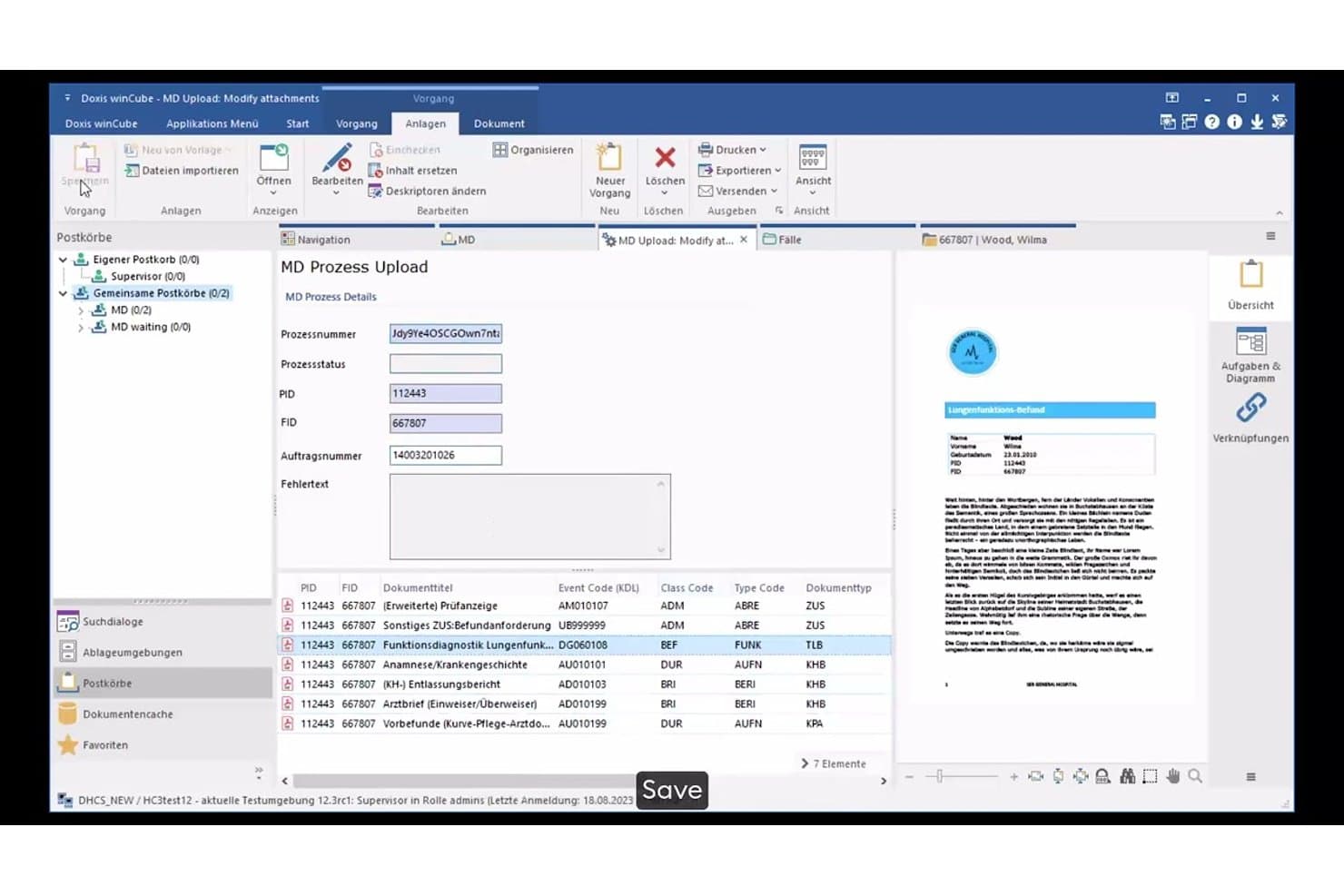
Doxis gestisce il caricamento dei documenti con metadati e monitoraggio dei processi. Doxis è una piattaforma intelligente per l'automazione dei contenuti che combina gestione documentale, automazione dei flussi di lavoro, elaborazione intelligente dei documenti, conformità dei record e archiviazione in un unico archivio.
Per chi è più adatto Doxis?
Doxis è particolarmente adatto alle grandi aziende nei settori soggetti a rigorosi requisiti di conformità—banche, assicurazioni, produzione e settore pubblico—che utilizzano SAP e necessitano di una gestione rigorosa dei record insieme all'automazione dei processi basata sui documenti.
Perché ho scelto Doxis
Ho scelto Doxis come una delle migliori soluzioni perché la sua integrazione con SAP va ben oltre un semplice connettore. È certificato SAP, supporta S/4HANA, Ariba e SuccessFactors e automatizza interi cicli dall'approvvigionamento al pagamento e dall'ordine all'incasso, con i documenti archiviati direttamente in eFile, pronti per la conformità. Inoltre, apprezzo il fatto che i piani di conservazione, il blocco WORM e i blocchi legali siano integrati nello stesso archivio, così la conformità dei record non richiede un sistema separato da riconciliare con i dati SAP.
Funzionalità principali di Doxis
- Elaborazione intelligente dei documenti AI.dp: Classifica automaticamente oltre 50 tipi di documenti ed estrae oltre 150 campi dati utilizzando OCR, apprendimento automatico e LLM in pochi secondi.
- Motore di flussi di lavoro BPMN 2.0: Modella i processi basati sui documenti con instradamento basato su regole, gestione dei sostituti, percorsi di escalation e avvio dei flussi di lavoro attivato dagli eventi.
- Condivisione esterna Doxis iRoom: Fornisce un portale sicuro per condividere documenti con interlocutori esterni all'organizzazione.
- Servizio di consolidamento della migrazione: Trasferisce prima i metadati, così gli utenti possono continuare a lavorare mentre i contenuti vengono migrati in background da fonti come OpenText, IBM FileNet e Alfresco.
Integrazioni Doxis
Doxis dichiara oltre 200 integrazioni, tra cui SAP S/4HANA, Salesforce, Workday, ServiceNow, Microsoft 365, SharePoint, Outlook, Teams e Dynamics 365. REST, CMIS, webhook e connessioni al database supportano le integrazioni personalizzate, con connettori certificati SAP per i flussi di lavoro aziendali.
Pros and Cons
Pros:
- Si adatta da piccoli archivi a miliardi di documenti
- Automatizza le approvazioni con percorsi di audit e instradamento ai sostituti
- Applica piani di conservazione, blocchi legali e controlli WORM
Cons:
- I recensori segnalano un supporto discontinuo e un seguito insufficiente dopo le interruzioni del servizio
- Alcuni utenti segnalano problemi con file di grandi dimensioni e con la condivisione esterna
Learn more about Doxis: Ideale per l'automazione dei processi nelle organizzazioni
- Demo gratuita disponibile
- Prezzo su richiesta
Visit WebsiteCustomer Rating:4.6/5
Laserfiche aggiorna i contenuti mentre automatizza le attività ripetitive. Laserfiche si distingue per le organizzazioni che desiderano automatizzare processi aziendali complessi insieme alla gestione dei documenti. È particolarmente indicato per team nel settore pubblico, educativo e dei servizi finanziari che devono digitalizzare i flussi di lavoro, garantire la conformità normativa e ridurre la documentazione cartacea manuale. Grazie ai suoi strumenti di automazione dei processi, Laserfiche ti permette di progettare, monitorare e ottimizzare operazioni basate sui contenuti su larga scala.
Perché ho scelto Laserfiche
Per le organizzazioni che necessitano di più della semplice archiviazione dei documenti, Laserfiche offre strumenti di automazione dei processi che lo distinguono nel panorama dei sistemi di gestione dei contenuti aziendali. La piattaforma consente di creare flussi di lavoro personalizzati tramite un designer visivo, così puoi automatizzare l'instradamento documenti, le approvazioni e le notifiche senza dover programmare. Apprezzo il fatto che Laserfiche includa analisi integrate per aiutarti a monitorare le prestazioni dei processi e individuare i colli di bottiglia. Queste funzionalità lo rendono una scelta valida per i team che desiderano digitalizzare e ottimizzare i loro processi aziendali insieme alla gestione dei contenuti.
Funzionalità principali di Laserfiche
Oltre alle sue capacità di automazione dei processi, Laserfiche offre diverse altre funzionalità che supportano la gestione dei contenuti aziendali:
- Acquisizione e scansione dei documenti: Importa documenti cartacei e file digitali direttamente nel sistema per una gestione centralizzata.
- Gestione dei record: Applica politiche di conservazione e automatizza la conformità ai requisiti normativi.
- Controlli dettagliati dei permessi: Imposta diritti di accesso dettagliati per utenti, gruppi e ruoli tra i vari repository.
- Accesso tramite app mobile: Visualizza, carica e gestisci documenti da dispositivi iOS e Android.
Integrazioni Laserfiche
Le integrazioni includono Microsoft Dynamics CRM, Salesforce, Laserfiche API, DocuSign e Workday.
Pros and Cons
Pros:
- Conformità ai controlli semplice
- Forte community di utenti
- Piattaforma altamente scalabile
Cons:
- Le integrazioni aggiuntive diventano costose
- La configurazione iniziale richiede tempo
Learn more about Laserfiche: Ideale per i flussi di lavoro documentali automatizzati
- Demo gratuita disponibile
- Prezzo su richiesta
Visit WebsiteCustomer Rating:4.5/5
DocuWare digitalizza i documenti aziendali. DocuWare è un sistema di gestione documentale progettato per le organizzazioni che hanno bisogno di automatizzare i processi basati su documenti e ridurre la gestione manuale della carta. È particolarmente adatto per i team di finanza, risorse umane e operazioni che trattano grandi volumi di moduli, fatture o approvazioni. DocuWare ti aiuta a digitalizzare, indirizzare e mettere in sicurezza i documenti, in modo che i tuoi flussi di lavoro siano più veloci e la conformità più facile da gestire.
Perché ho scelto DocuWare
L'automazione dei flussi di lavoro documentali è una priorità assoluta per molti acquirenti di sistemi di gestione dei contenuti aziendali, ed è per questo che DocuWare ha attirato la mia attenzione. Il designer di workflow della piattaforma permette di creare automazioni personalizzate basate su regole per l'instradamento, la revisione e l'approvazione dei documenti. Mi piace che DocuWare includa l'indicizzazione intelligente, così i documenti vengono automaticamente classificati e resi ricercabili appena caricati. La funzione di moduli elettronici consente inoltre ai team di acquisire e processare informazioni in formato digitale, riducendo l'inserimento manuale dei dati e velocizzando le approvazioni.
Funzionalità Principali di DocuWare
Altre funzionalità di DocuWare che risultano preziose per la gestione dei contenuti aziendali includono:
- Controllo delle Versioni dei Documenti: Segui le modifiche e mantieni uno storico completo delle revisioni e degli aggiornamenti dei documenti.
- Controllo degli Accessi Basato sui Ruoli: Assegna le autorizzazioni alle persone giuste in base ai ruoli utente per proteggere le informazioni sensibili.
- App Mobile: Acquisisci, accedi e approva i documenti da smartphone o tablet.
- Audit Trail: Monitora tutte le attività sui documenti con registri dettagliati per la conformità e la sicurezza.
Integrazioni di DocuWare
Le integrazioni includono Microsoft Outlook, SAP, Oracle, Sage, QuickBooks e OneDrive.
Pros and Cons
Pros:
- Controlli di sicurezza avanzati
- Interfaccia intuitiva
- Conformità integrata
Cons:
- L'app mobile è basilare
- Costo elevato per i piccoli team
Learn more about DocuWare: Ideale per l'integrazione della gestione delle risorse digitali
- Demo gratuita disponibile
- Prezzi su richiesta
Visit WebsiteCustomer Rating:4.5/5
Adobe Experience Manager semplifica la creazione di contenuti digitali. Se il tuo team gestisce un alto volume di risorse digitali su più canali, Adobe Experience Manager riunisce la gestione dei contenuti e delle risorse in un'unica piattaforma. È particolarmente utile per team di marketing e dipartimenti creativi che devono offrire esperienze coerenti e in linea con il marchio su vasta scala. Con Adobe Experience Manager, puoi creare un archivio centralizzato di risorse digitali, automatizzare i flussi di lavoro dei contenuti e collegare direttamente gli strumenti creativi alla tua libreria di contenuti.
Perché ho scelto Adobe Experience Manager
Per le organizzazioni che devono collegare strettamente la gestione delle risorse digitali con i flussi di lavoro dei contenuti aziendali, Adobe Experience Manager si distingue. La gestione nativa delle risorse digitali della piattaforma consente di archiviare, organizzare e riutilizzare i file creativi direttamente all'interno dell'ambiente di gestione dei contenuti. Mi piace che sia possibile automatizzare la catalogazione e la gestione delle versioni delle risorse, aiutando i team a mantenere aggiornati i contenuti e allineati al marchio. L'integrazione con Adobe Creative Cloud significa inoltre che designer e marketer possono lavorare con le risorse in tempo reale, riducendo i colli di bottiglia tra i team creativi e di pubblicazione.
Funzionalità principali di Adobe Experience Manager
Altre funzionalità di Adobe Experience Manager che risultano preziose per la gestione dei contenuti aziendali includono:
- Fornitura di contenuti headless: Distribuisci contenuti su qualsiasi canale o dispositivo utilizzando le API.
- Motore di personalizzazione: Personalizza le esperienze dei contenuti in base ai profili e ai comportamenti degli utenti.
- Gestione multisito: Gestisci e localizza i contenuti su più siti web da un'unica interfaccia.
- Creazione di frammenti di contenuto: Crea e riutilizza blocchi di contenuto strutturato per una comunicazione coerente.
Integrazioni di Adobe Experience Manager
Le integrazioni includono Adobe Creative Cloud, Adobe Target, Adobe Analytics, Salesforce, Marketo e Sitecore.
Pros and Cons
Pros:
- Gestione risorse digitali di livello mondiale
- Ottima sincronizzazione marketing
- Strumenti di analisi avanzati
Cons:
- Necessita di sviluppatori AEM
- Consumo elevato di risorse
Learn more about Adobe Experience Manager: 5Ideale per controlli avanzati di condivisione dei file
Box
- Piano gratuito + demo gratuita disponibili
- Da $8/utente/mese
Visit WebsiteCustomer Rating:4.3/5
Box archivia file e dati per le aziende. Box è una soluzione di gestione dei contenuti aziendali che si distingue per le organizzazioni che necessitano di un controllo rigoroso sulla condivisione dei file e sull’accesso ai documenti. È particolarmente utile per i team legali, finanziari e IT che gestiscono contenuti sensibili e richiedono impostazioni avanzate dei permessi. Con Box, puoi impostare politiche di condivisione dettagliate e monitorare l’attività sui documenti per soddisfare i requisiti di conformità e sicurezza.
Perché ho scelto Box
Controlli avanzati di condivisione dei file sono fondamentali per molti acquirenti di sistemi di gestione dei contenuti aziendali, e Box si distingue proprio in questo. La piattaforma consente di impostare permessi dettagliati a livello di file, cartella e utente, per controllare esattamente chi può visualizzare, modificare o condividere determinati tipi di contenuti. Apprezzo il fatto che Box includa funzionalità come link a scadenza e filigranatura, che aiutano a proteggere i documenti sensibili anche dopo la condivisione. Il monitoraggio delle attività fornisce inoltre una chiara traccia di controllo su chi ha accesso o ha modificato i file, aspetto importante per i team che hanno esigenze di conformità.
Caratteristiche principali di Box
Altre funzionalità utili di Box per la gestione dei contenuti aziendali includono:
- Strumenti di collaborazione sui documenti: Più utenti possono commentare, annotare e modificare i documenti in tempo reale.
- Gestione del workflow automatizzata: Puoi creare flussi di lavoro personalizzati per automatizzare i processi di revisione e approvazione dei documenti.
- Ricerca full-text: Cerca tra tutti i documenti archiviati usando parole chiave, frasi o metadati.
- Accesso mobile: Accedi, carica e gestisci file in modo sicuro da dispositivi iOS e Android.
Integrazioni Box
Le integrazioni includono Salesforce, Google Workspace, Microsoft Office 365, Slack, Adobe Sign e ServiceNow.
Pros and Cons
Pros:
- Eccellente condivisione esterna
- Sicurezza di livello aziendale
- Integrazione con numerose app
Cons:
- Costoso su larga scala
- Strumenti di workflow basilari
Learn more about Box: Ideale per la collaborazione del team sulla documentazione
- Piano gratuito disponibile
- Da $6,70/utente/mese
Visit WebsiteCustomer Rating:4.3/5
Confluence organizza efficacemente i contenuti del team. Confluence offre uno spazio di lavoro centralizzato per i team che devono collaborare su documentazione, basi di conoscenza e materiali di progetto. È particolarmente utile per organizzazioni con team distribuiti o per chi gestisce progetti complessi che richiedono una documentazione chiara e accessibile. Confluence ti aiuta a organizzare, condividere e aggiornare i contenuti in tempo reale, facilitando l'allineamento e la condivisione delle informazioni tra tutti i membri.
Perché ho scelto Confluence
Quando cerco una soluzione che supporti la collaborazione del team sulla documentazione, Confluence si distingue per il suo approccio strutturato alla creazione e condivisione dei contenuti. Le funzionalità di gerarchia delle pagine e organizzazione degli spazi della piattaforma rendono semplice per grandi team gestire e individuare la documentazione tra dipartimenti o progetti. Apprezzo molto come Confluence supporta la modifica e i commenti in tempo reale, che aiutano i team a lavorare insieme sui documenti senza confusione o conflitti di versione. I modelli integrati inoltre aiutano a standardizzare la documentazione, così la tua organizzazione può mantenere coerenza man mano che i contenuti crescono.
Funzionalità principali di Confluence
Altre funzionalità di Confluence che risultano preziose per la gestione dei contenuti aziendali includono:
- Ricerca avanzata: individua rapidamente pagine, allegati o parole chiave in tutti gli spazi tramite potenti filtri di ricerca.
- Gestione delle autorizzazioni: controlla l'accesso a spazi e pagine con autorizzazioni dettagliate per utenti e gruppi.
- Analisi delle pagine: monitora visualizzazioni e metriche di coinvolgimento per seguire l'utilizzo e la rilevanza dei contenuti.
- Libreria di macro: arricchisci le pagine con contenuti dinamici come elenchi di attività, calendari e media incorporati utilizzando le macro integrate.
Integrazioni di Confluence
Le integrazioni includono Jira, Slack, Trello, Google Drive e Microsoft Teams.
Pros and Cons
Pros:
- Molto facile da usare
- Solido controllo delle versioni
- Eccellente ricerca testuale
Cons:
- La formattazione può rompersi
- Mancano flussi di lavoro avanzati
Learn more about Confluence: Ideale per l'organizzazione dei documenti basata sui metadati
- Prova gratuita di 30 giorni + demo gratuita disponibile
- Da $65/utente/mese
Visit WebsiteCustomer Rating:4.4/5
M-Files compila file e metadati per un accesso semplificato. M-Files adotta un approccio unico alla gestione dei contenuti aziendali organizzando i documenti sulla base dei metadati invece delle tradizionali strutture a cartelle. Questo sistema è particolarmente utile per organizzazioni con esigenze complesse di gestione delle informazioni, come studi legali, di ingegneria o di servizi professionali. Se il tuo team ha difficoltà a trovare, classificare o controllare i documenti su più repository, M-Files offre un modo per rendere i contenuti immediatamente ricercabili e contestualizzati.
Perché ho scelto M-Files
A differenza dei tradizionali sistemi di gestione dei contenuti aziendali che si basano sulle cartelle, M-Files organizza i documenti utilizzando i metadati, rendendo molto più semplice individuare e gestire le informazioni all'interno dell'organizzazione. Questo approccio basato sui metadati permette di cercare i documenti per progetto, cliente, tipo di documento o qualsiasi etichetta personalizzata tu abbia definito. Apprezzo il fatto che M-Files applichi automaticamente metadati e controllo delle versioni, riducendo il lavoro manuale e il rischio di archiviazione errata. Per i team che devono gestire grandi volumi di documenti con relazioni complesse, questo sistema offre un modo più dinamico e scalabile per mantenere i contenuti organizzati e accessibili.
Caratteristiche principali di M-Files
Altre caratteristiche che rendono M-Files prezioso per la gestione dei contenuti aziendali includono:
- Motore di workflow automatizzato: Progetta e gestisci i processi di approvazione e revisione dei documenti con workflow personalizzabili.
- Accesso offline: Lavora con documenti e metadati anche quando non sei connesso a Internet.
- Audit trail: Tieni traccia di ogni azione eseguita su un documento per scopi di conformità e sicurezza.
- Integrazione con Microsoft 365: Accedi, modifica e gestisci documenti direttamente dalle applicazioni Microsoft 365 già note.
Integrazioni di M-Files
Le integrazioni includono Microsoft SharePoint, Salesforce, Google Drive, HubSpot, Microsoft Network Folders e Autodesk.
Pros and Cons
Pros:
- Solido controllo delle versioni
- Buon accesso offline
- Si integra con Windows
Cons:
- Le ricerche molto grandi sono lente
- La configurazione richiede molto lavoro
Learn more about M-Files: Ideale per la gestione della conformità su larga scala
- Demo gratuita disponibile
- Prezzo su richiesta
Visit WebsiteCustomer Rating:4.2/5
OpenText automatizza i flussi documentali per migliorare l'efficienza aziendale. OpenText è progettato per le aziende che devono gestire requisiti di conformità complessi su grandi volumi di contenuti. È particolarmente adatto per settori regolamentati come sanità, energia e servizi finanziari, dove la rigorosa governance e le tracce di audit sono essenziali. Con OpenText, puoi centralizzare i record, automatizzare le politiche di conservazione e supportare un reporting regolatorio dettagliato.
Perché ho scelto OpenText
Quando la gestione della conformità su larga scala è una priorità assoluta, OpenText offre capacità difficili da eguagliare. La piattaforma supporta una gestione avanzata dei record, consentendo di automatizzare i programmi di conservazione e applicare blocchi legali su milioni di documenti. Apprezzo che OpenText includa tracce di audit dettagliate e strumenti di reporting, che aiutano le organizzazioni a dimostrare la conformità alle normative di settore. La classificazione dei contenuti basata su policy facilita inoltre la gestione delle informazioni sensibili secondo standard di governance rigorosi.
Funzionalità principali di OpenText
Altre funzionalità di OpenText utili per la gestione dei contenuti aziendali includono:
- Digitalizzazione e acquisizione documentale: Digitalizza documenti cartacei ed estrae automaticamente i metadati per un'indicizzazione più semplice.
- Spazi di lavoro collaborativi: Crea spazi sicuri e basati su progetti per consentire ai team di condividere e gestire i contenuti.
- Ricerca e discovery avanzate: Utilizza metadati, ricerca full-text e ricerca per faccette per trovare rapidamente i documenti.
- Gestione dei contenuti da mobile: Accedi, revisiona e approva documenti in sicurezza da dispositivi mobili.
Integrazioni OpenText
Le integrazioni includono SAP, Oracle, Salesforce e Microsoft SharePoint.
Pros and Cons
Pros:
- Robuste caratteristiche di sicurezza
- Integrazioni profonde con SAP
- Funzionalità avanzate di intelligenza artificiale
Cons:
- Implementazione lunga
- Richiede un notevole supporto IT
Learn more about OpenText: Ideale per soluzioni di case management
- Demo gratuita disponibile
- Prezzo su richiesta
Visit WebsiteCustomer Rating:4.4/5
Hyland OnBase cataloga i file aziendali per agevolarne il recupero. Quando la tua organizzazione deve gestire processi complessi e ricchi di documenti, Hyland OnBase offre una piattaforma ECM unificata progettata per il case management. È una soluzione particolarmente adatta a settori come il governo, la sanità e i servizi finanziari che necessitano di flussi di lavoro sicuri, controllabili e tracciabilità dettagliata dei registri. OnBase aiuta i team a centralizzare i documenti, automatizzare l'instradamento dei casi e mantenere la conformità in ogni fase del ciclo di vita di un caso.
Perché ho scelto Hyland OnBase
Ciò che distingue Hyland OnBase nel settore della gestione dei contenuti aziendali è l'enfasi sulle soluzioni orientate al case management. La piattaforma consente di creare flussi di lavoro personalizzati per i casi, in modo da poter automatizzare l'instradamento dei documenti, le approvazioni e le escalation in base alle regole della propria organizzazione. Apprezzo come OnBase colleghi a ogni caso documenti correlati, email e note, offrendo una visione completa di ogni processo ai team. I suoi audit trail e i permessi granulari aiutano inoltre le organizzazioni a rispettare i severi requisiti di conformità e sicurezza, fondamentali per i settori regolamentati.
Funzionalità principali di Hyland OnBase
Altre funzioni di Hyland OnBase utili per la gestione dei contenuti aziendali includono:
- Acquisizione e digitalizzazione documentale: Converte documenti cartacei in file digitali per uno storage sicuro e un recupero rapido.
- Gestione dei registri: Applica policy di conservazione e automatizza la gestione del ciclo di vita dei documenti.
- Integrazione con i sistemi aziendali principali: Collega OnBase a ERP, CRM e altre piattaforme enterprise.
- Accesso mobile: Visualizza e gestisci contenuti da smartphone e tablet tramite app dedicate.
Integrazioni di Hyland OnBase
Le integrazioni includono Epic, Cerner, Microsoft Outlook, SAP e Lawson.
Pros and Cons
Pros:
- Licenza modulare flessibile
- Forte focalizzazione sul settore sanitario
- Workflow personalizzati e robusti
Cons:
- Moduli aggiuntivi costosi
- Gli aggiornamenti richiedono troppo tempo
Learn more about Hyland OnBase: 10Ideale per i contenuti strutturati su diversi canali
Sanity
- Piano gratuito + demo gratuita disponibili
- Da $15/utente/mese

Sanity sincronizza i contenuti multicanale. Sanity è una piattaforma di gestione dei contenuti progettata per i team che devono gestire contenuti strutturati su più canali digitali. È particolarmente indicata per le organizzazioni con modelli di contenuto complessi, come aziende del settore media, brand ecommerce o imprese con esigenze di pubblicazione omnicanale. Sanity ti aiuta a centralizzare, strutturare e distribuire i contenuti in modo coerente, anche quando i tuoi canali e le tue esigenze si evolvono.
Perché ho scelto Sanity
Sanity si distingue per la sua capacità di gestire contenuti strutturati su un'ampia gamma di canali digitali, che è una delle principali sfide per molti utenti di sistemi di gestione dei contenuti aziendali. Ho scelto Sanity perché i suoi strumenti di modellazione dei contenuti ti permettono di definire schemi e formati personalizzati, così il tuo team può gestire tutto, dai dati di prodotto ai contenuti editoriali, su un'unica piattaforma. Le funzionalità di collaborazione in tempo reale consentono ai team distribuiti di lavorare insieme sugli aggiornamenti senza problemi di versione. L'approccio API-first di Sanity rende inoltre facile distribuire i contenuti su siti web, app e altri endpoint, mantenendo tutto coerente man mano che i tuoi canali crescono.
Funzionalità principali di Sanity
Altre funzionalità utili di Sanity per la gestione dei contenuti aziendali includono:
- Versionamento dei contenuti: Traccia le modifiche e ripristina versioni precedenti di qualsiasi elemento di contenuto secondo necessità.
- Controllo accessi basato sui ruoli: Assegna permessi dettagliati a utenti e team per gestire chi può visualizzare o modificare specifici contenuti.
- Workflow personalizzati: Configura processi di approvazione e flussi di pubblicazione su misura per le esigenze della tua organizzazione.
- Gestione degli asset: Organizza, archivia e recupera immagini, video e altri file multimediali all'interno della stessa piattaforma.
Integrazioni di Sanity
Le integrazioni includono Mux, Vercel, Netlify, Algolia e Shopify.
Pros and Cons
Pros:
- Collaborazione in tempo reale
- Altamente personalizzabile
- Focus sui contenuti strutturati
Cons:
- La configurazione può essere complessa
- Confuso per chi non è tecnico
Learn more about Sanity:
Altri sistemi di gestione dei contenuti aziendali
Ecco alcune ulteriori opzioni di sistemi di gestione dei contenuti aziendali che non sono state incluse nel mio elenco ristretto, ma che vale comunque la pena valutare:
- 11IBM FileNet Content ManagerIl migliore con classificazione dei contenuti tramite intelligenza artificiale
- 12DokmeeIdeale per il supporto ai contenuti multilingue
- 13ContentfulIdeale per una distribuzione dei contenuti orientata alle API
- 14Builder.ioIdeale per la personalizzazione dei contenuti senza codice
Come Valuto i Sistemi di Gestione dei Contenuti Aziendali
Quando un team di marketing globale ha bisogno di un unico luogo per governare, versionare e distribuire i contenuti delle campagne, divido la valutazione tra requisiti di base e i fattori che distinguono i buoni dai migliori.
Funzionalità di Base (Requisiti Minimi per Questa Lista)
Quando seleziono gli strumenti per la mia lista, valuto ciascuno su una scala da 0 (non offre la funzionalità) a 5 (eccelle in quest'area) per ciascuna delle funzionalità chiave elencate di seguito. Poi calcolo il punteggio totale dello strumento trasformandolo in percentuale. Ogni strumento deve raggiungere un punteggio totale minimo del 65% per essere considerato per l'inclusione.
- Archivio Centralizzato dei Contenuti: Valuto se la piattaforma può archiviare e organizzare grandi volumi di asset diversi—PDF, video, immagini, HTML—su scala aziendale senza problemi di prestazioni.
- Gestione di Metadati & Tassonomia: La possibilità di tag personalizzati, tassonomie gerarchiche e ricerca facettata è fondamentale, soprattutto quando i team di marketing gestiscono migliaia di asset di campagne in più regioni.
- Automazione dei Workflow & Ciclo di Vita: Cerco workflow configurabili per revisione, approvazione e versioning che rispecchino i processi di marketing reali, come approvazioni multi-stakeholder delle campagne e archiviazione programmata dei contenuti.
- Controllo degli Accessi & Permessi: Permessi granulari basati su ruoli, supporto SSO/SAML e tracciabilità degli accessi sono elementi che verifico, poiché i team marketing spesso condividono asset con agenzie e partner esterni.
- Distribuzione Omnicanale dei Contenuti: La piattaforma deve pubblicare o distribuire i contenuti su siti web, app e canali marketing tramite API o connettori nativi, non solo tramite esportazione manuale.
- Integrazioni & Estensibilità: Verifico la presenza di connessioni native con strumenti già utilizzati dai team di marketing—CRM, automazione marketing, suite creative—oltre ad API aperte per configurazioni martech personalizzate.
Una volta che ho una lista di strumenti che soddisfano questi criteri, considero cosa distingue ogni piattaforma.
Fattori Differenzianti (Cosa Distingue i Fornitori)
Ecco come confronto i diversi fornitori:
Funzionalità Distintive
Il tagging intelligente basato su IA e la ricerca automatica fanno risparmiare ore quando i team di marketing gestiscono migliaia di asset di campagne, quindi valuto quanto bene ciascuna piattaforma gestisce l'auto-classificazione e la scoperta semantica. Gli strumenti di governance del brand sono altrettanto importanti—il blocco dei modelli e i portali di brand consentono ai team distribuiti di mantenere la coerenza del marchio senza colli di bottiglia nel team creativo centrale. Valuto anche le analisi sulle performance dei contenuti, in particolare dashboard che mostrano quali asset generano engagement sui diversi canali, così che i marketer possano investire su ciò che funziona davvero.
Oltre le Funzionalità
Certificazioni di conformità come SOC 2 e ISO 27001 sono importanti quando il team marketing gestisce contenuti regolamentati o licenze con tracciamento delle scadenze. Valuto anche implementazione e time-to-value—alcuni fornitori offrono template di marketing preconfigurati e supporto alla migrazione che rendono i team operativi in poche settimane, mentre altri richiedono un forte coinvolgimento IT. La trasparenza dei prezzi è un altro fattore che controllo, in particolare come vengono gestiti costi aggiuntivi di archiviazione e costi per utente con la crescita del team marketing e l'espansione delle librerie di contenuti.
Come scegliere un sistema di gestione dei contenuti aziendali
È facile perdersi in lunghi elenchi di funzionalità e strutture di prezzo complesse. Per aiutarti a rimanere concentrato mentre affronti il tuo processo di selezione del software, unico per la tua azienda, ecco una lista di fattori da tenere a mente:
| Fattore | Cosa considerare |
|---|---|
| FattoreScalabilità | Cosa considerareIl sistema sarà in grado di gestire il volume dei tuoi documenti man mano che la tua azienda cresce? Informati sui limiti di archiviazione, sul numero massimo di utenti e sulle possibilità di aggiornamento. |
| FattoreIntegrazioni | Cosa considerareLa piattaforma si collega nativamente agli strumenti che già utilizzi (CRM, ERP, e-mail, archiviazione dei file)? Verifica la presenza di integrazioni dirette, non solo dell’accesso tramite API. |
| FattorePersonalizzazione | Cosa considerarePuoi adattare i flussi di lavoro, i metadati e le autorizzazioni alle esigenze del tuo team? Valuta se dovrai adattare il sistema a reparti diversi. |
| FattoreFacilità d’uso | Cosa considerareIl tuo team adotterà rapidamente il sistema? Cerca una navigazione intuitiva, etichette chiare e requisiti minimi di formazione. Se possibile, fai una prova con una demo. |
| FattoreImplementazione e avviamento | Cosa considerareQuanto tempo ci vorrà per rendere operativo il sistema? Informati sul supporto alla migrazione, sulle risorse per l’avviamento e sulla necessità di coinvolgere il reparto IT. |
| FattoreCosto | Cosa considerareCosa è incluso nel prezzo? Fai attenzione ai costi aggiuntivi per archiviazione, utenti o moduli avanzati. Confronta il costo totale di proprietà su un periodo di 1-3 anni. |
| FattoreMisure di sicurezza | Cosa considerareIl sistema soddisfa i tuoi standard di protezione dei dati? Cerca crittografia, controlli degli accessi, registri di controllo e certificazioni di conformità pertinenti al tuo settore. |
| FattoreRequisiti di conformità | Cosa considerareIl sistema ti aiuterà a rispettare gli obblighi normativi (GDPR, HIPAA, SOX)? Verifica la presenza di funzionalità di conformità integrate e del supporto agli audit. |
Che cos’è un sistema di gestione dei contenuti aziendali?
Un sistema di gestione dei contenuti aziendali è una piattaforma software che aiuta le organizzazioni a archiviare, organizzare, gestire e proteggere grandi volumi di documenti e contenuti digitali. Questi sistemi supportano il controllo delle versioni dei documenti, i controlli degli accessi, l'automazione dei flussi di lavoro e la conformità ai requisiti normativi. I sistemi di gestione dei contenuti aziendali sono progettati per centralizzare le informazioni, semplificando la collaborazione tra i team, il recupero dei file e il mantenimento del controllo sui contenuti aziendali sensibili tra i vari reparti.
Funzionalità
Quando scegli un sistema di gestione dei contenuti aziendali, presta attenzione alle seguenti funzionalità principali:
- Archiviazione dei documenti: Centralizza i file digitali in un archivio sicuro e consultabile, semplificando l'organizzazione e il recupero dei documenti secondo necessità.
- Controllo delle versioni: Tiene traccia delle modifiche apportate ai documenti nel tempo, consentendo agli utenti di visualizzare, ripristinare o confrontare le versioni precedenti e mantenere una chiara traccia di controllo.
- Autorizzazioni di accesso: Consente agli amministratori di impostare i ruoli degli utenti e controllare chi può visualizzare, modificare o eliminare documenti specifici, supportando la sicurezza dei dati e la conformità.
- Automazione dei flussi di lavoro: Automatizza l'instradamento dei documenti, le approvazioni e le notifiche, aiutando i team a gestire in modo efficiente processi come le revisioni dei contratti o l'approvazione delle fatture.
- Gestione dei metadati: Consente agli utenti di contrassegnare i documenti con campi e categorie personalizzati, migliorando la possibilità di ricerca e supportando filtri avanzati.
- Tracce di controllo: Registra tutte le azioni degli utenti e le modifiche ai documenti, garantendo trasparenza e supportando la conformità normativa e gli audit interni.
- Politiche di conservazione dei documenti: Consente alle organizzazioni di impostare regole per archiviare o eliminare i documenti in base a requisiti legali o aziendali.
- Supporto per la firma elettronica: Facilita la raccolta e la gestione di firme digitali legalmente vincolanti direttamente all'interno del sistema.
- Funzionalità di integrazione: Si collega ad altri strumenti aziendali, come posta elettronica, CRM o piattaforme di archiviazione dei file, per ottimizzare i flussi di lavoro e ridurre le attività manuali.
Vantaggi
L'implementazione di un sistema di gestione dei contenuti aziendali offre diversi vantaggi al tuo team e alla tua azienda. Ecco alcuni dei benefici che puoi aspettarti:
- Accesso centralizzato alle informazioni: I team possono trovare e recuperare rapidamente i documenti da un unico archivio organizzato, riducendo il tempo dedicato alla ricerca dei file.
- Maggiore sicurezza e conformità: I controlli degli accessi, le tracce di controllo e le politiche di conservazione contribuiscono a proteggere i dati sensibili e a supportare i requisiti normativi.
- Flussi di lavoro ottimizzati: I processi automatizzati di instradamento e approvazione riducono le attività manuali e mantengono i progetti in movimento in modo efficiente tra i reparti.
- Collaborazione migliorata: Il controllo delle versioni e le impostazioni delle autorizzazioni consentono a più utenti di lavorare sui documenti senza confusione o perdita di dati.
- Riduzione del rischio di perdita dei dati: Le funzionalità di archiviazione e backup dei documenti proteggono le informazioni aziendali essenziali da eliminazioni accidentali o guasti hardware.
- Inserimento e formazione più rapidi: Interfacce intuitive e risorse per l'inserimento aiutano i nuovi utenti a diventare produttivi con un periodo di adattamento minimo.
- Scalabilità per la crescita: Il sistema può gestire volumi crescenti di documenti e di utenti man mano che la tua organizzazione si espande.
Costi e prezzi
La scelta di un sistema di gestione dei contenuti aziendali richiede la comprensione dei vari modelli e piani tariffari disponibili. I costi variano in base alle funzionalità, alle dimensioni del team, agli elementi aggiuntivi e ad altri fattori. La tabella seguente riassume i piani più comuni, i relativi prezzi medi e le funzionalità tipicamente incluse nelle soluzioni di gestione dei contenuti aziendali:
Tabella comparativa dei piani per i sistemi di gestione dei contenuti aziendali
| Tipo di piano | Prezzo medio | Funzionalità comuni |
|---|---|---|
| Tipo di pianoPiano gratuito | Prezzo medio$0 | Funzionalità comuniArchiviazione di base dei documenti, utenti limitati, ricerca semplice e controlli di accesso di base. |
| Tipo di pianoPiano personale | Prezzo medio$5–$40/utente/mese | Funzionalità comuniGestione individuale dei documenti, controllo delle versioni, automazione di base dei flussi di lavoro e integrazioni limitate. |
| Tipo di pianoPiano aziendale | Prezzo medio$15–$100/utente/mese | Funzionalità comuniCollaborazione tra team, autorizzazioni avanzate, automazione dei flussi di lavoro, tracce di controllo e opzioni di integrazione. |
| Tipo di pianoPiano per grandi aziende | Prezzo medio$1500+/mese | Funzionalità comuniFlussi di lavoro personalizzati, strumenti per la conformità, sicurezza avanzata, accesso API, assistenza dedicata e scalabilità. |
Domande frequenti sui sistemi aziendali di gestione dei contenuti
Ecco alcune risposte alle domande comuni sui sistemi aziendali di gestione dei contenuti:
In che modo un sistema aziendale di gestione dei contenuti si differenzia dalla semplice archiviazione dei documenti?
Un sistema aziendale di gestione dei contenuti va oltre la semplice archiviazione dei file, offrendo controllo delle versioni, automazione dei flussi di lavoro, autorizzazioni di accesso e strumenti per la conformità. Queste funzionalità aiutano le organizzazioni a gestire, monitorare e proteggere i documenti su larga scala, favorendo la collaborazione e il rispetto dei requisiti normativi.
I sistemi aziendali di gestione dei contenuti possono integrarsi con gli strumenti aziendali esistenti?
Sì, la maggior parte dei sistemi aziendali di gestione dei contenuti offre integrazioni con strumenti come CRM, ERP, piattaforme di posta elettronica e di archiviazione dei file. Ciò consente ai team di collegare i flussi di lavoro dei documenti ad altri processi aziendali e di ridurre l’inserimento manuale o la duplicazione dei dati.
Quali misure di sicurezza dovrei cercare in un sistema aziendale di gestione dei contenuti?
Cerca la crittografia, controlli di accesso granulari, registri di controllo e certificazioni di conformità come ISO 27001 o SOC 2. Queste misure di sicurezza aiutano a proteggere le informazioni sensibili e a supportare le politiche di protezione dei dati della tua organizzazione.
Quanto tempo occorre per implementare un sistema aziendale di gestione dei contenuti?
I tempi di implementazione variano in base alla complessità del sistema e alle esigenze di migrazione dei dati. I team più piccoli possono essere operativi in pochi giorni, mentre le organizzazioni più grandi con flussi di lavoro complessi e dati legacy potrebbero aver bisogno di diverse settimane o mesi.
I sistemi aziendali di gestione dei contenuti supportano la conformità normativa?
Sì, molti sistemi includono funzionalità per la conservazione dei documenti, la registrazione degli audit e i controlli di accesso, che aiutano le organizzazioni a soddisfare requisiti come GDPR, HIPAA o SOX. Verifica sempre che il sistema sia conforme alle normative specifiche del tuo settore.