

Avis sur OpusClip : avantages, inconvénients, fonctionnalités et tarifs
I put OpusClip’s AI repurposing to the test, weighing its time-saving strengths, creative tradeoffs, standout features, and pricing to see who it’s really built for.

Nous évaluons les outils de manière indépendante, et les commissions aident à financer nos tests. Consultez notre politique de transparence, notre méthodologie ou suggérez un outil.
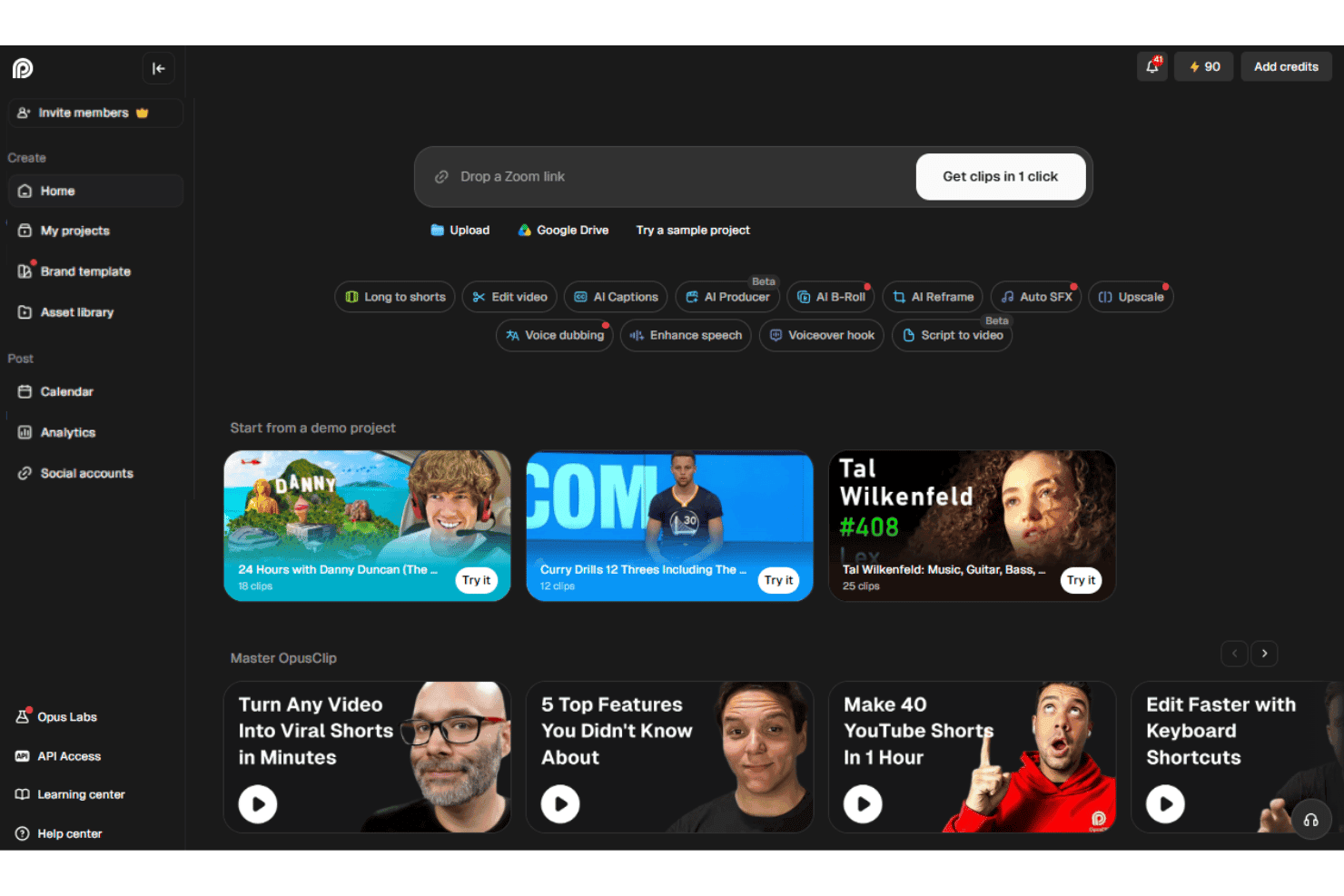
OpusClip is an AI video editor that turns long-form videos, webinars, and podcasts into short, caption-ready clips for TikTok, Instagram Reels, YouTube Shorts, and LinkedIn. I'd reach for it when your team is sitting on hours of recorded content and needs a fast way to spin up social-ready cuts without staffing a dedicated editor.
Compared to a timeline-based tool like Descript, OpusClip is the better pick when your goal is high-volume short-form repurposing with auto-generated hooks, virality scoring, and face-tracking reframing, rather than full multitrack editing from scratch.
OpusClip Evaluation Summary
4.6/5
- From $15/month
- Free plan available
Pourquoi faire confiance à nos recommandations de logiciels
6,700+
Reviews
20
Industry experts
16+
Evaluation factors
14
Years
Notre équipe teste et évalue des logiciels depuis 2012. En tant que leaders marketing nous-mêmes, nous savons à quel point il est difficile — et important — de choisir le bon logiciel.
Pour ce guide, nous avons évalué les outils grâce à des tests pratiques et une recherche indépendante, en notant les outils selon nos critères de sélection.
Nos avis reflètent notre jugement éditorial humain, et non un argumentaire de vente.
Réviseurs experts:
 Gui DrusinaDirecteur de la création
- Shriya GhateSenior Marketing Lead
 Amanda JacquesResponsable Marketing Ops

OpusClip Overview
OpusClip is my pick for turning long recordings into social clips, not for full multitrack production. Its browser interface makes onboarding simple: upload a file or paste a supported source, then review AI-selected clips, captions, subtitles, and virality scores. Pricing is tiered, with a free plan for limited processing and paid plans that increase usage limits and unlock more advanced features. Higher tiers add capabilities such as scheduling, team seats, dubbing, B-roll, API access, and exports for professional editing tools. Support is available through chat on select plans.
Pros
- ClipAnything identifies moments using visual, audio, and sentiment cues.
- AI reframe feature keeps speakers centered across vertical social formats.
- Users report finding several usable clips without manual episode review.
Cons
- AI clip selection often produces only a few usable edits.
- Face tracking can distort guests during automatic reframing.
- Free exports carry watermarks and expire after three days.
Is OpusClip Right For Your Needs?
Who Would be a Good Fit for OpusClip?
OpusClip fits marketers and small content teams that turn long recordings into social clips. Its AI clip selection, animated captions, auto reframe, virality scores, and social integrations support repeatable repurposing workflows.
- Social TeamsSocial media teams can turn webinars, interviews, and podcasts into captioned clips with auto reframe, virality scores, and direct social posting.
- Solo CreatorsSolo creators can upload recordings in a browser and review AI-selected clips without managing a complex editing timeline.
- Demand GenerationDemand generation teams can repurpose webinars into short-form assets using captions, reframing, editing, and brand templates.
- Podcast TeamsPodcast teams can identify shareable moments from long recordings, then export clips formatted for channels such as TikTok, Instagram Reels, LinkedIn, and YouTube.
- Small AgenciesSmall agencies can manage recurring client repurposing through Pro features such as two team seats, scheduling, credit rollover, and multiple aspect ratios.
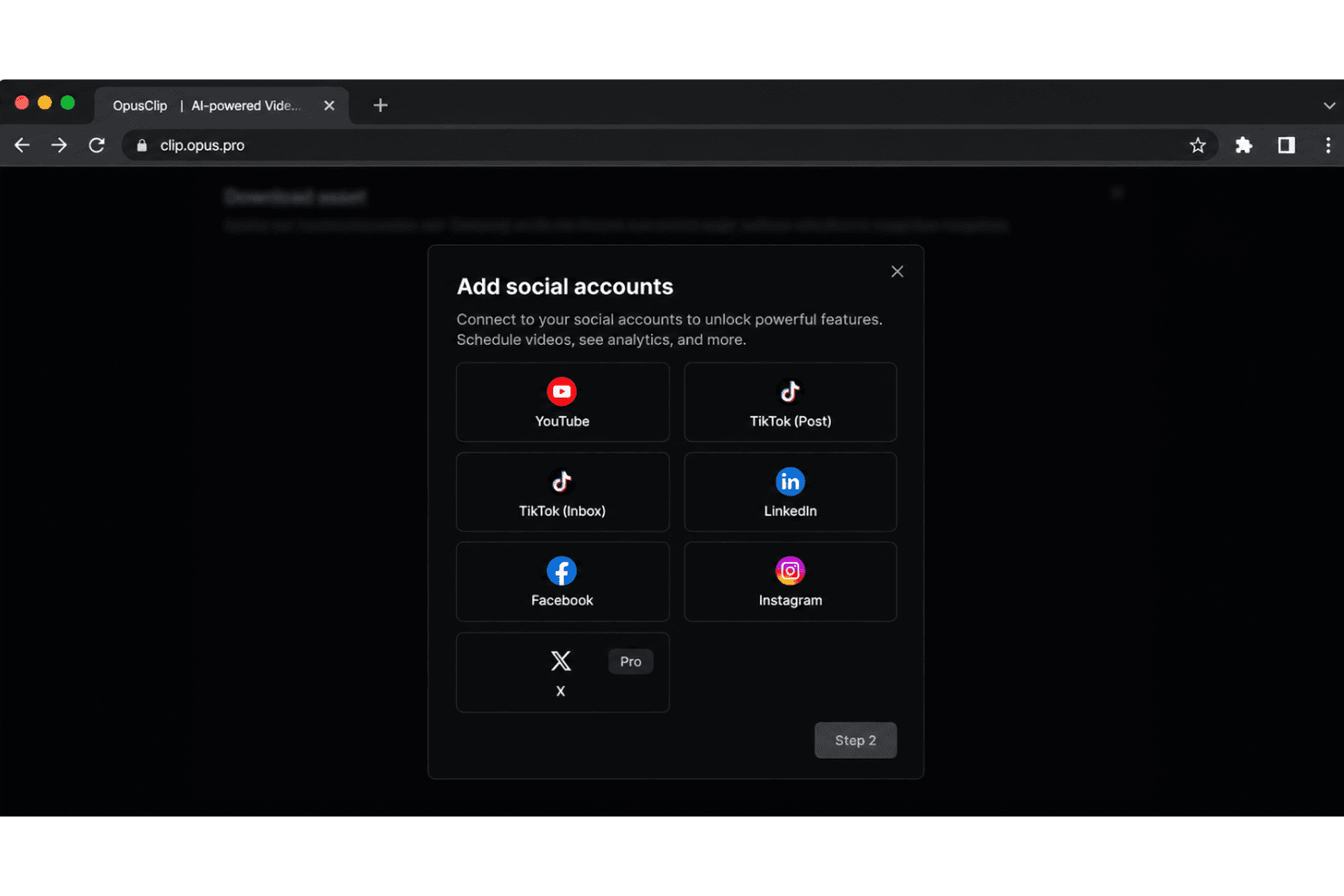
- Event MarketersEvent marketers can convert recorded talks and livestreams into promotional clips and distribute them through integrations with platforms such as LinkedIn, Facebook, X, and Instagram.
Who Would be a Bad Fit for OpusClip?
OpusClip is a weaker choice for teams that need offline production, detailed creative control, or highly consistent output quality. Its AI workflow can produce only a few usable clips, while free exports include watermarks and expire after three days.
- Complex PostproductionFilm and postproduction teams may outgrow OpusClip because AI-selected clips and browser timeline editing do not replace a full postproduction workflow.
- Offline Video TeamsTeams that cannot upload footage to a browser-based service should avoid OpusClip because its core workflow depends on online uploads and web editing.
- Exact Story EditorsEditors requiring precise narrative selection may find OpusClip unsuitable because reviewers report that the AI sometimes produces only a few usable clips.
- Brand StudiosBrand studios with strict visual systems may find the limited caption styles and single Starter brand template too restrictive.
- Free Client WorkAgencies delivering polished client assets cannot rely on the free tier because exports include watermarks and projects expire after three days.
- Hands-On SupportTeams needing detailed editing assistance may find OpusClip limiting because documentation and in-app guidance cover routine tasks, while chat support is available to Pro users.
Comment nous testons et évaluons les outils
Nous avons passé des années à construire, affiner et améliorer notre système de test et de notation des logiciels. Notre grille d’évaluation est conçue pour prendre en compte toutes les nuances du choix logiciel et ce qui rend un outil efficace, en mettant l’accent sur les aspects critiques du processus de décision. Ci-dessous, vous pouvez découvrir précisément comment nos tests et notations fonctionnent selon sept critères. Cela nous permet d’offrir une évaluation impartiale des logiciels en fonction de la fonctionnalité principale, des fonctionnalités différenciantes, de la facilité d’utilisation, de l’onboarding, du support client, des intégrations, des avis clients et du rapport qualité-prix.
Fonctionnalité principale (25% de la note finale)
Le point de départ de notre évaluation est toujours la fonctionnalité principale de l’outil. Dispose-t-il des fonctions de base attendues ? Certaines de ces fonctionnalités sont-elles bloquées dans des offres tarifaires supérieures ? Nous attendons d’un outil qu’il soit à la hauteur des capacités fondamentales de ses concurrents.
Fonctionnalités différenciantes (25% de la note finale)
Ensuite, nous évaluons les fonctionnalités spéciales qui vont au-delà de ce que l’on trouve habituellement chez ce type d’outils. Un score élevé indique des fonctionnalités uniques ou spécialisées qui rendent le produit plus rapide, plus efficace, ou offrent une valeur ajoutée à l’utilisateur. Nous évaluons également la facilité d’intégration avec d’autres outils couramment utilisés pour élargir les possibilités et l’utilité du logiciel. Les outils offrant de nombreuses intégrations natives, des connexions tierces et un accès API pour bâtir des intégrations personnalisées obtiennent les meilleures notes.
Facilité d’utilisation (10% de la note finale)
Nous considérons la rapidité et la facilité d’exécution des tâches principales via l’outil. Les logiciels les mieux notés sont bien conçus, intuitifs à utiliser, proposent des applications mobiles, des modèles prêts à l’emploi, et simplifient des tâches parfois complexes.
Onboarding (10% de la note finale)
Nous savons combien l’adoption rapide par l’équipe est cruciale pour une nouvelle plateforme. Nous évaluons donc la facilité avec laquelle il est possible d’apprendre et d’utiliser un outil sans formation poussée. On mesure aussi la vitesse à laquelle un membre de l’équipe peut être opérationnel, sans expérience préalable. Les solutions bien notées requièrent peu ou pas d’assistance.
Support client (10% de la note finale)
Nous examinons la rapidité et la facilité avec lesquelles on peut obtenir de l’aide par téléphone, chat en direct ou base de connaissances. Les outils et sociétés offrant un support en temps réel sont favorisés ; les chatbots sont pénalisés.
Avis clients (10% de la note finale)
Au-delà de nos propres tests et évaluations, nous prenons en compte le score de recommandation nette des clients actuels et passés. Nous étudions leur propension, si l’occasion se présente, à réutiliser l’outil pour sa fonctionnalité principale. Un score élevé reflète donc un bon taux de recommandation.
Rapport qualité-prix (10% de la note finale)
Enfin, après avoir pris en compte tous les autres critères, nous confrontons le prix moyen des offres de base aux fonctionnalités principales et prenons en compte la valeur apportée par les autres éléments d’évaluation. Les logiciels qui offrent plus pour moins obtiennent une note supérieure.
Core Features
AI Clip Generation
OpusClip analyzes long videos and selects short segments with hooks, dialogue, and pacing suited to social content. You can turn a webinar or podcast into several draft clips without reviewing the entire recording manually.
ClipAnything
ClipAnything finds moments through visual, audio, and sentiment cues, rather than relying only on transcripts. This helps surface clips such as product demonstrations, reactions, or audience moments that keyword-based selection can miss.
AI Reframing
AI reframing automatically adjusts the crop for vertical, square, and landscape formats while keeping speakers in view. A two-person podcast can become a vertical clip with the active speaker positioned clearly for mobile viewers.
Animated Captions
OpusClip generates AI captions and applies animated styling to match short-form video formats. Captions keep the message readable when viewers watch a product explanation or interview without sound.
Virality Score
Virality scores estimate how likely each generated clip is to attract attention based on factors such as pacing, content structure, and audience interest. Your team can use the score to prioritize which clips to review first, while still applying human judgment.
AI B-Roll
AI B-roll adds relevant visual footage over spoken sections to support the clip’s topic. For example, a marketing interview about analytics can receive supporting visuals instead of showing the same speaker throughout.
Ease of Use
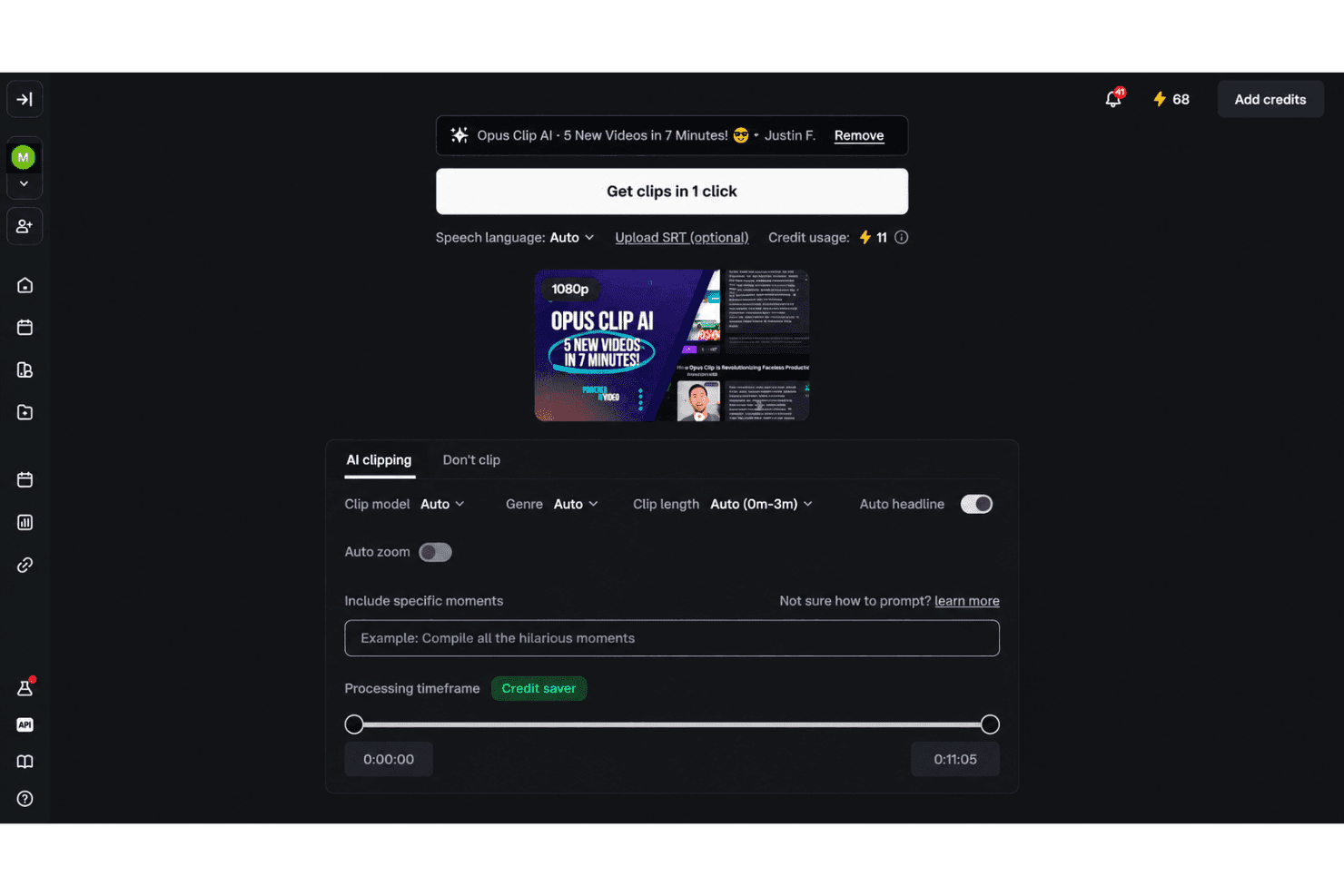
OpusClip is easy to use for fast social repurposing, especially if you prefer guided automation over manual editing. Upload a recording, then review AI-selected clips, animated captions, reframing, and virality scores in the browser. Text and timeline editing provide useful control afterward. User feedback supports the quick workflow, though reviewers often report only a few usable clips, occasional face-tracking distortion, and watermarked free exports that expire after three days.
Integrations
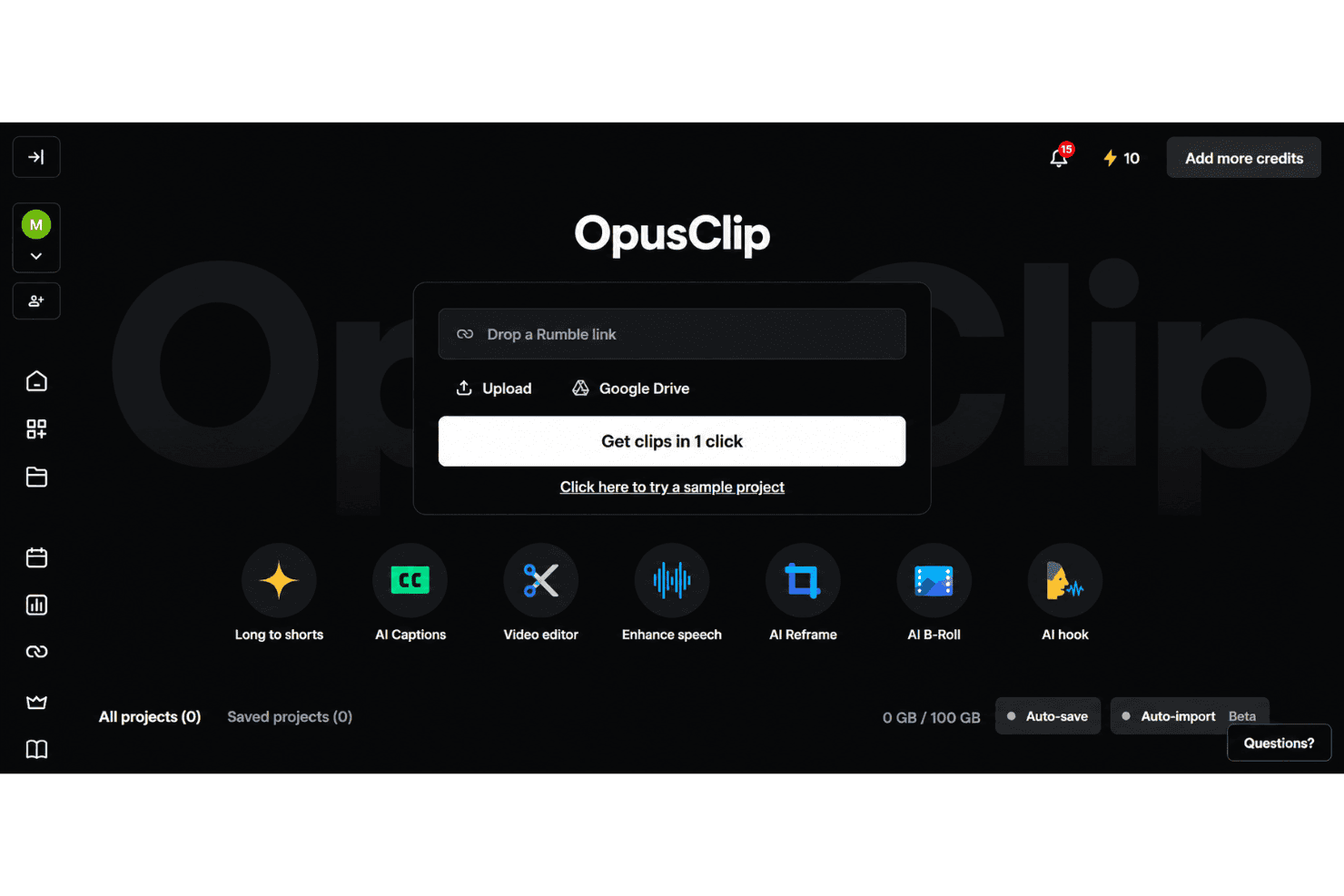
OpusClip integrates with YouTube, TikTok, Instagram Reels, Facebook, X, Google Drive, Vimeo, and Zoom, among others.
It also offers an API and connects with third-party integration tools including Zapier.
OpusClip Specs
- CAD Tools: Yes
- Data Export: Yes
- Data Import: Yes
- Multi-User: Yes
- Pixel Graphics: Yes
- Third-Party Plugins/Add-Ons: Yes
- Vector File Support: Yes
- Video: Yes


