

Pourquoi faire confiance à nos recommandations de logiciels
6,700+
Reviews
20
Industry experts
16+
Evaluation factors
14
Years
Notre équipe teste et évalue des logiciels depuis 2012. En tant que leaders marketing nous-mêmes, nous savons à quel point il est difficile — et important — de choisir le bon logiciel.
Pour ce guide, nous avons évalué les outils grâce à des tests pratiques et une recherche indépendante, en notant les outils selon nos critères de sélection.
Nos avis reflètent notre jugement éditorial humain, et non un argumentaire de vente.
Réviseurs experts:
 Gui DrusinaDirecteur de la création
- Shriya GhateSenior Marketing Lead
 Amanda JacquesResponsable Marketing Ops

Tableau comparatif des outils SEO pour les agences
| Tool | Best For | Trial Info | Price | ||
|---|---|---|---|---|---|
| 1 | Meilleures intégrations pour l'automatisation des workflows | Essai gratuit de 14 jours + démo gratuite | À partir de 103,2 $/mois (facturation annuelle) | Website | |
| 2 | Meilleur support pour la gestion du SEO local à grande échelle | Essai gratuit de 14 jours + démonstration gratuite | À partir de $31/mois (facturé annuellement) | Website | |
| 3 | Meilleure couverture data SEO et visibilité IA | Plan gratuit + démo gratuite | À partir de $29/mois | Website | |
| 4 | Meilleure solution tout-en-un pour l'analyse de la concurrence et des mots-clés | Essai gratuit de 7 jours + démo gratuite | À partir de 50 $/mois (facturé annuellement) | Website | |
| 5 | Meilleures analyses exploitables avec des outils alimentés par l'IA | Essai gratuit de 7 jours | À partir de 49$/mois | Website | |
| 6 | Meilleurs widgets en marque blanche pour capter de nouveaux leads | Essai gratuit de 14 jours | À partir de 99 $/mois (facturé annuellement) | Website | |
| 7 | Meilleur reporting automatisé pour les grands groupes | Essai gratuit de 14 jours + démo gratuite | À partir de $20/client/mois (facturation annuelle) | Website | |
| 8 | Meilleures données concurrentielles de visibilité digitale | Formule gratuite + essai gratuit de 7 jours + démo gratuite | À partir de $117.33/mois (facturé annuellement) | Website | |
| 9 | Meilleurs rapports marketing SEO personnalisables | Essai gratuit de 7 jours | À partir de $39/mois (facturé annuellement) | Website | |
| 10 | Meilleur suivi unifié des recherches traditionnelles et IA | Essai gratuit de 14 jours | À partir de 96 $/mois (facturé annuellement) | Website |



Avis sur les meilleurs outils SEO pour les agences
\u003cspan data-slate-fragment=\u0022JTVCJTdCJTIyY2hpbGRyZW4lMjIlM0ElNUIlN0IlMjJ0ZXh0JTIyJTNBJTIyQmVsb3clMjBhcmUlMjBteSUyMGRldGFpbGVkJTIwc3VtbWFyaWVzJTIwb2YlMjB0aGUlMjBiZXN0JTIwU0VPJTIwdG9vbHMlMjBmb3IlMjB hZ2VuY2llcyUyMHRoYXQlMjBtYWRlJTIwaXQlMjBvbnRvJTIwbXklMjBzaG9ydGxpc3QuJTIwTXklMjByZXZpZXdzJTIwb2ZmZXIlMjBhJTIwZGV0YWlsZWQlMjBsb29rJTIwYXQlMjB0aGUlMjBmZWF0dXJlcyUyQyUyMGludGVncmF0aW9ucyUyQyUyMGFuZCUyMHByaWNpbmclMjBvZiUyMGVhY2glMjBwbGF0Zm9ybSUyMHRvJTIwaGVscCUyMHlvdSUyMGZpbmQlMjB0aGUlMjBiZXN0JTIwb25lJTIwZm9yJTIweW91LiUyMiU3RCU1RCUyQyUyMnR5cGUlMjIlM0ElMjJwJTIyJTJDJTIyaWQlMjIlM0ElMjJWaGc2bG1ZdzN0JTIyJTdEJTVE\u0022\u003eVoici mes résumés détaillés des meilleurs outils SEO pour les agences qui ont intégré ma sélection. Mes avis présentent un aperçu détaillé des fonctionnalités, des intégrations et des tarifs de chaque plateforme afin de vous aider à trouver celle qui vous convient le mieux.\u003c/span\u003e
 Meilleures intégrations pour l'automatisation des workflows
- Essai gratuit de 14 jours + démo gratuite
- À partir de 103,2 $/mois (facturation annuelle)
Visit WebsiteCustomer Rating:4.8/5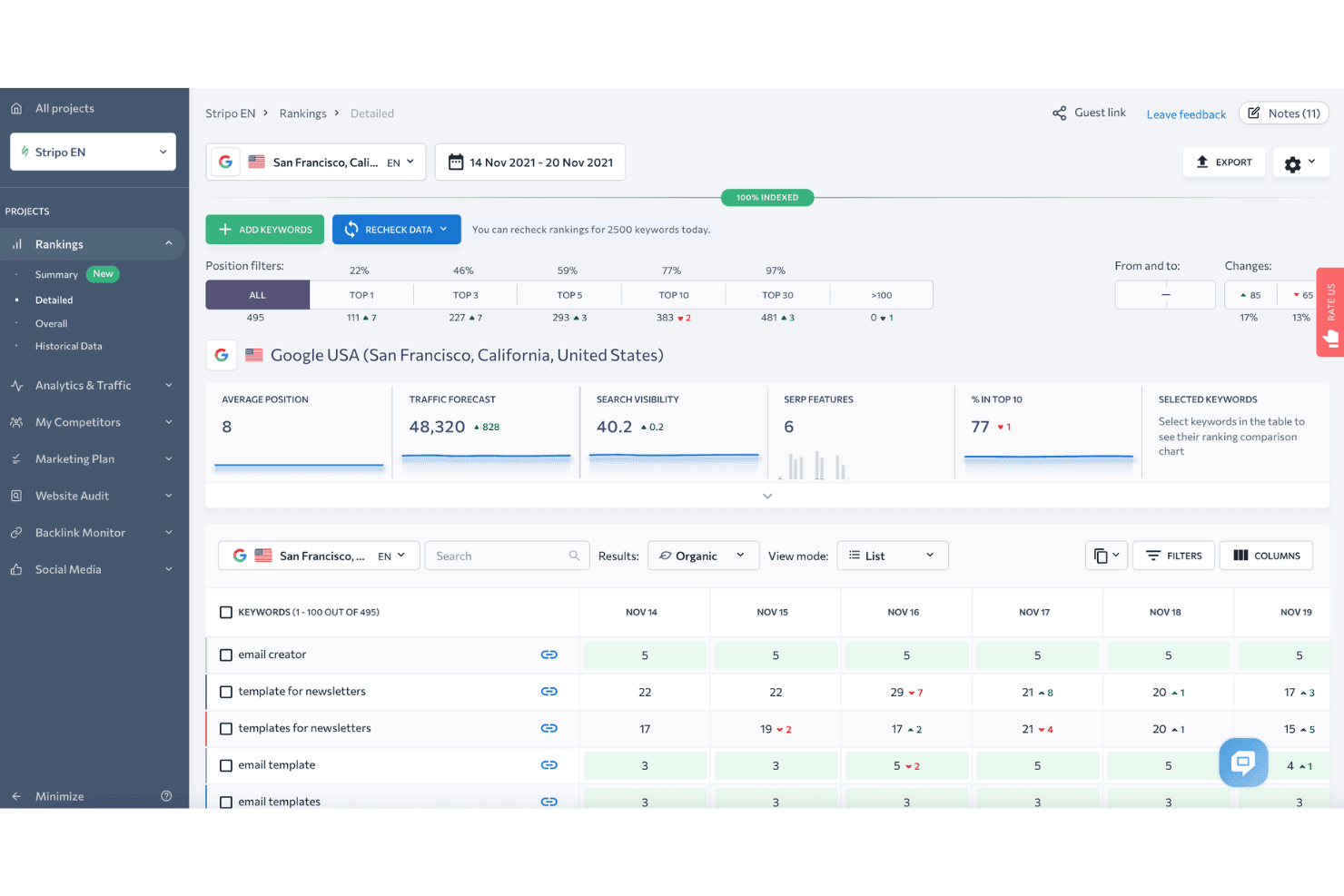
SE Ranking affiche un tableau de bord détaillé de suivi des mots-clés, avec filtres de position, prévision de trafic et variations quotidiennes des classements pour les mots-clés suivis. SE Ranking est une plateforme SEO cloud qui couvre le suivi de position, l'audit de site, la recherche de mots-clés, l'analyse de liens retour, l'étude de la concurrence, la création de rapports en marque blanche et le suivi de la visibilité via l'IA pour plusieurs projets clients.
Pour qui SE Ranking est-il le mieux adapté ?
SE Ranking convient particulièrement aux agences de petite et moyenne taille qui recherchent une suite SEO complète pour plusieurs comptes clients sans payer les prix des solutions d'entreprise.
Pourquoi j'ai choisi SE Ranking
SE Ranking mérite sa place dans ma sélection grâce à la qualité de son écosystème d'automatisation, parfaitement intégré aux flux de travail d'agence. J'utilise son node n8n vérifié et le connecteur Make.com pour déclencher des alertes de suivi de position et pousser les données directement dans les tableaux de bord clients sans export manuel. Le serveur MCP va plus loin en injectant les données SE Ranking en temps réel dans Claude ou ChatGPT, ce qui me permet de générer des analyses sans changer d'outil.
Fonctionnalités clés de SE Ranking
- Rapports en marque blanche : Créez des rapports personnalisables et à l'image de votre marque, accessibles par vos clients via un portail dédié.
- Groupement de mots-clés : Regroupez automatiquement de grandes listes de mots-clés par thématique et intention pour une recherche à grande échelle.
- Suivi local des positions : Surveillez les classements dans des villes ou régions spécifiques et gérez les données du profil d'établissement Google.
- Suivi des liens retour : Analysez les nouveaux backlinks et ceux perdus sur l'ensemble des domaines, avec historique et metrics d'autorité.
Intégrations de SE Ranking
SE Ranking propose des intégrations natives avec Google Analytics 4, Google Search Console, Google Ads, Matomo Analytics, Looker Studio, Whatagraph, AgencyAnalytics et Reportz. Il se connecte à Zapier, Make.com, n8n et propose une API pour des intégrations personnalisées.
Pros and Cons
Pros:
- Suivi quotidien fiable des positions dans toutes les régions
- Portails clients en marque blanche et accès invité
- Pack agence avec accès manager et client
Cons:
- Base de données de backlinks plus petite que celle des concurrents
- Audit limité des sites rendus en JavaScript
Learn more about SE Ranking: Meilleur support pour la gestion du SEO local à grande échelle
- Essai gratuit de 14 jours + démonstration gratuite
- À partir de $31/mois (facturé annuellement)
Visit WebsiteCustomer Rating:4.7/5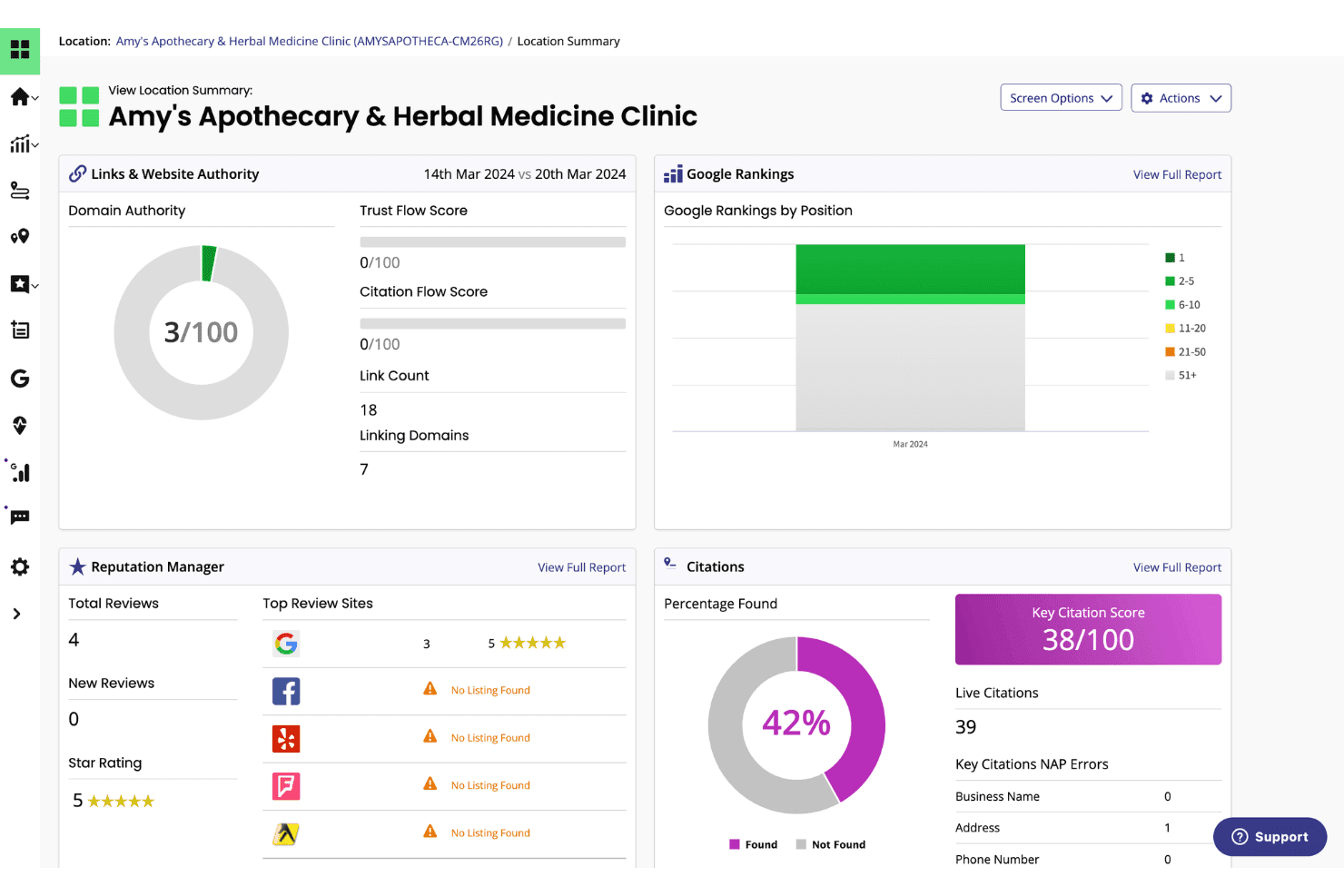
BrightLocal affiche un tableau de bord récapitulatif d'emplacement avec les classements Google, les scores de citation, l'autorité de domaine et les indicateurs de réputation pour une entreprise locale. BrightLocal est une plateforme de SEO local conçue pour les agences et les entreprises multi-sites, combinant le suivi du classement local, la gestion des citations, l'audit du profil Google Business et la surveillance des avis dans un seul tableau de bord.
À qui s'adresse BrightLocal ?
Les agences et les prestataires SEO en marque blanche qui gèrent des campagnes de référencement local pour des clients ayant des commerces physiques ou à zones de service tireront le meilleur parti de BrightLocal.
Pourquoi j'ai choisi BrightLocal
BrightLocal mérite sa place dans ma sélection grâce à sa gestion efficace du suivi du classement local sur l'ensemble d'un portefeuille client. J'adore la fonctionnalité Local Search Grid, qui cartographie les classements Google sur une zone géographique à l'aide d'une grille visuelle, ce qui me permet de voir instantanément où un client domine et où sa couverture est insuffisante. Chaque client dispose également de son propre accès à un tableau de bord externe en marque blanche, ce qui signifie que je peux configurer des rapports automatisés une fois pour toutes et laisser les clients consulter eux-mêmes leurs performances.
Fonctionnalités clés de BrightLocal
- Suivi des citations : Audite et surveille l'exactitude des fiches d'entreprise et identifie de nouvelles opportunités de citation dans les principaux annuaires.
- Audit GBP : Compare le profil Google Business d'un client à ceux de ses concurrents locaux avec des recommandations concrètes pour l'optimisation.
- Synchronisation active : Maintient automatiquement la cohérence des informations commerciales sur les principales sources de données locales et inscriptions en ligne.
- Widget de présentation des avis : Permet de publier directement les avis clients sur votre site web pour renforcer la preuve sociale et la confiance.
Intégrations de BrightLocal
BrightLocal propose des intégrations natives avec Google Business Profile, Google Analytics 4, Facebook et Zapier. Une API est disponible pour des intégrations personnalisées.
Pros and Cons
Pros:
- Suivi du classement local avec visualisation sur grille géographique
- Tableaux de bord en marque blanche pour un nombre illimité de clients
- Gestion et surveillance automatisées des citations
Cons:
- Pas d'analyse de backlinks ou d'audit des liens toxiques
- Fonctionnalités d'audit technique du site limitées
Learn more about BrightLocal: Meilleure couverture data SEO et visibilité IA
- Plan gratuit + démo gratuite
- À partir de $29/mois
Visit WebsiteCustomer Rating:4.6/5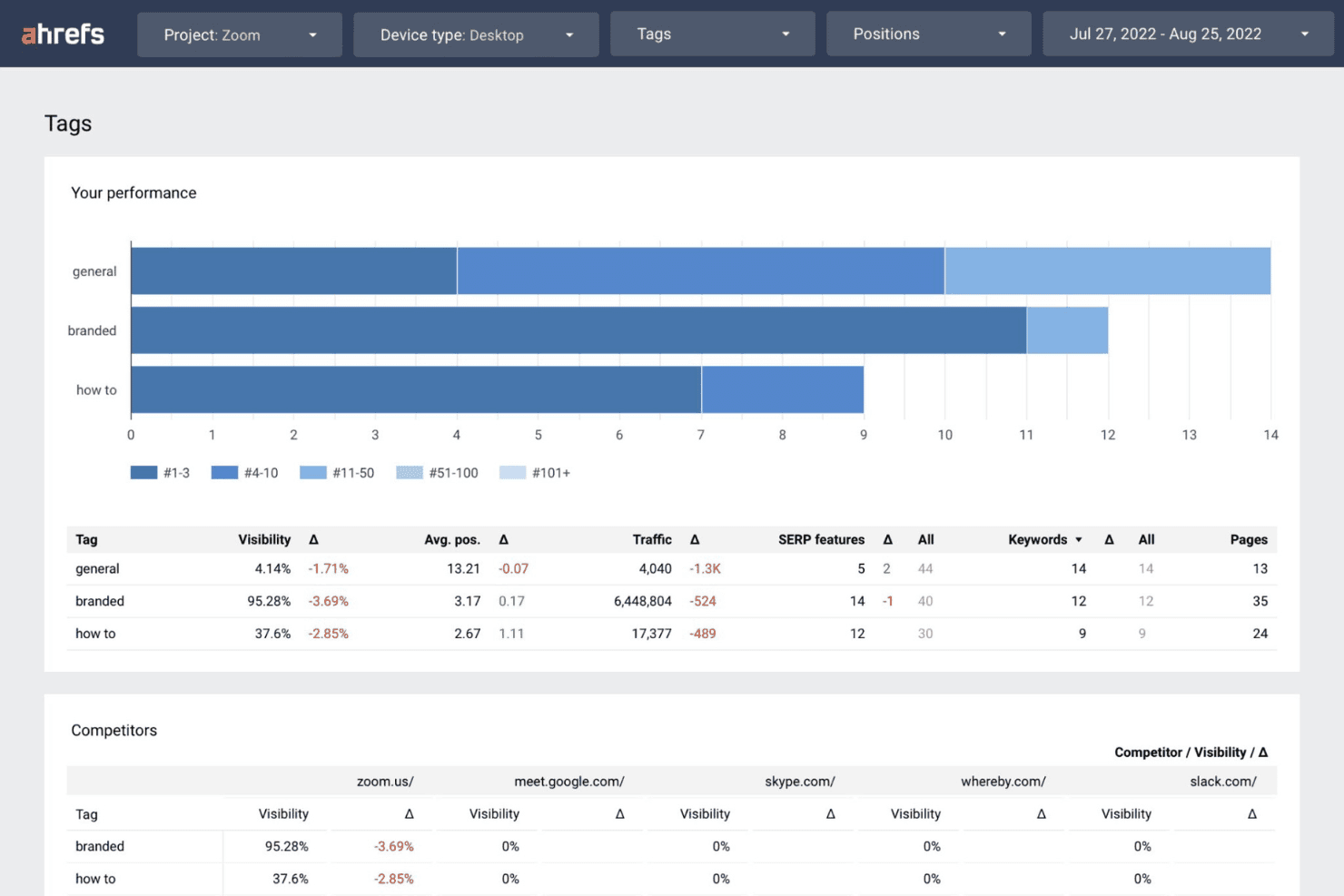
Ahrefs affiche un tableau de bord de performance des tags montrant la visibilité, le trafic et les données de mots-clés, segmentés par catégories de marque, général et tutoriel, ainsi que des comparaisons avec les concurrents. Ahrefs est une plateforme SEO tout-en-un construite autour de l'un des plus grands index de backlinks de l'industrie, offrant la recherche de mots-clés, le suivi des positions, l'audit de site et l'analyse concurrentielle sur plusieurs comptes clients.
Pour qui Ahrefs est-il le mieux adapté ?
Ahrefs convient particulièrement aux directeurs SEO en agence et aux gestionnaires de comptes qui privilégient la profondeur des données pour la recherche concurrentielle, la création de liens et le suivi de mots-clés pour plusieurs clients.
Pourquoi j'ai choisi Ahrefs
J'ai sélectionné Ahrefs parmi les meilleurs car sa couverture englobe à la fois la visibilité traditionnelle et IA dans les moteurs de recherche, d'une manière qu'aucun concurrent n'égale actuellement. Brand Radar permet de suivre les mentions et citations de marque de clients sur les LLM tels que ChatGPT, Claude et Gemini, et les Instructions personnalisées me donnent la possibilité de surveiller précisément dans quelles réponses IA un client apparaît. Je m'appuie aussi sur les données de clics de Keywords Explorer pour filtrer les mots-clés à fort volume qui ne génèrent aucun trafic réel, ce qui permet d'ancrer la stratégie de contenu client dans le comportement de recherche réel.
Fonctionnalités clés d'Ahrefs
- Site Explorer : Analysez en détail les profils de backlinks concurrents, le trafic organique et les mots-clés payants.
- Audit de site : Effectuez des crawls SEO techniques à grande échelle pour identifier les erreurs on-page et les problèmes de santé du site.
- Rank Tracker : Surveillez le classement des mots-clés selon les appareils, lieux et différents moteurs de recherche.
- Report Builder : Créez des tableaux de bord personnalisés et des rapports SEO automatisés, prêts à être partagés avec les clients.
Intégrations Ahrefs
Ahrefs propose des intégrations natives avec Google Search Console et Looker Studio, prend en charge MCP Server pour les assistants IA tels que ChatGPT et Claude, et fournit une API pour des intégrations personnalisées.
Pros and Cons
Pros:
- Index de backlinks le plus volumineux et le plus à jour disponible
- Suivi de la visibilité IA pour les moteurs de recherche
- Outils poussés d’analyse concurrentielle et SERP
Cons:
- Pas de connexion ou portail client natif
- Options de rapports en marque blanche limitées
 Meilleure solution tout-en-un pour l'analyse de la concurrence et des mots-clés
- Essai gratuit de 7 jours + démo gratuite
- À partir de 50 $/mois (facturé annuellement)
Visit WebsiteCustomer Rating:4.6/5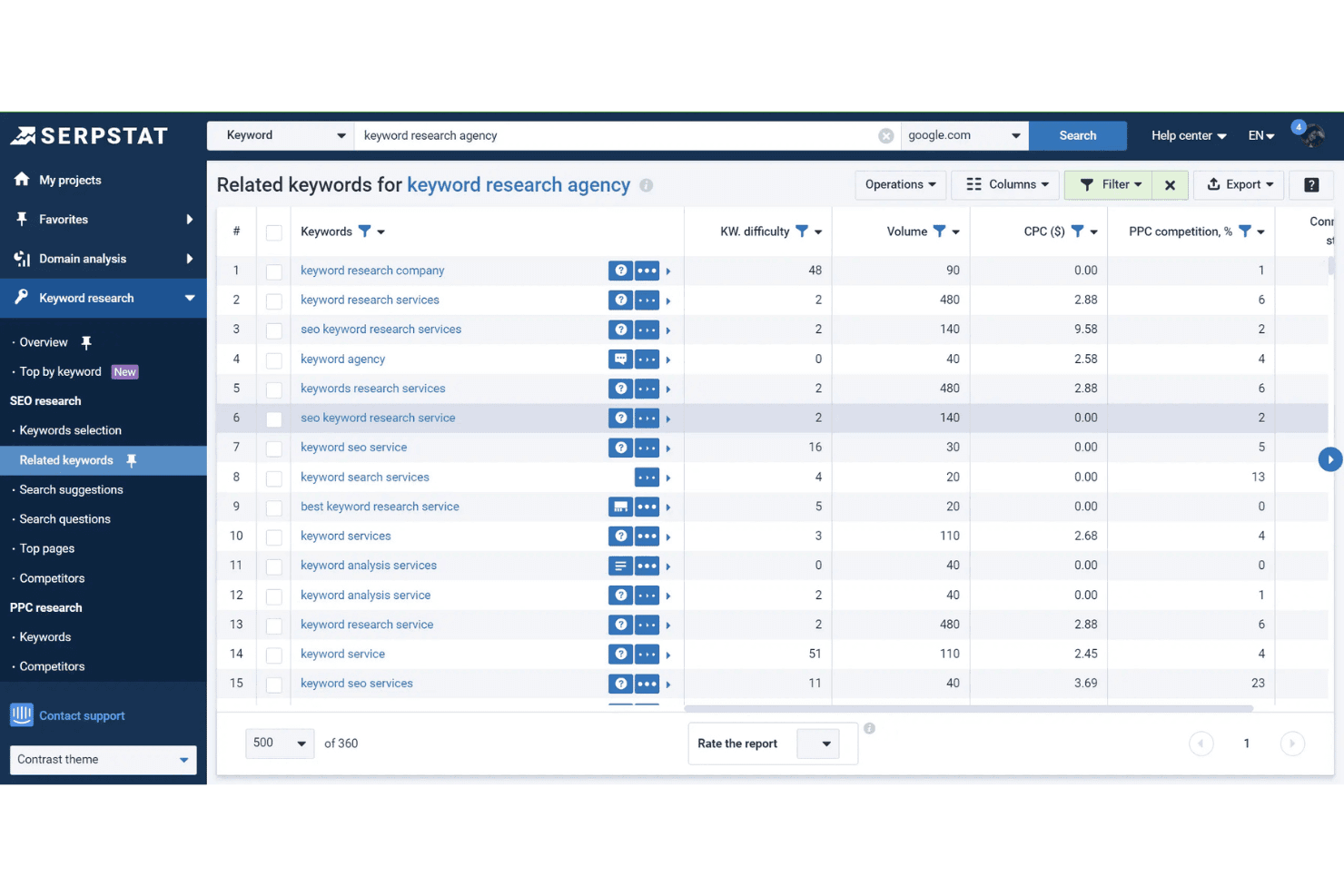
L'outil de mots-clés associés de Serpstat affiche la difficulté des mots-clés, le volume de recherche, le CPC et la concurrence PPC pour 'keyword research agency'. Serpstat est une plateforme de marketing de recherche qui regroupe la recherche de mots-clés, l'analyse de la concurrence, le suivi de position, l'audit de site et l'analyse de backlinks dans 230 pays et pour de multiples projets clients.
Pour qui Serpstat est-il le mieux adapté ?
Serpstat convient parfaitement aux agences de marketing digital de petite à moyenne taille ayant besoin d'une plateforme SEO tout-en-un abordable pour gérer plusieurs comptes clients.
Pourquoi j'ai choisi Serpstat
Serpstat mérite sa place sur ma liste grâce à la profondeur de son module d'analyse concurrentielle pour les cas d'usage en agence. Je peux obtenir les pages les plus performantes d'un concurrent, l'intégralité de son portefeuille de mots-clés et sa part de trafic, le tout depuis une seule interface, ce qui facilite l'analyse d'écart avant un appel stratégique. L'outil de regroupement de mots-clés est également réellement utile : je peux automatiquement regrouper des milliers de mots-clés bruts, ce qui accélère la planification de contenu pour les clients ayant des structures de site complexes ou de grande envergure.
Fonctionnalités clés de Serpstat
- Suivi de position : Surveillez le positionnement des mots-clés dans 230 pays sur desktop et mobile.
- Audit de site : Analysez les sites pour détecter des problèmes techniques SEO avec une planification d'audit personnalisable.
- Accès API : Intégrez directement les données d'analyses de recherche et d'audits dans des workflows personnalisés.
- Analyse en lot : Analysez jusqu'à 100 000 domaines ou mots-clés à la fois pour des vérifications volumineuses.
Intégrations Serpstat
Serpstat propose des intégrations natives avec Google Sheets, Google Search Console, Reportz, Stackby, Oviond, Datorama, SEOtools for Excel et Looker Studio. Il offre également des extensions de navigateur pour Chrome, Firefox, Edge et Opera, ainsi qu'un accès API pour des intégrations personnalisées.
Pros and Cons
Pros:
- Analyse de la concurrence sur les marchés mondiaux et locaux
- Regroupe de grandes listes de mots-clés
- Regroupement automatique de mots-clés pour de grands ensembles de données
Cons:
- Les données de backlinks sont moins complètes que celles d'Ahrefs
- Le reporting en marque blanche nécessite la formule la plus avancée
 Meilleures analyses exploitables avec des outils alimentés par l'IA
- Essai gratuit de 7 jours
- À partir de 49$/mois
Visit WebsiteCustomer Rating:4.5/5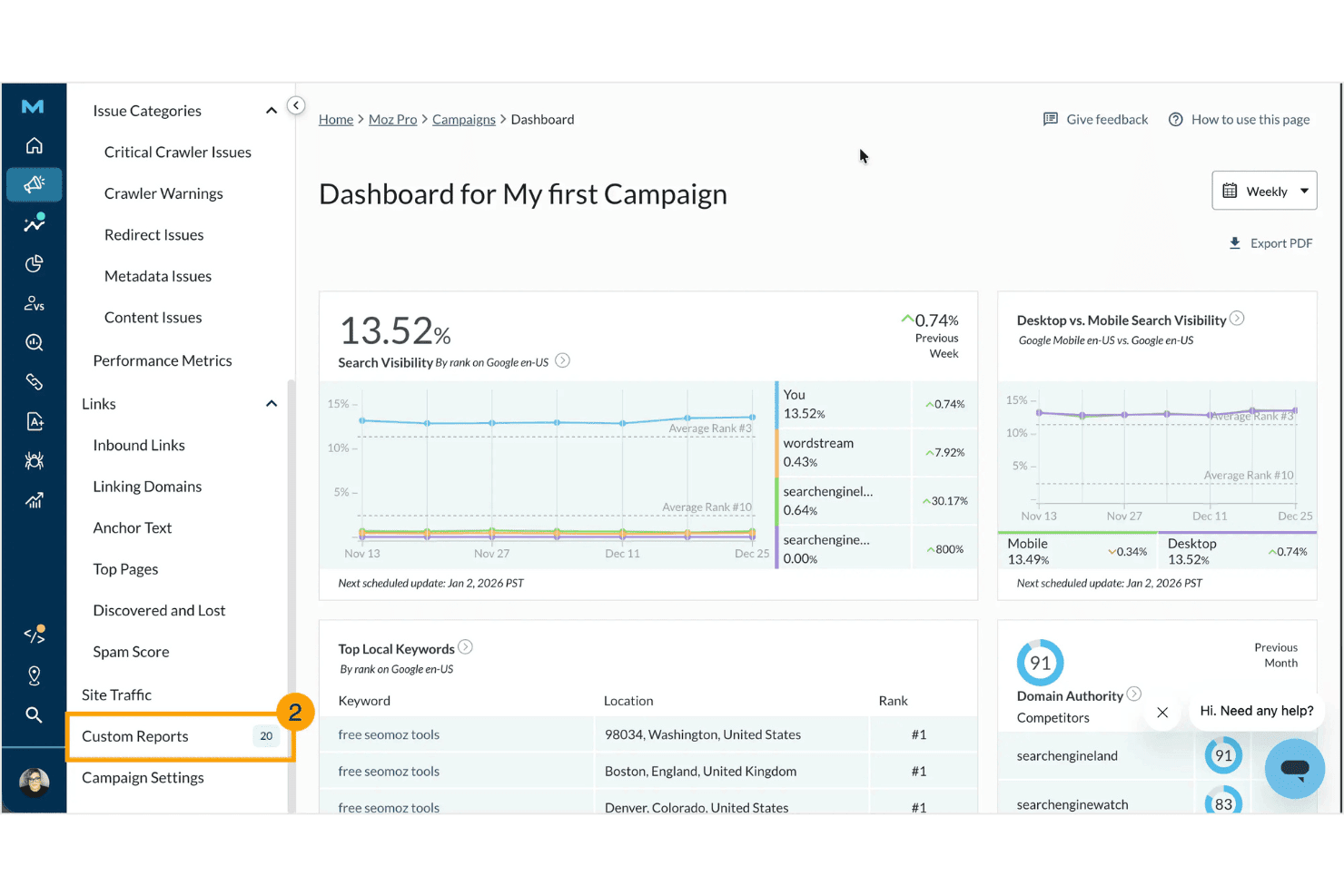
Moz Pro affiche un tableau de bord de campagne avec des métriques de visibilité de recherche, les principaux mots-clés locaux, des scores d'autorité de domaine et des comparaisons avec les concurrents. Moz Pro est une plateforme SEO axée sur la recherche de mots-clés, le suivi du positionnement, l'audit de site, l'analyse des liens retour et la création de rapports personnalisés, avec des outils alimentés par l'IA pour suivre la visibilité de la marque sur les moteurs de recherche génératifs.
À qui s'adresse Moz Pro ?
Moz Pro convient particulièrement aux agences de marketing digital de petite à moyenne taille qui ont besoin de rapports clients fiables, d'indicateurs d'autorité reconnus et d'une interface accessible pour leurs équipes SEO.
Pourquoi j'ai choisi Moz Pro
Moz Pro mérite sa place dans ma sélection grâce à la manière dont il associe ses métriques d'autorité reconnues à des outils d'IA réellement utiles. J'apprécie particulièrement la fonctionnalité de suivi des requêtes IA, qui indique la fréquence à laquelle la marque d'un client apparaît dans les réponses de ChatGPT, Gemini et du mode IA de Google. Les briefs de contenu IA ajoutent une dimension supplémentaire en transformant les données de mots-clés en recommandations structurées et directement exploitables pour les rédacteurs.
Fonctionnalités clés de Moz Pro
- Rapports personnalisés : Générez des rapports SEO personnalisés et prêts à être remis aux clients grâce à la personnalisation par glisser-déposer.
- Gestion des clients par campagne : Organisez plusieurs sites et projets clients dans des campagnes distinctes sur un seul tableau de bord.
- Analyse complète du site : Auditez l'ensemble du site web afin d'identifier les problèmes techniques SEO et les opportunités d'optimisation.
- Analyse du profil de liens retour : Accédez à des données détaillées sur les liens entrants pour vos clients et concurrents, y compris les nouveaux liens et ceux perdus.
Intégrations de Moz Pro
Moz Pro propose des intégrations natives avec Google Analytics, Google Search Console, HubSpot et Looker Studio. Une API est disponible pour des intégrations personnalisées.
Pros and Cons
Pros:
- Suivi des requêtes IA pour la recherche générative
- Scores d'autorité de domaine et de spam fiables
- Rapports SEO et audits clients personnalisés en marque blanche
Cons:
- Données de backlinks moins récentes que chez les grands concurrents
- Pas d'accès direct au portail client
Learn more about Moz Pro: Meilleurs widgets en marque blanche pour capter de nouveaux leads
- Essai gratuit de 14 jours
- À partir de 99 $/mois (facturé annuellement)
Visit WebsiteCustomer Rating:4.8/5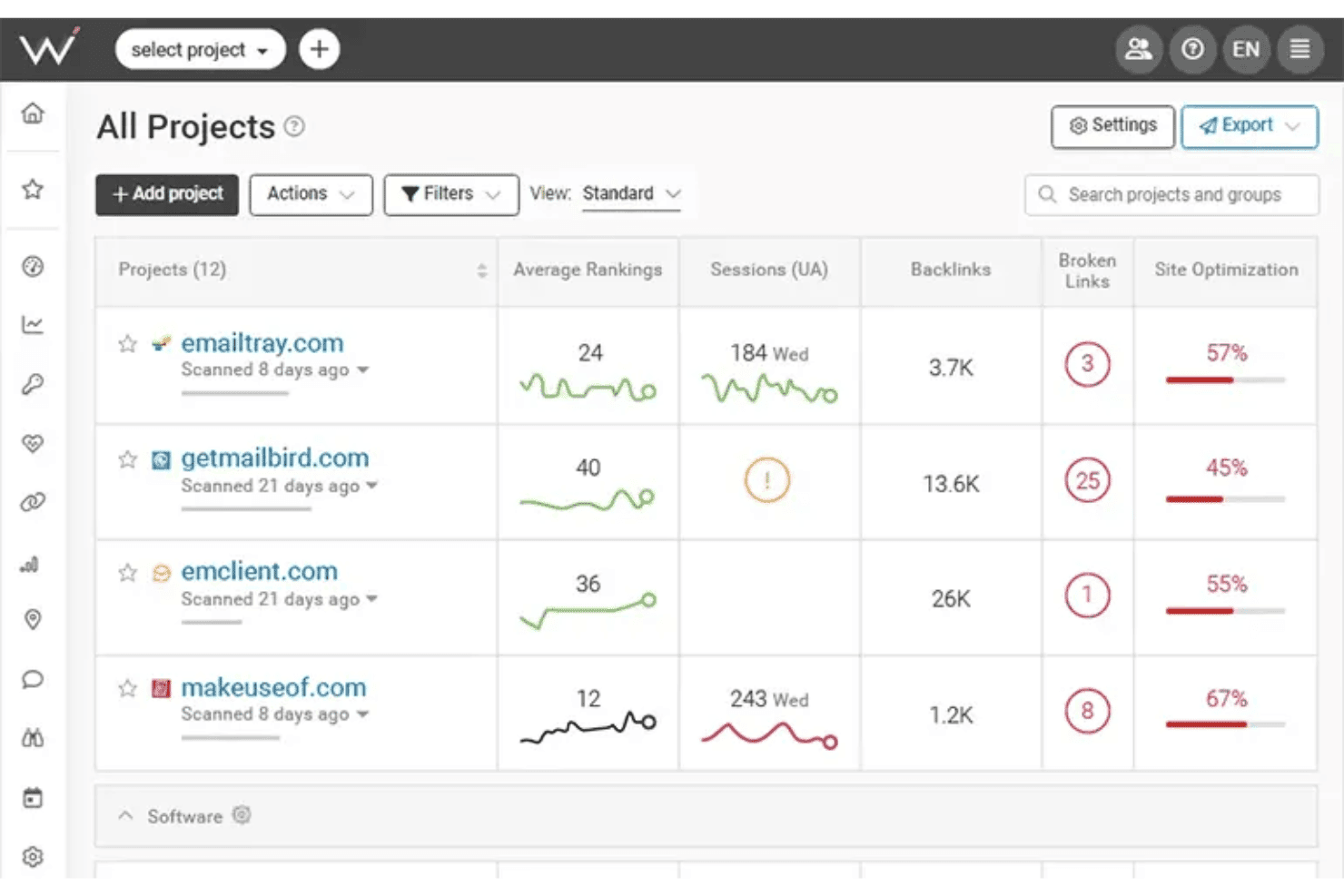
WebCEO affiche un tableau de bord Tous les Projets permettant aux utilisateurs de surveiller les positions moyennes, les sessions, les backlinks, les liens cassés et les scores d’optimisation des sites sur plusieurs sites web. WebCEO est une plateforme SEO cloud conçue pour les agences, couvrant le suivi des positions, l’audit de sites, l’analyse des backlinks, la recherche de mots-clés, l’intelligence concurrentielle et la création de rapports en marque blanche pour un nombre illimité de projets clients depuis un tableau de bord unique.
À qui s’adresse WebCEO ?
WebCEO est particulièrement adapté aux agences de marketing digital qui gèrent plusieurs comptes clients et souhaitent proposer des services SEO personnalisés sous leur propre domaine.
Pourquoi j’ai choisi WebCEO
WebCEO mérite sa place dans ma sélection car le widget de génération de leads en marque blanche est vraiment rare sur le marché des outils SEO. J’intègre un bouton d’audit personnalisable sur une page destinée aux clients, et lorsqu’un prospect lance une analyse, je reçois un rapport SEO en marque blanche diffusé sous le domaine de mon agence. De plus, l’espace client en marque blanche complet me permet d’exécuter les outils WebCEO sur mon propre domaine personnalisé, avec des accès clients définis par rôles et des rapports automatisés et programmés.
Fonctionnalités clés de WebCEO
- Suivi complet des positions : Suivi quotidien des classements de mots-clés sur plusieurs moteurs de recherche, emplacements et appareils.
- Outils de collaboration en équipe : Attribution de tâches, gestion des rôles utilisateurs et suivi des progrès de l’équipe via un tableau de bord unifié.
- Analyse SEO des concurrents : Analyse des backlinks, stratégies de contenu et mots-clés des concurrents pour obtenir des informations exploitables.
- Audits techniques automatisés de sites : Exploration complète des sites pour détecter les erreurs on-page, les problèmes mobiles et les données Core Web Vitals.
Intégrations WebCEO
WebCEO propose des intégrations natives avec Google Analytics, Google Ads, Google Search Console, Facebook et LinkedIn. Une API est disponible pour des intégrations personnalisées.
Pros and Cons
Pros:
- Widget de capture de leads SEO en marque blanche disponible
- Détecte les problèmes de performance mobile
- Livraison programmée et automatisée de rapports SEO de marque
Cons:
- Des frais supplémentaires sont facturés par analyse sur les forfaits agences
- Aucune version logicielle de bureau n’est disponible
Learn more about WebCEO: Meilleur reporting automatisé pour les grands groupes
- Essai gratuit de 14 jours + démo gratuite
- À partir de $20/client/mois (facturation annuelle)
Visit WebsiteCustomer Rating:4.7/5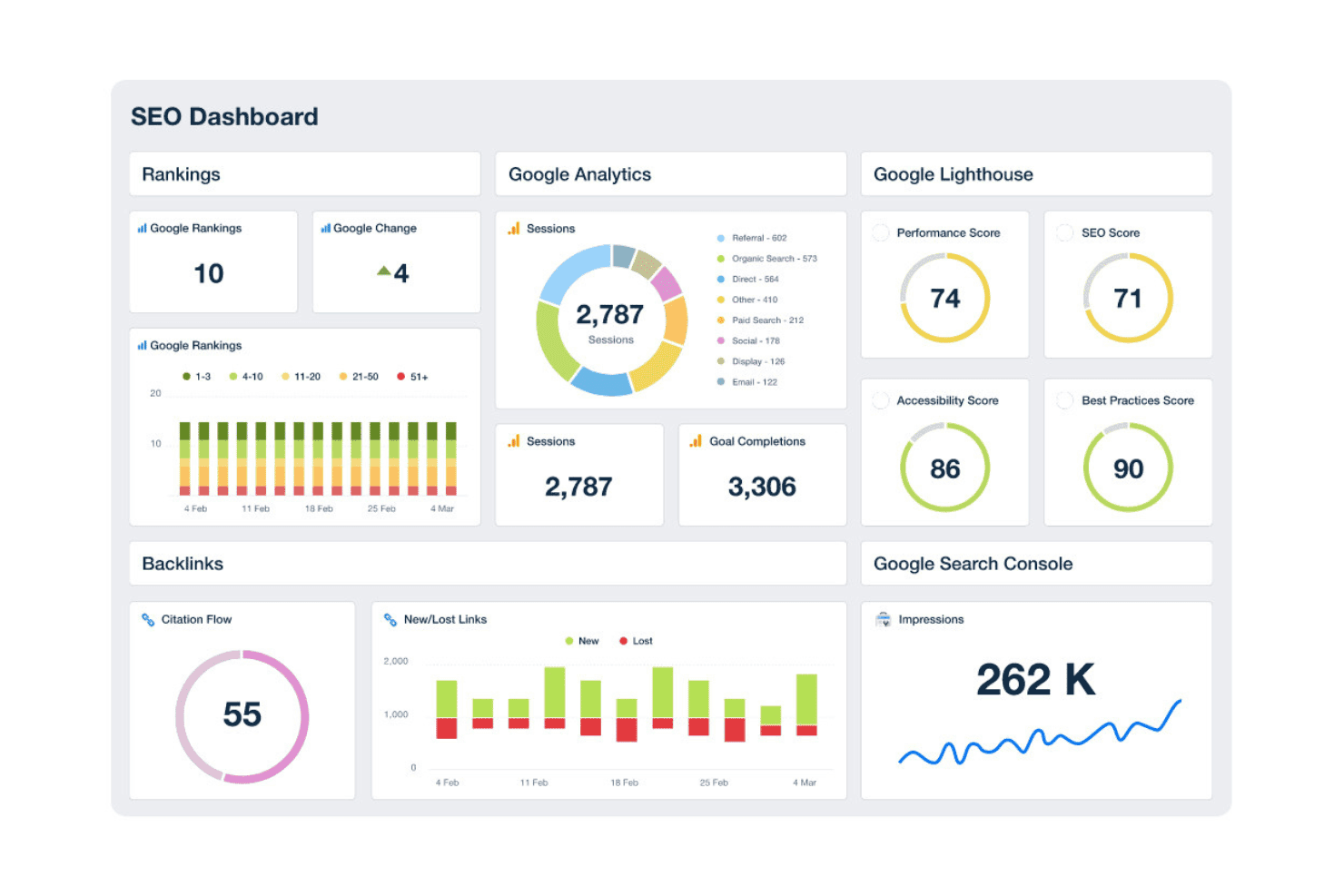
AgencyAnalytics propose un tableau de bord SEO complet affichant dans une seule vue les classements, les sessions Google Analytics, les scores Lighthouse, les backlinks et les impressions de la Search Console. AgencyAnalytics est une plateforme de reporting en marque blanche et de suivi SEO conçue pour les agences de marketing digital, combinant tableaux de bord clients automatisés, suivi du classement, audit de site et surveillance des backlinks pour plusieurs comptes clients.
À qui s'adresse AgencyAnalytics ?
AgencyAnalytics est particulièrement adapté aux agences de marketing digital de petite à moyenne taille qui gèrent plusieurs comptes clients et qui ont besoin de rapports en marque blanche sans devoir créer des tableaux de bord sur mesure.
Pourquoi j'ai choisi AgencyAnalytics
J’ai inclus AgencyAnalytics dans mes favoris car aucun autre outil du secteur n’égale sa programmation de rapports automatiques à grande échelle. Je peux créer un modèle de rapport personnalisé une fois, l’appliquer à plus de 20 comptes clients et en programmer l’envoi mensuel sans avoir à y revenir. Le portail client en marque blanche, la configuration de domaine personnalisé et le générateur de rapports par glisser-déposer permettent aux clients de recevoir des tableaux de bord professionnels à l’image de l’agence sur une URL que je contrôle, plutôt qu’un sous-domaine tiers générique.
Principales fonctionnalités d’AgencyAnalytics
- Analyses AI et détection d’anomalies : Utilise l’apprentissage automatique pour repérer les tendances, anomalies et nouvelles opportunités dans les données de performance.
- Surveillance des backlinks : Suit les nouveaux backlinks et les backlinks perdus provenant de sources intégrées pour chaque compte client.
- Bibliothèque d’intégrations : Se connecte à plus de 80 plateformes de marketing, SEO et publicité payante pour des rapports centralisés.
- Outil d’audit de site : Explore automatiquement les sites clients pour révéler les problèmes techniques SEO et fournir des recommandations on-page.
Intégrations AgencyAnalytics
AgencyAnalytics propose plus de 85 intégrations natives, dont Google Analytics, Google Search Console, Ahrefs, Semrush, Moz, Facebook Ads, Google Ads, Shopify, HubSpot, Mailchimp et CallRail. Une API est disponible pour des intégrations personnalisées.
Pros and Cons
Pros:
- Reporting automatisé en marque blanche pour tous les clients
- Propose des mises en page de tableaux de bord personnalisées
- Permissions d’accès individualisées au portail client
Cons:
- Les fonctionnalités de recherche de mots-clés nécessitent des outils tiers
- Les audits de site restent limités sur l’aspect technique
Learn more about AgencyAnalytics: Meilleures données concurrentielles de visibilité digitale
- Formule gratuite + essai gratuit de 7 jours + démo gratuite
- À partir de $117.33/mois (facturé annuellement)
Visit WebsiteCustomer Rating:4.5/5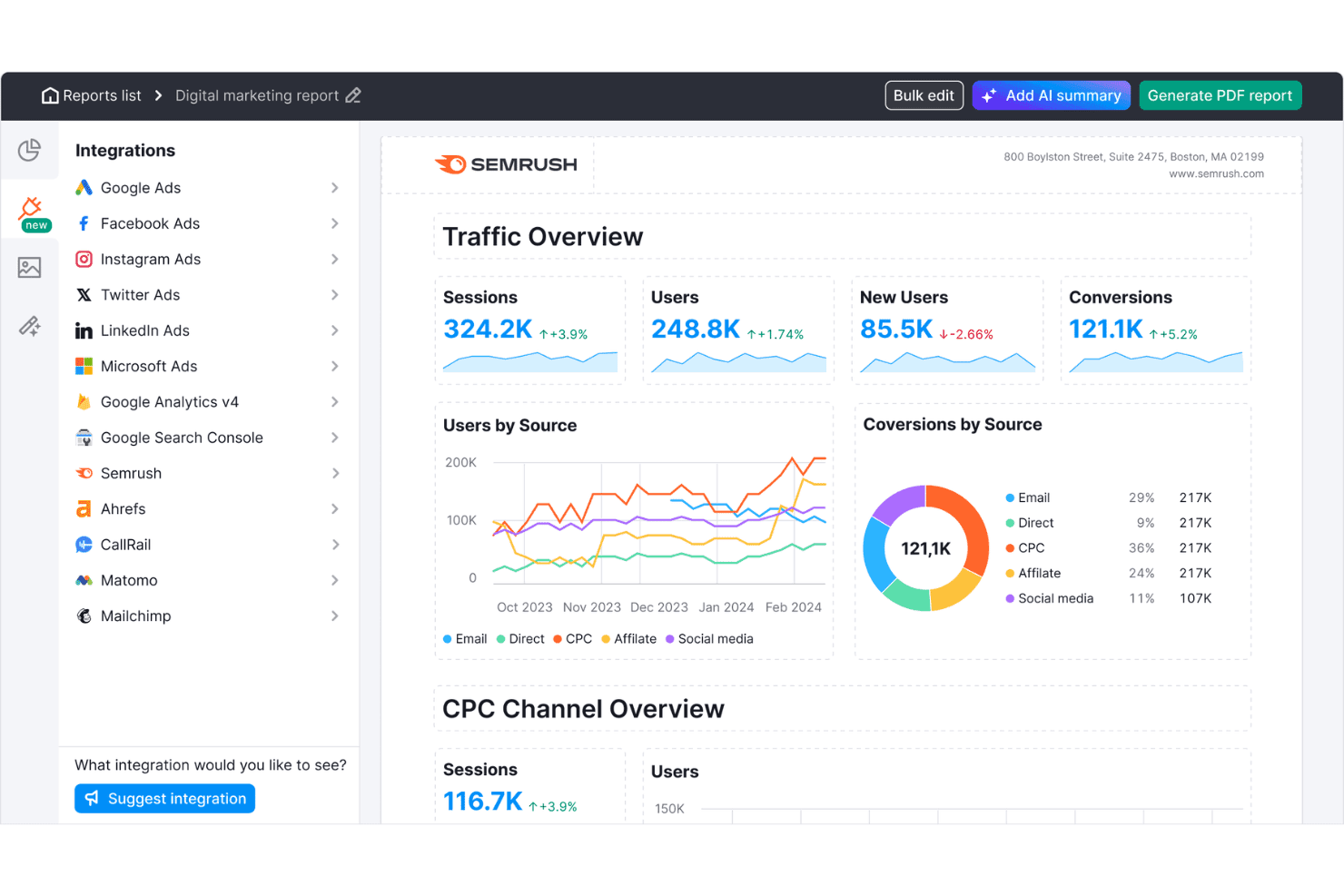
Semrush propose un tableau de bord de rapports marketing digital avec vue d'ensemble du trafic, utilisateurs par source, conversions par source et métriques CPC par canal. Semrush est une plateforme de visibilité en ligne qui offre aux agences des outils de recherche de mots-clés, de suivi du positionnement, d'audit de site, d'analyse des backlinks, d'intelligence concurrentielle et de rapports en marque blanche à travers des dizaines de comptes clients depuis un tableau de bord unique.
Pour qui Semrush est-il le mieux adapté ?
Semrush convient particulièrement aux agences digitales de taille moyenne à grande gérant simultanément de nombreux comptes clients pour des campagnes SEO.
Pourquoi j'ai choisi Semrush
J'ai choisi Semrush comme l'un des meilleurs car ses données d'intelligence concurrentielle sont incomparables à l'échelle d'une agence. L'outil Keyword Gap me permet de comparer jusqu'à cinq domaines concurrents côte à côte pour révéler les mots-clés sur lesquels ils sont positionnés et pas mes clients, tandis que l'outil Backlink Gap fait de même pour identifier des opportunités de création de liens. Avec une base de données de 28 milliards de mots-clés couvrant 142 bases de données géographiques, je peux effectuer cette analyse dans n'importe quel secteur client sans craindre de manquer de couverture.
Fonctionnalités clés de Semrush
- Outil d'audit de site : Analyse les sites clients pour détecter les problèmes techniques SEO, le contenu dupliqué, les liens brisés et les problèmes d'exploration.
- Suivi du positionnement : Surveille quotidiennement les classements de mots-clés sur plusieurs moteurs de recherche, emplacements et appareils pour chaque projet client.
- Tableau de bord Client Manager : Organise tous les comptes clients, projets et livrables de campagnes dans un espace de travail unifié avec des autorisations basées sur les rôles.
- Rapports en marque blanche : Génère des rapports SEO et marketing personnalisés programmés pour une livraison et une présentation faciles aux clients.
Intégrations Semrush
Semrush propose des intégrations natives avec Google Analytics, Google Search Console, Google Sheets, Looker Studio, Facebook, Pinterest, LinkedIn, Instagram, YouTube, All in One SEO, monday.com et Zoho Analytics. Une API est disponible pour les intégrations personnalisées.
Pros and Cons
Pros:
- Analyse des écarts de mots-clés et de backlinks concurrentiels
- Grandes bases de données de mots-clés et de liens géospécifiques
- Audit de site avec vérification des signaux web essentiels
Cons:
- Le reporting en marque blanche nécessite un module payant
- Limites sur les mots-clés et domaines suivis
 Meilleurs rapports marketing SEO personnalisables
- Essai gratuit de 7 jours
- À partir de $39/mois (facturé annuellement)
Visit WebsiteCustomer Rating:4.4/5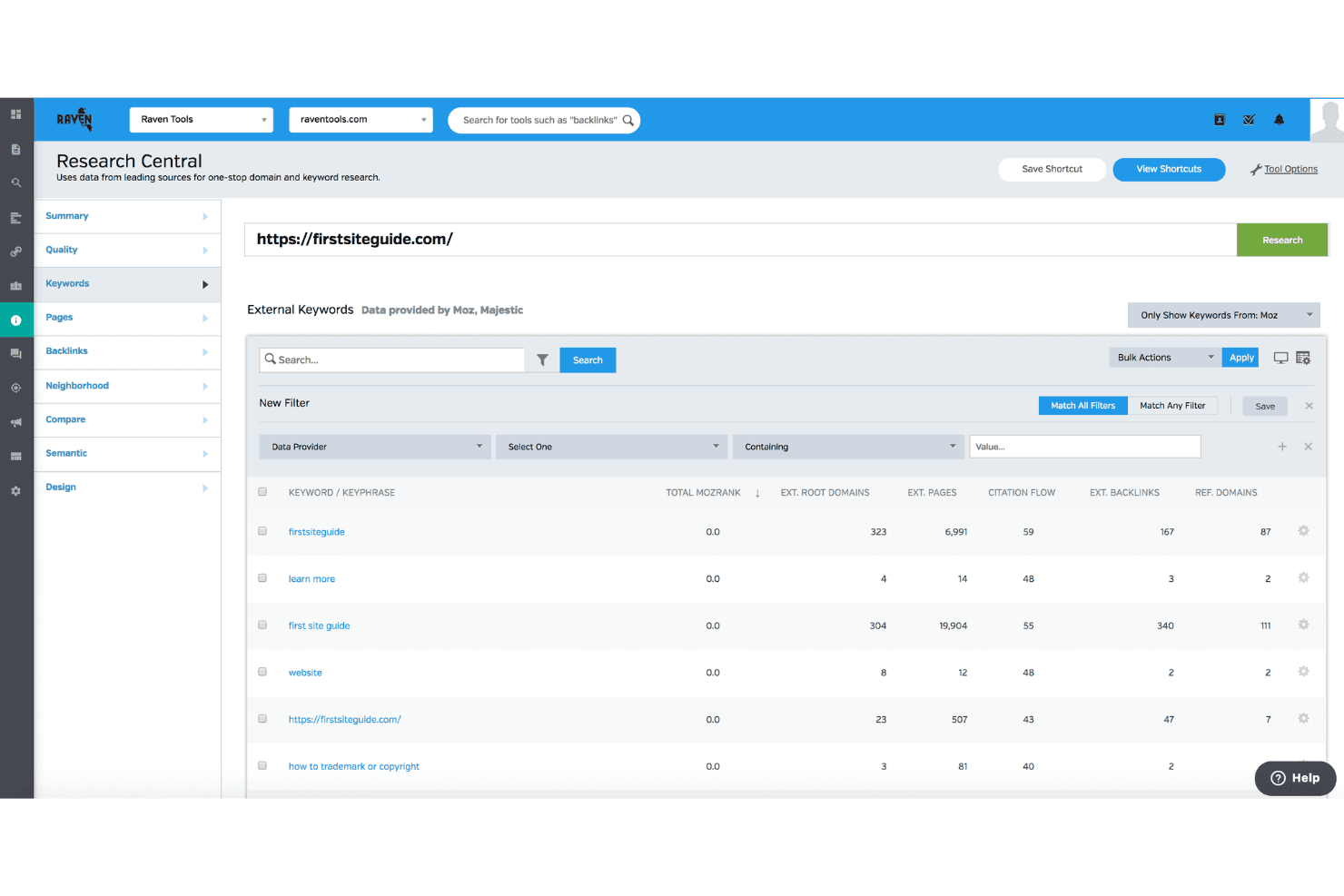
Raven Tools propose une fonctionnalité Research Central qui affiche des données externes sur les mots-clés, notamment le MozRank, le citation flow et les métriques de backlinks pour n'importe quel domaine. Raven Tools est une plateforme SEO conçue pour les agences, orientée vers les rapports clients en marque blanche, avec suivi du positionnement sur plusieurs moteurs de recherche, audit de site, analyse des backlinks alimentée par Majestic et Moz, ainsi que la recherche de mots-clés.
Pour qui Raven Tools est-il le mieux adapté ?
Raven Tools convient parfaitement aux agences de marketing digital de petite et moyenne taille qui gèrent plusieurs comptes clients et qui accordent la priorité aux rapports automatisés et personnalisés.
Pourquoi j'ai choisi Raven Tools
Raven Tools m’a convaincu par la puissance de son générateur de rapports. Je peux extraire des données de plus de 20 sources et utiliser plus de 30 modules préconçus pour créer un seul livrable personnalisé qui regroupe le suivi de position, la croissance des backlinks et les données Google Analytics, sans efforts supplémentaires. L’hébergement sur domaine personnalisé et la planification d’envois par email avec l’adresse de mon agence (et non celle de Raven Tools) sont essentiels pour une gestion professionnelle des relations client lorsque l’on gère une dizaine de comptes.
Fonctionnalités clés de Raven Tools
- Audit de site : Analyse les sites web afin de détecter les problèmes techniques SEO, et génère un score de santé du site avec une priorisation des corrections.
- Suivi multi-moteur du positionnement : Suit les positions des mots-clés sur Google, Bing, Yahoo, Yandex et Baidu, avec prise en charge du ciblage géographique.
- Explorateur de backlinks : Fournit les données de backlinks via les intégrations Majestic et Moz sans abonnement séparé.
- Gestionnaire de tâches : Permet à votre équipe d’assigner, gérer et suivre les tâches SEO directement dans chaque campagne client.
Intégrations de Raven Tools
Raven Tools propose des intégrations natives avec Google Analytics, Google Search Console, Google Ads, Bing Webmaster Tools, Facebook Ads, Majestic, Moz, YouTube, LinkedIn, Twitter, MailChimp, Constant Contact et CallRail. Une API est disponible pour les intégrations personnalisées.
Pros and Cons
Pros:
- Rapports personnalisés en marque blanche avec planification des e-mails
- Rapports automatisés illimités pour plusieurs clients
- Données backlinks intégrées issues de Majestic et Moz
Cons:
- Pas de suivi historique de la difficulté des mots-clés
- Aucun score de difficulté de mots-clés dans les outils de recherche
Learn more about Raven Tools: Meilleur suivi unifié des recherches traditionnelles et IA
- Essai gratuit de 14 jours
- À partir de 96 $/mois (facturé annuellement)
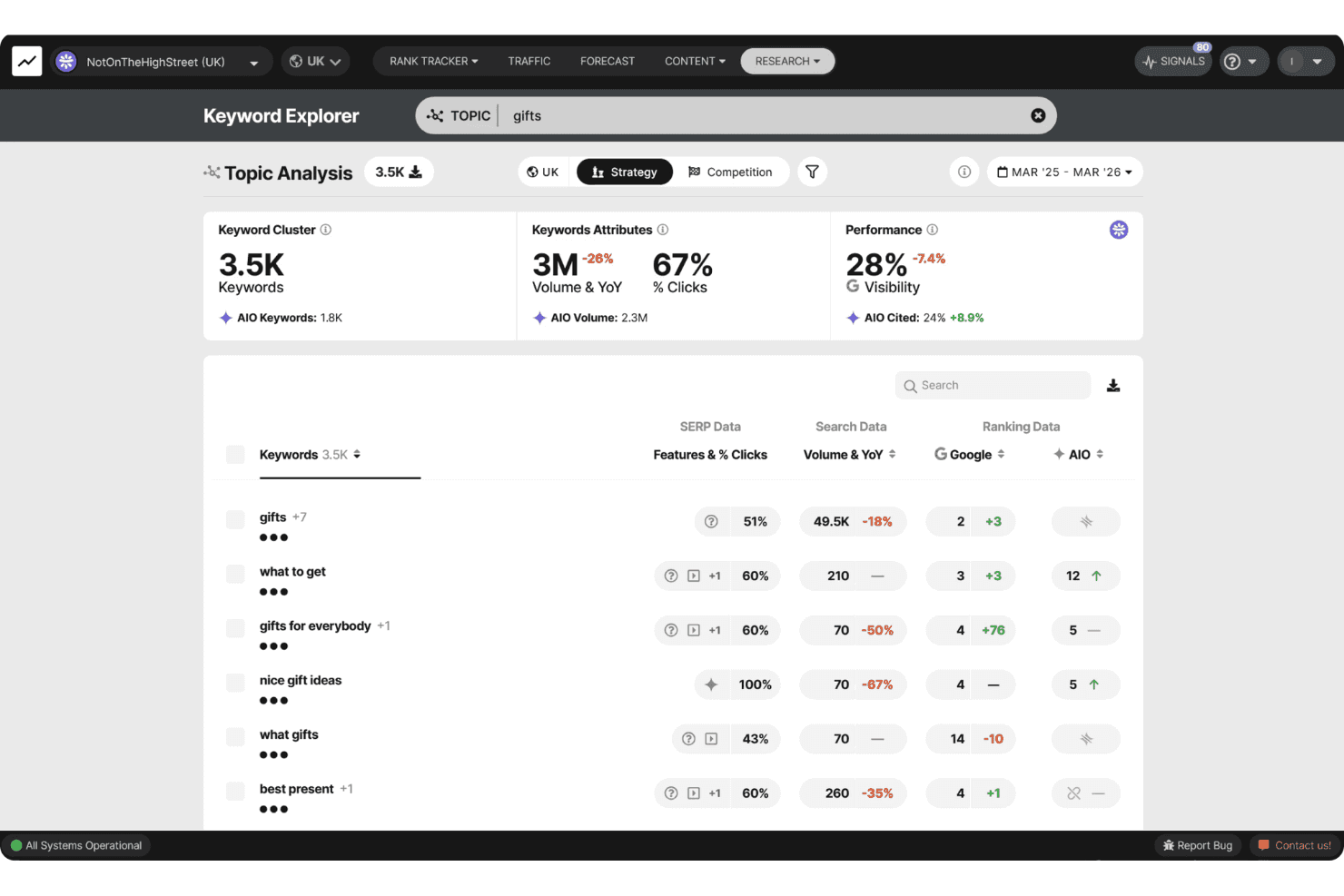
SEOmonitor propose un explorateur de mots-clés avec analyse de sujet, affichant des clusters de mots-clés, le volume de recherche, des indicateurs de visibilité et des données AIO pour le sujet "cadeaux". SEOmonitor est une plateforme SEO axée sur les agences qui combine le suivi du classement des mots-clés sur Google et les moteurs de recherche IA (ChatGPT, Gemini, Perplexity), la recherche de mots-clés, la prévision SEO et la rédaction de contenu par IA dans un seul espace de travail.
À qui s’adresse SEOmonitor ?
SEOmonitor convient particulièrement aux agences SEO qui gèrent plusieurs campagnes clients et qui ont besoin d’une visibilité unifiée sur les classements Google traditionnels ainsi que sur les plateformes de recherche IA.
Pourquoi j’ai choisi SEOmonitor
SEOmonitor mérite sa place dans ma sélection car c’est la seule plateforme que j’ai utilisée qui suit à la fois les classements Google et la visibilité sur les moteurs de recherche IA (ChatGPT, Gemini, Perplexity) dans une même stratégie de mots-clés. Je m’appuie sur la fonctionnalité « Campagnes brouillon » pour élaborer des prévisions SEO prêtes à être présentées aux clients potentiels avant de payer pour un seul mot-clé suivi. Le modèle de CTR combiné Google et IA Overviews montre également comment la recherche IA modifie les taux de clics sur les mots-clés les plus importants pour mes clients.
Fonctionnalités clés de SEOmonitor
- Tableau de bord agence : Surveillez la performance du portefeuille et la santé des clients en un coup d’œil.
- Rédacteur de contenu IA : Automatisez la recherche, la planification, la création de briefs et la rédaction d’articles pour les campagnes clients.
- Coffre à mots-clés : Stockez un nombre illimité de mots-clés avec des mises à jour continues du volume de recherche mensuel pour détecter de nouvelles opportunités.
- Connecteur natif Looker Studio : Créez des rapports SEO visuels et prêts à être transmis aux clients grâce à des flux de données en temps réel.
Intégrations de SEOmonitor
SEOmonitor propose des intégrations natives avec Google Analytics, Google Search Console, Google Sheets et Looker Studio. Une API est disponible pour les intégrations personnalisées.
Pros and Cons
Pros:
- Suit les classements sur Google et sur les moteurs de recherche IA
- Mises à jour quotidiennes du classement pour tous les mots-clés suivis
- Prévisions détaillées pour campagnes multi-clients
Cons:
- Se concentre principalement sur l’analyse de la recherche organique
- Nécessite des outils externes pour le suivi des liens
Learn more about SEOmonitor :
Autres outils SEO pour les agences
\u003cspan data-slate-fragment=\u0022JTVCJTdCJTIyY2hpbGRyZW4lMjIlM0ElNUIlN0IlMjJ0ZXh0JTIyJTNBJTIySGVyZSUyMGFyZSUyMHNvbWUlMjBhZGRpdGlvbmFsJTIwU0VPJTIwdG9vbHMlMjBmb3IlMjBhZ2VuY2llcyUyMG9wdGlvbnMlMjB0aGF0JTIwZGlkbiVFMiU4MCU5OXQlMjBtYWtlJTIwaXQlMjBvbnRvJTIwbXklMjBzaG9ydGxpc3QlMkMlMjBidXQlMjBhcmUlMjBzdGlsbCUyMHdvcnRoJTIwY2hlY2tpbmclMjBvdXQlM0ElMjIlN0QlNUQlMkMlMjJ0eXBlJTIyJTNBJTIycCUyMiUyQyUyMmlkJTIyJTNBJTIybzREY0hObkxCeSUyMiU3RCU1RA==\u0022\u003eVoici quelques autres options d’outils SEO pour les agences qui n’ont pas intégré ma sélection, mais qui méritent tout de même d’être examinées :\u003c/span\u003e
- 11Screaming FrogMeilleur crawl en profondeur pour les audits techniques
- 12SitebulbMeilleures présentations visuelles des données pour les audits techniques
- 13AccuRankerMeilleur suivi des performances LLM en temps réel
- 14WhatagraphMeilleure base de données intercanal évolutive
- 15DashThisMeilleurs tableaux de bord pour les rapports multicanaux
- 16SeobilityIdéal pour des conseils d'optimisation intuitifs
- 17MorningscoreMeilleures listes de tâches ludiques pour le suivi de la progression
- 18NightwatchMeilleur reporting d'attribution pour l'IA et la recherche
- 19SEOptimerMeilleur audit de site web intégrable pour la capture de leads
- 20SEO PowerSuiteMeilleur suivi illimité des mots-clés et des liens retour
Comment j'évalue les outils SEO pour les agences
Je divise mon évaluation entre les fonctionnalités incontournables que toute plateforme d'agence doit couvrir—comme le reporting en marque blanche et les espaces de travail multi-clients—et les éléments différenciateurs qui distinguent les bons outils des excellents.
Fonctionnalités de base (Critères préalables pour cette liste)
Lorsque je sélectionne des outils pour ma liste, j'attribue à chacun une note de 0 (la fonctionnalité n'est pas proposée) à 5 (le service excelle dans ce domaine) pour chaque fonctionnalité essentielle ci-dessous. Ensuite, je calcule le score total sous forme de pourcentage. Chaque outil doit obtenir un score total minimum de 65% pour être pris en considération.
- Gestion multi-clients : Je vérifie si la plateforme permet d'opérer des espaces de travail clients séparés avec des autorisations basées sur les rôles afin que les responsables de comptes ne voient que ce qu'ils doivent.
- Suivi de positionnement : Le suivi quotidien sur les moteurs, emplacements et appareils est primordial—surtout pour les agences gérant des campagnes locales sur des dizaines de marchés en même temps.
- Audit de site : J'évalue la profondeur du crawl et la détection des problèmes, en recherchant des re-crawls programmés qui détectent de nouveaux problèmes techniques avant le prochain point client.
- Analyse de backlinks : L'index de backlinks doit mettre en avant les liens nouveaux ou perdus, les domaines référents et les métriques d'autorité à la fois pour les sites clients et ceux de leurs concurrents.
- Recherche de mots-clés : Je recherche des volumes de recherche, des scores de difficulté et des données SERP suffisamment étendus pour soutenir la découverte de nouveaux mots-clés dans différents secteurs clients.
- Reporting en marque blanche : Les agences ont besoin de rapports automatisés et personnalisés, avec leur propre logo, leurs couleurs et idéalement un portail à domaine personnalisé où les clients peuvent se connecter directement.
Une fois que j'obtiens une liste d'outils répondant à ces critères, j'examine ce qui différencie chaque plateforme.
Facteurs de différenciation (Ce qui distingue les fournisseurs)
Voici comment je compare et distingue les différents fournisseurs :
Fonctionnalités distinctives
Le suivi SEO local est incontournable pour les agences accompagnant des clients multi-sites—je recherche un suivi de positionnement géolocalisé ainsi que la gestion des fiches Google Business Profile. L'optimisation de contenu par IA est précieuse lorsqu'on crée du contenu pour plusieurs secteurs clients. Les briefs de contenu intégrés et les analyseurs de SERP évitent à votre équipe de jongler entre différents outils. Enfin, les analyses en masse permettent d'effectuer des recherches de mots-clés par lot ou des crawls sur l'ensemble du portefeuille clients.
Au-delà des fonctionnalités
Le modèle tarifaire est le premier aspect que j'examine—la tarification par projet, qui évolue de manière prévisible à mesure que vous ajoutez des clients, est préférable à l'achat de multiples licences individuelles. La couverture d'intégration compte tout autant. Les connexions natives à Google Search Console, GA4 et Looker Studio sont essentielles, mais je vérifie aussi les liens CRM vers des outils comme HubSpot ou Asana. La fiabilité des données est également décisive ; un vaste index de backlinks et des mises à jour quotidiennes fiables du positionnement distinguent les outils auxquels vous pouvez confier les livrables clients de ceux à éviter.
Comment choisir des outils SEO pour les agences
Il est facile de se perdre dans de longues listes de fonctionnalités et des structures tarifaires complexes. Pour vous aider à rester concentré pendant votre processus unique de sélection de logiciels, voici une liste de critères à garder à l’esprit :
| Critère | Points à prendre en compte |
|---|---|
| CritèreÉvolutivité | Points à prendre en compteL’outil pourra-t-il s’adapter à la croissance des clients ou aux changements de la structure de votre agence sans effort manuel supplémentaire ni mauvaise surprise sur la facturation ? |
| CritèreIntégrations | Points à prendre en compteSe connecte-t-il aux plateformes d’analyse, de création de rapports et de gestion des flux de travail que votre équipe et vos clients utilisent déjà ? |
| CritèrePersonnalisation | Points à prendre en compteLes tableaux de bord, les rapports et les rôles des utilisateurs peuvent-ils être entièrement adaptés aux besoins de chaque client, ou devez-vous composer avec des modèles imposés par le fournisseur ? |
| CritèreFacilité d’utilisation | Points à prendre en compteVotre équipe et vos clients pourront-ils rapidement prendre l’outil en main, ou une courbe d’apprentissage abrupte créera-t-elle des difficultés et un travail d’intégration supplémentaire ? |
| CritèreMise en œuvre et intégration | Points à prendre en compteCombien de temps prendra la configuration ? Le fournisseur propose-t-il une documentation, une assistance en direct ou une aide à la migration des données pour vous permettre de démarrer dans de bonnes conditions ? |
| CritèreCoût | Points à prendre en compteAu-delà du tarif affiché, des frais supplémentaires s’appliquent-ils aux comptes clients, aux exportations de données, aux rapports personnalisés à votre marque ou à des limites de données plus élevées ? |
| CritèreMesures de sécurité | Points à prendre en comptePouvez-vous faire confiance à la plateforme pour traiter les données de performance et les ressources sensibles de vos clients ? Propose-t-elle des contrôles d’accès, des sauvegardes de données et des normes de sécurité clairement définies ? |
| CritèreDisponibilité de l’assistance | Points à prendre en compteUne assistance en direct ou prioritaire est-elle proposée lorsque vous travaillez sur des livrables clients dans des délais serrés, ou risquez-vous de devoir vous débrouiller seul si un problème survient ? |
Que sont les outils SEO pour les agences ?
Les outils SEO pour les agences sont des plateformes spécialisées qui vous permettent de gérer plusieurs campagnes clients, d’automatiser le suivi des positions et de fournir des rapports en marque blanche à grande échelle. Ces outils sont conçus pour les flux de travail des agences et proposent des tableaux de bord multi-clients, des contrôles des autorisations utilisateurs ainsi que des fonctionnalités d’audit avancées pour vous aider à répondre aux exigences de la gestion de programmes SEO complexes dans divers secteurs et portefeuilles clients.
Fonctionnalités
Lorsque vous sélectionnez des outils SEO pour les agences, prêtez attention aux principales fonctionnalités suivantes :
- Gestion multi-clients : Gérez des projets clients distincts, contrôlez les autorisations utilisateurs et empêchez le mélange des données entre les comptes afin d’optimiser les opérations de l’agence.
- Rapports en marque blanche : Générez des rapports et des tableaux de bord personnalisables et aux couleurs de votre marque, qui renforcent l’identité de votre agence lors de la présentation des résultats aux clients.
- Audit complet des sites : Analysez automatiquement les sites web des clients afin de détecter les erreurs techniques de SEO, les problèmes sur les pages et les possibilités d’optimisation, avec des recommandations détaillées et concrètes.
- Recherche et suivi des mots-clés : Découvrez des opportunités de mots-clés à forte valeur, suivez les positions sur plusieurs moteurs de recherche, zones géographiques et appareils, et analysez les évolutions des pages de résultats des moteurs de recherche.
- Analyse des backlinks : Surveillez les profils de liens entrants, identifiez les nouveaux liens et ceux qui ont été perdus, évaluez les domaines référents et analysez les stratégies de liens des concurrents afin d’obtenir des informations complètes sur le SEO hors page.
- Outils de SEO local : Suivez les positions propres à chaque zone géographique, surveillez les fiches locales et gérez les profils d’établissement Google dans plusieurs emplacements clients pour les entreprises axées sur la visibilité dans les recherches locales.
- Outils d’analyse en masse : Effectuez des vérifications groupées de mots-clés, des audits de backlinks et des explorations de sites afin de traiter efficacement d’importants volumes de données pour plusieurs clients dans un même flux de travail.
- Contrôles d’accès basés sur les rôles : Définissez les rôles et les autorisations des membres de l’équipe et des clients afin que chacun ne voie que les données et les outils correspondant à ses responsabilités.
- Planification et automatisation des rapports : Configurez l’envoi automatisé de rapports de performance et de tableaux de bord récurrents aux clients, ce qui vous fait gagner du temps et réduit les tâches de reporting manuel.
- Intégrations avec les plateformes marketing : Connectez-vous aux outils d’analyse, de publicité et de gestion de la relation client afin d’unifier les rapports SEO au sein des opérations marketing plus larges de votre agence.
Avantages
La mise en œuvre d’outils SEO pour les agences offre plusieurs avantages à votre équipe et à votre entreprise. Voici quelques-uns de ceux dont vous pouvez bénéficier :
- Gestion simplifiée des clients : Des espaces de travail dédiés et des autorisations utilisateurs vous permettent d’organiser, de suivre et de servir facilement plusieurs clients, sans chevauchement ni confusion des données.
- Fidélisation renforcée des clients : Les rapports automatisés en marque blanche et les tableaux de bord aux couleurs de votre marque vous aident à démontrer une valeur continue et à renforcer l’image professionnelle de votre agence.
- Opérations SEO à grande échelle : L’analyse en masse et l’automatisation des flux de travail permettent à votre équipe de gérer d’importants volumes d’audits, de suivi des positions et de recherches dans des portefeuilles clients variés.
- Amélioration des performances des campagnes : Les audits complets des sites, le suivi des mots-clés et l’analyse des backlinks fournissent des informations exploitables pour optimiser les stratégies de chaque client et obtenir des résultats mesurables.
- Cycles de reporting plus rapides : La planification automatisée des rapports élimine les extractions manuelles de données et fournit aux clients des mises à jour fréquentes et précises avec un minimum d’efforts.
- Collaboration et transparence accrues : Les contrôles d’accès basés sur les rôles et les tableaux de bord partageables favorisent la confiance, facilitent une communication claire et permettent à chacun de rester aligné sur l’avancement des campagnes.
- Meilleure harmonisation de la pile technologique : Les intégrations avec les outils d’analyse, de gestion de la relation client et les plateformes marketing unifient le travail SEO de votre agence au sein des rapports et des flux de travail clients plus larges.
Coûts & tarification
La sélection d’outils SEO pour les agences nécessite de comprendre les différents modèles et forfaits tarifaires disponibles. Les coûts varient en fonction des fonctionnalités, de la taille de l’équipe, des modules complémentaires et d’autres facteurs. Le tableau ci-dessous résume les forfaits courants, leurs prix moyens et les fonctionnalités généralement incluses dans les solutions d’outils SEO pour les agences :
Tableau comparatif des forfaits pour les outils SEO destinés aux agences
| Type de forfait | Prix moyen | Fonctionnalités courantes |
|---|---|---|
| Type de forfaitForfait gratuit | Prix moyen$0 | Fonctionnalités courantesSuivi limité des mots-clés, audits de base, rapports minimaux et accès pour un seul utilisateur. |
| Type de forfaitForfait personnel | Prix moyen$25-$75/utilisateur/mois | Fonctionnalités courantesSuivi étendu du classement, recherche de mots-clés, audits de site standard, exportation de rapports et assistance par e-mail. |
| Type de forfaitForfait professionnel | Prix moyen$100-$300/mois | Fonctionnalités courantesEspaces de travail pour plusieurs clients, rapports en marque blanche, analyse groupée, accès à l’API, intégrations et contrôles d’équipe. |
| Type de forfaitForfait entreprise | Prix moyen$500+/mois | Fonctionnalités courantesGestion illimitée des clients, automatisation avancée, accords de niveau de service personnalisés, accompagnement initial dédié et assistance premium. |
FAQ sur les outils SEO pour les agences
Voici quelques réponses aux questions courantes sur les outils SEO pour les agences :
Comment les outils SEO pour les agences aident-ils à gérer plusieurs clients ?
Ils vous permettent de créer des espaces de travail distincts, de définir des autorisations fondées sur les rôles et d’organiser des campagnes afin de gérer en toute sécurité et efficacement des dizaines de comptes clients depuis une seule plateforme. Les fonctionnalités SEO intégrées permettent aux professionnels du SEO de mieux équilibrer les tâches SEO quotidiennes, du suivi d’un sitemap à l’exécution du SEO on-page, sans perdre de vue les objectifs de chaque compte ni les indicateurs de référence de la stratégie SEO à long terme.
Les outils SEO pour les agences peuvent-ils automatiser les rapports clients ?
Oui, la plupart proposent des rapports automatisés en marque blanche qui planifient les mises à jour destinées aux clients, intègrent l’identité visuelle de votre agence et réduisent les extractions manuelles de données chaque mois. Cela contribue à démontrer la valeur de vos efforts SEO, en montrant précisément aux clients comment les informations fondées sur l’IA et la création de contenu stratégique contribuent à obtenir les premières positions dans les moteurs de recherche. Vous pouvez même créer un tableau de bord interactif pour présenter clairement vos rapports SEO.
Quelles intégrations rechercher dans les outils SEO destinés aux agences ?
Recherchez des connexions directes à des plateformes d’analyse comme Google Analytics 4 et Google Search Console (GSC), ainsi que des intégrations avec les outils de gestion de projet et de CRM utilisés dans le flux de travail de votre agence. Si vous gérez un marketing de contenu complet ou lancez des campagnes payantes, privilégiez les outils qui se connectent à vos tableaux de bord PPC, à vos outils de suivi des réseaux sociaux et à vos logiciels de prospection, afin de conserver toutes vos données au même endroit.
Le partage de données clients sensibles sur ces plateformes présente-t-il des risques de sécurité ?
Non, les fournisseurs réputés proposent des contrôles d’accès, une séparation des données et un chiffrement pour protéger les informations sensibles. Que vos clients soient de petites entreprises ou de grandes marques, ces protections permettent aux débutants comme aux équipes techniques avancées de collaborer en toute sécurité sur des configurations en arrière-plan, comme le balisage de données structurées, sans exposer de données d’entreprise sensibles ni compromettre l’intégrité de leurs configurations SEO actives.
Comment les agences doivent-elles comparer les tarifs des plateformes SEO ?
Comparez les coûts totaux en fonction du nombre de clients, des mots-clés suivis, des crédits d’exploration et des sièges utilisateurs ; ne vous contentez pas d’examiner le tarif de base, car les frais de dépassement et les modules complémentaires peuvent rapidement s’accumuler. Assurez-vous que l’abonnement inclut les outils spécifiques dont vous avez besoin pour produire du contenu SEO de haute qualité, afin de ne pas être contraint d’acheter ultérieurement des logiciels distincts.