

Revue de Mangools KWFinder : Avantages, Inconvénients, Fonctionnalités et Tarification Expliqués
Je vais droit au but — voici comment Mangools KWFinder fournit des données de mots-clés exploitables pour une véritable croissance SEO, sans vous submerger d’informations inutiles ou de complexité.

Nous évaluons les outils de manière indépendante, et les commissions aident à financer nos tests. Consultez notre politique de transparence, notre méthodologie ou suggérez un outil.
Mangools KWFinder is a keyword research SEO tool built for marketers who need accurate keyword difficulty scores, search volume data, and SERP analysis without learning a complex platform. It's worth considering if keyword research is your primary focus and you don't need a full suite of technical auditing or backlink analysis features. Compared to Ahrefs, KWFinder is significantly more affordable and easier to get into quickly—making it a practical choice for content teams and smaller marketing operations that need reliable keyword data without the enterprise price tag.
Mangools KWFinder Evaluation Summary
4.7/5
- From $18.85/month (billed annually)
- Free plan available
Pourquoi faire confiance à nos recommandations de logiciels
6,700+
Reviews
20
Industry experts
16+
Evaluation factors
14
Years
Notre équipe teste et évalue des logiciels depuis 2012. En tant que leaders marketing nous-mêmes, nous savons à quel point il est difficile — et important — de choisir le bon logiciel.
Pour ce guide, nous avons évalué les outils grâce à des tests pratiques et une recherche indépendante, en notant les outils selon nos critères de sélection.
Nos avis reflètent notre jugement éditorial humain, et non un argumentaire de vente.
Réviseurs experts:
 Gui DrusinaDirecteur de la création
- Shriya GhateSenior Marketing Lead
 Amanda JacquesResponsable Marketing Ops

Mangools KWFinder Overview
When I'm judging SEO tools for usability and value, I find Mangools KWFinder stands out for its user-friendly interface, fast onboarding, and focused keyword research features at a fair price. It can't match the deep integrations or advanced reporting some pricier solutions offer, but if you're choosing for small marketing teams or solo marketers, it nails the essentials. I think beginners or growing teams will appreciate not getting lost in endless settings or cluttered dashboards. If straightforward keyword data and intuitive design matter most in your selection, Mangools KWFinder is a strong choice.
Pros
- Accurate local keyword suggestions with reliable search volumes
- SERP analysis includes historical ranking data for keywords
- Transparent pricing without hidden data limits or upsells
Cons
- No site auditing or backlink tracking features included
- Daily keyword lookup limits may restrict heavy use
- High-volume users report slower data refresh rates
Is Mangools KWFinder Right For Your Needs?
Who Would be a Good Fit for Mangools KWFinder?
Mangools KWFinder is ideal for marketers, bloggers, content teams, and small businesses seeking straightforward keyword research, fast onboarding, and local search targeting. It appeals to SEO agencies, freelancers, and in-house teams who want actionable keyword insights and a clear, affordable interface—without the complexity or high cost of larger tools.
- Freelance MarketersKWFinder's user-friendly onboarding and affordable plans enable freelancers to quickly identify keyword opportunities for multiple clients or projects, without significant upfront investments.
- Local BusinessesLocal search filters and geo-targeted keyword data help small businesses discover terms their nearby customers use, increasing their ability to attract targeted traffic.
- Content WritersEasy-to-use keyword and SERP analysis tools empower writers to craft articles around keywords with realistic ranking potential, improving content calendars and SEO impact.
- Solo EntrepreneursSolo founders or small startup teams benefit from KWFinder’s intuitive workflows and concise keyword lists to kickstart website growth.
- Small Marketing TeamsCompact teams get an easy workspace with scalable usage limits, letting them focus on keyword research without managing complex SEO tools.
- Digital AgenciesAgencies working with different clients appreciate fast domain analysis, export features, and simple project organization, making KWFinder a time-saver for multi-client management.
Who Would be a Bad Fit for Mangools KWFinder?
Mangools KWFinder is less suitable for those requiring technical audits, large-scale competitor analysis, or advanced link analysis. Enterprise brands, technical SEO professionals, high-volume ecommerce, and data-driven teams will find it too basic if they need all-in-one SEO platforms, extensive automation, or broad data integrations.
- Large EnterprisesCompanies needing complex SEO, large data volume handling, advanced audits, or robust reporting will find KWFinder's functionality too limited.
- International EcommerceBusinesses operating global stores with thousands of products need deep technical SEO and advanced automation, which are beyond KWFinder’s scope.
- Technical SEO SpecialistsProfessionals wishing to analyze crawl data, indexation, and site errors will require more diagnostic features than KWFinder offers.
- Data AnalystsThose who want granular data exports, custom analytics, or API-driven processes will outgrow KWFinder’s simpler data and reporting options.
- In-House SEO EngineersTeams building custom automations or needing third-party integrations will be hampered by the lack of API and limited data connection capabilities.
- Enterprise Content TeamsContent teams in large organizations seeking workflow automation, advanced planning tools, and multi-seat controls will find KWFinder lacking.
Comment nous testons et évaluons les outils
Nous avons passé des années à construire, affiner et améliorer notre système de test et de notation des logiciels. Notre grille d’évaluation est conçue pour prendre en compte toutes les nuances du choix logiciel et ce qui rend un outil efficace, en mettant l’accent sur les aspects critiques du processus de décision. Ci-dessous, vous pouvez découvrir précisément comment nos tests et notations fonctionnent selon sept critères. Cela nous permet d’offrir une évaluation impartiale des logiciels en fonction de la fonctionnalité principale, des fonctionnalités différenciantes, de la facilité d’utilisation, de l’onboarding, du support client, des intégrations, des avis clients et du rapport qualité-prix.
Fonctionnalité principale (25% de la note finale)
Le point de départ de notre évaluation est toujours la fonctionnalité principale de l’outil. Dispose-t-il des fonctions de base attendues ? Certaines de ces fonctionnalités sont-elles bloquées dans des offres tarifaires supérieures ? Nous attendons d’un outil qu’il soit à la hauteur des capacités fondamentales de ses concurrents.
Fonctionnalités différenciantes (25% de la note finale)
Ensuite, nous évaluons les fonctionnalités spéciales qui vont au-delà de ce que l’on trouve habituellement chez ce type d’outils. Un score élevé indique des fonctionnalités uniques ou spécialisées qui rendent le produit plus rapide, plus efficace, ou offrent une valeur ajoutée à l’utilisateur. Nous évaluons également la facilité d’intégration avec d’autres outils couramment utilisés pour élargir les possibilités et l’utilité du logiciel. Les outils offrant de nombreuses intégrations natives, des connexions tierces et un accès API pour bâtir des intégrations personnalisées obtiennent les meilleures notes.
Facilité d’utilisation (10% de la note finale)
Nous considérons la rapidité et la facilité d’exécution des tâches principales via l’outil. Les logiciels les mieux notés sont bien conçus, intuitifs à utiliser, proposent des applications mobiles, des modèles prêts à l’emploi, et simplifient des tâches parfois complexes.
Onboarding (10% de la note finale)
Nous savons combien l’adoption rapide par l’équipe est cruciale pour une nouvelle plateforme. Nous évaluons donc la facilité avec laquelle il est possible d’apprendre et d’utiliser un outil sans formation poussée. On mesure aussi la vitesse à laquelle un membre de l’équipe peut être opérationnel, sans expérience préalable. Les solutions bien notées requièrent peu ou pas d’assistance.
Support client (10% de la note finale)
Nous examinons la rapidité et la facilité avec lesquelles on peut obtenir de l’aide par téléphone, chat en direct ou base de connaissances. Les outils et sociétés offrant un support en temps réel sont favorisés ; les chatbots sont pénalisés.
Avis clients (10% de la note finale)
Au-delà de nos propres tests et évaluations, nous prenons en compte le score de recommandation nette des clients actuels et passés. Nous étudions leur propension, si l’occasion se présente, à réutiliser l’outil pour sa fonctionnalité principale. Un score élevé reflète donc un bon taux de recommandation.
Rapport qualité-prix (10% de la note finale)
Enfin, après avoir pris en compte tous les autres critères, nous confrontons le prix moyen des offres de base aux fonctionnalités principales et prenons en compte la valeur apportée par les autres éléments d’évaluation. Les logiciels qui offrent plus pour moins obtiennent une note supérieure.
Core Features
Keyword Research
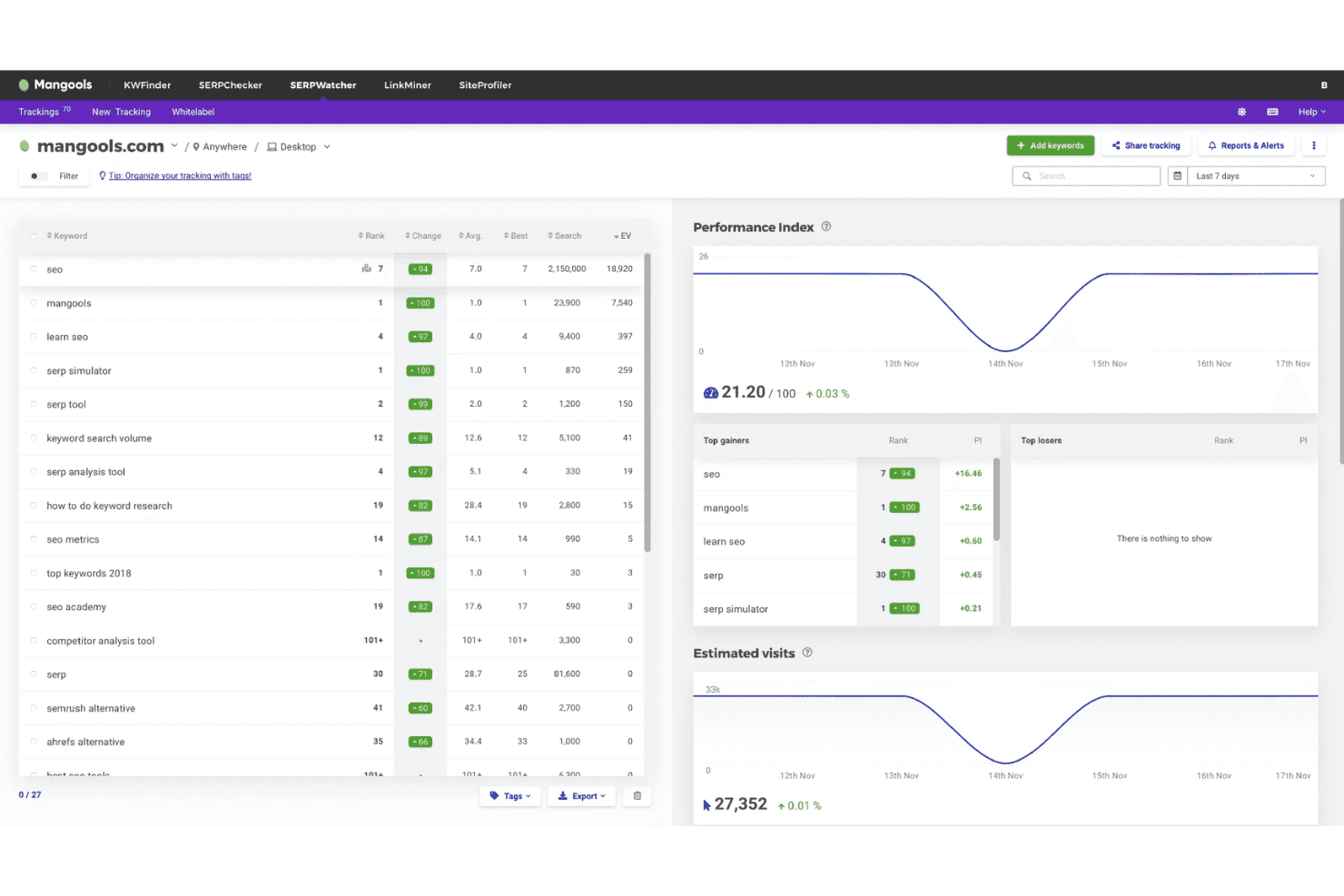
Get rich keyword ideas with precise monthly search volumes. Filter by location and language for actionable local targeting.
SERP Analysis
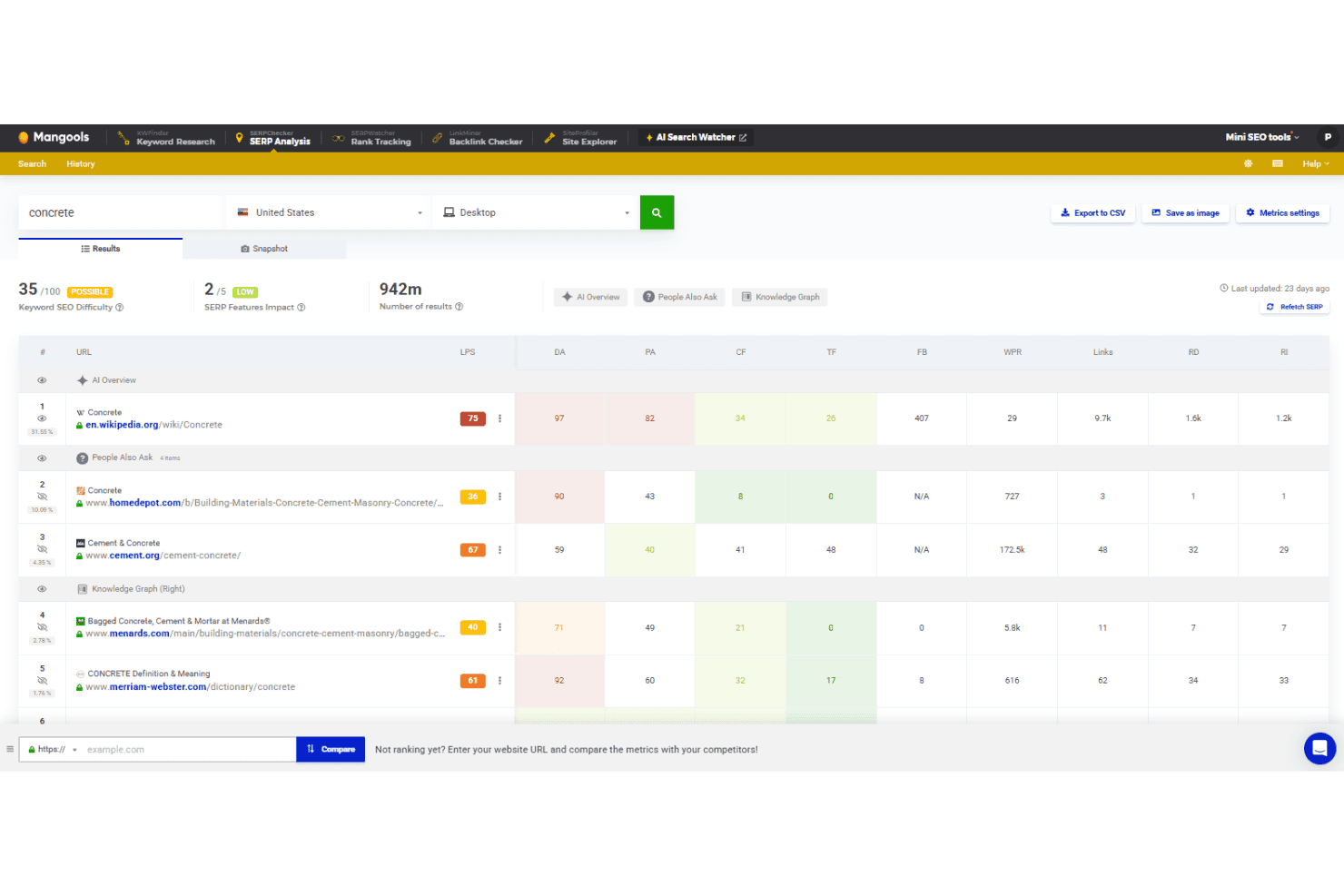
View the top 10 search engine results for any keyword. Assess keyword difficulty scores alongside real-time SERP metrics.
Search Volume Trend
Visualize historical keyword trends to spot seasonality or shifts. Graphs help you quickly judge which keywords are gaining traction.
Competitor Keyword Lookup
Enter any domain to see the keywords it ranks for. Instantly benchmark your targets against competitor strengths and gaps.
Keyword Lists
Save and categorize important keywords into lists for future campaigns. Manage research efficiently and revisit top opportunities anytime.
Google Suggest Integration
Explore hundreds of long-tail keywords pulled directly from search engine suggestions. Uncover new content topics and high-potential keyword variations.
Ease of Use
Mangools KWFinder is one of the most user-friendly SEO tools to pick up, thanks to its clean dashboard, color-coded difficulty scores, and step-by-step onboarding. I see many users call out how quickly they can dive into keyword research or export lists, making it especially usable for beginners or teams who hate cluttered, jargon-heavy software.
Integrations
Mangools KWFinder integrates with Slack. At this time, Slack is the main native integration promoted for Mangools KWFinder, and no other direct integrations are listed.
However, it does offer free API access that is useful for many tools under the Mangools umbrella, including SERPChecker and SiteProfiler.

Mangools KWFinder Specs
- API: Yes
- Audience Targeting: Yes
- Brand Management: Yes
- Conversion Tracking: Yes
- Dashboard: Yes
- Data Export: Yes
- Data Import: Yes
- Data Visualization: Yes
- External Integrations: Yes
- Keyword Tracking: Yes
- Link Tracking: Yes
- Marketing Automation: Yes
- Multi-Account: Yes
- Multi-User: Yes
- Notifications: Yes
- Social-Media Integration: Yes


