

Avis sur EmailOctopus 2026 : avantages, inconvénients, fonctionnalités et tarifs
I separate EmailOctopus’s practical strengths from its trade-offs so you can decide whether its features and pricing fit the way you market.

Nous évaluons les outils de manière indépendante, et les commissions aident à financer nos tests. Consultez notre politique de transparence, notre méthodologie ou suggérez un outil.
EmailOctopus is email marketing software for teams that need to send newsletters, manage subscriber lists, and set up email automations on a modest budget. I’d choose it over Mailchimp when you want core email campaign tools and straightforward pricing without a broader marketing suite.
EmailOctopus Evaluation Summary
4.8/5
- From $9/month (billed annually)
- Free plan available
Pourquoi faire confiance à nos recommandations de logiciels
6,700+
Reviews
20
Industry experts
16+
Evaluation factors
14
Years
Notre équipe teste et évalue des logiciels depuis 2012. En tant que leaders marketing nous-mêmes, nous savons à quel point il est difficile — et important — de choisir le bon logiciel.
Pour ce guide, nous avons évalué les outils grâce à des tests pratiques et une recherche indépendante, en notant les outils selon nos critères de sélection.
Nos avis reflètent notre jugement éditorial humain, et non un argumentaire de vente.
Réviseurs experts:
 Gui DrusinaDirecteur de la création
- Shriya GhateSenior Marketing Lead
 Amanda JacquesResponsable Marketing Ops

EmailOctopus Overview
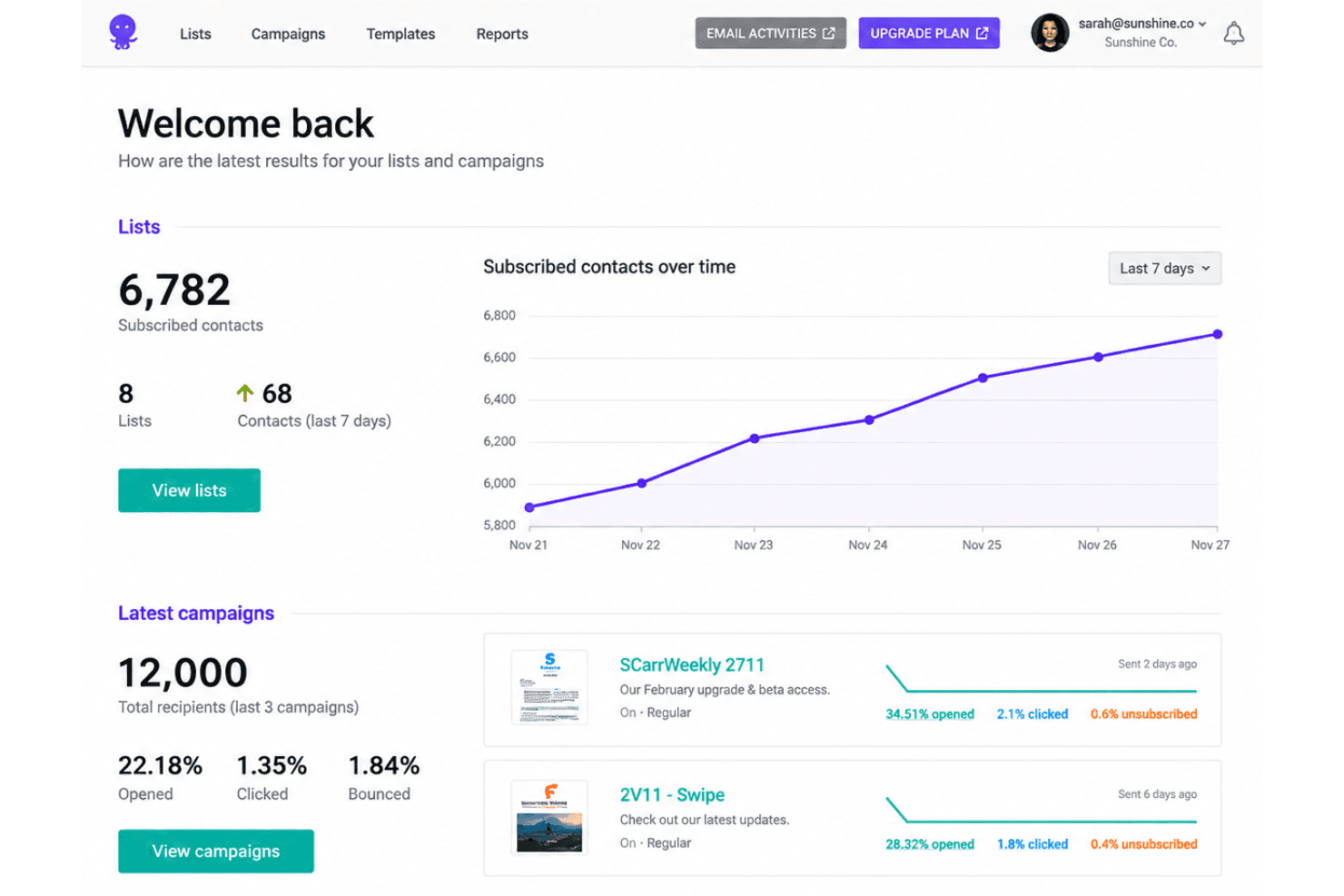
I’d choose EmailOctopus when you want affordable, straightforward email marketing rather than a broad marketing suite. Its free plan supports up to 2,500 subscribers and 10,000 monthly emails, while the editor, 100-plus templates, forms, landing pages, segments, and automations cover common newsletter and welcome-series needs. Integrations with more than 1,000 apps and a simple self-service setup make onboarding approachable; support is available, with priority support on Pro. Compared with more expansive platforms, it offers less scope for cross-channel marketing, so I’d select it for small teams, creators, and businesses focused on email campaigns.
Pros
- The free tier covers 2,500 subscribers and 10,000 monthly emails.
- Users praise its affordable pricing and responsive human support.
- Templates, segmentation, forms, and automations cover routine newsletter campaigns.
Cons
- Automation lacks behavioral triggers for clicks, opens, and ecommerce events.
- Free-plan campaign reports expire after 30 days.
- Reviewers report limited template variety and restrictive editor formatting.
Is EmailOctopus Right For Your Needs?
Who Would be a Good Fit for EmailOctopus?
EmailOctopus suits smaller teams and email-first use cases that need straightforward campaign tools, forms, segmentation, and welcome automations. Its free and paid plans offer flexibility for growing subscriber lists. It’s a good option for teams that prioritize affordability and ease of setup over extensive customization or advanced features.
- Small NewslettersNewsletter publishers with up to 2,500 subscribers can use the free plan’s 10,000 monthly emails and templates for routine sends.
- Solo CreatorsSolo creators can collect subscribers with a form or landing page and use a welcome automation without taking on a broad marketing suite.
- Small EcommerceSmall ecommerce teams can connect Shopify through Zapier and use EmailOctopus for email campaigns without requiring a direct Shopify integration.
- Local ServicesLocal service businesses can use forms to build an email list and segments to organize subscribers for routine campaigns.
- Lean Marketing TeamsSmall marketing teams can manage segments and welcome automations through a straightforward interface suited to everyday email work.
- Early-Stage StartupsStartups watching software costs can begin with the free plan and move to Pro for unlimited forms, landing pages, and users.
Who Would be a Bad Fit for EmailOctopus?
EmailOctopus is a weaker choice when your team needs deep automation, extensive design control, or capabilities beyond straightforward email campaigns. Reviewers report limited template variety and restrictive editor formatting, and the available integrations include Zapier, an API, and tools such as Make. Consider another option if those constraints conflict with your workflow or if you need a broader marketing suite.
- Enterprise MarketingEnterprise teams that need a broad marketing suite may find EmailOctopus’s focus on straightforward email campaigns too limited for their requirements.
- Lifecycle TeamsTeams building complex lifecycle journeys may outgrow EmailOctopus because its feature set is less suited to deep automation.
- Design-Led BrandsBrands that need precise control over campaign layouts may find the editor’s restrictive formatting and limited template variety frustrating.
- Omnichannel DepartmentsDepartments coordinating email with other marketing channels should consider whether an email-focused tool fits their cross-channel workflow.
- Integration-Heavy TeamsTeams that require many direct integrations may find the listed options limiting, since Shopify connects through Zapier and other options include an API and Make.
- Advanced AutomationMarketers who depend on extensive automation beyond welcome sequences may find EmailOctopus’s simpler automation capabilities insufficient.
Comment nous testons et évaluons les outils
Nous avons passé des années à construire, affiner et améliorer notre système de test et de notation des logiciels. Notre grille d’évaluation est conçue pour prendre en compte toutes les nuances du choix logiciel et ce qui rend un outil efficace, en mettant l’accent sur les aspects critiques du processus de décision. Ci-dessous, vous pouvez découvrir précisément comment nos tests et notations fonctionnent selon sept critères. Cela nous permet d’offrir une évaluation impartiale des logiciels en fonction de la fonctionnalité principale, des fonctionnalités différenciantes, de la facilité d’utilisation, de l’onboarding, du support client, des intégrations, des avis clients et du rapport qualité-prix.
Fonctionnalité principale (25% de la note finale)
Le point de départ de notre évaluation est toujours la fonctionnalité principale de l’outil. Dispose-t-il des fonctions de base attendues ? Certaines de ces fonctionnalités sont-elles bloquées dans des offres tarifaires supérieures ? Nous attendons d’un outil qu’il soit à la hauteur des capacités fondamentales de ses concurrents.
Fonctionnalités différenciantes (25% de la note finale)
Ensuite, nous évaluons les fonctionnalités spéciales qui vont au-delà de ce que l’on trouve habituellement chez ce type d’outils. Un score élevé indique des fonctionnalités uniques ou spécialisées qui rendent le produit plus rapide, plus efficace, ou offrent une valeur ajoutée à l’utilisateur. Nous évaluons également la facilité d’intégration avec d’autres outils couramment utilisés pour élargir les possibilités et l’utilité du logiciel. Les outils offrant de nombreuses intégrations natives, des connexions tierces et un accès API pour bâtir des intégrations personnalisées obtiennent les meilleures notes.
Facilité d’utilisation (10% de la note finale)
Nous considérons la rapidité et la facilité d’exécution des tâches principales via l’outil. Les logiciels les mieux notés sont bien conçus, intuitifs à utiliser, proposent des applications mobiles, des modèles prêts à l’emploi, et simplifient des tâches parfois complexes.
Onboarding (10% de la note finale)
Nous savons combien l’adoption rapide par l’équipe est cruciale pour une nouvelle plateforme. Nous évaluons donc la facilité avec laquelle il est possible d’apprendre et d’utiliser un outil sans formation poussée. On mesure aussi la vitesse à laquelle un membre de l’équipe peut être opérationnel, sans expérience préalable. Les solutions bien notées requièrent peu ou pas d’assistance.
Support client (10% de la note finale)
Nous examinons la rapidité et la facilité avec lesquelles on peut obtenir de l’aide par téléphone, chat en direct ou base de connaissances. Les outils et sociétés offrant un support en temps réel sont favorisés ; les chatbots sont pénalisés.
Avis clients (10% de la note finale)
Au-delà de nos propres tests et évaluations, nous prenons en compte le score de recommandation nette des clients actuels et passés. Nous étudions leur propension, si l’occasion se présente, à réutiliser l’outil pour sa fonctionnalité principale. Un score élevé reflète donc un bon taux de recommandation.
Rapport qualité-prix (10% de la note finale)
Enfin, après avoir pris en compte tous les autres critères, nous confrontons le prix moyen des offres de base aux fonctionnalités principales et prenons en compte la valeur apportée par les autres éléments d’évaluation. Les logiciels qui offrent plus pour moins obtiennent une note supérieure.
Core Features
Email Campaign Editor
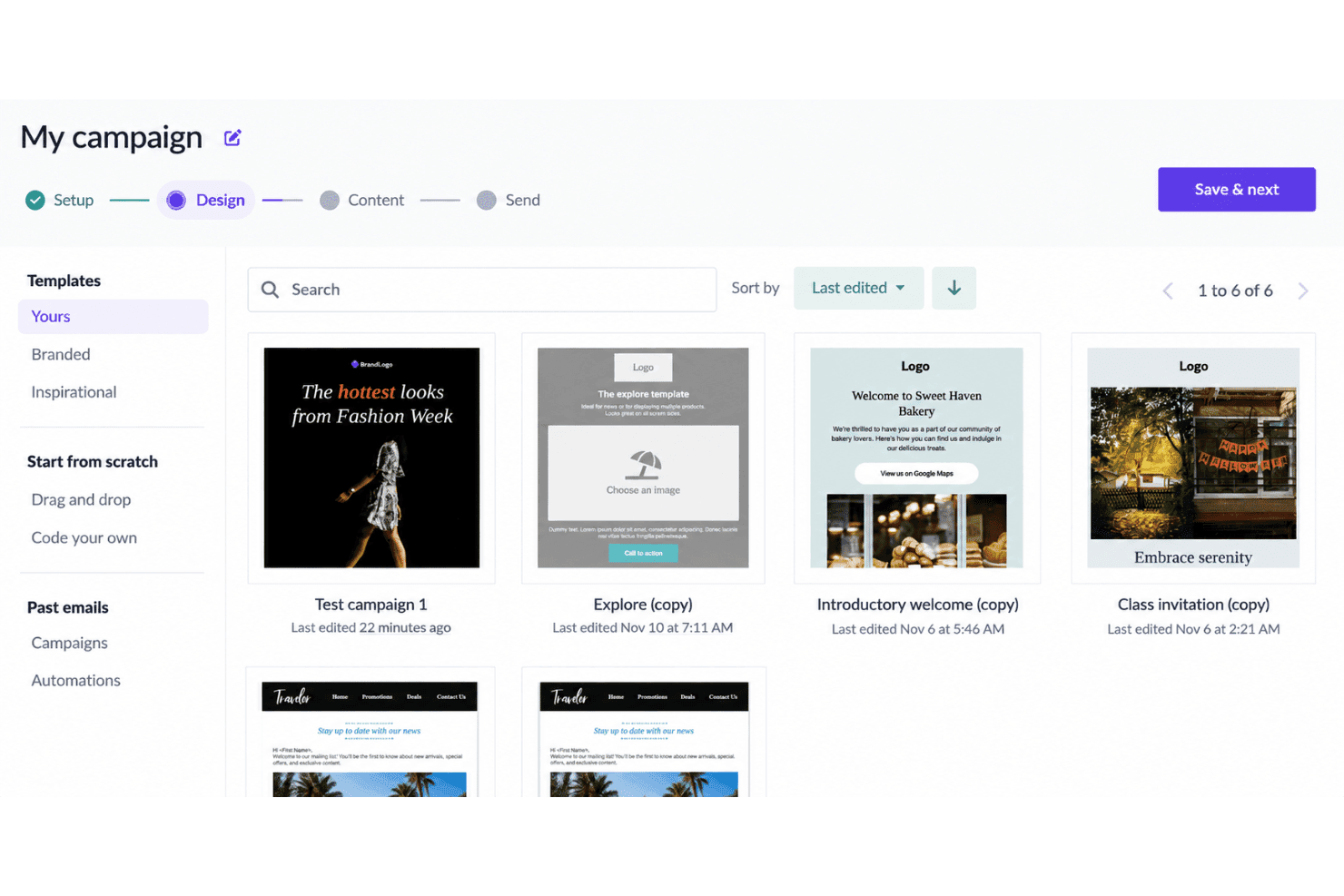
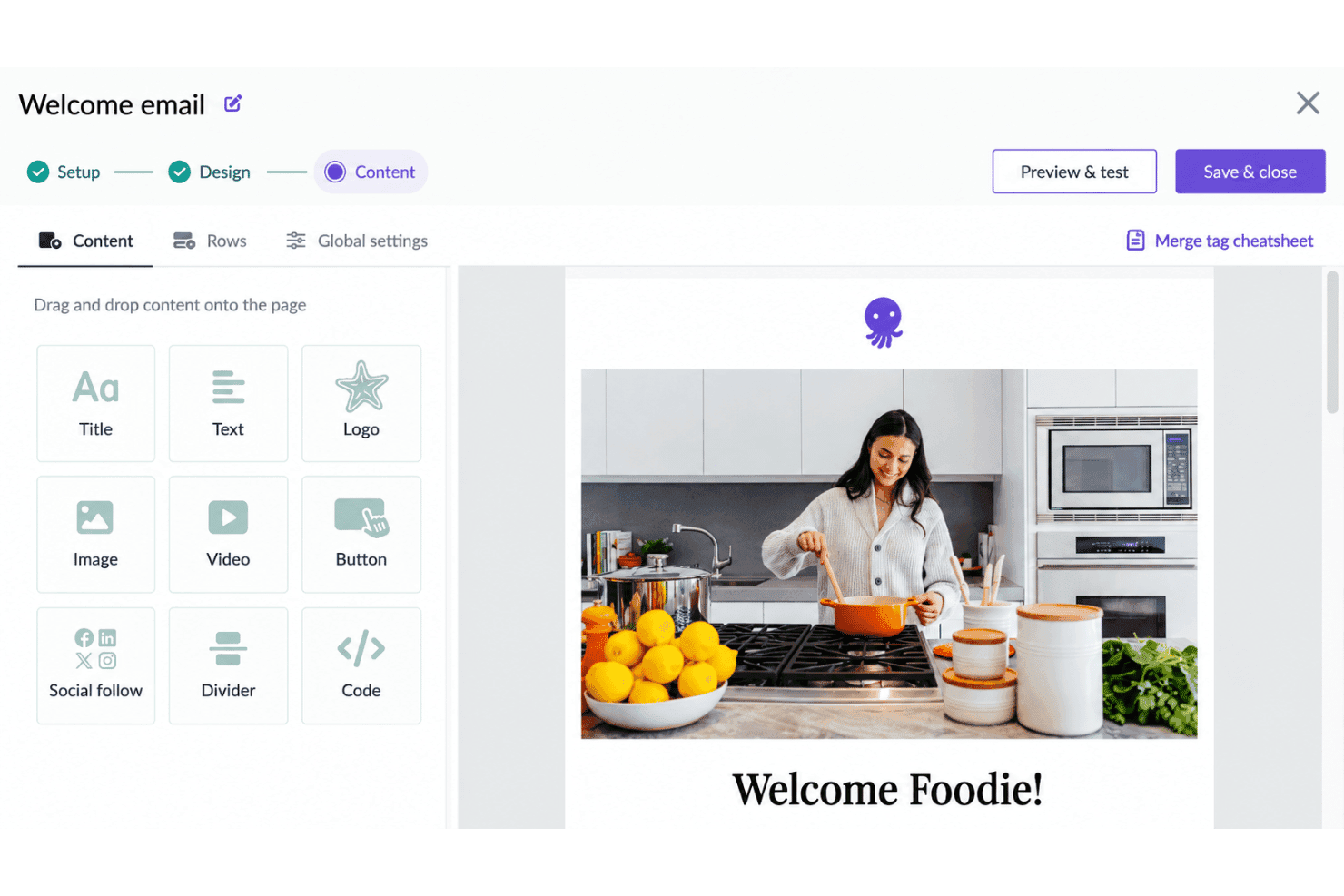
The editor lets you create email campaigns, while templates give you a starting point for newsletter layouts. This suits teams that want to build routine campaigns without designing each email from scratch.
Email Templates
EmailOctopus offers more than 100 templates for common campaign formats. You can choose a layout for a newsletter or announcement, though reviewers report limited variety and restrictive formatting.
Subscriber Lists
You can manage subscriber lists in EmailOctopus and use them to organize your email audience. This gives your team a place to maintain the subscribers you plan to reach with campaigns.
Audience Segmentation
Segmentation lets you group subscribers for targeted campaigns. For example, you can send a newsletter to a selected segment instead of your entire list.
Signup Forms And Landing Pages
EmailOctopus includes forms and landing pages for collecting subscribers. You can use them to give people a way to join your list from a signup page.
Email Automations
Automations can send messages in a sequence, including a welcome series for new subscribers. They cover routine email journeys, but don’t support behavioral triggers for clicks, opens, or ecommerce events.
Ease of Use
EmailOctopus is easy to get started with: its self-service setup, templates, forms, and straightforward tools for segments and welcome automations suit routine campaigns without a sprawling interface. I’d call its usability good for small teams, but not especially flexible. Reviewers praise the approachable setup, while some report limited template variety and restrictive editor formatting, which can make custom campaign layouts frustrating.
Integrations
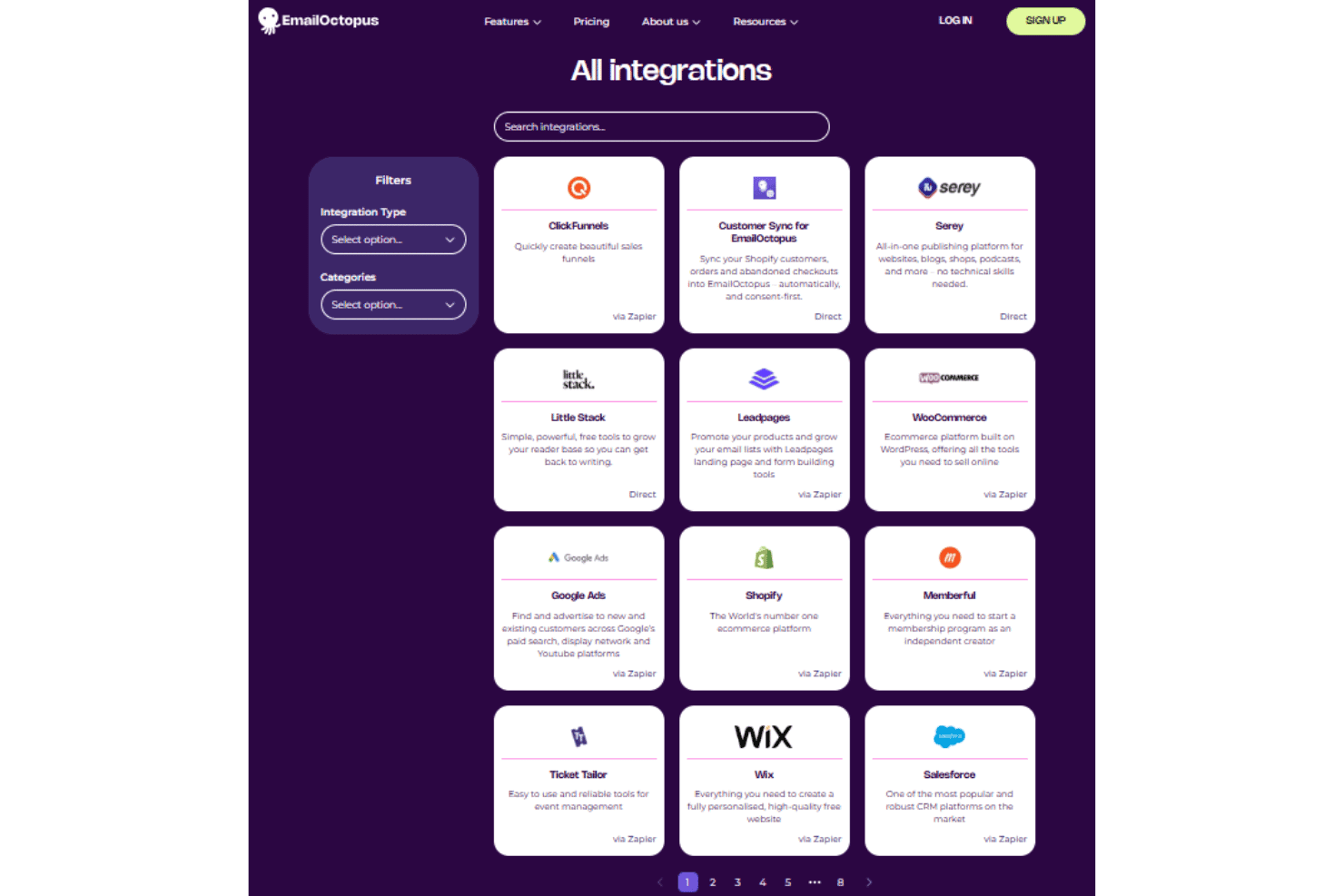
EmailOctopus integrates directly with WordPress, Customer Sync for EmailOctopus, Serey, and Little Stack. It also connects with Shopify, WooCommerce, ClickFunnels, Leadpages, Google Ads, Memberful, Ticket Tailor, Wix, and Salesforce through Zapier.
EmailOctopus also offers an API for custom integrations and connects with third-party integration tools, including Zapier and Make.
EmailOctopus Specs
- A/B Testing: No
- API: Yes
- Audience Targeting: Yes
- Brand Management: No
- Calendar Management: No
- Campaign Management: Yes
- Compliance Tracking: No
- Contact Management: Yes
- Contact Sharing: No
- Conversion Tracking: No
- CRM Integration: Yes
- Customer Management: No
- Dashboard: Yes
- Data Export: Yes
- Data Import: Yes
- Data Visualization: Yes
- Email Integration: Yes
- External Integrations: Yes
- Google Apps Integration: Yes
- Lead Management: No
- Lead Scoring: No
- Link Tracking: Yes
- Marketing Automation: Yes
- Multi-User: Yes
- Notifications: No
- Scheduling: Yes
- Social-Media Integration: No
- Third-Party Plugins/Add-Ons: Yes


